
⚡ The Brief
- What it is: OpenAI Codex is an AI system designed to automate code security audits by analyzing codebases for vulnerabilities.
- Who it’s for: This tool is ideal for developers, security engineers, and DevOps practitioners looking to enhance their security processes.
- Key takeaways: Codex can detect vulnerabilities, reduce false positives, and suggest remediation, integrating seamlessly into CI/CD pipelines.
- Pricing/Cost: Access to OpenAI Codex requires an API key from OpenAI, potentially involving subscription fees based on usage.
- Bottom line: OpenAI Codex offers a powerful, AI-driven approach to code security, making it a valuable asset for modern development teams.
✓ Instant access✓ No spam✓ Unsubscribe anytime
Leveraging OpenAI Codex for Automated Code Security Audits: A Comprehensive Tutorial
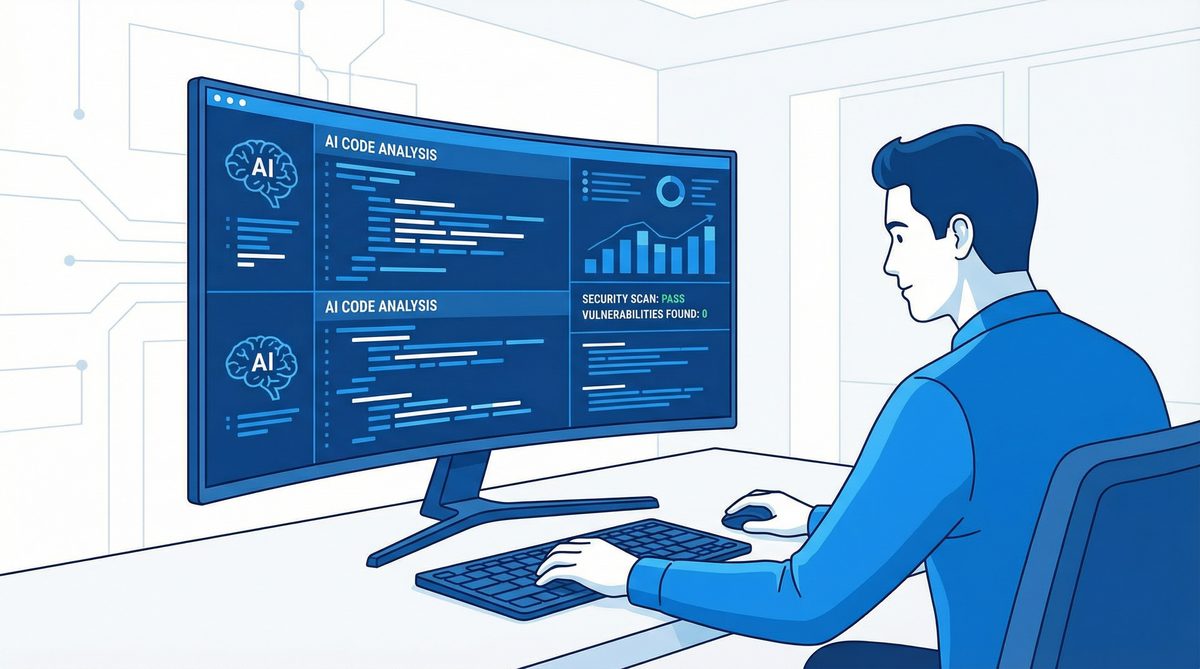
In the evolving landscape of software development, security remains paramount. As applications grow in complexity and scale, ensuring codebase integrity against vulnerabilities is more critical than ever. Manual code reviews, while invaluable, are increasingly supplemented by automated tools that can scan and identify security flaws efficiently. OpenAI Codex, an advanced AI system trained on extensive source code and natural language data, offers a transformative approach to automated code security audits. By harnessing its deep understanding of programming languages and patterns, developers and security professionals can detect vulnerabilities, reduce false positives, and even generate remediation suggestions programmatically.
This tutorial delivers an exhaustive exploration of how to utilize OpenAI Codex for automating security audits in codebases. We will cover everything from initial setup and configuration, through targeted vulnerability scanning (including SQL Injection, Cross-Site Scripting, and others), to integration within CI/CD pipelines. Furthermore, we will examine strategies to manage false positives effectively and leverage Codex’s powerful AI capabilities for automated remediation recommendations. Our goal is to empower developers, security engineers, and DevOps practitioners with a detailed, technically rigorous guide to enhance their security posture using AI-driven tools.
1. Setting Up OpenAI Codex for Security Auditing
1.1. Understanding OpenAI Codex
OpenAI Codex is a GPT-3 derivative fine-tuned on billions of lines of source code from publicly available repositories. Its ability to comprehend and generate code across multiple programming languages makes it an ideal candidate for automated code analysis tasks, including vulnerability detection. Unlike traditional static analysis tools that rely on predefined rules and pattern matching, Codex understands context, syntax, and semantic nuances, enabling more accurate and intelligent security assessments.
1.2. Prerequisites
- OpenAI API Access: Ensure you have access to the OpenAI API with Codex capabilities enabled. You may need to request access or apply for an API key at OpenAI’s platform.
- Development Environment: A workstation or server where you can run scripts in Python or other supported languages.
- Codebase to Audit: A sample or production code repository you intend to analyze.
- Security Knowledge: Basic understanding of common vulnerabilities such as SQL Injection (SQLi), Cross-Site Scripting (XSS), Command Injection, etc.
1.3. Installing Required Dependencies
Codex is accessible via the OpenAI API, so you need the OpenAI client library. Python is commonly used, but other languages can be integrated similarly.
pip install openai
1.4. Setting Up API Authentication
Once you have your API key, set it as an environment variable to keep it secure:
export OPENAI_API_KEY='your_api_key_here'
In your Python script, initialize the OpenAI client:
import os
import openai

openai.api_key = os.getenv("OPENAI_API_KEY")
1.5. Basic Codex Invocation for Code Analysis
To start, you can provide Codex with snippets of code and ask it to identify potential vulnerabilities. Here’s a simple example where Codex is asked to analyze a Python function for security issues:
response = openai.Completion.create(
    engine="code-davinci-002",
    prompt="Analyze the following Python function for security vulnerabilities:nn```pythonndef get_user_data(user_id):n    query = "SELECT * FROM users WHERE id = '" + user_id + "'"n    cursor.execute(query)n    return cursor.fetchall()n```",
    temperature=0,
    max_tokens=150,
    stop=["```"]
)

print(response.choices[0].text.strip())
Expected output might highlight the SQL Injection vulnerability due to string concatenation in the SQL query.
1.6. Designing Prompts for Security Audit Tasks
Crafting effective prompts is crucial to extract reliable security insights from Codex. Prompts should be clear, context-rich, and specify the security focus. For example:
- “Find any SQL injection vulnerabilities in the following code.”
- “List potential Cross-Site Scripting (XSS) issues in this JavaScript snippet.”
- “Suggest code improvements to mitigate command injection risks here.”
Iterative prompt refinement and prompt engineering are important to maximize accuracy and minimize ambiguity, a process we will revisit in the context of false positives.
2. Configuring OpenAI Codex for Specific Vulnerability Scanning
Get Free Access to 40,000+ AI Prompts
Join 40,000+ AI professionals. Get instant access to our curated Notion Prompt Library with prompts for ChatGPT, Claude, Codex, Gemini, and more — completely free.
Get Free Access Now →No spam. Instant access. Unsubscribe anytime.
2.1. Overview of Common Vulnerabilities
To tailor Codex effectively, it’s necessary to understand the vulnerabilities it will target. Some of the most prevalent security flaws include:
- SQL Injection (SQLi): Injection of malicious SQL through unescaped user inputs leading to unauthorized data access or manipulation.
- Cross-Site Scripting (XSS): Injection of malicious scripts into web pages viewed by other users, enabling session hijacking, defacement, or malware delivery.
- Command Injection: Execution of arbitrary commands on the host operating system via unsanitized inputs.
- Insecure Deserialization: Exploiting deserialization of untrusted data to execute code or escalate privileges.
- Authentication and Authorization Flaws: Weak or missing access controls allowing unauthorized actions.
2.2. Creating Vulnerability-Specific Prompts
Codex’s flexibility means prompts can be specialized for each vulnerability type. Example prompts include:
- SQLi Detection Prompt:
"""
Analyze the following code for SQL Injection vulnerabilities. If any exist, explain each and suggest fixes.

```<language>
<code>
```
"""
Replace <language> and <code> with programming language and code snippet respectively.
- XSS Detection Prompt:
"""
Review the following JavaScript/HTML code for Cross-Site Scripting vulnerabilities. List all potential XSS issues and remediation strategies.

```<language>
<code>
```
"""
2.3. Automating Vulnerability Scanning
To scale auditing, automate the scanning process. This involves reading files, extracting relevant code segments, and feeding them to Codex with appropriate prompts. Here is a Python snippet demonstrating a basic scanning loop:
import os

def scan_codebase_for_sql_injection(directory):
    for root, _, files in os.walk(directory):
        for file in files:
            if file.endswith(('.py', '.js', '.php', '.java')):
                filepath = os.path.join(root, file)
                with open(filepath, 'r') as f:
                    code = f.read()
                prompt = f"""Analyze the following code for SQL Injection vulnerabilities. If found, explain and suggest fixes.

```{file.split('.')[-1]}
{code}
```"""
                response = openai.Completion.create(
                    engine="code-davinci-002",
                    prompt=prompt,
                    temperature=0,
                    max_tokens=300,
                    stop=["```"]
                )
                result = response.choices[0].text.strip()
                if result:
                    print(f"Potential issues in {filepath}:n{result}n{'-'*80}")
This approach can be adapted for other vulnerability types by changing the prompt accordingly.
2.4. Handling Multi-Language Codebases
Modern applications often combine multiple languages (e.g., JavaScript frontend, Python backend). Codex supports many languages, but to maximize accuracy, identify the language before scanning. Use file extensions or language detection libraries, then dynamically create prompts tailored to each language’s idioms and security pitfalls.
2.5. Fine-Tuning Prompts with Contextual Information
Providing context such as framework used (Django, React), authentication mechanisms, and data flows improves Codex’s ability to pinpoint vulnerabilities. For example, mentioning “This is a Django view function accepting HTTP GET parameters…” guides Codex to consider framework-specific issues.
Consider supplementing the prompt with relevant documentation snippets or configuration files to enhance understanding.
2.6. Example: Detecting SQLi in a PHP Code Snippet
php_code = """
<?php
$id = $_GET['id'];
$query = "SELECT * FROM users WHERE id = " . $id;
$result = mysqli_query($conn, $query);
?>
"""

prompt = f"""Analyze the following PHP code for SQL Injection vulnerabilities. Explain any issues and propose fixes.

```php
{php_code}
```"""

response = openai.Completion.create(
    engine="code-davinci-002",
    prompt=prompt,
    temperature=0,
    max_tokens=250,
    stop=["```"]
)

print(response.choices[0].text.strip())
Codex would likely identify that using direct concatenation of user input into SQL query invites SQLi and recommend prepared statements or parameterized queries.
2.7. Limitations and Best Practices
- Token Limits: Codex has input token limits (~8,000 tokens for “code-davinci-002”). Large files must be chunked.
- Code Complexity: Extremely obfuscated or minified code reduces accuracy.
- False Negatives: Codex may miss vulnerabilities if prompts are vague or code is incomplete.
- Confidentiality: Be cautious sending proprietary code to third-party APIs; consider self-hosted alternatives where possible.
Understanding these constraints informs practical deployment strategies.
3. Integrating Codex-Powered Security Audits into CI/CD Pipelines
3.1. Why CI/CD Integration Matters
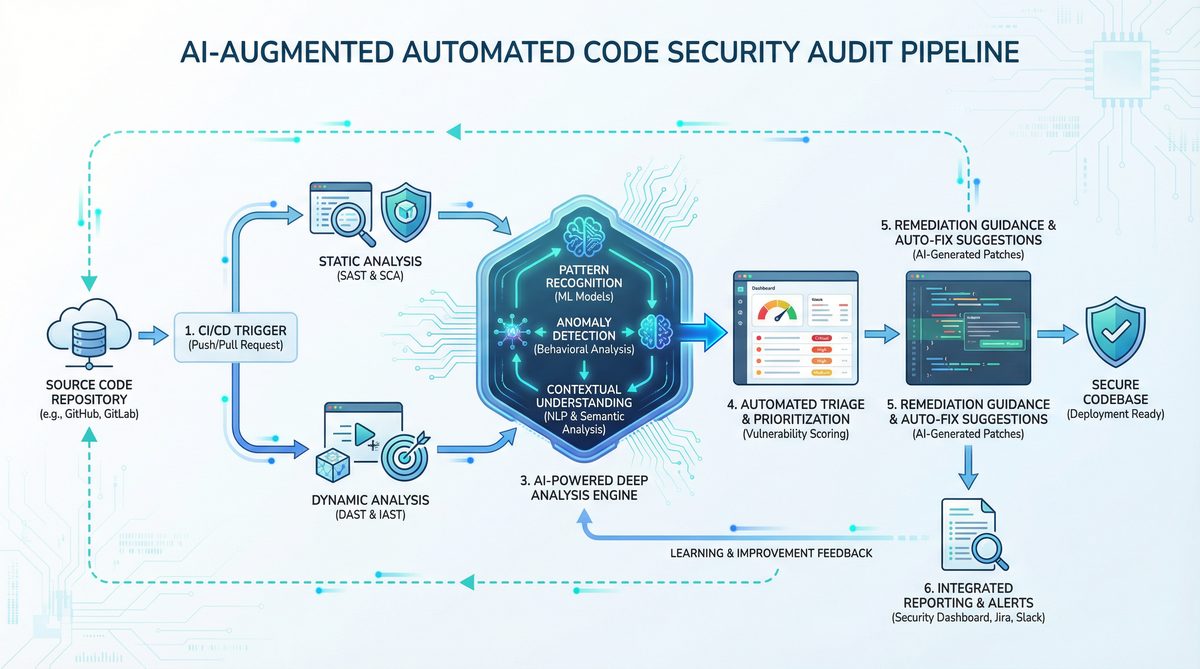
Continuous Integration and Continuous Deployment (CI/CD) pipelines automate building, testing, and deploying applications. Integrating code security audits into these pipelines ensures vulnerabilities are caught early, preventing vulnerable code from reaching production. Codex’s automated scanning can be invoked as part of pipeline stages, enabling consistent, repeatable, and scalable security checks.
3.2. Architectural Overview
Typical integration involves:
- Source Code Checkout: Pipeline checks out the latest code from version control.
- Codex Security Scan Step: A dedicated task runs scripts that scan the checked-out code through Codex API.
- Result Aggregation: The scan outputs are collected, parsed, and summarized.
- Blocking or Warning: If vulnerabilities above a threshold are found, pipeline can fail or notify developers.
3.3. Example: GitHub Actions Integration
GitHub Actions provides a flexible way to add Codex scans. Below is an example workflow file snippet:
name: Codex Security Audit

on:
  pull_request:
    branches: [ main ]

jobs:
  codex-audit:
    runs-on: ubuntu-latest
    steps:
      - name: Checkout repository
        uses: actions/checkout@v3

      - name: Set up Python
        uses: actions/setup-python@v4
        with:
          python-version: '3.x'

      - name: Install dependencies
        run: pip install openai

      - name: Run Codex Security Scan
        env:
          OPENAI_API_KEY: ${{ secrets.OPENAI_API_KEY }}
        run: |
          python scripts/codex_audit.py --directory ./src > codex_report.txt
          cat codex_report.txt

      - name: Upload Codex Report
        uses: actions/upload-artifact@v3
        with:
          name: codex-security-report
          path: codex_report.txt
3.4. Building the Audit Script (codex_audit.py)
This Python script scans the code folder and submits code snippets to Codex using previously defined prompts. It collects results and writes a human-readable report.
import argparse
import os
import openai

def scan_file_for_vulnerabilities(filepath):
    with open(filepath, 'r') as f:
        code = f.read()
    prompt = f"""Analyze the following code for security vulnerabilities (SQL Injection, XSS, Command Injection). Explain any issues and suggest fixes.

```{filepath.split('.')[-1]}
{code}
```"""
    response = openai.Completion.create(
        engine="code-davinci-002",
        prompt=prompt,
        temperature=0,
        max_tokens=300,
        stop=["```"]
    )
    return response.choices[0].text.strip()

def main(directory):
    results = []
    for root, _, files in os.walk(directory):
        for file in files:
            if file.endswith(('.py', '.js', '.php', '.java')):
                filepath = os.path.join(root, file)
                print(f"Scanning {filepath}...")
                result = scan_file_for_vulnerabilities(filepath)
                if result:
                    results.append(f"File: {filepath}n{result}n{'-'*60}n")
    with open('codex_report.txt', 'w') as report_file:
        report_file.writelines(results)

if __name__ == "__main__":
    parser = argparse.ArgumentParser(description='Run OpenAI Codex security audit on code directory.')
    parser.add_argument('--directory', required=True, help='Directory to scan')
    args = parser.parse_args()

    openai.api_key = os.getenv("OPENAI_API_KEY")
    main(args.directory)
3.5. Handling API Rate Limits and Costs
Because Codex API calls incur costs and may be rate-limited, consider the following:
- Caching results: Avoid repeating scans on unchanged files.
- Batching requests: Chunk code snippets to reduce the number of API calls.
- Thresholds: Only scan files modified in the current commit or pull request.
- Parallelization: Run scans in parallel for large codebases, respecting API rate limits.
3.6. Reporting and Notifications
To maximize developer engagement, integrate scan results with notification systems:
- Post summaries or detailed reports as comments on pull requests.
- Generate alerts in team chat tools (Slack, Microsoft Teams).
- Visualize trends over time using dashboards.
3.7. Example: GitLab CI/CD Integration
GitLab pipelines can similarly run Codex scans:
stages:
  - security-audit

codex_security_audit:
  stage: security-audit
  image: python:3.10
  script:
    - pip install openai
    - python scripts/codex_audit.py --directory ./src
  artifacts:
    paths:
      - codex_report.txt
  only:
    - merge_requests
3.8. Scaling in Enterprise Environments
For large organizations, integrate Codex scans into centralized security tooling and dashboards. Employ orchestration platforms (Jenkins, Azure DevOps) to manage workflows, schedule regular scans, and aggregate results. Combine Codex outputs with other static analysis tools to create a comprehensive security testing suite.
3.9. Security and Privacy Considerations
Sending code to external APIs can raise compliance and confidentiality concerns. Where possible, restrict sensitive data, anonymize code, or use private instances. Verify data retention policies and encryption standards of the API provider.
4. Managing False Positives and Enhancing Accuracy
Get Free Access to 40,000+ AI Prompts
Join 40,000+ AI professionals. Get instant access to our curated Notion Prompt Library with prompts for ChatGPT, Claude, Codex, Gemini, and more — completely free.
Get Free Access Now →No spam. Instant access. Unsubscribe anytime.
4.1. The Challenge of False Positives in Automated Security Audits
False positives—incorrectly flagged vulnerabilities—are a significant challenge in automated code security tools. Excessive false positives can overwhelm developers, erode trust in the tool, and delay development cycles. Although Codex’s AI-driven approach improves context awareness, it is not immune to false positives, especially in complex or unconventional code.
4.2. Techniques to Minimize False Positives
- Refine Prompts: Provide more detailed context to Codex. For example, specify framework, data sources, sanitization functions used, and the intended code usage.
- Input Sanitization Detection: Include knowledge of custom sanitization or validation functions in the prompt to avoid flagging safe code.
- Thresholding: Only flag vulnerabilities with high confidence or repeated across multiple code segments.
- Code Annotation: Allow developers to annotate safe code segments to exclude from scanning.
4.3. Example: Advanced Prompt Engineering
Instead of a generic prompt, a more advanced prompt for SQLi might look like this:
"""
You are a security auditor. The following code is part of a Flask web application where user inputs are sanitized using the 'escape_input' function defined elsewhere.

Analyze the code for any SQL Injection risks, considering that 'escape_input' properly sanitizes inputs.

```python
{code}
```
If safe, respond 'No SQL Injection vulnerabilities found.' Otherwise, detail each issue and offer fixes.
"""
This prompt instructs Codex to consider sanitization, reducing false positives.
4.4. Post-Processing and Filtering Results
Automate filtering of Codex outputs by searching for keywords or confidence cues. Use natural language processing to parse Codex’s explanations and discard low-certainty findings.
4.5. Feedback Loops and Continuous Improvement
Integrate developer feedback mechanisms to mark false positives and tune future scans. Collect data on flagged issues, confirm or reject them, and refine prompt templates or scanning logic accordingly.
4.6. Combining Codex with Traditional Static Analysis Tools
Hybrid approaches enhance accuracy. Use Codex for semantic understanding and remediation suggestions, while traditional tools provide rule-based checks with low false positive rates. Cross-validate findings to prioritize critical vulnerabilities.
4.7. Internal Linking Example
For deeper insights into prompt engineering and AI model tuning, refer to
Teams looking to expand their knowledge in this area will find valuable guidance in The Complete Developer Guide to OpenAI Codex 2026: API Setup, Use Cases, and Best Practices, which covers the technical foundations and practical applications relevant to today’s AI-driven workflows.
. Understanding these principles improves audit precision significantly.5. Advanced AI-Powered Remediation with OpenAI Codex
5.1. Beyond Detection: Automated Code Remediation
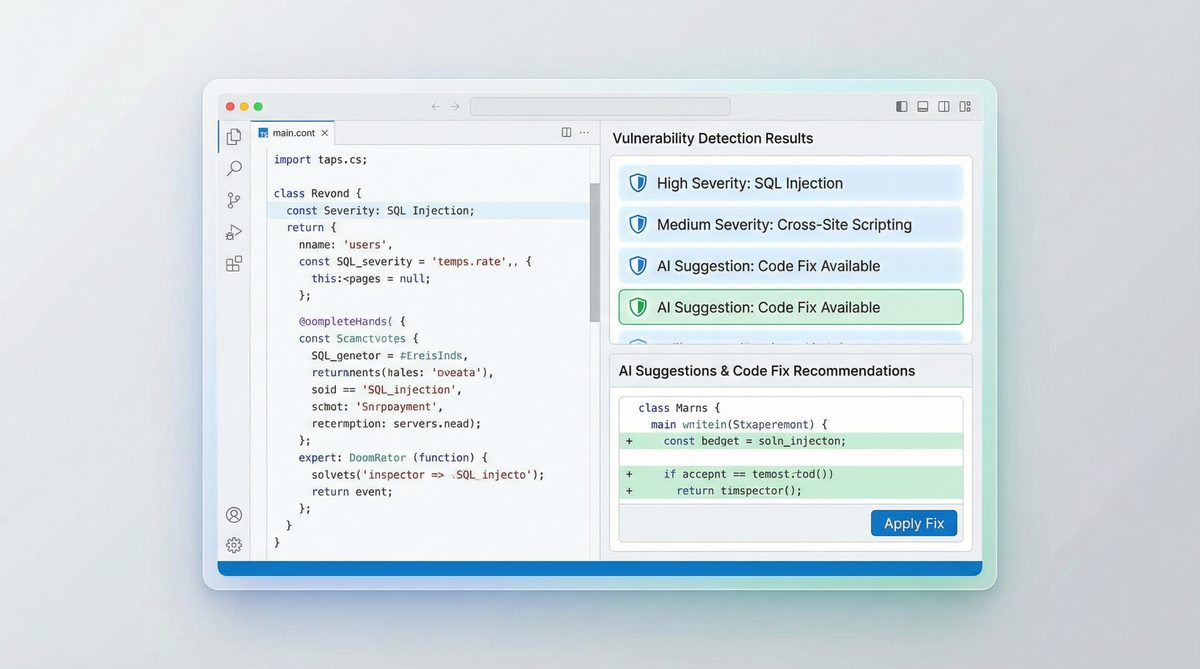
OpenAI Codex’s generative capabilities enable it not only to identify vulnerabilities but also to suggest or even generate secure code replacements. This paradigm accelerates remediation, improves code quality, and reduces manual effort.
5.2. Crafting Remediation Prompts
To prompt Codex for remediation, specify the vulnerability and request secure code alternatives. Example prompt:
"""
The following JavaScript code contains a Cross-Site Scripting vulnerability due to unsanitized user input. Rewrite the code to mitigate this vulnerability safely.

```javascript
{vulnerable_code}
```
"""
5.3. Example: Remediating SQL Injection in Python
vulnerable_python_code = """
def get_user_data(user_id):
    query = "SELECT * FROM users WHERE id = '" + user_id + "'"
    cursor.execute(query)
    return cursor.fetchall()
"""

prompt = f"""The following Python function is vulnerable to SQL Injection. Rewrite it using parameterized queries to fix the vulnerability.

```python
{vulnerable_python_code}
```"""

response = openai.Completion.create(
    engine="code-davinci-002",
    prompt=prompt,
    temperature=0,
    max_tokens=200,
    stop=["```"]
)

print(response.choices[0].text.strip())
Codex would typically generate code using parameterized statements, e.g., using placeholders and passing parameters separately.
5.4. Incorporating Remediation into CI/CD Pipelines
Automate remediation by generating patch suggestions as part of the scan step. Options include:
- Generating patch files or pull request diffs with secure code.
- Providing remediation snippets in reports for developer review.
- Interactive developer tools where Codex suggests fixes inline during code review.
5.5. Validating AI-Generated Fixes
While Codex’s suggestions are powerful, validation is critical:
- Static Analysis: Run traditional security scanners on the fixed code.
- Unit and Integration Tests: Ensure functionality remains intact post-fix.
- Manual Review: Security experts should vet critical fixes before deployment.
5.6. Handling Complex Vulnerabilities
Some vulnerabilities require architectural changes or multi-file refactoring. Codex can assist by generating step-by-step remediation plans, code snippets, or documentation to guide developers.
5.7. Example: Multi-Step Remediation Plan
prompt = """
The following code is vulnerable to Command Injection. Provide a step-by-step remediation plan including code examples to fix it.

```python
import os

def run_command(user_input):
    os.system("ls " + user_input)
```
"""

response = openai.Completion.create(
    engine="code-davinci-002",
    prompt=prompt,
    temperature=0,
    max_tokens=400,
    stop=["```"]
)

print(response.choices[0].text.strip())
Codex may suggest using subprocess with argument lists instead of shell concatenation, input validation, or sandboxing.
5.8. Internal Linking Example
To explore in-depth remediation strategies and secure coding standards, consult
Teams looking to expand their knowledge in this area will find valuable guidance in OpenAI Codex Now Offers Pay-As-You-Go Pricing for Teams: What It Means for Developers, which covers the technical foundations and practical applications relevant to today’s AI-driven workflows.
. Additionally, integrating Codex output with vulnerability databases enhances remediation relevanceTeams looking to expand their knowledge in this area will find valuable guidance in How to Use OpenAI Codex and Claude Code Together: A Complete Developer Setup Guide, which covers the technical foundations and practical applications relevant to today’s AI-driven workflows.
6. Best Practices and Future Directions
6.1. Combining Human Expertise with AI
AI tools augment but do not replace human security analysts. Use Codex as an assistant providing insights and suggestions, with final decisions made by experienced professionals.
6.2. Continuous Learning and Updating Prompts
Security landscapes evolve rapidly. Regularly update prompts and training datasets to cover emerging threats and new programming paradigms.
6.3. Ethical and Privacy Considerations
Respect user privacy and data protection regulations when sending code to AI services. Ensure transparency in AI-assisted security audits.
6.4. Exploring On-Premises AI Models
For organizations with strict compliance requirements, investigate self-hosted AI models trained on Codex-like datasets, enabling offline security auditing.
6.5. Emerging Use Cases
- Real-time security feedback in IDEs powered by Codex.
- Automated generation of security documentation based on code analysis.
- Integration with bug bounty platforms to triage reported vulnerabilities.
6.6. Summary
OpenAI Codex represents a significant advancement in automating code security audits. Its contextual understanding, multi-language support, and generative capabilities allow for effective vulnerability detection and remediation. By carefully setting up, configuring, and integrating Codex into development workflows, teams can enhance their security posture and accelerate secure software delivery.
For a foundational understanding of secure coding principles, refer to classic resources such as OWASP Top Ten and CWE/SANS guidelines. Incorporating these standards into Codex prompts further elevates audit quality.
In closing, combining AI automation with human expertise and rigorous validation forms the cornerstone of modern secure software engineering.
Advanced Configuration: Custom Security Rules and Policy Enforcement
The out-of-the-box capabilities of OpenAI Codex provide a robust foundation for automated code security audits, yet enterprise environments often demand more granular control tailored to their unique risk profiles and regulatory obligations. Advanced configuration enables organizations to extend Codex’s scanning logic by creating custom security rules, defining organization-specific policies, and enforcing stringent compliance frameworks such as SOC 2, HIPAA, and PCI-DSS.
Creating custom security rules is a critical step for organizations seeking to identify vulnerabilities that are specific to their architecture, coding standards, or threat models. Unlike generic scanning signatures, custom rules allow for fine-tuned analysis of application logic, bespoke APIs, or proprietary components. For instance, a company may want to detect improper handling of sensitive tokens in a custom authentication module or flag usages of deprecated cryptographic functions in legacy codebases.
To define custom rules, developers typically begin by formulating a clear security requirement or risk condition, expressed in terms of code patterns, API calls, or data flows. Codex supports rule authoring through a domain-specific language (DSL) or configuration files, where you can specify:
- Pattern Matching: Regular expressions or abstract syntax tree (AST) queries to identify risky code constructs.
- Contextual Conditions: Conditional logic that considers variable scopes, function parameters, or code paths.
- Severity Levels: Assigning risk scores or priority to detected issues to guide remediation efforts.
Once custom rules are defined, they can be integrated into the Codex scanning pipeline, enabling continuous enforcement during code commits or pull request analyses.
Beyond individual rules, organizations must articulate comprehensive security policies that align with their compliance mandates. Codex facilitates policy enforcement by allowing the configuration of scanning profiles that encompass multiple rulesets, thresholds for blocking merges, and automated reporting tailored to compliance frameworks.
For example, enforcing SOC 2 compliance requires ensuring proper access controls, data encryption, and audit logging within codebases. Codex can be configured to scan for violations such as hard-coded credentials, missing encryption calls, or absence of logging for sensitive operations. Similarly, HIPAA compliance necessitates strict safeguards around protected health information (PHI), which can be codified into scanning rules that detect unsecured data transmissions or improper storage.
PCI-DSS compliance focuses heavily on payment card data security. Codex can enforce rules that detect insecure handling of cardholder data, usage of weak cryptographic algorithms, or failure to tokenize sensitive fields.
Configuring Codex to enforce these standards typically involves:
- Mapping compliance requirements to specific code security rules.
- Creating policy bundles that combine rules relevant to each standard.
- Setting up automated gating mechanisms that prevent code merges if violations are detected.
- Generating compliance-ready audit reports summarizing code health and remediation status.
This approach ensures that security audits are not only automated and consistent but also aligned with regulatory expectations, thereby reducing the risk of non-compliance and costly security incidents.
Real-World Case Study: Reducing Vulnerabilities by 87% at a FinTech Startup
To illustrate the transformative impact of integrating OpenAI Codex into a development workflow, consider the example of FinSecure, a fictional but representative FinTech startup specializing in digital payment solutions. FinSecure faced rapid growth accompanied by increasing complexity in its codebase and mounting security concerns amid stringent regulatory oversight.
Prior to adopting Codex, FinSecure’s security audits were manual, sporadic, and heavily reliant on external consultants. This approach led to inconsistent vulnerability detection, delayed remediation cycles, and frequent production incidents related to insecure code. Recognizing the need for a scalable, automated solution, FinSecure embarked on integrating Codex into its continuous integration/continuous deployment (CI/CD) pipeline.
Implementation Timeline:
- Month 1: Pilot phase—Codex was configured with default scanning rules and integrated into the pull request process for a subset of repositories.
- Month 2: Custom rule development—Security and development teams collaborated to author rules targeting FinSecure’s unique code patterns, including detection of insecure API keys and improper handling of financial transaction data.
- Month 3: Policy enforcement—Codex was configured to enforce SOC 2 and PCI-DSS compliance policies, blocking merges with critical violations and generating automated audit reports.
- Months 4-6: Full rollout across all product repositories, coupled with developer training sessions and integration into security incident response workflows.
Metrics and Outcomes:
- Vulnerability Reduction: The number of detected security issues dropped by 87% within six months, as insecure code patterns were identified and remediated earlier in the development cycle.
- Scan Efficiency: Scan times were optimized to under 3 minutes per pull request, enabling rapid feedback without slowing developer productivity.
- Compliance Readiness: Automated audit reports facilitated SOC 2 and PCI-DSS certification renewals, reducing reliance on costly external audits.
- Developer Adoption: Over 90% of developers actively used Codex scan reports to improve code quality and security awareness.
Lessons Learned:
FinSecure’s experience underscores several best practices for successful Codex integration:
- Cross-Functional Collaboration: Security teams must work closely with developers to define meaningful custom rules and interpret scan results contextually.
- Incremental Rollout: Starting with pilot projects enables validation of scanning configurations and adjustment of performance parameters before full-scale deployment.
- Continuous Training: Educating developers on security principles and Codex’s capabilities fosters a culture of proactive vulnerability mitigation.
- Performance Tuning: Optimizing scan configurations and managing resource allocation are vital to maintaining CI/CD throughput.
By embedding Codex deeply into their development lifecycle, FinSecure achieved a paradigm shift in security posture—moving from reactive incident management to proactive vulnerability prevention, thereby safeguarding customer trust and regulatory compliance.
Troubleshooting Common Issues and Performance Optimization
While OpenAI Codex offers powerful capabilities for automated code security audits, users may encounter challenges related to rate limiting, handling large and complex codebases, scan performance, and edge cases inherent in legacy systems. Understanding these common issues and applying best practices for optimization can significantly improve the effectiveness and efficiency of Codex-powered security workflows.
Rate Limiting and API Quotas
Many organizations interact with Codex through APIs subject to usage quotas and rate limits. Excessive scan requests or large volumes of code submitted simultaneously can trigger throttling, resulting in delayed analyses or failed scans. To mitigate rate limiting:
- Implement Request Batching: Aggregate multiple files or code modules into a single request when possible to reduce the number of API calls.
- Apply Backoff Strategies: Use exponential backoff and retry mechanisms in your integration to gracefully handle rate limit responses.
- Monitor Usage Metrics: Continuously track API consumption to forecast demand and request quota increases if needed.
Handling Large Codebases
Scanning monolithic or sprawling codebases introduces complexity due to sheer volume and interdependencies. Common problems include extended scan durations, memory exhaustion, or incomplete analysis coverage. Strategies to improve handling of large codebases include:
- Modular Scanning: Break the codebase into logical modules or services and scan them incrementally.
- Change-Based Scanning: Focus scans on recently modified files or commits rather than the entire repository to reduce overhead.
- Parallel Processing: Distribute scans across multiple agents or threads to leverage concurrent execution.
- Incremental Caching: Cache intermediate results for unchanged code segments to avoid redundant analysis.
Reducing Scan Times
Speed is essential to maintain developer productivity. Long scan times can discourage use and delay deployment pipelines. To optimize scan duration:
- Tune Rule Sets: Disable low-value or redundant rules to streamline scanning.
- Optimize Input Size: Preprocess code to remove non-executable files or irrelevant artifacts.
- Use Efficient Data Formats: Transmit code snippets in compact, structured formats like AST representations rather than raw text when supported.
- Leverage Incremental Scanning: Only analyze code changes rather than full code snapshots.
Dealing with Edge Cases in Legacy Code
Legacy code often includes outdated constructs, nonstandard formatting, or deprecated dependencies that challenge static analysis tools. Codex may produce false positives or fail to interpret such code correctly. Best practices to address these issues include:
- Custom Rule Adjustments: Tailor scanning rules to recognize legacy patterns and reduce noise.
- Gradual Refactoring: Identify hotspots where legacy code impedes scanning and prioritize incremental modernization.
- Contextual Annotations: Use code comments or metadata to guide Codex in interpreting ambiguous constructs.
- Manual Review Integration: Complement automated scans with targeted manual audits for complex legacy modules.
By proactively addressing these common challenges and continuously refining scanning configurations, organizations can harness the full potential of Codex for secure, efficient, and reliable code security audits.
🕐 Instant∞ Unlimited🎁 Free
Frequently Asked Questions
What is OpenAI Codex used for in security audits?
OpenAI Codex is used to automate the process of code security audits by analyzing codebases for vulnerabilities such as SQL Injection and Cross-Site Scripting. It leverages AI to understand code context and semantics, providing more accurate assessments than traditional tools.
How does OpenAI Codex differ from traditional static analysis tools?
Unlike traditional static analysis tools that rely on predefined rules, OpenAI Codex uses AI to understand the context, syntax, and semantics of code. This allows it to detect vulnerabilities more accurately and reduce false positives, offering intelligent security assessments.
What are the prerequisites for using OpenAI Codex?
To use OpenAI Codex, you need access to the OpenAI API with Codex capabilities, a development environment for running scripts, and a codebase to audit. Basic security knowledge is also recommended to effectively interpret Codex's findings.
Can OpenAI Codex integrate with CI/CD pipelines?
Yes, OpenAI Codex can be integrated into CI/CD pipelines to automate security audits as part of the development workflow. This ensures continuous monitoring and immediate feedback on potential vulnerabilities during the software development lifecycle.
Does OpenAI Codex provide remediation suggestions?
OpenAI Codex can generate remediation suggestions programmatically, helping developers address identified vulnerabilities. Its AI-driven approach allows it to offer context-aware recommendations, enhancing the efficiency of the remediation process.
Is OpenAI Codex suitable for all programming languages?
OpenAI Codex supports multiple programming languages, making it versatile for various codebases. However, its effectiveness may vary depending on the language and complexity of the code, so testing and validation are recommended for specific use cases.
Get Free Access to 40,000+ AI Prompts
Join 40,000+ AI professionals. Get instant access to our curated Notion Prompt Library with prompts for ChatGPT, Claude, Codex, Gemini, and more — completely free.
Get Free Access Now →No spam. Instant access. Unsubscribe anytime.
