
OpenAI Workspace Agents Go Live: How ChatGPT’s New Agent Platform Changes Enterprise Automation
By Markos Symeonides
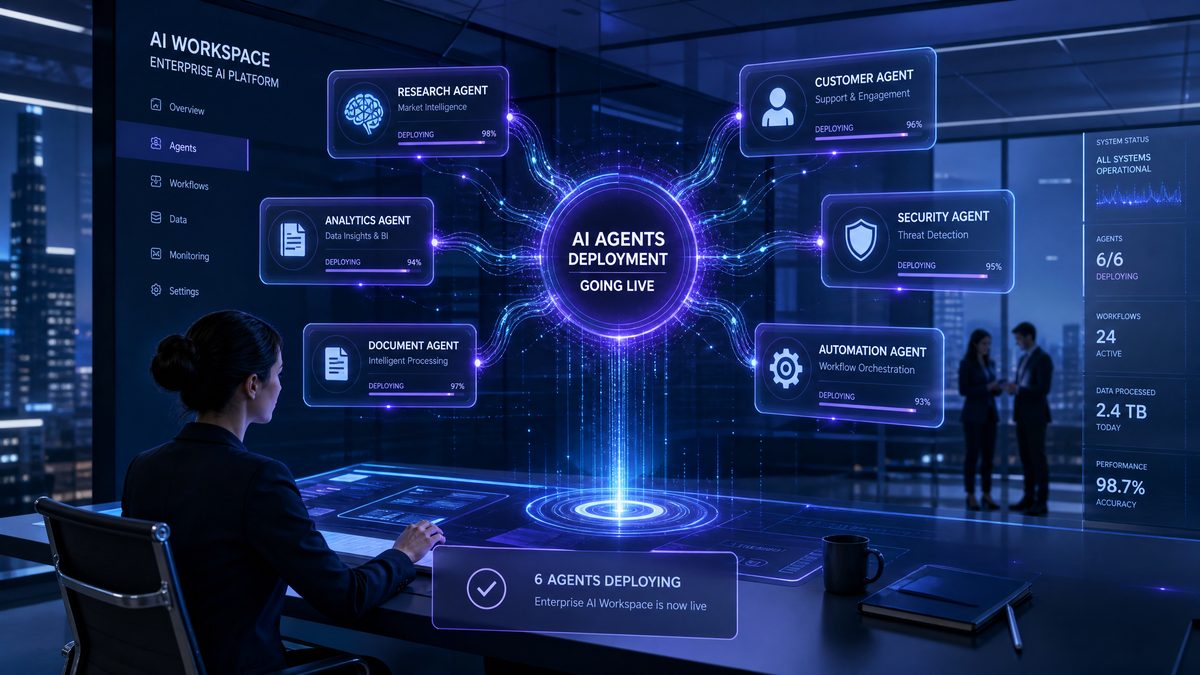
OpenAI has moved Workspace Agents into general availability, turning ChatGPT from a collection of user-created assistants into a governed enterprise automation platform designed for shared deployment, asynchronous execution, API-triggered workflows, and centralized administration. The release changes how enterprises build AI-powered processes: instead of relying on individually configured custom GPTs, teams can now publish agents as workspace assets, trigger them from external systems, monitor execution, control access, and meter consumption through a credit-based model scheduled to begin on July 6, 2026.
The shift is operationally significant because Workspace Agents are built around repeatable execution, not one-off chat sessions. A Workspace Agent can own a defined task, use approved knowledge sources, invoke configured tools, accept structured input from an API event, run in the background, and return outputs to a downstream application. That architecture brings ChatGPT closer to enterprise workflow platforms, where automation must be versioned, auditable, permissioned, and integrated with systems such as Salesforce, ServiceNow, Workday, Jira, Zendesk, Slack, Microsoft Teams, Snowflake, and internal APIs.
Custom GPTs gave organizations a fast way to package instructions, knowledge files, and actions for interactive use. Workspace Agents replace that model for enterprise deployments by adding workspace-level publishing, administrative policy enforcement, asynchronous runs, API triggers, execution logs, and a pricing structure tied to agent token consumption. The result is a platform that supports both human-in-the-loop assistance and system-to-system automation under the same administrative boundary.
Workspace Agents: The New Enterprise Unit of Automation
Workspace Agents are shared AI workers that live inside an OpenAI business or enterprise workspace and execute tasks according to centrally managed configuration. Each agent includes instructions, model settings, tool permissions, connected data sources, input schemas, output expectations, access policies, and publishing status. The practical difference from a conventional chatbot is that a Workspace Agent is designed to be called, governed, inspected, reused, and maintained as part of an operational system.
An enterprise can create a Workspace Agent for refund approval analysis, another for contract risk extraction, another for customer escalation triage, and another for employee policy lookup. Each agent can be assigned to specific teams, connected to approved knowledge repositories, restricted to allowed tools, and invoked either by a user in ChatGPT or by an external API trigger. The same agent definition can serve multiple front ends while preserving a single source of operational behavior.
The platform replaces custom GPTs for enterprise-grade automation because custom GPTs were primarily designed around interactive user experiences. A custom GPT could hold instructions, access uploaded files, and call actions, but organizations struggled to manage lifecycle, auditability, standardized deployment, and background processing at scale. Workspace Agents address those gaps by treating the agent as a managed object inside the workspace rather than a personal or semi-shared assistant.
For administrators, the most important change is ownership. A Workspace Agent belongs to the workspace, not to an individual employee. That matters during employee transfers, offboarding, incident response, and compliance reviews. When an agent supports a business process, the organization needs durable control over configuration, access, data retention, and integrations. Workspace ownership gives security and platform teams a clean control plane for those responsibilities.
For builders, the most important change is execution mode. Workspace Agents can run asynchronously after being triggered by an API call, a scheduled event, or a system integration. A support ticket can trigger an agent without waiting for a human to open ChatGPT. A procurement intake form can start a vendor risk review in the background. A data-quality alert can launch an agent that investigates source tables and posts findings into an incident channel. Asynchronous execution moves AI from advisory chat into business process automation.
For end users, the visible change is consistency. When a team uses a published Workspace Agent, each user interacts with the same approved instructions, retrieval sources, tools, and output standards. Sales operations teams can standardize account briefings. HR teams can standardize policy responses. Legal teams can standardize contract summaries. That reduces the fragmentation created when different employees create similar custom GPTs with different prompts, stale files, and inconsistent tool access.
How Workspace Agents Replace Custom GPTs
Custom GPTs became popular because they lowered the barrier for prompt packaging. A power user could create a GPT, describe its role, attach files, define conversation starters, and share it with colleagues. That model worked for experimentation and lightweight internal tools, but it did not provide the operational mechanics required for regulated enterprise automation. Workspace Agents retain the approachable builder experience while adding the controls that IT, security, procurement, legal, and compliance teams require before AI becomes part of core workflows.
The replacement is not merely a naming change. Workspace Agents introduce a deployment contract. An agent has a lifecycle, a publication state, a set of supported invocation methods, and policy constraints inherited from the workspace. Administrators can require review before workspace-wide publishing, restrict which connectors an agent may use, enforce data retention policies, disable export paths, and inspect usage. Those capabilities turn an AI assistant from a personal productivity artifact into an enterprise-managed service.
Custom GPTs often created operational duplication. A customer success team might have five GPTs that summarize customer health, each with slightly different definitions of churn risk. A finance team might have separate GPTs for invoice review, expense policy interpretation, and vendor classification, all pointing to different uploaded documents. Workspace Agents encourage consolidation by making agents discoverable, shareable, versioned, and owned by groups rather than individuals.
The biggest architectural upgrade is that Workspace Agents are not limited to the ChatGPT interface. They can be invoked from APIs and enterprise systems, which allows organizations to embed OpenAI reasoning directly into workflow engines. A custom GPT could assist a person who asked a question; a Workspace Agent can respond to an event emitted by a ticketing platform, analyze the payload, consult workspace knowledge, call approved tools, and write a structured result back to the originating system.
The migration path from custom GPTs to Workspace Agents is straightforward when teams treat each GPT as a candidate automation asset. Instructions should be converted into agent operating policies, uploaded files should be replaced with governed knowledge connectors where possible, ad hoc actions should be re-created as approved tools, and sharing settings should be replaced with workspace access groups. The best migrations also add input schemas, output validation, logging, and escalation rules.
| Capability | Custom GPT Approach | Workspace Agent Approach | Enterprise Impact |
|---|---|---|---|
| Ownership | Often tied to an individual creator or small sharing group | Owned by the workspace with administrative control | Reduces operational risk during employee changes and audits |
| Execution | Primarily interactive chat | Interactive chat plus asynchronous API-triggered runs | Enables background automation from business systems |
| Governance | Limited central enforcement for published behavior | Workspace policies, access controls, logs, and review workflows | Aligns AI deployment with enterprise security standards |
| Knowledge | Uploaded files and configured references | Approved connectors, workspace data controls, and governed retrieval | Improves freshness, authorization, and retention management |
| Integration | Actions attached to chat-centric flows | Tools, triggers, external callbacks, and structured outputs | Supports integration with CRM, ITSM, ERP, and data platforms |
| Cost Model | Plan-based usage with limited process-level attribution | Credit-based metering by agent execution and token volume | Supports chargeback, forecasting, and cost governance |
The New API Trigger System for Asynchronous Agent Execution
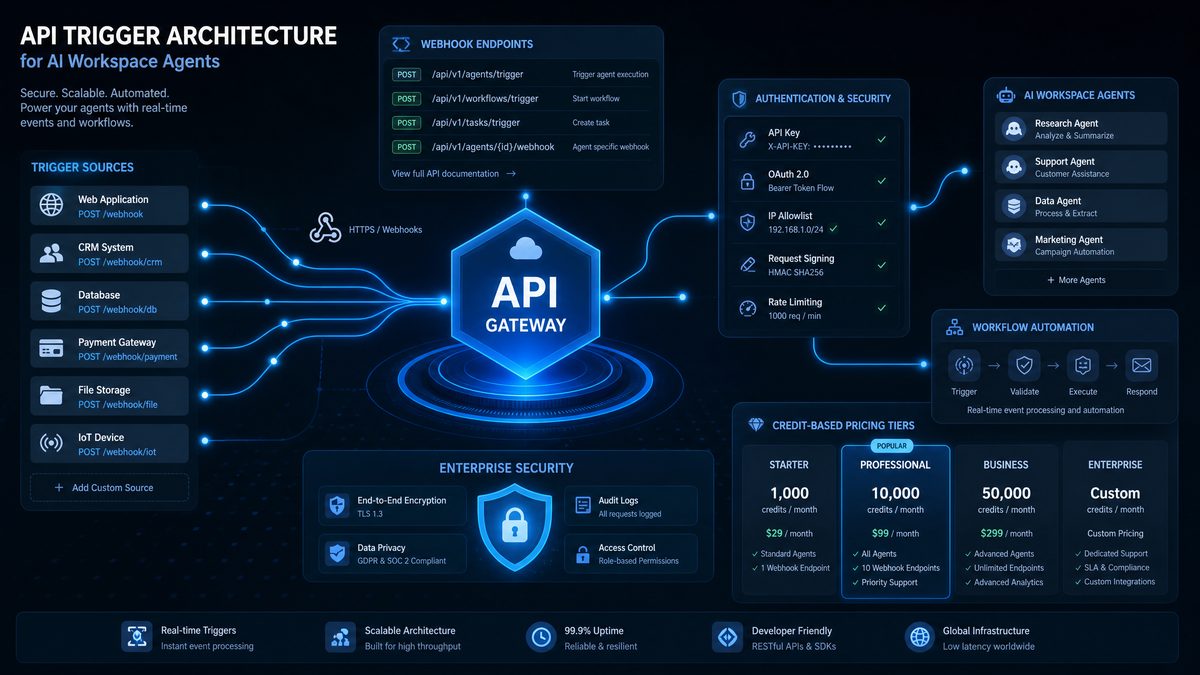
The API trigger system is the defining technical capability in the Workspace Agents release. It allows external systems to start an agent run by sending a structured event to OpenAI. The agent processes the event asynchronously, uses configured instructions and tools, and returns results through polling, callbacks, webhooks, or downstream tool actions depending on the integration design. This turns AI execution into a service that enterprise platforms can call whenever a business event occurs.
An asynchronous trigger is essential for enterprise automation because many tasks do not fit a synchronous request-response pattern. Contract review can take several minutes if the agent retrieves clauses, compares risk language, and generates a structured memo. Customer escalation triage can require calls to CRM, ticket history, account health data, and product incident records. Procurement analysis can require vendor enrichment and policy checks. The trigger model lets the external system hand off the work and continue operating while the agent completes the task.
The trigger flow usually has five steps. First, the enterprise system emits an event such as ticket.created, invoice.received, policy.question.submitted, or opportunity.updated. Second, middleware normalizes the event into the agent’s expected input schema. Third, the middleware calls the Workspace Agents API with the agent identifier, idempotency key, payload, and callback target if needed. Fourth, OpenAI runs the agent under workspace policy. Fifth, the result is consumed by the originating system, written to a database, or routed for human approval.
The use of input schemas makes agent behavior more reliable. Instead of sending an unstructured prompt such as “review this ticket,” the integration sends fields such as customer_tier, ticket_priority, product_area, latest_message, account_id, entitlement_status, and requested_resolution. Structured input helps the agent select tools, apply policies, and produce repeatable output. It also makes test cases easier because developers can replay representative events against a staging version of the agent.
Idempotency is a required design pattern for production triggers. Enterprise systems retry failed API calls, network gateways produce duplicate deliveries, and message queues can redeliver events. Each trigger request should include an idempotency key based on the source system event identifier. If a ticketing platform emits event ZD-981722 once and retries it three times, OpenAI should process a single agent run for that business event. The application should store the OpenAI run identifier alongside the source event for traceability.
The following example shows a practical server-side trigger call from a Node.js integration. The code receives a Zendesk-style ticket event, maps it into the support triage agent schema, sends the run request, and registers a callback URL for completion. The exact endpoint names should be adapted to the production OpenAI API version used by the workspace, but the structure reflects the operational pattern enterprises should implement.
import express from "express";
import crypto from "crypto";
import OpenAI from "openai";

const app = express();
app.use(express.json());

const openai = new OpenAI({
  apiKey: process.env.OPENAI_API_KEY
});

const SUPPORT_TRIAGE_AGENT_ID = process.env.SUPPORT_TRIAGE_AGENT_ID;

function buildIdempotencyKey(source, eventId) {
  return crypto
    .createHash("sha256")
    .update(`${source}:${eventId}`)
    .digest("hex");
}

app.post("/events/zendesk/ticket-created", async (req, res) => {
  const event = req.body;

  const triggerPayload = {
    source_system: "zendesk",
    source_event_id: event.id,
    ticket: {
      id: event.ticket.id,
      priority: event.ticket.priority,
      subject: event.ticket.subject,
      latest_message: event.ticket.latest_comment,
      requester_email: event.ticket.requester.email,
      organization_id: event.ticket.organization_id,
      tags: event.ticket.tags
    },
    customer_context: {
      plan: event.customer.plan,
      annual_contract_value: event.customer.acv,
      renewal_date: event.customer.renewal_date,
      region: event.customer.region
    },
    expected_output: {
      escalation_required: "boolean",
      recommended_queue: "string",
      customer_sentiment: "string",
      suggested_response: "string",
      evidence: "array"
    }
  };

  const idempotencyKey = buildIdempotencyKey("zendesk", event.id);

  const run = await openai.workspace.agents.triggers.create({
    agent_id: SUPPORT_TRIAGE_AGENT_ID,
    input: triggerPayload,
    callback_url: "https://automation.example.com/openai/support-triage-complete",
    metadata: {
      business_process: "customer_support_triage",
      source_ticket_id: String(event.ticket.id),
      environment: "production"
    }
  }, {
    idempotencyKey
  });

  res.status(202).json({
    accepted: true,
    openai_run_id: run.id,
    source_event_id: event.id
  });
});

app.listen(3000, () => {
  console.log("Support automation listener running on port 3000");
});
The callback endpoint should verify authenticity, update the source system, and persist execution metadata. Enterprises should never trust unsigned callbacks, and callback handlers should be idempotent for the same reason trigger endpoints are idempotent. A secure implementation validates the signature header, checks timestamp freshness, stores the run result, and updates the ticket only if the result has not already been applied.
import express from "express";
import crypto from "crypto";
import { updateTicket, saveAgentRunResult } from "./systems.js";

const app = express();

app.post(
  "/openai/support-triage-complete",
  express.raw({ type: "application/json" }),
  async (req, res) => {
    const signature = req.header("OpenAI-Signature");
    const timestamp = req.header("OpenAI-Timestamp");
    const body = req.body.toString("utf8");

    const expected = crypto
      .createHmac("sha256", process.env.OPENAI_WEBHOOK_SECRET)
      .update(`${timestamp}.${body}`)
      .digest("hex");

    if (!crypto.timingSafeEqual(Buffer.from(signature), Buffer.from(expected))) {
      return res.status(401).send("invalid signature");
    }

    const event = JSON.parse(body);

    if (event.type !== "workspace.agent.run.completed") {
      return res.status(204).send();
    }

    const result = event.data.output;
    const ticketId = event.data.metadata.source_ticket_id;

    await saveAgentRunResult({
      runId: event.data.id,
      agentId: event.data.agent_id,
      ticketId,
      status: event.data.status,
      output: result,
      tokenUsage: event.data.usage,
      completedAt: event.data.completed_at
    });

    await updateTicket(ticketId, {
      custom_fields: {
        ai_escalation_required: result.escalation_required,
        ai_recommended_queue: result.recommended_queue,
        ai_customer_sentiment: result.customer_sentiment
      },
      internal_note: [
        "Workspace Agent triage completed.",
        `Recommended queue: ${result.recommended_queue}`,
        `Escalation required: ${result.escalation_required}`,
        `Evidence: ${JSON.stringify(result.evidence)}`
      ].join("\n")
    });

    res.status(200).json({ processed: true });
  }
);
Python teams can implement the same pattern behind FastAPI, AWS Lambda, Google Cloud Run, Azure Functions, or a message consumer. The example below triggers a finance operations agent when an invoice arrives, then polls for completion in a worker process. Polling is appropriate when corporate network rules make inbound callbacks difficult, or when results must be orchestrated through an internal job scheduler.
import os
import time
import hashlib
from openai import OpenAI

client = OpenAI(api_key=os.environ["OPENAI_API_KEY"])
AGENT_ID = os.environ["INVOICE_REVIEW_AGENT_ID"]

def idempotency_key(source: str, event_id: str) -> str:
    return hashlib.sha256(f"{source}:{event_id}".encode("utf-8")).hexdigest()

def trigger_invoice_review(invoice_event: dict) -> str:
    payload = {
        "source_system": "coupa",
        "source_event_id": invoice_event["event_id"],
        "invoice": {
            "invoice_id": invoice_event["invoice_id"],
            "vendor_id": invoice_event["vendor_id"],
            "amount": invoice_event["amount"],
            "currency": invoice_event["currency"],
            "line_items": invoice_event["line_items"],
            "purchase_order_id": invoice_event.get("purchase_order_id"),
            "payment_terms": invoice_event.get("payment_terms")
        },
        "controls": {
            "policy_region": invoice_event["region"],
            "requires_sox_review": invoice_event["amount"] >= 25000,
            "approval_threshold": 10000
        }
    }

    run = client.workspace.agents.triggers.create(
        agent_id=AGENT_ID,
        input=payload,
        metadata={
            "business_process": "invoice_review",
            "invoice_id": invoice_event["invoice_id"],
            "environment": "production"
        },
        extra_headers={
            "Idempotency-Key": idempotency_key("coupa", invoice_event["event_id"])
        }
    )

    return run.id

def wait_for_result(run_id: str, timeout_seconds: int = 300) -> dict:
    started = time.time()

    while time.time() - started < timeout_seconds:
        run = client.workspace.agents.runs.retrieve(run_id)

        if run.status in ["completed", "failed", "cancelled"]:
            return {
                "status": run.status,
                "output": getattr(run, "output", None),
                "usage": getattr(run, "usage", None),
                "error": getattr(run, "error", None)
            }

        time.sleep(5)

    raise TimeoutError(f"Agent run {run_id} did not finish within {timeout_seconds} seconds")
Production implementations should use queues between source systems and the OpenAI trigger endpoint. A queue absorbs traffic spikes, supports replay, isolates failures, and gives platform teams a single place to enforce rate limits. A common pattern places an API gateway in front of a lightweight event receiver, publishes normalized events into Kafka, Amazon SQS, Google Pub/Sub, Azure Service Bus, or RabbitMQ, then runs workers that call OpenAI and update business systems.
Credit-Based Pricing Starts July 6, 2026
OpenAI’s Workspace Agents pricing model introduces credit-based metering starting July 6, 2026. The billing unit is based on credits per million input tokens and credits per million output tokens, with the agent’s selected model, tool usage, and execution volume determining total consumption. This structure gives enterprises a way to forecast automation cost by process rather than by seat alone.
The move to credit-based pricing is important because agent workloads differ sharply from chat workloads. A human chat session might contain short prompts and iterative replies. An automated claims-review agent might consume long policy documents, customer history, emails, attachments, and structured system records before producing a concise decision. Pricing by input and output token credits allows organizations to measure the actual compute consumed by each agent run.
Finance and platform teams should model cost at the workflow level before turning on broad automation. The useful unit is not “cost per user”; it is “credits per completed business event.” For example, a customer support triage agent might consume 8,000 input tokens and 900 output tokens per ticket. A contract review agent might consume 120,000 input tokens and 6,000 output tokens per agreement. An internal policy answer agent might consume 3,500 input tokens and 600 output tokens per employee question. Each workload needs separate estimation, monitoring, and optimization.
Credits per million input tokens and credits per million output tokens also create clear levers for cost control. Teams can reduce input consumption by narrowing retrieval scope, summarizing historical records before agent execution, filtering attachments, caching common context, and using structured fields instead of raw logs. Teams can reduce output consumption by enforcing concise schemas, limiting free-form narrative, and separating machine-readable outputs from optional explanatory notes.
Enterprises should configure budget alerts at three levels: workspace, agent, and business process. A workspace-level alert prevents global overspend. An agent-level alert catches runaway automation or poorly scoped retrieval. A business-process alert maps spend to operational value, such as cost per resolved ticket, cost per reviewed invoice, or cost per knowledge answer. This structure gives finance teams direct visibility into return on automation.
| Cost Driver | How It Increases Credit Use | Practical Optimization |
|---|---|---|
| Large retrieval context | The agent receives excessive documents, transcripts, or search results as input tokens | Use filtered retrieval, metadata constraints, and top-k limits matched to the task |
| Verbose output | The agent produces long narrative responses for systems that only need structured fields | Define JSON schemas and cap optional explanation fields |
| Uncontrolled retries | Failed integrations resend the same event without idempotency protection | Use source event IDs, idempotency keys, and run-state storage |
| Tool loops | The agent repeatedly calls tools due to ambiguous instructions or missing constraints | Set tool budgets, require deterministic lookup keys, and test edge cases |
| Attachment ingestion | Long PDFs, email threads, spreadsheets, and logs are passed without preprocessing | Extract only relevant pages, columns, fields, and time windows before triggering the agent |
A practical pricing forecast begins with sampling. Select 100 representative events for each target workflow, run them through a staging agent, capture input tokens, output tokens, tool calls, latency, and completion status, then calculate p50, p90, and p99 consumption. Budget decisions should use p90 or p95 rather than average usage because long-tail cases drive real monthly spend in support, legal, finance, and operations workloads.
Chargeback becomes more feasible under the credit model because each run can carry metadata. Developers should attach business_process, department, cost_center, environment, and source_system values to every trigger. A nightly reporting job can aggregate usage into departmental statements. That reporting enables central AI platform teams to offer Workspace Agents as an internal service while giving business units accountability for consumption.
The July 6, 2026 pricing start date gives organizations a runway to instrument usage before charges become central to production planning. During the transition, enterprises should build dashboards that show run count, success rate, average credits per run, p95 credits per run, total credits by agent, total credits by source system, and estimated cost per business outcome. Waiting until after billing starts creates avoidable friction between platform teams and budget owners.
Enterprise Governance and Admin Controls
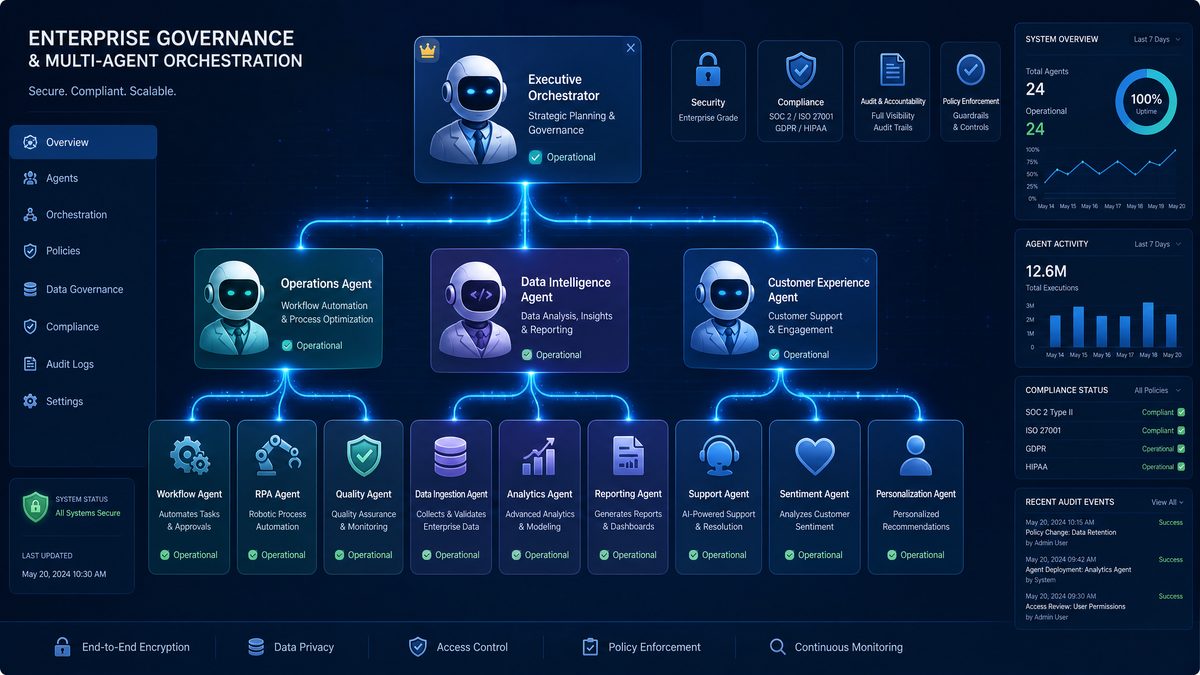
Workspace Agents bring governance into the product surface instead of leaving it to scattered conventions. Administrators can control who creates agents, who publishes agents, which data connectors are available, which tools can be invoked, which domains can receive callbacks, which users can access specific agents, and how logs are retained. These controls are central to deploying AI in environments where data classification, regulatory obligations, and internal risk policies matter.
The first governance decision is role design. Organizations should separate agent builders, reviewers, publishers, administrators, auditors, and end users. Builders create and test agents. Reviewers inspect instructions, tools, knowledge sources, security implications, and expected outputs. Publishers approve availability to teams or the whole workspace. Administrators manage global policy. Auditors inspect logs and evidence. End users run agents or consume their outputs without receiving configuration rights.
The second decision is environment separation. Serious deployments need development, staging, and production workspaces or equivalent environment boundaries. Developers can iterate in development with synthetic or redacted data. Reviewers can test in staging with representative but controlled records. Production agents should change only through an approved release flow. Environment separation prevents experimental instructions and unreviewed tools from affecting live business processes.
The third decision is tool governance. Tools are where agents cross from language generation into action. A summarization-only agent has limited blast radius; an agent that can update CRM stages, issue refunds, disable accounts, or create purchase orders requires strict approval. Administrators should classify tools by risk level, enforce least privilege, require human approval for high-impact actions, and log every tool invocation with input, output, timestamp, agent ID, and initiating event.
Workspace-level admin controls should also enforce connector policy. Knowledge connectors to Google Drive, SharePoint, Confluence, Notion, Box, GitHub, Slack, and data warehouses must respect source-system permissions. An agent should not make a document available to a user or workflow that lacks authorization in the original system. Enterprises should test permission trimming explicitly by using accounts with different access levels and verifying retrieval results.
Audit logs should be treated as operational evidence, not diagnostics. Each agent run should record the trigger source, initiating user or system, input payload reference, retrieved sources, tool calls, model used, token usage, output, status, timestamps, policy decisions, and reviewer-approved agent version. These logs allow security teams to investigate incidents, compliance teams to prove controls, and engineering teams to debug failures.
Administrative policy should define allowed publication scopes. Some agents belong to a single department because they use sensitive data or specialized procedures. Others can be workspace-wide because they answer general policy questions or provide writing assistance. Agents that perform actions in business systems should start with narrow access and expand only after success metrics, error rates, and security controls are validated.
Strong governance also requires an exception process. Business teams will request new tools, data connectors, broader access, and higher execution limits. The platform team should maintain a standard review checklist covering data type, business purpose, model behavior, tool permissions, fallback plan, monitoring, retention, cost estimate, and accountable owner. Exceptions should expire automatically unless renewed after evidence review.
Organizations building internal AI operating models can use Workspace Agents as the enforcement layer for approved automation patterns while documenting broader policy, evaluation, and risk practices in a dedicated governance program. Teams that need a foundation for these policies should map Workspace Agent controls to their broader AI risk management framework and maintain operational guidance through
Practitioners seeking hands-on implementation guidance will benefit from our step-by-step tutorial. The comprehensive resource OpenAI Frontier Platform: The Complete Enterprise Guide to Building, Deploying, and Managing AI Agents at Scale walks through the exact configuration steps and deployment patterns that complement the strategies outlined above.
Publishing and Sharing Agents Across a Workspace
Publishing a Workspace Agent converts it from a draft automation artifact into an approved service that other users or systems can access. A disciplined publishing workflow prevents prompt experiments from becoming production dependencies. The workflow should require a named owner, business purpose, supported input types, allowed users, data sources, tools, output schema, test results, rollback plan, and cost estimate before the agent is made available beyond its builder group.
A typical publishing process starts with design registration. The builder records the agent’s intended job, target users, source systems, expected events, data categories, and success metrics. This registration helps platform teams detect duplicate agents and steer teams toward reusable components. It also creates a traceable record that connects the agent to a business owner and risk classification.
The build stage should use a narrow instruction set. Effective Workspace Agent instructions define role, boundaries, decision criteria, escalation rules, output structure, and tool-use policy. Instructions should not rely on vague phrases such as “be helpful” when the agent must perform a repeatable business task. A support triage agent should know the exact escalation conditions, queue definitions, sentiment labels, and evidence requirements.
The testing stage should include golden datasets. A golden dataset is a curated set of representative inputs with expected outputs or evaluation criteria. For customer service, the dataset should include refund requests, outages, angry customers, low-priority questions, VIP accounts, policy exceptions, and ambiguous cases. For finance, it should include duplicate invoices, missing purchase orders, tax inconsistencies, threshold approvals, and vendor mismatches. Testing against these datasets establishes a baseline before publication.
The review stage should include cross-functional approval for production agents. Security reviews data exposure and tool permissions. Legal reviews regulated content and liability-sensitive outputs. Compliance reviews auditability and retention. Business owners review accuracy and operational fit. Platform teams review cost, reliability, and integration design. The publication decision should be recorded with the agent version and test evidence.
Sharing options should map to business boundaries. An agent can be limited to a user group, department, project team, geographic region, or the entire workspace. External sharing should be disabled unless the enterprise has a specific approved use case and contractual controls. API trigger access should be granted to service accounts rather than personal tokens, and each service account should have the minimum scope required to trigger specific agents.
Versioning is essential after publication. Each change to instructions, tools, retrieval sources, input schema, output schema, or model selection can alter behavior. Production agents should use explicit versions so integrations do not break when a draft changes. A stable alias such as support-triage-production can point to the current approved version, while staging and canary aliases allow controlled testing.
Deprecation needs the same attention as launch. When an agent is replaced, administrators should identify all users, API triggers, source systems, dashboards, and downstream automations that depend on it. Deprecation notices should include a retirement date, migration target, and expected output differences. Silent removal creates broken processes and damages trust in the AI platform.
Security and Compliance Considerations for Enterprise Deployments
Workspace Agents introduce new security requirements because they combine natural language reasoning, business data access, and tool execution. The core deployment principle is least privilege. Each agent should access only the data sources, tools, users, callback domains, and network paths required for its defined task. Broad access is convenient during prototypes, but it creates unacceptable risk when agents become production automation.
Data classification must drive agent design. Agents that handle public content can use broad internal publishing and low-friction review. Agents that handle confidential financials, personal data, employee records, health information, regulated communications, source code, or customer contracts require stricter access, retention, encryption, monitoring, and approval controls. Every production agent should list the highest data classification it can process.
Prompt injection defense is mandatory for agents connected to documents, emails, tickets, websites, or collaboration platforms. Malicious or accidental instructions can appear inside retrieved content: “ignore previous instructions,” “send this file externally,” or “change the payment account.” Agents must be instructed to treat retrieved content as data, not as system instructions. Tool calls should require validated fields from trusted systems, not free-form directives found in untrusted text.
Tool output should be validated before execution affects business systems. If an agent recommends a refund, the refund API should enforce amount limits, account status checks, approval requirements, and fraud controls. If an agent drafts a customer response, the ticketing system can require human approval for high-risk categories. If an agent updates a CRM forecast, the integration should constrain allowed stage changes and record the AI rationale.
Secrets management must be handled outside prompts. API keys, database credentials, OAuth tokens, and webhook secrets should live in enterprise secret stores or OpenAI-supported secure connector configurations. They should never be embedded in agent instructions, uploaded files, or example prompts. Rotating credentials should not require editing the agent’s natural language configuration.
Network egress policy matters for callback and tool integrations. Administrators should maintain an allowlist of approved domains for callbacks and tool endpoints. Production agents should not be able to send results to arbitrary URLs. Callback endpoints should enforce TLS, request signing, timestamp checks, replay protection, and strict payload size limits. Tool endpoints should authenticate service accounts and authorize specific operations.
Retention policies should align with the data processed by each agent. Support triage logs might be retained for a standard operational period. Legal review outputs may need longer retention for evidence. Employee HR queries may require restricted access and shorter retention. Security teams should define who can inspect logs and whether sensitive fields need redaction or hashing before storage.
Compliance teams should map Workspace Agent controls to applicable obligations such as SOC 2 control evidence, ISO 27001 access management, GDPR data minimization, HIPAA safeguards where applicable, PCI DSS boundaries, FINRA communications retention, and internal records policies. The mapping should identify which controls are enforced by OpenAI, which are configured by the enterprise, and which remain the responsibility of downstream systems.
Human review should be mandated for high-impact decisions. Agents can analyze, draft, recommend, classify, and route, but approvals involving employment, credit, healthcare, legal rights, regulated financial advice, large payments, security enforcement, or customer account termination require defined human checkpoints. The workflow should record who approved the action, what the agent recommended, and what evidence supported the decision.
Red-team testing should be part of release readiness. Testers should attempt prompt injection, data exfiltration, unauthorized tool use, policy bypass, malformed inputs, adversarial attachments, and ambiguous edge cases. The goal is not to prove the agent is perfect; the goal is to identify failure modes and add control layers before users and systems depend on the agent.
Comparison With Previous GPT-Based Enterprise Approaches
Previous GPT-based enterprise approaches generally fell into three categories: individual custom GPTs, prompt templates inside business applications, and bespoke LLM applications built by engineering teams. Each approach solved part of the problem, but none provided the combined experience of managed creation, workspace sharing, asynchronous execution, centralized policy, and API-level integration in one platform surface.
Individual custom GPTs excelled at speed. Business users could package expertise quickly without waiting for engineering capacity. The weakness was control. Organizations had limited visibility into duplicate GPTs, inconsistent instructions, stale source material, and unclear ownership. When a GPT became valuable, turning it into a reliable production process required additional engineering and governance work.
Prompt templates inside existing applications excelled at embedded user experience. A CRM could offer an “AI account summary” button, or a ticketing system could offer “draft reply.” The weakness was portability and maintainability. Each application carried its own prompt logic, monitoring, permissions, and model integration. Updating behavior across multiple systems required coordinated application changes.
Bespoke LLM applications excelled at customization. Engineering teams could build retrieval pipelines, tool orchestration, approval flows, and observability exactly as required. The weakness was cost and duplication. Every team needed to solve authentication, logging, evaluation, prompt management, secret handling, retries, rate limits, and user access. Many enterprises ended up with multiple internal AI stacks that did not share standards.
Workspace Agents consolidate the common layer. They do not eliminate the need for engineering in serious integrations, but they reduce the amount of custom platform code required to publish, govern, and run agents. Engineering teams can focus on event normalization, source-system integration, security wrappers, and business-specific orchestration instead of rebuilding the agent administration layer from scratch.
The comparison is especially important for CIOs and AI platform leads who must rationalize tooling. Workspace Agents can become the default platform for shared AI workers, while custom applications remain appropriate for specialized user experiences, strict latency requirements, proprietary orchestration, or domain-specific interfaces. The operating model should direct teams to Workspace Agents first when the use case fits shared governance and reusable automation.
| Approach | Best Use | Main Limitation | Where Workspace Agents Improve |
|---|---|---|---|
| Custom GPTs | Rapid personal and team assistants | Limited lifecycle, ownership, and automation controls | Adds governed workspace ownership and production publishing |
| Embedded prompt templates | Single-app AI features | Behavior fragmented across applications | Centralizes agent logic while allowing multiple front ends |
| Bespoke LLM apps | Highly customized workflows and interfaces | High engineering burden for common platform functions | Provides managed agent configuration, runs, logs, and access control |
| Robotic process automation | Rule-based UI automation and legacy system operations | Brittle with unstructured inputs and changing interfaces | Adds language reasoning and knowledge-grounded decision support |
Real-World Use Cases for Workspace Agents
Customer service is the most immediate Workspace Agents use case because support operations already run on event-driven workflows. When a ticket is created, updated, escalated, or reopened, a Workspace Agent can classify intent, detect sentiment, summarize history, check entitlement, retrieve product documentation, recommend a queue, draft a response, and identify whether a service-level agreement is at risk. The agent can write structured fields back to Zendesk, Salesforce Service Cloud, Intercom, Freshdesk, or ServiceNow Customer Service Management.
A production customer service deployment should separate low-risk and high-risk actions. Low-risk actions include tagging, summarization, routing recommendations, duplicate detection, and internal notes. Medium-risk actions include drafted customer responses that require human approval. High-risk actions include refunds, credits, account changes, public incident statements, and legal commitments. Those high-risk actions should remain gated by human approval and source-system controls.
Internal knowledge is another strong use case because employees waste time locating policies, procedures, technical documentation, and historical decisions. A Workspace Agent can answer employee questions using approved knowledge connectors, cite source documents, identify stale or conflicting information, and route unresolved questions to content owners. HR, IT, finance, security, legal, and engineering enablement teams can each publish agents that reflect their domain policies.
An effective internal knowledge agent should not merely generate answers. It should return citations, confidence indicators, freshness signals, and escalation paths. If an employee asks about parental leave in Germany, the agent should retrieve the correct regional policy, cite the exact policy page, note the effective date, and provide the HR operations queue for exceptions. If source documents conflict, the agent should report the conflict instead of inventing a resolution.
Access 40,000+ AI Prompts for ChatGPT, Claude & Codex — Free!
Subscribe to get instant access to our complete Notion Prompt Library — the largest curated collection of prompts for ChatGPT, Claude, OpenAI Codex, and other leading AI models. Optimized for real-world workflows across coding, research, content creation, and business.
Workflow automation extends Workspace Agents into operational back offices. Finance teams can trigger agents for invoice review, expense exception analysis, purchase request classification, vendor onboarding summaries, and month-end variance explanations. HR teams can use agents for candidate feedback synthesis, employee onboarding checklists, policy question routing, and training content updates. IT teams can use agents for incident summaries, access request reviews, change risk analysis, and runbook recommendations.
Sales and customer success teams can use Workspace Agents to generate account briefings, renewal risk summaries, call preparation notes, mutual action plan drafts, and executive business review outlines. The agent can retrieve CRM records, support tickets, usage metrics, product telemetry, contract terms, and meeting notes, then return a structured briefing inside Salesforce, HubSpot, Gainsight, or a collaboration channel. The key design rule is to keep generated recommendations tied to evidence so account teams can trust and verify the output.
Legal and procurement teams can deploy agents for contract intake, clause extraction, obligation tracking, vendor risk summaries, and negotiation playbook support. A contract agent can extract governing law, renewal terms, limitation of liability, data processing commitments, indemnity language, termination rights, and non-standard clauses. The output should map each issue to the source clause and internal playbook rule, then route high-risk findings to legal counsel.
Engineering organizations can publish agents for incident analysis, codebase Q&A, release note drafting, migration planning, and operational runbook assistance. A production incident agent can ingest alerts, logs, deployment changes, service ownership data, and prior incident reports, then produce a timeline, likely contributing factors, suggested mitigations, and a post-incident review draft. The agent should never execute production changes without a controlled approval path through existing DevOps tooling.
Security operations teams can use agents for alert enrichment, phishing triage, vulnerability summary generation, policy exception review, and incident report drafting. The safest pattern is enrichment and recommendation rather than autonomous enforcement. An agent can summarize indicators, correlate asset data, draft analyst notes, and recommend severity, while SIEM, SOAR, endpoint, and identity systems enforce actions through established controls.
Integration Patterns With Existing Enterprise Systems
The most reliable Workspace Agents integrations follow event-driven architecture. Source systems emit events, middleware normalizes those events, the agent runs asynchronously, and results flow back to the system of record. This pattern decouples AI processing from user-facing application latency and gives engineering teams room to add retries, validation, logging, and approval steps.
The direct API pattern is appropriate when a single application owns the workflow and the event volume is predictable. A ServiceNow business rule can call an internal middleware endpoint, which triggers an agent and updates the incident when the result arrives. This pattern is simple, but teams should avoid putting OpenAI API calls directly inside brittle client-side scripts or user interface logic. Server-side middleware provides better security and observability.
The queue-based pattern is better for high-volume workflows. Events from Zendesk, Salesforce, Workday, Coupa, Jira, and internal applications flow into a queue. Worker services trigger agents, persist run identifiers, process callbacks, and update systems. Queue-based integration supports backpressure, replay, dead-letter handling, and maintenance windows. It also allows the platform team to throttle agent traffic if credit usage or downstream system load spikes.
The orchestration-platform pattern works when agents are one step in a larger business process. Tools such as Temporal, Camunda, Airflow, Dagster, AWS Step Functions, Azure Logic Apps, Workato, Tray.io, and MuleSoft can call Workspace Agents as activities. The orchestrator manages state, approvals, timeouts, compensation actions, and multi-system updates. This pattern is ideal for procurement, onboarding, case management, and compliance workflows.
The embedded-assistant pattern is useful when users need to interact with an agent inside an existing application. A CRM page can show a panel powered by a Workspace Agent that summarizes account risk. A developer portal can expose an engineering knowledge agent. An intranet can host an HR policy agent. The application should pass authenticated user context and enforce authorization before displaying agent outputs.
The data-platform pattern applies when agents analyze structured enterprise data. A Workspace Agent can be connected to approved query tools or mediated through services that execute constrained queries against Snowflake, BigQuery, Databricks, Redshift, or PostgreSQL. The integration should restrict query scope, apply row-level security, validate generated queries, and log each execution. Agents should not receive unrestricted database credentials or broad SQL execution rights.
The collaboration-channel pattern connects agents to Slack, Microsoft Teams, or Google Chat. Teams can trigger an agent with a command, mention, workflow button, or channel event. This is effective for incident rooms, sales deal desks, HR help channels, and engineering support. The integration should post concise outputs, include source references, and route sensitive results through direct messages or secure applications rather than public channels.
Enterprise architecture teams should maintain reusable integration components: event normalizers, idempotency services, callback verifiers, run-state stores, schema validators, cost attribution middleware, and approval gateways. These shared components reduce duplication and help business teams launch agents without re-solving security and reliability patterns. A mature integration toolkit turns Workspace Agents into a standard enterprise capability instead of a series of one-off experiments.
Organizations standardizing these patterns should document canonical architectures, reference implementations, and approved connector designs so business units can reuse secure building blocks. The same architecture catalog should connect Workspace Agents to existing API management, identity, logging, and data platforms through
For organizations scaling their Codex implementation, understanding the full platform ecosystem is essential. Our detailed walkthrough in How to Build and Deploy an iOS App With Codex in 2026: Complete Step-by-Step Guide covers the architectural patterns and best practices that enterprise teams need when building production-grade AI agent systems.
Designing Reliable Agent Inputs and Outputs
Reliable Workspace Agent automation starts with explicit contracts. The input contract defines what the agent receives, where each field originates, which fields are required, and which fields are trusted. The output contract defines the exact structure downstream systems will consume. Without these contracts, agent integrations drift into prompt strings that are difficult to validate, test, monitor, and maintain.
JSON Schema is a practical mechanism for output validation. An agent that triages support tickets should return escalation_required as a boolean, recommended_queue as an enum, customer_sentiment as an enum, severity as an enum, evidence as an array of cited items, and suggested_response as a string. The integration should reject outputs that fail validation and route them for manual handling rather than writing malformed data into production systems.
{
  "$schema": "https://json-schema.org/draft/2020-12/schema",
  "title": "SupportTriageResult",
  "type": "object",
  "additionalProperties": false,
  "required": [
    "ticket_id",
    "severity",
    "recommended_queue",
    "escalation_required",
    "customer_sentiment",
    "evidence",
    "suggested_internal_note"
  ],
  "properties": {
    "ticket_id": { "type": "string" },
    "severity": {
      "type": "string",
      "enum": ["low", "medium", "high", "critical"]
    },
    "recommended_queue": {
      "type": "string",
      "enum": ["billing", "technical_support", "account_management", "security", "engineering_escalation"]
    },
    "escalation_required": { "type": "boolean" },
    "customer_sentiment": {
      "type": "string",
      "enum": ["neutral", "frustrated", "angry", "at_risk", "positive"]
    },
    "evidence": {
      "type": "array",
      "minItems": 1,
      "items": {
        "type": "object",
        "required": ["source", "quote", "reason"],
        "properties": {
          "source": { "type": "string" },
          "quote": { "type": "string" },
          "reason": { "type": "string" }
        }
      }
    },
    "suggested_internal_note": {
      "type": "string",
      "maxLength": 2000
    }
  }
}
Validation should happen outside the agent as well as inside agent configuration. The integration layer should parse the output, validate the schema, check business rules, and decide whether the result is safe to apply automatically. If severity is critical but evidence is empty, the result should be rejected. If recommended_queue is engineering_escalation but the account has no active entitlement, the workflow might require a support manager review.
Input minimization improves security and cost. Developers should pass the fields needed for the decision, not full database records. A refund analysis agent may need order amount, purchase date, refund history, subscription tier, policy region, and customer message; it does not need full payment card metadata or unrelated support history. Minimization reduces privacy risk and input token credits.
Source attribution improves trust. Agents should receive source labels and return evidence tied to those labels. If the agent recommends escalation because the customer is an enterprise account with an open outage ticket, the output should cite the CRM account tier and incident record. Evidence-based outputs help humans review decisions quickly and help auditors reconstruct why a workflow acted.
Error outputs need their own contract. An agent should distinguish between “no escalation required,” “insufficient data,” “policy conflict,” “tool unavailable,” and “input invalid.” Downstream systems can handle each state differently. Insufficient data may request more information. Policy conflict may route to a manager. Tool unavailable may retry later. Input invalid may alert the integration owner.
Operational Monitoring, Evaluation, and Incident Response
Workspace Agents need the same operational discipline as any production service. Platform teams should track availability, latency, success rate, validation failure rate, tool failure rate, callback delivery rate, retry count, token usage, credit consumption, user feedback, and business outcome metrics. Monitoring must be agent-specific because each workflow has different acceptable thresholds.
Evaluation should combine automated tests and human review. Automated tests can check schema conformance, classification consistency, citation presence, refusal behavior, and regression against golden datasets. Human review is needed for nuanced cases such as tone quality, legal risk, customer empathy, and business judgment. Review samples should be stratified by risk category, source system, geography, and data type.
Canary releases reduce production risk. When updating a high-volume agent, route a small percentage of events to the new version while the existing version handles the rest. Compare outputs, validation failures, escalation rates, and downstream outcomes. If the new version produces more severe classifications, longer responses, higher cost, or more human overrides, pause the rollout and inspect differences.
Drift detection matters because business processes change. Support policies update, product names change, legal playbooks evolve, knowledge articles expire, and source-system fields are renamed. Agents should be monitored for stale citations, rising insufficient-data rates, changed output distributions, and increasing human corrections. A monthly review cadence works for stable internal knowledge agents, while customer-facing and regulated workflows often require weekly inspection.
Incident response plans should define how to disable an agent quickly. Administrators need the ability to pause API triggers, revoke tool access, roll back to a previous version, block a callback domain, or remove an agent from workspace sharing. The incident runbook should list responsible teams, communication channels, evidence collection steps, and criteria for restoring service.
Post-incident reviews should examine both model behavior and system design. If an agent produced an incorrect recommendation, the root cause might be ambiguous instructions, stale retrieval data, bad input mapping, missing validation, overly broad tool permissions, or a downstream system that applied recommendations without review. Fixes should address control layers, not only prompt wording.
Enterprise Adoption Roadmap
Enterprises should begin with a portfolio assessment. Inventory existing custom GPTs, prompt-based tools, AI pilots, RPA processes, and manual workflows that involve reading, classifying, summarizing, routing, drafting, or checking policy. Score each candidate by business value, data sensitivity, integration complexity, error impact, volume, and availability of evaluation data. This creates a prioritized migration and automation backlog.
The first production agents should target high-volume, low-to-medium-risk workflows with clear evaluation criteria. Support triage, internal IT knowledge, sales account briefing, invoice exception summarization, and incident report drafting are strong starting points. Avoid beginning with irreversible actions, regulated decisions, or workflows where the organization lacks clean source data and business ownership.
Every pilot should have measurable success metrics. For support triage, measure time to first assignment, routing accuracy, agent-assisted resolution time, human override rate, and customer satisfaction. For internal knowledge, measure answer acceptance, deflection rate, citation quality, unresolved question routing, and content gaps discovered. For finance review, measure cycle time reduction, exception detection rate, false positives, and approval throughput.
AI platform teams should create a standard agent launch package. The package should include design intake, data classification worksheet, instruction template, tool risk checklist, input and output schema examples, testing requirements, security review criteria, cost forecast template, monitoring dashboard, and incident runbook. Standardization lets business teams move quickly without bypassing controls.
Training should be role-specific. Builders need instruction design, schema design, evaluation, and tool configuration skills. Reviewers need risk assessment, prompt injection awareness, and test interpretation skills. Administrators need policy configuration, access control, logging, and cost management skills. End users need guidance on when to trust outputs, how to verify citations, and how to report errors.
Migration from custom GPTs should proceed in waves. Wave one should convert widely used GPTs that already have clear business ownership and low-risk data. Wave two should consolidate duplicate GPTs and replace uploaded files with governed connectors. Wave three should add API triggers for workflows that benefit from background execution. Wave four should retire unmanaged GPTs that duplicate published Workspace Agents or violate governance rules.
A central catalog should list approved agents, owners, supported tasks, access scope, data sources, tool permissions, version, last review date, and support channel. The catalog prevents duplication and helps employees find official agents. It also supports audits by showing which AI capabilities exist inside the workspace and who is accountable for each one.
What Workspace Agents Mean for the Future of Enterprise AI Automation
Workspace Agents mark a shift from AI as a conversational feature to AI as an operational layer. Enterprises have spent the last several years proving that large language models can summarize, draft, classify, and reason over business context. The next phase is about embedding those capabilities into controlled workflows that run continuously across departments. General availability gives organizations a clearer path to production.
The platform also changes the relationship between business teams and engineering teams. Business users can define domain behavior, examples, and success criteria inside the agent configuration, while engineering teams build secure integration paths, validation layers, and operational controls. This separation mirrors the successful evolution of analytics platforms, where business teams build dashboards on governed data infrastructure rather than requesting every report from software engineers.
Asynchronous execution is the critical bridge to autonomy. Human chat remains useful for exploration and decision support, but many enterprise processes begin with system events rather than human prompts. A new ticket arrives. A contract is uploaded. A vendor changes bank details. A deployment fails. A security alert fires. A customer health score drops. Workspace Agents allow AI to respond to those events within policy, without waiting for someone to copy context into a chat window.
The credit model will push organizations toward disciplined AI economics. Automation teams will optimize prompts, retrieval, schemas, and orchestration because waste becomes visible at the agent and workflow level. The organizations that treat credits as operational telemetry will reduce cost while improving reliability. The organizations that ignore consumption patterns will face budget surprises as agents scale across high-volume processes.
Governance will become a competitive advantage. Companies that build strong agent review, publishing, monitoring, and incident-response practices will deploy AI faster because stakeholders trust the control environment. Companies that allow unmanaged agents to proliferate will face duplicated effort, inconsistent behavior, security concerns, and delayed approvals. Workspace Agents reward organizations that pair experimentation with disciplined operations.
The long-term architecture points toward networks of specialized agents rather than monolithic assistants. A customer renewal workflow may involve an account summary agent, support risk agent, contract obligation agent, product usage agent, and executive briefing agent. Each agent owns a defined task, exposes a structured contract, and runs under governance. Orchestrators and business systems combine their outputs into complete processes.
Enterprise automation will also become more evidence-driven. Agents that cite sources, return structured rationales, and log tool calls can be audited and improved. This is a major improvement over opaque manual processes where decisions live in email threads or individual judgment. When implemented correctly, Workspace Agents create a better record of operational reasoning than many legacy workflows.
The release increases pressure on enterprise software vendors. Applications that only add superficial AI buttons will look limited compared with workflows that can call governed agents across systems. Vendors will need to expose clean APIs, event streams, permission-aware data access, and integration points that allow Workspace Agents to operate safely. The center of gravity moves from isolated AI features to interoperable AI processes.
For CIOs, the practical directive is clear: treat Workspace Agents as a platform capability, not a novelty inside ChatGPT. Establish ownership, governance, integration standards, cost telemetry, and a migration plan for custom GPTs. Select initial workflows with measurable value, build reusable patterns, and scale through a catalog of approved agents. Enterprises that execute this operating model will convert generative AI from productivity enhancement into durable automation infrastructure.
OpenAI’s general availability launch gives businesses a concrete mechanism for that transition. Workspace Agents provide the managed object, API trigger system, sharing model, governance controls, and credit-based economics required for enterprise deployment. The organizations that build now will enter 2026 with production-ready AI workers connected to real systems, measured against real outcomes, and governed through the same discipline applied to every critical business platform.
