
Introduction to Mastering GPT-5.5 Instant: Prompting for Personalization and Accuracy
The release of GPT-5.5 Instant marks a pivotal advancement in the realm of large language models (LLMs), ushering in a new era of AI-driven personalization, transparent memory source tracking, and seamless integration with productivity tools such as Gmail. As artificial intelligence continues to embed itself into both professional and personal workflows, the demand for AI systems that deliver not only accurate and context-aware responses but also adapt dynamically to individual user preferences has never been greater.
Since the inception of OpenAI’s GPT architecture, each iteration has progressively enhanced contextual understanding, factual accuracy, and user-centric adaptability. GPT-5.5 Instant builds upon this legacy by introducing powerful personalization features that tailor AI outputs to unique user styles, alongside robust memory source tracking that transparently cites information provenance. Its integration with Gmail further empowers users to elevate email management by automating drafting, summarization, and scheduling with contextual intelligence.
This comprehensive guide is crafted for developers, AI practitioners, business professionals, and power users eager to master GPT-5.5 Instant’s advanced functionalities. Through in-depth exploration, practical examples, and actionable best practices, readers will learn how to design effective prompts that maximize model accuracy, personalization, and efficiency. By the end, you will be equipped to unlock the full potential of GPT-5.5 Instant, transforming your AI interactions into productive, precise, and personalized experiences.
Understanding GPT-5.5 Instant’s Cutting-Edge Features
Dynamic Personalization Enhancements
One of the hallmark innovations of GPT-5.5 Instant is its ability to dynamically personalize responses by adapting to user preferences, interaction history, and specific context. Unlike previous GPT versions that generated relatively uniform outputs, GPT-5.5 Instant leverages embedded personalization parameters either specified directly within prompts or configured through user profiles. This enables granular control over aspects such as tone, style, content focus, and verbosity.
Personalization operates on multiple key dimensions:
- Stylistic Adaptation: The model can emulate formal, casual, technical, or conversational tones depending on prompt instructions or learned user behavior. This ensures brand voice consistency in professional communications or a friendly, approachable style for customer engagement.
- Content Prioritization: GPT-5.5 Instant emphasizes information categories tailored to the user’s domain or interests. For example, a healthcare professional receives medically precise explanations, while a layperson obtains simplified summaries.
- Response Length and Detail: Users specify preferences for concise bullet summaries or expansive, in-depth analyses, supporting rapid decision-making or thorough research.
Consider the difference between a generic prompt versus a personalized prompt:
Generic: "Explain the significance of blockchain technology."

Personalized: "Explain the significance of blockchain technology in layman's terms for a small business owner looking to improve transaction security."
The personalized prompt guides the model to tailor the explanation to a specific audience, delivering more relevant and actionable content. This capability substantially expands GPT-5.5 Instant’s utility across diverse professional and personal use cases.
Moreover, GPT-5.5 Instant supports adaptive learning from ongoing interactions. If a user consistently prefers bullet-point summaries, the model detects this and adjusts future outputs accordingly unless overridden. This persistent personalization cultivates an intuitive, efficient user experience.
Developers can also programmatically configure personalization at scale by defining user profiles with parameters such as preferred language style, jargon familiarity, or focus areas. These profiles ensure AI outputs align with organizational standards or individual preferences, making GPT-5.5 Instant a versatile tool for enterprises and individuals alike.
Memory Source Tracking: Enhancing Transparency and Trust
Memory source tracking is a breakthrough feature that improves AI transparency and reliability by attaching citations to the data points and facts referenced in responses. This addresses the common challenge of distinguishing verifiable information from AI-generated assumptions or hallucinations.
The system maintains a dynamic memory of sources accessed during response generation, including prior conversation context, integrated knowledge bases, and external linked documents or web references. Each factual claim is traceable to its original source, enabling users to verify information and assess confidence levels.
Example:
“According to the 2023 IPCC report, global temperatures have increased by 1.1°C since pre-industrial levels[IPCC, 2023].”
This inline citation capability boosts user trust and facilitates workflows requiring source accountability, such as academic research, journalism, and corporate reporting.
Technically, memory source tracking leverages an advanced retrieval and indexing system integrated into GPT-5.5 Instant’s architecture. When generating responses, the model queries relevant external databases or user-supplied documents, integrating validated information with inline source annotations. Users can then drill down into original sources for validation or further study.
Additionally, GPT-5.5 Instant supports customizable citation styles, including APA, MLA, IEEE, and more, catering to diverse user requirements. This flexibility is invaluable for researchers, educators, and content creators adhering to strict referencing standards.
In multi-turn conversations, source tracking maintains context by referencing previously cited materials or newly introduced data, ensuring consistent and traceable dialogue. Collaborative environments benefit as multiple stakeholders can review AI-generated insights with confidence in their provenance.
Seamless Gmail Integration for Contextual Email Intelligence
GPT-5.5 Instant’s integration with Gmail elevates email management by harnessing contextual intelligence while safeguarding privacy and data security. After explicit user authorization via OAuth 2.0 protocols, the model accesses pertinent email content to inform tasks such as drafting, summarizing, and scheduling.
Privacy & Security: Access is limited to authorized scopes, with encrypted, ephemeral data handling and no persistent storage unless expressly permitted. Users retain full control to revoke access anytime.
Practical applications include:
- Email Drafting: Analyzing prior correspondence style and content to generate draft replies consistent with user voice and intent, adapting tone for formal business or casual customer outreach.
- Conversation Summarization: Condensing lengthy email threads into concise summaries that highlight decisions, action items, and pending follow-ups—ideal for busy professionals.
- Scheduling Assistance: Extracting dates and commitments to propose calendar events and reminders, while detecting conflicts and suggesting alternatives.
The integration also enables intelligent filtering and prioritization, flagging urgent messages and improving inbox efficiency.
GPT-5.5 Instant employs advanced natural language understanding and entity recognition to accurately parse email semantics, including sender relationships, sentiments, and action points.
Developers can customize integration parameters to align AI access and functionality with organizational policies and user preferences. Comprehensive audit logs maintain transparency and support security governance.
Best Practices for Crafting Effective Prompts with GPT-5.5 Instant
Clarity and Conciseness: Minimizing Verbosity and Irrelevance
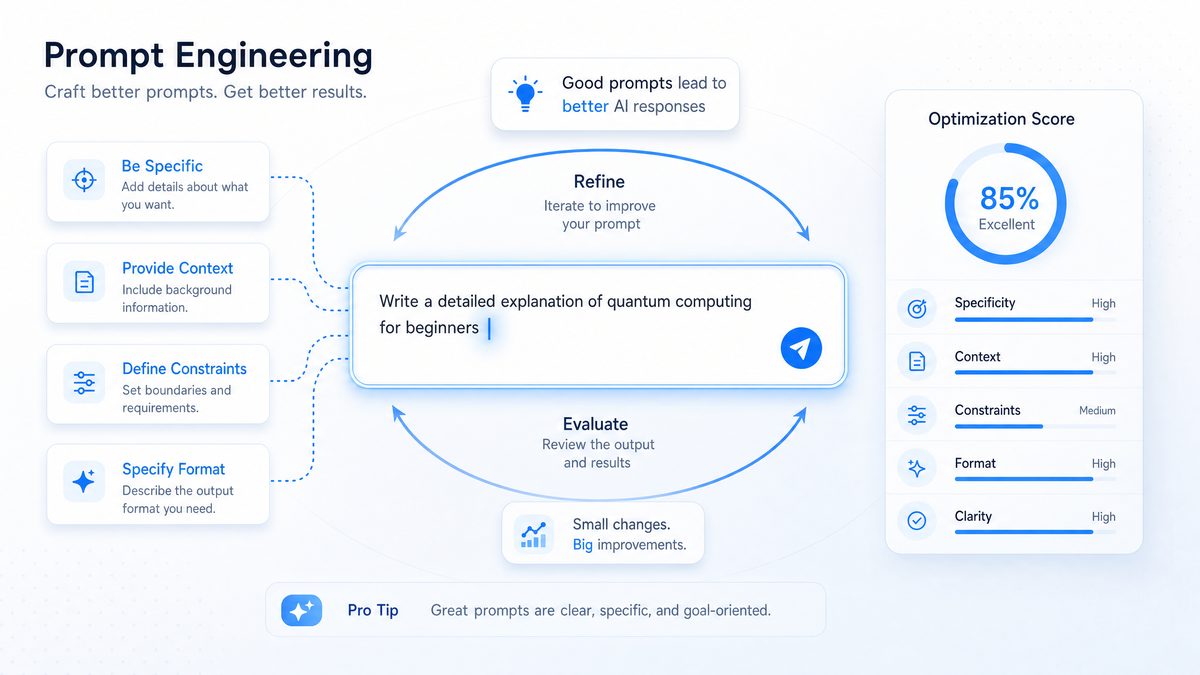
Verbose or off-topic responses are common challenges when working with LLMs. GPT models tend to generate lengthy outputs when prompts are ambiguous or overly broad. Achieving clarity and conciseness in prompt design is paramount to eliciting focused, efficient responses.
Common causes of verbosity include:
- Vague or open-ended prompts inviting expansive elaboration.
- Unspecified output format or length.
- Ambiguous terminology or multiple interpretation paths.
To reduce verbosity, apply these techniques:
- Use Direct Questions: Frame prompts as explicit requests. E.g., instead of “Tell me about AI,” say “List three key benefits of AI in healthcare.”
- Specify Output Length: Include instructions like “in no more than 100 words” or “provide a bullet-point summary.”
- Avoid Ambiguity: Define technical terms or context clearly to prevent misinterpretation.
| Prompt | Resulting Output Quality |
|---|---|
| Describe climate change. | Lengthy, general explanation covering many aspects, including off-topic details. |
| Summarize the main causes of climate change in 3 bullet points. | Concise, focused list directly addressing the question. |
Advanced strategies to enhance prompt clarity include:
- Structured Prompts: Break complex queries into numbered or bulleted requests within a single prompt.
- Explicit Output Format: Specify paragraphs, lists, code snippets, or tables to ensure usable content.
- Limit Scope: Narrow subject area or timeframe to avoid extraneous information.
Example:
Provide a bullet-point summary of the economic impacts of renewable energy adoption in Europe from 2015 to 2023, limited to five points.This level of specificity enables GPT-5.5 Instant to generate precise, relevant, and actionable content with minimal post-editing.
Embedding Personalization Directly in Prompts
To fully leverage GPT-5.5 Instant’s personalization capabilities, prompts should explicitly incorporate personalization parameters. One effective method is using “persona” tags or instructions that define style, tone, or perspective.
For example, a prompt starting with [Persona: Technical Expert] signals a formal, data-driven style. Including user or audience context guides the model toward relevant responses.
[Persona: Marketing Specialist] Explain the benefits of social media advertising for small businesses.As a customer support agent, draft a polite but firm response to a refund request.
Adding contextual details such as user role, preferences, or previous interactions enables highly tailored outputs. Experimenting with different personas helps fine-tune style and complexity. For instance, a sales professional might request industry jargon and persuasive language, whereas an educator may prefer simplified explanations.
Personalization can also include verbosity level, formality, and cultural considerations. Example:
[Persona: Financial Analyst] Provide a detailed risk assessment of investment options, using formal tone and including recent market data.Such precise instructions ensure GPT-5.5 Instant aligns closely with user expectations, enhancing satisfaction and usability.
For advanced personalization strategies, see Prompting GPT-5.5 Instant: How to Leverage Memory Sources, Personalization, and Reduced Hallucinations, which explores dynamic persona application and advanced prompt engineering techniques.
Leveraging Memory Source Tracking in Prompt Design
To maximize memory source tracking benefits, prompts should specifically request citations or provenance information. Incorporate instructions such as:
- “Explain with references.”
- “Include data provenance for all factual claims.”
- “Cite sources for each statistic mentioned.”
Example:
Provide a summary of recent AI advancements in natural language processing, including citations.This instructs GPT-5.5 Instant to attach inline references and utilize stored memory contexts, enhancing response transparency.
Combining this with follow-up prompts supports iterative validation and deeper topic exploration. For example:
Summarize the economic impacts of renewable energy, including source citations. Then, provide counterarguments with references.This method promotes balanced, well-supported analysis, crucial in academic, regulatory, or journalistic contexts.
Users may specify citation styles to conform with publication standards, e.g.:
Summarize the effects of urbanization on biodiversity, citing sources in APA format.GPT-5.5 Instant will format references accordingly, streamlining content creation.
For further insights on source tracking with conversational memory, see GPT-5.5 Instant Rolls Out as ChatGPT’s New Default: 52% Fewer Hallucinations and Memory Sources, which details improvements in hallucination reduction and transparent memory integration.
Practical Applications of GPT-5.5 Instant
Personalized Email Management Powered by Gmail Integration
GPT-5.5 Instant’s Gmail connectivity revolutionizes email workflows by offering personalized drafting, summarization, and scheduling assistance. By analyzing historical email data, the model learns user communication style and preferences, generating replies that reflect consistent voice and tone.
Practical applications include:
- Drafting Emails: Compose context-aware responses tailored to recipient profiles and conversation history, adjusting formality and style automatically.
- Summarizing Threads: Condense complex email chains into key points and action items for quick comprehension, ideal for onboarding or project reviews.
- Automating Scheduling: Extract dates and commitments to propose calendar events and reminders, resolving conflicts by suggesting alternatives.
Example prompt:
Using my recent email conversation with John Doe, draft a polite follow-up asking for an update on the project timeline.Here, GPT-5.5 Instant accesses relevant Gmail data to generate a personalized, contextually appropriate message reflecting the user’s typical tone.
Additional capabilities include email triage by urgency or topic, flagging important correspondence, and suggesting template responses for common queries. This reduces cognitive load and accelerates responsiveness.
Developers can integrate Gmail functions into wider automation workflows, connecting AI email tasks with CRM systems, project tools, or analytics platforms for comprehensive productivity solutions.
Generating Accurate, Source-Backed Content
GPT-5.5 Instant excels at producing research summaries, white papers, and fact-checked articles by combining its enriched knowledge base with memory source tracking. Users can explicitly instruct the model to separate verified information from assumptions.
Example prompt:
Write a fact-checked summary on the impact of renewable energy adoption worldwide, citing all sources.The model embeds citations within the content, boosting credibility and enabling independent verification.
This feature is invaluable in academic, journalistic, and corporate research where source transparency is critical. It accelerates content generation while maintaining rigor, helping meet tight deadlines.
GPT-5.5 Instant can synthesize diverse perspectives, presenting balanced analyses or highlighting conflicting viewpoints with appropriate citations, supporting nuanced understanding and informed decisions.
Users can request content tailored to specific styles such as executive summaries, technical reports, or layperson explanations, enhancing adaptability across audiences.
Boosting Productivity Tools with Personalized AI Assistance
Beyond communication and content creation, GPT-5.5 Instant integrates into productivity workflows, offering personalized assistance for reminders, task lists, and note-taking. By retaining memory of user preferences and ongoing tasks, it ensures consistency and accuracy over time.
Examples include:
- Generating customized daily agendas based on priorities, deadlines, and meetings.
- Converting meeting notes into actionable to-dos with deadlines, responsibilities, and dependencies.
- Providing context-aware project planning suggestions, including risk assessments and resource allocation.
Example productivity prompt:
Create a prioritized task list from my meeting notes, emphasizing deadlines and dependencies.GPT-5.5 Instant can interface with calendar and project management APIs for task automation, reminders, and progress tracking, reducing manual overhead and boosting organizational efficiency.
By learning from user feedback, the model personalizes task management approaches, adapting to preferred workflows and communication styles—some users may prefer brief checklists; others, detailed narratives.
For deeper insights into combining personalization with memory context in workflows, see GPT-5.5 Instant: OpenAI’s New Default ChatGPT Model Explained, which explores improved reasoning and AI-driven task automation.
Troubleshooting Common Issues and Pitfalls
Managing Overly Verbose or Off-Topic Outputs
Verbose or tangential responses can frustrate users seeking concise, relevant answers. Diagnosing these issues involves analyzing prompt clarity and model parameters.
Common causes include:
- Open-ended prompts without clear constraints.
- Insufficient context or ambiguous terminology.
- Excessively high temperature or creativity settings in API calls.
Effective mitigation strategies:
- Refine prompts with explicit length and focus instructions.
- Use system-level instructions to guide model behavior.
- Adjust parameters such as temperature, max tokens, and frequency penalty to control output variability and repetitiveness.
Example refinement:
| Original Prompt | Refined Prompt |
|---|---|
| Tell me about machine learning. | Provide a brief overview of supervised machine learning in under 150 words. |
Additional approaches to improve relevance:
- Negative Instructions: Specify exclusions, e.g.,
“Do not include historical background or unrelated applications.”
When a response still drifts, revise one constraint at a time. Clarify the audience, narrow the topic, define the format, and state what to omit. Review the result before adding more instructions, since competing requirements can reduce focus.
Conclusion
Effective prompting depends on clear scope, explicit personalization, a usable output format, and careful source verification. Start with the smallest prompt that captures those requirements, then refine it based on the response.
Across personalized responses, memory-source checks, and Gmail-assisted tasks, specify the relevant context and verify the output before acting on it. For repeatable workflows, save successful prompt patterns for later use.
