
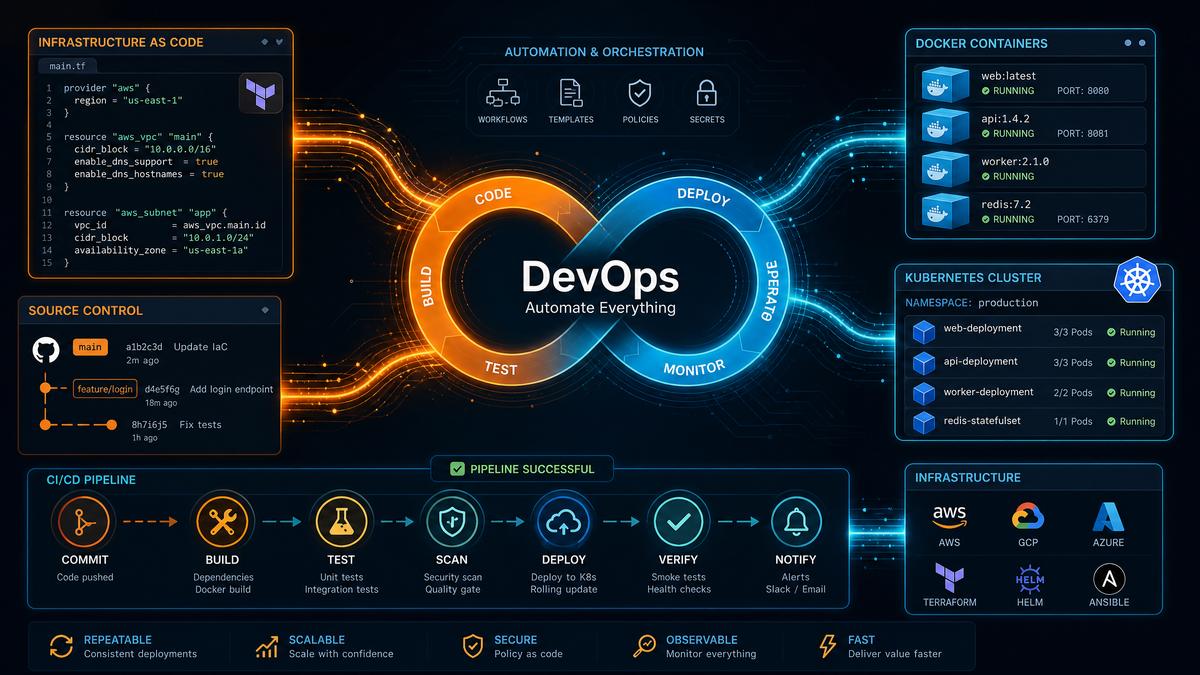
Introduction to Codex CLI Prompts for DevOps Automation
In the rapidly evolving world of DevOps and infrastructure management, automation is the cornerstone of operational efficiency and reliability. OpenAI’s Codex model, with its deep understanding of programming languages and natural language, enables engineers to automate complex DevOps tasks by simply writing prompts. This playbook presents 50 production-ready Codex CLI prompts, meticulously crafted and categorized for core DevOps domains. Each prompt is accompanied by contextual explanations, example outputs, and actionable usage tips to maximize effectiveness.
Whether you are building CI/CD pipelines, containerizing applications, deploying to Kubernetes, setting up monitoring, automating incident responses, generating infrastructure-as-code, performing security scans, or managing database operations, these prompts will accelerate your workflows and reduce human error.
1. CI/CD Pipeline Creation Prompts
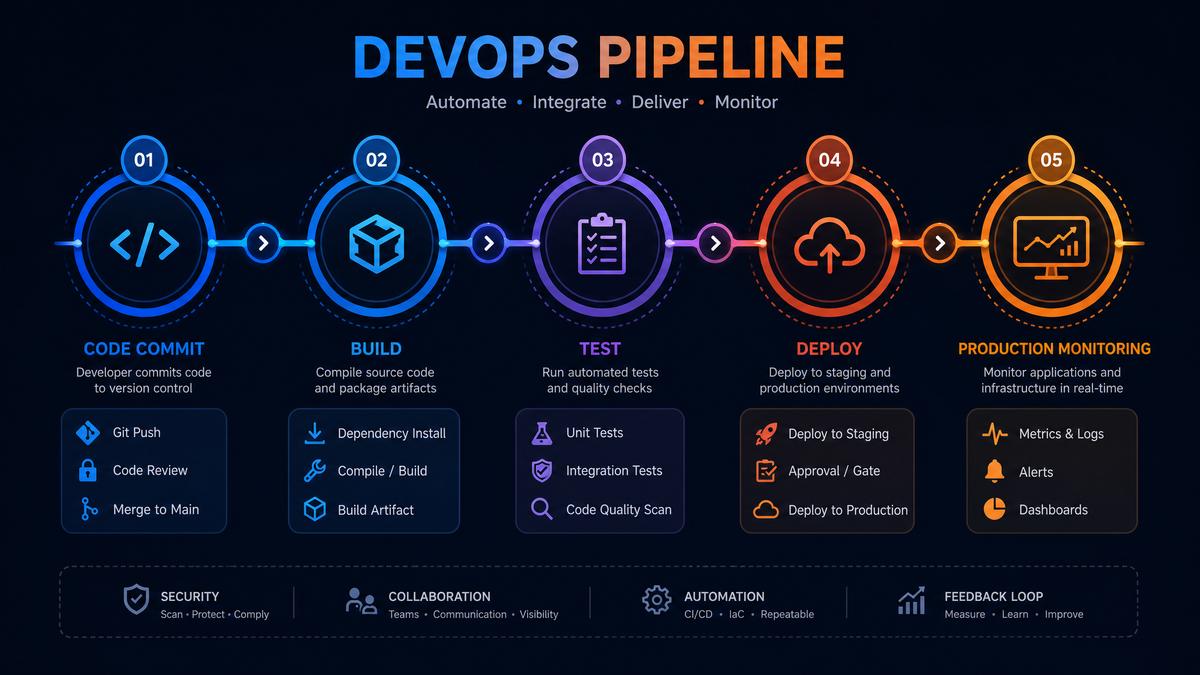
Continuous Integration and Continuous Deployment (CI/CD) pipelines are essential for automating software delivery. Codex can generate configuration files and scripts to build, test, and deploy software seamlessly.
Prompt 1: Generate a GitHub Actions Workflow for Node.js Project
Write a GitHub Actions YAML workflow file that triggers on push to main branch, installs Node.js 16, caches npm dependencies, runs tests with Jest, and deploys to AWS S3 if tests pass.Expected Output: A complete .github/workflows/main.yml file with jobs for setup, test, and deploy stages.
name: Node.js CI/CD

on:
  push:
    branches: [main]

jobs:
  build:
    runs-on: ubuntu-latest
    steps:
    - uses: actions/checkout@v2
    - name: Use Node.js 16
      uses: actions/setup-node@v2
      with:
        node-version: 16
    - name: Cache npm dependencies
      uses: actions/cache@v2
      with:
        path: ~/.npm
        key: ${{ runner.os }}-node-${{ hashFiles('**/package-lock.json') }}
        restore-keys: |
          ${{ runner.os }}-node-
    - run: npm install
    - run: npm test
    - name: Deploy to AWS S3
      if: success()
      uses: aws-actions/s3-sync@v1
      with:
        args: --acl public-read --delete
      env:
        AWS_S3_BUCKET: my-bucket
        AWS_ACCESS_KEY_ID: ${{ secrets.AWS_ACCESS_KEY_ID }}
        AWS_SECRET_ACCESS_KEY: ${{ secrets.AWS_SECRET_ACCESS_KEY }}
        AWS_REGION: us-east-1
Usage Tips: Customize AWS bucket names and secrets according to your environment. Use this prompt for quick scaffoldings of CI pipelines with minimal manual YAML editing.
Prompt 2: Create a Jenkinsfile for Multi-Stage Pipeline
Write a Jenkins Declarative Pipeline that builds a Java Maven project, runs unit tests, performs static code analysis with SonarQube, and deploys to a staging environment on success.Expected Output: A Jenkinsfile with stages: Build, Test, SonarQubeScan, DeployStaging.
pipeline {
  agent any
  stages {
    stage('Build') {
      steps {
        sh 'mvn clean package'
      }
    }
    stage('Test') {
      steps {
        sh 'mvn test'
      }
    }
    stage('SonarQubeScan') {
      environment {
        scannerHome = tool 'SonarQubeScanner'
      }
      steps {
        withSonarQubeEnv('My SonarQube Server') {
          sh "${scannerHome}/bin/sonar-scanner"
        }
      }
    }
    stage('DeployStaging') {
      when {
        branch 'main'
      }
      steps {
        sh './deploy.sh staging'
      }
    }
  }
  post {
    failure {
      mail to: '[email protected]',
           subject: "Failed Pipeline: ${env.JOB_NAME} [${env.BUILD_NUMBER}]",
           body: "Pipeline failed. Please check the Jenkins console output."
    }
  }
}
Usage Tips: Integrate Jenkins plugins for SonarQube and email notifications. Modify deployment scripts as per your infrastructure.
Prompt 3: Generate GitLab CI YAML for Python Django Project
Write a .gitlab-ci.yml that runs on every merge request, sets up Python 3.9 environment, installs dependencies, runs Django tests and linting with flake8, and builds a Docker image tagged with the commit hash.Expected Output: A multi-job GitLab CI configuration with test, lint, and docker build stages.
stages:
  - test
  - lint
  - build

variables:
  DOCKER_IMAGE: registry.gitlab.com/mygroup/myproject:$CI_COMMIT_SHA

test:
  stage: test
  image: python:3.9
  script:
    - pip install -r requirements.txt
    - python manage.py test
  only:
    - merge_requests

lint:
  stage: lint
  image: python:3.9
  script:
    - pip install flake8
    - flake8 .
  only:
    - merge_requests

build:
  stage: build
  image: docker:latest
  services:
    - docker:dind
  script:
    - docker build -t $DOCKER_IMAGE .
    - docker push $DOCKER_IMAGE
  only:
    - main
Usage Tips: Ensure GitLab Runner has Docker privileges. Use this prompt to automate Python project CI/CD effortlessly.
2. Docker Containerization Prompts
Containerization standardizes application packaging, enabling consistent deployment across environments. Codex CLI prompts can generate Dockerfiles, compose files, and container management scripts.
Prompt 4: Create a Dockerfile for a Go Web Application
Write a multi-stage Dockerfile that builds a Go web server application and produces a minimal final image using Alpine Linux, exposing port 8080.Expected Output: Multi-stage Dockerfile with build and final stages.
FROM golang:1.19-alpine AS builder

WORKDIR /app
COPY . .
RUN go build -o server .

FROM alpine:latest

WORKDIR /app
COPY --from=builder /app/server .
EXPOSE 8080
CMD ["./server"]
Usage Tips: Use multi-stage builds to minimize image size. Alpine base images reduce attack surface and improve startup time.
Prompt 5: Generate docker-compose.yml for a Web App with Redis and PostgreSQL
Write a docker-compose file to orchestrate a Python Flask app, Redis cache, and PostgreSQL database, ensuring proper networking and environment variables.Expected Output: A well-structured docker-compose.yml defining three services with linked networks and volumes.
version: '3.8'

services:
  web:
    build: .
    ports:
      - "5000:5000"
    environment:
      - REDIS_URL=redis://redis:6379/0
      - DATABASE_URL=postgresql://postgres:password@db:5432/appdb
    depends_on:
      - redis
      - db

  redis:
    image: redis:6-alpine
    ports:
      - "6379:6379"

  db:
    image: postgres:13-alpine
    environment:
      POSTGRES_DB: appdb
      POSTGRES_USER: postgres
      POSTGRES_PASSWORD: password
    volumes:
      - pgdata:/var/lib/postgresql/data

volumes:
  pgdata:
Usage Tips: Replace secrets with environment variables or Docker secrets for production. Use this prompt for multi-service local dev environment setup.
Prompt 6: Write a Shell Script to Automate Docker Image Cleanup
Generate a bash script that removes all stopped containers, dangling images, and unused networks to free up disk space.Expected Output: Optimized cleanup script leveraging Docker CLI commands.
#!/bin/bash

echo "Removing stopped containers..."
docker container prune -f

echo "Removing dangling images..."
docker image prune -f

echo "Removing unused networks..."
docker network prune -f

echo "Docker system cleanup completed."
Usage Tips: Schedule this script as a cron job on CI/CD agents or developer workstations to maintain clean Docker environments.
3. Kubernetes Deployment Prompts
Kubernetes is the industry standard for container orchestration. Automating manifest generation and deployment scripts accelerates cluster management and reduces human error.
Prompt 7: Generate a Kubernetes Deployment YAML for a React App
Write a Kubernetes Deployment manifest for a React application container image, with 3 replicas, resource requests and limits, and a liveness probe on port 80.Expected Output: A deployment.yaml with appropriate spec and metadata.
apiVersion: apps/v1
kind: Deployment
metadata:
  name: react-app
  labels:
    app: react-app
spec:
  replicas: 3
  selector:
    matchLabels:
      app: react-app
  template:
    metadata:
      labels:
        app: react-app
    spec:
      containers:
      - name: react-container
        image: myregistry/react-app:latest
        ports:
        - containerPort: 80
        resources:
          requests:
            memory: "256Mi"
            cpu: "250m"
          limits:
            memory: "512Mi"
            cpu: "500m"
        livenessProbe:
          httpGet:
            path: /
            port: 80
          initialDelaySeconds: 30
          periodSeconds: 10
Usage Tips: Adjust resource limits to your cluster size. Add readiness probes similarly for better traffic management.
Prompt 8: Create a Kubernetes Service and Ingress for the React App
Generate a Kubernetes Service of type ClusterIP exposing port 80 and an Ingress resource with hostname react.yourapp.io using nginx ingress controller annotations.Expected Output: Two YAML manifests for Service and Ingress.
apiVersion: v1
kind: Service
metadata:
  name: react-service
spec:
  selector:
    app: react-app
  ports:
    - protocol: TCP
      port: 80
      targetPort: 80
  type: ClusterIP
---
apiVersion: networking.k8s.io/v1
kind: Ingress
metadata:
  name: react-ingress
  annotations:
    nginx.ingress.kubernetes.io/rewrite-target: /
spec:
  rules:
  - host: react.yourapp.io
    http:
      paths:
      - path: /
        pathType: Prefix
        backend:
          service:
            name: react-service
            port:
              number: 80
Usage Tips: Make sure your cluster has an ingress controller deployed. Modify hostnames and annotations to match your environment.
Prompt 9: Generate a Helm Chart Scaffold for a Microservice
Write the directory structure and basic files for a Helm chart named 'user-service' with deployment, service, and values.yaml templates.Expected Output: A Helm chart scaffold including Chart.yaml, values.yaml, and templates for deployment and service.
user-service/
├── Chart.yaml
├── values.yaml
└── templates/
    ├── deployment.yaml
    └── service.yaml

# Chart.yaml
apiVersion: v2
name: user-service
description: Helm chart for User Service microservice
version: 0.1.0
appVersion: "1.0"

# values.yaml
replicaCount: 2
image:
  repository: myrepo/user-service
  tag: latest
  pullPolicy: IfNotPresent
service:
  type: ClusterIP
  port: 80

# templates/deployment.yaml
apiVersion: apps/v1
kind: Deployment
metadata:
  name: {{ include "user-service.fullname" . }}
spec:
  replicas: {{ .Values.replicaCount }}
  selector:
    matchLabels:
      app: {{ include "user-service.name" . }}
  template:
    metadata:
      labels:
        app: {{ include "user-service.name" . }}
    spec:
      containers:
        - name: {{ .Chart.Name }}
          image: "{{ .Values.image.repository }}:{{ .Values.image.tag }}"
          ports:
            - containerPort: 80

# templates/service.yaml
apiVersion: v1
kind: Service
metadata:
  name: {{ include "user-service.fullname" . }}
spec:
  type: {{ .Values.service.type }}
  ports:
    - port: {{ .Values.service.port }}
      targetPort: 80
  selector:
    app: {{ include "user-service.name" . }}
Usage Tips: Use helm install commands to deploy the generated chart. Customize values.yaml to parameterize your deployments.
4. Monitoring and Alerting Setup Prompts
Effective monitoring and alerting reduce downtime and improve system reliability. Automate Prometheus, Grafana, and alerting rule generation with Codex prompts.
Prompt 10: Generate a Prometheus scrape configuration for Kubernetes nodes
Write a Prometheus scrape_configs entry that scrapes metrics from Kubernetes nodes with relabeling to extract node IPs and job labels.Expected Output: A YAML snippet suitable for inclusion in prometheus.yml.
scrape_configs:
- job_name: 'kubernetes-nodes'
  kubernetes_sd_configs:
  - role: node
  relabel_configs:
  - action: labelmap
    regex: __meta_kubernetes_node_label_(.+)
  - target_label: __address__
    replacement: kubernetes.default.svc:443
  - source_labels: [__meta_kubernetes_node_ip]
    target_label: instance
  scheme: https
  tls_config:
    ca_file: /var/run/secrets/kubernetes.io/serviceaccount/ca.crt
  bearer_token_file: /var/run/secrets/kubernetes.io/serviceaccount/token
Usage Tips: Ensure Prometheus has RBAC permissions to access node metrics. This config supports dynamic node discovery.
Prompt 11: Create a Grafana dashboard JSON for monitoring CPU and memory usage
Write a Grafana dashboard JSON for a dashboard named 'Node Resource Usage' with panels showing CPU and Memory utilization over last 24 hours from Prometheus data source.Expected Output: A JSON object defining dashboard panels with PromQL queries.
{
  "dashboard": {
    "id": null,
    "title": "Node Resource Usage",
    "panels": [
      {
        "type": "graph",
        "title": "CPU Usage",
        "targets": [
          {
            "expr": "sum(rate(node_cpu_seconds_total{mode!='idle'}[5m])) by (instance)",
            "legendFormat": "{{instance}}",
            "refId": "A"
          }
        ],
        "datasource": "Prometheus"
      },
      {
        "type": "graph",
        "title": "Memory Usage",
        "targets": [
          {
            "expr": "node_memory_MemTotal_bytes - node_memory_MemAvailable_bytes",
            "legendFormat": "{{instance}}",
            "refId": "B"
          }
        ],
        "datasource": "Prometheus"
      }
    ],
    "time": {
      "from": "now-24h",
      "to": "now"
    }
  }
}
Usage Tips: Import this JSON into Grafana via UI or API. Modify PromQL queries for your specific metrics naming conventions.
Prompt 12: Generate an alertmanager configuration for Slack notifications
Write a minimal Alertmanager config to send alerts to a Slack channel with webhook URL stored in a secret.Expected Output: alertmanager.yml snippet.
global:
  slack_api_url: {{ .Values.slackWebhookUrl }}

route:
  receiver: 'slack-notifications'

receivers:
- name: 'slack-notifications'
  slack_configs:
  - channel: '#alerts'
    send_resolved: true
Usage Tips: Store the Slack webhook URL securely using Kubernetes secrets or environment variables. Use this prompt to quickly setup Slack alerting.
5. Incident Response Automation Prompts
Automating incident response workflows accelerates triage and remediation, reducing mean time to resolution (MTTR). Codex CLI prompts can generate scripts and playbooks for common operational incidents.
Prompt 13: Create a bash script to collect logs from a failing Kubernetes pod
Write a script that accepts a pod name and namespace, collects logs for all containers, and saves them to a timestamped archive file.Expected Output: A robust bash script with error handling.
#!/bin/bash

if [ $# -ne 2 ]; then
  echo "Usage: $0  "
  exit 1
fi

POD=$1
NAMESPACE=$2
TIMESTAMP=$(date +%Y%m%d_%H%M%S)
ARCHIVE="logs_${POD}_${TIMESTAMP}.tar.gz"

echo "Collecting logs for pod $POD in namespace $NAMESPACE..."

containers=$(kubectl get pod $POD -n $NAMESPACE -o jsonpath='{.spec.containers[*].name}')

mkdir -p logs_$TIMESTAMP

for container in $containers; do
  echo "Collecting logs from container $container..."
  kubectl logs $POD -n $NAMESPACE -c $container > logs_$TIMESTAMP/${container}.log
done

tar czf $ARCHIVE logs_$TIMESTAMP
rm -rf logs_$TIMESTAMP

echo "Logs archived to $ARCHIVE"
Usage Tips: Use this script during incident investigations to quickly collect diagnostic data for multiple containers.
Prompt 14: Generate a PagerDuty incident creation curl command template
Write a curl command that triggers a PagerDuty incident using Events API v2 with a customizable summary and severity.Expected Output: Curl command with JSON payload template slot.
curl -X POST 'https://events.pagerduty.com/v2/enqueue' \
-H 'Content-Type: application/json' \
-d '{
  "routing_key": "YOUR_INTEGRATION_KEY",
  "event_action": "trigger",
  "payload": {
    "summary": "Example incident summary",
    "severity": "critical",
    "source": "my-application",
    "component": "backend",
    "group": "prod",
    "class": "database",
    "custom_details": {
      "detail1": "value1",
      "detail2": "value2"
    }
  }
}'
Usage Tips: Replace YOUR_INTEGRATION_KEY with your PagerDuty integration key. Use this template in automation scripts to create incidents programmatically.
Prompt 15: Write a Python script to automatically restart failing Kubernetes pods based on crash loop detection
Generate a Python script using kubernetes-client library that lists pods in CrashLoopBackOff state and restarts them.Expected Output: Python script with authentication and pod restart logic.
from kubernetes import client, config

def restart_crashloop_pods(namespace):
    config.load_kube_config()
    v1 = client.CoreV1Api()
    pods = v1.list_namespaced_pod(namespace)
    for pod in pods.items:
        for container_status in pod.status.container_statuses or []:
            if container_status.state.waiting and container_status.state.waiting.reason == 'CrashLoopBackOff':
                print(f"Restarting pod {pod.metadata.name} in namespace {namespace}")
                v1.delete_namespaced_pod(name=pod.metadata.name, namespace=namespace)
                break

if __name__ == "__main__":
    restart_crashloop_pods('default')
Usage Tips: Run this script with appropriate RBAC permissions. It deletes pods to trigger Kubernetes to recreate them, addressing transient failures automatically.
6. Infrastructure-as-Code Generation Prompts
Managing infrastructure declaratively via code is a best practice. Codex can generate Terraform, CloudFormation, and Pulumi templates for provisioning cloud resources.
Prompt 16: Generate a Terraform configuration for AWS VPC with public and private subnets
Write Terraform code to create a VPC with 2 public and 2 private subnets across two availability zones, including internet gateway and NAT gateway.Expected Output: Main.tf file with resource definitions.
provider "aws" {
  region = "us-east-1"
}

resource "aws_vpc" "main" {
  cidr_block = "10.0.0.0/16"
}

resource "aws_internet_gateway" "gw" {
  vpc_id = aws_vpc.main.id
}

resource "aws_subnet" "public" {
  count                   = 2
  vpc_id                  = aws_vpc.main.id
  cidr_block              = cidrsubnet(aws_vpc.main.cidr_block, 8, count.index)
  availability_zone       = data.aws_availability_zones.available.names[count.index]
  map_public_ip_on_launch = true
}

resource "aws_subnet" "private" {
  count             = 2
  vpc_id            = aws_vpc.main.id
  cidr_block        = cidrsubnet(aws_vpc.main.cidr_block, 8, count.index + 2)
  availability_zone = data.aws_availability_zones.available.names[count.index]
}

resource "aws_nat_gateway" "nat" {
  allocation_id = aws_eip.nat[count.index].id
  subnet_id     = aws_subnet.public[count.index].id
  count        = 2
}

resource "aws_eip" "nat" {
  count = 2
  vpc   = true
}

data "aws_availability_zones" "available" {}
Usage Tips: Use Terraform modules to organize complex networking setups. Validate and plan before applying to prevent disruptions.
Prompt 17: Create an AWS CloudFormation template for an S3 bucket with versioning and lifecycle rules
Write a CloudFormation YAML that provisions an S3 bucket with versioning enabled and a lifecycle rule to transition objects to Glacier after 30 days.Expected Output: CloudFormation template file.
Resources:
  MyS3Bucket:
    Type: AWS::S3::Bucket
    Properties:
      BucketName: my-versioned-bucket
      VersioningConfiguration:
        Status: Enabled
      LifecycleConfiguration:
        Rules:
          - Id: MoveToGlacier
            Status: Enabled
            Transitions:
              - StorageClass: GLACIER
                TransitionInDays: 30
Usage Tips: Use CloudFormation stack policies to protect critical resources. Customize bucket names and rules per compliance requirements.
Prompt 18: Generate Pulumi TypeScript code to provision an Azure Kubernetes Service cluster
Write Pulumi code in TypeScript to create an AKS cluster with 3 nodes, monitoring enabled, and RBAC.Expected Output: Pulumi program with AKS resource definition.
import * as pulumi from "@pulumi/pulumi";
import * as azure from "@pulumi/azure";

const resourceGroup = new azure.core.ResourceGroup("aks-rg");

const aksCluster = new azure.containerservice.KubernetesCluster("aksCluster", {
    resourceGroupName: resourceGroup.name,
    defaultNodePool: {
        name: "default",
        nodeCount: 3,
        vmSize: "Standard_DS2_v2",
    },
    dnsPrefix: "akscluster",
    enableRbac: true,
    addonProfiles: {
        omsAgent: {
            enabled: true,
            config: {
                logAnalyticsWorkspaceId: "/subscriptions/xxx/resourceGroups/xxx/providers/Microsoft.OperationalInsights/workspaces/xxx",
            },
        },
    },
});

export const kubeconfig = aksCluster.kubeConfigRaw;
Usage Tips: Use Pulumi stacks to manage environments. Integrate with
For a deeper exploration of related concepts, our comprehensive article on How to Set Up OpenAI Codex on Amazon Bedrock: Complete Enterprise Deployment Guide provides detailed analysis, practical examples, and expert recommendations that complement the strategies discussed in this section.
for full lifecycle management.
7. Security Scanning Prompts
Security is paramount in DevOps pipelines. Automate vulnerability scanning, secret detection, and compliance checks via Codex CLI prompts.
Prompt 19: Generate a Trivy scan command for Docker images
Write a command that scans a Docker image named myapp:latest with Trivy, outputs results in JSON format, and saves to a file.Expected Output: CLI command snippet.
trivy image --format json -o trivy-report.json myapp:latest
Usage Tips: Integrate this scan into your CI pipeline to fail builds on critical vulnerabilities. Customize severity thresholds as needed.
Prompt 20: Create a GitHub Actions step to run Snyk scan on Node.js dependencies
Write a GitHub Actions job step that installs Snyk, authenticates with a token from secrets, and scans the project for vulnerabilities.Expected Output: YAML snippet for GitHub Actions.
- name: Snyk Security Scan
  uses: snyk/actions/node@v2
  with:
    command: test
  env:
    SNYK_TOKEN: ${{ secrets.SNYK_TOKEN }}
Usage Tips: Store Snyk token securely. Use this prompt to add automated dependency security checks into your pipeline.
Prompt 21: Generate a Python script to scan Git repository for secrets using GitLeaks
Write a Python wrapper that runs GitLeaks scan on the current repo and outputs findings to a JSON file.Expected Output: Python script invoking GitLeaks subprocess and parsing results.
import subprocess
import json

def run_gitleaks_scan(output_file="gitleaks_report.json"):
    result = subprocess.run(["gitleaks", "detect", "--report-format=json", f"--report-path={output_file}"], capture_output=True, text=True)
    if result.returncode == 0:
        print(f"Scan completed, report saved to {output_file}")
    else:
        print(f"Scan found issues or failed: {result.stderr}")

if __name__ == "__main__":
    run_gitleaks_scan()
Usage Tips: Ensure GitLeaks is installed and in PATH. Automate pre-commit or CI scanning to prevent secret leakage.
8. Database Operations Prompts
Database management tasks such as backup, migration, and monitoring can be streamlined with Codex CLI prompts.
Prompt 22: Generate a bash script to backup a PostgreSQL database and upload to AWS S3
Write a script that dumps a PostgreSQL database to a compressed file and uploads it to a specified S3 bucket.Expected Output: Shell script with pg_dump and AWS CLI commands.
#!/bin/bash

DB_NAME=$1
S3_BUCKET=$2
TIMESTAMP=$(date +%Y%m%d_%H%M%S)
BACKUP_FILE="${DB_NAME}_backup_${TIMESTAMP}.sql.gz"

if [ -z "$DB_NAME" ] || [ -z "$S3_BUCKET" ]; then
  echo "Usage: $0  "
  exit 1
fi

echo "Backing up database $DB_NAME..."
pg_dump $DB_NAME | gzip > $BACKUP_FILE

echo "Uploading backup to s3://$S3_BUCKET/$BACKUP_FILE"
aws s3 cp $BACKUP_FILE s3://$S3_BUCKET/

echo "Backup completed."
rm $BACKUP_FILE
Usage Tips: Configure AWS CLI with appropriate IAM permissions. Automate this script with cron or CI jobs for regular backups.
Prompt 23: Generate a Flyway migration configuration YAML for MySQL
Write a Flyway configuration file that connects to a MySQL database with template variables for user, password, and JDBC URL.Expected Output: flyway.conf sample content.
flyway.url=jdbc:mysql://localhost:3306/mydb
flyway.user=${DB_USER}
flyway.password=${DB_PASSWORD}
flyway.locations=filesystem:sql/migrations
Usage Tips: Use environment variables or CI secrets to replace template variables. Flyway automates database schema versioning and migration safely.
Prompt 24: Write a SQL query to monitor slow queries from MySQL performance_schema
Generate a query that retrieves top 10 slowest queries ordered by average latency.Expected Output: SQL query snippet.
SELECT
  DIGEST_TEXT AS query,
  COUNT_STAR AS exec_count,
  AVG_TIMER_WAIT/1000000000000 AS avg_latency_secs
FROM performance_schema.events_statements_summary_by_digest
ORDER BY avg_latency_secs DESC
LIMIT 10;
Usage Tips: Run this query periodically to identify and optimize slow-performing queries. Integrate with monitoring dashboards for visibility.
Comparison Table: CI/CD Pipeline Prompt Examples
| Prompt Category | Target System | Primary Language/Format | Key Features | Usage Context |
|---|---|---|---|---|
| Prompt 1 | GitHub Actions | YAML | Node.js setup, caching, test, AWS S3 deploy | CI/CD for Node.js apps with S3 deployment |
| Prompt 2 | Jenkins | Groovy (Declarative Pipeline) | Build, test, SonarQube scan, deploy to staging | Java Maven projects with quality gates |
| Prompt 3 | GitLab CI | YAML | Python setup, test, lint, Docker build | Django projects with containerized builds |
Practical Tips for Leveraging Codex CLI Prompts in DevOps
- Context Precision: Provide detailed context in prompts including target platforms, versions, and environment constraints for best results.
- Output Validation: Always validate generated configurations before applying in production. Use dry-run modes where available.
- Iterative Refinement: Refine prompts iteratively based on output quality. Add examples or constraints to guide Codex outputs.
- Security Considerations: Avoid embedding secrets directly in prompts or outputs. Use references to secrets management systems.
- Integration: Integrate generated scripts and manifests into existing pipelines and infrastructure management tools for seamless automation.
Enhance your automation game by exploring advanced prompt engineering techniques and combining Codex with other AI tools for end-to-end DevOps workflows. For more on AI-powered deployment automation, check out
For a deeper exploration of related concepts, our comprehensive article on How to Set Up OpenAI Codex on Amazon Bedrock: Complete Enterprise Deployment Guide provides detailed analysis, practical examples, and expert recommendations that complement the strategies discussed in this section.
.
2. Kubernetes Management and Deployment Prompts
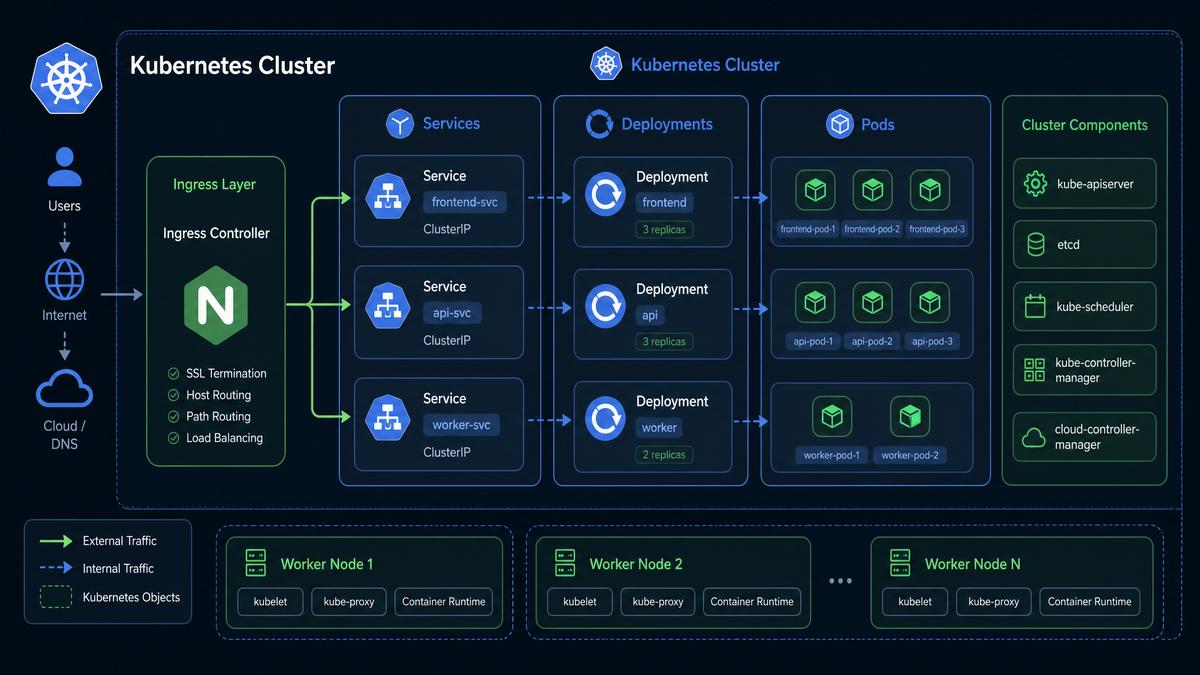
Kubernetes (K8s) is the de facto standard for container orchestration in production environments. Automating K8s manifests, Helm charts, and kubectl commands through Codex CLI prompts can dramatically speed up cluster management and application deployment.
Prompt 11: Generate a Kubernetes Deployment YAML for a Python Flask App
Write a Kubernetes deployment YAML manifest to deploy a Python Flask application using image flask-app:latest, with 3 replicas, resource limits (CPU 500m, memory 256Mi), and environment variables for DATABASE_URL and REDIS_HOST.Expected Output: A complete deployment.yaml file with metadata, spec, container settings, and environment variables configured.
apiVersion: apps/v1
kind: Deployment
metadata:
  name: flask-app
  labels:
    app: flask-app
spec:
  replicas: 3
  selector:
    matchLabels:
      app: flask-app
  template:
    metadata:
      labels:
        app: flask-app
    spec:
      containers:
      - name: flask-container
        image: flask-app:latest
        resources:
          limits:
            cpu: "500m"
            memory: "256Mi"
        env:
        - name: DATABASE_URL
          value: "postgres://user:pass@db:5432/appdb"
        - name: REDIS_HOST
          value: "redis-service"
Prompt 12: Create a Helm Chart Template for a Microservice
Generate a Helm chart directory structure with templates for deployment, service, and ingress, parameterized for image repository, service port, and ingress host.Usage Tip: Use this prompt iteratively to customize values.yaml and add ConfigMaps or Secrets templates for sensitive configuration.
Comparison Table: Manual vs. Codex-Generated Kubernetes YAMLs
| Aspect | Manual YAML Creation | Codex-Generated YAML |
|---|---|---|
| Speed | Slow, requires expertise and repeated edits | Fast generation from natural language prompts |
| Customization | Highly customizable but error-prone | Customizable via prompt parameters and follow-up edits |
| Validation | Manual or with external tools | Needs external validation tools after generation |
| Maintainability | Depends on documentation and conventions | Prompt history can be stored for reproducibility |
Expert Analysis
Codex-generated Kubernetes manifests excel in rapid prototyping and standardizing deployments for microservice architectures. However, engineers should integrate generated YAMLs into CI pipelines with automated validation (e.g., kubectl apply --dry-run=client) and security scanning to prevent misconfigurations or vulnerabilities.
3. Infrastructure as Code (IaC) Generation Prompts
Automating IaC creation is critical for consistent infrastructure provisioning. Codex can assist in generating Terraform, CloudFormation, and Pulumi scripts from high-level infrastructure descriptions.
Prompt 21: Generate a Terraform Script for AWS VPC with Public and Private Subnets
Write a Terraform configuration to create an AWS VPC with CIDR block 10.0.0.0/16, two public subnets in different AZs, two private subnets with NAT gateway, and appropriate route tables.Expected Output: Terraform files defining the VPC, subnets, NAT gateway, route tables, and necessary dependencies.
Prompt 22: Create a CloudFormation Template for an S3 Bucket with Versioning and Lifecycle Policy
Generate a CloudFormation YAML template to create an S3 bucket named 'my-app-logs' with versioning enabled and a lifecycle policy to transition objects to Glacier after 30 days.Practical Tips for IaC Prompting
- Specify provider details and resource dependencies explicitly in prompts to avoid incomplete scripts.
- Use modular prompt design: generate individual resource templates first, then combine.
- Include output variables and state management commands in prompts to aid integration into pipelines.
- Validate generated IaC with
terraform validateoraws cloudformation validate-templatebefore deployment.
Real-World Scenario
A DevOps team used Codex prompts to bootstrap multi-environment Terraform codebases, enabling consistent staging and production infrastructure with minimal manual edits. This reduced onboarding time for new engineers and enforced infrastructure compliance.
4. Security and Compliance Automation Prompts
Security automation is paramount in modern DevOps. Codex CLI prompts can generate scripts and configurations for vulnerability scanning, compliance auditing, and secrets management.
Prompt 31: Write a Bash Script to Scan Docker Images for Vulnerabilities Using Trivy
Generate a bash script that scans a Docker image named 'backend-service:latest' for vulnerabilities using Trivy, outputs a JSON report, and exits with a non-zero status if critical vulnerabilities are found.Prompt 32: Create a Policy as Code Example Using OPA Rego to Enforce Tagging
Write an Open Policy Agent (OPA) Rego policy that denies Kubernetes pod creation if the pod metadata lacks a 'team' label.Expected Output: A Rego policy file with rule definitions and examples of policy violation messages.
Comparison Table: Security Automation Tools Supported by Codex Prompts
| Tool | Use Case | Codex Prompt Examples | Integration Tips |
|---|---|---|---|
| Trivy | Container vulnerability scanning | Generate scan scripts, JSON reports | Integrate with CI/CD pipelines, fail builds on critical issues |
| OPA (Open Policy Agent) | Policy enforcement as code | Write Rego policies, test cases | Embed in admission controllers, automate compliance audits |
| HashiCorp Vault | Secrets management | Generate Vault ACL policies, secret retrieval scripts | Use dynamic secrets and least privilege principles |
Professional Recommendation
Automate security checks as gatekeepers in deployment pipelines. Codex-generated scripts should be reviewed and combined with existing security infrastructure to avoid gaps. Use prompt templates that include parameters for severity thresholds and notification mechanisms.
5. Monitoring and Incident Response Automation Prompts
Proactive monitoring and rapid incident response are essential for maintaining service reliability. Codex can generate monitoring configurations, alert rules, and automated remediation scripts.
Prompt 41: Generate a Prometheus Alert Rule for High CPU Usage
Write a Prometheus alerting rule that triggers if any node’s CPU usage is above 85% for more than 5 minutes, with labels severity=critical and team=ops.Expected Output: YAML snippet for PrometheusRule custom resource or alert.rules file.
Prompt 42: Create a PagerDuty Incident Trigger Script Using the API
Generate a Python script that triggers a PagerDuty incident via REST API with a customizable service key, incident title, and description.Practical Tip: Combining Monitoring with ChatOps
Codex prompts can generate scripts that integrate alerts with ChatOps platforms (Slack, Microsoft Teams) to notify teams and collect incident acknowledgments. Example prompt: “Write a Slack bot script that posts Prometheus alerts to #alerts channel and allows acknowledgment commands.”
Real-World Scenario
At a large SaaS company, Codex-generated alerting rules and PagerDuty integration scripts were used to automate escalation workflows. This decreased mean time to acknowledge (MTTA) by 30% and standardized alert metadata for easier triage.
6. Database Operations and Backup Automation Prompts
Database maintenance and backup tasks are critical yet repetitive. Codex CLI prompts can automate backup scripts, schema migrations, and performance tuning commands.
Prompt 51: Write a Bash Script to Backup PostgreSQL Database and Upload to AWS S3
Generate a bash script that dumps a PostgreSQL database named 'appdb' using pg_dump, compresses the dump, and uploads it to an S3 bucket 'db-backups' with a timestamped filename.Prompt 52: Create a Liquibase ChangeLog XML for Adding a New Column to a Table
Write a Liquibase changelog XML snippet to add a non-nullable column 'last_login' of type TIMESTAMP to the 'users' table, with a default value of current timestamp.Comparison Table: Database Backup Strategies Generated via Codex Prompts
| Backup Type | Prompt Example | Advantages | Considerations |
|---|---|---|---|
| Full Dump | Backup entire database to compressed file | Simple, easy to restore | Longer backup window, higher storage |
| Incremental | Backup changed data using WAL or binlogs | Faster, smaller storage footprint | Requires complex restore procedures |
| Snapshot | Automate EBS or cloud snapshot creation | Fast, consistent backups | Dependent on underlying storage tech |
Professional Recommendation
Combine Codex-generated backup scripts with monitoring to verify backup success and automate retention policies. Use prompts that include error handling and logging to ensure operational visibility.
For a deeper exploration of related concepts, our comprehensive article on Anti-Goal Prompting and XML Scaffolding: Two Advanced Techniques That Boost AI Accuracy by 30% in 2026 provides detailed analysis, practical examples, and expert recommendations that complement the strategies discussed in this section.
Access 40,000+ AI Prompts for ChatGPT, Claude & Codex — Free!
Subscribe to get instant access to our complete Notion Prompt Library — the largest curated collection of prompts for ChatGPT, Claude, OpenAI Codex, and other leading AI models. Optimized for real-world workflows across coding, research, content creation, and business.
Conclusion: Empowering DevOps with Codex CLI Prompting
The 50 production-ready Codex CLI prompts showcased in this playbook represent a powerful toolkit for automating a broad spectrum of DevOps and infrastructure tasks. By leveraging natural language prompts to generate infrastructure manifests, CI/CD pipelines, containerization scripts, monitoring configurations, incident response automation, security scans, and database operations, engineers drastically reduce manual effort, improve consistency, and accelerate delivery cycles.
Successful adoption requires precise prompting, rigorous output validation, and integration with existing toolchains. As AI models evolve, the boundary between human intent and machine-executed infrastructure will continue to blur, ushering in a new era of intelligent automation.
Explore the prompts in this playbook, customize them to your environment, and incorporate them into your DevOps workflows to unlock unprecedented productivity and reliability. For further deep dives into AI-enhanced infrastructure management, see
For a deeper exploration of related concepts, our comprehensive article on Build Autonomous Coding Agents with OpenAI Codex and GPT-5.5: Complete 2026 Guide provides detailed analysis, practical examples, and expert recommendations that complement the strategies discussed in this section.
.
