
Introduction to Codex Plugins Masterclass
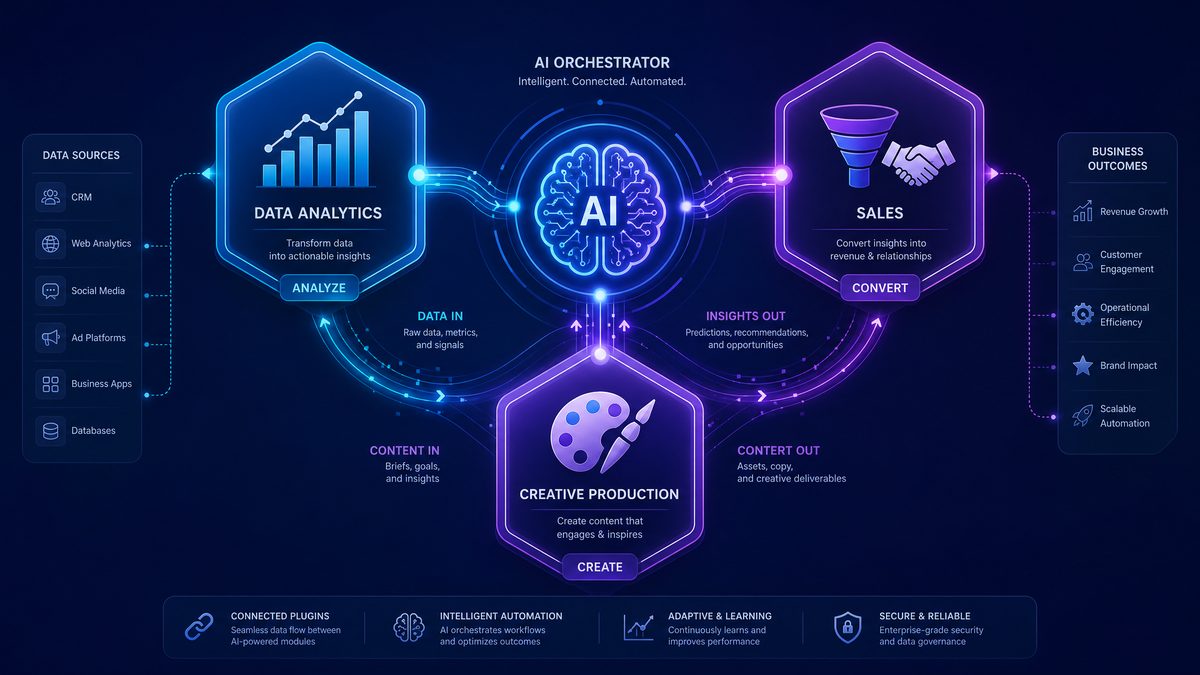
With the launch of OpenAI’s Codex plugins on June 2, 2026, a new era of AI-powered workflows has arrived. These plugins augment the Codex model’s capabilities, enabling domain-specific, contextually rich, and highly interactive tasks across industries. This masterclass dives deep into the three flagship Codex plugins: Data Analytics, Sales, and Creative Production. We will explore advanced prompt engineering techniques, multi-step chaining strategies, cross-plugin synergy, and optimization best practices to unlock their full potential.
Additionally, we will cover how the Sites feature elevates outputs into interactive dashboards and reports, how Annotations enable precision editing of plugin results, and best practices for enterprise deployment. By mastering these plugins, professionals in analytics, sales, and marketing can significantly boost productivity, accuracy, and creativity.
1. Data Analytics Plugin: Unlocking Insight from Data
Capabilities and Integration
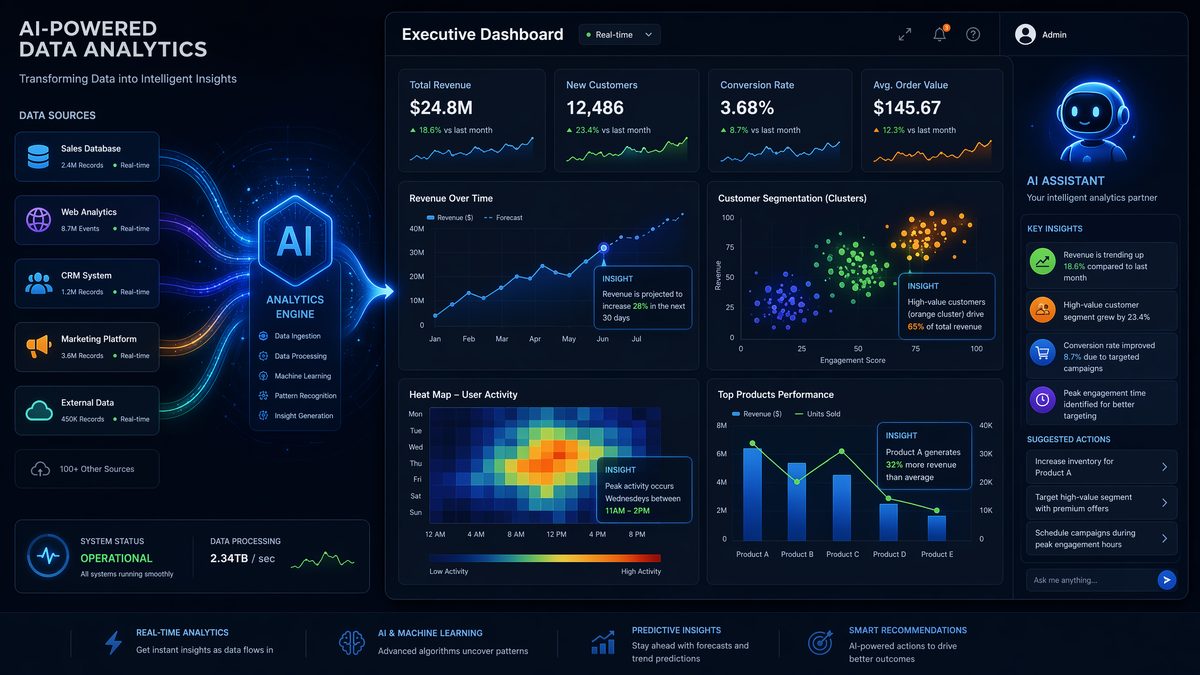
The Data Analytics plugin is designed to facilitate end-to-end data exploration, statistical analysis, visualization, and dashboard generation directly through Codex prompts. It seamlessly integrates with popular data sources such as SQL databases, cloud storage buckets, and CSV files, allowing users to query, manipulate, and visualize large datasets with natural language requests. The plugin supports complex statistical models, trend detection, anomaly identification, and interactive dashboards that can be embedded into Sites for real-time collaboration.
Advanced Prompts for Data Analytics
- Data Exploration:
“Load the sales_data.csv file, summarize the key columns, and identify any missing values or outliers.” - Visualization Creation:
“Create a time series line chart showing monthly revenue trends for the past 3 years, highlighting seasonal patterns.” - Statistical Analysis:
“Perform a regression analysis to determine the impact of advertising spend on product sales, including confidence intervals.” - Dashboard Assembly:
“Generate a sales performance dashboard with KPIs such as total revenue, average order value, and customer churn rate, updated daily.” - Anomaly Detection:
“Identify any outliers or sudden drops in website traffic data over the last 6 months and suggest possible causes.” - Correlation Matrix:
“Compute and visualize the correlation matrix for customer demographics and purchase behavior variables.” - Forecasting:
“Use ARIMA to forecast next quarter’s sales based on historical monthly data, providing a 95% confidence interval.” - Segment Analysis:
“Cluster customers into 4 segments based on purchase frequency, average spend, and product preferences.” - Automated Reporting:
“Generate a weekly automated report summarizing key metrics and trends, formatted for executive review.” - Custom SQL Query:
“Write an optimized SQL query to extract top 10 products by revenue in the last year, grouped by region.”
Prompt Chaining Strategies
Effective workflows often require chaining multiple prompts to build progressively complex analyses. For example:
- Step 1: Load and clean dataset—
“Import the customer_data.csv, remove duplicates, and fill missing age values with the median.” - Step 2: Perform clustering—
“Cluster customers into segments based on age, income, and purchase frequency.” - Step 3: Visualize clusters—
“Create a 3D scatter plot representing each cluster with distinct colors.” - Step 4: Generate report—
“Summarize the characteristics and size of each cluster in a report.”
This chaining enables modular, interpretable analytic workflows that can be iteratively refined.
Combining Data Analytics with Sales Plugin
Cross-plugin integration unlocks powerful business insights. For instance, use the Data Analytics plugin to segment leads based on behavioral data, then use the Sales plugin to assign lead scores and generate targeted outreach messages. Example prompt:
“From the customer purchase dataset, identify high-value leads using clustering, then score leads based on engagement metrics and generate personalized email templates for the top 20 leads.”Optimization Tips for Better Outputs
- Be explicit about data sources and formats to ensure accurate loading.
- Use clear metric definitions and specify time windows precisely.
- For statistical tests, specify confidence levels and assumptions.
- Request visualizations with labeled axes and legends to avoid ambiguity.
- Leverage prompt chaining to separate data cleaning from analysis for clarity.
Real-World Use Case: Retail Sales Performance Analysis
A retail chain used the Data Analytics plugin to integrate sales data from multiple stores, identify underperforming regions via heatmaps, forecast inventory needs, and build an interactive dashboard for executives. Prompt chaining enabled them to automate weekly updates and highlight anomalies such as sudden drops in specific product categories.
2. Sales Plugin: Driving Revenue with AI-Powered Sales Insights
Capabilities and Integration
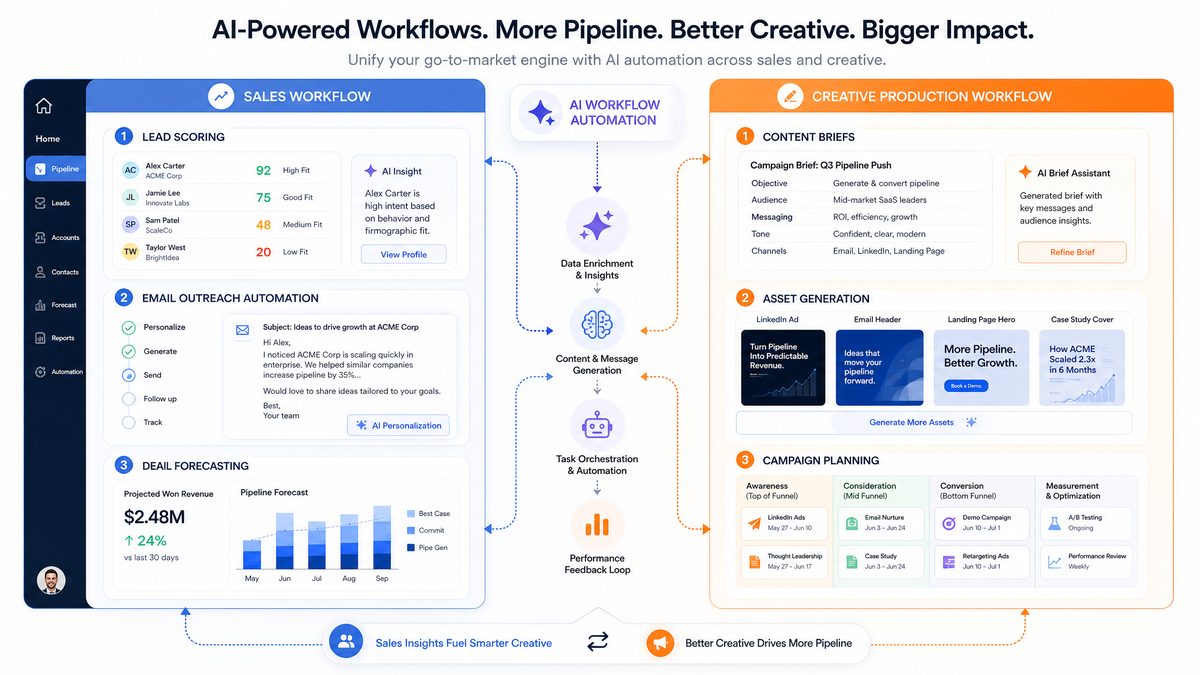
The Sales plugin is tailored to optimize customer acquisition and pipeline management. It integrates with CRM systems, email platforms, and calendar tools to provide lead scoring, pipeline analysis, outreach message generation, and sales forecasting. The plugin supports multi-channel workflows and enables sales teams to prioritize efforts with AI-generated insights and personalized communications.
Advanced Prompts for Sales Plugin
- Lead Scoring:
“Score the current lead list based on engagement history, company size, and past purchase behavior, ranking them from highest to lowest conversion probability.” - Pipeline Analysis:
“Analyze the sales pipeline and identify stages where the longest deal stagnation occurs, suggesting possible bottlenecks.” - Outreach Generation:
“Generate a personalized cold email sequence for a software product targeting CTOs in the finance industry, emphasizing security features.” - Sales Forecasting:
“Forecast monthly revenue for the next 6 months based on current pipeline data, accounting for historical close rates.” - Churn Risk Identification:
“Identify customers at risk of churning based on recent engagement and support ticket frequency.” - Deal Prioritization:
“Rank active deals by likelihood to close this quarter, factoring in deal size and client responsiveness.” - Follow-up Scheduling:
“Suggest optimal follow-up times for leads based on prior contact history and time zones.” - Competitor Analysis:
“Generate a summary comparing our product features with top 3 competitors for use in sales pitches.” - Proposal Drafting:
“Draft a sales proposal for a mid-sized healthcare client, highlighting cost savings and compliance benefits.” - Lead Qualification Questions:
“Create a list of qualifying questions to assess lead fit for a B2B SaaS platform.”
Prompt Chaining Strategies
Sales workflows benefit greatly from chaining, for example:
- Step 1: Score leads—
“Analyze the lead database and assign lead scores.” - Step 2: Generate outreach—
“Create personalized email sequences for top 10 leads.” - Step 3: Schedule follow-ups—
“Suggest follow-up timing for each lead.” - Step 4: Monitor pipeline—
“Provide weekly pipeline health summary with risks and opportunities.”
This modular approach improves clarity and adaptability.
Combining Sales Plugin with Creative Production Plugin
Pairing Sales with Creative Production enables seamless campaign execution: generate targeted outreach (Sales plugin) and then create complementary digital assets and A/B test variants (Creative Production plugin). Example:
“Create a lead scoring report for Q2, then generate email campaign content and social media visuals tailored to the top customer segments, including A/B test variations for subject lines and images.”Optimization Tips for Better Outputs
- Provide detailed lead attributes and engagement context for precise scoring.
- Use industry and persona specifications in outreach generation prompts.
- Specify tone and style preferences to align with brand voice.
- Leverage chaining to break down complex sales tasks into manageable steps.
- Regularly provide feedback and use Annotations to refine generated messages.
Real-World Use Case: SaaS Sales Pipeline Optimization
A SaaS company integrated the Sales plugin with their CRM to automatically score leads, generate personalized outreach emails, and forecast quarterly revenue. By chaining lead scoring with outreach generation and follow-up scheduling prompts, they increased their qualified meeting rate by 30% and improved forecast accuracy.
For a deeper exploration of related AI capabilities and implementation strategies, our comprehensive resource on GPT-5.5 Prompts for Supply Chain and Operations Management: Demand Forecasting, Inventory Optimization, and Logistics provides additional context, practical examples, and expert analysis that extends the concepts covered in this article.
3. Creative Production Plugin: Accelerating Content and Campaign Creation
Capabilities and Integration
The Creative Production plugin empowers marketing and creative teams to automate content briefs, generate digital assets, plan campaigns, and perform A/B testing. It integrates with design tools, content management systems, and analytics platforms to streamline the creative lifecycle from ideation to performance evaluation. The plugin supports multi-format content generation including copywriting, image creation, video storyboard drafts, and campaign timelines.
Advanced Prompts for Creative Production
- Content Brief Generation:
“Create a detailed content brief for a blog post on AI in healthcare, targeting medical professionals and emphasizing ethical considerations.” - Digital Asset Creation:
“Generate three concept ideas for social media graphics promoting our new eco-friendly product line.” - Campaign Planning:
“Outline a 6-week digital marketing campaign for a product launch, including key channels, messaging, and milestones.” - A/B Testing Setup:
“Design an A/B test plan comparing two email subject lines for conversion rates, specifying KPIs and sample size.” - Video Storyboarding:
“Create a storyboard outline for a 60-second product demo video targeting millennials.” - Copywriting Variations:
“Generate five headline variations for a landing page promoting a financial planning app.” - SEO Optimization:
“Suggest SEO keywords and meta descriptions for a webpage about sustainable packaging solutions.” - Social Media Calendar:
“Create a social media posting calendar for May, focusing on engagement and brand awareness.” - Performance Analysis:
“Analyze A/B test results from last month’s email campaign and recommend optimizations.” - Influencer Collaboration Plan:
“Draft a collaboration proposal for micro-influencers to promote our new fitness app.”
Prompt Chaining Strategies
Typical creative workflows involve sequential prompt chaining:
- Step 1: Generate campaign brief—
“Outline campaign goals and target audience.” - Step 2: Create content assets—
“Produce social media graphics and copy based on the brief.” - Step 3: Plan A/B tests—
“Design tests for headlines and images.” - Step 4: Analyze results—
“Summarize A/B test outcomes and recommend next steps.”
This chaining ensures creative consistency and data-driven optimization.
Combining Creative Production with Data Analytics Plugin
Integrating creative and analytics plugins creates a feedback loop to enhance campaign effectiveness. For example:
“Generate a campaign content plan for Q3, then analyze past campaign data to identify top-performing creative elements and incorporate those insights into the new plan.”Optimization Tips for Better Outputs
- Provide audience demographics and brand guidelines upfront.
- Specify content format, tone, and channel context clearly.
- Use iterative prompt refinement and Annotations to polish generated assets.
- Leverage chaining for comprehensive campaign creation and evaluation.
- Incorporate performance data from analytics for informed creative decisions.
Real-World Use Case: Integrated Marketing Campaign Automation
A global FMCG brand used the Creative Production plugin to automate content brief creation, asset generation, and A/B testing plans. By integrating with the Data Analytics plugin, they continuously optimized campaigns based on engagement metrics, reducing time-to-market by 40% and improving campaign ROI significantly.
The expanding Codex ecosystem introduces powerful new capabilities for enterprise teams. Our detailed breakdown of The Complete Guide to Codex Role-Specific Plugins: Data Analytics, Sales, Creative Production, and More explores how these features integrate with existing workflows and unlock new productivity gains across departments.
Enhancing Plugin Outputs with Sites Feature
The Sites feature transforms static plugin outputs into interactive, shareable web experiences. For Data Analytics, it enables embedding dynamic dashboards with filterable charts, drill-downs, and real-time data refresh. Sales teams can access live pipeline reports and lead scoring visualizations with customizable views. Creative teams benefit from interactive campaign timelines and asset galleries that update as content evolves.
Sites facilitate collaboration by allowing stakeholders to comment, annotate, and suggest edits directly within the interface, bridging the gap between AI-generated insights and human decision-making.
Precision Editing with Annotations Feature
The Annotations feature empowers users to perform granular edits on plugin outputs. Whether refining a data visualization, adjusting lead scoring criteria, or tweaking creative copy, users can highlight sections, add comments, and request specific modifications. This iterative feedback loop enables continuous improvement and alignment with business goals, ensuring AI outputs meet exacting standards.
Best Practices for Enterprise Deployment of Codex Plugins
| Category | Best Practice | Description |
|---|---|---|
| Security | Role-Based Access Controls | Limit plugin usage and data access based on user roles to protect sensitive information. |
| Data Governance | Centralized Data Management | Ensure consistent data sources and schema definitions across teams using plugins. |
| Training | Comprehensive User Onboarding | Provide training sessions on prompt engineering, chaining, and plugin-specific features. |
| Workflow Integration | Embed Plugins into Existing Tools | Integrate plugin calls within CRM, BI, and CMS platforms to streamline user adoption. |
| Performance Monitoring | Usage Analytics and Feedback Loops | Track plugin usage patterns and collect user feedback for continuous improvement. |
| Customization | Tailor Prompts and Models | Customize prompt templates and fine-tune models for domain-specific accuracy. |
| Collaboration | Shared Workspaces and Annotation Use | Encourage team collaboration through shared Sites and structured annotation workflows. |
Advanced Prompt Engineering Techniques for Codex Plugins
Understanding Contextual Prompting for Enhanced Accuracy
Prompt engineering is a critical skill when working with Codex plugins. It involves designing input prompts that guide the AI to generate highly relevant and accurate outputs. To maximize the potential of the Data Analytics, Sales, and Creative Production plugins, it’s essential to understand how context influences AI responses.
For example, when using the Data Analytics plugin, including precise data descriptors and specifying the desired analysis type (e.g., trend analysis, anomaly detection) significantly improves output quality. Below is a practical example:
{
  "prompt": "Analyze the quarterly sales data for 2025, focusing on identifying any significant upward or downward trends in the North American region."
}
Here, the explicit mention of ‘quarterly sales data,’ ‘2025,’ and ‘North American region’ guides the plugin to produce a focused report, avoiding irrelevant generalizations.
Chaining Prompts for Complex Multi-Step Tasks
Multi-step chaining allows you to break down complex workflows into manageable stages, feeding intermediate outputs back into subsequent prompts. This technique is particularly effective when combining multiple plugins or when the task requires iterative refinement.
Consider a sales forecasting use case where you first extract historical sales data using the Data Analytics plugin, then generate personalized customer outreach scripts using the Sales plugin, and finally create marketing visuals with the Creative Production plugin.
| Step | Plugin | Purpose | Example Prompt |
|---|---|---|---|
| 1 | Data Analytics | Extract past 12 months sales trends | “Provide a monthly sales breakdown for 2025 by product category.” |
| 2 | Sales | Generate tailored outreach scripts for key clients | “Create personalized email templates targeting high-value clients in the technology sector.” |
| 3 | Creative Production | Design marketing visuals for email campaigns | “Produce a banner image emphasizing our Q3 sales growth with modern, clean aesthetics.” |
This structured approach ensures each plugin complements the next, resulting in a cohesive AI-driven workflow.
Industry Applications and Use Cases of Codex Plugins
Healthcare: Accelerating Clinical Data Insights
In healthcare, the Data Analytics plugin can process clinical trial data, electronic health records, and patient feedback to identify emerging health trends or adverse event patterns. For example, a hospital might use the plugin to analyze patient recovery times across different treatments, enabling evidence-based decision-making.
The Sales plugin supports medical device companies by generating customized sales pitches and regulatory compliance messaging tailored for healthcare providers. Meanwhile, the Creative Production plugin assists marketing teams in creating educational materials and patient engagement content that comply with strict healthcare regulations.
Financial Services: Optimizing Client Engagement
Financial advisors can harness the Data Analytics plugin to parse market data, portfolio performance, and risk assessments. This granular analysis informs personalized investment strategies. The Sales plugin can then create targeted communication for prospects based on their risk profiles and investment goals.
Creative Production enhances client presentations with dynamic infographics and tailored reports, making complex financial concepts accessible and visually compelling.
Step-by-Step Guide: Deploying Codex Plugins in Enterprise Environments
Step 1: Assessing Business Needs and Use Case Identification
Begin by identifying specific workflows that can benefit from AI augmentation. Map out pain points, data sources, and desired outcomes. Engage stakeholders across departments to ensure alignment and gather comprehensive requirements.
Step 2: Setting Up the Plugin Environment
Establish a secure environment for plugin deployment. This involves configuring API access, defining user roles, and integrating with existing enterprise systems such as CRMs or data warehouses.
curl -X POST https://api.openai.com/v1/plugins/install \
  -H "Authorization: Bearer YOUR_API_KEY" \
  -d '{"plugin": "codex-data-analytics", "version":"latest"}'
Step 3: Customizing Plugin Parameters and Templates
Leverage plugin configuration options to tailor outputs to your organization’s terminology and style guidelines. Develop prompt templates for recurring tasks to maintain consistency and efficiency.
Step 4: Training and Onboarding Users
Conduct training sessions focused on prompt engineering best practices and plugin capabilities. Encourage experimentation and feedback to continuously improve usage patterns.
Step 5: Monitoring, Evaluation, and Continuous Improvement
Implement monitoring tools to track plugin performance, user satisfaction, and ROI metrics. Use this data to refine prompts, expand use cases, and plan for scaling.
Future Outlook: The Evolution of Codex Plugins in AI Workflows
Integration with Emerging Technologies
The future of Codex plugins lies in deeper integration with technologies such as augmented reality (AR), Internet of Things (IoT), and blockchain. For instance, combining Codex plugins with AR could enable real-time data visualization in manufacturing, while blockchain integration might enhance data provenance and security in analytics workflows.
Advancements in Multi-Modal AI Capabilities
As AI models evolve to process text, images, audio, and video simultaneously, Codex plugins will expand their creative and analytical capabilities. This will empower users to generate richer, multi-dimensional content and insights within a single workflow.
Access 40,000+ AI Prompts for ChatGPT, Claude & Codex — Free!
Subscribe to get instant access to our complete Notion Prompt Library — the largest curated collection of prompts for ChatGPT, Claude, OpenAI Codex, and other leading AI models. Optimized for real-world workflows across coding, research, content creation, and business.
Industry-Specific Plugin Ecosystems
We anticipate the emergence of specialized plugin marketplaces tailored to vertical industries such as legal, education, and entertainment. These ecosystems will foster community-driven development, accelerating innovation and adoption.
Ethical AI and Responsible Use
With increased reliance on AI plugins, enterprises must prioritize ethical considerations including bias mitigation, transparency, and data privacy. Codex plugin developers are expected to incorporate advanced auditing and explainability features to support responsible AI practices.
Integrating Codex Plugins with Existing Enterprise Systems
Seamless API Integration Strategies
One of the key advantages of Codex Plugins is their ability to integrate smoothly with existing enterprise systems such as CRM platforms, data warehouses, and ERP solutions. To achieve seamless API integration, organizations should follow these best practices:
- Identify Key Touchpoints: Map out where Codex Plugin outputs will feed into or pull data from existing systems. For example, integrating the Sales Plugin with Salesforce can automate lead scoring and opportunity insights.
- Use Middleware for Data Transformation: Employ middleware tools like Mulesoft or Apache NiFi to convert data formats and ensure compatibility between Codex Plugins and legacy systems.
- Implement Robust Authentication: Ensure secure API calls by adopting OAuth 2.0 or JWT tokens, protecting sensitive enterprise data during plugin interactions.
- Monitor API Performance: Utilize API gateways with rate limiting and logging to maintain optimal performance and quickly troubleshoot issues.
For example, a retail company integrating the Data Analytics Plugin with their supply chain management system saw a 15% reduction in inventory shortages within three months by automating demand forecasting updates.
Case Study: Codex Plugins in Healthcare IT Systems
In healthcare, integrating Codex Plugins with Electronic Health Records (EHR) systems can enhance clinical decision-making. A hospital network integrated the Creative Production Plugin to generate patient education materials tailored to individual conditions, leveraging real-time data from their EHR. This led to a 20% increase in patient adherence to treatment plans within six months.
Key steps included:
- Mapping patient data fields to plugin input parameters.
- Setting up secure API endpoints compliant with HIPAA regulations.
- Training clinical staff on interpreting and customizing generated content.
Measuring and Optimizing the Performance of Codex Plugins
Key Performance Indicators (KPIs) for Plugin Success
To ensure Codex Plugins deliver tangible business value, enterprises should establish clear KPIs tailored to plugin function and organizational goals. Examples include:
| Plugin | Relevant KPIs | Measurement Frequency | Optimization Focus |
|---|---|---|---|
| Data Analytics | Data accuracy %, query response time, insight adoption rate | Weekly | Model retraining, data source enrichment |
| Sales | Lead conversion rate, average deal size, sales cycle length | Monthly | Prompt refinement, integration depth |
| Creative Production | Content output volume, engagement metrics, revision rate | Bi-weekly | Template customization, style tuning |
Step-by-Step Plugin Performance Optimization Process
- Baseline Measurement: Collect initial KPI data for at least one full reporting period.
- Analyze Output Quality: Use user feedback and automated quality checks to identify common errors or shortcomings.
- Refine Prompts and Parameters: Adjust inputs based on analysis to improve relevance and accuracy.
- Enhance Data Inputs: Incorporate additional or higher-quality data sources where applicable.
- Train and Retrain Models: Schedule regular retraining cycles to adapt to evolving data and business needs.
- Continuous Monitoring: Set up dashboards for real-time KPI tracking and alerting.
Following this process, a financial services firm improved their Sales Plugin lead conversion rate by 12% within two quarters, primarily by iterating on prompt engineering and integrating richer CRM data.
Security and Compliance Considerations for Codex Plugins
Data Privacy and Governance
Enterprises must ensure that Codex Plugins comply with data privacy laws such as GDPR, CCPA, and industry-specific regulations. Key actions include:
- Data Minimization: Limit the amount of personal or sensitive data sent to plugins to only what is strictly necessary.
- Encryption: Use end-to-end encryption for data in transit and at rest within plugin workflows.
- Access Controls: Implement role-based access to plugin functionalities and outputs to prevent unauthorized use.
- Audit Trails: Maintain detailed logs of plugin interactions for compliance auditing and incident response.
Regulatory Compliance Frameworks
Depending on the industry, Codex Plugin deployment must align with frameworks such as HIPAA for healthcare, FINRA for financial services, or FedRAMP for government agencies. Enterprises should:
- Conduct comprehensive risk assessments before deployment.
- Engage with legal and compliance teams during plugin customization.
- Use vendor-provided compliance certifications and documentation.
- Implement regular compliance training for users interacting with plugins.
For example, a government contractor deploying Codex Plugins followed FedRAMP guidelines by hosting plugins within a FedRAMP-authorized cloud environment, ensuring all data handling met federal security standards.
Conclusion
The OpenAI Codex plugins launched in 2026 represent a paradigm shift in how AI augments professional workflows across data analytics, sales, and creative production. By mastering advanced prompt engineering, chaining strategies, and cross-plugin integrations, organizations can unlock unprecedented efficiency and insight generation. Leveraging the Sites and Annotations features further elevates outputs into interactive, collaborative assets that drive informed decision-making.
Enterprises adopting these plugins should focus on robust security, seamless workflow integration, and comprehensive user training to maximize impact. With the strategies outlined in this masterclass, professionals can confidently harness Codex plugins to transform data into action, engage customers more effectively, and accelerate creative innovation.
Embrace the future of AI-enhanced productivity with Codex plugins—the ultimate toolkit for data-driven, customer-centric, and creatively empowered organizations.
The expanding Codex ecosystem introduces powerful new capabilities for enterprise teams. Our detailed breakdown of The Complete Guide to Codex Role-Specific Plugins: Data Analytics, Sales, Creative Production, and More explores how these features integrate with existing workflows and unlock new productivity gains across departments.
The expanding Codex ecosystem introduces powerful new capabilities for enterprise teams. Our detailed breakdown of The Complete Guide to Codex Role-Specific Plugins: Data Analytics, Sales, Creative Production, and More explores how these features integrate with existing workflows and unlock new productivity gains across departments.
