
Apple Foundation Models Meet OpenAI: How WWDC 2026 Changes the AI Developer Landscape for ChatGPT and Codex Users
By Markos Symeonides
WWDC 2026 Turns Apple’s AI Strategy Into a Developer Platform
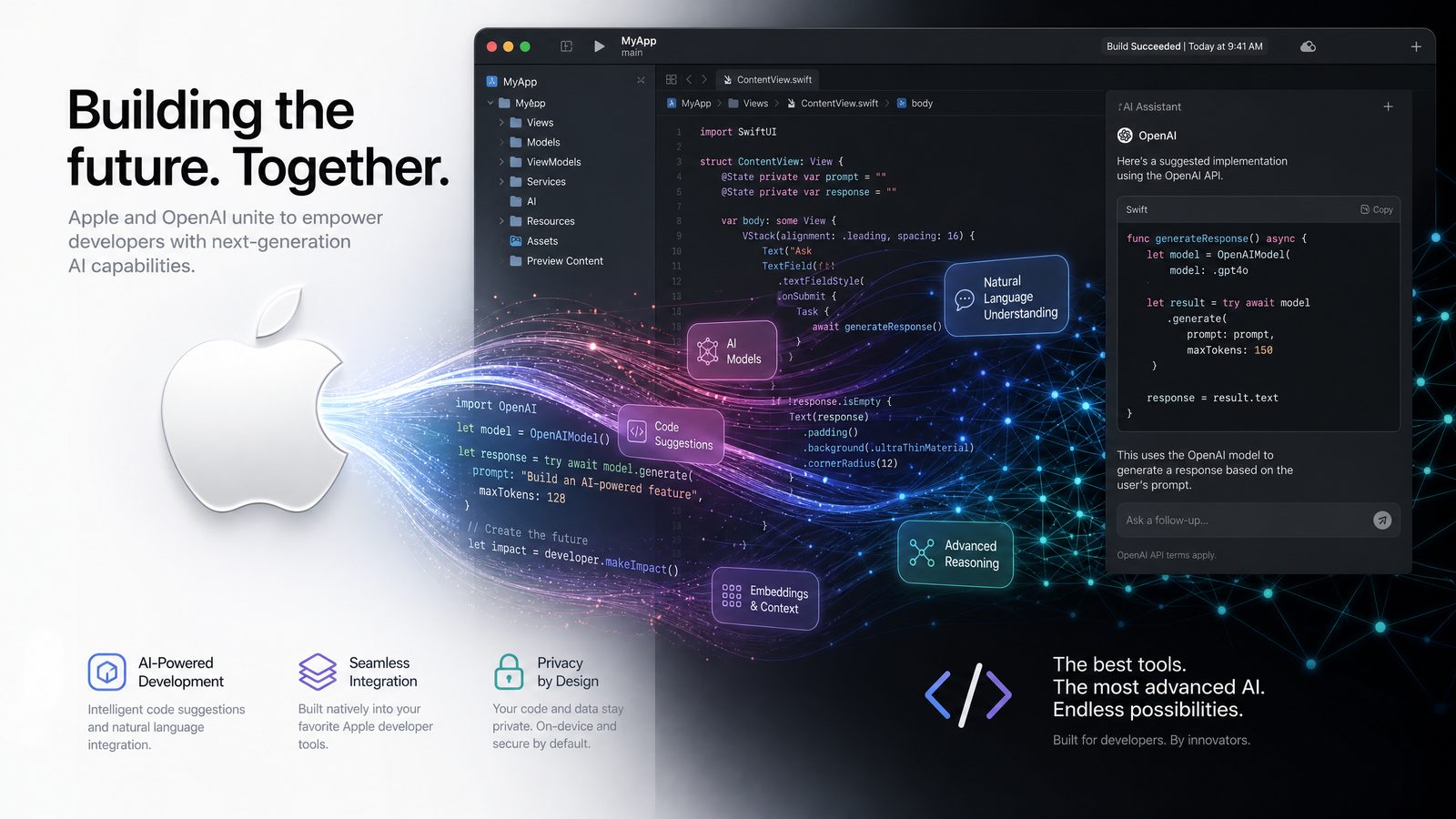
Apple WWDC 2026 marks a decisive shift in how artificial intelligence reaches iPhone, iPad, Mac, Vision Pro, and Apple Watch software. After several years of positioning Apple Intelligence as a user-facing layer across system apps, Apple has now made the stronger developer play: bringing Anthropic, Google, and OpenAI models into Xcode workflows and exposing Apple’s Foundation Models framework as a practical bridge between on-device inference, Private Cloud Compute, and third-party large language models.
For developers already using ChatGPT, OpenAI Codex, Claude, Gemini, or other coding assistants, the announcement changes the center of gravity. AI is no longer only a separate browser tab, terminal agent, or cloud API. It is now becoming part of the Apple developer stack: available during coding, app testing, interface design, documentation, localization, and runtime experiences inside iOS and macOS apps.
The headline is not simply that Apple is “adding AI to Xcode.” That phrase understates the scope. The more important development is that Apple is defining an AI orchestration layer for its ecosystem. The Foundation Models framework gives developers a way to use Apple Intelligence capabilities in apps, while Xcode AI integrates leading frontier models directly into the software creation workflow. Private Cloud Compute provides Apple’s privacy-preserving cloud inference path, and third-party model support gives teams choice when Apple’s local models are not enough.
That combination matters for ChatGPT and Codex users because it changes the workflow from external assistance to native collaboration. A Swift developer can now move from prompt-driven architecture planning, to generated code, to privacy-aware app features, to model evaluation, without leaving Apple’s toolchain. OpenAI’s participation also means that ChatGPT-style reasoning and Codex-like programming support can operate closer to the source files, build settings, interface definitions, and device targets that define modern Apple development.
Apple’s message at WWDC 2026 is clear: developers should not have to choose between the privacy and platform integration of Apple Intelligence and the capability of frontier cloud models. Instead, Apple wants to offer a layered system: small and efficient models on device, scalable inference through Private Cloud Compute, and specialized third-party models when a developer needs deeper reasoning, richer code generation, or broader world knowledge.
This is a major moment for iOS development. It also signals a more competitive AI development landscape. Microsoft has GitHub Copilot deeply integrated into Visual Studio Code. Google is building AI assistance around Android Studio and Gemini. OpenAI’s Codex has re-emerged as a serious agentic development environment. With WWDC 2026, Apple is making Xcode AI a first-class participant in that race, and it is doing so with a privacy architecture that differs meaningfully from the typical SaaS coding assistant model.
What Apple Announced: Foundation Models, Xcode AI, and Third-Party Model Choice
The most consequential WWDC 2026 announcement for developers is the expansion of the Foundation Models framework from a system intelligence capability into a more complete developer interface. In practical terms, the framework gives apps a structured way to request language understanding, generation, summarization, transformation, classification, and task execution using Apple Intelligence infrastructure.
Apple’s approach is not to expose a single monolithic chatbot API. Instead, the Foundation Models framework appears designed around task-specific sessions, model availability, privacy context, and controlled generation. Developers can request a capability, define instructions, pass structured input, and receive typed or semi-structured output. The important part is that the operating system participates in deciding how the request should run: on device when possible, through Private Cloud Compute when necessary, or through an approved third-party provider when the developer explicitly targets that path.
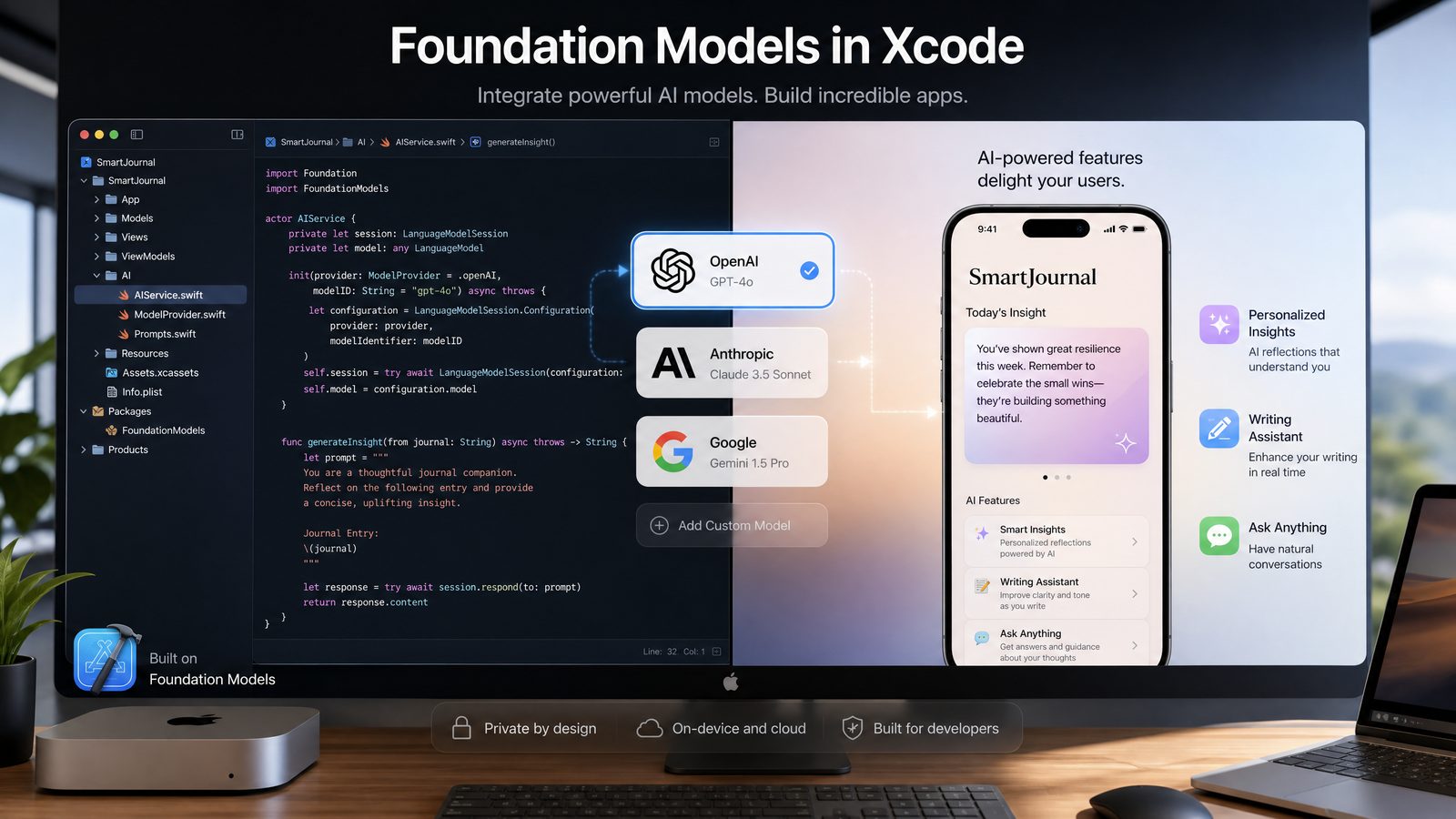
In Xcode, Apple’s AI tooling now reaches several stages of development. Developers can use model-backed assistance for code completion, refactoring, unit test generation, SwiftUI layout iteration, documentation drafts, migration guidance, and debugging. The addition of Anthropic, Google, and OpenAI as supported model providers is especially important because it suggests Xcode AI is not tied to one vendor’s strengths or weaknesses.
OpenAI models are likely to be attractive for developers who already rely on ChatGPT and Codex for app architecture, Swift code generation, XCTest creation, App Store copy drafting, and API integration work. Anthropic’s Claude models are often favored for long-context reasoning, codebase comprehension, and careful instruction following. Google’s Gemini models bring deep multimodal and Android-adjacent strengths, which can matter for cross-platform teams. Apple’s own models, meanwhile, can run close to user data and system features with less friction.
The strategic shift is that Apple is making model choice a platform feature. Instead of treating AI models as interchangeable remote endpoints, Apple is placing them behind a developer experience that understands app entitlements, privacy policies, device capabilities, OS versions, and user consent. This creates a more opinionated environment than a plain REST API call, but it also reduces the burden on developers who want AI features without building an entire governance layer themselves.
To understand the broader implications of these developments for your AI strategy, our in-depth coverage of Mastering Custom GPTs: How Developers Can Build and Deploy Tailored AI Assistants Using OpenAI’s Latest API Features examines the technical architecture, pricing considerations, and enterprise deployment patterns that define the current generation of AI capabilities.
The developer opportunity is substantial: iOS and macOS apps can now offer intelligent features that feel native, respect platform privacy expectations, and still access state-of-the-art reasoning where appropriate. The challenge is that developers must learn when to use which layer. Not every task needs a frontier model. Not every task should leave the device. Not every AI feature belongs in a user-facing interface. WWDC 2026 gives developers more power, but it also demands more architectural discipline.
Private Cloud Compute Is the Privacy Layer Behind Apple’s AI Ambition
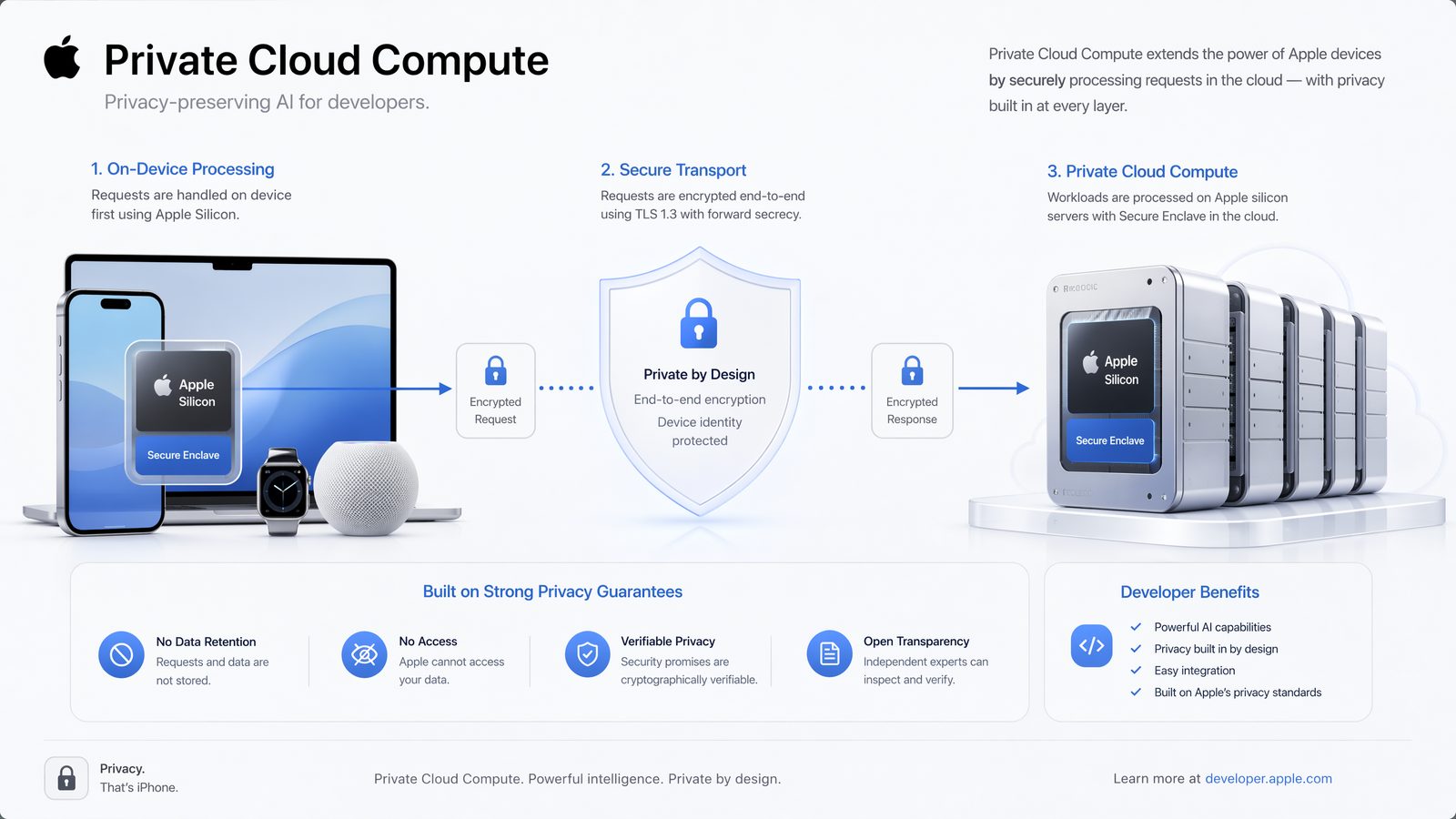
Private Cloud Compute remains the foundation of Apple’s differentiated AI story. The basic premise is straightforward: when an AI request is too large or complex to run on device, Apple can route it to Apple silicon servers designed to preserve privacy, minimize retained data, and provide verifiable assurances about the software environment handling the request.
That differs from the conventional cloud AI model, where prompts and context are sent to a provider’s API, processed in a generalized cloud environment, and governed by that provider’s data retention, logging, and training policies. Apple’s architecture attempts to bring cloud-scale inference closer to the security model of local computation. The system is designed so that data is not broadly accessible to Apple, is not retained beyond the request, and is processed only by publicly inspectable server software.
For developers, the most important implication is that Private Cloud Compute becomes a trust boundary. If an app uses Foundation Models to summarize a personal journal entry, analyze a user’s health note, classify private messages, or generate a response based on on-device context, developers can design around Apple’s privacy guarantees rather than building all inference on their own backend.
This is not just a legal or branding distinction. It changes product design. A finance app can consider natural-language transaction summaries without sending transaction histories to a third-party LLM provider. A healthcare app can offer patient-facing explanations while keeping sensitive context within Apple’s privacy architecture. A productivity app can summarize local documents without forcing developers to maintain an external vector database. A family app can use AI assistance while reducing exposure of children’s data.
Private Cloud Compute also matters for enterprise adoption. Large companies have often blocked consumer AI tools because prompts can contain proprietary source code, customer data, or regulated information. By tying cloud inference to Apple’s privacy-preserving infrastructure, Apple gives enterprise developers and IT administrators a more credible path to approve AI-enhanced apps on managed devices.
There are still hard questions. Developers will need clear diagnostics showing whether a request ran on device, in Private Cloud Compute, or through a third-party model. Enterprises will want policy controls, logs, model restrictions, and data residency commitments. App reviewers may scrutinize whether developers accurately disclose AI processing paths. Users will expect simple explanations of what happens to their data.
Apple’s advantage is that it controls the hardware, operating system, developer tools, and distribution layer. That makes it possible to create a vertically integrated AI privacy story. The risk is complexity. If the system is too opaque, developers may struggle to reason about behavior. If the constraints are too strict, power users may bypass the framework and call external models directly. The success of Private Cloud Compute will depend on whether Apple can make privacy-preserving inference feel both trustworthy and productive.
How Third-Party Models Fit Into Apple’s New AI Stack
The inclusion of Anthropic, Google, and OpenAI models in Apple’s developer workflow is not merely a partnership announcement. It reveals Apple’s recognition that no single model family will dominate every developer use case. Apple’s local and private-cloud models are optimized for platform integration, latency, privacy, and cost control. Frontier models from OpenAI, Anthropic, and Google are optimized for broader reasoning, coding performance, long-context understanding, multimodal capability, and rapid capability expansion.
The likely architecture is a layered model strategy. Apple models handle common on-device and system-aware tasks. Private Cloud Compute handles larger Apple Intelligence requests while preserving privacy properties. Third-party models become available when a developer or coding workflow requires capabilities beyond the local Apple model stack.
In Xcode, this may look like selecting a model for a development task: using OpenAI for complex Swift concurrency refactoring, Claude for reviewing a large codebase, Gemini for multimodal UI analysis, and Apple models for local code suggestions or documentation transformations. At runtime inside apps, developers may be able to declare model preferences or capabilities, then route requests based on availability, user permission, and policy.
For ChatGPT users, this is familiar but more structured. Today, a developer might copy an error message from Xcode into ChatGPT, ask for a fix, paste code back, then run tests. With Xcode AI, the model can potentially access the surrounding context directly: the file, symbol graph, build error, test failure, deployment target, and framework documentation. That context turns a general chatbot into a development assistant with better situational awareness.
For Codex users, the integration is even more important. Codex-style agents are most valuable when they can inspect repositories, make changes, run tests, evaluate failures, and iterate. If Apple allows OpenAI-powered coding assistance to operate within Xcode’s project model, developers could see a more native agentic workflow for iOS and macOS apps: describe a feature, allow the agent to modify Swift files and tests, review diffs, run on a simulator, then approve changes.
However, third-party model integration also introduces governance issues. Source code may contain secrets, proprietary algorithms, unpublished product plans, and customer-specific logic. Apple will need strong controls over what context is shared with external providers. Developers should expect settings for model selection, context scope, team policy, telemetry, and opt-out behavior. Enterprise teams will likely require managed configuration profiles that disable third-party model routing unless approved.
The practical takeaway is that Apple is not replacing OpenAI, Anthropic, or Google. It is mediating access to them. That mediation could become extremely valuable if it gives developers one consistent workflow while preserving model diversity. The developer no longer has to wire every model into every tool. Instead, the toolchain can provide the context, permissions, and interface, while models compete on capability.
Xcode AI: From Code Completion to Agentic iOS Development
Xcode has historically been powerful but conservative. It understands Swift deeply, integrates with simulators and Instruments, and provides Apple-specific tooling no general editor can fully replicate. But developers have often preferred Visual Studio Code or JetBrains tools for faster extension ecosystems and AI assistant availability. WWDC 2026 is Apple’s answer: make Xcode the best place to build Apple platform software with AI assistance that understands the Apple stack natively.
The first layer is intelligent code completion. This goes beyond predicting the next method call. A model integrated with Xcode can understand Swift type constraints, app lifecycle patterns, SwiftUI state management, App Intents, Core Data or SwiftData schemas, StoreKit flows, and platform availability annotations. It can suggest code that compiles against the selected SDK instead of generic Swift-like text.
The second layer is transformation. Developers can ask Xcode AI to migrate callback-based code to async/await, convert UIKit layouts to SwiftUI, generate previews, add accessibility labels, restructure networking layers, or create protocol-oriented abstractions. Because Xcode owns the build graph, the assistant can detect breakages and propose fixes across files.
The third layer is testing. XCTest generation is one of the most immediately useful AI workflows. A developer can select a view model, service class, or data transformer and request tests for success paths, failure paths, edge cases, cancellation, and localization. The model can create test doubles, simulate network errors, and update test targets.
The fourth layer is debugging. Instead of manually searching Stack Overflow or copying logs into ChatGPT, developers can ask Xcode AI to explain a crash, identify a race condition, interpret a Swift concurrency warning, or summarize an Instruments trace. A model that understands the current codebase and simulator environment can provide more precise guidance than a generic conversation.
The fifth layer is agentic feature development. This is the frontier Apple is moving toward. A developer describes a feature at a high level, the assistant proposes a plan, modifies files, generates tests, runs validation, and presents a diff for review. Apple’s key advantage is that Xcode already knows how to build, sign, run, profile, and archive Apple apps. Agentic coding becomes safer and more useful when it is tied to those existing lifecycle controls.
Here is a practical prompt template a developer could use inside an Xcode AI workflow for a SwiftUI feature:
Task: Add offline draft support to the JournalEntryEditorView.

Context to inspect:
- JournalEntryEditorView.swift
- JournalEntryViewModel.swift
- JournalStore.swift
- DraftPersistenceTests.swift

Requirements:
1. Save a local draft every 10 seconds when the editor has unsaved changes.
2. Restore the draft when the user reopens the editor.
3. Do not overwrite a server-synced entry that has a newer updatedAt timestamp.
4. Add unit tests for draft restore, conflict avoidance, and draft deletion after publish.
5. Keep changes compatible with iOS 19 and macOS 16.

Output:
- Brief implementation plan before code changes.
- Modify only files required for the feature.
- Run or propose XCTest coverage.
- Explain any tradeoffs in persistence strategy.
The prompt is specific, bounded, and test-oriented. That is the kind of instruction that works well with Codex-style agents and should translate effectively into Xcode AI. Developers should not ask for “make this app better.” They should define files, constraints, acceptance criteria, and expected validation.
The real productivity gain comes when the assistant can operate on the project rather than merely talk about it. That is why OpenAI integration in Xcode is strategically important. Codex users already understand the value of letting an agent reason across a repository. Apple now has an opportunity to make that experience native for iOS development.
Foundation Models Framework in Apps: What Developers Can Build
The Foundation Models framework is where WWDC 2026 becomes relevant not just to developers while they code, but to the apps they ship. By exposing model capabilities through platform APIs, Apple gives developers a way to bring Apple Intelligence-style features into their products without treating AI as an entirely separate backend service.
Consider a task manager app. With Foundation Models, it can convert a messy paragraph into structured tasks, infer due dates, prioritize action items, and suggest calendar blocks. A journaling app can summarize entries, identify recurring themes, and generate reflection prompts. A legal research app can classify documents and draft plain-language summaries while keeping sensitive material within approved processing paths. A photo management app can generate natural-language album descriptions. A developer tool can explain crash logs or convert release notes into App Store metadata.
The framework’s value depends on structured generation. Free-form text is useful, but production apps often need predictable output: JSON-like objects, enums, labels, confidence scores, or validated domain models. Developers should design AI features around schemas, constraints, and fallback behavior. AI output should be treated as probabilistic input, not trusted business logic.
A hypothetical Swift pattern for a Foundation Models-powered task extraction feature might look like this:
import Foundation
import FoundationModels

struct ExtractedTask: Codable {
    let title: String
    let dueDate: Date?
    let priority: Priority
    let sourcePhrase: String

    enum Priority: String, Codable {
        case low
        case medium
        case high
    }
}

final class TaskExtractionService {
    private let session = LanguageModelSession(
        instructions: """
        Extract actionable tasks from user text.
        Return only tasks that require a concrete action.
        Preserve the source phrase that supports each task.
        If a due date is ambiguous, set dueDate to nil.
        """
    )

    func extractTasks(from note: String) async throws -> [ExtractedTask] {
        let response = try await session.generate(
            input: note,
            output: [ExtractedTask].self
        )

        return response.filter { !$0.title.trimmingCharacters(in: .whitespaces).isEmpty }
    }
}
The names above are illustrative of the pattern developers should expect: create a model session, provide durable instructions, pass user input, request typed output, then validate before taking action. The same architecture applies whether the feature is summarization, classification, rewrite, entity extraction, or planning.
Developers should also design for availability. Not every device will support the same on-device model performance. Some requests may require a newer chip, an internet connection, user permission, or Private Cloud Compute availability. A robust app should have fallback paths: local rules, simpler AI behavior, manual editing, cached results, or server-side processing where appropriate.
Here is a practical runtime pattern for graceful degradation:
func summarizeDocument(_ document: Document) async -> SummaryResult {
    do {
        guard await FoundationModelAvailability.supports(.summarization) else {
            return .manualRequired("Summarization is not available on this device.")
        }

        let summary = try await summaryService.summarize(
            text: document.plainText,
            style: .concise,
            maximumLength: 180
        )

        return .success(summary)
    } catch ModelError.permissionDenied {
        return .manualRequired("AI processing is disabled for this document.")
    } catch ModelError.networkUnavailable {
        return .retryable("Connect to the internet to complete this summary.")
    } catch {
        return .manualRequired("Summary could not be generated. You can write one manually.")
    }
}
The most successful apps will not simply add a chatbot panel. They will use AI to remove friction from existing workflows. Apple’s framework encourages that approach because it fits into native app architecture. The goal is not to make every app conversational; it is to make apps more adaptive, context-aware, and efficient.
Apple Models vs OpenAI, Anthropic, and Google: Which Layer Should Developers Use?
WWDC 2026 gives developers more model options, but more options mean more architectural decisions. The right model path depends on privacy requirements, latency tolerance, cost, task complexity, context length, and user expectations. Developers should not default to the most powerful model for every request. They should choose the smallest, safest, and most reliable model that solves the task.
| Model Path | Best For | Primary Strength | Key Constraint | Developer Recommendation |
|---|---|---|---|---|
| On-device Apple models | Short summaries, rewriting, classification, personal context, low-latency interactions | Privacy, speed, offline or near-offline behavior, native integration | Smaller context and capability limits compared with frontier models | Use first for sensitive user data and lightweight app features |
| Private Cloud Compute | More complex Apple Intelligence requests that need greater compute | Cloud-scale inference with Apple’s privacy architecture | Requires Apple-controlled availability and policy support | Use when on-device capability is insufficient but privacy remains central |
| OpenAI models in Xcode or app workflows | Advanced code generation, reasoning, agentic development, complex natural-language tasks | Strong developer ecosystem, ChatGPT familiarity, Codex-style coding performance | External provider governance and data-sharing policies must be understood | Use for high-complexity coding and reasoning tasks with clear context controls |
| Anthropic Claude models | Long-context code review, careful document reasoning, policy-sensitive drafting | Strong instruction following and long-form analysis | May differ in tool-use behavior and integration depth inside Apple tooling | Use for large repository review, specs, architecture analysis, and compliance-heavy text |
| Google Gemini models | Multimodal analysis, cross-platform teams, media-heavy workflows | Multimodal capability and broad Google ecosystem alignment | Apple-native developer experience may vary by integration surface | Use where image, video, and cross-platform reasoning are central |
The key is to map task categories to model capabilities. A contact card cleanup feature should not call a frontier model if a local classifier can do the job. A complex app architecture refactor should not be forced through a tiny local model if an OpenAI or Anthropic model can reason across the codebase more effectively. A child safety or health-related feature should prioritize privacy and predictable behavior over novelty.
For ChatGPT and Codex users, the decision is often about where the work happens. During development, it may be appropriate to use OpenAI inside Xcode for code generation, test writing, and debugging. At runtime, the same app may rely mostly on Apple models and Private Cloud Compute to protect user data. This split is likely to become common: frontier models for building software, Apple’s privacy-preserving stack for shipping user-facing intelligence.
Cost also matters. AI features can become expensive if every user interaction triggers a large model call. Developers should cache outputs, batch non-urgent processing, use smaller models for routine transformations, and reserve frontier models for tasks where they materially improve outcomes. Apple’s local-first architecture may reduce operating costs for many app categories, especially consumer apps with high usage and low willingness to pay for AI add-ons.
Latency is another practical factor. On-device inference can provide immediate feedback for rewriting, smart replies, or classification. Cloud calls introduce network variability. For interactive UI elements, a 300-millisecond response and a three-second response create completely different product experiences. Developers should design interfaces that communicate progress, allow cancellation, and avoid blocking core actions on uncertain model responses.
The mature approach is a model routing strategy. Define each AI feature by sensitivity, complexity, latency need, and failure impact. Then route accordingly. This is less glamorous than demoing a chatbot, but it is the difference between an impressive prototype and a reliable production app.
Implications for ChatGPT and Codex Users Building iOS and macOS Apps
For developers who already use ChatGPT or Codex, Apple WWDC 2026 does not make existing workflows obsolete. It compresses them into a more native environment and raises expectations for integration quality. The habit of asking ChatGPT for a SwiftUI component, copying code into Xcode, fixing compiler errors manually, and then asking follow-up questions will increasingly feel inefficient.
Codex-style development inside Apple’s toolchain can change the cadence of building apps. Instead of treating AI as a consultant, developers can treat it as a project-aware collaborator. The assistant can examine files, propose changes, generate tests, and iterate against compiler output. That is especially powerful in Apple development because so many issues involve framework conventions, entitlements, provisioning, platform availability, and UI lifecycle details.
Consider a team building a subscription-based wellness app. Their Codex workflow might include generating SwiftData models, implementing StoreKit 2 purchase handling, writing onboarding screens in SwiftUI, creating accessibility audits, drafting localized strings, and writing tests for subscription state transitions. With OpenAI available through Xcode AI, those tasks can happen with direct awareness of project structure.
A practical development prompt for Codex inside Xcode could look like this:
Goal: Implement StoreKit 2 subscription status handling for the PremiumPlan feature.

Files to inspect:
- PremiumPlanView.swift
- SubscriptionManager.swift
- AccountEntitlements.swift
- PremiumPlanTests.swift

Acceptance criteria:
1. Load products for monthly and annual plans.
2. Purchase selected product with async StoreKit 2 APIs.
3. Verify transactions and update AccountEntitlements.
4. Handle cancellation, pending approval, and verification failure.
5. Add unit tests for entitlement state mapping.
6. Do not change UI copy except where required for error states.

Before editing:
- Summarize the current architecture.
- Identify missing abstractions.
- List the files you plan to modify.

After editing:
- Provide test commands.
- Explain any assumptions about product identifiers.
This kind of prompt takes advantage of the model’s coding ability while preserving developer control. It does not blindly ask the model to “build subscriptions.” It defines scope, files, behavior, tests, and review output. The developer remains responsible for correctness, security, and App Store compliance.
ChatGPT remains valuable outside Xcode as well. Developers will still use it for product strategy, architecture debates, API comparisons, documentation interpretation, user research synthesis, and release communication. But the routine implementation loop is likely to move toward Xcode AI because that is where the source context, compiler, simulator, and Apple documentation live.
There is also an educational impact. New iOS developers can ask for explanations of Swift concurrency, SwiftUI data flow, Core Animation, App Intents, or privacy manifests inside the environment where they encounter the problem. This could lower the barrier to Apple platform development, but it also creates a risk: developers may accept generated code without understanding it. Teams should pair AI usage with code review standards and testing discipline.
Organizations deploying AI coding agents at scale will benefit from our detailed analysis in OpenAI’s Path to IPO: What It Means for ChatGPT, Codex, and the AI Developer Ecosystem, which covers implementation strategies, security considerations, and performance optimization techniques for production environments.
The winners will be developers who learn to orchestrate AI rather than merely prompt it. They will know when to ask for a plan, when to request a diff, when to demand tests, when to reject a suggestion, and when to escalate from Apple’s local model to a more capable third-party system.
Enterprise and App Store Considerations: Governance Becomes a Core Skill
Apple’s expanded AI developer stack will accelerate enterprise interest, but it will also intensify governance requirements. Companies building internal iOS and macOS apps must decide which models can access which data, how requests are logged, whether source code can be shared with third-party providers, and how generated code is reviewed.
Access 40,000+ AI Prompts for ChatGPT, Claude & Codex — Free!
Subscribe to get instant access to our complete Notion Prompt Library — the largest curated collection of prompts for ChatGPT, Claude, OpenAI Codex, and other leading AI models. Optimized for real-world workflows across coding, research, content creation, and business.
Enterprise development teams should treat AI model access as part of their secure software development lifecycle. That means documenting approved model providers, defining data classification rules, managing secrets carefully, and ensuring AI-generated changes go through the same review process as human-written code. A model should never receive API keys, production credentials, private certificates, or customer data unless the organization has explicitly approved that processing path.
Apple’s ecosystem may make some of this easier. Managed device controls could restrict third-party model access in Xcode. Xcode projects may eventually carry policy metadata defining whether source files can be used for AI assistance. App privacy reports and privacy manifests may expand to cover AI processing categories. Private Cloud Compute could become the preferred path for sensitive app features because it aligns better with Apple’s privacy model.
For App Store distribution, developers should expect increasing scrutiny of AI features. If an app generates health advice, financial recommendations, legal summaries, educational feedback, or child-facing content, Apple may require clear disclosure, user control, safety measures, and reviewable behavior. Apps that rely on third-party models may need to explain what data leaves the device and why.
Developers should also plan for hallucination and unsafe output. Even strong models can fabricate citations, misclassify content, produce biased results, or generate insecure code. Production apps need validation layers: schema checks, content filters, human review for high-impact outputs, rate limits, abuse detection, and transparent user controls.
For internal coding workflows, teams should add AI-specific review questions to pull requests:
- Was AI used to generate or modify this code? Teams do not need to stigmatize AI usage, but they should know when it influenced a change.
- Were tests added or updated? AI-generated implementation without validation is a liability.
- Did the model receive sensitive data? Reviewers should know whether proprietary context was shared externally.
- Does the code introduce licensing risk? Generated snippets should be reviewed for originality and compatibility with company policy.
- Are security boundaries preserved? AI assistants sometimes take shortcuts around authentication, validation, or error handling.
- Does the implementation match platform guidelines? Generated Apple platform code must still respect privacy prompts, background execution rules, and App Store policies.
The emergence of Xcode AI does not reduce the need for senior engineering judgment. It increases the leverage of that judgment. A skilled developer can use AI to move faster, but governance determines whether that speed creates durable value or hidden risk.
Practical Architecture Patterns for AI-Native Apple Apps
Developers planning AI-native iOS and macOS apps after WWDC 2026 should avoid one-off model calls scattered across view controllers or SwiftUI views. AI features should be architected as services with clear boundaries, testable behavior, and observable outcomes. The model is an implementation detail; the app feature is the product contract.
A strong architecture starts with a dedicated AI service layer. This layer owns prompt instructions, model session configuration, privacy decisions, retries, validation, telemetry, and fallback behavior. Views should not build prompts directly. View models should request domain-level actions such as “summarize this entry,” “extract tasks,” or “draft a reply,” not manually concatenate strings for model calls.
A clean architecture might use these components:
- Capability detector: Determines whether the requested AI function is available on the current device, OS version, account state, and network condition.
- Policy router: Decides whether a request can run on device, through Private Cloud Compute, or through a third-party provider based on sensitivity and user settings.
- Prompt registry: Stores versioned system instructions and task templates so prompts can be reviewed and updated like code.
- Schema validator: Validates model output before it reaches business logic or UI.
- Safety filter: Applies domain-specific checks for harmful, misleading, or policy-violating output.
- Audit logger: Records non-sensitive metadata such as feature name, model route, latency, failure type, and version.
- Fallback provider: Supplies manual workflows or deterministic alternatives when AI fails.
Here is a simplified Swift-style architecture sketch:
protocol AIFeatureService {
    associatedtype Input
    associatedtype Output

    func run(_ input: Input, policy: AIPolicy) async throws -> Output
}

enum AIPolicy {
    case onDeviceOnly
    case privateCloudAllowed
    case approvedThirdPartyAllowed
}

struct AIRequestContext {
    let featureName: String
    let containsSensitiveData: Bool
    let userConsentedToCloudProcessing: Bool
    let maximumLatencySeconds: Double
}

final class AIModelRouter {
    func route(for context: AIRequestContext) -> AIPolicy {
        if context.containsSensitiveData {
            return context.userConsentedToCloudProcessing ? .privateCloudAllowed : .onDeviceOnly
        }

        if context.maximumLatencySeconds < 1.0 {
            return .onDeviceOnly
        }

        return .approvedThirdPartyAllowed
    }
}

final class JournalSummaryService: AIFeatureService {
    typealias Input = String
    typealias Output = String

    private let router: AIModelRouter

    init(router: AIModelRouter) {
        self.router = router
    }

    func run(_ input: String, policy: AIPolicy) async throws -> String {
        switch policy {
        case .onDeviceOnly:
            return try await summarizeLocally(input)
        case .privateCloudAllowed:
            return try await summarizeWithPrivateCloud(input)
        case .approvedThirdPartyAllowed:
            return try await summarizeWithApprovedProvider(input)
        }
    }
}
This structure has two benefits. First, it prevents AI logic from becoming unmaintainable prompt soup. Second, it gives product, legal, security, and engineering teams a shared vocabulary for evaluating behavior. When a stakeholder asks whether sensitive data can leave the device, the answer is not buried in a random SwiftUI action handler.
Developers should also version prompts. A prompt change can alter app behavior as much as a code change. Treat prompts as source artifacts with review, testing, and release notes. For structured outputs, maintain fixtures that test common cases, edge cases, and adversarial inputs. If a model update changes behavior, regression tests should catch it.
For many apps, the best AI feature is not a chat interface. It is a well-scoped function that saves the user time: auto-categorizing receipts, rewriting a message in a professional tone, summarizing a meeting, extracting dates from a note, or explaining a setting. Apple’s Foundation Models framework is likely to reward these focused use cases because they align with native app flows and privacy expectations.
Risks, Limitations, and Open Questions After WWDC 2026
Even with the strength of Apple’s announcements, several open questions remain. The first is API stability. WWDC announcements often arrive with developer beta SDKs, and model-related APIs may evolve quickly. Teams should prototype aggressively but avoid betting critical production launches on undocumented behavior or assumptions that may change before public OS releases.
The second question is model transparency. Developers need to understand which model processed a request, what constraints applied, whether data left the device, and how errors should be handled. If Apple abstracts too much, developers may struggle to debug quality issues. If Apple exposes too much complexity, the framework may become difficult for smaller teams.
The third question is cost. On-device inference shifts compute to user hardware, but Private Cloud Compute and third-party models require expensive infrastructure. Apple may absorb some costs for system features, but developers will need clarity about pricing, quotas, rate limits, and commercial terms for app-level usage. Third-party model access through Xcode may also raise subscription and team licensing questions.
The fourth question is regional availability. AI features often depend on language support, regulatory approval, and cloud infrastructure. Developers shipping globally need to know whether Foundation Models capabilities work across markets and how to handle regions where Apple Intelligence or third-party model integrations are restricted.
The fifth question is evaluation. Coding assistants are impressive in demos, but production software demands correctness. Generated Swift code can compile while still being inefficient, inaccessible, insecure, or misaligned with Apple Human Interface Guidelines. AI-generated tests can reinforce wrong assumptions. Model-written documentation can sound confident while omitting edge cases.
The sixth question is developer dependency. If Xcode AI becomes central to productivity, outages, model changes, or policy shifts could affect teams. Organizations should maintain portable workflows and avoid locking their engineering process into a single assistant. The healthiest approach is to treat AI as acceleration, not as institutional memory.
The seventh question is user trust. Consumers are becoming more aware of AI processing. They will want to know when an app is using AI, what data is involved, and how to disable it. Apple’s privacy brand helps, but developers must still communicate clearly. Silent AI features that alter user content or make decisions without explanation may face backlash.
Finally, there is the issue of quality variance. The same model may perform differently across languages, domains, and data types. A summarizer that works well for English meeting notes may perform poorly for medical terminology or multilingual family messages. Developers need domain-specific evaluation sets, not just casual testing during development.
The central lesson from WWDC 2026 is that AI capability is becoming easier to access, but trustworthy AI product design is not becoming automatic. Apple is providing better infrastructure, not removing engineering responsibility.
Conclusion: Apple Has Made AI a Native Part of the Developer Stack
Apple WWDC 2026 changes the AI developer landscape because it brings together three forces that previously lived apart: Apple’s privacy-first platform architecture, frontier third-party models from OpenAI, Anthropic, and Google, and the daily workflow of developers building iOS and macOS apps in Xcode.
The Foundation Models framework gives app developers a native path to intelligent features. Private Cloud Compute gives those features a privacy-preserving cloud option when local inference is not enough. Xcode AI gives developers model-assisted coding, testing, debugging, and refactoring directly inside Apple’s toolchain. Third-party model integration ensures that developers are not limited to Apple’s own models when they need deeper reasoning or more advanced code generation.
For ChatGPT and Codex users, the message is practical: your AI workflow is moving closer to the codebase. The best use of OpenAI inside Apple development will not be vague prompting. It will be scoped, test-driven, project-aware collaboration. Ask for plans, diffs, tests, migration steps, and validation. Keep sensitive data policies clear. Use Apple’s local and private-cloud layers for user-facing features where privacy matters. Use frontier models when complexity justifies the added governance.
For iOS development, this is a platform transition comparable to the arrival of SwiftUI or async/await: not because every app must immediately rebuild around AI, but because the default expectations are changing. Users will expect apps to summarize, classify, rewrite, extract, explain, and automate. Developers will expect their tools to understand code, diagnose errors, generate tests, and accelerate tedious implementation work. Enterprises will expect privacy, controls, and auditability.
Apple’s strategy is distinct because it does not frame AI as a separate destination. It frames AI as a capability woven through devices, apps, developer tools, and cloud infrastructure. That is why WWDC 2026 matters. Apple is not merely adding models to Xcode; it is defining how AI should behave inside a privacy-conscious consumer platform.
The opportunity for developers is enormous, but the bar is higher than a demo. Successful teams will build AI features with clear architecture, measured model routing, structured outputs, robust fallbacks, and transparent user controls. They will use Codex-like agents to accelerate engineering without surrendering review discipline. They will treat prompts, policies, and evaluations as part of the software lifecycle.
Apple has now given developers the pieces: Foundation Models, Private Cloud Compute, Xcode AI, and access to leading third-party intelligence. The next advantage belongs to teams that can assemble those pieces into apps that are not just smarter, but safer, faster, more private, and genuinely more useful.
