
Codex MCP Integration Masterclass: 30 Production-Ready Prompts for Building Enterprise Connectors and Tool Orchestration
By Markos Symeonides
Why Codex MCP Is Becoming the Enterprise Integration Layer for AI Work
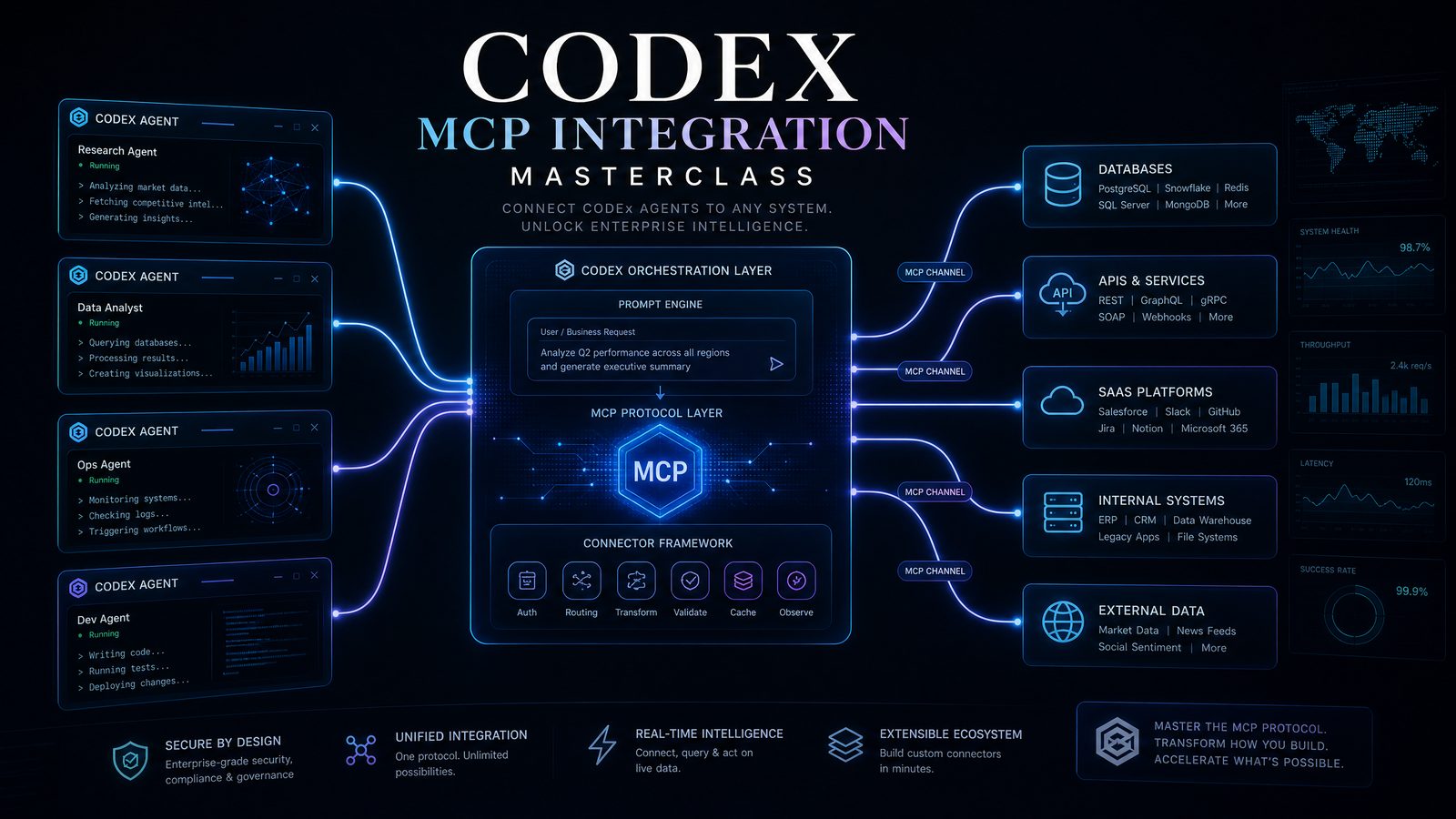
Codex MCP integration is quickly moving from experimental developer workflow to enterprise architecture priority. The reason is straightforward: large language models become far more valuable when they can safely access tools, data, business systems, and operational context. The Model Context Protocol gives teams a standard way to expose those capabilities to AI agents without hardcoding every integration into an application.
For enterprise teams, the opportunity is not simply “connect ChatGPT to a database.” The real value is building governed, reusable connectors that let Codex reason across systems, call tools with structured inputs, validate outputs, and orchestrate multi-system workflows. A well-designed MCP server can expose CRM records, data warehouse queries, ticketing workflows, observability metrics, procurement approvals, compliance documentation, and internal APIs through a consistent interface.
This masterclass is built around 30 production prompts for using Codex MCP effectively. These are not basic prompts for generating starter code. They are designed for senior engineers, platform teams, integration architects, and AI enablement leaders who need to build robust enterprise connectors, coordinate external tools, and deploy AI-assisted workflows in production environments.
The prompts are organized into three practical groups:
- Connector Development: prompts for designing MCP servers, schemas, authentication flows, database access, API clients, pagination, error handling, and connector test suites.
- Tool Orchestration: prompts for chaining tools, resolving conflicts, coordinating human approval, planning multi-system workflows, and handling partial failures.
- Production Deployment: prompts for security reviews, observability, CI/CD, versioning, governance, incident response, and enterprise readiness.
To understand the broader implications of these developments for your AI strategy, our in-depth coverage of Mastering Custom GPTs: How Developers Can Build and Deploy Tailored AI Assistants Using OpenAI’s Latest API Features examines the technical architecture, pricing considerations, and enterprise deployment patterns that define the current generation of AI capabilities.
The Enterprise MCP Mental Model: Servers, Tools, Resources, and Governance
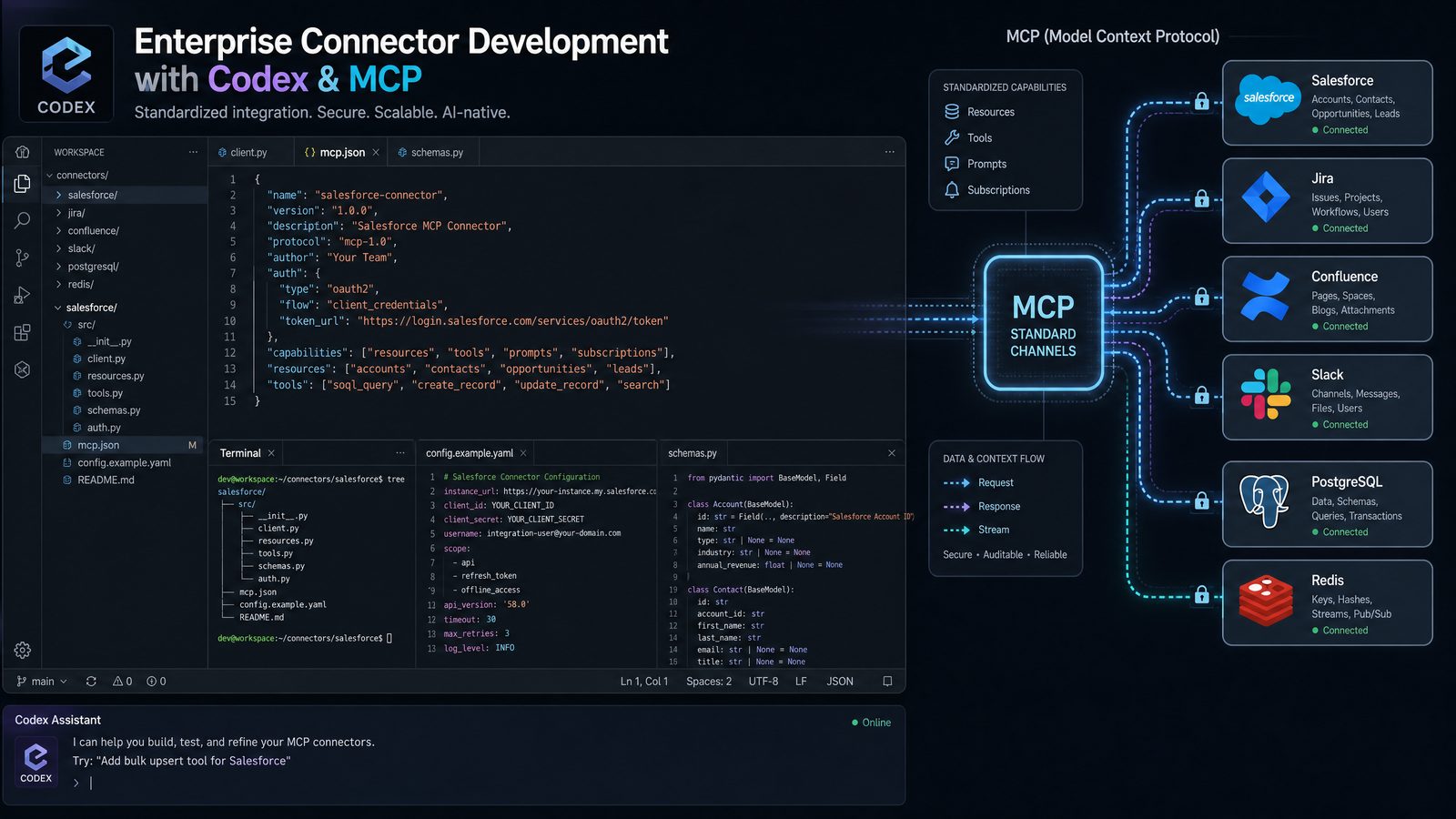
Before writing production prompts, it helps to define the operating model. In MCP, an application such as Codex can communicate with MCP servers that expose tools, resources, and contextual capabilities. A server may represent one system, such as Salesforce, ServiceNow, GitHub, Snowflake, or Jira. It may also represent a business domain, such as customer operations or finance approvals, with multiple back-end systems hidden behind a governed interface.
A strong enterprise connector should not simply mirror every internal API endpoint. Instead, it should expose high-value operations that map to business intent. For instance, rather than giving Codex raw access to dozens of CRM endpoints, you might expose tools such as get_customer_account_summary, create_support_escalation, list_open_contract_risks, and update_customer_success_plan. Each tool should have strict schemas, permission boundaries, audit logging, and predictable outputs.
That design discipline matters because tool orchestration depends on reliability. If Codex is expected to coordinate a workflow across a database, a ticketing system, and an internal approval service, each tool must communicate clear constraints. Codex needs to know what the tool can do, what it cannot do, what input shape is required, what errors mean, and when a human must approve the next action.
In practice, enterprise MCP work involves four layers:
- Connector layer: MCP servers, authentication handlers, API clients, database adapters, schema definitions, and resource exposure.
- Reasoning layer: prompts, tool descriptions, task decomposition, policy instructions, and workflow planning.
- Control layer: authorization, approval gates, rate limits, data classification, secrets handling, and audit trails.
- Operations layer: testing, observability, CI/CD, incident management, documentation, and version lifecycle.
The prompts in this article are written to make Codex operate across all four layers. They ask Codex to reason like a platform engineer, not a code autocomplete tool. Use them as starting points, then customize them with your stack, internal policies, compliance requirements, and target systems.
Production Prompting Framework for Codex MCP Work
Production prompts for Codex MCP should include more than a task description. They should define the target system, permission model, expected artifacts, failure modes, validation strategy, and deployment constraints. A prompt that says “build an MCP connector for our API” is too vague. A stronger prompt states exactly which tools to expose, how authentication works, what schemas to enforce, which actions are read-only, what logs are required, and how the connector should behave under timeout, quota, or authorization failures.
The following prompt framework works well for enterprise connector development:
Role:
You are a senior platform engineer specializing in Codex MCP, enterprise connectors,
secure API integration, and production-grade tool orchestration.

Context:
We need an MCP server for [system/domain] that exposes tools for [business workflows].
The connector must comply with [security/compliance requirements] and run in [runtime].

Systems:
- Source systems:
- Target systems:
- Authentication method:
- Data sensitivity:
- Expected users:

Task:
Design and implement [specific connector/tool/workflow].

Requirements:
- Use strict input and output schemas.
- Enforce least-privilege access.
- Include structured logging without leaking secrets or regulated data.
- Handle retries, pagination, rate limits, and partial failures.
- Include unit tests and integration test strategy.
- Document tool descriptions for safe LLM use.

Deliverables:
- Architecture summary.
- MCP tool definitions.
- Implementation code.
- Test plan.
- Operational runbook notes.
- Known limitations and extension points.
This framework gives Codex enough context to produce usable artifacts instead of generic scaffolding. For teams working in regulated sectors, add explicit language about data residency, personally identifiable information, financial records, protected health information, encryption, audit retention, and separation of duties.
The table below summarizes the difference between weak prompts and production-grade prompts for Codex MCP work.
| Area | Weak Prompt | Production-Ready Prompting Pattern |
|---|---|---|
| Connector scope | “Create a connector for our CRM.” | Define exact MCP tools, business operations, schemas, permissions, and read/write boundaries. |
| Security | “Add authentication.” | Specify OAuth scopes, token handling, secret storage, audit logging, and tenant isolation. |
| Error handling | “Handle errors.” | Define timeout, retry, quota, conflict, validation, and authorization behavior. |
| Tool orchestration | “Call these APIs in order.” | Define decision points, rollback actions, human approval gates, and compensating workflows. |
| Testing | “Write tests.” | Request schema tests, mocked API tests, integration tests, failure injection, and contract tests. |
| Deployment | “Make it production ready.” | Require CI/CD, observability, runbooks, rate limits, versioning, and incident response guidance. |
Section One: Connector Development Prompts 1-10
Connector development is where Codex MCP projects either gain long-term leverage or accumulate technical debt. The best connectors expose meaningful enterprise capabilities, not raw back-end complexity. Use the following ten prompts when asking Codex to build, refactor, or review MCP connectors for production systems.
Prompt 1: Design an Enterprise MCP Connector Architecture
Act as a senior integration architect. Design a production-grade Codex MCP server
for [enterprise system]. The connector must expose only business-safe tools,
not raw API endpoints.

Include:
1. Recommended MCP tools and resources.
2. Input and output schemas for each tool.
3. Authentication and authorization model.
4. Tenant isolation approach.
5. Logging, metrics, and audit events.
6. Rate-limit and retry strategy.
7. Risks, trade-offs, and implementation phases.

Assume the system stores [data classification] and is used by [user roles].
This prompt is useful before any code is written. It encourages Codex to produce an architecture that separates system capabilities from LLM-facing tools. The output should help teams decide whether the connector should be domain-oriented, system-oriented, or split into multiple MCP servers.
Prompt 2: Generate Strict MCP Tool Schemas
Create strict JSON-compatible input and output schemas for the following MCP tools:
- [tool name and purpose]
- [tool name and purpose]
- [tool name and purpose]

For each schema:
- Use explicit required fields.
- Add descriptions that help Codex decide when to call the tool.
- Include validation rules, enumerations, and safe defaults.
- Avoid accepting free-form objects unless absolutely necessary.
- Include sample successful and failed tool responses.
Schema quality directly affects tool reliability. Loose schemas lead to ambiguous tool calls and brittle workflows. Strong schemas help Codex plan correctly, reduce invalid requests, and create more explainable orchestration traces.
Prompt 3: Build an OAuth-Aware MCP Server
Implement an MCP server in [TypeScript/Python] that connects to [API name]
using OAuth 2.0. The implementation must:
- Load secrets from environment variables or a managed secret provider.
- Refresh access tokens safely.
- Never log tokens, authorization headers, or sensitive payloads.
- Expose tools for [allowed operations].
- Reject unauthorized tool calls with structured errors.
- Include tests for expired tokens, missing scopes, and refresh failure.
Authentication is one of the first places prototype connectors fail. This prompt directs Codex to implement token lifecycle handling, scope validation, and safe logging as first-class requirements.
Prompt 4: Create a Database Query Connector with Guardrails
Build a read-only MCP connector for [PostgreSQL/Snowflake/BigQuery/SQL Server].
The connector should expose a tool named query_business_metrics.

Requirements:
- Allow only SELECT statements or approved query templates.
- Block destructive operations and multi-statement execution.
- Enforce row limits and query timeout.
- Parameterize user-supplied values.
- Return results with column metadata and execution statistics.
- Include a safe error response for syntax, timeout, and permission failures.
Many organizations want Codex to query enterprise data. That must not mean unrestricted SQL execution. Use approved templates, semantic views, row limits, and dedicated read-only credentials. For analytics use cases, consider exposing metric-specific tools rather than generic SQL access.
Prompt 5: Wrap a REST API as Business-Level MCP Tools
Given this REST API documentation:
[paste API summary]

Design an MCP connector that exposes business-level tools instead of raw endpoints.
For each tool, provide:
- Tool name.
- Description for LLM selection.
- Input schema.
- Output schema.
- API calls required.
- Error mapping.
- Idempotency strategy for write operations.
- Permission requirements.
This prompt helps Codex translate API surface area into usable AI tools. It is especially valuable when an internal API has dozens of endpoints but the AI workflow only needs a small number of safe operations.
Prompt 6: Implement Pagination and Rate-Limit Handling
Refactor the MCP connector below to handle pagination, API quotas, and rate limits.

Code:
[paste connector code]

Requirements:
- Support cursor-based and page-number pagination where applicable.
- Respect Retry-After headers.
- Use exponential backoff with jitter.
- Provide partial progress metadata.
- Stop safely when max page or max item limits are reached.
- Include tests for quota exceeded, retry exhaustion, and interrupted pagination.
Enterprise APIs often fail under load not because the connector is wrong, but because it ignores operational constraints. This prompt improves connector resilience and gives Codex clearer feedback when a tool cannot complete the full task.
Prompt 7: Add Contract Tests for an MCP Connector
Create a contract test suite for this MCP connector:
[paste tool definitions and implementation]

The tests must verify:
- Tool schemas match documented behavior.
- Required fields are enforced.
- External API calls are mocked with realistic responses.
- Error responses are stable and machine-readable.
- Sensitive data is redacted from logs.
- Backward compatibility is maintained for existing tool versions.
Contract tests protect downstream workflows. If an MCP tool changes its output field names or error format, orchestration prompts may break. Stable interfaces are as important for AI agents as they are for traditional applications.
Prompt 8: Build a Connector for Internal Knowledge Systems
Design an MCP server for internal knowledge retrieval across [Confluence/SharePoint/Notion/Git].
The connector must:
- Search approved spaces only.
- Return citations, document owners, timestamps, and access restrictions.
- Enforce user-level permissions.
- Avoid returning confidential content to unauthorized users.
- Provide tools for search, fetch_document, and summarize_document_evidence.
- Include cache strategy and invalidation rules.
Knowledge connectors are powerful but risky. Codex should never become a bypass around document permissions. This prompt emphasizes access control, evidence, and content provenance.
Prompt 9: Review Connector Code for Enterprise Readiness
Review this MCP connector for production readiness:
[paste code]

Evaluate:
- Authentication and authorization.
- Input validation.
- Output consistency.
- Error handling.
- Observability.
- Secret handling.
- Data leakage risks.
- Test coverage.
- Scalability limits.
- Maintainability.

Return a prioritized remediation plan with severity, effort, and proposed code changes.
Use this prompt during pull request review or pre-deployment hardening. Codex can surface design flaws that are easy to miss when teams focus only on happy-path functionality.
Prompt 10: Generate Connector Documentation for AI and Humans
Create production documentation for this MCP connector:
[paste tool definitions]

Include:
- Overview and supported workflows.
- Tool catalog with input and output schemas.
- Permission model.
- Operational limits.
- Error codes.
- Security considerations.
- Usage examples for Codex.
- Runbook for common failures.
- Version history format.
Documentation must serve both engineers and AI systems. Clear tool descriptions help Codex select the right operation, while human-facing runbooks support maintenance, audit review, and incident response.
Section Two: Tool Orchestration Prompts 11-20
Once connectors exist, the next challenge is tool orchestration. Enterprise work rarely happens in one system. A customer escalation might require CRM lookup, contract review, ticket creation, Slack notification, risk scoring, and manager approval. Codex must reason about sequence, dependency, failure handling, and governance.
Prompt 11: Plan a Multi-System Workflow
Act as a workflow architect. Design a Codex MCP orchestration plan for this business process:
[describe process]

Available MCP tools:
[paste tool list]

Create:
1. Step-by-step workflow.
2. Tool call sequence.
3. Required inputs and outputs for each step.
4. Decision points.
5. Human approval gates.
6. Failure and rollback strategy.
7. Audit events that must be captured.
This prompt is useful for converting informal business processes into structured agent workflows. The best outputs identify which actions can be automated, which require review, and which must never be performed without explicit authorization.
Prompt 12: Create a Tool Selection Policy
Given these MCP tools:
[paste tool definitions]

Write a tool selection policy for Codex that defines:
- When each tool should be used.
- When each tool should not be used.
- Required preconditions.
- Data sensitivity constraints.
- Whether the tool is read-only or write-capable.
- What confirmation is required before execution.
- How to handle ambiguous user requests.
Tool descriptions are not enough for high-risk environments. A tool selection policy gives Codex explicit operating rules and reduces accidental calls to write-capable systems.
Prompt 13: Orchestrate CRM, Ticketing, and Messaging Systems
Design a Codex MCP workflow for a customer escalation that uses:
- CRM account lookup.
- Support ticket creation or update.
- Contract status check.
- Internal messaging notification.
- Manager approval if risk score exceeds threshold.

Provide:
- Tool sequence.
- Data mapping between systems.
- Escalation criteria.
- Approval message template.
- Final customer success summary.
- Error handling for each system.
This is a common enterprise pattern: gather context, decide severity, create the operational record, notify stakeholders, and produce a concise summary. Codex should preserve traceability from source data to final action.
Prompt 14: Build a Compensating Action Strategy
For the workflow below, identify every step that can partially fail:
[paste workflow]

Create a compensating action strategy:
- Which actions can be reversed automatically?
- Which require manual remediation?
- Which require audit-only follow-up?
- What state should be persisted after each step?
- What user-facing message should be returned after partial completion?
Multi-system workflows cannot assume atomic transactions. If Codex creates a ticket but fails to update the CRM, the workflow needs a durable record and a remediation path. Compensating actions are essential for production orchestration.
Prompt 15: Generate a Workflow State Machine
Convert this MCP tool orchestration into a state machine:
[paste workflow]

Include:
- States.
- Events.
- Transitions.
- Retryable and terminal failures.
- Human approval states.
- Timeout behavior.
- Persisted workflow metadata.
- Pseudocode for the orchestrator.
State machines make AI-assisted workflows more predictable. Rather than relying on a single long-running reasoning session, teams can persist progress and resume safely after approval, timeout, or system recovery.
Prompt 16: Resolve Conflicting Data Across Systems
Codex will receive conflicting customer data from these systems:
[paste systems and fields]

Create a conflict resolution policy:
- Source-of-truth hierarchy by field.
- Freshness rules.
- Confidence scoring.
- When to ask a human.
- How to present discrepancies.
- Which updates are allowed automatically.
- Audit log format for resolved conflicts.
Tool orchestration often exposes inconsistent enterprise data. This prompt helps Codex avoid making unsupported assumptions. It also turns conflicts into visible operational signals instead of silent errors.
Prompt 17: Create a Human-in-the-Loop Approval Prompt
Design a human approval step for this MCP workflow:
[paste workflow]

The approval request must include:
- Requested action.
- Business reason.
- Systems affected.
- Data that will be changed.
- Risk level.
- Alternative actions.
- Expiration time.
- Approve/reject response schema.
- Audit record fields.
Human approval is not a UX afterthought. It is a control mechanism. The approval message should make risk and impact clear enough for an authorized user to make a defensible decision.
Prompt 18: Create Tool Orchestration Tests
Write tests for this Codex MCP orchestration:
[paste workflow and tools]

Cover:
- Successful end-to-end execution.
- Missing required data.
- Tool timeout.
- Permission failure.
- Conflicting records.
- Human approval rejection.
- Partial completion and recovery.
- Duplicate request idempotency.
Testing orchestration requires more than testing each connector. Simulate failure between steps. Verify the workflow does not duplicate tickets, send repeated notifications, or overwrite authoritative records after recovery.
Prompt 19: Optimize Tool Calls for Latency and Cost
Review this MCP workflow for latency, cost, and unnecessary tool calls:
[paste workflow trace]

Recommend:
- Calls that can be parallelized.
- Calls that can be cached.
- Data that should be fetched lazily.
- Redundant calls to remove.
- Token reduction strategies.
- Observability metrics to confirm improvement.
Enterprise workflows can become slow if Codex calls every available tool before acting. This prompt encourages selective retrieval, caching, parallelism, and smaller context payloads.
Prompt 20: Produce an Orchestration Runbook
Create an operations runbook for this MCP workflow:
[paste workflow]

Include:
- Workflow purpose.
- Systems involved.
- Common failure modes.
- Alert thresholds.
- Manual remediation steps.
- Audit query examples.
- Rollback or compensation procedures.
- Support escalation path.
- Post-incident review checklist.
For teams looking to expand their AI prompting capabilities, our comprehensive guide on 25 Advanced OpenAI Codex Prompts for Enterprise Workflows: Unlocking AI Beyond Code Generation provides battle-tested prompt templates that integrate seamlessly with enterprise workflows and deliver measurable productivity improvements across technical and business teams.
Section Three: Production Deployment Prompts 21-30
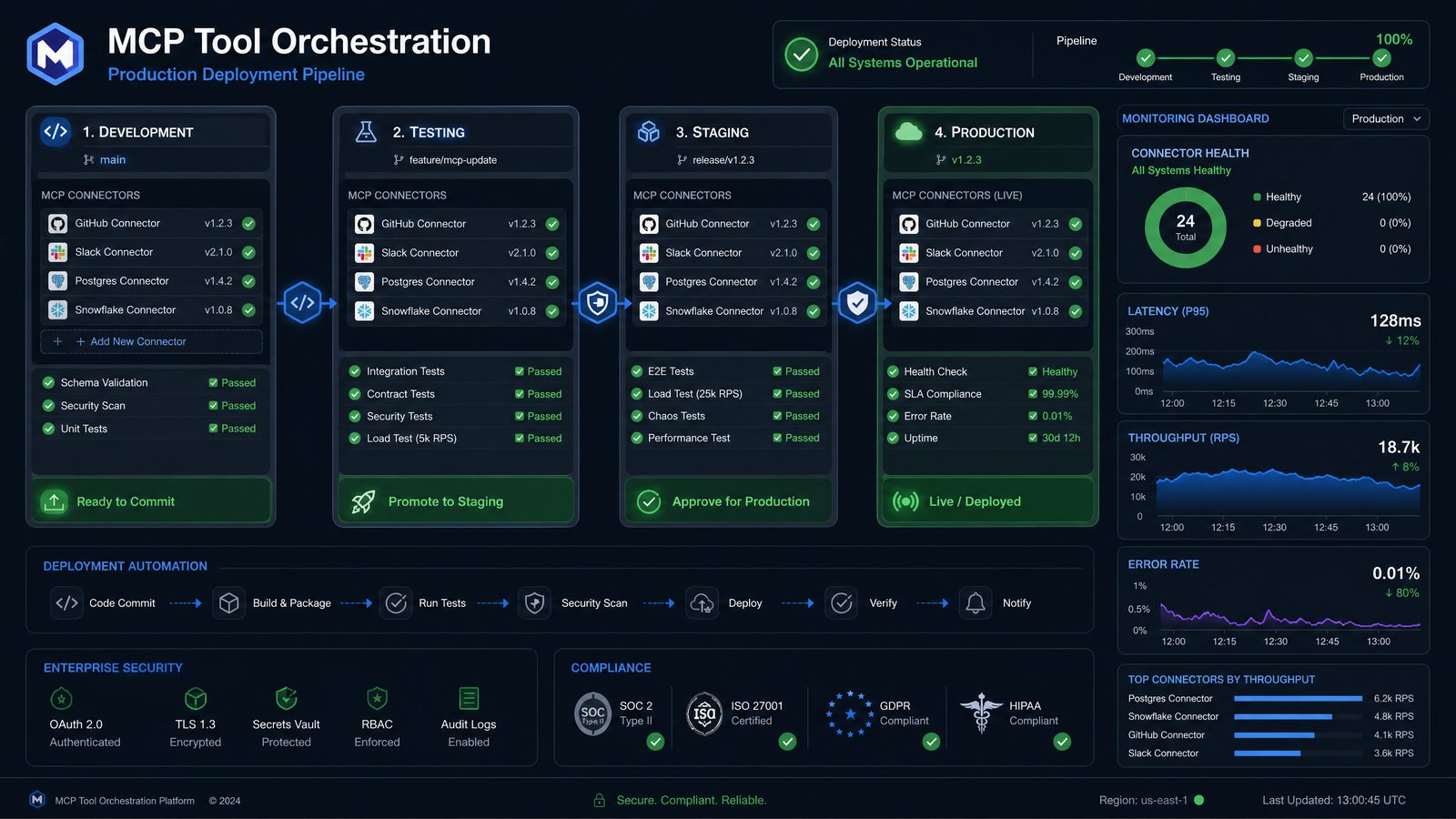
Production deployment is where Codex MCP work becomes an enterprise capability rather than a developer demo. The goal is to ship connectors and workflows with security, observability, change control, and operational accountability. The following prompts help teams harden MCP systems before they become critical infrastructure.
Prompt 21: Perform a Security Threat Model
Act as an application security architect. Threat model this Codex MCP connector:
[paste architecture and tool definitions]

Analyze:
- Authentication weaknesses.
- Authorization bypass risks.
- Prompt injection and tool misuse.
- Data exfiltration paths.
- Secrets exposure.
- Excessive permissions.
- Supply chain risks.
- Logging and retention issues.

Return mitigations ranked by severity and implementation priority.
Prompt injection and tool misuse deserve special attention. If an MCP connector fetches documents or accepts instructions from external systems, Codex must distinguish trusted tool instructions from untrusted content.
Prompt 22: Design Least-Privilege Access Controls
Create a least-privilege access model for these MCP tools:
[paste tools]

Define:
- User roles.
- Tool permissions by role.
- OAuth scopes or service account permissions.
- Field-level restrictions.
- Approval requirements for write operations.
- Deny-by-default behavior.
- Audit events for access decisions.
Production MCP servers should not rely on broad service accounts unless there is a compensating control. Whenever possible, enforce user-scoped authorization and log which identity initiated each action.
Prompt 23: Build Observability for MCP Connectors
Design observability for a Codex MCP deployment.

Include:
- Structured log fields.
- Metrics for tool calls, latency, errors, retries, and approvals.
- Distributed tracing approach.
- Redaction rules.
- Dashboards for operations and product teams.
- Alerts for abnormal tool usage or failure spikes.
- Sample log events in JSON.
{
"event": "mcp_tool_call_completed",
"tool": "create_support_escalation",
"workflow_id": "wf_78421",
"actor_id_hash": "usr_hash_91d",
"duration_ms": 842,
"status": "success",
"external_system": "ticketing",
"approval_required": true,
"sensitive_fields_redacted": true
}Observability should explain what happened without leaking regulated data. Hash user identifiers when appropriate, redact payloads, and maintain correlation IDs across the workflow.
Access 40,000+ AI Prompts for ChatGPT, Claude & Codex — Free!
Subscribe to get instant access to our complete Notion Prompt Library — the largest curated collection of prompts for ChatGPT, Claude, OpenAI Codex, and other leading AI models. Optimized for real-world workflows across coding, research, content creation, and business.
Prompt 24: Create CI/CD for MCP Servers
Design a CI/CD pipeline for MCP servers deployed to [Kubernetes/serverless/VM].
The pipeline must include:
- Static analysis.
- Dependency scanning.
- Secret scanning.
- Unit tests.
- Contract tests.
- Integration tests against sandbox systems.
- Schema compatibility checks.
- Deployment approval gates.
- Rollback strategy.
MCP connectors are integration software and should be treated with the same engineering rigor as public APIs. Schema compatibility checks are particularly important because agent workflows depend on stable tool contracts.
Prompt 25: Generate a Versioning and Deprecation Plan
Create a versioning strategy for these MCP tools:
[paste tool catalog]

Include:
- Semantic versioning rules.
- Backward-compatible change examples.
- Breaking change criteria.
- Deprecation timeline.
- Migration guidance.
- Compatibility tests.
- Communication plan for workflow owners.
Tool contracts evolve. A disciplined versioning strategy prevents orchestration failures when fields change, tools are renamed, or business logic moves to a new system.
Advanced Deployment Controls for Enterprise MCP Programs
Beyond code deployment, enterprise MCP programs need controls that define who can create tools, who can approve write-capable integrations, which environments are allowed, and how usage is monitored. Codex can help generate these policies, but accountability must remain with engineering, security, legal, and business owners.
Prompt 26: Create Data Classification Rules
Define data classification and handling rules for an MCP ecosystem.

Inputs:
- Systems connected: [systems]
- Data types: [data types]
- User roles: [roles]
- Jurisdictions: [regions]

Produce:
- Classification levels.
- Allowed tool behavior by classification.
- Redaction requirements.
- Retention rules.
- Cross-border transfer constraints.
- Approval requirements.
- Logging restrictions.
Data classification determines whether Codex can retrieve, summarize, transform, or write information. A connector that is safe for public documentation may be inappropriate for payroll, legal, or healthcare records.
Prompt 27: Build an Incident Response Playbook
Create an incident response playbook for Codex MCP failures.

Cover:
- Unauthorized tool call.
- Data exposure.
- Connector outage.
- Excessive API usage.
- Incorrect write action.
- Prompt injection event.
- Audit log gap.
- Credential compromise.

For each incident type, define detection, containment, eradication, recovery,
communication, and post-incident review steps.
Incident planning should happen before launch. If a connector can modify enterprise records, the organization needs a clear process for containment and correction.
Prompt 28: Create a Production Readiness Review Checklist
Create a production readiness review checklist for a Codex MCP connector and workflow.

Sections:
- Architecture.
- Security.
- Privacy.
- Reliability.
- Performance.
- Observability.
- Testing.
- Documentation.
- Support model.
- Business owner approval.

For each item, include pass criteria and required evidence.
This prompt is ideal for platform teams that manage multiple MCP servers. Standardized review criteria make it easier to scale integrations across business units without lowering the quality bar.
Prompt 29: Generate Executive and Technical Launch Notes
Write launch notes for a new Codex MCP workflow.

Create two versions:
1. Executive summary for business stakeholders.
2. Technical summary for engineering and operations.

Include:
- Business problem solved.
- Systems connected.
- Capabilities enabled.
- Controls and limitations.
- Rollout plan.
- Support process.
- Success metrics.
AI integration projects need clear communication. Executives need business impact and risk controls. Engineers need operational detail. Codex can generate both from the same source architecture if the prompt asks for separate audiences.
Prompt 30: Conduct a Post-Launch Optimization Review
Analyze this Codex MCP workflow after production launch:
[paste metrics, logs, user feedback, and incident summary]

Produce:
- Usage patterns.
- Failure trends.
- Latency and cost bottlenecks.
- Tool schema improvements.
- Prompt policy improvements.
- Security or governance gaps.
- Recommended roadmap for the next release.
Post-launch reviews keep MCP programs from stagnating. The best enterprise connectors evolve based on real usage, failure traces, and business feedback. Treat every workflow as a product with measurable reliability and adoption goals.
Reference Implementation Pattern for a Minimal MCP Tool
The exact SDK and runtime will vary, but the core implementation pattern is consistent: define a tool, validate input, call a governed service, sanitize output, and return a structured response. The following TypeScript-style sketch illustrates the pattern without tying the design to one proprietary enterprise system.
import { z } from "zod";

const CreateEscalationInput = z.object({
  customerId: z.string().min(1),
  severity: z.enum(["low", "medium", "high", "critical"]),
  summary: z.string().min(10).max(1000),
  requestedBy: z.string().min(1),
  approvalId: z.string().optional()
});

type ToolResult = {
  status: "success" | "requires_approval" | "failed";
  escalationId?: string;
  message: string;
  auditId: string;
};

async function createSupportEscalation(input: unknown): Promise<ToolResult> {
  const parsed = CreateEscalationInput.safeParse(input);

  if (!parsed.success) {
    return {
      status: "failed",
      message: "Invalid escalation request.",
      auditId: await audit("validation_failed", { reason: parsed.error.flatten() })
    };
  }

  const request = parsed.data;

  if (request.severity === "critical" && !request.approvalId) {
    return {
      status: "requires_approval",
      message: "Critical escalations require manager approval before creation.",
      auditId: await audit("approval_required", {
        customerId: request.customerId,
        severity: request.severity
      })
    };
  }

  const ticket = await ticketingClient.createEscalation({
    customerId: request.customerId,
    severity: request.severity,
    summary: request.summary
  });

  const auditId = await audit("escalation_created", {
    customerId: request.customerId,
    escalationId: ticket.id,
    requestedBy: request.requestedBy
  });

  return {
    status: "success",
    escalationId: ticket.id,
    message: "Support escalation created successfully.",
    auditId
  };
}
This pattern includes several production habits: schema validation, explicit status values, approval gating, audit creation, and sanitized user-facing messages. The implementation should be extended with retries, timeouts, authorization checks, redaction, and telemetry before production use.
Operational Metrics That Matter for Codex MCP
Enterprise teams should measure Codex MCP deployments like any other integration platform. Vanity metrics such as total tool calls are not enough. The most useful metrics connect reliability, business value, safety, and user experience.
| Metric | Why It Matters | Suggested Target |
|---|---|---|
| Tool call success rate | Shows whether connectors are reliable enough for production workflows. | Above 99% for critical read tools; higher scrutiny for write tools. |
| Schema validation failure rate | Indicates unclear tool descriptions, weak prompts, or poor input design. | Trend downward after prompt and schema refinements. |
| Approval rejection rate | Reveals whether Codex is proposing actions humans consider inappropriate. | Review spikes by workflow and role. |
| Partial failure frequency | Measures orchestration resilience across multi-system workflows. | Low and fully covered by runbooks. |
| Mean time to recovery | Tracks operational maturity after connector or workflow incidents. | Aligned with business criticality. |
| Unauthorized attempt count | Detects misuse, policy gaps, or prompt injection attempts. | Investigate every high-severity event. |
These metrics should be reviewed by platform owners, workflow owners, and security teams. When a workflow becomes business-critical, it should have service-level objectives, escalation policies, and periodic access reviews.
Conclusion: Build Codex MCP Systems Like Enterprise Infrastructure
Codex MCP is not just a developer convenience. Used properly, the Model Context Protocol can become a standard integration layer for enterprise AI, giving Codex governed access to databases, APIs, documents, ticketing systems, approval services, and internal platforms. That power requires disciplined connector design, deliberate tool orchestration, and production-grade deployment controls.
The 30 production prompts in this masterclass are designed to move teams from experimentation to repeatable delivery. Use the connector development prompts to create safe, well-scoped enterprise connectors. Use the tool orchestration prompts to coordinate multi-system workflows with clear decision points, human approval, and compensating actions. Use the production deployment prompts to harden security, observability, versioning, incident response, and governance.
The strongest enterprise AI teams will not be the ones with the largest number of tools. They will be the ones with the most reliable, auditable, well-described, and business-aligned tools. Codex MCP gives organizations a framework for that future, but the quality of the implementation depends on the prompts, schemas, controls, and operating model around it.
Treat every MCP connector as a product, every tool as a contract, and every workflow as an operational system. That mindset is what turns Codex from an assistant into a secure enterprise orchestration layer.
