
25 Advanced OpenAI Codex Prompts for Enterprise Workflows: Unlocking AI Beyond Code Generation
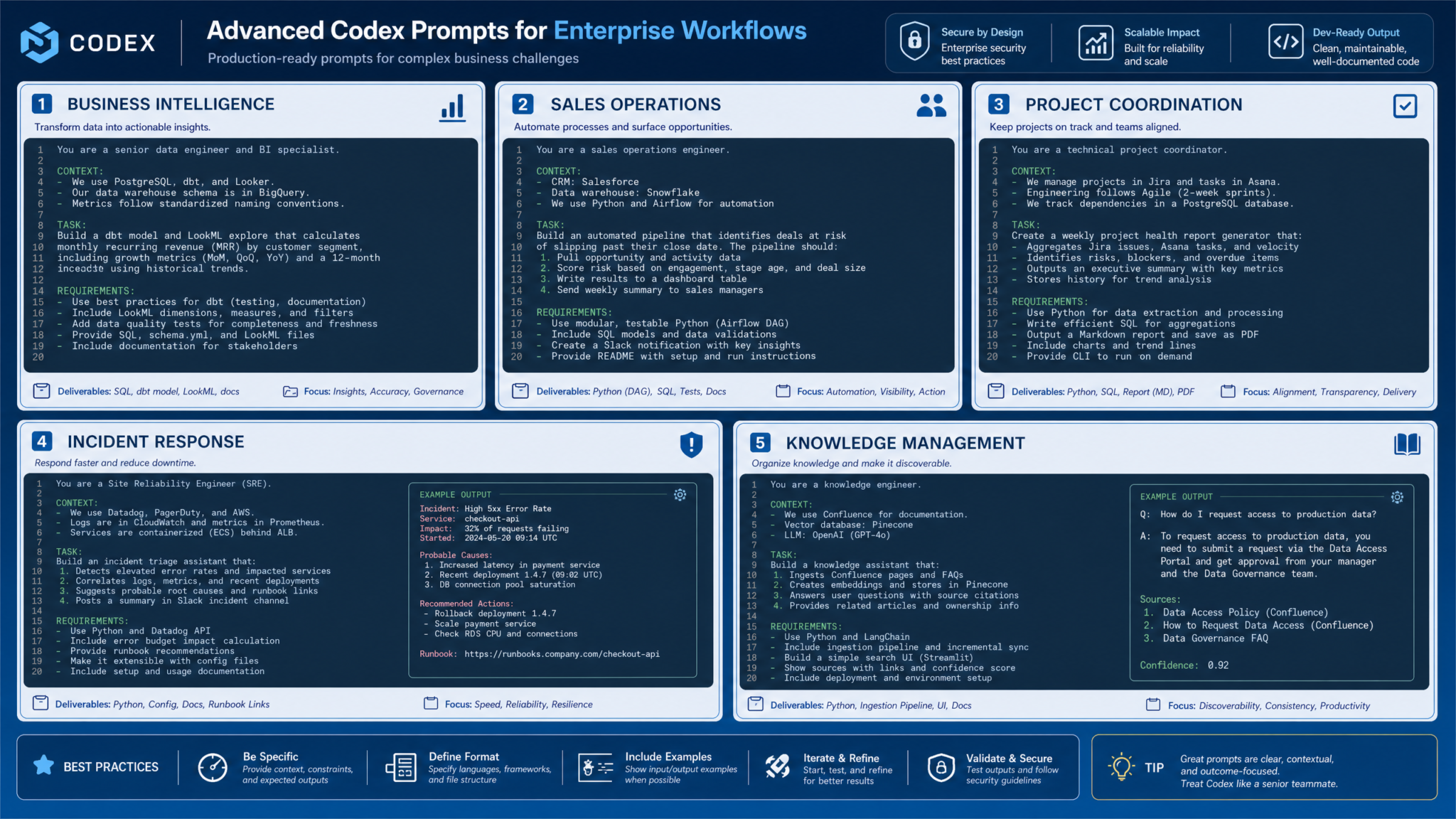
In today’s rapidly evolving digital landscape, enterprises are increasingly leveraging artificial intelligence (AI) to streamline complex workflows, enhance decision-making, and boost operational efficiency. OpenAI Codex, a state-of-the-art AI language model originally designed for code generation, has transcended its initial boundaries to become a strategic asset across diverse business functions. Powering over 4 million weekly users globally, Codex now enables organizations to automate multifaceted enterprise workflows including business intelligence, sales operations, project management, incident response, and knowledge management.
This comprehensive, SEO-optimized guide presents 25 advanced Codex prompts meticulously categorized by critical enterprise domains. Each prompt is designed to unlock Codex’s full potential far beyond basic code generation, driving transformative automation, data synthesis, and actionable insights at scale. Whether you are a business leader, AI practitioner, or enterprise technologist, this article empowers you to harness AI-driven innovation to future-proof your organization.
Harnessing Codex for Business Intelligence & Reporting
Business intelligence (BI) is the cornerstone of informed decision-making. Enterprises grapple daily with vast quantities of heterogeneous data from CRM systems, analytics platforms, financial databases, and operational tools. Codex excels at synthesizing these diverse data sources into clear, actionable reports, enabling faster insights and agility.
By integrating Codex into BI workflows, teams can automate the generation of executive summaries, detailed KPI dashboards, trend analyses, and strategic recommendations tailored to stakeholder needs. Here are some advanced prompts that demonstrate Codex’s prowess in business intelligence:
Top Business Intelligence Prompts
-
Monthly Sales Performance Report:
Generate a detailed monthly sales performance report combining data from CRM exports, website analytics, and inventory databases. Include key metrics, trends, and actionable recommendations for the executive team.Use case: Automates consolidation of sales, marketing, and inventory data to save hours of manual reporting.
Expected output: Structured report highlighting KPIs, trend visualizations, and an executive summary focusing on performance drivers and bottlenecks.
Tip: Customize by adding regional sales data or product category breakdowns for deeper insight.
-
Customer Support Issue Analysis:
Analyze quarterly customer support logs and product usage data to identify the top 5 recurring issues, prioritizing fixes for the product management team.Use case: Empowers product teams with data-driven root cause identification and prioritization.
Expected output: Prioritized issue list with frequency statistics, impact analysis, and actionable remediation steps.
Tip: Incorporate customer sentiment analysis or extend the timeframe for richer insights.
-
Marketing Campaign Performance Summary:
Summarize the results of last quarter’s marketing campaigns across multiple channels, comparing expected versus actual ROI, and propose optimization strategies.Use case: Automates complex post-campaign performance reviews to enhance marketing effectiveness.
Expected output: Detailed comparative analysis with ROI metrics, channel-specific performance breakdowns, and prioritized recommendations.
Tip: Focus on individual campaigns or segment by digital vs. offline channels for targeted reports.
-
Executive Company-Wide Performance Summary:
Generate an executive summary integrating company-wide performance metrics from finance, operations, and HR dashboards, highlighting key risks and growth opportunities.Use case: Delivers concise, high-level insights to leadership synthesizing broad operational data streams.
Expected output: Balanced narrative combining quantitative metrics with qualitative risk and opportunity assessments.
Tip: Tailor outputs to specific C-suite functions or organizational departments for maximum relevance.
-
Product Line Profitability Comparison:
Compare year-over-year product line profitability using financial and sales data, identify emerging trends, and recommend focus areas for investment.Use case: Supports strategic financial planning and resource allocation decisions.
Expected output: Comprehensive comparative analysis with profitability trend charts and investment suggestions.
Tip: Filter by product categories or geographic sales territories to hone insights.
| Prompt | Use Case | Expected Output | Customization Tips |
|---|---|---|---|
| Monthly Sales Performance Report | Automate multi-source sales and inventory report generation | Structured KPIs, trends, executive summaries | Add regional or product focus |
| Customer Support Issue Analysis | Identify recurring product issues from support logs | Prioritized issue list with recommendations | Include customer sentiment or timeframe adjustments |
| Marketing Campaign Summary | Automate campaign ROI and channel performance analysis | Comparative ROI and optimization strategies | Focus on specific campaigns or channel types |
| Executive Performance Summary | High-level company-wide metric integration | Balanced narrative with risks and opportunities | Tailored to department or function |
| Product Profitability Comparison | Strategic financial planning based on product trends | Profitability charts, investment recommendations | Filtered by category or region |
Optimizing Lead Qualification & Sales Operations with Codex
Sales organizations face the continual challenge of accelerating deal cycles, prioritizing leads, and personalizing customer engagement to maximize conversion rates. OpenAI Codex empowers sales teams by automating lead scoring, routing customer feedback with precision, and crafting customized communications that resonate with prospects.
By embedding Codex into sales workflows, enterprises can improve pipeline visibility, identify churn risks early, and streamline follow-up processes to boost revenue generation. Below are advanced prompts tailored for sales and lead management:
Advanced Sales and Lead Management Prompts
-
Lead Prioritization:
Evaluate this list of inbound leads based on company size, industry, and past engagement data, and categorize them into high, medium, and low priority for sales outreach.Use case: Rapid lead scoring enables sales reps to focus efforts efficiently.
Expected output: Prioritized lead lists with rationale and recommended next steps for outreach.
Tip: Integrate additional data such as lead source or product interest for richer qualification.
-
Feedback Routing:
Route product feature requests and feedback from customer emails and chat transcripts to the appropriate product team based on topic and urgency.Use case: Ensures timely attention to high-impact customer feedback.
Expected output: Categorized feedback with team assignments and urgency flags.
Tip: Include escalation protocols and segment customers by priority.
-
Personalized Follow-up Email Drafting:
Draft personalized follow-up emails for leads who attended last week’s webinar, referencing their expressed interests and suggesting tailored next steps.Use case: Enhances lead nurturing with context-aware, customized communication.
Expected output: Tailored email drafts including personalized content and strong calls to action.
Tip: Adjust tone and length based on lead maturity and position in the sales funnel.
-
Churn Risk Analysis:
Analyze CRM notes and interaction history to identify potential churn risks among enterprise customers and suggest proactive outreach strategies.Use case: Enables early intervention to improve customer retention.
Expected output: Risk profiles with correlating warning signs and targeted retention tactics.
Tip: Enhance analysis using support ticket volume and contract renewal dates.
-
Sales Pipeline Summary:
Generate a weekly sales pipeline summary report consolidating deal stages, forecasted close dates, and revenue projections for the sales leadership team.Use case: Maintains leadership visibility on pipeline health and forecast accuracy.
Expected output: Pipeline reports featuring deal counts, weighted revenue forecasts, and progression overviews.
Tip: Filter summaries by sales region or product category for granular insights.
| Prompt | Use Case | Expected Output | Customization Tips |
|---|---|---|---|
| Lead Prioritization | Score and categorize leads for focused outreach | Prioritized lead lists with rationale | Include lead source or product preferences |
| Feedback Routing | Assign product feedback to appropriate teams | Categorized feedback with urgency flags | Add escalation and customer segmentation rules |
| Personalized Follow-up Emails | Craft customized communications referencing lead interests | Tailored email drafts with CTAs | Adapt tone and length by funnel stage |
| Churn Risk Analysis | Identify and prevent customer churn | Risk profiles with retention strategies | Include support tickets and renewals |
| Sales Pipeline Summary | Provide pipeline visibility and forecasting | Reports with deal stages and weighted revenue | Filter by region or product |
Streamlining Project Coordination & Documentation with AI
Successful project management demands precise coordination, transparent communication, and comprehensive documentation. Codex helps project teams by automating status updates, synthesizing inputs from tools like JIRA and Confluence, and generating detailed plans and handover documents.
These capabilities reduce administrative overhead, enhance stakeholder alignment, and enable proactive risk management. Here are essential Codex prompts for project management excellence:
Essential Project Coordination Prompts
-
Comprehensive Project Status Update:
Compile a comprehensive project status update pulling data from JIRA tickets, Confluence notes, and team calendar events for the weekly stakeholder briefing.Use case: Streamlines reporting by integrating progress, blockers, and milestones in one report.
Expected output: Concise briefing covering current status, challenges, upcoming deadlines, and key accomplishments.
Tip: Customize updates for different project phases or stakeholder groups.
-
Detailed Project Plan Creation:
Generate a detailed project plan outlining tasks, dependencies, resource assignments, and timelines based on initial scope and team availability.Use case: Establishes clear work breakdown structures and schedules early in the project lifecycle.
Expected output: Task lists with Gantt-style dependency mappings and resource allocations.
Tip: Incorporate risk mitigation strategies and budget constraints for realistic planning.
-
Meeting Notes Summarization:
Summarize meeting notes from multiple teams, extracting action items, decisions made, and open questions for project managers.Use case: Enhances clarity and accountability across teams.
Expected output: Well-organized summary categorizing action items, owners, and deadlines.
Tip: Add priority markers or highlight critical issues for immediate attention.
-
Project Handover Document Draft:
Draft a comprehensive project handover document including current status, key contacts, pending issues, and recommended next steps for the incoming team.Use case: Facilitates smooth transitions and preserves institutional knowledge.
Expected output: Clear, structured notes covering all critical project elements.
Tip: Customize for internal teams or external vendors as appropriate.
-
Risk and Issue Log Template:
Create a risk and issue log template populated with existing risks identified from recent project retrospectives and their mitigation status.Use case: Enables proactive risk tracking and transparent issue management.
Expected output: Risk log with detailed descriptions, owners, current status, and mitigation plans.
Tip: Include impact scoring and escalation pathways to prioritize attention.
| Prompt | Use Case | Expected Output | Customization Tips |
|---|---|---|---|
| Project Status Update | Aggregate data from project tools for stakeholder briefings | Concise updates on progress, blockers, milestones | Customize by phase or audience |
| Project Plan Generation | Create detailed task schedules and resource plans | Task breakdowns with dependencies and allocations | Include risk and budget factors |
| Meeting Notes Summary | Extract action items and decisions from notes | Categorized action lists with owners and deadlines | Add priorities or highlights |
| Project Handover Document | Document critical info for team transitions | Clear, structured handover notes | Customize per team or vendor type |
| Risk and Issue Log | Track risks and issues with mitigation status | Populated risk logs with ownership and actions | Include impact scoring and escalations |
Accelerating Incident Response & Operations Management
Incident response is a critical function requiring rapid analysis, root cause identification, and clear operational procedures. Codex enhances incident management by quickly processing system logs, recommending containment strategies, and generating detailed operational runbooks that improve consistency and readiness.
Embedding Codex in incident workflows enables organizations to minimize downtime, enhance transparency, and improve post-incident learning. The prompts below illustrate advanced use cases in incident response and operational excellence:
Top Incident Management Prompts
-
Incident Severity Triage:
Analyze recent system outage logs and monitoring alerts to triage the incident severity and recommend immediate containment actions.Use case: Provides rapid impact assessment to guide initial response efforts.
Expected output: Severity classification with prioritized containment measures and affected service components.
Tip: Focus on specific incident types or critical systems for tailored triage.
-
Root Cause Analysis Report:
Perform a root cause analysis report based on system logs, error codes, and deployment history for the last critical incident.Use case: Identifies underlying causes to prevent recurrence.
Expected output: Detailed narrative explaining contributing factors with preventive recommendations.
Tip: Include incident timelines and impact summaries customized for stakeholders.
-
Operational Runbook Generation:
Generate a step-by-step operational runbook for database failover procedures, including verification steps and rollback plans.Use case: Documents critical procedures to ensure repeatability and team readiness.
Expected output: Clear procedural runbook with checkpoints and contingency plans.
Tip: Customize runbooks for specific platforms or infrastructure architectures.
-
Incident Ticket Summarization:
Summarize incident tickets from the last 30 days to identify recurring failure patterns and suggest improvements to monitoring configurations.Use case: Enables continuous monitoring enhancements by analyzing failure trends.
Expected output: Failure pattern analysis with recommendations for alert tuning and monitoring improvements.
Tip: Filter summaries by service type or severity level for targeted insights.
-
Post-Incident Stakeholder Communication:
Draft a post-incident communication for internal stakeholders summarizing impact, resolution steps, and next steps to restore full service confidence.Use case: Maintains transparency and trust through balanced communication.
Expected output: Professional incident summary balancing technical details with business impact.
Tip: Adjust tone and technical depth based on audience needs.
| Prompt | Use Case | Expected Output | Customization Tips |
|---|---|---|---|
| Incident Severity Triage | Rapid triage of system outages | Severity classification and containment steps | Specify incident or system focus |
| Root Cause Analysis | Identify root causes post-incident | Detailed cause narrative and preventive measures | Add timeline and impact details |
| Operational Runbook | Document failover procedures | Step-by-step procedure with verification and rollback | Customize by platform or infrastructure |
| Incident Ticket Summary | Analyze recurring failure patterns | Failure pattern report and monitoring improvement | Filter by severity or service |
| Post-Incident Communication | Transparent stakeholder incident updates | Balanced impact and resolution summary | Adjust tone to audience |
Enhancing Knowledge Management & Research with AI-driven Synthesis
In the era of information overload, enterprises must consolidate scattered data, documentation, and research into coherent, accessible knowledge bases. Codex excels at synthesizing diverse content — from internal wikis and code repositories to market intelligence — producing rich resources that amplify organizational learning and strategic decision-making.
By leveraging Codex for knowledge management, companies can create onboarding guides, competitive intelligence reports, regulatory briefings, and comprehensive FAQs that keep teams informed and agile. Below are strategic prompts for elevating knowledge workflows:
Strategic Knowledge & Research Prompts
-
Onboarding Guide Creation:
Gather relevant context from internal wiki pages, support documentation, and code repositories to create a comprehensive onboarding guide for new developers.Use case: Accelerates new hire ramp-up with a centralized, role-specific resource.
Expected output: Structured onboarding material covering tools, processes, policies, and key contacts.
Tip: Incorporate security policies or focus on departmental nuances for tailored onboarding.
-
Competitive Intelligence Report:
Synthesize recent product release notes, customer feedback, and competitor updates into a competitive analysis report highlighting differentiators and market risks.Use case: Supports data-driven strategic planning with timely market insights.
Expected output: Comparative assessment identifying strengths, weaknesses, and emerging threats.
Tip: Focus on specific competitors or market segments to deepen analysis.
-
Executive Briefing on AI Ethics & Regulation:
Aggregate research articles, whitepapers, and technical blogs on AI ethics and regulation to produce an executive briefing document.Use case: Facilitates leadership awareness and compliance readiness for emerging AI policies.
Expected output: Concise briefing with key points, implications, and recommended compliance actions.
Tip: Tailor briefings for regional laws or industry-specific regulations.
-
Consolidated Troubleshooting FAQ:
Extract and consolidate troubleshooting tips from multiple support forums and internal knowledge bases into a unified FAQ document.Use case: Enhances customer support efficiency with comprehensive self-help resources.
Expected output: Well-organized FAQ addressing frequent issues with clear, actionable solutions.
Tip: Prioritize FAQ entries based on issue frequency or product version.
-
Cloud Infrastructure Vendor Comparison:
Compile a research summary comparing cloud infrastructure providers on cost, reliability, and compliance based on recent market reports and user reviews.Use case: Supports procurement decisions through data-driven vendor evaluations.
Expected output: Comparative report presenting quantitative metrics and qualitative insights clearly.
Tip: Include region-specific compliance and SLA considerations for accuracy.
| Prompt | Use Case | Expected Output | Customization Tips |
|---|---|---|---|
| Onboarding Guide Creation | Accelerate new hire ramp-up | Comprehensive, structured onboarding material | Add role-specific or security content |
| Competitive Intelligence Report | Support strategic planning with market insights | Comparative strengths, weaknesses, risks summary | Focus on competitors or segments |
| AI Ethics & Regulation Briefing | Inform leadership on policy trends | Concise executive briefing with recommendations | Customize by region or industry |
| Troubleshooting FAQ Consolidation | Enhance customer self-help resources | Organized FAQ addressing common issues | Prioritize by frequency/version |
| Cloud Infrastructure Comparison | Vendor evaluation and procurement support | Quantitative and qualitative comparative report | Include compliance and SLA considerations |
As AI continues to integrate deeply into enterprise ecosystems, mastering advanced Codex prompts is indispensable for unlocking efficiency, generating actionable insights, and automating workflows at scale. The 25 prompts outlined here serve as a springboard for leveraging Codex’s versatility across intelligence gathering, sales enablement, project management, incident response, and knowledge synthesis.
To deepen your AI-driven enterprise capabilities, consider exploring additional resources and case studies that showcase real-world applications and innovative use cases.
- Claude for Small Business: Anthropic Launches 15 AI Skills and 8 Connectors for SMB Automation AI News
- 20 Advanced ChatGPT Prompts for Cybersecurity Professionals: Threat Analysis, Incident Response, and Code Auditing AI News
- Enterprise AI Automation Case Studies 2026: How Companies Are Using AI Agents to Transform Operations AI News
Frequently Asked Questions (FAQ)
What is OpenAI Codex and how does it differ from traditional AI models?
OpenAI Codex is a powerful AI language model specialized in understanding and generating code, while also possessing advanced natural language processing capabilities. Unlike traditional AI models focused solely on text or numeric data, Codex uniquely blends programming understanding with natural language, enabling it to automate complex workflows, generate reports, and assist in various enterprise tasks beyond just code generation.
How can Codex improve enterprise workflows beyond coding tasks?
Codex can automate multi-source data analysis, generate personalized communications, synthesize knowledge bases, and produce operational documentation. By crafting customized prompts, enterprises can streamline operations across business intelligence, sales, project management, incident response, and research, significantly reducing manual workload and accelerating decision-making.
Are these advanced prompts customizable for different industries?
Absolutely. The prompts provided include customization tips that allow adjustment of data inputs, focus areas, and output formats. This flexibility enables adaptation for various sectors such as finance, healthcare, manufacturing, technology, and more, ensuring relevance and effectiveness across diverse enterprise contexts.
How do I ensure data security when using Codex with sensitive enterprise data?
To maintain data security, enterprises should implement best practices such as data anonymization, adherence to internal security policies, secure API usage, and strict access control. Deploying Codex within private cloud environments or on-premises can further enhance data protection. Always consult with IT security teams before integrating AI models into sensitive workflows.
What is the best way to get started with Codex for my organization?
Begin by identifying high-impact workflows that involve repetitive manual tasks or complex data integration. Experiment with tailored prompts from this guide, measure the outcomes, and iteratively refine prompt design. Collaborate with AI specialists and IT teams to securely integrate Codex with your existing enterprise systems, ensuring scalability and compliance.
Useful Links
- OpenAI Codex Official Blog – Learn about the latest updates and capabilities of Codex directly from OpenAI.
- OpenAI Codex API Documentation – Comprehensive technical guide to integrating Codex into your applications.
- ChatGPT AI Hub – Explore a wide range of AI articles, tutorials, and case studies focused on ChatGPT and related models.
- Gartner AI Insights – Industry research and reports on AI adoption and trends in enterprise environments.
- Forrester Wave: AI-Based Text Analytics Platforms – Evaluation of leading AI platforms for text analytics and automation.
