
How to Build Enterprise Data Loss Prevention Policies for ChatGPT and Codex: Complete Implementation Guide
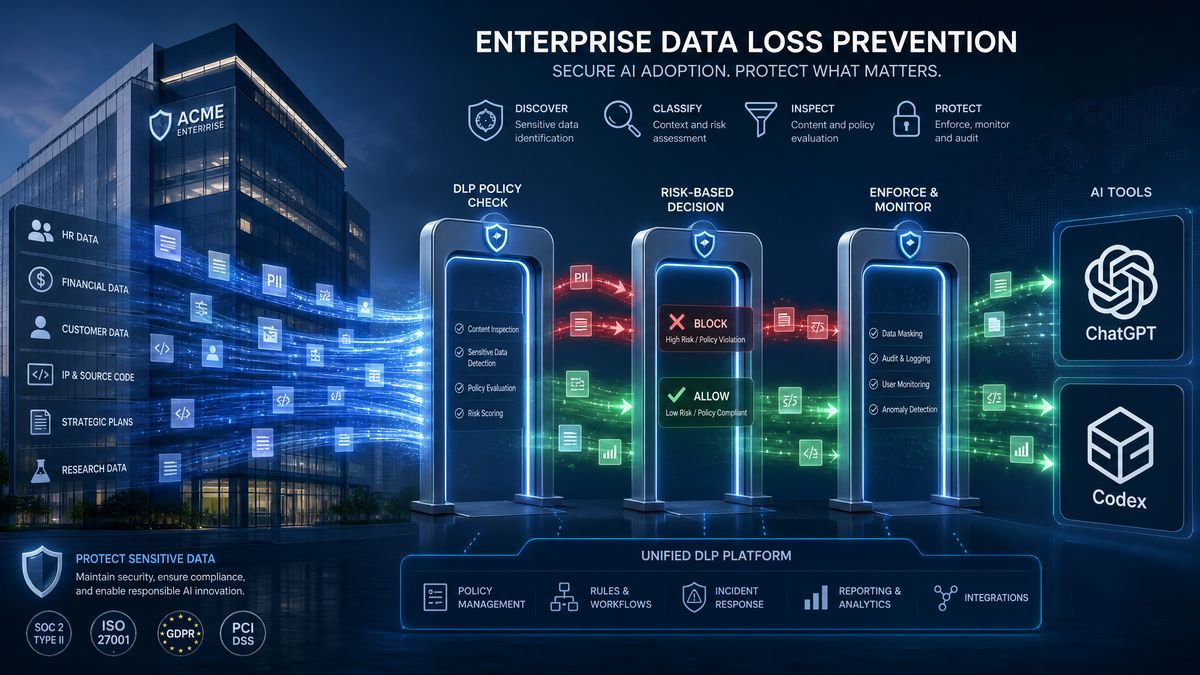
How to Build Enterprise Data Loss Prevention Policies for ChatGPT and Codex: Complete Implementation Guide
By the ChatGPT AI Hub Editorial Team — June 18, 2026
Enterprise adoption of ChatGPT and OpenAI Codex has accelerated dramatically over the past two years. Development teams now rely on Codex for code generation, security reviews, and automated refactoring, while business units use ChatGPT Enterprise for document analysis, customer data processing, and internal knowledge management. With that adoption comes a consequential risk: sensitive data leakage through AI prompts, completions, and API payloads.
Data Loss Prevention (DLP) is no longer optional for organizations operating under SOC 2, HIPAA, GDPR, PCI-DSS, or ISO 27001 frameworks. When an engineer pastes a database connection string into a Codex prompt, or a customer service representative submits a patient record to ChatGPT for summarization, the organization has potentially violated multiple regulatory controls simultaneously. The challenge is that traditional DLP tools were designed for email, file transfers, and endpoint activity — not for conversational AI interfaces with streaming API responses.
This guide provides a complete, production-ready implementation framework for building DLP policies specifically around ChatGPT Enterprise and Codex deployments. We cover account-level controls, real-time content inspection middleware, API gateway configurations, sensitive data detection patterns, audit logging architectures, and compliance mapping for the major regulatory frameworks. Every section includes working code, configuration examples, and decision tables you can adapt to your environment.
Data loss prevention policies must account for the security implications revealed by recent platform incidents. Our analysis of the June 2026 screen-capture incident and enterprise protection strategies provides critical context for understanding the threat vectors that DLP policies need to address when deploying AI coding assistants across your organization.
Understanding the DLP Threat Surface for AI Workloads
Before writing a single policy rule, security architects must map the attack surface unique to generative AI deployments. The threat model for ChatGPT and Codex differs from conventional SaaS applications in three critical ways.
Bidirectional Data Exposure
In traditional DLP scenarios, you primarily monitor outbound data. With AI, both directions carry risk. Outbound prompts may contain PII, source code with hardcoded secrets, financial records, or protected health information. Inbound completions may reproduce sensitive training data, generate outputs that inadvertently reconstruct confidential information from model memory, or return API responses containing data from other tenants in misconfigured deployments.
Unstructured Data Complexity
Standard DLP engines excel at detecting structured patterns: Social Security Numbers, credit card numbers, IP addresses. AI prompts are unstructured conversational text. A user might describe a patient without using formal field names, or discuss a merger using code names that only become sensitive in context. Your DLP pipeline must handle both structural pattern matching and semantic classification.
Developer Workflow Integration
Codex is embedded directly into IDEs, CI/CD pipelines, and code review tools. Developers interact with it dozens of times per hour through keystroke completions. Any DLP control that introduces latency above 100ms or that generates excessive false positives will be bypassed immediately, either by disabling the integration or by moving sensitive work to unmonitored environments. Effective enterprise DLP for AI must be fast, accurate, and minimally invasive.
Effective DLP implementation requires understanding your organization’s usage patterns and cost exposure. Our guide on Codex credit management and rate limit optimization for enterprise covers the administrative controls and monitoring dashboards that complement DLP policies by providing visibility into how teams consume AI resources.
Account-Level Controls in ChatGPT Enterprise and the OpenAI API
The foundation of any AI DLP program starts with the controls available directly within the OpenAI platform. These native controls are your first line of defense and the easiest to implement without custom engineering.
ChatGPT Enterprise Administrative Controls
ChatGPT Enterprise provides an administrative console at admin.openai.com where workspace administrators can configure conversation controls, data retention settings, and integration restrictions. The following configurations should be treated as baseline requirements for any regulated organization:
- Disable conversation history for sensitive workspaces: Navigate to Settings → Data Controls and set conversation retention to zero days for workspaces processing PHI or financial data. OpenAI honors this through their SOC 2 Type II certified data pipeline.
- Restrict plugin and connector access: Disable all third-party plugins by default. Approve only vetted integrations through the plugin allowlist. Each approved plugin should have a documented security review.
- Enable SSO enforcement: Configure SAML 2.0 SSO to ensure all users authenticate through your corporate identity provider. This enables you to enforce MFA, conditional access policies, and automatic deprovisioning.
- Configure IP allowlisting: Restrict API access to traffic originating from your corporate egress IPs or VPN subnets. OpenAI Enterprise supports IP restrictions through the API settings panel.
- Set up domain verification: Verify your corporate domain so that only users with @yourcompany.com email addresses can join the enterprise workspace.
API Key Management and Scoping
For Codex integrations accessed through the OpenAI API, key management is a critical DLP control that most organizations handle poorly. The default pattern of issuing a single organization-level API key shared across dozens of development teams creates no auditability and makes key rotation operationally painful.
Implement a secrets management architecture where API keys are issued per-team or per-application, stored in your secrets vault (HashiCorp Vault, AWS Secrets Manager, Azure Key Vault), rotated on a 90-day schedule, and never exposed in source code or CI/CD configuration files. The following Vault policy demonstrates how to scope ChatGPT API key access by team:
# vault-policy-codex-backend-team.hcl
# Grant the backend engineering team read access to their Codex API key

path "secret/data/openai/codex/backend-team" {
  capabilities = ["read"]
}

path "secret/metadata/openai/codex/backend-team" {
  capabilities = ["read", "list"]
}

# Deny access to keys belonging to other teams
path "secret/data/openai/codex/*" {
  capabilities = ["deny"]
}

# Allow key rotation operations only for approved automation roles
path "secret/data/openai/codex/backend-team" {
  capabilities = ["read", "update"]
  bound_roles = ["codex-key-rotation-bot"]
}
Additionally, configure your API gateway (covered in detail in a later section) to inject API keys at the infrastructure layer rather than the application layer, so that developer workstations never have direct access to production API credentials.
Building a Content Inspection Middleware Layer
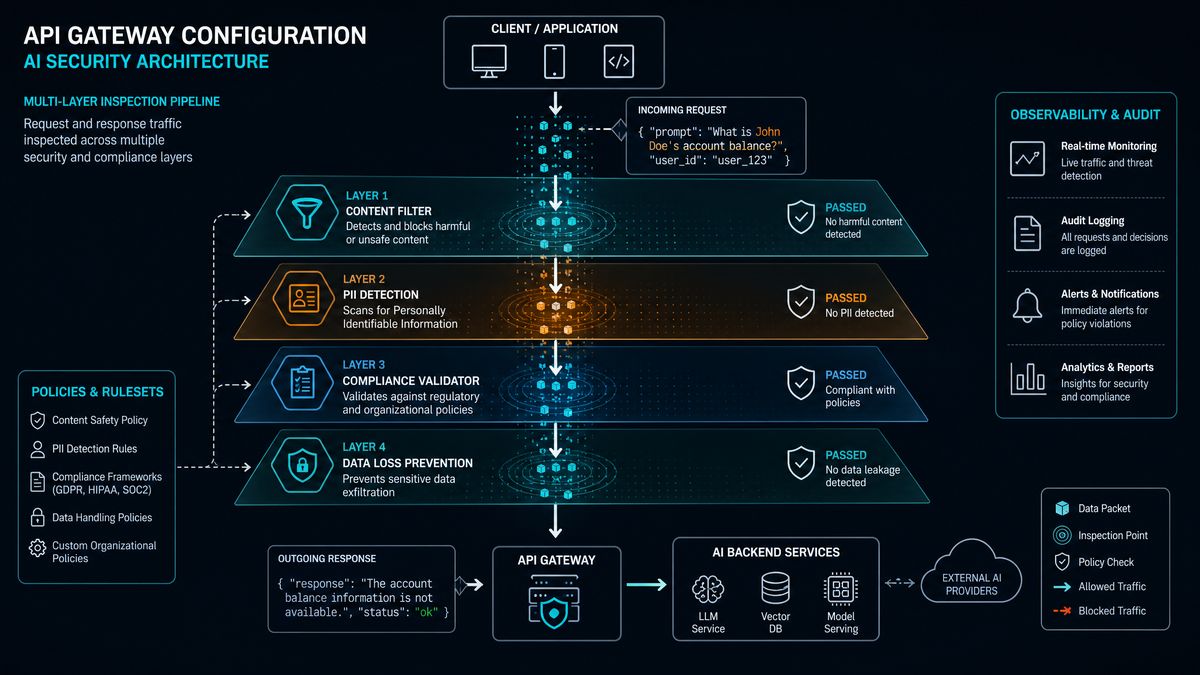
Native platform controls establish governance boundaries, but they cannot inspect the actual content flowing through your AI integrations. A content inspection middleware layer sits between your users and the OpenAI API, examining both prompts and completions in real time. This is the technical core of your enterprise AI DLP architecture.
Architecture Overview
The recommended pattern for ChatGPT and Codex DLP is a transparent proxy deployed as a Kubernetes service or serverless function. All API traffic is routed through this proxy, which performs three operations: classification, enforcement, and logging. Classification determines whether content matches defined sensitive data patterns. Enforcement applies the appropriate response (allow, block, redact, alert). Logging creates an immutable audit trail for compliance reporting.
Implementing the DLP Proxy in Python
The following example demonstrates a production-ready DLP proxy using FastAPI and a pluggable detection engine. This proxy handles both ChatGPT and Codex API traffic through the OpenAI completions and chat endpoints:
import re
import json
import hashlib
import logging
from typing import Optional, Dict, Any, List, Tuple
from datetime import datetime, timezone
from fastapi import FastAPI, Request, Response, HTTPException, Depends
from fastapi.responses import StreamingResponse
import httpx
from pydantic import BaseModel
import asyncio

# Configure structured logging for SIEM integration
logging.basicConfig(
    format='{"timestamp":"%(asctime)s","level":"%(levelname)s","message":%(message)s}',
    level=logging.INFO
)
logger = logging.getLogger("dlp-proxy")

app = FastAPI(title="Enterprise AI DLP Proxy", version="2.4.0")

# ─── Sensitive Data Detection Patterns ───────────────────────────────────────

DLP_PATTERNS = {
    "us_ssn": {
        "pattern": re.compile(r'\b(?!219-09-9999|078-05-1120)\d{3}-(?!00)\d{2}-(?!0{4})\d{4}\b'),
        "severity": "critical",
        "frameworks": ["HIPAA", "GDPR", "SOC2"],
        "action": "block"
    },
    "credit_card": {
        "pattern": re.compile(
            r'\b(?:4[0-9]{12}(?:[0-9]{3})?|'
            r'(?:5[1-5][0-9]{2}|222[1-9]|22[3-9][0-9]|2[3-6][0-9]{2}|27[01][0-9]|2720)[0-9]{12}|'
            r'3[47][0-9]{13}|3(?:0[0-5]|[68][0-9])[0-9]{11}|6(?:011|5[0-9]{2})[0-9]{12})\b'
        ),
        "severity": "critical",
        "frameworks": ["PCI-DSS", "SOC2"],
        "action": "block"
    },
    "aws_access_key": {
        "pattern": re.compile(r'\b(AKIA|AIPA|AROA|ASIA)[A-Z0-9]{16}\b'),
        "severity": "critical",
        "frameworks": ["SOC2"],
        "action": "block"
    },
    "aws_secret_key": {
        "pattern": re.compile(r'(?i)aws[_\-\s]*secret[_\-\s]*access[_\-\s]*key[_\-\s]*[=:][_\-\s]*[A-Za-z0-9/+=]{40}'),
        "severity": "critical",
        "frameworks": ["SOC2"],
        "action": "block"
    },
    "private_key_pem": {
        "pattern": re.compile(r'-----BEGIN (?:RSA |EC |OPENSSH )?PRIVATE KEY-----'),
        "severity": "critical",
        "frameworks": ["SOC2", "PCI-DSS"],
        "action": "block"
    },
    "api_key_generic": {
        "pattern": re.compile(r'(?i)(api[_\-\s]?key|apikey|api_token|access_token)[_\-\s]*[=:][_\-\s]*[A-Za-z0-9\-_]{20,}'),
        "severity": "high",
        "frameworks": ["SOC2"],
        "action": "alert"
    },
    "email_address": {
        "pattern": re.compile(r'\b[A-Za-z0-9._%+\-]+@[A-Za-z0-9.\-]+\.[A-Z|a-z]{2,}\b'),
        "severity": "medium",
        "frameworks": ["GDPR", "HIPAA"],
        "action": "log"
    },
    "us_phone": {
        "pattern": re.compile(r'\b(?:\+1[-.\s]?)?\(?\d{3}\)?[-.\s]?\d{3}[-.\s]?\d{4}\b'),
        "severity": "medium",
        "frameworks": ["GDPR", "HIPAA"],
        "action": "log"
    },
    "ipv4_private": {
        "pattern": re.compile(r'\b(?:10\.\d{1,3}\.\d{1,3}\.\d{1,3}|172\.(?:1[6-9]|2\d|3[01])\.\d{1,3}\.\d{1,3}|192\.168\.\d{1,3}\.\d{1,3})\b'),
        "severity": "medium",
        "frameworks": ["SOC2"],
        "action": "log"
    },
    "db_connection_string": {
        "pattern": re.compile(
            r'(?i)(mysql|postgresql|postgres|mongodb|redis|mssql|oracle)://[^\s"\'<>]+'
        ),
        "severity": "critical",
        "frameworks": ["SOC2", "PCI-DSS"],
        "action": "block"
    },
    "jwt_token": {
        "pattern": re.compile(r'\beyJ[A-Za-z0-9\-_]+\.[A-Za-z0-9\-_]+\.[A-Za-z0-9\-_]+\b'),
        "severity": "high",
        "frameworks": ["SOC2"],
        "action": "alert"
    },
    "phi_mrn": {
        "pattern": re.compile(r'(?i)(mrn|medical.record.number|patient.id)[_\-\s]*[=:#]?\s*[A-Z0-9\-]{6,12}\b'),
        "severity": "critical",
        "frameworks": ["HIPAA"],
        "action": "block"
    }
}


class DLPViolation(BaseModel):
    pattern_name: str
    severity: str
    frameworks: List[str]
    action: str
    matched_text_hash: str  # Hash, never log the actual match
    position: int


class DLPResult(BaseModel):
    is_clean: bool
    violations: List[DLPViolation]
    highest_severity: Optional[str]
    recommended_action: str
    scan_duration_ms: float


def scan_content(text: str) -> DLPResult:
    """Scan text content against all configured DLP patterns."""
    start_time = datetime.now(timezone.utc)
    violations = []
    severity_order = {"critical": 4, "high": 3, "medium": 2, "low": 1}

    for pattern_name, config in DLP_PATTERNS.items():
        matches = list(config["pattern"].finditer(text))
        for match in matches:
            matched_text = match.group(0)
            # Hash the matched text for audit logs - never store raw PII in logs
            text_hash = hashlib.sha256(matched_text.encode()).hexdigest()[:16]

            violations.append(DLPViolation(
                pattern_name=pattern_name,
                severity=config["severity"],
                frameworks=config["frameworks"],
                action=config["action"],
                matched_text_hash=text_hash,
                position=match.start()
            ))

    # Determine highest severity and recommended action
    highest_severity = None
    recommended_action = "allow"

    if violations:
        highest_sev_score = max(
            severity_order.get(v.severity, 0) for v in violations
        )
        highest_severity = [k for k, v in severity_order.items() if v == highest_sev_score][0]

        # Action hierarchy: block > alert > log > allow
        action_order = {"block": 3, "alert": 2, "log": 1, "allow": 0}
        highest_action_score = max(
            action_order.get(v.action, 0) for v in violations
        )
        recommended_action = [k for k, v in action_order.items() if v == highest_action_score][0]

    end_time = datetime.now(timezone.utc)
    scan_duration = (end_time - start_time).total_seconds() * 1000

    return DLPResult(
        is_clean=len(violations) == 0,
        violations=violations,
        highest_severity=highest_severity,
        recommended_action=recommended_action,
        scan_duration_ms=scan_duration
    )


def redact_content(text: str, violations: List[DLPViolation]) -> str:
    """Redact sensitive content while preserving text structure for low-severity items."""
    redacted = text
    # Process patterns in reverse order to preserve positions
    for pattern_name, config in DLP_PATTERNS.items():
        if config["severity"] in ("medium", "low") and config["action"] == "log":
            redacted = config["pattern"].sub("[REDACTED]", redacted)
    return redacted


@app.middleware("http")
async def dlp_inspection_middleware(request: Request, call_next):
    """Main DLP inspection middleware - runs on every request."""
    if request.url.path not in ["/v1/chat/completions", "/v1/completions"]:
        return await call_next(request)

    body_bytes = await request.body()

    try:
        body = json.loads(body_bytes)
    except json.JSONDecodeError:
        raise HTTPException(status_code=400, detail="Invalid JSON payload")

    # Extract text content from request
    request_text = extract_text_from_payload(body)

    # Run DLP scan on prompt
    scan_result = scan_content(request_text)

    # Build audit log entry
    audit_entry = {
        "event_type": "dlp_scan",
        "timestamp": datetime.now(timezone.utc).isoformat(),
        "direction": "outbound_prompt",
        "user_id": request.headers.get("X-User-ID", "unknown"),
        "team_id": request.headers.get("X-Team-ID", "unknown"),
        "application": request.headers.get("X-Application-Name", "unknown"),
        "model": body.get("model", "unknown"),
        "scan_result": scan_result.dict(),
        "payload_size_bytes": len(body_bytes)
    }

    logger.info(json.dumps(audit_entry))

    # Enforce DLP policy based on scan result
    if scan_result.recommended_action == "block":
        block_response = {
            "error": {
                "type": "dlp_policy_violation",
                "message": "Request blocked by enterprise DLP policy. Sensitive data detected.",
                "violation_count": len(scan_result.violations),
                "highest_severity": scan_result.highest_severity,
                "frameworks": list(set(
                    f for v in scan_result.violations for f in v.frameworks
                ))
            }
        }
        return Response(
            content=json.dumps(block_response),
            status_code=400,
            media_type="application/json"
        )

    return await call_next(request)


def extract_text_from_payload(payload: Dict[str, Any]) -> str:
    """Extract all text content from OpenAI API request payload."""
    text_parts = []

    # Handle chat completions format
    if "messages" in payload:
        for message in payload.get("messages", []):
            content = message.get("content", "")
            if isinstance(content, str):
                text_parts.append(content)
            elif isinstance(content, list):
                for part in content:
                    if isinstance(part, dict) and part.get("type") == "text":
                        text_parts.append(part.get("text", ""))

    # Handle legacy completions format
    if "prompt" in payload:
        prompt = payload.get("prompt", "")
        if isinstance(prompt, str):
            text_parts.append(prompt)
        elif isinstance(prompt, list):
            text_parts.extend(str(p) for p in prompt)

    return "\n".join(text_parts)
Deploying the DLP Proxy with Kubernetes
The proxy should be deployed as a sidecar or as a dedicated service depending on your traffic volume. For enterprise deployments handling more than 10,000 API calls per day, a dedicated service with horizontal pod autoscaling is recommended. The following Kubernetes manifest deploys the DLP proxy with appropriate resource limits and security contexts:
apiVersion: apps/v1
kind: Deployment
metadata:
  name: ai-dlp-proxy
  namespace: security
  labels:
    app: ai-dlp-proxy
    compliance: soc2-hipaa-gdpr
spec:
  replicas: 3
  selector:
    matchLabels:
      app: ai-dlp-proxy
  template:
    metadata:
      labels:
        app: ai-dlp-proxy
      annotations:
        vault.hashicorp.com/agent-inject: "true"
        vault.hashicorp.com/role: "dlp-proxy"
        vault.hashicorp.com/agent-inject-secret-openai: "secret/data/openai/api-key"
    spec:
      serviceAccountName: ai-dlp-proxy-sa
      securityContext:
        runAsNonRoot: true
        runAsUser: 10001
        fsGroup: 10001
        seccompProfile:
          type: RuntimeDefault
      containers:
      - name: dlp-proxy
        image: your-registry.io/ai-dlp-proxy:2.4.0
        ports:
        - containerPort: 8080
          name: http
          protocol: TCP
        resources:
          requests:
            cpu: "500m"
            memory: "512Mi"
          limits:
            cpu: "2000m"
            memory: "2Gi"
        env:
        - name: OPENAI_API_BASE
          value: "https://api.openai.com"
        - name: LOG_LEVEL
          value: "INFO"
        - name: METRICS_ENABLED
          value: "true"
        livenessProbe:
          httpGet:
            path: /health
            port: 8080
          initialDelaySeconds: 10
          periodSeconds: 30
        readinessProbe:
          httpGet:
            path: /ready
            port: 8080
          initialDelaySeconds: 5
          periodSeconds: 10
        securityContext:
          allowPrivilegeEscalation: false
          readOnlyRootFilesystem: true
          capabilities:
            drop: ["ALL"]
---
apiVersion: v1
kind: Service
metadata:
  name: ai-dlp-proxy
  namespace: security
spec:
  selector:
    app: ai-dlp-proxy
  ports:
  - port: 443
    targetPort: 8080
    name: https
  type: ClusterIP
---
apiVersion: autoscaling/v2
kind: HorizontalPodAutoscaler
metadata:
  name: ai-dlp-proxy-hpa
  namespace: security
spec:
  scaleTargetRef:
    apiVersion: apps/v1
    kind: Deployment
    name: ai-dlp-proxy
  minReplicas: 3
  maxReplicas: 20
  metrics:
  - type: Resource
    resource:
      name: cpu
      target:
        type: Utilization
        averageUtilization: 60
  - type: Resource
    resource:
      name: memory
      target:
        type: Utilization
        averageUtilization: 70
API Gateway Configuration for Traffic Enforcement
The content inspection layer detects violations, but a properly configured API gateway is what enforces them at scale. Your API gateway is the chokepoint through which all AI traffic must pass, and it provides additional controls beyond what your inspection middleware can deliver: rate limiting, authentication, traffic shaping, and geographic restrictions.
For organizations already running Kong, NGINX Plus, AWS API Gateway, or Azure API Management, routing Codex and ChatGPT API traffic through your existing gateway infrastructure is the path of least resistance. For teams starting fresh, Kong is recommended due to its robust plugin ecosystem and native support for the OpenAI API traffic patterns.
Kong Gateway Configuration for OpenAI Traffic
# kong-openai-dlp-config.yaml
# Deploy with: deck sync -s kong-openai-dlp-config.yaml

_format_version: "3.0"

services:
  - name: openai-chat-api
    url: https://api.openai.com
    connect_timeout: 5000
    read_timeout: 30000
    write_timeout: 30000

    routes:
      - name: chat-completions
        paths: ["/v1/chat/completions"]
        methods: ["POST"]
        strip_path: false

      - name: codex-completions
        paths: ["/v1/completions"]
        methods: ["POST"]
        strip_path: false

    plugins:
      # Rate limiting per consumer to prevent data exfiltration via bulk requests
      - name: rate-limiting-advanced
        config:
          limit: [100, 1000, 5000]
          window_size: [60, 3600, 86400]
          window_type: sliding
          limit_by: consumer
          sync_rate: 10
          strategy: redis
          redis:
            host: redis-cluster.internal
            port: 6379

      # Request size limiting to prevent bulk data uploads
      - name: request-size-limiting
        config:
          allowed_payload_size: 1
          size_unit: megabytes

      # Enforce authentication on all requests
      - name: jwt
        config:
          claims_to_verify: ["exp", "iat"]
          key_claim_name: "kid"

      # Inject API key from vault at gateway layer
      - name: request-transformer
        config:
          add:
            headers:
              - "Authorization: Bearer $(vault:secret/openai/api-key)"
          remove:
            headers:
              - "Authorization"  # Remove any user-supplied auth headers

      # Route to DLP inspection proxy before forwarding upstream
      - name: pre-function
        config:
          access:
            - |
              local dlp_response = kong.service.request.get_body()
              -- DLP inspection via internal service call
              local http = require "resty.http"
              local httpc = http.new()
              local res, err = httpc:request_uri(
                "http://ai-dlp-proxy.security.svc.cluster.local:8080/inspect",
                {
                  method = "POST",
                  body = kong.request.get_raw_body(),
                  headers = {
                    ["Content-Type"] = "application/json",
                    ["X-User-ID"] = kong.request.get_header("X-User-ID"),
                    ["X-Team-ID"] = kong.request.get_header("X-Team-ID"),
                  },
                  ssl_verify = true,
                  timeout = 5000,
                }
              )
              if res and res.status == 400 then
                return kong.response.exit(400, res.body)
              end

      # Comprehensive request/response logging for audit trail
      - name: file-log
        config:
          path: /var/log/kong/ai-audit.log
          reopen: true
          custom_fields_by_lua:
            user_id: "return kong.request.get_header('X-User-ID')"
            team_id: "return kong.request.get_header('X-Team-ID')"
            dlp_scan_id: "return kong.request.get_header('X-DLP-Scan-ID')"
Sensitive Data Classification Framework
Effective DLP requires a tiered classification framework that maps data sensitivity levels to enforcement actions. The following table defines the recommended classification tiers for AI workloads in regulated environments, along with the appropriate controls for each tier:
| Classification Level | Data Examples | Regulatory Frameworks | Enforcement Action | Logging Requirement | Retention Period |
|---|---|---|---|---|---|
| Critical (Level 4) | SSNs, payment card numbers, PHI, private keys, database credentials, MRNs | HIPAA, PCI-DSS, SOC 2, GDPR Art. 9 | Block + alert security team | Full audit log (hashed values) | 7 years |
| High (Level 3) | API keys, JWT tokens, employee IDs, passport numbers, financial account numbers | SOC 2, GDPR, ISO 27001 | Block or redact before forwarding | Full audit log (hashed values) | 5 years |
| Sensitive (Level 2) | Email addresses, phone numbers, IP addresses, customer names, internal hostnames | GDPR, CCPA, HIPAA | Alert + allow with annotation | Summary log | 3 years |
| Internal (Level 1) | Internal documentation, proprietary code without secrets, business logic | SOC 2 Confidentiality | Allow + log metadata only | Metadata log (no content) | 1 year |
| Public (Level 0) | Public documentation, open-source code, publicly available data | None | Allow | Aggregate statistics only | 90 days |
Contextual Classification for Code Inputs
Codex integrations require special attention because code contains sensitive data in contextually specific ways that differ from natural language. A SQL query containing a WHERE clause filtering on an email column may not trigger naive regex patterns but represents a potential data model disclosure. Implement the following additional checks specifically for code inputs:
import ast
import re
from typing import Set, List

# Code-specific DLP patterns for Codex inputs
CODE_DLP_PATTERNS = {
    "hardcoded_password": re.compile(
        r'(?i)(password|passwd|pwd|secret|token|key)\s*=\s*["\'][^"\']{4,}["\']'
    ),
    "base64_encoded_secret": re.compile(
        r'(?i)(password|secret|key|token)\s*=\s*["\'][A-Za-z0-9+/]{20,}={0,2}["\']'
    ),
    "sql_with_literal_values": re.compile(
        r'(?i)WHERE\s+\w+\s*=\s*["\'][^"\']{6,}["\']'
    ),
    "environment_secret_reference": re.compile(
        r'(?i)os\.(?:environ|getenv)\(["\'](?:password|secret|key|token|api)[^"\']*["\']'
    ),
    "terraform_sensitive_variable": re.compile(
        r'sensitive\s*=\s*true'
    ),
    "docker_env_secret": re.compile(
        r'(?i)ENV\s+(?:PASSWORD|SECRET|KEY|TOKEN|API_KEY)\s+\S+'
    ),
    "yaml_inline_secret": re.compile(
        r'(?i)(?:password|secret|api_key|private_key)\s*:\s*(?![{}\[\]${{]).{4,}'
    ),
}

def scan_code_content(code: str, language: str = "unknown") -> List[dict]:
    """
    Perform code-aware DLP scanning for Codex inputs.
    Returns list of code-specific violations with context.
    """
    violations = []
    lines = code.split('\n')

    for pattern_name, pattern in CODE_DLP_PATTERNS.items():
        for line_num, line in enumerate(lines, 1):
            matches = pattern.findall(line)
            if matches:
                violations.append({
                    "pattern": pattern_name,
                    "line_number": line_num,
                    "language": language,
                    "severity": "critical",
                    "context_hash": hashlib.sha256(
                        f"{line_num}:{pattern_name}:{code[:100]}".encode()
                    ).hexdigest()[:12]
                })

    # Python-specific: detect secrets passed to function arguments
    if language in ("python", "py"):
        try:
            tree = ast.parse(code)
            for node in ast.walk(tree):
                if isinstance(node, ast.Call):
                    for keyword in node.keywords:
                        if keyword.arg and any(
                            sensitive in keyword.arg.lower()
                            for sensitive in ["password", "secret", "token", "key"]
                        ):
                            if isinstance(keyword.value, ast.Constant):
                                violations.append({
                                    "pattern": "python_hardcoded_keyword_argument",
                                    "line_number": node.lineno,
                                    "language": language,
                                    "severity": "critical",
                                    "context_hash": hashlib.sha256(
                                        str(node.lineno).encode()
                                    ).hexdigest()[:12]
                                })
        except SyntaxError:
            pass  # Non-parseable code, rely on regex patterns only

    return violations
Compliance Mapping: SOC 2, HIPAA, and GDPR
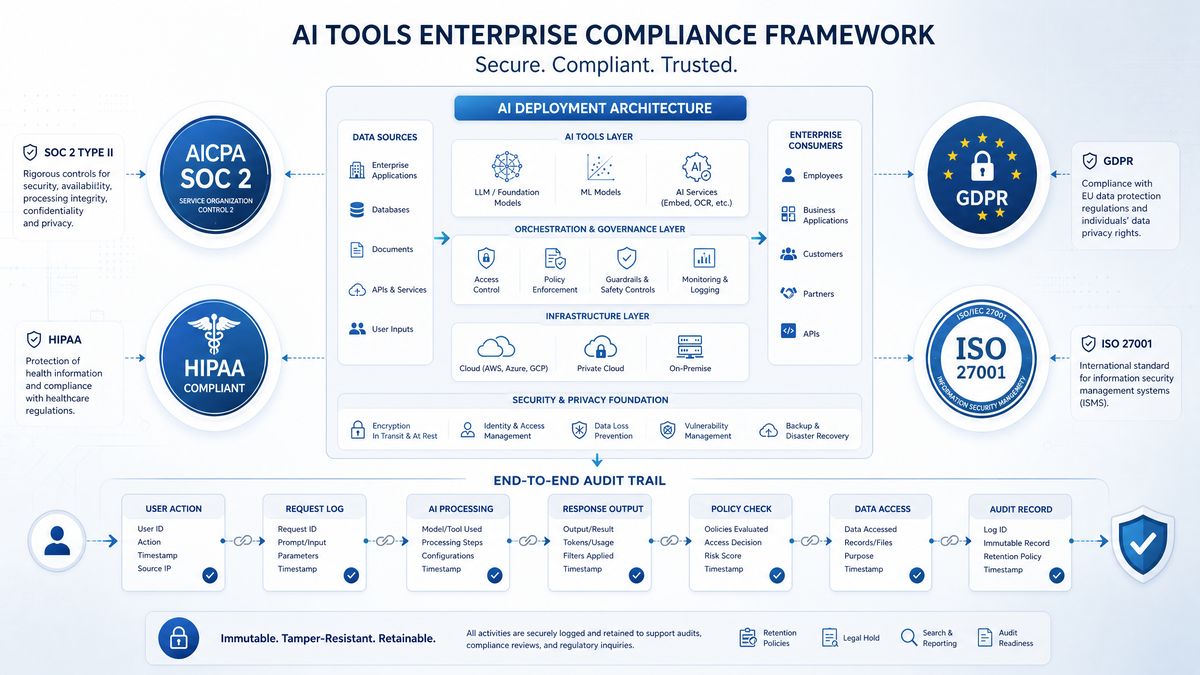
The technical controls described above must be mapped to specific regulatory requirements to demonstrate compliance. The following section provides the control mapping that your compliance team, external auditors, and data protection officers will need during assessments.
SOC 2 Type II Compliance Controls
SOC 2 Type II assessments evaluate the operating effectiveness of controls over a period typically ranging from six to twelve months. For AI workloads, the relevant Trust Service Criteria are CC6 (Logical and Physical Access), CC7 (System Operations), CC8 (Change Management), and A1 (Availability). The following table maps DLP controls to specific SOC 2 criteria:
| SOC 2 Criteria | Control Description | DLP Implementation | Evidence Collection |
|---|---|---|---|
| CC6.1 | Logical access security measures to protect against threats from outside the system | API key scoping, IP allowlisting, SSO enforcement | Kong access logs, Vault audit logs, IdP authentication reports |
| CC6.6 | Logical access security measures to protect against unauthorized access from network sources | DLP proxy blocking critical violations, rate limiting, request size limiting | DLP proxy block event logs, Kong rate limit logs |
| CC6.7 | Restriction of transmission and movement of information to authorized internal and external parties | Content inspection middleware, redaction pipeline | DLP scan results, redaction audit trail |
| CC7.2 | Monitor system components for anomalies that could indicate malicious acts or errors | SIEM integration, anomaly detection on DLP violation patterns | SIEM alert logs, DLP violation trend reports |
| CC7.3 | Evaluate security events to determine whether they could or have resulted in a failure to meet objectives | Security incident process triggered by critical DLP violations | Incident management tickets linked to DLP events |
| A1.2 | Availability commitments and requirements are met | DLP proxy HPA, health checks, circuit breakers | Uptime monitoring reports, HPA scaling events |
HIPAA Technical Safeguard Controls
For healthcare organizations using ChatGPT or Codex to process any data that could qualify as Protected Health Information, HIPAA Technical Safeguards under 45 CFR §164.312 mandate specific controls. Note that OpenAI offers a Business Associate Agreement (BAA) for ChatGPT Enterprise customers, but the BAA alone is insufficient; your DLP controls must also prevent inadvertent PHI transmission through channels not covered by the BAA.
| HIPAA Safeguard | §164.312 Reference | Required/Addressable | DLP Implementation Mapping |
|---|---|---|---|
| Access Control | §164.312(a)(1) | Required | SSO enforcement, team-scoped API keys, workspace role-based access |
| Audit Controls | §164.312(b) | Required | Immutable audit logs for all AI API calls, structured JSON logs to SIEM |
| Integrity | §164.312(c)(1) | Required | TLS 1.3 for all API traffic, response integrity validation |
| Person Authentication | §164.312(d) | Required | MFA enforcement through SSO, JWT authentication at API gateway |
| Transmission Security | §164.312(e)(1) | Required | TLS 1.3 only, certificate pinning for critical services |
| Automatic Logoff | §164.312(a)(2)(iii) | Addressable | JWT token expiry of 1 hour, refresh token rotation policy |
| Encryption and Decryption | §164.312(a)(2)(iv) | Addressable | Encryption at rest for audit logs, AES-256 for all log storage |
GDPR Article 25 and 32 Controls
GDPR imposes obligations around data protection by design and by default (Article 25) and security of processing (Article 32). For AI systems, Article 22 on automated decision-making and Article 35 on Data Protection Impact Assessments (DPIAs) are also frequently relevant. Your DLP implementation should be documented as part of the DPIA for any ChatGPT or Codex deployment that processes EU resident data.
Key GDPR technical control requirements for AI DLP include: pseudonymization of personal data before it enters AI prompts where feasible, the ability to fulfill data subject access requests (including requests to identify what personal data was submitted to AI systems), and documented data retention limitations. Your audit logs must retain enough information to respond to regulatory inquiries while honoring GDPR’s data minimization principle — which is why the DLP proxy hashes matched values rather than logging them in plaintext.
Implementing a Compliance Audit Report Generator
Your CISO and compliance team will need regular reports demonstrating control effectiveness. The following code generates a structured compliance summary from DLP event logs:
import json
from datetime import datetime, timezone, timedelta
from collections import defaultdict
from typing import Dict, List, Any
import boto3  # Example using S3 for log storage

def generate_compliance_report(
    log_source: str,
    start_date: datetime,
    end_date: datetime,
    frameworks: List[str] = ["SOC2", "HIPAA", "GDPR"]
) -> Dict[str, Any]:
    """
    Generate a compliance audit report from DLP event logs.
    Covers SOC 2, HIPAA, and GDPR requirements.
    """

    # Load events from your log storage
    events = load_dlp_events(log_source, start_date, end_date)

    report = {
        "report_metadata": {
            "generated_at": datetime.now(timezone.utc).isoformat(),
            "period_start": start_date.isoformat(),
            "period_end": end_date.isoformat(),
            "frameworks": frameworks,
            "total_events": len(events),
        },
        "summary": {
            "total_requests_scanned": 0,
            "clean_requests": 0,
            "violations_detected": 0,
            "requests_blocked": 0,
            "requests_alerted": 0,
            "requests_logged": 0,
        },
        "violations_by_type": defaultdict(int),
        "violations_by_severity": defaultdict(int),
        "violations_by_framework": defaultdict(int),
        "violations_by_team": defaultdict(int),
        "violations_by_application": defaultdict(int),
        "top_users_by_violations": defaultdict(int),
        "daily_trend": defaultdict(lambda: defaultdict(int)),
        "control_effectiveness": {},
    }

    for event in events:
        report["summary"]["total_requests_scanned"] += 1
        scan_result = event.get("scan_result", {})

        if scan_result.get("is_clean"):
            report["summary"]["clean_requests"] += 1
        else:
            report["summary"]["violations_detected"] += len(
                scan_result.get("violations", [])
            )
            action = scan_result.get("recommended_action", "allow")

            if action == "block":
                report["summary"]["requests_blocked"] += 1
            elif action == "alert":
                report["summary"]["requests_alerted"] += 1
            elif action == "log":
                report["summary"]["requests_logged"] += 1

            # Aggregate violation metrics
            for violation in scan_result.get("violations", []):
                report["violations_by_type"][violation["pattern_name"]] += 1
                report["violations_by_severity"][violation["severity"]] += 1

                for framework in violation["frameworks"]:
                    if framework in frameworks:
                        report["violations_by_framework"][framework] += 1

        # Team and application breakdowns
        team_id = event.get("team_id", "unknown")
        app_name = event.get("application", "unknown")
        user_id = event.get("user_id", "unknown")

        if not scan_result.get("is_clean"):
            report["violations_by_team"][team_id] += 1
            report["violations_by_application"][app_name] += 1
            report["top_users_by_violations"][user_id] += 1

        # Daily trend
        event_date = event.get("timestamp", "")[:10]
        if not scan_result.get("is_clean"):
            report["daily_trend"][event_date]["violations"] += 1
        report["daily_trend"][event_date]["total"] += 1

    # Calculate control effectiveness metrics
    total = report["summary"]["total_requests_scanned"]
    if total > 0:
        report["control_effectiveness"] = {
            "detection_rate": report["summary"]["violations_detected"] / total,
            "block_rate": report["summary"]["requests_blocked"] / total,
            "clean_rate": report["summary"]["clean_requests"] / total,
            "false_positive_rate": "manual_review_required",
        }

    # Framework-specific compliance statements
    report["compliance_statements"] = {}

    if "SOC2" in frameworks:
        report["compliance_statements"]["SOC2"] = {
            "cc6_1_status": "compliant" if report["summary"]["requests_blocked"] >= 0 else "review_required",
            "cc6_7_status": "compliant",
            "cc7_2_status": "compliant",
            "evidence_available": True,
            "audit_log_retention_days": 2555,  # 7 years
        }

    if "HIPAA" in frameworks:
        report["compliance_statements"]["HIPAA"] = {
            "phi_violations_detected": report["violations_by_framework"].get("HIPAA", 0),
            "audit_controls_status": "compliant",
            "baa_in_place": True,
            "phi_blocked_percentage": (
                report["summary"]["requests_blocked"] / total * 100
                if total > 0 else 0
            )
        }

    if "GDPR" in frameworks:
        report["compliance_statements"]["GDPR"] = {
            "personal_data_violations": report["violations_by_framework"].get("GDPR", 0),
            "data_minimization_status": "compliant",
            "pseudonymization_in_audit_logs": True,
            "dpia_required": report["violations_by_framework"].get("GDPR", 0) > 0,
        }

    # Convert defaultdicts to regular dicts for serialization
    report["violations_by_type"] = dict(report["violations_by_type"])
    report["violations_by_severity"] = dict(report["violations_by_severity"])
    report["violations_by_framework"] = dict(report["violations_by_framework"])
    report["violations_by_team"] = dict(report["violations_by_team"])
    report["violations_by_application"] = dict(report["violations_by_application"])
    report["top_users_by_violations"] = dict(report["top_users_by_violations"])
    report["daily_trend"] = {k: dict(v) for k, v in report["daily_trend"].items()}

    return report
IDE Plugin DLP Controls for Codex Developers
The DLP proxy and API gateway handle server-side enforcement, but developers working with Codex through IDE extensions (VS Code Copilot-style integrations, JetBrains AI Assistant, Cursor) benefit from client-side pre-flight checks that prevent sensitive data from ever leaving the workstation. This defense-in-depth approach reduces false positives at the gateway layer and creates a faster feedback loop for developers.
VS Code Extension Pre-Submission Scanning
The following TypeScript snippet demonstrates how to integrate DLP scanning into a VS Code extension that wraps Codex API calls. When a developer triggers a code completion or inline chat request, the extension scans the selected text and surrounding context before submitting it to the API:
import * as vscode from 'vscode';

interface DLPPattern {
  name: string;
  pattern: RegExp;
  severity: 'critical' | 'high' | 'medium' | 'low';
  message: string;
}

const CLIENT_DLP_PATTERNS: DLPPattern[] = [
  {
    name: 'aws_access_key',
    pattern: /\b(AKIA|AIPA|AROA|ASIA)[A-Z0-9]{16}\b/,
    severity: 'critical',
    message: 'AWS Access Key ID detected. Remove credentials before submitting to AI.'
  },
  {
    name: 'private_key',
    pattern: /-----BEGIN (?:RSA |EC |OPENSSH )?PRIVATE KEY-----/,
    severity: 'critical',
    message: 'Private key detected in selection. This should never be sent to an AI model.'
  },
  {
    name: 'hardcoded_password',
    pattern: /(?i:password|passwd|pwd)\s*=\s*['"][^'"]{4,}['"]/,
    severity: 'critical',
    message: 'Hardcoded password detected. Use environment variables or secrets management.'
  },
  {
    name: 'db_connection_string',
    pattern: /(?:mysql|postgresql|postgres|mongodb):\/\/[^\s"'<>]+/i,
    severity: 'critical',
    message: 'Database connection string detected. Redact credentials before submitting.'
  },
  {
    name: 'credit_card',
    pattern: /\b(?:4[0-9]{12}(?:[0-9]{3})?|5[1-5][0-9]{14}|3[47][0-9]{13})\b/,
    severity: 'critical',
    message: 'Credit card number detected. Remove PCI-DSS protected data.'
  }
];

export async function scanBeforeCodexSubmit(
  selectedText: string,
  context: string
): Promise<{ canSubmit: boolean; violations: DLPPattern[] }> {
  const fullContent = `${selectedText}\n${context}`;
  const violations: DLPPattern[] = [];

  for (const dlpPattern of CLIENT_DLP_PATTERNS) {
    if (dlpPattern.pattern.test(fullContent)) {
      violations.push(dlpPattern);
    }
  }

  if (violations.length === 0) {
    return { canSubmit: true, violations: [] };
  }

  const criticalViolations = violations.filter(v => v.severity === 'critical');

  if (criticalViolations.length > 0) {
    const message = criticalViolations.map(v => `• ${v.message}`).join('\n');
    await vscode.window.showErrorMessage(
      `DLP Policy Violation - Submission Blocked\n\n${message}`,
      { modal: true }
    );

    // Log to enterprise DLP telemetry (no content, just metadata)
    void reportViolationTelemetry(
      violations.map(v => v.name),
      vscode.workspace.workspaceFolders?.[0]?.name ?? 'unknown'
    );

    return { canSubmit: false, violations };
  }

  return { canSubmit: true, violations };
}

async function reportViolationTelemetry(
  patternNames: string[],
  workspaceName: string
): Promise {
  // Post violation metadata to enterprise DLP telemetry endpoint
  // Never include the actual content
  const telemetryPayload = {
    timestamp: new Date().toISOString(),
    source: 'vscode_dlp_extension',
    workspace: workspaceName,
    patterns_triggered: patternNames,
    developer_id: await getAnonymizedDeveloperId(),
    prevented: true
  };

  try {
    await fetch('https://dlp-telemetry.internal.yourcompany.com/v1/events', {
      method: 'POST',
      headers: { 'Content-Type': 'application/json' },
      body: JSON.stringify(telemetryPayload)
    });
  } catch {
    // Telemetry failure should not block developer workflow
    console.warn('DLP telemetry submission failed - continuing normally');
  }
}
Audit Logging Architecture for Regulatory Evidence
Every DLP event, whether a block, alert, or clean scan, must be logged in a format that satisfies audit requirements for your applicable regulatory frameworks. The logging architecture must address three requirements simultaneously: immutability (logs cannot be altered or deleted), searchability (auditors can query specific events efficiently), and minimality (logs contain sufficient information to demonstrate control effectiveness without storing the actual sensitive data that triggered violations).
Log Schema and SIEM Integration
The recommended log schema for AI DLP events follows the OCSF (Open Cybersecurity Schema Framework) format to ensure compatibility with major SIEM platforms including Splunk, Microsoft Sentinel, and Elastic Security:
{
  "class_uid": 6003,
  "class_name": "API Activity",
  "category_uid": 6,
  "category_name": "Application Activity",
  "activity_id": 1,
  "activity_name": "Send",
  "time": 1750242000000,
  "message": "DLP scan completed for AI API request",
  "severity_id": 3,
  "severity": "Medium",
  "status_id": 99,
  "status": "Other",
  "status_detail": "dlp_violation_detected",
  "actor": {
    "user": {
      "uid": "u-abc123def456",
      "email_addr": "[email protected]",
      "groups": [{"name": "backend-engineering"}]
    },
    "app": {
      "name": "vscode-codex-extension",
      "version": "3.1.2"
    }
  },
  "api": {
    "service": {
      "name": "openai",
      "labels": {"endpoint": "/v1/chat/completions"}
    },
    "request": {
      "flags": ["dlp_scanned"],
      "uid": "req-xyz789-2026-06-18"
    },
    "response": {
      "code": 400,
      "flags": ["dlp_blocked"]
    }
  },
  "metadata": {
    "version": "1.1.0",
    "product": {
      "name": "Enterprise AI DLP Proxy",
      "version": "2.4.0",
      "vendor_name": "YourCompany Security"
    },
    "original_time": "2026-06-18T14:00:00.000Z"
  },
  "dlp_context": {
    "scan_id": "scan-2026061814000000001",
    "patterns_triggered": ["us_ssn", "credit_card"],
    "highest_severity": "critical",
    "recommended_action": "block",
    "action_taken": "blocked",
    "scan_duration_ms": 4.7,
    "framework_applicability": ["HIPAA", "PCI-DSS", "SOC2"],
    "payload_size_bytes": 1847,
    "model_requested": "gpt-4o",
    "matched_value_hashes": [
      "a3f7b2c1d4e5f6a7",
      "b8c9d0e1f2a3b4c5"
    ]
  }
}
DLP Policy Governance and Tuning Process
Building the initial DLP controls is the first step. Maintaining them as your AI usage evolves requires a formal governance process. DLP policies that are not regularly reviewed and tuned become either too restrictive (causing developers to find workarounds) or too permissive (allowing sensitive data to flow through as business processes evolve).
False Positive Management
Establish a process for developers and business users to report false positive DLP violations. Each report should be triaged by your security team within 48 hours. True false positives should trigger a pattern refinement in your detection engine, not an exception for the individual user. Track your false positive rate per pattern and target a rate below 2% for critical patterns and below 5% for high-severity patterns.
Policy Review Cadence
- Weekly: Review DLP violation dashboards for anomalies, new patterns, or sudden increases in specific violation types that may indicate a new business process introducing sensitive data into AI workflows.
- Monthly: Review false positive reports, tune pattern detection, and update the classification taxonomy for any new data types your organization has introduced.
- Quarterly: Full policy review against current regulatory requirements. OpenAI platform changes (new model capabilities, new API endpoints, new ChatGPT Enterprise features) should trigger an ad-hoc policy review.
- Annually: External penetration test of the DLP proxy and API gateway configuration. Engage a third-party firm with AI security expertise to attempt DLP evasion through prompt injection, encoding attacks, and semantic obfuscation.
Metrics and KPIs for DLP Program Effectiveness
| Metric | Target | Measurement Method | Review Frequency |
|---|---|---|---|
| Critical violation block rate | 100% of detected critical violations blocked | DLP proxy block events / total critical scan hits | Weekly |
| DLP proxy availability | ≥99.9% uptime | Health check monitoring, incident records | Monthly |
| Median scan latency | <50ms p50, <100ms p99 | Proxy performance metrics | Weekly |
| False positive rate (critical patterns) | <2% | User-reported false positives / total block events | Monthly |
| API key rotation compliance | 100% of keys rotated within 90 days | Vault key age audit | Monthly |
| Developer DLP training completion | ≥95% of active AI users trained annually | LMS completion records | Quarterly |
| Time to detect and block new sensitive data type | <5 business days from identification to deployment | Policy change management log | Per incident |
Incident Response for AI DLP Violations
When a critical DLP violation occurs — particularly when it is detected after-the-fact through log analysis rather than blocked in real time — your incident response process must account for the unique characteristics of AI data leakage. Unlike email DLP incidents where you can recall a message, data submitted in an AI prompt cannot be unsubmitted. The response focuses on containment, notification, and remediation.
Incident Severity Classification for AI DLP Events
- P1 (Critical): PHI, payment card data, or authentication credentials were confirmed transmitted to the AI API without redaction and without a BAA or equivalent contractual protection in place. Immediate escalation to CISO, legal counsel, and DPO. HIPAA breach notification assessment begins immediately. 72-hour GDPR notification window may apply.
- P2 (High): Sensitive data transmitted to AI API but covered under existing BAA or data processing agreement. Detailed investigation required to determine if data minimization principles were violated. Document incident for SOC 2 control exception review.
- P3 (Medium): Internal sensitive data (API keys, internal hostnames, employee PII) detected in AI prompts. Security review of the implicated workflow required. Developer coaching and process improvement.
- P4 (Low): Low-severity pattern match (email addresses, phone numbers in business context). Log and review during regular weekly meeting. No immediate escalation.
Conclusion: Building a Sustainable AI DLP Program
Implementing DLP for ChatGPT and Codex is a continuous security engineering challenge, not a one-time project. The controls described in this guide — account-level configurations, content inspection middleware, API gateway enforcement, client-side pre-flight scanning, and immutable audit logging — provide a defense-in-depth architecture capable of satisfying SOC 2, HIPAA, and GDPR requirements. But their effectiveness depends on organizational discipline: regular policy reviews, developer training, false positive management, and integration with your broader security incident response processes.
The organizations that execute AI DLP well treat it not as a compliance checkbox but as a foundational engineering capability that enables their teams to use AI tools confidently without regulatory risk. When developers know that guardrails are in place and that the feedback loop for false positives is fast, they stop trying to work around the controls. That alignment between security and productivity is the real measure of a mature AI DLP program.
As OpenAI continues to release new capabilities — multimodal inputs, longer context windows, fine-tuning APIs — each expansion of the platform’s surface area requires a corresponding review of your DLP policy coverage. Build that review cadence into your security roadmap now, and your organization will be positioned to adopt new AI capabilities rapidly without compromising your compliance posture.
Published by the ChatGPT AI Hub Editorial Team on June 18, 2026. This guide reflects OpenAI API capabilities and regulatory requirements as of the publication date. Consult qualified legal and compliance counsel for regulatory interpretations specific to your jurisdiction and industry.
Access 40,000+ AI Prompts for ChatGPT, Claude & Codex — Free!
Subscribe to get instant access to our complete Notion Prompt Library — the largest curated collection of prompts for ChatGPT, Claude, OpenAI Codex, and other leading AI models. Optimized for real-world workflows across coding, research, content creation, and business.
