
How to Integrate Codex Library with Your Existing ChatGPT Workflows: Complete Migration and Setup Guide

How to Integrate Codex Library with Your Existing ChatGPT Workflows: Complete Migration and Setup Guide
By Markos Symeonides | June 20, 2026
OpenAI’s decision to consolidate the ChatGPT Library feature into Codex represents one of the most significant workflow changes for power users and enterprise teams since the introduction of Custom Instructions. If your team has spent months — or years — building a curated collection of saved prompts, project templates, and system instructions inside ChatGPT’s native Library, you’re now facing a migration that demands careful planning. Done poorly, this transition can fracture your team’s productivity for weeks. Done well, it unlocks a dramatically more powerful, version-controlled, and collaborative environment for managing AI-assisted work at scale.
This guide walks you through every phase of the migration: auditing what you currently have in ChatGPT Library, structuring your assets for the Codex environment, executing the technical transfer, and establishing governance practices that will keep your shared Codex Library organized as your team grows. Whether you’re a solo developer with 50 saved prompts or an enterprise team managing hundreds of custom instruction sets across multiple departments, the frameworks here are designed to scale with you.
What this guide covers: Pre-migration audit methodology, Codex Library architecture, step-by-step migration procedures, code examples for bulk operations, team governance models, and advanced organization strategies for enterprise deployments.
Understanding the Codex Library Consolidation: What Actually Changed
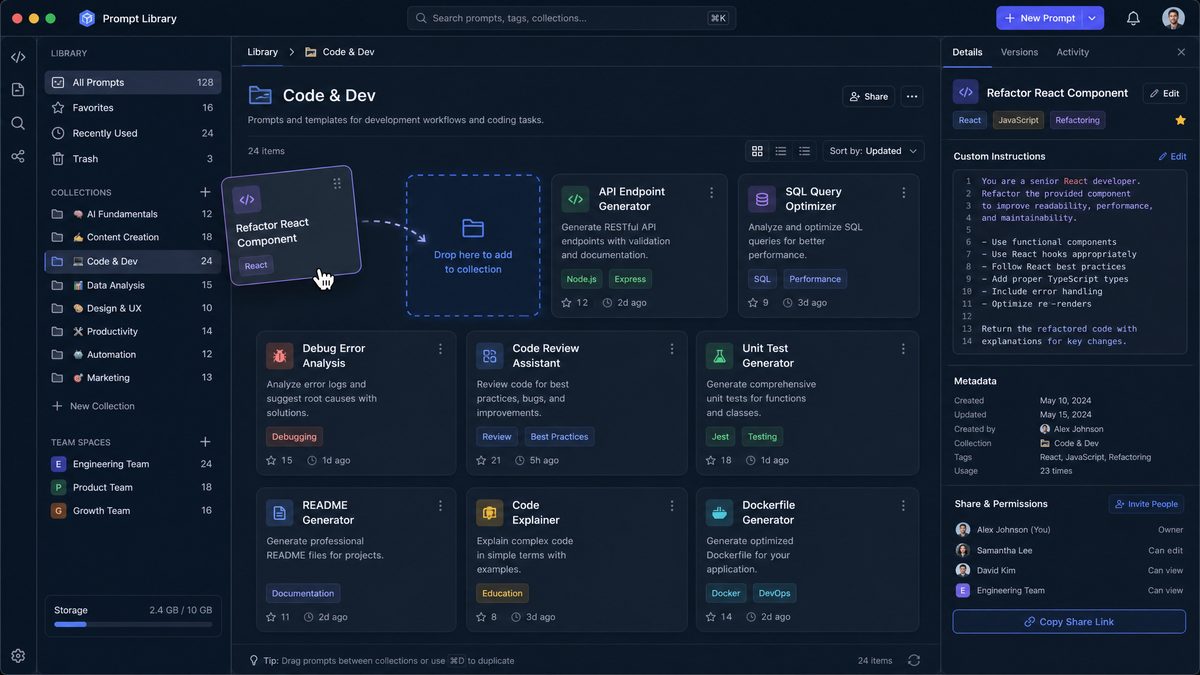
Before touching a single file or prompt, you need to understand precisely what OpenAI changed and why. The ChatGPT Library was originally a lightweight feature — essentially a personal bookmark system for conversations and prompts, living inside the ChatGPT web interface. It was functional for individual users but lacked versioning, sharing primitives, access controls, and any kind of programmatic interface.
Codex Library, by contrast, is built on an entirely different architectural foundation. It treats prompts, instructions, and templates as first-class objects with metadata, ownership, version history, and API accessibility. The consolidation isn’t simply a UI migration — it’s a philosophical shift from “saved text snippets” to “managed AI assets.”
Key Differences Between ChatGPT Library and Codex Library
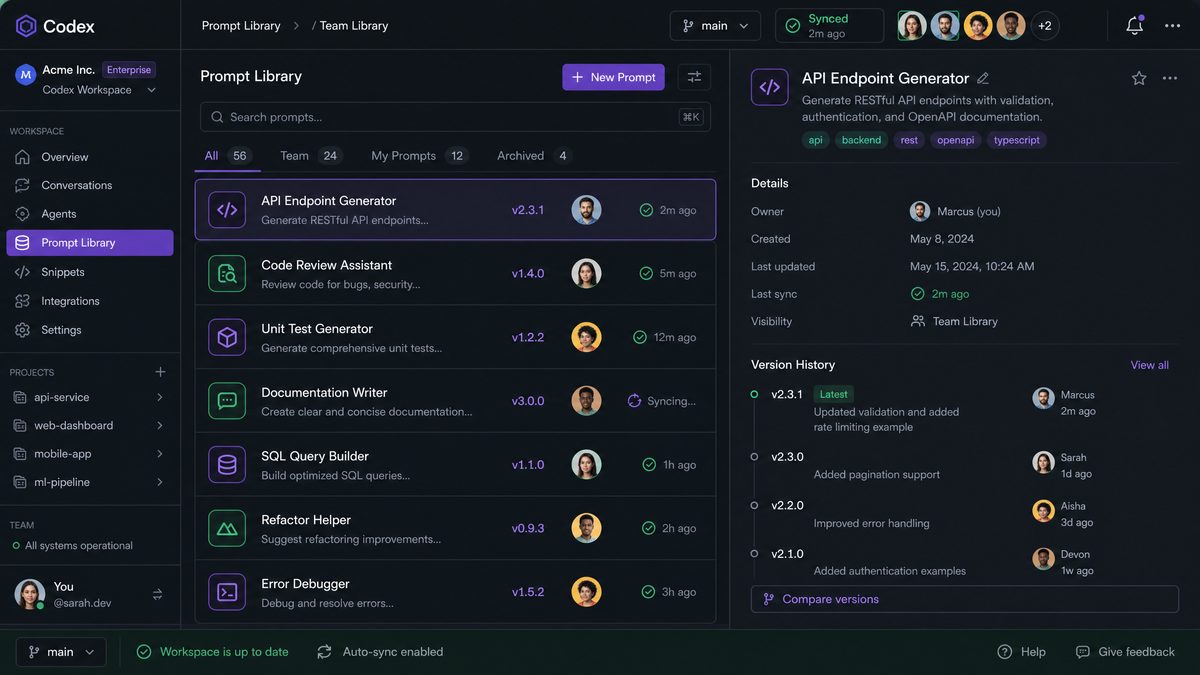
- Version control: Codex Library maintains a full edit history for every item, with the ability to roll back to any previous version. ChatGPT Library had no versioning — if you edited a saved prompt, the original was gone.
- Access control: Codex Library supports granular permissions at the item level: owner, editor, viewer, and no-access. ChatGPT Library was either private or shared with everyone in your workspace.
- API access: Codex Library items are accessible via the OpenAI API, allowing you to programmatically retrieve, update, and deploy prompts. This enables CI/CD pipelines for prompt management.
- Structured metadata: Every Codex Library item supports tags, categories, descriptions, model specifications, and parameter presets. ChatGPT Library stored plain text with a title.
- Team namespaces: Codex Library introduces the concept of organizational namespaces, separating personal items from team-shared assets from organization-wide templates.
- Execution context: Codex Library items can be linked directly to Codex agents, meaning a saved prompt can carry its own runtime configuration — which model to use, what tools to enable, what context window settings to apply.
What Happens to Your Existing ChatGPT Library Items
OpenAI has committed to a grace period during which ChatGPT Library items remain accessible in read-only mode through the legacy interface. However, they will not automatically migrate to Codex Library — the structural differences between the two systems make a lossless automatic migration impossible. Your saved prompts won’t disappear overnight, but they won’t gain the new capabilities either, and the legacy interface will eventually be deprecated.
The practical implication: you have a window to conduct a deliberate, structured migration rather than a panicked last-minute export. Use it. Teams that invest two to four hours in a proper audit and migration process now will avoid the productivity disruption of discovering that a critical prompt template has become inaccessible mid-project.
Phase 1: Auditing Your ChatGPT Library Before Migration
The single biggest mistake teams make during any tool migration is treating it as a pure technical exercise — export everything, import everything, done. In reality, a migration is an opportunity to eliminate technical debt. Research consistently shows that prompt libraries accumulate significant cruft over time: duplicate prompts with minor variations, outdated instructions that reference deprecated features, test prompts that were never cleaned up, and items whose original purpose no one on the team can remember.
A proper audit before migration ensures you’re building your Codex Library on a clean foundation rather than importing chaos into a more powerful system.
Step 1: Export Your Complete ChatGPT Library Inventory
Start by generating a complete inventory of everything currently in your ChatGPT Library. From the ChatGPT web interface, navigate to your Library and use the export function to download a JSON file of all saved items. The export format looks like this:
{
  "library_export": {
    "exported_at": "2026-06-20T09:15:00Z",
    "version": "1.0",
    "items": [
      {
        "id": "lib_a1b2c3d4e5",
        "title": "Technical Documentation Writer",
        "content": "You are a senior technical writer specializing in API documentation...",
        "created_at": "2025-11-03T14:22:00Z",
        "updated_at": "2026-02-17T09:45:00Z",
        "tags": ["documentation", "api", "technical"],
        "usage_count": 47,
        "last_used": "2026-06-15T11:30:00Z"
      },
      {
        "id": "lib_f6g7h8i9j0",
        "title": "test prompt 2",
        "content": "test",
        "created_at": "2026-01-08T16:00:00Z",
        "updated_at": "2026-01-08T16:00:00Z",
        "tags": [],
        "usage_count": 0,
        "last_used": null
      }
    ]
  }
}
If you’re managing a team workspace, you’ll need to export from each team member’s account separately, or — if you have admin access — use the OpenAI Admin API to pull a consolidated export across all workspace members.
Step 2: Run the Audit Analysis Script
Rather than manually reviewing potentially hundreds of items, use this Python script to automatically categorize your export and flag items that need attention:
import json
from datetime import datetime, timedelta, timezone
from collections import defaultdict

def audit_library_export(export_file_path):
    """
    Analyzes a ChatGPT Library export and categorizes items for migration.
    Returns a structured audit report with recommendations.
    """
    with open(export_file_path, 'r', encoding='utf-8') as f:
        data = json.load(f)

    items = data['library_export']['items']
    now = datetime.now(timezone.utc)
    ninety_days_ago = now - timedelta(days=90)

    audit_results = {
        'total_items': len(items),
        'migrate_as_is': [],
        'migrate_with_review': [],
        'archive_candidates': [],
        'delete_candidates': [],
        'duplicate_groups': defaultdict(list),
        'untagged_items': [],
        'statistics': {}
    }

    for item in items:
        # Flag empty or test items
        if len(item['content'].strip()) < 20 or item['title'].lower().startswith('test'):
            audit_results['delete_candidates'].append({
                'id': item['id'],
                'title': item['title'],
                'reason': 'Empty content or test item'
            })
            continue

        # Check last usage date
        if item['last_used'] is None:
            last_used_dt = None
        else:
            last_used_dt = datetime.fromisoformat(item['last_used'].replace('Z', '+00:00'))

        # Never used items
        if item['usage_count'] == 0:
            audit_results['delete_candidates'].append({
                'id': item['id'],
                'title': item['title'],
                'reason': 'Never used since creation'
            })
            continue

        # Stale items (not used in 90 days, low usage)
        if last_used_dt and last_used_dt < ninety_days_ago and item['usage_count'] < 5:
            audit_results['archive_candidates'].append({
                'id': item['id'],
                'title': item['title'],
                'last_used': item['last_used'],
                'usage_count': item['usage_count'],
                'reason': 'Low usage, not accessed in 90+ days'
            })
            continue

        # Flag untagged items for review
        if not item['tags']:
            audit_results['untagged_items'].append(item['id'])
            audit_results['migrate_with_review'].append({
                'id': item['id'],
                'title': item['title'],
                'reason': 'No tags — needs categorization before migration'
            })
            continue

        # High-value items: migrate as-is
        if item['usage_count'] >= 10 or (last_used_dt and last_used_dt >= ninety_days_ago):
            audit_results['migrate_as_is'].append({
                'id': item['id'],
                'title': item['title'],
                'usage_count': item['usage_count'],
                'tags': item['tags']
            })

    # Generate statistics
    audit_results['statistics'] = {
        'migrate_as_is_count': len(audit_results['migrate_as_is']),
        'review_needed_count': len(audit_results['migrate_with_review']),
        'archive_candidates_count': len(audit_results['archive_candidates']),
        'delete_candidates_count': len(audit_results['delete_candidates']),
        'untagged_count': len(audit_results['untagged_items'])
    }

    return audit_results

def print_audit_report(audit_results):
    stats = audit_results['statistics']
    print("=" * 60)
    print("CHATGPT LIBRARY MIGRATION AUDIT REPORT")
    print("=" * 60)
    print(f"Total items found: {audit_results['total_items']}")
    print(f"\n✅ Ready to migrate: {stats['migrate_as_is_count']} items")
    print(f"⚠️  Needs review: {stats['review_needed_count']} items")
    print(f"📦 Archive candidates: {stats['archive_candidates_count']} items")
    print(f"🗑️  Delete candidates: {stats['delete_candidates_count']} items")
    print(f"\nItems without tags: {stats['untagged_count']}")

    if audit_results['delete_candidates']:
        print("\n--- DELETE CANDIDATES ---")
        for item in audit_results['delete_candidates']:
            print(f"  [{item['id']}] {item['title']}")
            print(f"    Reason: {item['reason']}")

if __name__ == "__main__":
    results = audit_library_export('chatgpt_library_export.json')
    print_audit_report(results)

    # Save structured results for next phase
    with open('audit_results.json', 'w') as f:
        json.dump(results, f, indent=2, default=str)
    print("\nFull audit results saved to audit_results.json")
Step 3: Establish Your Migration Decision Framework
After running the audit script, you’ll have four categories of items. Apply these decision rules consistently across your team:
- Migrate as-is: Items with 10+ uses or recent activity. These are proven, active assets. Migrate them first to minimize disruption.
- Migrate with review: Items that lack tags or metadata. Before migrating, spend two to three minutes per item adding proper categorization. The effort now prevents search failures later.
- Archive: Low-use items that might have future value. Create a dedicated
_archivenamespace in Codex Library for these. They’re accessible but won’t clutter your active workspace. - Delete: Test items, empty prompts, duplicates. Do not migrate these. The temptation to “keep everything just in case” is how libraries become unusable.
Phase 2: Designing Your Codex Library Architecture
The structural decisions you make before importing a single item will determine how usable your Codex Library is six months from now. Codex Library’s namespace and tagging system is powerful, but power without structure creates confusion. This section covers the architectural patterns that work at different scales.
Namespace Strategy: The Three-Tier Model
For teams of five or more people, implement a three-tier namespace model that mirrors how work actually flows through your organization:
# Codex Library Namespace Structure
# Format: {tier}/{department}/{category}

# Tier 1: Organization-wide (read access for all, write access for designated owners)
org/
  ├── brand-voice/          # Company tone and style guidelines
  ├── legal-review/         # Compliance and legal review prompts
  ├── onboarding/           # Templates for new employee workflows
  └── data-standards/       # Data formatting and validation prompts

# Tier 2: Department-level (full access for department members)
team/
  ├── engineering/
  │   ├── code-review/
  │   ├── documentation/
  │   └── debugging/
  ├── marketing/
  │   ├── copywriting/
  │   ├── seo/
  │   └── social-media/
  ├── customer-success/
  │   ├── response-templates/
  │   └── escalation/
  └── product/
      ├── prd-templates/
      └── user-research/

# Tier 3: Personal (private by default, shareable on request)
personal/
  ├── drafts/               # Work in progress
  ├── experiments/          # Testing new approaches
  └── shortcuts/            # Personal productivity prompts
This structure accomplishes three things simultaneously: it makes discovery intuitive (people know where to look for what they need), it establishes clear ownership (each namespace has designated maintainers), and it prevents the “everything in one flat list” problem that makes large libraries unusable.
Metadata Schema: Standardizing Before You Import
Codex Library supports custom metadata fields. Define your organization’s metadata schema before migration and enforce it consistently. Here’s a production-ready schema that works for most teams:
{
  "codex_library_item_schema": {
    "required_fields": {
      "title": {
        "type": "string",
        "format": "{Function} - {Specific Use Case}",
        "example": "Code Review - Security Vulnerability Detection",
        "max_length": 80
      },
      "description": {
        "type": "string",
        "format": "One to two sentences describing what this prompt does and when to use it",
        "min_length": 50,
        "max_length": 300
      },
      "namespace": {
        "type": "string",
        "format": "{tier}/{department}/{category}",
        "example": "team/engineering/code-review"
      },
      "tags": {
        "type": "array",
        "min_items": 2,
        "max_items": 8,
        "controlled_vocabulary": true
      },
      "owner": {
        "type": "string",
        "format": "email address of primary maintainer"
      },
      "model_preference": {
        "type": "string",
        "enum": ["gpt-4o", "gpt-4o-mini", "o3", "o3-mini", "codex-1", "any"],
        "description": "Recommended model for this prompt"
      }
    },
    "optional_fields": {
      "context_window_requirement": {
        "type": "string",
        "enum": ["standard", "extended", "maximum"]
      },
      "tools_required": {
        "type": "array",
        "items": ["code_interpreter", "web_search", "file_access", "none"]
      },
      "example_input": {
        "type": "string",
        "description": "A representative example of what you would send with this prompt"
      },
      "expected_output_format": {
        "type": "string",
        "enum": ["markdown", "json", "plain_text", "code", "structured_report"]
      },
      "review_date": {
        "type": "date",
        "description": "When this prompt should be reviewed for continued relevance"
      }
    }
  }
}
The review_date field deserves special attention. Prompts have a shelf life. A prompt written for GPT-4 may behave differently with newer models, and a prompt built around a specific product feature may become irrelevant after a product update. Setting review dates at creation time — typically six months for active prompts, twelve months for stable templates — prevents your library from silently becoming outdated.
For teams building sophisticated AI workflows, understanding
Building an effective Codex Library starts with well-structured prompt templates. Our collection of seven production-tested templates for AI coding demonstrates the organizational patterns and metadata structures that scale effectively when migrating to the consolidated Codex Library system. The 2026 Prompt Library: 7 Templates for AI Coding.
is essential context before finalizing your metadata schema, since the fields that matter most depend heavily on how your team structures its system-level instructions.
Tag Taxonomy: Building a Controlled Vocabulary
Free-form tagging is the enemy of discoverability at scale. If one person tags a prompt “docs” and another tags a similar prompt “documentation” and a third uses “technical-writing,” your search results will always be incomplete. Establish a controlled vocabulary before migration and document it in your team’s knowledge base.
Structure your tag taxonomy across four dimensions:
- Function tags (what the prompt does):
generate,review,transform,analyze,summarize,classify,extract,translate - Domain tags (subject matter):
code,documentation,marketing-copy,legal,data-analysis,customer-communication,product-management - Output format tags:
json-output,markdown-output,bullet-list,table,narrative - Complexity tags:
quick-task,multi-step,requires-context,expert-level
Phase 3: Executing the Migration
With your audit complete and your architecture designed, you’re ready to execute the actual migration. This phase has two tracks: a manual track for teams migrating fewer than 50 items, and an automated track for larger migrations.
Manual Migration: The Codex Library Web Interface
For each item in your “migrate as-is” and “migrate with review” categories, follow this sequence in the Codex Library web interface:
- Navigate to Codex Library and select the appropriate namespace for the item.
- Click New Item and select Prompt Template as the item type.
- Paste the prompt content from your ChatGPT Library export.
- Fill in all required metadata fields according to your schema — title, description, tags, owner, model preference.
- In the Version Notes field for this initial version, write:
Migrated from ChatGPT Library [original ID]. Original creation date: [date]. Migration date: 2026-06-20.This preserves provenance. - Set the access permissions according to your namespace tier (org-wide items get broader read access; personal items stay private).
- Save and test the prompt in the Codex execution environment to confirm it behaves as expected.
Automated Migration: Bulk Import via the Codex API
For larger migrations, use the Codex API to automate the import process. The following script takes your audit results and the original export file, then creates properly structured Codex Library items for everything in the “migrate” categories:
import json
import time
import requests
from datetime import datetime, timezone

class CodexLibraryMigrator:
    """
    Handles bulk migration from ChatGPT Library export to Codex Library.
    Requires OPENAI_API_KEY with Codex Library write permissions.
    """

    def __init__(self, api_key, organization_id, base_url="https://api.openai.com/v1"):
        self.api_key = api_key
        self.organization_id = organization_id
        self.base_url = base_url
        self.headers = {
            "Authorization": f"Bearer {api_key}",
            "OpenAI-Organization": organization_id,
            "Content-Type": "application/json"
        }
        self.migration_log = []

    def map_tags_to_controlled_vocabulary(self, original_tags):
        """
        Maps legacy ChatGPT Library tags to your controlled vocabulary.
        Customize this mapping for your organization's tag taxonomy.
        """
        tag_mapping = {
            "api": ["documentation", "code"],
            "docs": ["documentation"],
            "tech": ["code", "documentation"],
            "writing": ["generate", "narrative"],
            "analysis": ["analyze"],
            "summary": ["summarize"],
            "review": ["review"],
            "template": ["generate"],
            "data": ["data-analysis", "extract"],
            "customer": ["customer-communication"],
            "marketing": ["marketing-copy", "generate"],
            "legal": ["legal"],
            "product": ["product-management"]
        }

        controlled_tags = set()
        for tag in original_tags:
            tag_lower = tag.lower()
            if tag_lower in tag_mapping:
                controlled_tags.update(tag_mapping[tag_lower])
            else:
                # Keep unmapped tags but normalize them
                controlled_tags.add(tag_lower.replace(' ', '-'))

        return list(controlled_tags)[:8]  # Enforce max 8 tags

    def infer_namespace(self, item):
        """
        Attempts to infer the correct namespace from item content and tags.
        Returns a suggested namespace — review before using in production.
        """
        content_lower = item['content'].lower()
        tags = [t.lower() for t in item.get('tags', [])]

        # Engineering namespace signals
        if any(t in tags for t in ['api', 'code', 'tech', 'debugging', 'engineering']):
            return "team/engineering/general"
        if any(k in content_lower for k in ['function', 'class', 'repository', 'pull request', 'code review']):
            return "team/engineering/code-review"
        if any(k in content_lower for k in ['documentation', 'readme', 'api reference']):
            return "team/engineering/documentation"

        # Marketing namespace signals
        if any(t in tags for t in ['marketing', 'copy', 'seo', 'social']):
            return "team/marketing/copywriting"
        if any(k in content_lower for k in ['blog post', 'social media', 'campaign', 'brand voice']):
            return "team/marketing/copywriting"

        # Customer success signals
        if any(k in content_lower for k in ['customer', 'support ticket', 'response', 'escalation']):
            return "team/customer-success/response-templates"

        # Default to personal drafts for ambiguous items
        return "personal/drafts"

    def create_codex_library_item(self, item, namespace, controlled_tags):
        """
        Creates a single item in Codex Library via the API.
        """
        payload = {
            "object": "library.item",
            "type": "prompt_template",
            "namespace": namespace,
            "title": item['title'],
            "content": item['content'],
            "metadata": {
                "description": f"Migrated from ChatGPT Library. Original ID: {item['id']}",
                "tags": controlled_tags,
                "owner": "[email protected]",
                "model_preference": "any",
                "migration_metadata": {
                    "source": "chatgpt_library",
                    "original_id": item['id'],
                    "original_created_at": item['created_at'],
                    "original_usage_count": item['usage_count'],
                    "migrated_at": datetime.now(timezone.utc).isoformat()
                }
            },
            "version_notes": f"Initial migration from ChatGPT Library. Original creation: {item['created_at']}. Usage count at migration: {item['usage_count']}."
        }

        response = requests.post(
            f"{self.base_url}/codex/library/items",
            headers=self.headers,
            json=payload
        )

        return response

    def migrate_batch(self, export_file, audit_file, dry_run=True):
        """
        Migrates all items categorized as 'migrate_as_is' or 'migrate_with_review'.
        Set dry_run=False to execute actual API calls.
        """
        with open(export_file, 'r') as f:
            export_data = json.load(f)

        with open(audit_file, 'r') as f:
            audit_data = json.load(f)

        # Build lookup dict from export
        items_by_id = {
            item['id']: item
            for item in export_data['library_export']['items']
        }

        # Collect items to migrate
        items_to_migrate = (
            audit_data['migrate_as_is'] +
            audit_data['migrate_with_review']
        )

        print(f"{'[DRY RUN] ' if dry_run else ''}Starting migration of {len(items_to_migrate)} items...")

        success_count = 0
        failure_count = 0

        for i, audit_item in enumerate(items_to_migrate):
            item_id = audit_item['id']
            full_item = items_by_id.get(item_id)

            if not full_item:
                print(f"  ⚠️  Item {item_id} not found in export — skipping")
                continue

            # Process metadata
            controlled_tags = self.map_tags_to_controlled_vocabulary(
                full_item.get('tags', [])
            )
            namespace = self.infer_namespace(full_item)

            if dry_run:
                print(f"  [DRY RUN] Would migrate: '{full_item['title']}'")
                print(f"    → Namespace: {namespace}")
                print(f"    → Tags: {controlled_tags}")
                self.migration_log.append({
                    'status': 'dry_run',
                    'id': item_id,
                    'title': full_item['title'],
                    'namespace': namespace,
                    'tags': controlled_tags
                })
                success_count += 1
            else:
                response = self.create_codex_library_item(
                    full_item, namespace, controlled_tags
                )

                if response.status_code == 201:
                    new_id = response.json().get('id')
                    print(f"  ✅ Migrated: '{full_item['title']}' → {new_id}")
                    self.migration_log.append({
                        'status': 'success',
                        'original_id': item_id,
                        'new_id': new_id,
                        'title': full_item['title'],
                        'namespace': namespace
                    })
                    success_count += 1
                else:
                    print(f"  ❌ Failed: '{full_item['title']}' — {response.status_code}: {response.text}")
                    self.migration_log.append({
                        'status': 'failed',
                        'original_id': item_id,
                        'title': full_item['title'],
                        'error': response.text
                    })
                    failure_count += 1

                # Rate limiting: 2 requests per second
                time.sleep(0.5)

        # Save migration log
        log_filename = f"migration_log_{'dry_run_' if dry_run else ''}{datetime.now().strftime('%Y%m%d_%H%M%S')}.json"
        with open(log_filename, 'w') as f:
            json.dump(self.migration_log, f, indent=2)

        print(f"\n{'[DRY RUN] ' if dry_run else ''}Migration complete.")
        print(f"  Successful: {success_count}")
        print(f"  Failed: {failure_count}")
        print(f"  Log saved to: {log_filename}")

        return self.migration_log


# Usage
if __name__ == "__main__":
    import os

    migrator = CodexLibraryMigrator(
        api_key=os.environ['OPENAI_API_KEY'],
        organization_id=os.environ['OPENAI_ORG_ID']
    )

    # Always run dry_run=True first to review what will happen
    migrator.migrate_batch(
        export_file='chatgpt_library_export.json',
        audit_file='audit_results.json',
        dry_run=True  # Change to False when ready to execute
    )
Migrating Custom Instructions
Custom Instructions from ChatGPT require special handling because they contain two distinct components — “What would you like ChatGPT to know about you?” and “How would you like ChatGPT to respond?” — that map to different Codex Library item types.
In Codex Library, the first component (contextual background) should be migrated as a Context Document item type, while the second component (response style preferences) should become a System Instruction item type. Keeping these separate allows you to mix and match — you might use the same response style instructions across multiple different context documents, or vice versa.
# Example: Migrating a Custom Instruction to Codex Library

# Original ChatGPT Custom Instruction:
# "What should ChatGPT know about you?"
CONTEXT_CONTENT = """
I'm a senior backend engineer at a B2B SaaS company. We use Python (FastAPI),
PostgreSQL, Redis, and Kubernetes. Our codebase follows domain-driven design
principles. I'm working on a team of 8 engineers and often need to communicate
technical decisions to non-technical stakeholders.
"""

# "How should ChatGPT respond?"
INSTRUCTION_CONTENT = """
Always provide code examples when explaining technical concepts.
Assume I understand advanced programming concepts — don't explain basics.
When reviewing code, prioritize security issues first, then performance,
then style. Format all code with syntax highlighting. When I ask for
explanations for non-technical audiences, use analogies rather than jargon.
"""

# Codex Library: Context Document
context_document = {
    "type": "context_document",
    "namespace": "personal/shortcuts",
    "title": "Engineering Context - Backend/SaaS",
    "content": CONTEXT_CONTENT,
    "metadata": {
        "description": "Personal engineering background for backend development work",
        "tags": ["code", "context", "backend", "engineering"],
        "model_preference": "any",
        "owner": "[email protected]"
    }
}

# Codex Library: System Instruction
system_instruction = {
    "type": "system_instruction",
    "namespace": "personal/shortcuts",
    "title": "Response Style - Technical Engineering",
    "content": INSTRUCTION_CONTENT,
    "metadata": {
        "description": "Response format preferences for technical engineering conversations",
        "tags": ["code", "quick-task", "engineering"],
        "model_preference": "any",
        "owner": "[email protected]"
    }
}
Phase 4: Setting Up Team Governance for Codex Library at Scale
The technical migration is the easy part. The hard part is keeping a shared Codex Library organized and useful as your team grows, priorities shift, and prompts accumulate. Without deliberate governance, even the best-structured library will degrade into chaos within six months. The following frameworks address the most common failure modes.
Assigning Library Stewards
Every namespace in your Codex Library should have a designated steward — not an owner in the bureaucratic sense, but someone who takes responsibility for the quality and currency of items in that namespace. Steward responsibilities include:
- Reviewing new item submissions to their namespace for metadata completeness and quality
- Conducting quarterly audits to identify stale or duplicate items
- Updating items when underlying tools, models, or processes change
- Communicating significant changes to namespace users via your team’s standard channels
- Approving or denying access requests for their namespace
For most teams, stewardship works best when it’s tied to existing role responsibilities rather than creating a new dedicated function. The engineering team lead naturally becomes the steward for team/engineering/. The content team manager owns team/marketing/. Distributing stewardship this way means the person closest to the work is maintaining the prompts that support that work.
The Contribution Workflow: From Draft to Published
Establish a clear lifecycle for new Codex Library items so that adding a prompt to the shared library is a deliberate act rather than an impulsive one. A three-stage workflow prevents the library from filling up with half-tested, poorly documented items:
-
Draft stage (
personal/drafts/): The author creates and tests the prompt in their personal namespace. They use it in real work for at least one week and refine it based on actual results. No item should leave draft stage without having been used at least three times in production scenarios. - Review stage: The author submits the item for namespace inclusion by tagging the namespace steward and providing the required metadata. The steward reviews for: metadata completeness, duplication with existing items, quality of the prompt itself, and appropriate namespace placement. Review should happen within five business days.
- Published stage: Once approved, the item is moved to the appropriate team or org namespace with full access permissions. The original author is preserved in the item’s ownership metadata, and the steward is added as a co-maintainer.
Version Control Practices for Prompt Templates
Codex Library’s versioning system is one of its most powerful features, and most teams dramatically underutilize it. Treat prompt versions the way a software team treats code commits: every meaningful change should have a descriptive version note, and major revisions should be tagged.
# Version note conventions for Codex Library items

# Minor fix (version note format):
"Fixed: Corrected output format specification from 'bullet points' to
'numbered list' to match downstream processing requirements.
No behavioral change."

# Behavioral improvement (version note format):
"Improved: Added explicit instruction to cite specific line numbers
when identifying code issues. Previous version produced vague
references. Tested against 15 real PRs — specificity improved
significantly."

# Major revision (version note format):
"MAJOR: Rewrote for o3 model. Previous version relied on
chain-of-thought scaffolding that is now handled natively.
Removed 200 words of scaffolding instructions. Output quality
maintained, token usage reduced by approximately 35%."

# Model compatibility note (version note format):
"Updated: Added explicit JSON schema in system instruction
after GPT-4o API behavior change in May 2026 update caused
occasional schema deviations. Verified stable across 50 test runs."
When a prompt undergoes a major revision, never delete the previous version — mark it as deprecated and add a note pointing to the current version. Teams running automated workflows that reference specific Codex Library item versions by ID will thank you for this discipline when they discover their pipeline still works after you update the prompt.
Integration with CI/CD Pipelines
One of the most powerful capabilities that Codex Library enables — and that ChatGPT Library never could — is treating your prompt library as part of your software development lifecycle. If your team builds applications that use OpenAI models, your production prompts should live in Codex Library and be deployed through the same review and testing processes as your code.
# Example: GitHub Actions workflow for Codex Library prompt deployment
# .github/workflows/deploy-prompts.yml

name: Deploy Prompt Templates to Codex Library

on:
  push:
    branches: [main]
    paths:
      - 'prompts/**/*.json'

jobs:
  validate-and-deploy:
    runs-on: ubuntu-latest

    steps:
      - name: Checkout repository
        uses: actions/checkout@v4
        with:
          fetch-depth: 2

      - name: Set up Python
        uses: actions/setup-python@v4
        with:
          python-version: '3.11'

      - name: Install dependencies
        run: pip install openai jsonschema requests

      - name: Validate prompt metadata schema
        run: |
          python scripts/validate_prompt_schema.py prompts/

      - name: Run prompt regression tests
        env:
          OPENAI_API_KEY: ${{ secrets.OPENAI_API_KEY }}
        run: |
          python scripts/test_prompts.py --changed-only

      - name: Deploy to Codex Library (staging)
        env:
          OPENAI_API_KEY: ${{ secrets.OPENAI_API_KEY }}
          OPENAI_ORG_ID: ${{ secrets.OPENAI_ORG_ID }}
        run: |
          python scripts/deploy_to_codex_library.py \
            --environment staging \
            --namespace team/engineering \
            --changed-only

      - name: Run integration tests against staging
        env:
          OPENAI_API_KEY: ${{ secrets.OPENAI_API_KEY }}
        run: |
          python scripts/integration_tests.py --environment staging

      - name: Deploy to Codex Library (production)
        if: success()
        env:
          OPENAI_API_KEY: ${{ secrets.OPENAI_API_KEY }}
          OPENAI_ORG_ID: ${{ secrets.OPENAI_ORG_ID }}
        run: |
          python scripts/deploy_to_codex_library.py \
            --environment production \
            --namespace team/engineering \
            --changed-only

      - name: Notify team on deployment
        if: success()
        uses: slackapi/[email protected]
        with:
          payload: |
            {
              "text": "✅ Prompt templates deployed to Codex Library production",
              "blocks": [
                {
                  "type": "section",
                  "text": {
                    "type": "mrkdwn",
                    "text": "*Codex Library Update* — ${{ github.event.head_commit.message }}\nDeployed by: ${{ github.actor }}"
                  }
                }
              ]
            }
        env:
          SLACK_WEBHOOK_URL: ${{ secrets.SLACK_WEBHOOK_URL }}
This pipeline approach ensures that changes to production prompts go through the same peer review process as code changes, are tested before deployment, and are tracked in your version control system. For teams where AI-generated outputs have downstream consequences — customer-facing communications, automated reports, data processing pipelines — this level of discipline is not optional.
Phase 5: Advanced Organization Strategies for Enterprise Deployments
Organizations with hundreds of users and thousands of prompts need additional strategies beyond what works for smaller teams. The following patterns address the specific challenges that emerge at enterprise scale.
Prompt Inheritance and Template Composition
At scale, you’ll notice that many prompts share common components: the same brand voice instructions appear in twenty different marketing prompts, the same security review checklist appears in fifteen code review prompts. Codex Library’s composition feature allows you to define these shared components once and reference them in multiple prompts, dramatically reducing maintenance burden.
# Base component: Brand Voice (stored in org/brand-voice/)
BRAND_VOICE_COMPONENT = """
[BRAND_VOICE]
Always write in a confident, direct tone. Avoid passive voice.
Use "you" and "we" to create connection. Never use corporate jargon
(avoid: "leverage", "synergy", "circle back", "deep dive").
Preferred reading level: Grade 10-12. Maximum sentence length: 25 words.
[/BRAND_VOICE]
"""

# Base component: Output Format (stored in org/data-standards/)
JSON_OUTPUT_COMPONENT = """
[OUTPUT_FORMAT]
Return your response as valid JSON only. No markdown code fences.
No explanatory text before or after the JSON object.
If you cannot complete the task, return: {"error": "description of issue", "partial_result": null}
[/OUTPUT_FORMAT]
"""

# Composed prompt (stored in team/marketing/copywriting/)
BLOG_INTRO_PROMPT = """
You are a content strategist writing for a B2B technology audience.

{brand_voice}  # References org/brand-voice/standard-b2b component

Task: Write a compelling blog post introduction for the following topic and outline.

Topic: {{topic}}
Target audience: {{audience}}
Key message: {{key_message}}
Desired length: {{word_count}} words

The introduction should:
1. Open with a specific, concrete scenario or statistic (not a rhetorical question)
2. Establish the problem or opportunity within the first 50 words
3. Preview the value the reader will get from the full article
4. End with a natural transition into the body content

{json_output}  # References org/data-standards/json-output component

JSON structure:
{
  "introduction": "string",
  "hook_type": "statistic|scenario|claim",
  "word_count": number,
  "transition_phrase": "string"
}
"""
Search Optimization: Making Your Library Findable
A library that people can’t find items in is a library that people stop using. Codex Library’s search is powerful, but it needs good signal to surface the right results. Beyond the metadata schema discussed earlier, invest in writing high-quality descriptions that include the natural language terms people actually use when searching.
Consider how a new team member would search for a prompt. They’re unlikely to know your internal naming conventions — they’ll search for what they want to accomplish, not what you named the item. A prompt titled “Code Review – Security Vulnerability Detection” should have a description that includes terms like “find security bugs,” “check for SQL injection,” “review authentication code,” and “identify unsafe dependencies” — the actual phrases someone would type when they need that prompt.
Access 40,000+ AI Prompts for ChatGPT, Claude & Codex — Free!
Subscribe to get instant access to our complete Notion Prompt Library — the largest curated collection of prompts for ChatGPT, Claude, OpenAI Codex, and other leading AI models. Optimized for real-world workflows across coding, research, content creation, and business.
Run a quarterly search audit: ask five team members to search for five specific use cases and record whether they found the right item, found a wrong item, or found nothing. Items that consistently fail to surface in relevant searches need their descriptions and tags updated. This is a human problem, not a technical one — the search works; the metadata needs to be written for humans, not for a filing system.
Cross-Team Prompt Discovery and Reuse
One of the most significant efficiency gains from a well-organized Codex Library comes from cross-team prompt reuse — situations where a prompt developed in one department turns out to be valuable in another. This doesn’t happen automatically; it requires deliberate mechanisms to surface relevant items across namespace boundaries.
Establish a monthly “prompt spotlight” practice where each team’s library steward shares one or two high-performing prompts from their namespace in a shared channel. This is low-effort (fifteen minutes per steward per month) but consistently surfaces valuable reuse opportunities. The marketing team’s content summarization prompt might be exactly what the product team needs for summarizing user research notes. The engineering team’s bug reproduction steps generator might be useful for customer success when documenting escalations.
For organizations that have invested heavily in prompt engineering, understanding
When organizing your Library for migration, understanding advanced prompt patterns is critical. Our guide to working examples for Claude and ChatGPT covers the structural techniques that make prompts portable across AI platforms, ensuring your Library content remains effective regardless of which model processes it. Advanced Prompt Patterns for coding: Working Examples for Claude and ChatGPT.
will help your stewards evaluate which prompts in their namespaces have genuine cross-team reuse potential versus which are too specialized to be broadly useful.
Measuring Library Health: Key Metrics to Track
You can’t improve what you don’t measure. Track these metrics monthly to assess the health of your Codex Library:
- Active item ratio: Percentage of library items used at least once in the past 30 days. A healthy library maintains above 60%. Below 40% indicates significant stale content.
- Metadata completeness score: Percentage of items with all required metadata fields populated. Target 100%; alert at below 90%.
- Search success rate: Measured through the quarterly search audit described above. Target above 80% first-result accuracy.
- Contribution rate: New items added per month per active user. Tracks whether the library is growing or stagnating.
- Version activity: Items updated in the past 90 days as a percentage of total items. Below 10% suggests the library isn’t being maintained.
- Cross-namespace usage: Percentage of item usages that come from users outside the item’s home namespace. High cross-namespace usage indicates the library is delivering value beyond the team that created the content.
# Codex Library health check script
# Run monthly via cron job or GitHub Actions scheduled workflow

import requests
import json
from datetime import datetime, timedelta, timezone
import os

def generate_library_health_report(api_key, org_id):
    headers = {
        "Authorization": f"Bearer {api_key}",
        "OpenAI-Organization": org_id
    }

    # Fetch all library items with usage statistics
    response = requests.get(
        "https://api.openai.com/v1/codex/library/items",
        headers=headers,
        params={
            "include_usage_stats": True,
            "limit": 1000
        }
    )

    items = response.json()['data']
    now = datetime.now(timezone.utc)
    thirty_days_ago = now - timedelta(days=30)
    ninety_days_ago = now - timedelta(days=90)

    total = len(items)
    active_30d = 0
    metadata_complete = 0
    updated_90d = 0
    required_fields = ['description', 'tags', 'owner', 'model_preference']

    for item in items:
        # Check active usage
        last_used = item.get('last_used_at')
        if last_used:
            last_used_dt = datetime.fromisoformat(last_used.replace('Z', '+00:00'))
            if last_used_dt >= thirty_days_ago:
                active_30d += 1

        # Check metadata completeness
        metadata = item.get('metadata', {})
        if all(metadata.get(field) for field in required_fields):
            if len(metadata.get('tags', [])) >= 2:
                metadata_complete += 1

        # Check recent updates
        updated_at = item.get('updated_at')
        if updated_at:
            updated_dt = datetime.fromisoformat(updated_at.replace('Z', '+00:00'))
            if updated_dt >= ninety_days_ago:
                updated_90d += 1

    report = {
        "report_date": now.isoformat(),
        "total_items": total,
        "metrics": {
            "active_item_ratio": round(active_30d / total * 100, 1) if total > 0 else 0,
            "metadata_completeness": round(metadata_complete / total * 100, 1) if total > 0 else 0,
            "version_activity_90d": round(updated_90d / total * 100, 1) if total > 0 else 0
        },
        "health_status": "calculating..."
    }

    # Determine overall health
    metrics = report['metrics']
    if (metrics['active_item_ratio'] >= 60 and
        metrics['metadata_completeness'] >= 90 and
        metrics['version_activity_90d'] >= 10):
        report['health_status'] = "HEALTHY"
    elif (metrics['active_item_ratio'] >= 40 and
          metrics['metadata_completeness'] >= 75):
        report['health_status'] = "NEEDS_ATTENTION"
    else:
        report['health_status'] = "CRITICAL"

    return report

if __name__ == "__main__":
    report = generate_library_health_report(
        os.environ['OPENAI_API_KEY'],
        os.environ['OPENAI_ORG_ID']
    )
    print(json.dumps(report, indent=2))
Common Migration Pitfalls and How to Avoid Them
After walking through dozens of these migrations, certain failure patterns appear consistently. Knowing them in advance is the most efficient way to avoid them.
Pitfall 1: Migrating Everything Without Auditing
The “export and import everything” approach seems efficient but creates a library that’s immediately cluttered with low-value items. Teams that skip the audit phase consistently report that their Codex Library becomes “just as unusable as the old ChatGPT Library was” within two months. The audit is not optional — it’s the most valuable part of the migration.
Pitfall 2: Using Personal Naming Conventions for Shared Items
Prompts that make perfect sense to their creator are often incomprehensible to everyone else. “Quick summary v3 FINAL” is a meaningful title to the person who created it and meaningless to everyone else. Before migrating any item to a shared namespace, apply the “new hire test”: would someone joining your team today understand what this prompt does and when to use it from the title and description alone? If not, rewrite them.
Pitfall 3: Neglecting the Execution Context
Many prompts that worked well in ChatGPT’s conversational interface were implicitly relying on ChatGPT’s default behaviors — its built-in tendency to ask clarifying questions, its default response length, its automatic formatting choices. When these same prompts run in Codex’s more execution-focused environment, those implicit behaviors may not apply. After migrating, test every prompt in the Codex execution environment, not just in the preview pane. Pay particular attention to prompts that previously relied on multi-turn conversation to gather context — these may need to be rewritten to gather all necessary context in a single, more detailed prompt.
Pitfall 4: Setting Up Permissions Too Restrictively
In an understandable desire to maintain quality control, some teams lock down their Codex Library so tightly that adding new items requires multiple approvals and takes weeks. This kills adoption. People who can’t contribute to the library will maintain their own shadow libraries in personal notes, Notion pages, or Slack bookmarks — exactly the fragmentation you were trying to solve. Keep the contribution process lightweight enough that adding a high-quality prompt takes less than 15 minutes of a person’s time beyond writing the prompt itself.
Pitfall 5: Treating Migration as a One-Time Event
The migration from ChatGPT Library to Codex Library is not a project with a completion date — it’s the beginning of an ongoing practice. Teams that treat it as a one-time migration and then return to ad-hoc prompt management will find themselves in the same situation in 18 months, except with a Codex Library that’s accumulated the same kind of cruft that made the ChatGPT Library painful. Build the governance practices described in Phase 4 into your team’s regular operating rhythm from day one.
Post-Migration Checklist
Use this checklist to confirm your migration is complete before decommissioning your ChatGPT Library access:
- ☐ All “migrate as-is” items are in Codex Library with complete metadata
- ☐ All “migrate with review” items have been reviewed, updated, and migrated or discarded
- ☐ Archive items are in the
_archivenamespace with appropriate access restrictions - ☐ Custom Instructions have been split into Context Documents and System Instructions
- ☐ All migrated items have been tested in the Codex execution environment
- ☐ Namespace structure is documented in your team’s knowledge base
- ☐ Tag taxonomy is documented and accessible to all team members
- ☐ Namespace stewards have been assigned and notified of their responsibilities
- ☐ Contribution workflow has been documented and communicated to the team
- ☐ At least one person on the team has completed the CI/CD pipeline setup (if applicable)
- ☐ Monthly health check script is scheduled
- ☐ Migration log has been archived for provenance purposes
- ☐ Team has been trained on Codex Library search and discovery features
- ☐ First quarterly review date has been calendared
Looking Ahead: What Codex Library Enables That ChatGPT Library Never Could
It’s worth stepping back from the tactical details to appreciate what this migration actually enables. The ChatGPT Library was fundamentally a personal tool with a thin collaborative veneer. Codex Library is an infrastructure layer for organizational AI capability.
With a well-organized Codex Library, your team can build automated workflows that pull production-quality prompts from a version-controlled source of truth. New team members can be productive with AI tools on day one because the institutional knowledge is encoded in accessible, well-documented library items rather than locked in individual people’s heads. Quality improvements to a shared prompt propagate to everyone who uses it. Usage analytics reveal which AI-assisted workflows are actually delivering value and which are being ignored.
The organizations that treat this migration as an opportunity to build genuine prompt infrastructure — rather than just moving files from one system to another — will find themselves with a meaningful competitive advantage in how effectively they leverage AI tools. The technical steps in this guide are straightforward. The organizational commitment to maintaining that infrastructure over time is where the real work — and the real payoff — lies.
The migration window is open now. The teams that move deliberately and build well will be the ones who look back on this consolidation as the moment their AI workflows became genuinely scalable.
Markos Symeonides covers AI infrastructure, enterprise AI adoption, and OpenAI platform developments for ChatGPT AI Hub. He has worked with engineering teams at multiple organizations on large-scale AI workflow implementation.
