
OpenAI Launches Enterprise Usage Analytics: How New Credit Controls and Spending Dashboards Change Team Management in 2026

OpenAI Launches Enterprise Usage Analytics: How New Credit Controls and Spending Dashboards Change Team Management in 2026
By Markos Symeonides | June 20, 2026
On June 18, 2026, OpenAI quietly dropped one of the most operationally significant updates to ChatGPT Enterprise since the platform’s commercial launch: a comprehensive suite of usage analytics tools, role-based credit allocation controls, and real-time spending dashboards built directly into Workspace settings. For enterprise AI administrators who have spent the past two years managing ChatGPT deployments through a patchwork of API logs, rough estimates, and manual cost-center accounting, this announcement represents a fundamental shift in how organizations can govern, optimize, and justify their AI investments.
The update is not a cosmetic refresh. OpenAI has introduced granular monthly credit limits assignable by custom role, a multi-dimensional usage dashboard that breaks down consumption by department, user tier, and model type, and a new policy framework that lets admins enforce spending caps without cutting off access entirely. Taken together, these tools address one of the most persistent pain points in enterprise AI adoption: the gap between the promise of productivity gains and the ability to measure, control, and report on them with the precision that CFOs and compliance teams demand.
This article provides a deep technical and strategic analysis of what was announced, how the new controls actually work inside the Workspace settings panel, what the credit allocation model means for different organizational structures, and what the broader implications are for enterprise AI governance in 2026 and beyond.
What Was Actually Announced on June 18: Breaking Down the Release
OpenAI’s June 18 release notes, published to the Enterprise admin documentation portal, outlined four distinct capability additions that collectively form the new usage analytics framework. Understanding each component individually is essential before examining how they interact in practice.
1. Role-Based Monthly Credit Limits
The most structurally significant addition is the ability to assign monthly credit ceilings to custom roles within a ChatGPT Enterprise Workspace. Previously, Enterprise accounts operated under a single organizational credit pool with no native mechanism to prevent any individual user or department from consuming a disproportionate share. Admins could monitor usage after the fact, but enforcement required manual intervention or external tooling.
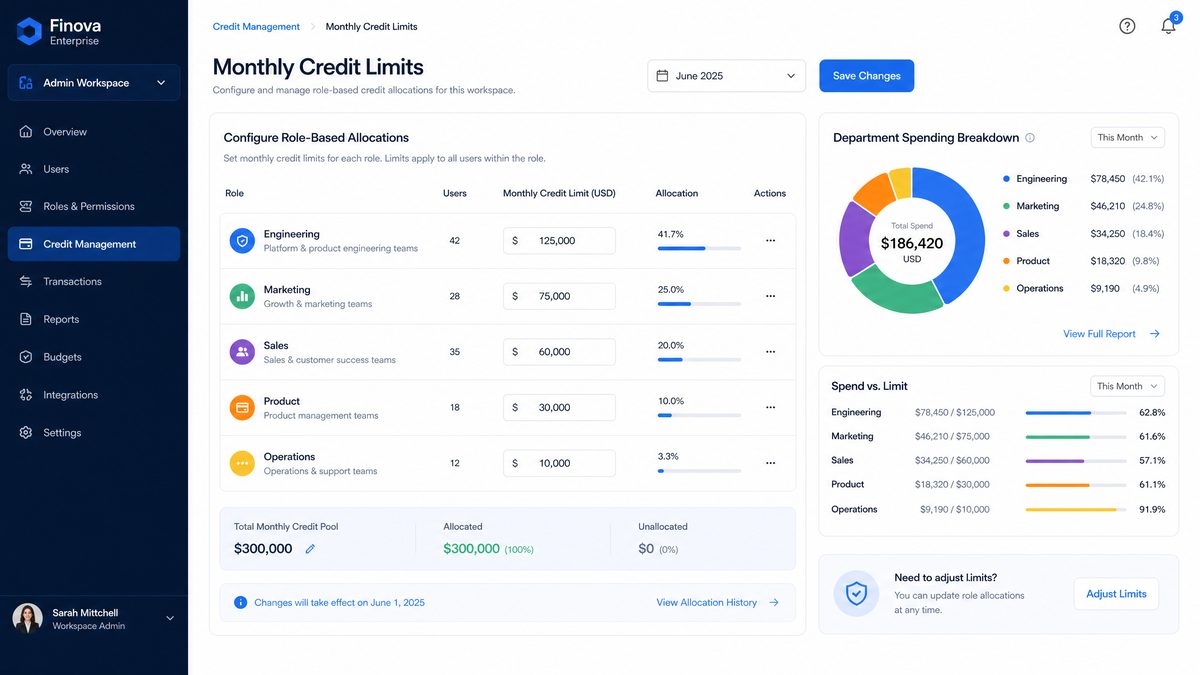
The new system introduces what OpenAI is calling Role Credit Policies. Each custom role — which admins define within Workspace settings — can now carry an associated monthly credit limit. When a user assigned to that role reaches their limit, their access to high-compute operations (specifically GPT-4o and the o3 reasoning model series) is throttled to a lower-tier model, rather than cut off entirely. This design choice is deliberate and worth noting: OpenAI has prioritized continuity of access over hard enforcement, a decision that reflects the realities of enterprise workflows where a sudden loss of AI access mid-task creates significant operational disruption.
Credit limits are set in OpenAI’s internal credit unit system, which maps to API token consumption at defined conversion rates. For Enterprise accounts, one credit unit currently equates to approximately 1,000 GPT-4o input tokens or 500 output tokens, though these conversion rates are documented in the admin portal and subject to adjustment as model pricing evolves.
2. The Workspace Usage Dashboard
The second major addition is a rebuilt analytics dashboard accessible to Workspace Owners and designated Admin roles. The dashboard is organized around four primary views:
- Organizational Overview: Total credit consumption across the entire Workspace for the current billing period, with a 12-month trend line and projected end-of-period spend based on current consumption velocity.
- Department Breakdown: Credit consumption segmented by department or team, assuming the Workspace has been configured with department-level groupings. This view supports drill-down to individual users within each department.
- Model Distribution: A breakdown of credit consumption by model type (GPT-4o, o3, o3-mini, GPT-4o mini, and any custom fine-tuned models deployed in the Workspace). This view is particularly valuable for identifying whether high-compute models are being used appropriately or whether significant consumption is occurring in use cases where a lighter model would suffice.
- Feature Usage Heatmap: A visualization of which ChatGPT features — including Advanced Data Analysis, image generation via DALL-E 3, web browsing, and custom GPT interactions — are driving the most consumption. This is new territory for enterprise visibility and directly addresses a gap that has frustrated IT leaders managing multi-feature deployments.
3. Spending Alerts and Threshold Notifications
The third component is a configurable alert system. Admins can now set percentage-based thresholds at which automated notifications are dispatched. For example, an admin can configure alerts at 50%, 75%, and 90% of a department’s monthly credit allocation, with notifications delivered via email, Slack (through the existing Workspace integration), or webhook to an external SIEM or ITSM platform. The webhook support is particularly significant for organizations that have invested in centralized IT operations tooling, as it enables ChatGPT usage events to flow into the same monitoring infrastructure used for cloud cost management, security alerts, and compliance reporting.
4. Audit-Ready Export and API Access
The fourth addition is an export and programmatic access layer. Usage data can now be exported in CSV or JSON format for any date range within the past 24 months. More significantly, OpenAI has extended the Admin API to include usage analytics endpoints, allowing organizations to pull consumption data programmatically and integrate it into existing BI platforms, ERP systems, or custom cost allocation dashboards. The new endpoints are documented in the OpenAI Admin API reference and require an API key scoped to the workspace.analytics.read permission.
Inside Workspace Settings: A Technical Walkthrough
For administrators who need to understand the implementation mechanics, this section provides a detailed walkthrough of how the new controls are configured within the ChatGPT Enterprise Workspace settings panel.
Accessing the New Analytics and Controls Interface
The new functionality is accessible via the Workspace Settings panel, under a newly added Usage & Spending section in the left navigation. This section was not present in earlier versions of the admin interface and replaces the previous “Billing” tab, which provided only aggregate consumption data without the granular controls now available.
Within Usage & Spending, admins will find three sub-sections: Credit Policies, Analytics Dashboard, and Alerts & Exports. The separation of policy configuration from analytics viewing is intentional — it allows organizations to grant read-only analytics access to finance teams or department heads without exposing the ability to modify credit allocation rules.
Configuring Role-Based Credit Policies
Setting up a Role Credit Policy begins in the Credit Policies sub-section. The workflow is as follows:
- Navigate to Workspace Settings → Usage & Spending → Credit Policies
- Select an existing custom role from the dropdown, or navigate to the Roles management section to create a new role first
- Toggle the Monthly Credit Limit switch to enabled
- Enter the credit ceiling in the credit unit field. OpenAI provides a real-time cost estimate in USD based on current Enterprise pricing to help calibrate the limit
- Configure the Limit Behavior: choose between Throttle to Standard Models (the default, which downgrades the user to GPT-4o mini when the limit is reached) or Notify Only (which sends an alert but does not restrict access)
- Optionally, configure a Rollover Policy: unused credits can either expire at month end or roll over (up to a configurable maximum of three months of accumulated credits)
- Save the policy and confirm the role assignment
One important architectural detail: credit policies are enforced at the role level, not the user level. If a user holds multiple roles (which is possible in Enterprise Workspaces), the highest credit limit across all their assigned roles applies. This is a permissive design that prevents accidental lockouts when users are assigned overlapping roles, but it does mean admins need to be thoughtful about role stacking when designing their access architecture.
Custom Role Design for Credit Management
The most effective way to use Role Credit Policies is to design your custom role taxonomy with credit management in mind from the outset. OpenAI’s default roles (Owner, Admin, Member) cannot have credit limits applied directly — limits only apply to custom roles. This means organizations that have been relying on the default role structure will need to migrate users to custom roles to take advantage of the new controls.
A practical role taxonomy for a mid-to-large enterprise might look like this:
- Power User — Engineering: High credit limit (e.g., 50,000 credits/month), access to all models including o3, no feature restrictions. Intended for software engineers using ChatGPT for code generation, architecture review, and documentation.
- Power User — Research: High credit limit, access to all models, Advanced Data Analysis enabled. Intended for data scientists and analysts running complex multi-step analytical workflows.
- Standard User — Knowledge Worker: Moderate credit limit (e.g., 15,000 credits/month), access to GPT-4o and GPT-4o mini, web browsing enabled, image generation disabled. The default tier for most office workers.
- Standard User — Customer-Facing: Moderate credit limit, restricted to specific custom GPTs relevant to customer service workflows, no general-purpose model access. Ensures customer service teams use curated, policy-compliant AI tools.
- Limited User — Pilot: Low credit limit (e.g., 5,000 credits/month), access to GPT-4o mini only. Used for onboarding new users or running controlled pilots in sensitive departments.
- Admin — Analytics Read: No credit limit (admins are exempt from consumption restrictions), read-only access to the analytics dashboard. Used for finance team members who need visibility without operational access.
Reading the Analytics Dashboard: What the Data Actually Tells You
The new dashboard is rich with data, but its value depends entirely on knowing what questions to ask. Here are the three most actionable signals the dashboard surfaces, and what to do with each:
Signal 1: Model Distribution Skew. If the Model Distribution view shows that 80% or more of your organizational credit consumption is concentrated in GPT-4o or o3, that warrants investigation. In most enterprise deployments, a significant portion of use cases — email drafting, simple Q&A, document summarization — can be handled effectively by GPT-4o mini at a fraction of the compute cost. High concentration in premium models often indicates that users are defaulting to the most powerful option available rather than selecting the model appropriate to the task. This is a training and UX problem, not a technology problem, and it’s one the dashboard now makes quantifiable.
Signal 2: Consumption Velocity Anomalies. The Organizational Overview’s 12-month trend line will surface departments or users whose consumption is accelerating faster than organizational averages. A sudden spike in credit consumption in a department that previously had stable usage patterns is worth investigating — it could indicate a new high-value use case that deserves more resource allocation, or it could indicate misuse, shadow IT behavior, or a misconfigured automation that is making excessive API calls through a connected integration.
Signal 3: Feature Usage vs. Business Outcome Correlation. The Feature Usage Heatmap shows which capabilities are driving consumption, but it becomes truly valuable when correlated with business outcome data from other systems. An organization that is spending heavily on Advanced Data Analysis but has not seen corresponding improvements in the speed or quality of analytical outputs may have an adoption quality problem — users are running the feature but not using it effectively. This kind of correlation analysis requires pulling the ChatGPT usage data via the Admin API and joining it with internal productivity or outcome metrics, which is now possible with the new programmatic access layer.
Using the Admin API for Usage Analytics
For organizations that want to go beyond the built-in dashboard, the new Admin API endpoints open up significant possibilities. Below is an example of how to pull department-level usage data for the current billing period using the new workspace.analytics.read scoped API key:
import requests
import json
from datetime import datetime, date

# Configuration
API_KEY = "your_workspace_analytics_api_key"
WORKSPACE_ID = "your_workspace_id"
BASE_URL = "https://api.openai.com/v1/admin"

headers = {
    "Authorization": f"Bearer {API_KEY}",
    "Content-Type": "application/json",
    "OpenAI-Workspace-ID": WORKSPACE_ID
}

# Define the billing period
current_month_start = date.today().replace(day=1).isoformat()
today = date.today().isoformat()

# Fetch department-level usage breakdown
def get_department_usage(start_date: str, end_date: str) -> dict:
    endpoint = f"{BASE_URL}/analytics/usage/departments"
    params = {
        "start_date": start_date,
        "end_date": end_date,
        "granularity": "daily",  # Options: "daily", "weekly", "monthly"
        "include_model_breakdown": True,
        "include_feature_breakdown": True
    }

    response = requests.get(endpoint, headers=headers, params=params)

    if response.status_code == 200:
        return response.json()
    else:
        raise Exception(f"API Error {response.status_code}: {response.text}")

# Fetch role-level credit policy status
def get_role_credit_status() -> dict:
    endpoint = f"{BASE_URL}/analytics/credit-policies/status"
    params = {
        "include_approaching_limit": True,  # Returns roles at >75% of monthly limit
        "billing_period": "current"
    }

    response = requests.get(endpoint, headers=headers, params=params)

    if response.status_code == 200:
        return response.json()
    else:
        raise Exception(f"API Error {response.status_code}: {response.text}")

# Generate a cost allocation report
def generate_cost_allocation_report():
    print(f"Fetching usage data for period: {current_month_start} to {today}")

    department_data = get_department_usage(current_month_start, today)
    role_status = get_role_credit_status()

    report = {
        "report_generated": datetime.now().isoformat(),
        "billing_period": {
            "start": current_month_start,
            "end": today
        },
        "departments": [],
        "roles_approaching_limit": []
    }

    # Process department data
    for dept in department_data.get("departments", []):
        dept_summary = {
            "department_name": dept["name"],
            "total_credits_consumed": dept["credits_consumed"],
            "estimated_cost_usd": dept["estimated_cost_usd"],
            "top_model": dept["model_breakdown"][0]["model"] if dept.get("model_breakdown") else "N/A",
            "active_users": dept["active_user_count"],
            "avg_credits_per_user": dept["credits_consumed"] / max(dept["active_user_count"], 1)
        }
        report["departments"].append(dept_summary)

    # Process roles approaching credit limits
    for role in role_status.get("approaching_limit", []):
        role_summary = {
            "role_name": role["name"],
            "credits_consumed": role["credits_consumed"],
            "credit_limit": role["credit_limit"],
            "percentage_used": round((role["credits_consumed"] / role["credit_limit"]) * 100, 1),
            "days_remaining_in_period": role["days_remaining"],
            "projected_overage": role.get("projected_overage_credits", 0)
        }
        report["roles_approaching_limit"].append(role_summary)

    return report

# Execute and output
report = generate_cost_allocation_report()
print(json.dumps(report, indent=2))
This script can be scheduled as a daily or weekly job and its output piped into a data warehouse, a BI tool like Tableau or Power BI, or a cost management platform like Apptio. The include_model_breakdown and include_feature_breakdown parameters are particularly useful for organizations that want to build internal chargeback models where departments are billed for their AI consumption as a line item in their operating budgets.

Credit Allocation Strategy: Designing Spending Policies That Actually Work
Having the technical tools is only half the challenge. The more difficult problem is designing credit allocation policies that balance cost control with the productivity outcomes that justified the Enterprise investment in the first place. Get the limits wrong in either direction — too restrictive or too permissive — and you either strangle the value creation potential of the platform or fail to achieve the governance objectives that motivated the controls.
Establishing Baseline Consumption Before Setting Limits
The most common mistake organizations will make when first deploying Role Credit Policies is setting limits based on intuition or budget arithmetic rather than actual usage data. OpenAI’s documentation recommends a two-phase approach: run the analytics dashboard in observe-only mode for 30 to 60 days before activating any credit limits, using that period to establish baseline consumption patterns by role and department.
During the observation period, focus on capturing the following data points for each user segment you plan to map to a custom role:
- P50 monthly consumption: The median credit consumption across users in the segment. This is your “typical user” baseline.
- P90 monthly consumption: The 90th percentile. Users at this level are your heavy users — they may be getting exceptional value from the platform, or they may be using it inefficiently.
- Peak day consumption: The highest single-day consumption recorded for any user in the segment during the observation period. This helps you understand whether usage is evenly distributed or whether there are spike events (e.g., quarter-end report generation, product launch preparation) that need to be accommodated.
- Model preference distribution: What percentage of consumption is driven by each model. This informs whether your credit limit needs to accommodate premium model usage or whether the segment primarily uses standard models.
A reasonable starting point for credit limits, once you have baseline data, is to set the monthly limit at 150% of the P90 consumption figure for each role. This gives heavy users room to operate without restriction in most months while still providing a meaningful ceiling that will catch genuinely anomalous consumption. You can tighten limits over time as you gain confidence in the baseline and as users become more deliberate about model selection.
OpenAI’s rapid development pace was recently confirmed when their Chief Scientist revealed that GPT-5.6 is imminent, signaling continued investment in enterprise-grade AI capabilities that will integrate with these new usage analytics and spending control features. GPT-5.6 Imminent: What OpenAI’s Chief Scientist Confirmed.
Designing for Seasonal and Project-Based Consumption Patterns
Many enterprise teams have consumption patterns that are highly seasonal or project-driven. A legal team may consume minimal credits in most months but spike dramatically during M&A due diligence periods. A marketing team may have predictable spikes around product launches or campaign planning cycles. A finance team will almost certainly show elevated consumption during budget season and quarter-close periods.
The new credit policy framework accommodates this through two mechanisms. First, the Rollover Policy allows unused credits to accumulate across months (up to a three-month maximum), providing a natural buffer for teams that have low-consumption periods followed by high-demand spikes. Second, Workspace Owners can manually adjust role credit limits at any time — there is no waiting period or approval workflow required for limit changes, which means admins can proactively increase limits for a department ahead of a known high-demand period and reduce them afterward.
For organizations with very predictable seasonal patterns, it is worth building a credit policy calendar: a planned schedule of limit adjustments aligned with the organizational calendar. This can be partially automated using the Admin API’s credit-policies/update endpoint, allowing a script to adjust limits automatically based on date-triggered logic.
The Chargeback Model: Making AI Costs Visible to Budget Owners
One of the most strategically important applications of the new analytics framework is enabling internal AI cost chargeback. In most organizations today, ChatGPT Enterprise costs are absorbed as a central IT or operations line item, invisible to the department heads who are actually consuming the resource. This creates a structural misalignment: the people making decisions about how intensively to use AI are not the people who see the cost consequences of those decisions.
The new usage analytics tools, particularly when accessed via the Admin API and integrated with financial systems, make it possible to implement true chargeback or showback models where departments see (and in chargeback models, are financially accountable for) their AI consumption. This is a significant governance maturation step, and it mirrors the evolution that cloud computing went through over the past decade as organizations moved from centralized cloud budgets to FinOps practices with departmental accountability.
A practical chargeback implementation using the new tools would involve: pulling monthly department-level usage data via the Admin API, applying the organization’s internal cost rate per credit unit (which may differ from OpenAI’s list price depending on the Enterprise contract terms), and generating a monthly cost allocation report that feeds into the organization’s internal billing or cost allocation system. The JSON export format from the Admin API is well-suited for this purpose, as it provides the granularity needed to support both aggregate chargeback (department-level billing) and granular showback (user-level visibility without financial transfer).
Handling Limit Exceptions and Escalation Workflows
Any credit limit framework will generate exceptions: users who legitimately need more credits than their role allocation allows for a specific project or time period. OpenAI has not built a native exception request workflow into the Workspace settings — limit adjustments are currently an admin action, not a self-service user action. This means organizations need to design their own exception handling process.
A lightweight but effective approach is to configure the Workspace’s Slack integration to route credit limit notifications to a dedicated channel monitored by an IT admin or a designated AI governance team member. When a user receives a throttling notification (which appears in the ChatGPT interface when their role limit is reached), they can post to that channel with context about their use case. The admin can then make a targeted limit adjustment for that user by temporarily assigning them to a higher-tier custom role, or by increasing the limit for their current role for the remainder of the billing period.
For larger organizations, it is worth building a more formal exception request process — potentially a simple form submission that triggers an automated workflow to notify an admin and log the request. The key governance principle is that every exception should be documented, because exception patterns over time reveal whether your baseline credit limits are appropriately calibrated or whether they are systematically too restrictive for certain roles.
Enterprise AI Governance: What This Means Beyond Cost Management
It would be reductive to frame the June 18 announcement purely as a cost management update. The deeper significance is what these tools represent for enterprise AI governance more broadly — and how they position ChatGPT Enterprise relative to competing platforms as organizations mature their AI programs.
From Shadow AI to Governed AI: The Visibility Imperative
One of the defining characteristics of enterprise AI adoption in 2024 and 2025 was the prevalence of shadow AI: employees using personal or departmental AI subscriptions outside of officially sanctioned and monitored platforms, precisely because the official platforms lacked the flexibility and features that unofficial tools offered. Organizations that deployed ChatGPT Enterprise during that period often found that even with an enterprise license in place, a meaningful portion of AI activity was still happening on ungoverned personal accounts.
The new analytics framework directly addresses one of the root causes of shadow AI: the perception among employees that the enterprise platform is a blunt instrument that either gives you everything or nothing, with no nuance in between. Role-based credit limits with graceful throttling (rather than hard cutoffs) mean that the enterprise platform can now accommodate the full spectrum of user needs — from the occasional light user to the power user who relies on AI as a primary productivity tool — without requiring a one-size-fits-all policy that inevitably fails someone.
When employees know that their enterprise platform will meet their needs, and that the governance controls in place are reasonable and transparent, the incentive to go outside the governed environment diminishes significantly. This is the governance dividend of the new controls: not just cost visibility, but a stronger pull toward the sanctioned platform that makes the organization’s overall AI posture more governable.
Understanding how different OpenAI models consume credits is essential for cost management. Our detailed comparison of GPT-5.4 versus OpenAI Codex breaks down the performance-per-credit ratio, helping enterprise teams choose the most cost-effective model for each workflow type. GPT-5.4 vs OpenAI Codex: The 2026 Head-to-Head Comparison.
Audit Readiness and Regulatory Compliance
For organizations in regulated industries — financial services, healthcare, legal, government contracting — the 24-month usage history export capability is not just operationally useful; it is potentially compliance-critical. Regulatory frameworks including SOC 2 Type II, ISO 27001, and emerging AI-specific regulations in the EU and several US states are beginning to require demonstrable controls over AI tool usage, including the ability to produce audit trails showing who used AI systems, when, and in what context.
The new export functionality, particularly when combined with the programmatic API access, allows organizations to build automated compliance reporting pipelines that produce the AI usage audit trails these frameworks require. The data captured includes user identifiers, timestamps, model types used, feature categories (though not the content of conversations, which remains private), and credit consumption — sufficient to demonstrate that AI usage is monitored and controlled without exposing the sensitive content of individual interactions.
It is worth noting that the current analytics framework captures usage metadata, not conversation content. For organizations that require content-level audit trails (for example, financial services firms subject to FINRA communications surveillance requirements), the usage analytics data needs to be supplemented by the separate conversation logging capabilities available in the Enterprise API, which are configured independently of the Workspace analytics settings.
Benchmarking AI ROI: The Analytics Foundation
Perhaps the most strategically valuable long-term application of the new analytics framework is as the data foundation for AI return on investment measurement. This is a problem that has plagued enterprise AI programs since their inception: the productivity benefits of AI tools are real but diffuse, manifesting as marginal time savings across thousands of interactions rather than as discrete, easily measurable outcomes. The result has been that many enterprise AI programs are renewed on faith rather than evidence — IT leaders and executives believe the tools are valuable but cannot produce the quantitative case that would justify expanding the investment or defending it during budget cycles.
The new analytics tools do not solve this problem by themselves — they provide the consumption side of the ROI equation, not the outcome side. But they provide a critical missing piece. With accurate, department-level consumption data and associated cost figures, it becomes possible to construct ROI analyses that compare AI spend against measurable productivity outcomes: time-to-first-draft for content teams, code review cycle times for engineering teams, ticket resolution times for customer service teams. The consumption data from ChatGPT Enterprise analytics, joined with operational metrics from other business systems via the Admin API export, creates the analytical foundation that has been missing.
Organizations that build this analytics infrastructure in the near term will be better positioned to make evidence-based decisions about AI investment levels, use case prioritization, and tool selection as the enterprise AI market continues to mature and as alternative platforms compete for budget.
Access 40,000+ AI Prompts for ChatGPT, Claude & Codex — Free!
Subscribe to get instant access to our complete Notion Prompt Library — the largest curated collection of prompts for ChatGPT, Claude, OpenAI Codex, and other leading AI models. Optimized for real-world workflows across coding, research, content creation, and business.
Competitive Context: How This Positions ChatGPT Enterprise in 2026
OpenAI’s June 18 announcement does not exist in a vacuum. Microsoft Copilot for Microsoft 365, Google Workspace Duet AI (now consolidated under the Gemini for Workspace brand), Anthropic’s Claude for Enterprise, and a growing ecosystem of specialized enterprise AI platforms all compete for the same budgets and the same organizational attention. Understanding how the new analytics capabilities position ChatGPT Enterprise relative to these alternatives is important context for enterprise buyers evaluating or re-evaluating their AI platform strategy.
Microsoft Copilot: The Integrated Suite Advantage vs. Governance Granularity
Microsoft Copilot’s primary competitive advantage is deep integration with the Microsoft 365 ecosystem — the fact that AI assistance is woven into Word, Excel, Teams, Outlook, and the broader Azure infrastructure means that organizations already invested in the Microsoft stack face lower switching costs and higher integration value from Copilot than from a standalone ChatGPT Enterprise deployment.
However, Microsoft’s usage analytics and spending controls for Copilot have historically lagged behind what enterprise IT teams need. The Microsoft 365 admin center provides usage reports for Copilot, but the granularity of role-based credit limits and the flexibility of the policy framework that OpenAI has now introduced are not currently matched by Microsoft’s offering. For organizations that have deployed or are evaluating both platforms — a common scenario given that many enterprises use ChatGPT Enterprise for general-purpose AI work while Copilot handles document and communication workflows — OpenAI’s governance tooling advancement strengthens the case for ChatGPT Enterprise as the primary governed AI platform for non-Microsoft-integrated use cases.
Anthropic Claude for Enterprise: The Governance-First Challenger
Anthropic has positioned Claude for Enterprise as the governance-first alternative to ChatGPT Enterprise, emphasizing Constitutional AI, usage policies, and safety controls as differentiators. The June 18 OpenAI announcement directly addresses what had been a meaningful gap: Anthropic’s enterprise offering has included more granular usage controls for longer, and enterprise buyers who prioritized governance capabilities had a legitimate reason to prefer Claude for Enterprise on that dimension.
With the new analytics framework, OpenAI has substantially closed that gap. The role-based credit limit system, the audit-ready export capability, and the Admin API access layer bring ChatGPT Enterprise’s governance tooling to a level that is competitive with, and in some dimensions exceeds, what Anthropic currently offers. The key remaining differentiator for Anthropic is the Constitutional AI framework’s content-level controls — the ability to define organizational values and constraints that shape model behavior at a deeper level than OpenAI’s current system prompt and custom instruction mechanisms allow. For organizations where content governance is the primary concern, this remains a meaningful distinction.
The Broader Market Signal: Governance as a Feature
The most important competitive signal in the June 18 announcement is not any specific feature — it is the strategic direction it reveals. OpenAI is clearly investing in making ChatGPT Enterprise a platform that IT leaders, CFOs, and compliance teams can confidently champion internally, not just a tool that end users love. This is a necessary evolution for any enterprise software platform: the people who use the tool and the people who approve and govern it are different audiences with different needs, and both need to be served.
The June 18 release is the clearest signal yet that OpenAI understands this dynamic and is building accordingly. For enterprise buyers, this trajectory matters as much as the current feature set — it suggests that the governance capabilities will continue to deepen over time, making the platform an increasingly viable choice for organizations with stringent compliance requirements.
Practical Implementation Guide: Getting Started in the Next 30 Days
For enterprise administrators who want to move quickly on implementing the new capabilities, here is a prioritized 30-day action plan that balances speed with the need to establish a solid analytical foundation before activating enforcement controls.
Week 1: Enable Analytics and Establish Baselines
The first priority is activating the analytics dashboard and beginning the data collection process. Navigate to Workspace Settings → Usage & Spending → Analytics Dashboard and ensure the dashboard is enabled for your Workspace. If your Workspace was created before the June 18 update, you may need to explicitly enable the new analytics features — check for an activation prompt at the top of the Usage & Spending section.
During week one, also audit your current Workspace structure: How many users are on default roles versus custom roles? What department groupings are configured? The quality of the analytics data you collect will be directly proportional to the quality of your Workspace organizational structure. If users are not organized into meaningful department groups and custom roles, invest time in this week to clean up the structure before the observation period begins.
Week 2: Design Your Custom Role Taxonomy
Based on your Workspace audit, design the custom role taxonomy you will use for credit policy assignment. Reference the example taxonomy provided earlier in this article as a starting point, but adapt it to your organization’s specific structure. Key questions to answer:
- Which user segments have fundamentally different AI usage patterns and needs?
- Which departments or teams have compliance or security requirements that warrant different feature access controls?
- What is the organizational unit for cost accountability — department, cost center, or business unit? Your role taxonomy should map to this unit.
- Who needs analytics read access without operational access? These users need their own admin-tier custom role.
Week 3: Configure Alerts and API Integration
Before activating credit limits, configure the alert system and, if applicable, the Admin API integration. Set up threshold alerts at 75% and 90% of your anticipated credit limits for each role — these thresholds will generate useful data during the observation period even before limits are enforced. If you are integrating with an external BI or cost management platform, configure the Admin API access and test the data pipeline end-to-end using historical data from the analytics dashboard.
Week 4: Activate Credit Policies with Conservative Limits
In week four, activate Role Credit Policies using conservative limits based on the observation data from weeks one through three. Start with the Notify Only limit behavior rather than Throttle to Standard Models — this gives you another observation period to validate that your limits are appropriately calibrated before enforcement begins. Communicate the new policies to affected users and department heads, explaining the rationale and the exception request process. Transparency at this stage is critical for maintaining user trust and ensuring that the governance controls are perceived as reasonable rather than punitive.
What’s Next: Anticipated Roadmap Additions
OpenAI’s documentation for the June 18 release includes a brief roadmap section that hints at additional capabilities planned for the second half of 2026. While these are subject to change, they provide useful context for organizations making long-term platform decisions.
Project-Level Credit Allocation: The current framework allocates credits by role, but OpenAI has indicated that project-level credit allocation is in development — the ability to create a named project within a Workspace, assign a credit budget to that project, and track consumption against the project budget independently of role-level limits. This would be transformative for organizations that run distinct AI-intensive initiatives (product launches, research programs, client engagements) and want to track AI costs at the project level for billing or reporting purposes.
Predictive Spend Forecasting: The current dashboard provides projected end-of-period spend based on current consumption velocity, but future versions are expected to incorporate more sophisticated forecasting models that account for historical seasonal patterns and project-driven consumption spikes. This would reduce the manual calendar-based limit adjustment work described earlier in this article.
Cross-Platform Usage Consolidation: For organizations that use both the ChatGPT Enterprise Workspace and direct API access through the OpenAI platform, usage and spending data currently live in separate systems. OpenAI has signaled that consolidating these views into a unified organizational analytics layer is a priority, which would significantly simplify governance for organizations with mixed deployment architectures.
Native BI Connectors: Beyond the current JSON/CSV export and Admin API access, OpenAI is reportedly developing native connectors for major BI platforms including Power BI, Tableau, and Looker. This would reduce the engineering effort required to integrate ChatGPT Enterprise usage data into existing analytics infrastructure and would make the governance tooling accessible to organizations without dedicated data engineering resources.
Conclusion: A Governance Milestone That Changes the Enterprise Conversation
The June 18 launch of enterprise usage analytics and spending controls is not a flashy product announcement. There are no new model capabilities, no breakthrough features that will generate viral social media attention. But for the enterprise IT leaders, CFOs, compliance officers, and AI governance teams who have been waiting for the operational infrastructure to match the productivity promise of ChatGPT Enterprise, it is arguably the most important update OpenAI has shipped in 2026.
The ability to set monthly credit limits by role, track consumption at the department and model level, export audit-ready usage data, and integrate analytics programmatically into existing business intelligence and cost management systems transforms ChatGPT Enterprise from a powerful but partially governable tool into a platform that meets enterprise-grade operational requirements. It makes the conversation with CFOs and compliance teams fundamentally different — instead of defending AI spend as a necessary but hard-to-measure investment, enterprise IT leaders can now present precise cost allocation data, demonstrate that controls are in place, and build the ROI case with real consumption metrics.
The implementation work required to take full advantage of these capabilities is not trivial. Designing an effective custom role taxonomy, establishing consumption baselines, building API integrations, and designing exception handling workflows all require investment. But for organizations that have made or are making significant commitments to ChatGPT Enterprise, this investment is straightforwardly justified — the governance infrastructure built now will compound in value as AI usage grows and as regulatory requirements for AI oversight continue to tighten.
OpenAI has made a clear statement with this release: the enterprise market is a strategic priority, and the platform will continue to evolve to meet enterprise requirements. For organizations evaluating their AI platform strategy, that trajectory is as important as any individual feature. The June 18 announcement is the clearest evidence yet that ChatGPT Enterprise is building toward the governance maturity that large-scale enterprise deployment requires.
Markos Symeonides covers enterprise AI strategy, OpenAI platform developments, and AI governance for ChatGPT AI Hub. This article reflects information available as of June 20, 2026, based on OpenAI’s published release notes and admin documentation for the June 18 Enterprise analytics update.
