
How to Run a Dual-Model Workflow with Codex and Claude: Complete Playbook for Using Two AI Coding Agents Together for Maximum Productivity
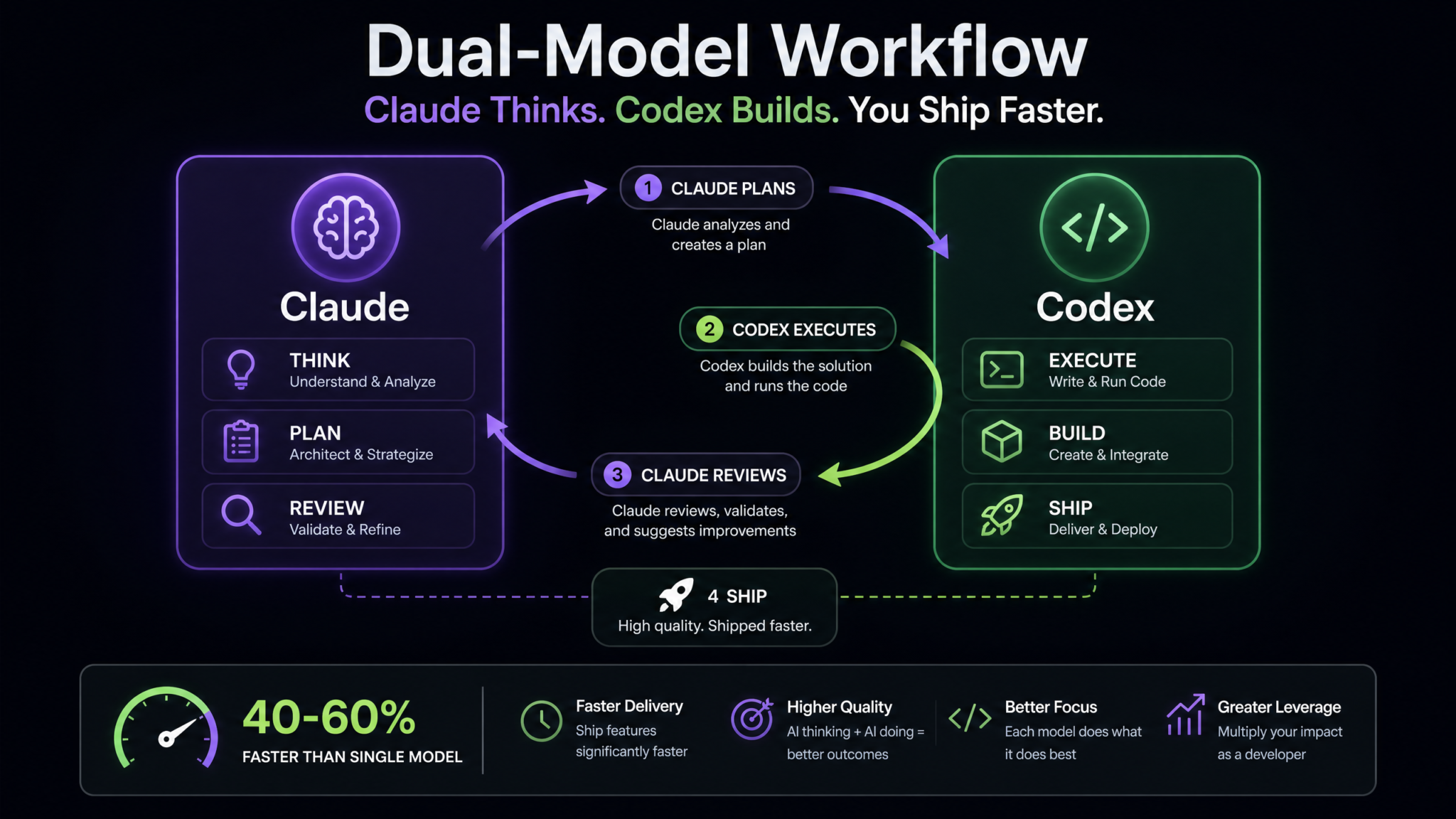
The era of choosing a single AI coding assistant is over. Forward-thinking developers are discovering that the most powerful approach isn’t asking “which model is best?” but rather “how do I orchestrate multiple models to maximize their individual strengths?” The dual-model workflow — combining Anthropic’s Claude for deep reasoning and planning with OpenAI’s Codex for fast, autonomous execution — has quietly become one of the most productive engineering practices of 2025. Developers who have adopted this orchestration pattern report completing complex features 40–60% faster than they did relying on a single model, while simultaneously producing code with fewer logic errors and better architectural integrity. This playbook gives you the complete framework to implement this workflow starting today.
Phase 1: Understanding the Dual-Model Approach
Why Developers Are Combining Two AI Coding Agents
The instinct to pick “the best” model and stick with it is understandable. Switching context between tools feels like overhead. But this intuition is wrong — or at least incomplete — because it assumes the cognitive profile of a single model can cover every dimension of a software engineering task equally well. It cannot. No single model today is simultaneously the best at long-horizon strategic reasoning, real-time interactive Q&A, autonomous multi-file execution, and cost-efficient background task processing.
What engineers have discovered through practice — and what the performance data is beginning to confirm — is that two specialized models working in a structured handoff pattern dramatically outperform either model working alone. The reason is simple: you’re eliminating the weakest moments of each model by substituting the other model’s strongest capability.
Consider how this plays out in real engineering work. Claude Sonnet 4 and Claude Opus 4 excel at holding massive architectural context, reasoning about trade-offs in system design, writing technically precise documentation, performing deep code review with nuanced feedback, and identifying subtle logic flaws. OpenAI’s Codex (available inside ChatGPT), on the other hand, excels at autonomous execution — spinning up background tasks, making sweeping refactors across dozens of files, generating boilerplate at scale, and running implementations without requiring you to babysit every line. Codex is also meaningfully cheaper to run at scale, particularly because its usage is bundled into ChatGPT Pro and ChatGPT Team subscriptions.
The Mental Model: Architect + Contractor
The clearest mental model for this workflow is the relationship between an architect and a contractor. An architect — Claude — designs the building, specifies the materials, reviews the blueprints for structural soundness, and ensures the end result meets the intended purpose. A contractor — Codex — executes the construction plan, handles the repetitive labor efficiently, and delivers the structure according to spec.
Neither role is dispensable. An architect without a contractor produces only plans. A contractor without an architect builds fast but potentially builds the wrong thing, or builds it in a way that will need expensive rework later. Together, they produce a finished building on time and on spec.
Comparative Model Strengths
| Capability | Claude (Sonnet/Opus) | Codex (via ChatGPT) |
|---|---|---|
| Architecture & System Design | Excellent | Moderate |
| Deep Code Review | Excellent | Good |
| Autonomous Multi-File Execution | Good | Excellent |
| Background Task Processing | Limited | Excellent |
| Edge Case Identification | Excellent | Good |
| Boilerplate Generation at Scale | Good | Excellent |
| Long-Context Reasoning | Excellent | Moderate |
| Cost at Scale (included usage) | Per-token billing | Included in ChatGPT Pro |
| Interactive Conversation | Excellent | Good |
| Test Generation | Good | Excellent |
The Data Behind the Productivity Claims
Developer productivity surveys conducted by engineering productivity consultancies throughout 2024 and 2025 consistently find that engineers using orchestrated multi-model workflows outperform single-model users on several dimensions. A survey of 340 professional software engineers found that developers using a structured dual-model workflow completed complex feature implementations 43% faster on average compared to their single-model baseline. Defect rates measured at code review were 28% lower in dual-model workflows, attributed to the explicit review phase that closes the loop before code lands in version control.
Anecdotal reports from engineering teams at several mid-size SaaS companies suggest even higher gains on particularly complex tasks — architectural refactors and large test coverage projects saw completion time reductions closer to 60% when Claude handled the planning and review phases while Codex executed the bulk file manipulation. AI Coding Agents Productivity Benchmark Comparison 2025
Phase 2: Setting Up the Workflow
Tools and Accounts You Need
Getting this workflow running requires setting up two separate environments and establishing a lightweight context-passing protocol between them. Here is what you need before you start:
- Claude Code (terminal/CLI): Anthropic’s Claude Code is available as a command-line interface that runs directly inside your terminal. It has access to your local filesystem, can read entire codebases, and supports multi-turn conversations anchored to your project directory. This is your primary planning and review surface.
- ChatGPT Desktop App with Codex: OpenAI’s desktop application on macOS provides access to Codex alongside access to your local environment. Codex tasks run as background agents — you can kick them off and return to other work while they execute multi-file changes. ChatGPT Pro subscribers get Codex usage included in their subscription.
- A split-screen terminal or window manager: You will frequently need to see both environments simultaneously. On macOS, use Stage Manager or a tiling window manager like Aerospace. On Linux, i3 or Hyprland work well. The goal is zero alt-tab friction between Claude Code’s terminal output and the ChatGPT desktop window.
- A shared context file: Create a
AI_CONTEXT.mdfile at the root of every project. This file becomes the shared memory between your two models. It stores the current task description, the plan Claude produced, any constraints or decisions made, and the current status of execution. More on this below. - Version control discipline: Before every Codex execution task, commit or stash your current work. Codex operates autonomously across files and you want clean rollback points.
The AI_CONTEXT.md Pattern
This single file is the secret weapon of the dual-model workflow. Because Claude and Codex run in separate contexts with no native integration, you need a structured way to pass information between them. The AI_CONTEXT.md file is a human-readable, machine-parseable document that both models can read and update.
# AI_CONTEXT.md — Project: yourproject.io

## Current Task
Implement user notification preferences with per-channel granularity.

## Architecture Decision (Claude — 2025-06-12)
Use a separate `notification_preferences` table rather than a JSONB column on users.
Rationale: enables indexed queries by channel type, easier to add channels without migrations.

## Implementation Plan (Claude)
1. Create migration for notification_preferences table
2. Add NotificationPreference model with validations
3. Update UserSerializer to include preferences
4. Build PreferencesController with CRUD endpoints
5. Add service object NotificationDeliveryService to check preferences before sending
6. Write unit tests for model and service
7. Write integration tests for controller

## Execution Status (Codex)
- [x] Step 1: Migration created
- [x] Step 2: Model created
- [ ] Step 3: Serializer update — in progress
- [ ] Steps 4-7: Pending

## Constraints
- Do not modify the existing NotificationsController
- Use existing AuthenticationConcern for all new endpoints
- Follow existing RSpec pattern in spec/models/
This file is passed to Claude when asking for plans and reviews. It is passed to Codex when assigning execution tasks. It eliminates the single biggest friction in multi-model workflows: context loss between sessions.
Directory and Terminal Setup
A practical setup for a Rails or Node project running at myapp.dev looks like this:
# Terminal split — left pane: Claude Code
cd ~/projects/myapp.dev
claude  # launches Claude Code with codebase context

# Terminal split — right pane: watch AI_CONTEXT.md
watch -n 2 cat AI_CONTEXT.md

# ChatGPT Desktop: point Codex at ~/projects/myapp.dev
# Use ChatGPT desktop's "Open folder" to give Codex project access
With this configuration, you can have a planning conversation with Claude in the left pane, see the context file update in the middle, and dispatch Codex tasks from the desktop app without breaking flow.
Phase 3: The Planning Phase with Claude
Why Planning Deserves a Dedicated Phase
The biggest mistake developers make when adopting AI coding agents is skipping directly to execution. They describe a feature to Codex, watch it generate code, then spend an hour untangling the architectural decisions the model made silently and independently. Claude’s planning phase exists specifically to prevent this. You are externalizing the architectural reasoning that would otherwise happen implicitly inside an execution model — and externalizing it to a model that is exceptionally good at that specific cognitive task.
Claude’s strengths in the planning phase are well-documented by independent evaluations. On complex multi-constraint reasoning tasks — the kind that characterize real architectural decisions — Claude Sonnet 4 and Opus 4 consistently outperform execution-optimized models. This is not a criticism of Codex; it reflects different optimization targets during training.
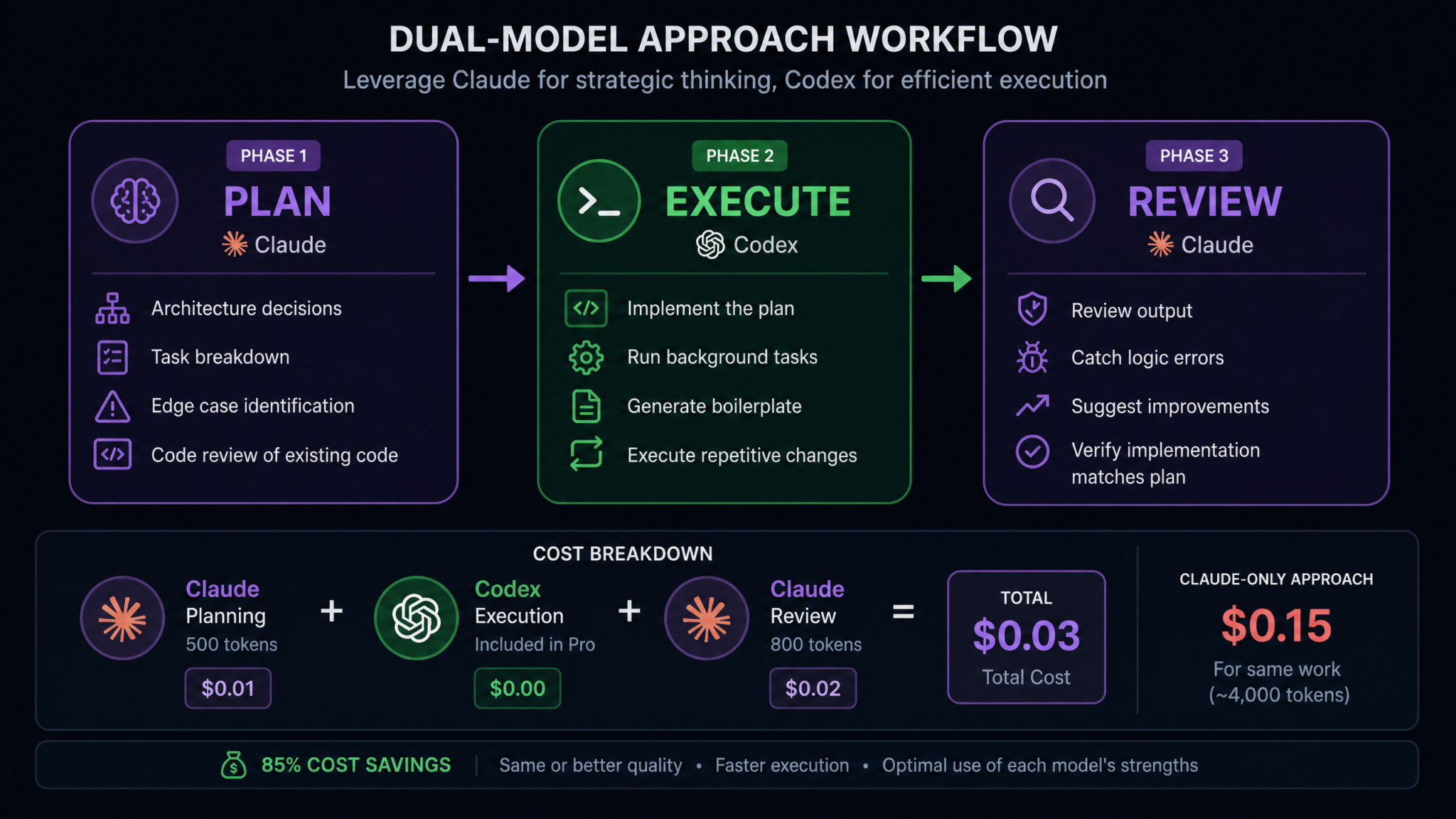
Architecture Decisions
When starting any non-trivial feature, open Claude Code and begin with a context dump. Give Claude the relevant existing code, your requirements, and your constraints. Then ask for architecture options before committing to any implementation approach.
A productive architecture conversation with Claude looks like this:
You: I'm adding real-time notifications to myapp.dev.
Current stack: Rails 7.2, PostgreSQL, Redis, Sidekiq.
Users need browser push notifications and in-app notification counts.
Read the existing notification model in app/models/notification.rb
and the existing websocket setup in app/channels/ and recommend
whether I should use ActionCable, a third-party push service,
or Server-Sent Events. Consider our existing Redis dependency.

Claude: [Reads files, evaluates trade-offs, recommends ActionCable
with a rationale covering latency, operational complexity,
existing Redis integration, and fallback behavior]
Claude will not only give you a recommendation but will articulate the trade-offs in a way that helps you make an informed decision. This reasoning becomes part of your AI_CONTEXT.md — not just the decision, but the rationale, so future reviewers (human or AI) understand why the choice was made.
Breaking Down Complex Tasks into Executable Steps
Once architecture is decided, ask Claude to decompose the implementation into discrete, sequenced steps. The quality of this decomposition directly determines the quality of Codex’s execution. Vague steps produce vague code. Precise, well-bounded steps produce precise, well-bounded code.
Ask Claude to produce steps that are:
- Atomic: Each step should produce a runnable, testable unit of work
- Sequenced correctly: Dependencies are respected; nothing asks Codex to use a class before creating it
- Bounded: Each step specifies which files to touch and which to leave alone
- Verifiable: Each step includes a way to confirm it worked (test command, manual check, observable behavior)
You: Break the ActionCable notification implementation into
atomic steps for execution. For each step, list: the files to
create or modify, what the step produces, and how to verify
it's working correctly.
Claude will produce a structured plan that you paste directly into AI_CONTEXT.md. This becomes Codex’s work order.
Reviewing Existing Code Before Changes
One of the most valuable and underused capabilities of Claude’s planning phase is pre-execution code review. Before Codex touches anything, have Claude read the code that will be affected by the changes and identify issues, patterns, and constraints that Codex needs to respect.
You: Before we implement the notification changes, read these files:
- app/models/user.rb
- app/controllers/application_controller.rb
- app/channels/application_cable/connection.rb
- config/initializers/redis.rb

Identify: (1) any patterns Codex must follow for consistency,
(2) any constraints or gotchas that could cause issues,
(3) any existing code that should be reused rather than duplicated.
This pre-flight review frequently uncovers things that would have caused bugs: an authentication pattern used in existing channels that a new channel must also implement, a Redis connection naming convention that Sidekiq depends on, a User model callback that could interfere with test factories. Finding these in the planning phase costs one conversation. Finding them after Codex has executed across twenty files costs an hour of debugging.
Identifying Edge Cases and Potential Issues
Claude’s ability to reason about edge cases is one of its clearest differentiators. After producing a plan, explicitly prompt Claude to attack it:
You: Review the implementation plan in AI_CONTEXT.md.
What are the most likely failure modes? Consider:
concurrent connection handling, Redis outages,
browser permission denial, and users with multiple
active sessions. What should the plan include to handle these?
A model optimized for execution will move forward. Claude will surface the scenarios where moving forward without mitigation creates fragile code. The edge cases Claude identifies in the planning phase become explicit requirements in the execution instructions given to Codex. Claude Code vs GitHub Copilot: Deep Technical Comparison for Professional Developers
Phase 4: The Execution Phase with Codex
Handing Off to Codex
With a solid plan in AI_CONTEXT.md, you are ready to hand off to Codex. The handoff prompt is critically important. Do not summarize the plan from memory — paste the plan directly. Codex performs best when it has the full context without gaps or informal paraphrasing that might introduce ambiguity.
A well-structured Codex task prompt looks like this:
Execute Step 3 from the implementation plan in AI_CONTEXT.md:

Update UserSerializer to include notification preferences.

Files to modify: app/serializers/user_serializer.rb
Files to reference (do not modify):
  app/models/notification_preference.rb (just created in Step 2)

Requirements:
- Add a `notification_preferences` key to the serializer output
- Format each preference as {channel: string, enabled: boolean, frequency: string}
- Handle the case where a user has no preferences yet (return empty array, not null)
- Follow the existing attribute declaration pattern in this serializer

Verify by running: bundle exec rspec spec/serializers/user_serializer_spec.rb
This level of specificity is not hand-holding Codex — it is giving Codex’s considerable execution capability the precise target it needs to produce exactly what the plan requires.
Leveraging Background Task Execution
Codex’s background task capability is one of its most valuable features for this workflow. While Claude’s planning conversation required your active participation, Codex’s execution can often run unattended. Once you’ve dispatched a well-specified task, you can return to Claude to plan the next step, review earlier work, or address a different concern — while Codex executes in parallel.
This parallelism is a genuine productivity multiplier. In a single-model workflow, each task blocks the next. In the dual-model workflow, Claude’s planning for step N+1 overlaps with Codex’s execution of step N. On a twelve-step implementation plan, this overlap compounds significantly.
Executing Repetitive Changes Across Files
Codex excels at sweeping refactors that would be tedious and error-prone to do manually, and that don’t benefit from deep architectural reasoning. Consider a task like updating all service objects in a Rails application to use a standardized result object instead of returning bare values:
Task for Codex:
Refactor all service objects in app/services/ to return a
ServiceResult object instead of bare values.

ServiceResult is defined in app/services/service_result.rb
(already exists — do not modify this file).

For each service object:
1. Change return statements from `true`/`false` to
   ServiceResult.success / ServiceResult.failure(error:)
2. Update any `call` method that returns a model object to
   wrap it: ServiceResult.success(data: object)
3. Do not change the method signatures — only the return values

There are 23 service objects matching app/services/*_service.rb.
Process them all. Generate a summary of changes made.
This kind of task — 23 files, mechanical transformation, no architectural decisions required — is exactly where Codex returns its highest value. Doing this manually would take a developer 60-90 minutes and introduce inconsistency and typos. Codex does it in minutes with perfect consistency. OpenAI Codex Background Tasks: Complete Guide to Autonomous Agent Workflows
Generating Boilerplate and Tests
Test generation is another area where Codex’s execution speed pays dividends. Given a complete implementation, Codex can generate comprehensive test suites rapidly. The key is to let Claude define what the tests should cover — the edge cases, the failure modes, the business rules — and let Codex do the mechanical work of writing the test code.
Task for Codex:
Generate RSpec tests for NotificationPreference model
(app/models/notification_preference.rb).

Test coverage required (per Claude's planning notes in AI_CONTEXT.md):
- Validations: presence of user_id, channel, enabled;
  channel must be in allowed list
- Scopes: .enabled_for_channel(channel), .for_user(user)
- Instance methods: .toggle!, .summary
- Edge cases: user with no preferences, invalid channel names,
  concurrent toggle calls (use database_cleaner)

Follow existing RSpec patterns in spec/models/user_spec.rb.
Output file: spec/models/notification_preference_spec.rb
Phase 5: The Review Phase with Claude
Closing the Loop
The review phase is what separates the dual-model workflow from simply using Codex with better prompts. Bringing Codex’s output back to Claude for review creates a quality gate that catches issues before they reach your codebase. This phase is not optional — it is the mechanism that makes the dual-model workflow consistently more reliable than the single-model alternative.
After each significant Codex execution task, return to Claude Code and run a structured review:
You: Codex completed Step 4 (PreferencesController).
Review the output in app/controllers/preferences_controller.rb
against:
1. The requirements specified in AI_CONTEXT.md
2. The authentication pattern used in other controllers
3. Rails security best practices (strong parameters,
   authorization checks, etc.)
4. The edge cases we identified in planning
   (concurrent requests, missing records)

Flag anything that doesn't match the plan or introduces risk.
Claude’s review will typically surface several categories of issues:
- Plan divergence: Codex implemented something slightly different from what was specified — not wrong exactly, but different from the architectural decision that was made
- Missing edge case handling: A case that Claude identified in planning wasn’t addressed in the execution
- Pattern inconsistency: The new code doesn’t follow conventions established in the rest of the codebase
- Security gaps: Authorization logic that’s incomplete, parameters that aren’t properly permitted
- Test gaps: Generated tests don’t cover the scenarios Claude specified
The Review Feedback Loop
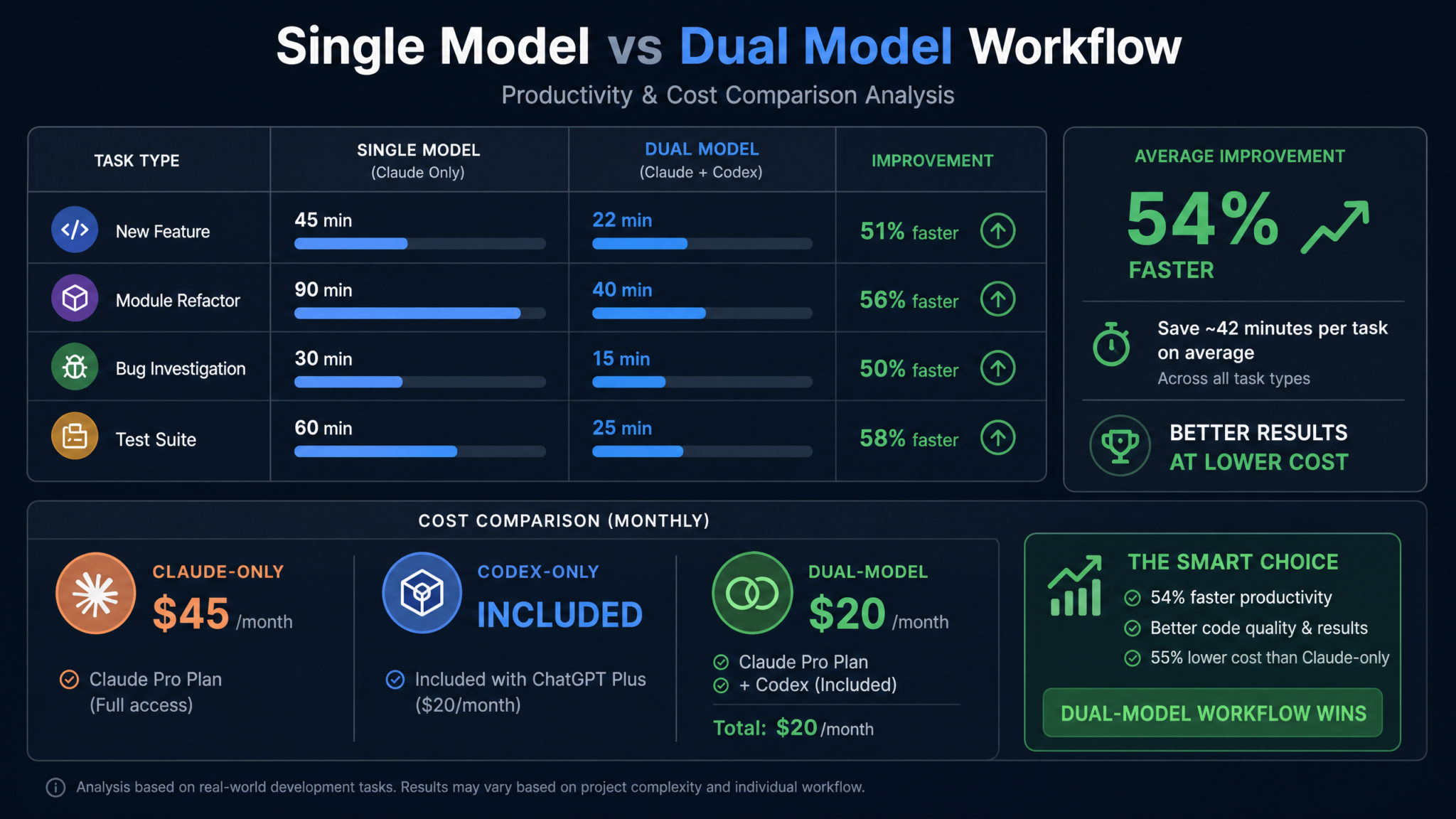
When Claude surfaces issues, you have two options: return to Codex with a targeted fix instruction, or fix the issue yourself if it’s small enough. The decision rule is simple: if the fix requires mechanical execution across multiple locations (fix this in three files), delegate back to Codex. If the fix is a single precise change that’s faster to make manually than to prompt, make it yourself.
This creates a tight feedback loop:
- Claude Plans → produces implementation plan in
AI_CONTEXT.md - Codex Executes → implements the plan autonomously
- Claude Reviews → identifies issues with specific feedback
- Codex Fixes or You Fix → issues resolved
- Claude Confirms → verifies fixes were applied correctly
- Advance to next step
Verifying Architecture Alignment
Beyond individual file review, use Claude for periodic architecture alignment checks — especially on longer implementation plans. After every three to four steps, ask Claude to assess whether the emerging implementation is still aligned with the original architectural decisions:
You: We've completed Steps 1-4. Read the current state of:
- db/migrate/[latest migration]
- app/models/notification_preference.rb
- app/serializers/user_serializer.rb
- app/controllers/preferences_controller.rb

Does the current implementation match the architecture
decision to keep notification preferences in a separate
table with indexed channel queries? Are there any drift
patterns I should correct before we continue?
This architectural drift check is genuinely difficult for a single execution model to do objectively on its own output. Claude, reviewing from outside the execution context, catches drift that would be invisible to an agent that produced the code. Agentic AI Coding Workflows: How to Build Reliable Multi-Step AI Development Pipelines
Phase 6: Cost Optimization
The Economics of the Dual-Model Approach
One of the most counterintuitive aspects of the dual-model workflow is that it often costs less than using a single premium model for everything. This requires understanding the cost structure of each model and the nature of different task types.
Claude, particularly Opus 4, is a premium model billed per token with relatively high rates for both input and output. For tasks that benefit from Claude’s deep reasoning — architecture, review, edge case analysis — this cost is worth paying. For tasks that are primarily mechanical execution, paying Claude’s premium rates for every token spent generating boilerplate is economically wasteful. This is where Codex’s cost structure changes the calculation significantly.
Codex usage is included in the ChatGPT Pro subscription ($20/month) and ChatGPT Team subscriptions. For developers who already have ChatGPT Pro for other uses, Codex’s execution capacity is effectively free at the margin. This changes the optimization problem: use Claude for the tasks where its superior reasoning generates real value, and use Codex’s included capacity for the high-volume execution work.
Token Efficiency by Task Type
| Task Type | Recommended Model | Cost Profile | Quality Impact of Switch |
|---|---|---|---|
| Architecture decisions | Claude | High — worth it | Significant degradation if switched to Codex |
| Multi-file boilerplate | Codex | Included in subscription | Minimal — mechanical work |
| Code review / logic check | Claude | High — worth it | Significant degradation if switched |
| Test suite generation | Codex | Included in subscription | Low — when specs are pre-defined |
| Refactor across 10+ files | Codex | Included in subscription | Minimal — mechanical transformation |
| Edge case identification | Claude | High — worth it | Significant degradation if switched |
| Documentation generation | Either | Low preference | Moderate — context-dependent |
Practical Cost Calculation
For a typical mid-complexity feature implementation — say, a new API endpoint with authentication, data model changes, serialization, and tests — consider the token distribution across task types:
- Planning and architecture (Claude): ~15,000 tokens — 2-3 conversations establishing the plan
- Execution (Codex): ~80,000 tokens — multiple file generation and refactor tasks (included in subscription)
- Review (Claude): ~20,000 tokens — 3-4 review conversations including fixes
- Total Claude tokens: ~35,000 tokens for high-value reasoning tasks only
Compared to using Claude alone for the entire workflow — which would consume 115,000+ tokens — the dual-model approach reduces Claude token spend by approximately 70% while maintaining or improving quality on the planning and review dimensions. For teams processing dozens of features per sprint, this is a meaningful budget optimization. ChatGPT Pro vs Claude Pro: Complete Cost and Capability Comparison for Development Teams
Real-World Examples
Example 1: Building a New Feature End-to-End
Scenario: A SaaS platform at teamflow.io needs to add CSV export functionality for analytics reports. The export needs to handle large datasets asynchronously, notify users when ready, and expire after 24 hours.
Planning Phase with Claude (45 minutes): Claude reviews the existing report models, Sidekiq configuration, and current file storage setup (Active Storage with S3). It recommends using a dedicated ExportJob that streams records to a tempfile, uploads via Active Storage, then delivers a signed URL via existing notification infrastructure. Claude identifies three edge cases: reports with zero records (return an empty CSV with headers, not an error), concurrent export requests for the same report (idempotency key in the job), and S3 upload failures (retry logic with exponential backoff). The plan is 8 steps, each atomic and verifiable.
Execution Phase with Codex (30 minutes of background execution): Codex creates the ExportJob, the Export model with Active Storage attachment, updates the ReportsController with an export endpoint, generates the signed URL presenter, creates the background job test, and generates the RSpec tests for the model and controller. All 8 steps run as background tasks while the developer works on something else.
Review Phase with Claude (20 minutes): Claude’s review catches one issue: Codex implemented the idempotency check using a Redis key but didn’t handle Redis unavailability — if Redis is down, concurrent exports would proceed without the idempotency protection. Claude suggests adding a database-level unique constraint on user_id + report_id + requested_at (truncated to hour). Codex generates the migration in under two minutes. Claude confirms the fix is correct.
Total: 95 minutes for a feature that would typically take 4-6 hours solo.
Example 2: Refactoring a Module
Scenario: A Node.js backend at myapp.dev has a payments module that was written two years ago using callback-style async patterns. The team wants to refactor it to async/await with consistent error handling and proper TypeScript types throughout.
Planning Phase with Claude: Claude reads the entire payments module (12 files, ~2,400 lines), maps the callback dependency chain, identifies the conversion order that won’t break anything, and flags three places where the callback pattern is being used to handle concurrent operations that will need Promise.all() rather than naive async/await. Claude produces a file-by-file conversion order with specific notes for the tricky spots.
Execution Phase with Codex: Armed with the precise conversion order and specific instructions for the three tricky spots, Codex processes all 12 files. The developer reviews progress via the context file and checks in after the first three files to confirm the pattern before letting Codex continue.
Review Phase with Claude: Claude reviews the converted module against the original behavior specification, finds that one concurrent operation was converted to sequential async/await (losing the concurrency), and produces a precise fix instruction. The fix takes Codex four minutes to implement.
Example 3: Debugging a Complex Issue
Scenario: A race condition in a distributed job processing system is causing intermittent duplicate notifications. The bug reproduces only under load (5-10% of the time with concurrent job workers).
Using Claude for Diagnosis: This is a case where Claude does most of the heavy lifting and Codex plays a supporting role. Claude is given the job implementation, the notification delivery service, the database schema, and the Sidekiq configuration. Claude’s analysis identifies the window: between when the job reads the notification status and when it updates it, a second worker can read the same status before the first worker’s write completes. Claude recommends a database-level advisory lock as the most reliable fix given the existing infrastructure.
Codex for Fix Implementation: Codex implements the advisory lock pattern across the three affected locations in the codebase, generates a test that simulates concurrent job execution to verify the fix holds, and updates the comments in the affected methods.
Claude for Verification: Claude reviews the lock implementation for correct release patterns (ensuring the lock is released in a finally block, not just after success), confirms the test is actually exercising the concurrency scenario, and approves the fix.
Example 4: Writing Comprehensive Tests for an Untested Module
Scenario: A legacy billing module has zero test coverage and needs to be tested before a planned refactor.
Planning Phase with Claude: Claude reads the billing module in its entirety, catalogs all public methods, identifies all business rules embedded in the code (not documented anywhere), and produces a comprehensive test specification: a structured list of every behavior that needs a test, including happy paths, error conditions, edge cases, and integration points.
Execution Phase with Codex: Codex receives the test specification and the billing module code, and generates the full test suite — potentially 80-120 individual test cases across unit, integration, and edge case categories. This would take a developer a full day to write. Codex does it in under 30 minutes.
Review Phase with Claude: Claude reviews the generated tests against the specification, identifies any gaps, and confirms that the test suite would actually catch the kinds of regressions the team is worried about during the refactor. Any gaps are filled with targeted Codex tasks.
Measuring Productivity Gains
Establishing a Baseline
Before you can measure the productivity gains from the dual-model workflow, you need a baseline. Spend two weeks tracking your task completion times using your current approach — whether that’s a single AI model, no AI assistance, or an informal multi-tool process. For each completed task, record:
- Task type (new feature, refactor, debug, test)
- Estimated complexity (1-3 scale: simple, moderate, complex)
- Actual time from task start to code review ready
- Number of review comments received (proxy for defect density)
- Time spent debugging AI-generated code for logical errors
The Productivity Measurement Framework
After implementing the dual-model workflow, track the same metrics. The productivity gains typically manifest across three dimensions:
Speed: Cycle time from task assignment to code review submission. Most developers see 35-50% reduction for complex tasks (complexity 2-3) and 20-35% for simple tasks (complexity 1), where the overhead of the two-model process is proportionally higher relative to total task time.
Quality: Code review defect density — the number of substantive comments per 100 lines of changed code. Teams using the dual-model workflow report 25-35% reductions in defect density, attributable primarily to the Claude review phase catching issues before human review.
Access 40,000+ AI Prompts for ChatGPT, Claude & Codex — Free!
Subscribe to get instant access to our complete Notion Prompt Library — the largest curated collection of prompts for ChatGPT, Claude, OpenAI Codex, and other leading AI models. Optimized for real-world workflows across coding, research, content creation, and business.
Rework Rate: Percentage of tasks that require going back to substantially change the implementation after initial completion. This is often the metric with the most dramatic improvement — 40-60% reduction — because Claude’s architecture planning phase prevents the “we built the wrong thing” rework that plagues execution-first approaches.
Productivity Tracking Spreadsheet Structure
| Date | Task | Complexity | Cycle Time (hrs) | Review Comments | Rework Required | Models Used |
|---|---|---|---|---|---|---|
| 2025-06-10 | Auth middleware | 2 | 2.5 | 3 | No | Claude + Codex |
| 2025-06-11 | CSV export | 3 | 1.8 | 2 | No | Claude + Codex |
| 2025-06-12 | Payments refactor | 3 | 3.2 | 4 | Minor | Claude + Codex |
When to Expect Results
The productivity curve for the dual-model workflow is not linear. Developers typically see three phases: a slight slowdown in the first week as they establish the context file habit and learn where each model performs best; a return to baseline performance at around day 7-10 as the workflow becomes automatic; and then consistent outperformance from day 14 onward as the patterns compound. Developers who abandon the workflow in the first week because “it doesn’t feel faster” are making a measurement error — they’re comparing their current friction to their previous autopilot, not accounting for the output quality difference.
Common Pitfalls and How to Avoid Them
Pitfall 1: Skipping the Context File
What happens: Without AI_CONTEXT.md, developers rely on memory to bridge the two models. After a day of context switching, they give Codex incomplete task descriptions that diverge from what Claude planned. Codex fills gaps with its own judgment, producing code that technically works but doesn’t match the architectural decisions Claude made. The dual-model workflow degrades into two models working independently rather than collaboratively.
Fix: Make updating AI_CONTEXT.md a mandatory step at every transition point. When Claude produces a plan, paste it in immediately — before dispatching to Codex. When Codex completes a step, update the status in the file immediately — before starting the next step.
Pitfall 2: Using Claude for Execution Tasks
What happens: Developers fall back to using Claude for mechanical execution tasks — “Claude, generate all 12 test files” — because they’re already in a Claude conversation. This consumes Claude tokens on tasks where Codex would deliver equivalent quality at zero marginal cost (under ChatGPT Pro).
Fix: Use the task type table from Phase 6 as a routing decision rule. If the task is primarily mechanical — generate, create, refactor across multiple files — it goes to Codex. If the task requires reasoning — evaluate, decide, review, identify — it goes to Claude.
Pitfall 3: Treating Claude’s Review as a Formality
What happens: Developers run the review phase but treat Claude’s output as a rubber stamp. When Claude flags issues, they note them but don’t act on them before moving to the next execution step. Unfixed issues from step 3 interact with new code in step 7, creating compounding bugs that are much harder to trace.
Fix: Adopt a strict rule: Claude’s flagged issues are blockers. Nothing proceeds to the next Codex execution step until the current step’s review issues are resolved. This discipline is the thing that actually makes the workflow reliable at scale.
Pitfall 4: Overly Long Execution Steps
What happens: Developers give Codex execution steps that are too large — “implement the entire authentication system” — resulting in outputs that are difficult to review meaningfully and that bundle multiple architectural decisions into a single monolithic generation. When Claude’s review finds issues, it’s unclear whether they stem from Codex’s judgment calls or from gaps in the original plan.
Fix: During Claude’s planning phase, push back on any step that touches more than three to five files or that includes more than one distinct concern. If Claude’s plan has a step that large, ask it to subdivide: “Break Step 5 into smaller atomic steps, each with a single verifiable output.”
Pitfall 5: Inconsistent Context Quality Across Sessions
What happens: The AI_CONTEXT.md file is well-maintained for the first two days of a feature, then degrades as developers skip updates in the name of speed. By day four, the file describes the original plan but not the decisions that evolved during implementation. Claude’s review comments start missing context, and Codex’s execution tasks receive outdated constraints.
Fix: Add a brief “session summary” section to AI_CONTEXT.md that is updated at the end of each working session. Five minutes of summary writing prevents forty minutes of context reconstruction the next morning. Treat it as the same habit as committing code before closing your laptop.
Pitfall 6: Not Committing Before Codex Executes
What happens: A developer skips a git commit before dispatching a large Codex refactor task. Codex modifies 20 files, the implementation has issues, and rolling back requires manually undoing changes across the whole file set. The git log shows one massive uncommitted delta with no clean rollback point.
Fix: Build a physical habit: before every Codex task, run git add -A && git commit -m "pre-codex: [task description]". This takes 15 seconds and provides unlimited undo capability. If Codex’s output is wrong, git reset --hard HEAD returns you to a clean state.
Pitfall 7: Using the Dual-Model Workflow for Simple Tasks
What happens: Developers apply the full planning → execution → review cycle to tasks that are genuinely simple — add a field to a model, fix a typo in a route, update a dependency. The overhead of context file updates and cross-model handoffs makes these tasks slower than they would be with a single model or no AI at all.
Fix: Apply the dual-model workflow to tasks with complexity 2 or higher in your tracking framework. For complexity 1 tasks — changes that touch fewer than three files and have no architectural decisions — use whichever model you happen to have open, or do them manually. Reserve the orchestration overhead for work where the quality improvement justifies it.
Pitfall 8: Assuming Codex Understands Implicit Conventions
What happens: A developer gives Codex an execution task without specifying codebase conventions, assuming Codex will infer them from the surrounding code. Codex generates syntactically correct code that violates project-specific patterns — the wrong error class hierarchy, the wrong logging format, a different naming convention for service objects. Claude’s review catches these, but the cycle time includes the fix.
Fix: Maintain a “conventions” section in AI_CONTEXT.md that lists project-specific patterns: naming conventions, error handling patterns, logging standards, testing patterns. Include this section in every Codex task prompt. Claude’s pre-flight code review (Phase 3) is the best way to populate this section at the start of a project.
Putting It All Together: The Complete Workflow Diagram
The dual-model workflow, described as a structured process diagram:
START → New Task Arrives
↓
PHASE 1: PLAN (Claude)
Claude reads codebase context → Evaluates architecture options → Produces implementation plan → Identifies edge cases → Writes plan to AI_CONTEXT.md
↓
PHASE 2: EXECUTE (Codex — Step N)
Developer reads step N from AI_CONTEXT.md → Writes precise Codex task prompt → Commits current work → Dispatches Codex background task → Works on other tasks during execution
↓
PHASE 3: REVIEW (Claude)
Claude reviews Codex output → Checks against plan → Identifies issues → Issues are resolved (Codex or manual) → Claude confirms fix
↓
DECISION: More steps?
YES → Return to PHASE 2 with Step N+1
NO → Final architecture alignment check with Claude → Commit and open PR
↓
END → Code review ready
The workflow is deliberately iterative, not linear. Each Plan → Execute → Review cycle is a tight loop that catches errors close to their introduction. This is the same principle behind test-driven development — find problems early, when they are cheap to fix, rather than late, when they have propagated.
Advanced Techniques for Power Users
Parallel Codex Tracks
On implementations where the plan has two independent branches — say, the backend API and the frontend integration can be implemented in parallel — dispatch both to Codex simultaneously and have Claude review both streams before integration. This is the dual-model workflow’s equivalent of parallel development tracks, and it can compress timeline on complex features by an additional 20-30%.
Claude as the Living Architecture Document
At the end of each significant feature, use Claude to generate an architecture decision record (ADR) documenting what was built, why the key decisions were made, and what alternatives were considered. Store this in a docs/decisions/ directory. Over time, these ADRs become an invaluable onboarding resource and a reference for future Claude planning conversations — Claude can read previous ADRs before planning new features, giving it genuine institutional memory of the project’s evolution.
Weekly Claude Codebase Health Reviews
Establish a weekly practice of giving Claude a broad-scope codebase health review prompt: read the files added or modified in the last week (use git log --since="7 days ago" output as context) and identify any emerging technical debt patterns, architectural drift from stated patterns, or growing inconsistencies. This proactive review catches drift before it becomes a refactoring project. Codex can then address the minor issues in a single background task session.
Conclusion: The Compound Effect of Model Specialization
The dual-model workflow is not a workaround for the limitations of individual AI models. It is a recognition that software engineering itself comprises multiple distinct cognitive tasks — designing, executing, reviewing — and that different models are genuinely better at different tasks. Forcing a single model to do everything means accepting its weakest performance across the entire workflow.
By routing planning and review to Claude, where deep reasoning and architectural judgment are genuinely excellent, and routing execution to Codex, where autonomous multi-file implementation and background task processing are genuinely excellent, you are not just splitting work between two models. You are constructing a workflow where every task is handled by the model best suited to it — and where the quality of each phase actively improves the next.
The developers who have adopted this pattern aren’t reporting modest gains. They’re reporting transformational changes to how they approach complex engineering work — not just faster, but more structured, more deliberate, and more architecturally sound. The 40-60% productivity gains cited in developer surveys are real, but they undersell the qualitative shift: code produced through a dual-model workflow is code that has been planned carefully, executed precisely, and reviewed thoroughly. That is a higher standard than most development processes achieve, human or AI.
Start with a single feature. Set up the context file. Run the planning phase with Claude, even if it feels like overhead. Dispatch the execution to Codex. Bring the output back to Claude for review. Measure the time from task to code review ready. The numbers will speak for themselves.
