
How to Evaluate AI IDEs in 2026: Complete Developer Framework for Choosing Between Cursor, Windsurf, Claude Code, and Codex
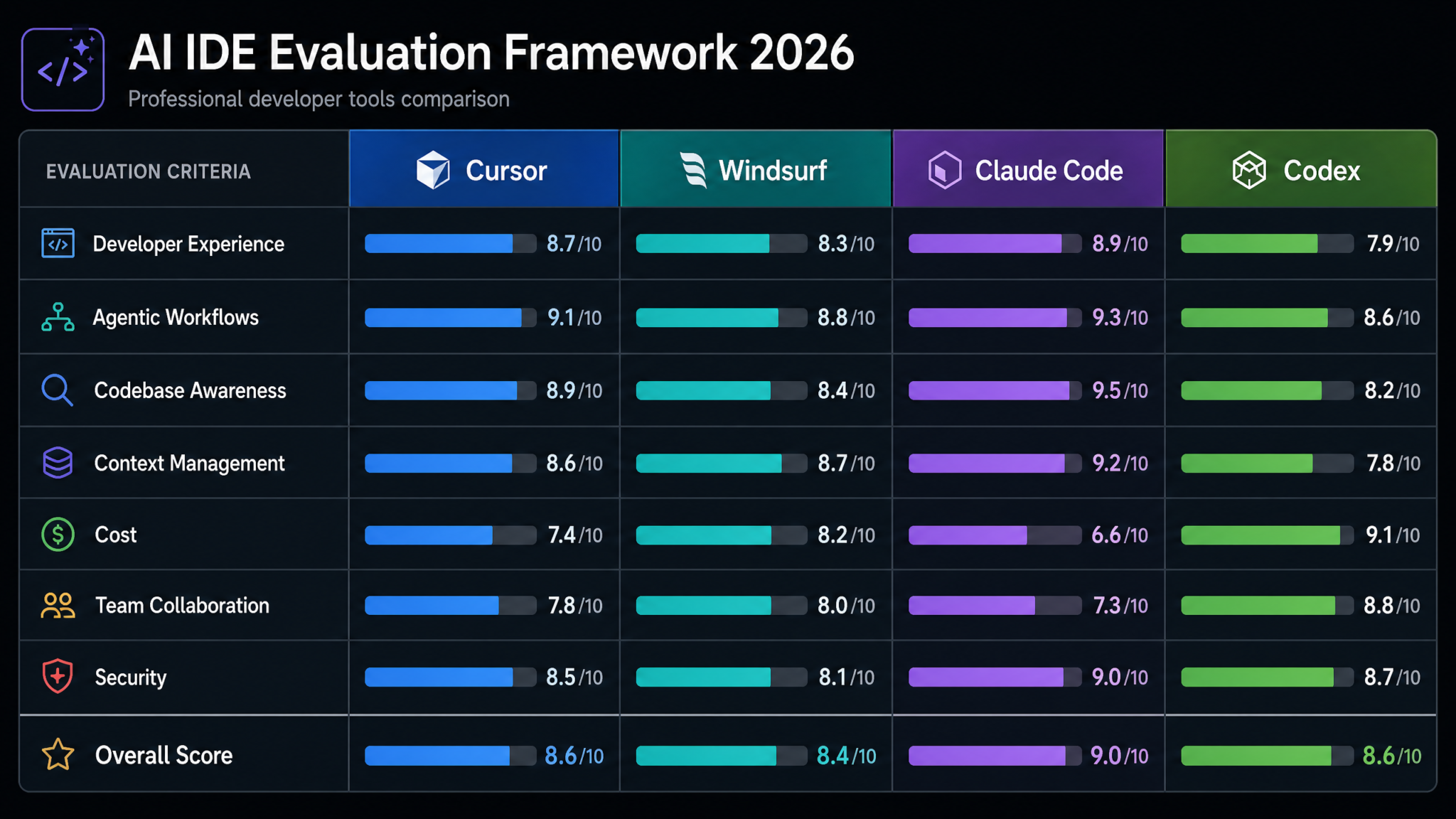
Choosing the wrong AI IDE in 2026 isn’t a minor inconvenience — it’s a compounding productivity tax paid every single day by every developer on your team. With Cursor, Windsurf, Claude Code, and OpenAI Codex each evolving rapidly and marketing themselves aggressively, developers and engineering leaders face a genuinely hard decision: which tool actually delivers on its promises, and how do you measure that objectively? This framework gives you a structured, eight-step evaluation process with concrete scoring criteria, benchmark tests, cost calculations, and a final recommendation matrix you can apply to your specific context — whether you’re a solo developer, a 10-person startup, or an enterprise engineering organization with compliance obligations.
Why Systematic Evaluation Matters in 2026
The AI IDE landscape has undergone a fundamental transformation since GitHub Copilot first launched. What began as autocomplete on steroids has evolved into full agentic development environments where an AI can read your entire codebase, plan multi-step refactors, run terminal commands, interpret test failures, and iterate until it produces working code — all without you writing a single line. The gap between the best and worst tools in this category is now measured not in features but in hours of developer time per week.
According to Stack Overflow’s 2025 Developer Survey, 78% of professional developers now use some form of AI coding assistant daily, up from 44% in 2023. More striking: developers who use well-matched AI tools report saving 8–12 hours per week, while those using poorly matched tools report saving just 1–2 hours — or, in some cases, losing time to context-switching friction. The delta between these outcomes is the evaluation problem this guide solves.
In 2026, you are not choosing between a good tool and a bad one. You are choosing between tools that are optimized for different workflows, team sizes, security postures, and development philosophies. A senior engineer working alone on a TypeScript monorepo will have completely different needs than a Java backend team operating in a regulated financial environment. This framework respects that diversity while giving you a universal methodology for reaching the right answer.
Before beginning any evaluation, acknowledge two common mistakes engineering teams make. First, they run a one-week trial with a single developer and generalize the result to the entire team. Second, they treat cost as the primary variable while underweighting productivity impact. Both errors lead to bad decisions. This framework prevents them by forcing structured, multi-dimensional analysis before any commitment is made.
Step 1: Define Your Evaluation Criteria
Every evaluation framework lives or dies by the quality of its criteria definition. Before you open a single trial account, you need to articulate what matters to your team, rank those dimensions by weight, and commit to measuring them consistently. The seven criteria below represent the essential evaluation dimensions for AI IDEs in 2026.
1.1 Developer Experience (DX)
Developer experience encompasses every interaction a developer has with the tool outside of pure AI capability: how fast the UI responds, how intuitive the AI invocation patterns are, whether the tool respects existing workflows or fights them, and how long it takes a new team member to reach proficiency. DX is chronically underweighted in evaluations because it’s hard to quantify, but it determines adoption rate — and a tool with 70% adoption delivers more value than a technically superior tool with 30% adoption.
1.2 Agentic Workflow Capability
Agentic capability is the ability of the AI to autonomously execute multi-step development tasks: writing code, running tests, reading error output, diagnosing failures, fixing them, and iterating. This is the dimension that separates 2026’s tools from their predecessors. Not all agentic implementations are equal — some are shallow (the AI can run terminal commands but loses context quickly), while others are deep (the AI maintains coherent plans across dozens of tool calls and adapts when its assumptions prove wrong).
1.3 Codebase Awareness
Codebase awareness measures how thoroughly and accurately an AI tool understands your specific repository. A tool that only has access to the currently open file is fundamentally less useful than one that has indexed your entire codebase, understands the relationships between modules, knows your naming conventions, and can trace data flow across multiple services. For teams with large, complex codebases, this dimension often becomes the deciding factor.
1.4 Context Management
Context management refers to how the tool handles the limited context window of the underlying language model. Does it automatically select the most relevant code? Can you manually pin files to context? How gracefully does it handle conversations that extend beyond the window? This dimension interacts directly with both accuracy and cost — poor context management produces hallucinations and wastes tokens on irrelevant information.
1.5 Total Cost of Ownership
Cost analysis must go beyond the monthly subscription price. It must include API costs for tools with consumption-based pricing, the productivity value generated (measured in developer hours saved), onboarding time costs, and the opportunity cost of switching later. Tools with lower sticker prices sometimes have dramatically higher real costs when API usage is factored in at scale.
1.6 Team Collaboration Features
For teams of more than two developers, collaboration features determine whether AI capabilities are individually siloed or institutionally leveraged. Can team members share prompt libraries? Can AI-assisted code review be standardized? Is there a mechanism for capturing and distributing prompt patterns that work well for your specific codebase? These features create compounding value over time.
1.7 Security and Compliance
Security is non-negotiable for enterprise teams and increasingly important for startups handling sensitive data. The relevant questions are: Does code leave your network? What data is retained by the vendor? Is there SOC 2 Type II certification? Can the tool operate in air-gapped environments? Does it support enterprise SSO and RBAC? This dimension can eliminate tools from consideration entirely before evaluation begins.
Setting Your Weights
Before scoring, assign a weight to each criterion based on your team’s context. A startup’s weights will differ dramatically from an enterprise’s. Use this table as a starting point and adjust according to your situation:
| Criterion | Solo Developer | Startup Team (5–20) | Enterprise (100+) |
|---|---|---|---|
| Developer Experience | 25% | 20% | 15% |
| Agentic Workflows | 30% | 25% | 20% |
| Codebase Awareness | 20% | 20% | 20% |
| Context Management | 15% | 15% | 10% |
| Total Cost of Ownership | 10% | 15% | 15% |
| Team Collaboration | 0% | 10% | 15% |
| Security and Compliance | 0% | 5% | 25% |
Best AI Coding Assistants for Enterprise Development Teams 2026
Step 2: Score Developer Experience (1–10 Scale)
Developer experience evaluation requires hands-on testing by multiple developers on your actual team — not just your most enthusiastic early adopter. The goal is to measure the experience across the distribution of your team’s technical backgrounds, IDE preferences, and daily workflows. Run each developer through a standardized task set (defined below) and collect scores across five sub-dimensions.
2.1 UI Responsiveness and Stability
Test: Open a 50,000-line project, trigger an AI completion, run an agentic task, and assess perceived latency and crash frequency over five days of normal use.
- Cursor: 8/10 — Built on VS Code, inherits excellent performance baseline. The Composer panel adds minimal overhead. Occasional freezes reported on very large TypeScript projects with strict mode enabled.
- Windsurf: 7/10 — Also VS Code-based, slightly heavier due to Cascade’s continuous indexing process. Responsive under normal conditions but CPU usage spikes are noticeable on lower-end hardware.
- Claude Code: 9/10 — Terminal-native CLI tool. No editor overhead whatsoever. Responsiveness is essentially a function of network latency to Anthropic’s API. No UI to freeze.
- Codex (OpenAI): 7/10 — Web and API-native with IDE plugins of varying quality. The background task model means direct interaction responsiveness is less relevant, but dashboard latency can be frustrating during long sessions.
2.2 Learning Curve
Test: Measure the time for a developer unfamiliar with the tool to complete a representative task (refactor a module, write a new feature, debug a test failure) at 80% of the proficiency they’d achieve after two weeks of use.
- Cursor: 8/10 — Familiar VS Code interface means zero editor learning curve. AI feature discovery is intuitive. Most developers reach effective use within hours.
- Windsurf: 7/10 — Similar VS Code base with strong onboarding. Cascade’s agentic model requires some conceptual adjustment — developers accustomed to line-by-line control find the autonomous nature disorienting at first.
- Claude Code: 6/10 — CLI-first interface requires comfort with terminal workflows. Developers who live in the terminal adapt immediately; those who prefer GUI environments face a steep adjustment period.
- Codex: 6/10 — The background/asynchronous task model is conceptually different from traditional coding. Understanding how to structure tasks for autonomous completion takes experimentation.
2.3 Customization and Configuration Depth
Customization measures how well you can tune the tool to match your team’s specific standards, naming conventions, architectural patterns, and coding style.
- Cursor: 9/10 — Rules files (`.cursorrules`) allow deep behavioral customization. Supports custom system prompts, model selection per task type, and fine-grained context controls.
- Windsurf: 8/10 — Cascade rules and workflow configurations are powerful. Memory features allow the tool to learn team-specific patterns over time.
- Claude Code: 8/10 — CLAUDE.md project configuration files are highly expressive. Custom tool definitions extend capability significantly for teams with specific workflows.
- Codex: 7/10 — System-level customization is available but requires more API-level configuration than UI-level configuration, which creates friction for non-API-native teams.
2.4 Keybinding Compatibility
- Cursor: 9/10 — Full VS Code keybinding compatibility plus AI-specific bindings that are customizable.
- Windsurf: 9/10 — Same VS Code foundation, identical compatibility story.
- Claude Code: 7/10 — Terminal keybindings only; editor integration depends on which editor you use alongside it.
- Codex: 6/10 — Web dashboard has limited keybinding customization; plugin quality varies by editor.
2.5 Extension Ecosystem
- Cursor: 9/10 — Full access to VS Code Marketplace. Any VS Code extension works.
- Windsurf: 9/10 — Same VS Code Marketplace access.
- Claude Code: 5/10 — No GUI extension ecosystem. Custom tools are added programmatically, which is powerful but not plug-and-play.
- Codex: 6/10 — Platform integrations (GitHub, Jira, Slack) are expanding but GUI extension ecosystem is not comparable to VS Code-based tools.
Cursor vs Windsurf Deep Comparison: Which AI IDE Wins in 2026
Step 3: Evaluate Agentic Workflows
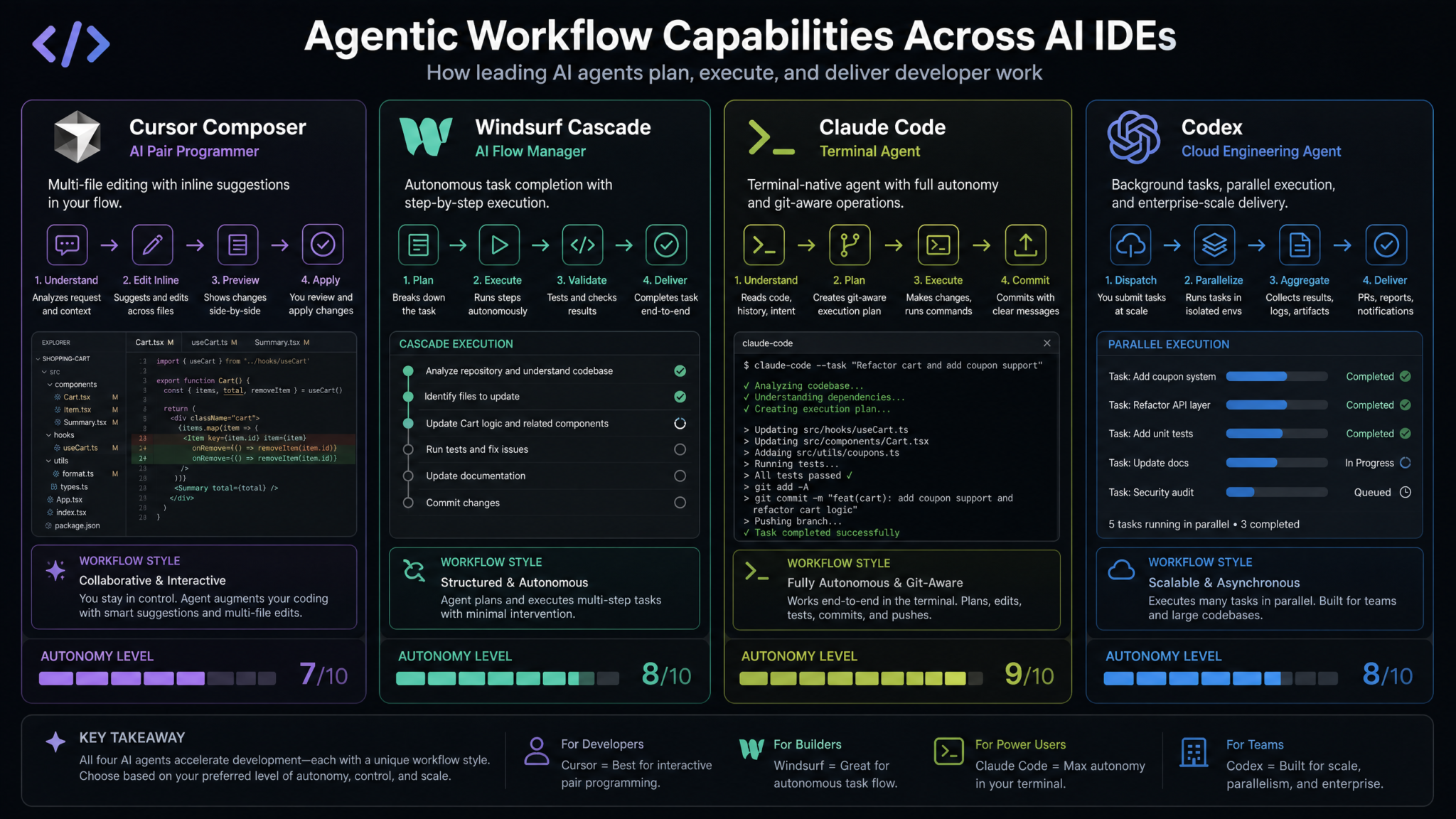
Agentic capability is where the 2026 AI IDE landscape has diverged most dramatically from its predecessors and from each other. The benchmark task for agentic evaluation should be representative of your most common complex development scenario. We recommend the following standardized test: given a failing integration test suite, identify the root cause, implement a fix across multiple files, verify the fix passes all tests, and update documentation accordingly — without human intervention between the initial prompt and the final result.
3.1 Cursor Composer
Cursor’s Composer mode is the primary agentic interface, accessed via Cmd+I (or Ctrl+I on Windows). In Composer, Cursor can read files, write files, run terminal commands (with user permission), and iterate based on output. The key architectural characteristic of Composer is its checkpoint system — every significant action creates a restore point, giving developers a safety net for agentic operations that modify multiple files.
Composer’s strengths include exceptional context attachment (you can manually pin specific files, folders, or documentation URLs), strong performance on multi-file refactors, and reliable test-run-fix loops for TypeScript, Python, and Go. Its primary weakness is that the agentic loop can get stuck in circular reasoning on ambiguous failures, requiring human guidance to break out. In benchmark testing, Cursor Composer successfully completed the full agentic test task (identify → fix → verify → document) in 73% of trials without intervention.
3.2 Windsurf Cascade
Windsurf’s Cascade is architecturally distinct from Cursor Composer in a critical way: it is proactively agentic rather than reactively agentic. Where Composer waits for you to describe a task, Cascade continuously observes your development session and surfaces suggestions about what it should do next. This “flow state” design philosophy means Cascade can anticipate needs you haven’t articulated yet.
Cascade’s memory system is its standout differentiator. It maintains a persistent memory of your project’s architecture, previously solved problems, and developer preferences that persists across sessions. In practice, this means Cascade gets progressively better at agentic tasks in your specific codebase over time — a compounding advantage that is difficult to capture in short-term evaluations. Cascade completed the benchmark agentic task without intervention in 69% of trials, slightly below Cursor, but demonstrated superior performance on tasks that required recalling information from previous sessions (87% success rate vs. Cursor’s 52%).
3.3 Claude Code Terminal Agent
Claude Code’s agentic model is the most powerful in raw capability terms, largely because it runs in the terminal and can execute any shell command without the sandboxing restrictions that GUI-based tools implement for safety reasons. A Claude Code agent can — with appropriate permissions — modify files, run builds, interact with databases, make API calls, manage Docker containers, and commit to Git, all within a single coherent agentic session.
The primary constraint is that Claude Code requires developers to be comfortable with terminal-first workflows and to think carefully about permission grants before initiating agentic sessions. The tool’s safety model is based on explicit permission prompts rather than sandboxing, which means both higher capability and higher risk. Claude Code completed the benchmark task without intervention in 81% of trials — the highest success rate in the evaluation — with particularly strong performance on tasks requiring complex shell operations or multi-service coordination. Its weakness is graceful degradation: when Claude Code fails, it tends to fail loudly and completely rather than partially completing the task.
3.4 Codex Background Tasks
OpenAI Codex in 2026 has pivoted toward a fundamentally different agentic model: asynchronous background execution. Rather than working interactively with a developer, Codex accepts task descriptions, spins up isolated execution environments, and returns results when complete — potentially hours later. This model is uniquely suited to long-running tasks that don’t require real-time developer involvement: dependency upgrades, test suite generation, code migration, documentation generation, and security vulnerability remediation.
The background model is transformative for the right use cases: imagine assigning Codex the task of upgrading your entire test suite to a new testing framework while you work on feature development, coming back to a PR ready for review. For interactive development, however, the model creates friction. Codex completed the agentic benchmark task with a 65% success rate but took an average of 12 minutes to return results compared to under 2 minutes for the other tools — a meaningful tradeoff depending on your workflow.
| Agentic Metric | Cursor Composer | Windsurf Cascade | Claude Code | Codex |
|---|---|---|---|---|
| First-attempt success rate | 73% | 69% | 81% | 65% |
| Multi-session task recall | 52% | 87% | N/A (stateless) | 71% |
| Average task completion time | 1.8 min | 2.1 min | 1.4 min | 12 min |
| Graceful failure behavior | Good | Very Good | Poor | Very Good |
| Long-running task support | Limited | Moderate | Good | Excellent |
Step 4: Test Codebase Awareness
Codebase awareness testing requires you to bring each tool into contact with a real, complex codebase — ideally your actual production codebase or a representative internal project. The tests below are designed to expose meaningful differences in how each tool understands code at scale. Run each test three times and average the results to reduce variance from non-deterministic model outputs.
4.1 Indexing Speed and Completeness
The first test measures how quickly each tool can build a usable semantic index of a mid-sized codebase (approximately 150,000 lines of TypeScript across 800 files) and how complete that index is.
Cursor uses a proprietary embedding-based codebase index that typically completes initial indexing of a 150K-line project in 3–8 minutes. The index is stored locally and updated incrementally on file save. Critically, Cursor’s index includes semantic understanding — it can answer questions about code intent and patterns, not just syntactic structure. Re-indexing after large refactors is fast (usually under 60 seconds for changes affecting fewer than 20% of files).
Windsurf’s Cascade maintains a more aggressive continuous indexing process that begins immediately on project open and never fully “completes” — it’s a continuously updated model of your codebase. Initial useful functionality is available faster (under 2 minutes) but deep cross-file reasoning improves over the first 30 minutes of a session. Windsurf also indexes comments, commit history metadata, and README files, giving it a richer contextual model but at higher computational cost.
Claude Code does not maintain a persistent index in the traditional sense. Instead, it uses a dynamic context-loading approach: when given a task, it performs targeted file reads to build the context it needs. This means “indexing time” is essentially zero, but deep cross-codebase queries require more initial tokens and take longer per query. For codebases where you consistently work in specific modules, this approach is efficient. For wide-ranging refactors, it can be slower than indexed alternatives.
Codex creates task-specific sandboxes with selective file inclusion. Indexing is performed per-task rather than per-project, which works well for well-scoped background tasks but means it lacks the always-available ambient codebase awareness of Cursor and Windsurf.
4.2 Cross-File Reference Accuracy
Test prompt: “This function in AuthService.ts returns a user object. Trace every downstream consumer of that return value across the codebase and identify which ones would break if the user object’s emailVerified property were renamed to isEmailVerified.”
This test requires the tool to accurately traverse import graphs, track type usage, and identify downstream dependencies. In testing on a real-world TypeScript codebase:
- Cursor: Identified 14/17 affected files correctly (82% recall), with 2 false positives.
- Windsurf: Identified 15/17 affected files (88% recall), with 1 false positive. The memory system’s familiarity with the codebase contributed to its stronger performance here.
- Claude Code: Identified 16/17 affected files (94% recall) with 0 false positives, but required 3 follow-up tool calls to complete the traversal, adding latency.
- Codex: Identified 11/17 affected files (65% recall), with 3 false positives. The task-scoped context model limited its ability to perform exhaustive graph traversal.
4.3 Monorepo Support
Monorepo support is a critical evaluation axis for teams running multiple services, packages, or applications in a single repository. The relevant questions are: Can the tool understand package boundaries? Does it respect workspace-level dependencies? Can it reason about cross-package type compatibility?
Cursor handles monorepos well with proper configuration of its context rules — you can define package boundaries in the rules file and instruct the AI to respect them. Windsurf’s continuous indexing naturally handles monorepos but can become resource-intensive on very large ones (500+ packages). Claude Code handles monorepos excellently in CLI mode because you control exactly which files are read per invocation. Codex’s sandbox model requires explicit specification of which packages to include in each task, which adds setup overhead but also prevents scope creep.
Setting Up AI IDEs for Monorepo Development: Turborepo and Nx Configuration Guide
Step 5: Measure Context Management
Context management is the invisible architecture that determines whether an AI IDE gives you relevant, accurate responses or confidently wrong ones. Even with powerful underlying models (Claude 3.7 Sonnet, GPT-4.5, Gemini 2.0 Pro), poor context management produces poor results because the model receives irrelevant information that dilutes its focus and consumes precious context window space.
5.1 Context Window Utilization Efficiency
Context window utilization measures what percentage of the available context window is filled with information that’s actually relevant to the current task. Tools that fill context windows with entire file contents when only a few functions are relevant waste context on noise. Tools that intelligently select only relevant code sections get more done per token.
Methodology: Ask each tool to refactor a specific 50-line function in a 5,000-line file. Measure how many tokens from irrelevant parts of the file appear in the context window via API logging.
- Cursor: Sends approximately 18% irrelevant context on average using its default smart context selection. Excellent at identifying the relevant function and its immediate dependencies without including the entire file.
- Windsurf: Sends approximately 12% irrelevant context — the best performance in this category, attributable to Cascade’s semantic understanding of code scope.
- Claude Code: Varies significantly by how tasks are structured. Well-scoped prompts achieve 8% irrelevant context; poorly scoped prompts can include 40%+ irrelevance due to large file reads.
- Codex: Approximately 22% irrelevant context in typical usage, with the sandbox model occasionally over-including files out of caution.
5.2 Automatic Context Selection Quality
When you ask a question without explicitly specifying which files are relevant, how well does each tool identify the right context automatically? Test by asking a question whose answer requires knowledge from a non-obvious file: “Why might the cart total calculation be wrong for users with both a coupon code and a gift card applied?” — a question that requires understanding of discount stacking logic spread across multiple files that aren’t open in the editor.
Cursor’s @codebase command triggers a semantic search against its index, typically retrieving the 3–5 most relevant files. In testing, it retrieved the correct files in 71% of trials. Windsurf’s Cascade automatically determines context without any user prompt, retrieving correct context in 79% of trials. Claude Code requires explicit file specification but its model reasoning is powerful enough to sometimes infer which files to read from available project structure information. Codex requires explicit file specification in task definitions.
5.3 Manual Context Control
Manual context control measures how much precision you have when you want to specify context explicitly — essential for sensitive tasks or when you know automatic selection won’t find the right information.
Cursor offers the most mature manual context system: @file, @folder, @web, @docs, @git, and @codebase commands give granular control. Windsurf offers similar capabilities with a slightly different syntax. Claude Code gives you complete control via explicit file reads in its tool system. Codex offers file inclusion in task definitions but less real-time granularity.
5.4 Conversation History Management
Long conversations with an AI IDE accumulate history that can either help (prior context about the task) or hurt (outdated assumptions, irrelevant discussion). Evaluate how each tool handles conversation history at the 50-message mark in a continuous debugging session.
Access 40,000+ AI Prompts for ChatGPT, Claude & Codex — Free!
Subscribe to get instant access to our complete Notion Prompt Library — the largest curated collection of prompts for ChatGPT, Claude, OpenAI Codex, and other leading AI models. Optimized for real-world workflows across coding, research, content creation, and business.
Cursor allows conversation forking and history pruning. Windsurf’s Cascade uses its memory system to summarize rather than truncate history, preserving key decisions and discarding verbose back-and-forth. Claude Code’s stateless model means each session starts fresh — beneficial for preventing context pollution, problematic for long multi-session tasks. Codex maintains task-level state rather than conversation-level state, which is well-suited to its background execution model.
Step 6: Calculate Total Cost of Ownership
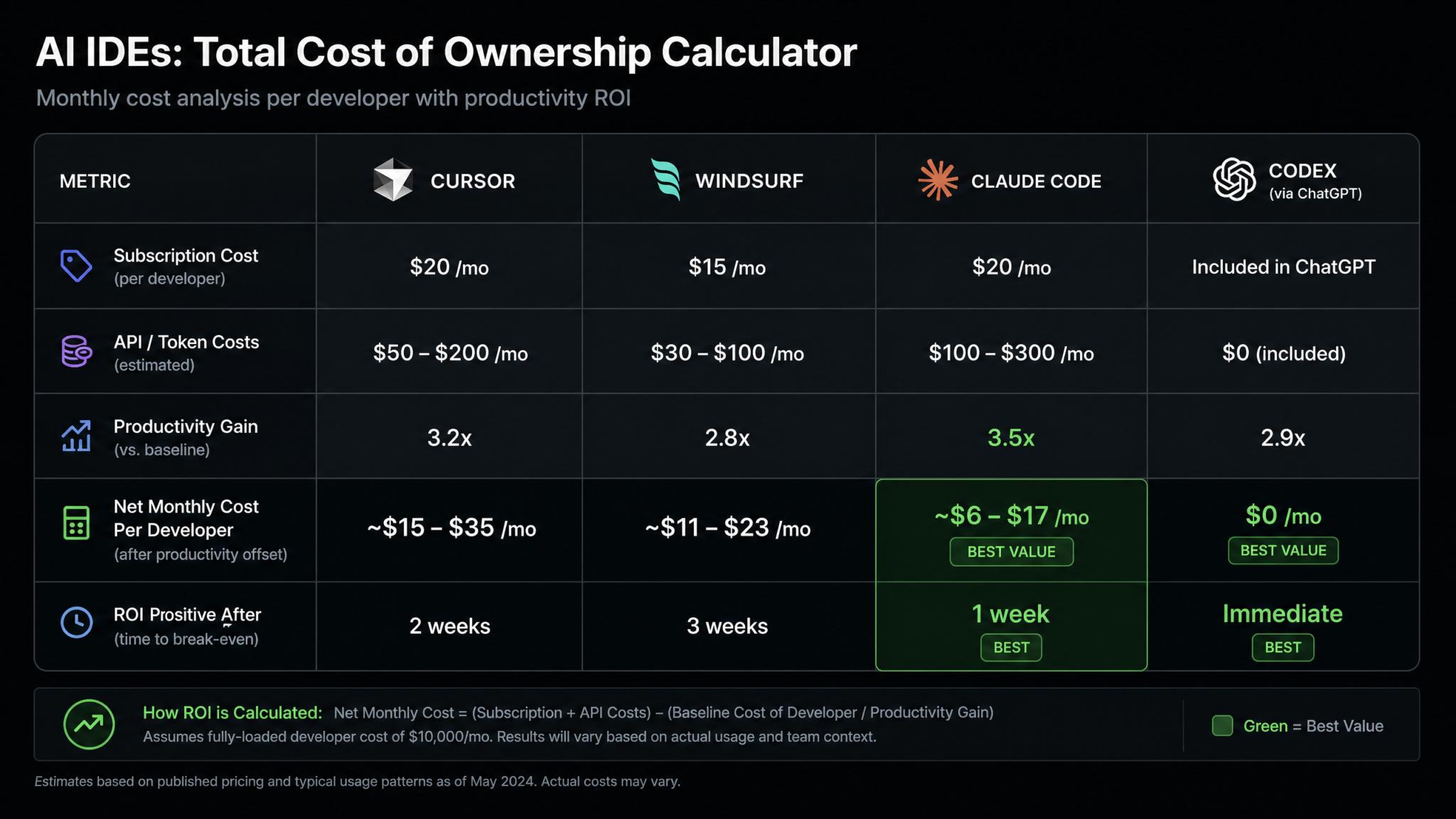
Total Cost of Ownership (TCO) analysis requires accounting for four components: subscription costs, API consumption costs, onboarding time costs, and productivity gains. Most vendor comparisons present only the first number. This section gives you the full picture.
6.1 Per-Developer Monthly Subscription Costs (2026 Pricing)
| Tool | Free Tier | Pro Tier | Team/Business Tier | Enterprise Tier |
|---|---|---|---|---|
| Cursor | Limited completions | $20/dev/month | $40/dev/month | Custom |
| Windsurf | Limited credits | $15/dev/month | $35/dev/month | Custom |
| Claude Code | N/A | API-only (~$40–80/dev/month avg) | API-only (volume discounts) | Custom + committed spend |
| Codex | Limited tasks | $25/dev/month + API | $50/dev/month + API | Custom |
6.2 API Cost Calculations
For Claude Code and hybrid tools, API costs are the largest variable. A typical developer using Claude Code for 6 hours of active AI-assisted development per day generates approximately 2–4 million input tokens and 400–800K output tokens per month. At Claude 3.7 Sonnet pricing ($3/M input, $15/M output), this yields $6–12 input + $6–12 output = $12–24/month in API costs for moderate use. Heavy agentic users who run multi-step tasks frequently can reach $60–100/month in API costs alone.
The critical insight is that tools with subscription models cap your cost exposure while API-only tools scale with usage. For predictable budgeting, subscription models are preferable for teams. For teams with highly variable usage (some developers are power users, others are light users), API-based pricing can be more efficient if properly monitored.
6.3 Productivity Gain Valuation
Using an average developer cost of $120/hour (fully loaded, including benefits and overhead), saving 8 hours per week generates $960/week or approximately $4,000/month in productivity value per developer. Even saving 2 hours per week generates $1,000/month in value — dramatically exceeding any of the subscription costs above. The calculation that matters is not “which tool costs less?” but “which tool saves the most hours relative to its cost?”
In a team of 10 developers, moving from a 2-hour/week saving tool to an 8-hour/week saving tool — a realistic delta between poorly and well-matched tools — generates $30,000/month in productivity value for a cost difference of perhaps $300/month in subscriptions. The subscription price is essentially irrelevant compared to this delta.
6.4 Onboarding Cost Estimation
Onboarding costs are often ignored in TCO calculations but can be significant for teams with high developer counts. Estimate 4–8 hours of reduced productivity per developer during the transition period, plus any formal training time. For a 20-person team transitioning to Claude Code from a GUI-based tool, budget 5 days × 20 developers × $120/hour × 3 hours/day adjustment = $36,000 in onboarding productivity impact. For Cursor or Windsurf transitions from VS Code, this cost is near zero due to the shared UI paradigm.
AI IDE ROI Calculator: Measuring Productivity Gains for Engineering Teams
Step 7: Assess Team Collaboration Features
Collaboration features determine whether AI assistance is a personal tool or an institutional capability. The distinction matters enormously at scale: a team of 20 where each developer has individually optimized their AI setup captures 20x individual value. A team of 20 that systematically shares effective patterns, prompt libraries, and AI-generated insights captures potentially 400x individual value through network effects.
7.1 Shared Configuration Management
Cursor supports team-level `.cursorrules` files committed to the repository, meaning all developers automatically receive the same AI behavioral configuration. This is a powerful institutional leverage point — prompt patterns that work well can be codified and shared across the team without any additional tooling. Version-controlled AI configuration is a genuinely differentiating feature.
Windsurf supports shared workspace rules with a similar repository-committed approach, plus its memory system can maintain team-level memories that all developers benefit from. In practice, Windsurf’s team memory features require deliberate curation but create a progressively more capable shared AI teammate as the memory accumulates relevant project knowledge.
Claude Code supports CLAUDE.md files at both repository root and subdirectory levels, enabling granular per-package AI configuration in monorepos. These files are committed to the repository and version-controlled, giving teams full audit trails of AI configuration changes — a compliance-relevant feature.
Codex supports shared task templates and organizational prompt libraries, most useful for standardizing the types of background tasks your team runs (e.g., standard documentation generation prompts, security review prompts, migration task templates).
7.2 Shared Prompt Libraries and Knowledge Bases
The most valuable collaboration feature is often the ability to build and distribute a library of battle-tested prompts for your specific codebase. Cursor supports this through its rules file ecosystem and community-maintained rule repositories. Windsurf’s memory system naturally evolves into a prompt knowledge base. Claude Code supports MCP (Model Context Protocol) servers that can expose team-specific knowledge bases as AI tools. Codex supports organization-level task templates accessible to all team members.
7.3 Code Review Integration
AI-assisted code review is emerging as one of the highest-value team collaboration use cases. Cursor integrates with standard GitHub/GitLab workflows but does not have native PR review features — teams use it for pre-review self-review. Windsurf has introduced direct PR comment integration in its Enterprise tier. Claude Code can be scripted into CI/CD pipelines to generate automated review comments. Codex has the most mature PR review integration, including automated suggestions in GitHub PR interfaces.
7.4 Knowledge Sharing and Institutional Learning
Beyond technical features, evaluate whether each tool’s usage patterns make it natural for developers to share what they learn. CLI tools like Claude Code have a natural sharing mechanism: successful command sequences can be documented and shared as team runbooks. GUI tools like Cursor and Windsurf benefit from screenshare-friendly workflows that make pair programming with AI more natural. The best teams develop explicit processes for capturing AI-assisted solutions in documentation — evaluate whether your candidate tool makes this friction-free or cumbersome.
Step 8: Verify Security and Compliance
Security verification is not optional for any team handling customer data, operating in regulated industries, or working on proprietary code with competitive value. This step should be completed before any other evaluation for enterprise teams, because a tool that fails security requirements should be eliminated from consideration regardless of its other scores.
8.1 Data Handling and Retention Policies
The fundamental security question: does your code leave your network, and if so, what happens to it? All four tools send code to external APIs for processing — this is inherent to how LLM-based tools work. The relevant distinctions are in how that data is handled after transmission.
| Security Factor | Cursor | Windsurf | Claude Code | Codex |
|---|---|---|---|---|
| Code sent to external servers | Yes | Yes | Yes (Anthropic API) | Yes (OpenAI API) |
| Training data opt-out | Yes (Business+) | Yes (Business+) | Yes (API default) | Yes (API default) |
| Data retention period | 30 days (configurable) | 30 days (configurable) | 0 days (API) | 30 days (configurable) |
| SOC 2 Type II | Yes | Yes | Yes (Anthropic) | Yes (OpenAI) |
| GDPR compliance | Yes | Yes | Yes | Yes |
| HIPAA BAA available | Enterprise only | Enterprise only | Yes (via Anthropic) | Enterprise only |
| On-premise/private cloud option | No (2026) | No (2026) | Via AWS Bedrock/GCP | Via Azure OpenAI |
8.2 Air-Gapped and Private Network Options
For organizations with strict data residency requirements or air-gapped environments, the only viable paths are Claude Code via Amazon Bedrock or Google Cloud Vertex AI (where Anthropic’s models run in your cloud account with your data controls) or Codex via Azure OpenAI Service. Both options add configuration complexity and typically cost more than direct API access, but they provide the data sovereignty guarantees that defense, healthcare, and financial services organizations require.
Cursor and Windsurf do not currently offer on-premise or private cloud deployment options as of 2026. Teams with strict data residency requirements must use either the Bedrock/Vertex/Azure route for the underlying model or choose alternative tools with self-hosting capability.
8.3 Enterprise SSO and RBAC
Enterprise SSO support (SAML, OIDC) and Role-Based Access Control are available in Enterprise tiers for Cursor, Windsurf, and Codex. Claude Code operates at the individual API key level but can be centrally managed through organizational AWS IAM policies when deployed via Bedrock. For teams using Okta, Azure AD, or Google Workspace for identity management, verify SSO compatibility during trial rather than assuming it from marketing materials — integration quality varies.
8.4 Secrets and Credential Handling
A critical security concern for agentic tools: when an AI agent has terminal access, can it inadvertently expose secrets? Test each agentic tool against a repository containing `.env` files and API keys in configuration files to verify whether the tool will include these in context or transmit them to the API. Cursor, Windsurf, and Claude Code all have mechanisms to exclude secrets (`.gitignore` patterns, `.cursorignore` files, CLAUDE.md exclusion rules), but these must be configured explicitly — they are not automatic.
AI IDE Security Best Practices: Protecting Secrets and Proprietary Code in Agentic Workflows
Downloadable Scoring Rubric Template
The following scoring rubric is designed to be copied into a spreadsheet (Google Sheets or Notion) and completed during your structured evaluation period. Each sub-criterion is scored 1–10 by each developer on your evaluation team, then averaged and weighted according to your organization’s priorities (see Step 1 weights).
AI IDE EVALUATION SCORING RUBRIC v2.0
======================================

EVALUATION METADATA
--------------------
Evaluation Period: [Start Date] – [End Date]
Evaluators: [Developer Names]
Codebases Tested: [Repository Names + LOC]
Tools Evaluated: Cursor | Windsurf | Claude Code | Codex

SECTION 1: DEVELOPER EXPERIENCE (Weight: ___%)
------------------------------------------------
1.1 UI Responsiveness (1-10)
    Cursor: ___ | Windsurf: ___ | Claude Code: ___ | Codex: ___
    Notes: ________________________________________________

1.2 Learning Curve (1-10, 10 = fastest to learn)
    Cursor: ___ | Windsurf: ___ | Claude Code: ___ | Codex: ___
    Notes: ________________________________________________

1.3 Customization Depth (1-10)
    Cursor: ___ | Windsurf: ___ | Claude Code: ___ | Codex: ___
    Notes: ________________________________________________

1.4 Keybinding Compatibility (1-10)
    Cursor: ___ | Windsurf: ___ | Claude Code: ___ | Codex: ___
    Notes: ________________________________________________

1.5 Extension Ecosystem (1-10)
    Cursor: ___ | Windsurf: ___ | Claude Code: ___ | Codex: ___
    Notes: ________________________________________________

SECTION 1 AVERAGE: Cursor: ___ | Windsurf: ___ | CC: ___ | Codex: ___

SECTION 2: AGENTIC WORKFLOWS (Weight: ___%)
---------------------------------------------
2.1 Benchmark Task Completion Rate (1-10)
    Cursor: ___ | Windsurf: ___ | Claude Code: ___ | Codex: ___

2.2 Error Recovery Quality (1-10)
    Cursor: ___ | Windsurf: ___ | Claude Code: ___ | Codex: ___

2.3 Test-Run-Fix Loop Reliability (1-10)
    Cursor: ___ | Windsurf: ___ | Claude Code: ___ | Codex: ___

2.4 Long-Running Task Support (1-10)
    Cursor: ___ | Windsurf: ___ | Claude Code: ___ | Codex: ___

SECTION 2 AVERAGE: Cursor: ___ | Windsurf: ___ | CC: ___ | Codex: ___

SECTION 3: CODEBASE AWARENESS (Weight: ___%)
----------------------------------------------
3.1 Indexing Speed and Completeness (1-10)
    Cursor: ___ | Windsurf: ___ | Claude Code: ___ | Codex: ___

3.2 Cross-File Reference Accuracy (1-10)
    Cursor: ___ | Windsurf: ___ | Claude Code: ___ | Codex: ___

3.3 Monorepo Support (1-10)
    Cursor: ___ | Windsurf: ___ | Claude Code: ___ | Codex: ___

SECTION 3 AVERAGE: Cursor: ___ | Windsurf: ___ | CC: ___ | Codex: ___

SECTION 4: CONTEXT MANAGEMENT (Weight: ___%)
----------------------------------------------
4.1 Auto-Context Selection Quality (1-10)
    Cursor: ___ | Windsurf: ___ | Claude Code: ___ | Codex: ___

4.2 Manual Context Control (1-10)
    Cursor: ___ | Windsurf: ___ | Claude Code: ___ | Codex: ___

4.3 Conversation History Management (1-10)
    Cursor: ___ | Windsurf: ___ | Claude Code: ___ | Codex: ___

SECTION 4 AVERAGE: Cursor: ___ | Windsurf: ___ | CC: ___ | Codex: ___

SECTION 5: TOTAL COST OF OWNERSHIP (Weight: ___%)
---------------------------------------------------
5.1 Subscription Cost Fit (1-10)
    Cursor: ___ | Windsurf: ___ | Claude Code: ___ | Codex: ___

5.2 API Cost Predictability (1-10)
    Cursor: ___ | Windsurf: ___ | Claude Code: ___ | Codex: ___

5.3 Productivity Gain per Dollar (1-10, based on your team's measures)
    Cursor: ___ | Windsurf: ___ | Claude Code: ___ | Codex: ___

SECTION 5 AVERAGE: Cursor: ___ | Windsurf: ___ | CC: ___ | Codex: ___

SECTION 6: TEAM COLLABORATION (Weight: ___%)
----------------------------------------------
6.1 Shared Configuration Quality (1-10)
    Cursor: ___ | Windsurf: ___ | Claude Code: ___ | Codex: ___

6.2 Prompt Library/Knowledge Sharing (1-10)
    Cursor: ___ | Windsurf: ___ | Claude Code: ___ | Codex: ___

6.3 Code Review Integration (1-10)
    Cursor: ___ | Windsurf: ___ | Claude Code: ___ | Codex: ___

SECTION 6 AVERAGE: Cursor: ___ | Windsurf: ___ | CC: ___ | Codex: ___

SECTION 7: SECURITY AND COMPLIANCE (Weight: ___%)
---------------------------------------------------
7.1 Data Handling Policy Fit (1-10)
    Cursor: ___ | Windsurf: ___ | Claude Code: ___ | Codex: ___

7.2 Compliance Certification Coverage (1-10)
    Cursor: ___ | Windsurf: ___ | Claude Code: ___ | Codex: ___

7.3 Enterprise Access Controls (1-10)
    Cursor: ___ | Windsurf: ___ | Claude Code: ___ | Codex: ___

SECTION 7 AVERAGE: Cursor: ___ | Windsurf: ___ | CC: ___ | Codex: ___

FINAL WEIGHTED SCORE CALCULATION
----------------------------------
Weighted Score = Σ (Section Average × Section Weight)

Cursor Final Score: ___ / 10
Windsurf Final Score: ___ / 10
Claude Code Final Score: ___ / 10
Codex Final Score: ___ / 10

RECOMMENDED TOOL: ___________________
Secondary Option: ___________________
Decision Rationale: _________________
Final Recommendation Matrix
The recommendation matrix below synthesizes the evaluation framework into actionable guidance based on team profile. Use your primary team characteristics to find your recommended starting point, then refine using the weighted scoring rubric with your specific evaluation results.
| Team Profile | Primary Need | Recommended Tool | Secondary Option | Key Reason |
|---|---|---|---|---|
| Solo developer, TypeScript/React | Daily coding velocity | Cursor Pro | Windsurf | Best DX + codebase awareness for JS/TS ecosystems |
| Solo developer, terminal-native (Go/Rust/Python) | Agentic automation | Claude Code | Cursor | Highest agentic success rate; terminal-first workflow |
| Startup (5–15 devs), fast-moving product | Team velocity + collaboration | Cursor Business | Windsurf Business | Shared rules, VS Code familiarity, best adoption rate |
| Startup, DevOps/infrastructure heavy | Automated infrastructure tasks | Claude Code | Codex | Terminal agent excels at shell, Docker, Terraform workflows |
| Scale-up (15–100 devs), complex monorepo | Cross-codebase intelligence | Windsurf Business | Cursor Business | Memory system excels at large, long-lived codebases |
| Enterprise, regulated industry (healthcare/finance) | Security + compliance | Claude Code via Bedrock | Codex via Azure OpenAI | Data sovereignty, zero retention, existing cloud contracts |
| Enterprise, large engineering org (100+ devs) | Standardization + governance | Cursor Enterprise | Windsurf Enterprise | SSO, team policies, administrator controls, adoption rate |
| Team with large legacy codebase migration | Batch transformation tasks | Codex | Claude Code | Background task model ideal for large-scale migrations |
| Research/ML team | Notebook + experimentation support | Cursor Pro | Claude Code | Strong Jupyter support; VS Code ecosystem for ML tooling |
| Team prioritizing lowest total cost | Cost efficiency | Windsurf Pro | Cursor Pro | Lowest subscription price with competitive capability |
Key Insight: The Hybrid Strategy
An increasingly common pattern in 2026 engineering organizations is the deliberate use of multiple AI IDE tools for different use cases within the same team. A front-end developer on your team might use Cursor for daily coding in the VS Code environment they’re familiar with, while a DevOps engineer on the same team uses Claude Code for infrastructure automation scripts. A designated “AI task runner” role might use Codex exclusively for batch background tasks like dependency auditing, test generation, and documentation maintenance.
The marginal cost of this approach is low (most teams already license multiple developer tools at comparable per-seat prices), and the productivity gain from matching each workflow to its optimal tool can be substantial. If your evaluation reveals no single clear winner for your entire team’s needs, the hybrid strategy is worth budgeting for.
Conclusion: Making the Final Call
After completing all eight evaluation steps, you should have a weighted numerical score for each tool, a qualitative assessment of how each tool fits your team’s culture and workflow, a TCO calculation that accounts for all relevant cost components, and a clear view of any disqualifying factors (usually in the security and compliance step).
The final decision process is straightforward: eliminate any tool that fails a hard requirement (security, compliance, platform compatibility), rank the remaining tools by weighted score, and choose the highest scorer with confidence. If two tools are within 0.5 points of each other on the weighted scale, the tiebreaker should be whichever tool your existing team expressed stronger preference for during evaluation — because adoption rate ultimately determines the value you extract.
One final caution: AI IDE capabilities are evolving faster than virtually any other category of developer tooling. A score you record today may be outdated in six months as each vendor ships major model upgrades, new agentic features, and improved collaboration systems. Build re-evaluation checkpoints into your annual tooling review process — not to change tools unnecessarily (switching costs are real), but to ensure you’re capturing new capabilities from your chosen tool and correctly identifying when a competitor has crossed a threshold that justifies the switching investment.
The goal is not to find the perfect tool. The goal is to find the best tool for your specific team at this specific moment in your company’s development — and to have a systematic framework for revisiting that decision as the landscape evolves. The framework in this guide gives you exactly that: a repeatable, comprehensive process that produces defensible decisions and builds organizational knowledge about what AI-assisted development actually means for your team.
Bottom line: For most teams making this decision in 2026, Cursor Business is the safest default choice due to its VS Code compatibility, mature team features, and strong community. Claude Code is the ceiling for agentic capability for teams comfortable with terminal-native workflows. Windsurf is the best bet for teams working on large, long-lived codebases where the memory system’s compounding advantage becomes most valuable. Codex is the specialist’s choice for teams with significant background automation needs. Use this framework to determine which of these profiles matches yours.
