
How to Build an Asynchronous GPT-6 Astra Agent: Tool Calls, Mid-Turn Steering, Dynamic Reasoning, and Cache-Safe Workflows

Why asynchronous tool calling changes the agent architecture
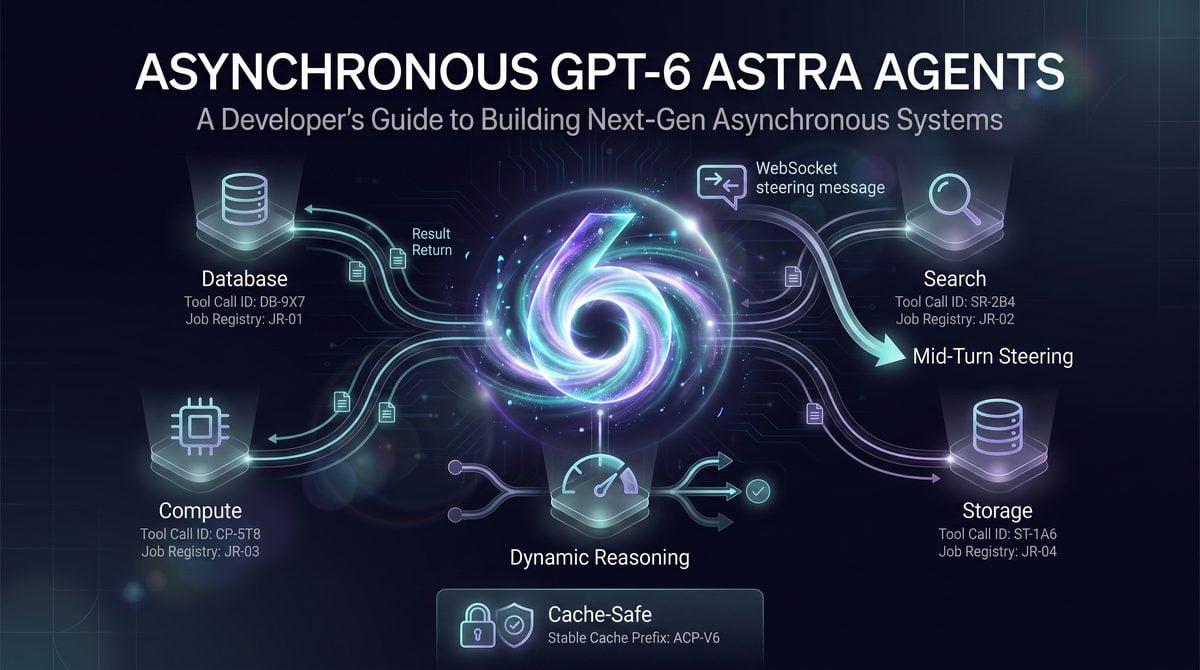
GPT-6 Astra introduces an important shift for agent builders: an application-executed tool call can be marked asynchronous so the model can keep working on independent parts of the task while the application runs the tool. In the OpenAI documentation, this applies to GPT-6 Astra and later models, and it is configured on application-owned function or custom tools with an async setting. The practical result is not “OpenAI runs your background job.” The practical result is that Astra can issue a tool request, receive a task handle or later tool output from your application, and continue useful reasoning instead of blocking the entire response whenever a slow system is involved.
The architectural problem is familiar in production agents. A user asks for a market map, a compliance comparison, a code change, or a multi-system operational report. The agent may need a CRM export, an internal search index, a sandbox build, a data warehouse query, a static analysis run, and a ticket-system update. Some of those jobs finish in milliseconds; others take seconds or minutes. In a purely synchronous tool loop, the model asks for one tool, waits, consumes the result, asks for the next tool, waits again, and leaves no room for planning, drafting, validation, or unrelated subtasks while your systems do their work.
Async tool calling is designed for the cases where the model can separate dependent work from independent work. If Astra asks your application to run a repository-wide test suite, it may still be able to inspect provided requirements, draft a migration checklist, identify risky files from the prompt context, or prepare the final report structure while the test job is running. That is different from pretending that every task is parallelizable. If the next decision depends on the exact result of the tool, the model should wait; if only one branch of the work depends on the result, the model can advance the other branches.
This distinction matters for founders and operators because async tools do not remove the need for workflow design. They move responsibility into clearer places. Astra can decide to call a tool asynchronously and can later incorporate the result, but the application remains responsible for executing the job, assigning a unique task handle if one is needed, tracking lifecycle state, enforcing authorization, retrying or failing safely, and returning the result on the original tool call identifier. Teams that already have job queues, workers, audit tables, and idempotency keys can map async tool calls into that infrastructure; teams without those components should build them before treating async agents as production automation.
For OpenAI Responses API Agents, How to Build Custom AI Agents with OpenAI’s Responses API: From Single-Turn Chat to Multi-Step Autonomous Workflows is the most relevant adjacent resource. The custom Responses API agent tutorial explains the stateful, multi-step foundation on which asynchronous Astra tool calls and continuations are built.
Async tool calling is not Background mode
Async tool calling and Background mode solve different problems. Background mode is about allowing a model response itself to continue outside the lifetime of a normal foreground request pattern. Async tool calling is about tool execution inside an agent turn: the model delegates work to an application-executed tool, the application runs that work, and Astra may continue with independent reasoning while it waits for the tool result. Treating those as interchangeable leads to brittle designs because the ownership boundary is different.
| Question | Async tool calling | Background mode |
|---|---|---|
| What continues asynchronously? | An application-owned tool job can run while Astra continues independent work in the same agent flow. | The model response lifecycle can continue outside a normal foreground request pattern. |
| Who executes the external job? | Your application, workers, queues, databases, and third-party integrations execute the job. | Background mode does not mean OpenAI runs your business-specific tool job for you. |
| Which tools does it apply to? | OpenAI documents async behavior for application-executed function or custom tools, not hosted built-in tools. | Use Background mode for long-running model-response handling, not as a substitute for a job runner. |
| What can go wrong if confused? | The model waits forever because the application never delivers the tool result, or duplicate workers perform side effects. | The application assumes a tool was executed when only the model response lifecycle was made durable. |
A production implementation should therefore have two separate control planes. The model-response control plane tracks Responses API response identifiers, event streams, steering messages, and final assistant output. The tool-execution control plane tracks queued jobs, worker attempts, permissions, input hashes, timeouts, human approvals, and output delivery. The two planes meet at specific identifiers, especially the tool call’s call_id and the response thread’s previous_response_id.
Operational warning: An async tool call is not a permission grant, a job scheduler, a transaction manager, or an audit log. It is a model-to-application request that your system must validate, execute, record, and reconcile.
The identifiers that keep the workflow coherent
The call_id is the durable link between a tool request emitted by the model and the tool result you later return. If Astra asks for an async repository scan, your application should persist the call_id along with the response id, user or tenant, tool name, validated arguments, task handle, job status, creation time, and any authorization decision. When the worker completes, your application returns the tool output using the same call_id. If that mapping is lost, the model cannot reliably associate the result with the original request.
The previous_response_id is the continuity mechanism for the Responses API conversation. When you supply the result of a tool call back to the model in a follow-up request, you use the appropriate previous response reference so Astra continues from the response that created the pending work rather than starting a detached conversation. In practice, this is what lets the agent say, “I was waiting for the test result from that earlier call; now I can revise the deployment recommendation.”
The safe implementation rule is simple: persist before executing. As soon as the model emits an async tool call, write a record that binds the OpenAI response id, call_id, tool arguments, internal job id, and current state. Only after that record is durable should your application enqueue the worker. This prevents the common failure where a worker runs a side-effecting job but the application crashes before it records how to send the result back to the model.
{
  "internal_job_id": "job_8f3a...",
  "openai_response_id": "resp_...",
  "previous_response_id_for_return": "resp_...",
  "call_id": "call_...",
  "tool_name": "run_regression_suite",
  "validated_args_hash": "sha256:...",
  "tenant_id": "tenant_123",
  "status": "queued",
  "attempt_count": 0,
  "created_at": "2026-09-04T12:30:00Z"
}
For Human in the Loop Codex Workflows, How to Build Human-in-the-Loop Codex App-Server Workflows with Asynchronous Questions and Bounded Approvals is the most relevant adjacent resource. The Codex app-server human-in-the-loop playbook distinguishes non-blocking questions from bounded approvals, providing a closely related governance pattern for asynchronous Astra agents.
What mid-turn steering changes
Mid-turn steering lets a client send updated guidance while a GPT-6 Astra response is already running, but OpenAI documents an important boundary: it is available only for GPT-6 Astra over a WebSocket connection to the Responses API. The client sends a response.steer event after response.created, continues reading events after response.steer.accepted, and treats acceptance as queued input rather than evidence that Astra has already changed course.
This matters in real interfaces. A user may watch an agent drafting an incident analysis and then add, “Prioritize customer-facing impact over internal root cause,” or an operator may notice that the agent is about to spend too much time on optional validation and steer it toward a concise executive summary. With a normal request-response flow, the user would cancel, restart, and pay the coordination cost of rebuilding context. With mid-turn steering, the application can inject the updated instruction into the active response stream, provided it is using the documented WebSocket path.
Steering is not time travel. OpenAI’s steering guide states that it does not undo output already emitted and does not cancel tools that have already started. If Astra has already called an async tool that triggers a long-running compliance export, a steering message cannot be treated as a cancellation of that export. Your application needs its own cancellation mechanism for jobs that support cancellation, and it must decide whether cancellation is safe, authorized, and semantically correct. The model can be informed that a cancellation was requested or completed, but the external system remains under application control.
Steering also has connection-local behavior. Pending steering is local to the WebSocket connection, so clients should record steering inputs and manage reconnect behavior rather than assuming queued updates survive a disconnect. A robust browser or desktop client should keep an application-side steering log with timestamps, response id, user id, and delivery status. On reconnect, the client should not blindly replay every steering instruction; it should first determine whether the response is still active, whether the instruction is still relevant, and whether replay would contradict output already shown to the user.
Where dynamic reasoning and cache-safe design fit
Astra supports documented reasoning efforts of low, medium, high, xhigh, and max; OpenAI’s reasoning guide also notes that none is not supported for Astra and returns an HTTP 400 if sent. In an async agent, reasoning effort should be treated as part of workload control. A low-friction triage phase may use a lower effort to identify required tools, while a later synthesis phase may raise effort after expensive tool results arrive or after the user steers the agent toward a higher-stakes decision.
OpenAI documents configuration_update items that can change reasoning effort during a conversation while preserving the prompt prefix for caching. The cache implication is operationally important: do not rebuild the entire prompt just to change the reasoning budget. Keep stable instructions, tool definitions, policies, schemas, and long-lived context in a stable prefix; append new user turns, tool results, steering summaries, and configuration updates after that prefix. This design improves the chance that prompt caching can reuse the expensive shared portion of the request, subject to the documented caching rules and cache-hit behavior.
A cache-safe async agent should avoid mutating tool definitions midstream unless the change is required. OpenAI’s prompt-caching guidance emphasizes stable prefixes, append-only conversations, stable tool definitions, explicit breakpoints, allowed tools, deferred tool loading, and deterministic cache-key sharding as optimization methods. For this playbook, the operating rule is to keep “who the agent is, what tools exist, and what policies apply” stable, then append “what happened next” as job status, tool output, steering instructions, and reasoning configuration updates.
When a synchronous workflow is still the better choice
Async tools add coordination overhead, and not every workflow benefits. Use a synchronous tool call when the result is fast, required before any meaningful next step, and cheap to retry. A user-profile lookup, a single permission check, a small deterministic calculation, or a database read that gates the entire answer is usually simpler and safer as a blocking call. The model should not continue drafting an account-change recommendation before the authorization check that determines whether the request is allowed.
Synchronous workflows are also preferable when ordering is the safety property. If a deployment plan must run “validate configuration,” then “obtain approval,” then “apply change,” then “verify result,” allowing the model to continue speculative work during the approval step may create confusing output or pressure the operator into a decision. Async can still be used for non-blocking evidence gathering, but the side-effecting path should remain explicit, serialized, and auditable.
Use async tool calling when at least one material branch of the task can progress without the tool result, when the tool may take long enough to waste a model turn, and when your application can reliably track pending work. Keep synchronous calls when the tool is low-latency, when the model’s next token depends on the result, when the external action is irreversible, or when your team has not yet built durable job tracking. The strongest Astra agents will mix both patterns rather than forcing every tool into the newest mode.
Reference production architecture for Astra async tools

A production Astra async-tool system should treat the model as the planner and conversational executor, not as the background-job runner. OpenAI’s async tool-calling guide says that setting async: true on an application-executed function or custom tool lets GPT-6 Astra continue independent work while the application runs the tool, but the application remains responsible for executing the job, assigning a unique task handle, tracking lifecycle state, and returning the result on the original call_id. That division of responsibility should shape the architecture: one path streams model events, a second path executes durable jobs, and a third path delivers tool results back to the response using the identifiers emitted by the model.
The safest baseline is a five-part design: a Responses API session handler, a tool-call dispatcher, a durable job registry, one or more worker pools, and a result-delivery component. The session handler reads the model stream and detects async tool calls. The dispatcher validates the call, creates or reuses a registry row, and enqueues work. Workers claim jobs, execute application code, and write completion or failure records. The delivery component submits the result back through the documented Responses API tool-output mechanism with the original call_id, not with the task handle. The task handle is for your system and for optional user/model references; the call_id is the protocol binding that lets the model attach the result to the tool call it made.
Do not implement async tools as an in-memory callback map unless the workflow is purely experimental. Async calls are useful precisely because work may outlive the immediate turn, cross process boundaries, hit rate limits, or require retries. If the web process restarts and loses the mapping between task_handle and call_id, the worker may finish successfully but the application will no longer know how to deliver the result. Persist the registry in a database or durable key-value store before enqueueing work, and make the queue consumer idempotent so duplicate delivery events do not create duplicate side effects.
For AI Agent Event Architecture, OpenAI Open-Sources the Codex Agent Harness: Architecture, SDKs, App-Server, and What Developers Can Build is the most relevant adjacent resource. The open-source Codex harness article examines app-server events, SDKs, and integration boundaries, helping developers place Astra call IDs, job registries, and result delivery inside a broader agent architecture.
Core data model: separate protocol IDs from operational IDs
The job registry should store both the original model identifiers and your operational identifiers. The model’s call_id is required for returning the tool result. Your task_handle is a stable application-defined handle that can be shown to the model, displayed in an admin console, attached to logs, or passed into an optional wait tool. Keeping both values prevents a common failure mode: developers expose internal queue IDs to the model and later discover that the queue ID is not sufficient to satisfy the Responses API’s requirement to return output on the original call.
| Field | Purpose | Operational rule |
|---|---|---|
task_handle |
Application-defined durable handle for lookup, logs, wait-tool calls, and user support. | Generate once, make globally unique within the tenant or deployment, and never recycle. |
call_id |
Original Responses API tool-call identifier emitted by the model. | Persist exactly as received and use it when delivering the result back to the model. |
response_id or conversation reference |
Links the job to the model turn or session that created it. | Store enough context to resume delivery after a process restart or reconnect. |
tool_name and canonical arguments |
Defines the work the application must execute. | Canonicalize arguments before hashing so idempotency checks are stable. |
state |
Tracks lifecycle, commonly pending, running, completed, or failed. |
Only allow explicit transitions; never infer completion from queue acknowledgement. |
attempt_count, lease_expires_at |
Supports worker retries and recovery from crashed consumers. | Use leases for long-running jobs so another worker can reclaim abandoned work safely. |
result_payload or error_payload |
Stores the final output that will be delivered to the model. | Persist before delivery so network retry does not require re-running the tool. |
Recommended event and state contract
The table below is a practical event contract for production systems. Event names are intentionally application-level rather than SDK-specific; map them to the concrete Responses API events and SDK objects used in your implementation. The important invariant is that the registry transition happens before the next irreversible action, such as enqueueing work, calling an external system, or delivering a result to the model.
| Application event | Registry state | Required action | Invariant to enforce |
|---|---|---|---|
async_tool_call_observed |
pending |
Validate tool name, arguments, tenant authorization, and async eligibility; create or reuse the registry row. | A row containing task_handle and original call_id exists before the job is queued. |
job_enqueued |
pending |
Place a minimal message on the queue, usually only task_handle and routing metadata. |
The queue message is not the source of truth; the registry is. |
worker_claimed |
running |
Set a lease, increment attempt count, and begin tool execution. | Only one worker owns an unexpired lease for a side-effecting job. |
worker_completed |
completed |
Persist the structured result and mark the job complete. | The result is durable before any delivery attempt is made. |
worker_failed_retryable |
pending or running |
Record the error, release or expire the lease, and schedule retry with backoff. | Retries cannot duplicate non-idempotent side effects. |
worker_failed_terminal |
failed |
Persist a safe error object suitable for model consumption and operator review. | The model receives a structured failure rather than waiting indefinitely. |
result_delivery_attempted |
completed or failed |
Submit the tool output or tool error using the original call_id. |
Delivery retries reuse the persisted payload and never re-execute the tool. |
result_delivered |
completed or failed |
Record delivery metadata for support and replay analysis. | A delivery acknowledgement is not used to mutate the tool result itself. |
Python-shaped implementation skeleton
The following example is illustrative rather than a drop-in SDK sample. It shows the control-plane responsibilities that must exist around the OpenAI call: tool definition, event handling, durable registration, queue execution, idempotency, and result delivery. Replace the placeholder client calls with the exact SDK methods and event object names used in your stack.
from dataclasses import dataclass
from datetime import datetime, timedelta, timezone
import hashlib
import json
import uuid

TERMINAL_STATES = {"completed", "failed"}

def now():
    return datetime.now(timezone.utc)

def canonical_json(value: dict) -> str:
    return json.dumps(value, sort_keys=True, separators=(",", ":"))

def make_task_handle(tenant_id: str) -> str:
    return f"task_{tenant_id}_{uuid.uuid4().hex}"

def make_idempotency_key(tenant_id: str, call_id: str, tool_name: str, arguments: dict) -> str:
    material = "|".join([tenant_id, call_id, tool_name, canonical_json(arguments)])
    return hashlib.sha256(material.encode("utf-8")).hexdigest()

@dataclass
class ToolJob:
    task_handle: str
    tenant_id: str
    response_ref: str
    call_id: str
    tool_name: str
    arguments: dict
    arguments_hash: str
    idempotency_key: str
    state: str
    attempt_count: int
    lease_expires_at: datetime | None
    result_payload: dict | None
    error_payload: dict | None
    created_at: datetime
    updated_at: datetime

class JobRegistry:
    def create_or_get_from_call(self, *, tenant_id, response_ref, call_id, tool_name, arguments) -> ToolJob:
        idempotency_key = make_idempotency_key(tenant_id, call_id, tool_name, arguments)
        existing = self.find_by_idempotency_key(idempotency_key)
        if existing:
            return existing

        job = ToolJob(
            task_handle=make_task_handle(tenant_id),
            tenant_id=tenant_id,
            response_ref=response_ref,
            call_id=call_id,
            tool_name=tool_name,
            arguments=arguments,
            arguments_hash=hashlib.sha256(canonical_json(arguments).encode("utf-8")).hexdigest(),
            idempotency_key=idempotency_key,
            state="pending",
            attempt_count=0,
            lease_expires_at=None,
            result_payload=None,
            error_payload=None,
            created_at=now(),
            updated_at=now(),
        )
        return self.insert_with_unique_idempotency_key(job)

    def claim_for_work(self, task_handle: str, lease_seconds: int = 300) -> ToolJob | None:
        # Atomically transition pending or expired-running job to running.
        # Return None if another worker owns a valid lease or the job is terminal.
        ...

    def mark_completed(self, task_handle: str, result_payload: dict) -> None:
        # Persist result before delivery.
        ...

    def mark_failed(self, task_handle: str, error_payload: dict, terminal: bool) -> None:
        # For retryable failure, either keep running until lease expiry or return to pending.
        ...

    def find_by_idempotency_key(self, key: str) -> ToolJob | None:
        ...

    def insert_with_unique_idempotency_key(self, job: ToolJob) -> ToolJob:
        ...

class WorkQueue:
    def enqueue_once(self, task_handle: str) -> None:
        # Use queue de-duplication if available, but rely on registry idempotency regardless.
        ...

registry = JobRegistry()
queue = WorkQueue()

ASTRA_ASYNC_TOOLS = [
    {
        "type": "function",
        "name": "generate_finance_export",
        "description": "Create a finance export from approved internal records.",
        "parameters": {
            "type": "object",
            "properties": {
                "account_id": {"type": "string"},
                "period": {"type": "string"}
            },
            "required": ["account_id", "period"]
        },
        "async": True
    },
    {
        "type": "function",
        "name": "wait_for_task",
        "description": "Check whether an application task has completed and return its current status.",
        "parameters": {
            "type": "object",
            "properties": {
                "task_handle": {"type": "string"},
                "max_wait_seconds": {"type": "integer"}
            },
            "required": ["task_handle"]
        }
    }
]

def on_model_tool_call(event, tenant_id: str):
    """Called when the Responses stream emits an application async tool call."""
    call = event.tool_call
    if call.name not in {"generate_finance_export"}:
        raise ValueError(f"Unexpected async tool: {call.name}")

    job = registry.create_or_get_from_call(
        tenant_id=tenant_id,
        response_ref=event.response_ref,
        call_id=call.call_id,
        tool_name=call.name,
        arguments=call.arguments,
    )

    queue.enqueue_once(job.task_handle)

    # Optional: surface the task handle to logs, UI, or later wait-tool calls.
    return {"task_handle": job.task_handle, "state": job.state}
The tool definition keeps generate_finance_export async so Astra can continue independent reasoning or drafting while the export runs. The optional wait_for_task tool is not marked async in this example because it is a rendezvous primitive: it checks the registry and returns a bounded status. In a real implementation, set strict authorization rules so a model turn can only wait on task handles created within the same tenant, user session, or workflow scope.
Worker execution and result delivery
Workers should consume only the task handle from the queue and load all authoritative details from the registry. That pattern prevents stale queue messages from carrying outdated arguments or missing call IDs. It also lets operators repair a job row, requeue a handle, or inspect a failure without reconstructing context from logs. For side-effecting tools, pass the idempotency key to downstream services whenever those services support idempotent requests; for read-only tools, the key still helps deduplicate accidental duplicate execution.
def worker_loop():
    while True:
        task_handle = receive_task_handle_from_queue()
        job = registry.claim_for_work(task_handle)
        if job is None:
            continue

        try:
            result = execute_application_tool(job)
            registry.mark_completed(job.task_handle, {
                "ok": True,
                "tool_name": job.tool_name,
                "task_handle": job.task_handle,
                "data": result,
            })
        except RetryableToolError as exc:
            registry.mark_failed(job.task_handle, {
                "ok": False,
                "task_handle": job.task_handle,
                "error_type": "retryable",
                "message": safe_error_message(exc),
            }, terminal=False)
            schedule_retry_with_backoff(job.task_handle, job.attempt_count)
        except Exception as exc:
            registry.mark_failed(job.task_handle, {
                "ok": False,
                "task_handle": job.task_handle,
                "error_type": "terminal",
                "message": safe_error_message(exc),
            }, terminal=True)
            enqueue_delivery(job.task_handle)

def execute_application_tool(job: ToolJob) -> dict:
    if job.tool_name == "generate_finance_export":
        return finance_export_service.generate(
            account_id=job.arguments["account_id"],
            period=job.arguments["period"],
            idempotency_key=job.idempotency_key,
        )
    raise ValueError(f"Unsupported tool: {job.tool_name}")

def delivery_loop():
    while True:
        task_handle = receive_delivery_handle()
        job = registry.get(task_handle)
        if job.state not in TERMINAL_STATES:
            continue

        payload = job.result_payload if job.state == "completed" else job.error_payload

        # Placeholder: use the documented Responses API mechanism for submitting
        # tool output, and include the original call_id exactly as received.
        openai_responses_submit_tool_output(
            response_ref=job.response_ref,
            call_id=job.call_id,
            output=payload,
        )

        registry.mark_result_delivered(job.task_handle)
The delivery loop is intentionally separate from the worker loop. If the worker completes the finance export but the network path to OpenAI is temporarily unavailable, the job should remain completed and delivery should retry from the persisted payload. Re-running the export to solve a delivery failure is unsafe because it can duplicate side effects, change results after the model has reasoned from prior context, or make audit trails inconsistent.
Designing an application-defined wait tool
An application-defined wait tool is useful when the model reaches a point where it cannot proceed without an async result. It should not be implemented as an unbounded sleep inside the model-facing request. Instead, make it a bounded registry query that can return pending, running, completed, or failed. If you allow a short wait, cap it with max_wait_seconds and enforce your own server-side maximum regardless of the model’s requested value.
def wait_for_task_handler(tenant_id: str, task_handle: str, max_wait_seconds: int = 5) -> dict:
    max_wait_seconds = min(max_wait_seconds, 10)
    deadline = now() + timedelta(seconds=max_wait_seconds)

    while now() < deadline:
        job = registry.get_authorized(tenant_id=tenant_id, task_handle=task_handle)
        if job.state == "completed":
            return {
                "task_handle": task_handle,
                "state": "completed",
                "result": job.result_payload,
            }
        if job.state == "failed":
            return {
                "task_handle": task_handle,
                "state": "failed",
                "error": job.error_payload,
            }
        sleep_briefly()

    return {
        "task_handle": task_handle,
        "state": job.state,
        "message": "Task is not finished yet. Continue independent work or check again later."
    }
The wait tool should be treated as a convenience, not the primary delivery channel. The authoritative async result still needs to be returned on the original call_id so the model can resolve the original tool call correctly. If you return the full result through the wait tool as well, keep the payload identical or clearly marked as a status snapshot; inconsistent result shapes can cause the model to reason over two conflicting representations of the same job.
Retry policy, idempotency, and failure semantics
Separate execution retries from delivery retries. Execution retries happen before a terminal result exists and can repeat application work; they require idempotency controls, leases, and attempt limits. Delivery retries happen after completed or failed is persisted and should only resubmit the same payload to the model using the original call_id. A retry policy that blurs those two phases is difficult to audit and can cause duplicate invoices, duplicate file writes, repeated emails, or inconsistent data exports.
Use a terminal failure payload when the application cannot safely complete the tool. The model is usually better served by a structured error than by indefinite silence: include a safe error category, the task handle, whether retry is possible, and any user-actionable next step. Do not include stack traces, secrets, raw downstream responses, or privileged identifiers in model-visible error payloads. Store sensitive diagnostics in operator logs and link them by trace ID or task handle.
For long-running jobs, use a lease-based claim rather than a simple running flag. A worker can crash after marking a job as running, leaving the registry permanently stuck unless another process can reclaim expired leases. The worker should periodically extend the lease for legitimate long work, and the registry should treat an expired lease as eligible for retry only if the tool’s idempotency guarantees are strong enough for re-execution.
Observability that makes async behavior debuggable
Async agents fail in distributed ways, so logs must connect the model event, job registry, queue message, worker attempt, downstream call, and result delivery. At minimum, attach tenant_id, response_ref, call_id, task_handle, tool_name, idempotency_key, attempt_count, and state to structured logs. Redact arguments by default and selectively log approved fields, because tool arguments often contain customer data or operational secrets.
Recommended metrics include counts of async tool calls by tool name, pending-job age, running-job lease extensions, retry counts, terminal failures, result-delivery failures, and time from tool-call observation to result delivery. Alert on jobs stuck in pending beyond the expected queue delay, jobs stuck in running beyond their lease policy, and completed jobs whose result has not been delivered. These alerts detect the practical failures users see: the model moved ahead, but a required result never arrived.
Tracing should use the task handle as the cross-system correlation key and the original call_id as the model-protocol correlation key. That distinction helps incident responders answer two different questions: “What happened to this background job?” and “Which model tool call is still unresolved?” If you later add WebSocket mid-turn steering, remember that OpenAI documents steering acceptance as queued input rather than proof the model has acted, and pending steering is connection-local. Do not use steering messages as a substitute for durable job state or result delivery.
Cache-safe workflow layout
Prompt caching rewards stable prefixes, append-only conversation design, stable tool definitions, explicit breakpoints, deferred tool loading, and deterministic prompt_cache_key sharding according to OpenAI’s prompt-caching guide. Async-job status is usually volatile, so keep it out of the long, reusable prefix. Put durable system instructions, tool schemas, safety policy, and workflow rules before the cacheable breakpoint; append job-specific task handles, pending statuses, and results later in the conversation where they do not invalidate the stable prefix.
If a workflow changes reasoning effort while an async job is underway, prefer the documented configuration_update approach for GPT-6 Astra rather than rewriting the earlier prompt prefix. OpenAI documents that changing Astra reasoning effort with a configuration_update item can preserve the prompt prefix for caching. That matters in async systems because status updates are frequent: a design that repeatedly resends modified tool instructions, reordered tool definitions, or changing policy text will reduce cache effectiveness and make behavior harder to compare across attempts.
A practical decision rule is simple: stable instructions and stable tools belong in the prefix; live job state belongs in append-only messages or tool outputs; results must be delivered with the original call_id; and operational recovery belongs in your registry, not in the prompt. Following that rule keeps Astra free to continue independent work while your application retains the durable control plane required for production async execution.
Operate the live response: WebSocket steering, approvals, and reasoning changes

Mid-turn steering is the control plane for a running GPT-6 Astra response, not a replacement for your job queue, approval workflow, or tool-result protocol. OpenAI documents steering as available only for GPT-6 Astra over a WebSocket connection to the Responses API, and the client sends steering after the response has been created. The operational implication is simple: keep the WebSocket reader alive, treat steering as an ordered stream of additional input, and keep the application’s durable workflow state outside the socket.
A production client should open the Responses WebSocket, authenticate according to the Responses API documentation, register a durable client-side operation ID, and then send a response.create event. Do not build the workflow around a “fire and forget” socket write. The server’s response.created event is the point at which you can safely associate subsequent steering messages with the running response, while your application database remains the source of truth for tool handles, human approvals, retry attempts, and replay markers.
{
  "type": "response.create",
  "response": {
    "model": "gpt-6-astra",
    "reasoning": { "effort": "medium" },
    "input": [
      {
        "role": "developer",
        "content": "You are operating an application-owned async workflow. Continue independent work while tools run, but wait for required approvals and tool outputs."
      },
      {
        "role": "user",
        "content": "Audit the migration plan, run the policy checks, and prepare a remediation summary."
      }
    ],
    "tools": [
      {
        "type": "function",
        "name": "start_policy_scan",
        "async": true,
        "description": "Starts an application-owned policy scan and returns a task handle."
      }
    ]
  }
}
This example is intentionally schema-shaped rather than a complete SDK listing: the decision rule is more important than the client library syntax. The initial response.create should contain the stable instructions, stable tool definitions, and a reasoning effort that is good enough for the first phase. Later changes belong in steering or in a configuration_update item, depending on whether you are changing the task instruction or changing response configuration.
Use steering only after the response exists
The steering guide’s ordering constraint matters in real systems: send response.steer after response.created, not before it, and continue reading events after response.steer.accepted. Acceptance means the input was queued for the running response; it does not prove the model has incorporated it, revised its plan, stopped an already-started tool, or undone text it already emitted. If your UI shows “steering applied” at acceptance time, label it as “queued” rather than “executed.”
{
  "type": "response.steer",
  "response_id": "resp_123",
  "content": [
    {
      "type": "input_text",
      "text": "New constraint: prioritize remediation items that can be completed without database schema changes."
    }
  ],
  "metadata": {
    "client_steer_id": "steer_2026_09_04_0007",
    "issued_by": "operator_42"
  }
}
The model may have already produced output or started tool calls by the time the steering message is accepted. Treat steering as a forward-only correction, clarification, or priority update. If the operator needs to invalidate already-emitted content, the application should create an explicit follow-up instruction such as “The earlier draft is superseded; produce a revised final summary using the new constraint,” and the UI should mark previous content as stale rather than silently editing history.
| Event or status | Operational meaning | Recommended handler behavior |
|---|---|---|
response.created |
The running response exists and can receive mid-turn steering over the current WebSocket connection. | Persist the response ID, bind it to your operation ID, and enable operator controls that send response.steer. |
response.steer.accepted |
The steering message was accepted for queueing; it is not proof of model action. | Keep reading events, show “queued,” and wait for subsequent model output, tool calls, or terminal status. |
response.steer.pending |
The steering update is waiting behind already-running model work, tool boundaries, or other queued input. | Do not resend automatically. Store the client steering ID and let the event stream advance unless a human explicitly supersedes it. |
response.steer.failed |
The steering message was not accepted or could not be queued. | Record the failure, surface it to the operator, and decide whether to send a new steering message or create a new response. |
Incomplete with reason steered |
The current response was interrupted or ended as a consequence of steering behavior. | Treat it as a controlled transition. Persist partial outputs, then continue with an explicit follow-up response if the business task still needs completion. |
The important failure mode is duplicate human intent. If an operator clicks “tighten scope” three times because the UI has not yet shown new model output, the agent may receive three similar steering messages. Use a client-generated client_steer_id, a short operator-facing status trail, and a “supersedes” field when later steering intentionally replaces earlier steering.
Respect required tool outputs and approval boundaries
Steering cannot satisfy a required tool output. When Astra calls an application-executed async function, your application remains responsible for running the background job, tracking the task handle, and returning the result on the original call_id. If the model is waiting for the result of call_abc, a steering instruction saying “continue without the scan” is only an instruction; it is not a tool result and it does not complete the protocol obligation unless the model chooses a path that no longer depends on that result.
The same rule applies to approvals. If your workflow requires a human or policy approval before a tool can proceed, model steering should not be used to bypass that approval. The application should expose approval state as a first-class item: pending, approved, denied, expired, or superseded. Once the approval decision exists, send the required approval response or tool output through the documented Responses protocol rather than burying the decision in plain text.
{
  "operation_id": "op_981",
  "response_id": "resp_123",
  "waiting_on": [
    {
      "kind": "tool_output",
      "call_id": "call_scan_456",
      "tool_name": "start_policy_scan",
      "task_handle": "scan_job_734",
      "state": "running"
    },
    {
      "kind": "approval",
      "approval_id": "approval_prod_patch_17",
      "state": "pending",
      "required_before": "apply_remediation_patch"
    }
  ],
  "steering_queue": [
    {
      "client_steer_id": "steer_2026_09_04_0007",
      "state": "accepted"
    }
  ]
}
This state shape gives operators a truthful explanation of why a response appears idle. The response may be thinking, waiting for an async result, waiting for approval, or holding queued steering that has not yet influenced output. A single “running” spinner hides these distinctions and encourages unsafe retries. For teams designing code-review or infrastructure agents, this distinction is also where auditability begins: a patch applied after a denied approval is an application bug, not a model steering feature.
For Codex Mid Task Steering, Advanced Prompting for AI Coding Agents: Steering Codex and Claude Code is the most relevant adjacent resource. The advanced Codex and Claude Code steering guide explains how operators redirect coding agents during execution, offering conceptual context for Astra’s WebSocket-native mid-turn steering protocol.
Account for connection-local queued steering
OpenAI’s steering documentation states that pending steering is connection-local. That means a steering message accepted or pending on one WebSocket connection should not be assumed to survive a disconnect. Your application must record the operator’s intent before or at the time it sends response.steer, then reconcile the event stream after reconnect. Do not rely on the socket as your only queue.
A practical reconnect policy has three branches. First, if your database shows a steering message and the event log contains response.steer.accepted, do not blindly replay it after reconnect; wait for subsequent response events or ask the operator whether to send a new superseding instruction. Second, if the send failed locally before any server acknowledgment, mark the steering attempt as unsent and offer a resend action. Third, if the socket dropped after send but before acknowledgment, mark the message as uncertain and require reconciliation rather than automatic replay.
function classifySteeringForReconnect(localRecord, observedEvents) {
  if (observedEvents.includes("response.steer.accepted")) {
    return "acknowledged_do_not_auto_replay";
  }

  if (localRecord.transport_state === "send_failed_before_write") {
    return "safe_to_offer_manual_resend";
  }

  if (localRecord.transport_state === "write_attempted_no_ack") {
    return "uncertain_require_operator_or_reconciliation";
  }

  return "inspect_event_log";
}
This replay protection prevents the most common mid-turn steering bug: applying the same human correction twice. Double application is especially damaging for narrowing instructions such as “remove all optional sections” or priority changes such as “ignore non-critical findings.” A duplicate may cause the model to over-prune a report or abandon useful work. Replay protection should therefore be part of your steering layer, not an afterthought in the UI.
Change reasoning effort with configuration updates, not prompt churn
GPT-6 Astra supports the reasoning efforts low, medium, high, xhigh, and max; OpenAI’s reasoning guide says Astra does not support none, and sending none returns an HTTP 400 error. Use this as a validation rule before the request leaves your service. In early experiments, OpenAI recommends reserving at least 25,000 tokens for reasoning and output, and operators should inspect incomplete responses where reasoning consumes the configured output budget.
Astra’s launch documentation also describes configuration_update items that change reasoning effort during a conversation while preserving the prompt prefix for caching. This matters because prompt caching depends on stable prefixes: stable developer instructions, stable tool definitions, stable long context, append-only conversation structure, and explicit cache breakpoints where your application uses them. If you rewrite the whole prompt just to move from medium to high, you risk invalidating the very prefix you paid to write into cache.
{
  "type": "response.create",
  "response": {
    "model": "gpt-6-astra",
    "reasoning": { "effort": "medium" },
    "input": [
      {
        "role": "developer",
        "content": "Stable operating policy, stable tool contract, stable formatting rules, and long-lived project context."
      },
      {
        "type": "configuration_update",
        "reasoning": { "effort": "high" }
      },
      {
        "role": "user",
        "content": "Now perform the final risk ranking using the scan results and approved remediation scope."
      }
    ]
  }
}
Treat the example as a pattern: place long-lived context before the configuration change, then append the phase-specific task after it. The goal is to preserve the cached prefix while changing the reasoning posture for the next segment of work. This is especially useful when the first phase is broad collection or formatting, but the second phase requires more careful tradeoff analysis, policy reasoning, or multi-step verification.
For AI Agent Reasoning Control, Mastering GPT-Realtime-2 Voice Prompts: Preambles, Reasoning Effort, and Agent Design Patterns is the most relevant adjacent resource. The GPT-Realtime-2 prompt guide covers reasoning effort, preambles, and agent design choices, complementing Astra’s dynamic reasoning controls and the need to match effort to task value.
Keep cached prefixes stable while the live task evolves
Prompt caching for GPT-5.6 and later supports explicit and implicit breakpoints, requires a minimum cacheable visible prefix of 1,024 tokens, and supports prompt_cache_options.ttl with "30m". The cache-safe steering design is therefore append-only: put organization policy, tool schemas, skill instructions, and long project context at the front; then append user requests, tool results, approvals, steering summaries, and configuration updates after the stable prefix. Do not reorder tools or rewrite the developer message for each operator intervention.
Changing the allowed tool set is a common cache hazard. If the response phase needs only a subset of tools, prefer documented controls such as allowed_tools where applicable, deferred tool loading, or a stable tool catalog with phase-specific permissioning outside the model prompt. The cache objective is not merely lower token cost; it also reduces variability in long-running agent behavior because the model repeatedly sees the same front-loaded contract.
{
  "prompt_cache_key": "tenantA:astra:policy-audit:v3:shard-07",
  "prompt_cache_options": { "ttl": "30m" },
  "input_layout": [
    "stable_developer_policy",
    "stable_tool_definitions",
    "stable_project_context",
    "explicit_cache_breakpoint_if_used",
    "append_only_conversation_events",
    "tool_outputs_by_original_call_id",
    "approval_decisions",
    "steering_summaries",
    "configuration_update_items"
  ]
}
The cache key should be deterministic enough to route similar work toward a matching prefix, but it should not mix tenants, authorization domains, or materially different tool contracts. Routing keys improve the probability of reaching a machine with a matching cache; they should not be treated as a guarantee of a cache hit. If a cache miss would make a request too expensive or too slow, the application should detect that through billing and latency telemetry rather than assuming the prefix was reused.
Operator workflow for a steered Astra response
- Create the response over the WebSocket. Send
response.createwith the stable prompt prefix, selected reasoning effort, and only the tool definitions needed for the workflow phase. - Persist protocol identifiers. Store the response ID, tool
call_idvalues, application task handles, approval IDs, and client steering IDs in separate fields so retries do not confuse them. - Read until the response asks for work or emits output. Async tools may let Astra continue independent work while the application runs a job, but the application still owns execution and lifecycle tracking.
- Send steering only as forward-looking input. After
response.created, sendresponse.steerfor priority changes, clarifications, constraints, and operator corrections that do not themselves satisfy a required tool output or approval. - Return required items through typed protocol paths. Tool results go back on the original
call_id; approval decisions go through the application’s approval workflow and documented response mechanism. - Use
configuration_updateat phase changes. Raise or lower reasoning effort for the next segment while preserving the cached prefix, and validate that the requested effort is one Astra supports. - Handle disconnects conservatively. Because pending steering is connection-local, reconcile acknowledgments before replaying anything, and require a human or deterministic policy to supersede uncertain steering.
This workflow keeps the model’s live reasoning flexible without turning the WebSocket into an untracked control channel. The model can continue useful independent work, operators can correct direction mid-turn, and the application can still enforce approvals, preserve cacheable prefixes, and recover from transport failures with a defensible audit trail.
Production controls before you expose the agent to real users
A production Astra agent should treat asynchronous tool calling as an application-owned execution system, not as a convenience flag that transfers operational responsibility to OpenAI. OpenAI’s async tool-calling guidance says the application runs the job, tracks lifecycle state, maintains unique task handles, and returns the result on the original call_id. That means your production boundary must include authentication, authorization, approval gates, cancellation handling, disconnect recovery, metrics, test fixtures, and rollout controls before the first high-impact workflow is enabled.
Recommendation: separate three identities in every tool invocation: the end user who requested the action, the application principal that is allowed to call your internal service, and the worker identity that performs the asynchronous job. This separation prevents a model-generated tool argument from becoming an implicit permission grant. For example, a request to “update the customer contract” should be authorized against the user’s role and tenant, executed through a scoped service account, and logged with the specific worker instance that touched the contract system.
{
  "tool_call_security_context": {
    "end_user_id": "user_123",
    "tenant_id": "tenant_456",
    "application_principal": "astra-agent-prod",
    "worker_id": "worker-17",
    "requested_tool": "create_contract_revision",
    "call_id": "resp_call_abc",
    "task_handle": "job_2026_09_04_00091",
    "authorization_decision": "approved_by_policy",
    "approval_gate": "required_before_external_send"
  }
}
Authenticate clients and workers as separate trust zones
Recommended control: authenticate the user-facing client, the orchestration service, and the job worker independently. A WebSocket connection used for mid-turn steering should not automatically authorize a tool execution, because steering is only queued input to the running response and is not proof that the model has acted on it. The orchestration service should verify the client session before accepting steering instructions, then write a durable steering record that can be reconciled if the connection drops.
Worker authentication should be machine-to-machine and narrowly scoped to the tools the worker can execute. If a worker only processes generate_invoice_preview, it should not have credentials for send_invoice. This design matters because Astra can continue independent work while an async tool is running; the worker may complete after the user has navigated away, the WebSocket has reconnected, or an operator has changed the task priority.
Authorize tool calls from policy, not from model confidence
The model’s decision to call a tool is an input to your system, not an authorization decision. Build a policy layer that validates tenant, user role, object ownership, action type, data classification, and environment before the job is enqueued. For a customer-success agent, summarize_account_history might be automatically allowed, draft_renewal_email might require human review before sending, and change_discount_terms might require a separate commercial approval outside the agent loop.
For Enterprise AI Agent Governance, AI Agent Governance for Enterprises: Complete Guide to Security, Compliance, and Risk Management in 2026 is the most relevant adjacent resource. The enterprise agent-governance guide covers security, compliance, auditability, risk ownership, and escalation, supplying the organizational controls required around asynchronous tools and live steering.
| Tool category | Authorization rule | Approval gate | Production warning |
|---|---|---|---|
| Read-only retrieval | Check tenant, user role, and object access. | Usually no human approval if data is already visible to the user. | Do not allow broad search arguments to bypass row-level permissions. |
| Drafting or transformation | Validate source documents and output destination. | Require review when the draft will be sent externally or stored as an official record. | Keep drafts clearly separated from approved artifacts. |
| State-changing internal action | Check explicit entitlement for the exact action and object. | Require policy or human approval for high-impact changes. | Reject model-supplied privilege escalation such as “act as admin.” |
| External side effect | Validate recipient, payload, and business purpose. | Require approval before sending, purchasing, deleting, publishing, or deploying. | Steering does not undo an already started tool, so approve before enqueueing. |
Design approval gates as durable state transitions
Approval gates should be implemented as durable workflow states, not as informal chat messages. A safe pattern is proposed → approved → queued → running → returned_to_model. If a manager approves a contract revision, store the approver, timestamp, policy version, exact payload, and task handle. If the model later steers toward a different recipient or amount, require a new approval because the approved payload has changed.
Operational warning: mid-turn steering can help an operator correct direction while a response is running, but OpenAI’s steering documentation states that steering does not undo already emitted output and does not cancel tools that have already started. Therefore, approvals must happen before irreversible jobs are queued. Do not rely on a later steering message such as “never mind, don’t send it” to stop an email, transfer, deletion, deployment, or account change that your worker has already begun.
Respect tool-mode limitations and choose the execution pattern deliberately
Async tool calling applies to application-executed function tools and custom tools where you set async: true. OpenAI’s guidance distinguishes these from hosted built-in tools. Do not mark hosted tools as async or design lifecycle code that assumes you can run OpenAI-hosted web search, file search, code interpreter, hosted shell, apply patch, computer use, MCP, or similar built-in tools through your own async worker. Hosted-tool behavior should be handled according to the tool’s documented interface, while application-owned jobs should use your task handles, queues, and result-return logic.
Required constraint: do not combine async tools with parallel tool calls in Multi-agent mode. OpenAI’s async tool-calling guidance specifically warns against that combination. If your architecture uses multiple agents, choose one coordination style for a given workflow: either a single Astra response with async application tools and explicit lifecycle tracking, or a multi-agent topology that avoids async tool calls where the prohibited combination would apply.
A useful production decision rule is to keep high-risk side effects synchronous until the policy system, approval UI, and audit trail are mature. Async execution is most valuable when the model can continue independent reasoning while a slow, application-owned job runs. It is less valuable when the next step depends entirely on the tool result, when the operation is irreversible, or when human approval must occur before any external state changes.
Cancellation, timeouts, and disconnect recovery
Cancellation is an application-level responsibility for async jobs. Steering a running response is not a cancellation mechanism, and acceptance of response.steer only means the input has been queued for the model over the active WebSocket connection. If your product exposes a “cancel job” button, implement it against your job store and worker system, record whether cancellation was requested before or after execution started, and return a clear terminal result to the original call_id when the protocol requires the model to receive a tool outcome.
{
  "task_handle": "job_2026_09_04_00091",
  "call_id": "resp_call_abc",
  "state": "cancel_requested",
  "cancel_requested_by": "user_123",
  "cancel_requested_at": "2026-09-04T15:22:17Z",
  "worker_observed_state": "running",
  "final_result_policy": "return_cancelled_if_not_committed"
}
Timeouts should distinguish between model response time, queue wait time, tool execution time, and result-delivery time. A long queue wait may indicate worker saturation; a long execution time may indicate a downstream service problem; a long result-delivery time may indicate orchestration failure. Treating all of these as a single “agent timeout” hides the failure mode and makes it harder to decide whether to retry, cancel, or ask the user for a new instruction.
Disconnect recovery is especially important for steered Astra responses because OpenAI documents that pending steering is connection-local. Your client should record the user’s steering input before sending it, record whether response.steer.accepted was observed, and continue reading events after acceptance. On reconnect, do not assume queued steering survived. Instead, reconcile the durable steering log with the current response state and either resume observation, start a new response with summarized state, or ask the operator whether to reissue the correction.
Metrics that reveal whether the agent is safe and useful
Measure async behavior as a distributed system. Minimum metrics include tool-call count by tool name, authorization rejects, approval required rate, approval latency, queue latency, worker runtime, cancellation request rate, cancellation success rate, tool-result delivery failures, duplicate task-handle detection, steering acceptance count, steering-after-disconnect count, incomplete responses, and responses where reasoning or output consumed the configured budget. OpenAI’s reasoning guide recommends reserving meaningful budget during experimentation and checking incomplete responses where reasoning consumes output capacity; production telemetry should make those cases visible.
Cache metrics should be tied to workflow design rather than only billing reports. Track prompt prefix version, cache key shard, explicit breakpoint placement, cacheable prefix size, and cache-hit or cache-miss observations if exposed by your integration. OpenAI’s prompt-caching guidance emphasizes stable prefixes, append-only conversations, stable tool definitions, explicit breakpoints, allowed_tools, deferred tool loading, deterministic cache-key sharding, and prompt_cache_options.ttl: "30m" for supported GPT-5.6-and-later caching behavior. A production dashboard should show when a deployment changed the prefix or tool schema and accidentally reduced cache effectiveness.
| Metric | Why it matters | Action when abnormal |
|---|---|---|
| Authorization reject rate | Shows whether prompts or users are requesting actions outside policy. | Review tool descriptions, UI affordances, and policy rules. |
| Approval latency | Determines whether async work is actually reducing end-to-end delay. | Add approver routing, escalation, or safer auto-approval for low-risk actions. |
| Steering accepted but not reflected | Acceptance is queued input, not proof of model behavior. | Inspect event timing and avoid steering after the relevant output has already been emitted. |
| Duplicate task handles | Indicates idempotency or job-store defects. | Block execution until handle generation and retry semantics are fixed. |
| Incomplete responses | May indicate reasoning and output budget pressure. | Adjust output budget, reasoning effort, or task decomposition. |
Testing, staged rollout, and failure drills
Test the orchestration layer with deterministic fake tools before connecting production systems. A fake async tool should support success, slow success, timeout, duplicate result, malformed result, worker crash, authorization denial, approval denial, cancel-before-start, cancel-after-start, and result-delivery failure. These fixtures verify that the model protocol, task-handle store, approval states, and operator UI remain coherent when the happy path breaks.
Mid-turn steering tests should run over an actual WebSocket connection to the Responses API because steering is specific to Astra over WebSockets. Exercise the sequence response.created, response.steer, response.steer.accepted, continued event reading, disconnect, reconnect, and reconciliation. The expected result is not that every steering message changes the already-running response; the expected result is that your application records exactly what was sent, what was accepted, and what the user should do if the connection-local queue was lost.
Reasoning-effort tests should cover low, medium, high, xhigh, and max if those settings are relevant to your workload. Do not send none for Astra; OpenAI’s reasoning documentation states that Astra does not support none and returns HTTP 400. When changing effort during a workflow, use documented configuration_update items rather than rewriting the stable system prompt, because preserving the prompt prefix helps maintain cache-safe structure.
Recommended rollout plan: begin with read-only tools in a shadow or staff-only environment, then enable draft-producing tools, then enable low-risk state changes with approvals, and only then consider high-impact external actions. At each stage, compare authorization rejects, approval latency, cancellation behavior, incomplete responses, tool-result failures, and user correction rates against your acceptance thresholds. Rollback should disable the risky tool or approval path without requiring a model downgrade or a prompt-prefix rewrite.
Run failure drills before launch and after every material change to tool schemas, approval policy, or worker infrastructure. A practical drill set includes: WebSocket disconnect during pending steering, worker crash after enqueue, duplicate retry after partial execution, approval revoked while a job is queued, cache-prefix change during deployment, downstream service returning stale data, and a user requesting cancellation after the worker has crossed an irreversible commit point. Each drill should produce an audit record and a clear operator instruction.
Reference production checklist
| Area | Launch requirement | Evidence to keep |
|---|---|---|
| Authentication | User, orchestrator, and worker identities are authenticated separately. | Session logs, service-principal configuration, worker identity records. |
| Authorization | Every tool call is checked against tenant, role, object, and action policy. | Policy decision log tied to call_id and task_handle. |
| Approvals | High-impact actions require approval before enqueueing irreversible work. | Approver, timestamp, payload snapshot, and policy version. |
| Async lifecycle | Task handles are unique, durable, idempotent, and mapped to original call IDs. | Job-store records and duplicate-handle tests. |
| Tool limitations | Async is used only for application-executed functions or custom tools. | Tool registry showing hosted tools are not treated as application async jobs. |
| Multi-agent mode | Async tools are not combined with parallel tool calls in Multi-agent mode. | Architecture review and automated configuration checks. |
| Steering | Clients send steering only after response creation and keep reading events afterward. | WebSocket event logs including accepted steering and reconnect reconciliation. |
| Cancellation | Cancellation is implemented in the job system and does not rely on steering. | Cancel-state transitions and worker acknowledgement records. |
| Reasoning | Astra reasoning values exclude none; incomplete responses are monitored. |
Configuration tests and response-budget dashboards. |
| Caching | Stable prefixes, append-only design, explicit breakpoints, and 30-minute TTL are used where appropriate. | Prompt-prefix versions, cache-key strategy, and deployment diff records. |
| Rollout | Release proceeds by capability tier with rollback controls per tool. | Stage gates, metrics thresholds, and rollback runbooks. |
Conclusion
An asynchronous GPT-6 Astra agent is safest when the model is treated as a reasoning and coordination layer while your application remains the authority for identity, policy, job execution, approval, cancellation, and auditability. OpenAI’s async, steering, reasoning, and prompt-caching documentation gives the protocol shape: application-owned async jobs, WebSocket-only mid-turn steering for Astra, connection-local steering queues, documented reasoning-effort values, and cache-preserving configuration updates. Production readiness comes from the controls around those features: durable state, least-privilege workers, approval-before-side-effect gates, failure drills, and metrics that expose whether the agent is doing useful work without exceeding its authority.
Access 40,000+ AI Prompts for ChatGPT, Claude & Codex — Free!
Subscribe to get instant access to our complete Notion Prompt Library — the largest curated collection of prompts for ChatGPT, Claude, OpenAI Codex, and other leading AI models. Optimized for real-world workflows across coding, research, content creation, and business.
Useful Links
- OpenAI API guide: Async tool calling
- OpenAI API guide: Mid-turn steering
- OpenAI API guide: Reasoning
- OpenAI API guide: Prompt caching
