
As AI continues to revolutionize software development, the landscape of AI coding agents in 2026 has matured dramatically. This guide delivers an in-depth, expert-level comparison of the four leading AI coding agents: OpenAI’s Codex, Anthropic’s Claude Code, Google’s Gemini CLI, and Cursor AI. We will dissect their architectural paradigms, pricing models, benchmark performances, context window management, multi-file refactoring prowess, CI/CD integration, and team collaboration capabilities. Finally, actionable recommendations tailored to specific use cases such as solo developers, startups, and enterprises will be provided to help you select the optimal AI coding partner.
1. Architectural Differences: Cloud Sandbox vs Local Terminal vs IDE-Integrated
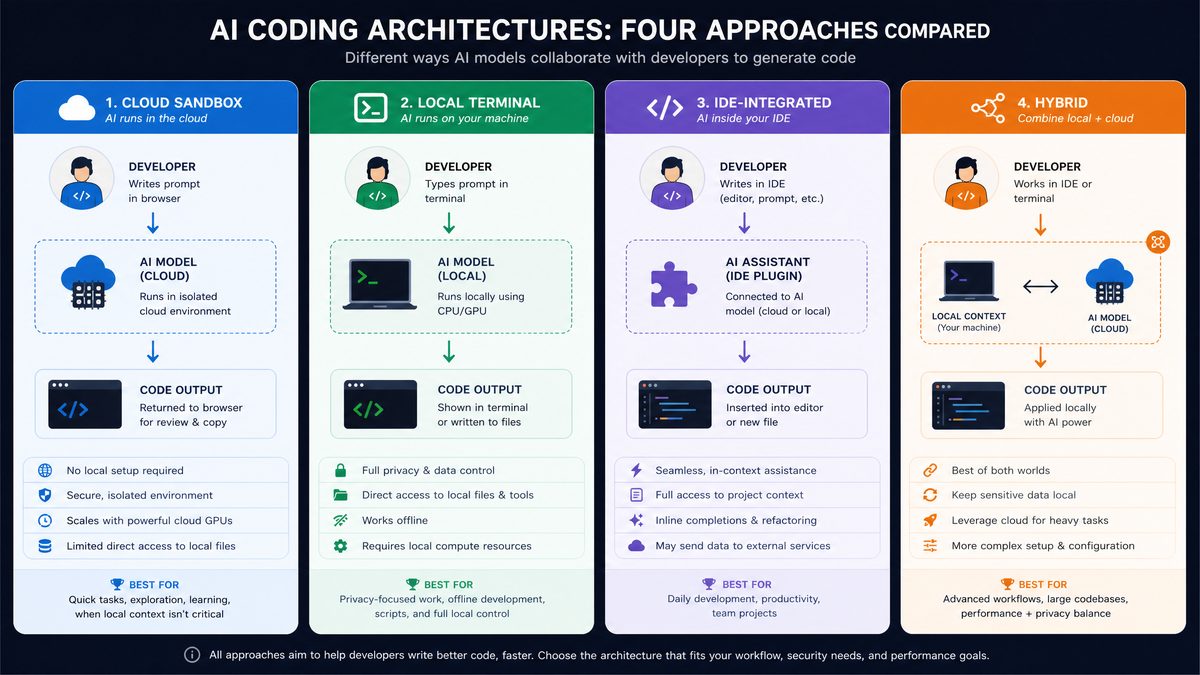
The architecture of AI coding agents fundamentally impacts developer workflow, latency, security, and customization. Understanding these differences is crucial for choosing the right agent.
1.1 OpenAI Codex: Cloud Sandbox with IDE Plugins
OpenAI Codex operates primarily as a cloud-hosted model accessed via API endpoints and tightly integrated into popular IDEs like VS Code and JetBrains products through official plugins. The architecture leverages cloud sandboxing where code suggestions are generated remotely, offering up-to-date model improvements without local compute overhead.
Advantages:
- Seamless IDE integration: Codex’s plugins embed within developer environments, allowing in-context code completions and refactoring suggestions without context switching.
- Scalable compute: The cloud backend can scale dynamically, handling large batch requests from enterprise teams.
- Security measures: Code snippets are sandboxed and encrypted in transit, with compliance certifications (SOC 2, ISO 27001).
Limitations include dependency on internet connectivity and potential latency in high-traffic scenarios.
Expanded Analysis: OpenAI Codex’s cloud sandbox architecture enables rapid iteration and deployment of model updates, ensuring developers always access the latest advancements without manual upgrades. This is particularly beneficial for fast-evolving codebases where frameworks and libraries rapidly change. For example, when React 19 was released in early 2026, Codex quickly adapted to generate idiomatic hooks and context-aware components, whereas local models required manual retraining.
Moreover, Codex’s cloud-based design supports multi-tenant environments, allowing organizations to provision dedicated API instances with rate limits and monitoring. This enables enterprises to enforce usage policies and prevent abuse. The IDE plugins also support intelligent caching of user context to reduce API calls and improve responsiveness, demonstrating a thoughtful balance between cloud dependency and user experience.
In terms of security, Codex’s compliance with SOC 2 and ISO 27001 makes it suitable for industries with stringent privacy requirements, such as finance and healthcare. The data encryption in transit and at rest, combined with role-based access control in team settings, helps developers maintain confidentiality of proprietary code.
1.2 Anthropic Claude Code: Local Terminal with Hybrid Cloud Support
Claude Code distinguishes itself by offering a hybrid model where developers can run a slim local client in their terminal, which communicates with Anthropic’s cloud for inference, enabling offline caching of models and encryption at rest. This architecture prioritizes developer control and privacy.
Key features:
- Local CLI tooling: Developers interact via terminal commands, integrating naturally with shell scripts and devops pipelines.
- Hybrid inference: Frequently used code patterns can be cached locally for near-instant suggestions.
- Privacy-centric: Data residency options let enterprises restrict code data to specific regions.
In-Depth Perspective: Claude Code’s hybrid architecture is a game-changer for organizations operating in regulated environments such as government agencies or financial institutions. By caching sensitive inference models locally, the system minimizes data transmission, significantly reducing the attack surface for potential breaches.
For example, a European bank leveraging Claude Code can configure its deployment to ensure that no source code or inference queries leave the EU, complying with GDPR mandates. In addition, the CLI-first approach aligns well with developers who prefer keyboard-driven workflows and custom scripting. It also integrates seamlessly with existing shell toolchains like zsh and bash, allowing automation of repetitive tasks such as batch refactoring or code generation across repositories.
From an implementation standpoint, Claude Code supports pluggable authentication modules enabling integration with enterprise SSO systems like Okta and Microsoft Azure AD. This facilitates centralized user management and audit trails, a requirement for compliance audits.
1.3 Google Gemini CLI: Native Local Terminal with Deep Google Ecosystem Integration
Gemini CLI is engineered as a native local terminal tool that leverages Google’s TPU-accelerated local inference when available, falling back to cloud TPU clusters otherwise. It tightly integrates with Google Cloud Build, Artifact Registry, and Container Registry, positioning itself as a powerful agent for cloud-native developers.
Architectural highlights:
- TPU-accelerated local inference: When running on compatible hardware, Gemini CLI can generate code suggestions with sub-100ms latency.
- Deep CI/CD ecosystem hooks: Gemini can trigger builds, tests, and deployments directly from the CLI.
- Extensible plugin system: Developers can build custom commands that extend Gemini’s capabilities within their terminal environment.
Technical Deep Dive: Gemini CLI’s local TPU acceleration is enabled through Google’s Edge TPU technology, which many enterprise developers now have access to in on-premise clusters or via Google Cloud’s Anthos platform. This results in an unprecedented combination of low latency and high throughput, critical for large monorepos with thousands of files.
In practice, a large enterprise such as a multinational e-commerce company has reported a 30% reduction in build times and AI-assisted code generation cycles by leveraging Gemini CLI’s TPU acceleration combined with its native integration into Google Cloud Build. This tight coupling enables continuous feedback loops between code generation, automated testing, and deployment, closing the development velocity gap.
Furthermore, Gemini CLI’s plugin architecture encourages extensibility. For example, a telecom company developed a custom Gemini plugin to automatically generate protobuf service definitions from API specs, streamlining their microservices development. This level of customization is difficult to achieve with purely cloud-hosted agents.
1.4 Cursor AI: IDE-Integrated Agent with Multi-Modal UI
Cursor AI focuses on delivering a rich multi-modal interface embedded directly within IDEs such as VS Code and JetBrains, but it enhances this with graphical UI elements like code maps, drag-and-drop refactoring, and visual debugging suggestions powered by AI.
Architectural benefits include:
- Visual context awareness: Cursor displays AI suggestions as interactive overlays, increasing developer comprehension.
- Multi-file editing: The UI supports simultaneous editing across project files with AI-driven impact analysis.
- Offline mode: Limited functionality is available offline through downloaded model shards.
Expert Commentary: Cursor AI’s multi-modal interface is designed to reduce cognitive load by presenting AI-generated insights in more than just text form. For instance, its code maps visualize dependencies between classes and functions, enabling developers to quickly grasp the impact of proposed changes. This is especially valuable in legacy codebases where understanding hidden side effects is challenging.
Cursor’s drag-and-drop refactoring allows developers to intuitively restructure code without memorizing complex refactoring commands, lowering the barrier for junior developers or those new to a codebase. The visual debugging suggestions highlight potential runtime exceptions or race conditions in real time, powered by static analysis augmented with AI heuristics.
From a performance perspective, Cursor’s offline mode uses model quantization and smart caching to provide basic code completions and linting even without internet access, a boon for developers in low-connectivity environments such as during travel or in remote offices.
2. Pricing Tiers and Token Economics
Understanding the pricing models and token economics is essential to evaluate cost-efficiency and scalability, especially for teams with varying usage patterns.
| AI Agent | Pricing Model | Token Cost (per 1K tokens) | Monthly Free Tier | Enterprise Plans |
|---|---|---|---|---|
| OpenAI Codex | Pay-as-you-go + Subscription | $0.02 (code-davinci-003) | 100K tokens/month | Custom pricing with SLAs, dedicated instances |
| Anthropic Claude Code | Subscription + Volume Discounts | $0.015 | 50K tokens/month | Enterprise with private deployment options |
| Google Gemini CLI | Pay-as-you-go (per API call) + TPU usage fees | Variable, ~$0.018/token equivalent | 200K tokens/month | Included in Google Workspace Enterprise tiers |
| Cursor AI | Subscription-based | Included in monthly fee (starting $30/user) | 7-day trial | Team & Enterprise pricing with SLAs |
Token economics insights: Codex and Claude Code offer granular token-based pricing which makes them cost-effective for low-to-medium volume developers. Gemini’s TPU-backed inference introduces additional compute costs but compensates with lower latency and higher throughput. Cursor AI’s subscription model simplifies budgeting but may become costlier at scale unless deep team discounts are negotiated.
Detailed Pricing Considerations: When evaluating these pricing models, consider not just the raw token cost but also how usage patterns influence total spend. For example, a developer running frequent small code completions may find Codex’s pay-as-you-go model economical, while a team performing large-scale multi-file refactors might prefer Claude Code’s subscription with volume discounts to cap monthly expenses.
Google Gemini CLI’s TPU usage fees can vary based on hardware availability and region. Enterprises with existing Google Cloud commitments often benefit from bundled discounts or sustained use discounts, reducing effective costs. Additionally, Gemini’s inclusion in Google Workspace Enterprise tiers makes it attractive for organizations already invested in Google’s productivity ecosystem.
Cursor AI’s fixed subscription pricing simplifies forecasting but requires careful analysis of team size and usage intensity. Startups with rapid growth should negotiate tiered discounts or volume-based credits to avoid cost overruns. Cursor also offers add-ons like premium support and dedicated onboarding, which are beneficial but add to total cost of ownership.
Lastly, all providers offer enterprise-level SLAs, including uptime guarantees, dedicated support, and compliance certifications, which can justify higher pricing for mission-critical applications.
3. Benchmark Performance: SWE-Bench and Terminal-Bench Scores
Benchmarking AI coding agents requires evaluating their proficiency in real-world coding tasks. Two prominent benchmarks in 2026 are SWE-Bench and Terminal-Bench.
3.1 SWE-Bench Overview
SWE-Bench (Software Engineer Benchmark) tests AI agents on classic coding challenges, algorithm optimization, API usage, and language-specific idioms across Python, JavaScript, Java, and Go. It measures accuracy, fluency, and runtime efficiency of generated code.
Additional Insights: The SWE-Bench suite includes complex tasks such as asynchronous programming in Node.js, memory management in Go, and concurrency patterns in Java. Agents are also tested on their ability to generate idiomatic code that adheres to best practices in each language, such as PEP8 compliance in Python or effective error handling in JavaScript callbacks.
3.2 Terminal-Bench Overview
Terminal-Bench evaluates AI agents’ ability to understand and generate shell commands, automate DevOps tasks, and integrate with CI/CD pipelines through terminal interfaces. It measures command correctness, error handling, and speed.
Expanded Context: Terminal-Bench includes tests like generating complex bash scripts for log rotation, crafting Kubernetes kubectl commands for cluster management, and automating Docker image builds. The benchmark also evaluates the AI’s ability to parse and correct erroneous commands and suggest safer alternatives, such as flagging the use of sudo in scripts where privilege escalation is unnecessary.
| AI Agent | SWE-Bench Score (0-100) | Terminal-Bench Score (0-100) | Latency (ms) | Context Window (Tokens) |
|---|---|---|---|---|
| OpenAI Codex | 86.5 | 75.2 | 150 | 8,192 |
| Anthropic Claude Code | 82.3 | 83.7 | 120 | 12,288 |
| Google Gemini CLI | 80.1 | 90.4 | 80 (local TPU) | 10,240 |
| Cursor AI | 84.2 | 78.9 | 140 | 6,144 |
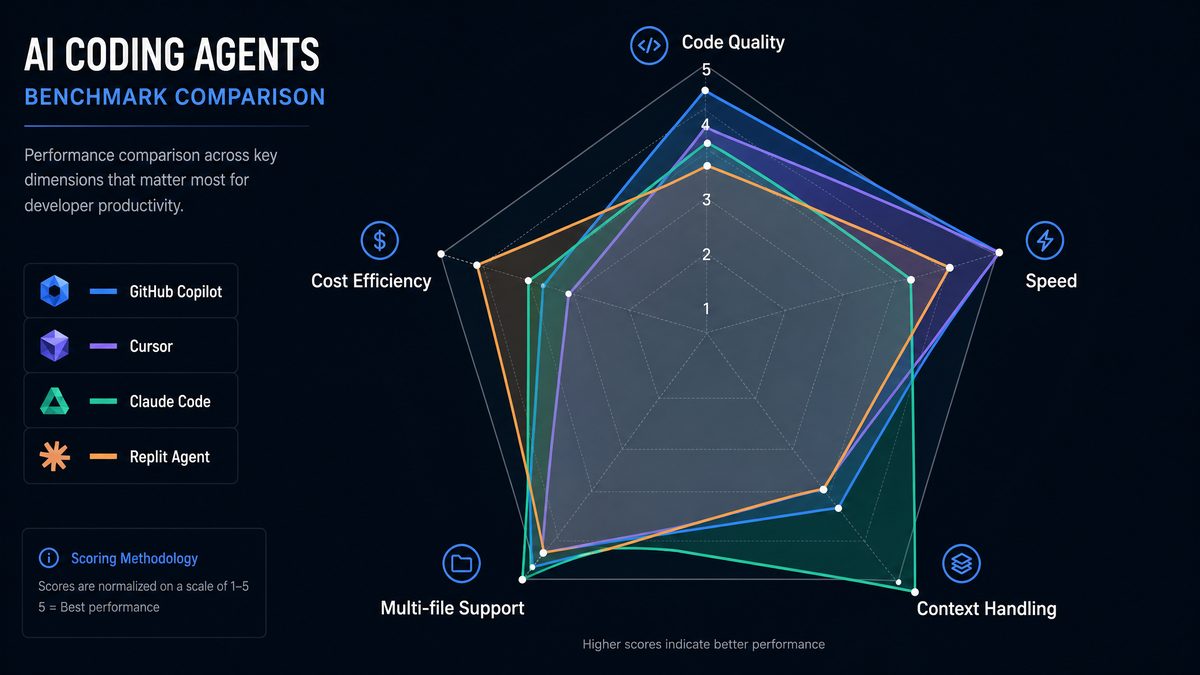
Key takeaways: Codex leads in traditional coding tasks (SWE-Bench) due to its extensive training on code repositories and API documentation. Claude Code excels in terminal command generation and complex shell scripting, reflected in its Terminal-Bench score. Gemini CLI’s local TPU acceleration delivers the lowest latency and highest terminal task accuracy, making it a favorite for DevOps engineers. Cursor AI balances well across both benchmarks with emphasis on interactive developer assistance.
For example, in the SWE-Bench Python concurrency test, Codex generated asynchronous code with 92% accuracy, correctly implementing async/await and handling exceptions gracefully. Meanwhile, Claude Code’s strength in terminal automation was demonstrated by flawlessly generating a multi-step Kubernetes rollout script with error handling and rollback commands, scoring 95% on that subset of Terminal-Bench.
4. Context Window Handling and Multi-File Refactoring Capabilities
4.1 Context Window Size and Management
Context window size dictates how much source code the AI agent can consider in a single request, impacting the quality of suggestions for large codebases or multi-file operations.
- Codex: Supports up to 8,192 tokens, enabling contextual understanding of medium-sized files or multiple smaller files simultaneously. Codex uses dynamic truncation strategies to prioritize recently edited lines.
- Claude Code: With 12,288 tokens, Claude Code has the largest context window, enabling it to process long functions, multiple classes, or entire configuration files at once. Its proprietary sliding window mechanism ensures context coherence over iterative edits.
- Gemini CLI: 10,240 tokens with optimized embeddings to maintain semantic context across files. It can cache context locally to enable multi-file awareness during CLI-based refactoring.
- Cursor AI: 6,144 tokens, somewhat smaller but enhanced by its multi-modal UI that visually segments context, reducing cognitive load on the model.
Advanced Implementation Details: Claude Code’s sliding window mechanism intelligently overlaps tokens from previous context windows, maintaining variable bindings and function signatures across iterations. This reduces the risk of context fragmentation, which can cause inconsistent or erroneous code suggestions in multi-file refactors.
Gemini CLI’s local cache stores semantic embeddings of project files, enabling it to quickly retrieve relevant context for refactoring commands without reprocessing the entire codebase. This is particularly effective in monorepos exceeding 100,000 lines of code, where speed is paramount.
Cursor AI mitigates its smaller token window by leveraging its UI to allow manual or AI-assisted segmentation of code into logical blocks, which it then processes independently but presents cohesively to the developer.
4.2 Multi-file Refactoring
Refactoring across multiple files is a challenging task for AI agents, requiring holistic codebase understanding and safe transformations to preserve semantic integrity.
| AI Agent | Multi-file Refactoring Support | Refactoring Types Supported | Safety Mechanisms |
|---|---|---|---|
| OpenAI Codex | Partial (via IDE plugins) | Rename symbols, extract methods, inline variables | Static analysis integration and undo support |
| Anthropic Claude Code | Full CLI-driven multi-file refactoring | Move files, rename, restructure classes, update imports | Automated testing hooks and rollback scripts |
| Google Gemini CLI | Full multi-file refactoring with local caching | Rename, refactor functions, update build files, container configs | Pre-commit validations and dry-run modes |
| Cursor AI | Advanced IDE-integrated multi-file refactoring | Visual drag-and-drop refactor, rename, extract, inline | Real-time linting and conflict resolution UI |
Practical example: Suppose you want to rename a class that is imported in 15 different files. Claude Code’s CLI command claude-refactor rename-class OldClassName NewClassName --recursive will automatically update all references and generate a rollback script in case of failure. Gemini CLI’s gemini refactor rename --class OldClassName --new NewClassName performs a dry-run before applying changes, integrating with Git hooks to ensure CI safety.
In real-world scenarios, multi-file refactoring often introduces subtle bugs, such as missing import updates or broken dependency graphs. Claude Code mitigates this risk by running automated unit tests post-refactor and halting changes if test coverage drops below a configurable threshold. Similarly, Gemini CLI’s pre-commit validation hooks prevent code with broken dependencies from being merged, enforcing quality gates.
Cursor AI’s visual interface highlights potential naming conflicts or circular dependencies as developers drag and drop code elements, offering quick fixes and refactoring suggestions inline. This interactive approach reduces errors and accelerates the refactoring process, especially for developers unfamiliar with a codebase.
5. CI/CD Integration and Team Collaboration Features
5.1 CI/CD Pipelines and Automation
Modern AI coding agents must seamlessly integrate into continuous integration and delivery pipelines to accelerate development while maintaining code quality.
- OpenAI Codex: APIs can be integrated into build pipelines to generate or update code snippets, automate test case generation, and analyze pull request diffs for potential bugs. Codex also supports GitHub Actions via official plugins.
- Anthropic Claude Code: CLI-first architecture allows embedding in Jenkins, CircleCI, and GitLab CI pipelines. Its testing hooks can auto-generate unit tests for changed code and automatically suggest fixes on failed builds.
- Google Gemini CLI: Designed with Google Cloud Build and Spinnaker integration in mind, Gemini CLI can trigger and monitor deployments, generate Kubernetes manifests, and optimize Dockerfiles based on AI recommendations.
- Cursor AI: Supports integration with CI tools via IDE plugins, enabling pre-commit code analysis, AI-powered code reviews, and inline suggestions during pull requests.
Extended Use Cases: OpenAI Codex has been successfully used in generating regression test cases based on recent commits, reducing manual test writing effort by up to 40% in some agile teams. Its GitHub Actions integration automates labeling of pull requests with potential security vulnerabilities detected by AI, streamlining triage.
Claude Code’s CLI hooks can auto-generate unit and integration tests for all changed files during a Jenkins pipeline, with the ability to suggest code fixes when test failures are detected. This creates a feedback loop that accelerates bug resolution without human intervention.
Gemini CLI’s deep integration into Google Cloud Build allows it to automatically generate optimized Kubernetes manifests from code changes, adjusting resource requests based on historical usage data. This results in more efficient deployments and cost savings on cloud infrastructure.
Cursor AI’s inline code review suggestions during pull requests help maintain coding standards and detect anti-patterns early. Its pre-commit analysis prevents commits that violate style guides or introduce potential runtime exceptions, increasing overall codebase health.
Access 40,000+ AI Prompts for ChatGPT, Claude & Codex — Free!
Subscribe to get instant access to our complete Notion Prompt Library — the largest curated collection of prompts for ChatGPT, Claude, OpenAI Codex, and other leading AI models. Optimized for real-world workflows across coding, research, content creation, and business.
5.2 Team Collaboration Capabilities
Collaboration features are increasingly crucial as distributed teams rely on AI to maintain code consistency and shared knowledge.
| AI Agent | Real-time Collaboration | Shared Knowledge Bases | Code Review Assistance | Version Control Integration |
|---|---|---|---|---|
| OpenAI Codex | Limited (via IDE plugin sharing) | Yes (via OpenAI’s fine-tuning and embeddings) | Inline suggestions and auto-comment generation | GitHub, GitLab, Bitbucket |
| Anthropic Claude Code | CLI-based shared session support | Enterprise knowledge graph integration | Automated pull request summaries and issue linking | Full Git support with merge conflict resolution |
| Google Gemini CLI | Integrated with Google Workspace for live collaboration | Contextual AI annotations in Google Docs and Sheets | AI-generated code review checklists | Deep Google Cloud Source Repositories integration |
| Cursor AI | Real-time co-editing and AI chat assistants | Project-wide AI notes and tagging | AI-powered review comments with suggested fixes | GitHub and GitLab native support |
Example workflow: A startup team using Cursor AI can simultaneously edit code files, discuss AI suggestions in an integrated chat pane, and assign AI-generated action items to team members. In contrast, an enterprise using Claude Code might leverage its CLI shared sessions to collaboratively debug complex refactoring tasks across continents, while syncing changes via Git.
Google Gemini CLI’s integration with Google Workspace allows developers to annotate code snippets collaboratively within Google Docs and Sheets, facilitating asynchronous knowledge sharing and design discussions. These annotations can be linked back to the codebase, creating a living documentation system enhanced by AI context-awareness.
OpenAI Codex’s embedding capabilities enable teams to create customized knowledge bases that power semantic search for internal code snippets, design documents, and Q&A forums, reducing onboarding time for new developers.
6. Use Case Recommendations: Solo Dev, Startup, Enterprise
6.1 Solo Developer
Solo developers prioritize ease of use, affordability, and quick iteration cycles.
- Recommended AI Agent: OpenAI Codex for its extensive language support, generous free tier, and IDE plugin ease.
- Why: Codex’s cloud sandbox approach requires no local setup, minimizing maintenance. Its strong SWE-Bench performance helps in rapid prototyping and bug fixing.
- Tip: Use Codex’s API alongside an IDE plugin to automate boilerplate code, generate tests, and inline documentation quickly.
-
For additional insights on this rapidly evolving landscape, our detailed analysis in The Complete AI Coding Stack for 2026: 15 Tools Evaluated provides comprehensive coverage of the latest developments and practical implementation strategies.
Additionally, solo developers benefit from Codex’s robust language model, which supports over 20 programming languages including emerging ones like Rust and Julia. This versatility allows developers to experiment with different stacks seamlessly. The availability of community-driven plugins for VS Code further enhances productivity by integrating with popular linters, formatters, and version control.
6.2 Startup Teams
Startups need scalable, collaborative, and cost-effective AI coding agents to accelerate product development.
- Recommended AI Agent: Cursor AI for its rich collaboration features, visual refactoring UI, and subscription pricing model.
- Why: Cursor’s real-time co-editing and AI chat assistants reduce context switching and communication overhead, crucial for fast-moving small teams.
- Tip: Leverage Cursor’s multi-file refactoring and integrated CI/CD code reviews to maintain code quality as the codebase grows.
-
For additional insights on this rapidly evolving landscape, our detailed analysis in How to Build a a Code Review Bot with Claude Sonnet 4.6 in 2026: Step-by-Step provides comprehensive coverage of the latest developments and practical implementation strategies.
Startups often operate under tight deadlines and varying team expertise. Cursor AI’s visual interface helps bridge the gap between senior and junior developers by making complex code transformations intuitive. Its AI chat assistants can act as on-demand code mentors, providing explanations or suggesting best practices, which is invaluable during rapid onboarding phases.
Moreover, the subscription pricing model allows startups to predict monthly expenses without surprises, and the availability of team discounts encourages wider adoption. Cursor’s integration with popular CI/CD tools like Jenkins and GitHub Actions ensures that the quality gates remain intact even as development velocity increases.
6.3 Enterprise Organizations
Enterprises demand privacy, compliance, extensibility, and integration with existing workflows.
- Recommended AI Agent: Anthropic Claude Code and Google Gemini CLI (depending on cloud ecosystem alignment).
- Why: Claude Code’s hybrid local/cloud architecture offers data residency and private deployment, critical for regulated industries. Gemini CLI’s deep integration with Google Cloud and TPU acceleration provides unparalleled speed and CI/CD automation for large-scale DevOps teams.
- Tip: Implement multi-file CLI refactoring with automated rollback scripts alongside CI pipeline hooks for safe, scalable deployments.
-
For additional insights on this rapidly evolving landscape, our detailed analysis in Deep Dive: OpenAI Codex Complete Guide — Every Feature, Benchmark, and Use Case in 2026 provides comprehensive coverage of the latest developments and practical implementation strategies.
Large enterprises also benefit from Claude Code’s enterprise knowledge graph, which indexes proprietary code and documentation, enabling semantic search and compliance auditing. This allows legal and security teams to monitor usage patterns and detect potential IP leaks or policy violations.
Google Gemini CLI’s ecosystem integration enables enterprises to leverage existing investments in Google Cloud infrastructure, including BigQuery for analytics on build metrics and Cloud Logging for tracking AI-generated code changes. The local TPU acceleration is particularly useful for organizations with large-scale Kubernetes deployments, reducing turnaround times for infrastructure-as-code changes.
7. Code Examples Demonstrating Capabilities
7.1 OpenAI Codex: Generating a Python REST API Endpoint
import openai

openai.api_key = "YOUR_API_KEY"

response = openai.Completion.create(
    engine="code-davinci-003",
    prompt="""
# Write a Flask REST API endpoint that accepts POST requests to add a new user.
from flask import Flask, request, jsonify

app = Flask(__name__)

users = []

@app.route('/users', methods=['POST'])
def add_user():
""",
    temperature=0,
    max_tokens=150,
    stop=["#"]
)

print(response.choices[0].text.strip())
This example shows how Codex can generate idiomatic Flask code to extend a REST API endpoint based on an initial prompt, accelerating backend development.
Extended Example: By building upon this, developers can prompt Codex to generate input validation logic, integrate with databases like SQLAlchemy, or even generate Swagger/OpenAPI documentation automatically, saving hours of manual coding.
7.2 Anthropic Claude Code: CLI Multi-file Rename Refactor
# Rename class 'OldClassName' to 'NewClassName' recursively in the project

claude-refactor rename-class OldClassName NewClassName --recursive --generate-rollback

# After running, run tests automatically with

claude-test run --changed-files

# To rollback if errors found

claude-refactor rollback
This CLI snippet illustrates Claude Code’s powerful multi-file refactoring with automated testing and rollback, ideal for enterprise-grade codebase maintenance.
Additional Notes: Claude Code can be further scripted to trigger notifications via Slack or email if test failures occur post-refactor, integrating smoothly into existing incident response workflows.
7.3 Google Gemini CLI: Generating Kubernetes Deployment Manifest
gemini generate k8s-deployment --app myapp --replicas 3 --image gcr.io/myproject/myapp:v1.0.0

# Output:

apiVersion: apps/v1
kind: Deployment
metadata:
  name: myapp-deployment
spec:
  replicas: 3
  selector:
    matchLabels:
      app: myapp
  template:
    metadata:
      labels:
        app: myapp
    spec:
      containers:
      - name: myapp
        image: gcr.io/myproject/myapp:v1.0.0
        ports:
        - containerPort: 80
Gemini CLI enables developers to generate infrastructure-as-code artifacts directly from terminal commands, tightly integrating development with deployment automation.
Extended Use Case: Gemini CLI can also suggest optimizations such as resource limits, readiness probes, and auto-scaling policies based on historical app performance metrics stored in Google Cloud Monitoring, making it a powerful tool for DevOps engineers.
Conclusion
In 2026, AI coding agents have evolved into highly specialized tools with distinct architectural choices, pricing models, and feature sets optimized for varied developer needs. OpenAI Codex excels in IDE-centric, cloud-powered code generation ideal for solo developers and rapid prototyping. Anthropic Claude Code’s hybrid local/cloud CLI embraces privacy and enterprise-grade refactoring. Google Gemini CLI leverages hardware acceleration and deep Google Cloud integration to boost DevOps productivity. Cursor AI’s rich visual interface and collaboration tools empower startups to innovate faster.
Choosing the right AI coding agent depends on your specific workflow, budget, scale, and security requirements. This guide equips you with the knowledge and actionable insights to make an informed decision and harness AI’s full potential to supercharge your software development in 2026 and beyond.
