
How to Build Voice AI Agents with GPT-Realtime-2: Complete Developer Tutorial
Building Advanced Voice AI Agents with OpenAI’s GPT-Realtime-2
OpenAI’s GPT-Realtime-2 represents a significant leap forward in voice AI technology, integrating GPT-5-class reasoning capabilities with an unprecedented 128,000 token context window. This model enables developers to create sophisticated, context-aware voice agents that can process and generate extensive dialogues, perform parallel tool calls with synchronized audio narration, and adjust reasoning effort dynamically for optimized performance. This tutorial dives deep into the technical aspects of building voice AI agents using GPT-Realtime-2, providing a comprehensive guide from architecture to deployment, including practical code examples, advanced configuration techniques, and cost management best practices.
GPT-Realtime-2’s ability to handle vast context windows and to engage in complex reasoning tasks with real-time responsiveness is a game changer in the voice AI landscape. It empowers developers to design conversational agents capable of understanding nuanced user intents, maintaining coherence across long interactions, and integrating external knowledge sources seamlessly. The model’s flexibility is further enhanced by features such as adjustable reasoning effort levels, enabling applications to balance between speed and depth of analysis based on situational needs.
Throughout this article, you will find in-depth explanations, illustrative code snippets, and architectural insights that collectively provide a robust foundation for developing next-generation voice AI systems leveraging GPT-Realtime-2.
Introduction: Unlocking New Possibilities with GPT-Realtime-2
Voice AI agents have evolved substantially, but limitations in context length, reasoning depth, and real-time responsiveness have constrained their capabilities. Traditional voice assistants often struggle to maintain coherent context over extended conversations or to integrate multiple data sources dynamically. GPT-Realtime-2 overcomes these barriers by combining the sophisticated reasoning of GPT-5-class models with real-time audio processing, enabling voice agents to understand and respond with nuanced intelligence over extended conversations.
The model’s expanded 128,000 token context window is a standout feature, dwarfing previous iterations and industry standards. This massive context capacity allows developers to maintain long dialogues and rich context histories, facilitating complex interactions without losing track of earlier details. For example, a voice assistant can remember user preferences, previous topics, and even subtle conversational cues spanning several hours of interaction, vastly improving personalization and user satisfaction.
Additionally, GPT-Realtime-2 supports preambles—natural filler phrases such as “let me check that”—which enhance conversational fluidity and user experience by signaling processing and thoughtfulness. Preambles make the interaction feel less mechanical and more human-like, reducing perceived latency and improving engagement.
Parallel tool calls allow the model to query external APIs or databases while simultaneously narrating audio responses, creating highly interactive and multi-functional voice agents. This means a voice assistant can fetch weather data, calendar events, or perform complex computations concurrently with speaking, leading to smoother, more dynamic conversations.
The adjustable reasoning effort feature enables balancing between response speed and depth of analysis, making GPT-Realtime-2 adaptable to various application requirements. Whether the use case demands rapid, concise answers or deep, multi-step reasoning, developers can tune the model accordingly.
Beyond these technical enhancements, GPT-Realtime-2 elevates the overall architecture of voice AI agents, facilitating modular design, scalable deployment, and integration with diverse platforms such as smart speakers, mobile apps, and web interfaces.
This tutorial explores how to leverage these capabilities to build robust voice AI agents, covering architecture, implementation, configuration, error handling, cost optimization, and deployment strategies.
Prerequisites and Setup
Before starting development with GPT-Realtime-2 voice AI agents, it is essential to prepare your environment and ensure you have the necessary tools and permissions. This section details the prerequisites and setup steps required for a smooth development experience.
- OpenAI API Access: Ensure you have API access to GPT-Realtime-2, GPT-Realtime-Translate, and GPT-Realtime-Whisper. These models require specific API keys and permissions from OpenAI. If you do not have access yet, apply through the OpenAI platform and verify your credentials.
- Development Environment: Python 3.8+ or Node.js 16+ installed on your system. Python is commonly used for prototyping and backend services, while Node.js is popular for web and real-time applications.
- Audio Processing Libraries: For Python, libraries such as
pydub,wave,speech_recognition,sounddevice, andsoundfileare recommended for handling audio capture, manipulation, and processing. For Node.js, considerfluent-ffmpeg,node-record-lpcm16, andspeakerfor audio streaming and playback. - Networking: A stable internet connection is critical for making API calls to OpenAI services. Consider network reliability and latency, especially for real-time applications.
- Familiarity: Basic knowledge of REST APIs, asynchronous programming paradigms (async/await, promises), and audio signal processing will greatly facilitate development.
Before starting, ensure you have your OpenAI API keys configured as environment variables or stored securely within your application environment. For example, on Unix-like systems, you can export your key as:
export OPENAI_API_KEY="your_api_key_here"Also, install required SDKs or HTTP clients like requests for Python or axios for JavaScript. These HTTP clients simplify REST API communication.
For Python, install dependencies using:
pip install requests pydub sounddevice soundfile pyttsx3For Node.js, use:
npm install axios fluent-ffmpeg node-record-lpcm16 speakerSetting up your environment properly will ensure efficient development and testing of GPT-Realtime-2-powered voice AI agents.
Architecture Overview of a Voice AI Agent Using GPT-Realtime-2
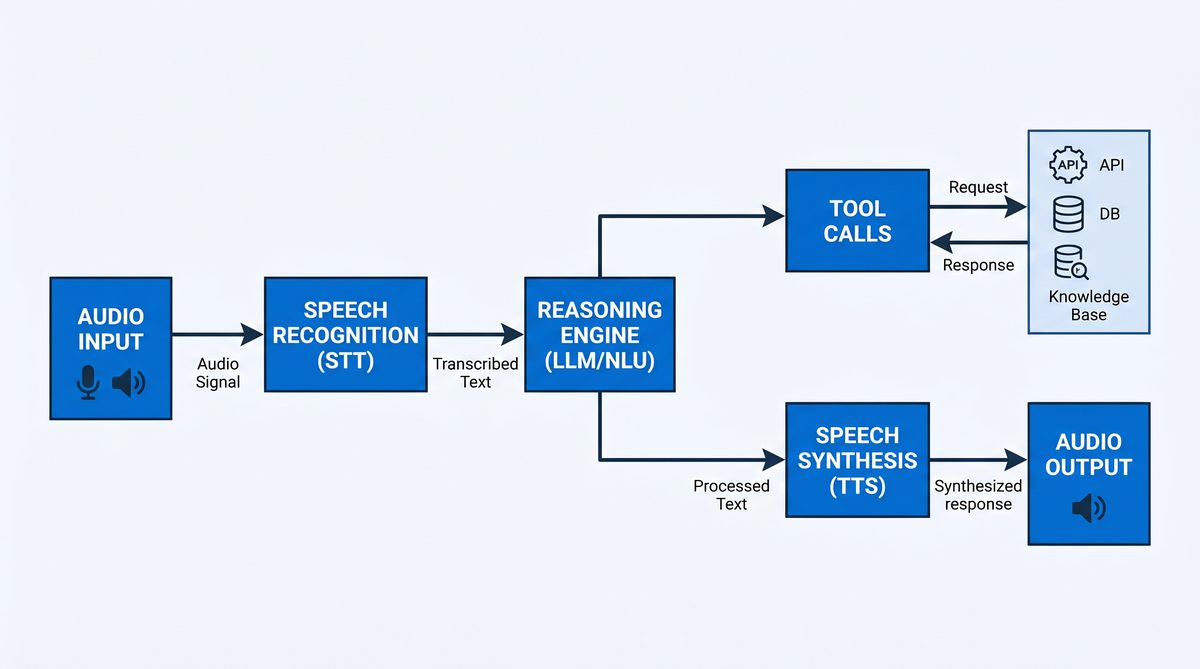
Designing a voice AI agent with GPT-Realtime-2 involves several key components working harmoniously to deliver real-time, intelligent conversations. Understanding the architecture helps in building scalable, maintainable, and extensible systems.
The primary components include:
- Audio Input Processing: Captures user voice input from microphones or audio streams, converts analog signals to digital formats, and transcribes speech to text. GPT-Realtime-Whisper or other ASR systems provide high-accuracy transcription optimized for real-time use. Preprocessing may include noise reduction, gain control, and audio normalization.
- Context Management: Maintains conversation history and context within the model’s 128K token window, enabling long, coherent dialogues. This involves storing user utterances, assistant responses, tool call outputs, timestamps, and metadata in structured formats such as JSON. Efficient context pruning or summarization techniques help manage token limits and maintain relevance.
- Reasoning and Response Generation: Uses GPT-Realtime-2 to interpret user queries, perform reasoning, and generate natural language responses. The model supports advanced features such as preambles and adjustable reasoning effort to tailor the interaction style and depth.
- Parallel Tool Calls: Executes calls to external APIs or internal tools in parallel with audio narration, allowing for dynamic data retrieval or action execution during conversations. Tool schemas define permissible API calls, parameters, and expected responses. The system parses tool call requests returned by the model and dispatches them asynchronously.
- Audio Output Synthesis: Converts generated text responses back into speech, leveraging TTS (Text-to-Speech) services or OpenAI’s audio output capabilities. Speech synthesis may support multiple voices, languages, and expressive styles. Streaming audio output reduces latency and improves user experience.
- Error Handling and Recovery: Implements strategies to gracefully handle API errors, network failures, or unexpected inputs during interactions. This includes retries, fallbacks, context pruning, and user prompts for clarification.
- Adjustable Reasoning Control: Dynamically configures the model’s reasoning effort from minimal to extra-high, balancing latency and response quality. This flexibility supports diverse application scenarios, from quick replies to in-depth analysis.
These components are typically orchestrated within a modular architecture comprising:
- Frontend Interface: Smart speakers, mobile apps, or web clients capture audio and play back synthesized speech.
- Backend Services: Handle audio processing, API orchestration, context management, and integration with GPT-Realtime-2 and other OpenAI models.
- Middleware: Manages asynchronous communication between components, tool call execution, logging, and monitoring.
Such architecture supports extensibility and scalability, allowing integration with various backend services and frontend interfaces. For example, integrating calendar APIs, knowledge bases, or IoT device controls enhances agent capabilities.
Careful attention to latency, concurrency, and error resilience is necessary to deliver smooth, natural user experiences in real-time voice interactions.
Step-by-Step Implementation of a GPT-Realtime-2 Voice AI Agent
1. Capturing and Transcribing Audio Input
The first step in building a voice AI agent is capturing user audio input and converting it into text for processing. GPT-Realtime-Whisper provides a state-of-the-art ASR model optimized for real-time transcription with high accuracy across multiple languages and accents.
In addition to recording audio, preprocessing techniques such as noise suppression, silence trimming, and gain normalization can improve transcription quality. Depending on the application, audio may be captured in chunks for streaming transcription or in fixed durations for batch processing.
Below is a Python example demonstrating audio recording and transcription using the GPT-Realtime-Whisper API. This example records 5 seconds of audio from the microphone, saves it in WAV format in memory, and sends it to the OpenAI endpoint:
# Python example: Audio recording and transcription using GPT-Realtime-Whisper API

import requests
import sounddevice as sd
import soundfile as sf
import io
import os

def record_audio(duration=5, sample_rate=16000):
    print("Recording audio...")
    audio = sd.rec(int(duration * sample_rate), samplerate=sample_rate, channels=1)
    sd.wait()
    buffer = io.BytesIO()
    sf.write(buffer, audio, sample_rate, format='WAV')
    buffer.seek(0)
    return buffer

def transcribe_audio(audio_buffer):
    api_key = os.getenv("OPENAI_API_KEY")
    headers = {
        "Authorization": f"Bearer {api_key}",
        "Content-Type": "audio/wav"
    }
    response = requests.post(
        "https://api.openai.com/v1/audio/transcriptions/gpt-realtime-whisper",
        headers=headers,
        data=audio_buffer.read()
    )
    response.raise_for_status()
    transcript = response.json().get("text", "")
    return transcript

if __name__ == "__main__":
    audio_buffer = record_audio(duration=5)
    transcript = transcribe_audio(audio_buffer)
    print("Transcribed text:", transcript)
For real-time or streaming applications, consider capturing audio in smaller chunks and sending partial transcriptions incrementally to reduce latency. Additionally, integrating voice activity detection (VAD) helps detect speech segments and avoid processing silence.
2. Managing Conversation Context
Maintaining conversation context is crucial for generating coherent and contextually relevant responses. GPT-Realtime-2 supports an extensive 128,000 token context window, enabling agents to remember long conversations and complex details.
Context management involves storing dialogue turns, including user inputs, assistant replies, tool call results, and metadata such as timestamps and conversation IDs. This structured storage facilitates retrieval and updating of context for each interaction.
Efficient context management strategies include:
- Structured Data Storage: Use JSON arrays or objects to store messages with roles (e.g., “user”, “assistant”, “tool_result”) and content. This format aligns with OpenAI chat API expectations.
- Context Pruning: When token limits approach, prune older or less relevant messages, or summarize them to reduce token count while preserving essential information.
- Metadata Tracking: Include timestamps, user IDs, and session information to manage multi-user scenarios and enable personalized experiences.
- Session Management: Handle multiple concurrent conversations by maintaining separate context stores per user or session.
Example context structure:
# Example context structure
conversation_history = [
    {"role": "user", "content": "What's the weather today in New York?"},
    {"role": "assistant", "content": "Let me check that for you..."},
    {"role": "tool_result", "content": "The current temperature is 75°F with clear skies."}
]
Developers can implement context management using in-memory data structures for prototyping or persistent databases (e.g., Redis, MongoDB) for production systems. Efficient serialization and deserialization methods are important for performance.
3. Generating Intelligent Responses with GPT-Realtime-2
Once the conversation context is prepared, it is sent to GPT-Realtime-2 for generating intelligent, context-aware responses. The model supports advanced parameters such as reasoning effort levels, enabling preambles, and parallel tool calls.
The reasoning effort parameter balances between quick, shallow responses and slower, deeper reasoning. Preambles add natural conversational cues, improving user experience.
The API endpoint accepts a JSON payload including the conversation messages, reasoning effort, and feature toggles.
Below is a Python function illustrating how to call GPT-Realtime-2 for response generation, including error handling and response parsing:
# Python example: calling GPT-Realtime-2 for response generation

import requests
import json
import os

def generate_response(conversation, reasoning_effort="low", enable_preambles=True, enable_parallel_tool_calls=True):
    api_url = "https://api.openai.com/v1/chat/completions"
    headers = {
        "Authorization": f"Bearer {os.getenv('OPENAI_API_KEY')}",
        "Content-Type": "application/json"
    }
    payload = {
        "model": "gpt-realtime-2",
        "messages": conversation,
        "reasoning_effort": reasoning_effort,
        "enable_preambles": enable_preambles,
        "enable_parallel_tool_calls": enable_parallel_tool_calls
    }
    try:
        response = requests.post(api_url, headers=headers, data=json.dumps(payload), timeout=15)
        response.raise_for_status()
        result = response.json()
        return result["choices"][0]["message"]["content"]
    except requests.exceptions.RequestException as e:
        print(f"Error during GPT-Realtime-2 API call: {e}")
        return "Sorry, I am having trouble processing your request right now."

if __name__ == "__main__":
    conversation_history = [
        {"role": "user", "content": "What's the weather today in New York?"}
    ]
    response_text = generate_response(conversation_history, reasoning_effort="medium")
    print("Assistant:", response_text)
For more advanced applications, consider streaming responses to reduce perceived latency. OpenAI’s streaming API sends partial completions incrementally, allowing audio synthesis to begin before the entire text is generated.
4. Implementing Parallel Tool Calls
One of GPT-Realtime-2’s powerful features is the ability to issue parallel tool calls during response generation. This enables voice agents to access external data or perform actions without interrupting the conversational flow.
Developers define tool schemas that specify the API endpoints, parameters, expected responses, and error handling strategies. The model, when prompted appropriately, returns structured tool call requests embedded within its output, which your application must parse and execute asynchronously.
This approach allows the agent to, for example, query a weather API, calendar service, or database while simultaneously narrating an answer.
Below is an example illustrating tool call integration with GPT-Realtime-2:
# Tool call example integrated with GPT-Realtime-2 response

tools = {
    "get_weather": {
        "description": "Fetches current weather information for a specified location.",
        "parameters": {"location": "string"}
    }
}

# Augment conversation with system instruction to invoke tool
conversation_history = [
    {"role": "user", "content": "What's the weather today in New York?"},
    {"role": "system", "content": "Invoke 'get_weather' with {'location': 'New York'}"}
]

response_text = generate_response(conversation_history)
print("Assistant with tool call:", response_text)
In production systems, implement a dispatcher component that listens for tool call requests in the model’s response, performs the API calls concurrently, and feeds results back into the conversation context for subsequent turns.
Asynchronous programming frameworks such as asyncio in Python or Promises in JavaScript facilitate parallel execution and efficient resource utilization.
Careful synchronization is necessary to align audio narration with tool call completions, ensuring that users receive timely and accurate information.
5. Converting Text Responses to Audio Output
After generating a text response, the next step is synthesizing speech to deliver audio output to users. GPT-Realtime-2 can output audio tokens directly, or you can use third-party TTS engines.
Text-to-Speech synthesis options include:
- OpenAI Audio Output: Use OpenAI’s native audio token output to generate natural-sounding speech, supporting multiple voices and languages.
- Third-party TTS Engines: Integrate with cloud TTS services such as Google Cloud Text-to-Speech, Amazon Polly, or Microsoft Azure TTS for advanced voice customization.
- Open-source Libraries: Use libraries like
pyttsx3(offline, Python) orfluent-ffmpeg(Node.js) for simpler applications.
Below is a Python example using pyttsx3 to synthesize speech from the generated text:
# Example using a TTS library (e.g., pyttsx3 in Python)

import pyttsx3

def speak_text(text):
    engine = pyttsx3.init()
    engine.say(text)
    engine.runAndWait()

if __name__ == "__main__":
    response_text = "The weather in New York today is sunny with a high of 75 degrees Fahrenheit."
    speak_text(response_text)
For real-time applications, streaming audio synthesis reduces latency and improves user experience. Ensure audio playback is synchronized with other system events such as tool call completions or UI updates.
Voice customization features such as pitch, rate, volume, and voice selection enhance the naturalness and personality of your voice agent.
Configuring Reasoning Effort Levels for Optimal Performance
GPT-Realtime-2 offers five reasoning effort levels: minimal, low, medium, high, and xhigh. These levels control the depth and complexity of the model’s analysis, directly affecting response quality, latency, and computational resource consumption.
The default setting is low, which balances speed and intelligence, suitable for most general-purpose voice assistants.
Understanding and configuring reasoning effort is essential to tailor your voice AI agent’s behavior to specific use cases:
- Minimal: Fastest response time with shallow reasoning, ideal for straightforward queries or where latency is critical.
- Low: Balanced speed and reasoning, appropriate for typical conversational agents handling common interactions.
- Medium: Enhanced reasoning depth for moderately complex tasks such as multi-step instructions or contextual understanding.
- High: Deep reasoning for complex problem solving, detailed explanations, or multi-turn dialogues requiring thorough analysis.
- XHigh: Maximum reasoning effort for research-grade tasks, medical consultations, or legal advice where accuracy and detail are paramount.
Adjusting reasoning effort is performed by setting the reasoning_effort parameter in API calls. This parameter influences internal model computation and resource allocation without changing the API endpoint.
For example, in Python:
response_text = generate_response(conversation_history, reasoning_effort="high")Choosing the appropriate reasoning level impacts both user experience and operational cost. Higher effort levels consume more compute resources, resulting in increased latency and billing.
Developers can implement adaptive reasoning effort strategies, dynamically adjusting levels based on user intent, query complexity, or system load. For instance, a voice assistant might start with low effort for initial queries and escalate to high if the user requests detailed explanations.
Monitoring response times and user satisfaction metrics helps fine-tune reasoning effort configurations for optimal balance.
GPT-Realtime-2 inherits its reasoning capabilities from the GPT-5 model family, which has seen rapid iteration throughout 2026. Understanding the progression from GPT-5 through GPT-5.5 helps developers appreciate the reasoning depth available in voice interactions. Our comprehensive breakdown of every capability difference across GPT-5, 5.1, 5.2, 5.3, 5.4, and 5.5 provides the full context for understanding what GPT-5-class reasoning means in practice.
Implementing Preambles and Parallel Tool Calls for Enhanced Interaction
Preambles are natural filler phrases generated before the main response, such as “Let me check that” or “Good question, I think…”. They improve conversational realism and user engagement by signaling thought or processing time. Preambles help reduce perceived latency, making the voice assistant appear more attentive and human-like.
Enable preambles by setting enable_preambles to true in the API request payload. Developers can customize preamble style or frequency through system-level instructions or prompt engineering techniques to match the desired conversational personality.
For example, you can instruct the model to use formal, casual, or humorous preambles, or limit them to specific situations such as complex queries.
Parallel tool calls allow GPT-Realtime-2 to invoke multiple tools or APIs simultaneously while generating audio narration. This multi-threaded interaction is essential for complex agents that need to aggregate information or perform actions dynamically, such as booking appointments, querying knowledge bases, or controlling smart devices.
Developers define tool schemas and permissible parameters, then instruct the model to invoke them within the conversation flow. The model returns structured tool call requests alongside generated text, which your application must parse and execute in parallel. This requires robust asynchronous API handling and synchronization with audio output streams.
Consider the following best practices when integrating preambles and parallel tool calls:
- Prompt Engineering: Craft system prompts that clearly define tool capabilities, invocation triggers, and preamble styles to guide the model’s behavior effectively.
- Asynchronous Orchestration: Use event-driven programming patterns to manage concurrent tool executions and audio synthesis, ensuring smooth user experiences.
- Error Handling: Anticipate tool call failures and implement fallback mechanisms, such as retry logic or alternative responses.
- Latency Management: Balance the number and complexity of parallel tool calls with acceptable response times to avoid user frustration.
- Security and Privacy: Validate and sanitize tool call parameters to prevent injection attacks or data leaks.
Integrating these features requires careful orchestration of asynchronous API calls, audio stream synchronization, and error handling.
Configuring GPT-Realtime-2 effectively requires understanding how prompt engineering differs for reasoning-capable models. The system prompt structure, reasoning effort parameters, and tool definitions all interact to shape agent behavior. Our guide to prompt engineering patterns for GPT-5.1 and Opus 4.7 reasoning models covers the foundational techniques that apply directly to voice agent configuration.
Error Handling and Recovery Patterns in Voice AI Agents
Robust error handling is critical for maintaining seamless user experiences in voice AI applications. Voice agents operate in dynamic environments prone to network failures, transcription inaccuracies, API timeouts, and unexpected user inputs. Implementing comprehensive recovery patterns ensures resilience and user trust.
Common failure points and corresponding strategies include:
- Timeout Management: Implement request timeouts and retries with exponential backoff to mitigate transient network issues. For example, if a tool call fails due to a timeout, retry with increasing delays up to a maximum number of attempts.
- Fallback Responses: Use canned fallback messages or simplified responses when the model or external tools fail. For instance, respond with “I’m sorry, I couldn’t retrieve that information right now” to maintain conversational flow.
- Contextual Recovery: Employ context pruning or summarization to recover from corrupted or overly long conversation histories exceeding token limits. Summarization reduces token count while preserving key information.
- Tool Call Validation: Validate tool call parameters before execution to prevent API errors, and handle exceptions gracefully. Sanitize inputs to avoid invalid or malicious data.
- User Feedback Loops: Prompt users politely to rephrase queries or confirm ambiguous requests, enhancing clarity and reducing misinterpretations.
GPT-Realtime-2 includes built-in recovery behavior that can be activated via system instructions, allowing the model to self-correct or request clarifications during complex dialogues. For example, the model can detect conflicting information in the conversation and ask the user to confirm details.
Implementing logging and monitoring for errors helps identify recurring issues and informs continuous improvement. Capture error codes, timestamps, user queries, and system states for analysis.
Designing a layered error handling framework combining client-side validations, backend retries, and model-level recovery ensures high availability and reliability of voice AI agents.
Strategies for Cost Optimization with GPT-Realtime-2
Operating advanced voice AI agents with GPT-Realtime-2 involves managing costs associated with API usage, particularly as audio input and output tokens accumulate. Understanding the pricing model and implementing optimization techniques are key to sustainable deployments.
Pricing for GPT-Realtime-2 is based on audio token input and output volumes:
| Model | Pricing | Billing Unit |
|---|---|---|
| GPT-Realtime-2 (Audio Input) | $32 per 1 million tokens | Audio input tokens |
| GPT-Realtime-2 (Audio Output) | $64 per 1 million tokens | Audio output tokens |
| GPT-Realtime-Translate | $0.034 per audio minute | Minutes of translated audio |
| GPT-Realtime-Whisper | $0.017 per audio minute | Minutes of transcribed audio |
To optimize costs effectively, consider the following strategies:
- Adjust Reasoning Effort: Use minimal or low reasoning effort for straightforward queries to reduce compute usage. Escalate effort only for complex or critical interactions.
- Context Window Management: Prune or summarize conversation history periodically to avoid unnecessary token consumption. Avoid sending overly verbose or redundant context data.
- Selective Audio Generation: Generate audio output only for key responses; fallback to text or visual display when possible, especially in multi-modal applications.
- Batch Processing: Aggregate multiple user inputs when appropriate to reduce overhead and amortize API call costs.
- Tool Call Efficiency: Cache external API responses and avoid redundant queries within short timeframes. Implement intelligent caching layers based on data freshness requirements.
- Latency vs. Cost Trade-offs: Balance the frequency and depth of tool calls with cost constraints. For example, limit parallel tool calls during peak usage periods.
- Monitoring and Alerts: Set up cost monitoring dashboards and alerts to detect abnormal usage spikes and optimize accordingly.
Implementing these techniques ensures that voice AI agents remain cost-effective while delivering high-quality experiences to users.
Testing and Deployment Considerations
Comprehensive testing and thoughtful deployment planning are vital to delivering reliable and scalable voice AI agents built on GPT-Realtime-2.
Testing Strategies:
- Unit Tests: Validate individual components such as audio capture, transcription accuracy, API call correctness, and response generation logic. Use mock APIs and audio samples to simulate scenarios.
- Integration Tests: Simulate multi-turn conversations with various user intents and edge cases to verify end-to-end functionality. Test handling of parallel tool calls, preambles, and error recovery.
- Load Testing: Measure performance and latency under concurrent user sessions to identify bottlenecks. Use stress testing tools to simulate real-world usage patterns.
- User Experience Testing: Conduct live user trials or beta programs to assess conversational naturalness, error recovery, responsiveness, and voice quality. Collect feedback to refine system behavior.
- Security Testing: Evaluate API key protection, data encryption, and input validation to safeguard user data and system integrity.
Deployment Considerations:
- Cloud Hosting: Use scalable cloud infrastructure with low latency network access to OpenAI APIs. Consider region selection to optimize response times.
- Security: Protect API keys, encrypt data in transit (TLS), and comply with privacy regulations such as GDPR or CCPA for voice data handling.
- Monitoring and Analytics: Implement comprehensive logging, usage tracking, error reporting, and performance monitoring to maintain operational health and facilitate troubleshooting.
- Continuous Updates: Regularly update your agent to incorporate improvements in GPT-Realtime-2 capabilities, security patches, and tooling enhancements.
- Disaster Recovery: Plan for failover mechanisms, data backups, and incident response procedures to ensure high availability.
- Scalability: Architect systems to scale horizontally with increasing user demand, leveraging containerization and orchestration platforms (e.g., Kubernetes).
Voice agents built on GPT-Realtime-2 represent the cutting edge of AI voice technology, delivering scalable, intelligent, and engaging user interactions that can adapt to evolving requirements.
Performance Benchmarks Comparison
Evaluating GPT-Realtime-2’s performance against previous versions and industry averages highlights its advancements in accuracy, context handling, and reasoning capabilities.
| Benchmark | GPT-Realtime-2 | Previous GPT-Realtime Version | Industry Average |
|---|---|---|---|
| Big Bench Audio | 96.6% | 89.4% | 85.2% |
| Audio MultiChallenge | 48.5% | 42.1% | 39.7% |
| Context Window (Tokens) | 128,000 | 32,000 | Varies (8K-32K) |
| Reasoning Capability | GPT-5-class reasoning details | GPT-4-class reasoning | GPT-3.5-class reasoning |
Additional performance metrics include:
- Latency: GPT-Realtime-2 achieves sub-second response times for typical queries with low reasoning effort, maintaining real-time conversational flow.
- Robustness: Improved error recovery and context management reduce conversational breakdowns in long dialogues.
- Multilingual Support: Enhanced transcription and translation accuracy across multiple languages support global applications.
- Scalability: Efficient parallel tool call support enables complex multi-service integrations without performance degradation.
These benchmarks position GPT-Realtime-2 as a leading model for voice AI agents requiring advanced reasoning and extensive context awareness.
Conclusion
OpenAI’s GPT-Realtime-2 sets a new standard for voice AI agents by marrying advanced reasoning, extensive context awareness, and real-time audio interaction capabilities. Developers can build highly capable, natural, and responsive voice assistants by leveraging features such as preambles, parallel tool calls, and adjustable reasoning effort.
This tutorial has outlined the critical components and technical steps required to architect, implement, optimize, and deploy voice AI agents powered by GPT-Realtime-2. From capturing and transcribing audio to managing large conversation contexts, generating intelligent responses, and synthesizing speech, the model’s comprehensive capabilities enable the creation of sophisticated conversational experiences.
Moreover, understanding cost optimization, error handling, and deployment considerations ensures that solutions are not only powerful but also practical and scalable. The modular architecture and rich feature set of GPT-Realtime-2 facilitate integration with diverse platforms and services, opening new avenues for innovative voice-based applications.
As voice AI continues to transform human-computer interaction, mastering GPT-Realtime-2 will enable the creation of next-generation applications that are smarter, more versatile, and more engaging, ultimately enhancing how users interact with technology across industries and domains.
Access 40,000+ AI Prompts for ChatGPT, Claude & Codex — Free!
Subscribe to get instant access to our complete Notion Prompt Library — the largest curated collection of prompts for ChatGPT, Claude, OpenAI Codex, and other leading AI models. Optimized for real-world workflows across coding, research, content creation, and business.
