
ChatGPT Coding Masterclass Part 5: 10 Real-World Coding Projects with ChatGPT + Codex
ChatGPT Coding Masterclass Series
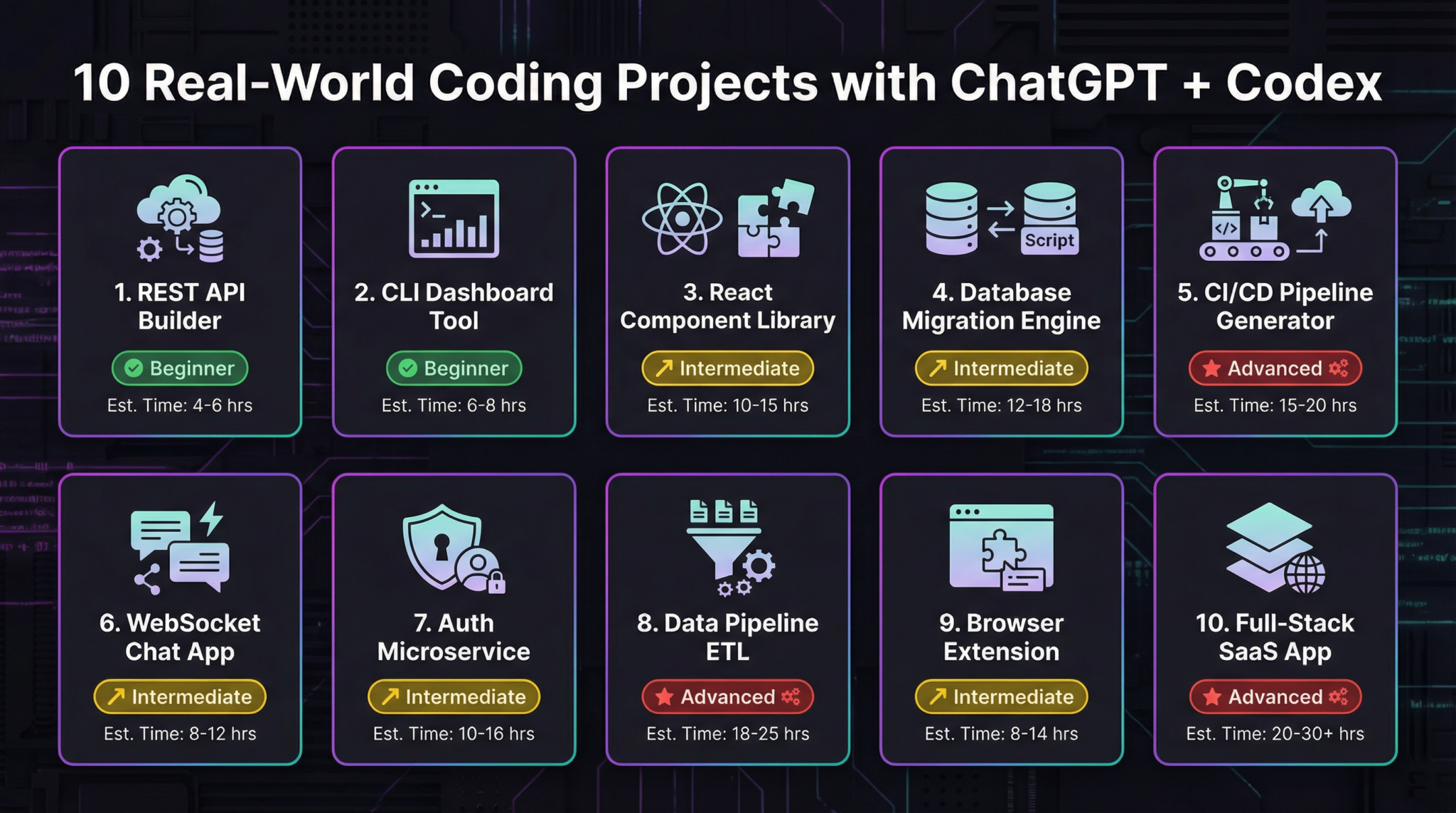
10 Real-World Coding Projects with ChatGPT + Codex — Part 5: Harnessing Agent Infrastructure for Long-Running AI Tasks
Welcome to Part 5 of the ChatGPT Coding Masterclass series. This module dives deep into building long-running AI-powered coding projects using the cutting-edge GPT-5.3-Codex, focusing on the critical concept of the Agent Harness — the operating system for AI agents.
Table of Contents
- Introduction: Why Agent Harnesses Matter
- Theoretical Deep-Dive: Agent Harness Engineering
- What is an Agent Harness?
- Context Engineering Fundamentals
- Architectural Constraints & Entropy Management
- The 3-Agent Pattern: Planner, Generator, Evaluator
- Step-by-Step Implementation Guide
- Setting up the Codex CLI environment
- Creating your first agent harness project
- Implementing AGENTS.md for Progressive Disclosure
- Developing the Planner, Generator, Evaluator agents
- Integrating Playwright MCP for automated QA
- OpenAI Agents SDK and Testing Harnesses
- SDK Architecture Overview
- Using the SDK to build and orchestrate agents
- Writing test harnesses to verify harness logic
- Codex CLI Usage Deep Dive
- Installation & configuration commands
- Common commands for harness lifecycle management
- Debugging and log inspection commands
- IDE Integration: VS Code, Cursor, Windsurf
- Installing GPT-5.3 plugins
- Setting up multi-agent workflows in IDE
- Live debugging and interactive agent tuning
- Advanced Prompt Templates for Agent Harnesses
- 5 ready-to-use templates with placeholders
- Concrete Code Examples
- Rust: Agent harness core orchestration
- Python: Planner-Generator-Evaluator loop
- TypeScript: Playwright MCP integration
- Pro Tips & Edge Cases
- Common pitfalls in context inflation
- Handling agent hallucinations and verification loops
- Efficient entropy management for multi-agent systems
Introduction: Why Agent Harnesses Matter
In 2026, the frontier of AI-assisted software engineering has evolved beyond simple question-answering or code generation. The new paradigm revolves around long-lived, autonomous AI agents capable of managing complex workflows, debugging, and continuous improvement cycles without human intervention.
This is where Agent Harnesses come in — the vital infrastructure layer that:
- Constrains AI models to prevent runaway generation
- Informs agents by carefully engineering context windows
- Verifies and corrects agent outputs through structured feedback loops
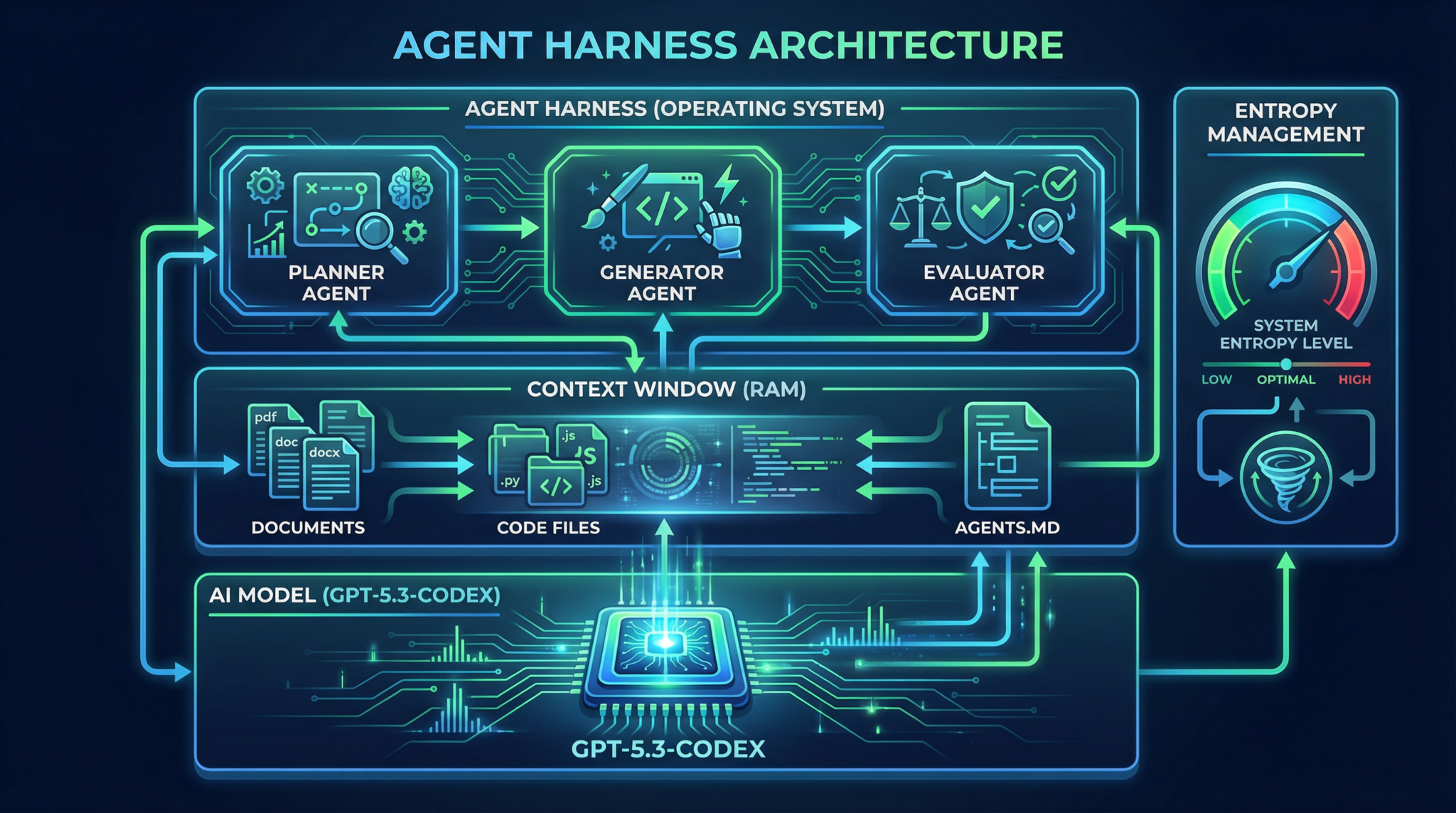
Think of the Agent Harness as the operating system for AI agents: GPT-5.3-Codex is the CPU, the conversation context is RAM, and the harness is the OS managing task scheduling, memory, and security.
Theoretical Deep-Dive: Agent Harness Engineering
What is an Agent Harness?
An Agent Harness is a software infrastructure wrapping one or more AI models (agents) to:
- Manage context injection and progressive disclosure of knowledge
- Enforce architectural constraints (e.g., token limits, API rate limits)
- Implement entropy management to reduce randomness and improve determinism
- Orchestrate multi-agent pipelines with Planner-Generator-Evaluator patterns
- Maintain state persistence for long-running tasks
This lets agents operate like software processes, each with defined roles, inputs, and outputs.
Context Engineering Fundamentals
The power of GPT-5.3 lies in its enormous context window (100k+ tokens), but how you fill that context determines agent effectiveness.
Agent Harnesses use context engineering to:
- Start with minimal seed context (e.g.,
AGENTS.md) acting as a map to deeper documentation or code - Apply progressive disclosure, where agents are only given small, relevant context slices at a time, reducing noise and hallucination
- Include metadata annotations to tag context chunks with versioning, timestamps, or semantic roles (e.g., spec, test cases, bug reports)
- Define context refresh policies to update or prune context as the agent progresses
This approach is vital for long-running agents managing evolving codebases or specs.
Architectural Constraints & Entropy Management
Architectural constraints are rules baked into the harness to:
- Limit token usage per agent call
- Enforce maximum call frequency (rate limits, cooldowns)
- Define strict input/output schemas (via JSON schemas or protobufs)
- Restrict allowed APIs or file system access
Entropy management refers to controlling randomness during generation (temperature, top_p) and output validation:
- Use low temperature (0.0 – 0.3) for deterministic tasks like code generation
- Introduce stochasticity only during exploratory phases (e.g., brainstorming)
- Implement multi-step verification loops to catch hallucinations or errors
- Use Evaluators with Playwright MCP (Model-Checking Protocol) to run real tests and provide feedback
Together, these ensure safe, reliable, and auditable AI agent operation.
The 3-Agent Pattern: Planner, Generator, Evaluator
A powerful architectural pattern in agent harnesses is the Planner-Generator-Evaluator (PGE) triad:
| Agent Role | Responsibilities | Outputs |
|---|---|---|
| Planner | Expands high-level specs into detailed tasks or sprints | Sprint Contracts (task breakdowns) |
| Generator | Creates code or artifacts based on sprint contracts | Code, configs, tests |
| Evaluator | Runs tests, reproduces bugs, validates output, generates QA reports | Validation results, bug repro videos, PR suggestions |
This triad runs in a closed feedback loop, enabling autonomous bug reproduction & fixing.
Use the PGE pattern to achieve full agent autonomy and continuous integration within your harness.
Step-by-Step Implementation Guide
1. Setting up the Codex CLI environment
The Rust-based Codex CLI is your command-line gateway to GPT-5.3-Codex and agent harness orchestration.
# Install Codex CLI via Cargo (Rust's package manager)
cargo install codex-cli

# Verify installation
codex --version
# Expected output:
# codex-cli 1.2.0 (GPT-5.3-Codex support)
Configure your OpenAI credentials:
export OPENAI_API_KEY="sk-xxxxxx-your-token-xxxxxx"
codex configure
# Follow interactive prompt to confirm setup
2. Creating your first agent harness project
# Initialize a new harness project scaffold
codex harness init my-ai-project

cd my-ai-project

# Directory structure overview:
# ├── agents/
# │   ├── planner.agent
# │   ├── generator.agent
# │   └── evaluator.agent
# ├── AGENTS.md
# ├── harness.toml
# └── tests/
3. Implementing AGENTS.md for Progressive Disclosure
AGENTS.md acts as the context map injected into the harness context for agents to reference source-of-truth documents:
# AGENTS.md - Agent Context Map

## Overview
This file maps agents to their authoritative sources.

- Planner: `docs/specs/feature_spec.md`
- Generator: `src/`
- Evaluator: `tests/e2e/`

## References
- Design Doc: `docs/design_doc.md`
- Bug Reports: `logs/bug_reports.md`
- Coding Standards: `docs/coding_standards.md`
In harness.toml, configure progressive disclosure:
[context]
base_context = ["AGENTS.md"]
progressive_disclosure = true
max_context_tokens = 8000
4. Developing the Planner, Generator, Evaluator agents
Each agent is implemented as a .agent file with prompt templates and role-specific logic.
Example planner.agent snippet:
# Planner Agent Prompt

You are the planning agent. Your job is to break down the following feature specification into sprint contracts.
Use the AGENTS.md map to find detailed specs.

Feature Spec:
{feature_spec}

Output format:
- Sprint Name
- Tasks (with descriptions and acceptance criteria)
5. Integrating Playwright MCP for automated QA
The Evaluator uses Playwright MCP to run integration tests and validate code outputs.
Example integration in evaluator.agent:
import { PlaywrightMCP } from 'openai-agents-sdk';

async function runEvaluation() {
  const mcp = new PlaywrightMCP();

  const testResult = await mcp.runTest('tests/e2e/my_feature.spec.ts');

  if (!testResult.passed) {
    return {
      status: 'fail',
      logs: testResult.logs,
      screenshot: testResult.screenshotPath,
    };
  }
  return { status: 'pass' };
}
OpenAI Agents SDK and Testing Harnesses
SDK Architecture Overview
The OpenAI Agents SDK provides:
- Agent classes to build and manage agent roles
- Context management utilities for progressive disclosure
- Orchestration tools to run multi-agent pipelines asynchronously
- Testing harnesses to simulate agent inputs and verify outputs
Using the SDK to build and orchestrate agents
Example Rust snippet using the SDK:
use openai_agents_sdk::{Agent, Harness};

#[tokio::main]
async fn main() {
    let planner = Agent::new("planner.agent").await.unwrap();
    let generator = Agent::new("generator.agent").await.unwrap();
    let evaluator = Agent::new("evaluator.agent").await.unwrap();

    let mut harness = Harness::new(vec![planner, generator, evaluator]);

    let feature_spec = std::fs::read_to_string("docs/specs/feature_spec.md").unwrap();

    // Run the planner
    let sprint_contracts = harness.run_agent("planner", feature_spec).await.unwrap();

    // Pass contracts to generator
    let generated_code = harness.run_agent("generator", sprint_contracts).await.unwrap();

    // Evaluate generated code
    let eval_result = harness.run_agent("evaluator", generated_code).await.unwrap();

    println!("Evaluation Status: {:?}", eval_result);
}
Writing test harnesses to verify harness logic
Use the SDK’s test harness utilities to simulate agents and verify state transitions:
#[cfg(test)]
mod tests {
    use super::*;
    use openai_agents_sdk::test_harness::*;

    #[tokio::test]
    async fn test_planner_generates_sprints() {
        let planner = Agent::new("planner.agent").await.unwrap();
        let harness = TestHarness::new(planner);

        let feature_spec = "Build a user login system";

        let output = harness.run(feature_spec).await.unwrap();

        assert!(output.contains("Sprint 1"));
        assert!(output.contains("Task"));
    }
}
Codex CLI Usage Deep Dive
Installation & Configuration Commands
# Install globally
cargo install codex-cli --locked

# Setup API key
codex configure

# View current config
codex config show
Common commands for harness lifecycle management
# Initialize a new harness project
codex harness init my-project

# Run a specific agent with input file
codex agent run -a planner.agent -i docs/specs/feature_spec.md

# Start full harness run
codex harness run

# View harness logs
codex logs show -p my-project

# Update harness dependencies
codex harness update
Debugging and log inspection commands
# Enable verbose logging for harness
codex harness run --verbose

# Export harness logs to file
codex logs export -p my-project -o logs/output.log

# Inspect agent context window
codex context inspect -a planner.agent
IDE Integration: VS Code, Cursor, Windsurf
Installing GPT-5.3 Plugins
- VS Code Marketplace:
OpenAI GPT-5.3 Codexplugin - Cursor IDE: Native GPT-5.3 integration pre-bundled
- Windsurf: Install
windsurf-gptextension
Setting up multi-agent workflows in IDE
- Open your harness project directory
- Load
.agentfiles in the IDE workspace - Use IDE commands to trigger agent runs (
Ctrl+Shift+P > Codex: Run Agent) - Visualize agent outputs and logs in sidebars
- Configure environment variables for API keys
Live debugging and interactive agent tuning
- Use IDE breakpoint features on agent prompts
- Modify prompt templates on-the-fly
- Trigger evaluations and view Playwright MCP test results inline
- Use inline annotations for agent suggestions
Leverage IDE-integrated GPT-5.3 models to iteratively refine agent behavior and harness policies.
Advanced Prompt Templates for Agent Harnesses
Below are 5 advanced prompt templates for harness agents, ready to copy-paste and customize.
1. Planner Agent: Sprint Contract Generation
You are a Planner Agent tasked with decomposing the following feature specification into actionable sprint contracts. Reference the AGENTS.md for detailed requirements.

Feature Spec:
{feature_spec}

Output JSON format:

{
  "sprints": [
    {
      "name": "Sprint 1",
      "tasks": [
        {
          "title": "Task title",
          "description": "Task detailed description",
          "acceptance_criteria": ["criterion 1", "criterion 2"]
        }
      ]
    }
  ]
}
2. Generator Agent: Code Scaffold Creation
You are a Generator Agent. Based on the sprint contract below, generate code scaffolds, configuration files, and initial test cases.

Sprint Contract:
{sprint_contract}

Ensure adherence to company coding standards per AGENTS.md.

Output: File tree structure with code snippets, in markdown.
3. Evaluator Agent: Automated Test Execution & Report
You are an Evaluator Agent responsible for running automated tests on generated code. Use Playwright MCP to execute tests and capture logs.

Test Suite:
{test_suite_files}

Output JSON with:
- status: pass/fail
- error_logs: string
- screenshot_path: string (if fail)
- remediation_suggestions: string
4. Bug Reproducer Agent
You are a Bug Reproducer Agent. Given a bug report, write steps and code to reproduce the bug reliably.

Bug Report:
{bug_report}

Output: Step-by-step reproduction instructions and minimal code snippet.
5. PR Generator Agent
You are a PR Generator Agent. Based on the fix applied, generate a detailed pull request description including issue references, change summary, and test coverage.

Fix Summary:
{fix_summary}

Output: Markdown formatted PR description.
Concrete Code Examples
1. Rust: Agent Harness Core Orchestration
use openai_agents_sdk::{Agent, Harness, Context};

#[tokio::main]
async fn main() {
    // Load agents
    let planner = Agent::load("agents/planner.agent").await.unwrap();
    let generator = Agent::load("agents/generator.agent").await.unwrap();
    let evaluator = Agent::load("agents/evaluator.agent").await.unwrap();

    // Initialize harness with agents
    let mut harness = Harness::new(vec![planner, generator, evaluator]);

    // Load initial context map
    let context_map = std::fs::read_to_string("AGENTS.md").unwrap();

    // Provide feature specification
    let feature_spec = std::fs::read_to_string("docs/specs/new_feature.md").unwrap();

    // Inject context with progressive disclosure
    let context = Context::new()
        .with_base_context(context_map)
        .with_input(feature_spec);

    // Run planner to get sprint contracts
    let sprint_contracts = harness.run_agent("planner", context.clone()).await.unwrap();

    // Run generator to produce code artifacts
    let code_output = harness.run_agent("generator", sprint_contracts).await.unwrap();

    // Run evaluator to validate code
    let evaluation = harness.run_agent("evaluator", code_output).await.unwrap();

    println!("Evaluation Result: {:?}", evaluation);
}
2. Python: Planner-Generator-Evaluator Loop
from openai_agents_sdk import Agent, Harness

async def main():
    planner = await Agent.load('agents/planner.agent')
    generator = await Agent.load('agents/generator.agent')
    evaluator = await Agent.load('agents/evaluator.agent')

    harness = Harness([planner, generator, evaluator])

    with open('AGENTS.md') as f:
        base_context = f.read()

    with open('docs/specs/feature_spec.md') as f:
        feature_spec = f.read()

    # Run planner
    sprint_contracts = await harness.run_agent('planner', base_context + '\n' + feature_spec)

    # Run generator
    code_output = await harness.run_agent('generator', sprint_contracts)

    # Run evaluator
    eval_result = await harness.run_agent('evaluator', code_output)

    print('Evaluation:', eval_result)

import asyncio
asyncio.run(main())
3. TypeScript: Playwright MCP Integration for Evaluator Agent
import { PlaywrightMCP } from 'openai-agents-sdk';

export async function evaluateCode(testSuitePath: string) {
    const mcp = new PlaywrightMCP();

    const result = await mcp.runTest(testSuitePath);

    if (!result.passed) {
        return {
            status: 'fail',
            errorLogs: result.logs,
            screenshot: result.screenshotPath,
            remediation: 'Check failing assertions and fix implementation',
        };
    }

    return { status: 'pass' };
}
Pro Tips & Edge Cases
1. Managing Context Inflation
- Problem: Agents receive too much context → increased token usage and hallucinations
- Solution: Use
AGENTS.mdas a context map, enable progressive disclosure to feed only relevant chunks - Tip: Implement context pruning policies to discard stale or irrelevant data periodically.
2. Handling Agent Hallucinations & Verification Loops
- Problem: Agents generate plausible but incorrect code or specs
- Solution: Use the Evaluator with Playwright MCP to run real tests and validate outputs
- Tip: Automate bug reproduction → fix → validate → PR creation cycle to close the loop.
3. Efficient Entropy Management
- Problem: Too high randomness causes flaky agents; too low causes repetitive outputs
- Solution: Tune temperature and top_p per agent role: low for Generator/Evaluator, moderate for Planner
- Tip: Use multi-pass generation with different seeds for exploratory planning phases.
By mastering Agent Harness Engineering, you unlock the full power of GPT-5.3-Codex for complex, autonomous software projects — transforming AI from a writing assistant into a full software engineer partner.
🔒 Unlock the Full Coding Masterclass Library
This is a premium deep-dive module. Register for free to access all 7 parts, downloadable templates, and the complete prompt library.
ChatGPT Coding Masterclass Series

