
ChatGPT Coding Masterclass Part 3: What is Codex? The AI Coding Agent Explained
⚡ The Brief
- What it is: Codex is an AI coding agent built on GPT-5.3, designed for autonomous code generation and reasoning.
- Who it’s for: Codex is ideal for professional developers seeking to automate coding tasks and enhance software development efficiency.
- Key takeaways: Codex accelerates development, reduces context switching, and improves code quality with AI-guided testing.
- Pricing/Cost: Pricing details vary; typically offered as a subscription model through OpenAI’s platform.
- Bottom line: Codex represents the future of AI-driven software development, offering unprecedented autonomy and efficiency.
✓ Instant access✓ No spam✓ Unsubscribe anytime
ChatGPT Coding Masterclass Series
What is Codex? The AI Coding Agent Explained
Welcome to Part 3 of the ChatGPT Coding Masterclass — an exhaustive, nano banana pro-level deep dive into Codex, the AI coding agent powering the future of software development. In this module, we dissect Codex’s architecture, explore its ecosystem in 2026, and provide advanced hands-on guidance for professional developers to master Codex and its agentic capabilities.
Table of Contents
- Theoretical Foundations of Codex
- Codex in 2026: Architecture and Ecosystem
- Agent Harness Engineering: The Backbone of Codex Agents
- Step-by-Step Guide: Using Codex CLI and OpenAI Agents SDK
- IDE Integrations: Setup and Optimization
- Advanced Prompt Templates for Codex Agents
- Concrete Code Examples: Architecture, Implementation, and Testing
- Pro Tips, Pitfalls, and Edge Cases
Theoretical Foundations of Codex
Get Free Access to 40,000+ AI Prompts
Join 40,000+ AI professionals. Get instant access to our curated Notion Prompt Library with prompts for ChatGPT, Claude, Codex, Gemini, and more — completely free.
Get Free Access Now →No spam. Instant access. Unsubscribe anytime.
What is Codex?
At its core, Codex is an AI coding agent built upon the powerful GPT-5.3 architecture, specialized for code generation, reasoning, and multi-modal understanding. It’s not just a language model; it’s an agentic system that interprets, plans, generates, evaluates, and iterates code autonomously.
Why Codex Exists
- Accelerate software development: Automate boilerplate and complex coding tasks.
- Reduce context switching: Provide developers with in-IDE code generation and debugging.
- Increase code quality and maintainability: Use AI-guided testing and validation loops.
- Enable agentic autonomy: Automate entire dev cycles — from bug reproduction to PR creation.
Under the Hood: How Codex Works
Codex combines several cutting-edge AI and software engineering principles:
1. Large Language Model Backbone
- Built on GPT-5.3-Codex, a multi-modal transformer with billions of parameters optimized for code understanding.
- Trained on public and private codebases, documentation, and runtime logs.
2. Agentic Architecture
- Employs a Planner–Generator–Evaluator triad:
- Planner: Expands vague requirements into detailed specs.
- Generator: Implements code “sprints” based on contracts.
- Evaluator: Uses automated QA tools (e.g., Playwright MCP) to validate outputs.
- This modularity enables progressive disclosure, where agents iteratively refine their knowledge.
3. Agent Harness Engineering
- The Agent Harness acts as the OS for AI models, managing context, memory, and environment constraints.
- It enforces architectural constraints, entropy management, and context engineering, preventing model drift and hallucination.
- Uses the AGENTS.md pattern to map agents to their deeper knowledge sources, enabling safe and traceable autonomy.
4. Multi-Modal and Parallel Coding Agents
- Supports multi-modal inputs (code, natural language, diagrams).
- Runs parallel agents to tackle different components simultaneously.
- Manages concurrency and synchronization via cloud-native sandboxes.
Codex in 2026: Architecture and Ecosystem
Overview of the Current Flagship: GPT-5.3-Codex
- Advanced Reasoning: Handles complex logic and domain-specific languages.
- Multi-Modal Inputs/Outputs: Processes code, text, images, and UI mocks.
- Agentic Autonomy: Full self-management of the coding lifecycle.
The Ecosystem Components
| Component | Description |
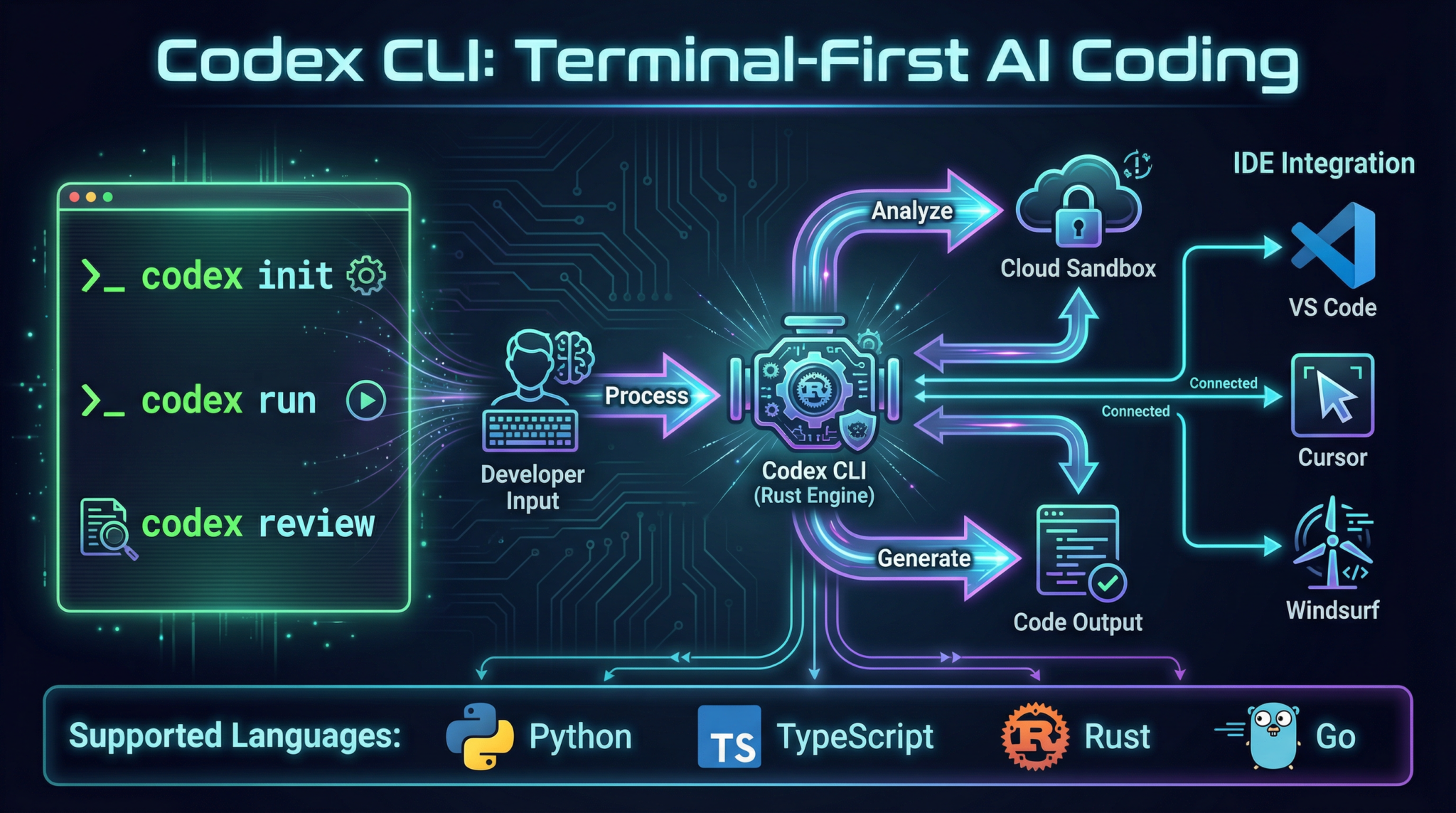
| Codex CLI (Rust-based) | Primary interface for Codex agents, enabling local and cloud operations with performance and safety guarantees. |
| OpenAI Agents SDK | Developer toolkit for creating, managing, and orchestrating AI agents with standardized harnesses and testing tools. |
| Parallel Coding Agents | Multiple agents running concurrently for different codebase parts, reducing iteration times. |
| Cloud-Native Sandboxes | Isolated environments for safe execution, testing, and debugging of agent outputs. |
Agent Harness Engineering: The Backbone of Codex Agents
What is an Agent Harness?
Think of the AI model as a CPU, its context as RAM, and the Agent Harness as the Operating System. The harness manages:
- Context Injection: Feeding the model relevant information without overwhelming it.
- Constraints Enforcement: Ensuring the agent operates within pre-defined architectural rules.
- Entropy Management: Balancing randomness and determinism in outputs.
- Verification and Correction: Validating outputs and correcting errors autonomously.
Key Patterns in Harness Design
AGENTS.md Pattern
- A lightweight file injected into the agent’s context at startup.
- Acts as a map or table of contents to deeper sources of truth like design docs, API references, and internal wikis.
- Enables progressive disclosure by guiding agents from high-level specs to detailed references.
Progressive Disclosure
- Agents start with minimal context.
- They are progressively “taught” where to find additional information.
- Prevents information overload and keeps model focus sharp.
Planner–Generator–Evaluator Pattern
- Planner: Analyzes requirements, breaks down tasks.
- Generator: Writes code following the Planner’s sprint contracts.
- Evaluator: Runs automated QA, including Playwright MCP for UI testing.
Full Agent Autonomy Loop
- Validate current state.
- Reproduce bug.
- Record diagnostic video.
- Fix bug.
- Re-validate fix.
- Record final video.
- Open Pull Request with fix.
Step-by-Step Guide: Using Codex CLI and OpenAI Agents SDK
Prerequisites
- Rust installed (1.70+ recommended).
- Node.js 20+ (for Agents SDK).
- OpenAI API key with GPT-5.3-Codex access.
- IDE with GPT-5.3 plugins (optional).
1. Installing Codex CLI
# Clone the Codex CLI repository
git clone https://github.com/openai/codex-cli.git
cd codex-cli

# Build the CLI using Rust's Cargo
cargo build --release

# Add to PATH (Linux/macOS)
export PATH=$PATH:$(pwd)/target/release
2. Initialize Your First Codex Agent Project
codex-cli init my-codex-agent
cd my-codex-agent
This scaffolds the directory with:
AGENTS.md(agent knowledge map)harness/(agent harness configuration)prompts/(prompt templates)tests/(automated test cases)
3. Writing an Agent Harness Configuration
Edit harness/config.toml:
[agent]
model = "gpt-5.3-codex"
max_context_tokens = 8192
entropy_control = "moderate"
constraints_file = "constraints.json"

[logging]
level = "debug"
path = "./logs/agent.log"
4. Running the Agent Locally
codex-cli run --agent my-codex-agent --input "Implement a REST API in Rust for user management."
Expected output:
[INFO] Planning API endpoints...
[INFO] Generating Rust code modules...
[INFO] Evaluating generated code with unit tests...
[SUCCESS] API implemented successfully!
5. Using the OpenAI Agents SDK (TypeScript example)
import { Agent, Harness, PromptTemplate } from 'openai-agents-sdk';

async function runAgent() {
  const harness = new Harness({
    model: 'gpt-5.3-codex',
    contextTokens: 8192,
    constraintsPath: './constraints.json',
  });

  const agent = new Agent({
    harness,
    prompt: new PromptTemplate('./prompts/api_implementation.template'),
  });

  const result = await agent.run('Create a GraphQL API for orders.');
  console.log(result.output);
}

runAgent().catch(console.error);
6. Testing Harnesses
- Place test cases in
tests/with.jsoninput/output pairs. - Run tests with:
codex-cli test --agent my-codex-agent
IDE Integrations: Setup and Optimization
Supported IDEs & Plugins
| IDE | Plugin / Extension | Setup Notes |
| VS Code | GPT-5.3 Codex Native Plugin | Install from Marketplace, configure API key in `settings.json` |
| Cursor | Built-in Codex Integration | Sign in with OpenAI, enable Codex features in preferences |
| Windsurf | Codex Agent Plugin | Manual install via Windsurf Plugin Manager, requires Rust toolchain |
| JetBrains (IntelliJ, PyCharm) | GPT-5.3 Codex Plugin | Download from JetBrains marketplace, set up API key and project harness |
Example: VS Code Setup
- Open VS Code.
- Go to Extensions (
Ctrl+Shift+X). - Search for GPT-5.3 Codex Native Plugin.
- Install and reload.
- Open
settings.json(Ctrl+Shift+P→ Preferences: Open Settings (JSON)). - Add:
{
  "codex.apiKey": "sk-xxxxxxxxxxxxxxxxxxxxxxxxxx",
  "codex.model": "gpt-5.3-codex",
  "codex.harnessPath": "./harness/config.toml",
  "codex.enableAutoTest": true
}
- Reload VS Code.
Pro Tip for IDE Usage
Advanced Prompt Templates for Codex Agents
Below are 5 advanced prompt templates designed for GPT-5.3-Codex agents. Replace placeholders to tailor them to your project.
1. API Implementation Sprint Contract
You are a software Architect AI. Your task is to implement the {api_type} API for the {domain} domain.

Requirements:
- Endpoints: {endpoints_list}
- Authentication: {auth_method}
- Database: {database_type}

Follow sprint contract:
1. Plan detailed specs for each endpoint.
2. Generate modular code files following Rust best practices.
3. Write unit and integration tests.
4. Document your design in AGENTS.md.

Start by outputting the plan with task breakdown.
2. Bug Reproduction and Fix Loop
You are a debugging AI agent.

Input:
- Bug report: {bug_description}
- Current code snippet: {code_snippet}
- Test case failing: {test_case_description}

Tasks:
1. Reproduce the bug step-by-step, documenting logs.
2. Record a diagnostic video (simulate output).
3. Propose a fix with explanation.
4. Validate fix by re-running test case.
5. Summarize results and open a PR with changes.

Begin with reproducing the bug.
3. Progressive Disclosure Documentation Lookup
You are an agent with limited initial context.

Initial knowledge:
- AGENTS.md file at {agents_md_path} provides links to design docs and API references.

Your goal:
- Start with the AGENTS.md summary.
- Request further documents only as needed.
- Summarize each document before using it to answer queries.

Output your plan for document exploration.
4. Multi-Agent Sprint Coordination
You are the Planner agent coordinating multiple Generators.

Input:
- Feature spec: {feature_spec}
- Team: Generators A, B, C with specialties in frontend, backend, and testing.

Tasks:
1. Break down feature into tasks per specialty.
2. Define Sprint Contracts for each Generator.
3. Schedule execution order and dependencies.
4. Monitor progress and collect outputs for evaluation.

Output the sprint plan with timelines.
5. Entropy Management and Output Stabilization
You are managing entropy in code generation.

Input:
- Task: {task_description}
- Desired creativity level: {entropy_level} (low, moderate, high)

Tasks:
1. Adjust temperature and top-p parameters accordingly.
2. Generate candidate outputs.
3. Evaluate and select most stable output.
4. Document rationale for parameter settings.

Begin by setting parameters based on entropy_level.
Concrete Code Examples: Architecture, Implementation, and Testing
Example 1: Rust Codex CLI Agent Harness
use codex_cli::{AgentHarness, AgentConfig};

fn main() -> Result<(), Box<dyn std::error::Error>> {
    let config = AgentConfig::load("harness/config.toml")?;
    let mut harness = AgentHarness::new(config)?;

    let input_task = "Implement a microservice in Rust for user authentication";
    let output = harness.run_agent(input_task)?;

    println!("Agent Output:
{}", output);
    Ok(())
}
Example 2: TypeScript OpenAI Agents SDK – Multi-Agent Sprint
import { Agent, Harness, PromptTemplate } from 'openai-agents-sdk';

async function runMultiAgentSprint() {
  const harness = new Harness({ model: 'gpt-5.3-codex', contextTokens: 8192 });

  // Planner agent
  const planner = new Agent({
    harness,
    prompt: new PromptTemplate('./prompts/sprint_planner.template'),
  });

  // Generator agents
  const frontendGen = new Agent({
    harness,
    prompt: new PromptTemplate('./prompts/frontend_generator.template'),
  });
  const backendGen = new Agent({
    harness,
    prompt: new PromptTemplate('./prompts/backend_generator.template'),
  });

  // Evaluate sprint plan
  const sprintPlan = await planner.run('Create sprint plan for e-commerce checkout');
  console.log('Sprint Plan:', sprintPlan.output);

  // Run Generators in parallel
  const [frontendResult, backendResult] = await Promise.all([
    frontendGen.run(sprintPlan.output),
    backendGen.run(sprintPlan.output),
  ]);

  console.log('Frontend Code:', frontendResult.output);
  console.log('Backend Code:', backendResult.output);
}

runMultiAgentSprint().catch(console.error);
Example 3: Automated Test Harness JSON Format
{
  "test_cases": [
    {
      "input": "Generate an Express.js REST endpoint for user login.",
      "expected_output_contains": ["app.post('/login'", "res.status(200)"]
    },
    {
      "input": "Fix the bug causing null pointer in Rust service.",
      "expected_output_contains": ["Option::unwrap_or", "None handling"]
    }
  ]
}
Run tests with:
codex-cli test --agent my-codex-agent
Pro Tips, Pitfalls, and Edge Cases
Pro Tips
Common Pitfalls and Solutions
| Issue | Cause | Solution |
| Agent output hallucination | Excessive entropy, insufficient constraints | Lower temperature, enrich constraints.json, verify with Evaluator |
| Context overflow errors | Too much injected data in prompt | Use AGENTS.md progressive disclosure, chunk context |
| Slow CLI responses | Network latency or large prompt payloads | Optimize prompt size, use local Codex caches |
| IDE plugin crashes or freezes | API rate limits or misconfiguration | Check API keys, enable rate limiting, update plugin |
| Failed test harness runs | Mismatched expectations or unstable code generation | Refine prompt templates, rerun with evaluator feedback loop |
Summary
Codex, powered by GPT-5.3, is a revolutionary AI coding agent designed for professional developers seeking to automate, optimize, and elevate the software development lifecycle. Through Agent Harness Engineering, robust SDKs, CLI tools, and IDE integrations, Codex offers a scalable, agentic platform to handle everything from planning and generation to evaluation and autonomous fixes.
Mastering Codex requires understanding its theoretical foundation, ecosystem, and harness patterns — then applying these with precision through step-by-step implementation and testing. Use the advanced prompt templates and code examples provided here as a launchpad into the next era of AI-driven coding.
End of Part 3. Stay tuned for Parts 4 through 7, where we’ll explore Agent Harness Engineering in depth, multi-agent orchestration, autonomous bug fixing, and production-grade deployment workflows.
🎉 Access 40,000+ ChatGPT Prompts — Free!
Subscribe to get instant access to our complete Notion Prompt Library — the largest curated collection of ChatGPT prompts available, including all Coding Masterclass templates and resources.
Subscribe & Get Free Access →ChatGPT Coding Masterclass Series
🕐 Instant∞ Unlimited🎁 Free
Frequently Asked Questions
What is Codex and how does it function?
Codex is an AI coding agent based on GPT-5.3, designed to autonomously generate, evaluate, and iterate code. It uses a Planner–Generator–Evaluator architecture to transform requirements into detailed specifications, implement code, and perform automated quality assurance. This system significantly enhances development efficiency and code quality.
How does Codex improve software development?
Codex improves software development by automating repetitive coding tasks, reducing context switching, and enhancing code quality through AI-guided testing and validation. It allows developers to focus on complex problem-solving while Codex handles routine coding and debugging, thus accelerating the overall development process.
What technologies underpin Codex's architecture?
Codex is built on the GPT-5.3 architecture, a multi-modal transformer optimized for code understanding. It integrates a Planner–Generator–Evaluator triad, leveraging large language models trained on diverse codebases, documentation, and runtime logs to autonomously manage coding tasks and quality assurance.
Can Codex be integrated with existing development tools?
Yes, Codex can be integrated with existing development tools. It offers IDE integrations and utilizes the OpenAI Agents SDK, allowing developers to seamlessly incorporate Codex into their workflows for enhanced code generation and debugging capabilities directly within their preferred environments.
What are the main benefits of using Codex?
The main benefits of using Codex include accelerated software development, reduced context switching, improved code quality, and the ability to automate entire development cycles. Codex's agentic capabilities enable it to autonomously handle tasks from bug reproduction to pull request creation, freeing developers to focus on more strategic activities.
How does Codex handle code quality and testing?
Codex handles code quality and testing through its Evaluator component, which uses automated QA tools like Playwright. This ensures that generated code meets high standards of quality and functionality, allowing for continuous integration and deployment without compromising on reliability or performance.
