
ChatGPT Coding Masterclass Part 2: Prompt Engineering for Developers in the Era of GPT-5.3-Codex

⚡ The Brief
- What it is: A technical guide for developers on prompt engineering using GPT-5.3-Codex, focusing on practical applications and advanced techniques.
- Who it’s for: Professional software engineers seeking to enhance their skills in AI-driven coding and prompt design within the GPT-5.3-Codex framework.
- Key takeaways: Learn to design effective prompts, integrate AI tools with IDEs, and utilize advanced SDKs for optimal AI model performance.
- Pricing/Cost: Access to GPT-5.3-Codex and related tools may require subscriptions or licenses, depending on the provider’s pricing model.
- Bottom line: Mastering prompt engineering with GPT-5.3-Codex can significantly improve coding efficiency and AI task execution for developers.
✓ Instant access✓ No spam✓ Unsubscribe anytime
ChatGPT Coding Masterclass Series
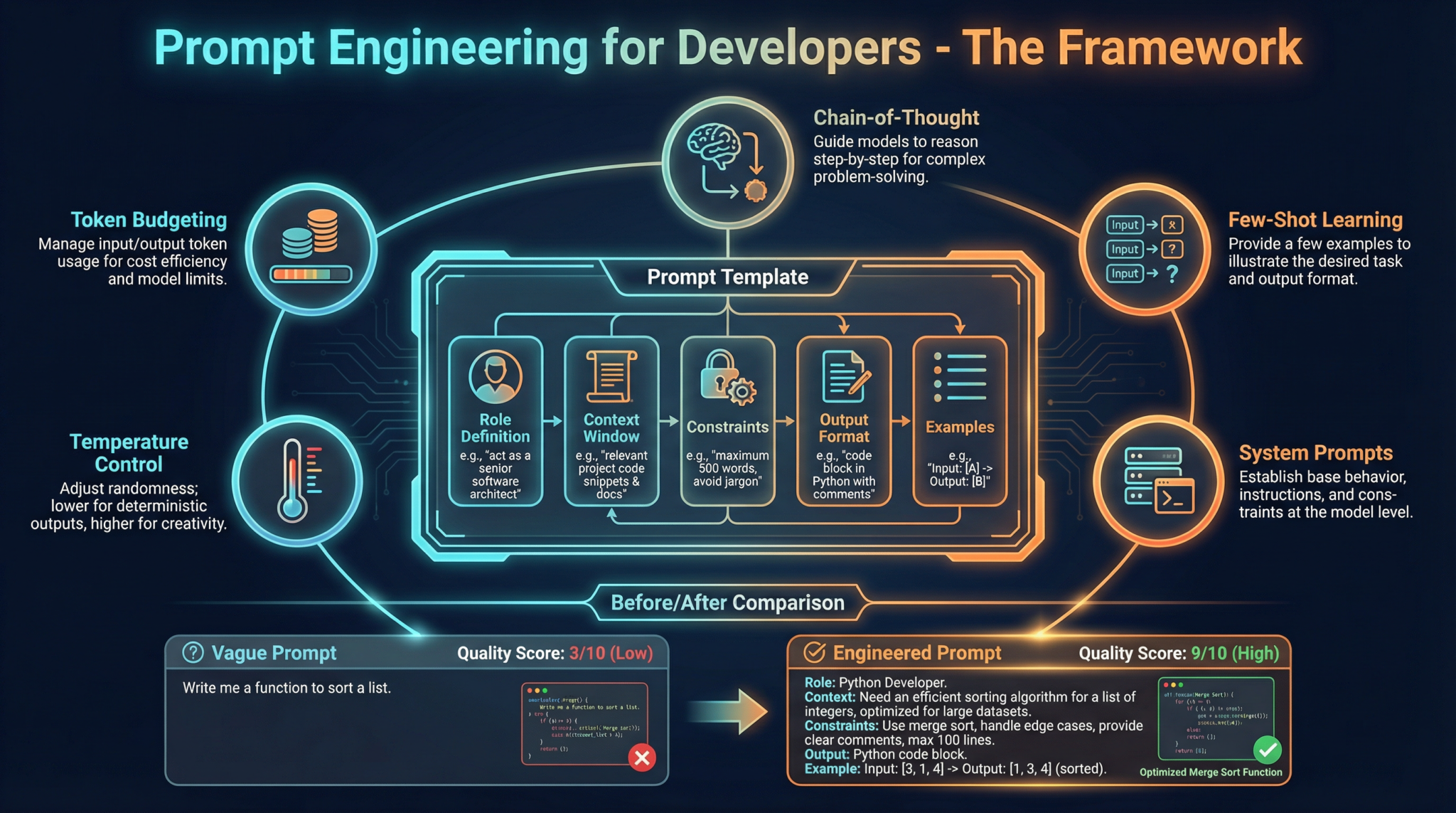
Prompt Engineering for Developers: The Nano Banana Pro Deep Dive
Part 2 of 7 in the ChatGPT Coding Masterclass Prompt Library (2026 Edition)Welcome to the ultimate technical deep-dive into Prompt Engineering for Developers leveraging the cutting-edge GPT-5.3-Codex ecosystem. This module is designed to empower professional software engineers with advanced, practical, step-by-step mastery — from theoretical underpinnings to hands-on agent harness engineering, SDK usage, IDE integrations, and production-grade prompt templates.
Table of Contents
- Understanding Prompt Engineering: Theoretical Foundations
- Architecting Prompts for GPT-5.3-Codex
- Agent Harness Engineering: Context, Constraints, and Control
- Step-by-Step Prompt Engineering Implementation
- Using OpenAI Agents SDK & Agent Harness Patterns
- Codex CLI: Command Reference and Examples
- IDE Integrations: VS Code, Cursor, Windsurf, JetBrains
- Advanced Prompt Templates for Developers
- Concrete Code Examples: Architecture, Implementation, and Testing
- Pro Tips, Edge Cases, and Troubleshooting
Understanding Prompt Engineering: Theoretical Foundations
Get Free Access to 40,000+ AI Prompts
Join 40,000+ AI professionals. Get instant access to our curated Notion Prompt Library with prompts for ChatGPT, Claude, Codex, Gemini, and more — completely free.
Get Free Access Now →No spam. Instant access. Unsubscribe anytime.
Prompt Engineering is the art and science of designing, structuring, and optimizing textual inputs to AI models to elicit precise, high-quality outputs. At the core of GPT-5.3-Codex’s power is its agentic, multi-modal reasoning ability, capable of interpreting complex instructions, chaining reasoning steps, and autonomously executing tasks in cloud-native sandboxes.
Why Prompt Engineering Matters in 2026
- Complex Task Decomposition: GPT-5.3-Codex can handle multi-step logic, but only if guided correctly through prompts that encode task context, constraints, and expected outputs.
- Agent Harnessing: The AI model is the CPU, but the harness (runtime layer) manages memory, constraints, verification, and entropy—prompt engineering is the interface that bridges human intent with this infrastructure.
- Maximizing Context Utility: With token limits increased yet still finite, prompt design must balance information density, clarity, and progressive disclosure to keep the context optimal.
- Enabling Autonomy: Prompts define not just what to do, but how the AI agent should plan, generate, evaluate, and iterate — critical for the Full Agent Autonomy Loop.
How Prompt Engineering Works Under the Hood
GPT-style models predict tokens based on preceding context. The prompt is the “context” that conditions the model’s output distribution. Effective prompt engineering leverages:
- Contextual Framing: Setting roles, goals, and constraints explicitly.
- Progressive Disclosure: Feeding information incrementally to avoid context overflow.
- Structured Data Injection: Embedding JSON, YAML, or markdown-like artifacts (
AGENTS.mdpatterns) inside prompts to represent maps to deeper knowledge. - Meta-prompting: Embedding instructions for agent behaviors — e.g., “You are a planner agent that expands specs in detail.”
- Entropy Management: Balancing prompt specificity to reduce randomness and hallucination, while preserving creative flexibility.
Effective prompt engineering is akin to programming a Turing-complete machine via natural language. Understanding the model’s “cognitive architecture” is critical.
Architecting Prompts for GPT-5.3-Codex
Core Prompt Engineering Principles for Developers
| Principle | Description | Example |
|---|---|---|
| Role Specification | Define the AI’s persona and expertise clearly | “You are a senior backend engineer with expertise in Rust.” |
| Goal Orientation | State explicit objectives and success criteria | “Generate a test harness that validates API responses.” |
| Context Provision | Include relevant code snippets, data formats, or architectural notes | “Given the following API spec, write a client in TypeScript.” |
| Constraint Enforcement | Specify boundaries on behavior, output format, or performance | “Output only JSON conforming to OpenAPI schema v3.” |
| Progressive Disclosure | Layer information to avoid overwhelming context | “First, outline the components. Then, generate code.” |
| Output Validation Hints | Request self-checking or verification steps | “If uncertain, explain assumptions before coding.” |
The AGENTS.md Pattern: The Map to Truth
This is a critical innovation in harness engineering — injecting a short AGENTS.md file snippet into the prompt context to act as a MAP to deeper documentation, design docs, or trusted data sources. This pattern:
- Enables the agent to reference authoritative locations.
- Supports progressive disclosure by exposing only entry points initially.
- Facilitates long-running task management by linking to stateful knowledge bases.
Example snippet to inject:
# AGENTS.md
- Spec: https://docs.example.com/project/spec-v2.md
- Design: https://design.example.com/architecture/agent-harness.md
- Tests: https://git.example.com/repo/tests/README.md
Agent Harness Engineering: Context, Constraints, and Control
Conceptualizing the Agent Harness
| Component | Analogy | Role |
|---|---|---|
| Model | CPU | The GPT-5.3-Codex neural network performing token predictions |
| Context | RAM | The prompt and stateful context feeding tokens to the model |
| Harness | Operating System | Middleware enforcing constraints, managing memory, verifying output, correcting errors |
The Agent Harness is the infrastructure wrapping the AI to:
- Constrain: Prevent undesired behaviors by limiting output scope and enforcing rules.
- Inform: Inject updated state, context, and metadata dynamically.
- Verify & Correct: Validate outputs via evaluators and apply corrections.
- Manage Entropy: Control randomness through temperature, top-p, and prompt clarity.
The Planner, Generator, Evaluator (PGE) Pattern
A best-practice architectural pattern for complex agent workflows:
| Agent Role | Function |
|---|---|
| Planner | Expands vague specifications into detailed tasks and sprint contracts |
| Generator | Writes code or outputs following the planner’s contract, ensuring format and style |
| Evaluator | Runs automated tests (e.g., Playwright MCP), reproduces bugs, records videos, and opens PRs |
This triangular feedback loop enables Full Agent Autonomy:
- Validate state
- Reproduce bug
- Record video
- Fix bug
- Validate fix
- Record video
- Open PR
Step-by-Step Prompt Engineering Implementation
Step 1: Define Agent Role and Context Scope
- Specify the agent’s expertise (e.g., “You are a Rust backend expert”).
- Narrow context to essential info (code snippets, specs).
- Inject
AGENTS.mdto provide next-level references.
Step 2: Apply Progressive Disclosure
- Start with small, manageable prompt entries.
- Use follow-up prompts to drill down.
- Example:
Prompt 1: "Outline the main components of the API client."
Prompt 2: "Generate the Rust struct definitions for the components."
Prompt 3: "Write unit tests for the structs."
Step 3: Use Structured Prompt Templates
- Embed JSON/YAML to encode constraints.
- Use clear variable placeholders for dynamic parts.
Step 4: Enforce Architectural Constraints
- Add explicit instructions to respect coding standards.
- Limit output to specific code blocks.
Step 5: Incorporate Self-Evaluation Instructions
- Ask the agent to explain assumptions.
- Request error checks before output.
Step 6: Integrate with the Agent Harness
- Wrap prompt calls via the OpenAI Agents SDK.
- Use the
AGENTS.mdpattern to inform context. - Manage prompt tokens carefully.
Always test prompts iteratively with small context windows before scaling to full specs.
Using OpenAI Agents SDK & Agent Harness Patterns
The OpenAI Agents SDK (Rust-based) is the go-to tool for building and managing agent harnesses around GPT-5.3-Codex. It provides abstractions for:
- Prompt construction and injection
- Context management and entropy tuning
- Agent orchestration (planner, generator, evaluator)
- Integration with cloud-native sandboxes for secure execution
Example: Initializing an Agent Harness in Rust
use openai_agents_sdk::{AgentHarness, PromptTemplate, AgentConfig};
fn main() -> Result<(), Box<dyn std::error::Error>> {
// Configure the agent
let config = AgentConfig {
model: "gpt-5.3-codex",
temperature: 0.2,
max_tokens: 1500,
..Default::default()
// Define the AGENTS.md snippet
let agents_md = r#"
# AGENTS.md
- Spec: https://docs.example.com/project/spec-v2.md
- Design: https://design.example.com/architecture/agent-harness.md
- Tests: https://git.example.com/repo/tests/README.md
// Create prompt template with placeholders
let prompt = PromptTemplate::from_str(r#"
You are a Rust backend engineer.
Refer to the following AGENTS.md map:
{{agents_md}}
Task: {{task_description}}
Please provide your output strictly in Rust code blocks.
// Build the harness
let harness = AgentHarness::new(config)
.with_context("agents_md", agents_md)
.with_context("task_description", "Implement an API client for the payment service");
// Run the agent
let response = harness.run(&prompt)?;
println!("Agent Response:
{}", response);
Running Tests with the Testing Harness
The SDK supports automated test harnesses to validate agent outputs against expected results using snapshot testing or custom QA flows.
Codex CLI: Command Reference and Examples
The Codex CLI is a Rust-based terminal interface to interact directly with GPT-5.3-Codex and control agent harness workflows.
Installation
cargo install codex-cli
Basic Usage
codex-cli --model gpt-5.3-codex --temperature 0.2 --max-tokens 1500 \
--prompt-file ./prompts/api-client.md
Commands and Flags
| Command | Description |
| codex-cli generate | Generate code or text from a given prompt file |
| codex-cli eval | Run the evaluator agent on generated outputs, integrates with Playwright MCP |
| –model <model-name> | Specify the GPT model to use, e.g. gpt-5.3-codex |
| –temperature <float> | Control output randomness (0.0 – 1.0) |
| –max-tokens <int> | Maximum output token length |
| –prompt-file <path> | Path to local prompt markdown file |
| –context <key=value> | Inject key-value pairs into prompt context |
Example: Full Autonomy Loop Command Sequence
# Step 1: Planner expands spec
codex-cli generate --prompt-file planner-prompt.md --context spec_url=https://...
Step 2: Generator builds sprint contract code
codex-cli generate --prompt-file generator-prompt.md --context sprint=1
Step 3: Evaluator runs QA tests
codex-cli eval --test-suite ./tests/payment-api
Step 4: Repeat for bug fixes and PR automation
IDE Integrations: VS Code, Cursor, Windsurf, JetBrains
Modern IDEs have native plugins to supercharge developer workflows with GPT-5.3-Codex agents.
VS Code GPT-5.3 Plugin Setup
- Install the official GPT-5.3 plugin from the VS Code marketplace.
- Configure API keys and agent harness parameters via settings.json:
{
"gpt53.apiKey": "YOUR_API_KEY",
"gpt53.model": "gpt-5.3-codex",
"gpt53.temperature": 0.15,
"gpt53.agentHarness.enabled": true,
"gpt53.agentHarness.agentsMdUrl": "https://yourdomain.com/AGENTS.md"
- Use
/gpt53 runcommands inside the editor to invoke planner, generator, or evaluator agents contextually.
Cursor IDE
- Native multi-agent support.
- Drag and drop AGENTS.md files into the project context.
- Interactive prompt templates with variable placeholders.
- Live replay of agent autonomy loops.
Windsurf
- Cloud-native sandbox integration with real-time context injection.
- Visual prompt debugging tools.
- Parallel agent orchestration dashboard.
JetBrains (IntelliJ, WebStorm)
- Plugin supports inline prompt annotations.
- Code lens for agent feedback and corrections.
- Integrated Codex CLI terminal.
Advanced Prompt Templates for Developers
Each template below includes placeholders for dynamic insertion and enforces the agent harness patterns discussed.
1. Spec Expansion Planner
You are a Planner Agent specializing in software specs.
AGENTS.md Reference:
{{agents_md}}
Expand the following vague specification into a detailed set of sprint contracts.
Specification:
{{spec_text}}
Output Format:
- List sprint tasks as markdown bullet points.
- Include acceptance criteria.
- Reference relevant AGENTS.md docs.
2. Code Generator for Rust API Client
You are a Rust backend engineer.
AGENTS.md Map:
{{agents_md}}
Sprint Contract:
{{sprint_contract}}
Constraints:
- Rust 2021 edition
- Use async/await
- Strictly follow company style guide
Provide only Rust code enclosed in triple backticks:
<Your code here>
3. Evaluator Agent - Automated QA
You are an Evaluator Agent.
{{agents_md}}
Run the Playwright MCP QA suite against the following build output.
Build ID: {{build_id}}
Instructions:
- Reproduce any reported bugs.
- Record video of each test failure.
- Summarize test results in JSON format.
<test summary>
4. Bug Reproducer and Fixer Agent
You are a Generator Agent tasked with bug reproduction and fixing.
Bug Report:
{{bug_report}}
{{agents_md}}
- Reproduce bug using given code context.
- Record minimal test case.
- Provide fix with inline comments.
- Validate fix with tests.
Output only corrected code and test cases.
5. Documentation Generator Agent
You are a Documentation Agent.
{{agents_md}}
Input Code:
{{code_snippet}}
Generate detailed markdown documentation including:
- Function descriptions
- Usage examples
- Parameter explanations
- Security considerations
Ensure markdown is compatible with the project wiki.
Output only markdown text.
Customize placeholders to your project context for maximum relevance.
Concrete Code Examples: Architecture, Implementation, and Testing
Example 1: Rust Agent Harness Setup with Progressive Disclosure
use openai_agents_sdk::{AgentHarness, PromptTemplate};
fn main() -> Result<(), Box<dyn std::error::Error>> {
let config = AgentConfig {
model: "gpt-5.3-codex",
temperature: 0.1,
max_tokens: 1800,
..Default::default()
let agents_md = r#"
# AGENTS.md
- Spec: https://docs.myproject.com/specs/api-v3.md
- Design: https://design.myproject.com/agent-harness-v2.md
// Step 1: Planner prompt - outline sprint tasks
let planner_prompt = PromptTemplate::from_str(r#"
You are a Planner Agent.
{{agents_md}}
Expand this spec into sprint tasks:
{{spec_summary}}
Output a markdown list of tasks with acceptance criteria.
let harness = AgentHarness::new(config)
.with_context("agents_md", agents_md)
.with_context("spec_summary", "Implement payment gateway integration");
let plan = harness.run(&planner_prompt)?;
println!("Sprint Plan:
{}", plan);
// Step 2: Generator prompt - implement first sprint task
let generator_prompt = PromptTemplate::from_str(r#"
You are a Rust backend engineer.
{{agents_md}}
Sprint Task:
{{task_description}}
Constraints:
- Async Rust
- Follow company style guide
Output Rust code only.
let harness = harness.with_context("task_description", "Create async client for Stripe API");
let code = harness.run(&generator_prompt)?;
println!("Generated Code:
{}", code);
Example 2: Python Testing Harness for Evaluator Agent
import subprocess
import json
def run_evaluator(build_id):
"codex-cli",
"eval",
"--test-suite", "./tests/payment-api",
"--context", f"build_id={build_id}"
result = subprocess.run(cmd, capture_output=True, text=True)
if result.returncode != 0:
raise Exception(f"Evaluator failed: {result.stderr}")
summary = json.loads(result.stdout)
return summary
if __name__ == "__main__":
build_id = "build_2026_07_01"
test_results = run_evaluator(build_id)
print("Test Summary:", test_results)
Pro Tips, Edge Cases, and Troubleshooting
Pro Tip #1: Avoid Prompt Overload
- Long prompts can exceed token limits or cause context dilution.
- Use progressive disclosure and
AGENTS.mdmaps to keep initial prompts minimal. - Chain agents with intermediate context persistence.
Pro Tip #2: Manage Entropy for Consistency
- Set temperature ≤ 0.3 for deterministic outputs.
- Use top-p ≤ 0.9 to reduce hallucinations.
- Explicitly instruct the agent to “Output only valid Rust code.”
Pro Tip #3: Harness Verification Loops
- Always integrate evaluator agents after code generation.
- Automate the full autonomy loop with video recording and PR automation.
Edge Case: Ambiguous Specs
- Ambiguous or incomplete specs cause hallucinated or off-target outputs.
- Mitigate by explicitly asking the Planner Agent to list assumptions.
- Use follow-up prompts to clarify before generation.
Edge Case: Multi-Modal Inputs
- GPT-5.3-Codex accepts images, tables, and code.
- Embed references to multi-modal data in
AGENTS.md. - Provide textual descriptions alongside images for clarity.
Troubleshooting Common Errors
| Symptom | Cause | Solution |
|---|---|---|
| Output missing or truncated | Token limit exceeded | Reduce prompt size, increase max_tokens flag |
| Code syntax errors | Model hallucination or ambiguous prompt | Add more constraints, lower temperature, self-check prompts |
| Agent ignores constraints | Insufficient or unclear instructions | Use explicit “DO NOT” clauses and role definitions |
| Evaluator tests fail silently | Test harness misconfiguration | Verify test suite paths, enable verbose logging |
This Nano Banana Pro module equips you with everything necessary to master prompt engineering for GPT-5.3-Codex in 2026’s advanced developer ecosystem. In Part 3, we dive into Agent Autonomy and Orchestration — stay tuned!
End of Part 2: Prompt Engineering for Developers
🎉 Access 40,000+ ChatGPT Prompts — Free!
Subscribe to get instant access to our complete Notion Prompt Library — the largest curated collection of ChatGPT prompts available, including all Coding Masterclass templates and resources. Subscribe & Get Free Access →
ChatGPT Coding Masterclass Series
Frequently Asked Questions
What is prompt engineering in AI development?
Prompt engineering involves crafting specific textual inputs to guide AI models like GPT-5.3-Codex in generating desired outputs. It is crucial for maximizing model efficiency and accuracy in task execution.
How does GPT-5.3-Codex improve coding tasks?
GPT-5.3-Codex enhances coding by providing advanced multi-modal reasoning, allowing developers to automate complex tasks, optimize code generation, and integrate AI capabilities into development workflows.
What tools integrate with GPT-5.3-Codex?
GPT-5.3-Codex integrates with popular IDEs like VS Code, JetBrains, and specialized tools such as Cursor and Windsurf, facilitating seamless AI-enhanced coding environments.
What are agent harnesses in AI models?
Agent harnesses are runtime layers that manage AI model operations, including memory, constraints, and task verification, ensuring efficient execution of complex instructions through prompt engineering.
Why is context important in prompt engineering?
Context is vital as it helps the AI model understand task requirements, constraints, and expected outcomes, ensuring precise and relevant outputs while optimizing token usage within the model's limits.
What are the benefits of mastering prompt engineering?
Mastering prompt engineering allows developers to fully leverage AI capabilities, improve coding efficiency, automate complex tasks, and enhance the quality of AI-generated outputs in development projects.
🕐 Instant∞ Unlimited🎁 Free
