
ChatGPT Coding Masterclass Part 6: Advanced Workflows with Multi-Agent Coding Pipelines
ChatGPT Coding Masterclass Series
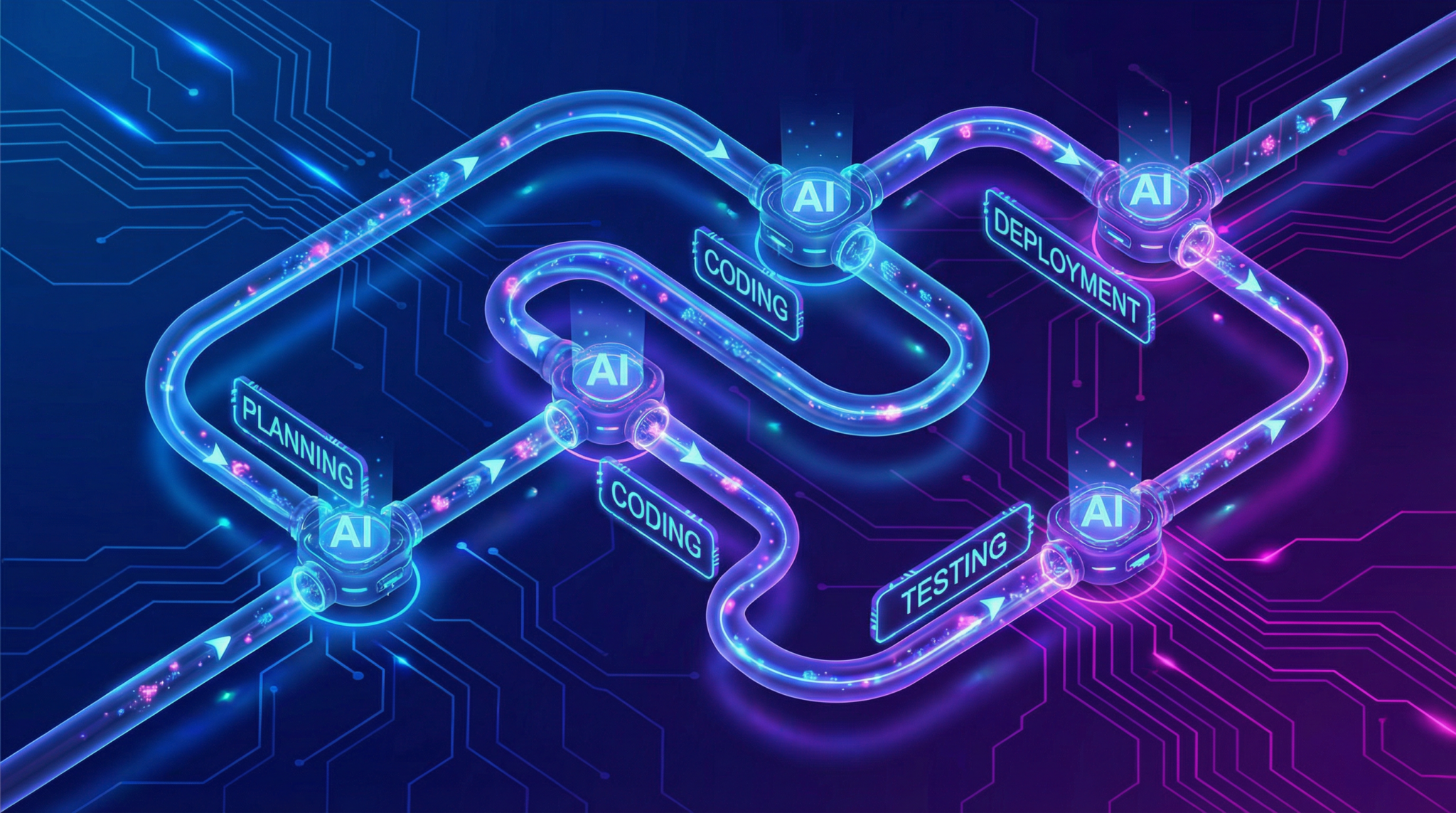
Advanced Workflows: Multi-Agent Coding Pipelines
Welcome to Part 6 of the ChatGPT Coding Masterclass series. In this module, we dive deeply into Advanced Workflows with a focus on Multi-Agent Coding Pipelines leveraging the latest in AI agentic orchestration, harness engineering, and cloud-native development ecosystems powered by GPT-5.3-Codex.
This tutorial is crafted for professional developers seeking to architect, implement, and master complex multi-agent workflows that enable scalable, robust, and autonomous coding pipelines. We leverage the Codex CLI, the OpenAI Agents SDK, and integrate tightly with modern IDEs such as VS Code, Cursor, and Windsurf to deliver industry-leading developer experiences.
Table of Contents
- Theoretical Foundations: Why Multi-Agent Pipelines?
- Agent Harness Engineering: The Core Infrastructure
- Planner-Generator-Evaluator Architecture Deep Dive
- Setting Up the Environment: SDK & CLI Installation
- Step-by-Step Implementation Guide
- IDE Integrations: VS Code, Cursor & Windsurf
- Advanced Prompt Templates for Multi-Agent Pipelines
- Concrete Code Examples: Python & Rust
- Testing Harnesses & QA Automation
- Pro Tips, Common Pitfalls & Edge Cases
- Summary & Next Steps
Theoretical Foundations: Why Multi-Agent Pipelines?
The “Why” Behind Multi-Agent Systems
Traditional AI coding assistants operate as monolithic models—single agents tasked with end-to-end code generation. While powerful, this approach struggles with:
- Context Saturation: A single agent’s context window can be overwhelmed by large, complex specs.
- Specialization Limitations: Task heterogeneity demands specialized reasoning modules.
- Error Propagation: Mistakes early in the pipeline cascade downstream.
- Lack of Modularity: Difficult to debug, optimize, and maintain.
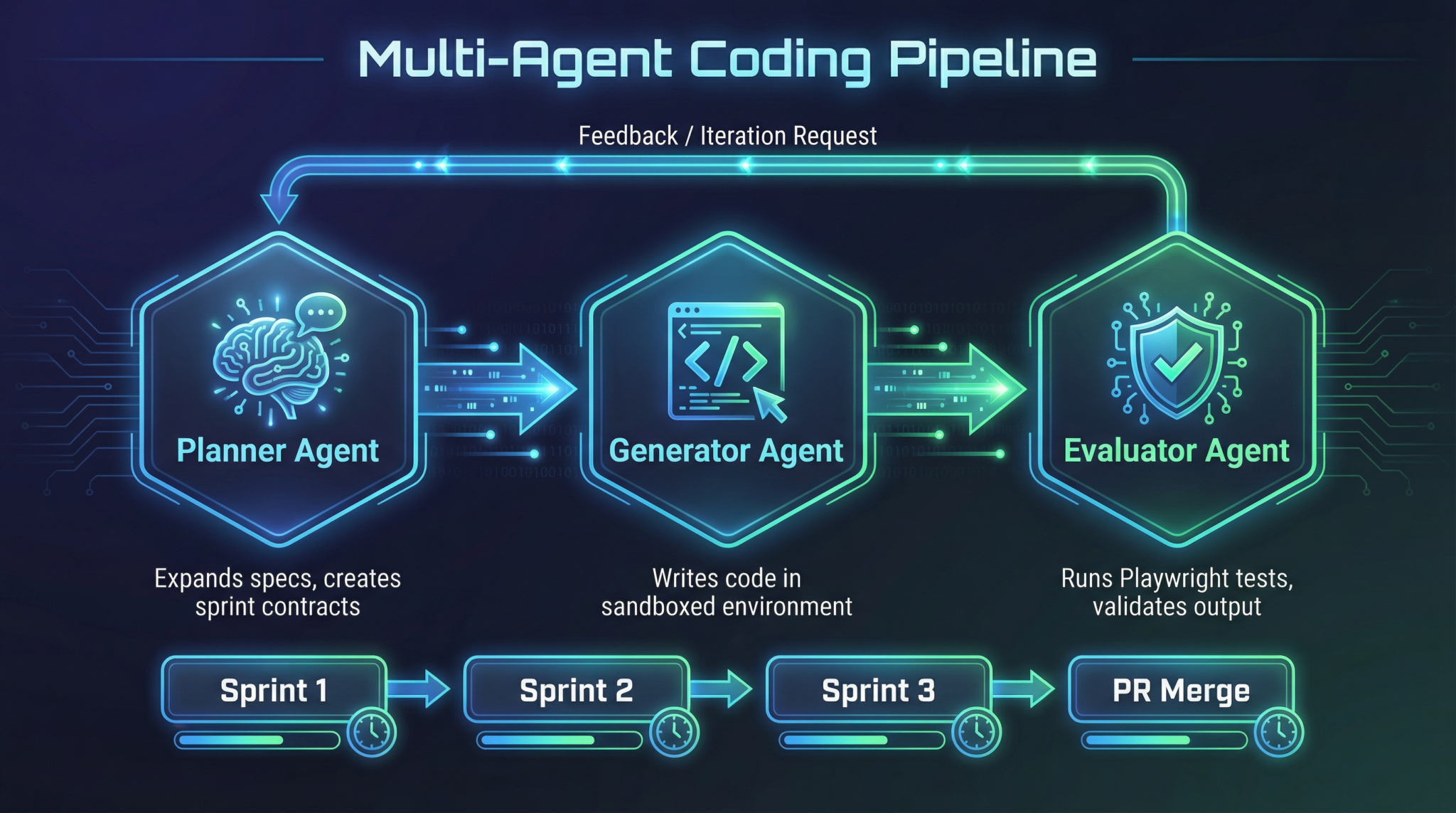
By contrast, multi-agent pipelines break the coding workflow into atomic, cooperative agents, each with a narrow, well-defined responsibility. This mirrors microservices in cloud architecture:
- Planner Agent: Expands and refines specs.
- Generator Agent: Implements code sprints.
- Evaluator Agent: Tests and verifies output.
This modularity enhances robustness, scalability, and maintainability.
The “How”: Orchestration & Harnessing
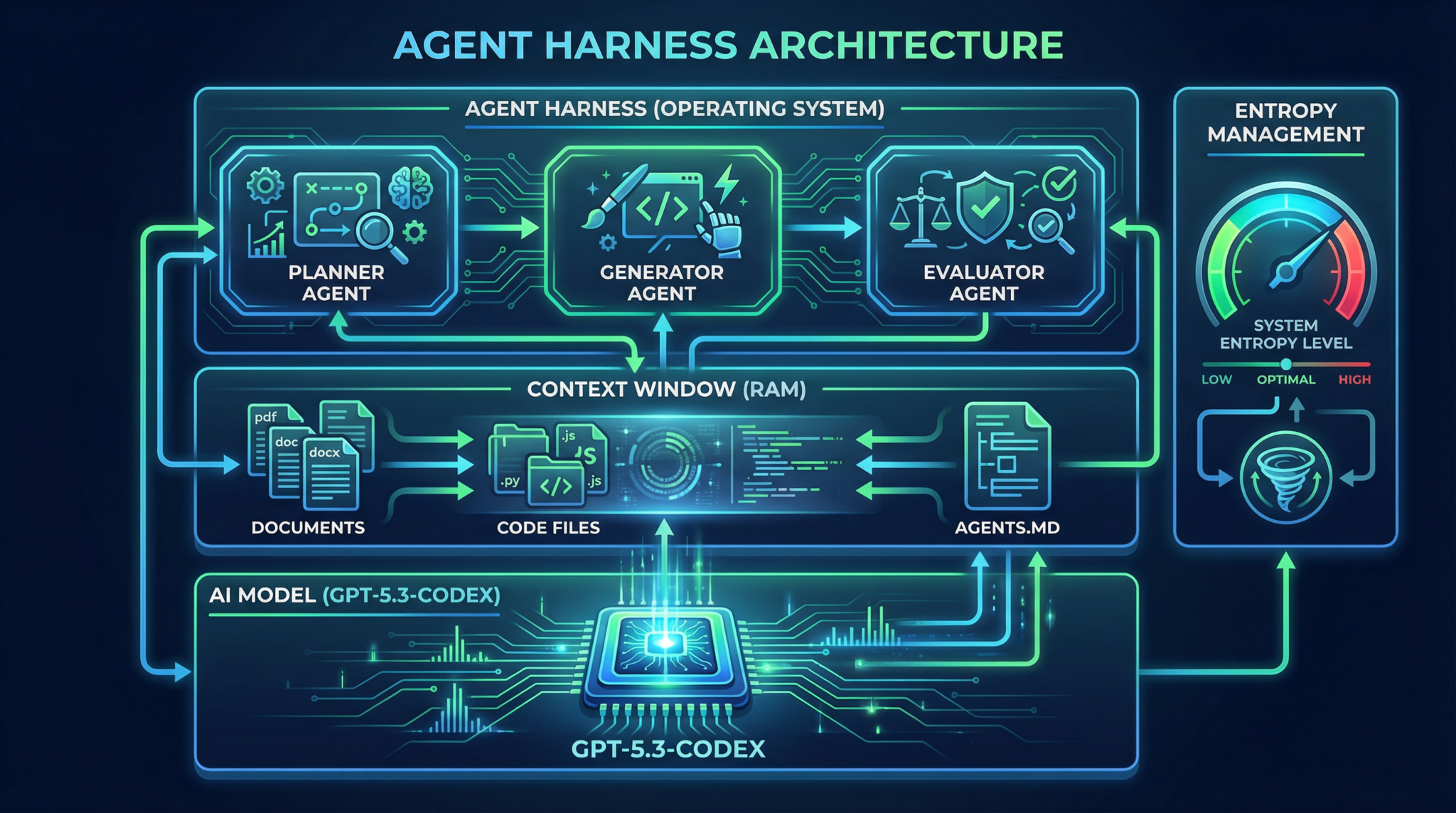
To unlock multi-agent workflows, an Agent Harness infrastructure is required to:
- Manage context windows (RAM) and model compute (CPU).
- Enforce architectural constraints like API rate limits and memory budgets.
- Implement entropy management to balance exploration and exploitation in output variation.
- Apply progressive disclosure—training agents to refer to an
AGENTS.mdpattern, a short but powerful context file that maps to deeper documentation and codebases, enabling recursive knowledge retrieval.
Multi-agent orchestration leverages OpenAI Agents SDK and Codex CLI tools to automate this harnessing, scheduling, and error correction process end-to-end.
Agent Harness Engineering: The Core Infrastructure
The Agent Harness is the operating system for AI agents, abstracting complexities of long-running AI tasks into a reliable, observable, and controllable framework.
Components of the Harness
- Context Engineering: Dynamically manages input tokens, injecting relevant context files (
AGENTS.md, design docs, test logs). - Architectural Constraints: Implements throttling, API quotas, retry policies.
- Entropy Management: Controls randomness in generation, balancing creativity vs. determinism.
- Verification & Correction Loops: Automated pipelines for bug reproduction, video recording, fix implementation, and PR generation.
The AGENTS.md Pattern
A lightweight, human- and AI-readable file that acts as an index or map for agents:
# AGENTS.md

- Planner: /docs/planner_spec.md
- Generator: /design/generator_architecture.md
- Evaluator: /tests/playwright_suite.md
- Repo: https://github.com/org/project
Injected early into each agent’s context, it enables progressive disclosure—agents start small and expand knowledge scope as needed, reducing context overload.
Tip: Keep AGENTS.md minimal but comprehensive. It should never exceed 300 tokens to avoid context bloat.
Planner-Generator-Evaluator Architecture Deep Dive
The 3-agent architecture is the foundational pattern for multi-agent coding pipelines.
| Agent | Role | Responsibilities | Outputs |
| Planner | Spec Expansion | Breaks down large specs into modular tasks; defines sprint contracts | Task lists, detailed specs, sprint contracts |
| Generator | Code Implementation | Consumes sprint contracts and generates code; adheres to architectural constraints | Code chunks, commits, documentation |
| Evaluator | QA & Test Automation | Runs tests, reproduces bugs, records videos, verifies fixes | Test reports, bug reproductions, PR comments |
Interaction Flow
- Planner expands the project spec into sprint contracts.
- Generator sequentially executes sprints, emitting incremental code.
- Evaluator validates outputs and triggers correction loops.
- Feedback to Planner for replanning if needed.
This feedback loop ensures autonomous, iterative refinement with minimal human intervention.
Setting Up the Environment: SDK & CLI Installation
1. Install Codex CLI (Rust-based)
# Install Rust toolchain if not present
curl --proto '=https' --tlsv1.2 -sSf https://sh.rustup.rs | sh

# Clone Codex CLI repo
git clone https://github.com/openai/codex-cli.git
cd codex-cli

# Build and install
cargo install --path .
Verify installation:
codex --version
# Expected output: codex 1.2.0
2. Install OpenAI Agents SDK (Python)
pip install openai-agents-sdk
3. Initialize an Agent Harness Project
mkdir multi-agent-project && cd multi-agent-project

# Initialize harness config
codex init-harness --name multi-agent-harness --language python
This scaffolds the directory with:
harness.yaml— harness configAGENTS.md— agent map filespecs/— project specificationssrc/— source codetests/— test suites
Step-by-Step Implementation Guide
Step 1: Define AGENTS.md
Create concise agent map pointing to spec files:
# AGENTS.md

- Planner: specs/planner_spec.md
- Generator: specs/generator_spec.md
- Evaluator: specs/evaluator_spec.md
- Repo: https://github.com/org/multi-agent-project
Step 2: Write Planner Spec (specs/planner_spec.md)
# Planner Spec

## Objective
Break down feature X into sprint tasks with acceptance criteria.

## Constraints
- Max tokens per sprint: 1500
- Output format: JSON task list

## Progressive Disclosure
Refer to `AGENTS.md` for design docs.
Step 3: Implement Planner Agent Using OpenAI Agents SDK
from openai_agents_sdk import Agent, Harness

class PlannerAgent(Agent):
    def run(self, context):
        # Load specs from context
        spec = context.get('planner_spec.md')
        # Generate sprint breakdown
        sprints = self.llm.generate_sprints(spec)
        # Return JSON tasks
        return sprints

if __name__ == "__main__":
    harness = Harness('multi-agent-harness')
    planner = PlannerAgent(harness.context)
    planner_output = planner.run(harness.context)
    print(planner_output)
Step 4: Use Codex CLI to Run Planner
codex run --agent planner --harness multi-agent-harness
Expected output: JSON list of sprint contracts.
Step 5: Implement Generator Agent
class GeneratorAgent(Agent):
    def run(self, context):
        sprints = context.get('planner_output')
        code_chunks = []
        for sprint in sprints:
            code = self.llm.generate_code(sprint['description'])
            code_chunks.append(code)
        return code_chunks
Run generator:
codex run --agent generator --harness multi-agent-harness
Step 6: Implement Evaluator Agent Using Playwright MCP
from playwright.sync_api import sync_playwright

class EvaluatorAgent(Agent):
    def run(self, context):
        code = context.get('generator_output')
        with sync_playwright() as p:
            browser = p.chromium.launch()
            page = browser.new_page()
            # Load test suite and run
            result = self.run_tests(page, code)
            browser.close()
        return result
Run evaluator:
codex run --agent evaluator --harness multi-agent-harness
Step 7: Automate Full Autonomy Loop
Create a pipeline script:
codex pipeline run --harness multi-agent-harness --agents planner,generator,evaluator
This orchestrates:
- Validate -> Reproduce bug -> Record video -> Fix -> Re-validate -> PR generation
IDE Integrations: VS Code, Cursor & Windsurf
VS Code Setup
- Install GPT-5.3 Codex Plugin from Marketplace.
- Configure plugin with API key and Harness project path.
- Use Codex CLI integrated terminal for commands.
- Use Agent Dashboard extension to visualize agent statuses and logs.
- Enable Live Test Runner linked to Evaluator agent.
Cursor Setup
- Import
multi-agent-harnessrepo. - Use Agent Pipeline View to run Planner, Generator, Evaluator sequentially.
- Cursor’s Context Explorer allows you to browse injected
AGENTS.mdreferences. - Supports inline prompt templating and variable injection.
Windsurf Setup
- Windsurf supports cloud sandboxing.
- Connect Windsurf workspace to your harness repo.
- Use Windsurf’s multi-agent orchestration UI to parallelize sprint generation.
- Integrated video capture for Evaluator agent QA loops.
Tip: For maximum efficiency, use VS Code for coding + Windsurf for parallel test automation + Cursor for prompt engineering and iterative tuning.
Advanced Prompt Templates for Multi-Agent Pipelines
Below are 5 advanced prompt templates, designed for each pipeline agent role with variable placeholders.
1. Planner Agent Prompt Template
You are the Planner agent. Given the following high-level project specification:

{project_spec}

Break it down into discrete sprint tasks. Each sprint must not exceed {max_tokens} tokens in description.

Output format: JSON array with fields: "id", "title", "description", "acceptance_criteria".

Refer to AGENTS.md for documentation links.

Begin with sprint 1.
2. Generator Agent Prompt Template
You are the Generator agent.

Sprint Contract:
Title: {sprint_title}
Description: {sprint_description}

Write production-quality code in {language} that fulfills the sprint requirements.

Adhere to architectural constraints:
- Max function size: {max_function_size} lines
- Use existing modules from {repo_url}

Output the complete code snippet with comments.
3. Evaluator Agent Prompt Template
You are the Evaluator agent.

Given the source code:

{code_snippet}

Run the test suite located at {test_suite_location} using the Playwright Multi-Context Player.

Report any failing tests with detailed logs.

If bugs are found, reproduce and record a video. Attach video link in your report.
4. Progressive Disclosure Prompt for All Agents
Agents are provided with a minimal context file AGENTS.md:

{agents_md_content}

If additional information is required, query the mapped documents sequentially.

Respond only with references to documentation or code files, never full contents unless explicitly asked.
5. Correction Loop Prompt Template
You are the correction agent in the pipeline.

Input:
- Bug reproduction video: {video_url}
- Failing test logs: {test_logs}
- Current code: {current_code}

Analyze the bug, propose a minimal fix, and generate a pull request description.

Output:
- Fix code diff
- PR description
- Validation steps
Tip: Parameterize prompts carefully. Use environment variables or config files for tokens like {max_tokens}, {repo_url}, and {language} to avoid hardcoding.
Concrete Code Examples: Python & Rust
1. Python: Planner Agent Implementation
from openai_agents_sdk import Agent, Harness
import json

class PlannerAgent(Agent):
    def run(self, context):
        spec = context.read_file('specs/planner_spec.md')
        max_tokens = context.get_config('max_tokens', 1500)

        prompt = f"""
        You are the Planner agent. Given the project spec:
        {spec}
        Break down into sprints <= {max_tokens} tokens. Output JSON list with id, title, description, acceptance_criteria.
        """
        response = self.llm.complete(prompt)
        try:
            sprints = json.loads(response)
        except json.JSONDecodeError:
            self.logger.error("Failed to parse planner output")
            raise

        context.write('planner_output.json', json.dumps(sprints, indent=2))
        return sprints

if __name__ == "__main__":
    harness = Harness('./multi-agent-harness')
    agent = PlannerAgent(harness.context)
    sprints = agent.run(harness.context)
    print(sprints)
2. Rust: Generator Agent Snippet
use openai_agents_sdk::{Agent, Harness};
use serde_json::Value;

struct GeneratorAgent;

impl Agent for GeneratorAgent {
    fn run(&self, context: &mut Harness) -> Result<(), Box<dyn std::error::Error>> {
        let planner_output = context.read_file("planner_output.json")?;
        let sprints: Vec<Value> = serde_json::from_str(&planner_output)?;

        let mut generated_code = Vec::new();
        for sprint in sprints {
            let description = sprint["description"].as_str().unwrap_or_default();
            let prompt = format!("Write Rust code for this sprint: {}", description);
            let code = context.llm_complete(&prompt)?;
            generated_code.push(code);
        }
        let combined_code = generated_code.join("\n\n");
        context.write_file("src/generated_code.rs", &combined_code)?;
        Ok(())
    }
}
Testing Harnesses & QA Automation
Playwright MCP for Evaluator Agent
Use the multi-context player (MCP) to run UI/Integration tests in isolated browser contexts. Sample Python test harness:
from playwright.sync_api import sync_playwright

def run_playwright_tests(test_files):
    with sync_playwright() as p:
        browser = p.chromium.launch(headless=True)
        context = browser.new_context()
        page = context.new_page()
        results = {}
        for test in test_files:
            page.goto(test['url'])
            result = page.evaluate(test['js_test'])
            results[test['name']] = result
        browser.close()
    return results
Automated Bug Reproduction & Video Recording
- Use Playwright’s video recording capabilities integrated into Evaluator agent.
- Store videos in cloud storage and link in PRs.
- Automate bug reproduction with deterministic seed inputs.
Pro Tips, Common Pitfalls & Edge Cases
| Scenario | Issue | Solution |
| Context Overload | Agents hitting token limits, truncating critical data | Use AGENTS.md and progressive disclosure to limit initial context; paginate large docs; compress context with embeddings |
| Entropy Mismanagement | Generator produces too random or too deterministic code | Tune temperature dynamically; use entropy management modules in harness |
| Pipeline Deadlocks | Evaluator finds a bug but Planner does not replan | Implement robust feedback loop with state validation and conditional triggers |
| API Rate Limits | Codex CLI commands fail intermittently due to throttling | Use harness throttling policies; exponential backoff retries; cache intermediate results |
| Test Flakiness | Evaluator reports inconsistent test failures | Use Playwright MCP’s isolated contexts; stabilize tests with mocks and fixed seeds |
Tip: Always version control your AGENTS.md and specs files. Changes here ripple through the entire pipeline.
Summary & Next Steps
In this module, you mastered:
- The theoretical underpinnings of multi-agent coding pipelines.
- The critical role of the Agent Harness in orchestrating complex workflows.
- How to implement the Planner, Generator, and Evaluator agents using the OpenAI Agents SDK.
- Using the Codex CLI for management and execution.
- IDE integration best practices for VS Code, Cursor, and Windsurf.
- Crafting advanced prompt templates to maximize agent autonomy.
- Concrete Python and Rust examples demonstrating architecture and implementation.
- Testing harnesses and QA automation with Playwright MCP.
- Pro tips and common pitfalls to avoid.
The next module will focus on Part 7: Autonomous Agent Monitoring, Debugging, and Continuous Improvement Loops, where we explore observability, telemetry, and advanced error correction techniques.
You’re now empowered to architect and deploy next-generation multi-agent coding pipelines that push the boundaries of AI-assisted software engineering. Harness the power of GPT-5.3-Codex, open-source tooling, and modern IDEs to build resilient, scalable, and fully autonomous developer workflows.
🔒 Unlock the Full Coding Masterclass Library
This is a premium deep-dive module. Register for free to access all 7 parts, downloadable templates, and the complete prompt library.
ChatGPT Coding Masterclass Series

