
ChatGPT Coding Masterclass Part 7: ChatGPT Coding Cheat Sheet + Resource Library
ChatGPT Coding Masterclass Series
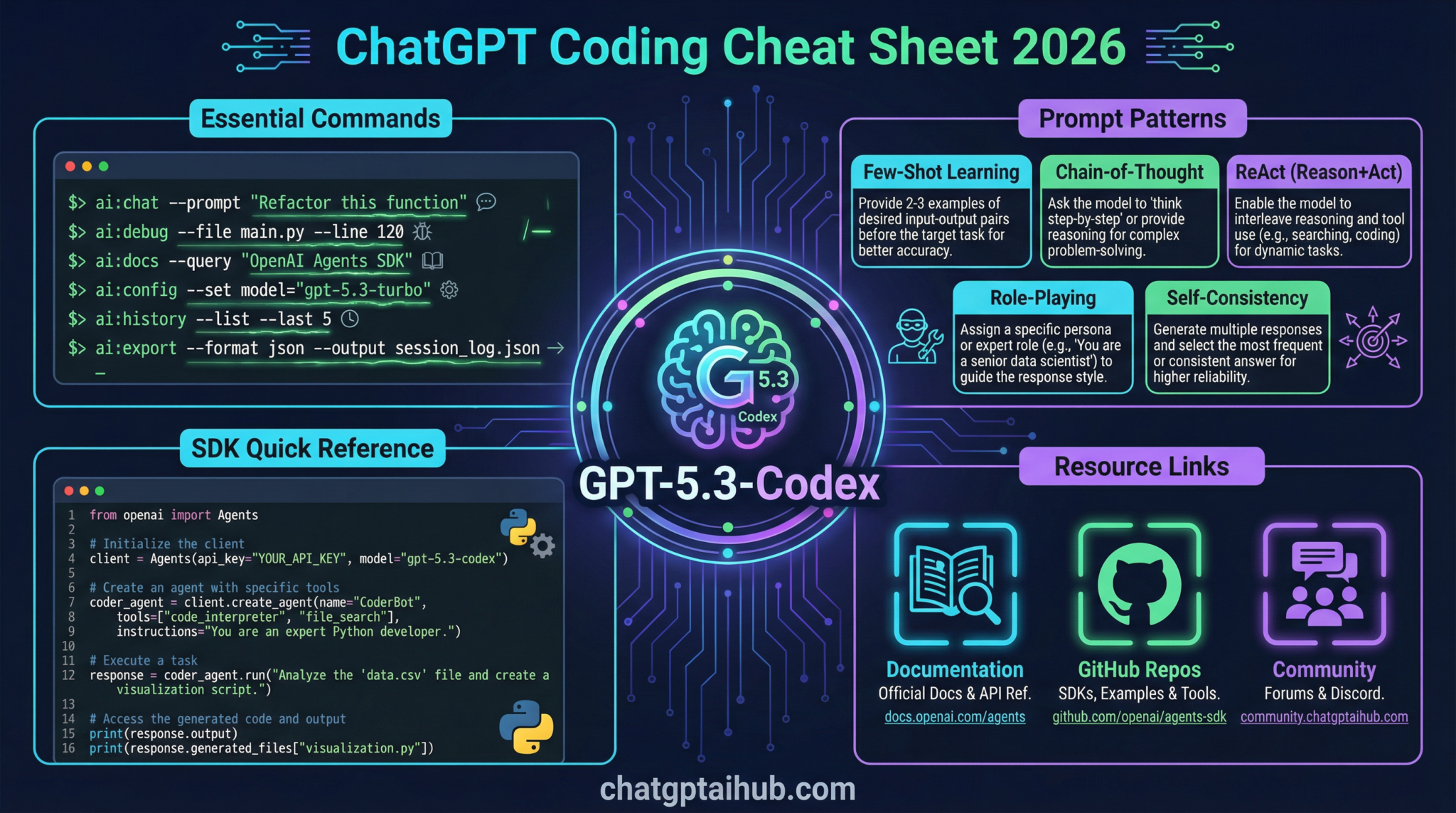
ChatGPT Coding Cheat Sheet + Resource Library
Welcome to Part 7 of the ChatGPT Coding Masterclass—the ultimate deep-dive into leveraging GPT-5.3-Codex and its ecosystem for professional-grade coding workflows. This module is your Nano Banana Pro level, massively expanded cheat sheet and resource library, designed to empower you with everything you need to architect, build, test, and deploy AI-powered coding agents and harnesses in 2026.
Table of Contents
- Deep-Dive Theoretical Overview
- Step-by-Step Implementation Guides
- OpenAI Agents SDK & Agent Harness Patterns
- Codex CLI: Usage & Commands
- IDE Integrations: Setup & Best Practices
- Advanced Prompt Templates for GPT-5.3-Codex
- Concrete Code Examples
- Pro Tips & Edge Cases
Deep-Dive Theoretical Overview
The Agent Harness Paradigm: OS for AI Models
At the core of the 2026 AI coding ecosystem is the Agent Harness—the sophisticated infrastructure layer that wraps the raw GPT-5.3-Codex model (think: the CPU) to manage long-running, complex tasks reliably and securely. This harness acts like an Operating System (OS):
- Model = CPU: The raw, powerful core computation engine.
- Context = RAM: The working memory that holds prompt context, code snippets, and state.
- Harness = OS: Manages resources, enforces constraints, and orchestrates agent workflows.
The harness abstracts away the “wild west” nature of raw LLM calls by enforcing:
- Architectural Constraints: Strict interface boundaries, memory management, rate limiting, and API governance.
- Context Engineering: Intelligent context injection, AGENTS.md pattern to progressively disclose knowledge.
- Entropy Management: Reducing randomness and hallucination via feedback loops and output verification.
AGENTS.md Pattern: Progressive Disclosure Map
Long-term agent autonomy requires hierarchy and modular knowledge. The AGENTS.md file acts as a map or index injected into the agent’s context. It contains:
- Links to design docs, source of truth repos, and detailed spec expansions.
- Enables the agent to progressively discover deeper knowledge instead of overwhelming it upfront.
- Supports context window management by chunking information and referencing external knowledge.
Planner, Generator, Evaluator Architecture
The cutting-edge agent orchestration pattern breaks down complex specs into manageable tasks:
| Agent Role | Purpose |
|---|---|
| Planner | Expands high-level specs into detailed subtasks. |
| Generator | Implements code via “Sprint Contracts” ensuring deliverable quality. |
| Evaluator | Uses Playwright MCP (Multi-Channel Playwright) for automated QA, validation, and bug reproduction. |
This triad enables:
- Full autonomy loops: Validate -> Reproduce bug -> Record video -> Fix -> Validate -> Open PR.
- Parallelization: Multiple generator agents can sprint in parallel on parts of a spec.
- Continuous feedback: Evaluator ensures code correctness and adherence to spec.
Step-by-Step Implementation Guides
1. Setting Up a Minimal Agent Harness with GPT-5.3-Codex
-
Install the OpenAI Agents SDK
bash

   cargo install openai-agents-sdk
or for Node.js ecosystem:
bash

npm install @openai/agents-sdk -
Define your AGENTS.md file with core knowledge map:
“`markdown
# AGENTS.md
## Overview
This agent is designed to manage long-running coding tasks.
## References - Spec Doc
-
Design Doc
“` -
Initialize your harness config (Rust example):
“`rust
use openai_agents_sdk::Harness;
fn main() {
let harness = Harness::builder()
.model(“gpt-5.3-codex”)
.context_files(vec![“AGENTS.md”])
.constraints(vec![“max_tokens=4000”, “temperature=0.2”])
.build()
.unwrap();
harness.run();
}
“`
-
Implement Planner, Generator, Evaluator agents as separate modules with inter-agent communication channels.
-
Run the harness and monitor logs for constraint enforcement and entropy metrics.
2. Using the Planner-Generator-Evaluator Pattern
- Planner
- Load high-level spec.
- Break down into sprint contracts (e.g., “Implement API endpoint”, “Add unit tests”).
-
Save sprint contracts to shared context layer.
-
Generator
- Read sprint contracts.
- Use prompt templates to generate code snippets or modules.
-
Commit partial outputs to version-controlled sandbox.
-
Evaluator
- Load generated code in sandbox.
- Run Playwright MCP tests simulating real user scenarios.
- Record any bugs or regressions with video logs.
-
Pass or return feedback to Generator.
-
Loop until all sprint contracts are validated and merged.
3. Progressive Disclosure Using AGENTS.md
- Inject a minimal AGENTS.md snippet in the initial prompt.
- Upon request or detected need, the agent queries external knowledge via links.
- Harness enforces context window limits by only loading required document chunks.
- This reduces hallucination and improves factual accuracy.
OpenAI Agents SDK & Agent Harness Patterns
Key Components
- Harness: Core runtime environment managing model lifecycle and context injection.
- Agent: Modular AI modules (Planner, Generator, Evaluator) instantiated within the harness.
- Context Engine: Dynamically injects, updates, and prunes context files like AGENTS.md.
- Constraint Manager: Enforces token limits, temperature caps, and API rate limits.
- Entropy Controller: Monitors output randomness; triggers re-rolls or resets if entropy exceeds thresholds.
Example: Initializing an Agent with SDK (TypeScript)
import { Harness, Agent, ContextFile } from '@openai/agents-sdk';

async function main() {
  const harness = new Harness({
    model: 'gpt-5.3-codex',
    contextFiles: [new ContextFile('AGENTS.md')],
    constraints: { maxTokens: 4000, temperature: 0.1 }
  });

  const planner = new Agent('Planner', harness);
  const generator = new Agent('Generator', harness);
  const evaluator = new Agent('Evaluator', harness);

  await harness.start();

  // Example interaction loop
  const spec = await harness.loadSpec('feature_spec.md');
  const plan = await planner.call(`Expand this spec into sprint contracts:\n${spec}`);

  const sprintContract = extractSprintContract(plan);
  const code = await generator.call(`Generate code for sprint contract:\n${sprintContract}`);

  const evalResult = await evaluator.call(`Run QA tests on this code:\n${code}`);

  if (evalResult.passed) {
    console.log('Sprint contract completed successfully');
  } else {
    console.error('QA failed:', evalResult.details);
  }

  await harness.shutdown();
}

main();
Codex CLI: Usage & Commands
The Codex CLI is a Rust-based command line tool to interact with GPT-5.3-Codex models, build agents, and manage sandboxes.
Installation
cargo install codex-cli
Key Commands & Flags
| Command | Description |
codex-cli init |
Initialize a new Codex project with default configs and AGENTS.md scaffold. |
codex-cli run --agent=planner --spec=spec.md |
Run the Planner agent on a specification file. |
codex-cli generate --contract=contract.json --output=src/ |
Generate code based on a sprint contract JSON file, output to source directory. |
codex-cli evaluate --code=src/ --tests=tests/ |
Run Evaluator agent with Playwright MCP based tests. |
codex-cli sandbox --start |
Starts a cloud-native sandbox environment for secure code execution. |
codex-cli logs --agent=generator |
Stream logs of the generator agent in real-time. |
Example Workflow
codex-cli init
codex-cli run --agent=planner --spec=feature_spec.md
codex-cli generate --contract=sprint_contract.json --output=src/
codex-cli evaluate --code=src/ --tests=tests/
codex-cli sandbox --start
codex-cli logs --agent=generator
Expected output on successful evaluation:
[EVALUATOR] Running Playwright MCP tests...
[EVALUATOR] 12 tests passed, 0 failed.
[EVALUATOR] Recording video logs...
[EVALUATOR] Evaluation complete. Ready to open PR.
Use the --verbose flag with all codex-cli commands to get detailed debug-level logs, especially useful when troubleshooting harness constraints or entropy warnings.
IDE Integrations: Setup & Best Practices
Supported IDEs
- VS Code (native GPT-5.3 plugin)
- Cursor
- Windsurf
- JetBrains Suite (IntelliJ, PyCharm, WebStorm)
VS Code GPT-5.3 Plugin Setup
- Install from the VS Code Marketplace:
GPT-5.3 Codex AI - Configure API key in extension settings (
openai.apiKey). - Enable Agent Harness Mode for long-running task management.
- Load your project folder with AGENTS.md and codex-cli config.
- Use command palette to:
- Run
Codex: Run Planner Agent - Run
Codex: Generate Code from Contract - Run
Codex: Evaluate Code
Cursor IDE Integration
- Cursor supports multi-agent concurrency natively.
- Drag-and-drop AGENTS.md into your workspace to bootstrap.
- Use the Agent Harness Dashboard to monitor agent states and entropy metrics.
- Supports Playwright MCP integration for live test feedback.
Windsurf Setup
- Windsurf’s cloud-native environment syncs with Codex CLI sandboxes.
- Supports real-time video recording of evaluation runs.
- Use Windsurf’s UI to configure progressive disclosure policies for your agents.
Advanced Prompt Templates for GPT-5.3-Codex
Below are five advanced prompt templates engineered for professional developer workflows using GPT-5.3-Codex. Replace variable placeholders as needed.
1. Planner Agent: Spec Expansion Template
You are the Planner agent. Your goal is to expand the following high-level specification into detailed sprint contracts with acceptance criteria and estimated effort.

SPECIFICATION:
{{spec_text}}

Output a JSON array of sprint contracts with the following keys:
- id: unique string
- description: detailed task description
- acceptance_criteria: list of criteria
- estimated_hours: number

Example output:
[
  {
    "id": "SC-001",
    "description": "Implement user login API with JWT authentication",
    "acceptance_criteria": [
      "POST /login endpoint accepts username and password",
      "Returns JWT token on success",
      "Returns 401 on invalid credentials"
    ],
    "estimated_hours": 8
  },
  ...
]

Begin now.
2. Generator Agent: Code Sprint Contract Template
You are the Generator agent. Given the sprint contract below, generate clean, idiomatic {{language}} code that fulfills all acceptance criteria. Include inline comments and follow company style guides.

SPRINT CONTRACT:
ID: {{contract_id}}
DESCRIPTION: {{contract_description}}
ACCEPTANCE CRITERIA:
{{acceptance_criteria_list}}

Provide the complete code files with appropriate module structure.
3. Evaluator Agent: Playwright MCP QA Template
You are the Evaluator agent. Using Playwright MCP, write test scripts to validate the following code module. Ensure all acceptance criteria are covered.

MODULE DESCRIPTION:
{{module_description}}

ACCEPTANCE CRITERIA:
{{acceptance_criteria_list}}

Output Playwright test code ready to run in the test harness.
4. Bug Reproduction & Fix Loop Template
You are the Evaluator agent. A test has failed with the following error:

ERROR MESSAGE:
{{error_message}}

Steps to reproduce:
{{steps}}

Record a video of the failure. Then, as the Generator agent, provide a patch to fix the bug with a detailed explanation of the root cause and fix.

Output format:
- Video recording link
- Patch code with comments
- Explanation
5. Progressive Disclosure Query Template
You are an agent with limited initial context. Refer to AGENTS.md for the knowledge map. If you encounter unknown references, respond with queries requesting specific documents or sections.

Current task:
{{task_description}}

AGENTS.md summary:
{{agents_md_excerpt}}

List what additional documents or references you need to complete the task.
Use these templates as foundational building blocks for your agents’ prompt engineering workflows. Custom-tailor the acceptance criteria and code style to match your team’s standards.
Concrete Code Examples
Example 1: Rust Agent Harness Setup with Planner, Generator, Evaluator
use openai_agents_sdk::{Agent, Harness, ContextFile};

fn main() {
    // Initialize the harness
    let harness = Harness::builder()
        .model("gpt-5.3-codex")
        .context_files(vec![ContextFile::new("AGENTS.md")])
        .constraints(vec!["max_tokens=4000".into(), "temperature=0.1".into()])
        .build()
        .expect("Failed to build harness");

    // Create agents
    let planner = Agent::new("Planner", &harness);
    let generator = Agent::new("Generator", &harness);
    let evaluator = Agent::new("Evaluator", &harness);

    // Example workflow
    let spec_text = std::fs::read_to_string("feature_spec.md").unwrap();

    let plan_prompt = format!(
        "Expand this spec into sprint contracts:\n{}",
        spec_text
    );
    let plan_response = planner.call(&plan_prompt).unwrap();

    // Parse sprint contracts from JSON
    let sprint_contracts: Vec<SprintContract> =
        serde_json::from_str(&plan_response).expect("Invalid JSON from planner");

    for contract in sprint_contracts.iter() {
        let gen_prompt = format!(
            "Generate Rust code for sprint contract:\nID: {}\nDescription:{}\nAcceptance Criteria:\n{}",
            contract.id,
            contract.description,
            contract.acceptance_criteria.join("\n")
        );

        let code = generator.call(&gen_prompt).unwrap();

        // Save code to sandbox directory
        std::fs::write(format!("sandbox/src/{}.rs", contract.id), &code).unwrap();

        // Evaluate generated code
        let eval_prompt = format!(
            "Run Playwright MCP tests on the code for contract {} with acceptance criteria:\n{}",
            contract.id,
            contract.acceptance_criteria.join("\n")
        );
        let eval_result = evaluator.call(&eval_prompt).unwrap();

        println!("Evaluation Result for {}: {}", contract.id, eval_result);
    }

    harness.shutdown().unwrap();
}

#[derive(serde::Deserialize)]
struct SprintContract {
    id: String,
    description: String,
    acceptance_criteria: Vec<String>,
    estimated_hours: u32,
}
Example 2: TypeScript Module Generator Agent with OpenAI Agents SDK
import { Harness, Agent, ContextFile } from '@openai/agents-sdk';

interface SprintContract {
  id: string;
  description: string;
  acceptance_criteria: string[];
  estimated_hours: number;
}

async function runGenerator(contract: SprintContract, harness: Harness) {
  const generator = new Agent('Generator', harness);

  const prompt = `
You are the Generator agent. Generate TypeScript code fulfilling this sprint contract:

ID: ${contract.id}
Description: ${contract.description}
Acceptance Criteria:
${contract.acceptance_criteria.map(c => `- ${c}`).join('\n')}

Output a complete, well-documented module.
`;

  const code = await generator.call(prompt);

  // Save generated code to file system or sandbox
  const fs = require('fs');
  fs.writeFileSync(`sandbox/src/${contract.id}.ts`, code);

  return code;
}

async function main() {
  const harness = new Harness({
    model: 'gpt-5.3-codex',
    contextFiles: [new ContextFile('AGENTS.md')],
    constraints: { maxTokens: 4000, temperature: 0.2 },
  });

  await harness.start();

  const contract: SprintContract = {
    id: 'SC-002',
    description: 'Implement user registration backend with validation',
    acceptance_criteria: [
      'POST /register endpoint accepts user data',
      'Validates email and password strength',
      'Stores user securely in database'
    ],
    estimated_hours: 10,
  };

  const code = await runGenerator(contract, harness);

  console.log('Generated code:', code);

  await harness.shutdown();
}

main();
Pro Tips & Edge Cases
1. Managing Context Window Overflow
- Problem: Complex specs + AGENTS.md + code snippets can exceed GPT-5.3-Codex’s 32k token window.
- Solution:
- Implement context pruning: Load only relevant AGENTS.md sections on demand.
- Use embedding-based retrieval to fetch snippets.
- Chunk specs into smaller sprint contracts.
2. Entropy Spikes & Hallucinations
- Problem: High temperature or unconstrained output causes hallucinations.
- Solution:
- Enforce low temperature (0.1 – 0.2) in constraints.
- Use Entropy Controller in harness to monitor and reset agent state if entropy crosses threshold.
- Implement output validators in Evaluator agent to catch hallucinated code.
3. Agent Communication Failures
- Problem: Inter-agent message queues get out of sync or drop messages.
- Solution:
- Use reliable message bus with ACK and retry semantics.
- Persist intermediate states to disk/db for recovery.
- Monitor harness logs for dropped packets.
4. Playwright MCP Test Flakiness
- Problem: UI tests intermittently fail due to timing or environment issues.
- Solution:
- Use retry policies with exponential backoff.
- Record video on every failure for root cause analysis.
- Stabilize test environment in sandbox with deterministic state.
5. Debugging Agent Output
- Always run with
--verboseand inspect: - Prompt templates for unintended instructions.
- AGENTS.md for outdated references.
- Entropy logs for sudden randomness spikes.
Maintain a versioned AGENTS.md repository and synchronize updates with your agents to prevent knowledge drift and stale context.
Closing Notes
This masterclass module distilled the most advanced, pragmatic, and exhaustive knowledge for building production-grade coding harnesses around GPT-5.3-Codex in 2026. Mastering the agent harness pattern, SDK usage, CLI tooling, IDE integration, prompt engineering, and continuous evaluation will enable you to architect scalable, autonomous AI coding systems that revolutionize software development workflows.
Happy coding with your AI agents! 🚀
🔒 Unlock the Full Coding Masterclass Library
This is a premium deep-dive module. Register for free to access all 7 parts, downloadable templates, and the complete prompt library.
ChatGPT Coding Masterclass Series

