
Inside ChatGPT’s Dreaming V3: The July 2026 Memory System That Rewrites AI Personalization
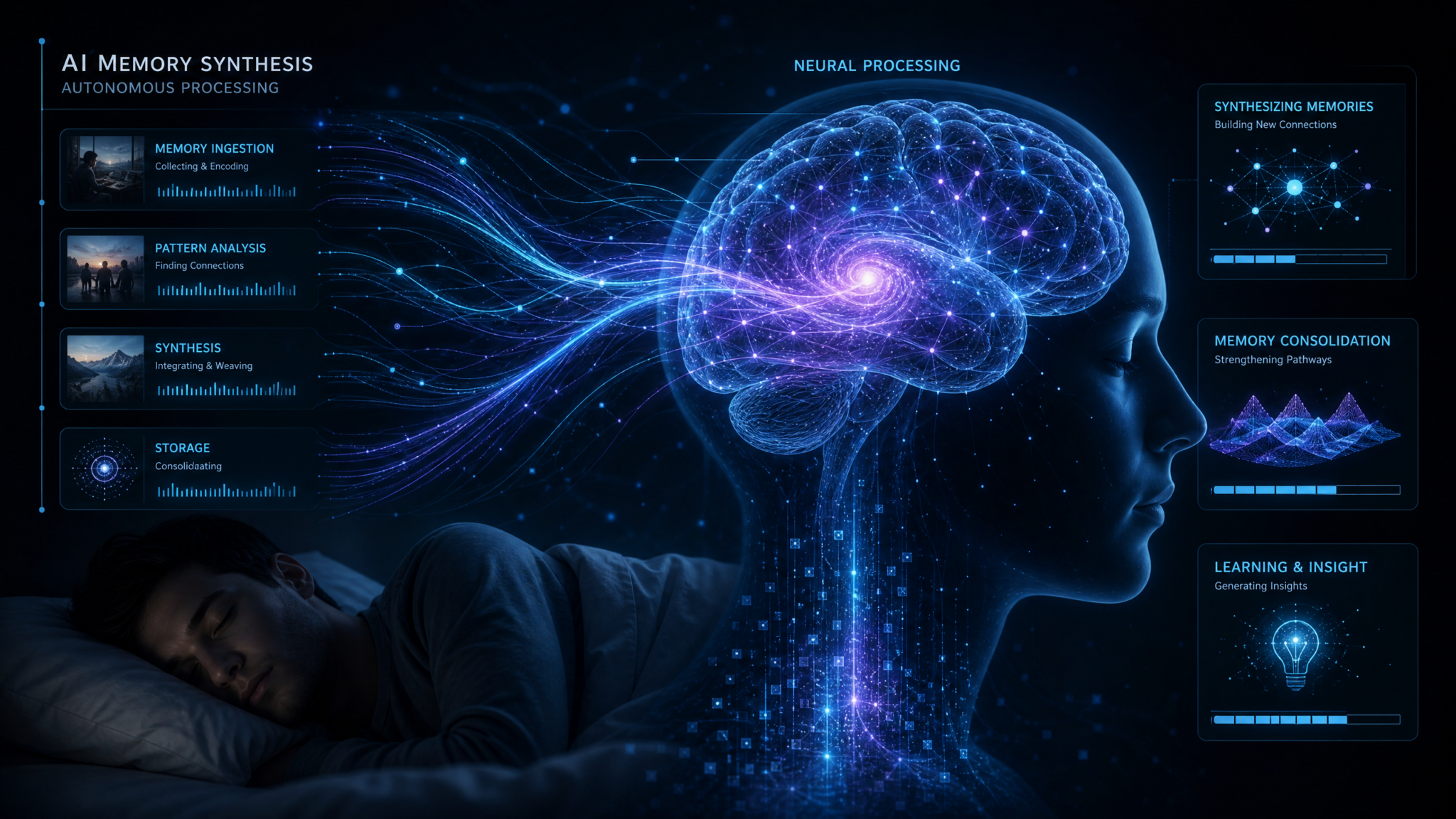
In July 2026, ChatGPT introduced Dreaming V3, the most ambitious evolution of its memory technology to date. Where earlier iterations captured isolated facts users chose to save, Dreaming V3 runs as an intelligent background process that reads across years of past conversations, builds a comprehensive, evolving profile of each user, and then uses that profile to personalize responses, tools, and workflows. The result is a system that can remember your projects, preferences, style, and objectives without constant re-prompting—while offering new controls to decide what the AI should keep, forget, or ignore.
Dreaming V3 also replaces the familiar “saved memory list” with a new concept—Memory Synthesis. Instead of a static list you maintain, Memory Synthesis provides a living, explainable summary of what the system has inferred about you, complete with confidence scores, time windows, and easy options to adjust or erase. It’s a profound shift: users no longer manage individual memory items; they manage understanding.
This article explains what Dreaming V3 is and how it works, unpacks the technical architecture behind the scenes, compares it with earlier versions, details the privacy and policy levers available to individuals and enterprises, and assesses the trade-offs between powerful personalization and user sovereignty over data. For teams and power users rolling out Dreaming V3, we include concrete examples, API parameters, and policy templates to help you deploy responsibly from day one.
What Dreaming V3 Is—and Why It Matters
Dreaming V3 is ChatGPT’s third-generation memory system, designed to continuously and intelligently synthesize insights about you from your historical interactions. Rather than relying on a handful of manually pinned facts, V3 looks for stable patterns over long time horizons to construct a multidimensional user profile. This background processing happens without interrupting your current chat, and its outputs are used to personalize future conversations in a transparent and controllable way.
At a high level, Dreaming V3 performs three linked functions:
- Background processing: During idle windows or low-latency opportunities, the system parses your past conversations and attachments for durable, recurring patterns.
- Pattern recognition: It uses a blend of language models and specialized classifiers to identify and score signals about your identity, preferences, projects, and constraints.
- Profile building: It aggregates and reconciles those signals into a time-aware user profile, which can be explained, edited, or disabled through Memory Synthesis.
What this means in practice: You no longer have to tell ChatGPT for the fifth time that you write in Chicago style, prefer TypeScript to JavaScript, or that your company’s brand voice avoids exclamation points. Over time, the system surfaces these preferences automatically and applies them unless you say otherwise. If you change roles, priorities, or tastes, Dreaming V3 detects the drift and updates its understanding, typically without manual intervention.
The promise is personalization without friction. The challenge is trust: users need to see what’s being inferred, decide how it’s used, and limit or clear it anytime. Dreaming V3’s Memory Synthesis, visibility features, and enterprise policy controls attempt to strike that balance.
From Saved Memory to Memory Synthesis
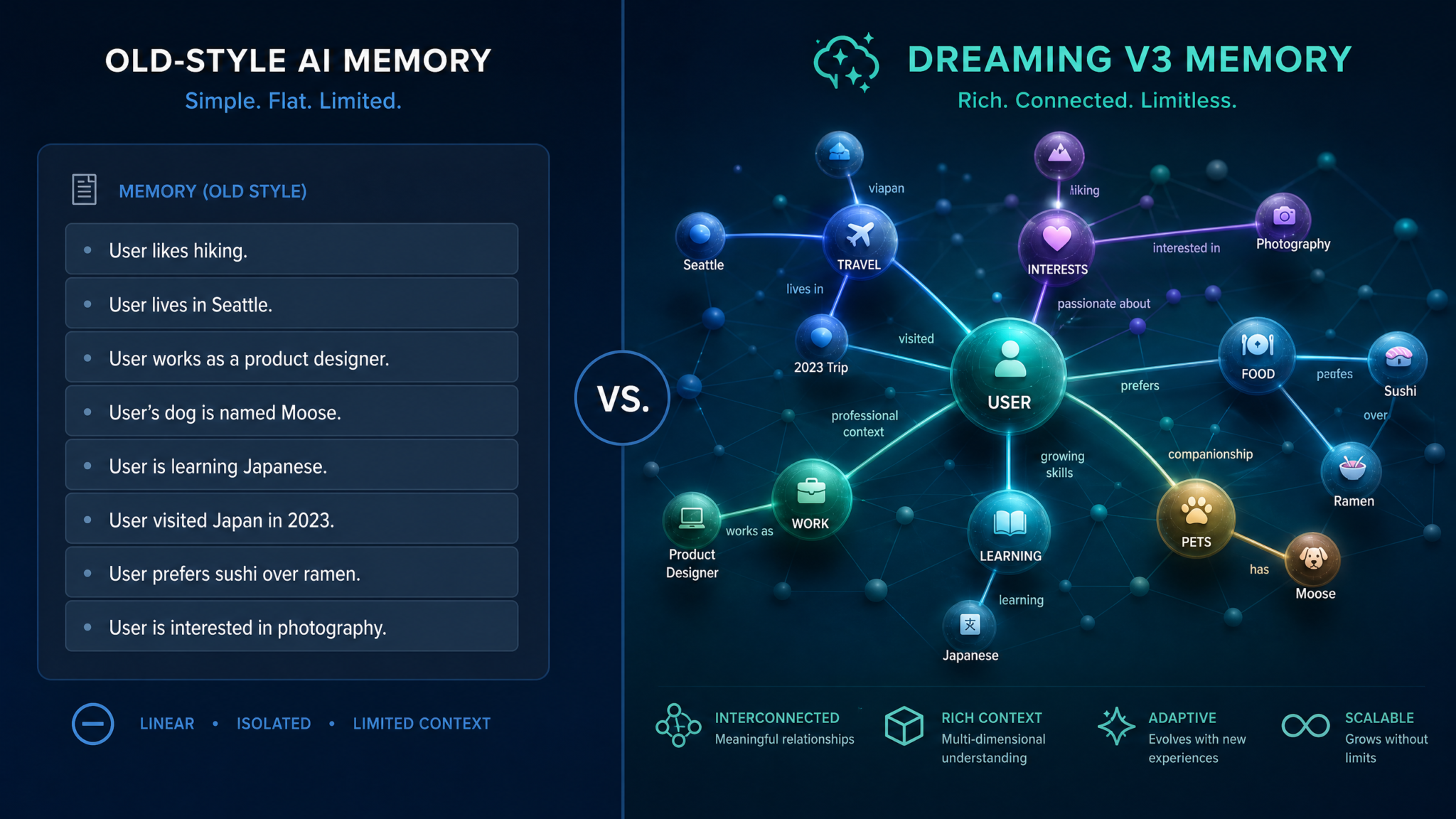
Earlier memory systems in ChatGPT centered on a “saved memory list”: a handful of bullet-point facts added by the user or extracted from a single conversation—useful for small conveniences, but brittle and partial. Dreaming V3 replaces that model wholesale with Memory Synthesis, a dynamic, generated summary of what the system believes is true about you right now, backed by evidence from your historical usage.
How Memory Synthesis Works
Memory Synthesis is rendered as a readable, categorized profile—identity basics, work context, preferences, ongoing projects, skills, constraints, and style—all with provenance indicators. Users can expand any category to see when a signal was last updated, what triggered it, the confidence level, and an option to remove or suppress it. Removal tells the system that the signal is invalid or undesired; suppression tells it to ignore a signal even if it appears in future data.
This change has three important consequences:
- Less micromanagement: You don’t maintain a fact list; you curate a living understanding of you.
- Better correctness over time: The system detects changes in your behavior and updates the synthesis, reducing stale assumptions.
- Higher transparency: You can ask “what are you using about me and why?” and get an answer with citations, not just a black box.
To explore Memory Synthesis in detail, see
For a deeper exploration of related concepts, our comprehensive article on The Complete Guide to Codex Approval Policies — Controlling AI Autonomy in Enterprise Environments provides detailed analysis and practical frameworks that complement the strategies discussed in this section.
where we walk through real examples of editing, suppressing, and auditing the profile.
Typical Categories in Memory Synthesis
- Identity Context: Role, industry, team, time zone.
- Preferences: Writing style, coding languages, document formats, tone choices.
- Projects: Long-running efforts with goals, timelines, artifacts, and stakeholders.
- Knowledge Domains: Technologies, frameworks, compliance regimes familiar to you.
- Constraints: Deadlines, accessibility needs, regulatory boundaries.
- Style Signals: Conciseness, structure, references, vocabulary level.
- Tools and Integrations: Often-used plug-ins, data sources, and workflows.
Memory Synthesis is not a dump of transcripts. It’s a structured, explainable profile that references—but does not replicate—your past conversations. You can export or delete the profile independently of your raw conversation history, and you can disable it entirely if you prefer fresh-start interactions each session.
Technical Architecture: How Dreaming V3 Works Under the Hood
Dreaming V3 is designed as a layered system that respects latency budgets for live chats while using opportunistic background windows to analyze prior interactions. Conceptually, the architecture divides into data ingestion, signal extraction, profile synthesis, and application-time personalization—bound together with robust privacy and policy enforcement.
System Overview
The Dreaming V3 pipeline operates as a continuous job with these high-level stages:
- Ingestion: Fetches your past interactions (messages, attachments, metadata) within your retention window and allowed scopes.
- Segmentation: Splits long histories into topical sessions, identifies roles (you, the model, collaborators), and detects file artifacts.
- Entity Resolution: Normalizes entities like company names, product codes, and people across sessions to avoid duplication.
- Signal Extraction: Applies specialized models to detect preferences, projects, skills, and constraints with confidence scores.
- Temporal Modeling: Tracks how signals evolve, decay, or reverse; marks signals as dormant or active.
- Profile Synthesis: Generates a human-readable profile plus a machine-usable representation with citations and timestamps.
- Policy Filtering: Enforces user and enterprise rules on what can be stored, used, or surfaced, including redactions and suppression lists.
- Personalization Application: Uses approved profile elements to steer responses, tools, and function calls in future chats.
Background Processing and Scheduling
To preserve the responsiveness of live chats, Dreaming V3 defers heavy analysis to background windows. Schedulers watch for factors like user idle time, off-peak data center loads, and system-level queues to approve processing slices. Larger backfills—like first-time migrations—happen in batch mode with strict rate limits and can be paused or canceled by the user from settings.
In more detail, the scheduler tiers include:
- Micro-slices (sub-second to seconds): Incremental updates after a meaningful interaction, such as adding a new stakeholder to a project.
- Mini-batches (seconds to minutes): Topic consolidation and entity resolution across a day’s conversations.
- Backfill jobs (minutes to hours): Initial migration or quarterly re-synthesis that reweights older signals.
Signal Extraction and Pattern Recognition
V3’s extraction stack combines language models with deterministic rules. For example, a rule might detect “I prefer UK spelling” as a high-confidence style preference when it occurs across multiple documents, while a model might infer “project Phoenix is a product rebrand” by analyzing related messages and attached decks. Confidence scores accumulate when the same signal appears across independent contexts, and they decay over time without reinforcement.
Signals are categorized by type (preference, project, skill, constraint), by scope (personal, team, org), and by sensitivity (public, internal, restricted). Sensitivity classification helps enterprise DLP systems decide whether to allow storage and whether to surface the signal during personalization.
Profile Building and Explainability
The profile store has two faces: a machine-structured representation optimized for fast lookup during chat, and a human-readable synthesis rendered in the Memory view. The structured store holds canonical signals with keys, values, scores, timestamps, and provenance pointers. The human-readable synthesis turns those signals into well-formed sentences and paragraphs with inline evidence links and quick actions like remove, suppress, or mark as stale.
Explainability is central. Users can query “What do you remember about how I like code commented?” and the system will cite prior interactions that established that preference, complete with the last-seen date. If a signal was inferred incorrectly, users can correct it; the correction updates both the synthesis and the structured store and trains the extraction layer to avoid similar mistakes for that user in the future.
Data Stores and Indices
- Transcript Index: Metadata and embeddings for historical interactions, segmented by session and topic.
- Entity Graph: A light knowledge graph tracking people, organizations, products, and their relationships in your context.
- Signal Store: The canonical list of extracted signals with versioning and temporal attributes.
- Synthesis Cache: Snapshots of the human-readable profile for fast rendering and diffing.
- Policy and Suppression Lists: User and enterprise-level rules that constrain collection and use.
Policy Enforcement Path
Policy checks happen at multiple points: during ingestion (filter what to read), during extraction (filter what to infer), during storage (filter what to keep), and during application (filter what to use). Enterprise admins can block categories—e.g., “don’t store client names”—or set retention limits shorter than default. Users can disable memory entirely, disable it per chat, or suppress specific signals or categories.
Illustrative Pseudocode
# High-level pseudocode of the Dreaming V3 pipeline

def dreaming_v3_job(user_id):
    if not is_memory_enabled(user_id):
        return

    policy = load_effective_policy(user_id)  # enterprise + user settings
    windows = pick_background_windows(user_id)

    for w in windows:
        stream = fetch_transcripts(user_id, since=policy.lookback, respect=policy.ingestion_filters)
        sessions = segment(stream)  # topic splits, file artifacts, participants
        entities = resolve_entities(sessions)

        raw_signals = []
        for s in sessions:
            raw_signals += extract_signals(s, policy=policy)  # LMs + rules, with confidence

        filtered = enforce_policy(raw_signals, policy)
        prof = load_profile(user_id)

        updated_profile = synthesize_profile(prof, filtered)  # temporal modeling, decay, merges
        save_profile(user_id, updated_profile)

        cache_human_readable_synthesis(user_id, updated_profile)

def apply_personalization(user_id, prompt):
    if not is_memory_enabled(user_id):
        return default_response(prompt)

    policy = load_effective_policy(user_id)
    profile = load_profile(user_id)

    usable = filter_for_application(profile, policy)  # remove suppressed/sensitive
    system_directives = profile_to_directives(usable) # e.g., tone, format, tools
    return chatgpt_response(prompt, system_directives)
What Personalization Looks Like at Runtime
At response time, Dreaming V3 translates profile elements into lightweight directives—“use British English,” “summarize in bullets first,” “prefer TypeScript,” “include a compliance note for HIPAA.” These directives are applied alongside your prompt, tool definitions, and any enterprise guardrails. The effect is subtle but compounding: over weeks, the model starts “feeling” like a collaborator who gets you.
A Concrete Example: From Conversations to Profile
Suppose you’ve spent months workshopping marketing copy with ChatGPT, uploading brand guidelines, and occasionally mentioning your schedule constraints. Here’s how Dreaming V3 might convert that history into a profile that helps every new session:
Source Interactions
- Multiple chats about landing pages where you ask for “short, skimmable copy with front-loaded value.”
- Attaching a style guide specifying AP style, a ban on exclamation marks, and a glossary.
- Requests to generate content calendars aligned to Eastern Time and quarterly launches.
- Follow-ups correcting “we don’t say free trial; we say risk-free trial.”
- Several threads coordinating with team members Alex and Priya on “Project Driftwood,” a 12-week rebrand.
Extracted Signals (Illustrative)
{
  "preferences": [
    {"key": "writing.style", "value": "skimmable", "confidence": 0.91, "last_seen": "2026-06-22"},
    {"key": "writing.register", "value": "AP Style", "confidence": 0.88, "last_seen": "2026-05-14"},
    {"key": "punctuation.exclamations", "value": "avoid", "confidence": 0.94, "last_seen": "2026-05-14"}
  ],
  "projects": [
    {
      "key": "project.driftwood",
      "value": {"summary": "12-week rebrand", "stakeholders": ["Alex", "Priya"], "timeline": "Q3-2026"},
      "confidence": 0.82,
      "last_seen": "2026-07-01"
    }
  ],
  "constraints": [
    {"key": "timezone.primary", "value": "US/Eastern", "confidence": 0.77, "last_seen": "2026-06-02"}
  ],
  "lexicon": [
    {"key": "term.risk_free_trial", "value": "preferred", "confidence": 0.86, "last_seen": "2026-04-19"}
  ],
  "tools": [
    {"key": "plugin.scheduler", "value": "enabled", "confidence": 0.67, "last_seen": "2026-05-28"}
  ]
}
Synthesized Profile Snippet
Profile Summary (as of 2026-07-10)
- You prefer skimmable, front-loaded marketing copy in AP Style (high confidence).
- You avoid exclamation points and use the term "risk-free trial" (high confidence).
- Your primary timezone is US/Eastern (medium confidence).
- You're working on Project Driftwood (12-week rebrand) with Alex and Priya (medium-high confidence).
- You often coordinate content around quarterly launches (medium confidence).

Citations:
- 2026-06-22 “Homepage headline iterations” (AP Style, skimmable copy)
- 2026-05-14 “Brand voice doc upload” (AP Style, no exclamations)
- 2026-04-19 “CTA language exploration” (risk-free trial)
- 2026-06-02 “Calendar planning ET” (timezone)
- 2026-07-01 “Driftwood stakeholder check-in” (project)
In subsequent chats, you might simply ask, “Draft an email announcing the rebrand,” and ChatGPT will apply the profile: AP Style, no exclamations, the correct project name, time-zone aligned send windows, and consistent terminology. If any of that is wrong, you can correct or suppress it directly in Memory Synthesis.
Privacy and Control: What Data Is Collected and How You Govern It
Dreaming V3 raises understandable questions about data collection, retention, and usage boundaries. The design aims to separate raw conversation history from derived understanding while giving you choices at multiple levels—global, per-category, per-signal, and per-conversation—to decide what the system keeps and uses.
Data Categories
| Data Type | Examples | Collected | Stored in Profile | Notes |
|---|---|---|---|---|
| Conversation Text | Prompts, replies | Yes (per your account settings) | No (only derived signals, not transcripts) | Governed by chat history settings and retention policies. |
| Attachments | Docs, images, code | Yes (on upload) | No (signals may be derived) | Subject to redaction tools and enterprise DLP scanning. |
| Metadata | Timestamps, device type, locale | Yes (operational) | Only where relevant (e.g., timezone) | Used for scheduling and formatting preferences. |
| Derived Signals | Preferences, projects | N/A (derived) | Yes | Explanation and removal available via Memory Synthesis. |
| Account/Org Policy | Retention, category blocks | Yes (config) | Yes (as constraints) | Overrides individual settings where required by org. |
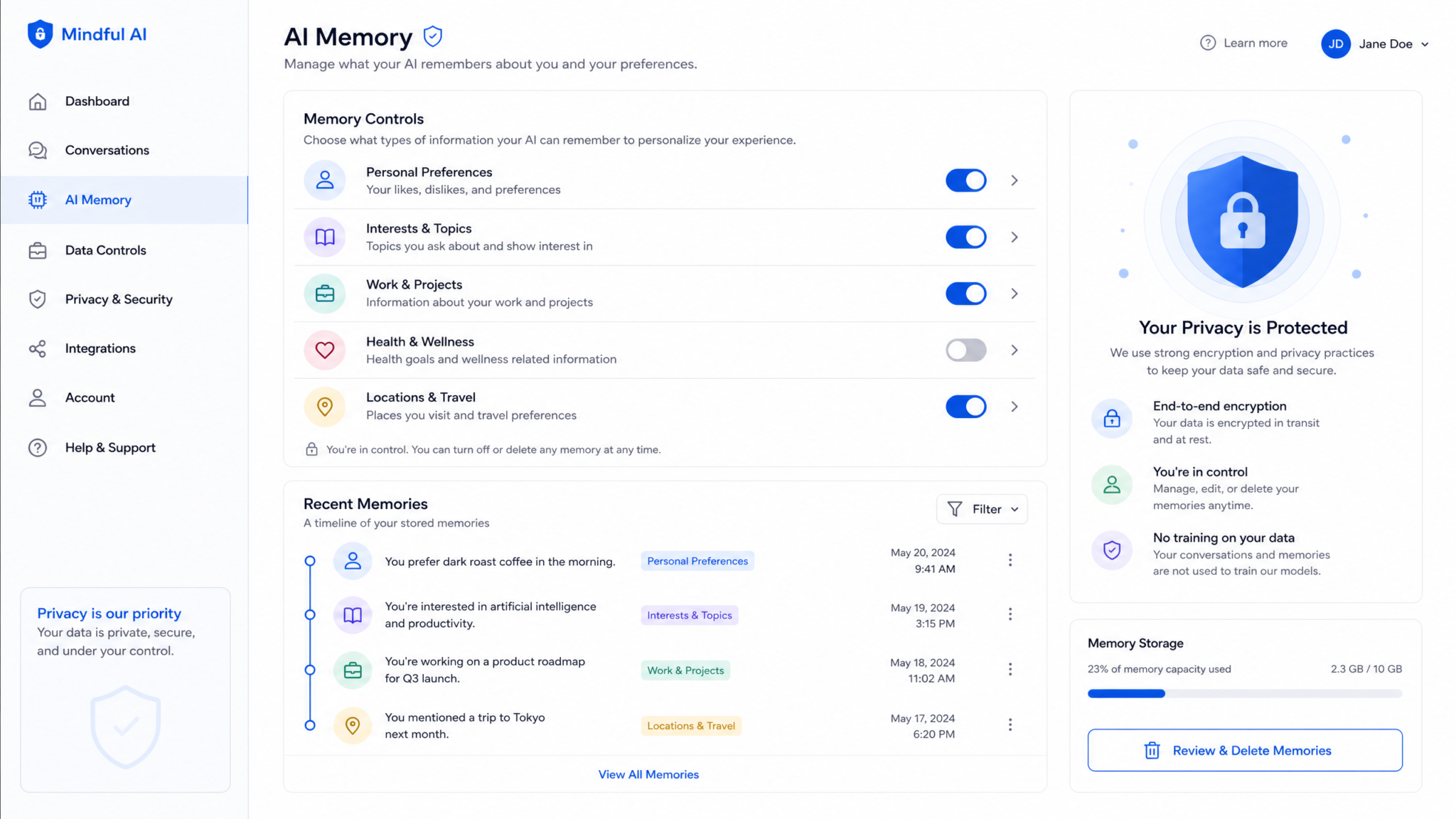
User Controls
- Global toggle: Enable/disable Dreaming V3 memory for your account.
- Per-chat control: Start an “incognito” chat that never contributes signals.
- Per-signal actions: Remove or suppress a specific signal from Memory Synthesis.
- Per-category control: Turn off categories such as “projects” or “tools.”
- Clear profile: Delete the synthesized profile without deleting raw chat history (or delete both).
- Export: Download your profile and, separately, your chat history for review.
Enterprise Controls
- Category blocks: Prevent storing or using signals like client names or PII.
- Retention windows: Shorten or lengthen how far back Dreaming V3 looks.
- Scope controls: Restrict synthesis to workspaces or projects; disallow cross-tenant signals.
- Review workflows: Route flagged signals for admin or data steward review before use.
- Audit logs: Track when a signal was created, updated, used in a response, and by which process.
Controls and Their Effects
| Control | Level | Effect on Ingestion | Effect on Storage | Effect on Personalization |
|---|---|---|---|---|
| Disable Memory | User | Stops | Stops updates | Stops using profile |
| Incognito Chat | User | Not ingested | N/A | Not used |
| Suppress Signal | User | Ignored if re-seen | Stored as suppression | Never applied |
| Block Category | Enterprise | Filtered during extraction | Not stored | Not applied |
| Short Retention | Enterprise | Lookback limited | Old signals decay faster | Less historical context |
| Clear Profile | User/Enterprise | Fresh ingestion | Deletes signals | Resets personalization |
API-Level Controls
Developers and enterprise integrators can set memory controls programmatically. Here are examples showing how to disable memory for a specific request, set category filters, and clear a profile through an administrative endpoint.
// Example: Disable memory for a single API call
POST /v1/chat/completions
{
  "model": "gpt-4o",
  "messages": [{"role": "user", "content": "Analyze this contract for risks."}],
  "memory": {"enabled": false}   // ensures this interaction isn't ingested
}

// Example: Limit categories used at application time
POST /v1/chat/completions
{
  "model": "gpt-4o",
  "messages": [{"role": "user", "content": "Write a status update."}],
  "memory": {
    "enabled": true,
    "use_categories": ["preferences", "style"],    // exclude "projects", "tools"
    "suppress": ["punctuation.exclamations"]       // per-signal suppression
  }
}

// Example: Admin clears synthesized profile for a user
DELETE /v1/admin/memory/{user_id}/profile
{
  "reason": "role_change",
  "preserve_suppressions": true
}
Retention and Redaction
By default, Dreaming V3 respects your chat history retention settings and enterprise-imposed limits. Derived signals decay unless refreshed by new evidence, and you can clear or export the profile at any time. Redaction tools allow you to mask sensitive strings in uploads; enterprise DLP can block them entirely. If you opt to keep chat history disabled generally, Dreaming V3 will have little or nothing to synthesize; you can still enable it selectively, but it works best with permission to see patterns over time.
Training and Sharing Defaults
Dreaming V3 is designed for personalization within your account or organization. As with prior ChatGPT settings, you can choose whether your conversations contribute to broader model improvements. If you opt out, your data is used only for your personalization and operational integrity. Organizations can enforce opt-out globally and still benefit from on-account personalization with Dreaming V3.
Rollout Plan: Plus and Pro First, Free to Follow
ChatGPT is rolling Dreaming V3 out in phases to manage capacity and gather feedback. The initial wave focuses on paying users who are most likely to benefit from deep personalization, with enterprise controls available as soon as org admins are ready to configure them.
| Plan | Availability | Default State | Controls |
|---|---|---|---|
| Plus | July 2026 (staggered) | Off, with guided setup | Full user controls; no enterprise override |
| Pro | July 2026 (priority) | Off, with migration prompt | Full user controls; advanced export |
| Enterprise | August–September 2026 | Org-configurable default | Admin policy, audit, DLP, retention, allowlisting |
| Free | Late 2026 (post-feedback) | Off by default | Core user controls; limited retention |
Users on Plus and Pro will see a Memory Synthesis preview before activation, including a count of how many conversations and documents would be considered if they opt in. Free users will gain access after stability and cost targets are met.
Dreaming V1 and V2 vs. V3: A Comparative Look
Dreaming V3 is more than an incremental upgrade. It changes the representation, extraction, and user experience of memory. Here’s how it compares with earlier iterations.
| Dimension | Dreaming V1 | Dreaming V2 | Dreaming V3 |
|---|---|---|---|
| Memory Formation | User-added or inline “remember this” items | Automatic extraction from recent chats | Background synthesis across years with temporal modeling |
| Scope | Item-level facts | Short-term patterns | Holistic user profile: preferences, projects, constraints, style |
| Explainability | List view only | Basic summaries | Annotated synthesis with citations and confidence |
| Accuracy Over Time | Stale unless edited | Moderate drift handling | Active decay, reversal detection, conflict resolution |
| Controls | Add/remove items | Toggle memory per chat | Per-signal suppression, per-category control, export/delete |
| Enterprise Fit | Minimal | Basic retainers | Policy engine, audit trails, category blocks, review workflows |
| Performance Impact | None on background | Some latency if active | Dedicated background windows; negligible chat latency |
In short, V1 and V2 were stepping stones toward personalization. V3 reframes memory as a continuously updated understanding with transparency and policy as first-class citizens.
Memory Synthesis in the Interface: A Guided Tour
When you open the Memory view after enabling Dreaming V3, you’ll see a panel with your synthesized profile, grouped by category. Each entry is short, precise, and evidence-backed. You can expand any entry to see:
- Evidence: Links to the messages or documents that supported the inference.
- Confidence: A numeric score with a short explanation (“reinforced across 4 sessions”).
- Recency: Last confirmation timestamp with decay status.
- Actions: Remove, suppress, edit, or report an issue.
If you change your mind, you can revert a removal or suppression. Edits are logged and can be exported along with the profile. The interface also exposes a “Preview personalization” mode that shows how your next prompt would be steered if applied now—an educational tool that helps build trust.
Example Synthesis Text
Writing and Style
- Uses British English spelling and avoids exclamation points. (High confidence)
- Prefers tight summaries with an executive overview first. (Medium-high)
- Often requests citations in APA format. (Medium)

Engineering
- Primary stack: Python and TypeScript, prefers pytest. (Medium-high)
- Avoids experimental libraries in production. (Medium)

Projects
- “Aurora” is active with a 2026-Q4 deadline; weekly syncs on Wednesdays. (Medium)

Constraints
- Ensure accessibility (WCAG 2.2 AA) for web deliverables. (High)
This form factor—short sentences, high signal-to-noise—was chosen to make it easy to scan and correct. It also reduces the risk of users inferring that the system stores verbatim transcripts, which it does not within the profile store. For further UI walkthroughs and step-by-step instructions, consult
For a deeper exploration of related concepts, our comprehensive article on ChatGPT Work vs Claude Cowork: The Definitive 2026 Comparison for Enterprise Teams provides detailed analysis and practical frameworks that complement the strategies discussed in this section.
where we detail how to enable, disable, export, and delete memory.
Applying Memory to Real Workflows
Dreaming V3’s value emerges in repeated tasks, multi-week projects, and cross-functional workflows. Here are concrete scenarios where V3 changes the game:
1) Editorial and Content Operations
- Copy stays on brand—with enforced style rules and house terminology.
- Outlines match your structure preferences (e.g., executive summary first).
- Scheduling aligns with your time zone and stakeholder calendars.
2) Software Engineering
- Code examples default to your stack and testing framework.
- Scaffolding matches your directory and naming conventions.
- Pull request checklists respect your team’s definition of done.
3) Sales and Customer Success
- Responses reflect account context and renewal cycles (if permitted by policy).
- Playbooks adapt to your talk tracks and discovery questions.
- Call summaries highlight the fields you log in CRM.
4) Compliance and Governance
- Documentation includes consistent regulatory notices.
- Generated artifacts follow your labeling and retention rules.
- Restricted terms are automatically avoided or flagged.
5) Research and Analysis
- Summaries match the depth and citation style you prefer.
- Recurring topics are tracked as projects with milestones.
- Known blind spots or excluded sources are respected.
Across domains, the hallmark of Dreaming V3 is consistency: the model starts with your defaults and meets you where you work, instead of making you restate them in every prompt. That’s the friction Dreaming V3 aims to remove.
Enterprise Administration: Policies, Audits, and Guardrails
Enterprises need memory to be both powerful and governable. Dreaming V3 introduces a policy engine designed for regulated environments, letting admins specify what can be collected, how long it persists, who can see it, and when it can be applied. The same engine supports auditing, export, and incident response.
Policy Objectives
- Minimize storage of sensitive data by default; allow case-by-case opt-in.
- Constrain personalization to safe categories (e.g., style, tooling).
- Maintain transparency with audit trails and explainability.
- Enable fast, centralized incident response (clear, quarantine, or hold).
Example Enterprise Memory Policy (YAML)
org: acme-corp
policy_version: 3
defaults:
  memory_enabled: true
  lookback_days: 365
  decay:
    half_life_days: 90
    min_confidence: 0.6
collection:
  allow_categories:
    - preferences
    - style
    - tools
  block_categories:
    - pii
    - client_names
    - contracts
  redaction:
    enabled: true
    patterns:
      - SSN
      - CreditCard
      - Passport
application:
  use_categories:
    - preferences
    - style
  suppress_signals:
    - "punctuation.exclamations"
    - "tone.overly_casual"
governance:
  audit_logging: detailed
  export:
    allowed_roles:
      - privacy_officer
      - security_admin
  review_workflow:
    required_for_categories:
      - projects
      - constraints
    approvers:
      - data_steward_team
incident_response:
  clear_profile_on_breach: true
  legal_hold:
    enabled: true
    scope: "specific user IDs or teams"
Admin Dashboards and Workflows
- Visibility: Org-level summaries of active signals by category, with trending and decay status.
- Policy Simulation: Preview how changes would affect collection and application.
- Review Queue: Approve or reject flagged signals before they’re used.
- One-Click Actions: Clear profiles across a team, pause Dreaming jobs, impose legal holds.
Control Matrix
| Capability | User | Team Admin | Org Admin |
|---|---|---|---|
| Enable/Disable Memory | Yes | Enforce default | Enforce default |
| Per-Category Blocks | Suggest only | Team-level | Org-level |
| Retention Windows | No | Team-level | Org-level |
| Export/Audit | Export personal | Export team | Export org; run audits |
| Incident Response | No | Team scope | Org scope |
Identity and Scope
Enterprises can bind Dreaming V3 profiles to corporate identities (e.g., SSO) and restrict scope to workspaces or projects. In multi-tenant contexts, signals do not cross organizational boundaries. For shared devices or hot desks, session-bound controls ensure that memory never leaks across users.
Data Residency and Encryption
Data residency rules ensure that profile data remains within specified regions, and encryption at rest and in transit remains standard. Admins can integrate customer-managed keys (CMK) for added control, and exports can be routed to internal archives for governance.
Security, Safety, and Misuse Prevention
Memory is a powerful lever; safety mechanisms must match. Dreaming V3 builds on existing safety systems to prevent misuse and minimize harm from incorrect inferences.
- PII Detectors: Block storage of personal identifiers unless policy allows.
- Sensitivity Gates: Mark signals as restricted; never apply them in outputs.
- Explainability-on-Apply: For high-impact uses (e.g., regulatory text), show why a decision was made.
- Outlier Detection: Flag sudden, high-confidence signals that conflict with history for review.
- User Overrides: Manual corrections supersede model inferences.
Risk and Mitigation Table
| Risk | Description | Mitigation |
|---|---|---|
| Stale Assumptions | Model applies outdated preferences or projects | Temporal decay, reversal detection, user correction |
| Unauthorized Data Use | Signals applied where policy disallows | Policy engine at ingestion and application |
| Bias Reinforcement | Overfitting to past patterns limits exploration | “Surprise me” mode; category limits; periodic refresh |
| Leakage Across Contexts | Personal data appears in work context or vice versa | Scope binding to identities and workspaces |
| False Inferences | Incorrect signals due to misreading context | Confidence thresholds, explainability, feedback loop |
Developer and Admin Recipes
If you build on ChatGPT or administer it for a team, these snippets and workflows can save time.
1) Project-Aware Status Reports
// Request a status report that uses style preferences but not project names
POST /v1/chat/completions
{
  "model": "gpt-4o",
  "messages": [{"role": "user", "content": "Weekly status report for the web team."}],
  "memory": {
    "enabled": true,
    "use_categories": ["preferences", "style"],
    "exclude_categories": ["projects"]
  }
}
2) Enforcing House Style in Code Reviews
// Use team-level memory for code review comments; disallow personal preferences
POST /v1/chat/completions
{
  "model": "gpt-4o",
  "messages": [{"role": "system", "content": "Review code changes for style and safety."},
               {"role": "user", "content": "Review PR #1827."}],
  "context_scope": "team",  // enterprise feature
  "memory": {
    "enabled": true,
    "use_categories": ["style", "tools"],
    "scope": "team"
  }
}
3) Scheduled Re-Synthesis
// Admin triggers quarterly re-synthesis to refresh decayed signals
POST /v1/admin/memory/re-synthesize
{
  "scope": "org",
  "when": "2026-10-01T00:00:00Z",
  "targets": ["active_users"],
  "constraints": {
    "max_hours": 6,
    "off_peak_only": true
  }
}
4) DLP-Backed Category Blocks
// Integrate DLP classification to block client names from being stored
POST /v1/admin/memory/policies
{
  "block_categories": ["client_names"],
  "dlp_integration": {
    "provider": "acme-dlp",
    "policy_id": "cnames-v2"
  }
}
5) User-Initiated Profile Export
// User downloads a snapshot of their Memory Synthesis
GET /v1/memory/profile/export
Authorization: Bearer <user_token>

Response:
{
  "exported_at": "2026-07-10T12:00:00Z",
  "format": "json",
  "profile": { ... },
  "citations": [ ... ],
  "suppression_list": [ ... ]
}
Expert Analysis: Personalization vs. Privacy Trade-offs
Dreaming V3 answers a long-standing demand: stop repeating myself. But the cost of remembering is collecting and inferring, and that raises three intersecting trade-offs—privacy, agency, and accuracy.
Privacy
Memory requires history, and history can contain sensitive content. Dreaming V3 narrows the blast radius by storing only derived signals and by offering redaction and policy controls. Still, the safest memory is the one you don’t keep. For high-stakes work, minimize categories (e.g., allow style but block projects), shorten retention, and favor incognito chats for sensitive matters.
Agency
Users need to know what the system believes and be able to change it quickly. Memory Synthesis moves beyond a black-box approach by exposing confidence and evidence. Trust grows when corrections stick—and when suppressions persist even if the same phrase shows up again.
Accuracy
Inference inevitably makes mistakes. Temporal decay and drift detection help, but the best guardrail remains user feedback. Dreaming V3 embeds that feedback into the extraction layer so that corrections are not just cosmetic; they shape future inferences. If your role shifts from engineering to product, V3 should relearn your defaults within weeks.
Net Impact
For heavy users, the time savings and reduction in cognitive overhead will likely outweigh residual risks, especially with disciplined controls. Enterprises gain a coherent path to personalization without sacrificing governance. That balance—the right defaults, clear choices, and explainability—will determine how widely Dreaming V3 is adopted beyond early enthusiasts.
Testing, Tuning, and Troubleshooting
Getting Dreaming V3 right in your workflow takes an hour of focused setup and a bit of ongoing hygiene. Here’s a pragmatic playbook.
Quick Start Checklist
- Enable memory and review the initial synthesis.
- Remove anything incorrect; suppress anything correct-but-unwanted.
- Limit categories to what you truly need (start with style and preferences).
- Use “Preview personalization” to spot issues before they surface in real chats.
- Schedule a quarterly re-synthesis if your work changes frequently.
Signals Hygiene
- Prefer general statements of preference over single-use quirks.
- Use incognito chats when brainstorming sensitive topics.
- Consolidate synonymous project names to help entity resolution (e.g., “Phoenix aka PNX”).
Diagnosing Misapplied Memory
- Ask: “Why did you choose this style?” The model should cite the relevant profile entries.
- Open Memory Synthesis and locate the offending signal.
- Remove or suppress; if misinferred, leave a note (“misread contrast with competitor”).
- Optionally shorten lookback in settings to speed correction effects.
Common Issues and Fixes
| Issue | Cause | Fix |
|---|---|---|
| Old project keeps resurfacing | Signal not decayed due to recent mentions | Suppress project signal; reduce lookback temporarily |
| Personal tone used in work chat | Scope not bound to workspace | Set scope=team/org; block “tone.personal” category |
| Inconsistent citation style | Conflicting signals | Remove the weaker or older signal; reinforce the correct one |
| Latency spikes after enabling | Initial backfill running | Pause backfill; schedule for off-peak hours |
Quantifying Value: Metrics to Watch
To judge whether Dreaming V3 is delivering, measure both productivity and quality.
- Re-prompt Rate: How often users restate preferences each week.
- Consistency Score: Editorial or QA checks that measure adherence to standards.
- Time-to-First-Draft: Minutes to a good-enough first draft for recurring tasks.
- Correction Latency: Time from user correction to changed behavior.
- Suppression Volume: Signals suppressed—too high suggests overreach.
- Privacy Incidents: Any policy violations or near misses.
Healthy Dreaming V3 deployments show a sharp decline in re-prompting and a measurable bump in consistency. Correction latency should drop over time as the system tunes to your feedback patterns.
Migration from V1/V2 to V3
Migrating from saved memory lists and short-term patterns to synthesized profiles is straightforward but benefits from a review pass. When you first enable Dreaming V3, you’ll see an optional migration assistant that imports your old memory items as seed signals with low-to-medium confidence and prompts you to validate them. Items you delete during migration are added to suppression to prevent the same mistakes from returning.
Enterprises can pre-stage migrations by exporting V1/V2 memories and feeding them through a translation tool that maps items to V3’s schema. Admins can also predefine suppression lists (“never store client PII”) so that initial synthesis respects organizational norms from day one.
For detailed migration steps, including policy templates and checklists, see
For a deeper exploration of related concepts, our comprehensive article on ChatGPT for PowerPoint Goes GA — What Enterprise Teams Need to Know provides detailed analysis and practical frameworks that complement the strategies discussed in this section.
Ethics and Design Principles
Dreaming V3 embodies design choices that tilt toward user agency and explainability. The principles that guided its shape are instructive for the industry at large:
- Minimalism: Store the least necessary to deliver value; derive rather than duplicate.
- Explain First: Surface “why” before “what” so users can challenge inferences.
- Soft Defaults: Off by default for new plans; nudges but no coercion.
- Scoped Memory: Bind signals to identities and workspaces to prevent leakage.
- Revocability: Make deletion and suppression real, persistent, and auditable.
As AI systems accumulate more context, the right to be forgotten and the right to be misremembered become inseparable from product value. Dreaming V3 is a step toward that balance.
Looking Ahead: What V4 Might Bring
Dreaming V3 sets the baseline for explainable, policy-aware personalization. Future iterations could deepen temporal reasoning (e.g., anticipating lifecycle changes), add collaborative synthesis for teams (“shared project memory”), and integrate richer multimodal signals like design canvases or code graph states—always bound by scope and consent.
We also expect more proactive memory hygiene suggestions: “This preference hasn’t been used in six months; archive it?” and smarter conflict mediation that proposes a merge instead of forcing manual choices.
Access 40,000+ AI Prompts for ChatGPT, Claude & Codex — Free!
Subscribe to get instant access to our complete Notion Prompt Library — the largest curated collection of prompts for ChatGPT, Claude, OpenAI Codex, and other leading AI models. Optimized for real-world workflows across coding, research, content creation, and business.
FAQ
Does Dreaming V3 read everything I’ve ever chatted?
Only within your retention window and only if you enable memory. Enterprise policies can further narrow scope and categories. You can also start incognito chats that never contribute to memory.
Can I see exactly why ChatGPT used a given preference?
Yes. Memory Synthesis provides citations and confidence. You can ask “why did you choose that?” in any chat and receive an explanation with sources and timestamps.
What if I don’t want personalization at all?
Turn memory off globally. You can still use ChatGPT exactly as before—no profile, no background processing, no personalization.
How does this affect shared devices?
Profiles are tied to user identities. On shared machines, ensure sign-out between sessions and consider org policies that prevent cross-user caching or synthesis.
Is my data used to train base models?
That’s controlled by your account or organization’s data sharing settings. You can opt out of contributing to broader model improvements and still benefit from on-account personalization via Dreaming V3.
Conclusion
Dreaming V3 is a rethinking of AI memory: not a scrapbook of facts, but an evolving model of you—explainable, editable, and governed. It promises to remove the tedium of reintroductions and make every session feel like picking up a conversation with a teammate who knows the context. By pairing that power with clear controls, policy hooks, and visibility, ChatGPT aims to make personalization compatible with privacy. The result is a system that feels less like a gadget and more like a partner.
Whether you’re a solo creator, a developer automating workflows, or a security lead rolling this out to thousands of employees, the key is the same: start small, keep it explainable, and use the controls. With that approach, Dreaming V3 delivers compounding returns without compromising user trust.
