
ChatGPT Gets Write Access to Box, Notion, Linear, and Dropbox: New App Integrations Expand AI Workflow Automation
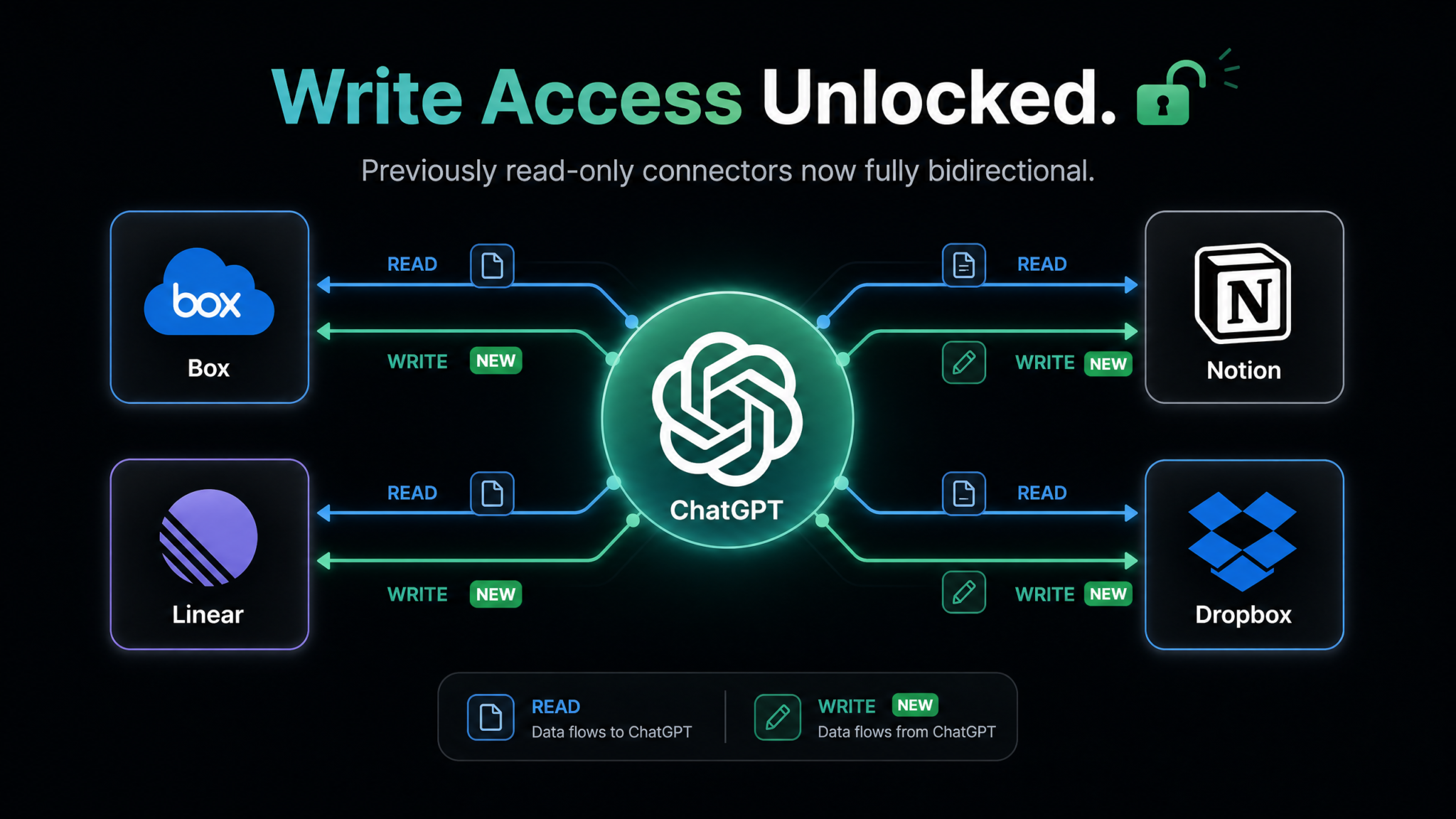
On August 15, 2026, OpenAI published what may be its most consequential product release notes of the year: a quietly worded update announcing that ChatGPT’s existing app integrations with Box, Notion, Linear, and Dropbox had graduated from read-only connectors to full bidirectional, write-enabled pipelines. The announcement, tucked inside a broader changelog post on OpenAI’s developer blog, triggered an immediate wave of excitement across developer communities, enterprise IT forums, and productivity circles — because the practical implications are enormous. For the first time, ChatGPT can not only read what’s in your workspace; it can actively write to it, create inside it, and modify it on your behalf.
This is not a minor patch. Write access fundamentally changes the nature of ChatGPT as a productivity tool. The difference between a read-only AI assistant and a write-enabled one is roughly the difference between having a research analyst who can brief you and a full-stack executive assistant who can execute tasks, draft deliverables, file tickets, and keep your documentation synchronized — without you ever switching tabs. The August 15 update pushes ChatGPT decisively into the second category.
In this article, we break down exactly what changed, how the new write permissions work under the hood, what workflows are now possible, what security teams need to know, how enterprises should configure access, and how OpenAI’s expanding integration footprint stacks up against competitors like Anthropic’s Claude and Google’s Gemini. This is a deep dive into one of the most significant expansions of AI tool-use capabilities in 2026.
What Changed on August 15, 2026: The Release Notes Explained
OpenAI’s August 15 changelog entry was titled simply: “App Integrations Update: Expanded Write Capabilities for Box, Notion, Linear, and Dropbox.” At first glance, it reads like a modest maintenance update. But the substance buried in that post represents a categorical shift in how ChatGPT interacts with third-party platforms.
Previously, ChatGPT’s connectors for these four platforms were read-only. That meant the model could pull information from a connected Notion workspace to answer questions, search a Box repository for documents, retrieve a list of Linear tickets to help with sprint planning, or scan a Dropbox folder to summarize files. Useful, certainly — but fundamentally passive. The AI was still a consumer of information, not a participant in creating it.
The August 15 update changes that across four platforms simultaneously:
- Notion: ChatGPT can now create pages, databases, and database entries; update existing content; append blocks to pages; and manage page properties including title, tags, and status fields.
- Box: ChatGPT can upload new files, create folder structures, update file metadata, copy and move files between folders, and manage shared link permissions.
- Linear: ChatGPT can create new issues (tickets), assign them to team members, set priority and status, add labels, create sub-issues, post comments, and update issue descriptions.
- Dropbox: ChatGPT can upload files, create folders, move and copy content, update shared folder permissions, and sync generated content directly to a specified path.
OpenAI was careful to note in the release that write access is opt-in by default for individual users and disabled by default for enterprise workspaces pending administrator configuration. That design decision is significant and we’ll return to it in the security and enterprise sections below.
The update also confirmed that write capabilities are available across ChatGPT Plus, Team, and Enterprise tiers. Free-tier users retain read-only access for now, though OpenAI’s language suggests that write access may eventually extend to free users under a more restricted permission model.
Finally, the release notes acknowledged that these four platforms are the first wave of write-enabled integrations, with additional connectors — including Jira, Confluence, Google Drive (as a standalone connector, separate from Gemini’s native integration), Slack, and GitHub — described as “in active development.”
ChatGPT Custom GPTs and Tool Use: Building AI Agents That Actually Work
Technical Deep Dive: OAuth2 Scopes, Permission Models, and Data Flow
For developers and IT administrators trying to understand exactly what happens when ChatGPT writes to a connected platform, the mechanics matter as much as the marketing. OpenAI has been relatively transparent about the underlying architecture, and what’s been published in their developer documentation paints a clear picture of how write access is implemented, scoped, and controlled.
OAuth2 Authorization Flow
All four integrations use OAuth 2.0 as the authorization layer, which is the industry-standard protocol for delegated access. When a user connects ChatGPT to Notion, for example, they are redirected to Notion’s authorization server, where they authenticate and explicitly approve a defined set of permissions. The resulting access token is scoped — meaning it grants access only to the capabilities the user approved, not blanket access to the entire account.
The critical change in the August 15 update is the OAuth2 scopes being requested. Prior to August 15, ChatGPT requested read-only scopes. Post-update, when users connect or reconnect their integrations, ChatGPT requests expanded scopes that include write operations. Existing connected accounts were not automatically upgraded — users need to re-authorize their connections to activate write capabilities, a deliberate friction point designed to ensure informed consent.
Scope Breakdown by Platform
| Platform | Read Scopes (Previous) | Write Scopes (New, August 15) | Excluded Scopes |
|---|---|---|---|
| Notion | read_content, read_user | update_content, insert_content, create_pages | delete_pages, manage_members, billing_access |
| Box | root_readonly, manage_shared_links (read) | root_readwrite, manage_shared_links (write), upload | admin_console, user_management, trash_permanent_delete |
| Linear | read (issues, projects, teams) | issues:create, issues:update, comments:create | admin, settings:write, billing_admin |
| Dropbox | files.metadata.read, files.content.read | files.content.write, sharing.write, file_requests.write | team_admin, member_management, account_settings |
This table reveals something important: OpenAI explicitly excluded destructive and administrative scopes. ChatGPT cannot permanently delete items, cannot manage billing, and cannot add or remove workspace members. The write access granted is deliberately bounded around creation and modification rather than administration or destruction — a design philosophy that should give most users and IT teams meaningful confidence.
Data Flow Architecture
Understanding the data flow is equally important. When ChatGPT executes a write action — say, creating a Notion page from a meeting summary — the following sequence occurs:
- User Instruction: The user instructs ChatGPT (in natural language) to perform a write action: “Save this meeting summary to my Notion workspace under the ‘Q3 Planning’ database.”
- Intent Classification: ChatGPT’s tool-use layer classifies the instruction as a write operation targeting the Notion integration, identifies the target workspace and database, and maps the content to the appropriate Notion block structure.
- Confirmation Step (Configurable): Depending on user or admin settings, ChatGPT either requests explicit confirmation before executing or proceeds automatically in “agent mode.”
- API Call Execution: ChatGPT’s backend makes an authenticated API call to Notion’s API using the stored OAuth2 access token, passing the structured content payload.
- Response Handling: Notion’s API returns a success response (or error), and ChatGPT surfaces the result to the user, including a direct link to the newly created page.
- Audit Logging: The write action is logged in both OpenAI’s activity log and, where supported, the platform’s own audit trail.
Token storage follows OpenAI’s standard encrypted credential management practices. Access tokens are stored server-side with AES-256 encryption, and refresh tokens are rotated on each use. No token data is included in model training pipelines — a point OpenAI has emphasized explicitly in their enterprise data agreements.
Granular Permission Controls
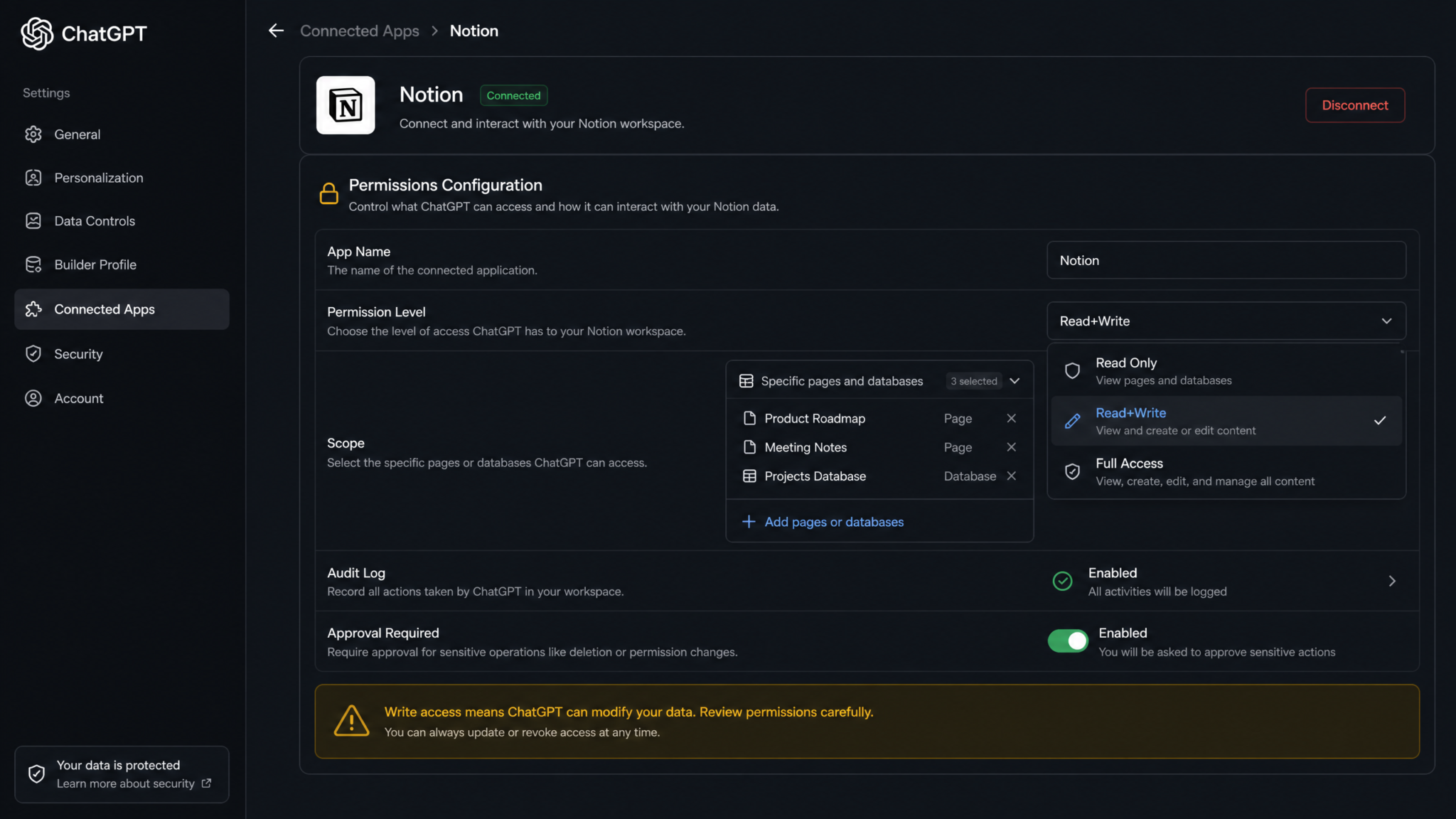
Within the ChatGPT interface, users can configure write access at a granular level through the Connected Apps settings panel. The new permission configuration UI — launched simultaneously with the August 15 update — allows users to set write permissions per-action, per-workspace, and per-folder or database.
| Permission Level | Description | Best For |
|---|---|---|
| Full Write (Auto) | ChatGPT executes write operations without per-action confirmation | Power users, automated workflows, agent tasks |
| Full Write (Confirm) | ChatGPT requests confirmation before each write action | Individual users wanting oversight with full capability |
| Scoped Write | Write access limited to specific folders, databases, or projects | Enterprise users, compliance-sensitive workflows |
| Read Only | Previous behavior; no write operations permitted | Users wanting to preserve previous setup |
| Disabled | Integration fully disconnected | Temporary suspension without losing configuration |
What You Can Do Now That You Couldn’t Before: Workflow Breakdowns
The real-world value of write access becomes clear when you map it against specific workflows. The following breakdowns illustrate concrete use cases that were either impossible or required significant manual intervention before August 15.
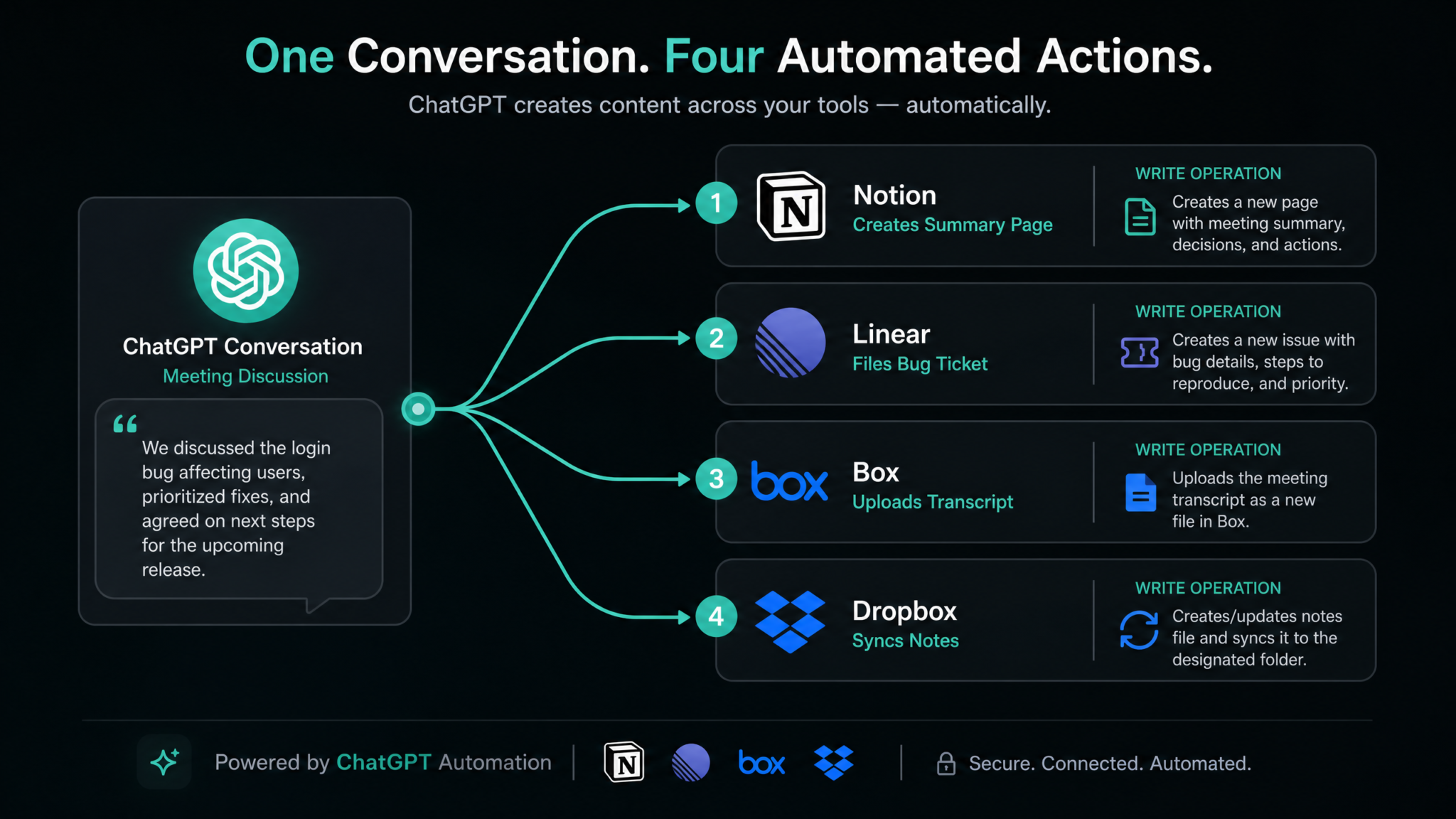
Workflow 1: Auto-Creating Meeting Notes in Notion from ChatGPT Conversations
Before August 15, a user could paste a meeting transcript into ChatGPT, receive a structured summary, and then manually copy that summary into Notion. Now, the entire pipeline can be automated:
- User pastes a meeting transcript or audio-to-text output into ChatGPT
- ChatGPT generates a structured meeting note with sections for attendees, agenda items, decisions made, and action items
- User says: “Save this to my Notion ‘Meeting Notes’ database, tagged Q3-2026 and assigned to Project Atlas”
- ChatGPT creates the Notion page with proper formatting, fills in the database properties, and returns the page URL in under 10 seconds
The Notion page created by ChatGPT is fully structured with native Notion blocks — headings, toggles, callouts, and checkbox action items — not just raw pasted text. This is because ChatGPT’s Notion integration now supports the full Notion block API, enabling rich formatting at creation time.
For teams that use Notion as their primary documentation hub, this workflow eliminates what was previously a 5-15 minute per-meeting administrative task. Across a 20-person team with three weekly meetings, that’s potentially 3-9 hours of documentation overhead eliminated every week.
Workflow 2: Filing Bug Reports in Linear from Debugging Sessions
Developers who use Linear for issue tracking now have a direct pipeline from debugging conversations to their project boards. The workflow looks like this:
- Developer pastes an error log, stack trace, or describes a bug to ChatGPT and works through the diagnosis
- At the end of the session, developer says: “Create a Linear issue for this bug in the Backend team, Priority: High, assign to @maya, label it ‘authentication’”
- ChatGPT generates a structured issue title and description that includes the error context, suspected root cause, reproduction steps from the conversation, and proposed solution approach
- The Linear issue is created and a link is returned
The quality difference between a ChatGPT-authored Linear ticket and one hastily filed by a tired developer at 11pm is significant. ChatGPT naturally structures issues with proper technical context, clean reproduction steps, and linked context — the kind of documentation that makes issues actually actionable for the next engineer who picks them up.
Linear’s API also supports sub-issues, so complex bugs can be decomposed into a parent issue with child tasks, all created in a single ChatGPT instruction: “Create a parent issue for the auth bug and three sub-issues: one for the token refresh fix, one for the session timeout logic, and one for the regression test suite.”
ChatGPT API Integration Guide for Developers: Building Production-Ready Applications
Workflow 3: Archiving Research to Box
Knowledge workers who use Box as an enterprise content management system can now use ChatGPT as a research-to-archive pipeline. A typical workflow:
- User conducts a research session with ChatGPT — competitive analysis, market research, technical deep dive
- ChatGPT produces a structured research document, including sources, summaries, and analyst commentary
- User instructs: “Save this competitive analysis as a PDF to my Box folder /Research/Competitive/2026/Q3/ and set the shared link to company-only”
- ChatGPT uploads the formatted document, creates any missing folder path elements, applies the sharing restriction, and returns the Box item URL
For organizations with Box as their compliance-grade document management system, this workflow enables a direct bridge between AI-generated analysis and the formal document repository — with proper folder structure, metadata tagging, and access controls applied at upload time.
Workflow 4: Syncing Generated Content to Dropbox
Content creators, marketers, and writers using Dropbox as their file storage layer can now sync ChatGPT outputs directly to their file system:
- User asks ChatGPT to draft a blog post, marketing copy, product description, or technical document
- After review and iteration in the chat, user instructs: “Save the final version to /Dropbox/Content/Blog/Drafts/ as ‘ai-workflow-automation-2026.md’”
- ChatGPT writes the Markdown file to the specified Dropbox path
- The file is immediately available in the user’s Dropbox desktop client, mobile app, and any connected paper tools
This workflow is particularly powerful for teams using Dropbox Paper or other tools that automatically sync with Dropbox folders. A content brief written in ChatGPT can appear in a writer’s Dropbox folder as a ready-to-open document within seconds of generation.
Workflow 5: The Multi-Platform Agent Chain
Perhaps the most powerful demonstration of the August 15 update is what happens when you chain write actions across multiple platforms in a single agent session. Consider a post-sprint retrospective workflow:
- User pastes the sprint retrospective transcript into ChatGPT
- ChatGPT extracts: summary notes, identified bugs, documentation gaps, and follow-up tasks
- User instructs: “Save the retrospective summary to Notion, create Linear issues for each bug identified, and archive the full transcript to Box under /Sprints/2026-Q3/”
- ChatGPT executes three write operations across three platforms in sequence, returning links to all created content
This multi-platform chaining capability is what elevates ChatGPT from a conversational tool to a genuine workflow orchestration layer. The AI isn’t just answering questions; it’s coordinating the downstream actions that those answers imply.
Security Implications: Write Access, Audit Logs, and Data Control
Write access is powerful, but it is not without risk. Security professionals, IT administrators, and privacy-conscious users have legitimate questions about what it means for an AI system to have the ability to create and modify data in their most important business tools. OpenAI and the integration partners have implemented several layers of control, but understanding the threat model is essential before enabling these capabilities in any serious deployment.
The Core Risk: Prompt Injection and Unauthorized Writes
The most significant security concern with AI write access is prompt injection — the risk that malicious content in a document being read by ChatGPT could contain embedded instructions that trick the model into executing unauthorized write operations. For example, a document in Box might contain hidden text instructing ChatGPT to copy its contents to an external location or create a Linear issue with sensitive information in the description.
OpenAI has addressed this in the August 15 update with two mechanisms:
- Tool-use sandboxing: Write operations are isolated from read operations in the model’s context window, reducing the surface area for prompt injection to influence write behavior.
- Intent verification: Before executing a write operation, ChatGPT performs an internal intent check to verify that the write action is consistent with the user’s stated goal in the conversation, rather than instructions embedded in external content.
These are meaningful mitigations, but security researchers have already noted that they are not complete defenses. The security community’s recommendation for high-sensitivity deployments is to use Scoped Write permissions that limit write access to specific designated folders or databases, minimizing blast radius if an injection were to succeed.
Audit Logging
All write operations performed by ChatGPT integrations are logged in the ChatGPT Activity Log, accessible through Settings → Connected Apps → Activity. Each log entry includes:
- Timestamp of the write operation
- Platform and specific action type (e.g., “Notion: Page Created”)
- Target resource identifier (page ID, file path, issue ID)
- Conversation session ID (allowing trace-back to the original chat)
- Token/authorization identifier used
For enterprise accounts, write activity logs are also surfaced in the OpenAI Enterprise admin console and can be exported via the Activity Log API for integration with SIEM systems. This is critical for compliance teams who need to maintain audit trails of AI-initiated data modifications.
At the platform level, write operations by ChatGPT appear in each platform’s own activity logs as actions taken by the connected OAuth2 application, named something like “ChatGPT (OpenAI)” — not as the individual user. This means platform-level logs show that an AI application made the change, which is important for accurate forensic analysis.
Revocation and Emergency Controls
Revoking write access is straightforward and takes effect immediately. Users can revoke at three levels:
- Per-action revocation: Downgrade a specific platform from write to read-only without disconnecting the integration
- Full integration disconnection: Remove the integration entirely from ChatGPT’s Connected Apps, which invalidates the OAuth token on OpenAI’s side
- Platform-side revocation: Each platform (Notion, Box, Linear, Dropbox) allows users to revoke ChatGPT’s access from within their own Connected Apps or OAuth settings, providing an independent revocation path that doesn’t require accessing ChatGPT at all
The platform-side revocation path is particularly important in incident response scenarios — if an account is compromised or unexpected write activity is observed, a user can immediately revoke ChatGPT’s access from within Notion or Box without needing to log into OpenAI’s platform.
ChatGPT Enterprise Security: Data Privacy, Compliance, and Zero Data Retention Explained
Enterprise Adoption Impact: IT Admin Controls and Compliance
For enterprise customers — which represent an increasingly large share of OpenAI’s revenue in 2026 — the write access update comes with a parallel layer of governance tools that IT administrators will need to configure thoughtfully before rollout.
Workspace-Level Permission Architecture
In ChatGPT Enterprise and Team workspaces, write access integrations are governed at three levels: Organization, Team, and User. Administrators set the ceiling; users can operate within that ceiling but cannot exceed it.
| Level | Who Controls It | What It Controls | Default State |
|---|---|---|---|
| Organization | Org Admins | Which platforms can be connected at all; whether write access is permitted org-wide | Write access disabled (must be explicitly enabled) |
| Team | Team Admins | Which write operations are permitted for team members; scoped write path restrictions | Inherits org setting |
| User | Individual Users | Personal connection authorization; confirmation settings; platform-specific scope selection | Can only enable what org/team permit |
This hierarchical model means a company can allow write access to Notion for the marketing team while keeping it read-only for teams handling sensitive financial data. Different policies can apply to different integration platforms simultaneously — write access to Linear might be enabled org-wide for engineering, while Box write access is restricted to specific job roles.
Compliance Considerations
For organizations operating under regulatory frameworks — HIPAA, SOC 2, ISO 27001, GDPR — AI-initiated write access introduces specific compliance questions that need addressing before deployment:
- Data residency: When ChatGPT writes a document to Box or Notion, does the content transit through OpenAI’s servers? The answer is yes — the content passes through OpenAI’s API infrastructure as part of the write operation. Organizations with strict data residency requirements need to verify that this transit is compatible with their policies.
- Data retention: Under ChatGPT Enterprise’s zero-data-retention guarantees, conversation content is not stored for training. But write operations create persistent artifacts in third-party systems — those artifacts are subject to the retention policies of those platforms, not OpenAI’s.
- Access attribution: For audit purposes, writes made by ChatGPT should be attributed in a way that allows subsequent review. The combination of ChatGPT’s own activity logs and platform-level OAuth attribution generally satisfies this, but compliance teams should validate the audit trail before relying on it for regulated workflows.
- Change management: AI-written content in systems like Notion or Box may bypass traditional change management workflows if write access is configured in automatic (no-confirm) mode. Enterprise deployments should consider requiring confirmation steps for high-sensitivity databases or document libraries.
DLP Integration
Several enterprise security platforms — including Microsoft Purview, Forcepoint, and Nightfall — have announced or are in the process of announcing integrations that extend data loss prevention (DLP) policies to ChatGPT write operations. This means organizations can apply content scanning to ChatGPT-initiated writes, blocking or flagging operations that would move regulated data (PII, PHI, financial records) into systems or paths where it shouldn’t reside.
Competitive Landscape: Claude MCP, Gemini Workspace, and the Write Access Race
OpenAI’s August 15 update does not happen in a vacuum. Both Anthropic’s Claude and Google’s Gemini have been actively building out their own tool-use and integration capabilities, and a comparison reveals a fascinating three-way race to define what AI-native workflow access looks like.
Claude and the Model Context Protocol
Anthropic’s Model Context Protocol (MCP) — introduced in late 2024 and significantly expanded through 2025 and 2026 — takes a fundamentally different architectural approach than OpenAI’s managed integrations. Where OpenAI builds and maintains specific connectors for each platform (Notion, Box, Linear, Dropbox), MCP is an open protocol that allows any application to expose its capabilities to Claude through a standardized interface.
Access 40,000+ AI Prompts for ChatGPT, Claude & Codex — Free!
Subscribe to get instant access to our complete Notion Prompt Library — the largest curated collection of prompts for ChatGPT, Claude, OpenAI Codex, and other leading AI models. Optimized for real-world workflows across coding, research, content creation, and business.
The practical result is that Claude’s integration ecosystem is broader but less curated. Developers can build MCP servers for any tool, and Claude can use them — but the quality, security posture, and reliability of those integrations varies significantly based on who built the MCP server. There is no central integration hub maintained by Anthropic with standardized permission models.
For write access specifically, Claude through MCP can write to virtually any platform that has an MCP server available — which as of mid-2026 includes Notion, Linear, GitHub, Jira, Slack, and dozens of others. In terms of raw write capability coverage, Claude’s MCP ecosystem is actually broader than ChatGPT’s four-platform August 15 update.
However, the enterprise governance layer is where ChatGPT’s approach holds an advantage. MCP server configurations are typically set up by individual developers or teams, with limited centralized IT control. ChatGPT’s managed integrations come with the org/team/user permission hierarchy, SIEM-compatible audit logs, and DLP integration that enterprise security teams require. For regulated enterprises, ChatGPT’s tighter, more controlled approach is often preferable to MCP’s flexibility.
| Capability | ChatGPT (OpenAI) | Claude (Anthropic) | Gemini (Google) |
|---|---|---|---|
| Write Integration Model | Managed connectors (curated) | Open MCP protocol | Native Google Workspace + third-party APIs |
| Notion Write Access | Yes (August 15, 2026) | Yes (via community MCP server) | No native support |
| Linear Write Access | Yes (August 15, 2026) | Yes (via community MCP server) | No native support |
| Box Write Access | Yes (August 15, 2026) | Unofficial MCP only | No native support |
| Dropbox Write Access | Yes (August 15, 2026) | Unofficial MCP only | No native support |
| Google Drive Write Access | Not yet (in development) | Yes (via MCP) | Yes (native) |
| GitHub Write Access | In development | Yes (official MCP) | Limited (Gemini Code Assist) |
| Enterprise Audit Logging | Yes (native) | Varies by MCP server | Yes (Google Admin) |
| Centralized Permission Management | Yes (org/team/user hierarchy) | Limited | Yes (Google Workspace Admin) |
| Prompt Injection Mitigations | Tool-use sandboxing + intent verification | Constitutional AI constraints | Google Safe Browsing integration |
Gemini’s Native Workspace Advantage
Google’s Gemini occupies a fundamentally different position in this comparison. For organizations already inside the Google Workspace ecosystem, Gemini’s write access to Docs, Sheets, Drive, Gmail, and Calendar is native and deeply integrated — it’s not a connector that calls an external API; it’s AI built into the same platform. That level of integration produces capabilities that external connectors can’t easily replicate: real-time co-writing inside Docs, formula generation directly in Sheets cells, and calendar blocking from natural language without any OAuth handshake.
Where Gemini falls short is in the non-Google tool ecosystem. Notion, Linear, Box, and Dropbox are not Google products, and Gemini’s native write access doesn’t extend to them. Google has third-party integration capabilities through Google Cloud’s application integration layer, but these are developer-configured pipelines rather than the seamless write operations Gemini offers inside Workspace. For companies that are deeply embedded in non-Google tools — which describes a very large portion of the enterprise market — ChatGPT’s expanding connector ecosystem is meaningfully more useful than Gemini’s native-but-narrow approach.
Gemini vs ChatGPT for Enterprise Workflows: Which AI Platform Fits Your Business in 2026
The Broader Agentic AI Trend: Why Write Access Is the Turning Point
Zooming out from the specifics of Notion and Dropbox, the August 15 update represents a meaningful inflection point in a trend that has been building since the earliest deployments of GPT-4’s function-calling capabilities: the transition from AI as advisor to AI as actor.
For most of AI’s recent history, the dominant paradigm has been consultation. You give the AI a problem; it returns an answer or artifact; you take that artifact and do something with it. The AI is a sophisticated information processor that augments human decision-making, but the execution — the clicks, the file saves, the form submissions — remains human.
Agentic AI disrupts this paradigm by extending the model’s reach into the execution layer. When ChatGPT can write a Linear ticket, it isn’t just producing text that a developer would copy into a ticket form. It is completing the workflow end-to-end. The human’s role in that specific micro-task is eliminated — not because the human is removed from the loop in any meaningful strategic sense, but because a rote execution step has been automated.
Multiply this across dozens of micro-tasks in a knowledge worker’s day — saving notes, creating tickets, filing documents, updating databases — and the aggregate productivity impact becomes substantial. Research firm IDC estimated in their 2026 AI Productivity Index that knowledge workers currently spend an average of 2.3 hours per day on “workflow administration” tasks: the act of moving information from one system to another, filing, tagging, and organizing. Write-enabled AI integrations directly target this category.
The August 15 update is also significant because of what it implies about OpenAI’s product direction. The company has been publicly committed to the development of AI agents since the 2025 launch of Operator. Write-enabled integrations are not a standalone product; they are infrastructure for the agentic layer. As OpenAI continues to develop persistent agents that can operate over extended time horizons without continuous user input, write access to the tools those agents need to do meaningful work is a prerequisite, not an optional feature.
The four platforms chosen for the first wave of write access — Notion, Box, Linear, Dropbox — are not arbitrary. They represent the core infrastructure of knowledge work: documentation, file storage, issue tracking, and file sync. These are the systems where knowledge workers actually produce and organize work product. Gaining write access to all four simultaneously gives ChatGPT agents the ability to function as a full participant in knowledge work workflows, not just a consultant hovering above them.
OpenAI Operator Agent: What It Is, How It Works, and What Tasks It Can Actually Do
Community Reaction: Developers, IT Pros, and Power Users Respond
The community response to the August 15 announcement has been enthusiastic, critical, and divided in interesting ways that reflect the genuine complexity of giving an AI write access to important business systems.
Developer Enthusiasm
Among developers, the Linear integration has drawn the most immediate excitement. On forums across Hacker News, the Linear community Slack, and developer-focused subreddits, multiple posts within hours of the announcement described people successfully creating their first ChatGPT-authored Linear issues and expressing genuine surprise at the quality of the output. One Hacker News commenter with significant upvotes wrote: “The ticket descriptions ChatGPT writes are better than the ones half my team writes manually. If this ships to production and holds up, I’m making it part of our dev workflow by end of sprint.”
The Notion integration drew similar enthusiasm from the documentation and productivity community. Several Notion power users who maintain elaborate workspace templates posted detailed walkthroughs within 24 hours of the announcement, demonstrating how ChatGPT’s write access could populate existing Notion databases with properly structured entries.
Security Professional Skepticism
The security community’s reaction has been considerably more measured. On professional security forums and in several dedicated blog posts published in the days following the announcement, security researchers raised legitimate concerns about the prompt injection risk, the implications of OAuth tokens being stored server-side at OpenAI, and the challenge of maintaining meaningful audit trails when AI-generated content enters managed document systems.
A post from a well-known application security researcher summarized the concern concisely: “OAuth is the right protocol choice and the scopes are appropriately bounded. But every write-capable integration is an attack surface. The question isn’t whether the happy path is secure — it’s whether the adversarial paths are sufficiently defended. Prompt injection into AI write pipelines is a research area that’s still actively evolving, and enterprises are about to put this in production.”
OpenAI’s security team published a detailed response blog post on August 18, three days after the announcement, acknowledging the prompt injection concern specifically and providing additional technical details about the intent verification mechanism. The post committed to ongoing red-team testing of the write integration pipelines and to publishing security research findings. That response was generally well-received, though it didn’t fully close the debate.
Enterprise IT Reaction
Among IT administrators and CISOs, the reaction has been cautiously positive about the permission architecture but cautious about timeline for deployment. The consensus from several enterprise IT communities is that the organization-level default of “disabled” was the right call, and that the hierarchical permission model provides the governance structure enterprise IT requires. However, many administrators noted that they would want to see the permission system through a thorough internal security review — including penetration testing of the API authorization flows — before enabling write access at scale.
Several large enterprises publicly known to be ChatGPT Enterprise customers — across technology, financial services, and consulting sectors — have shared through community channels that they have write access integrations on their 2026 Q4 IT review roadmap, suggesting broad deployment in the first half of 2027 is a realistic target for the enterprise tier.
Power User and Productivity Blogger Response
In the productivity and no-code community, the response has been unambiguously positive. Notion influencers, productivity YouTubers, and workflow automation bloggers have produced a wave of content in the week following August 15, with many describing the update as “the thing that finally makes ChatGPT actually useful for real work” — a characterization that, while perhaps hyperbolic, captures the genuine shift that write access represents for use-case breadth.
What Integrations Could Come Next
OpenAI’s August 15 release notes explicitly described the four new write integrations as “the first wave” of write-enabled connectors, and named several platforms described as “in active development.” Reading those signals alongside OpenAI’s product strategy, the integration roadmap becomes reasonably legible.
Confirmed In Development (Per August 15 Release Notes)
- GitHub: Write access would allow ChatGPT to create branches, commit code changes, open pull requests, create issues, and post review comments. This would be transformative for AI-assisted software development workflows.
- Jira: Alongside Linear, Jira is the dominant issue tracking platform for enterprise engineering teams. Write access to Jira would dramatically expand ChatGPT’s utility for large enterprise software organizations.
- Confluence: Atlassian’s documentation platform, typically paired with Jira, would give ChatGPT write access to technical wikis and knowledge bases — a natural complement to the Jira integration.
- Google Drive (standalone connector): Distinct from Gemini’s native Workspace integration, this would give ChatGPT write access to Google Drive for organizations using it as their primary file storage system.
- Slack: Write access to Slack is the most personally consequential integration on this list. The ability to have ChatGPT post summaries, action items, or alerts directly to Slack channels and DMs would fundamentally change how AI-generated content flows through team communication.
Likely Future Candidates (Analyst Inference)
- Asana and Monday.com: Project management platforms with strong market share in non-engineering teams — marketing, operations, HR — where ChatGPT’s task creation and status update capabilities would have significant productivity value.
- Salesforce: CRM write access would unlock lead creation, opportunity updates, and activity logging from sales call summaries — one of the highest-value enterprise AI use cases in CRM.
- HubSpot: Similar to Salesforce but covering the SMB market more directly; write access to HubSpot would enable contact creation, deal updates, and email drafting and scheduling.
- Figma: Design file write access is more complex given Figma’s proprietary design data model, but the ability for ChatGPT to create frames, text layers, or comment threads in a Figma file would be valuable for design-heavy teams.
- Airtable: A widely used structured database and project management hybrid, Airtable write access would enable ChatGPT to create and update records in bases used for everything from content calendars to product roadmaps.
The GitHub integration, when it arrives, is likely to be the most technically significant. Code write access carries different risk profiles than document write access — an incorrectly written commit is much harder to undo cleanly than a Notion page that can simply be deleted. OpenAI will almost certainly implement additional safeguards for code write operations, including mandatory confirmation steps and integration with code review workflows, before shipping GitHub write access at scale.
Verdict: What This Means for the Future of AI-Native Workflows
The August 15, 2026 write access update is not a single product feature — it is an architectural shift in what ChatGPT is. For the past several years, AI assistants have lived at the edge of workflows, producing outputs that humans then carried across system boundaries. Write access collapses those boundaries. ChatGPT can now participate in the workflow itself, creating persistent artifacts in the systems where work actually happens.
This matters at multiple levels. At the individual level, it eliminates categories of administrative friction that accumulate into hours of lost productivity weekly. At the team level, it creates new possibilities for AI-mediated workflow automation that don’t require no-code tools, Zapier connections, or API work — just natural language instructions in a chat interface. At the enterprise level, it raises genuine governance questions that IT and security teams need to address thoughtfully before broad deployment.
OpenAI’s approach — managed integrations with hierarchical permissions, explicit OAuth scoping, and comprehensive audit logging — reflects a bet that enterprise customers will prioritize governance and control over maximum flexibility. That bet seems well-placed. The organizations with the most to gain from AI workflow automation are also the ones with the most to lose from ungoverned AI write access, and the permission architecture OpenAI shipped alongside the write capabilities gives those organizations a credible path to adoption.
The competitive implications are also significant. Claude’s MCP ecosystem offers broader coverage but less governance structure. Gemini’s native Workspace integration is deeper but narrower. ChatGPT’s managed connector approach occupies a differentiated middle ground: curated integrations with enterprise-grade controls for the tools that matter most to knowledge workers. As the integration list expands to include GitHub, Jira, Slack, and beyond, that middle ground becomes an increasingly powerful position.
What August 15 represents, ultimately, is the moment that AI stopped being exclusively a tool for generating answers and started being a tool for taking action. That transition has been anticipated for years. It is now underway in earnest — and the four integrations updated on August 15 are just the beginning of what will become a comprehensive rewiring of how AI participates in knowledge work.
For users, the invitation is to experiment thoughtfully: start with Scoped Write permissions, validate the outputs of the first few write operations manually, build confidence in the system, and then progressively automate. For IT teams, the mandate is to engage with the governance tools now, before user demand forces the conversation. For the industry, the signal is clear: the race to AI-native workflows with full read-write tool access is the defining product battleground of the next two years.
This article reflects information available as of August 2026. Integration capabilities, permission models, and competitor features are subject to change. Enterprise customers should consult with their OpenAI account team and review the latest documentation before configuring write access integrations in production environments.
