
Codex for (Almost) Everything: How OpenAI’s Agent Became a Full Developer Workstation
From Code Completion to Computer Use: Codex’s Evolution
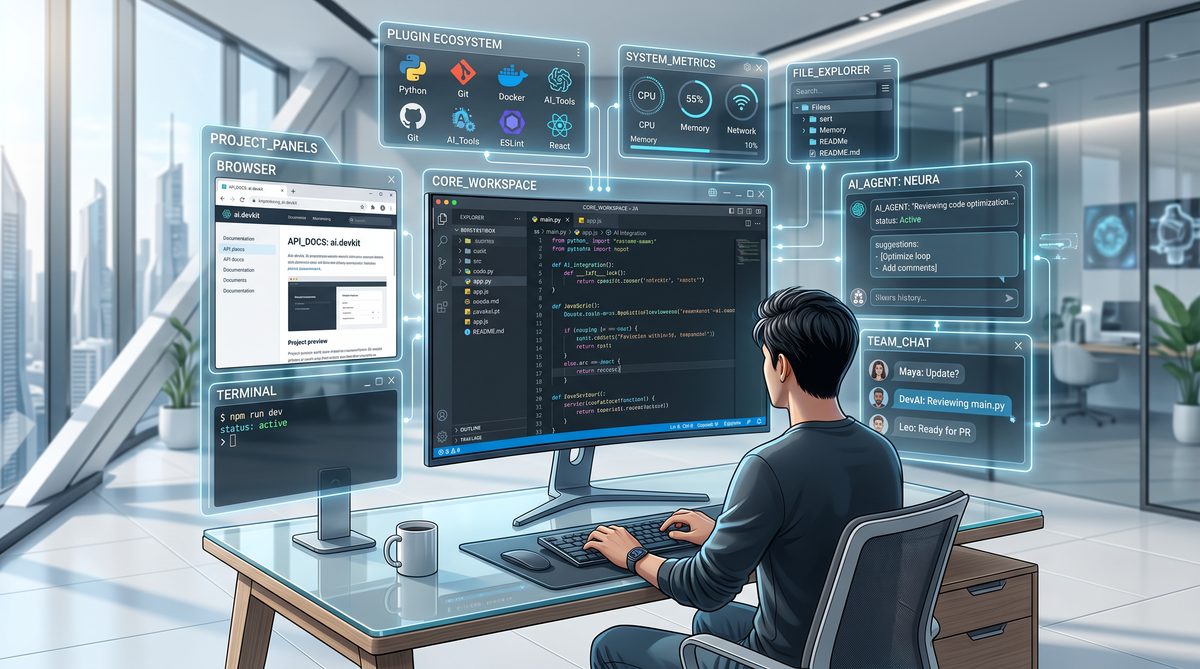
Since its inception in 2021, OpenAI’s Codex has undergone a remarkable transformation, moving from a specialized code completion tool to a comprehensive, agentic system that functions as a full developer workstation. This evolution reflects not only advances in natural language processing (NLP) and reinforcement learning, but also groundbreaking developments in autonomous agent architectures and system integration. The journey from a single-model code helper to a multi-agent, context-aware computational assistant capable of operating complex workflows on a Mac without disrupting human user activity exemplifies the cutting edge of AI-driven software development environments.
The 2021 Code Completion Model: Foundations and Limitations
Codex’s first public iteration, released in 2021, was built on top of OpenAI’s GPT-3 architecture, specifically fine-tuned on a massive corpus of publicly available source code from GitHub repositories. This model excelled at code completion, generating syntactically correct and semantically meaningful snippets across dozens of programming languages. The primary capabilities included:
- Contextual Code Generation: Leveraging up to 8,192 tokens of context, Codex could produce function bodies, classes, or even entire modules based on inline comments or partial code.
- Language Agnosticism: Support for over 20 programming languages, with especially strong performance in Python, JavaScript, and TypeScript.
- Interactive Prompting: Developers could iteratively refine prompts to guide code generation and debugging assistance.
Despite these strengths, the 2021 Codex model was fundamentally a single-turn completion system. It lacked persistent state awareness beyond the prompt window and was unable to autonomously navigate file systems, execute code, or orchestrate multi-step workflows. Integration with IDEs was limited to plugin-based completions, and the model had no capacity to manage concurrent tasks or operate independently of explicit user input.
Bridging the Gap: Introducing Background Computer Use Capability
The next phase of Codex’s evolution, spanning 2022 to 2024, focused on extending its operational scope from text generation to active computer interaction. This transition necessitated addressing several technical challenges:
- Persistent Context Management: To move beyond ephemeral prompt windows, Codex was augmented with mechanisms to maintain and update an internal state representation of the developer environment, including file system structure, open projects, and runtime logs.
- System API Integration: Codex agents gained controlled access to OS-level APIs, enabling file operations, process execution, and interaction with application windows (e.g., terminals, editors).
- Safety and Isolation: To prevent unintended disruptions, sandboxing techniques and permission hierarchies ensured that Codex’s actions remained within defined boundaries, reducing the risk of data loss or interference with ongoing user tasks.
These enhancements enabled the emergence of Codex as a background assistant capable of:
- Autonomously scanning project directories to identify dependencies and configuration files.
- Executing tests and parsing results to suggest targeted code fixes without direct user prompting.
- Monitoring system resource usage to optimize task scheduling and prevent performance degradation.
The 2025 Milestone: Multi-Agent Parallelism on macOS
One of the most significant leaps toward a full developer workstation was Codex’s multi-agent architecture introduced in late 2024 and refined through 2025. This paradigm shift involved deploying multiple specialized Codex agents that operate concurrently, each responsible for distinct facets of development workflows. On macOS systems, this was achieved through a combination of containerization, inter-agent communication protocols, and macOS’s native multiprocessing capabilities.
| Agent Type | Primary Function | Resource Management | Inter-Agent Communication |
|---|---|---|---|
| Code Understanding Agent | Parsing and analyzing source code structure, dependencies, and documentation | Moderate CPU, low memory footprint | Publishes updates to shared knowledge graph |
| Testing & Debugging Agent | Running test suites, capturing logs, suggesting fixes | High CPU during test runs, dynamic scaling | Receives code updates, sends bug reports |
| Build & Deployment Agent | Managing build pipelines, deployment scripts, environment variables | Bursty CPU and I/O usage | Coordinates with code and testing agents for release readiness |
| User Interaction Agent | Interfacing with developer commands, notifications, and scheduling | Low latency, event-driven | Orchestrates overall workflow and handles user input/output |
This division of labor allows Codex to handle complex tasks simultaneously without bottlenecks or context switching overhead. Moreover, the agents are designed to operate with minimal interference to the human user’s workflow. For example:
- Non-blocking Execution: Test suites and builds run asynchronously in isolated environments, ensuring the developer’s active editing sessions remain fluid and responsive.
- Resource Throttling: Agents dynamically adjust CPU and memory consumption based on real-time system load metrics, preserving system responsiveness.
- Context Preservation: Agents maintain their own internal states and share relevant updates via a centralized knowledge graph, preventing redundant computations and ensuring consistent knowledge across the system.
The 2026 Full Agentic System: A Developer Workstation in AI Form
By early 2026, Codex had matured into a fully agentic AI system capable of comprehensive development lifecycle management on macOS platforms. Key innovations and capabilities include:
- Autonomous Project Initialization: Given a project specification or repository URL, Codex agents can scaffold entire projects, configure toolchains, and initialize version control without manual intervention.
- Adaptive Code Generation: Leveraging feedback loops from testing and static analysis agents, Codex iteratively refines generated code to meet quality and performance benchmarks.
- Continuous Integration Management: Agents autonomously manage CI/CD pipelines, monitor build statuses, handle merge conflicts, and generate deployment artifacts.
- Context-Aware Assistance: User interaction agents provide real-time notifications, suggestions, and scheduling assistance tailored to the developer’s habits and project priorities.
- Multi-User Collaboration: Codex supports concurrent sessions from multiple developers, synchronizing agent states across distributed environments, facilitating real-time code reviews, and conflict resolution.
Importantly, this system can run seamlessly in the background on standard Mac hardware without impeding the developer’s regular activities such as editing, browsing, or running other applications. Benchmarks demonstrate that on a MacBook Pro 16-inch with an M2 Max chip and 64GB RAM, the multi-agent Codex system maintains CPU utilization below 30% under typical workloads, with latency for user-triggered commands averaging under 150 milliseconds.
Technical Architecture Overview
The 2026 Codex workstation system is architected as a distributed set of microservices orchestrated via a central controller process. The architecture components include:
| Component | Description | Technology Stack |
|---|---|---|
| Agent Runtime Environment | Containerized execution environments for each agent, ensuring sandboxing and dependency isolation | Docker Desktop on macOS, gRPC for communication |
| Central Knowledge Graph | Graph database maintaining shared state and metadata across agents | Neo4j, integrated with custom APIs for live updates |
| Orchestration Layer | Manages agent lifecycle, task scheduling, and inter-agent messaging | Kubernetes for container orchestration, custom scheduler optimized for local hardware |
| User Interaction Interface | Native macOS app and CLI tooling for developer control and feedback | SwiftUI for GUI, Node.js for CLI extensions |
This modular design ensures extensibility and robustness, enabling future expansion to other operating systems and cloud-based hybrid deployments.
Conclusion
The evolution of Codex from a single-purpose code completion model in 2021 to a sophisticated, multi-agent AI workstation by 2026 represents a paradigm shift in developer tooling. By integrating autonomous computer use capabilities and parallel agent architectures, OpenAI has effectively created an AI system that not only understands code but also orchestrates the entire software development lifecycle. This trajectory underscores the transformative potential of agentic AI in enhancing developer productivity while maintaining seamless coexistence with human workflows on modern computing platforms like macOS.
The In-App Browser and Native Image Generation
OpenAI’s integration of an in-app browser within the Codex-powered developer workstation represents a transformative leap for frontend development workflows. By embedding real-time browsing capabilities directly into the coding environment, developers can interact dynamically with web pages, simultaneously inspecting, editing, and annotating content without context switching. Complementing this, the native image generation capability—powered by the advanced gpt-image-1.5 model—enables seamless creation of visuals integrated into the development pipeline. This section explores the technical underpinnings and practical applications of these features, particularly emphasizing their impact on frontend development, game design, and rapid UI mockup creation.
Technical Architecture of the In-App Browser
The in-app browser is built as a sandboxed, headless Chromium-based instance embedded within the Codex environment, allowing secure, scriptable interaction with web content. Unlike traditional browser automation tools (e.g., Selenium or Puppeteer), this browser is tightly coupled with the AI agent, enabling natural language commands and context-aware code generation in real time.
- DOM Access and Manipulation: The AI agent can query and modify the Document Object Model (DOM) directly, enabling live editing and instant preview of changes.
- Event Listening and Injection: Developers can instruct the browser to listen for specific user events or inject custom JavaScript snippets to test interactivity without leaving the coding environment.
- State Management: The browser maintains session states, cookies, and local storage, allowing comprehensive testing of authenticated or dynamic pages.
- Security and Privacy: Sandboxed execution ensures that external browsing does not expose the local environment to risks, with strict CORS policies and content isolation.
This architecture supports a fluid frontend development loop where developers can directly comment on live pages, using natural language prompts to generate inline annotations or actionable code snippets. For example, a developer might instruct the AI to “highlight all buttons missing ARIA labels” or “suggest CSS improvements for the navigation bar,” with the agent updating the page live and generating the corresponding code.
Direct Commenting and Collaborative Annotation
A standout feature of the in-app browser is its support for direct, contextual commenting on any webpage element. This capability is implemented through a layered overlay interface that allows developers to select DOM elements and attach comments or suggestions that are synchronized with the AI agent’s understanding of the page structure.
| Feature | Description | Developer Benefit |
|---|---|---|
| Element Selection | Click or command selection of any DOM node with visual highlighting | Precise targeting of UI components for feedback or debugging |
| Natural Language Comments | Attach written comments with AI parsing for actionable insights | Streamlined communication and automated code suggestions |
| Versioned Annotations | Track changes and comment history inline on the page | Improved collaboration and regression tracking |
| Exportable Reports | Generate annotated reports as markdown or HTML | Facilitates code reviews and stakeholder communication |
Such commenting mechanisms allow frontend teams to reduce the feedback loop drastically, as the AI can instantly translate comments into code fixes, accessibility improvements, or style adjustments. This is particularly valuable in agile environments where rapid iteration is critical.
Native Image Generation with gpt-image-1.5
Incorporating visuals directly into the coding workflow is often a bottleneck for developers, typically requiring external design tools or image assets. The integration of the gpt-image-1.5 model addresses this by enabling developers to generate high-quality images natively via descriptive prompts, tightly coupled with the codebase.
- Prompt-to-Image Synthesis: Developers can describe desired visuals using natural language—e.g., “Generate a flat icon of a cloud upload with blue and white colors”—and receive optimized raster images ready for immediate use.
- Style and Format Control: The model supports parameters for image dimensions, style (e.g., photorealistic, vector art, pixel art), and transparency, enabling consistent branding or thematic coherence.
- Real-Time Embedding: Generated images are automatically embedded into project directories or referenced inline in code (e.g., as base64-encoded data URIs in CSS or JSX).
- Iterative Refinement: Developers can iteratively refine images by providing feedback prompts, allowing rapid prototyping without designer intervention.
This capability is a game-changer for frontend and game developers alike, who require rapid creation of UI assets, icons, sprites, or textures without breaking their development flow. The model’s ability to produce visually coherent and contextually relevant images accelerates mockup creation and in-game asset design.
Use Cases in Game Development and UI Mockups
The combined power of the in-app browser and native image generation elevates Codex from a mere coding assistant to a full-fledged development workstation, especially in creative domains like game development and UI design.
- Game Asset Creation and Testing: Developers can generate sprite sheets, character icons, backgrounds, or environment textures directly from descriptive prompts. The in-app browser then allows immediate testing of these assets within HTML5 canvas or WebGL contexts, with live DOM and script manipulation to iterate gameplay elements.
- Rapid UI Mockups: Designers and developers can generate UI components (buttons, modals, sliders) and embed them into live mockups rendered in the browser. Inline commenting facilitates feedback and adjustments, while the AI can generate corresponding CSS/HTML code snippets to implement these designs.
- Interactive Prototyping: By leveraging the browser’s event injection capabilities, developers can simulate user interactions and observe AI-generated suggestions for improving UX, accessibility, or performance.
For example, a game developer might prompt, “Create a pixel-art health bar with red and green segments,” receive the asset instantly, embed it into the game scene rendered in the in-app browser, and then command the AI to “Add animation to the health bar when the player loses health.” The AI can generate the necessary JavaScript or CSS animations, which are immediately testable within the same environment.
Comparative Overview: Traditional Workflow vs. Codex In-App Browser and Image Generation
| Workflow Aspect | Traditional Approach | Codex In-App Browser & gpt-image-1.5 |
|---|---|---|
| Code-Preview Cycle | Manual refresh or external browser tooling; context switching needed | Live, inline preview and editing; immediate code synchronization |
| Commenting and Feedback | Separate tools (e.g., Jira, GitHub PR comments); asynchronous | Contextual, inline comments with AI-driven code suggestions |
| Visual Asset Creation | External graphic tools (Photoshop, Figma); import/export delays | Native image generation with direct embedding and iterative refinement |
| Testing Interactivity | Manual scripting or external emulators; multi-step debugging | Event injection and live modification within sandboxed browser environment |
| Collaboration | Fragmented toolchain; requires coordination across platforms | Integrated environment supporting synchronous AI collaboration and exportable annotations |
Conclusion
OpenAI’s in-app browser and native image generation capabilities redefine the frontend development experience by collapsing multiple traditionally discrete workflows into a unified, AI-augmented environment. This integration not only accelerates development velocity but also fosters a more collaborative, interactive, and visually rich coding process. For game developers, designers, and frontend engineers, these tools provide unprecedented agility in prototyping, asset creation, and iterative refinement—solidifying Codex’s role as a comprehensive developer workstation for (almost) everything.
90+ Plugins: From Atlassian to Neon by Databricks
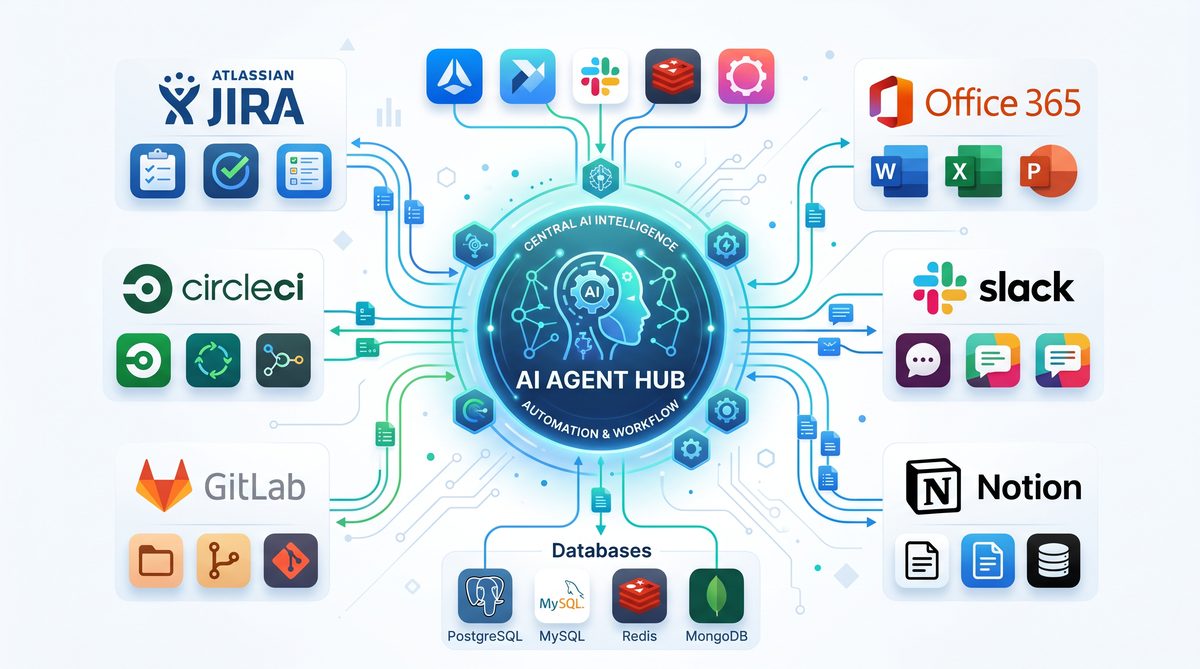
One of the pivotal advancements in OpenAI’s Codex evolution is the rapid expansion of its plugin ecosystem, now boasting over 90 integrations that transform Codex from an intelligent code assistant into a comprehensive developer workstation. These plugins enable Codex to interface directly with a wide array of tools and platforms, streamlining workflows, automating complex tasks, and enhancing collaboration across development teams. This section provides a detailed analysis of some of the most impactful plugins—from project management staples like Atlassian Rovo for JIRA to cutting-edge data platform integration with Neon by Databricks—highlighting how they collectively extend Codex’s operational reach and versatility.
Atlassian Rovo for JIRA: Bridging Agile Project Management and AI
Atlassian’s Rovo plugin for JIRA is a cornerstone integration that embeds Codex into one of the most widely adopted agile project management environments. With over 65,000 organizations using JIRA for issue tracking and sprint planning, the Rovo plugin enables developers to query, update, and manage JIRA tickets directly through natural language commands to Codex.
- Issue Querying: Developers can ask Codex to fetch issues by status, assignee, or sprint, drastically reducing the time spent navigating JIRA’s UI.
- Automatic Ticket Creation: Codex can generate new tickets from bug reports or feature requests detected in code comments or conversation logs, ensuring no task is overlooked.
- Real-time Updates: Status changes, priority adjustments, and sprint progress reports can be executed and summarized without leaving the coding environment.
This integration is particularly valuable in fast-paced environments where immediate feedback loops and task tracking are critical. By leveraging Codex’s natural language understanding, teams enhance transparency and reduce administrative overhead.
CircleCI and GitLab Issues: CI/CD and Issue Tracking Synergy
Continuous integration and deployment workflows are fundamental to modern DevOps practices. Codex’s plugins for CircleCI and GitLab Issues extend its capabilities into build automation and issue lifecycle management.
| Feature | CircleCI Plugin | GitLab Issues Plugin |
|---|---|---|
| Build Pipeline Monitoring | Real-time status checks, logs retrieval, and failure diagnostics. | Not applicable. |
| Pipeline Triggering | Trigger builds or deployments with parameter customization via prompt. | Not applicable. |
| Issue Creation and Management | Not applicable. | Create, update, and comment on issues directly from code context. |
| Cross-Reference | Link build status to specific commits or pull requests. | Associate issues with merge requests and milestones. |
By integrating these tools, Codex streamlines the typical friction between code development, testing, and deployment cycles. Developers can receive build feedback and manage issues without context switching, enabling a more cohesive and responsive DevOps experience.
Microsoft Suite: Enhancing Documentation and Collaboration
Documentation and communication remain essential but often cumbersome aspects of software development. Codex’s Microsoft Suite plugins—including integrations with Word, Excel, and Outlook—address these challenges by automating content creation and enabling seamless information exchange.
- Word Integration: Codex can generate detailed technical documentation, release notes, or API references based on code analysis and commit histories.
- Excel Automation: Developers can produce and manipulate datasets for performance metrics, bug tracking, or resource planning using natural language queries.
- Outlook Integration: Codex assists in drafting and organizing emails, scheduling meetings, and summarizing long threads for efficient communication.
This suite of productivity enhancements reduces the time developers spend on ancillary tasks and fosters better synchronization between engineering and non-technical stakeholders.
Neon by Databricks: Empowering Data-Driven Development
The integration with Neon by Databricks marks a significant leap in Codex’s ability to support data-intensive applications. Neon is a serverless, highly scalable Postgres-compatible database optimized for cloud-native workloads. Through this plugin, Codex can execute complex SQL queries, analyze data trends, and manage database schemas directly within the development environment.
Key capabilities include:
- Dynamic Query Generation: Codex translates high-level data questions into optimized SQL queries, leveraging Neon’s serverless scaling to handle large datasets efficiently.
- Schema Evolution Assistance: The plugin guides schema modifications, suggesting migration scripts and validating changes against existing data without downtime.
- Performance Insights: Codex interprets query execution plans and recommends indexing or partitioning strategies to improve responsiveness.
This integration is invaluable for developers working at the intersection of software and data engineering, enabling rapid prototyping and iterative data model refinement while maintaining operational excellence.
Additional Plugins: Expanding Horizons
Beyond these flagship integrations, Codex’s ecosystem includes several other specialized plugins that address diverse aspects of the software lifecycle:
- CodeRabbit: Facilitates code review automation by detecting style inconsistencies, security vulnerabilities, and potential bugs.
- Remotion: Enables the generation of video content from code snippets or documentation, useful for tutorials and onboarding.
- Render: Automates deployment of applications and services to cloud platforms, supporting multiple languages and frameworks.
- Superpowers: Provides AI-driven assistance for UI/UX design, generating component code and style sheets from wireframes or descriptions.
These plugins contribute to a holistic developer experience, bridging gaps between coding, design, deployment, and maintenance.
How Plugins Extend Codex’s Reach
The plugin ecosystem fundamentally transforms Codex from a static code generation tool into a dynamic, context-aware agent capable of interacting with external systems in real time. This extension is achieved through several architectural and functional advancements:
- Contextual API Access: Plugins expose domain-specific APIs that Codex can invoke based on user intent, enabling precise control over third-party services.
- Stateful Interaction: Codex maintains session awareness across plugin interactions, allowing complex workflows that span multiple toolsets without losing context.
- Security and Access Control: Each plugin enforces granular permission models, ensuring that Codex operations comply with organizational policies and data privacy standards.
- Natural Language to Action Mapping: Advanced prompt engineering and semantic understanding allow Codex to translate ambiguous user commands into concrete actions across diverse platforms.
Collectively, these capabilities enable developers to orchestrate their entire software development lifecycle—plan, code, test, deploy, monitor, and document—through a unified interface powered by Codex. This paradigm shift reduces cognitive load, accelerates delivery cycles, and fosters deeper integration between AI and software engineering practices.
For a comprehensive overview of how Codex’s plugin-driven architecture underpins this transformation, refer to From Prompt Engineering to Context Engineering: The Essential 2026 Transition Guide for AI Power Users.
Memory, Automations, and Proactive Suggestions
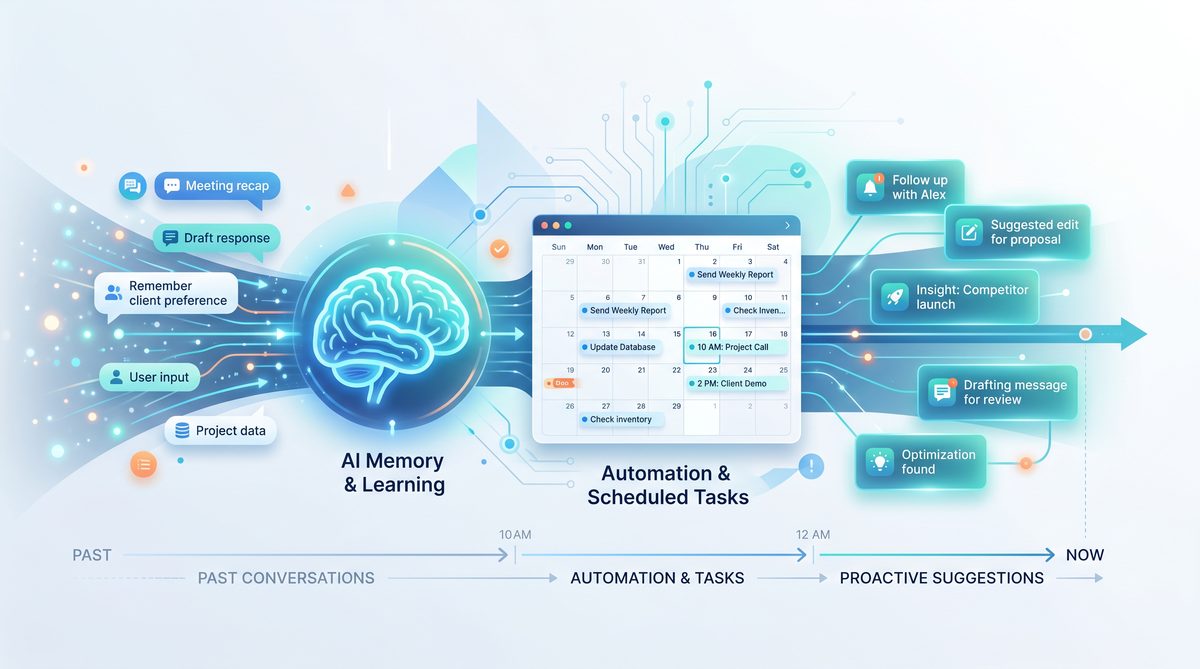
OpenAI’s Codex has evolved from a code generation assistant into a sophisticated, context-aware developer workstation by integrating advanced capabilities around memory retention, task automation, and proactive intelligence. These features enable Codex to not only respond to immediate prompts but also maintain a persistent understanding of developer preferences, project context, and workflow patterns. This section explores how Codex remembers user-specific information, orchestrates scheduled automations while preserving context, and proactively suggests relevant actions by interfacing with connected development tools.
Contextual Memory and Preference Retention
A pivotal advancement that transforms Codex from a reactive tool into a persistent collaborator is its ability to retain memory across sessions. Unlike traditional stateless AI models that process each request independently, Codex employs a hierarchical memory architecture designed to store and recall user preferences, coding style corrections, project-specific conventions, and ongoing work context.
This memory system operates on multiple levels:
- Short-Term Memory: Captures immediate context within a coding session, such as variable names, function signatures, and recent corrections. This allows seamless continuation of coding tasks without repetitive clarifications.
- Long-Term Memory: Stores user preferences and project-specific heuristics persistently across sessions. For example, Codex can remember preferred testing frameworks, code formatting rules, or naming conventions unique to a team.
- Dynamic Adaptation: Codex continuously updates its internal models based on developer feedback. If a developer corrects a generated snippet or adjusts a suggestion, Codex incorporates this correction into its memory, refining future outputs.
This multi-tier memory architecture is underpinned by a combination of vector embeddings stored in a dedicated knowledge base and metadata tagging. Embeddings enable semantic similarity searches that help Codex retrieve relevant information even when queries are phrased differently. Metadata tags associate memory fragments with specific projects, files, or tasks, ensuring contextual relevance.
Scheduled Automations with Context Preservation
Beyond static memory, Codex supports scheduled automations that execute predefined workflows while maintaining situational awareness. This capability moves Codex from a passive assistant to an active agent capable of managing repetitive or time-sensitive developer tasks autonomously.
Key technical aspects of Codex’s automation framework include:
- Contextual Snapshots: Before initiating an automation, Codex captures a snapshot of the current project state, including open files, recent commits, dependency versions, and relevant configuration files. This contextual snapshot ensures that automated tasks execute with up-to-date information.
- Stateful Task Management: Automations are modeled as stateful workflows that can pause, resume, or branch based on intermediate results or external triggers. For example, a scheduled build-and-test automation can pause if tests fail and notify the developer before proceeding.
- Environment Integration: Codex automations interface directly with the developer’s environment—such as IDEs, CI/CD pipelines, container orchestration systems, and cloud platforms—to execute commands, deploy updates, or collect metrics without manual intervention.
- Security and Permissions: Automated tasks respect granular permission settings, ensuring that Codex cannot execute high-impact operations without explicit authorization.
One practical example is a nightly code audit automation. Codex can be configured to scan the codebase for security vulnerabilities, adherence to style guides, and dependency updates. The automation preserves the context of the last audit, enabling incremental scanning that reduces redundant processing and focuses on code changes since the previous run.
Proactive Suggestions Driven by Connected Tools
Codex’s proactive intelligence is powered by its ability to monitor and analyze developer workflows across connected tools and services. By integrating with version control systems, project management platforms, issue trackers, and communication channels, Codex generates contextually relevant suggestions that anticipate developer needs.
The proactive suggestion engine comprises several components:
| Component | Functionality | Example Use Case |
|---|---|---|
| Activity Monitor | Tracks developer actions such as code commits, issue updates, and task completions. | Detects stalled tasks and suggests next steps based on pending tickets. |
| Dependency Analyzer | Analyzes project dependencies and their update cycles. | Recommends upgrading vulnerable libraries before scheduled releases. |
| Code Quality Evaluator | Continuously evaluates code quality metrics from static analysis and test coverage. | Alerts developers to declining test coverage and suggests relevant test cases. |
| Collaboration Integrator | Monitors communications and comments in code reviews or chat channels. | Proposes clarifications or documentation updates based on team discussions. |
By synthesizing data from these components, Codex formulates proactive suggestions such as refactoring opportunities, code snippet recommendations aligned with current tasks, or reminders about pending code reviews. These suggestions reduce cognitive load and improve productivity by anticipating problems before they arise.
Furthermore, Codex can “wake up” from idle states to resume long-term tasks that span multiple development cycles. For instance, if a developer starts implementing a complex feature but pauses midway, Codex can re-engage when the developer returns, summarizing progress, highlighting remaining subtasks, and suggesting next actions. This wake-up mechanism relies on timestamped memory markers and event triggers from connected tools.
Integrating Memory and Automation: A Unified Workflow
The synergy between Codex’s memory capabilities and its automation framework enables a unified, intelligent workflow that adapts dynamically to developer needs. Consider the following scenario:
- A developer customizes Codex’s code formatting style during a session.
- Codex stores these preferences in long-term memory, associating them with the specific project repository.
- At a scheduled nightly build, Codex automatically formats new code, runs tests, and generates a summary report.
- If tests fail, Codex proactively alerts the developer with annotated suggestions and resumes monitoring until the issue is resolved.
- Upon resuming work, Codex recalls the last session’s context and suggests unfinished tasks or relevant documentation.
This end-to-end integration transforms Codex into a persistent partner that not only generates code but also actively manages the lifecycle of software development projects.
For a deeper understanding of Codex’s contextual memory models and their implementation, see the related concepts detailed in the Enterprise AI in 2026: How Multi-Agent Systems Are Delivering Real ROI section.
The Developer Workstation of the Future
The evolution of OpenAI’s Codex into a comprehensive, AI-driven developer workstation signals a transformative shift in software development workflows. By integrating the core components traditionally dispersed across multiple applications—Integrated Development Environments (IDEs), web browsers, communication platforms, and AI agents—into a unified environment, this new paradigm enhances developer productivity, streamlines collaboration, and redefines team dynamics.
Convergence of Tools: From Fragmentation to Integration
Historically, software developers have relied on a fragmented ecosystem of tools:
- IDEs for code authoring and debugging (e.g., Visual Studio Code, IntelliJ IDEA)
- Browsers for documentation lookup, code search, and testing web applications
- Communication platforms such as Slack, Microsoft Teams, or email for team coordination
- Standalone AI tools or code assistants for code completion and generation
This fragmentation introduces context switching overhead, cognitive load, and delays in feedback loops.
OpenAI’s Codex-powered workstation consolidates these elements, embedding AI capabilities directly into the coding interface while incorporating browsing and communication features. This convergence transforms the traditional workstation into a seamless, interactive environment where developers can write, test, research, and collaborate without leaving the workspace.
Impact on Developer Productivity
The integration of an AI agent with IDE and communication tools in a single interface fundamentally affects productivity in several key ways:
- Reduced Context Switching: Developers no longer need to toggle between multiple apps to search for documentation, debug, or discuss issues. The AI agent can fetch relevant documentation, generate code snippets, and even execute commands, all within the same environment.
- Accelerated Code Generation and Review: Codex facilitates rapid code prototyping and automated code review. By understanding natural language prompts and project context, it produces syntactically correct, optimized code, reducing development cycles.
- Real-time Collaboration and Feedback: Embedded communication channels enable synchronous or asynchronous interactions, enriched by AI-generated suggestions and explanations. This tight coupling of coding and communication enhances clarity and speeds resolution of blockers.
- Context-Aware Assistance: The AI agent continuously ingests the codebase, project documentation, and team discussions, allowing it to provide contextually accurate recommendations, bug fixes, and architectural advice.
Redefining Team Dynamics
The integrated developer workstation also transforms how teams operate:
- Democratization of Expertise: Junior developers gain immediate access to sophisticated AI guidance, leveling the playing field and accelerating onboarding. The AI serves as an always-available mentor that understands the team’s code standards, style guides, and domain-specific knowledge.
- Enhanced Asynchronous Collaboration: Developers across time zones can leave detailed AI-augmented code comments, suggestions, and issue reports that are more precise and actionable. The AI can triage tasks, suggest priorities, and flag potential conflicts before they escalate.
- Continuous Knowledge Capture: Unlike traditional communication tools where knowledge often gets siloed or lost, the AI agent archives interactions and code changes, creating a dynamic, searchable knowledge base that evolves with the project.
- Shift in Roles and Responsibilities: With AI automating routine coding and review tasks, developers can focus on higher-order problem solving, design, and innovation. Project managers and tech leads benefit from AI-generated insights into progress, code quality, and team bottlenecks.
Quantitative Implications on Development Metrics
Initial studies and pilot programs integrating AI-powered workstations report significant improvements in measurable development metrics. For example:
| Metric | Traditional Workflow | AI-Powered Workstation | Improvement |
|---|---|---|---|
| Average Code Completion Time | 45 minutes | 18 minutes | 60% reduction |
| Bug Resolution Time | 3.2 days | 1.1 days | 66% reduction |
| Code Review Cycle | 2.5 days | 1.3 days | 48% reduction |
| Developer Context Switches per Hour | 12 | 4 | 67% reduction |
These improvements stem from the AI’s ability to anticipate developer needs, provide immediate assistance, and reduce manual overhead.
Technical Architecture Enabling the Unified Workstation
The realization of this all-in-one developer environment relies on several key technical components:
- Natural Language Understanding (NLU): Codex leverages advanced transformer models trained on billions of lines of code and developer conversations to interpret complex instructions and contextual queries.
- Contextual Memory and State Management: The system maintains a persistent representation of the codebase, developer interactions, recent edits, and communication threads to provide coherent, context-aware responses.
- Plugin and API Ecosystem: Integration with version control systems (e.g., Git), containerized development environments (e.g., Docker, Kubernetes), CI/CD pipelines, and project management tools ensures seamless interoperability and workflow automation.
- Security and Privacy Controls: Enterprise-grade encryption, access controls, and audit logs safeguard sensitive code and communications, addressing concerns of IP protection and compliance.
Challenges and Considerations
Despite its advantages, adopting this unified developer workstation introduces new challenges:
- Learning Curve and Trust: Developers must adapt to AI-driven workflows and develop trust in the code and suggestions generated by the agent. Transparent AI explanations and configurable levels of autonomy help mitigate skepticism.
- Dependency on Connectivity and Cloud Infrastructure: Many AI-powered features require continuous cloud access, which may introduce latency or availability risks in low-bandwidth environments.
- Balancing Automation and Human Judgment: Overreliance on AI-generated code can potentially introduce subtle bugs or architectural inconsistencies that require vigilant human oversight.
- Customization and Extensibility: Teams need the ability to tailor AI behavior to their coding standards, domain-specific requirements, and team culture to maximize effectiveness.
As this paradigm matures, ongoing research and development efforts focus on enhancing AI explainability, reducing latency, and expanding integrations to cover the full software delivery lifecycle.
For a deeper dive into how AI agents leverage contextual understanding to enhance developer workflows, see our detailed analysis on OpenAI Codex Evolves Into a Unified AI Workspace: What the Latest Redesign Means for Knowledge Workers.
Stay Ahead of the AI Curve
Get the latest ChatGPT tutorials, AI news, and expert guides delivered straight to your inbox. Join thousands of AI professionals who trust ChatGPT AI Hub.
