
How to Deploy GPT-5.5 on Amazon Bedrock for Multi-Cloud Enterprise AI: Complete Setup Guide with IAM Policies, Cost Controls, and Production Patterns
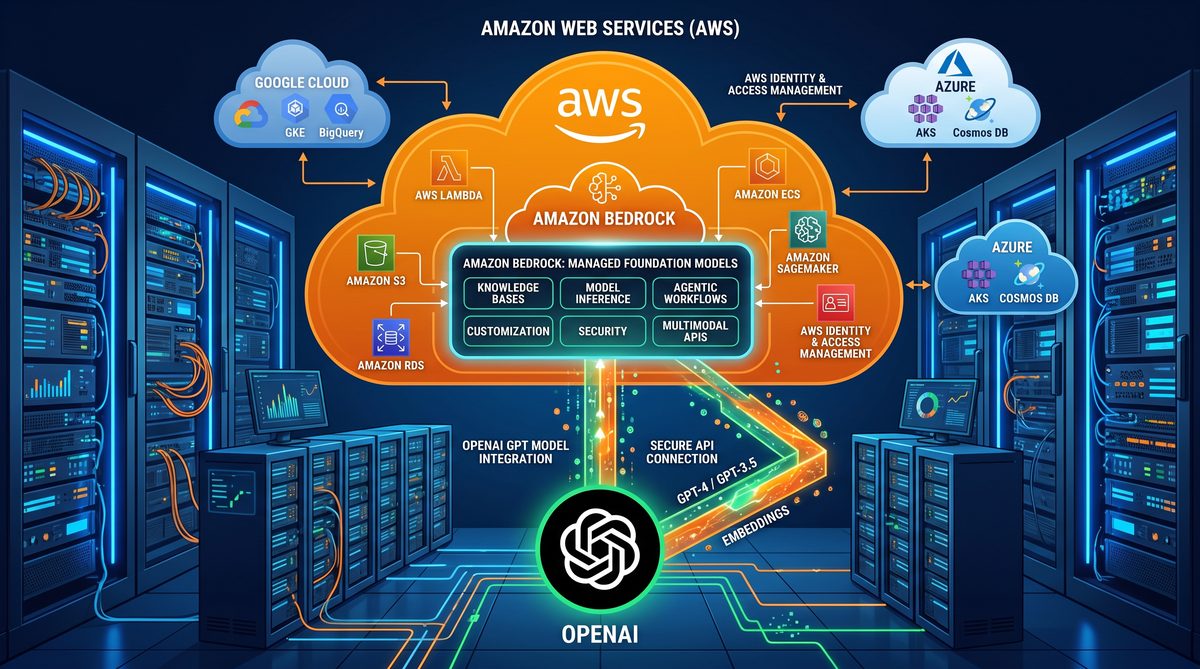
Deploying GPT-5.5 on Amazon Bedrock: End-to-End Guide for IAM, Cross-Account Access, Cost Optimization, and Multi-Cloud Routing
This technical, hands-on tutorial takes you from planning to production: configuring IAM for Bedrock, enabling cross-account access patterns, implementing cost controls (including prompt caching and usage monitoring), and building multi-cloud routing strategies to combine Amazon Bedrock’s GPT-5.5 with other LLM providers. The guide includes concrete, copy-pasteable IAM JSON policies, boto3 Python examples for local and cross-account invocation, DynamoDB/Redis caching examples, CloudWatch and Cost Explorer integration, and reference architectural patterns for high-availability, low-cost deployments.
Intended audience: cloud architects, DevOps engineers, security engineers, and ML platform builders who will operate GPT-5.5 on Amazon Bedrock in production environments as of the Bedrock GA on June 3, 2026.
Executive summary
GPT-5.5 on Amazon Bedrock brings next-generation generative capabilities into AWS-managed model hosting. Deployment planning must cover: secure and least-privilege IAM configurations, cross-account access for centralized model teams, cost governance to prevent runaway spend, and flexible routing to enable multi-cloud or hybrid fallbacks. This guide provides exact IAM policy documents, actionable boto3 scripts, caching strategies, cost control measures, and architecture patterns for multi-cloud routing.
Prerequisites and assumptions
- An AWS account with administrative privileges to create IAM roles, policies, and Bedrock resources.
- Python 3.11+ and boto3 version that includes a Bedrock client (post-GA SDK). Example installation: pip install boto3 botocore
- Familiarity with AWS services: IAM, STS, S3, KMS, DynamoDB, ElastiCache (Redis), CloudWatch, AWS Budgets, Cost Explorer, and AWS API Gateway or Application Load Balancer.
- Access to GPT-5.5 model identifier as published in Bedrock documentation (example: “gpt-5.5-bedrock-v1”).
1. IAM policy design and cross-account access
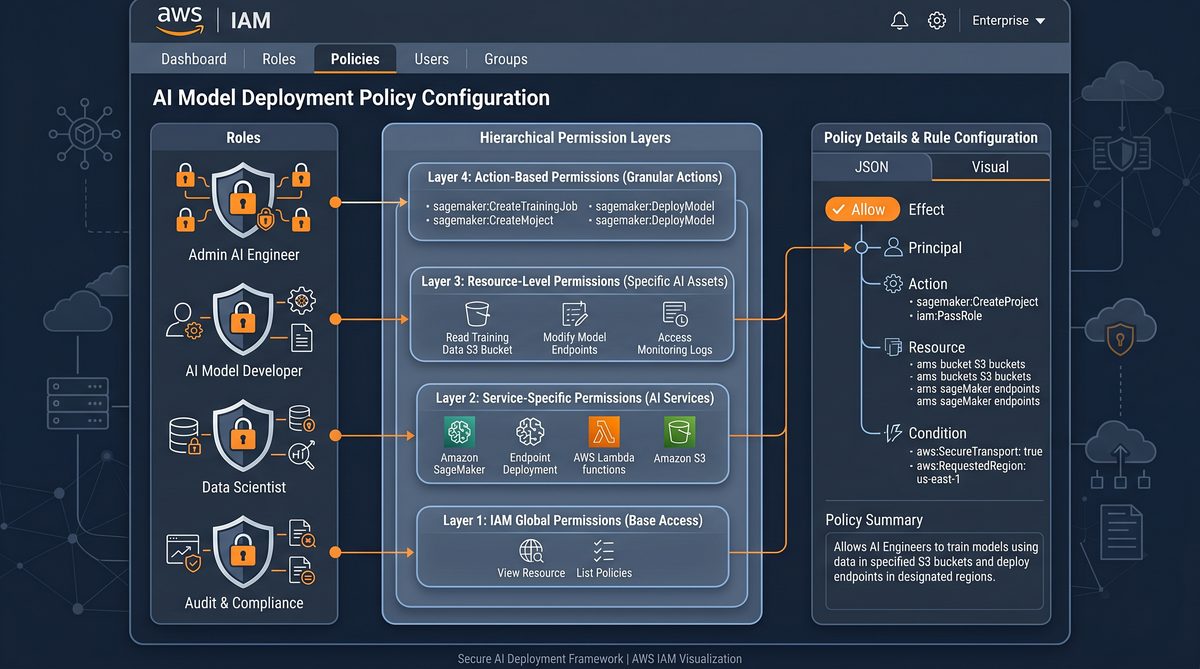
This section covers: a minimal policy to invoke GPT-5.5 on Bedrock, a full permissions baseline for a model-serving application (including S3 and KMS use), and cross-account trust policies to allow a central AI platform account to invoke models in a tenant account or vice versa. We also cover recommended resource tagging and service control policies (SCPs) patterns for organizations.
1.1 Minimal Bedrock invoke policy
Grant only the permissions required to call the Bedrock model invocation APIs. Replace arn:aws:bedrock:REGION:ACCOUNT:* with your regional Bedrock ARNs when Bedrock supports resource-level ARNs for models. If resource-level ARNs are not supported, limit by condition keys and tags.
{
  "Version": "2012-10-17",
  "Statement": [
    {
      "Sid": "AllowBedrockInvoke",
      "Effect": "Allow",
      "Action": [
        "bedrock:InvokeModel",
        "bedrock:DescribeModel",
        "bedrock:ListModels"
      ],
      "Resource": "*"
    },
    {
      "Sid": "AllowS3ReadForPromptAssets",
      "Effect": "Allow",
      "Action": [
        "s3:GetObject",
        "s3:ListBucket"
      ],
      "Resource": [
        "arn:aws:s3:::my-bedrock-prompts",
        "arn:aws:s3:::my-bedrock-prompts/*"
      ]
    },
    {
      "Sid": "AllowKMSDecryptForModelKeys",
      "Effect": "Allow",
      "Action": [
        "kms:Decrypt",
        "kms:Encrypt",
        "kms:GenerateDataKey"
      ],
      "Resource": "arn:aws:kms:REGION:ACCOUNT:key/XXXX-XXXX-XXXX-XXXX"
    }
  ]
}
1.2 Production model-serving role (example)
For an ECS task or Lambda that acts as an LLM microservice, you typically need Bedrock invoke permission, S3/KMS to read prompt templates and embeddings, CloudWatch to emit metrics, and optionally DynamoDB/ElastiCache access for caching. This IAM policy is scoped to specific resources and includes tags for cost allocation.
{
  "Version": "2012-10-17",
  "Statement": [
    {
      "Sid": "InvokeBedrockModel",
      "Effect": "Allow",
      "Action": [
        "bedrock:InvokeModel"
      ],
      "Resource": "*",
      "Condition": {
        "StringEquals": {
          "aws:ResourceTag/Environment": "production",
          "aws:TagKeys": ["Environment", "Team"]
        }
      }
    },
    {
      "Sid": "S3AccessForPrompts",
      "Effect": "Allow",
      "Action": [
        "s3:GetObject",
        "s3:ListBucket"
      ],
      "Resource": [
        "arn:aws:s3:::org-ml-prompts",
        "arn:aws:s3:::org-ml-prompts/*"
      ]
    },
    {
      "Sid": "DynamoDBCacheAccess",
      "Effect": "Allow",
      "Action": [
        "dynamodb:GetItem",
        "dynamodb:PutItem",
        "dynamodb:Query",
        "dynamodb:UpdateItem"
      ],
      "Resource": "arn:aws:dynamodb:REGION:ACCOUNT:table/bedrock-prompt-cache"
    },
    {
      "Sid": "CloudWatchEmitMetrics",
      "Effect": "Allow",
      "Action": [
        "cloudwatch:PutMetricData"
      ],
      "Resource": "*"
    }
  ]
}
1.3 Cross-account role for centralized platform teams
Common pattern: the central AI platform account (Account A) needs to assume a role in a tenant account (Account B) to call Bedrock resources that are deployed in the tenant account, or the tenant needs to assume a role in the central account for centralized billing/observability. The trust policy below should be created in the target account (Account B).
{
  "Version": "2012-10-17",
  "Statement": [
    {
      "Sid": "AllowPlatformAssumeRole",
      "Effect": "Allow",
      "Principal": {
        "AWS": "arn:aws:iam::ACCOUNT_A_ID:root"
      },
      "Action": "sts:AssumeRole",
      "Condition": {
        "StringEquals": {
          "aws:PrincipalTag/PlatformTeam": "CoreAI"
        }
      }
    }
  ]
}
Attach a permissions policy to this role in Account B granting the Bedrock invocation permissions and other needed resources (S3/DynamoDB). Example policy as attached to the role:
{
  "Version": "2012-10-17",
  "Statement": [
    {
      "Sid": "InvokeBedrockFromPlatform",
      "Effect": "Allow",
      "Action": [
        "bedrock:InvokeModel",
        "bedrock:ListModels",
        "bedrock:DescribeModel"
      ],
      "Resource": "*"
    },
    {
      "Sid": "ReadS3ForPrompts",
      "Effect": "Allow",
      "Action": [
        "s3:GetObject"
      ],
      "Resource": [
        "arn:aws:s3:::tenant-b-prompts/*"
      ]
    }
  ]
}
1.4 Example: STS assume-role flow with boto3
Below is a Python snippet you can run from Account A (platform account) to assume the role in Account B and call Bedrock’s invoke model API. Adjust region, role_arn, and session names appropriately. This pattern is suitable for central job runners, CI/CD pipelines, or platform operators.
import boto3
import json
import time

REGION = "us-east-1"
ROLE_ARN = "arn:aws:iam::ACCOUNT_B_ID:role/PlatformBedrockInvokeRole"
SESSION_NAME = "platform-bedrock-session"

sts = boto3.client("sts", region_name=REGION)
assumed = sts.assume_role(RoleArn=ROLE_ARN, RoleSessionName=SESSION_NAME, DurationSeconds=3600)
creds = assumed["Credentials"]

bedrock = boto3.client(
    "bedrock",
    region_name=REGION,
    aws_access_key_id=creds["AccessKeyId"],
    aws_secret_access_key=creds["SecretAccessKey"],
    aws_session_token=creds["SessionToken"]
)

payload = {
  "input": "Hello from cross-account invocation. Summarize this in one sentence."
}

response = bedrock.invoke_model(
    modelId="gpt-5.5-bedrock-v1",
    accept="application/json",
    contentType="application/json",
    body=json.dumps(payload)
)

print("Status code:", response.get("ResponseMetadata", {}).get("HTTPStatusCode"))
print("Model output:", response["body"].read().decode("utf-8"))
1.5 Secure principal tagging and least privilege
Use principal tags and condition keys to limit which roles can be assumed and under which conditions (for example, only from a specific VPC or only when MFA is present). Example condition using source VPC endpoint:
"Condition": {
  "StringEquals": {
    "aws:SourceVpce": "vpce-0123456789abcdef0"
  }
}
1.6 Service control policies (SCPs) and organizational guardrails
At the AWS Organization level, create SCPs that prevent unapproved external model endpoints from being called directly by workloads (for example, disallow direct network calls to external LLM providers at the network layer). Use tag-based allow lists for approved Bedrock model usage to ensure compliance and auditability.
Implementation checklist:
- Create least-privilege IAM policies for model-serving roles.
- Deploy cross-account assume-role with explicit trust policies and tag-based conditions.
- Use AWS KMS keys with key policies that include the roles needing access, and enable automatic key rotation.
- Enable CloudTrail for all Bedrock API calls in all accounts and aggregate logs in a central analytics account for audit and anomaly detection.
Detailed diagrams and an architectural flow illustrating cross-account STS assume-role pattern and Bedrock invocation lifecycle would normally appear here, including VPC endpoints and private networking. For placement in documentation, use the following placeholder:
1.7 Policy hardening examples
Hardening tips:
- Restrict “bedrock:InvokeModel” to particular source IP ranges or VPC endpoints when possible using Condition keys (aws:SourceIp, aws:SourceVpc, aws:SourceVpce).
- Enforce MFA for high-privilege assume-role operations in the trust policy.
- Tag resources and require tags in role assumption conditions to maintain cost allocation and deployment hygiene.
2. Cost optimization techniques: prompt caching, usage monitoring, and spend controls
Running GPT-5.5 can be costly if unchecked. Cost management has three pragmatic pillars: reduce redundant compute via caching and reuse, monitor and alert on usage and anomalies, and implement guardrails (quotas, budgets, and throttles). This section provides detailed strategies, DynamoDB/Redis caching examples, sample cost-control tables, and automated enforcement approaches.
2.1 Prompt caching architecture
Design principles for caching:
- Cache at the semantic request level using a canonicalized input signature (hash of normalized prompt + parameters + modelId + temperature + maxTokens).
- Use a TTL appropriate to your application (short for dynamic chat, longer for static templates).
- Prefer Redis for high QPS and low latency; use DynamoDB for cost-effective persistent caches with on-demand scaling.
- Invalidate dependent caches when prompt templates or system messages change (include template version in cache key).
Cache key example
Compute a SHA-256 over the serialized canonical request:
import hashlib
import json

def canonical_key(model_id, prompt_text, system_prompt, temperature, max_tokens, template_version):
    # Normalize whitespace and stable-serialize
    payload = {
        "model_id": model_id,
        "prompt": " ".join(prompt_text.split()),
        "system": " ".join(system_prompt.split()),
        "temperature": float(temperature),
        "max_tokens": int(max_tokens),
        "version": template_version
    }
    raw = json.dumps(payload, separators=(",", ":"), sort_keys=True)
    return hashlib.sha256(raw.encode("utf-8")).hexdigest()
Redis (ElastiCache) caching example
Redis is ideal for low latency and high QPS. Use elasticache Redis with in-transit and at-rest encryption and enforce IAM policies that restrict which EC2/ECS roles can access the cluster subnet groups. Example Python usage with redis-py and boto3 for fallbacks:
import redis
import json
import hashlib
import boto3
from botocore.exceptions import ClientError

REDIS_HOST = "redis.cache.cluster.endpoint"
REDIS_PORT = 6379
REDIS_DB = 0
CACHE_TTL_SECONDS = 300  # Example TTL

r = redis.Redis(host=REDIS_HOST, port=REDIS_PORT, db=REDIS_DB)

def get_cached_response(cache_key):
    val = r.get(cache_key)
    if val:
        return json.loads(val)
    return None

def set_cached_response(cache_key, value, ttl=CACHE_TTL_SECONDS):
    r.setex(cache_key, ttl, json.dumps(value))
DynamoDB caching example (cost-optimized)
For applications with moderate QPS where cost is a concern, DynamoDB provides a serverless, durable cache. Use GSI for TTL and read patterns. Table schema example and boto3 example follow.
{
  "TableName": "bedrock-prompt-cache",
  "AttributeDefinitions": [
    { "AttributeName": "cacheKey", "AttributeType": "S" },
    { "AttributeName": "lastAccess", "AttributeType": "N" }
  ],
  "KeySchema": [
    { "AttributeName": "cacheKey", "KeyType": "HASH" }
  ],
  "BillingMode": "PAY_PER_REQUEST",
  "TimeToLiveSpecification": {
    "Enabled": true,
    "AttributeName": "expiresAt"
  }
}
import boto3
import json
from botocore.exceptions import ClientError
import time
dynamodb = boto3.resource("dynamodb", region_name="us-east-1")
table = dynamodb.Table("bedrock-prompt-cache")
def get_cached_response(cache_key):
try:
resp = table.get_item(Key={"cacheKey": cache_key})
return resp.get("Item", {}).get("response")
except ClientError as e:
# Log and return None so we fall back to model invocation
print("DynamoDB get_item error:", e)
return None
def set_cached_response(cache_key, response_obj, ttl_seconds=300):
expires_at = int(time.time()) + ttl_seconds
table.put_item(Item={
"cacheKey": cache_key,
"response": response_obj,
"expiresAt": expires_at,
"lastAccess": int(time.time())
})2.2 Prompt deduplication and embedding-based cache lookup
When user prompts vary slightly but are semantically identical, use embedding-based similarity search to find cache hits. Compute an embedding for the canonical prompt (or the last user query + context) and store vector representations in an approximate nearest neighbor index (e.g., Amazon OpenSearch k-NN, Amazon Neptune, or Faiss on EC2). If similarity > threshold, reuse cached output to save compute.
2.3 Cost-control policy examples and throttling
Control spend by employing layered throttles and quotas:
- API Gateway usage plans (per-API key) to limit requests per second and burst capacity.
- Application-level rate limiting and per-user daily quotas enforced via Lambda or in-service token buckets.
- Bedrock invocation limits via IAM policies that restrict by condition keys such as
aws:RequestTagor by enforcing model selection to a cost-optimized model family.
Example throttle lambda for enforcement
This Lambda checks a DynamoDB table of per-user tokens and either allows or rejects requests. Implement as a pre-invoke step in API Gateway using a Lambda authorizer or as an application call prior to invoking Bedrock.
import boto3
from botocore.exceptions import ClientError
import time

dynamodb = boto3.resource("dynamodb")
table = dynamodb.Table("user-rate-limits")

def allow_request(user_id, cost_units=1):
    # cost_units represents the cost of the impending Bedrock call
    now = int(time.time())
    try:
        resp = table.update_item(
            Key={"userId": user_id},
            UpdateExpression="SET tokens = if_not_exists(tokens, :initial) - :cost, lastAccess = :now",
            ConditionExpression="tokens >= :cost",
            ExpressionAttributeValues={
                ":cost": cost_units,
                ":initial": 100,  # initial daily tokens
                ":now": now
            },
            ReturnValues="UPDATED_NEW"
        )
        return True
    except ClientError as e:
        if e.response["Error"]["Code"] == "ConditionalCheckFailedException":
            return False
        raise
2.4 Cost monitoring and budgets
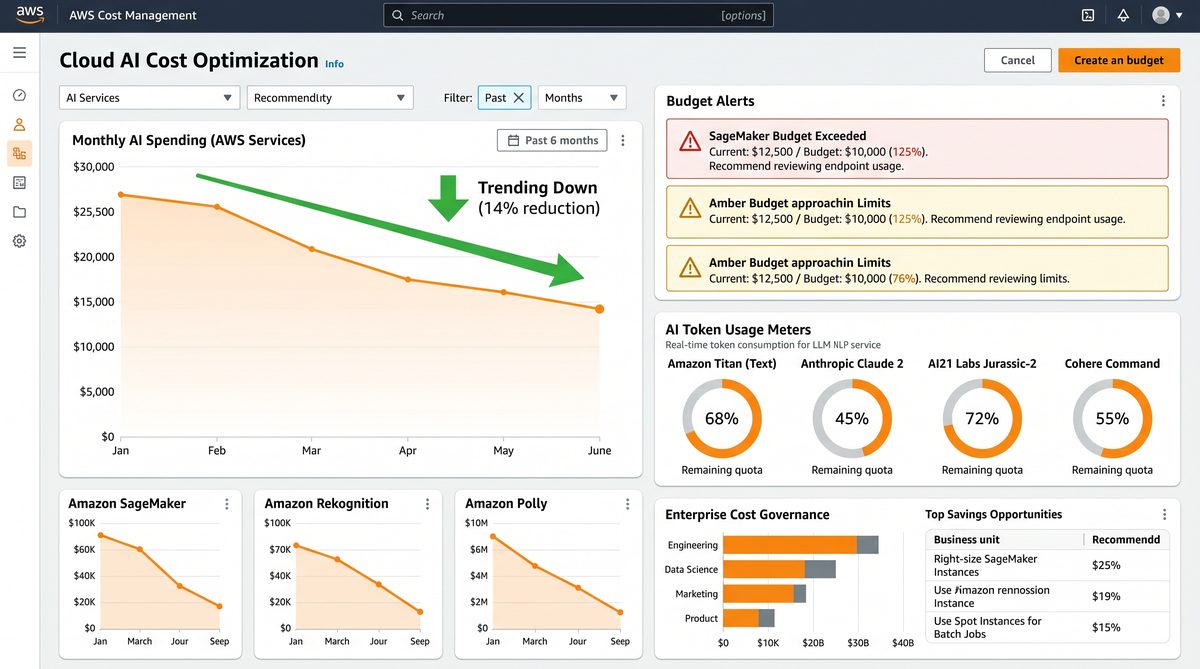
Integrate Bedrock usage metrics into CloudWatch and Cost Explorer. Bedrock API calls themselves emit CloudTrail events; parse these into CloudWatch metrics (count of invocations, cumulative input/output tokens, latency). Use the following signals for spend alerts:
- Daily token consumption per environment (prod/staging/dev)
- Total cost-per-day against forecast
- Top model consumers (logical team or API key)
- Anomalous single-request cost spikes (long context or huge generation length)
Cost control table (example rates and monthly projections)
| Metric | Example Rate | Assumptions | Monthly Cost (estimate) |
|---|---|---|---|
| GPT-5.5 (generation) | $0.012 per 1K output tokens | 500K output tokens/day | $0.012 * 500 * 30 = $180 |
| GPT-5.5 (input) | $0.004 per 1K input tokens | 1M input tokens/day | $0.004 * 1000 * 30 = $120 |
| Embedding calls | $0.002 per 1K tokens | 100K tokens/day | $0.002 * 100 * 30 = $6 |
| ElastiCache (redis) | $0.20/hr (small instance) | 24×30 hours | $144 |
| DynamoDB (cache) | Pay-per-request | 10M reads/writes per month | ~$50 |
Note: The numbers above are illustrative. Replace with your organization’s negotiated Bedrock pricing, reserved capacity, and spot model discounts where applicable.
2.5 Automatic spend enforcement using AWS Budgets and Lambda
Create an AWS Budget for Bedrock line item and configure an SNS action for threshold notifications. Subscribe a Lambda to the SNS topic that can automatically lower service quotas, rotate API keys, or disable model invocations by updating a global feature-flag in DynamoDB or by removing an IAM permission via an “enforcer” role.
def budget_notification_handler(event, context):
    # Pseudocode: on budget threshold, flip feature flag or reduce allowed tokens
    message = event["Records"][0]["Sns"]["Message"]
    detail = json.loads(message)
    threshold = detail.get("budgetThreshold")
    # Update a feature-flag table to prevent further high-cost model invocations
    flags_table.update_item(Key={"flagName":"bedrock_invoke"}, UpdateExpression="SET enabled = :v", ExpressionAttributeValues={":v":False})
2.6 Observability: CloudWatch metrics and synthetic checks
Emit these custom CloudWatch metrics from your serving layer for visibility:
- Requests.Count
- Tokens.Input.Total
- Tokens.Output.Total
- Cost.Estimate.Total (computed locally using configured price table)
- Cache.HitRate
- Latency.P50, P95, P99
Set alarms for sudden increases in Token consumption per minute to detect runaway loops or bugged clients.
For broader internal policy context, teams that consume GPT-5.5 often compare AWS-specific controls with OpenAI controls. See the internal policy comparison to understand architectural tradeoffs and how to map controls across providers:
For a deeper exploration of this topic, our comprehensive analysis on The Enterprise Guide to OpenAI Spend Controls and Usage Analytics: How to Monitor, Optimize, and Govern AI Costs Across Your Organization in 2026 provides detailed implementation strategies, real-world case studies, and actionable frameworks that complement the concepts discussed in this section.
. This subsidiary article explains how provider-level spend controls differ in API design and what translation layers your platform should implement when routing between Bedrock and OpenAI. Integrating those considerations will help you maintain consistent enforcement when you have a multi-cloud routing layer.
2.7 Cost-saving operational tactics
- Use smaller maxTokens and aggressive stop sequences where feasible.
- Prefer cheaper models for background or deterministic tasks (e.g., classification, paraphrasing) and reserve GPT-5.5 for high-value customer-facing generation.
- Batch multiple prompts into a single invocation when acceptable (reduces per-call overhead).
- Compress or deduplicate context before sending; only include the minimal context window needed for accurate outputs.
2.8 Example: end-to-end cached invoke flow in Python (boto3)
import boto3
import json
import hashlib
import time

REGION = "us-east-1"
MODEL_ID = "gpt-5.5-bedrock-v1"

bedrock = boto3.client("bedrock", region_name=REGION)
dynamodb = boto3.resource("dynamodb", region_name=REGION)
cache_table = dynamodb.Table("bedrock-prompt-cache")

def make_cache_key(model_id, prompt, system_prompt, params):
    data = {
        "model": model_id,
        "prompt": " ".join(prompt.split()),
        "system": " ".join(system_prompt.split()),
        "params": params
    }
    raw = json.dumps(data, sort_keys=True, separators=(",", ":"))
    return hashlib.sha256(raw.encode()).hexdigest()

def cached_invoke(prompt, system_prompt="", params=None, ttl=300):
    if params is None:
        params = {"temperature":0.7, "max_tokens":256}
    key = make_cache_key(MODEL_ID, prompt, system_prompt, params)
    # attempt cache
    resp = cache_table.get_item(Key={"cacheKey": key})
    if "Item" in resp and resp["Item"].get("expiresAt", 0) > int(time.time()):
        return json.loads(resp["Item"]["response"])
    # invoke Bedrock
    payload = {
        "input": prompt,
        "system_prompt": system_prompt,
        "parameters": params
    }
    response = bedrock.invoke_model(modelId=MODEL_ID, accept="application/json", contentType="application/json", body=json.dumps(payload))
    body = response["body"].read().decode("utf-8")
    # store in cache
    cache_table.put_item(Item={
        "cacheKey": key,
        "response": body,
        "expiresAt": int(time.time()) + ttl
    })
    return json.loads(body)
3. Multi-cloud routing patterns: when to route requests to Bedrock vs other LLM providers
Multi-cloud routing is valuable when you want to combine Bedrock GPT-5.5 with other providers for redundancy, cost optimization, latency optimization, or model specialization. This section outlines routing patterns, API gateway implementations, traffic splitting, failover, and governance implications.
3.1 Common routing patterns
- Primary/Failover: Route to Bedrock as primary; on invocation failures or elevated latency, failover to an alternative provider (OpenAI or on-prem model). Implement circuit-breaker logic and rate-limited fallbacks to avoid cascading failures.
- Weighted traffic split: Use weighted routing to send X% of traffic to Bedrock and Y% to other providers for canary experiments, benchmarking, or cost balancing.
- Latency-based routing: Use a performance probe and route to the provider with the best recent tail latency for a user’s region.
- Model-type routing: Route certain request types (e.g., embeddings, classification) to the lowest-cost capable provider and route creative generation to GPT-5.5.
- Hybrid vector store routing: Use a vector-match scorer hosted centrally that decides whether a local on-prem model is sufficient for short replies; otherwise escalate to Bedrock.
3.2 Implementation: API Gateway + routing lambda
Use an API Gateway fronting a Lambda (or containerized microservice) that performs routing decisions. The Lambda can use a feature flag service or a configuration in DynamoDB to determine weights and failover behavior. The Lambda should implement idempotency keys and request signatures to ensure consistent routing during retries.
def route_request(input_payload, routing_config):
    # routing_config example: {"bedrock":0.7, "openai":0.3}
    import random
    r = random.random()
    cumulative = 0.0
    for provider, weight in routing_config.items():
        cumulative += weight
        if r <= cumulative:
            return provider
    return "bedrock"
3.3 Traffic splitting with weighted rules
For controlled experiments, tie a stable hash of user_id to a routing bucket to ensure users consistently get the same provider during an experiment window. This avoids confusing users with inconsistent model behavior.
3.4 Failover and circuit-breakers
Implement the following circuit-breaker policy:
Access 40,000+ AI Prompts for ChatGPT, Claude & Codex — Free!
Subscribe to get instant access to our complete Notion Prompt Library — the largest curated collection of prompts for ChatGPT, Claude, OpenAI Codex, and other leading AI models. Optimized for real-world workflows across coding, research, content creation, and business.
- Track error rate and latency for each provider; trip circuit if error rate > 5% or P95 latency > configured threshold.
- On circuit open, route traffic to secondary provider for a cooldown window.
- Gradually reintroduce traffic using a backoff strategy (e.g., exponential decay) to probe the primary provider's health.
3.5 Security and data residency concerns
When routing across providers, enforce data residency and privacy policies. Use request metadata filters to strip PII before sending to external providers. If using Bedrock in AWS Region A and routing to OpenAI in the public internet, ensure you have contractual and technical controls (DLP, encryption in transit, and encryption at rest) to satisfy regulatory requirements.
3.6 Observability for multi-cloud routing
Record the provider decision and the response cost in your metrics for each request. Aggregate key metrics per provider: cost-per-request, tokens-per-request, latency percentiles, error rates, and cache hit rates. This enables data-driven routing changes and accurate cost allocation.
3.7 Example routing table and policy
Example configurable routing table stored in DynamoDB:
{
  "key": "routing-config",
  "value": {
    "default": {
      "providers": {
        "bedrock": 0.8,
        "openai": 0.2
      },
      "failover_order": ["openai", "bedrock"]
    },
    "experiments": {
      "user-group-abc": {
        "providers": {
          "bedrock": 0.5,
          "openai": 0.5
        }
      }
    }
  }
}
3.8 Example: invoking OpenAI as fallback using requests
When failing over, your Lambda or microservice must switch authentication and retry logic appropriately. Do not hardcode API keys—use secrets manager or KMS-encrypted environment variables and rotate regularly.
import requests
import os

OPENAI_KEY = os.environ.get("OPENAI_KEY")

def invoke_openai(prompt, model="gpt-4o-mini"):
    url = "https://api.openai.com/v1/responses"
    headers = {"Authorization": f"Bearer {OPENAI_KEY}", "Content-Type": "application/json"}
    body = {"model": model, "input": prompt}
    resp = requests.post(url, headers=headers, json=body, timeout=20)
    resp.raise_for_status()
    return resp.json()
3.9 Cost and performance tradeoffs in multi-cloud routing
Routing partially to cheaper providers reduces cost but adds operational complexity and increases surface area for security and compliance. Score routing decisions by:
- Per-request cost delta
- Latency sensitivity
- Quality delta (measured by quality metrics or human evaluation)
- Compliance constraints
For teams that use both Bedrock and external LLMs, maintaining consistent spend controls across providers is essential. For scheduling tasks, periodic batching, or asynchronous calls that offload to cheaper models during off-peak hours, review operational automation patterns such as scheduled tasks and job queues. Our internal playbook describes scheduling and batching best practices in detail:
For a deeper exploration of this topic, our comprehensive analysis on ChatGPT Scheduled Tasks Get a Major Overhaul: How the New Dedicated Page, Web Monitoring, and Agentic Automations Transform Personal and Business Productivity provides detailed implementation strategies, real-world case studies, and actionable frameworks that complement the concepts discussed in this section.
. The referenced article discusses orchestration strategies and how to map scheduled job cost profiles to provider-specific rate limits and quotas.
4. Operational runbook: deployments, incident responses, and CI/CD
4.1 Deployment checklist
- Create IAM roles and policies for model serving and cross-account access (use the JSON samples above).
- Provision KMS keys and ensure the service roles are present in KMS key policy.
- Bootstrap caching (DynamoDB or Redis) and configure TTL and monitoring.
- Deploy model-serving microservices with environment variables for model id, region, and routing config.
- Enable CloudTrail on all accounts and create a central log aggregation account for audit.
- Configure AWS Budgets and link an SNS to a spend-enforcer Lambda.
- Run chaos tests for failover routing (simulate Bedrock failure and validate fallback).
4.2 Incident response patterns
Incidents specific to LLM deployments often involve runaway invocation loops, cost spikes, or model regressions. Prepare playbooks for:
- High cost alert: turn off production model via feature flag and limit API access via API Gateway usage plan changes.
- Performance degradation: enable circuit-breaker to divert traffic to fallback provider and collect traces.
- Security event: revoke suspect API keys, investigate CloudTrail logs for relevant STS and bedrock:InvokeModel calls.
4.3 CI/CD for model configuration and prompts
Store prompt templates, system messages, and canonical prompt versions in a Git repository. CI should validate prompt changes against a test harness that runs a suite of deterministic checks and quality metrics (e.g., hallucination rate, response length). When template changes pass checks, CI publishes a new template version tag which invalidates the prompt-cache keys that include the template version.
4.4 Audit and compliance
Aggregate model invocation CloudTrail logs into a secure analytics account and run periodic audits for unusual invocation patterns or cross-account usage anomalies. Ensure CloudTrail and CloudWatch log retention policies meet regulatory requirements and that logs are immutable (S3 Object Lock when required).
5. Appendices: reference content and templates
5.1 Complete IAM policy templates
Bedrock invocation role for ECS/Lambda (copyable template):
{
  "Version": "2012-10-17",
  "Statement": [
    {
      "Sid": "BedrockInvokeFull",
      "Effect": "Allow",
      "Action": [
        "bedrock:InvokeModel",
        "bedrock:ListModels",
        "bedrock:DescribeModel"
      ],
      "Resource": "*"
    },
    {
      "Sid": "S3ReadPrompts",
      "Effect": "Allow",
      "Action": [
        "s3:GetObject",
        "s3:ListBucket"
      ],
      "Resource": [
        "arn:aws:s3:::org-ml-prompts",
        "arn:aws:s3:::org-ml-prompts/*"
      ]
    },
    {
      "Sid": "DynamoDBCacheRW",
      "Effect": "Allow",
      "Action": [
        "dynamodb:GetItem",
        "dynamodb:PutItem",
        "dynamodb:UpdateItem",
        "dynamodb:Query"
      ],
      "Resource": "arn:aws:dynamodb:REGION:ACCOUNT:table/bedrock-prompt-cache"
    },
    {
      "Sid": "CloudWatchMetrics",
      "Effect": "Allow",
      "Action": [
        "cloudwatch:PutMetricData"
      ],
      "Resource": "*"
    }
  ]
}
5.2 KMS key policy example (allow a role to use key)
{
  "Version": "2012-10-17",
  "Id": "key-default-1",
  "Statement": [
    {
      "Sid": "Allow use of the key",
      "Effect": "Allow",
      "Principal": {
        "AWS": [
          "arn:aws:iam::ACCOUNT_ID:role/PlatformBedrockInvokeRole"
        ]
      },
      "Action": [
        "kms:Encrypt",
        "kms:Decrypt",
        "kms:ReEncrypt*",
        "kms:GenerateDataKey*",
        "kms:DescribeKey"
      ],
      "Resource": "*"
    }
  ]
}
5.3 Example Bedrock invocation boto3 script (single-account)
import boto3
import json

REGION = "us-east-1"
MODEL_ID = "gpt-5.5-bedrock-v1"

bedrock = boto3.client("bedrock", region_name=REGION)

def invoke(prompt, system_prompt="", max_tokens=256, temperature=0.7):
    payload = {
        "input": prompt,
        "system_prompt": system_prompt,
        "parameters": {
            "max_tokens": max_tokens,
            "temperature": temperature
        }
    }
    resp = bedrock.invoke_model(modelId=MODEL_ID, accept="application/json", contentType="application/json", body=json.dumps(payload))
    return json.loads(resp["body"].read().decode("utf-8"))

if __name__ == "__main__":
    out = invoke("Explain the single-assume-role cross-account pattern in one paragraph.")
    print(out)
5.4 Troubleshooting tips
- Permission denied invoking bedrock: check the role's attached policy for bedrock:InvokeModel and verify session credentials are present when calling with STS temporary credentials.
- Cross-account assume-role fails: verify the trust policy in the target account includes the principal and that the principal has sts:AssumeRole permission.
- High cost: check CloudWatch custom metrics for tokens-per-request and compare with SDK logs to find unexpectedly large max_tokens or missing stop sequences.
- Cache misses: ensure canonicalization is stable and template_version is incorporated into cache key; confirm TTL is not immediately expired.
