
What AI Coding Tools Really Cost in 2026: Complete Guide to Hidden Expenses, Token Budgets, and ROI Calculation for Engineering Teams
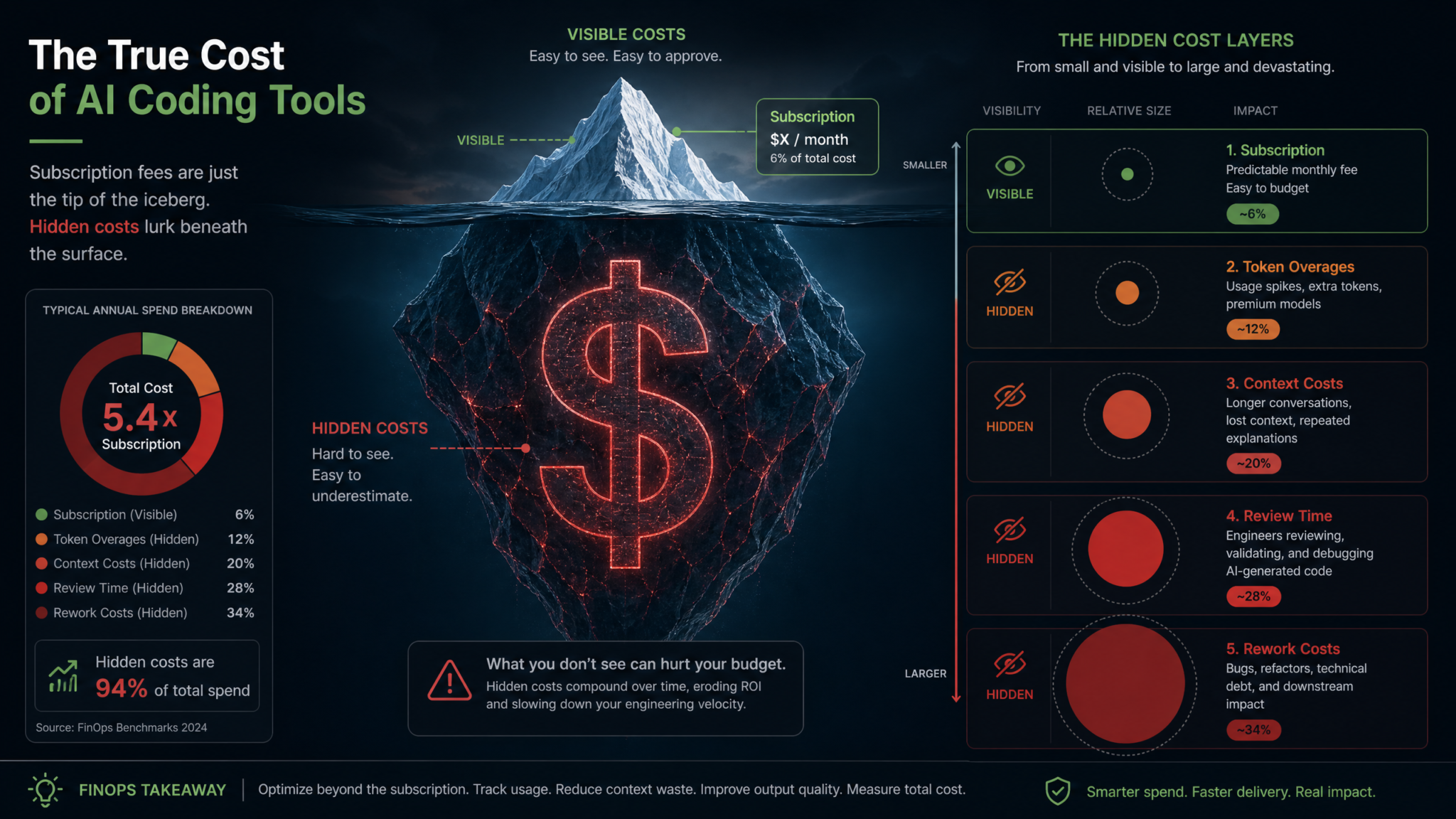
Engineering leaders made a costly assumption in 2024 and 2025: that AI coding tools were essentially free productivity multipliers once you paid the subscription. By 2026, that assumption has been thoroughly demolished. The real cost of deploying AI coding assistants across an engineering organization is not the $19 monthly fee on a credit card statement — it is a layered, dynamic, and often poorly understood ecosystem of token consumption, compute overhead, context window fees, and the invisible tax of increased code review cycles. This guide cuts through the marketing noise to give you the complete financial picture, from first-dollar subscription costs to total cost of ownership, with frameworks to calculate whether your team is actually ahead or behind on the investment.
The 2026 Market Reality: What Gartner’s Data Actually Shows
Gartner’s 2026 AI Developer Tooling Expenditure Report delivers a striking finding that has caught many CTOs off guard: 25% of organizations deploying AI coding assistants are now spending between $200 and $500 per developer per month when all cost categories are accounted for. More alarming still, 6% of organizations report monthly per-developer costs exceeding $2,000 — a figure that, for a 50-person engineering team, translates to over $1.2 million in annual AI tooling expenditure alone.
These numbers stand in stark contrast to the headline subscription pricing that dominates vendor marketing pages. When a developer signs up for GitHub Copilot Individual, they see a $19 monthly charge. When a startup buys Cursor Pro licenses, the finance team logs $20 per seat. The gap between these visible numbers and the $200–$2,000 reality represents the hidden cost architecture that this guide exists to expose and quantify.
The distribution is not uniform across organization types. Gartner’s segmentation reveals that the highest per-developer costs tend to cluster in three scenarios: organizations using multiple overlapping AI tools simultaneously, teams working on large codebases where context window consumption is disproportionately high, and companies that have not implemented any token governance policies. Meanwhile, organizations in the first quartile of AI tooling cost efficiency — those spending under $80 per developer per month inclusive of all costs — share identifiable practices around prompt engineering discipline, context management, and strategic model selection.
The survey also highlights a measurement problem. 61% of engineering managers reported they could not accurately state their organization’s total monthly spend on AI coding tools within a 20% margin of error. Costs are fragmented across individual subscriptions on personal credit cards, departmental AWS or Azure invoices, centralized SaaS procurement, and hidden compute costs embedded in CI/CD pipeline billing. Without a unified view, budget overruns go undetected until they appear as anomalies in a quarterly finance review.
Understanding this landscape is the necessary first step before any team can make rational decisions about tool selection, usage policies, or ROI justification. The sections that follow build a complete framework for doing exactly that.
Key Statistic: According to Gartner’s 2026 AI Developer Tooling report, organizations with formal token governance policies spend an average of 43% less per developer than those without, while reporting equivalent or higher developer satisfaction scores.
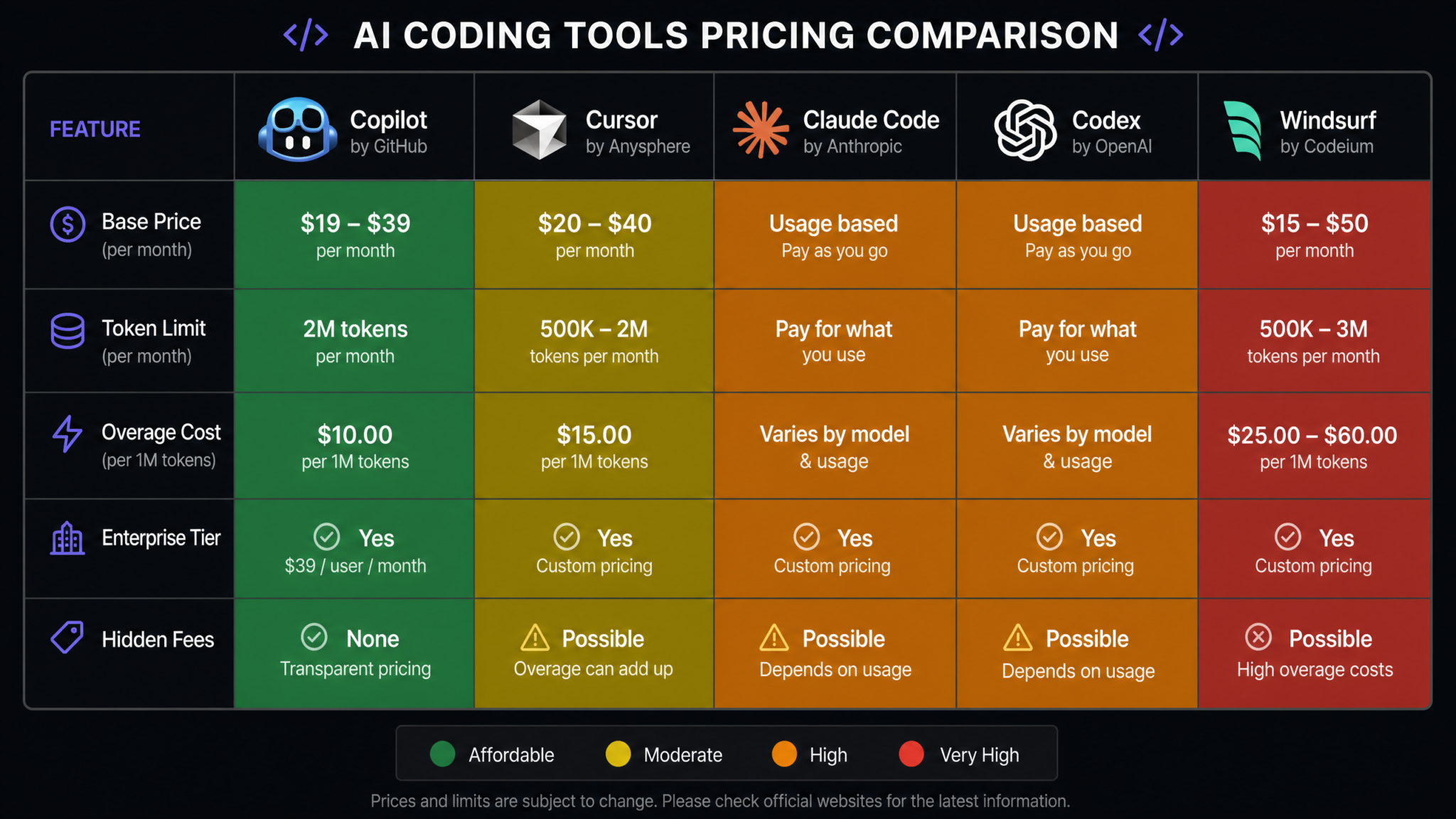
Tool-by-Tool Cost Breakdown for 2026
Pricing in the AI coding tool market has evolved significantly. The following breakdown reflects 2026 published pricing and real-world consumption data from engineering teams actively using these tools.
GitHub Copilot: $19–$39/Month Per Seat
GitHub Copilot remains the most widely deployed AI coding assistant by volume, with an estimated 2.8 million active enterprise seats as of early 2026. The pricing tiers are:
- Copilot Individual: $10/month (billed annually) or $10/month billed monthly — primarily for solo developers and open-source contributors
- Copilot Business: $19/month per user — adds organization-wide policy management, audit logs, and IP indemnity
- Copilot Enterprise: $39/month per user — adds fine-tuned models on private codebase, pull request summaries, Copilot Chat in GitHub.com, and knowledge bases
The visible cost story for Copilot is relatively clean. However, Copilot Enterprise’s hidden cost profile is substantial. Organizations that leverage the codebase fine-tuning feature are effectively consuming significant Azure compute resources, which are embedded in the $39 fee but create usage-pattern-dependent value. Teams with small or poorly organized codebases may find the Enterprise tier’s premium unjustifiable. Additionally, Copilot’s integration with GitHub Actions can trigger AI-powered code review on every PR, which for high-velocity teams processing 50–100 PRs per day can generate hundreds of dollars in additional GitHub Actions minutes.
True monthly cost estimate per developer: $19–$85 when GitHub Actions compute, administrative overhead, and review time increases are included.
Cursor: $20–$40/Month Per Seat
Cursor has established itself as the preferred tool for developers who want deep IDE integration with frontier model access. Its pricing in 2026:
- Cursor Hobby: Free — 2,000 completions, 50 slow premium requests monthly
- Cursor Pro: $20/month — 500 fast premium requests, unlimited slow premium requests, 10 Claude Opus requests
- Cursor Business: $40/month per user — SSO, enforced privacy mode, centralized billing, usage dashboards
The critical hidden cost in Cursor is what happens when developers exhaust their fast premium request allocation before month-end. Cursor’s “slow” fallback uses less capable models that frustrate developers who have calibrated their workflow to frontier model performance. Many teams resolve this by upgrading to Business tier or purchasing additional fast request packs — costs that appear as line items only in detailed billing audits.
Cursor’s Max Mode, which enables full 200K context window usage with Claude claude-3-5-sonnet or GPT-4o, charges directly against the user’s Anthropic or OpenAI API key rather than through Cursor’s flat fee. A developer running intensive Max Mode sessions can easily accumulate $50–$150 in additional API costs per month, completely invisible in the Cursor subscription line item.
True monthly cost estimate per developer: $40–$200 for heavy users leveraging Max Mode and frontier models.
Claude Code: Usage-Based Pricing
Anthropic’s Claude Code (formerly the Claude CLI) operates on pure consumption pricing tied directly to the Anthropic API. There is no flat subscription — every interaction costs tokens. As of 2026, Anthropic pricing for the models Claude Code commonly uses:
- Claude claude-3-5-haiku: $0.80/million input tokens, $4.00/million output tokens
- Claude claude-3-5-sonnet: $3.00/million input tokens, $15.00/million output tokens
- Claude Opus 4: $15.00/million input tokens, $75.00/million output tokens
Claude Code’s agentic architecture is its defining feature and its primary cost risk. When Claude Code operates in autonomous mode — running commands, reading files, writing tests, iterating on failures — it generates far more tokens than a simple completion tool. A single Claude Code session solving a complex debugging task might consume 50,000–200,000 tokens. At Claude claude-3-5-sonnet pricing, that is $0.75–$3.00 per session. Developers running 10–20 such sessions daily accumulate $15–$60 in API costs per day, or $300–$1,200 per month for a single developer.
The Gartner 6% figure — organizations spending over $2,000 per developer per month — largely consists of heavy Claude Code users working on complex, long-context software projects without token governance policies in place. Claude Code Agentic Workflow Setup and Token Management
True monthly cost estimate per developer: $50–$2,500+ depending entirely on usage patterns and model selection discipline.
OpenAI Codex (via API and ChatGPT): Usage-Based
OpenAI’s Codex capabilities in 2026 are primarily accessed through the broader GPT-4o and o-series model ecosystem, either via the API directly or through ChatGPT Pro’s coding features. Pricing reference points:
- ChatGPT Pro: $200/month — includes unlimited GPT-4o access, o1 Pro access, and Codex-equivalent code generation
- OpenAI API (GPT-4o): $2.50/million input tokens, $10.00/million output tokens
- OpenAI API (o3-mini): $1.10/million input tokens, $4.40/million output tokens
- OpenAI API (o3): $10.00/million input tokens, $40.00/million output tokens
The o-series reasoning models introduce a distinct cost dynamic: they generate extensive “thinking” tokens before producing output. An o3 request that produces 1,000 output tokens may have consumed 5,000–15,000 internal reasoning tokens, all billed at output token rates. Teams migrating from GPT-4o to o3 for coding tasks without understanding this billing structure have reported 5–8x cost increases for equivalent work.
True monthly cost estimate per developer: $200 (ChatGPT Pro flat) to $800+ for API-based heavy usage with o3-series models.
Windsurf (Codeium): $15–$50/Month Per Seat
Windsurf, Codeium’s flagship AI IDE, has positioned itself as a cost-competitive alternative to Cursor with aggressive enterprise pricing:
- Windsurf Free: Limited completions and chat interactions
- Windsurf Pro: $15/month — includes premium model access with monthly credit allocation
- Windsurf Teams: $30/month per user — adds team management and priority model access
- Windsurf Enterprise: $50/month per user (or custom) — on-premise deployment options, SOC2 compliance, dedicated support
Windsurf’s credit system is its most important cost variable. Credits are consumed by premium model interactions, and the credit allocation at each tier is designed to cover typical usage. However, Windsurf’s Cascade agentic feature — which autonomously navigates codebases and runs multi-step tasks — is a significant credit consumer. Teams relying heavily on Cascade for complex tasks frequently exhaust monthly credits by the third week of the month, triggering either top-up purchases or a fallback to lower-quality completions that disrupts workflow.
True monthly cost estimate per developer: $25–$120 when credit top-ups, enterprise deployment overhead, and review time factors are included.
| Tool | Published Price Range | Light User True Cost | Heavy User True Cost | Primary Hidden Cost Driver |
|---|---|---|---|---|
| GitHub Copilot Business | $19/mo | $35–$55 | $70–$110 | Actions compute + review time |
| Cursor Pro | $20/mo | $30–$60 | $120–$220 | Max Mode API overages |
| Claude Code | $0 (API only) | $50–$150 | $400–$2,000+ | Agentic session token volume |
| OpenAI Codex / GPT-4o | $0–$200/mo | $50–$250 | $300–$900 | o3 reasoning token inflation |
| Windsurf Pro | $15/mo | $25–$50 | $80–$150 | Cascade credit depletion + top-ups |
Token Budget Planning Framework
Token budgeting is the discipline of treating AI token consumption as a finite, plannable resource — similar to how cloud infrastructure teams manage compute budgets. Most engineering organizations have not yet built this discipline, which is a primary reason so many land in Gartner’s high-expenditure cohort.
Step 1: Baseline Token Consumption Measurement
Before you can budget tokens, you must measure current consumption. For subscription tools like Copilot and Windsurf, this requires accessing administrative dashboards and extracting usage reports. For API-based tools like Claude Code or direct OpenAI API access, consumption data is available in provider billing dashboards. The critical practice is aggregating these sources into a single view — a task most teams currently do manually in spreadsheets, but which cost monitoring tools (covered in a later section) can automate.
Run a 30-day baseline measurement period before implementing any optimization. This establishes your actual consumption profile by developer, by task type, and by time period. You will typically find a distribution that looks like this: approximately 20% of developers account for 60–70% of token consumption. These “power users” are often your most sophisticated AI tool adopters, but they may also be running inefficient prompting patterns that inflate costs without proportional productivity gains.
Step 2: Define Token Budget Tiers by Role
Not all developers have equivalent AI tool usage requirements. A senior engineer working on complex architectural refactoring legitimately consumes more tokens than a junior developer doing well-defined feature work. Token budgets should reflect role-based usage patterns rather than applying a uniform cap.
A practical tiering framework:
- Tier 1 — Standard Developer: $50–$80/month total AI tooling budget. Covers routine completions, code review assistance, documentation generation.
- Tier 2 — Senior / Staff Engineer: $120–$200/month. Adds architectural design assistance, complex refactoring, cross-file analysis.
- Tier 3 — AI/ML or Platform Engineer: $300–$500/month. Includes intensive agentic sessions, large codebase analysis, automated test generation at scale.
- Tier 4 — Power User / AI-Augmented Researcher: $500–$1,000/month. Reserved for specific high-value tasks with clear ROI documentation required.
Step 3: Implement Soft and Hard Limits
Effective token governance uses both soft limits (alerts that trigger at 70% and 90% of monthly budget) and hard limits (automatic throttling or approval-required escalation at 100%). For API-based tools, this is implementable through provider spending caps — Anthropic, OpenAI, and Google all support project-level spending limits with alert webhooks.
For subscription tools where token consumption is embedded in the flat fee, governance looks different: monitoring which features developers use (Cascade vs. basic completions, Max Mode vs. standard mode) and setting team norms around high-consumption features for high-value tasks only.
Step 4: Establish a Token ROI Tracking Protocol
Token budgets should not be pure cost controls — they should be tied to output measurement. For every $100 of AI tool spend, what was produced? This requires a lightweight tracking mechanism: developers log the tasks completed with significant AI assistance, estimated time saved, and any quality issues identified in review. This data feeds the ROI calculation framework described in the next major section.
AI Developer Productivity Metrics and Measurement Frameworks
Cost Optimization Strategies That Actually Work
Cost optimization in AI coding tools is not about using AI less — it is about using it more intelligently. The following strategies are drawn from practices of organizations in Gartner’s first cost quartile (sub-$80/developer/month total cost).
Prompt Efficiency: The Single Biggest Lever
Prompt engineering for cost optimization is distinct from prompt engineering for output quality. The goal is to achieve equivalent output quality with fewer input tokens, fewer iteration rounds, and more targeted context inclusion.
The most impactful practices:
- Front-load specificity: A specific prompt that gets a usable answer in one pass costs far less than a vague prompt requiring 4–6 refinement exchanges. A 300-token specific prompt that gets the answer is cheaper than a 50-token vague prompt that triggers a 2,000-token back-and-forth.
- Use structured output formats: Requesting responses in a specific format (JSON, a particular function signature, a defined list structure) reduces token waste in response verbosity.
- Chain prompts strategically: For complex tasks, a chain of focused prompts with smaller context windows often costs less than a single massive prompt with full codebase context, while producing equivalent or better results.
Context Management: Precision Over Completeness
The single most common cause of context window cost inflation is the “give it everything” instinct — feeding entire files, full git histories, or complete dependency trees when the model only needs a targeted subset. Effective context management means:
- Identifying the minimum viable context for each task type
- Using retrieval-augmented approaches to pull relevant code snippets rather than full files
- Clearing conversation context between distinct tasks rather than accumulating an ever-growing session history
- Using smaller, cheaper models for context summarization before engaging frontier models for the primary task
Tools like Cursor’s codebase indexing and Windsurf’s context management features are designed to handle this intelligently — but developers who manually override these systems with “include everything” instructions can negate thousands of dollars of engineering that went into making context selection efficient.
Model Selection Discipline: Right Model for Right Task
Using Claude claude-3-5-haiku for tasks that don’t require claude-3-5-sonnet’s capabilities, and using claude-3-5-sonnet instead of Opus for tasks that don’t require maximum reasoning depth, can reduce API costs by 60–85% for those task categories. The challenge is building team norms around which model is appropriate for which task type.
A practical model selection heuristic:
- Mini/Haiku class models: Boilerplate generation, simple completions, code formatting, basic documentation
- Sonnet/GPT-4o class models: Feature implementation, test generation, code review, moderate refactoring
- Opus/o3 class models: Complex architectural decisions, security analysis, novel algorithm design, debugging subtle concurrency issues
Caching and Reuse
Anthropic’s prompt caching feature allows teams to cache frequently used context (system prompts, shared codebase context, documentation) and pay a reduced rate for cache reads versus full input token processing. For teams with consistent system prompts and shared context across developers, prompt caching can reduce Claude API costs by 70–80% on the cached portion. Anthropic Prompt Caching Setup Guide for Engineering Teams
OpenAI offers similar caching for prompts over 1,024 tokens. Building caching into your AI tooling architecture is one of the highest-ROI technical investments available for cost reduction.
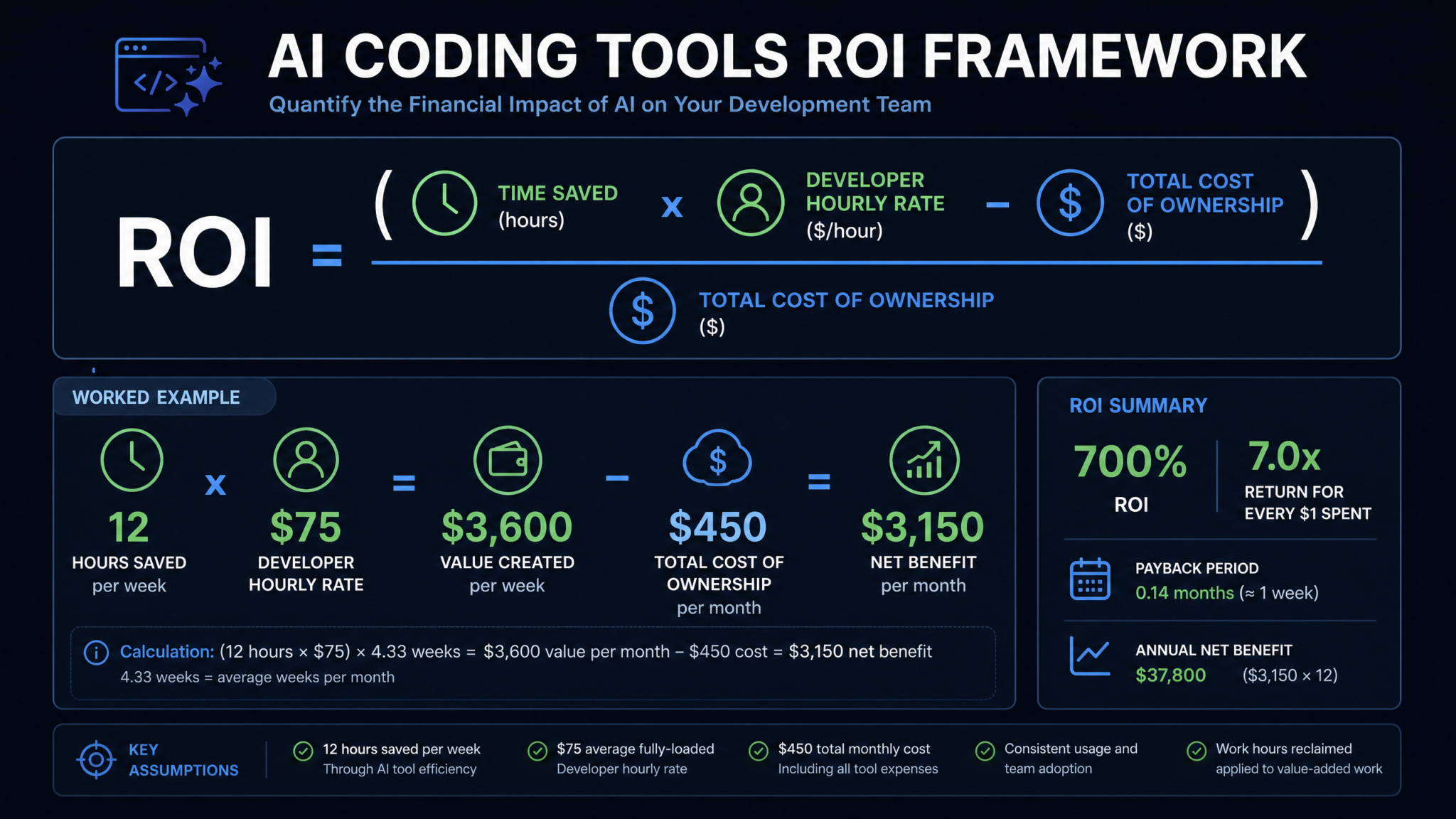
ROI Calculation Methodology for Engineering Teams
ROI calculation for AI coding tools requires a disciplined approach that captures both the value created and the true total cost incurred. The following methodology gives you a framework applicable to teams of any size.
The Core ROI Formula
ROI = (Value Created - Total Cost of Ownership) / Total Cost of Ownership × 100%

Where:

Value Created = (Hours Saved × Fully-Loaded Developer Hourly Rate)
              + (Defect Reduction Value)
              + (Faster Time-to-Market Value)
              - (Code Review Time Increase Cost)
              - (Rework from AI Error Cost)

Total Cost of Ownership = Subscription Fees
                        + API Token Costs
                        + Infrastructure Costs
                        + Administrative Overhead
                        + Training Costs
                        + Security Review Overhead
Calculating Fully-Loaded Developer Hourly Rate
The fully-loaded hourly rate for a developer includes base salary, benefits, payroll taxes, office/remote infrastructure allocation, and management overhead. As a general formula:
Fully-Loaded Annual Cost = Base Salary × 1.35 (average benefits multiplier for US tech)
                         + $15,000 (average tooling, hardware, software per developer)
                         + Management overhead allocation

For a developer at $150,000 base salary:
Fully-Loaded Annual Cost ≈ $150,000 × 1.35 + $15,000 ≈ $217,500
Fully-Loaded Hourly Rate ≈ $217,500 / 2,000 work hours ≈ $108.75/hour
Measuring Hours Saved
The most rigorous approach to measuring hours saved involves a controlled experiment: track task completion times for a representative sample of tasks before and after AI tool adoption, using the same developers where possible. In absence of controlled data, industry benchmarks provide starting points:
- Routine completions and boilerplate: 20–35% time reduction
- Test generation: 40–60% time reduction
- Documentation writing: 50–70% time reduction
- Debugging with AI assistance: 15–30% time reduction (offset by validation time)
- Code review: -10% to +30% time change (often increases for AI-generated code)
Sample ROI Calculation: 10-Developer Team
Team: 10 developers, $150K average base salary
Tool stack: Cursor Business ($40/user), Claude Code moderate usage (~$150/user)
Total visible tool cost: $190 × 10 = $1,900/month

Hidden costs (estimated):
- Review time increase (20% of 1 SR × $120/hr × 40 hrs/mo): $960/month
- Security review overhead ($200/month estimated): $200/month
- Administrative overhead ($150/month): $150/month
Total TCO: $1,900 + $1,310 = $3,210/month = $38,520/year

Value Created:
- 10 developers × 20% productivity increase × 160 hrs/month × $108.75/hr
  = 10 × 0.20 × 160 × $108.75
  = $34,800/month = $417,600/year
- Defect reduction (15% fewer bugs, each worth $2,000 to resolve, 5 bugs/dev/mo avg)
  = 10 × 5 × 0.15 × $2,000 = $15,000/month = $180,000/year

Less:
- Code review increase cost: $960/month × 12 = $11,520/year
- Rework from AI errors (estimated 5% of AI output): $24,000/year

Net Value Created = $417,600 + $180,000 - $11,520 - $24,000 = $562,080/year

ROI = ($562,080 - $38,520) / $38,520 × 100% = 1,360%
Even this simplified calculation demonstrates why well-implemented AI coding tools generate enormous ROI when the productivity lift is real. The key variables to monitor are whether the productivity lift materializes as claimed, whether hidden costs are being accurately captured, and whether code review and rework costs are being properly offset against productivity gains.
When AI Coding Tools Save Money vs. When They Cost More Than They Save
The ROI analysis above assumes productivity gains materialize. They do not always. Understanding the conditions under which AI coding tools create negative ROI is as important as optimizing the positive cases.
Scenarios Where AI Coding Tools Deliver Clear Positive ROI
High-volume, well-specified feature work: When tasks have clear specifications, bounded scope, and straightforward implementation paths, AI tools accelerate development substantially. A team building API endpoints against a well-defined OpenAPI specification, generating CRUD interfaces, or implementing well-understood algorithmic patterns will see 30–50% productivity gains that easily justify tool costs.
Test and documentation generation: These tasks have the highest AI-to-human quality ratio. AI-generated tests that a human reviews and validates cost a fraction of fully human-written tests. Teams that use AI heavily for test scaffolding while having humans review and refine the coverage logic report the highest satisfaction-to-cost ratios in the Gartner survey.
Legacy code comprehension: Understanding and documenting a legacy codebase — the first step in any modernization project — is dramatically accelerated by AI tools. A task that previously required weeks of code archaeology can be compressed to days. The ROI is high because this work is otherwise an extreme drain on senior engineer time.
Small to medium teams with standardized tech stacks: Teams of 5–20 developers working in mainstream stacks (TypeScript/React, Python/FastAPI, Go services) find that AI tools are well-calibrated to their domain, producing reliable output with minimal correction overhead.
Scenarios Where AI Coding Tools Create Negative or Marginal ROI
Highly novel or research-heavy engineering work: When the problem itself is not well-understood — when you are designing novel distributed systems architectures, implementing custom cryptographic protocols, or developing ML model architectures — AI tools provide limited direct code generation value while still consuming tokens and attention. The cost of managing AI suggestions that are confidently wrong can exceed the cost of simply writing the code.
Highly regulated codebases with extensive compliance requirements: In financial services, healthcare, and defense, AI-generated code requires such extensive validation — against regulatory frameworks, security mandates, and audit trail requirements — that the review overhead can entirely consume the productivity gains. AI Coding Tools in Regulated Industries: Compliance and Security Considerations
Small teams without a senior engineer to validate AI output: Counter-intuitively, very small teams (2–4 developers) where everyone is at a junior or mid-level may experience negative ROI from AI coding tools. Without an experienced engineer to recognize when AI output is subtly incorrect, teams ship AI-generated bugs that accumulate as expensive technical debt. The quality filter that senior engineers provide is a prerequisite for AI tool ROI, not an optional enhancement.
Access 40,000+ AI Prompts for ChatGPT, Claude & Codex — Free!
Subscribe to get instant access to our complete Notion Prompt Library — the largest curated collection of prompts for ChatGPT, Claude, OpenAI Codex, and other leading AI models. Optimized for real-world workflows across coding, research, content creation, and business.
Unmanaged multi-tool deployments: Organizations where developers use 3–5 different AI tools simultaneously — Copilot for completions, Claude Code for complex tasks, ChatGPT Pro for design conversations, Windsurf for IDE experience — without centralized governance consistently overspend. The combined cost of overlapping tools, each used at partial capacity, exceeds the cost of a single well-chosen tool used at full capacity, while providing a fragmented experience that reduces productivity gains.
Team Size Scaling Economics
AI coding tool economics scale non-linearly with team size. Understanding these scaling dynamics is essential for accurate budget planning and for making the right tool architecture decisions as teams grow.
Solo Developers and Micro-Teams (1–5 developers)
At this scale, the economics strongly favor flat-rate subscription tools. The overhead of managing API keys, implementing token governance, and monitoring consumption is disproportionate for small teams. Cursor Pro at $20/month or Windsurf Pro at $15/month provides excellent value without administrative overhead.
The primary risk at this scale is over-reliance on expensive models for routine tasks. A solo developer who defaults to using Claude claude-3-5-sonnet for every interaction when Haiku would suffice for 60% of tasks is leaving significant money on the table. At this scale, the optimization is behavioral rather than systemic.
Recommended budget at this scale: $20–$50/developer/month total AI tooling cost is achievable with disciplined tool selection.
Small Teams (6–20 developers)
This is the range where hidden costs begin to matter materially and where the lack of governance begins to show up as measurable overspend. A 15-person team with no AI tooling governance can easily spend $4,000–$8,000 per month in total AI costs without realizing it.
At this scale, investing in centralized billing and monitoring pays off. Consolidating all AI tool spend under a single cost center with monthly reporting takes approximately 4–8 hours of engineering/FinOps time per month to implement and maintain, and typically identifies 15–25% overspend that can be eliminated.
Enterprise licensing negotiations also become viable at this scale. Most vendors offer meaningful discounts at 10+ seat annual commitments. Cursor Business at $40/seat has been negotiated to $28–$32/seat for 12-month commitments of 15+ seats by engineering teams. The negotiation is straightforward and rarely attempted by small teams who assume vendor pricing is fixed.
Recommended budget at this scale: $60–$120/developer/month total, with a target of $80 for well-governed deployments.
Mid-Size Teams (21–100 developers)
At this scale, AI tooling governance becomes a distinct function rather than an ad hoc responsibility. Organizations with 20–100 developers benefit from a designated AI tooling owner — typically a staff engineer or developer experience engineer — responsible for tool selection, cost monitoring, and best practice dissemination.
The economics at this scale also create viable ROI for custom tooling investments. Building a shared prompt library, implementing team-specific fine-tuned models, or deploying a local LLM for lower-sensitivity tasks can generate cost savings that justify 100–200 hours of engineering investment. A local Qwen 2.5 Coder instance handling 40% of routine completions can eliminate $8,000–$15,000 in monthly API costs for a 50-person team.
Recommended budget at this scale: $80–$150/developer/month, targeting the lower end through governance and infrastructure investment.
Enterprise Teams (100+ developers)
Enterprise AI tooling economics are dominated by negotiated contracts, security and compliance overhead, and infrastructure investment amortization. At 100+ developers, no organization should be paying published per-seat rates — enterprise agreements with GitHub (Copilot Enterprise), Anthropic, or OpenAI routinely include 20–40% discounts from published pricing at this scale, plus SLA guarantees, dedicated support, and compliance documentation that has independent value.
The hidden cost profile shifts at enterprise scale. Code review overhead and security validation costs become the dominant hidden expense categories, and they scale with headcount in a way that API costs do not necessarily match. An enterprise investing in AI-assisted code review tooling (tools that review AI-generated code for patterns and issues before human review) can generate significant leverage at this scale. Enterprise AI Code Review Automation and Security Scanning Tools
Recommended budget at this scale: $100–$200/developer/month (higher due to compliance and security infrastructure), with aggressive governance targeting the lower end.
Enterprise vs. Individual Pricing Analysis
The pricing gap between enterprise and individual tiers is more complex than a simple per-seat comparison. Enterprise pricing typically bundles capabilities and compliance infrastructure that create real value beyond the raw AI access, but the value realization requires organizational investment to capture.
What Enterprise Pricing Actually Buys
GitHub Copilot’s jump from $19 (Business) to $39 (Enterprise) per seat purchases: fine-tuned models trained on your private codebase, pull request summarization integrated into GitHub.com, Copilot Chat with knowledge base access, and enhanced IP indemnity. The fine-tuning capability alone represents significant value for organizations with large, distinctive codebases — a company that has spent 10 years developing proprietary domain-specific patterns will see meaningfully better suggestion quality from a fine-tuned model than from a generic one.
However, realizing this value requires maintaining the codebase in a state suitable for fine-tuning: consistent patterns, reasonable documentation density, and organizational structure that allows the model to learn meaningful patterns. Organizations with chaotic, inconsistent legacy codebases may not see the quality improvement that justifies the Enterprise premium.
The Hidden Tax of Individual Subscriptions
Organizations that allow developers to use personal AI tool subscriptions — expensed or directly reimbursed — face a distinct set of costs beyond the subscription fees. Individual accounts lack the audit logs, policy enforcement, and data privacy guarantees that enterprise accounts provide. In regulated industries, using individual Copilot or Cursor accounts may violate data handling policies, creating compliance risk that dwarfs any subscription cost savings.
Additionally, individual account proliferation makes cost monitoring impossible. When 40 developers each have a different combination of personal AI tool subscriptions, the engineering organization has no visibility into aggregate consumption, no ability to negotiate volume pricing, and no mechanism to enforce consistent best practices.
The Hybrid Model: Recommended Approach for 20–100 Developer Teams
The most cost-effective structure for mid-size engineering organizations is a hybrid of one enterprise-tier subscription tool for broad adoption (typically Copilot Business or Windsurf Teams) combined with a metered API account for specialized high-value use cases (Claude API with project-level spending caps). This approach provides broad access through the flat-rate tool while enabling controlled use of frontier models for complex tasks through the metered account.
Cost Monitoring Tools and Dashboards
Visibility is a prerequisite for cost control. The following tools represent the current state of the art for AI coding tool cost monitoring in 2026.
Native Provider Dashboards
Anthropic Console: Provides per-project usage breakdowns, daily consumption charts, and spending limit configuration. The project-level isolation is particularly useful for attributing costs to specific teams or applications. The console also shows model distribution — what percentage of spend is going to claude-3-5-haiku vs. claude-3-5-sonnet vs. Opus — which informs model selection governance decisions.
OpenAI Usage Dashboard: Similar capability with organization-level API key management, per-key usage tracking, and billing alerts. The tier upgrade to API usage dashboards at the organization level adds project-level attribution that is essential for multi-team deployments.
GitHub Copilot Insights: Available at the Business and Enterprise tiers, provides per-developer usage analytics including suggestion acceptance rates, active user counts, and language-level usage breakdowns. The acceptance rate metric is particularly valuable — a developer with a 15% suggestion acceptance rate is consuming tokens at the same rate as a developer with a 45% acceptance rate but getting 3x less value, indicating either misaligned tool usage or a mismatch between the tool’s capabilities and their work type.
Third-Party Cost Management Platforms
Helicone: An open-source LLM observability platform that proxies API calls to log cost, latency, and usage data across multiple providers. Teams can deploy Helicone as a self-hosted proxy (at myapp.dev/ai-gateway, for example) and gain unified visibility across Anthropic, OpenAI, and other API providers. The free tier supports up to 10,000 requests/month, with paid tiers starting at $100/month for unlimited logging.
LangSmith: LangChain’s observability platform provides detailed tracing of LLM calls, token counts, and cost attribution for teams using LangChain-based agentic workflows. Particularly relevant for teams using Claude Code or Codex in pipeline contexts where AI calls are embedded in automated workflows rather than interactive developer sessions.
OpenMeter: For teams that need billing-grade metering of AI API consumption — for example, to do internal chargeback to specific development teams or product areas — OpenMeter provides infrastructure for high-accuracy consumption metering with webhook integrations to provider APIs.
Building Custom Cost Monitoring: A Minimal Viable Approach
For teams that cannot immediately invest in a third-party platform, a minimal viable cost monitoring setup consists of three components:
- A shared Anthropic/OpenAI organization account with per-project API keys for each team or developer, enabling provider-level attribution
- A weekly automated report (simple Python script querying provider APIs) that emails the engineering manager with per-developer spend vs. budget
- A monthly cost review meeting of 30 minutes where the team reviews consumption patterns and identifies optimization opportunities
This minimal setup can be implemented in 4–6 hours and eliminates the “invisible overspend” problem that affects 61% of engineering organizations according to Gartner’s data.
Budget Allocation Recommendations by Team Size
The following budget recommendations synthesize the TCO analysis, scaling economics, and optimization strategies into actionable allocation guidance.
Solo Developer / Freelancer
Recommended allocation: $30–$60/month
- Primary tool: Cursor Pro ($20/month) — best value for integrated IDE experience
- Supplemental: Anthropic API access with $20–$40/month spend cap for complex tasks
- Avoid: Expensive enterprise tiers without team features, multiple overlapping tools
Startup Team (2–10 developers)
Recommended allocation: $50–$80/developer/month
- Primary tool: Windsurf Teams or Cursor Business — flat-rate, full team management
- API budget: Shared Anthropic/OpenAI account with per-developer project keys and $100–$200/developer/month spending caps
- Governance: Basic cost reporting via provider dashboards, monthly review
- Priority: Avoid individual account proliferation — centralize from day one
Growth-Stage Team (11–50 developers)
Recommended allocation: $80–$130/developer/month
- Primary tool: GitHub Copilot Business or Enterprise depending on codebase maturity — negotiate annual pricing
- Specialized tool: Claude API with project-level governance and Helicone monitoring
- Governance investment: 0.1 FTE of developer experience or DevOps time for AI tooling governance
- Optimization target: Implement prompt caching for shared system prompts, reducing API costs by an estimated 30–40%
Mid-Market Engineering Org (51–200 developers)
Recommended allocation: $100–$160/developer/month
- Enterprise contracts with primary vendor at 15–25% discount from published rates
- Dedicated AI tooling owner (staff engineer or DX engineer) to manage governance, optimization, and best practice programs
- Investment in AI-assisted code review tooling to manage review overhead as AI-generated code increases
- Quarterly tool portfolio review to eliminate redundant tools and renegotiate pricing
Enterprise Engineering Org (200+ developers)
Recommended allocation: $120–$200/developer/month
- Formal AI FinOps function within engineering, with quarterly budget reviews and variance analysis
- Tiered tool access by role (standard, senior, power user) with corresponding budgets and approval processes
- Investment in self-hosted models for lower-sensitivity tasks to reduce per-token costs at scale
- Formal ROI measurement program with quarterly reports to engineering leadership and CFO
- Security and compliance tooling integrated into AI code review pipeline
| Team Size | Target Budget/Dev/Month | Primary Tool | Governance Level | Key Risk to Monitor |
|---|---|---|---|---|
| 1–5 | $30–$60 | Cursor Pro + limited API | Minimal | Model selection defaults |
| 6–20 | $50–$100 | Windsurf/Cursor Business | Basic monthly review | Individual account proliferation |
| 21–50 | $80–$130 | Copilot Business + Claude API | Formal monitoring | Burst consumption events |
| 51–200 | $100–$160 | Enterprise contract | Dedicated owner | Review overhead scaling |
| 200+ | $120–$200 | Multi-vendor enterprise | AI FinOps function | Security/compliance debt |
Final Assessment: Building a Sustainable AI Coding Budget
The financial reality of AI coding tools in 2026 is more complex than the vendor narrative suggests, but the ROI case remains compelling when organizations approach deployment with discipline and transparency. The gap between the 25% of organizations spending $200–$500 per developer per month and the cohort achieving equivalent productivity gains at sub-$100 total cost is not explained by tool selection alone — it is explained by governance maturity, prompt discipline, and the willingness to measure both costs and outcomes honestly.
Three principles define the organizations that achieve sustainable AI coding tool ROI:
First: they treat token consumption as a finite resource, not a utility. Electricity and cloud compute took years to develop governance frameworks in engineering organizations. AI token budgeting needs to move faster. Teams that implement even basic token monitoring and per-developer budgets within their first quarter of AI tool deployment consistently outperform those that defer governance until overspend becomes a crisis.
Second: they measure the full cost of code review, not just the cost of generation. The dirty secret of AI coding tool ROI is that every token of output creates review obligation. Organizations that track pull request review time before and after AI tool adoption, and that invest in AI-assisted review tooling to manage the overhead, capture significantly more of the theoretical productivity gain. Those that measure only “time to write code” and ignore review costs are calculating ROI on incomplete data.
Third: they match tool capability to task requirements. The most expensive AI coding tool in any organization is the one being used for tasks that a 10x cheaper model could handle equivalently. Building and maintaining a team culture where developers make conscious model selection decisions — rather than always defaulting to the most capable (and expensive) model available — is one of the highest-leverage cost optimization actions available to engineering leaders.
The Gartner data showing 6% of organizations spending over $2,000 per developer per month is not a condemnation of AI coding tools — it is a map of where not to go. With the frameworks, benchmarks, and strategies in this guide, engineering leaders have the tools to build an AI coding budget that is transparent, defensible, and genuinely productive.
The investment is real. The returns, when properly managed, are substantial. The difference between those two sentences is governance — and governance starts with knowing exactly what you are spending and why.
