
How to Maximize Your Codex Weekly Usage After the August 11 Banked Reset: Complete Optimization Playbook
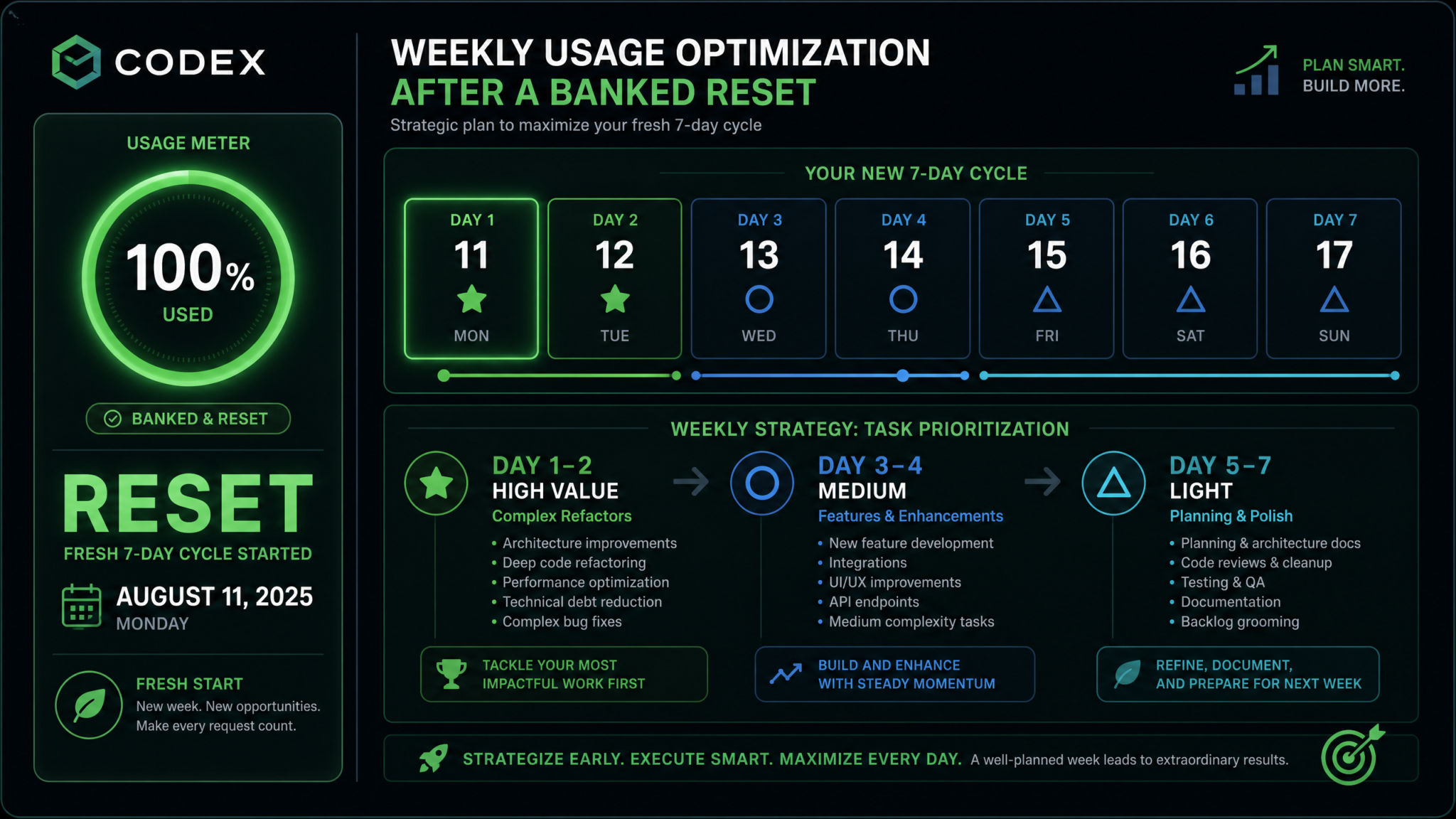
The August 11 banked reset represents one of the most significant opportunities Codex users have had since the platform launched its usage-based model. Whether you arrived at the reset with depleted credits or a partial balance, August 11 wipes the slate clean — returning your allocation to 100% and giving you a fresh 7-day window to deploy AI-assisted development at full capacity. The developers who extract the most value from this reset are not the ones who simply open Codex and start typing. They are the ones who treat the weekly cycle as a strategic resource, front-loading their most valuable work, protecting their budget against inefficient prompts, and building systems to monitor and adapt in real time. This playbook is your complete guide to doing exactly that.
1. What the Banked Reset Actually Means (And Why August 11 Matters)
Codex operates on a weekly usage cycle where your allocation of compute — measured in task capacity, context processing, and agent execution time — refreshes at the start of each period. The term “banked reset” specifically describes a scenario where OpenAI performs a forced reconciliation of accumulated balances across accounts, restoring everyone to their full weekly allocation regardless of what was consumed in prior periods.
The August 11 reset carries additional significance because it follows a period during which many heavy users found themselves throttled, partially depleted, or operating under provisional limits tied to the Codex beta expansion. The reset is not simply a Tuesday refresh — it is a full normalization, meaning:
- Your usage counter returns to 100% of your allocated weekly capacity
- Any previously banked “debt” or over-consumption credit is cleared
- A fresh 7-day window opens, running from August 11 through August 17
- Rate limits that were softened during provisional periods snap back to their documented levels
Think of it like being handed a full tank of fuel on Monday morning. You can drive efficiently and make it to Friday with reserves, or you can floor the accelerator on Monday and coast on fumes by Wednesday. The developers who understand the reset mechanics use the first 48 hours strategically rather than reactively.
The Weekly Cycle Calendar (August 11–17)
| Day | Date | Recommended Focus | Target Usage % |
|---|---|---|---|
| Day 1 | August 11 (Mon) | Complex architecture, major refactors | 20–25% |
| Day 2 | August 12 (Tue) | Multi-file changes, system design | 20–25% |
| Day 3 | August 13 (Wed) | Feature implementation, API integration | 15–20% |
| Day 4 | August 14 (Thu) | Test suites, edge case coverage | 10–15% |
| Day 5 | August 15 (Fri) | Documentation, inline comments | 8–10% |
| Day 6 | August 16 (Sat) | Code review assistance, minor fixes | 5–8% |
| Day 7 | August 17 (Sun) | Planning, prompt preparation for next week | 3–5% |
The percentages above are guidelines, not hard rules. Your project’s specific demands may shift weight earlier or later in the week. The critical discipline is intentionality — knowing before you start a session what you’re spending and why.
2. Understanding Codex’s Usage Model: Tokens, Tasks, and Cost Drivers
To spend wisely, you need to understand what Codex actually measures. Unlike a simple token counter, Codex’s usage model accounts for multi-step agent execution, not just input/output character counts. Each “task” you assign to Codex involves several distinct computational phases, each consuming from your allocation.
The Four Cost Components of a Codex Task
- Context Loading: Every file or snippet Codex reads to understand your codebase burns tokens proportional to file size. A 500-line Python module costs roughly 3–4x what a 150-line utility script costs just to parse.
- Reasoning Passes: Codex’s agent performs internal reasoning before generating code. Complex tasks — like refactoring a module while maintaining backward compatibility — trigger multiple reasoning passes. Simple tasks, like renaming a variable across files, may require only one.
- Code Generation: The actual output tokens for code produced. Longer outputs cost more, but this is often the smallest component relative to context and reasoning for complex tasks.
- Verification and Iteration: When Codex runs tests, linters, or validation steps as part of an agentic loop, each iteration adds to consumption. A task that requires three re-tries because of test failures costs 3x the base generation expense.
What Consumes More Usage
- Providing entire repositories as context instead of targeted file subsets
- Open-ended requests like “improve my codebase” — these trigger broad scanning
- Tasks with failing tests that require agent iteration loops
- Cross-language tasks where Codex must reconcile different syntax paradigms
- Requests involving large dependency trees (e.g., monorepos)
- Ambiguous prompts that cause Codex to ask clarifying questions internally
What Consumes Less Usage
- Single-file, single-function targeted requests
- Highly specific prompts with explicit constraints
- Tasks with working test suites that Codex can validate against immediately
- Refactors on clean, well-commented code (less reasoning required)
- Template-based generation (e.g., “generate a CRUD endpoint following this existing pattern”)
- Documentation generation from already-written code
The Context Window Trap
One of the most common ways developers inadvertently drain their weekly budget is by submitting entire codebases as context. If your .codex configuration file includes a broad file glob like **/*.ts, Codex will load every TypeScript file in your project for every task — including configuration files, test fixtures, and generated build artifacts that add zero signal. On a mid-sized project with 200+ TypeScript files, this can inflate per-task costs by 40–60% compared to targeted context configuration.
Codex Context Configuration Best Practices
The fix is surgical context targeting, which we cover in depth in Section 6.
3. Day 1–2 Strategy: Deploy Your Highest-Value Work First
The first 48 hours after the August 11 reset are your most powerful window. You have full capacity, fresh rate limits, and the psychological advantage of starting from zero. This is when you tackle the work that would be prohibitively expensive to attempt on Day 6 with 12% remaining.
What Qualifies as “Highest-Value” Work?
High-value tasks for Codex are those that:
- Would take a senior developer 4+ hours to complete manually
- Involve cross-file reasoning that benefits from Codex’s agentic context window
- Block other development work — critical path items
- Require consistent application of a pattern across multiple modules
- Carry high defect risk if done manually under time pressure
Day 1 Priority: Architecture and Major Refactors
Monday morning should begin with your largest architectural task. This might be:
- Migrating a monolithic Express service to a modular architecture
- Refactoring a class-based React component library to functional hooks
- Replacing a custom ORM layer with Prisma or Drizzle
- Extracting a shared utilities package from a multi-package monorepo
- Updating an entire API surface to align with a new schema definition
Before submitting your Day 1 task, invest 15–20 minutes in prompt engineering. A poorly specified architecture task can trigger an iterative loop that consumes 3x the expected usage. Use the following structure:
CONTEXT:
- Project: [describe tech stack, e.g., Node.js 20, TypeScript 5.1, PostgreSQL]
- Current structure: [describe existing architecture in 3–5 sentences]
- Target structure: [describe desired end state]

CONSTRAINTS:
- Maintain backward compatibility for [list affected interfaces]
- Do not modify [list files/modules to leave untouched]
- Tests in /tests/integration must continue to pass

TASK:
[Single, specific action statement]

OUTPUT FORMAT:
- Modified files listed with diff summaries
- Migration steps in numbered order
- Any assumptions flagged explicitly
This structure reduces reasoning ambiguity and typically reduces iteration loops by 30–50% based on observed usage patterns across teams using Codex in production workflows.
Day 2 Priority: Multi-File Changes and System Integration
Day 2 should follow up on Monday’s architecture work or tackle the second-highest complexity item in your backlog. Ideal Day 2 tasks include:
- Implementing a new data model across schema, migrations, service layer, and API routes simultaneously
- Wiring up a new third-party service integration (authentication provider, payment processor, analytics SDK)
- Updating TypeScript interfaces and propagating type changes through dependent files
- Building a complex state management module (Redux slice, Zustand store, XState machine)
Day 1–2 Capacity Budget: A Worked Example
Assume you have 100 “task units” per week (a simplified model). Here’s how a well-structured Day 1–2 might look:
| Task | Estimated Units | Actual Units | Outcome |
|---|---|---|---|
| Auth module refactor (Express → middleware pattern) | 12 | 14 | Complete, 3 files changed |
| TypeScript strict mode migration (47 errors) | 8 | 9 | Complete, zero remaining errors |
| Database schema + migration + service layer | 15 | 18 | Complete after 2 iterations |
| Payment integration (Stripe webhook handling) | 10 | 11 | Complete, tested against test fixtures |
| Day 1–2 Total | 45 | 52 | 55 units remaining |
Notice the consistent pattern: actual usage runs 10–20% higher than estimates. Always budget with a 20% overrun buffer on your most complex tasks.
4. Day 3–4 Strategy: Feature Implementation, Tests, and Documentation
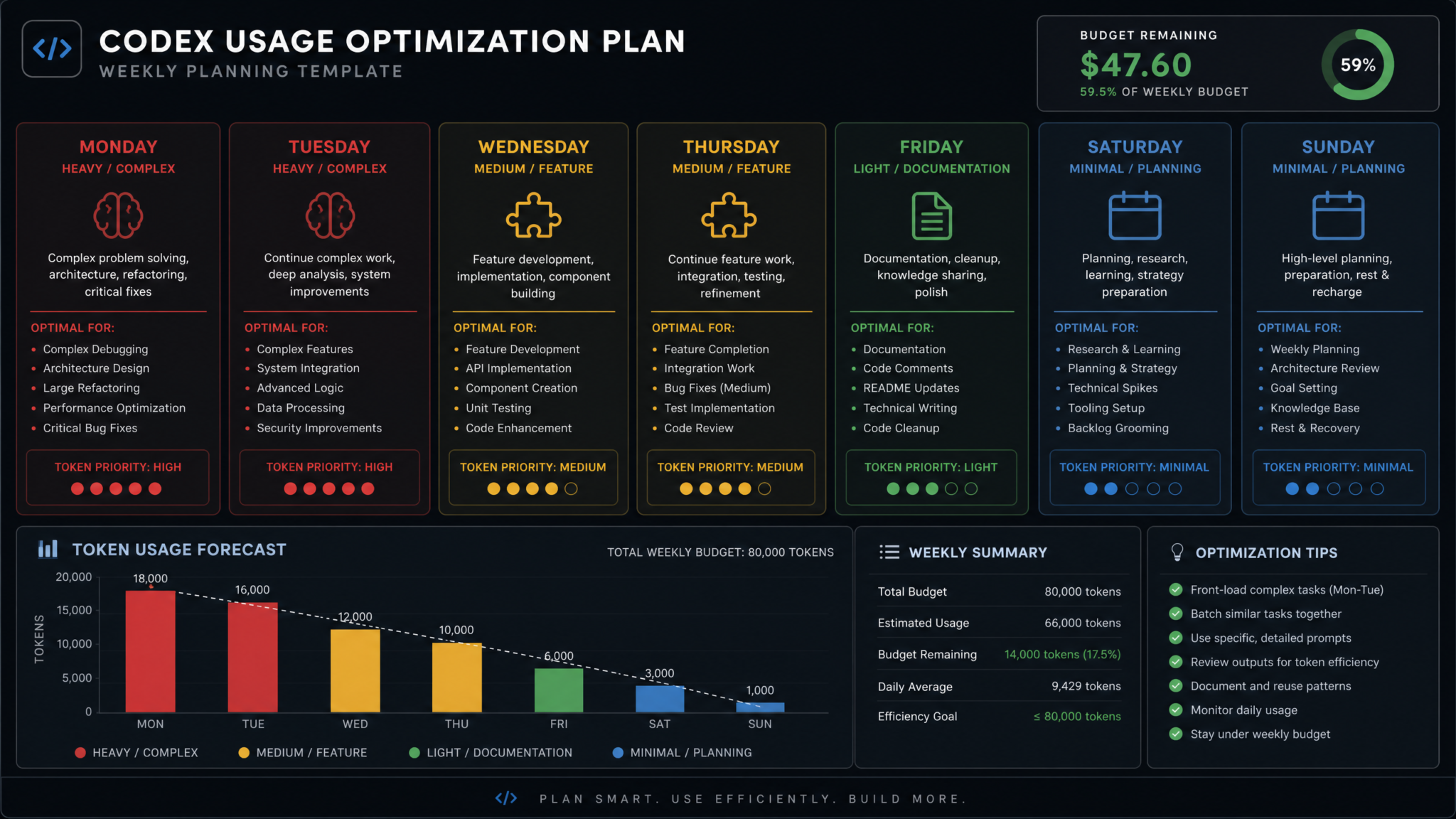
By Wednesday, your critical path work should be landed. Days 3 and 4 are for filling in the completeness layer — the features, tests, and documentation that make your Week 1 architecture work production-ready rather than a proof of concept.
Day 3: Feature Implementation
Feature implementation on Day 3 benefits from having the architecture already in place. Codex can follow existing patterns rather than inventing new ones, which reduces reasoning overhead and keeps costs lower than Day 1–2 tasks.
Strong Day 3 task types include:
- Implementing CRUD endpoints following an established pattern from Day 1–2
- Building UI components that follow your design system conventions
- Adding validation layers using your established schema library (Zod, Yup, Joi)
- Implementing business logic rules that are well-specified in a ticket or PRD
- Background job handlers that follow an existing job queue pattern
For pattern-following tasks, explicitly reference the existing implementation in your prompt. For example:
Implement a POST /api/v1/subscriptions endpoint following the exact same pattern
as the existing POST /api/v1/users endpoint in src/routes/users.ts.

Use the same:
- Zod validation middleware pattern
- Error response format (ApiError class in src/utils/errors.ts)
- Database transaction pattern (see src/services/userService.ts lines 45–89)
- Response serialization (UserSerializer pattern)

New endpoint specifics:
- Input schema: { userId: string, planId: string, paymentMethodId: string }
- Business logic: validate plan exists, check existing subscription, create Stripe subscription, write to DB
- Success response: 201 with subscription object
This type of anchor-to-existing-pattern prompt typically costs 30–40% less than an open-ended “implement a subscription endpoint” request because Codex spends less time on architectural reasoning.
Day 4: Test Writing and Coverage Expansion
Test writing is one of the highest ROI activities for Codex because it is high-volume, pattern-repetitive, and time-consuming for humans. A developer might spend 2 hours writing integration tests for a new service layer. Codex can produce the same coverage in minutes.
Effective test generation prompts follow this structure:
Generate comprehensive tests for src/services/subscriptionService.ts

Test framework: Jest + Supertest
Database: Use the existing test database helpers in tests/helpers/db.ts
Mocking: Use the existing Stripe mock in tests/mocks/stripe.ts

Required test cases:
1. Happy path: successful subscription creation
2. User not found
3. Plan not found
4. User already has active subscription
5. Stripe payment failure
6. Database transaction rollback on partial failure

Coverage target: All branches in createSubscription() and cancelSubscription()
Key Day 4 discipline: do not ask Codex to write tests for untested code it hasn’t seen before. Always run your Day 3 features through at least manual smoke testing before generating test suites. Tests written against buggy code embed the bugs into the test assertions, creating false confidence and future debugging debt.
Writing Effective AI-Generated Test Suites for Production Code
Day 3–4 Usage Monitoring Checkpoint
At the end of Day 4 (Thursday evening), perform a usage audit:
- If you have more than 45% remaining: You were conservative — consider moving some Day 5–7 tasks forward
- If you have 35–45% remaining: On track — proceed with the Day 5–7 plan as designed
- If you have 20–35% remaining: Moderate pressure — triage Day 5–7 tasks, prioritize highest-value items
- If you have less than 20% remaining: Budget mode — see Section 10 for mid-week limit strategy
5. Day 5–7 Strategy: Lightweight Tasks and Next-Week Preparation
Day 5 (Friday): Documentation and Code Cleanup
Friday is ideal for documentation because it is inherently lower-cost in Codex’s model (shorter outputs, less multi-file reasoning) and delivers lasting value that benefits the entire team going into the next week. Target:
- JSDoc/TSDoc comment generation for public APIs and service methods written earlier in the week
- README updates for new modules or services added in Days 1–4
- OpenAPI/Swagger specification generation from existing route handlers
- Changelog entry drafting for the work completed this week
- ADR (Architecture Decision Record) drafting for major architectural choices made on Day 1
Day 6 (Saturday): Code Review Support and Minor Fixes
If you have pull requests awaiting review, Day 6 is when Codex earns its keep as a review co-pilot. Submit PR diffs with specific review instructions:
Review the following diff for:
1. Security vulnerabilities (SQL injection, auth bypass, IDOR)
2. Missing error handling for async operations
3. TypeScript type unsafety (any casts, type assertions)
4. Performance issues (N+1 queries, missing database indexes)
5. Missing input validation

Respond with a structured list: issue category, line reference, severity (critical/major/minor), suggested fix.
This kind of focused review request is very token-efficient because you are providing specific review axes rather than asking for a general code review, which can trigger broad scanning behavior.
Day 7 (Sunday): Planning and Prompt Preparation
The highest-leverage activity of Day 7 is preparing your prompts for the following week’s reset. This costs almost nothing in Codex usage but dramatically improves Week 2 efficiency. Your Day 7 activities:
- Audit your backlog for next week’s highest-priority items
- Write draft prompts for your top 3–5 tasks, following the structures outlined in this playbook
- Update your
.codexconfiguration file based on what context patterns worked and which were wasteful this week - Document which tasks overran their estimates and why, to improve next week’s budgeting
- Identify which tasks should not go to Codex based on this week’s experience
6. Token-Efficient Prompting Techniques Specific to Codex
General prompting advice applies to Codex, but the platform has specific behaviors and configuration options that require specialized techniques. Understanding these can reduce per-task usage by 25–40% without sacrificing output quality.
Optimizing Your .codex Configuration File
The .codex/config.yaml file (or .codex.json depending on your integration) is the single most impactful lever for usage efficiency. Key configuration parameters:
# .codex/config.yaml - Optimized for usage efficiency

context:
  # AVOID: include_patterns: ["**/*"]
  # PREFER: Explicit inclusion of relevant directories
  include_patterns:
    - "src/services/**/*.ts"
    - "src/routes/**/*.ts"
    - "src/models/**/*.ts"
    - "tests/helpers/**/*.ts"

  # Always exclude generated, large, or irrelevant files
  exclude_patterns:
    - "node_modules/**"
    - "dist/**"
    - "build/**"
    - "**/*.generated.ts"
    - "**/*.min.js"
    - "coverage/**"
    - ".next/**"
    - "prisma/migrations/**"  # Only include if migration task

  # Limit individual file size loaded into context
  max_file_size_kb: 100

agent:
  # Limit iteration loops to control usage
  max_iterations: 3

  # Prefer targeted runs over broad scans
  scan_mode: "targeted"

output:
  # Request diffs only (not full file rewrites) for modifications
  format: "diff"
The max_file_size_kb setting is particularly powerful — it prevents Codex from loading accidentally large files (generated types, fixture data, compiled outputs that got committed) that add context noise while consuming significant token budget.
The Surgical Prompt Architecture
Structure every Codex prompt with four distinct sections:
- Scope Declaration: Explicitly state which files can and cannot be touched
- Contract Definition: Define the interface or function signature before asking for implementation
- Constraint List: Libraries allowed, patterns to follow, performance requirements
- Acceptance Criteria: What “done” looks like — tests that must pass, behaviors that must work
Context File Optimization: The “Anchor File” Technique
Instead of providing broad directory context, identify 1–3 “anchor files” that exemplify the patterns you want Codex to follow. Reference these explicitly in your prompt. Codex will generalize from the anchors rather than scanning your entire codebase.
Pattern anchor: Follow the exact service pattern in src/services/userService.ts
Interface anchor: All types must extend patterns from src/types/base.ts
Test anchor: Follow test structure in tests/services/userService.test.ts

Now implement: src/services/notificationService.ts
This technique consistently produces pattern-consistent output while keeping context loading to 3 files instead of potentially dozens.
Diff vs. Full File Output
When modifying existing files, explicitly request diff output rather than full file rewrites. A 300-line file modified in 15 lines generates roughly 6x less output tokens as a diff than as a full rewrite. Over 20 modification tasks in a week, this can save 10–15% of your total weekly budget.
Return ONLY the diff for modifications to existing files.
Do not return full file contents unless creating a new file.
Use unified diff format: --- a/filepath, +++ b/filepath
Pre-Computed Architecture Summaries
For recurring work on the same codebase, maintain a .codex/architecture.md file that summarizes your system in 200–400 words. Reference this file instead of requiring Codex to infer architecture from source files. This single optimization can reduce context loading overhead by 20–30% on architecture-aware tasks.
Building Effective AI Development Workflows for Engineering Teams
7. When to Use Codex vs. Alternatives: The Decision Framework
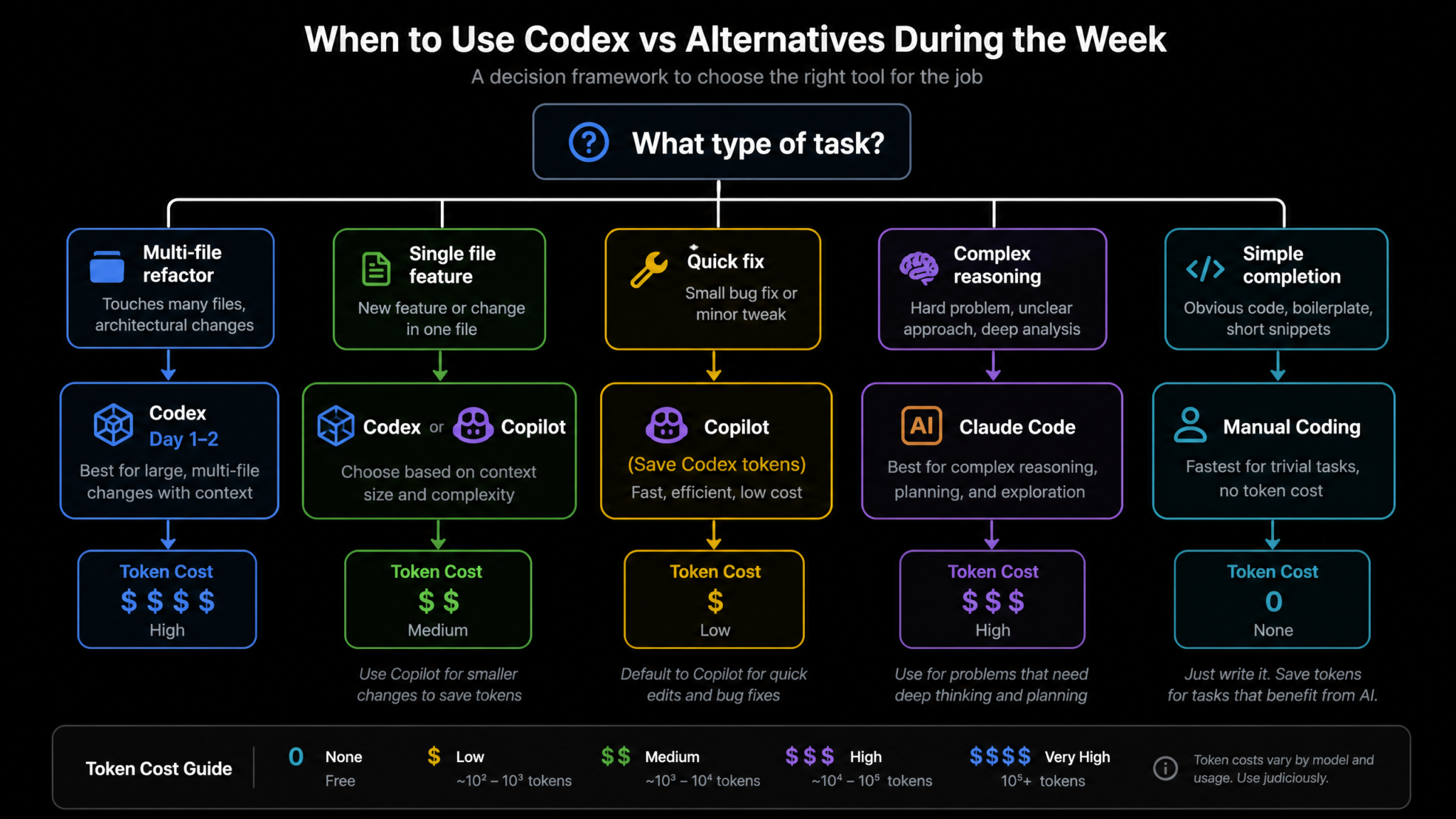
Strategic usage means knowing when not to use Codex. The most efficient developers in AI-augmented workflows use multiple tools in concert, routing tasks to the optimal tool rather than defaulting to one platform for everything.
The Tool Selection Matrix
| Task Type | Best Tool | Why |
|---|---|---|
| Multi-file refactor with context | Codex | Agentic file access, can execute and verify |
| Complex reasoning about architecture trade-offs | Claude (claude.ai) | Superior long-form reasoning, no code execution needed |
| Inline autocompletion while typing | GitHub Copilot | Real-time, context-aware, no task submission overhead |
| Debugging a specific error message | Claude Code or ChatGPT | Conversational, iterative, cheaper for Q&A |
| Renaming a variable in 3 places | IDE find/replace | Zero cost, 100% reliable, 5 seconds |
| Writing a 20-line utility function | Copilot or manual | Too small to justify Codex overhead |
| Generating 50 test cases from a spec | Codex | High volume, pattern-repetitive, benefits from file access |
| Explaining what code does | ChatGPT | Conversational, no file access needed, save Codex budget |
| Security audit of entire service | Codex | Cross-file analysis, can trace data flows |
| Writing a regex | Manual or Copilot | Single line, zero Codex budget justified |
Claude Code: The Reasoning-Heavy Companion
Claude Code (Anthropic’s terminal-integrated offering) excels at tasks where you need extended reasoning over a complex problem before generating code. Use it for:
- Designing a database schema where you need to reason through normalization trade-offs
- Evaluating whether to use an event-driven vs. request-response pattern for a specific problem
- Debugging complex race conditions or state management bugs through reasoning
- Reviewing architectural decisions before handing implementation to Codex
A productive workflow: use Claude Code to design a solution (zero Codex cost), then use Codex to implement the already-designed solution (highly efficient because the reasoning has been done externally).
GitHub Copilot: The Zero-Overhead Ambient Layer
Copilot runs as ambient completions as you type — it costs you nothing from your Codex budget. Preserve Copilot for:
- Boilerplate generation within a file you have open
- Function body completion when you have written the signature
- Import statement resolution
- Test case body writing when you have the test structure defined
The rule of thumb: if you can get 80% of what you need from Copilot inline completions in 30 seconds, do not submit a Codex task for it.
The “Manual is Fastest” Threshold
Never underestimate the cost of Codex task overhead even on “small” tasks. Submitting, waiting for execution, reviewing output, and applying changes has a fixed overhead cost regardless of task size. For any task where manual execution is under 5 minutes, default to manual. Your Codex budget is for the work that would take 30 minutes to 4 hours manually.
Access 40,000+ AI Prompts for ChatGPT, Claude & Codex — Free!
Subscribe to get instant access to our complete Notion Prompt Library — the largest curated collection of prompts for ChatGPT, Claude, OpenAI Codex, and other leading AI models. Optimized for real-world workflows across coding, research, content creation, and business.
8. Monitoring Your Usage: Dashboard Reading and Tracking Scripts
Effective budget management requires real-time awareness of consumption. The Codex dashboard provides usage data, but translating raw numbers into actionable decisions requires either a personal tracking system or lightweight automation.
Reading the Codex Dashboard
The Codex usage dashboard shows several key metrics:
- Tasks Completed: Total agent task executions this week
- Compute Used: Percentage of your weekly allocation consumed
- Tokens Processed: Cumulative input + output token count
- Average Task Cost: Average compute units per task (useful for spotting cost spikes)
Watch for the Average Task Cost metric as your primary efficiency indicator. If your Monday average was 8 units per task and Wednesday’s average is 15, you’ve shifted to significantly more expensive task types — a useful signal to review whether you’re deploying Codex appropriately for the workload type.
Building a Simple Usage Tracking System
A lightweight Node.js script that reads your Codex usage via API and logs it to a daily JSON file creates the data foundation for weekly trend analysis:
// codex-tracker.js (run daily via cron or manually)
// Requires: Codex API access token in environment

const fs = require('fs');
const path = require('path');

async function fetchUsage() {
  const response = await fetch('https://api.openai.com/v1/usage', {
    headers: {
      'Authorization': `Bearer ${process.env.OPENAI_API_KEY}`,
      'Content-Type': 'application/json'
    }
  });

  const data = await response.json();
  return data;
}

async function logDailyUsage() {
  const usage = await fetchUsage();
  const today = new Date().toISOString().split('T')[0];
  const logFile = path.join('./usage-logs', `${today}.json`);

  const entry = {
    date: today,
    timestamp: new Date().toISOString(),
    tokensUsed: usage.data?.reduce((sum, item) => sum + item.n_context_tokens_total + item.n_generated_tokens_total, 0) || 0,
    requestCount: usage.data?.length || 0,
    rawData: usage
  };

  fs.mkdirSync('./usage-logs', { recursive: true });
  fs.writeFileSync(logFile, JSON.stringify(entry, null, 2));

  console.log(`[${today}] Tokens used: ${entry.tokensUsed.toLocaleString()} | Requests: ${entry.requestCount}`);
}

logDailyUsage().catch(console.error);
Schedule this via cron to run at end of day: 55 23 * * * cd /path/to/project && node codex-tracker.js
Weekly Budget Burn Rate Calculator
Once you have 2–3 days of data, calculate your burn rate and project week-end usage:
// burn-rate.js
const fs = require('fs');
const path = require('path');

function calculateBurnRate() {
  const logsDir = './usage-logs';
  const files = fs.readdirSync(logsDir).sort();

  const weeklyBudgetTokens = 10_000_000; // Adjust to your actual allocation

  const entries = files.map(f => JSON.parse(fs.readFileSync(path.join(logsDir, f))));

  const totalUsed = entries.reduce((sum, e) => sum + e.tokensUsed, 0);
  const daysElapsed = entries.length;
  const daysRemaining = 7 - daysElapsed;

  const dailyAverage = totalUsed / daysElapsed;
  const projectedWeekTotal = totalUsed + (dailyAverage * daysRemaining);
  const projectedBudgetUsage = (projectedWeekTotal / weeklyBudgetTokens * 100).toFixed(1);

  console.log(`
=== Codex Weekly Budget Report ===
Days elapsed: ${daysElapsed}/7
Total consumed: ${totalUsed.toLocaleString()} tokens
Daily average: ${Math.round(dailyAverage).toLocaleString()} tokens
Projected week total: ${Math.round(projectedWeekTotal).toLocaleString()} tokens
Projected budget usage: ${projectedBudgetUsage}%
Status: ${projectedBudgetUsage > 100 ? '⚠️  OVER BUDGET' : projectedBudgetUsage > 85 ? '🟡 HIGH USAGE' : '✅ ON TRACK'}
  `);
}

calculateBurnRate();
Run this each morning to start the day with a clear picture of your remaining runway.
Automating AI Development Tool Usage Tracking for Engineering Teams
9. Team Coordination: Sharing Budget and Assigning Tasks Strategically
If you are working within a team where multiple developers share a Codex organizational allocation, usage coordination becomes a significant factor in weekly productivity. Without coordination, a team of five developers can easily create a tragedy-of-the-commons situation where the budget is exhausted by Wednesday through overlapping, duplicated, or low-priority work.
Establishing a Team Usage Policy
A practical team usage policy for a 5-developer team on a shared organizational account might allocate as follows:
| Developer Role | Weekly Allocation % | Primary Use Cases |
|---|---|---|
| Tech Lead / Architect | 30% | Architecture, cross-cutting refactors, system design implementation |
| Senior Backend Developer | 20% | Service layer, API development, database work |
| Senior Frontend Developer | 20% | Component library, state management, UI feature implementation |
| Mid-level Developer | 15% | Feature implementation, test writing, bug fixes |
| Junior Developer | 10% | Test writing, documentation, small features |
| Emergency Reserve | 5% | Unplanned critical work |
Task Assignment Based on Budget Remaining
Implement a simple Slack or Notion-based daily standup field: “Codex task for today”. This 30-second addition to standup surfaced duplicated intent (two developers planning similar tasks), allows the tech lead to redirect tasks to more budget-appropriate team members, and builds organizational awareness of how the AI budget is being deployed against business value.
The “High-Value Task Auction” Protocol
For teams with contested high-value tasks (multiple developers could benefit from AI assistance on their respective work), run a brief Monday morning prioritization exercise:
- Each developer names their most complex task for the week (30-second each)
- Tech lead ranks by: business impact × manual effort savings × risk reduction
- Highest-ranked tasks get first access to organizational budget on Day 1–2
- Lower-ranked tasks are scheduled for Day 3–5 or flagged for manual execution
Avoiding Duplicate Context Loading
In team settings, multiple developers working on the same codebase may each be loading overlapping context in their individual Codex sessions. Coordinate to avoid three developers each loading the full src/services/ directory independently on the same morning. Use service ownership assignments to ensure each developer’s Codex sessions are scoped to their area, not the full shared codebase.
10. What to Do When You Hit Limits Mid-Week
Despite careful planning, mid-week limits happen. A larger-than-expected architecture task, an unusually complex debugging session, or a team coordination gap can drain your budget ahead of schedule. When you hit 80% usage by Wednesday, you are in triage mode. Here is your fallback playbook.
The Mid-Week Triage Decision Tree
USAGE ≥ 80% before Day 5?

├── Is remaining work CRITICAL PATH (blocks production deployment)?
│   ├── YES → Allocate remaining budget to critical path only.
│   │         Defer all non-critical work to next reset cycle.
│   └── NO  → Move to Ultra-Efficient Mode (see below)

├── Can tasks be decomposed into smaller, cheaper chunks?
│   ├── YES → Break large tasks into targeted single-file tasks
│   └── NO  → Route to alternatives (Claude Code, Copilot, manual)

└── Is there shared organizational budget available?
    ├── YES → Request reallocation from low-use team members
    └── NO  → Full fallback to alternative tools
Ultra-Efficient Mode: Techniques for Budget-Constrained Days
When operating in a constrained state, apply these restrictions to every remaining Codex task:
- Context diet: Reduce include_patterns to the absolute minimum — single files or single directories only
- Diff-only output: Mandate diff output for all modifications, no full file rewrites
- Single-concern tasks: Each task addresses exactly one function, one bug, or one test suite — no compound requests
- Zero iteration budget: Before submitting, verify the request is clear enough that one pass should suffice. If uncertain, write it out manually instead
- Skip documentation: In constrained mode, defer all documentation and comment generation to next week
The Alternative Tool Cascade
When Codex budget is exhausted or critically low, route work through this cascade:
- GitHub Copilot inline: For code-within-a-file tasks, switch to Copilot-guided manual implementation
- Claude.ai conversation: For reasoning-heavy tasks, use Claude’s free or standard tier for architectural guidance, then implement manually
- ChatGPT with paste: For specific functions or modules, paste the relevant code into ChatGPT for targeted assistance
- Manual implementation with Copilot assist: For well-understood tasks, write the code yourself with Copilot completing boilerplate
- Defer to next cycle: For non-urgent tasks, add to the “Week 2 Codex Queue” document and execute after the next reset
Maintaining a “Next Reset Queue”
Whenever you defer a task due to budget constraints, add it to a structured queue document. This serves two purposes: it prevents the task from being forgotten, and it gives you ready-to-submit prompts at the moment of next week’s reset — meaning you can start Day 1 immediately without a planning gap.
# codex-next-week-queue.md

## Week of August 18 - Pre-Written Tasks

### PRIORITY 1 (Day 1-2)
**Task:** Migrate user authentication to JWT refresh token pattern
**Files:** src/auth/*, src/middleware/auth.ts
**Prompt:** [complete prompt written and ready]
**Estimated Units:** 12-15
**Context:** Blocked this week due to budget constraints after payment integration overrun

### PRIORITY 2 (Day 1-2)
**Task:** Implement rate limiting middleware across all public API routes
**Files:** src/middleware/, src/routes/*
**Prompt:** [complete prompt written and ready]
**Estimated Units:** 8-10

[continue for all deferred tasks]
11. Preparing for the Next Reset Cycle
The gap between August 17 (end of this reset cycle) and August 18 (next weekly reset) is your preparation window. How you use this gap determines whether Week 2 starts with the same stumbling and context-loading inefficiency as Week 1, or whether it starts with Day 1 precision from minute one.
The Weekly Retrospective Protocol
Run a 20-minute retrospective at the end of each Codex week answering five questions:
- Which tasks delivered the highest value relative to their usage cost?
- Which tasks underperformed — consuming more budget than the output was worth?
- Which tasks were routed to Codex that should have gone to an alternative tool?
- Which tasks were done manually that would have benefited from Codex assistance?
- What prompting techniques worked best this week, and which should be abandoned?
Document your answers in a running codex-learnings.md file. After 4–6 weeks, you will have a personalized optimization log specific to your codebase, team, and project type that no generic guide can replicate.
Updating Your Configuration for Week 2
Based on this week’s experience, update your .codex/config.yaml before the reset. Common adjustments:
- Remove directories from context that were included but never useful (build artifacts, config dirs)
- Add new service directories created this week to the include patterns
- Adjust
max_iterationsif you experienced too many or too few re-try loops - Update your
architecture.mdto reflect Week 1’s architectural changes
The Compound Improvement Effect
Teams that run this weekly optimization loop consistently report a 20–30% improvement in effective output per unit of Codex consumption over 4–6 weeks. The first week is always the least efficient — you are learning the model’s behavior, your codebase’s context characteristics, and your team’s coordination patterns. Each subsequent reset cycle, you extract more value from the same allocation.
Long-Term AI Tool ROI Measurement for Software Development Teams
12. Daily Planning Templates and Decision Frameworks
To put this entire playbook into practice, the following templates provide copy-paste-ready frameworks for each day of your Codex reset week.
Daily Codex Session Planning Template
# Codex Session Plan - [DATE]

## Budget Status
- Weekly allocation: [X%] remaining
- Yesterday's consumption: [Y%]
- Today's target maximum consumption: [Z%]

## Tasks for Today (ordered by priority)

### Task 1 (High Priority)
- Description:
- Files involved:
- Estimated units:
- Prompt written: [Y/N]
- Alternative if budget constrained:

### Task 2 (Medium Priority)
- Description:
- Files involved:
- Estimated units:
- Prompt written: [Y/N]
- Alternative if budget constrained:

### Task 3 (Low Priority / Stretch)
- Description:
- Estimated units:
- Execute only if budget allows:

## Routing Decisions
- Tasks going to Codex: [list]
- Tasks going to Copilot: [list]
- Tasks going manual: [list]
- Tasks deferred to next week: [list]

## End-of-Day Review
- Actual consumption:
- What worked:
- What to change tomorrow:
The Codex Task Classification Framework
Before submitting any task, run it through this 60-second classification:
| Question | If YES | If NO |
|---|---|---|
| Does this task span multiple files? | Codex candidate | Consider Copilot or manual |
| Would manual execution take 30+ minutes? | Codex candidate | Lean toward manual or Copilot |
| Does the task require reasoning about architecture? | Consider Claude Code first | Codex is appropriate |
| Is there an existing pattern to follow? | High-efficiency Codex use | Budget extra units for reasoning |
| Are your tests in a passing state? | Proceed with task | Fix tests first before running Codex |
| Is your prompt specific with explicit constraints? | Submit task | Refine prompt before submitting |
The Weekly Reset Checklist (For August 11 and Every Future Monday)
## Codex Weekly Reset Checklist

### Before Starting (30-minute prep block)
[ ] Update .codex/config.yaml based on last week's learnings
[ ] Review and refresh .codex/architecture.md
[ ] Pull Next Reset Queue document and sort by priority
[ ] Identify this week's top 3 highest-value Codex candidates
[ ] Write or finalize prompts for Day 1-2 tasks
[ ] Set budget allocation targets by day (use table from Section 1)
[ ] Confirm team coordination plan (who owns which domains)

### Day 1-2 Gates
[ ] Most complex/highest-value task submitted before 10am Day 1
[ ] Architecture tasks completed before moving to feature work
[ ] Day 2 end: verify remaining budget ≥ 48% for Days 3-7

### Day 3-4 Gates
[ ] Feature work follows existing patterns (not inventing new ones)
[ ] Tests written for Day 1-2 code before writing new features
[ ] Day 4 end: usage audit and triage if needed

### Day 5-7 Protocol
[ ] Documentation tasks scheduled for Day 5 (low cost, high value)
[ ] Next Reset Queue populated with deferred tasks
[ ] Prompts pre-written for Week 2 Day 1 tasks
[ ] Retrospective completed and .codex config updated

### Red Flags - Stop and Reassess If:
[ ] Daily average task cost spikes 50%+ above prior day
[ ] Budget below 20% before Day 5
[ ] Multiple tasks requiring 3+ iteration loops in a row
[ ] Context loading taking >2 minutes per task
The ROI Calculation Framework
To justify Codex usage on specific task types over time, track the value ratio — hours saved versus budget consumed:
# roi-tracker.js
// Simple task value tracking

const taskLog = {
  week: "August 11-17",
  tasks: [
    {
      name: "Auth module refactor",
      estimatedManualHours: 4.0,
      codexUnitsUsed: 14,
      outputQualityScore: 9, // 1-10
      reworkRequired: false,
      valueRating: "high"
    },
    {
      name: "50 integration test cases",
      estimatedManualHours: 3.5,
      codexUnitsUsed: 8,
      outputQualityScore: 8,
      reworkRequired: false,
      valueRating: "high"
    },
    {
      name: "Variable renaming across 5 files",
      estimatedManualHours: 0.1,
      codexUnitsUsed: 3,
      outputQualityScore: 10,
      reworkRequired: false,
      valueRating: "low" // Should have used IDE find/replace
    }
  ]
};

// Calculate ROI per unit
taskLog.tasks.forEach(task => {
  const hoursPerUnit = task.estimatedManualHours / task.codexUnitsUsed;
  console.log(`${task.name}: ${hoursPerUnit.toFixed(2)} hours saved per unit | Value: ${task.valueRating}`);
});
Over time, this log reveals your personal “Codex efficiency profile” — the task types where you extract the highest time savings per unit consumed. Optimize your weekly planning to maximize hours-per-unit, not just total hours saved.
Putting It All Together: The August 11 Reset Mindset
The August 11 banked reset is not just a technical event — it is a strategic opportunity. Most Codex users will treat it exactly the same as any other Monday: opening their editor, submitting tasks reactively as the day demands them, and discovering on Thursday that they are running low with important work still ahead. The developers who treat the reset as a planned campaign — with a Day 1 priority list prepared in advance, prompt templates written and refined, context configuration optimized, and team coordination locked in — will extract two to three times the value from the same allocation.
The playbook above is a living system. Week 2 should be more efficient than Week 1 because you have one week of data about your actual usage patterns. Week 4 should be more efficient still. The compounding effect of weekly optimization, when applied consistently, transforms Codex from an occasionally-useful AI assistant into a core force multiplier for your engineering output.
As you head into the August 11 reset, the single most valuable action you can take right now is to write your Day 1 prompt. Not start the task — write the prompt. That 15-minute investment before the reset arrives is the difference between a reactive Monday and a strategic one. Everything in this playbook follows from that discipline.
