
How to Set Up ChatGPT Enterprise for Your Team: Admin Console, SSO, Data Controls, and Model Access Management
Author: Markos Symeonides, ChatGPT AI Hub
Overview and Scope
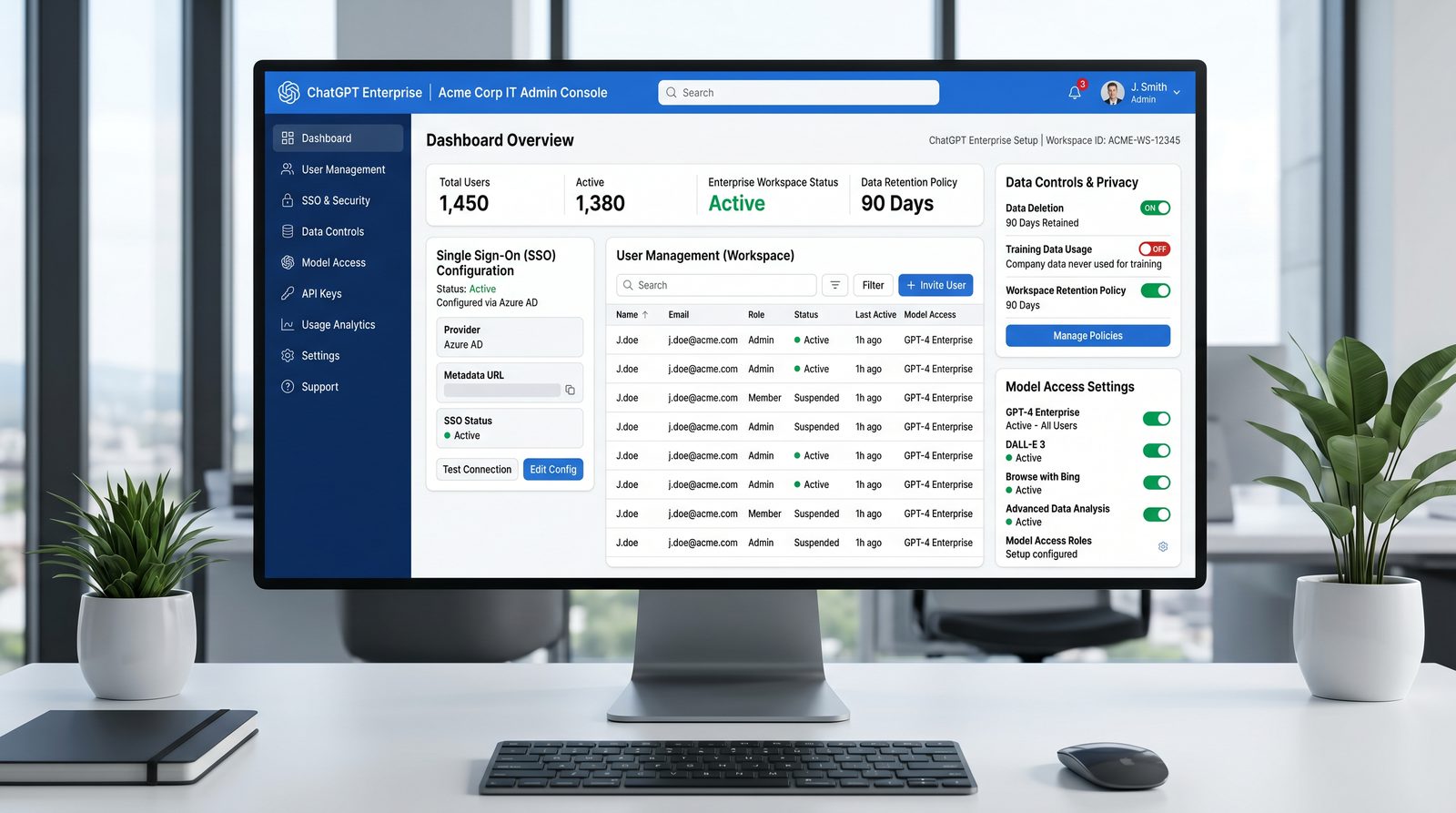
This tutorial is a field guide for IT administrators deploying ChatGPT Enterprise across an organization. It emphasizes secure-by-default setup, identity federation, data governance, and model governance. You will learn how to configure the Admin Console, integrate your identity provider using SSO (SAML or OIDC), define data retention and conversation history policies, manage model access by team, set usage limits and cost controls, enable Custom GPTs with guardrails, configure API access and rate limits, enforce security settings (IP allowlisting, audit logs, compliance features), orchestrate user onboarding and enablement, measure ROI, and troubleshoot common issues.
While feature names can vary by contract and product evolution, the operational principles and step-by-step guidance here reflect best practices as of the knowledge cutoff. Always validate exact screens, URLs, and options against your Admin Console and OpenAI’s current documentation and release notes.
Prerequisites and Pricing Overview
Organizational Prerequisites
- Identity Provider: Okta, Microsoft Entra ID (formerly Azure AD), or Google Workspace supported for SAML 2.0 and/or OpenID Connect (OIDC).
- Domain Control: Ability to verify your email domain via DNS and/or email challenge (to ensure only employees can join).
- Networking & Security: Capability to enforce outbound web policies (optional), configure IP allowlists, and forward audit logs to your SIEM.
- Data Governance: Documented retention requirements (e.g., deletion timelines), acceptable use policies, and approval standards for Custom GPTs and connectors.
- Change Management: A communication plan, pilot cohorts, and training content tailored to roles (e.g., engineering, support, marketing).
Administrative Roles
Plan and assign the following administrative roles before setup:
| Role | Primary Responsibilities | Least-Privilege Guidance |
|---|---|---|
| Org Admin | Global settings, SSO/SCIM, security policies, audit, model availability, data retention | Limit to a small, trusted group; require MFA in IdP; enforce change approvals |
| Workspace Admin | Team membership, usage quotas, workspace templates, Custom GPT approvals | Delegate by business unit; review audit logs monthly |
| Billing Admin | Seats, invoices, spend caps, budget alerts | Restrict to finance/IT finance; enable read-only for stakeholders |
| Developer Admin | API project setup, key rotation, model allowlists for API, IP allowlisting | Use service accounts and project scoping; forbid personal keys for production |
Pricing Model (High-Level)
ChatGPT Enterprise is typically sold via an annual per-seat contract with volume-based discounts and optional add-ons. Seat types generally map to full product access for named users; certain features (e.g., premium models, bespoke model hosting, or elevated rate limits) may be subject to contract terms. For exact numbers and inclusions, contact OpenAI Sales or your account representative. As of late 2024 product guidance:
Access 40,000+ AI Prompts for ChatGPT, Claude & Codex — Free!
Subscribe to get instant access to our complete Notion Prompt Library — the largest curated collection of prompts for ChatGPT, Claude, OpenAI Codex, and other leading AI models. Optimized for real-world workflows across coding, research, content creation, and business.
- Per-seat pricing for ChatGPT Enterprise typically includes enterprise-grade features such as SSO, SOC 2/ISO-aligned security controls, administration console, and usage analytics.
- Model families (e.g., GPT-4-class, GPT-4o, reasoning models, embeddings) are included subject to availability and contract; some advanced or future models may require enablement or add-ons.
- The API is billed separately unless bundled; the Admin Console governance described here applies to the ChatGPT app and, if contracted, to enterprise API projects.
Budget owners should define spend caps and consumption alerts early, even when seats are fixed, to understand incremental costs for API workloads or add-ons.
Initial Account Setup and Workspace Creation
Step 1: Create the Organization and Admin Accounts
- Visit your enterprise onboarding link from OpenAI Sales. If you do not have one, start with a trial or contact sales to provision an enterprise org.
- Register initial admin users using corporate email addresses. Do not use personal email accounts for administrators.
- Enable MFA at the IdP level and require it for all users; treat the Admin Console as a privileged application.
Step 2: Verify Your Corporate Domain
Domain verification ensures only users from your organization can self-join and that email address ownership is validated.
- In the Admin Console, navigate to Settings > Domains.
- Add your domain(s), e.g.,
example.comand subsidiaries as needed. - Follow the DNS verification prompt. Commonly, you add a TXT record such as:
_openai-chatai.example.com IN TXT "openai-domain-verification=9f2c1d1a-5e..."
Once the DNS record propagates (typically within minutes to 24 hours), click Verify. If DNS isn’t feasible, fall back to email challenge or support-advised methods.
Step 3: Create Workspaces Aligned to Departments
Workspaces are logical containers for users, policies, and assets. Common patterns:
- Department-based: “Engineering,” “Customer Support,” “Marketing,” “Finance”
- Use-case-based: “RAG Platform Team,” “Analytics CoE,” “Sales Enablement”
- Subsidiary-based: “EMEA BU,” “APAC Subsidiary”
For each workspace:
- Assign Workspace Admins from the relevant business unit.
- Define initial policies (data retention, model allowlist) to default-safe values.
- Decide whether to permit Custom GPTs and external connectors immediately or phase them in after a pilot.
Step 4: Connect to Your SIEM for Audit
Before you onboard users at scale, wire audit export to your SIEM (e.g., Splunk, Microsoft Sentinel). Export includes administrative actions, SSO events, policy changes, and usage summaries. If your Admin Console offers a webhook or pull API, configure a secure endpoint and service account with read-only audit permissions. For Splunk HEC, an example receiver configuration:
# Example: posting an audit event to Splunk HEC
curl -sS -X POST \
  -H "Authorization: Splunk <HEC_TOKEN>" \
  -H "Content-Type: application/json" \
  https://splunk.example.com:8088/services/collector \
  -d '{
    "time": 1715111111,
    "host": "chatgpt-enterprise",
    "source": "openai_admin_audit",
    "sourcetype": "openai:audit",
    "event": {
      "action": "policy.update",
      "actor": "[email protected]",
      "target": "workspace_marketing",
      "details": {
        "data_retention_days": 90,
        "conversation_history": "disabled"
      }
    }
  }'
Validate that events index correctly and that dashboards reflect activity.
Configuring SSO with Your Identity Provider
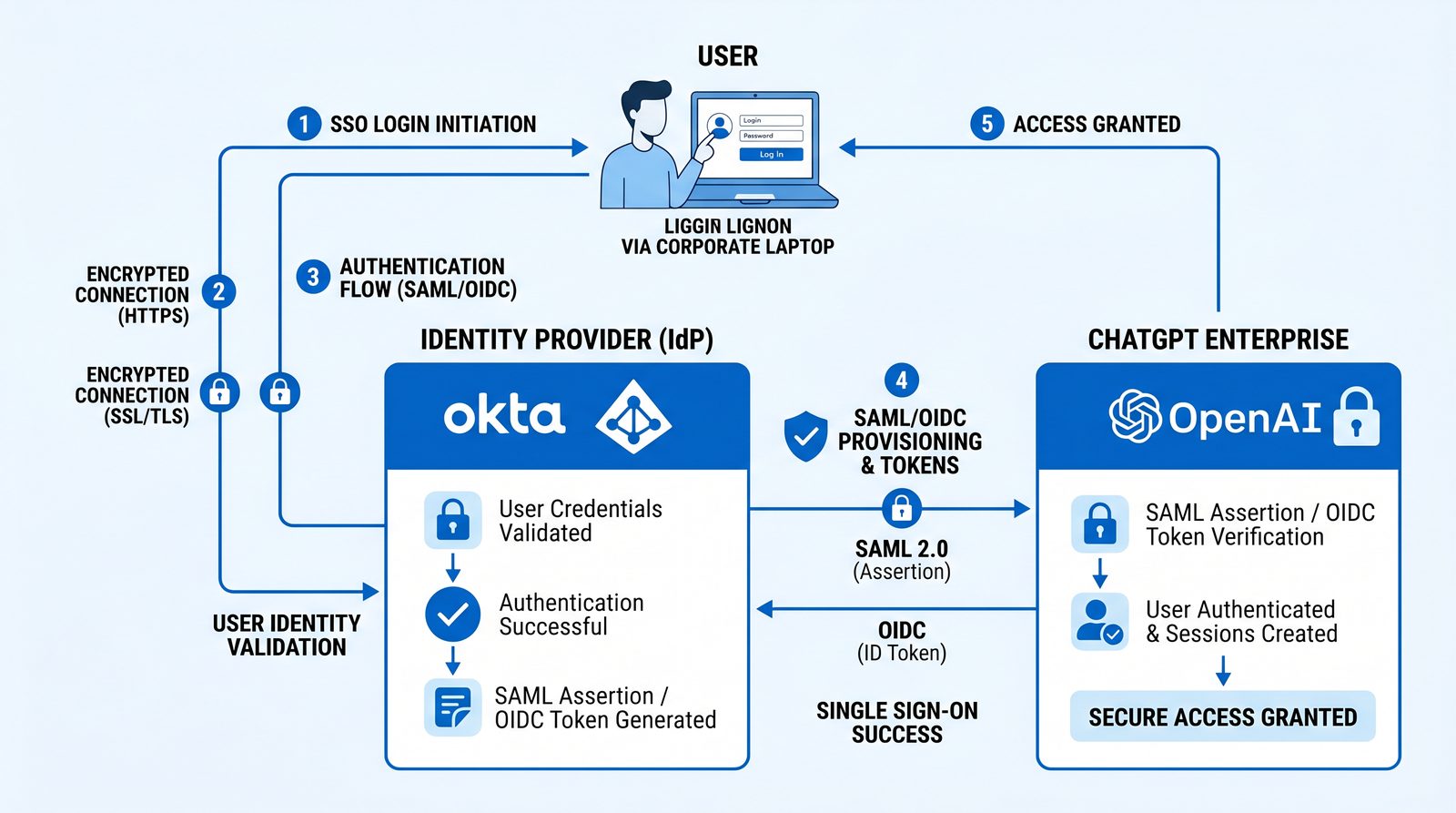
Federated identity is foundational for governance. Configure SSO with SAML 2.0 or OIDC. SCIM provisioning is recommended for lifecycle automation (create, update, deactivate users and groups).
SAML 2.0 vs. OIDC: Which to Choose?
| Feature | SAML 2.0 | OIDC (OAuth 2.0) |
|---|---|---|
| Maturity | Highly mature; ubiquitous enterprise support | Modern; wide support; ideal for modern app stacks |
| Attributes/Claims | XML assertions with attribute statements | JSON Web Tokens (JWT) with claims |
| Signing/Encryption | XML signature and optional encryption | JWS (signed) / JWE (encrypted) tokens |
| Group Mapping | Attributes can contain groups; can be large | Scopes and claims; groups via custom claim |
| Setup Complexity | Medium; certificate management required | Medium; manage client secret and redirect URIs |
Common Attribute/Claim Requirements
- Email (unique identifier)
- First Name
- Last Name
- Groups (for role assignment, workspace placement)
Check your Admin Console’s SSO configuration page for exact keys expected (e.g., email, given_name, family_name, groups).
Configuring SAML 2.0
Step A: Gather Service Provider (SP) Metadata
In the Admin Console, navigate to Authentication > SSO > SAML, and collect the SP information:
- ACS (Assertion Consumer Service) URL (e.g.,
https://chat.openai.com/sso/saml/acs) - SP Entity ID / Audience URI (e.g.,
urn:openai:chatgpt-enterpriseor a tenant-specific value) - Default RelayState (if used)
- Assertion signing requirement (usually required)
- NameID format (often
urn:oasis:names:tc:SAML:1.1:nameid-format:emailAddress)
Step B: Configure the Identity Provider (IdP)
In your IdP (examples below), create a new SAML application and input the SP metadata. Then set attribute mappings:
- Attribute “email” =>
user.email - Attribute “given_name” =>
user.firstName - Attribute “family_name” =>
user.lastName - Attribute “groups” => groups assigned to the app (subject to group push/filters)
Finally, export IdP metadata (XML) and upload it to the Admin Console.
Example SAML Assertion (Minimal)
<saml:Assertion xmlns:saml="urn:oasis:names:tc:SAML:2.0:assertion">
  <saml:Issuer>https://idp.example.com/app/chatgpt-enterprise</saml:Issuer>
  <saml:Subject>
    <saml:NameID Format="urn:oasis:names:tc:SAML:1.1:nameid-format:emailAddress">[email protected]</saml:NameID>
    <saml:SubjectConfirmation Method="urn:oasis:names:tc:SAML:2.0:cm:bearer">
      <saml:SubjectConfirmationData NotOnOrAfter="2026-07-01T12:00:00Z"
                                    Recipient="https://chat.openai.com/sso/saml/acs"/>
    </saml:SubjectConfirmation>
  </saml:Subject>
  <saml:AttributeStatement>
    <saml:Attribute Name="email">
      <saml:AttributeValue>[email protected]</saml:AttributeValue>
    </saml:Attribute>
    <saml:Attribute Name="given_name">
      <saml:AttributeValue>Jane</saml:AttributeValue>
    </saml:Attribute>
    <saml:Attribute Name="family_name">
      <saml:AttributeValue>Doe</saml:AttributeValue>
    </saml:Attribute>
    <saml:Attribute Name="groups">
      <saml:AttributeValue>workspace_engineering</saml:AttributeValue>
      <saml:AttributeValue>role_workspace_admin</saml:AttributeValue>
    </saml:Attribute>
  </saml:AttributeStatement>
</saml:Assertion>
Okta SAML Configuration Notes
- “Single sign on URL” => ACS URL from Admin Console.
- “Audience URI (SP Entity ID)” => value from Admin Console.
- Attribute Statements:
email,given_name,family_name. - Group Attribute Statement: name “groups”, filter using regex to send only app-relevant groups (e.g.,
^workspace_.*). - Sign Assertions: enabled. Use SHA-256 or higher.
Microsoft Entra ID (Azure AD) SAML Notes
- “Identifier (Entity ID)” and “Reply URL (ACS)” from Admin Console.
- Map Unique User Identifier to user’s email.
- Under Attributes & Claims, add mappings for
email,given_name,family_name. - For groups, either emit group IDs/Names via claims mapping or use “Advanced Options” for Group Claims with a filter (e.g., “Security groups assigned to the application”).
Google Workspace SAML Notes
- “ACS URL” and “Entity ID” from Admin Console; set start URL if prompted.
- Attribute Mapping: Primary Email =>
email, First Name =>given_name, Last Name =>family_name. - For groups, enable “Google Groups” attribute mapping via custom schema or assign groups via access control.
Configuring OIDC
Step A: Register Client Application
Create an OIDC application in your IdP:
- Redirect URIs: Use the redirect(s) provided by your Admin Console (e.g.,
https://chat.openai.com/sso/oidc/callback). - Grant type: Authorization Code with PKCE preferred.
- Scopes:
openid,email,profile, plus a custom scope for groups if needed.
Step B: Claims Mapping
Ensure ID token or userinfo endpoint supplies:
email: user emailgiven_nameandfamily_name: profile namesgroups: string array (optionally filtered)
Example OIDC Discovery and Sample Token
# OIDC discovery document
GET https://idp.example.com/.well-known/openid-configuration

# Sample ID token (decoded header/payload)
{
  "iss": "https://idp.example.com",
  "sub": "a1b2c3d4",
  "aud": "chatgpt-enterprise-client",
  "exp": 1987654321,
  "iat": 1987650721,
  "email": "[email protected]",
  "given_name": "Jane",
  "family_name": "Doe",
  "groups": ["workspace_engineering", "role_workspace_admin"]
}
SCIM Provisioning (Recommended)
Use SCIM to automatically provision and deprovision users and groups.
- Enable SCIM in Admin Console: generate a SCIM base URL and token (e.g.,
https://api.openai.com/scim/v2/<org>). - In IdP, configure SCIM app: set base URL, token, and mapping for user attributes and groups.
- Test: create a test user and assign to the ChatGPT app; verify automatic creation in the Admin Console.
- Deprovisioning: disable user in IdP and ensure SCIM delete/deactivate removes access promptly.
# Example SCIM user creation (pseudo; IdP normally handles this)
curl -sS -X POST https://api.openai.com/scim/v2/<org>/Users \
  -H "Authorization: Bearer <SCIM_TOKEN>" \
  -H "Content-Type: application/scim+json" \
  -d '{
    "userName": "[email protected]",
    "name": { "givenName": "Jane", "familyName": "Doe" },
    "emails": [{ "value": "[email protected]", "primary": true }],
    "active": true,
    "groups": [{ "value": "workspace_engineering" }]
  }'
Ensure your SCIM job is incremental and retries gracefully; configure alerts for SCIM drift (e.g., when mappings change or tokens expire).
Enterprise teams managing ChatGPT deployments at scale need visibility into how individual team members and departments are actually using the platform. Our guide on ChatGPT-5.5 Memory and Personalization explains how to configure persistent memory profiles that adapt to each user’s work style, reducing repetitive context-setting across sessions.
Data Controls and Conversation History Governance
Data governance for generative AI must balance productivity with confidentiality. ChatGPT Enterprise provides centralized controls for conversation history, retention, export, and legal holds. Key principles:
- Minimize retention by default; extend only where justified.
- Segregate sensitive teams (e.g., Legal, M&A) into stricter workspaces.
- Disable external connectors where data leakage risk outweighs benefit, or restrict to approved connectors.
Retention Policies
Set organization-wide retention, then override per workspace if needed. Common configurations:
- Global deletion window: 30–180 days after last activity, unless retained by legal hold.
- Conversation history toggle: allow/disallow users to retain chats beyond a session or a short period.
- Download/export: restrict bulk export to Admins; enable per-user export only with justification.
Example Policy Matrix
| Workspace | Conversation History | Retention (days) | Export | Notes |
|---|---|---|---|---|
| Engineering | Enabled | 90 | User export allowed | High productivity priority; sanitized code only |
| Legal | Disabled | 30 | Admin-only | Legal hold exceptions apply |
| Finance | Disabled | 60 | Admin-only | PII policies enforced; connectors off |
| Support | Enabled | 120 | User export allowed | Templates vetted; knowledge connectors approved |
Conversation History Toggle
In Admin Console > Data Controls, set defaults:
- Conversation History: Enabled/Disabled
- Individual Opt-Out: Permit users to disable history for specific sessions (e.g., “temporary chat”).
- Admin Overrides: Allow Workspace Admins to stricter controls than org-level defaults.
Training and Privacy
As of the 2024 product posture, ChatGPT Enterprise conversations are not used to train OpenAI’s models by default. Confirm this setting in your Admin Console and document it in your privacy notice. For connectors and third-party tools, review vendor DPAs and ensure data flow charts reflect reality.
Legal Hold and eDiscovery
If your organization requires legal hold capabilities, integrate with your legal ops process. Typical workflow:
- Legal raises a hold request with user identifiers and date ranges.
- Org Admin applies hold in the Admin Console for specified users or workspaces.
- Export relevant data to a secure repository; coordinate with counsel on scope.
PII and Sensitive Data Guardrails
- Educate users not to paste secrets, credentials, or protected data; enforce via DLP where possible.
- Disable file uploads for sensitive workspaces if necessary.
- For code/security teams, use redaction proxies or client-side scrubbing when integrating tools.
Model Access Management
Model governance ensures the right capabilities are available to the right teams. Availability can depend on your contract, region, and compliance posture. Use the Admin Console to allowlist model families and versions per workspace.
Common Model Families
| Family | Examples | Typical Use Cases | Notes |
|---|---|---|---|
| GPT-4-class (General) | GPT-4o, GPT-4.1 | General reasoning, writing, code assistance, multimodal (image/text) | Strong breadth; default for most users |
| Reasoning | o3, o3-mini (examples) | Complex multi-step reasoning, analysis, tool orchestration | Higher latency/cost; gate by need |
| Cost-Optimized | GPT-4o mini | High-volume tasks, drafts, internal support | Lower cost; good for bulk operations |
| Embeddings | text-embedding-3 family | Search, RAG, semantic clustering | API-centric; restrict to developer projects |
| Vision/Multimodal | GPT-4o, Vision-capable endpoints | Image understanding, document parsing | Review data sensitivity before enabling |
Policy Patterns
- Default Safe: Enable GPT-4-class and a cost-optimized model; disable experimental or high-cost models.
- Workspace-Based Exceptions: Engineering can access reasoning models; Finance restricted to a curated set.
- Approval Flow: Users request additional models via ticket; Workspace Admin approves with justification.
Example Model Allowlist Policy (YAML)
org: example.com
workspaces:
  engineering:
    allowed_models:
      - gpt-4o
      - gpt-4.1
      - o3
      - gpt-4o-mini
    default_model: gpt-4o
  finance:
    allowed_models:
      - gpt-4.1
      - gpt-4o-mini
    default_model: gpt-4o-mini
  legal:
    allowed_models:
      - gpt-4.1
    default_model: gpt-4.1
Store such policies in version control and document changes via change requests, even if the Admin Console is the enforcement point.
Beyond usage tracking, organizations building autonomous workflows should understand how OpenAI’s internal teams have achieved 97.9% Codex adoption for production tasks. Our analysis of OpenAI’s Shift from Chat to Agents reveals the specific infrastructure patterns and governance frameworks that enabled this transition at scale.
Setting Usage Limits and Cost Controls
Even with per-seat licensing for the ChatGPT app, you should set governance for high-cost features and any API-based usage. Admin Console budget controls and alerts help avoid cost surprises and enable chargeback/showback.
Budgeting Structures
- Org-Level Cap: A ceiling for aggregate monthly or quarterly consumption (particularly for API).
- Workspace Budgets: Allocate budgets to departments; alert at 50%/80%/100% thresholds.
- Per-User Safeguards: Rate and usage limits to prevent runaway workloads (e.g., file-processing bursts).
Quota Types
| Quota | Applies To | Purpose | Notes |
|---|---|---|---|
| Requests per minute (RPM) | API projects/users | Throttle concurrency; stabilize backend | Set lower defaults; allow bursts for service accounts |
| Tokens per minute (TPM) | API projects/users | Control compute intensity | Adjust based on model; heavier for reasoning models |
| Daily/Monthly Spend | Workspaces/projects | Budget control, chargeback | Integrate with finance alerts |
| Attachment/File Size | Chat app | Prevent large data exfiltration | Balance productivity with risk |
Example Enforcement (JSON)
{
  "org": "example.com",
  "workspaces": {
    "engineering": {
      "spend_limit_monthly_usd": 5000,
      "alerts": [0.5, 0.8, 1.0],
      "api_limits": {
        "rpm": 300,
        "tpm": 100000
      }
    },
    "finance": {
      "spend_limit_monthly_usd": 1000,
      "alerts": [0.7, 0.9, 1.0],
      "api_limits": {
        "rpm": 60,
        "tpm": 20000
      }
    }
  },
  "default_user_limits": {
    "chat_file_upload_mb": 50
  }
}
Implement monitoring that correlates Admin Console budgets with your cloud cost explorer for API projects to ensure a single source of truth for finance.
Custom GPTs and Workspace Templates
Custom GPTs allow teams to package prompts, tools, and knowledge sources for repeatable workflows. Governance is essential to prevent data sprawl and unsafe tool usage.
Enabling Custom GPTs
- Org Toggle: In Admin Console > Features > Custom GPTs, enable/disable globally.
- Workspace Overrides: Allow selected workspaces to create or use Custom GPTs.
- Publish Workflow: Require admin review before a Custom GPT can be shared broadly.
Governance Controls
- Connectors: Restrict to approved knowledge sources (e.g., internal SharePoint, Confluence), ban personal drives.
- External Tools: Disable unsafe tools (e.g., arbitrary web fetch or code execution) unless vetted.
- Data Residency: Avoid connecting data across regions without clearance.
Workspace Templates
Templates standardize onboarding for new teams or projects. A template may include:
- Default model and temperature settings
- Pre-approved Custom GPTs pinned for the workspace
- Policies: data retention, conversation history, file upload limits
- Knowledge sources connected to the workspace
Template Definition (YAML)
template: "support_workspace_v1"
defaults:
  model: gpt-4o
  temperature: 0.3
  conversation_history: enabled
  retention_days: 120
pinned_gpts:
  - "RMA Assistant"
  - "Tone & Compliance Checker"
knowledge_sources:
  - type: confluence
    instance: "confluence.corp.local"
    space_whitelist: ["SUPPORT", "KB"]
policies:
  file_upload_mb: 25
  external_connectors: ["confluence"]
Approval Flow for Custom GPT Publication
- Builder submits GPT with description, data sources, and intended audience.
- Workspace Admin reviews: checks prompts for sensitive content, verifies data source permissions, validates testing evidence.
- Security sign-off for external tools or web access.
- Publish to workspace or org catalog; set expiry/review date.
API Access Configuration and Rate Limits
If your enterprise contract includes API usage, configure API projects under your organization with governance consistent with the ChatGPT app. Treat API keys as secrets and prefer service accounts.
Projects, Keys, and Roles
- Create API projects per app/service; avoid monolithic projects.
- Assign roles: Project Admin, Developer (write keys), Auditor (read-only metrics/logs).
- Rotate keys quarterly or on staff change; store in secret managers (e.g., HashiCorp Vault, AWS Secrets Manager).
IP Allowlisting and Origins
Use IP allowlists for server-to-server API traffic and CORS origin allowlists for browser-based usage (if applicable). Prefer server-side integration for production systems.
Model and Rate Limit Configuration
- Restrict each project to only required models.
- Define RPM/TPM limits per model and per project to prevent saturation.
- Enable alerting on 429 (rate limit) and 5xx (service) spikes.
Client Best Practices: Retries and Backoff
Implement exponential backoff with jitter for 429s and idempotent retries for safe methods.
# Python example using requests and tenacity for backoff
import os, time, json
import requests
from tenacity import retry, stop_after_attempt, wait_exponential, retry_if_exception_type

API_KEY = os.getenv("OPENAI_API_KEY")
BASE_URL = "https://api.openai.com/v1"

class RateLimitError(Exception):
    pass

def post_json(path, payload):
    r = requests.post(
        f"{BASE_URL}{path}",
        headers={"Authorization": f"Bearer {API_KEY}", "Content-Type": "application/json"},
        json=payload,
        timeout=60
    )
    if r.status_code == 429:
        raise RateLimitError(r.text)
    r.raise_for_status()
    return r.json()

@retry(
    retry=retry_if_exception_type((RateLimitError, requests.exceptions.Timeout)),
    wait=wait_exponential(multiplier=1, min=1, max=32),
    stop=stop_after_attempt(6)
)
def call_chat(model, messages):
    return post_json("/chat/completions", {"model": model, "messages": messages})

if __name__ == "__main__":
    resp = call_chat(
        "gpt-4o",
        [{"role": "user", "content": "Summarize our Q2 OKRs in three bullets."}]
    )
    print(json.dumps(resp, indent=2))
Service Account Pattern
For production systems, provision service accounts bound to API projects with keys scoped only to necessary models and limits. Avoid using personal keys for CI/CD and automation.
Observability for API
- Emit metrics: requests, latency, tokens, error rates per project and per model.
- Tag usage by business unit for chargeback (e.g., via project naming conventions or metadata).
- Stream logs to your SIEM; redact prompts/outputs if they can contain sensitive content.
Governance Example: Gateway Policy
If you proxy API calls through an internal gateway, enforce policies centrally:
# Example pseudo-policy for an API gateway
policies:
  - name: "limit-embeddings"
    match:
      path: "/v1/embeddings"
      project: "marketing"
    enforce:
      rpm: 60
      tpm: 50000
  - name: "block-unauthorized-models"
    match:
      path: "/v1/chat/completions"
      model_not_in: ["gpt-4o", "gpt-4o-mini", "gpt-4.1"]
    enforce:
      action: "deny"
  - name: "ip-allowlist"
    match:
      any: true
    enforce:
      source_ips: ["203.0.113.0/24", "198.51.100.10/32"]
For teams looking to expand their AI capabilities, our guide on How to Use OpenAI Codex for Automated Code Review provides actionable frameworks for setting up Codex agents for PR analysis and security scanning that complement the strategies discussed in this article.
Security Settings: IP Allowlisting, Audit Logs, and Compliance
IP Allowlisting
Restrict access to the ChatGPT app and Admin Console from trusted corporate networks or VPN egress IPs where supported. Approaches:
- Native IP Allowlists: Configure ranges in Admin Console (e.g.,
203.0.113.0/24,198.51.100.10/32). - Secure Web Gateway: Enforce SASE or SWG policy to only allow traffic to ChatGPT domains from managed devices or VPN.
- IdP Conditional Access: Require compliant device and network location before SSO is granted.
Example Allowlist CIDR Plan
hq-vpn-egress: 203.0.113.0/24
aws-nat:       198.51.100.10/32
gcp-nat:       192.0.2.44/32
Document ownership of each CIDR and automate updates when NAT IPs change.
Audit Logs
Continuously export logs to detect misconfigurations and anomalous usage. Key event categories:
- Authentication: SSO logins, MFA challenges, failures
- Administration: Policy edits, model allowlist changes, role assignments
- Provisioning: SCIM create/update/delete
- Usage: Volume by workspace/model, errors (429/5xx)
Detecting Anomalies (Example)
# Splunk pseudo-SPL: detect sudden spike in 429s for a project
index=openai sourcetype=openai:api
| timechart span=5m count(eval(status=429)) as rate_limited
| eventstats avg(rate_limited) as baseline stdev(rate_limited) as sigma
| eval z=(rate_limited - baseline) / sigma
| where z > 3
Compliance and Certifications
ChatGPT Enterprise aligns with enterprise security standards and offers controls to help you meet your requirements (e.g., SOC 2, ISO 27001). Verify current attestations and documentation with your account team. Complement vendor controls with your own policies:
- Encrypt in transit and at rest (vendor-managed); avoid downloading sensitive content locally.
- Use DLP on endpoints to prevent exfiltration from chat transcripts.
- Maintain vendor risk assessments and DPAs for connectors and third-party tools.
User Onboarding Workflow and Training
Phased Rollout
- Pilot: 50–200 users across representative teams. Collect feedback and refine policies.
- Wave 1: Add sensitive-adjacent teams with stricter policies (Finance, HR, Legal).
- Broad Rollout: Remaining departments; publish governance and how-to guides.
Onboarding Steps
- Provisioning: SCIM creates user, assigns to default workspace based on group.
- Welcome Email: Links to acceptable use, data handling, and quick-start guide.
- First Login: SSO via IdP; conversation history and data notices presented.
- Orientation Session: 30 minutes; covers prompt patterns, safe usage, and support channels.
Training Recommendations
- Role-Specific Playbooks: Engineering (code reviews, API prototyping), Support (macro creation), Marketing (drafting, tone control).
- Prompt Engineering Basics: Clear intent, stepwise instructions, examples, constraints, and evaluation.
- Security Hygiene: No secrets/credentials in prompts, redaction, checking output for hallucinations.
- Custom GPT Use: When to use, when to avoid, how to request new GPT approval.
Prompt Patterns Cheat Sheet
# Task Breakdown
"You are assisting with <task>. First list steps you will take. Then ask clarifying questions. Then proceed."

# Style & Tone
"Write with a professional but friendly tone. Use short paragraphs and bullets. Avoid hyperbole."

# Safety Constraints
"Do not include any data beyond what I give you. If unsure, ask me to confirm facts."
Communication and Support
- Dedicated Channel: “#chatgpt-enterprise-support” in Slack/Teams.
- Office Hours: Weekly “ask me anything” for admins and champions.
- Feedback Form: Triage requests for models, connectors, and Custom GPTs.
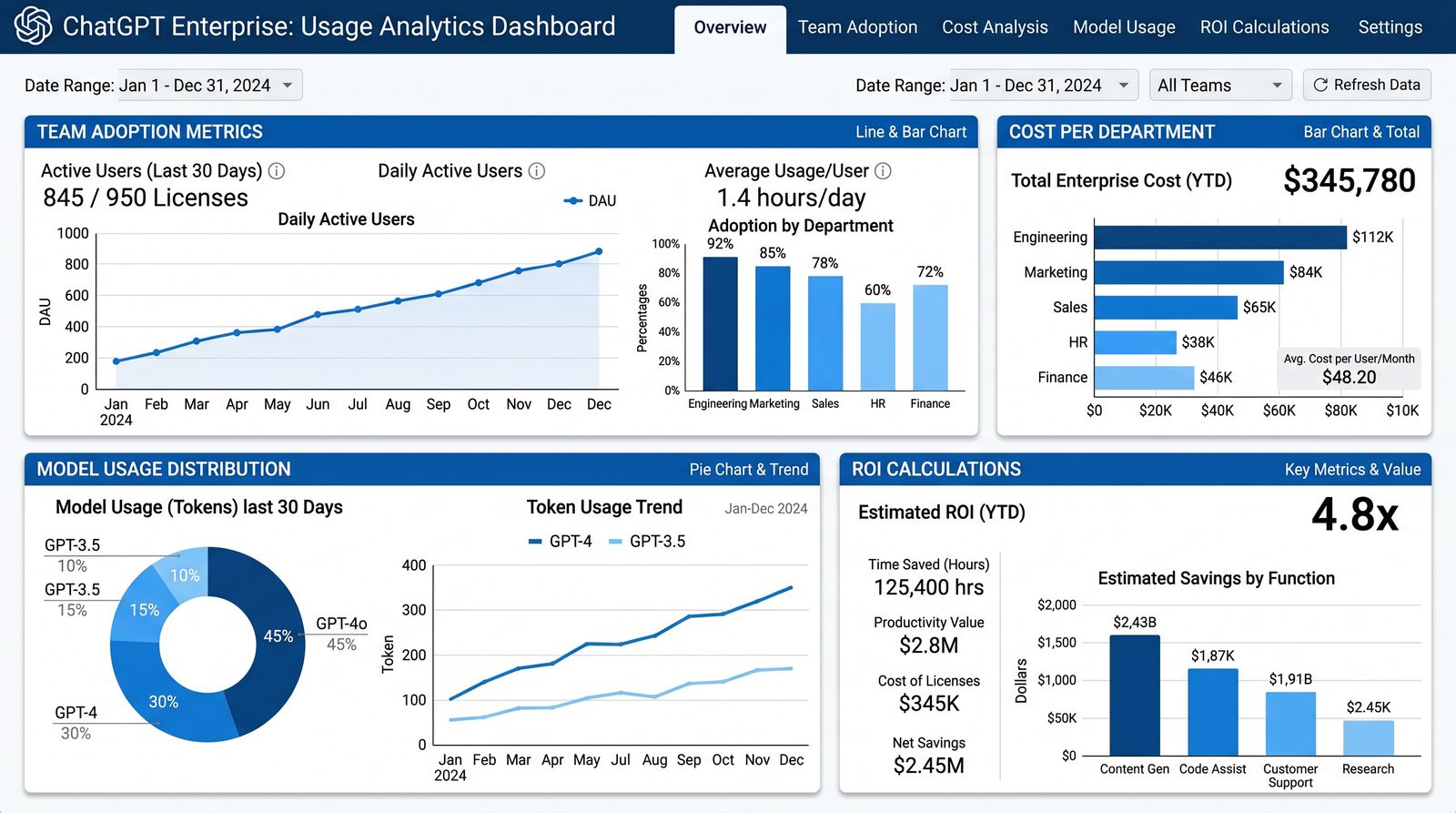
Monitoring Usage and ROI
Key Metrics
- Adoption: Active users per week/month by workspace
- Engagement: Sessions, messages, time saved (survey-based), output quality
- Cost: Spend per department/project; unit economics (per 1K tokens, per task)
- Risk: Policy violations, DLP alerts, off-hours anomalies
Dashboards
- Executive: Adoption and ROI summary; cost vs. budget
- Security: Policy changes, failed logins, anomalous usage
- Operations: Rate limits hit, error rates, model usage distribution
ROI Model
Create a conservative ROI model based on time saved and quality improvements. Example assumptions:
- Average knowledge worker: 2 hours/week saved at steady state
- Fully loaded hourly cost: $75
- Adoption lag: 50% adoption by month 3, 70% by month 6
ROI Calculation (Python)
# Rough ROI calculation using adoption curve
import math

seats = 1000
hourly_cost = 75.0
hours_saved_per_user_per_week = 2.0
weeks_per_month = 4.33

# Adoption curve (logistic-like approximation)
def adoption(month):
    # 20% initial, approaching 70% by month 6
    return min(0.7, 0.2 + 0.1 * month)

def monthly_savings(month):
    adopters = seats * adoption(month)
    return adopters * hours_saved_per_user_per_week * hourly_cost * weeks_per_month

annual_savings = sum(monthly_savings(m) for m in range(1, 13))
print(f"Estimated annual labor savings: ${annual_savings:,.0f}")
Compare savings to total cost of ownership (seats, API spend, admin overhead) and include qualitative benefits (faster turnaround, higher quality, reduced context switching).
Troubleshooting Common Setup Issues
SSO Errors
- Invalid Audience/Entity ID: Ensure the IdP Audience matches the Admin Console SP Entity ID exactly.
- Signature Failures: Rotate SAML signing certificate and update in Admin Console; ensure SHA-256.
- Group Mapping Missing: Check claim/attribute name is “groups” (or the expected key) and that the user is assigned to groups granted to the app.
- Clock Skew: Sync IdP and SP clocks via NTP to avoid NotOnOrAfter assertion errors.
Diagnostic Capture
# Decode a SAML response (base64) for inspection (macOS/Linux)
pbpaste | base64 -D > saml.xml
xmllint --format saml.xml | less
SCIM Provisioning Failures
- 401 Unauthorized: Token expired or wrong; rotate and update the IdP SCIM app.
- Schema Mismatch: Ensure
userName,emails, and group mapping match Admin Console expectations. - Race Conditions: If group arrives after user, ensure the IdP retries group push or sequence creation properly.
Model Access Not Visible to Users
- Workspace Override: A stricter workspace policy may override org defaults.
- Region/Contract Limits: Requested model may not be available under your contract or region; confirm with account team.
- Caching: Ask user to sign out/in after policy change; some clients cache capabilities.
Unexpected Costs or Budget Alerts
- API Project Leakage: Ensure dev/test keys aren’t used in production workflows.
- Burst Traffic: Identify 429s and auto-retries causing token inflation; adjust client backoff.
- Mis-scoped Keys: Keys with broader model access may select pricier models via auto-upgrade; lock allowed models.
Conversation History Not Adhering to Policy
- Per-User Overrides: Disable user-level overrides where required.
- Multiple Workspaces: Ensure the user is using the intended workspace where policy is applied.
- Legacy Sessions: Policies may apply to new sessions; instruct users to start a new conversation.
IP Allowlist Access Issues
- NAT Mismatch: Confirm your egress IPs match documented CIDRs; update allowlist as needed.
- Roaming Users: Enforce VPN for mobile users or relax rules with device posture checks.
- Geo Routing: Some ISPs use regionally diverse egress IPs; prefer VPN or consolidate egress.
Operational Runbook and Best Practices
Change Management
- RFCs for Policy Changes: All changes to SSO, data retention, and model access require a ticket and peer review.
- Maintenance Windows: Schedule policy changes during off-peak hours; notify affected workspaces.
- Rollback: Define rollback steps for each change (e.g., revert to previous SAML cert, restore model allowlist).
Least-Privilege and Segregation
- Admin Segregation: Org Admins separate from Workspace Admins; dual-control for critical changes.
- Project Segmentation: API projects per app/service with distinct keys and allowlists.
- Connector Boundaries: Restrict cross-business-unit data connectors to avoid data mingling.
Documentation and Evidence
- Policy Registry: Store YAML/JSON snapshots of policies in a versioned repository.
- Audit Trails: Export and retain admin and usage logs per your compliance policy.
- Training Records: Track attendance and publish microlearning for new features.
End-to-End Setup Checklist
- Access and Roles
- Admin accounts created and MFA enforced
- Roles assigned (Org/Workspace/Billing/Developer)
- Identity and Provisioning
- Domain verified
- SSO configured (SAML or OIDC) and tested
- SCIM provisioning enabled and validated
- Security and Data
- Retention policies set per workspace
- Conversation history defaults defined
- IP allowlists configured, conditional access enforced
- Audit logs streaming to SIEM
- Model and Usage Governance
- Model allowlists set per workspace
- Budgets and rate limits configured
- API projects established with scoped keys and IP allowlists
- Enablement and Templates
- Custom GPTs enabled with approval workflow (if applicable)
- Workspace templates defined and applied
- Training delivered and materials published
- Monitoring and ROI
- Dashboards live for adoption, cost, and risk
- ROI model created and updated quarterly
Appendix A: Example IdP Configurations
Okta (SAML)
- Applications > Create App Integration > SAML 2.0
- Single sign-on URL: ACS from Admin Console; Audience URI: SP Entity ID
- Attributes:
email=user.emailgiven_name=user.firstNamefamily_name=user.lastName- Group Attribute:
groups, filter^workspace_.*|^role_.*
- Sign Assertion: enabled; Signature Algorithm: RSA-SHA256
- Download IdP metadata and upload to Admin Console
Microsoft Entra ID (Azure AD, SAML)
- Enterprise Applications > New application > Non-gallery application
- Set Identifier (Entity ID) and Reply URL (ACS)
- User Attributes & Claims:
- email =
user.mail - given_name =
user.givenname - family_name =
user.surname - groups = Security groups assigned to the application (configure group claims)
- email =
- Certificates & Secrets: Upload or generate signing cert; keep rotation calendar
Google Workspace (SAML)
- Apps > Web and mobile apps > Add app > Add custom SAML app
- Service Provider Details: ACS, Entity ID, Start URL if needed
- Attribute Mapping:
- email => Primary email
- given_name => First Name
- family_name => Last Name
- Assign to Groups/Org Units: apply least privilege
Appendix B: Example Acceptable Use and Data Policy
Employees must not input secrets, production credentials, or customer PII into ChatGPT unless explicitly permitted by workspace policy and using approved connectors or redaction tools. Outputs must be reviewed for accuracy before external use. Use only approved Custom GPTs for customer-facing content.
Appendix C: Sample Incident Response for AI Misuse
- Detect: SIEM alert on anomalous export or off-hours usage.
- Contain: Suspend user access via IdP; revoke API keys for implicated projects.
- Eradicate: Remove unsafe Custom GPTs; tighten model/connector policies.
- Recover: Re-enable access with additional controls; educate team.
- Postmortem: Document timeline; update runbooks and training.
Frequently Asked Questions
Do ChatGPT Enterprise conversations train OpenAI’s models?
As communicated by OpenAI for enterprise offerings circa 2024, customer conversations are not used to train OpenAI models by default. Confirm the current setting in your Admin Console and contract.
Can we restrict certain models to specific teams?
Yes. Use workspace-level model allowlists to grant access only to models that meet your risk and cost profile. Maintain a request-and-approve workflow for exceptions.
How do we ensure contractors have limited access?
Create dedicated contractor groups and workspaces with stricter policies, limited model access, and no Custom GPT creation rights. Enforce SSO with conditional access and SCIM deprovisioning on contract end.
What’s the best way to prevent overspend on API usage?
Set budgets and alerts, constrain models to cost-optimized defaults, enforce RPM/TPM limits, and proxy traffic through a gateway with policy enforcement and observability.
Conclusion
Operationalizing ChatGPT Enterprise is a cross-functional effort spanning identity, security, governance, and enablement. By implementing SSO and SCIM, defining data retention and conversation history policies, carefully managing model access, setting budgets and rate limits, governing Custom GPTs, enforcing IP allowlists and audit exports, and delivering role-aligned training, you provide a secure and scalable foundation for AI-assisted work across the enterprise. Iterate through pilots, measure ROI, and refine policies as adoption grows.
For teams looking to expand their AI capabilities, our guide on GPT-5.6 Sol Benchmarks Decoded provides actionable frameworks for GPT-5.6 Sol benchmark comparisons across real-world tasks that complement the strategies discussed in this article.
