
OpenAI Launches Codex Chrome Extension: A Paradigm Shift in AI-Powered Browser Workflows
On May 7, 2026, OpenAI unveiled a dedicated Chrome extension for its groundbreaking AI coding assistant, Codex, marking a significant milestone in AI-driven software development and web automation. This launch enables Codex to operate natively within the Google Chrome browser on both macOS and Windows platforms, fundamentally transforming how developers, QA engineers, and product teams interact with web applications. By seamlessly integrating with users’ existing browser sessions, the extension enhances productivity without interrupting ongoing workflows, paving the way for a new class of AI-assisted, browser-native coding and testing experiences.
The introduction of this extension represents a strategic evolution from Codex’s earlier API-based and standalone tool usage, embedding AI capabilities directly into the environment where much of modern software development occurs. It not only streamlines coding and debugging tasks but also introduces intelligent automation possibilities for browser-based workflows, effectively bridging the gap between AI assistance and real-time web interaction.
Moreover, this development aligns with broader industry trends emphasizing context-aware AI tools that adapt dynamically to user environments. By harnessing the browser as a platform, OpenAI is setting a new precedent for how AI can augment human technical workflows, offering a more intuitive, responsive, and integrated experience.
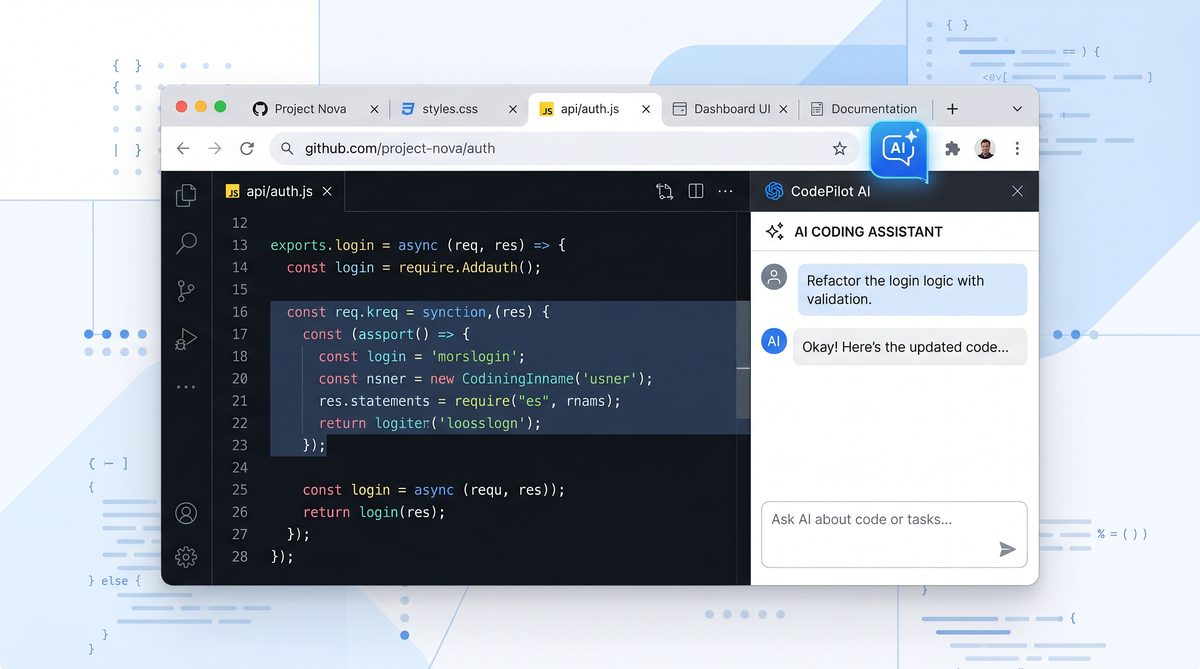
What the Extension Does
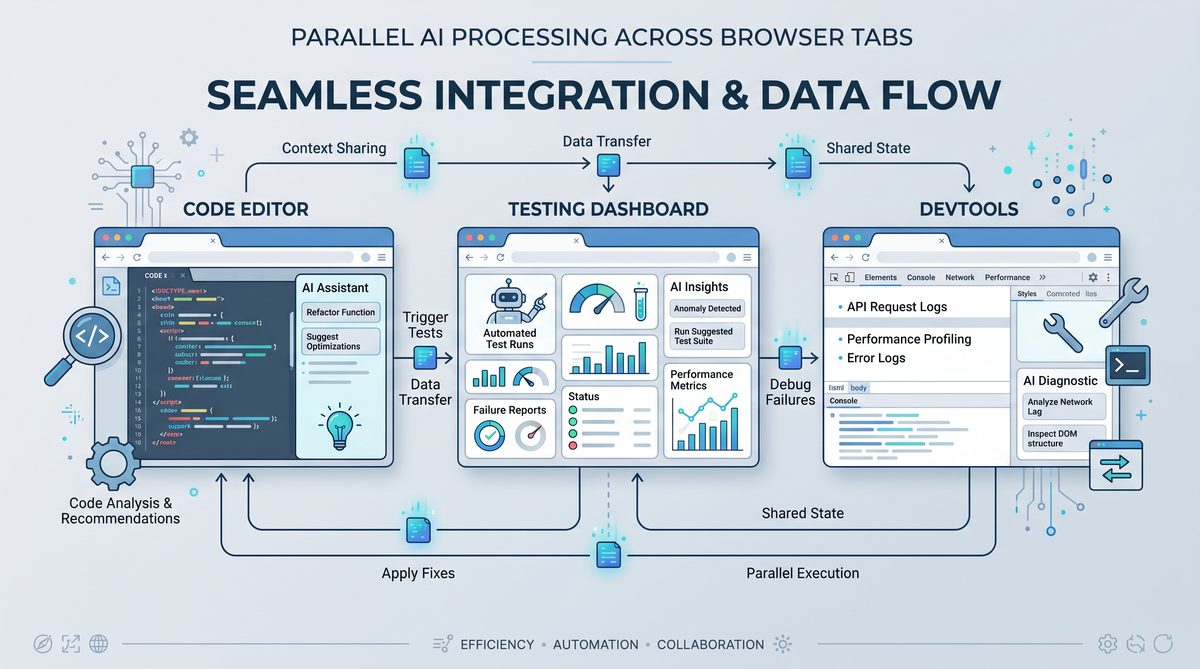
The Codex Chrome extension is designed to embed OpenAI’s powerful AI coding engine directly into the Chrome browser environment. Unlike traditional AI coding tools that operate in isolated environments or require switching between multiple applications, this extension allows Codex to function concurrently across multiple browser tabs while maintaining the context of the user’s active browsing session.
At its core, the extension acts as a bridge between the AI’s code generation capabilities and the live web environment, enabling direct interaction with web pages, applications, and developer tools. By leveraging Chrome’s extension APIs, Codex can monitor and respond to user actions, manipulate DOM elements, and provide intelligent suggestions or automation based on the exact state of the browser.
One of the extension’s most powerful features is its ability to utilize the user’s real browser profile. This means Codex can access cookies, session storage, local storage, and authentication tokens, allowing it to operate within authenticated sessions and interact with web apps as the user would. This level of integration enables AI-powered automation and assistance that respects existing user contexts, making it highly effective for tasks such as UI testing, data extraction, and complex workflow automation.
Additionally, the extension runs as a background process, ensuring that Codex’s operations do not interfere with the user’s primary activities. Whether a developer is writing code, a QA engineer is running manual tests, or a product manager is reviewing user flows, Codex remains available to respond to natural language prompts or code generation requests without disrupting the user experience.
In practice, this means that developers can ask Codex to generate contextually relevant code snippets based on the current web page or automate sequences of browser interactions, such as filling forms or clicking buttons, all within the same environment they use daily. This seamless integration reduces friction, accelerates task completion, and opens up new possibilities for AI-assisted web development and testing.
Technical Architecture and Integration
The extension is built on a robust architecture that leverages Chrome’s extension APIs, including the tabs API, cookies API, and the powerful Chrome DevTools Protocol. It acts as a client that sends context-aware requests to OpenAI’s Codex servers and receives AI-generated code or instructions in real-time.
Internally, the extension maintains a lightweight local agent that manages session data and handles communication with the AI backend. This design ensures minimal latency and efficient resource usage, even when operating across multiple tabs simultaneously.
Moreover, the extension includes a sophisticated context management system that tracks the state and content of each open tab, enabling Codex to generate highly relevant outputs tailored to the specific web application or page under focus. This contextual intelligence is critical for tasks such as debugging complex JavaScript issues, optimizing UI components, or automating repetitive browser tasks.
From a developer’s perspective, the extension acts as an intelligent assistant embedded within their browser, capable of understanding the nuances of their current work environment and proactively offering solutions or automations that align with their objectives.
Key Capabilities
The Codex Chrome extension significantly expands the AI’s operational scope. Key features include:
- Parallel Tab Operations: Codex can work simultaneously across multiple tabs, enabling multitasking and cross-application workflows without performance degradation. For example, a developer can debug a frontend issue in one tab while simultaneously generating backend API code in another, with Codex maintaining context across both.
- Real Browser Profile Integration: Access to cookies, authentication tokens, session storage, and logged-in states means Codex can interact with web applications exactly as the user does. This allows for automation of tasks that require authentication, such as submitting forms or retrieving user-specific data.
- Contextual Awareness: By analyzing the content of open tabs, Codex can generate highly relevant code snippets, automate repetitive tasks, or suggest UI modifications aligned with the current user context. This contextual understanding extends to recognizing page structure, JavaScript errors, and network activity.
- Chrome DevTools Integration: Codex can leverage DevTools APIs to inspect DOM elements, monitor network activity, debug JavaScript, and execute commands directly within the browser’s developer environment. This integration enables advanced debugging assistance, such as identifying memory leaks or performance bottlenecks with AI-generated recommendations.
- Background Operation: Running unobtrusively, Codex does not interrupt the user’s workflow, offering assistance on demand without requiring active focus. Notifications and prompts are context-sensitive and delivered in a non-disruptive manner.
- Cross-Platform Support: Compatible with macOS and Windows, the extension broadens accessibility for a wide range of developers and QA professionals. Future plans include support for Linux and ChromeOS environments.
This new functionality positions Codex as more than just a coding assistant; it becomes an integral part of browser-based workflows, blending AI capabilities with everyday web interactions to boost efficiency and innovation.
Enhanced Automation and Scripting
One of the standout features enabled by the extension is the ability for Codex to generate browser automation scripts tailored to the exact structure and state of the live web application. For instance, a QA engineer can instruct Codex to create a test script that simulates user login, navigates through various pages, and validates UI elements, all using the authenticated session and live DOM structure.
These scripts can be exported in popular formats such as JavaScript for Puppeteer, Selenium WebDriver scripts, or even as Chrome DevTools Protocol commands, facilitating integration with existing test frameworks and CI/CD pipelines.
Example automation prompt and generated code snippet:
// Prompt: "Create a Puppeteer script to log in to the current site and check if the dashboard loads successfully"

const puppeteer = require('puppeteer');

(async () => {
  const browser = await puppeteer.launch({headless: true});
  const page = await browser.newPage();
  await page.goto('https://example.com/login');

  await page.type('#username', 'your_username');
  await page.type('#password', 'your_password');
  await page.click('#login-button');
  await page.waitForNavigation();

  const dashboardVisible = await page.$('#dashboard') !== null;
  console.log('Dashboard loaded:', dashboardVisible);

  await browser.close();
})();
Improved Debugging Assistance
With direct access to Chrome DevTools APIs, Codex can assist developers in identifying and resolving complex issues more efficiently. For example, it can analyze JavaScript stack traces, detect common errors such as undefined variables or network failures, and suggest fixes or optimizations inline within the browser.
Additionally, Codex can recommend performance improvements by monitoring network requests, identifying slow resources, or suggesting code changes to reduce rendering times.
How It Differs from Previous Codex Versions
Before the introduction of the Chrome extension, OpenAI Codex primarily operated as an API-driven model accessible through command-line interfaces, integrated IDE plugins, or web-based playgrounds. While powerful for generating code snippets, automating tasks, and providing coding assistance, previous versions were limited in their ability to interact directly with live web environments or browser-based applications.
The traditional Codex experience often required developers to copy context manually from their browsers into IDEs or separate tools, leading to fragmented workflows and reduced efficiency. Moreover, the lack of session awareness meant that Codex could not operate within authenticated applications or leverage real-time web states, limiting its utility for complex web development and testing scenarios.
Key differentiators enabled by the Chrome extension include:
- Native Browser Presence: Codex now runs within the user’s browser environment, eliminating context switching and enabling real-time interaction with web content. This tighter integration enhances responsiveness and relevance of AI outputs.
- Session-Aware Operations: Utilizing actual browser sessions allows Codex to authenticate and operate within logged-in apps, a capability not feasible in isolated environments. This capability is crucial for automating workflows that depend on user-specific data or enterprise SaaS tools.
- Simultaneous Multi-Tab Functionality: The extension supports parallel processing across tabs, a feature absent in prior Codex iterations. This supports complex workflows where multiple applications or pages are involved concurrently.
- Integration with DevTools: Direct access to Chrome’s developer tools offers unprecedented debugging and inspection capabilities integrated with AI assistance. This enables Codex to understand and manipulate the live DOM and JavaScript runtime environment in ways not possible before.
These enhancements mark a fundamental evolution from Codex as a code generation backend to a comprehensive browser-based AI assistant capable of augmenting complex web workflows. The extension effectively transforms Codex into an interactive, context-aware collaborator that works seamlessly within the developer’s natural environment.
Use Cases for Developers, QA Engineers, and Product Teams
The new Codex Chrome extension unlocks a variety of powerful use cases across multiple disciplines, demonstrating its versatility and potential to transform browser-based workflows.
Web Development
Developers can leverage Codex’s contextual awareness and browser integration to accelerate coding tasks significantly. For example, when working on a complex single-page application, Codex can analyze the current DOM structure and suggest optimized JavaScript or React component code that fits precisely with the existing architecture.
Additionally, developers can use Codex to refactor legacy code by requesting suggestions based on the real-time application state or automate repetitive tasks such as generating API request handlers or form validation logic tailored to the current web app.
Example prompt for developers:
“Analyze the current page’s JavaScript console errors and suggest fixes to resolve the ‘undefined variable’ issues.”
Codex can then parse the console logs via DevTools integration and produce actionable code snippets or debugging steps directly within the browser environment.
Quality Assurance
QA engineers benefit immensely from Codex’s ability to interact with authenticated sessions and live web environments. They can instruct Codex to generate automated test scripts that simulate realistic user interactions, validate UI elements, and verify application behavior under various conditions.
The extension’s session awareness ensures that test scripts reflect actual user permissions and data, increasing the fidelity and reliability of automated testing. Furthermore, Codex can assist in exploratory testing by generating test cases based on observed UI elements and user flows, reducing manual effort.
Example use case:
- Create a test scenario that logs in as a user, navigates to the dashboard, performs data entry in forms, and verifies success messages.
- Automatically generate regression tests for UI components that have recently changed, leveraging context from open tabs.
Product Management and UX Teams
Product managers and UX designers can use Codex as a rapid prototyping tool embedded within the browser. By analyzing live user flows, Codex can suggest UI adjustments, identify potential usability issues, or generate mockups and code snippets for new features.
Moreover, Codex can help generate documentation or user guides by extracting relevant data and screenshots from the current application state, streamlining communication between teams.
Example prompt:
“Generate a summary report of the user journey on the current page, highlighting bottlenecks and suggesting UI improvements.”
Cross-Team Collaboration
Because Codex respects browser session data and authentication states, it enables teams working with enterprise SaaS tools or internal applications to integrate AI assistance without compromising security or workflow integrity. Teams can share automated scripts, debugging insights, or UI prototypes generated by Codex, fostering collaboration and reducing miscommunication.
This cross-functional utility makes Codex a valuable asset across the software development lifecycle, from initial design and coding through testing and deployment.
Additional Use Cases
- Accessibility Testing: Codex can analyze page elements for compliance with accessibility standards like WCAG and suggest code fixes or ARIA attribute additions.
- Performance Monitoring: By observing network requests and resource loading times, Codex can recommend optimizations to improve page load speed and responsiveness.
- SEO Optimization: Codex can review HTML and metadata to suggest improvements for search engine ranking and social media sharing.
These expanded capabilities highlight Codex as a multi-dimensional assistant that supports not only coding but also broader aspects of web application quality and user experience.
Privacy and Security Considerations
Integrating an AI assistant deeply within the browser raises important privacy and security questions. OpenAI has designed the Codex Chrome extension with these considerations in mind to ensure user trust and compliance with stringent data protection standards.
- Data Handling: Codex processes data locally within the browser context where possible, minimizing data transmission and exposure. When interaction with OpenAI’s servers is required, data is encrypted using industry-standard TLS protocols, ensuring end-to-end security during communication.
- User Consent: The extension requires explicit user permission to access browser data, including cookies, session information, and DevTools APIs. Users retain full control over which tabs Codex can access and when it can operate, with granular permission settings available in Chrome’s extension management interface.
- Session Isolation: Codex does not export or store session cookies or authentication tokens outside the local browser environment, preserving user privacy and security. All sensitive session data remains within the user’s device unless explicitly shared through AI queries.
- Compliance: OpenAI adheres to relevant privacy regulations, including GDPR and CCPA, ensuring that user data is handled responsibly and transparently. The extension’s design reflects these compliance requirements by implementing data minimization, user control, and clear privacy policies.
- Transparency and Auditability: Users can review logs of Codex’s activity within the browser and control data sharing settings. OpenAI also provides documentation detailing the extension’s data usage policies and security practices.
These safeguards provide confidence that the Codex extension enhances productivity without compromising user security or data integrity, a critical factor for enterprise adoption and trust. Organizations can deploy the extension knowing that it aligns with best practices in cybersecurity and privacy protection.
Enterprise Security Features
For organizations, OpenAI offers additional security features, including:
- Admin Controls: IT administrators can manage extension deployment policies, restrict permissions, and monitor usage through centralized management consoles.
- Data Residency Options: Enterprises can opt for data processing within specific geographic regions to comply with local regulations.
- Audit Logs: Detailed activity logs support compliance audits and incident investigations.
These enterprise-grade features make the Codex Chrome extension suitable for sensitive environments, including finance, healthcare, and government sectors.
How to Get Started
Getting started with the Codex Chrome extension is straightforward and designed to minimize setup friction while maximizing immediate productivity gains.
- Install from Chrome Web Store: The extension is publicly available and can be added to Chrome on macOS or Windows directly through the Chrome Web Store. Installation typically takes under a minute.
- Authenticate OpenAI Access: Users sign in with their OpenAI account credentials to enable Codex functionality and link the extension to their API usage quota. This step ensures usage tracking and billing integration.
- Configure Permissions: Upon installation, users grant permissions for Codex to access browser tabs, cookies, and DevTools APIs. These permissions can be adjusted subsequently in Chrome’s extension settings, giving users full control over data access.
- Invoke Codex Assistance: Codex can be summoned via a browser toolbar button, keyboard shortcut, or context menu within any tab to generate code, automate tasks, or analyze web pages based on natural language prompts. This flexible invocation model supports different user preferences and workflows.
- Utilize in Parallel Tabs: Users can open multiple tabs to work in parallel, with Codex maintaining session awareness and context across all active browser windows. This facilitates multitasking and complex workflows involving multiple web applications or services.
Additionally, users can customize Codex’s behavior through advanced settings, such as adjusting AI response verbosity, setting preferred programming languages, or enabling specific automation features.
Practical Tips for Effective Usage
- Start with Specific Prompts: To maximize Codex’s effectiveness, provide clear and concise instructions that specify the context or desired outcome.
- Leverage DevTools Integration: Use Codex’s ability to inspect and debug directly within the browser to accelerate troubleshooting and code refinement.
- Experiment with Automation: Automate repetitive tasks such as form filling, navigation, or data extraction to save time and reduce errors.
- Manage Permissions Carefully: Regularly review and adjust extension permissions to maintain security and privacy.
- Collaborate Using Shared Scripts: Export and share automation scripts generated by Codex with team members to standardize testing and development processes.
What This Means for the Future of AI Coding Agents
The launch of the Codex Chrome extension signals a transformative shift in how AI coding agents are deployed and utilized. By embedding AI directly within the browser — the primary interface for modern software development, testing, and product management — OpenAI is redefining the boundaries between human and machine collaboration.
This evolution supports a vision where AI assistants are no longer siloed tools but contextual collaborators, capable of understanding user environment, preferences, and workflow nuances to deliver precise, actionable assistance. The extension’s ability to operate unobtrusively across authenticated sessions and multiple tabs expands the AI’s utility beyond mere code generation into comprehensive browser-based workflow augmentation.
For developers, QA engineers, and product teams, this opens new avenues for efficiency gains, error reduction, and innovation acceleration. It also challenges the industry to rethink integration paradigms, security models, and user experience design for AI-powered tools.
As AI coding agents mature, we can expect further convergence of AI capabilities with browser ecosystems, enabling more immersive, intelligent, and responsive development environments. The Codex Chrome extension is a critical step in this trajectory, exemplifying how AI can be seamlessly woven into daily technical workflows.
Future developments may include tighter integration with other browser-based tools such as version control systems, continuous integration dashboards, and cloud development environments. Additionally, advances in natural language understanding and context retention will enable Codex to proactively suggest improvements, detect potential issues before they arise, and personalize assistance based on individual developer habits.
The broader implication is a shift toward AI-augmented development environments that blend human creativity and judgment with machine precision and automation, fostering a new era of software craftsmanship.
For more insights into the evolving role of AI in programming, explore foundational concepts around OpenAI Codex and its capabilities. The extension’s impact also resonates deeply with emerging trends in AI coding agents and their integration in developer workflows. Furthermore, understanding the broader ecosystem of AI productivity tools, including ChatGPT productivity enhancements, provides context on how these innovations collectively reshape the software development landscape.
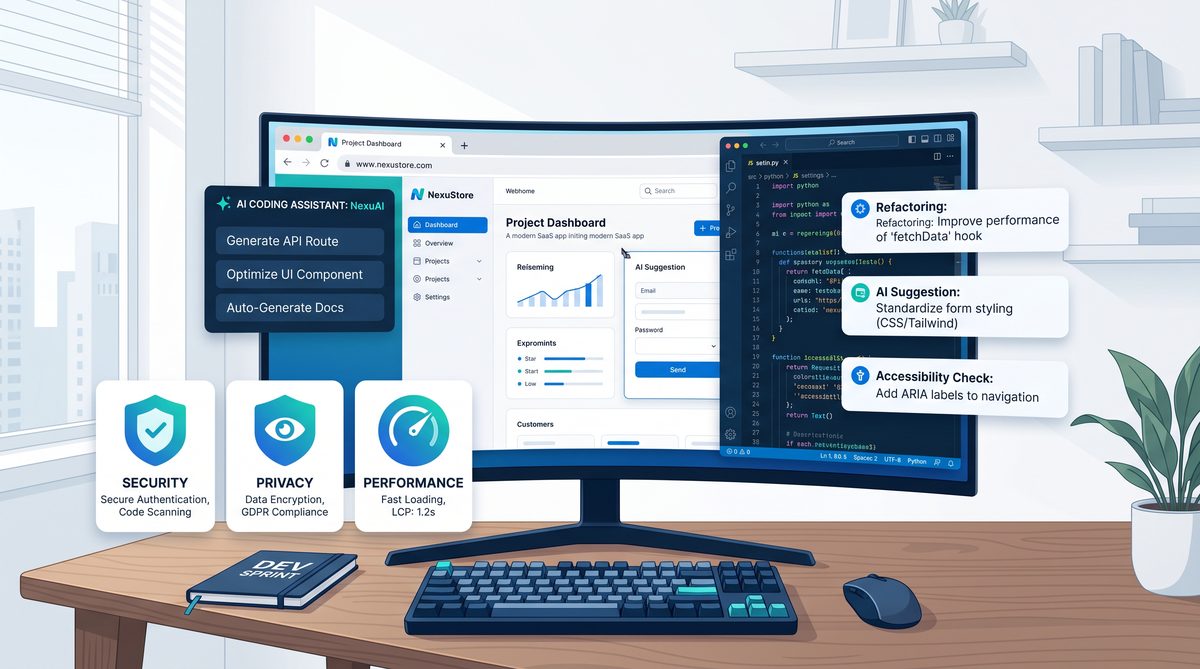
Comparison Table: Codex Capabilities Before vs After Chrome Extension Launch
| Feature | Before Chrome Extension | After Chrome Extension |
|---|---|---|
| Operating Environment | Isolated APIs, IDE plugins, web playgrounds | Native integration inside Chrome browser |
| Session Context | Stateless, no access to user sessions or cookies | Full access to user’s real browser profile and authenticated sessions |
| Multi-Tab Operation | Single session per invocation | Simultaneous operation across multiple tabs |
| Browser DevTools Access | None | Full integration with Chrome DevTools APIs for debugging and inspection |
| Background Operation | Requires active input or focus | Runs unobtrusively in the background while users continue working |
| Supported Platforms | Cross-platform via IDEs and APIs | macOS and Windows via Chrome browser |
| Use Cases | Code generation, scripting outside browser context | Web app testing, UI automation, contextual code generation within live web apps |
Additional Feature Comparison: AI Interaction Modes
| Feature | Before Chrome Extension | After Chrome Extension |
|---|---|---|
| Prompt Input Methods | Text input in IDEs or playgrounds | Natural language prompts via toolbar, keyboard shortcuts, and context menus |
| Automation Script Export | Limited or manual export | Automated generation and export of scripts for Puppeteer, Selenium, and DevTools commands |
| AI Suggestions Delivery | Inline code suggestions in IDEs or static outputs | Dynamic, context-aware suggestions embedded in browser UI with interactive elements |
| Collaboration Support | Manual sharing of generated code | Direct sharing of automation scripts and session-aware outputs across teams |
Author Perspective
As CEO and AI Apps Creator, I view OpenAI’s launch of the Codex Chrome extension as a watershed moment for AI-assisted software development. By bridging the gap between AI models and the browser—the ubiquitous platform for modern development—this extension transforms Codex from a reactive code generator into an active participant in the developer’s environment.
The ability to harness real session data and interact with web applications in their native context unlocks unprecedented opportunities for automation and intelligent assistance. It empowers developers and teams to accelerate delivery cycles, improve product quality, and foster innovation through seamless AI collaboration.
This innovation also sets a new standard for AI tool design, emphasizing unobtrusive, context-aware, and secure integration. As AI coding agents continue to mature, such embedded experiences will become the norm, redefining productivity and creativity in software engineering.
OpenAI’s Codex Chrome extension is not merely a new tool; it is a glimpse into the future of AI-augmented development workflows, where the browser itself becomes a smart interface to both the human and machine intelligence driving software forward.
Looking ahead, I anticipate that this integration will inspire a wave of browser-native AI tools tailored to specific development domains, such as cloud infrastructure management, data science notebooks, and collaborative coding platforms. The extension’s success demonstrates the power of embedding AI contextually, paving the way for increasingly intelligent, adaptive, and personalized developer experiences.
Access 40,000+ AI Prompts for ChatGPT, Claude & Codex — Free!
Subscribe to get instant access to our complete Notion Prompt Library — the largest curated collection of prompts for ChatGPT, Claude, OpenAI Codex, and other leading AI models. Optimized for real-world workflows across coding, research, content creation, and business.
