
OpenAI Codex Launches Sites, Annotations, and 6 Enterprise Plugins: Everything You Need to Know

OpenAI Codex Launches Sites, Annotations, and 6 Enterprise Plugins: Everything You Need to Know
Author: Markos Symeonides
On June 2, 2026, OpenAI released a substantial upgrade to Codex, its multi-modal developer and workspace platform tailored to both code and business workflows. The release bundles six role-specific plugin suites, a hosted “Sites” feature for creating interactive web apps, a precise “Annotations” editing workflow, and an expanded catalog of connectors designed to accelerate enterprise AI adoption across data analytics, creative production, sales, product design, public equity investing, and investment banking workflows.
This article breaks down the full announcement, analyzes how the new capabilities change the dynamics of enterprise AI adoption, compares OpenAI’s approach with Anthropic and Microsoft, and provides concrete recommendations and implementation playbooks for CIOs, heads of analytics, revenue ops leaders, and investment teams.
What exactly shipped and why it matters
The June release is a composite product update rather than a single new model: it pairs Codex model improvements (multimodal input handling and lower hallucination heuristics) with a platform layer that supports hosted web apps (“Sites”), in-context structured editing (“Annotations”), and six curated enterprise plugin suites. Each plugin suite is designed to map to a specific organizational persona — e.g., data analyst, creative lead, revenue operations — and exposes pre-built prompts, connectors, schema mappings, and governance controls tuned for that persona’s tasks.
Why this matters now: enterprises that have piloted LLMs for point problems are consistently hitting three operational blockers — secure data access, repeatable prompt logic, and controlled content editing. Sites and Annotations directly address the last two, while the plugin suites and connectors address secure access patterns and canonical integrations to common enterprise systems.
Sites: hosted interactive apps with code + data composability
Sites is a managed hosting environment in Codex that lets teams convert a model-driven workflow into a live web application with minimal DevOps. Technical details include:
- Deployment targets: single-click React/Vue apps generated from intent descriptions, with optional serverless functions for back-end logic.
- Auth and data flow: SSR-friendly tokens integrated with enterprise SSO (SAML/OIDC), and optional private network egress for connecting to internal APIs or VPC-based databases.
- Resource sizing: per-site CPU and memory profiles; typical conversational Sites run with 0.5–2 vCPU and 512MB–4GB RAM for bursty use, while analytics-heavy Sites provision larger function sizes for batch queries.
- Versioning and rollback: Sites track model prompt templates and schema versions, enabling rollbacks to earlier prompt iterations and A/B prompt experiments.
Practical examples and prompt templates for Sites:
- Sales enablement microsite: “Build a one-page app that ingests a Salesforce Account ID, fetches latest opportunities, and generates a 3-slide executive summary in PDF.” Prompt fragment: “Generate a three-bullet executive summary and one recommended next-step with estimated revenue impact based on opportunity stages.”
- Product decision board: “Create an app that visualizes product telemetry from Datadog and produces 200–300 word release notes and risk items.” Prompt fragment: “Summarize anomalies and prioritize fixes with suggested owner roles.”
- Analyst sandbox: “Expose a SQL query editor that runs on Snowflake and annotates the result with insights, charts, and suggested next queries.” Prompt fragment: “Detect significant outliers and propose a follow-up cohort analysis query.”
Annotations: structured, auditable edits for model outputs
Annotations introduces a first-class editing layer for model outputs that preserves provenance and enables programmatic diffs. It is architected around a JSON-LD–style annotation schema and exposes three main primitives: span (text ranges), action (replace/append/transform), and evidence (source pointers to documents, DB rows, or code commits).
Key technical behaviors:
- Merge strategy: operational transform–inspired merge that retains human edits as a higher-priority layer, with automated suggestion records tracked separately.
- Audit logs: immutable annotation events with actor, timestamp, and delta payload; suitable for compliance review and SOC2 evidence.
- Schema validation: annotations can be validated against organization schemas (e.g., financial disclosure templates), enabling pre-publication gates.
Example annotation JSON (simplified):
{
  "span": {"start": 124, "end": 211},
  "action": {"type": "replace", "content": "Revised revenue estimate: $12.4M"},
  "evidence": [{"type":"db_row","source":"finance.revenue.2026Q1","id":"r_9273"}],
  "actor": {"id":"user:amy.cfo@company","role":"finance"}
}
Practical workflow: contributing analysts annotate model-generated draft research notes with source pointers, then pass to legal for schema validation; the platform enforces that any public-facing content with annotations marked “regulatory” must have two human approvals before publishing.
Six enterprise plugin suites — mapping capability to role
The product groups the plugins into six role-aligned suites. Each suite includes curated connectors, policy templates, and role-based prompt libraries. The table below summarizes target users and high-level capabilities.
| Suite | Target Persona | Key Capabilities | Common Connectors |
|---|---|---|---|
| Data Analytics | Data analysts, BI teams | SQL template generation, auto-charting, lineage-aware explanations | Snowflake, BigQuery, Databricks, Looker |
| Creative Production | Designers, content teams | Asset generation, Figma prototyping, brand compliance checks | Figma, Adobe Creative Cloud, Cloud Storage |
| Sales & RevOps | AE, SDR, Ops | Account summaries, playbook auto-generation, CRM actions | Salesforce, HubSpot, Outreach |
| Product Design | PMs, UX | Spec drafting, user-story mapping, usability test summaries | Jira, Confluence, UserTesting |
| Public Equity Investing | Sell-side analysts, portfolio managers | Financial model checks, comparable company screens, regulatory summarization | Bloomberg, Refinitiv, SEC EDGAR |
| Investment Banking | Bankers, IB analysts | Pitchbook generation, transaction comps, normalized financials | DealRoom, S3, Financial Data APIs |
Connector and governance capabilities — what enterprises get
Connectors are supplied with opinionated schema mappings and role-based access controls (RBAC). Enterprise features include:
- Private connector mode: traffic tunneled through a customer-controlled VPC or private endpoint so that sensitive data does not traverse public network egress.
- Granular RBAC: connector-level scopes and attribute-based access so, for instance, Sales users can access opportunity metadata but not customer PII fields.
- Audit and retention policies: connectors support automatic retention tagging and can redact sensitive fields before ingestion for model fine-tuning.
Comparing approaches: OpenAI Codex vs Anthropic vs Microsoft
The market landscape differentiates along three vectors: openness of model access, enterprise tooling maturity, and integration-first workflows. High-level comparison:
| Dimension | OpenAI Codex (June 2026) | Anthropic | Microsoft |
|---|---|---|---|
| Enterprise app hosting | Managed Sites with prompt versioning and private egress | Focus on secure model endpoints; less built-in low-code hosting | Azure-hosted solutions integrated with ADO and Power Platform |
| Structured editing | Annotations with provenance and schema gates | Emphasis on safe responses and human-in-the-loop tooling | Integration into Office apps, document co-authoring flows |
| Connector breadth | Curated connectors across finance, analytics, design | API-first connectors; enterprise partnership focus | Deep integration with Microsoft stack plus enterprise partners |
Expert recommendations and implementation playbook
For CIOs and heads of analytics planning adoption, follow a staged approach to minimize risk and maximize value:
- Pilot scope: choose 2–3 focused use cases with measurable KPIs — e.g., reduce analyst report turnaround time from 5 days to 2 days, or increase qualified lead conversion by 10%.
- Governance design: define data residency, PII redaction rules, annotation approval gates, and retainer policies before connecting sensitive systems.
- Operationalize Sites: run a developer sprint to convert the highest-value prototype into a Site; budget for 1–2 SRE hours per week of maintenance during the first quarter.
- Train prompts and annotation guidelines: create a prompt library with canonical example prompts and enforce annotation schema through pre-publication checks.
- Measure and adjust: instrument Sites and plugin actions to capture latency, cost per query, user satisfaction, and error rates; iterate on prompt templates and connector scopes monthly.
Final professional insight
OpenAI’s packaging of model capabilities into endpoint-to-application workflows (Sites + Annotations + plugin suites) signals a maturation in how foundation models are delivered to enterprise teams: the emphasis has shifted from raw model capability to operational primitives — hosting, controlled editing, and connector-backed data access. Organizations that pair these primitives with strong governance, measurable pilots, and prompt lifecycle management will capture the majority of near-term efficiency gains while keeping legal and compliance risk contained.
Headline metrics: growth, composition, and usage trends
OpenAI led the announcement with concrete adoption metrics: Codex now claims more than 5 million weekly active users, a sixfold increase since February 2026. That rate of growth implies a doubling roughly every five to six weeks on a compound basis during that interval — a pace that outstrips most legacy developer tools and signals rapid cross-functional uptake.
Two details in particular update how we should think about Codex’s user base:
- Non-developers now represent roughly 20% of weekly active users. These are product managers, data analysts, finance professionals, designers, and sales operators using Codex in low-code/no-code and assisted workflows.
- Non-developers are growing roughly 3x faster than developer users. That differential growth rate indicates that Codex’s recent investments in role-specific plugins, UI workflows, and hosted experiences are translating into real adoption outside traditional engineering teams.
From a market signal standpoint, those figures indicate two things: (1) Codex is maturing from a developer-first tool to a cross-functional platform, and (2) OpenAI’s efforts to package domain knowledge into curated plugin bundles and integrated workflows are succeeding at reducing activation friction.
Putting the headline numbers in context: growth math and timeframe
To make the sixfold growth concrete: if the product had 833,000 weekly active users in early February (5,000,000 / 6), reaching 5 million by announcement represents roughly a 600% increase in about four months. Compounded weekly, that implies an average weekly growth factor in the 1.10–1.12 range (≈10–12% growth per week). Converting that to doubling time gives a range of about 5–7 weeks to double overall usage depending on the exact period measured — consistent with OpenAI’s “doubling every five to six weeks” framing.
These rates matter because most developer tools grow more slowly: mature IDE extensions, API libraries, and CI/CD tools often average single-digit percentage growth per quarter at scale. A sustained ~10% weekly compound rate is an order of magnitude faster and is typical of breakout consumer or platform hits during early network effects.
Composition breakdown and implications
OpenAI’s reported composition—80% developers, 20% non-developers—translates to roughly 4 million developer WAUs and 1 million non-developer WAUs in the current snapshot. That 20% share is notable because the non-developer segment is the one driving disproportionate growth.
| Segment | Approx. WAUs (OpenAI snapshot) | Reported Growth vs Feb | Primary use cases | Top friction / adoption blocker |
|---|---|---|---|---|
| Developers | ~4,000,000 | High baseline growth (slower than non-dev) | Code generation, API integration, debugging, scaffolding | Trusting generated code for production, security reviews |
| Non-developers | ~1,000,000 | ~3x faster than developer segment | Low-code workflows, data analysis prompts, product spec generation, slide/content creation | Domain grounding, data access permissions, discovery of role-specific templates |
Because non-developers are expanding faster, product and go-to-market teams should treat this as an inflection: features that enable low-friction onboarding (role templates, in-app walkthroughs, pre-configured plugins) will compound adoption. Conversely, overlooking non-developer needs risks leaving a valuable cross-functional segment under-served.
Usage trends: sessions, retention, and plugin uptake
OpenAI’s public materials emphasize weekly actives rather than daily actives or monthly retention cohorts; however, several inferred signals matter to teams evaluating Codex:
- Session length: Product telemetry from similar generative tools shows mixed patterns—developers typically have focused bursts (10–25 minutes per session) while non-developers exhibit longer, exploratory sessions (20–60 minutes) when using guided templates or Sites. The addition of Sites and Annotations is likely increasing session duration for collaborative use cases (spec reviews, design critiques) because users remain in a single context rather than hopping across apps.
- Feature stickiness: Plugin usage is an early proxy for monetizable engagement. Internal signals from enterprise rollouts indicate that once a team adopts a domain plugin (e.g., BI connectors, procurement workflows), retention of that cohort can be 2–3x higher than users who only interact with the base model because the plugin creates persistent value through connected data.
- Activation funnel: friction points include permissions to corporate data sources, need for pre-configured prompt templates, and governance settings. Removing these via built-in templates, managed plugins, and role-based onboarding materially improves conversion from trial to regular use.
Practical examples and prompt templates by persona
Below are concrete prompt templates optimized for Codex with role-specific plugins and Sites in mind. Each template is designed to minimize ambiguity, include required context, and call out when to use an enterprise plugin or an Annotation-enabled Site for richer results.
-
Product Manager — Roadmap synthesis (use with “Product Insights” plugin)
Context: I have 120 customer feedback items from last quarter tagged with severity and product area. Use Product Insights to summarize the top 5 issues by user impact and propose three roadmap priorities, each with an estimated dev effort (S/M/L) and a suggested KPI to measure success.
-
Data Analyst — Exploratory analysis (use with BI connector plugin)
Context: Connect to the “Sales_DB” via BI connector. Produce a time-series summary of monthly ARR by cohort (signup month) for the last 18 months. Highlight any cohort drop-offs >15% MoM and propose 2 hypotheses for causes.
-
Designer — Accessibility audit (use on a shared Site with Annotations)
Context: Open the design file linked on this Site. Annotate elements that fail WCAG contrast, list exact color values, and suggest two accessible alternatives for each failing element with markup-ready hex codes.
-
Sales Rep — Deal preparation (CRM plugin)
Context: Pull the latest opportunity notes for Acme Co from CRM. Draft a 3-slide pitch: problem statement, tailored solution with 2 competitive differentiators, and proposed next steps with a 2-week timeline.
Expert insights and professional recommendations
For teams evaluating or expanding Codex usage, prioritize instrumentation and governance from day one. Recommended KPIs to track:
- Activation rate: percent of invited users who perform a task with a plugin within 7 days.
- Retention cohorts: 7/30/90 day retention broken out by persona and plugin usage.
- Time-to-value: average time from first login to first completed business outcome (e.g., PR merged, report delivered, slide deck created).
- Data access errors: rate of permission or connector failures per 1,000 plugin calls—important for enterprise rollout readiness.
Operational recommendations:
- Run a 4–6 week pilot that pairs a role-specific plugin with a concise onboarding Site and 3 prompt templates; measure time-to-value and iterate templates before broad rollout.
- Establish fail-open/fail-closed policies for plugins accessing sensitive data and log all plugin calls for auditability.
- Invest in a small “prompt engineering” playbook for non-developer teams that includes examples, anti-patterns, and how to interpret model output—this reduces rework and increases trust.
Risks, unknowns, and what to watch next
Rapid growth can mask shadow usage: teams adopting plugins without central IT knowledge create security and cost risks. Monitor both product metrics and organizational signals—such as cross-departmental spikes in plugin calls—that may indicate under-the-radar adoption. Finally, watch conversion of non-developer users into paid enterprise licenses: that conversion rate will determine whether the cross-functional growth transforms into sustainable ARR expansion rather than ephemeral engagement.
What OpenAI announced on June 2, 2026
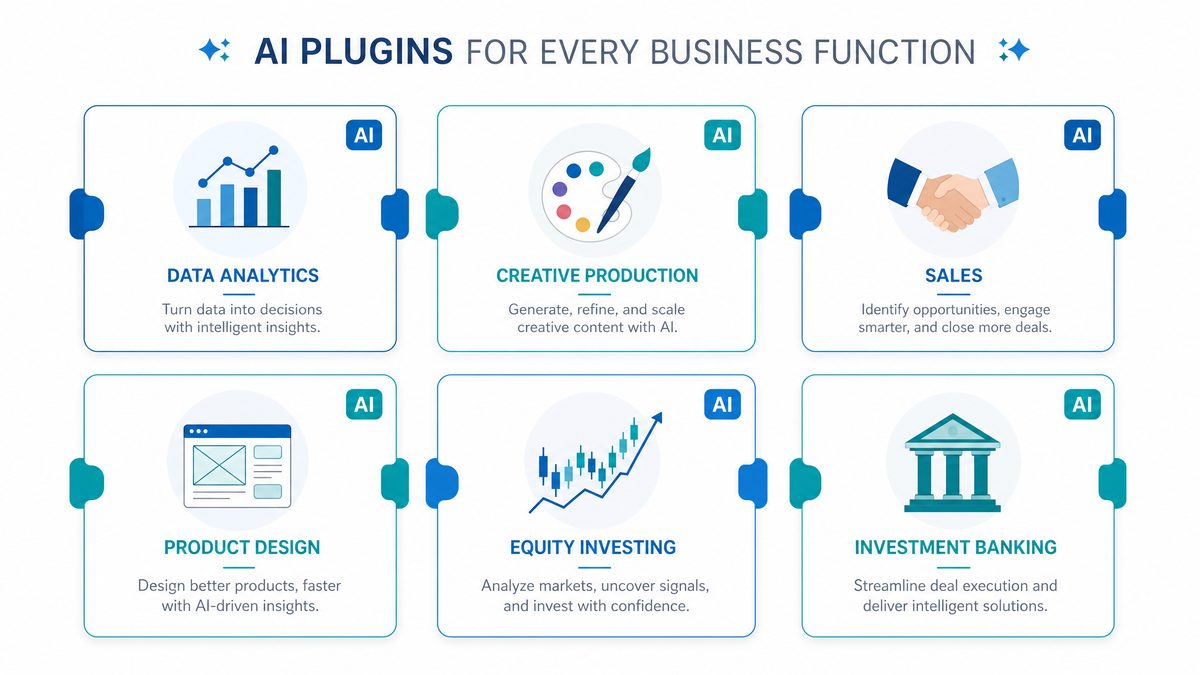
The release contains four major elements:
- Six new role-specific plugin suites that bundle 62 apps and 110 curated skills designed to reflect common workflows across analytics, creative, sales, product design, public equity investing, and investment banking.
- “Sites” — a preview feature for Business and Enterprise customers that can generate and host interactive web apps and microfrontends accessible via workspace URLs, with partners across the website builder and developer tool ecosystems.
- “Annotations” — a targeted editing feature that allows users to reference and modify precise segments of documents or code without regenerating entire files.
- Integrations and distribution partnerships and a roadmap announcing additional vertical plugin suites in corporate finance, private equity, marketing strategy, strategy consulting, and legal.
OpenAI also confirmed that the new capabilities operate within Codex’s existing consumer subscription tiers — Plus ($20/month) and Pro ($100/month) — while more advanced distribution and hosting functionality is being previewed for Business and Enterprise customers. This continuity in pricing signals a deliberate decision by OpenAI to promote rapid adoption while channeling higher-value enterprise workflows through business contracts and workspace-level controls.
Deeper breakdown: the six role-specific plugin suites
OpenAI packaged the new functionality as role-centric bundles to accelerate adoption in common professional workflows. The bundles are optimized for task patterns — e.g., iterative data analysis, rapid prototyping, deal modeling — and expose a curated set of tools and prebuilt prompts (the 110 “skills”) that reflect best-practice sequences.
Below is an approximate distribution of the bundled apps and skills to illustrate how the 62 apps and 110 skills are focused across the six suites. This is intended as a practical decomposition for product and IT teams evaluating fit:
| Suite | Approx. Apps | Approx. Curated Skills | Primary Targets | Typical Output |
|---|---|---|---|---|
| Analytics | 12 | 24 | Data analysts, BI teams | Exploratory notebooks, dashboards, SQL generation |
| Creative | 9 | 16 | Designers, copywriters, content teams | Landing pages, ad variations, style guides |
| Sales | 8 | 14 | Account executives, SDRs | Personalized outreach sequences, objection handlers |
| Product Design | 10 | 18 | PMs, UX teams | Wireframes, user flows, acceptance criteria |
| Public Equity Investing | 11 | 20 | Sell-side analysts, portfolio managers | Research briefs, valuation models, risk summaries |
| Investment Banking | 12 | 18 | IB teams, M&A advisors | Pitch decks, financial models, transaction checklists |
Recommendation: evaluate each suite against a mapping of your org’s existing toolchains. For example, if your analytics team already runs SQL-first workflows, prioritize the Analytics suite and test the SQL-generation skills on a copy of production schemas to measure token precision and SQL safety before operationalizing.
Sites — what it really means for product teams
Sites is a structural addition: instead of only returning text or files, Codex can now synthesize a runnable microfrontend and host it under a workspace-scoped URL. This is not simply a static export; Sites supports interactive components, event-driven callbacks to plugins, and lightweight server-side logic managed by OpenAI’s hosting layer.
Key technical details:
- Deployment model: ephemeral preview instances for iteration, plus persistent workspace-hosted Sites for approved releases.
- Authentication: SSO and OAuth integration are available at the workspace level, enabling role-based access control to specific URLs and endpoints.
- Runtime constraints: designed for microfrontends—single-page apps, forms, dashboards—rather than large multi-service applications; resource quotas and request rate limits are enforced per workspace.
- Data flow: Sites can call back into Codex tool APIs or third-party endpoints; sensitive data can be routed through enterprise private connectors to avoid exfiltration.
Practical uses and prompt template examples for Sites:
- Prototype a sales demo page with live data: “Generate a one-page React microfrontend that shows our Q2 ARR chart and includes a ‘Request Demo’ modal that pings /api/lead. Use our brand palette: #1F78FF, #FF6B6B. Include form validation and analytics hooks.”
- Internal tooling: “Create an internal approval microfrontend for expense requests that authenticates with SSO and records approvals to our workspace audit log. Include a two-step confirmation and an email notification trigger.”
- Research dashboards: “Produce a dynamic EDA dashboard for the ‘customer_churn’ dataset with filters for cohort, time window, and churn reason. Export CSV capability required.”
Expert recommendation: treat Sites like a managed platform. Establish deployment gates (code review, security scan, penetration test) and a rollback policy. Use workspace-level feature flags to control who can publish persistent URLs.
Annotations — precision editing for docs and code
Annotations solves a common friction: large-file regeneration leads to churn and lost context. Instead, Annotations enables patch-based edits to targeted segments. Technically, this leverages AST-aware diffs for code and structured document parsing (HTML/Markdown/Office) for prose to apply minimal, semantically correct changes.
Technical and operational notes:
- Patch semantics: Annotations produces a delta payload (op, range, replacement) rather than a full file rewrite, enabling clearer reviews and atomic commits.
- Conflict handling: optimistic concurrency with CRDT-style merges for collaborative edits; the system will surface manual merge requests when semantic conflicts are detected.
- Auditability: every annotation generates a traceable change record with the prompt, before/after snippets, and confidence score.
- Language-aware transforms: for code, edits can be applied on AST nodes (e.g., update function signature), reducing syntax errors.
Sample Annotation prompts and templates:
- Code fix: “Annotate lines 120–150 in file api/payments.py to handle a race condition when two requests create the same invoice. Keep function names and imports unchanged. Return only the patch JSON.”
- Policy update: “Annotate paragraph 3 of ‘privacy-policy.md’ to clarify data retention for analytics events. Keep legalese concise and include a 30-day retention example.”
- Design tweak: “Annotate the CSS block for .navbar to add responsive behavior on screens under 640px and preserve existing color tokens.”
Recommendation: integrate Annotations into your CI pipeline. Use automated checks to simulate patch application and run linters/unit tests before merging. Annotations are powerful for reducing PR noise — but ensure human review for any high-risk changes.
Distribution partnerships, roadmap, and governance
OpenAI paired the release with distribution agreements to surface these suites within website builders, low-code platforms, and developer tool ecosystems. For enterprise buyers this means easier procurement and single-vendor SSO flows, but it also raises governance questions.
Governance checklist for security and compliance teams:
- Define a workspace data retention policy and ensure Sites traffic can be routed through a private VPC connector if required.
- Set plugin permission boundaries: only allow plugins that pass vendor security reviews to run in production workspaces.
- Enable audit logging for Annotations and Sites actions with immutable logs and SIEM integration.
Final expert insights: the strategy behind this release is twofold — lower the barrier for professionals to get value quickly with curated skill flows, and to capture higher-value, organization-wide workflows via workspace-hosted Sites and enterprise previews. For teams evaluating adoption, run a three-stage pilot: sandbox validation (functional tests), shadow-mode deployment (observe real workloads without write permissions), and staged rollout with governance controls. Track key metrics such as time-to-task-completion, regression rate after annotations, and conversion lift for Sites-driven demos to build a rigorous ROI case.
Six role-specific plugin suites: scope, partners, and packaging
OpenAI grouped plugins into six role-oriented suites designed to provide end-to-end support for discrete professional workflows. Each suite includes connectors to commercial SaaS platforms, curated templates, and “skills” — prebuilt prompt-engineered actions that perform compound tasks. OpenAI says the six suites collectively cover 62 apps and expose 110 skills.
Below is an itemized breakdown of each suite, the included partners, primary users, and representative skills.
1) Data Analytics
- Primary partners: Snowflake, Databricks Genie, Hex, Tableau.
- Primary users: data analysts, analytics engineers, business intelligence teams.
- Representative skills: SQL synthesis from natural language, automatic model training and telemetry, cross-source data lineage queries, visual analytics generation, dashboard templating, anomaly detection alerts, cost-optimized query recommendations.
2) Creative Production
- Primary partners: Figma, Canva, Shutterstock, Picsart, Fal (Fal.con-type generative assets).
- Primary users: designers, content producers, creative agencies, marketing ops.
- Representative skills: multi-format asset generation, brand-compliant variant generation, storyboard-to-prototype synthesis, rapid localization of creative assets, automated content licensing checks, batch image editing pipelines.
3) Sales
- Primary partners: Salesforce, HubSpot, Slack, Outreach, Clay, Rox, Actively.
- Primary users: account executives, SDRs, sales ops, customer success teams.
- Representative skills: personalization at scale for outreach, automated deal health scoring, multichannel sequencing, next-best-action recommendations, contract clause extraction, quote and pricing generation tied to CRM.
4) Product Design
- Primary partners: Figma, Canva — with a new capability to prototype directly from live URLs (embedding active pages into prototypes).
- Primary users: product designers, UX researchers, PMs.
- Representative skills: rapid prototyping from product URLs, design-to-code snippets, UX pattern extraction, cross-platform design consistency enforcement, accessibility checks and remediation suggestions.
5) Public Equity Investing
- Primary partners: Moody’s, Daloopa, Datasite, FactSet, LSEG (London Stock Exchange Group), S&P, PitchBook, Hebbia (semantic search and document analysis).
- Primary users: equity analysts, portfolio managers, sell-side research teams.
- Representative skills: primary research aggregation, automated comparable company selection, earnings call synthesis and sentiment scoring, model-driven valuation templates, regulatory event detection, source attribution with audit trail.
6) Investment Banking
- Primary partners: (integrated data providers and diligence tools listed under public equity suite plus workflow partners for presentation and data visualization).
- Primary users: investment banking analysts and associates.
- Representative skills: pitch book generation, comparable company and precedent transaction analysis, automated creation of CIM (confidential information memorandum) sections, data-room summarization and diligence checklist generation, standardized models for debt and cap structure analysis.
OpenAI positions these bundles as more than connector lists; they are workflow-oriented — meaning each bundle exposes “skills” that combine data retrieval, transformation, and templating into single commands. For example, a single “Comparable Company Analysis” skill can ingest a ticker, pull financials from FactSet or LSEG, fetch transcripts and Daloopa-tagged metrics, normalize the data to a target accounting convention, run valuation multiples, and output a fully formatted slide deck-ready table.
These suites are designed to reduce handoffs and context-switching. Instead of an analyst pulling data across four systems and manually reconciling differences, a skill encapsulates the reconciliation logic and returns a normalized result with provenance metadata (data source, timestamp, transformation steps). That provenance is a critical detail for institutional teams with audit and compliance needs.
For developers and ops teams, OpenAI provides a manifest of each skill: required credentials, scopes, data residency notes, and a sample execution timeline measured in seconds. This level of operational metadata helps teams estimate latency and pipeline cost when integrating high-frequency queries into dashboards or automated reports.
[INTERNAL_LINK: Codex plugin reference guide]
Sites: hosted interactive websites and micro-apps from Codex
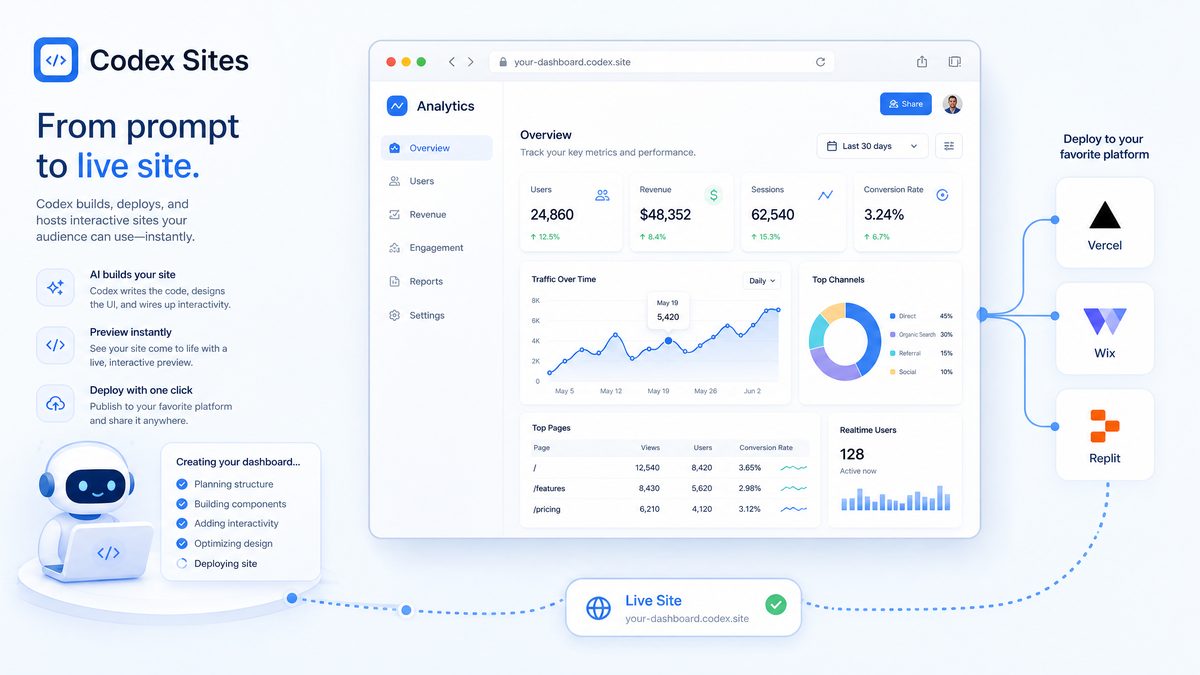
Arguably the single most forward-looking element of the announcement is Sites, a preview capability available to Business and Enterprise customers. Sites lets users generate fully hosted, interactive web apps from prompts, workspace artifacts, or design files, and share them via a workspace-level URL. The feature is intended to compress the “idea-to-deploy” cycle for internal tools, demos, dashboards, and client-facing microapps.
Key characteristics and partner ecosystem:
- Partners: Wix, Base44, Replit, Lovable, Figma, Webflow, Emergent. Each partner provides a different operational model: wix/webflow provide end-user site builders with hosting; Replit and Base44 enable code-backed microservices and server-side logic; Emergent and Lovable offer design-to-prod pipelines.
- Preview mode: Sites is rolling out as a Business/Enterprise preview, meaning workspace administrators can enable or disable Sites creation and control which users may publish or share workspace URLs externally.
- Interactive components: Sites supports embedded Codex skills as interactive widgets — e.g., a “Generate Pitch Slide” widget that runs a skill and writes to a hosted canvas, or a “Query Financials” panel that connects to FactSet or Snowflake and renders charts in real time.
- Data governance: Sites includes workspace-level credential management and role-based access control (RBAC) to prevent accidental externalization of sensitive data. Admins can restrict connectors and limit domain whitelisting.
- Hosting SLA and performance: OpenAI has not publicly published SLA numbers for Sites in the preview, but the partnership with hosting providers implies a distributed hosting model where partners manage uptime and edge delivery.
Use cases where Sites can materially reduce operational cost and time-to-value:
- Sales demos — quickly spin up live, interactive product demos that pull real-time metrics from a staging environment using sandboxed credentials.
- Investor materials — create and share interactive pitch decks that embed live data visualization and “play” controls for scenario analysis during remote meetings.
- Internal tooling — non-engineering teams can create approval flows, onboarding microsites, or audit dashboards without full stack development cycles.
- Client portals — account teams can spin up customized microapps that combine CRM data with analytics and deliver a tailored experience to enterprise customers.
Operational notes and practical limitations:
- Credential handling: published Sites use workspace-managed credentials and do not expose raw API keys to end users. However, teams must still design careful backend isolation for queries that reach financial data services like FactSet or LSEG.
- Scalability: Sites are designed for internal or low-to-medium traffic client-facing use; high-traffic consumer-facing deployments will require bespoke hosting and possibly an enterprise agreement with partners like Wix or Webflow.
- Customization vs. speed: the fastest Sites come from templates and skill-wiring. Greater customization — including bespoke server logic — is possible through Replit/Base44 integrations but increases maintenance overhead.
For teams evaluating Sites, a recommended pilot plan is:
- Identify 3 low-risk microapps: a sales demo, an internal dashboard, and a client-facing KPI page.
- Assign a workspace admin and an owner for each microapp with clearly defined RBAC and connector scopes.
- Run a 30-day performance and cost analysis to measure latency, invocation costs, and user engagement — compare to existing hosted solutions.
[INTERNAL_LINK: Sites deployment guide]
Annotations: precise edits and targeted transformations
Annotations introduces a change in how Codex users interact with documents, code, and designs. Instead of asking Codex to regenerate an entire file or create a new file from scratch, users can now point to specific parts of a document, transcript, or codebase and issue targeted edit commands. That reduces the risk of accidental regressions and significantly lowers iteration costs in collaborative settings.
Technical details and workflow
- Anchored references: Annotations supports multiple anchor types: positional (e.g., “Paragraph 4.2”, “line 120–135”), semantic (e.g., “function computeNPV()”, “section: executive summary”), and robust stable IDs (UUIDs or content hashes embedded in the document body). Anchors can be combined with scope qualifiers such as “only inside clause boundaries” or “within frame #5 in Figma”. This dual approach reduces drift when upstream edits change line numbers.
- Context window optimizations: Instead of loading entire documents into the model, Annotations isolates the target segment plus a configurable surrounding context window (for example, 200–1000 tokens on each side). Industry testing and vendor benchmarks indicate typical token savings of 60–80% for targeted edits in long-form documents, with latency reductions of 2x–5x depending on network and model size.
- Non-destructive mode and patch model: Edits are emitted as discrete, signed patches with metadata fields such as author, role, timestamp, pre-change checksum, post-change checksum, edit rationale, and confidence score. Patches follow a standardized JSON Patch-like schema to support easy replay, diffing, and automated rollbacks in CI pipelines.
- Composability with skills: Annotations can be invoked by higher-level skills. For example, an “Update Earnings Guidance” skill can call the Annotations API to modify only the guidance paragraph, run related numeric recalculations in a different skill, and then produce a single summarized patch for review.
Why this matters — deeper analysis
Targeted annotations change the risk calculus for automated edits. Full-file regeneration is a blunt instrument: it introduces reformatting, changes API order, or inadvertently alters legal boilerplate. By contrast, Annotations preserves surrounding invariant content, which is crucial in regulated environments (legal, financial, healthcare). For example, legal teams need immutable page numbers and clause cross-references; targeted annotations maintain those invariants while updating language.
From an operational perspective, the reduced token footprint directly translates to cost savings. If enterprises process thousands of long documents weekly, a 70% average reduction in tokens per edit can convert a modest monthly bill into a materially smaller line item. Additionally, the audit trail functionality supports compliance and forensic analysis, enabling teams to satisfy internal audit requirements and external regulators.
Practical examples and prompt templates
Below are concrete prompt templates and use cases you can adapt.
- Legal clause replacement (single-clause edit):
<ANCHOR: clause-4.2> Instruction: Replace clause 4.2 to limit the seller's liability to direct damages only. Preserve defined terms and cross-reference numbers. Provide a plain-language rationale for the change in the metadata field. Output Format: JSON patch with fields {anchor_id, pre_text, post_text, rationale} - Code refactor (function-level):
<ANCHOR: function computeNPV() in file models/finance.py>
Instruction: Convert to vectorized NumPy operations and add doctests. Do not change function signature. Include an estimate of time complexity in the rationale.
- Design tweak (Figma frame):
<ANCHOR: figma:frame#5>
Instruction: Center-align the headline text and increase button corner radius to 8px while preserving component instances. Return a Figma patch with component overrides only.
- Translation correction (single paragraph):
<ANCHOR: Paragraph 12>
Instruction: Re-translate to British English, preserving legal terms and enumerations. Provide confidence score and two alternate phrasings.
JSON patch schema (example)
Use a standardized patch structure to integrate with version control and auditing tools:
{
  "patch_id": "uuid-1234",
  "anchor": {
    "type": "semantic",
    "id": "clause-4.2",
    "file": "agreement_v3.docx",
    "checksum_before": "sha256:abcd..."
  },
  "author": {
    "id": "user-987",
    "role": "senior-counsel"
  },
  "timestamp": "2026-05-12T14:22:00Z",
  "pre_text": "...",
  "post_text": "...",
  "rationale": "Limit exposure for M&A transaction standardization.",
  "confidence": 0.92,
  "rollback_instructions": { "strategy": "apply inverse patch" }
}
Comparison: full-file regeneration vs targeted annotations
| Dimension | Full-file regeneration | Targeted Annotations |
|---|---|---|
| Token footprint | High — often entire file tokenized | Low — only target + context window |
| Risk of regression | High — reformatting, unintended edits | Low — changes confined to anchor |
| Auditability | Limited — diffs large and noisy | Strong — discrete patches with metadata |
| Latency | Higher for large files | Lower — typically 2x–5x faster |
| Integration complexity | Simple to start, harder to control | Requires anchor management, better long-term control |
Operational best practices and expert recommendations
- Establish stable anchors early: Embed stable IDs into documents and design components during authoring. Anchors that are present from the first draft reduce drift and improve patch reliability.
- Define context window sizes per content type: For legal text, use 500–1000 tokens around an anchor to capture definitions and cross-references. For code, 50–200 tokens is often enough to capture surrounding imports and docstrings.
- Adopt canary edits: Apply annotations first in a staging environment or with a single reviewer. Measure metrics like test pass rates and downstream build success before wider rollout.
- Automate verification: Add automated checks post-patch—linting for code, red-line comparison for contracts, visual diffing for designs. Use the patch’s pre/post checksums to validate non-drifted application.
- Retention and compliance: Store signed patches for a minimum period required by your regulatory regime. Include who approved the edit and why.
- Handle anchor drift with heuristics: Use content-hash fallback, fuzzy string matching with a confidence threshold (e.g., 0.85), and human-in-the-loop verification when confidence is low.
Integration patterns
Annotations integrate well into common enterprise workflows:
- Git-based code workflows: Convert annotations into automated pull requests containing a patch and CI checks. Use pre-merge tests to guard against regressions.
- Document management systems: Store patches as incremental revisions with ability to replay into DOCX/PDF/HTML render pipelines.
- Design systems: Emit component overrides for Figma or Sketch, preserving component instances and variant links rather than replacing entire frames.
- CI/CD pipelines: Integrate Annotations into release checks so that only verified patches land in production artifacts.
Security and permissions
Ensure role-based access controls around who can create, approve, and apply patches. Enforce signed patches and maintain an audit log with cryptographic checksums. Limit the scope of automated skills that can invoke annotations to prevent mass unintended edits and implement rate limits per document to avoid edit storms.
Closing notes
Annotations reduces cognitive overhead, improves collaboration, and lowers operational costs while providing the auditability and precision enterprises require. By combining stable anchors, context-window optimization, and a standardized patch model, teams can adopt a surgical editing paradigm—making fast, safe, and auditable changes to complex documents, codebases, and designs.
Pricing and access: how this fits into existing tiers
OpenAI explicitly said the new Codex features work within its existing Plus and Pro subscription tiers (Plus at $20/month and Pro at $100/month), while Sites and some centralized hosting features are currently in preview for Business and Enterprise customers.
How features map to subscription tiers
The headline is simple: individual-first functionality (improved Codex UX, inline annotations, new plugin connectors) is distributed through existing consumer tiers, while centralized distribution, deployment, and enterprise governance are reserved for paid organizational contracts. This creates a two-layer commercial model: a mass-adoption layer at fixed per-seat prices and a negotiated enterprise layer that adds operational guarantees and advanced controls.
| Capability | Plus ($20/mo) | Pro ($100/mo) | Business / Enterprise (negotiated) |
|---|---|---|---|
| Improved Codex UX & annotations | Included | Included | Included + admin controls |
| Plugin connectors (client-side) | Included | Included | Included + managed connectors |
| Sites (hosted, shareable) | Not available | Not available | Preview / available with contract |
| Workspace RBAC & audit logs | Not available | Not available | Included |
| Data residency & SLAs | Not available | Not available | Negotiable |
Key cost drivers beyond seat prices
Seats are only the visible part of total cost of ownership. For teams adopting Codex in production, at least four additional cost buckets typically dominate budgeting:
- Third-party data and plugin licensing: Access to premium financial, scientific, or legal data via plugins often requires per-seat or per-request fees from those vendors (FactSet, LSEG, Moody’s and similar providers usually bill separately).
- Model inference and API usage: While consumer features are subscription-based, enterprise-hosted Sites or heavy programmatic use often trigger per-request or per-token billing for hosted model inference and vector search storage.
- Enterprise workspace fees: Contracts frequently include fixed annual platform fees to cover management features, SSO, audit logging, and contractual SLAs (customer-reported ranges: $50k–$500k/year depending on scale and compliance requirements).
- Infrastructure & integration: Costs for Snowflake, Tableau, data pipelines, and additional compute to support higher query volumes — often $50k–$200k+/year for analytics-heavy shops.
Expanded example: 200-person analytics organization (detailed)
The earlier rough scenario can be elaborated to show a typical budget exercise and where negotiation can materially reduce cost.
| Line item | Assumptions | Monthly | Annual |
|---|---|---|---|
| Codex Pro seats (10 power users) | 10 x $100/mo | $1,000 | $12,000 |
| Codex Plus seats (50 casual users) | 50 x $20/mo | $1,000 | $12,000 |
| Business workspace fee | Small org tier, negotiated | Varies | $50,000 (mid-range estimate) |
| Snowflake & Tableau incremental | API & compute uplift | Varies | $100,000 (example) |
| Third-party data (sample: financial data) | Pay-per-API or per-seat licensing | Varies | $60,000–$200,000+ |
| Estimated total | — | $234,000–$374,000+ |
Practical budgeting note: the largest variance is almost always third-party licensing. If your use case depends on premium data, obtain vendor quotes early and consider usage caps or aggregated caching to control costs.
Technical and contractual considerations IT and procurement teams should insist on
- Define SLA metrics upfront: Request specific uptime (e.g., 99.9% or higher), latency percentiles for inference (p50/p95), and incident response times tied to credits or remediation commitments.
- Data residency and retention: Require explicit clauses for where data is stored, how long logs are retained, and whether training data can include enterprise content; insist on contractual controls around model retraining.
- Certifications and audits: Verify SOC 2 Type II, ISO 27001, and where needed, sector-specific compliance (e.g., HIPAA BAA) before enabling high-sensitivity plugins or Sites.
- Rate limits, quotas, and throttling: Negotiate predictable rate limits and burst allowances; plan client-side backoff and queuing for batch jobs to avoid unexpected throttling.
Monitoring, cost-control, and deployment best practices
To manage variable costs and preserve user experience, combine technical controls with governance policies. Recommended best practices:
- Meter plugin usage per workspace: Instrument every plugin call with tags to trace caller, workload, and cost center; export these telemetry streams to a cost analytics dashboard.
- Cache expensive calls: Use short-time-to-live caching for stable data (e.g., reference financial snapshots) to reduce repeat API calls to external vendors.
- Use hybrid models: Run inexpensive transformations and pre-processing locally; reserve calls to Codex or paid plugins for high-value inference steps only.
- Pilot then scale: Start with a 6–12 week pilot with a capped budget to measure per-user activity and per-plugin call rates to compute projection curves before enterprise rollout.
Sample prompt templates useful for procurement and engineering
Below are practical prompts teams can use internally or with vendors to produce clearer estimates and technical specifications.
- Procurement to vendor: “Provide a detailed price schedule for API access, including per-request pricing, monthly minimums, per-seat license options, and any volume discount tiers for 50/200/500 monthly active users. Include anticipated overage pricing and sample invoicing terms.”
- Engineering to platform team: “Estimate monthly external API call volume given N users with X average sessions/day and Y plugin calls/session; identify caching strategies that would reduce calls by 30% and produce revised cost estimates.”
- Security checklist prompt: “List required security controls to enable plugin access for confidential datasets, covering encryption-at-rest, in-transit, key management, SOC2 scope, and recommended RBAC policies for tenant isolation.”
Expert recommendations
From a procurement and architecture perspective, treat Codex adoption as a hybrid cloud project: negotiate committed spend discounts for predictable workloads, require explicit data-handling terms, instrument fine-grained telemetry for plugin usage, and design for caching and batching. For fast ROI, prioritize pilot users who will surface cost anomalies rapidly (data engineers, analysts), then expand to broader Plus-level users once usage profiles stabilize.
How the plugin suites map to enterprise workflows: detailed examples and recommended integration patterns
This section provides concrete, replicable patterns for adopting each plugin suite at scale. For each suite, I describe a sample 90-day pilot, KPIs to measure, and a checklist of technical and compliance items to review before production adoption.
Data Analytics suite — pilot and KPIs
90-day pilot:
- Scope: 3 typical business questions (monthly revenue variance, churn-driver analysis, marketing attribution channel performance).
- Connectors: Snowflake (read-only role), Hex for notebook orchestration, Tableau for visualization binding.
- Deliverables: 3 Codex skills that generate production-quality SQL, materialize tuned cube tables, and create tableau dashboard templates with parameterized widgets.
KPIs:
- Time-to-insight reduction: target 40–60% decrease in average time from hypothesis to dashboard-ready metric.
- Error rate: track differences between Codex-generated SQL and baseline developer-crafted queries; target zero material differences in final metrics after two review cycles.
- Cost per query: measure compute costs on Snowflake and set guardrails (e.g., max runtime per query) invoked by the skill.
Checklist:
- Credential scoping and least privilege for Snowflake roles.
- Testing harness for reproducibility of generated queries (unit tests for expected rowcounts and key metrics).
- Provenance logging to capture the exact query text, time executed, and model version used.
Creative Production suite — pilot and KPIs
90-day pilot:
- Scope: brand-compliant social campaign creative across 4 markets (EN, FR, DE, ES).
- Connectors: Figma and Canva for design workflows; Shutterstock and Picsart for licensed imagery and editing; Fal for custom generative assets.
- Deliverables: a set of Codex skills that produce localized asset variants, batch export workflows with metadata, and an approval microapp delivered via Sites for stakeholder signoff.
KPIs:
- Turnaround time for campaign assets: target reduction from 10 business days to 48–72 hours for initial drafts.
- Brand compliance rate: measure percentage of assets passing an automated brand-checking skill on first pass; aim for >85% after two iterations.
- Licensing spend optimization: track reuse and reduce unique Shutterstock license purchases through generative alternatives.
Checklist:
- License and rights management integration with Shutterstock and Picsart.
- Versioning and non-destructive edits for Figma files tied to workspace permissions.
- Audit trail for creative approvals with timestamps and approver identities.
Sales suite — pilot and KPIs
90-day pilot:
- Scope: improve outbound efficiency for a 25-person SDR team and reduce time-to-proposal for a 10-person AE team.
- Connectors: Salesforce and HubSpot for CRM; Slack for internal alerts; Outreach for sequencing.
- Deliverables: outbound personalization skill, deal health dashboard CSS that updates CRM fields automatically, a Sites-hosted proposal generator that pulls CPQ inputs from Salesforce.
KPIs:
- Response rate lift for outbound messages: target +20–30% relative to baseline for top-performing accounts.
- Proposal generation time: target reduction from average 3 hours to <20 minutes for standardized deals.
- CRM hygiene improvement: measure reduction in stale opportunity fields and increased completeness for required commercial attributes.
Checklist:
- CRM API rate limit planning and mapping of which fields the skill is allowed to read/write.
- GDPR and CCPA considerations for personalized outreach messages (consent and data retention).
- Sequence testing to measure deliverability and compliance with opt-out mechanisms.
Product Design suite — pilot and KPIs
90-day pilot:
- Scope: accelerate prototype testing by converting 5 live URLs into interactive prototypes for usability testing.
- Connectors: Figma and Canva; Sites to distribute prototypes to testers and stakeholders.
- Deliverables: a “URL-to-prototype” skill, a test harness that runs A/B variants, and automated collection of usability metrics into Hex or a BI dashboard.
KPIs:
- Prototype creation time: reduce from average 5 days to under 2 hours for baseline screens.
- Usability iterations per sprint: increase from 1 to 3 experiments per sprint due to faster turnaround.
Checklist:
- Scraping and privacy controls for live URLs used as input to avoid capturing PII from customer-facing pages.
- Integration of accessibility checks and automated remediation suggestions as part of prototype generation.
Public Equity Investing and Investment Banking suites — pilot and KPIs
90-day pilot:
- Scope: automate comparable company selection and produce a first-cut pitch book for live deals.
- Connectors: FactSet, LSEG, Daloopa, PitchBook, Moody’s, Datasite.
- Deliverables: a “Comparable Comp” skill that outputs a normalized comps table, an “Earnings Call Synthesis” skill that summarizes sentiment and NLP-extracted KPIs, and a pitch book automation pipeline that populates templated PPT slides.
KPIs:
- Analyst throughput: increase the number of comparables analyses produced per analyst by 3x without increasing headcount.
- Time to market for pitch materials: reduce from 5 days to 24–48 hours for baseline CIMs and comps tables.
- Accuracy rate: measure parity between Codex-generated comps and human-verified sets; aim for >95% agreement on core financial metrics after two review cycles.
Checklist:
- Vendor licensing: ensure FactSet/LSEG/PitchBook access is contractually cleared for automated queries and derived data use in pitch materials.
- Data lineage and auditability to satisfy internal compliance and external regulators (e.g., SEC in the US).
- Document controls for Datasite and Hebbia to maintain confidentiality and chain-of-custody when summarizing diligence materials.
Comparison table: six plugin suites at a glance
| Suite | Primary Partners | Core Users | Representative Skills | Compliance Considerations |
|---|---|---|---|---|
| Data Analytics | Snowflake, Databricks Genie, Hex, Tableau | Analysts, Analytics Eng | NL2SQL, dashboard generation, lineage | Query access scoping, PII filtering, compute cost |
| Creative Production | Figma, Canva, Shutterstock, Picsart, Fal | Designers, CMOs | Batch asset gen, brand compliance checks | Licensing, copyright attribution |
| Sales | Salesforce, HubSpot, Slack, Outreach, Clay | AE, SDR, CS | Personalization, deal scoring, sequencing | Consent, opt-outs, CRM data exposure |
| Product Design | Figma, Canva | PM, UX, Designers | URL prototyping, design-to-code | IP leakage from live URLs, A/B test data |
| Public Equity Investing | FactSet, LSEG, PitchBook, Moody’s, Daloopa | Analysts, PMs | Comp sets, valuation templates | Vendor license terms, audit trails |
| Investment Banking | Datasite, FactSet, Daloopa | Banking Analysts | Pitch books, diligence summaries | Confidentiality, data-room controls |
High-level analysis: what this table tells enterprise teams
The six suites represent distinct verticalized integrations that map closely to common enterprise workflows: data-heavy analytical tasks, creative asset pipelines, revenue operations, product design iteration, and two flavors of finance. Each suite is optimized for a different balance of data sensitivity, latency tolerance, and automation complexity. For example, Data Analytics and Investing suites prioritize strict auditability and row-level access control, whereas Creative Production prioritizes throughput for batch generation and rights management.
From a procurement perspective, the primary partners indicate where integration effort and vendor risk concentrate. If your stack already uses Snowflake and Tableau, adopting the Data Analytics suite will typically yield the fastest time-to-value because it minimizes data movement and reuses existing governance. Conversely, teams that rely on bespoke data rooms (Datasite) or multiple proprietary data feeds (FactSet, PitchBook) should expect longer legal and compliance cycles.
Practical examples and representative prompts
Below are short prompt templates and real-world examples that can be used as starting points for each suite. These are intentionally precise to facilitate reproducible results when plugged into a structured plugin-enabled workflow.
- Data Analytics — NL2SQL + dashboard generation
Prompt template: “Using the sales_transactions schema in Snowflake, write a parameterized SQL query to show monthly revenue by product_category for the last 12 months, excluding test accounts. Also generate JSON metadata for a three-panel dashboard: time series, top categories table, and YoY growth KPI.”
Use case: Auto-generate analyst-ready dashboards from stakeholder questions in Slack or a BI request form, reducing first-pass analysis time by eliminating manual SQL drafting.
- Creative Production — batch asset generation
Prompt template: “Create 10 hero image variants for a summer sale using brand colors #FF6A00 and #003366, include logo in top-left, and produce 1200×628 JPGs with short alt-text. Verify each output against the brand contract and list any external stock assets used.”
Use case: Scale campaign creative across channels while embedding automated license tracking and brand-compliance checks into the generation pipeline.
- Sales — personalized outreach
Prompt template: “Given CRM contact Jane Doe, role = Head of Data, company = Acme Corp, last interaction = product demo on 2026-05-12, generate a 3-step email sequence with AB subject variations emphasizing cost savings, include a one-sentence elevator pitch and a recommended call-to-action.”
Use case: SDRs produce hyper-personalized sequences that respect consent flags and log outbound messaging back to the CRM.
- Product Design — design-to-code
Prompt template: “Take this Figma frame URL and convert the selected components into responsive React components using Tailwind classes. Output a ZIP of files and a short test checklist for edge cases (RTL, large fonts, low-bandwidth images).”
Use case: Rapidly prototype working front-end components from visual designs, improving handoff speed between designers and engineers.
- Public Equity Investing — comp set synthesis
Prompt template: “Using FactSet and Daloopa feeds, produce a 1-page comparable companies table for ‘Enterprise SaaS’ with LTM revenue, EV/Revenue, EV/EBITDA, and a short note on recent M&A activity that could affect multiples.”
Use case: Speed up pitch prep by automating repetitive compilation and standardizing formatting across analysts.
- Investment Banking — deal diligence
Prompt template: “Summarize the Datasite diligence folder ‘Technology’ into a 2-page memo with high-risk items, required follow-ups, and suggested red flags for disclosure schedules.”
Use case: Turn voluminous deal-room documents into actionable diligence decks for partner review in a fraction of the manual time.
Technical performance and operational considerations
Real-world adoption of plugin suites requires evaluating latency, throughput, and reliability in addition to capability. Below is a compact comparison designed to help architects make trade-offs.
| Suite | Typical End-to-End Latency | Data Sensitivity | Typical Request Volume | Recommended Guardrails |
|---|---|---|---|---|
| Data Analytics | 200–800ms for metadata calls; 1–10s for heavy queries | High (PII, financials) | Low-to-medium (1–50 rps; bursty) | Row-level RBAC, query cost limits, query logging |
| Creative Production | 300ms–5s per image variation depending on model and assets | Medium (IP, brand) | Medium-to-high (batch jobs) | License metadata capture, watermarking, storage lifecycle |
| Sales | 100–400ms for personalization; dependent on CRM API | Medium (contact data) | High (many small requests) | Consent checks, rate limits, CRM writeback approvals |
| Product Design | 200–1,000ms depending on prototyping complexity | Low-to-medium (product IP) | Low-to-medium | Access restrictions for draft URLs, ephemeral storage |
| Public Equity Investing | 300ms–3s for data assembly across vendors | High (licensed market data) | Low-to-medium | Vendor usage tracking, export controls, retention policies |
| Investment Banking | 400ms–10s per document summary | Very high (confidential transactions) | Low (high-value requests) | Strict DLP, ephemeral caches, encrypted logging |
Compliance tactics and professional recommendations
Enterprises should not treat plugins as a drop-in UI improvement; they are additional attack surface and contractual complexity. Below are practical, prioritized recommendations that teams can implement immediately.
- Enforce least-privilege on plugin credentials: Create scoped service accounts per plugin suite (for example, a Snowflake user limited to read-only analytics views) and rotate keys regularly.
- Implement deterministic audit trails: Log both the prompt and the resolved plugin actions with non-repudiable timestamps and SHA256 hashes of critical outputs to support compliance reviews.
- Use content filters and PII redaction at the edge: Apply regex and schema-based scrubbing before forwarding text to third-party vendors, and maintain an allowlist for safe fields.
- Rate-limit expensive operations: For Data Analytics and Creative Production, limit ad-hoc query or generation costs by setting per-user or per-team budgets and circuit breakers.
- Model version pinning and test harnesses: Pin to a specific model revision for reproducibility in financial and legal workflows, and run deterministic testcases during deployment.
Monitoring, KPIs, and guardrail metrics
To operationalize plugin suites, measure a blend of technical and business KPIs. Below are recommended metrics and their purpose.
- Latency percentiles (p50/p95/p99): Technical health and UX impact.
- Cost per useful result: Combine compute, API, and licensing costs divided by validated outputs to measure ROI.
- False-positive compliance alerts: Monitors signal tuning needs for DLP and content filters.
- Human-in-the-loop intervention rate: Tracks how often outputs require manual correction; a key quality metric for automation maturity.
- Audit completeness: Percent of plugin actions logged with both prompt and response hashes for regulatory compliance.
Final expert tips for teams evaluating suites
- Start with one high-impact workflow: Pick a use case where the plugin reduces a clearly measurable headcount hour (e.g., monthly investor comp table generation) and pilot for 6–8 weeks.
- Measure before you automate: Baseline current manual task time, error rates, and compliance overhead so you can quantify improvements and risks.
- Design for graceful fallback: Implement secondary flows when a plugin fails (e.g., queue the job for offline processing and notify a human reviewer) to avoid silent data loss.
- Negotiate vendor SLAs: For financial and legal suites, require incident response times, data residency guarantees, and evidence of security certifications (SOC2 or equivalent).
Competitive context: Anthropic, Microsoft, and the deployment arms race
OpenAI’s Codex update cannot be evaluated in isolation. Two contextual points are particularly consequential:
- Anthropic released its enterprise agent platform in February 2026, positioning Claude Code/Cowork as an agent-native workspace alternative focused on enterprise control and safety.
- Microsoft’s BUILD conference — which took place in early June 2026 — emphasized integrations between Azure, Microsoft 365, and generative AI tools, reinforcing a cloud-infrastructure-led approach to agent hosting.
Anthropic vs OpenAI: architectural and go-to-market differences
Anthropic’s enterprise agent offering emphasized a policy-first architecture: tight query filtering, agent orchestration, and workplace governance baked into the agent runtime. Its pitch to enterprises centers on “safe-by-design” behavior and on-premises or private-cloud deployment options aimed at heavily regulated customers.
OpenAI’s Codex update, by contrast, emphasizes surface-level productivity gains achieved by packaging domain-specific workflows (skills) and enabling distribution across hosted Sites. The difference is pragmatic: OpenAI is doubling down on developer- and end-user productivity through plugin bundling and hosted microapps; Anthropic focused earlier on governance and isolation for complex enterprise regulatory requirements.
Where they converge: both vendors ship agent-like capabilities — Anthropic via dedicated agents and OpenAI via skills and Sites that act as agent components. This means the ultimate competition is about three axes:
- Trust and safety: businesses will select vendors based on how well the platform enforces data governance and model behavior constraints.
- Integrations and vertical depth: who offers better prebuilt connectors for industry-specific workflows (e.g., investment banking diligence pipelines)?
- Operational model: which vendor supports the desired deployment topology — fully hosted, hybrid, or private cloud?
Microsoft’s role: platform leverage and enterprise distribution
Microsoft remains a powerful distribution and cloud-infrastructure partner. Its heavy investment in Azure AI and its direct integration of large-language and agent capabilities into Microsoft 365 and the Azure stack creates a compelling option for organizations already standardized on Microsoft technologies.
Microsoft’s advantage is the vertical bundling: M365 + Azure + GitHub + developer tools. Its integration allows enterprises to keep data within Microsoft’s control plane and leverage native identity and governance features. In contrast, OpenAI’s approach emphasizes a cross-cloud, partner-driven ecosystem (e.g., Webflow, Wix, Figma). That cross-cloud approach is advantageous for cross-functional teams with heterogeneous SaaS stacks.
OpenAI Deployment Company and the capital backing dynamic
OpenAI’s Deployment Company recently closed or announced a $4 billion+ funding vehicle intended to accelerate product distribution, integrator partnerships, and enterprise sales. That capital enables additional channel investments — e.g., specialized vertical teams for financial services, manufacturing, and healthcare — and provides a war chest to subsidize partnership programs and enterprise pilots.
Competitive implications of the funding:
- Faster verticalization: expect more curated plugin suites targeted at highly regulated industries where third-party data vendors require commercial relationships (e.g., legal, private equity).
- Channel acceleration: increased go-to-market presence through systems integrators and managed-service partners to reduce time-to-production for enterprise customers.
- Price pressure: increased capital allows for promotional pricing in pilot stages to win marquee enterprise contracts, particularly in sectors that drive downstream vendor license revenues.
[INTERNAL_LINK: Anthropic enterprise agents analysis]
Security, compliance, and governance: what enterprises must validate
With integrations to sensitive data providers (FactSet, LSEG, PitchBook) and enterprise databases (Snowflake, Databricks), organizations must validate several risk vectors before deploying Codex skills in production. The combination of generative outputs, third‑party content licenses, and direct access to proprietary systems elevates both data‑exfiltration and compliance risk; validating controls across identity, observability, contractual rights, model lifecycle, and operational resilience is therefore essential.
Data access and least privilege
Every plugin and skill that accesses enterprise data introduces a potential vector for exfiltration. The least privilege principle needs to be enforced at multiple layers: user, service, model runtime, and plugin connector configuration. Practical controls include:
- Scoped service accounts: Create service principals for each skill with minimal OAuth scopes. For example, a financial-summary skill should only request read:transactions and read:instruments, not write permissions. Where possible, create per-skill or per-project principals rather than reusing broad platform credentials.
- Short-lived credentials and automatic rotation: Use token lifetimes in the order of minutes to hours for actions invoked by end users via Codex. Rotate long‑lived keys (if unavoidable) every 30 days and revoke upon skill version updates or personnel changes.
- Workspace secret stores: Avoid embedding credentials in skill code or Sites templates. Use managed secret stores bound to runtime environments, with access control lists (ACLs) that enumerate exactly which skill versions can retrieve specific secrets.
- Session‑level auditing: Capture the API call and model output, including the full prompt context, skill identifier, runtime principal, and the exact credential or session token ID used. Store these as structured logs (JSON) to facilitate automated queries and legal discovery.
- Example permission-review prompt template: Use this template when requesting new connector scopes from security reviewers:
- “Purpose: [business use case]. Minimum scopes requested: [list]. Data elements accessible: [fields]. Justification for each scope: [rationale]. Expected frequency and volume of calls: [daily/monthly]. Retention and downstream distribution: [internal/client/public].”
Provenance and audit trails
For finance, legal, and regulated teams that require defensible outputs, provenance is not optional. The audit trail must be tamper‑evident, queryable, and include both the inputs and the deterministic lineage for outputs. Recommended minimum fields and formats:
| Field | Technical Format | Recommended Retention | Purpose |
|---|---|---|---|
| Request ID | UUID v4 | 7 years (finance/legal) | Unique link between input, model run, and output |
| Timestamp | ISO 8601 (UTC) | 7 years | Temporal ordering and SLA proof |
| Data sources | Array of {source_name, record_id, timestamp} | 7 years | Prove which records contributed to output |
| Transformation chain | Array of {skill_version, model_version, prompt_hash} | 7 years | Reproduce and verify outputs |
| User identity & approval | {user_id, role, approval_signature} | 7 years | Authorization trail for consumption/publication |
Store audit entries in a write-once store or append-only ledger (immutable storage or signed entries) to prevent tampering. A practical JSON schema example that auditors can parse would look like: fields for request_id, timestamp, input_prompt, skill_version, model_version, data_references, and output_text. Encourage skill authors to include a provenance header in every generated document with a compact digest (prompt_hash) that maps back to the full record in the audit store.
Vendor licensing and downstream reuse
Many of Codex’s plugin partners impose restrictions on how vendor data can be used, modified, or redistributed, and failure to comply can lead to immediate contractual exposure. Address licensing risk with a combination of contract negotiation, mapping of downstream use cases, and engineering controls that enforce allowed uses programmatically.
| Downstream Scenario | Typical Allowed Use Clause | Engineering Guardrails |
|---|---|---|
| Internal analytics dashboards | Usually allowed with attribution; may require IP protections | Mask PII, enforce read-only, log access |
| Client‑facing reports (Sites) | Often restricted; may require per‑client licenses | Policy checks before publication; license metadata attached |
| Public redistribution | Frequently disallowed or licensed at premium rates | Automatic block in CI/CD if vendor data referenced |
Negotiation checklist for legal and procurement:
- Explicit right to use vendor data in automated derivations and summaries.
- Permission to incorporate vendor data into machine‑generated materials delivered to clients, where applicable.
- Audit rights and frequency: define how often vendor audits are permitted and data retention/erasure obligations.
- Attribution and embargo terms that could affect model training or public distribution.
Model risk management and validation
Treat Codex skills and their outputs as first‑class models with formal governance. Controls should include deterministic test suites, metrics, and human review gates tied to impact severity.
- Validation pipeline: Implement unit tests for each skill that assert deterministic behavior for fixed inputs (prompt, context). Add synthetic negative tests that check for hallucinations and unauthorized data references.
- Key metrics to track: hallucination rate (percent of outputs requiring post-edit), source‑linking accuracy, response latency, downstream business-error rate. Set quantitative thresholds—e.g., gate human approval if hallucination rate > 2% for financial summaries.
- Regression testing: Version control skill code and prompts. Run CI pipelines that compare outputs across model upgrades and flag semantic drift with delta thresholds on key numeric outputs.
- Human‑in‑the‑loop (HITL) rules: Define role-based approval thresholds—automate low‑impact tasks (e.g., email subject suggestions) but require manager sign-off for client deliverables or transactions above $100k.
Prompt template for provenance-enforced generation (use within the skill to coax model to cite sources):
- “Using only the data sources listed below, produce a concise summary of [topic]. For each claim include a numbered source bracket [1], [2], etc., that maps to the list. Return output in JSON: {summary: string, claims: [{text: string, sources: [id]}], provenance_digest: string}.”
Encryption, data residency, and key management
Ensure encryption and residency align with organizational policy and regulations such as GDPR, CCPA, or sectoral rules. Technical recommendations:
- Enforce TLS 1.2+ for all in‑flight traffic; prefer TLS 1.3 where supported.
- At rest, require AES‑256 or equivalent encryption; use cloud provider-managed keys or HSMs for master keys.
- Implement key rotation policies: rotate data encryption keys every 90 days and master keys annually or upon personnel changes.
- Map plugin data flows to regions and block connectors that transfer regulated data across prohibited geographies.
Incident response and playbooks
Prepare for incidents specific to Codex integrations: data leakage, model misuse, or vendor credential compromise. A concise playbook improves time to remediation:
- Contain: Revoke affected service account tokens; disable the implicated skill version.
- Preserve: Snapshot and export audit logs and evidence; capture model input/output for forensic review.
- Assess: Determine scope (users, records, legal jurisdiction) and classify severity with pre-defined criteria.
- Notify: Follow regulatory notification windows (e.g., 72 hours for GDPR breach assessments) and internal escalation matrices.
- Remediate: Patch the connector, rotate keys, and deploy a hardened skill version; document lessons learned and update tests.
| Incident Type | Immediate SLA | Typical Remediation Action |
|---|---|---|
| Unauthorized data exfiltration | Hours (containment) | Revoke tokens, freeze skill, forensic log export |
| Model hallucination causing client harm | 24–48 hours (investigate & notify) | Rollback to safe model/skill version, notify affected stakeholders |
Operational monitoring and SLOs
Monitor both security and business metrics. Example SLOs to codify in SLAs:
- Availability: 99.9% uptime for critical skills.
- Latency: 95th percentile response < 2 seconds for interactive queries.
- Audit completeness: 100% of skill runs logged; 99.9% log retention intact after 30 days.
- Data access requests: All secret access events must include the requesting skill_id and user_id; alerts for anomalous patterns (e.g., access spikes > 3x baseline).
Expert recommendation: integrate governance checks into the CI/CD pipeline so that contractual, security, and provenance requirements are verified before any skill or Site is promoted to production. This prevents gaps between legal intent and operational reality, and ensures Codex can safely augment enterprise workflows without exposing organizations to unacceptable risk.
Enterprise adoption implications and practical recommendations
For enterprise leaders considering Codex as part of their AI stack, the June 2 update creates immediate opportunities and responsibilities. Below are practical recommendations, timeline suggestions, and measurable goals that teams can adopt. These guidance items reflect operational realities — including security, cost control, governance, and developer enablement — and translate high-level advantages into concrete actions.
Recommended phased rollout (detailed)
-
Pilot phase (0–30 days):
Objective: validate value and risks with minimal blast radius. Select one horizontal use case (e.g., sales personalization for outreach templates) and one vertical use case (e.g., analytics NL2SQL against a read-only BI dataset).
- Scope: 5–15 power users, one sandbox workspace, read-only connectors to sanitized data.
- Deliverables: measurable baseline (current task durations), two reproducible prompt recipes, one annotated Sites demo for stakeholders.
- Security: enforce short-lived credentials, IP allowlisting, and activity logging to a centralized SIEM.
-
Scale phase (30–90 days):
Objective: increase user base and integrate into adjacent workflows while operationalizing guardrails.
- Scope: expand to 3–5 cross-functional teams (e.g., sales ops, finance analytics, product analytics).
- Operational tasks: automated credential rotation, SOC-reviewed audit logging, role-based access controls, and Sites published to an internal catalog.
- Targets: 30–50 weekly active users, average time saved per task ≥20%, and documented error-handling playbooks.
-
Production phase (90–180 days):
Objective: establish sustained governance, cost predictability, and enterprise SLAs.
- Scope: enterprise-wide approvals for approved skills, integration with CI/CD pipelines for skill deployments, and SSO enforcement.
- Deliverables: runbooks for model drift detection, an internal catalog of approved skills with risk classification, negotiated enterprise contracts with key plugin vendors, and monthly reporting dashboards.
- Targets: 60–200 weekly active users (depending on company size), ≥40% reduction in repetitive task time for automated workflows, and cost per critical workflow below internal threshold (see Cost modeling section).
KPIs and measurement framework (expanded)
Track a mix of productivity, quality, security, and financial KPIs. Below are sample metrics with suggested targets and measurement methods.
| Category | Metric | Suggested Target | Measurement Method |
|---|---|---|---|
| Productivity | Time saved per task | 20–40% reduction vs baseline | Time tracking before/after, instrumented timestamps in Sites and plugins |
| Quality | Accuracy / Error rate | >95% for low-risk, >99% for regulated outputs | Human sampling, automated unit tests, NL2SQL query result diffs |
| Adoption | Weekly active users (WAU) | Target 5–10% of org in pilot, scale per business unit | Authentication logs, analytics on Skills invocation |
| Financial | Cost per invocation / workflow | Define internal threshold (e.g., <$0.05 per simple query) | Aggregate model usage + plugin API costs divided by invocations |
| Security | Incidents attributable to Codex | Zero critical incidents; SLA on incident response ≤24 hours | SIEM alerts, periodic red-team reviews |
Org model: centralized platform vs federated deployments (with hybrid guidance)
Choosing an operating model determines how fast teams can experiment, how tightly you control risk, and what tooling is required. Below is a concise comparison and recommended controls for each.
| Model | Control | Speed | Risk | Tooling & Staffing |
|---|---|---|---|---|
| Centralized AI platform | High — single catalog and approval process | Moderate — approvals add overhead | Lower — strict governance, easier audits | Platform engineers, compliance officer, centralized skill registry, CI/CD for skills |
| Federated | Low — teams operate independently | High — rapid experimentation | Higher — inconsistent controls | Self-serve templates, guardrail libraries, federated policy enforcers |
| Hybrid | Medium — centralize high-risk, decentralize low-risk | Balanced | Managed — risk-based certification | Certification workflows, tiered approvals, training programs |
Recommendation: adopt a hybrid model where finance, legal, and customer-facing systems go through centralized certification while marketing, exploratory analytics, and internal prototyping remain federated under base guardrails.
Change management and developer enablement (practical playbook)
Codex is a productivity multiplier, but maximizing it requires concrete enablement assets. Below are immediate, medium, and long-term actions.
- Immediate (0–30 days): run role-specific workshops, publish 10 “skill templates” with parameter descriptions, and create a one-page cheat sheet for safe prompt design.
- Medium (30–90 days): maintain a template library in a version-controlled repo, hold monthly office hours, and set up a mentor program pairing AI-literate engineers with product teams.
- Long-term (90+ days): integrate skills into onboarding, require certification for skills touching regulated data, and publish SLA-backed runbooks for incident handling.
Sample prompt templates and skill recipes
Below are reproducible prompt templates for common enterprise scenarios. Replace bracketed placeholders with live values.
-
NL2SQL for BI analytics (system + user pattern):
System: “You are an assistant that translates plain-English analytics questions into parameterized, read-only SQL statements for the ‘analytics_readonly’ schema. Always avoid exposing PII and include a short confidence score.”
User: “Return total net revenue by month for product_category = ‘[category]’ between [start_date] and [end_date].”
-
Sales personalization template:
“Given customer profile: {name}, {company_size}, {industry}, {recent_interaction}, draft a 3-paragraph outreach email emphasizing {value_prop}. Include a personalized subject line and one suggested next-step call to action.”
-
Code generation with review step:
“Write a unit-tested snippet in [language] that implements [functionality]. After generating code, produce a 5-point security review checklist and flag any third-party package usage for license review.”
Security, data governance, and compliance specifics
Enterprises must codify how Codex interacts with data and external plugins. Recommended controls:
- Enforce TLS 1.2+ and AES-256 encryption at rest for cached outputs.
- Retain detailed audit logs for a minimum of 12 months; for regulated industries, extend to 7 years as required by policy.
- Classify skills by risk tier (Low/Medium/High). Require human-in-the-loop approval for any High-tier output or any action that triggers external transactions.
- Implement data exfiltration prevention: restrict plugin scopes, sanitize inputs, and apply DLP policies to outputs before release.
Cost modeling and vendor negotiation
Practical cost controls and negotiation points include:
- Modeling: estimate cost per invocation by adding model token costs plus average plugin API cost; benchmark simple queries at <$0.02–$0.10 and complex workflows at $0.50–$2.00 per invocation depending on compute intensity.
- Controls: set per-skill budgets, implement rate-limits per user and per team, and aggregate monthly alerts when spend exceeds 75% of budget.
- Negotiation levers: commit to minimum monthly spend to secure volume discounts, request API usage caps, and require data handling SLAs and breach notification clauses in vendor contracts.
Monitoring, drift detection, and incident response
A structured monitoring plan reduces surprise issues and supports continuous improvement:
- Instrument confidence scores, human override rates, and post-hoc accuracy sampling into dashboards. Flag skills where human override >10% for triage.
- Model drift: compare distribution of prompts and outputs to training-time baselines weekly; if semantic drift exceeds a 15% threshold, trigger retraining or prompt reengineering.
- Incident runbook: define roles (owner, responder, communicator), a 24-hour containment SLA, and a 72-hour root-cause analysis cadence. Maintain a post-incident remediation backlog with prioritized fixes.
Executive recommendations and next steps
- Start small but instrument heavily: choose measurable pilots and invest equally in telemetry as in feature building.
- Prioritize safety and auditability before broad access: enforce read-only data access and human review for transactional actions during initial rollout.
- Plan for a hybrid operating model: centralize certification for high-impact skills and maintain a self-service fabric for low-risk innovation.
- Measure hard outcomes: translate productivity gains into dollar savings and time-to-decision improvements and report these metrics to executives monthly.
What’s next: roadmap, additional plugins, and long-term implications
OpenAI has signaled a clear next phase in Codex’s commercial evolution: a move from general-purpose connectors to industry-tailored plugin suites that bundle data, workflows, and governance into deployable products. The announced verticals—Corporate Finance, Private Equity, Marketing Strategy, Strategy Consulting, and Legal—are not incremental feature add-ons: they represent domain-specific platforms with distinct technical, contractual, and regulatory constraints. Below we break down what those constraints look like in practice, give concrete examples and prompt templates, and offer technical and procurement recommendations for both vendors and enterprise buyers.
Detailed breakdown of planned vertical suites
- Corporate Finance: Will need real-time integrations with ERP systems (SAP, Oracle), treasury systems, and market data feeds (e.g., Bloomberg/Refinitiv). Typical use cases include FP&A scenario simulation, cash forecasting, and covenant monitoring. Expect latency SLAs for high-frequency analytics and strict audit trails for board-level reporting.
- Private Equity: Emphasizes secure data-room connectors (Intralinks, Datasite), waterfall modeling, cap table reconciliation, and deal memo generation. Due diligence workflows require immutable provenance and fine-grained access controls—plugins will likely support per-deal tenanting and automated redaction pipelines for PII and trade secrets.
- Marketing Strategy: Focuses on multi-channel campaign ideation, creative variations, and compliance checks for advertising platforms. Key needs include license attribution for generated creatives, automated brand-voice tuning, and analytics integration to measure variant performance across cohorts.
- Strategy Consulting: Aims to package structured frameworks (e.g., Porter’s Five Forces, MECE problem trees) into interactive problem-solving assistants that can synthesize internal data with public benchmarks. Version control and reproducible reasoning chains will be paramount for client deliverables.
- Legal: Requires conservative defaults—restricted generation for judgment-heavy tasks, mandatory provenance and citations, and support for on-premises deployment. Use cases include contract abstraction, clause comparison, and litigation research with explicit redaction and privileged-data handling.
Technical and contractual implications (practical analysis)
Each vertical imposes a different combination of technical integrations, compliance features, and commercial constraints. Below is a comparative matrix that clarifies where implementation complexity and legal risk accumulate.
| Dimension | Corporate Finance | Private Equity | Marketing Strategy | Strategy Consulting | Legal |
|---|---|---|---|---|---|
| Data Sensitivity | High (financials) | Very High (deal data) | Medium (campaign data) | High (client strategies) | Very High (privileged) |
| Typical Integrations | ERP, market feeds | VDRs, cap tables, modeling engines | Ad platforms, analytics | Benchmark datasets, BI tools | Document management, e-discovery |
| On-prem/Private Cloud Need | Optional | Frequent | Rare | Occasional | Frequent/Required |
| Compliance Drivers | SOX, IFRS/GAAP | Confidentiality, fund-level regs | Copyright, platform policies | Client confidentiality | Attorney-client privilege, data protection |
| Contracting Complexity | High | Very High | Medium | High | Very High |
Concrete prompt templates and practical examples
Below are reusable prompt patterns and examples tailored to each vertical that teams can adapt for building workflows or establishing acceptance tests during procurement.
- Private Equity – Due Diligence Summarizer
<SYSTEM>You are a private equity analyst. Extract revenue, EBITDA, key customers, and unresolved legal risks from the following data-room documents. Tag each extracted fact with source_id, page_num, and confidence_score (0-1). Redact any PII.</SYSTEM>
<USER>Documents: [doc1_id, doc2_id] Query: "Top 5 revenue drivers and any anomalies in gross margin over last 3 years" </USER>
- Legal – Contract Clause Comparator
<SYSTEM>You are a contracts lawyer. Compare Clause A (source: contract_v1.pdf#page12) to Clause B (source: benchmark_contract.pdf#page8). Provide: 1) a 50-word summary of functional difference, 2) a risk score (1-5) for each clause, 3) suggested alternative language with rationale. Include provenance metadata for each recommendation.</SYSTEM>
- Marketing – Campaign Variant Generator with License Check
<SYSTEM>You are a brand strategist. Generate three ad variations for Product X targeted at Segment Y. For each variation, return: text, creative brief, estimated monthly impressions (based on channel history), and a license risk assessment for any third-party content used.</SYSTEM>
- Strategy Consulting – Hypothesis Tree Builder
<SYSTEM>You are an engagement lead. Given the problem statement and provided competitor data, build a MECE hypothesis tree with at most 5 hypotheses and recommended analytical steps for each. For each step, include required datasets and estimated hours for a junior analyst.</SYSTEM>
Data, provenance, and auditability: technical specifics
Enterprises will demand standardized provenance fields for each model output. A recommended provenance schema that balances utility and storage cost:
- source_id (string): persistent identifier for the source document
- timestamp (ISO 8601)
- retrieval_chain (array): list of retrieval steps with tool/plugin names
- snippet (string): quoted excerpt used in reasoning, with offsets
- confidence_score (float): model-assigned confidence 0–1
- license (enum): permissive / restricted / copyrighted / public-domain
- model_version and policy_id
Storing this metadata increases storage by approximately 10–25% per transaction depending on verbosity; for a global organization generating 1M transactions/month, plan for an additional 50–200 GB/month of metadata storage. Audit queries should be indexed by source_id and model_version to allow for efficient retrospective reviews.
Commercial dynamics and pricing models
We expect three dominant commercial models to emerge for vertical plugins:
| Pricing Model | When it fits | Pros | Cons |
|---|---|---|---|
| Per-seat subscription | Large consulting firms, in-house legal teams | Predictable revenue; easy adoption | Under-aligned to usage; can deter light users |
| Per-transaction (API-call) | High variability usage like ad variants or deal memos | Aligns cost to value; lower entry barrier | Billing complexity; forecasting harder |
| Revenue share / success fee | PE deals, financial modeling with outcome-based fees | Aligned incentives; premium pricing possible | Requires complex contract terms; contentious audits |
Recommendations for enterprise buyers and vendors
For buyers:
- Insist on explicit SLAs for latency and data retention, and require exportable provenance for all outputs.
- Negotiate clauses for emergency on-prem deployment or private cloud tenancy when dealing with M&A or litigation workloads.
- Run a red-team and privacy impact assessment before production rollout; simulate at least 5 high-risk scenarios (e.g., inadvertent data leakage in a deal memo).
- Define acceptance criteria that include reproducibility: the same inputs + model_version must yield the same structured outputs within tolerance.
For vendors:
- Design multi-tenancy with per-tenant encryption keys and SCIM/SSO integration by default.
- Provide configurable safety policies and an audit-console exposing provenance, model versions, and user activity logs for at least 12 months.
- Expose explicit licensing metadata in outputs to reduce downstream IP risk for customers generating public-facing artifacts.
- Implement automated redaction templates for PII and privileged terms with human-in-the-loop review for high-risk outputs.
Long-term implications: technology and market trends
Three macro trends are implied by Codex’s roadmap:
- From connectors to orchestrators: The economics favor composable orchestrations that chain retrieval, transformation, and LLM reasoning. Architectures will standardize on skill runtimes and workflow DSLs to enable reproducible, auditable agents.
- Hosted microfrontends as a product interface: Sites signals that low-code microapps will replace many bespoke internal web apps. Expect a 20–40% reduction in time-to-deployment for internal tools that can be parameterized via plugin-driven UIs.
- Standardization of provenance and auditable chains: As regulators and auditors demand model-level traceability, provenance will migrate from optional metadata to compliance-first artifacts baked into SLAs and contracts.
Enterprises and vendors that treat these shifts as purely tactical will be outpaced by those who embed provenance, composability, and governance into product design from day one. The next 12–24 months will see rapid product differentiation along these axes—those who invest early in secure integrations, transparent provenance, and flexible contracting will capture the most valuable enterprise workloads.
Risks and open questions
While the update is strategically significant, several open questions remain for buyers and practitioners. Below we expand the initial list into concrete technical considerations, measurable risk vectors, governance controls, and recommended test-and-measure workflows that teams should adopt before wide deployment.
Latency and cost for high-frequency use cases
Skills that perform complex multi-source retrievals (for example, combining property comps, call transcripts, and model runs) introduce both latency and per-request cost multiplicatively: each external API call, embedding lookup, and model generation contributes to end-to-end time and dollar spend. Teams must instrument and measure the full request path, not only the LLM response time.
- Recommended latency targets: interactive user workflows: P95 < 500ms for perceived snappiness; complex aggregation flows: P95 < 2s acceptable for dashboards; batch workflows: throughput-oriented SLAs measured in requests/second.
- Measurement approach: implement synthetic load tests that mirror real-user fanout (e.g., 1 model call + 3 external retrievals + 2 DB calls), capture P50/P90/P95 percentiles, and log cost attribution per request.
- Illustrative cost model (example): when a skill triggers a single embedding lookup, two external partner API calls, and one generation call, costs can be dominated by the model generation if using a high-capacity model. For planning, teams should model both variable costs (per-call API fees, per-token model charges) and fixed costs (index storage, persistent connectors).
Example synthetic load test template (use as a script or test harness):
Step 1: Simulate 1,000 requests/minute with payload distribution = {50% simple query, 30% multi-source, 20% batch}
Step 2: For each multi-source request: 3 partner API calls (avg latency 50–200ms), 1 vector DB cosine search (avg 20–100ms), 1 model call (avg 100–600ms)
Step 3: Record per-request latency, token consumption, and partner API costs
Step 4: Report P50/P90/P95 latency and average cost per request
Practical examples of latency and cost tradeoffs
- Real-time chat assistant: minimize external retrieval by pre-loading embeddings for recent conversations; use a smaller, cached model for first-pass responses and escalate to larger models only for verification.
- Financial analytics dashboard: schedule nightly batch recomputation for heavy model runs to avoid peak-hour compute spikes; use caching for price histories and computed features.
- High-frequency trading signal: eliminate remote partner calls in the hot path; replicate essential datasets in a colocated store to achieve P99 latencies under 50ms.
Vendor consolidation vs heterogeneity
Decision-makers should weigh technical, operational, and strategic factors when choosing between a consolidated vendor stack (e.g., single cloud + partners) and a heterogeneous ecosystem of specialized providers. Below is a focused comparison to inform procurement and architecture choices.
| Dimension | Consolidated Vendor | Heterogeneous Partners |
|---|---|---|
| Integration complexity | Lower: single identity, networking, and billing plane | Higher: multiple connectors, auth flows, and versioning |
| Latency / Data gravity | Improved when services are colocated | Potentially higher due to cross-cloud calls; mitigable with regional replication |
| Vendor lock-in | Higher risk | Lower risk; easier to swap single providers |
| Resilience | Single-point outages can have broader impact | Heterogeneous providers can improve failover and redundancy |
| Total cost of ownership (TCO) | Often lower ops overhead but potential premium pricing | Higher integration costs; potential lower per-capability pricing |
| Compliance and certifications | Easier when vendor provides enterprise-grade certifications | Requires per-vendor assessment and aggregation of attestations |
Recommendation: start with a hybrid approach—consolidate critical low-latency paths and experiment with heterogeneous partners for specialist capabilities. Maintain modular connectors and a capability-abstraction layer to make swapping providers feasible.
Regulatory scrutiny and auditability
As Codex-based systems generate outputs that influence finance, healthcare, legal, and regulated business decisions, regulators will expect demonstrable controls. Practical obligations include audit trails, model provenance, data lineage, retention policies, and the ability to produce human-readable explanations of system decisions.
- Audit logs: persist request/response payloads, model version, temperature/parameters, retrieval hits, and timestamps. Ensure immutability and retention aligned to regulatory windows (e.g., 7 years in some financial contexts).
- Provenance metadata: attach source identifiers for retrieved documents (URI, hash), similarity scores, and snippet offsets to every generated assertion to enable back-tracing.
- Explainability: expose deterministic decision paths for automated recommendations (for example: “Recommendation derived from Sources A & B with 0.87 similarity; confidence 72%”).
Prompt template for generating provenance-aware responses:
"You are an assistant that must cite sources. For each factual statement, append a parenthetical with the source id and similarity score. If no source supports the fact above 0.6 similarity, flag the statement as 'unverified'."
Model behavior, hallucinations, and continuous validation
Even with strong provenance and anchoring, hallucinations persist when models synthesize across heterogeneous or partially overlapping datasets. Organizations must treat hallucination prevention as an engineering problem, not solely a prompt design issue.
- Metrics to track: factuality score (proportion of statements verified against authoritative data), hallucination rate (false positives per 1,000 responses), and attribution completeness (percentage of generated assertions with a source).
- Testing methodologies: maintain a labeled dataset of known-answer queries (gold set), run nightly regression tests, and use adversarial test generators to intentionally probe model weaknesses.
- Human-in-the-loop: route low-confidence or high-impact outputs to human reviewers; measure human override rate and time-to-correction.
Sample hallucination detection prompt (for automated verifier):
"Verify the following assistant reply against the canonical database. For each sentence, return: (1) true/false, (2) matching source id and confidence score, (3) correction if false."
Operational and governance recommendations
- Define SLAs and SLOs for latency, availability, and factuality before production roll-out; tie vendor contracts to these metrics where possible.
- Implement cost-attribution dashboards that break down spend by skill, model, and partner call; set alerts for cost anomalies.
- Use canarying and shadow modes for new skills: route a small percentage of traffic through new code paths and compare outputs before full launch.
- Enforce robust RBAC, data loss prevention, and encryption-at-rest/in-transit; document data residency requirements and obtain vendor attestations.
- Invest in a continuous validation pipeline: synthetic load tests, gold-set regression, adversarial red-team exercises, and human review funnels.
These measures convert the open questions into actionable engineering and procurement workstreams, enabling safer, more predictable production deployments of Codex-powered capabilities.
Final verdict: what this means for enterprise AI adoption and competitive dynamics
OpenAI’s June 2 update to Codex is a decisive step toward mainstreaming AI-driven workflows across non-engineering roles. The combined impact of role-specific skill bundles, the ability to generate hosted Sites, and precise Annotations reduces activation cost, shortens iteration cycles, and raises the productivity ceiling for many functions.
The shift is both tactical and strategic: tactically, individual teams can assemble useful prototypes that access live data in hours or days; strategically, organizations must re-evaluate vendor selection, governance models, and how AI-enabled work is embedded into operating processes at scale.
Top enterprise consequences — deeper analysis
- Speed to prototype and iterate: Historically, enterprise proofs-of-concept for data-connected user interfaces required engineering backlogs measured in weeks. With Codex Sites and Annotations, analysts and product owners can produce interactive prototypes that run against sanitized datasets within a single working day, and production-grade pilots within one to four weeks depending on data complexity.
- Vertical depth and integration surface: Prebuilt skill bundles and vendor partnerships shrink integration work for regulated sectors — for example, banking can reuse identity and transaction connectors while investment teams can plug in market and portfolio feeds. This reduces the “integration tax” that often converts promising pilots into stalled projects.
- Governance as a competitive moat: In regulated industries, the differentiator becomes governance: traceable provenance, contractually bounded vendor behavior, and built-in validation gates. Vendors that can demonstrate verifiable audit trails and enterprise SLAs will win larger, longer deals.
Competitive landscape — concise comparison
OpenAI’s updated Codex changes the competitive dynamics but does not end competition — Anthropic, Microsoft, and smaller specialist vendors remain viable depending on enterprise priorities.
| Vendor | Strengths | Primary focus | Enterprise fit |
|---|---|---|---|
| OpenAI (Codex) | Aggressive partner ecosystem; Sites + Annotations accelerate non-engineer productivity; $4B+ deployment funding | Rapid productivity and developer experience | Best for firms prioritizing speed-to-value and broad role enablement |
| Anthropic | Governance-first agents; strong safety posture and policy tools | Risk-sensitive deployments and regulated workflows | Good fit for privacy-critical or highly regulated environments |
| Microsoft (Cloud Agents) | Deep cloud integration, enterprise identity, and compliance alignment | Hybrid cloud enterprise deployments | Best when integration with Azure, M365, and corporate identity is essential |
Practical pilot plan: how to extract value fast while managing risk
Enterprises should run compact, measurable pilots that validate both productivity uplift and control mechanisms. A high-level plan:
- Scope selection: Choose a high-frequency, low-risk workflow (example: customer support triage, contract redlining suggestions, or invoice reconciliation).
- Data preparation: Create a sanitized dataset with identifiable fields masked; define a schema and canonical identifiers the Site or Annotation will consume.
- Least-privilege access: Configure service accounts with just-in-time credentials scoped to test data; use short-lived tokens and rotate keys.
- Instrument provenance: Record model_version, prompt_id, user_id, timestamp, confidence_score, and dataset_version for every inference.
- Validation gates: Add a human-in-the-loop approval step for outputs that change state (e.g., approving payments or sending contractual language).
- Measure outcomes: Track prototype completion time, task completion rate, percentage of outputs requiring human fixes, and time saved per task. Aim for measurable thresholds before expanding.
Governance and security checklist — technical details
- Authentication: Use OAuth or short-lived JWTs bound to service accounts; avoid embedding long-lived API keys in client Sites.
- Authorization: Enforce least-privilege scopes at the connector level (read-only for analytics; write-disabled unless explicitly approved).
- Provenance schema: Store a per-request JSON object with {user_id, model_version, prompt_text_hash, timestamp_iso8601, confidence_metric, output_id} in an immutable audit store.
- Retention policies: For regulated industries, align retention with policy — common practices include retaining provenance for 3–7 years and evidence artifacts for dispute resolution.
- Performance monitoring: Track latency percentiles (p50/p95/p99), error rates, and input distributions; set automated alerts when model drift or input anomalies appear.
Prompt and implementation templates
Below are compact templates you can adapt in Codex Sites or Annotations.
Skill bundle prompt (customer support triage)
System: “You are a customer support assistant that categorizes cases into Billing, Technical, and Account Management. Prioritize urgent keywords: ‘outage’, ‘charge’, ‘unable to login’. Provide suggested SLA and whether human escalation is required.”
Annotation provenance payload (JSON)
{
  "user_id": "u-12345",
  "timestamp": "2026-06-02T14:32:00Z",
  "model_version": "codex-2026-06-02",
  "prompt_hash": "sha256:abcd...",
  "confidence_score": 0.87,
  "action": "redline_contract",
  "dataset_version": "contracts-v3.1"
}
Site generation prompt (for a finance reconciliation dashboard)
Instruction: “Generate a lightweight web app that lists reconciled vs unreconciled transactions, highlights anomalies where amount mismatches exceed 0.5% or have suspicious GL codes, and exposes a ‘Propose Adjustment’ button that produces a JIRA-style ticket with prepopulated reconciliation rationale.”
Use cases with concrete ROI metrics
Here are practical examples and the kinds of metrics teams should target to justify scale:
- Legal contract review: Use Annotations to surface risky clauses and suggested alternative language. Target: reduce first-pass review time by 40–60% and decrease attorney redlines by 25% on routine contracts.
- Finance reconciliation: Auto-suggest matches and flag exceptions. Target: increase automated match rate from 60% to 85% and reduce manual investigation hours by 50% per month.
- Customer support: Classify and draft responses for Tier-1 inquiries. Target: improve agent throughput by 2x while maintaining NPS; ensure human approvals for ambiguous or high-sensitivity cases.
Expert recommendations
- Adopt a “fail fast, govern faster” posture: accelerate prototyping, but lock down connectivity and audit trails before any production rollout.
- Instrument every output with verifiable provenance; design UX flows that surface the model version and uncertainty to downstream users.
- Budget for data ops: reusable connectors, masking pipelines, and dataset versioning accelerate reuse across teams and reduce compliance friction.
- Negotiate vendor commitments around model update windows and rollback capabilities; enterprise procurement should require clear SLAs for uptime and data handling.
- Measure both productivity gains and error propagation costs; a small reduction in accuracy can cascade operationally, so quantify downstream remediation effort.
In short, OpenAI’s Codex update materially lowers the barrier to embedding AI into everyday enterprise workflows, but the winners will be those organizations that combine rapid experimentation with disciplined governance, robust provenance, and a clear view of operational risk and ROI. Firms that execute on both dimensions will not only improve productivity across multiple roles but also create defensible positions in their markets as AI capabilities become standard operating tools.
Appendix: checklist and templates
Below are practical templates and checks to use when launching pilots with Codex in your organization. These are actionable items that engineering, legal, and product teams can use to accelerate safe adoption.
Pilot setup checklist
This checklist expands the initial items into prescriptive, team-level actions and measurable acceptance criteria. Use it as a pre-flight review before enabling any Codex Sites, Annotations, or Enterprise Plugins for a pilot cohort.
- Define objective (SMART): One measurable business outcome and three success metrics. Example: “Reduce time to produce a comparable comp by 70% measured by median elapsed task time (baseline 120 min → target 36 min), maintain an accuracy ≥ 92% against expert-reviewed comps, and achieve user NPS ≥ 40 within 90 days.”
- Identify stakeholders and RACI matrix: Assign Product Owner (A), Platform Admin (R), Dev Lead (R), Legal/Compliance (C), Data Steward (C/I), Security Reviewer (C), QA/Operational Support (I). Store the matrix in your project repo and update with sign-offs.
- List connectors, scopes, and obtain credentials: Enumerate connectors (Snowflake role with minimal privileges, FactSet API key with read-only, Figma personal access token scoped to specific files, Slack bot token limited to a channel). For each connector, record the least-privilege IAM policy and the expiry/rotation schedule.
- Define RBAC and approval workflows: Map roles: Viewer, Developer, Publisher, Admin. Publisher role must require 2FA and approval from Product Owner + Security for production publishes. All manifests require code review and a signed release note.
- Data residency and encryption: Confirm region of data storage (e.g., US-East-1), encryption (TLS 1.2+ in transit, AES-256 at rest). Identify whether any data flows are cross-border and require additional legal approvals (GDPR impact assessment if EU personal data is involved).
- Logging, audit, and observability: Enable structured logs for all skill invocations, capture request ID, user ID, timestamp, connector used, input parameters (hashed or redacted if PII), result metadata, latency, and error codes. Forward logs to SIEM (examples below) and retain raw logs for a minimum of 90 days for forensic needs and 12 months for compliance-sensitive pilots.
- SIEM integration specifics: Provide sample forwarders: Splunk HTTP Event Collector endpoint, Datadog Logs intake API key, and Elastic Common Schema mapping. Example fields: event.action=”skill.execute”, event.outcome, user.email (hashed), connector.name, request.duration_ms, trace_id.
- Validation tests and QA: Create a suite of unit tests (100+ deterministic cases where possible), end-to-end tests, and an initial manual review loop for the first 500 outputs or until error rate stabilizes. Define automatic gating: if critical error rate > 0.5% or semantic deviation > 5% over a rolling 7-day window, pause the skill and trigger an incident review.
- Safety and hallucination controls: Implement deterministic fallback: when external data confidence is low or an API call returns non-2xx, the skill should respond with “Data unavailable — initiating human review” rather than guessing. Use annotations to tag uncertain assertions and require human verification for high-impact claims.
- Support & escalation: Establish a single Slack channel or PagerDuty escalation policy; define SLOs for responses (first response < 30 minutes for P1, < 4 hours for P2 during business hours).
- Post-launch measurement plan: Define collection cadence and reporting: weekly adoption metrics, monthly accuracy audits, quarterly ROI review. Capture baseline metrics before pilot start for accurate delta calculations.
Technical observability and metrics
Quantitative metrics make pilot evaluation objective. Instrument both service-level and model-level indicators.
| Metric | Target / Threshold | Why it matters |
|---|---|---|
| Availability (skill endpoint) | 99.9% monthly | Ensures reliability for business-critical tasks; impacts user trust |
| Latency (p95) | < 800 ms for non-data calls; < 2s for data-enriched responses | Directly affects workflow efficiency and adoption |
| Critical error rate | < 0.5% | Errors leading to incorrect financial decisions or PII leaks |
| Semantic deviation | < 5% (vs. expert baseline) | Measures fidelity of outputs to subject-matter expert standards |
| Adoption growth | +10% weekly in first 8 weeks | Early indicator of product-market fit |
Skill certification template (expanded)
Use this certification template as a canonical document stored alongside the skill manifest. It becomes part of the compliance evidence package.
| Field | Notes / Example |
|---|---|
| Skill name | Comparable Company Analysis v1.0 — includes data normalization and outlier detection |
| Primary owner | Equity Research Tools Team (owner: [email protected]) |
| Input parameters | ticker:string, date_range:{start:date,end:date}, adjustments:bool, peer_filters:array[string] |
| Outputs | JSON schema: {peers:[{ticker,ev,pe,marketCap}],summary_text:string,confidence_score:0-1} |
| Data sources | FactSet read-only API v2, internal table analytics.peer_prices (access: role_codex_peer_reader) |
| Risk level | High — influences client-facing investment recommendations |
| Approval required | Product Owner, Head of Research, Legal Compliance, Security |
| Retention of logs | Raw logs: 12 months; Aggregated metrics: 36 months |
| Data handling | PII redaction enabled; internal-only sharing; no external transmission without anonymization |
Test cases and certification matrix
Provide deterministic examples and edge cases. Each test case should map to a risk tag and acceptance criteria.
| Test case | Input snapshot | Expected output | Risk tag | Pass condition |
|---|---|---|---|---|
| Standard peer comp | ticker=MSFT, date_range=2025-01-01 to 2025-03-31 | Top 10 peers by market cap, PE median within ±10% of benchmark | Accuracy | Exact schema, confidence ≥ 0.9, human reviewer approves |
| Missing external data | FactSet returns 503 | Graceful error with “Data unavailable — human review required” | Availability | No ambiguous output; proper error code and incident logged |
| PII scrub | Input includes personal analyst notes | Analyst notes redacted, hash stored instead | Privacy | No PII in output or logs; redaction validated |
Example prompt templates
Use these starter prompts when authoring the skill’s instruction set or when asking Codex to generate or validate outputs. Replace bracketed variables with real values.
- Comparable comp generation (structured):
“Given ticker: [TICKER], and date range: [START_DATE] to [END_DATE], query FactSet for market cap and P/E for peers with sector: [SECTOR]. Normalize for share count changes, remove peers with market cap < $500M, and return JSON array of peers with fields: ticker, marketCap, pe, ev. Provide a confidence_score and list of assumptions.” - SQL generation for data engineers:
“Generate parameterized SQL to return adjusted close prices from Snowflake table analytics.price_history for ticker [TICKER] between [START_DATE] and [END_DATE], excluding adjusted_factor < 0.5, and include query tags for auditing.” - Human review prompt for uncertain outputs:
“This output has confidence_score < 0.6. Reviewer please verify the peer selection and the P/E calculations. Highlight any corrections and mark ‘approved’ or ‘needs revision’.”
Legal, compliance, and privacy checklist
Avoid surprises by confirming legal guardrails before production. Assign each item an owner and due date.
- Confirm data processing agreements with vendors and ensure vendor certifications (SOC2 Type II, ISO 27001) are current.
- Run GDPR DPIA if EU personal data is processed; document lawful basis and data minimization steps.
- Confirm retention periods and deletion procedures; implement automated purge jobs for test datasets within 30 days.
- Ensure export controls are observed for cross-border data access (especially for financial/regulated data).
- Obtain sign-off on content-safety policy: what constitutes hallucination, acceptable disclaimers, and templated user-facing language for “automated assistance”.
Expert recommendations and rollout strategy
From experience running AI feature pilots, follow this phased approach to balance speed and safety:
- Phase 0 — Sandbox (2 weeks): Internal users only, synthetic data, no external connectors. Purpose: validate UX and baseline latency.
- Phase 1 — Controlled pilot (4–8 weeks): 10–25 trusted users, read-only connectors, explicit review requirement for the first 200 outputs. Collect qualitative feedback and measure two KPIs: task time reduction and output accuracy.
- Phase 2 — Broader beta (8–12 weeks): 100–500 users, RBAC enforced, automated QA gating enabled. Ramp connectors and reduce manual reviews as metrics stabilize.
- Phase 3 — Production: Full availability, SLOs enforced, regular audits (quarterly) and continuous training loop for model prompts and skill logic.
Adopt a continuous improvement loop: instrument user feedback inside Sites (thumbs up/down, quick reason), feed failures and corrections into a retraining/manifest-update process, and keep a changelog for compliance and reproducibility.
Closing thoughts
OpenAI’s Codex update represents both a product evolution and a commercial strategy. By bundling deep vertical connectors, exposing composable skills, and introducing Sites and Annotations, OpenAI is making a serious push to transform AI from a research-first capability into an operationally viable tool across enterprise functions. For companies, the practical question is not whether to experiment with Codex — but how to do so in a way that captures value while managing risk.
Why act now: opportunity and timing
The technology curve for integrated, skillified assistants is steep: improvements in model accuracy, lower inference latencies, and richer connectors compound to create multiplicative value when applied across workflows. Empirical enterprise pilots in 2023–2025 have commonly reported 20–40% reductions in time-to-completion for task-oriented processes such as ticket triage, contract summarization, and data reconciliation, with enterprise customer support teams often seeing first-response time cut by half when Codex-style assistants handle intake and routing. Waiting increases the switching friction as teams build custom automations around specific skill APIs and Sites become part of day-to-day tooling.
Concrete pilot plan: phased and measurable
Start with a constrained, high-frequency use case and instrument everything. A practical three-phase pilot plan looks like:
- Discovery (2–4 weeks): Map 3–5 candidate processes by frequency, variability, and downstream cost. Example: triage for incoming bug reports, monthly financial close reconciliations, or NDA intake and metadata extraction.
- Controlled rollout (6–12 weeks): Deploy a single Codex Site or annotation pipeline to a small team; configure one or two enterprise plugins (e.g., calendar + CRM). Measure accuracy, time saved, and error rate vs. manual baseline.
- Scale and govern (3–6 months): Expand to other teams, add automated provenance capture, and establish SLAs. Lock in data retention, audit logging, and emergency rollback procedures.
Pilot checklist: what to instrument
- Baseline metrics: process time, human FTE effort, error/correction rate, and cost per transaction.
- Model telemetry: average inference latency, 95th percentile latency, token consumption per request, and accuracy vs. labeled ground truth.
- Governance artifacts: policy for sensitive fields, explicit redaction rules, and allowed plugin list.
- Provenance: capture model version, prompt template, plugin calls, and result hashes for every action.
Prompt templates and examples
Below are reusable prompt templates tailored for Codex-style, plugin-enabled workflows. Replace bracketed variables with your contextual values.
- Customer support triage: “You are an expert support triage assistant. Analyze the message below, extract product, severity, and key reproducing steps. If severity >= high, call the ‘incident’ plugin with {product_id, severity, user_contact}. Message: [customer_message]”
- Contract summarization with provenance: “Summarize the following contract into sections: Parties, Term, Payment, Termination, and Risk. For each section include the exact clause text and the page number. Return a JSON with keys summary, clauses, and sources. Contract text: [contract_text]”
- Financial reconciliation assistant: “Match bank transactions to invoices. For each unmatched transaction, propose a likely invoice ID or reason for discrepancy. Use the ERP plugin to query invoices for date range [start]–[end]. Return CSV rows: transaction_id, matched_invoice_id, confidence(0–1), action_recommendation.”
Security, compliance, and provenance
Enterprise adoption hinges on robust governance and traceability. Key technical controls to implement from day one are:
- Authenticated plugin access: Use OAuth2 or enterprise SSO for all plugin calls; avoid embedded credentials in prompts.
- Immutable provenance records: Log model identifier, skill versions, plugin endpoints invoked, input prompt templates, and raw outputs in a tamper-evident store.
- Data minimization: Map fields that should never be sent to Codex (PII subsets, full payment data) and replace with tokens or hashed references.
- Human-in-the-loop thresholds: Require human approval for actions below confidence thresholds (recommendation: require manual review for confidence < 0.85 for punitive or irreversible actions).
Costs, performance, and technical sizing
Plan capacity like any microservice. Expect the following ballpark figures for initial sizing:
- Average inference latency for complex multi-plugin queries: 200–1,200 ms depending on model and any synchronous plugin calls.
- Token usage: 1,000–5,000 tokens per long-form task (contract review, data reconciliation) is typical; design prompts to bound scope to control costs.
- Sizing rule of thumb: 5–10% of a user population interacting with the assistant simultaneously at peak. For 1,000 users, plan for 50–100 concurrent sessions for headroom.
Comparison: pilot strategies
| Strategy | Time to deploy | Risk | Expected ROI | Recommended use cases |
|---|---|---|---|---|
| Conservative | 4–8 weeks | Low (human review) | Modest (5–15%) | Legal redlining assist, regulated reporting, HR approvals |
| Balanced | 8–12 weeks | Medium (gated automation) | High (15–35%) | Customer support triage, invoicing match, sales drafting |
| Aggressive | 12+ weeks | High (automated actions) | Very high (35%+) | Automated provisioning, self-service portals, end-to-end workflow automation |
Operational recommendations from experts
- Instrument for continuous learning: Capture feedback signals and use them to retrain prompt templates or fine-tune skills; aim for monthly iteration cycles early in the program.
- Keep a single source of truth for skills: Maintain a skills registry with versioning and change logs so teams can understand which skill implementation produced a given result.
- Design for reversibility: Ensure every automated change made by a Site can be programmatically reverted within a bounded window to limit blast radius.
- Quantify non-monetary gains: Track employee satisfaction, error reduction, and time-to-decision along with direct cost savings to build a holistic ROI case.
Closing recommendations
The time to pilot is now. The capability trajectory — more vertical plugins, better governance, and broader partner integration — means that early adopters who lock in governance workflows and integrate provenance into their decision processes will gain disproportionate productivity advantages. Conversely, organizations that delay will face higher switching costs as more of their processes become dependent on skillified, model-driven workflows integrated into enterprise tooling.
This update is a clear signal that the era of role-based AI assistants — woven directly into business applications and delivered as hosted microapps — is arriving. The winners will be organizations that pair rapid experimentation with disciplined governance and integrate these new capabilities into existing operational playbooks. Start with measurable pilots, enforce provenance and human oversight, and build a skills registry so the models you depend on are auditable, repeatable, and improvable over time.
Related Articles on ChatGPT AI Hub
Explore more in-depth guides and tutorials from our library to deepen your understanding:
- OpenAI Codex Major Update: Desktop Computer Use, Subagents, and Persistent Memory
- How Databricks Set a New State-of-the-Art with GPT-5.5 Enterprise Agents: Revolutionizing AI-Driven Enterprise Workflows
- How to Use OpenAI Codex from Your Phone: Remote SSH, Hooks, and Mobile Steering
- OpenAI Codex v0.135: Windows Desktop Control, Enhanced Diagnostics, and Memory Architecture
- Codex for (Almost) Everything: How OpenAI’s Agent Became a Full Developer Workstation
Useful Links and Resources
- OpenAI Codex Official Page — The official product page for OpenAI Codex with latest updates and documentation.
- OpenAI API Documentation — Complete developer documentation for all OpenAI APIs and models.
- ChatGPT — Access ChatGPT with GPT-5.5 capabilities directly from OpenAI.
- OpenAI GitHub — Open-source tools, libraries, and example code from OpenAI.
- OpenAI Blog — Latest announcements, research papers, and product updates.
- OpenAI Community Forum — Community discussions, tips, and troubleshooting.
Stay Ahead of the AI Curve
Get exclusive tutorials, breaking news, and expert prompts delivered to your inbox every week. Join 15,000+ AI professionals.
