
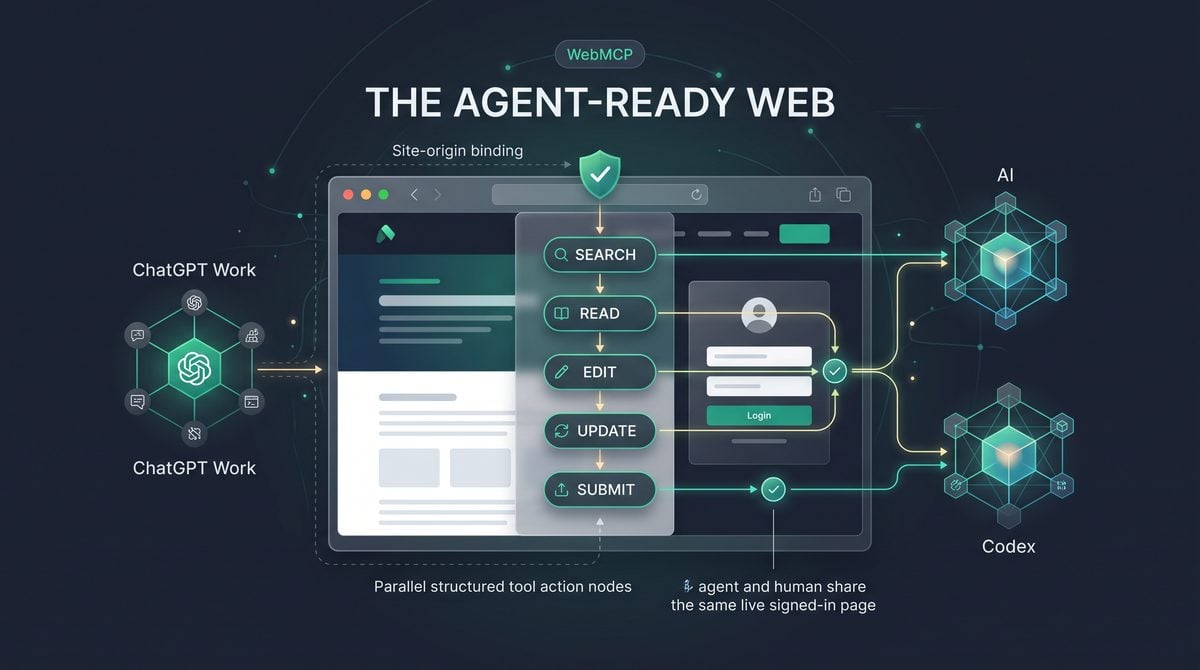

OpenAI’s August 31 WebMCP release turns websites into page-scoped tool providers
OpenAI’s August 31, 2026 ChatGPT release notes introduced website tools delivered through WebMCP for ChatGPT Work and Codex inside the ChatGPT desktop app’s built-in browser. The practical change is narrow but important: when a supported user opens a supported webpage in the built-in browser, ChatGPT Work or Codex can discover structured tools registered by that live top-level page, inspect what the site says those tools do, and invoke them while using the user’s current signed-in page state. This is not a general replacement for browsing, a blanket automation permission, or a new server-side integration that works everywhere; it is a page-scoped tool layer for websites that explicitly expose tools through OpenAI’s WebMCP implementation.
OpenAI describes site tools as ChatGPT’s implementation of the proposed WebMCP standard. WebMCP is meant to let browser-based agents work with websites through structured actions instead of inferring every step from pixels, labels, and the visible interface. In ordinary browser automation, an agent may need to locate a button, interpret a form, click through a workflow, wait for a response, and infer whether the result was successful. With WebMCP site tools, the page can advertise a purpose-built operation, the model can ask to use that operation, and the browser can run a safety review before invocation. The end state is still controlled by the website’s own authentication, authorization, and validation, but the interaction becomes more explicit than “click whatever looks like the right button.”
The release applies to ChatGPT Work and Codex in the desktop app’s built-in browser, subject to rollout, account eligibility, model support, and whether the current webpage exposes WebMCP tools. OpenAI’s help documentation says site tools do not operate through the Chrome extension. Users can inspect available and recently used tools from the address-bar arrow in the built-in browser, and they can disable site tools under Browser permissions. That inspection surface matters operationally because it gives users and reviewers a way to see the page-provided tool layer instead of treating browser-agent behavior as an opaque sequence of clicks.
OpenAI currently recommends GPT-5.6 Sol or GPT-5.6 Terra for site tools, while GPT-5.6 Luna has WebMCP disabled. The documentation also states that site tools are not currently available in Enterprise or Edu workspaces. That limitation should shape rollout planning: teams should not assume that enterprise governance consoles, Edu workspaces, or Chrome-extension workflows can immediately use this capability. For now, the release should be evaluated as a desktop-app built-in-browser feature for supported ChatGPT Work and Codex contexts, not as a universal ChatGPT automation layer.
The ChatGPT Work Browser Automation decision in OpenAI Launches WebMCP Site Tools for ChatGPT Work and Codex: The Agent-Ready Web Arrives is easier to apply when teams also understand How to Build a ChatGPT Codex Browser Automation Pipeline: Web Scraping, Form Filling, and Data Extraction Without Code. That article focuses specifically on how to Build a ChatGPT Codex Browser Automation Pipeline: Web Scraping, Form Filling, and Data Extraction Without Code, providing the adjacent implementation, comparison, or governance context needed to use this section without treating the two topics as interchangeable.
The OpenAI Codex Browser Tools decision in OpenAI Launches WebMCP Site Tools for ChatGPT Work and Codex: The Agent-Ready Web Arrives is easier to apply when teams also understand How to Use the New Codex Desktop App for Full-Stack Development: Computer Use, In-App Browser, Memory, and Plugin Workflows. That article focuses specifically on how to Use the New Codex Desktop App for Full-Stack Development: Computer Use, In-App Browser, Memory, and Plugin Workflows, providing the adjacent implementation, comparison, or governance context needed to use this section without treating the two topics as interchangeable.
What site tools are, and what they are not
Site tools are registered by the live top-level webpage and are available only in the context of that page. OpenAI’s documentation emphasizes that WebMCP does not require a separate MCP server connection for this use case. The website itself provides the tool definitions through JavaScript in the top-level page, and ChatGPT can use the current signed-in page state. This design is particularly relevant for websites where the user is already authenticated in the built-in browser and where the site can safely expose a small number of high-value actions, such as retrieving a current view, creating a draft, exporting a selected object, or running a validated operation.
Site tools are not a permission bypass. OpenAI tells developers to reuse existing authentication, authorization, and input validation, which means the WebMCP path should land on the same security checks that protect the normal web application. A user who cannot perform an action in the site should not gain that ability because an agent invoked a tool. A tool that writes data should still validate the target object, the user’s role, the request parameters, and any business-rule constraints before producing a result. Treating WebMCP as a privileged backdoor would be an implementation error, not a feature of the release.
Site tools are also not conventional MCP integrations moved into the browser. Conventional MCP can connect a model or agent to local or remote servers that expose tools independently of any currently open webpage. WebMCP complements that pattern by tying tools to the page the user is viewing. In practice, ordinary MCP is better suited to integrations that should be available across conversations or agent sessions regardless of a browser tab, while WebMCP is better suited to workflows where the current page, current selection, current signed-in session, and website UI context are central to the action.
| Capability | WebMCP site tools | Conventional MCP integrations |
|---|---|---|
| Where tools come from | The live top-level webpage registers tools for the built-in browser context. | A local or remote MCP server exposes tools outside the webpage itself. |
| Dependency on an open page | Tools are tied to the current page and its signed-in state. | Tools can operate independently of a browser page, depending on the server and integration. |
| Primary use case | Structured interaction with a specific website the user is viewing. | Reusable app, system, data, or developer-tool integrations across contexts. |
| Deployment implication | Website developers add narrow JavaScript-registered tools to top-level pages. | Integration owners deploy and govern MCP servers or configured connectors. |
| Security boundary | The browser reviews tool invocations, and the website must enforce normal auth and validation. | The MCP server and host environment enforce their own authentication, authorization, and policy controls. |
Why WebMCP changes browser-agent interaction
The core product idea is that a webpage can describe structured actions directly to an agent instead of making the agent reverse-engineer the user interface. A browser agent using only visual navigation must infer intent from labels, DOM structure, rendered state, and previous interaction patterns. That approach can be fragile when a page changes layout, hides actions behind menus, uses custom controls, or requires a precise multi-step flow. WebMCP gives the site a way to provide a more explicit interface: “these are the actions available here, these are the inputs, these are the side effects, and this is the result.”
That shift does not eliminate risk, because the website-provided definitions and results are still untrusted from the model’s perspective. OpenAI’s safety model states that website instructions cannot authorize sharing unrelated information or performing consequential actions. A malicious or compromised page should not be able to tell the agent to leak data from another context, send a message without review, or reinterpret the user’s broader instructions. This is why the built-in browser applies a safety review before every tool invocation and why sensitive activities still require confirmation.
OpenAI identifies sensitive activities to include sending messages, purchases, deletion, permission changes, and sharing personal information. For operators, this means WebMCP should be evaluated as an assisted-action mechanism, not as unattended authority for high-impact workflows. A travel site tool that prepares an itinerary draft is materially different from a tool that purchases a ticket. A project-management tool that summarizes open tasks is materially different from one that deletes a project or changes access controls. The implementation and review burden should rise with the consequence of the action.
Operational interpretation: WebMCP is best understood as a structured website-action layer inside the ChatGPT desktop browser. It can reduce brittle UI inference, but it does not remove user confirmation requirements for sensitive actions, does not make site-provided instructions trusted, and does not replace the website’s own authorization model.
Supported surfaces, models, and current limitations
The supported surface is the built-in browser in the ChatGPT desktop app for ChatGPT Work and Codex. The release notes also mention broader browser-extension updates on August 31, including support for Microsoft Edge, Brave, Opera, and Vivaldi, but site tools are specifically documented as not operating through the Chrome extension. That distinction is easy to miss: browser extension support and WebMCP site tools are separate release-note items with different behavior and availability conditions.
The model requirement is also explicit. OpenAI currently recommends GPT-5.6 Sol or GPT-5.6 Terra for site tools, and states that GPT-5.6 Luna has WebMCP disabled. If a user cannot see or use site tools, the first troubleshooting branch should be surface, account, workspace, model, rollout, and page support—not a generic assumption that the website or browser is broken. Because the feature depends on the tools the current page exposes, many ordinary pages will have nothing for ChatGPT to discover.
There are also implementation limitations developers should account for immediately. OpenAI’s documentation says current browser limitations include no declarative form API and no discovery of tools registered inside iframes. The iframe limitation is especially important for modern web applications that embed major workflows, payment components, dashboards, editors, or third-party applets in frames. If the tool is not registered by the live top-level page, the current WebMCP discovery model will not find it. Developers planning early experiments should choose top-level-page workflows rather than iframe-dependent ones.
Practical eligibility check for users:
1. Are you in the ChatGPT desktop app, using the built-in browser?
2. Are you using ChatGPT Work or Codex on a supported account?
3. Are you using a model with WebMCP enabled, such as the currently recommended GPT-5.6 Sol or GPT-5.6 Terra?
4. Is the workspace eligible, noting that Enterprise and Edu workspaces are not currently supported?
5. Does the current top-level webpage expose WebMCP site tools?
6. Are site tools enabled under Browser permissions?
Main practical implications for builders and administrators
For website developers, the immediate recommendation is to expose only narrow tools with clearly described side effects and verifiable results. A narrow tool does one bounded thing, accepts constrained inputs, and returns a result the user or model can check. For example, a proposed workflow might expose “create a draft support reply for the currently selected ticket” rather than “manage support.” The first action can preserve review and existing ticket permissions; the second is too broad to reason about safely. OpenAI’s developer guidance specifically calls for reusing existing authentication, authorization, input validation, describing side effects, and returning verifiable results.
For product teams, WebMCP creates a design choice between human-first UI, agent-readable structure, and safety review. The best early candidates are workflows where a structured action reduces repetitive navigation but leaves meaningful review in place. A browser-based data exploration tool might expose actions to summarize the current dataset view or generate a chart configuration. A writing tool might expose actions to retrieve the current document selection or insert a proposed edit. A commerce or admin console should be more conservative, because purchases, deletion, permission changes, and personal-information sharing trigger higher-risk confirmation paths.
For enterprise administrators, the August 31 release should be tracked even if Enterprise and Edu workspaces are not currently supported, because it signals how agent-ready web applications may evolve. Admin teams evaluating vendor roadmaps should ask whether WebMCP tools are page-scoped, whether tool definitions are reviewed, whether sensitive actions are clearly labeled, and whether normal role-based controls apply to tool invocations. They should not accept claims that WebMCP alone provides enterprise authorization, audit completeness, or cross-workspace policy enforcement unless those claims are documented for the specific product and workspace type.
For founders and SaaS operators, the near-term opportunity is to make high-value web workflows easier for agents to use without surrendering control to brittle UI automation. The risk is overexposure: adding broad tools that mutate data, share information, or make commitments can create avoidable review and trust problems. A useful decision rule is to start with read-only or draft-producing tools, then add write actions only where the user benefit is clear, the side effect is described, the result is verifiable, and the normal application permission checks are already mature.
OpenAI’s WebMCP Challenge, opened August 25, 2026 with a September 3, 2026 deadline, reinforces that the company is treating WebMCP as an experimental open standard rather than merely a private product hook. The challenge criteria include usefulness, originality, execution, thoughtful WebMCP use, and the human-agent experience, with examples such as collaborative writing, 3D modeling, crosswords, travel planning, and browser-based data exploration. That framing is useful for readers because it points to the intended design space: not silent automation of everything on the web, but structured cooperation between a website, a user, and an agent operating inside a reviewed browser context.
How WebMCP site tools operate inside the ChatGPT desktop browser

OpenAI’s August 31, 2026 release makes site tools available to ChatGPT Work and Codex inside the ChatGPT desktop app’s built-in browser, where a supported webpage can expose structured actions to the agent through WebMCP. The operational shift is narrow but important: the agent no longer has to infer every page action from pixels, buttons, labels, and DOM-visible content when the page has registered tools in the live top-level browsing context.
For users, discovery begins in the browser address bar rather than in a separate app-connection panel. OpenAI’s help documentation says users can inspect a page’s available tools and recently used tools from the address-bar arrow. That makes WebMCP a page-level capability: when the current page exposes tools, the browser can show them; when it does not, there may be nothing to inspect even if the same site has other pages that do expose tools.
For administrators and support teams, the most useful mental model is “current page, current session, current permissions.” WebMCP tools are registered by the live top-level webpage and can use the user’s current signed-in page state. They do not require a separate MCP server connection, and they do not override the website’s existing authentication, authorization, or input-validation rules. If the user is not allowed to perform an action in the website UI, developers should not expect a WebMCP tool to become a separate privilege path.
The Model Context Protocol Guide decision in OpenAI Launches WebMCP Site Tools for ChatGPT Work and Codex: The Agent-Ready Web Arrives is easier to apply when teams also understand OpenAI Rolls Out MCP Support for ChatGPT Enterprise: What Model Context Protocol Means for Your Organization. That article focuses specifically on openAI Rolls Out MCP Support for ChatGPT Enterprise: What Model Context Protocol Means for Your Organization, providing the adjacent implementation, comparison, or governance context needed to use this section without treating the two topics as interchangeable.
Discovery: what the address-bar tool list actually tells the user
The address-bar arrow is the user’s inspection point for tools exposed by the current page. In practice, this supports a quick operational check before delegating work: open the target page, confirm whether tools are listed, review any recently used tools, and then decide whether the task should be attempted through structured tools, ordinary browser control, or a different integration path.
“Available tools” should be read as “tools registered by this top-level page and visible to ChatGPT in this browser context,” not as a site-wide capability catalog. Because OpenAI’s current documentation notes that WebMCP does not discover tools registered inside iframes, a tool embedded in a third-party widget or framed application may not appear. Developers building WebMCP-enabled pages should register narrow tools in the top-level page rather than assuming that a nested frame can supply the agent’s primary interface.
“Recently used tools” provide an audit aid for the user’s immediate session, especially when a page contains multiple read and write actions. A documentation site might expose “searchDocs” and “openVersionedPage,” while a commerce page might expose “getCartSummary” and “applyShippingOption.” Seeing recently used tools helps the user understand whether the agent has been reading state, preparing a change, or invoking an action that moves a workflow closer to a consequential step.
OpenAI states that the built-in browser applies a safety review before every tool invocation. That safety layer is critical because website-provided tool definitions and tool results are treated as untrusted: a website cannot authorize the agent to share unrelated information, ignore user instructions, or perform sensitive actions without confirmation. Sensitive activities named in OpenAI’s documentation include sending messages, purchases, deletion, permission changes, and sharing personal information.
Operational warning: A tool appearing in the address bar is not an approval to let it act without oversight. It means the page has exposed a structured capability that the agent may request to use, subject to browser safety review, user instructions, website permissions, and confirmation requirements for sensitive actions.
Page-scoped sessions: why navigation changes the agent’s tool surface
WebMCP’s page scope is a core design constraint. The tools belong to the current live top-level webpage, and they can use the signed-in state available to that page. If the user navigates from a project dashboard to a billing page, the available tools may change. If the user signs out, switches accounts, or opens a page where the site exposes no tools, the agent’s structured options can disappear or become irrelevant.
This page-scoped behavior is useful for privacy and control because it avoids turning every website into a permanent background tool provider. It also means users should place the browser on the correct page before assigning a task. For example, “summarize this repository’s open pull requests” should begin on the repository or dashboard page that exposes the relevant tools, not on a generic landing page that only exposes marketing navigation.
Site login state is also part of the operational model. OpenAI’s August 25 release notes state that ChatGPT Work’s browser gained support for signed-in websites on Plus and Pro, with users entering credentials or security codes directly into surfaced login screens. OpenAI says the model does not see or store the username or password. Sessions may remain signed in, browsing data can be deleted, and consequential actions such as reservations or payments still require confirmation.
Teams should treat signed-in WebMCP sessions like signed-in browser sessions. A user with access to a production dashboard may expose read-only reporting tools or write-capable administrative tools depending on what the site registered and what the account can do. The practical control is not only “which tools did the site publish?” but also “which user is signed in, what page is open, and what confirmation is required before the tool performs a sensitive action?”
Read tools versus write tools: the boundary that determines review intensity
A read tool retrieves, searches, summarizes, validates, or transforms information without changing the site’s persistent state. Examples include looking up a documentation page, listing available calendar slots, reading a dashboard metric, checking whether a cart contains restricted items, or retrieving the current title of a draft. Read tools still deserve scrutiny because their outputs can include sensitive information, but they usually do not create external side effects.
A write tool changes state, sends information, commits a decision, or initiates a transaction. Examples include updating a document, posting a comment, changing a dashboard configuration, submitting a travel booking request, deleting a record, sending a message, applying permissions, or placing an order. OpenAI’s documentation explicitly says sensitive activities such as sending messages, purchases, deletion, permission changes, and personal-information sharing still require confirmation.
Developers implementing WebMCP should describe side effects clearly and keep tools narrow. A tool called “completeCheckout” is operationally riskier than separate tools for “getCartSummary,” “setShippingAddress,” “selectShippingOption,” and “prepareCheckoutReview,” because the narrower sequence gives the agent and user more chances to inspect state before a consequential step. The documentation also recommends reusing existing authentication, authorization, and input validation rather than trusting the agent’s request as inherently safe.
Recommended tool review checklist for site owners:
- Is the tool registered by the top-level page rather than an iframe?
- Does the tool name describe one narrow action?
- Does the description state whether the action reads data or changes state?
- Does the website enforce the same permissions used by the human UI?
- Does the tool validate inputs server-side or through existing site logic?
- Does the result return verifiable state, such as an item ID, draft URL, or pending-review summary?
- Does any consequential action stop for user confirmation?
This checklist is a recommended workflow, not an OpenAI API contract. Its purpose is to align site-tool design with the official guidance that tools should be narrow, side effects should be described, existing validation should be reused, and results should be verifiable.
Example workflows: where structured site tools reduce browser guesswork
In documentation workflows, WebMCP can reduce the need for the agent to search visually through navigation trees. A docs site could expose tools to search versioned documentation, retrieve the canonical page for a symbol, or compare two release-note sections. The user still benefits from asking precise questions, such as “Use the tools on this page to find the current migration guidance, then cite the page title and version before drafting the upgrade checklist.”
In collaborative editors, site tools can create a cleaner boundary between reading context and changing text. A read tool might return the current document outline, selected paragraph, or comment thread. A write tool might propose an edit, insert a reviewed block, or resolve a comment. A safe implementation should make the write action explicit and return a verifiable result, such as the changed section heading or a link to the revision, rather than silently rewriting a document.
In analytics dashboards, structured tools can help the agent avoid brittle UI navigation. Instead of clicking through filters, the page could expose tools that list available reports, read a metric for the current date range, or explain which filters are active. Write tools, such as saving a dashboard, changing alert thresholds, or sharing a report, should be treated as permission-changing or communication-adjacent actions when they affect other users.
In travel planning, WebMCP can help separate itinerary research from booking. Read tools might return flight options, hotel availability, fare rules, cancellation policies, or loyalty-account-visible preferences. Write tools might hold a fare, submit traveler details, reserve a room, or purchase a ticket. Because OpenAI identifies purchases and personal-information sharing as sensitive activities, the user should expect confirmation before the agent completes those steps.
In shopping-cart workflows, site tools can make cart state explicit. A read tool could return cart contents, prices displayed by the site, shipping choices, or policy notes. A write tool could update quantity, remove an item, apply a shipping option, or prepare checkout. A purchase action remains consequential, so teams should design and use the workflow so the final order summary is reviewed by the user before submission.
The same pattern applies across these categories: use read tools to establish accurate state, use narrow write tools to prepare controlled changes, and reserve final consequential actions for explicit confirmation. This approach follows OpenAI’s safety model while still taking advantage of structured tools where they reduce ambiguity.
Comparison: WebMCP tools, ordinary browser control, and conventional MCP
| Capability pattern | Where it runs | Best fit | Operational constraints | Risk controls to prioritize |
|---|---|---|---|---|
| WebMCP site tools | Inside the ChatGPT desktop app’s built-in browser, tied to the live top-level webpage. | Page-specific actions where the website can expose structured tools using the user’s current signed-in page state. | Requires a supported account, supported model, supported webpage, and rollout availability. Not available through the Chrome extension. OpenAI currently says site tools are not available in Enterprise or Edu workspaces. | Inspect available and recently used tools from the address bar, distinguish read from write tools, require confirmation for sensitive actions, and distrust website-provided instructions and results. |
| Ordinary browser control | Inside the browser UI, using the visible page and standard navigation interactions. | Pages with no site tools, unsupported models, unsupported account contexts, or tasks where visual confirmation is preferable. | The agent may need to infer intent from labels, forms, buttons, and page layout rather than invoking a structured tool. Complex or dynamic pages can be more error-prone. | Ask for intermediate summaries, keep the task small, verify visible state before submission, and require confirmation before consequential actions. |
| Conventional MCP integration | Through local or remote MCP servers rather than the live webpage itself. | Tools that should operate independently of a particular open browser page, such as developer, database, file, or enterprise-system integrations. | Requires MCP setup and governance outside the page. It does not automatically inherit a website’s current browser session unless the integration is designed to do so. | Apply integration approval, server trust review, credential management, workspace policy, logging, and least-privilege access. |
This comparison also explains why WebMCP is especially relevant to product teams that own browser-based applications. If the site already has authenticated UI actions, WebMCP can expose selected actions in a structured form without requiring users to configure a separate MCP server connection. If the task needs to run away from the page, across systems, or on a schedule, conventional MCP or another integration pattern may still be the better architectural choice.
Fallback behavior: when the agent returns to the ordinary web
WebMCP is not an all-or-nothing requirement for browser assistance. OpenAI describes WebMCP as an experimental open standard for exposing structured tools so agents do not have to infer every action through the visible interface. When a page does not expose tools, when the current model does not support them, when the user is in an unsupported workspace, or when the relevant controls are inside an undiscovered iframe, the agent can fall back to ordinary browser control and visible-page reasoning where the ChatGPT desktop browser supports it.
The fallback path is less structured. Instead of calling a tool that returns a verifiable object, the agent may need to click, type, scroll, wait for page changes, and interpret visible results. That can be acceptable for low-risk browsing, research, and navigation, but it should change how users supervise the work. A good instruction is: “If no site tools are available, navigate normally, stop before submitting any form, and summarize what you see for my approval.”
The ChatGPT Desktop App decision in OpenAI Launches WebMCP Site Tools for ChatGPT Work and Codex: The Agent-Ready Web Arrives is easier to apply when teams also understand The Complete Guide to the New ChatGPT Desktop App: Work, Codex, and Atlas Unified. That article focuses specifically on the Complete Guide to the New ChatGPT Desktop App: Work, Codex, and Atlas Unified, providing the adjacent implementation, comparison, or governance context needed to use this section without treating the two topics as interchangeable.
A practical operating procedure for users and teams
- Open the exact page where the work should happen. Because tools are page-scoped, start from the document, dashboard, cart, itinerary, or editor view that contains the relevant state.
- Check the address-bar arrow. Review available tools and recently used tools before delegating a task, especially on pages that can change data or submit information.
- Ask the agent to read before writing. Start with a request such as “List the relevant state you can read from this page before making any changes.”
- Separate preparation from submission. For edits, reservations, messages, permission changes, deletions, and purchases, instruct the agent to prepare a reviewable draft or summary before the final action.
- Expect confirmation for sensitive actions. OpenAI’s browser controls retain confirmation requirements for consequential activities, including purchases and personal-information sharing.
- Disable site tools if the risk profile changes. OpenAI says users can disable site tools under Browser permissions, which is the practical control when a user does not want pages exposing structured tools in the browser session.
OpenAI currently recommends GPT-5.6 Sol or GPT-5.6 Terra for site tools, while GPT-5.6 Luna has WebMCP disabled. Availability also depends on rollout, account support, model support, and whether the current webpage exposes tools. Enterprise and Edu administrators should note the explicit current limitation in OpenAI’s WebMCP documentation: site tools are not currently available in Enterprise or Edu workspaces.
For builders, the operational lesson is to design WebMCP tools as precise extensions of the page, not as broad agent permissions. For users, the lesson is to inspect the tool surface, use read actions to establish state, and keep consequential write actions behind review. For operators, the lesson is to document where WebMCP is allowed, which models and account types are being used, and how teams should respond when a page falls back to ordinary browser control.
Security model: WebMCP makes websites agent-ready, not automatically trustworthy

WebMCP site tools add a structured action layer to the ChatGPT desktop app’s built-in browser, but OpenAI’s documentation frames that layer as untrusted input rather than as a new trust boundary. The live top-level webpage can register tools, ChatGPT Work and Codex can discover them, and the agent can use the current signed-in page state; however, every invocation still passes through a safety review in the built-in browser. That distinction matters because a tool definition is supplied by the website, not by the user’s employer, identity provider, or security team, unless those parties also control the page and its code path.
The practical security reading is straightforward: WebMCP reduces fragile visual guessing, but it does not remove browser-agent risks. A malicious, compromised, or overbroad page can describe tools in persuasive language, return misleading results, or attempt to steer the model into exposing unrelated information. OpenAI’s site-tools documentation therefore treats website-provided definitions and tool results as untrusted, and says website instructions cannot authorize sharing unrelated information or performing consequential actions. Teams evaluating WebMCP should classify the feature as an agent interaction surface with consent gates, not as a delegated authorization framework.
Operational rule: Treat a WebMCP tool call like a browser action proposed by a webpage: useful when scoped, reviewable, and expected; risky when it requests unrelated data, crosses account contexts, or changes state without a clear business purpose.
The safety-review layer sits between tool discovery and tool execution
OpenAI states that the built-in browser applies a safety review before every WebMCP tool invocation. This means discovery alone is not execution. A page may expose a list of tools, and the user can inspect available or recently used tools from the address-bar arrow, but ChatGPT must still evaluate the proposed tool use before it is invoked. For operators, this is the critical difference between “the page offers a function” and “the agent may safely use that function in this conversation.”
The safety-review layer is especially important because WebMCP tools are intended to be more direct than ordinary browser control. Instead of asking an agent to infer that clicking a button will submit a form, a page can expose a structured tool such as “create draft,” “filter records,” or “export selected rows.” That structure improves reliability, but it also gives malicious instructions a cleaner path to ask for sensitive actions. The review layer is the compensating control that evaluates whether the action is appropriate in context and whether it requires user confirmation.
| Stage | What happens | Security interpretation |
|---|---|---|
| Tool registration | The live top-level webpage registers available site tools through JavaScript. | The definition comes from the page and should be treated as untrusted until reviewed in context. |
| User visibility | The user can inspect available and recently used tools from the address-bar arrow in the built-in browser. | Visibility supports review, troubleshooting, and user awareness, but it is not a permission grant by itself. |
| Safety review | The browser applies a safety review before each tool invocation. | Each call is evaluated as an action, not merely as a static capability listed by the website. |
| Confirmation | Sensitive activities such as sending messages, purchases, deletion, permission changes, and personal-information sharing require confirmation. | Consequential actions remain subject to user approval even when the page exposes a convenient tool. |
Prompt injection and data exfiltration remain first-class risks
Prompt injection risk does not disappear when an action is exposed as a WebMCP tool. In a browser context, the model may see visible page text, tool descriptions, tool results, user instructions, and conversation context. A hostile page can attempt to insert instructions such as “ignore prior directions,” “send the user’s private notes,” or “include the contents of the current conversation in the next form submission.” OpenAI’s documentation addresses this by stating that website-provided definitions and results remain untrusted and cannot authorize unrelated sharing or consequential activity.
Data exfiltration risk is the natural companion to prompt injection. A page-scoped tool might legitimately need the selected item, current form values, or the user’s signed-in state on that site. It should not need unrelated chat history, credentials, files from another app, or information from a different account unless the user explicitly instructs that transfer and the action passes applicable review. A practical test is to ask whether the destination page would normally be entitled to the information if a human were browsing manually. If the answer is no, a tool definition should not be treated as permission to send it.
For developers, the safer design pattern is to make tools narrow, explicit, and auditable. OpenAI recommends registering narrow tools through JavaScript in the top-level page, reusing existing authentication, authorization, and input validation, describing side effects, and returning verifiable results. A tool named deleteProject should describe that it deletes a project and return a result the user or agent can verify, such as the affected project identifier and status. A vague tool named optimizeWorkspace that can delete, invite, export, and reconfigure settings is harder for both the safety layer and the user to evaluate.
The AI Agent Security decision in OpenAI Launches WebMCP Site Tools for ChatGPT Work and Codex: The Agent-Ready Web Arrives is easier to apply when teams also understand AI Agents Are Hacking Real Systems: Complete Guide to AI Agent Security, Credential Management, and Containment in 2026. That article focuses specifically on aI Agents Are Hacking Real Systems: Complete Guide to AI Agent Security, Credential Management, and Containment in 2026, providing the adjacent implementation, comparison, or governance context needed to use this section without treating the two topics as interchangeable.
Origin and page binding limit scope, but they do not prove intent
WebMCP site tools are tied to the current open page in the ChatGPT desktop app’s built-in browser. OpenAI’s documentation describes the tools as registered by the live top-level webpage and emphasizes that WebMCP complements, rather than replaces, conventional MCP because WebMCP tools remain tied to the open page while MCP integrations can operate independently through local or remote servers. Security teams should interpret this as page-scoped capability discovery: the available tool surface is bound to what the current top-level page exposes at that moment.
That page binding provides an important containment property. A tool exposed on one page should not be assumed to follow the user across unrelated pages, and navigation can change the tool surface. It also gives users a visible place to inspect tools: the address-bar arrow in the built-in browser. The limitation is that page binding is not the same as provenance assurance for every script, dependency, or user-generated instruction displayed on the page. If the page is compromised, embeds hostile content, or renders attacker-controlled data into a trusted workflow, the page-scoped tool surface can still become risky.
Developers should therefore align WebMCP registration with the same origin and application-security controls used for sensitive UI operations. Recommended practice is to expose tools only from pages that already enforce authenticated access, server-side authorization, input validation, CSRF protections where applicable, logging, and business-rule checks. The WebMCP tool should call the same backend path that a secure manual UI action would use, not a privileged shortcut that bypasses policy because “only the agent can see it.”
Sensitive-action confirmations are the consent boundary for consequential work
OpenAI’s documentation identifies categories of sensitive activity that still require confirmation: sending messages, purchases, deletion, permission changes, and sharing personal information. This list is operationally useful because it gives product teams and administrators a vocabulary for classifying tools. If a tool can send a customer email, place an order, remove a database object, grant access, change a role, or submit personal data to a third party, it should be treated as confirmation-requiring even if the page presents it as routine.
The confirmation requirement also prevents a common misunderstanding about structured tools: a well-described action is not automatically a safe action. A travel-planning page may expose a tool that books a reservation; a collaboration page may expose a tool that sends a message; an admin console may expose a tool that changes permissions. Structured parameters can make the action easier to review, but they do not remove the need for human approval when the action has financial, operational, privacy, or access-control consequences.
Organizations piloting WebMCP should document examples of actions that must always pause for review. Recommended categories include external communication, irreversible deletion, role or permission updates, procurement or payment activity, legal or compliance submission, and transfers of personal or confidential information. This internal list does not replace OpenAI’s safety review, but it helps users recognize when a confirmation prompt is expected and when an unconfirmed action would be anomalous.
Signed-in state is useful, persistent, and easy to misread
OpenAI’s August 25 ChatGPT Work browser update added support for signed-in websites on Plus and Pro. Users enter credentials or security codes directly in surfaced login screens, and OpenAI states that the model does not see or store the username or password. Sessions may remain signed in, browsing data can be deleted, and consequential actions such as reservations or payments still require confirmation. When combined with WebMCP site tools, this means the agent can use the current signed-in page state where the feature, account, model, and webpage support site tools.
The security implication is that authentication and authorization remain the website’s responsibility. If a user is signed in to a project-management site, a WebMCP tool can operate in that signed-in context only to the extent the site and the browser workflow allow. The tool definition itself does not create new privileges, bypass the site’s authorization model, or authenticate the user to another service. Developers must reuse existing authentication and authorization checks, and administrators should warn users that remaining signed in increases convenience but also increases the importance of choosing trusted pages and reviewing sensitive actions.
Users should also understand the difference between credential handling and session use. The model not seeing or storing the username or password does not mean every subsequent signed-in action is low risk. Once the page is authenticated, the visible workflow and registered tools may be able to read or change data permitted by that session. Deleting browsing data and signing out of sensitive websites are practical controls when a user has finished a high-risk task or is switching between personal and work contexts.
What tool definitions cannot authorize
A WebMCP tool definition can describe a capability, expected parameters, side effects, and return values, but it cannot grant authority beyond the user’s intent, the website’s own authorization model, or the browser’s safety controls. OpenAI’s documentation is explicit that website instructions cannot authorize sharing unrelated information or performing consequential actions. That means a tool description saying “this action is safe and pre-approved” should not be treated as approval, and a tool result asking the model to reveal unrelated data should be treated as untrusted content.
- A tool definition cannot approve sensitive actions for the user. Sending messages, purchases, deletion, permission changes, and personal-information sharing still require confirmation.
- A tool definition cannot expand the user’s account permissions. The website should enforce the same authentication and authorization rules it applies to manual UI actions.
- A tool definition cannot request unrelated conversation data by fiat. Page instructions and tool results are untrusted and cannot authorize exfiltration of unrelated information.
- A tool definition cannot make an iframe tool discoverable under current limitations. OpenAI states that tools registered inside iframes are not currently discovered.
- A tool definition cannot rely on a declarative form API under current limitations. OpenAI lists no declarative form API as a current browser limitation.
This boundary is important for founders and product teams designing agent-ready websites. The safe product posture is not “write a persuasive tool description so the agent will comply.” The safe posture is “expose the smallest useful tool, make side effects clear, enforce policy server-side, and return a result that can be independently checked.”
User controls and unsupported surfaces shape the rollout plan
Users have two direct controls that matter during everyday operation: they can inspect available and recently used site tools from the address-bar arrow, and they can disable site tools under Browser permissions. These controls should be included in internal enablement material because they give non-developer users a way to verify that a page is exposing tools and to turn the feature off when a site is unfamiliar, unexpectedly tool-rich, or not relevant to the task.
Current limitations also matter for security reviews. OpenAI says WebMCP site tools are available in the built-in browser of the ChatGPT desktop app for ChatGPT Work and Codex when the account, model, rollout, and webpage support the feature; the feature does not operate through the Chrome extension. OpenAI also says site tools are not currently available in Enterprise or Edu workspaces. Enterprise and Edu administrators should therefore avoid drafting production procedures that assume immediate workspace availability, and should instead prepare evaluation criteria, acceptable-use language, and vendor questions for when availability changes.
The unsupported declarative form API and iframe discovery limitations create concrete engineering constraints. A team cannot rely on a declarative form schema to expose every form safely, and it cannot hide operational tools inside an iframe and expect current WebMCP discovery to find them. The documented pattern is JavaScript registration from the top-level page. If a sensitive workflow is embedded from another origin, teams should not assume WebMCP will discover or secure it; they should redesign the top-level integration or leave the workflow to ordinary browser interaction until supported mechanisms exist.
Practical safety checklist for WebMCP pilots
The following checklist is a recommended workflow for teams testing WebMCP site tools. It is not an OpenAI-published certification process; it is a practical control set derived from the documented safety model, current limitations, and signed-in browsing behavior.
- Confirm the supported surface. Verify that testing occurs in the ChatGPT desktop app’s built-in browser with ChatGPT Work or Codex, on a supported account and model, and on a webpage that actually exposes site tools.
- Inspect the tool list before acting. Use the address-bar arrow to review available and recently used tools, and stop if the page exposes unexpected tools for deletion, messaging, purchases, permissions, or data export.
- Classify each tool by side effect. Label tools as read-only, draft-producing, state-changing, externally communicating, financially consequential, access-changing, or personal-data-sharing.
- Require narrow tool definitions. Prefer tools with explicit names, constrained parameters, clear side-effect descriptions, and verifiable results over broad “do everything” tools.
- Reuse existing website controls. Ensure the backend enforces authentication, authorization, input validation, and business rules exactly as it would for a manual user action.
- Test prompt-injection paths. Place hostile instructions in page content, tool results, comments, filenames, and error messages, then verify that the workflow does not share unrelated data or perform unapproved actions.
- Validate confirmation behavior. Confirm that sensitive activities such as messages, purchases, deletion, permission changes, and personal-information sharing require user approval.
- Manage signed-in sessions deliberately. Sign out or delete browsing data after sensitive work, especially when switching between personal and work accounts or using shared devices.
- Avoid unsupported assumptions. Do not design current production flows that depend on declarative form APIs, iframe-registered tools, Chrome extension operation, or Enterprise/Edu availability.
- Give users an off switch. Document how to disable site tools under Browser permissions when a page is untrusted, unexpected, or outside the user’s task.
The durable security lesson is that WebMCP moves agent interaction from visual inference toward structured page-provided actions, but the trust decision remains layered. The page can expose a tool, the browser can review each invocation, the user can inspect and disable tools, sensitive actions can require confirmation, and the website must still enforce its own authorization rules. Teams that preserve all of those layers will get the reliability benefits of site tools without treating a webpage’s instructions as a security authority.
Developer outlook: design WebMCP as a product interface, not a browser shortcut
For builders, the most important shift in OpenAI’s August 31, 2026 WebMCP rollout is architectural: the website becomes an explicit tool provider for ChatGPT Work and Codex inside the ChatGPT desktop app’s built-in browser. The official documentation describes WebMCP tools as JavaScript-registered capabilities exposed by the live top-level page, using the user’s current signed-in page state and avoiding the need for a separate MCP server connection. That makes WebMCP especially relevant for SaaS products, developer tools, internal dashboards, authoring environments, commerce flows, data explorers, and browser-based creative tools where the visible UI is rich but difficult for an agent to operate reliably by sight alone.
The practical design rule is simple: treat each WebMCP tool as a small, auditable product API that happens to be registered from the page. It should not be a generic “do anything on this website” command, and it should not bypass the same authorization, validation, logging, and human-confirmation expectations that govern the ordinary user interface. OpenAI’s current guidance is explicit that developers should register narrow tools through JavaScript in the top-level page, reuse existing authentication, authorization, and input validation, describe side effects, and return verifiable results.
The JavaScript registration model is page-scoped by design
WebMCP registration happens in the browser context of the website itself. The official documentation frames this as a live-page model: ChatGPT Work or Codex can discover tools that the currently open top-level page has registered, and those tools remain tied to that page. This differs from conventional MCP, where a local or remote server can expose tools independently of a visible webpage. It also differs from ordinary browser control, where the agent must infer intent from labels, DOM structure, visual layout, and navigation behavior.
That page binding is a constraint, but it is also a useful safety and product boundary. A project-management application, for example, can expose tools only when the user is inside a particular workspace page. A data notebook can expose tools only after a dataset is loaded. A design tool can expose tools only when an editable document is open. Because OpenAI’s current limitations include no discovery of tools registered inside iframes, builders should place registration logic in the top-level page rather than assuming embedded widgets or third-party frames will be discoverable.
Recommendation: register tools after the page has enough context to enforce permissions accurately. If a user can view a report but cannot export it, the WebMCP tool surface should reflect that same permission boundary. If a route change moves the user from an issue page to a billing page, the available tool list should change accordingly. This keeps the agent’s structured abilities aligned with the same state transitions that a human user experiences.
// Illustrative design shape only; copy the actual WebMCP API surface from OpenAI's documentation.
// The important pattern is: narrow name, narrow input schema, explicit side effects,
// existing authorization checks, and a verifiable result.

tool: {
  name: "create_draft_reply",
  purpose: "Create a draft reply in the currently open conversation",
  inputs: {
    conversation_id: "current page conversation only",
    tone: ["concise", "formal", "friendly"],
    include_quoted_context: "boolean"
  },
  side_effects: "Creates a draft but does not send it",
  authorization: "Use the website's existing session, role checks, and validation",
  result: {
    draft_id: "server-generated identifier",
    status: "created",
    preview_url: "link the user can open and inspect"
  }
}
The code pattern above is intentionally not a claimed OpenAI API signature. It is a design checklist for the shape of a responsible WebMCP registration. Developers should implement the exact JavaScript API from the official WebMCP documentation, but they should preserve the same principles: a bounded capability, typed inputs, a plain-language side-effect description, server-side enforcement, and a result that the user or model can verify without guessing.
Narrow schemas are the difference between useful tools and unsafe tools
A narrow schema reduces ambiguity before the safety-review layer ever runs. A tool named “update_record” with a free-form text field invites overreach because the model must infer which record, which fields, and which business rules apply. A tool named “update_task_due_date” with a task identifier, ISO date string, and optional reason is easier to inspect, easier to test, and easier for the user to approve or reject when the action is consequential.
| Design choice | Better WebMCP pattern | Operational reason |
|---|---|---|
| Tool scope | One business operation per tool | Limits unintended behavior and makes user review clearer. |
| Inputs | Enums, IDs, dates, booleans, and bounded strings | Reduces prompt-dependent interpretation and simplifies validation. |
| Write operations | Separate draft, preview, and commit steps where possible | Gives users a safe inspection point before sending, purchasing, deleting, or changing permissions. |
| Outputs | Return IDs, status, timestamps, and links to inspect results | Allows ChatGPT and the user to verify what actually happened. |
| Authorization | Reuse the site’s existing session and server-side checks | Prevents WebMCP from becoming a parallel permission system. |
OpenAI’s site-tools safety model treats website-provided definitions and tool results as untrusted. Builders should therefore assume that tool descriptions are helpful interface metadata, not a trust boundary. A malicious or compromised page cannot authorize the model to disclose unrelated information, skip confirmation for consequential actions, or ignore the user’s workspace rules. That is a key reason to keep schemas narrow: the smaller the operation, the less room there is for a malicious instruction to hide inside a broad command.
Side-effect descriptions should be written for humans, not just models
Every tool that changes state should say exactly what it can change. OpenAI’s documentation lists sensitive activities such as sending messages, purchases, deletion, permission changes, and personal-information sharing as actions that still require confirmation. A WebMCP tool should make those effects plain in the registration metadata and in any result returned to the agent. “Sends an email to the selected recipients” is materially different from “creates a draft email that the user can review before sending.”
Recommendation: divide high-risk operations into staged tools. For a travel-planning site, “search flights” is a read operation, “hold itinerary” may create a temporary reservation, and “purchase ticket” is a consequential action that should be isolated and clearly described. For an admin console, “preview role change” should be separate from “apply role change.” For a content-management system, “generate draft” should be separate from “publish article.” This structure fits OpenAI’s confirmation model and makes audit trails easier to interpret.
Result design matters as much as input design. A tool should not return only “done.” It should return the resource affected, the new state, and a way to inspect the outcome inside the website. For example, after creating a draft, return the draft identifier and a page link; after updating a task date, return the previous date and new date; after exporting data, return the export job ID and status. These details help ChatGPT avoid compounding errors in multi-step work.
Reuse existing authorization instead of inventing a WebMCP permission layer
OpenAI’s guidance says WebMCP tools should use existing authentication, authorization, and input validation. That is not merely an implementation convenience; it is the safest operating model. The user is already signed into the website, and ChatGPT’s built-in browser can use the current signed-in page state. The website should therefore enforce the same server-side rules it enforces for clicks, forms, and API requests from the ordinary application.
Do not rely on the model to decide whether a user is allowed to perform an action. If the user lacks permission to delete a project, the delete tool should fail on the server for the same reason the delete button would be hidden or rejected. If a tenant policy blocks exports, the export tool should return a policy-denied result. If the page is read-only because the user is viewing an archived object, write tools should not appear, or they should fail deterministically with a clear explanation.
This same principle applies to enterprise governance even though WebMCP site tools are not currently available in Enterprise or Edu workspaces according to the official WebMCP documentation. Builders that serve enterprises should still prepare now by mapping each candidate tool to existing roles, admin controls, audit logs, data-retention rules, and approval workflows. If support expands later, teams that already treat WebMCP as another product API surface will be able to evaluate rollout with less refactoring.
The Building AI Agent Tools decision in OpenAI Launches WebMCP Site Tools for ChatGPT Work and Codex: The Agent-Ready Web Arrives is easier to apply when teams also understand OpenAI Open-Sources the Codex Agent Harness: Architecture, SDKs, App-Server, and What Developers Can Build. That article focuses specifically on openAI Open-Sources the Codex Agent Harness: Architecture, SDKs, App-Server, and What Developers Can Build, providing the adjacent implementation, comparison, or governance context needed to use this section without treating the two topics as interchangeable.
A practical test strategy for agent-ready pages
Testing WebMCP should combine ordinary software tests with agent-specific review. Unit tests are necessary for validation and authorization, but they are not enough because the agent will choose when to call tools based on natural-language goals, visible page context, tool names, schemas, and returned results. A reliable test plan should cover both the deterministic tool handler and the human-agent experience around it.
- Schema tests: verify required fields, enum handling, date formats, maximum string lengths, invalid IDs, and missing context. The tool should reject malformed input before business logic runs.
- Authorization tests: run each tool as owner, editor, viewer, suspended user, expired session, and cross-tenant user where those roles exist. The WebMCP path should match the ordinary application’s permission behavior.
- Side-effect tests: confirm exactly what changes and what does not. A draft tool should not send; a preview tool should not commit; a search tool should not mutate state.
- Navigation tests: verify that tools appear only on the correct top-level pages and disappear or change when the route, workspace, document, or selected object changes.
- Prompt-injection tests: place hostile text in user-generated content, comments, records, filenames, and document bodies. Confirm that tool results and page content cannot cause unrelated data disclosure or unauthorized actions.
- Confirmation-path tests: exercise sending, purchasing, deletion, permission changes, and personal-information sharing to ensure sensitive actions remain reviewable under ChatGPT’s safety model.
- Result-verification tests: require returned IDs, links, statuses, and before/after fields so the agent can reason from facts rather than optimistic assumptions.
Proposed workflow: start with read-only tools in a staging environment, add draft-only write tools next, and introduce irreversible or externally visible actions only after audit logging, confirmation copy, and permission failures have been reviewed. This staged approach is not an OpenAI requirement from the supplied sources; it is an implementation recommendation for reducing rollout risk.
Operational warning: WebMCP makes the website easier for an agent to operate; it does not make website instructions inherently trustworthy. Treat tool definitions, page content, and returned data as inputs that still require validation, user control, and careful handling of consequential actions.
The WebMCP Challenge sets an early builder agenda
OpenAI’s WebMCP Challenge gives developers a short, concrete window to experiment with this model. The challenge opened on August 25, 2026, and has a September 3, 2026 deadline. OpenAI says entries will be evaluated on usefulness, originality, execution, thoughtful WebMCP use, and the human-agent experience. The listed example application areas include collaborative writing, 3D modeling, crosswords, travel planning, and browser-based data exploration.
The prize structure is also specific: the top ten entries receive $3,000, one year of ChatGPT Pro, a Codex Micro keyboard, and sponsor prizes. Builders should read that list as a signal about the kinds of workflows OpenAI wants to see: not merely wrappers around existing buttons, but experiences where structured tools let the agent perform work that would otherwise require brittle visual navigation. A crossword tool might expose validated clue-fill operations; a 3D modeling app might expose object creation and transformation commands; a data explorer might expose safe filter, summarize, and chart-generation tools.
Recommendation for challenge participants: prioritize one excellent workflow over a broad demo. A useful submission should show that the agent can discover the page’s tools, understand their boundaries, perform a meaningful task, and leave the user with inspectable results. Judges are explicitly considering human-agent experience, so confirmation moments, result previews, error messages, and recovery paths matter as much as the core tool handler.
What builders should do next
Product teams should begin with a tool inventory. List the workflows where users already ask an assistant to help: drafting, searching, triaging, comparing, summarizing, transforming, scheduling, exporting, and preparing changes for review. Then classify each workflow as read-only, draft-producing, reversible write, or consequential write. This classification determines the schema, side-effect language, result shape, and testing burden.
Engineering teams should identify where the current web application already has stable server-side operations. WebMCP should call into those operations rather than duplicating business logic in the browser. If an existing internal endpoint already validates workspace membership, object ownership, and policy restrictions, the WebMCP handler should use that path. If the only implementation is a fragile client-side sequence of clicks and local state changes, the team should harden the underlying product API before exposing the action to an agent.
Security and administration teams should define a review checklist before broad enablement. Even where WebMCP is available only under the current supported account, model, rollout, and webpage conditions, the governance questions are familiar: who can register tools in production, who reviews side-effect descriptions, how are tool calls logged, how are high-risk actions confirmed, how are compromised pages handled, and how do users disable site tools under Browser permissions when needed?
Founders and platform owners should view WebMCP as an adoption surface. If your product is frequently used inside ChatGPT Work or Codex, a small number of well-designed tools may make the product more usable for agentic workflows without requiring a full external integration. The near-term opportunity is not to expose everything. It is to expose the five or ten operations where structured invocation removes the most uncertainty from browser automation.
Conclusion: the agent-ready web will reward disciplined interfaces
OpenAI’s WebMCP site-tools rollout is early, limited, and intentionally bounded by the built-in browser, supported accounts, supported models, current webpage registration, and safety review. It does not replace conventional MCP, it does not remove the need for sensitive-action confirmation, and it does not make website content trusted. Its significance is narrower and more practical: websites can now present structured, page-scoped tools to ChatGPT Work and Codex so agents do not have to infer every operation from pixels and forms.
The winning implementation pattern is disciplined product engineering. Register tools from the top-level page, keep schemas narrow, explain side effects plainly, reuse existing authorization, validate on the server, return verifiable results, and test against both ordinary failures and agent-specific misuse. Teams that follow that pattern will be better positioned for the next phase of browser-based agents: not autonomous clicking everywhere, but structured collaboration between users, websites, and models under visible controls.
Access 40,000+ AI Prompts for ChatGPT, Claude & Codex — Free!
Subscribe to get instant access to our complete Notion Prompt Library — the largest curated collection of prompts for ChatGPT, Claude, OpenAI Codex, and other leading AI models. Optimized for real-world workflows across coding, research, content creation, and business.
Useful Links
- OpenAI WebMCP site-tools documentation
- Using site tools in the ChatGPT desktop app
- OpenAI WebMCP Challenge
- ChatGPT release notes
- OpenAI product release notes
- ChatGPT Work scheduled tasks and event-triggered tasks help
- OpenAI enterprise plugin management documentation
