
The Evolution of Prompting: Beyond Simple Questions
By Markos Symeonides, April 17, 2026
✓ Instant access✓ No spam✓ Unsubscribe anytime
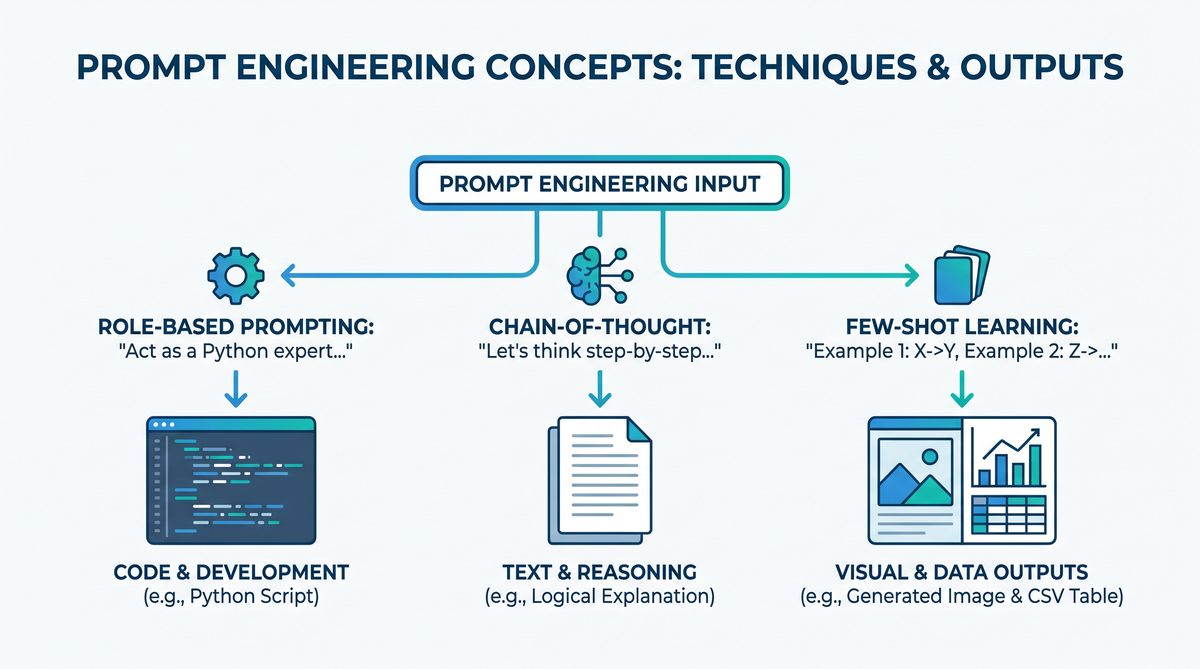
In the rapidly advancing world of artificial intelligence, the models themselves are only half of the equation. The other, arguably more critical half, is the art and science of communicating with them. Welcome to the definitive guide to prompt engineering in 2026. What began as a simple practice of asking direct questions to models like the original GPT-3 has blossomed into a sophisticated discipline. Today, a well-crafted prompt is the key that unlocks the full potential of state-of-the-art models like OpenAI’s GPT-4 series, Anthropic’s Claude 3 family, and the powerful GitHub Copilot powered by Codex. Simple, ambiguous instructions yield generic, often unhelpful results. In contrast, a masterfully engineered prompt can command an AI to generate nuanced legal analysis, write production-ready software, create a multi-part marketing campaign, or even compose a symphony.
This guide moves beyond the basics. We will dissect the frameworks and advanced techniques that separate amateur AI users from professional prompt engineers. You will learn not just what to ask, but how to ask it—how to provide context, define tasks with precision, and specify the exact format for the output you need. We will explore powerful methods like Chain-of-Thought (CoT) prompting to elicit complex reasoning, few-shot learning to teach the model on the fly, and the strategic use of system prompts to create persistent AI personas. Whether you are a developer, a writer, a researcher, or a business professional, mastering these skills is no longer optional; it is essential for leveraging the transformative power of modern AI.
The Core Framework: Context, Task, Format (CTF)
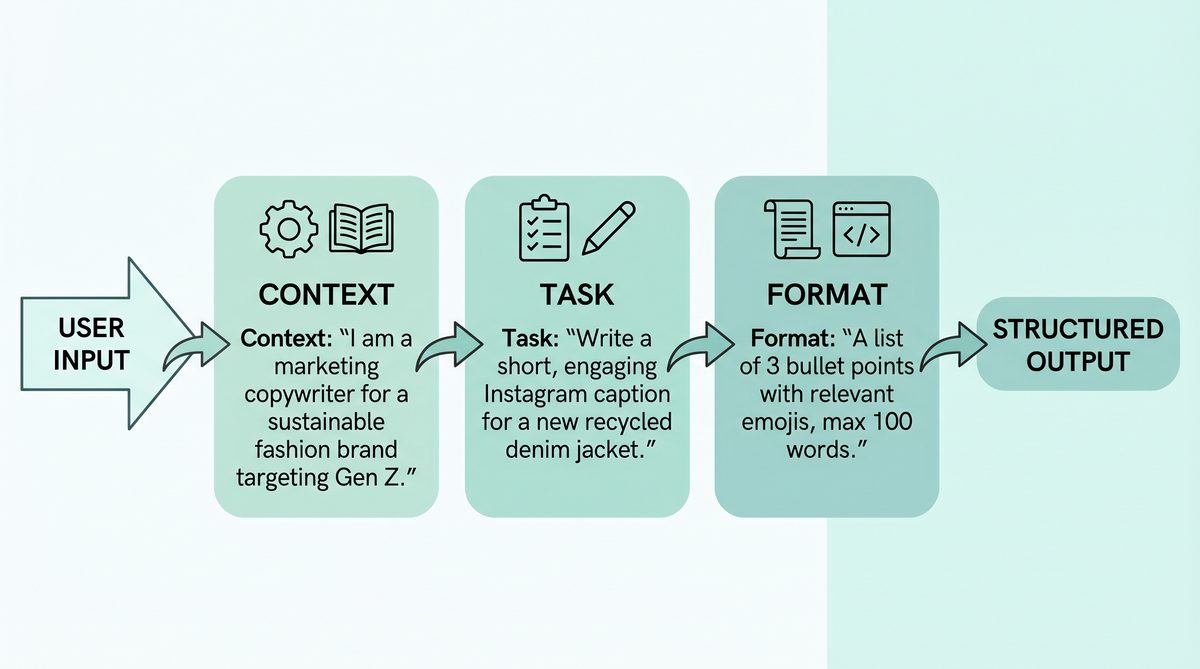
At the heart of modern prompt engineering is the Context, Task, Format (CTF) method. This simple yet powerful framework provides a universal structure for designing effective prompts across any major AI model. By systematically providing these three elements, you create a clear, unambiguous instruction that dramatically increases the quality and relevance of the AI’s response. It minimizes confusion and forces the model to operate within the precise boundaries you define.
Deconstructing the CTF Method
Let’s break down each component:
- Context (C): This is the background information, the stage-setting that the AI needs to understand the world in which the task exists. Without context, the model operates in a vacuum and has to make assumptions. Effective context can include user profiles, source data, prior conversation history, environmental constraints, or the overarching goal. Think of it as the “You are here” map for the AI.
- Task (T): This is the specific, actionable instruction. It is the verb of the prompt—what you want the AI to do. The task should be defined with as much clarity and precision as possible. Instead of “summarize this,” a better task is “Summarize this technical document into a three-point executive summary for a non-technical audience.”
- Format (F): This is the explicit definition of how you want the output to be structured. If you don’t specify the format, the model will choose its own, which is often a verbose, unstructured block of text. By defining the format, you get predictable, machine-readable, or presentation-ready output. This can be anything from “a JSON object with keys ‘name’ and ’email’” to “a Markdown table with three columns.”
Here is a comparison of how each component contributes to the final output:
| Component | Purpose | Poor Example | Strong Example |
|---|---|---|---|
| Context | Sets the scene and provides necessary background. | Tell me about this product. | You are a marketing expert writing copy for a new productivity app targeting busy professionals. The app helps manage tasks and calendars. |
| Task | Defines the specific action to be performed. | Write a description. | Write three compelling headline options (under 10 words each) for the app’s landing page. |
| Format | Specifies the structure of the desired output. | Give me the headlines. | Return the output as a JSON array of strings. |
Advanced Prompting Techniques
Once you have mastered the CTF framework, you can begin to layer in more advanced techniques to tackle complex reasoning, coding, and creative tasks. These methods push the models beyond simple instruction-following into genuine problem-solving.
Role-Based Prompting: Giving the AI a Persona
One of the most effective ways to shape an AI’s response is to assign it a role. By starting your prompt with a persona, you anchor the model’s tone, expertise, and perspective. This is far more effective than simply asking for a certain style. When you tell a model “You are a world-class cybersecurity expert with 20 years of experience,” you prime it to access the patterns and knowledge associated with that persona in its training data. This results in more authoritative, detailed, and nuanced responses.
Template: You are a [Persona/Role]. Your task is to [Task].
Example: You are a seasoned travel blogger specializing in budget-friendly backpacking trips in Southeast Asia. Your task is to create a 7-day itinerary for a first-time traveler to Vietnam, focusing on cultural experiences and local food. The output should be a day-by-day plan in a Markdown list.
Chain-of-Thought (CoT) Prompting: Encouraging Reasoning
In advancing prompt engineering frameworks, incorporating mechanisms for self-correction and AI feedback loops is essential. The post Chain-of-Verification Prompting: The Advanced Technique That Eliminates AI Hallucinations in 2026 delves into innovative methods that enable AI models like ChatGPT and Claude to verify and refine their outputs, reducing errors and improving reliability through iterative feedback.
Template: [Context]. [Task]. Show your work and think step by step before providing the final answer.
Example: A farmer has 100 meters of fencing to build a rectangular enclosure. What is the maximum area she can enclose? Think step by step and show your calculations before giving the final area.
Few-Shot Learning: Teaching by Example
Few-shot learning is the practice of providing the model with a few examples of the desired input-output pattern before giving it the final task. This is incredibly effective for tasks involving specific formatting, sentiment analysis, or code generation. By seeing a few examples, the model learns the pattern and can apply it to new, unseen data. This is a form of in-context learning and does not require fine-tuning the model itself.
Template:
[Example 1 Input] -> [Example 1 Output]
[Example 2 Input] -> [Example 2 Output]
[Final Input] ->
Example for sentiment analysis:
Tweet: "I love the new update, it's so fast!" -> Positive
Tweet: "My app keeps crashing after the latest patch." -> Negative
Tweet: "The UI is a bit confusing but the features are great." -> Mixed
Tweet: "I can't believe they removed my favorite feature." ->
Model-Specific Prompting: ChatGPT, Claude, and Codex
While the CTF framework is universal, top-tier models have unique features that can be leveraged for superior results. Understanding these differences is key to expert-level prompt engineering.
System Prompts: The Power of Pre-Instruction
Both ChatGPT and Claude support system prompts, which are high-level instructions that set the context and constraints for the entire conversation. Unlike a standard prompt, the system prompt is typically sent separately via an API and remains in effect for the duration of a session. This is the ideal place to establish a persona, define output formats, and state rules the AI must follow.
| Model | System Prompt Feature | Best For |
|---|---|---|
| ChatGPT (OpenAI) | Passed via the `system` role in the API messages array. It strongly influences the model’s behavior but can be overridden by user prompts. | Establishing a consistent persona (e.g., “You are a helpful assistant”), setting a specific tone, and providing general guidelines. |
| Claude (Anthropic) | Passed as a separate `system` parameter in the API. Claude models are known to follow system prompts with very high adherence. | Enforcing strict output formats (like XML or JSON), defining complex roles, and setting hard constraints that should not be broken. |
Claude System Prompt Example:
System: You are a code analysis bot. Your task is to review Python code submissions, identify potential bugs, and suggest fixes. All output must be in a JSON object containing two keys: "bugs" (a list of strings describing identified issues) and "suggestions" (a list of strings with corrected code snippets). Do not write any explanatory text outside of the JSON structure.Codex and GitHub Copilot: Prompting for Code
Effective prompt engineering also intersects with AI-driven development methodologies that enhance productivity and streamline workflows. The case study titled How AI Coding Agents Boosted Developer Productivity by 40%: A Real-World Case Study provides concrete examples of how integrating AI coding agents like Codex and Claude Code transforms software development processes, illustrating practical applications of AI in development environments.
Codex Prompting Example (within a Python file):
import pandas as pd

def calculate_moving_average(prices: list[float], window_size: int) -> list[float]:
    """
    Calculates the simple moving average of a list of prices.

    Args:
        prices: A list of floats representing prices.
        window_size: The number of periods for the moving average.

    Returns:
        A list of floats representing the moving average.
    """
    # The model will generate the function body here based on the docstring and signature.
Structured Output and Complex Workflows
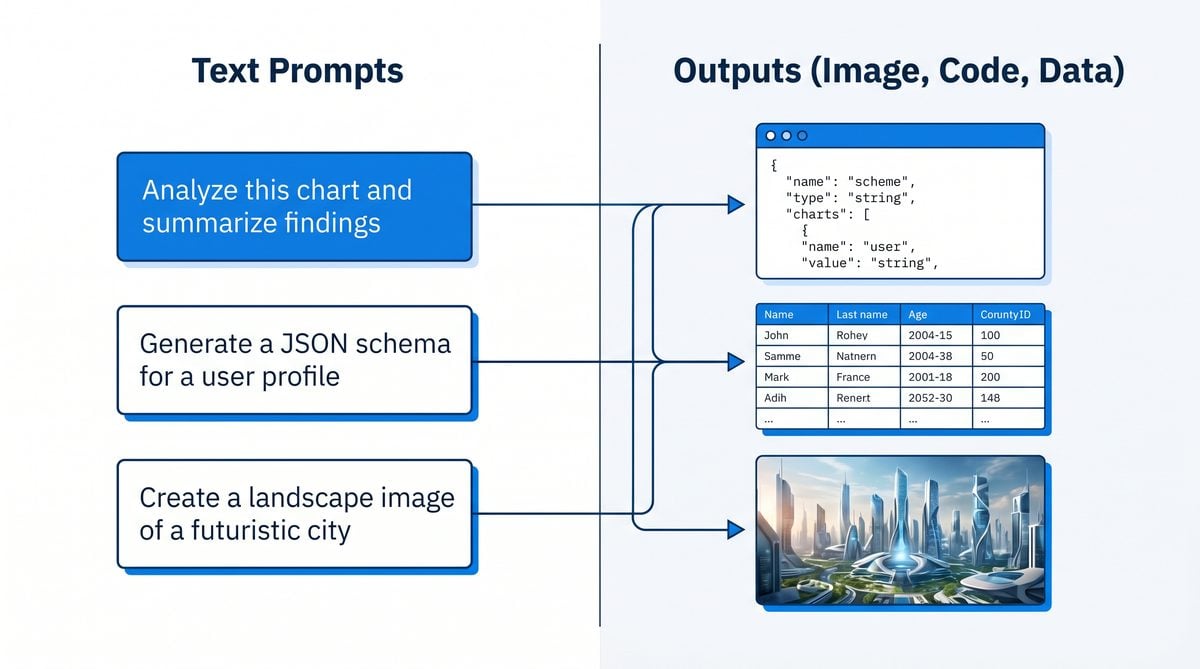
Forcing the AI to produce structured data is essential for building reliable applications on top of LLMs. Similarly, chaining prompts together allows you to automate complex, multi-step tasks.
Mastering Structured Output: JSON and Tables
Never leave the output format to chance when you need predictable results. Explicitly instruct the model to return data in a specific format like JSON, XML, or a Markdown table. This is especially important when the AI output will be consumed by another program. Using a system prompt in Claude or a detailed instruction in ChatGPT is highly effective for this.
Prompt for JSON Output: Extract the speaker and the main topic from the following text. Return the result as a single JSON object with two keys: "speakerName" and "topic".
Text: "During today's keynote, Dr. Anya Sharma introduced our new quantum computing framework."
Prompt Chaining: Building AI Workflows
Prompt chaining is the technique of taking the output from one prompt and using it as the input for a subsequent prompt. This allows you to build sophisticated workflows that mimic human problem-solving. For example, a first prompt could extract key facts from a document, a second could use those facts to write a summary, and a third could translate that summary into another language. This modular approach is more reliable than asking the model to do everything in one giant, complex prompt. It allows for better error handling and more predictable results at each stage of the process.
Common Mistakes to Avoid
Even experienced users can fall into common traps that degrade the quality of AI responses. Avoiding these pitfalls is just as important as using advanced techniques.
| Mistake | Description | Solution |
|---|---|---|
| Vague or Ambiguous Tasking | Using unclear verbs like “analyze,” “discuss,” or “explain” without specifying the desired outcome. | Be hyper-specific. Instead of “Analyze this data,” use “Calculate the month-over-month growth rate from this sales data and present it as a percentage.” |
| Missing Context | Assuming the model knows about your specific domain, project, or intent without providing any background. | Always provide the necessary context at the beginning of the prompt using the CTF method. State the user profile, goal, and any relevant constraints. |
| Ignoring the Format | Accepting a wall of text when you need structured data. This makes the output difficult to parse and use. | Explicitly define the output format. Demand JSON, XML, Markdown tables, or bullet points. Use a system prompt to enforce this. |
| Overly Complex Single Prompts | Trying to accomplish a multi-step task in a single, massive prompt. This increases the likelihood of errors and hallucinations. | Break the task down into smaller, manageable steps using prompt chaining. Have each prompt perform one clear function. |
| Implicit Assumptions | Assuming the model shares your cultural context, unspoken rules, or common sense. | State your assumptions explicitly. For example, specify the currency, measurement system, or target audience. A useful practice is to define the target audience for the content, which is a key part of Personalizing AI interactions is a critical component of modern prompt engineering frameworks, enabling tailored user experiences. The article ChatGPT Introduces “Custom Instructions” for Enhanced Personalization and Smarter AI Conversations explores how customizable instructions empower users to guide AI behavior and responses, thus enhancing content personalization across ChatGPT and related platforms. . |
15+ Ready-to-Use Prompt Templates
Here are over a dozen templates you can adapt for your own use cases, covering a range of professional and creative tasks.
- The Expert Persona Prompt:
You are a [Expert Role, e.g., Chief Technology Officer] with expertise in [Domain, e.g., scalable cloud architectures]. Analyze the following [Document/Problem] and provide a [Specific Output, e.g., list of three key recommendations for improvement]. - The Code Generation Prompt:
As a senior software engineer, write a Python function named `[FunctionName]` that accepts `[Arguments]` and returns `[ReturnType]`. The function should [Detailed Logic]. Include a comprehensive docstring and type hints. - The Data Extraction Prompt (JSON):
From the text below, extract the following entities: [Entity 1], [Entity 2], and [Entity 3]. Return the result as a single, minified JSON object with corresponding keys. Text: "[Source Text]" - The Summarization Prompt (Executive Briefing):
You are a business analyst. Read the following article and distill it into a 5-point executive summary for a busy CEO. Each point should be a single, impactful sentence. Article: [Article Text] - The Creative Writing Prompt (Role-Play):
You are a 19th-century detective in London. Write a journal entry describing your first encounter with a mysterious client who has an unsolvable case. Focus on the atmosphere and the client's unusual demeanor. - The Few-Shot Classification Prompt:
Given the following examples of customer feedback classification, classify the final entry. Feedback: "The app is a masterpiece!" -> Enthusiastic Feedback: "It works, but it's slow." -> Neutral Feedback: "This is unusable." -> Negative Feedback: "I'm so impressed with the customer support." -> - The Chain-of-Thought Math Prompt:
Solve the following problem. Explain your reasoning step-by-step before giving the final answer. Problem: [Math or Logic Problem] - The Marketing Copy Prompt:
You are a direct-response copywriter. Write three variations of a Facebook ad headline for a new [Product, e.g., smart coffee mug]. The target audience is [Audience, e.g., tech professionals]. Each headline must be under 12 words and create a sense of urgency. - The Technical Explanation Prompt (ELI5):
Explain the concept of [Complex Topic, e.g., quantum entanglement] as if you were explaining it to a curious 10-year-old. Use simple analogies and avoid jargon. - The Multi-Modal Image Prompt (for models like GPT-4o):
[Image Input] Describe the architectural style of the building in this image. Identify at least three key features that define this style. - The Refactoring Prompt for Codex:
// You are a senior developer specializing in clean code. // Refactor the following Python function to be more efficient and readable. // Add comments explaining the key changes you made. [Original Code Snippet] - The Structured Table Generation Prompt:
Create a Markdown table comparing three different cloud providers: AWS, Google Cloud, and Azure. The columns should be: Provider, Key Differentiator, and Ideal Use Case. - The Persona-Driven Email Prompt:
You are a project manager. Write a polite but firm follow-up email to a team member whose task is overdue. State the original deadline, the impact of the delay, and ask for an immediate status update. - The Content Brainstorming Prompt:
You are a content strategist for a B2B SaaS blog. Generate 10 blog post ideas (title and a one-sentence description) about the topic of [Topic, e.g., AI in customer service]. - The System Prompt for a Support Bot (Claude):
System: You are a friendly and helpful support agent for "Innovate Inc." Your goal is to answer user questions based ONLY on the provided documentation. If the answer is not in the documentation, you must politely say, "I'm sorry, but I don't have information on that topic. Can I help with anything else?" Do not invent answers. - The Code Commenting Prompt:
Add clear, concise comments to the following code snippet to explain its logic to a junior developer.

[Uncommented Code Snippet]
Access 40,000+ AI Prompts for ChatGPT, Claude & Codex — Free!
Subscribe to get instant access to our complete Notion Prompt Library — the largest curated collection of prompts for ChatGPT, Claude, OpenAI Codex, and other leading AI models. Optimized for real-world workflows across coding, research, content creation, and business.
Access Free Prompt LibraryUseful Links
To continue your journey in prompt engineering, here are some essential resources from the creators of these powerful models and the wider community.
- OpenAI Prompt Engineering Guide – The official documentation and best practices from the creators of ChatGPT and Codex.
- Anthropic’s Guide to Prompting – Official guidance on getting the most out of Claude models, including system prompt usage.
- OpenAI Cookbook on GitHub – A repository filled with code examples and practical guides for using the OpenAI API.
- Learn Prompting – A comprehensive, free, open-source course on prompt engineering.
- Brex’s Prompt Engineering Guide – A practical guide for developers from the team at Brex.
- Prompting Guide by DAIR.AI – A detailed guide covering the latest research and techniques in prompt engineering.
The Future of Prompt Engineering: Automation and Abstraction
As AI models continue to evolve, so too will the discipline of prompt engineering. The future points towards a world where manual prompt crafting is augmented, and in some cases replaced, by higher levels of abstraction and automation. We are already seeing the beginnings of this shift with the emergence of tools and frameworks that help manage, optimize, and even generate prompts programmatically.
Meta-Prompting and Self-Optimizing AIs
One of the most exciting frontiers is meta-prompting, where we use AI to generate prompts for other AIs. Imagine an orchestrator AI that, given a high-level goal, can design a series of highly optimized prompts for specialized models. This orchestrator could test different prompt variations, analyze the quality of the output, and iteratively refine its approach—a process of automated prompt discovery. This moves the human role from a prompt crafter to a goal definer and system supervisor.
The Rise of Prompt Management Platforms
As organizations scale their use of AI, managing thousands of prompts across different applications becomes a significant challenge. A new category of software is emerging: Prompt Management Platforms. These tools provide version control for prompts (like Git for code), A/B testing frameworks to measure prompt effectiveness, and collaborative environments for teams of prompt engineers. They treat prompts as valuable assets, enabling a systematic approach to improving AI interactions company-wide. These platforms are becoming an essential part of the MLOps stack for generative AI.
From Text to Intent: The Abstraction of Interaction
Ultimately, the goal is to move away from meticulously crafting text and towards simply communicating intent. Future AI systems will likely require less explicit instruction, becoming more adept at inferring user goals from minimal input and conversational context. The AI will ask clarifying questions, suggest different approaches, and co-create the solution with the user. In this paradigm, the prompt is not a static command but the starting point of a dynamic, collaborative dialogue. While the detailed techniques discussed in this guide are critical for leveraging today’s models, they are also the foundation upon which these more intuitive and powerful interaction models of tomorrow will be built. The core principles of providing clear context, defining tasks, and specifying structure will remain, even as the syntax we use to express them becomes more abstract and intelligent.
🕐 Instant∞ Unlimited🎁 Free
