
Introduction: Revolutionizing AI-Assisted Development with Codex CLI /goal
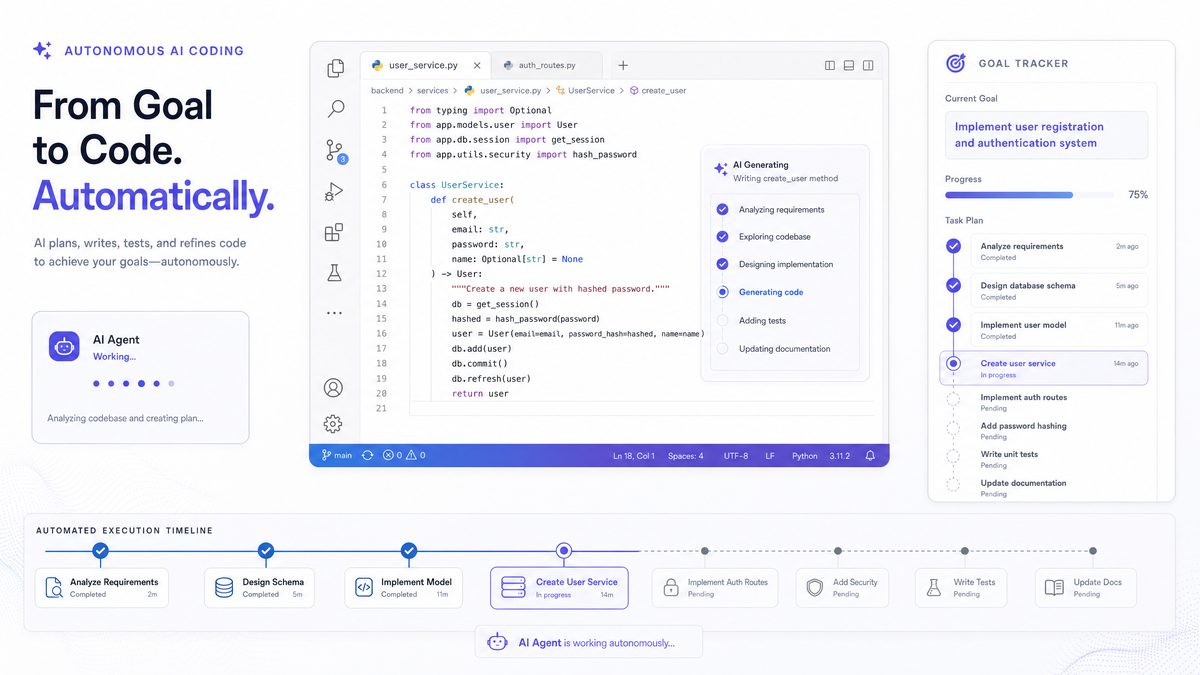
On May 2, 2026, OpenAI released Codex CLI version 0.128.0, introducing the groundbreaking /goal command—a paradigm shift in autonomous AI-driven software development. This feature enables persistent, cross-session objectives that allow developers to set long-horizon goals for coding projects and let the AI autonomously plan, act, test, review, and iterate until completion. Dubbed the “Ralph loop,” this cycle embodies a new era of AI autonomy in software engineering.
Unlike previous AI coding assistants such as Claude Code, Cursor Composer 2, or Aider, Codex CLI’s /goal operates without interrupting the developer for permissions, enabling uninterrupted productivity. Real-world results demonstrate the power of this approach: one developer shipped 14 out of 18 planned features within 18 hours, with the system running unattended and costing under $5 in OpenAI credits.
By persisting goals across sessions, Codex CLI lets you close your laptop and return later, picking up exactly where it left off thanks to smart soft-stop boundaries where the agent self-summarizes its context and continues seamlessly. Leveraging GPT-5.5 sub-agents for self-review ensures high-quality output and continuous improvement.
In this comprehensive tutorial, we will explore how to harness the power of Codex CLI’s /goal feature. From installation and configuration to writing effective goals and integrating with CI pipelines, you will learn how to implement autonomous long-horizon coding workflows that fit into professional development environments.
Prerequisites and Installation (Codex CLI 0.128.0+)
Before diving into the /goal feature, ensure you have the right environment prepared. Codex CLI 0.128.0 or later is required, as this version introduced the /goal command and its supporting infrastructure.
System Requirements
- Operating System: Linux, macOS, or Windows (WSL recommended)
- Python Version: 3.11 or higher
- OpenAI API Access: Active API key with GPT-5.5 enabled
- Network: Stable internet connection for API calls
Installation Steps
pip install --upgrade openai-codex-cli
codex-cli --version
# Verify you have version 0.128.0 or higher
Once installed, configure your OpenAI API key:
export OPENAI_API_KEY="your_api_key_here"
# Alternatively, on Windows:
setx OPENAI_API_KEY "your_api_key_here"
You can verify authentication by running a simple Codex CLI command:
codex-cli chat "Hello from Codex CLI!"
If you receive a valid response, your setup is complete.
The /goal command is integrated seamlessly into the CLI:
codex-cli /goal --help
This will display usage instructions and options for managing autonomous coding objectives.
Understanding the /goal Architecture: The Ralph Loop Explained
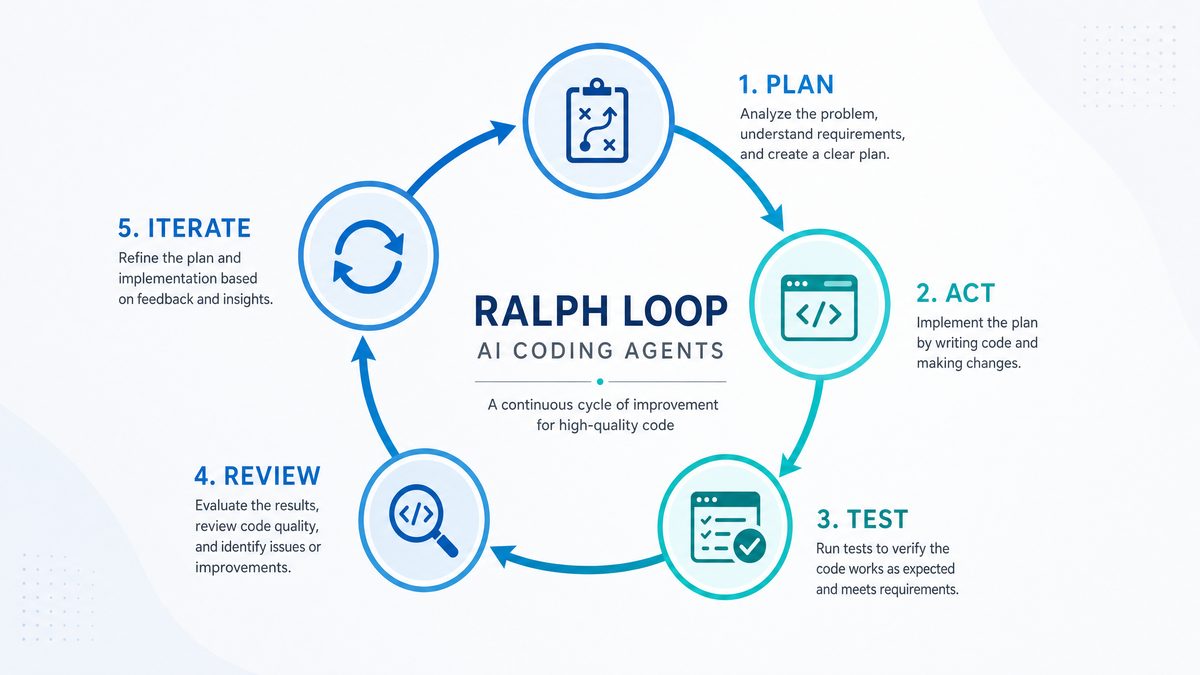
The core innovation behind Codex CLI’s /goal feature is the implementation of the “Ralph loop,” a persistent autonomous agent cycle that enables long-horizon coding without manual intervention. The cycle consists of five phases:
- Plan: The agent decomposes the high-level goal into actionable subtasks and creates a prioritized plan.
- Act: Codex writes code, generates tests, or performs other development actions based on the plan.
- Test: The system runs automated tests or validation checks on the newly generated code to ensure correctness.
- Review: Using GPT-5.5 sub-agents, the AI performs self-review, analyzing code quality, test results, and compliance with the goal.
- Iterate: Based on review feedback, the agent refines the code or plan and proceeds with the next cycle.
The loop runs continuously, respecting “soft stop” boundaries rather than hard session limits. When a boundary approaches—such as API token limits or session timeouts—the agent summarizes its state and checkpoints progress to disk. This design enables session persistence: you can close your laptop or terminate the CLI, and upon restarting, the agent picks up exactly where it left off, fully informed.
“The Ralph loop allows for truly autonomous software development by closing the feedback loop continuously while maintaining context over long periods.”
Unlike other AI coding agents that frequently interrupt users for permissions or manual input, Codex CLI’s /goal trusts the developer’s initial intent and operates independently, minimizing friction in the development process.
Additionally, the use of GPT-5.5 sub-agents for self-review elevates output quality, with these specialized models identifying potential bugs, style inconsistencies, or performance issues before the code reaches production.
Your First /goal Session – Walkthrough
Let’s explore a practical example of how to initiate and run a /goal session. This walkthrough will demonstrate setting a feature development goal, observing the autonomous agent in action, and managing the session lifecycle.
Step 1: Define Your Goal
Create a simple project directory and initialize your Git repository (optional but recommended):
mkdir my-autonomous-project
cd my-autonomous-project
git init
Write a plain-text goal file named FEATURE_GOAL.txt describing the objective:
Implement a REST API service with endpoints for user authentication, data retrieval, and data submission, including unit tests and API documentation.
Step 2: Launch Codex CLI /goal
Run the following command to start the autonomous session:
codex-cli /goal --goal-file FEATURE_GOAL.txt --project-root .
Upon execution, Codex CLI:
- Ingests your goal description
- Creates an internal backlog of tasks
- Begins the Ralph loop, autonomously planning and coding
You will see periodic output indicating the agent’s current phase, e.g., planning, coding, testing, reviewing, or summarizing.
Step 3: Monitor Progress
The system writes logs and status updates to a goal_status.log file within the project root. This includes summaries of completed tasks, test results, and self-review notes from GPT-5.5 sub-agents.
Because of soft-stop boundaries, if you terminate the session (Ctrl+C), Codex CLI will attempt to checkpoint:
^C
Saving session state... done.
You can resume with:
codex-cli /goal --resume --project-root .
Step 4: Resume and Finalize
Restart the session using the resume flag:
codex-cli /goal --resume --project-root .
This capability means you can close your laptop, switch workstations, or pause the AI without losing progress.
Step 5: Review Results
When the goal is completed or you decide to stop the session, review the generated codebase, tests, and documentation. You can also inspect the BACKLOG.md file automatically maintained by the agent, which tracks remaining and completed tasks.
For those interested in the evolving landscape of AI-powered coding tools, AI Coding Agents in 2026: Codex vs Claude Code vs Gemini — Which Wins? provides an in-depth comparison of the leading AI coding agents, analyzing their capabilities, strengths, and limitations in the context of autonomous multi-hour coding sessions. Understanding these distinctions is crucial for optimizing AI-assisted development workflows and selecting the most effective tool for long-term coding projects in 2026.
Writing Effective Goals That Ship Features
Success with Codex CLI /goal depends heavily on how you articulate and scope your goals. Effective goal-writing ensures the AI agent can decompose work correctly and avoid scope creep or misaligned outputs.
Principles of Effective Goal Writing
- Clarity: Use clear, concise language that unambiguously describes the desired feature or task.
- Scope: Define boundaries to prevent the agent from diverging into unrelated areas or overly broad objectives.
- Outcome-Oriented: Specify deliverables such as API endpoints, UI components, tests, or documentation rather than vague intentions.
- Constraints: Include constraints like programming language, frameworks, or coding standards to maintain consistency.
Example Goal Templates
# Example 1: Authentication Feature
Implement OAuth2-based user authentication with JWT token issuance, support login/logout endpoints, and include unit and integration tests. Follow PEP8 and use FastAPI framework.

# Example 2: Data Export Module
Create a CSV and JSON export functionality for user data, accessible via REST API endpoints. Ensure exports handle large datasets efficiently and include error handling with retry logic.
Using BACKLOG.md to Structure Tasks
Codex CLI maintains a BACKLOG.md file that lists planned, in-progress, and completed tasks. You can edit this file directly to add manual tasks or reprioritize existing ones. The AI agent uses this backlog to navigate the development workflow.
Example BACKLOG.md structure:
# Backlog

## TODO
- Implement login endpoint
- Write unit tests for authentication module

## IN PROGRESS
- OAuth2 integration

## DONE
- Project scaffolding and dependencies installed
Keeping a clean backlog improves collaboration and transparency when multiple stakeholders are involved.
Monitoring and Managing Long-Running Goals
Long-horizon projects can span multiple sessions and extend over days or weeks. Codex CLI provides several tools and best practices for monitoring and managing these goals effectively.
Session Checkpoints and Summaries
At soft stop boundaries, Codex CLI automatically generates summaries of the current state, including:
- Completed tasks and features
- Known issues or blockers
- Current plan and next steps
This summary is saved to disk, enabling quick review before resuming work.
Real-Time Logging and Notifications
Configure verbose logging for detailed insights:
codex-cli /goal --goal-file FEATURE_GOAL.txt --log-level DEBUG
Additionally, you can integrate output with notification systems or dashboards to receive updates on progress or failures.
Pausing, Resuming, and Cancelling Goals
- Pause: Interrupt a session safely with Ctrl+C; Codex CLI checkpoints progress.
- Resume: Restart with the
--resumeflag to continue. - Cancel: Delete state files in the project root to abort and reset.
These controls allow flexible management of unattended workloads without data loss.
Integrating with Your Development Workflow
Codex CLI outputs standard file formats and Git commits, making it easy to incorporate AI-generated code into existing pipelines. Combine with manual code reviews or automated CI checks to maintain quality.
Advanced Patterns: CI Integration and Multi-Goal Workflows
For enterprise-grade usage, integrating Codex CLI /goal into Continuous Integration (CI) pipelines and managing concurrent goals is essential.
CI Pipeline Integration
Automate goal execution as part of your CI/CD workflow using scripts:
#!/bin/bash
# Run Codex goal during nightly build
codex-cli /goal --goal-file FEATURE_GOAL.txt --project-root . --resume --log-level INFO

# Run tests and linting after goal completion
pytest tests/
flake8 src/
This approach enables autonomous feature development during off-hours, accelerating release cycles.
Multi-Goal Management
Complex projects often require managing multiple goals simultaneously. Use isolated project directories or branches for each goal, or leverage Codex CLI’s --goal-id parameter to distinguish sessions.
Example:
codex-cli /goal --goal-file FEATURE_GOAL_A.txt --goal-id auth-feature --project-root ./auth
codex-cli /goal --goal-file FEATURE_GOAL_B.txt --goal-id export-feature --project-root ./export
These workflows enable parallel autonomous development streams with independent checkpoints and status tracking.
To maximize the effectiveness of your autonomous multi-hour coding sessions with OpenAI Codex, mastering prompt engineering is essential. The 2026 ChatGPT Prompt Engineering Best Practices Guide offers in-depth strategies for crafting prompts that elicit optimal code generation and problem-solving responses. Understanding these best practices is particularly relevant as you seek to improve the reliability and efficiency of your AI-assisted development workflows in 2026.
Cost Optimization and Credit Management
Running long-horizon autonomous coding sessions incurs API usage costs. Efficient credit management is critical to maximize ROI.
Understanding Cost Drivers
- Model Usage: GPT-5.5 sub-agents are powerful but cost more per token than lower-tier models.
- Session Length: Longer sessions generate more tokens cumulatively.
- Testing and Review Frequency: More frequent test and review cycles increase token consumption.
Practical Optimization Tips
- Goal Scoping: Define precise goals to avoid unnecessary exploration.
- Batching Actions: Configure the agent to batch multiple tasks before checkpointing.
- Adjust Review Frequency: Control how often sub-agents perform self-review.
- Use Caching: Cache API responses where possible to reduce redundant calls.
- Monitor Usage: Use the OpenAI dashboard or CLI commands to track credit consumption in real time.
For example, the reported case of shipping 14 features in 18 hours cost approximately $4.20, highlighting the cost-effectiveness of well-scoped autonomous sessions.
Troubleshooting Common Issues
Despite its robustness, users may encounter issues when using Codex CLI /goal. Below are common problems and solutions.
Agent Fails to Resume Session
- Cause: Missing or corrupted checkpoint files.
- Solution: Ensure session state files remain in the project root. If corrupted, delete and restart the goal with the original goal file.
Unintended Scope Expansion
- Cause: Vague goal descriptions causing the agent to wander.
- Solution: Rewrite goals with tighter constraints and update
BACKLOG.mdto reprioritize tasks.
High API Usage Costs
- Cause: Excessive review cycles or long-running sessions.
- Solution: Adjust review frequency flags and limit session run time.
Agent Gets Stuck in Loop
- Cause: Failure to converge on a solution, often due to conflicting constraints.
- Solution: Manually intervene by editing code or backlog, then resume.
For more detailed troubleshooting, consult the official OpenAI Codex CLI documentation.
Comparison with Other Coding Agents
Codex CLI’s /goal feature stands out in the AI coding assistant landscape. Below is a comparison table examining key aspects versus Claude Code, Cursor Composer 2, and Aider:
| Feature | Codex CLI /goal | Claude Code | Cursor Composer 2 | Aider |
|---|---|---|---|---|
| Long-running state | Interrupt a disposable /goal run, attempt recovery with --resume, and inspect the restored project state and next steps. |
Interrupt a disposable session and verify how task context, pending work, and recovery are handled. | Interrupt an editor task and verify how plans, pending edits, and task context are preserved. | Stop a disposable repository task and verify what must be restored manually before work can continue. |
| Automation boundaries | Confirm project-root limits, command permissions, checkpoint behavior, test execution, and stop controls before unattended use. | Confirm repository permissions, command boundaries, approval behavior, test execution, and interruption controls. | Confirm which files, editor actions, and commands the workflow may change or execute. | Confirm command permissions, repository scope, commit practices, and rollback steps. |
| Selection focus | Prioritize recoverable state, bounded goals, visible progress, and reviewable diffs. | Prioritize predictable session recovery, clear permission controls, and reviewable changes. | Prioritize transparent edits, clear progress reporting, and control over file scope. | Prioritize reproducible commands, inspectable patches, and a clean recovery path. |
Use this table as an evaluation checklist rather than a universal ranking. Test each candidate on a small branch, inspect every change, and confirm that interruption, recovery, testing, and review behavior match your repository’s controls.
Conclusion
Effective autonomous coding starts with a bounded goal, explicit acceptance criteria, reliable tests, and recoverable checkpoints. Keep each session isolated, review the resulting diff, and apply the same quality checks used for human-written changes.
For larger projects, split work into independent goals and preserve clear handoff notes. This limits scope expansion, makes failures easier to diagnose, and gives maintainers a practical basis for approving each change.
