
How to Use Claude’s New Financial Agents: A Complete Step-by-Step Setup Guide
How to Use Claude’s New Financial Agents: A Step-by-Step Setup Guide
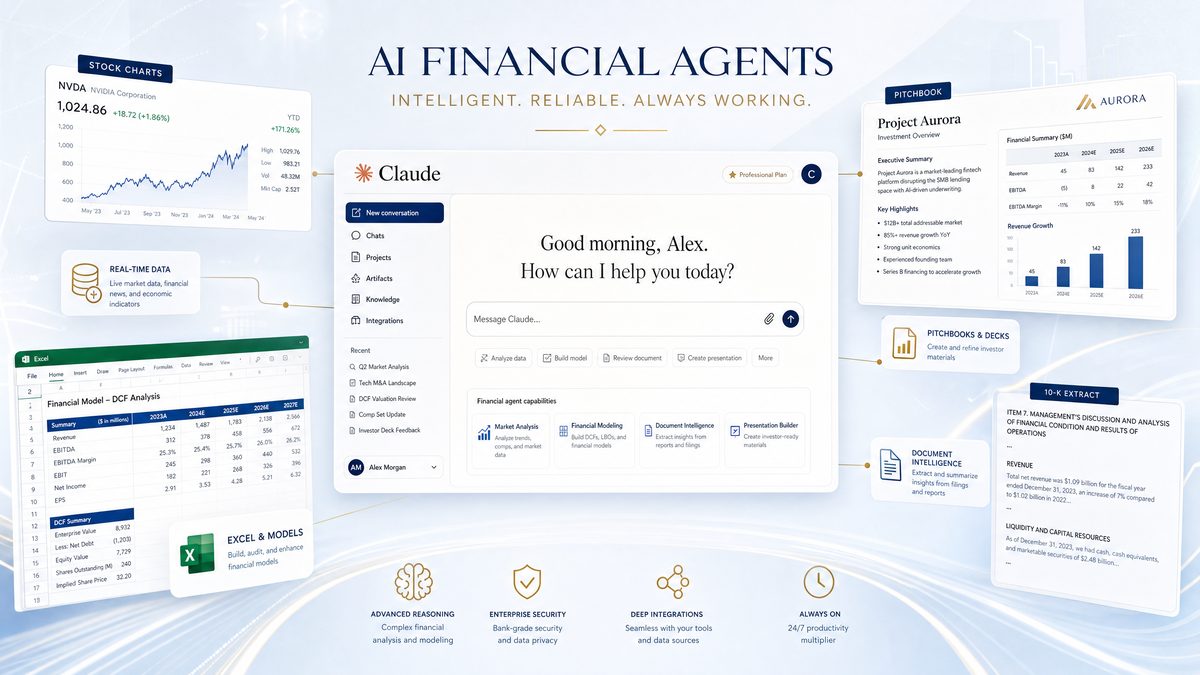
With the rapid evolution of AI-driven financial technologies, Anthropic has positioned itself at the forefront by releasing a suite of 10 specialized financial agent templates designed to streamline complex finance operations through intelligent automation. These agents, which integrate seamlessly as plugins within Claude Cowork and Claude Code, leverage advanced natural language processing and deep learning capabilities to execute diverse financial tasks. Additionally, their compatibility with Microsoft 365 enables organizations to embed AI-powered financial workflows directly into their existing productivity ecosystems.
This tutorial provides an exhaustive, step-by-step walkthrough on how to set up and effectively utilize Claude’s new financial agents. From understanding the architectural design and technical prerequisites to exploring real-world applications and implications, this guide is tailored for developers, financial technologists, and enterprise architects looking to harness these agents to optimize finance operations.
Overview of Claude’s Financial Agents and Their Capabilities
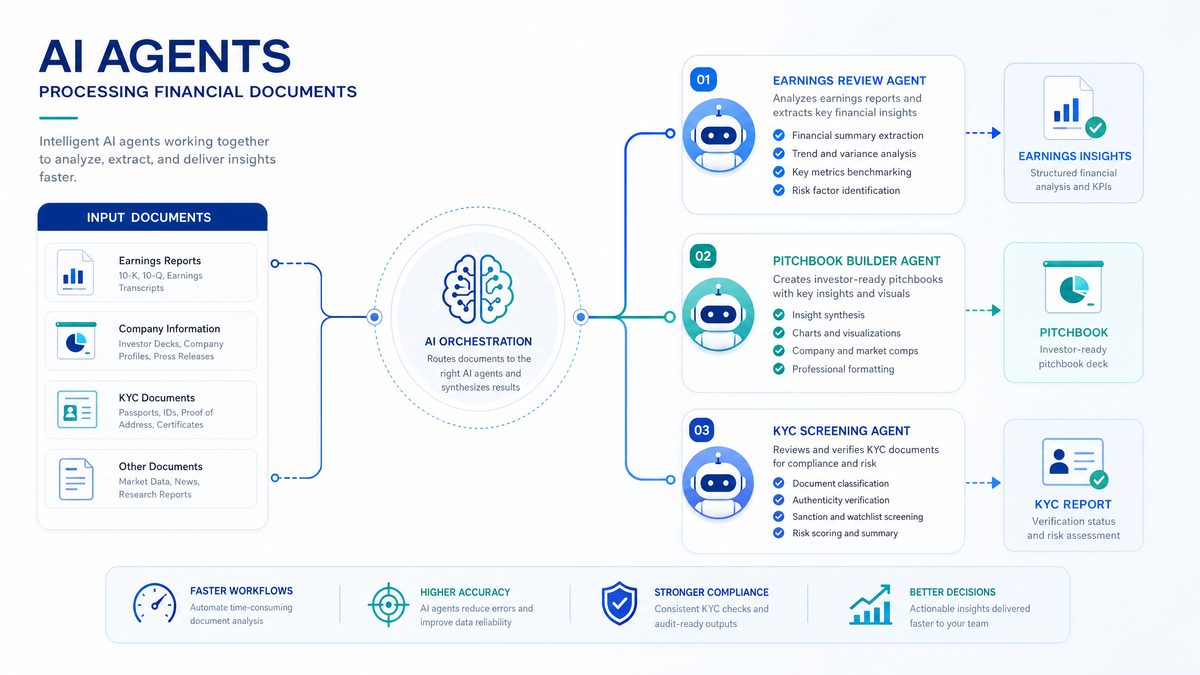
Anthropic’s financial agents are AI-driven modules designed to automate and enhance financial processes by executing domain-specific tasks with precision. The agents are deployed as plugins within two core Claude environments:
- Claude Cowork: A collaborative workspace for integrating AI assistance into team workflows. It facilitates real-time collaboration between human users and AI agents, enabling teams to co-author documents, review financial data, and generate insights collaboratively. Its architecture supports multi-user sessions with role-based permissions, ensuring secure and efficient team interactions.
- Claude Code: A development environment optimized for code generation, debugging, and automation scripting. It allows developers and financial engineers to build customized workflows by scripting agent behaviors using languages like Python and JavaScript. Claude Code supports integration with external APIs, database connectors, and cloud services, making it ideal for creating complex automation pipelines.
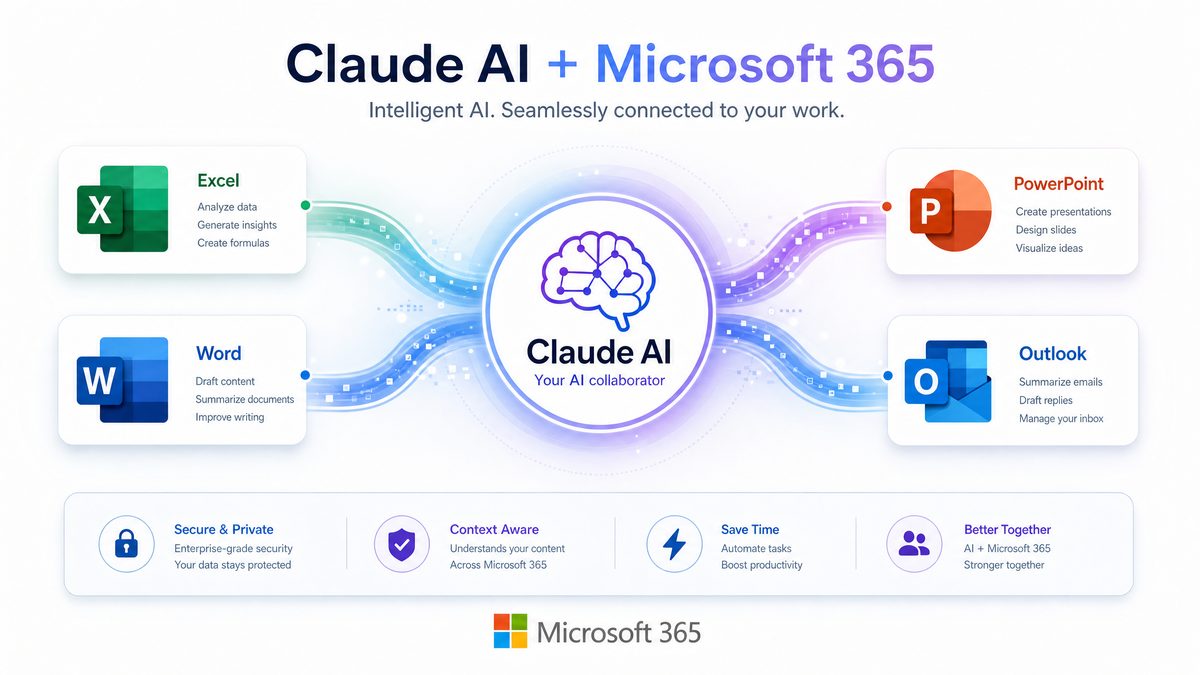
These agents are also designed to integrate with Microsoft 365, allowing users to embed AI-driven financial intelligence directly into commonly-used applications like Excel, Outlook, and PowerPoint. This integration is enabled via Microsoft Graph APIs, Office Add-ins, and Power Automate flows, providing a seamless user experience within familiar productivity tools.
The 10 Financial Agent Templates
| Agent Name | Primary Function | Use Case Examples | Integration Scope |
|---|---|---|---|
| Pitch Builder | Auto-generates investment pitches and financial proposals | Venture capital fundraising, client presentations | PowerPoint, Word |
| KYC Screener | Performs Know Your Customer compliance checks | Customer onboarding, fraud detection | Excel, custom APIs |
| Risk Assessor | Analyzes portfolio risk and market exposure | Asset management, regulatory reporting | Excel, Claude Cowork |
| Transaction Monitor | Monitors financial transactions for anomalies | AML compliance, internal audits | Claude Code, SQL databases |
| Market Intelligence | Aggregates and summarizes financial news and trends | Market analysis, strategy planning | Outlook, Claude Cowork |
| Invoice Processor | Automates invoice data extraction and validation | Accounts payable automation | Excel, Power Automate |
| Budget Forecaster | Generates budget forecasts using historical data | Financial planning, resource allocation | Excel, Power BI |
| Compliance Checker | Reviews regulatory compliance documents | Legal audits, internal compliance | Word, Claude Cowork |
| Tax Calculator | Calculates tax liabilities based on jurisdiction rules | Corporate tax planning, payroll | Excel, Claude Code |
| Financial Advisor | Provides personalized financial advice based on user data | Wealth management, customer engagement | Claude Cowork, Outlook |
Each agent is pre-trained on domain-specific data and equipped with customizable parameters to adapt to different regulatory frameworks, financial products, and corporate policies. This modular approach allows teams to selectively deploy agents tailored to their specific business needs.
For example, the Risk Assessor agent utilizes advanced quantitative models like Value at Risk (VaR), Conditional VaR, and Monte Carlo simulations to evaluate portfolio exposure under various market scenarios. It can ingest real-time market data feeds, historical performance statistics, and corporate financials to provide dynamic risk dashboards. Similarly, the KYC Screener employs machine learning classifiers and entity resolution algorithms to detect fraudulent identities and sanction list matches, combining structured data validation with unstructured document analysis.
Moreover, these agents are designed with extensibility in mind. Developers can fine-tune the underlying AI models using transfer learning techniques on proprietary datasets, ensuring higher accuracy for niche financial instruments or local regulatory peculiarities. The agents also support multi-language processing, enabling deployment across global markets.
Technical Prerequisites and Environment Setup
Before integrating Claude’s financial agents into your workflow, it is essential to ensure that your environment meets the necessary technical prerequisites. This section provides a detailed checklist and setup instructions that cover installation, configuration, and authentication protocols.
1. System Requirements
- Operating Systems Supported: Windows 10/11, macOS 11+, Linux (Ubuntu 20.04+ recommended). It is advisable to use 64-bit architectures to leverage optimized computational libraries and ensure compatibility with Docker containers if deploying agents in scalable environments.
- Claude Platform Access: Subscription or enterprise license for Claude Cowork and Claude Code. Enterprise plans may include enhanced SLAs, dedicated support, and advanced security features such as single sign-on (SSO) integration.
- Microsoft 365 Subscription: Required for integration with Excel, Outlook, PowerPoint, and Power Automate. Ensure that your subscription plan supports Office Add-ins and Microsoft Graph API permissions necessary for agent integrations.
- Internet Connectivity: Stable connection for API calls and cloud interactions. Low latency network connections improve responsiveness when agents access real-time financial data streams or cloud-hosted services.
2. Installing Claude Financial Agents
Anthropic provides the financial agent templates as plugin packages downloadable from their developer portal. Follow these steps to install:
- Log in to your Anthropic developer account and navigate to the plugin marketplace. If you do not have an account, registration involves identity verification to ensure compliance with financial data handling policies.
- Search for “Financial Agents” and select the desired agent templates. Each agent package includes metadata, version history, and dependency information to assist in compatibility checks.
- Download the packages or install directly into your Claude environment via the “Install” button. The installation process supports batch deployment for multiple agents and includes pre-installation validation scripts.
- Verify installation by checking the plugin manager in Claude Cowork or Claude Code, where the agents should appear with status “Active.” Conduct initial health checks by running sample input scenarios and reviewing logs for errors or warnings.
As an example, when installing the Invoice Processor agent, ensure that the required OCR (Optical Character Recognition) engine dependencies and Power Automate connectors are properly configured to enable accurate invoice data extraction.
3. Authentication and API Configuration
The financial agents interact with external data sources and Microsoft 365 services via OAuth 2.0 authentication and API keys. Follow these steps for configuration:
- Create an Azure Active Directory application for Microsoft 365 API access with appropriate permissions (e.g., Mail.Read, Files.ReadWrite, Excel.ReadWrite.All). For enhanced security, configure delegated permissions with conditional access policies and multi-factor authentication.
- Obtain client ID, client secret, and tenant ID from Azure portal. Store these credentials securely using secrets management solutions such as Azure Key Vault or HashiCorp Vault.
- Configure these credentials within the Claude platform’s agent settings panel. The platform supports automated token refresh mechanisms to maintain uninterrupted API access.
- Set up API keys for internal data sources or third-party financial data providers if required by specific agents (e.g., Bloomberg, Reuters). These integrations often necessitate subscription agreements and may include rate limits, which should be considered during workflow design.
Once authentication is configured, agents can securely fetch, analyze, and modify data within Microsoft 365 applications and enterprise systems. It is recommended to use scoped tokens and follow the principle of least privilege to minimize security risks.
4. Network and Security Considerations
Given the sensitive nature of financial data, ensure the following security best practices:
- Use VPN or private network connections for Claude platform access. Employ network segmentation and firewall rules to restrict agent communication to authorized endpoints.
- Implement role-based access control (RBAC) for agent usage within your organization. Define granular permissions to control who can execute, configure, or audit agent workflows.
- Enable logging and audit trails for all agent interactions with financial data. Logs should be immutable and stored in secure SIEM (Security Information and Event Management) systems for compliance audits.
- Regularly update plugins to patch security vulnerabilities and improve functionality. Adopt a continuous integration/continuous deployment (CI/CD) pipeline that includes automated security scanning and testing.
Additionally, consider encrypting data at rest and in transit using industry standards such as AES-256 and TLS 1.3. Conduct periodic penetration tests and vulnerability assessments on the Claude platform environment.
Step-by-Step Guide to Configuring and Using Financial Agents
Step 1: Selecting Appropriate Agents for Your Use Case
Begin by mapping your financial process requirements to the agent capabilities outlined earlier. For instance, if you need to automate customer onboarding compliance, the KYC Screener agent is essential. For financial forecasting, the Budget Forecaster will be the primary tool.
Consider combining multiple agents for complex workflows. For example, to build an end-to-end investment proposal pipeline, integrate Market Intelligence, Risk Assessor, and Pitch Builder agents within Claude Cowork. This interconnected approach allows for dynamic data sharing whereby Market Intelligence provides up-to-date market trends, Risk Assessor evaluates potential financial risks, and Pitch Builder compiles the findings into persuasive investor presentations.
In larger organizations, it is beneficial to conduct a needs assessment workshop involving stakeholders from compliance, finance, and IT departments to identify the most impactful agents and integration requirements. This collaborative approach ensures alignment with business goals and regulatory mandates.
Claude Opus 4.7 for Software Engineering: The Complete 2026 Guide
Step 2: Configuring Agent Parameters and Data Sources
Each agent includes customizable parameters accessible via the plugin management dashboard. Typical configuration options include:
- Data Input Sources: Define Excel sheets, SQL databases, or APIs feeding data into the agent. For example, the Risk Assessor may connect to a PostgreSQL database containing portfolio holdings, while the KYC Screener pulls customer details from a RESTful CRM API.
- Regulatory Jurisdictions: Set the geographic scope for compliance checks and tax calculations. This allows agents to apply region-specific rules such as the EU’s GDPR, US SEC regulations, or APAC financial compliance standards.
- Thresholds and Alerting: Configure risk tolerance levels or transaction anomaly thresholds triggering alerts. For instance, the Transaction Monitor can flag transactions exceeding predefined amounts or exhibiting suspicious patterns like rapid fund transfers.
- Output Formats: Determine the format of generated reports (e.g., PowerPoint slides, Excel summaries, PDFs). This enables seamless sharing and integration into existing reporting pipelines.
For example, the KYC Screener can be set to pull customer data from a CRM system API and cross-check against sanctions lists updated daily. It can also be configured to generate audit logs and compliance certificates automatically, streamlining regulatory reporting.
Advanced users can leverage scripting capabilities within Claude Code to define custom data transformation logic or implement fallback mechanisms for incomplete data scenarios, enhancing robustness.
Step 3: Integrating Agents into Microsoft 365 Workflows
Integration with Microsoft 365 is a key feature enabling users to leverage AI capabilities within familiar interfaces. Below is a breakdown of how to embed agents into common Microsoft apps:
| Microsoft Application | Agent Integration Approach | Typical Workflow |
|---|---|---|
| Excel | Use custom functions or add-ins to call agent APIs for data processing. For example, an Excel add-in can invoke the Risk Assessor to analyze portfolio data directly from spreadsheet cells, returning risk metrics as formula results. | Run Risk Assessor on portfolio data; auto-populate tax calculations |
| PowerPoint | Auto-generate slides with Pitch Builder based on input data. The add-in can create dynamic charts and narrative content, drawing from financial models and market data to produce polished pitch decks. | Create investor pitch decks with dynamic financial charts |
| Outlook | Agent-driven email summarization and scheduling. Market Intelligence can deliver daily financial briefings as concise email summaries, while the Financial Advisor agent can propose meeting times based on client data. | Market Intelligence provides daily briefings within email |
| Power Automate | Trigger agents as part of automated workflows. For instance, the Invoice Processor can be set to activate upon receipt of a new invoice email, extracting data and updating accounting systems automatically. | Invoice Processor kicks off on new invoice receipt email |
To enable these integrations, install the Anthropic Claude add-ins from the Microsoft AppSource or configure custom connectors using the Microsoft Graph API combined with Claude agent endpoints. Developers can create Power Automate flows that orchestrate multi-agent interactions, such as feeding Market Intelligence output into Pitch Builder for enhanced investor presentations.
Detailed developer documentation provides sample code snippets, REST API specifications, and OAuth integration guides to facilitate smooth embedding within Microsoft 365 environments.
Step 4: Running and Monitoring Agent Workflows
After configuration and integration:
- Initiate Agent Execution: Trigger agents manually via Claude Cowork UI or programmatically using Claude Code scripts. For example, invoking the Transaction Monitor to scan the latest transaction batch at scheduled intervals.
- Monitor Logs and Outputs: Use the Claude dashboard to track execution status, error logs, and output files. The dashboard provides filtering options by agent, time range, and severity to streamline troubleshooting.
- Refine Parameters: Analyze results and iteratively tune agent parameters to improve accuracy and relevancy. Continuous feedback loops involving domain experts help calibrate thresholds and model sensitivities.
- Set Up Alerts: Configure notifications for critical events like compliance breaches or anomalous transactions. Alerts can be sent via email, SMS, or integrated with enterprise incident management tools like ServiceNow.
For example, the Transaction Monitor can be scheduled to run in near real-time on transactional data streams, flagging suspicious activity for compliance teams. Leveraging streaming data platforms such as Apache Kafka or Azure Event Hubs, the agent can scale to process thousands of transactions per second, utilizing anomaly detection algorithms including isolation forests and recurrent neural networks (RNNs) to identify patterns indicative of money laundering or fraud.
Administrators can configure dashboards displaying KPIs such as number of flagged transactions, average resolution time, and false positive rates, driving continuous improvement in monitoring efficacy.
AI Coding Agents in 2026: Codex vs Claude Code vs Gemini — Which Wins?
Real-World Implications and Best Practices for Financial Agent Deployment
Enhancing Operational Efficiency
Claude’s financial agents significantly reduce manual workload by automating labor-intensive financial processes such as KYC checks, invoice processing, and report generation. This accelerates turnaround times, lowers operational costs, and frees up human analysts to focus on strategic tasks.
Case studies from early adopters illustrate these benefits. For example, a mid-sized asset management firm implemented the Risk Assessor and Market Intelligence agents to automate monthly portfolio risk reporting, reducing the process from 5 days to under 12 hours and cutting analyst hours by 60%. Similarly, a multinational bank leveraged the KYC Screener to automate onboarding for retail customers, decreasing manual review backlogs by 80% while improving compliance accuracy.
These agents also support scalability during peak periods through cloud-native deployment models. Organizations can elastically scale agent instances to handle end-of-quarter reporting spikes or sudden regulatory audits without infrastructure bottlenecks.
Improving Compliance and Risk Management
Automated compliance screening and risk assessment agents help organizations adhere more consistently to regulatory requirements. The agents can rapidly scan large datasets for potential violations or financial risks, enabling proactive mitigation strategies and reducing regulatory penalties.
For example, the Compliance Checker agent can process voluminous contracts and legal documents, using natural language understanding (NLU) techniques to identify clauses that may expose the firm to risks or non-compliance. By cross-referencing with the latest regulatory updates, the agent flags areas requiring attention or amendment, streamlining legal audits.
Similarly, Transaction Monitor’s use of machine learning-driven anomaly detection enhances AML (Anti-Money Laundering) programs by identifying subtle patterns that traditional rule-based systems might miss. This leads to improved detection rates and fewer false positives, optimizing compliance team workloads.
Driving Data-Driven Decision Making
By integrating market intelligence and forecasting agents within everyday productivity tools, financial professionals gain timely insights that inform investment strategies, budgeting, and portfolio management. This democratization of AI-powered analytics fosters a culture of data-driven decision-making across departments.
For instance, the Budget Forecaster agent utilizes advanced time series models such as ARIMA, Prophet, and LSTM networks to generate precise budget projections based on historical financial data and external economic indicators. Coupled with Power BI dashboards, departments gain interactive visualizations to explore forecast scenarios and adjust resource allocations dynamically.
Moreover, the Financial Advisor agent personalizes recommendations by analyzing individual client profiles, risk appetites, and market conditions. It can generate tailored asset allocation advice, retirement planning strategies, and tax optimization tips, enhancing customer engagement and satisfaction.
Security Considerations and Ethical Use
While AI agents offer powerful capabilities, they must be deployed with strict governance to protect sensitive financial data and avoid biases. Best practices include:
- Regular auditing of agent outputs to detect errors and bias. Implement validation pipelines that compare AI-generated results against expert judgments and historical outcomes.
- Implementing access controls and encryption to safeguard data. Use end-to-end encryption for data in transit and at rest, along with hardware security modules (HSMs) for key management.
- Ensuring transparency by documenting agent decision logic and data sources. Maintain comprehensive model cards and data provenance records to support explainability and regulatory audits.
- Complying with relevant data privacy regulations such as GDPR and CCPA. Incorporate data minimization principles and obtain necessary consents for data processing activities.
Additionally, organizations should establish AI ethics committees to oversee agent deployment, monitor for unintended consequences, and ensure alignment with corporate social responsibility (CSR) goals.
How Enterprise Teams Achieved 40% Productivity Gains with AI Desktop Agents
Scaling and Customizing Agents for Enterprise Needs
Enterprises can extend the base financial agent templates by training on proprietary datasets or integrating with internal systems. Claude Code provides a programmable environment to customize agent workflows using Python, SQL, or JavaScript, enabling:
- Creation of bespoke financial models tailored to specific asset classes such as derivatives, fixed income, or cryptocurrencies. These models can incorporate domain-specific risk factors and regulatory constraints.
- Integration with ERP and CRM platforms for seamless data flow. For example, synchronizing client data between Salesforce and the KYC Screener agent to maintain up-to-date compliance records.
- Development of advanced alerting and dashboarding features. Custom dashboards can combine outputs from multiple agents, providing unified situational awareness for executives and compliance officers.
Scaling involves deploying agents in containerized environments (e.g., Kubernetes clusters) to handle high volumes of concurrent requests without latency, ensuring robust enterprise-grade performance. Leveraging orchestration tools like Helm and service meshes such as Istio can optimize load balancing, fault tolerance, and secure communication between agent instances.
For example, a global financial institution may deploy multiple instances of the Transaction Monitor agent across regional data centers, orchestrating them via Kubernetes to achieve low-latency monitoring and comply with data residency requirements.
Furthermore, enterprises should implement CI/CD pipelines with automated testing frameworks to validate agent updates and customizations, minimizing downtime and ensuring consistent performance.
Access 40,000+ AI Prompts for ChatGPT, Claude & Codex — Free!
Subscribe to get instant access to our complete Notion Prompt Library — the largest curated collection of prompts for ChatGPT, Claude, OpenAI Codex, and other leading AI models. Optimized for real-world workflows across coding, research, content creation, and business.
Useful Links
- Anthropic Official Website
- Claude Developer Documentation
- Microsoft 365 Developer Center
- Azure AD OAuth 2.0 Authentication
- Microsoft Graph API Overview
- Understanding KYC (Know Your Customer)
- Bloomberg Professional Services
- Reuters Financial Market Data
- Anti-Money Laundering (AML) Overview
