
Mastering GPT-Realtime-2 Voice Prompts: Preambles, Reasoning Effort, and Agent Design Patterns
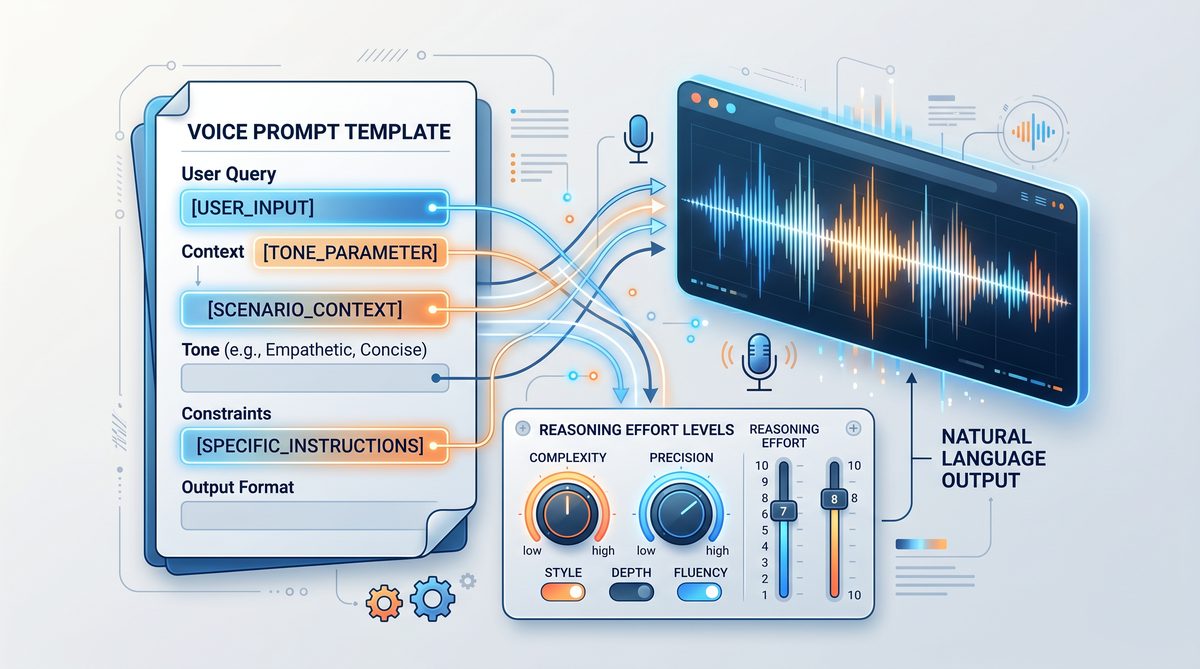
Crafting Effective Prompts for GPT-Realtime-2 Voice Agents: A Comprehensive Guide
Voice AI agents powered by GPT-Realtime-2 represent a significant advancement in conversational technology, offering real-time responses with nuanced understanding and dynamic interaction capabilities. Unlike traditional text-based prompts, voice prompts require specialized design approaches to accommodate the auditory and temporal nature of spoken dialogue. This guide provides an in-depth exploration of crafting effective prompts tailored specifically for GPT-Realtime-2 voice agents, addressing the unique challenges and opportunities presented by voice-first AI interactions.
With the rise of voice-enabled devices and virtual assistants, the demand for highly responsive and natural voice agents has surged. GPT-Realtime-2’s architecture, featuring a vast 128K token context window and adjustable reasoning effort levels, enables developers to create voice agents that not only comprehend complex queries but also maintain engaging, human-like conversations over extended interactions. This comprehensive guide explores foundational concepts, prompt architecture, advanced strategies, and practical examples to empower developers to harness the full potential of GPT-Realtime-2 voice agents.
Why Voice Prompts Differ from Text Prompts
Crafting prompts for voice agents involves fundamentally different considerations compared to text-based interfaces. Voice interactions are inherently ephemeral, linear, and sequential, which means users cannot skim or re-read responses. This places a premium on clarity, pacing, and engagement. Additionally, spoken language includes prosody, intonation, and filler words that contribute to naturalness and listener comfort. GPT-Realtime-2’s voice agents must therefore be tuned not just for accuracy and relevance, but also for conversational flow, tone, and personality that resonate in spoken form.
Unlike text prompts, which allow users to review, pause, or edit inputs and outputs, voice interactions demand immediacy and seamlessness. Users expect the agent to sound natural and approachable, avoiding robotic or overly verbose replies that can cause listener fatigue. Therefore, voice prompt design must consider factors such as sentence length, rhythm, and the strategic use of pauses or emphasis to enhance comprehension.
Furthermore, voice agents often operate in noisy or interruptible environments, necessitating robust error recovery and concise information delivery. The agent’s ability to maintain context over extended conversations is critical, especially given GPT-Realtime-2’s impressive 128K token context window, which enables complex multi-turn dialogues without loss of coherence. This capability allows voice agents to remember details from earlier in the conversation or even prior sessions, enabling personalized and contextually relevant responses.
Another key distinction lies in user expectations around conversational style. Voice users tend to prefer conversational, informal tones that mimic human speech patterns, including the use of contractions, colloquial expressions, and empathetic acknowledgments. Incorporating such elements into prompt design enhances user engagement and satisfaction.
To further illustrate, consider the difference between a text prompt and its voice counterpart:
- Text prompt: “Please provide your account number.”
- Voice prompt: “Could you please tell me your account number? I’ll need it to assist you.”
The voice prompt is longer, more polite, and designed to sound natural when spoken aloud. It anticipates potential user hesitation and encourages a comfortable interaction.
Finally, voice prompts must account for speech recognition limitations and ambiguity in user input. Designing prompts that guide users toward clear, concise responses can reduce recognition errors and improve overall interaction quality.
Challenges Unique to Voice Prompt Design
- Latency Sensitivity: Voice users expect near-instantaneous responses, so prompts must be optimized for brevity and clarity to minimize processing delays.
- Environmental Noise: Background noise can interfere with speech recognition, requiring prompts to be robust and error-tolerant.
- Interruptions and Multi-tasking: Users may interrupt or multitask during interactions, so prompts should be designed to handle partial or fragmented inputs gracefully.
- Memory Management: Maintaining relevant context without overwhelming the user or the system is critical for smooth conversations.
Opportunities Enabled by Voice Prompts
- Emotional Connection: Voice agents can leverage tone and prosody to build rapport and trust.
- Multimodal Integration: Combining voice with visual or tactile feedback can enrich user experiences.
- Personalization: Leveraging context and user data to tailor responses enhances relevance.
- Accessibility: Voice prompts can increase accessibility for users with disabilities or those who prefer hands-free interactions.
Understanding these distinctions is foundational before diving into the technicalities of prompt construction.
System Prompt Architecture for Voice Agents
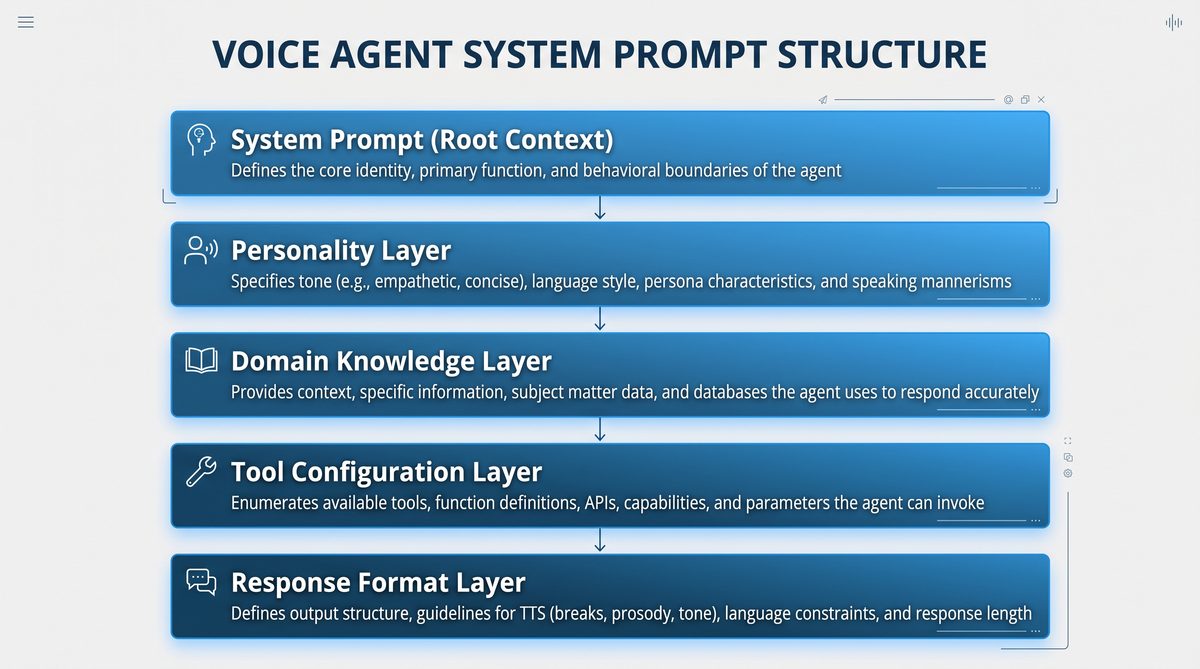
The backbone of any GPT-Realtime-2 voice agent is the system prompt, which sets the foundational personality, domain expertise, and behavioral constraints of the model before user interaction begins. System prompts enable developers to encode agent style, role, and operational parameters, ensuring consistent and predictable responses suited to voice delivery.
System prompts act as the “director” of the AI’s behavior, guiding it on how to interpret inputs, frame responses, and maintain conversational coherence. Crafting a well-structured system prompt is essential to achieve voice outputs that are not only accurate but also engaging and contextually appropriate.
Key Architectural Components of an Effective System Prompt
- Role Definition: Explicitly defining the agent’s role helps the model align its knowledge and tone. For example, “You are a knowledgeable healthcare assistant who speaks clearly and empathetically” primes the model to adopt medical terminology and a compassionate style.
- Behavioral Guidelines: These include instructions on politeness, verbosity, formality, and interaction style. For instance, specifying “Use polite and concise responses” or “Avoid jargon when possible” tailors the agent’s delivery to user expectations.
- Domain Constraints: Limiting responses to relevant content prevents the agent from speculating or deviating off-topic. This is critical in regulated industries such as healthcare or finance.
- Tone and Style: Voice delivery requires attention to pacing, rhythm, and expressive elements. The prompt can instruct the model to “Speak with a calm, reassuring tone” or “Use friendly and informal language.”
- Error Recovery Instructions: Predefining fallback behaviors ensures the agent can gracefully handle misunderstandings or unavailable information, e.g., “If unsure, ask for clarification” or “Apologize and offer alternative assistance.”
- Tool Integration Instructions: If the agent invokes external APIs or services, the system prompt can include narration guidelines to keep users informed during tool calls.
Modular System Prompt Design
To facilitate rapid iteration and domain adaptation, system prompts can be modularized into reusable components:
- Core Personality Module: Defines fundamental traits such as tone, style, and role.
- Domain Module: Contains domain-specific vocabulary, compliance guidelines, and contextual constraints.
- Error Handling Module: Specifies recovery strategies and fallback messages.
- Tool Narration Module: Provides instructions for seamless integration with external tool calls.
- Interaction Flow Module: Manages pacing, preambles, and turn-taking conventions.
By combining these modules dynamically, developers can customize voice agents for diverse applications while maintaining consistency and ease of maintenance.
Best Practices for System Prompt Architecture
- Explicitness: Clearly articulate expectations and constraints to reduce ambiguity in responses.
- Conciseness: Keep instructions focused to avoid overwhelming the model.
- Testing: Continuously test system prompts in real-world scenarios to identify gaps or unintended behaviors.
- Version Control: Maintain versions of system prompts to track changes and facilitate rollback if needed.
- Documentation: Thoroughly document prompt components and their purposes for team collaboration.
Leveraging advanced prompting for AI agents in 2026“>AI voice assistants in practical applications involves crafting system prompts that are both flexible and robust, incorporating domain-specific expertise with conversational smoothness.
Designing Preamble Strategies
Preambles are short filler phrases that the voice agent utters before delivering its main response. They serve multiple purposes:
- Engagement: Capture user attention and signal that the agent is processing or responding.
- Naturalness: Mimic human conversational pauses or acknowledgments.
- Expectation Management: Prepare users for potentially complex or lengthy answers.
Effective preamble design balances brevity with expressiveness. Examples of preambles include:
"Let me check that for you…""Here’s what I found…""That’s a great question. Here’s the information…""One moment while I gather the details…"
Why Preambles Matter in Voice Interactions
Preambles help manage the natural flow of conversation by reducing awkward silences or abrupt transitions. They reassure users that the agent is actively listening and working on their request, which is particularly important when processing complex queries that require longer response times.
Moreover, preambles can be tailored to the agent’s personality and domain to enhance user engagement. For example, a healthcare assistant might say, “Let me carefully review your symptoms,” while a financial advisor might use, “I’m analyzing your portfolio now.”
Strategies for Effective Preamble Design
- Variety: Rotate among several preambles to avoid repetitiveness and maintain conversational freshness.
- Context Sensitivity: Adjust preamble length and tone based on query complexity or user sentiment.
- Timing Coordination: Synchronize preambles with system processes such as tool calls or data retrieval.
- Natural Language Patterns: Use familiar phrases and conversational fillers that sound human rather than scripted.
Dynamic Preamble Example
If query is simple:
  Randomly select from:
    - "Sure, here’s what I found."
    - "Got it, one moment."

If query is complex or requires external data:
  Randomly select from:
    - "Let me check that carefully for you."
    - "This might take a moment, thanks for your patience."
Technical Considerations
Implementing preambles involves configuring the prompt templates or the voice agent’s speech synthesis pipeline to prepend these phrases consistently. Developers should also monitor timing to avoid overlapping audio or unnatural pauses.
Testing user reactions to different preamble styles through A/B testing or user feedback surveys can guide iterative improvements.
Reasoning Effort Selection Guide
GPT-Realtime-2 offers adjustable reasoning effort levels—minimal, low, medium, high, xhigh—which control the depth and computational intensity of the model’s reasoning processes. Selecting the appropriate level is crucial for balancing response quality, latency, and resource usage in voice interactions.
| Reasoning Level | Description | Use Cases | Latency & Resource Impact |
|---|---|---|---|
| Minimal | Fast, surface-level processing with basic comprehension. | Simple queries, greetings, confirmations. | Lowest latency, minimal compute. |
| Low | Basic reasoning with light inference and limited context integration. | Factual questions, direct instructions. | Low latency, low compute. |
| Medium | Moderate reasoning with multi-step inference and context retention. | Complex questions, multi-turn interactions. | Balanced latency and compute. |
| High | Deep reasoning with sophisticated multi-step logic and domain expertise. | Technical consultations, problem-solving. | Higher latency, increased compute. |
| XHigh | Maximum reasoning effort with exhaustive analysis and creativity. | Critical or high-stakes interactions requiring maximum accuracy. | Highest latency, maximum compute. |
Balancing Latency and Quality
Voice interactions are sensitive to response delays, as users expect near-real-time replies. Therefore, selecting reasoning effort levels involves a tradeoff between response depth and speed. For instance, using minimal or low effort for routine queries ensures snappy replies, whereas high or xhigh effort is reserved for complex or critical interactions where accuracy and thoroughness are paramount.
Developers can implement dynamic reasoning effort switching based on query classification, user profile, or conversation context. For example, a voice agent might start with minimal effort during greetings and escalate to medium or high when detailed information is requested.
Examples of Reasoning Effort in Practice
- Minimal: User says, “What’s the weather today?” Agent replies quickly with a brief response.
- Low: User asks, “Set an alarm for 7 AM tomorrow.” Agent confirms and executes command efficiently.
- Medium: User requests, “Can you explain the main points of my recent bank statement?” Agent synthesizes multiple data points and provides a summary.
- High: User seeks advice on troubleshooting a technical issue with detailed logs. Agent performs multi-step reasoning to diagnose.
- XHigh: User requires legal or medical consultation where exhaustive analysis and caution are necessary.
Resource Management Tips
- Monitor compute usage to prevent overload during peak times.
- Cache frequent responses for repeated queries at lower reasoning levels.
- Use asynchronous processing for high reasoning effort tasks, providing interim updates via preambles.
Tone and Personality Configuration Patterns
Voice agents’ success heavily depends on consistent and appealing tone and personality. GPT-Realtime-2 system prompts can embed tone and personality directives that influence word choice, sentence structure, and interaction style.
Establishing a distinctive tone and personality enhances user engagement, brand alignment, and perceived intelligence of the voice agent. These elements contribute to making conversations feel authentic and relatable.
Common Tone Configurations
- Formal: Polished, respectful, suitable for professional contexts.
- Casual: Friendly, conversational, approachable.
- Empathetic: Warm, understanding, supportive.
- Enthusiastic: Energetic, positive, motivating.
- Neutral: Objective, straightforward, fact-based.
Personality Traits and Their Impact
Personality elements define the agent’s character traits such as humor, patience, assertiveness, or optimism. These traits influence how the agent handles different conversational scenarios:
- Humor: Lightens mood and builds rapport but must be used judiciously to avoid misunderstandings.
- Patience: Important in educational or support roles to encourage user participation.
- Assertiveness: Useful in advisory roles to provide clear recommendations.
- Optimism: Boosts motivation and user confidence.
Examples of System Prompt Instructions for Tone and Personality
You are a patient and empathetic medical assistant who speaks in a calm and reassuring tone.You are a knowledgeable financial advisor, formal and precise in your explanations.You are a cheerful and enthusiastic tutor who encourages learners with positive feedback.Technical Considerations for Tone Implementation
While the system prompt guides the model’s language style, voice synthesis engines can complement tone directives by adjusting pitch, speed, and intonation. Coordinating prompt instructions with speech synthesis parameters enhances the overall user experience.
Tips for Tone and Personality Customization
- Align tone with target audience demographics and cultural norms.
- Maintain consistency across all interactions to build trust.
- Test different tone settings with user groups to identify preferred styles.
- Use personality traits to handle edge cases, such as frustration or confusion, with empathy.
Domain-Specific Prompt Templates
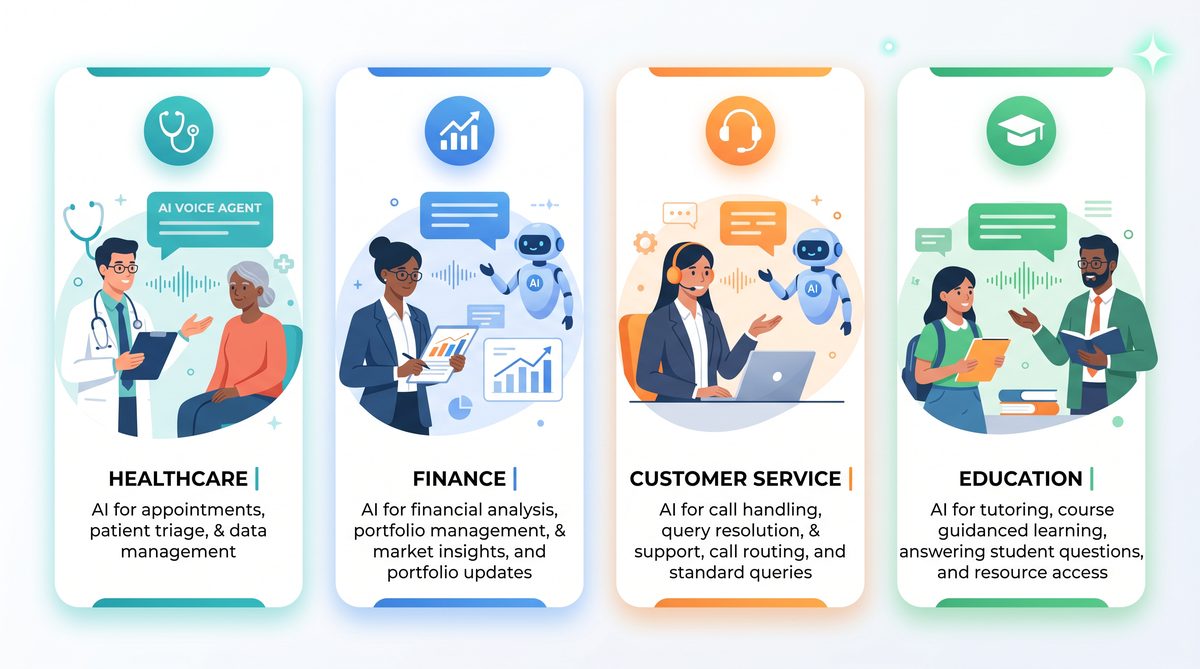
Different industries impose unique requirements on voice agent behavior, terminology, and compliance. GPT-Realtime-2 allows crafting domain-specific prompt templates that contain specialized vocabulary, regulatory disclaimers, and context-aware behaviors.
| Domain | Example System Prompt Snippet | Key Features |
|---|---|---|
| Healthcare |
|
HIPAA compliance hints, empathetic tone, medical terminology, error recovery for misunderstood symptoms. |
| Finance |
|
Regulatory compliance, formal tone, jargon control, risk disclaimers. |
| Customer Service |
|
Politeness, solution-focused responses, escalation instructions. |
| Education |
|
Encouraging tone, simplified explanations, multi-turn question handling. |
Extending Domain-Specific Templates
Beyond basic domain constraints, advanced templates can incorporate:
- Regulatory Compliance: Embed disclaimers, data privacy statements, and usage warnings.
- Terminology Glossaries: Include definitions or preferred terminology to maintain consistency.
- Contextual Behaviors: Customize error recovery and escalation paths based on domain complexity.
- Multi-language Support: Adapt templates for localized dialects and languages.
Example: Healthcare Prompt with Compliance and Empathy
You are a licensed healthcare assistant who provides accurate, evidence-based medical information. Always prioritize patient confidentiality and respond with empathy and patience. Do not offer diagnoses or medical advice beyond your scope. If unsure, recommend consulting a healthcare professional. Include HIPAA compliance reminders when handling personal data.
Benefits of Domain-Specific Templates
- Improved response relevance and accuracy.
- Enhanced user trust through professionalism and compliance.
- Reduced risk of inappropriate or off-topic responses.
- Simplified prompt maintenance and scalability across industries.
Utilizing domain-specific templates significantly improves the agent’s relevance and user trust, especially when combined with GPT-Realtime-2’s better domain understanding and tone control capabilities.
Developers working on domain-centric voice agents should integrate these templates early in prompt design and tailor them iteratively for maximal impact.
More sophisticated prompt design can be explored within the framework of 2026 prompt engineering best practices“>prompt engineering techniques that optimize domain adaptation and response accuracy.
Tool Call Narration Prompts
One of GPT-Realtime-2’s standout features is its ability to perform parallel tool calls with synchronized audio narration, enabling the voice agent to invoke external APIs or services while narrating progress and results to the user.
Effective tool call narration requires prompt patterns that:
- Announce the initiation of a tool call clearly.
- Provide status updates if the tool call is lengthy.
- Describe results in user-friendly terms once data is received.
- Handle tool errors gracefully with fallback responses.
Importance of Tool Call Narration
When an AI agent accesses external services such as databases, payment gateways, or IoT devices, users benefit from transparent communication about ongoing processes. Narration reduces uncertainty and improves perceived responsiveness, especially if the tool call introduces delays.
Sample Narration Prompt Snippet
“I’m now checking your account details. This will just take a moment.”Upon completion:
“I’ve found your recent transactions. Would you like me to summarize them?”Advanced Narration Techniques
- Progress Updates: For long-running tool calls, provide intermediate status reports, e.g., “Still gathering your data, almost done.”
- Conditional Narration: Tailor narration based on tool call results, such as “No recent activity found” or “I encountered an issue retrieving your data.”
- Multi-step Narration: Break down complex tool calls into stages with narration at each step.
- Multi-modal Feedback: Combine voice narration with visual cues or haptic feedback for richer user experience.
Prompt Pattern Example for Tool Call Narration
System Prompt Instructions:
- Before initiating a tool call, say: "I’m now [action description]. This will just take a moment."
- If the tool call takes longer than 3 seconds, say: "Still working on it, thanks for your patience."
- Upon success, summarize results in simple terms.
- If an error occurs, say: "I’m sorry, I couldn’t retrieve that information right now. Would you like to try something else?"
Integration Tips
- Coordinate tool call triggers with prompt generation to avoid overlapping speech.
- Use asynchronous callbacks to update narration dynamically.
- Implement fallback mechanisms in case of tool failure to maintain conversation flow.
Error Recovery Prompt Patterns
Robust error recovery in voice agents is essential to maintain conversational flow and user satisfaction. GPT-Realtime-2 supports recovery behaviors that gracefully handle misunderstandings, incomplete information, or external service failures.
Common error recovery prompt patterns include:
- Clarification Requests: “I’m sorry, could you please rephrase that?”
- Fallback Responses: “I’m having trouble accessing that information right now. Can I help with something else?”
- Escalation Prompts: “I will connect you with a live agent for further assistance.”
- Apologetic Tone: Using empathetic language to acknowledge issues.
Designing Effective Error Recovery
Error recovery is vital in voice interactions due to the higher likelihood of speech recognition errors, ambiguous user inputs, and system failures. The agent must respond in a manner that reassures users and guides them toward successful resolution.
Types of Error Recovery Prompts
- Clarification: When the agent detects uncertainty, it should prompt the user for rephrasing or additional details.
- Fallback: When the agent cannot process a request, it should offer alternative options or redirect the conversation.
- Escalation: For complex or sensitive issues, the agent should provide a pathway to human assistance.
- Apology and Empathy: Acknowledge errors with polite and empathetic language to maintain user trust.
Example Error Recovery Prompt Scripts
Clarification:
"I'm sorry, I didn't quite catch that. Could you please say it again or rephrase?"

Fallback:
"I'm having trouble accessing that information right now. Is there something else I can help you with?"

Escalation:
"This seems like a complex issue. Let me connect you with one of our specialists."

Apology:
"Apologies for the inconvenience. Let's try a different approach."
Implementation Tips
- Incorporate error recovery directives in the system prompt to ensure consistency.
- Detect common failure points such as unrecognized intents or ambiguous slots.
- Use polite and encouraging language to reduce user frustration.
- Log errors and recovery attempts for ongoing improvement.
Context Window Management Strategies
GPT-Realtime-2’s extensive 128K token context window enables the voice agent to retain long conversation histories, supporting nuanced multi-turn interactions and context-aware responses. However, managing this context effectively is critical to avoid information overload or irrelevant memory buildup.
Effective context management ensures that the agent focuses on relevant information, preserves user preferences, and maintains coherent dialogue progression without exhausting computational resources.
Strategies for Context Management
- Selective Memory: Retain only relevant turns, pruning redundant or off-topic content. For example, keep recent user preferences or critical information, discard small talk.
- Summarization: Periodically compress conversation history into concise summaries that capture key points, enabling longer conversations within token limits.
- Context Tagging: Annotate segments with metadata such as speaker role, topic, or urgency to prioritize important information during retrieval.
- Dynamic Windowing: Adjust context length based on conversation complexity and user needs, trimming older or less relevant parts.
- Session Persistence: Store summaries or key data across sessions to provide continuity for returning users.
Example: Context Summarization Workflow
Every 50 turns:
  - Generate a summary of the past conversation.
  - Replace detailed history with summary in context window.
  - Retain recent turns in full detail for immediate context.
Practical Tips for Developers
- Implement programmatic pruning of prompt history before each API call.
- Use hierarchical summarization to maintain both high-level context and detailed recent exchanges.
- Incorporate user-defined context resets or topic shifts to clear irrelevant history.
- Monitor token usage and adjust context window dynamically to optimize latency and cost.
Benefits of Effective Context Management
- Maintains conversational coherence over long sessions.
- Reduces risk of irrelevant or outdated responses.
- Improves user satisfaction through personalized interactions.
- Optimizes computational resources and response times.
Advanced Patterns: Multi-Turn Conversation Design
Designing multi-turn conversations for voice agents requires anticipatory prompting that guides the dialogue naturally across several exchanges. Key patterns include:
- Context Preservation: Use system prompts to maintain persona and conversation state across turns.
- Prompt Chaining: Structure prompts to build upon previous responses and user inputs logically.
- Slot Filling: Prompt the user for missing information incrementally.
- Conditional Branching: Embed instructions for alternative dialogue paths based on user intent.
- Explicit Turn Management: Indicate clearly when the agent expects user input or will continue speaking.
Context Preservation Techniques
Maintaining consistent persona and conversation state prevents the agent from repeating questions or contradicting itself. System prompts can include instructions such as “Remember the user’s preferred language and previous topic” or “Maintain a friendly tone throughout the conversation.”
Prompt Chaining Explained
Prompt chaining involves passing accumulated dialogue history and system instructions to the model at each turn, enabling it to generate contextually appropriate responses. This method leverages GPT-Realtime-2’s large context window to maintain continuity.
Slot Filling in Voice Dialogues
Slot filling is the process of collecting required pieces of information from the user across multiple turns. For example, a travel booking agent might sequentially ask for destination, dates, and preferences. Effective slot filling prompts are polite, concise, and clarify what information is needed next.
Conditional Branching
Embedding conditional logic in system prompts allows the agent to handle varying user intents and conversation paths. For instance, if a user declines an offer, the agent can pivot to alternative suggestions or end the conversation gracefully.
Explicit Turn Management
Clearly signaling turn-taking helps prevent interruptions and confusion. The agent can use phrases like “Please let me know your preferred date” or “I will wait for your response.” This is especially important in voice channels where visual cues are absent.
Example Multi-Turn Conversation Flow
System Prompt:
Maintain a friendly and helpful persona. Ask clarifying questions if user input is incomplete. Confirm information before proceeding.

User: "I want to book a flight."
Agent: "Great! Where would you like to travel to?"
User: "New York."
Agent: "When do you plan to depart?"
User: "Next Friday."
Agent: "Thanks. Do you prefer morning or evening flights?"
User: "Morning."
Agent: "Got it. Booking a morning flight to New York next Friday. Shall I proceed?"
Prompt Testing and Iteration Methodology
Effective prompt design is an iterative process involving rigorous testing and refinement. Recommended methodology includes:
- Define Goals: Specify desired agent behaviors, response quality, and user experience metrics.
- Initial Prompt Drafting: Develop baseline system and user prompt templates.
- Automated Testing: Use scripted dialogues to evaluate response accuracy, latency, and tone consistency.
- User Testing: Conduct live trials with representative users to gather qualitative feedback.
- Analyze Failures: Identify common errors, misunderstandings, or unnatural phrasing.
- Refine Prompts: Adjust preambles, tone instructions, reasoning levels, and error recovery patterns.
- Repeat: Cycle through testing and refinement until performance targets are met.
Automated Testing Techniques
Automated testing involves running predefined conversation scripts and evaluating the agent’s outputs against expected results. Metrics can include:
- Response correctness
- Latency and throughput
- Tone and style adherence (using NLP classifiers)
- Error recovery effectiveness
Tools such as unit test frameworks, conversational simulators, and audio synthesis checkers can facilitate this process.
User Testing Best Practices
- Recruit diverse user groups representing target demographics.
- Monitor real-time interactions and collect feedback via surveys or interviews.
- Observe natural usage patterns and unexpected queries.
- Analyze user satisfaction and frustration points.
Failure Analysis and Prompt Refinement
Systematically categorize failures to identify root causes, such as ambiguous prompts, insufficient context, or inappropriate tone. Use these insights to update prompt instructions, error handling, or reasoning effort parameters.
Continuous Improvement
Post-deployment, monitor live usage data and error logs to detect emerging issues. Implement analytics dashboards and alerts to maintain prompt quality over time.
Complete Example: Building a Customer Service Voice Agent Prompt
Below is a comprehensive example illustrating how to assemble prompt components for a GPT-Realtime-2 customer service voice agent.
System Prompt:
You are a courteous and helpful customer service representative named "Alex". Speak with a friendly and empathetic tone, using phrases such as "Thank you for waiting" and "I’m here to help." Always confirm user requests before taking action. If you do not understand a query, politely ask for clarification. When invoking external tools, narrate the process clearly. Prioritize quick resolution while maintaining professionalism.

Preamble Configuration:
Before each response, say one of the following randomly:
- "Let me check that for you."
- "I’m looking into it now."
- "One moment please."

Reasoning Effort:
Use "Medium" for general inquiries.
Switch to "High" for complex billing or technical questions.

Error Recovery:
If confused, respond with:
"I’m sorry, could you please clarify your request?"

Tool Call Narration:
When accessing account data, say:
"Accessing your account details now."

Context Management:
Retain last 20 user-agent turns.
Summarize earlier conversation every 50 turns.

Sample Interaction:
User: "I want to check my recent charges."
Agent: "Let me check that for you. Accessing your account details now."
[Tool call to billing API]
Agent: "I see three charges in the last month. Would you like me to detail them?"
This example demonstrates the integration of system prompt architecture, preambles, reasoning effort selection, error handling, and tool narration to produce a polished voice agent prompt.
Developers can adapt this template to other domains by modifying tone, terminology, and behavioral rules accordingly.
For more insights into OpenAI’s prompt ecosystem and best practices, consult building a universal prompt optimizer“>ChatGPT prompting resources that detail prompt construction principles applicable to GPT-Realtime-2.
Table Comparing Prompt Strategies Across Reasoning Levels
| Aspect | Minimal | Low | Medium | High | XHigh |
|---|---|---|---|---|---|
| Response Detail | Very brief, surface-level answers | Basic factual responses | Moderate detail with some inference | In-depth, multi-step reasoning | Exhaustive, creative, nuanced explanations |
| Preamble Usage | Minimal or no filler phrases | Simple acknowledgments | Engaging, varied preambles | Context-aware, dynamic preambles | Highly personalized and adaptive preambles |
| Tone Complexity | Neutral | Basic polite | Consistent with domain tone | Rich, personality-driven | Highly nuanced, emotional intelligence |
| Context Handling | Limited to current turn | Short-term memory | Active multi-turn context | Deep long-term context integration | Extensive 128K token history with summaries |
| Error Recovery | Basic fallback | Simple clarifications | Proactive recovery prompts | Empathetic and flexible error handling | Adaptive recovery with escalation paths |
| Tool Call Narration | Minimal or silent | Basic status phrases | Clear, user-friendly narration | Contextual and dynamic narration | Fully integrated with multi-step explanations |
Access 40,000+ AI Prompts for ChatGPT, Claude & Codex — Free!
Subscribe to get instant access to our complete Notion Prompt Library — the largest curated collection of prompts for ChatGPT, Claude, OpenAI Codex, and other leading AI models. Optimized for real-world workflows across coding, research, content creation, and business.
