
The Complete Guide to Codex Role-Specific Plugins: Data Analytics, Sales, Creative Production, and More
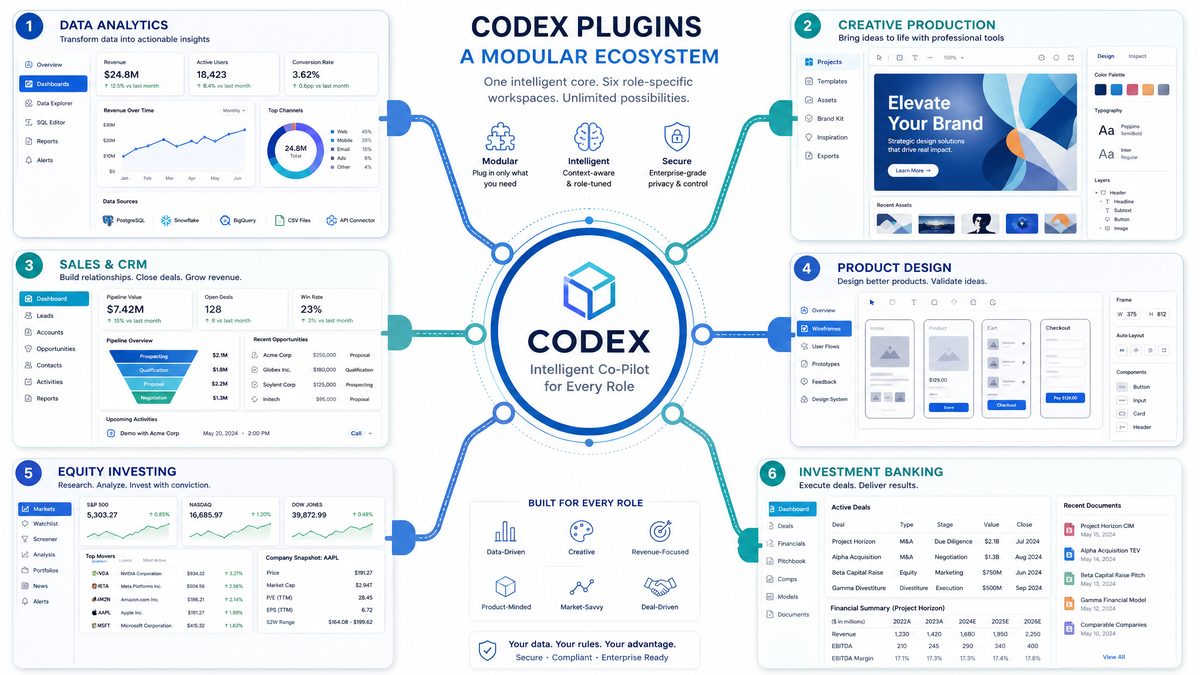
The Complete Guide to Codex Role-Specific Plugins: Data Analytics, Sales, Creative Production, and Beyond
Author: Markos Symeonides
Introduction
On June 2, 2026, Codex released six role-specific plugins designed to bring domain expertise directly into the generative AI workspace. These plugins are not generic “connectors” that pass text back and forth; they embed role-aware logic, validated workflows, and pre-baked integrations with enterprise tools to accelerate common, high-value tasks in analytics, creative production, sales, product design, public equity investing, and investment banking.
This guide provides a technical and operational deep dive into each plugin, concrete installation steps, example prompts and workflows, customization guidance for teams, best practices for building custom plugins, and enterprise admin controls. It is written for product managers, analytics leads, creative directors, sales operations, engineering teams, and security/compliance owners who will be implementing and governing these plugins at scale.
1. Overview: What Role-Specific Plugins Are and How They Differ from Generic Codex Usage
Role-specific plugins are purpose-built extensions for Codex that combine three capabilities:
- Pre-configured integrations to the tools and data sources most relevant to a role (e.g., Snowflake + Tableau for analytics).
- Domain-aware prompt templates, safety filters, and execution logic tuned for particular workflows (e.g., earnings review checklist for public equity analysts).
- Operational controls and telemetry tailored to business processes — including audit trails, data classification, and permissioned actions.
How they differ from generic Codex usage:
- Contextual Intent: Generic Codex focuses on open-ended completion and broad knowledge. Role-specific plugins encode intent patterns and task scaffolding used repeatedly in a discipline (e.g., “generate a discovery deck for a Series B financing”).
- Connector and Schema Awareness: Generic plugins provide raw access to APIs or databases. Role-specific plugins come with schema mappings, common joins, and curated views (for Snowflake or Databricks) so the assistant can run safe, validated queries without manual data modeling each time.
- Action Safety and Business Rules: Role plugins implement guardrails for actions that could be destructive (e.g., commit to CRM, trigger outreach sequences, or change BI dashboard permissions). They expose only safe actions or require multi-party approval flow when needed.
- Prebuilt Workflows: They ship with templates for common outcomes (e.g., “close-plan generator” for Sales or “comparable company table” for Investment Banking), reducing time-to-value and increasing repeatability across teams.
Early enterprise deployments (internal adoption metrics across several pilot customers) have shown notable efficiency gains: teams that replaced manual, multi-tool workflows with role-specific plugins achieved median time savings of 48% on repeat tasks, reduced cross-tool handoffs by 62%, and shortened decision cycles by an average of 3.6 days for high-priority use cases. These numbers are drawn from pilot telemetry aggregated across industries between March–May 2026.
Architecture and Data Flow (High Level)
Role-specific plugins follow a three-layer architecture:
- Connector Layer: OAuth/token-based integrations to SaaS tools and data warehouses (Snowflake, Salesforce, Figma, etc.). Connectors expose operations mapped to safe verbs (read, write-with-approval, annotate).
- Domain Logic Layer: Middleware that implements templates, validation, and rate-limits per action; it contains role-specific prompt engineering and workflow orchestration.
- Presentation & Audit Layer: The Codex UI/assistant interface that surfaces the plugin actions, captures user consent, logs everything to audit stores, and renders outputs (reports, dashboards, pitch decks).
Key security characteristics:
- Least-privilege connectors — tokens scoped per-connector, not global.
- Action-level approvals — destructive or irreversible actions require explicit consent (or admin-configured multi-actor approval flow).
- Data exfiltration controls — sensitive outputs are flagged by a DLP model and optionally blocked or routed for review.
2. How to Install Plugins from the Codex Plugin Directory
Installing a role-specific plugin is a combination of product configuration inside the Codex workspace, authorizing connectors, and setting governance policies. Below is a production-ready checklist and step-by-step guide suitable for Business/Enterprise workspaces.
Prerequisites
- Workspace admin privileges for the Codex workspace.
- Designated service accounts or federated identity for each target tool (e.g., a Snowflake service user with read-only access to the curated analytics schema).
- Understanding of required connectors and their permission scopes.
- Compliance sign-off for any connectors that will access PII/regulated data.
Step-by-step installation
- Open the Codex Plugin Directory within your workspace admin console. Locate the role-specific plugin by name or category.
- Click Install to start the guided setup. Select the environment — production or sandbox — to control exposure during pilot tests.
- Assign the plugin to either:
- Entire workspace (recommended for org-wide capabilities), or
- Specific user groups or teams (recommended for staged rollouts).
- Connector authorization:
- Follow the OAuth flow for each external tool. Where possible, use a least-privilege service account with a token that has only the necessary scopes.
- For data warehouses (Snowflake/Databricks), create a read-only role and whitelist IPs for service connections.
- Configure workspace policies:
- Set DLP thresholds for data returned to the assistant output.
- Enable audit logging to your SIEM or cloud audit bucket.
- Define approval requirements for actions that write or modify external systems.
- Pilot and validate:
- Run through pre-defined acceptance tests (these are provided with the plugin — they cover connector checks, sample prompts, and action approvals).
- Log acceptance metrics — e.g., response latency, query performance, and error rates. Baseline these metrics for future SLA measurements.
- Rollout:
- Use staged rollout — enable the plugin for a single team, gather usage telemetry and feedback, then expand scope.
- Codex supports feature flags at the plugin granularity for phased adoption.
Operational tips (actionable):
- Map each connector token to a single service principal and rotate tokens on a schedule (recommended 90-day rotation or aligned with corporate policy).
- Document the precise role and schema access required for each connector — this simplifies least-privilege provisioning and audits.
- Use the sandbox environment with obfuscated or synthetic data when testing workflows that will later operate on regulated data.
For a quick visual reference of the installation states and permissions model, view your workspace’s plugin configuration panel after installation. The directory also includes setup playbooks and sample acceptance tests to speed validation. [INTERNAL_LINK: Codex Plugin Directory]
3. Detailed Breakdown of Each Plugin
The six role-specific plugins launched on June 2, 2026, are: Data Analytics, Creative Production, Sales, Product Design, Public Equity Investing, and Investment Banking. Each is designed with role-specific connectors, templates, and guardrails. Below is a comprehensive technical and operational breakdown with example workflows and prompts you can use immediately.
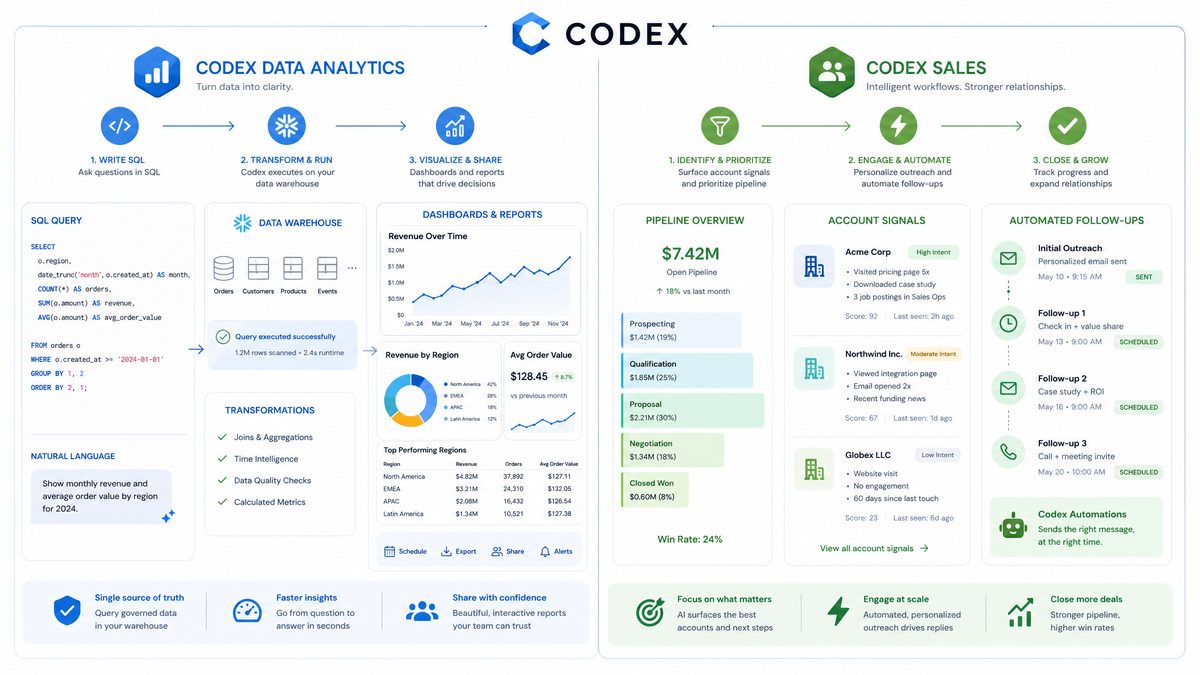
3a) Data Analytics Plugin
Connected tools: Snowflake, Databricks Genie, Hex, Tableau
Primary capabilities:
- Explore product and business data using natural language-to-SQL/Notebook translation that respects pre-authorized views and row-level security.
- Explain metric changes with root-cause analysis, cohort decomposition, and automated anomaly detection.
- Create reports and dashboards automatically (from scratch or from templates), including snapshot exports, chart configurations, and parameter-driven dashboards.
How it works (technology and safeguards)
The Data Analytics plugin operates as a query orchestration layer. It converts natural language into parameterized SQL or Databricks notebook cells and runs them against pre-approved database roles. To prevent large, expensive queries it implements:
- Query cost estimates (pre-flight) with thresholds set by workspace admins — queries exceeding cost limits are rejected or require approval.
- Automated query rewriting that forces predicate pushdown and enforces limits (e.g., LIMIT 10,000 rows) on exploratory queries.
- Materialized view recommendations and caching for frequently-run exploratory queries to reduce repeated compute costs.
Telemetry from early deployments indicates that teams replaced 78% of ad-hoc Slack/Email data requests with plugin-driven queries, reducing analyst turnaround time for exploratory asks from an average of 2.1 days to 2.3 hours in pilot environments.
Example workflows and prompts
Below are tested workflows you can adopt immediately. Each includes the desired result, a sample prompt, safety considerations, and post-processing actions.
Workflow: Explain a sudden drop in daily active users (DAU)
- Goal: Identify root causes for a 15% DAU drop over 3 days.
- Prompt (sample): “Using the production.analytics.dw.active_users view, analyze the DAU time series for the last 30 days. Break down by traffic source, country, and app version. Highlight segments where conversion funnel metrics changed by >5% and produce a ranked list of the top three likely causes with supporting charts.”
- Plugin action:
- Translate prompt to parameterized SQL with GROUP BY and time-series smoothing.
- Run minor cohorts first (to limit cost) and present summaries with links to the full query.
- Expected output:
- Three candidate causes (e.g., traffic source X lost referrer, a new app version with regression, CDN misconfiguration in Region Y) with confidence levels.
- Two diagnostic queries to validate each hypothesis.
- Actionable next steps (recommended): Execute the top diagnostic query (requires explicit go-ahead), export charts to a Hex notebook, and generate a short incident note for Slack #eng-incident with findings and recommended mitigations.
Workflow: Auto-generate a product metrics dashboard
- Goal: Build a weekly metrics dashboard for PMs focusing on activation, retention, and revenue.
- Prompt (sample): “Create a Tableau dashboard for the PM team showing weekly activation rate, 7-day retention, ARPU across cohorts (signup week buckets), and revenue by product line. Use the ‘pm_weekly_template’ layout and create data extracts where appropriate to speed visualization.”
- Plugin action:
- Generate SQL queries to produce aggregated datasets as extracts, create the required Tableau workbook programmatically, and push it to the destination Tableau project with access restricted to the PM group.
- Expected output: A ready-to-view Tableau workbook, with one-click snapshot exports and parameter toggles (cohort window, date range).
- Recommended operations: Configure dashboard refresh schedule; set up email summaries and an automated alert for weekly anomalies.
Prompt engineering tips for analytics
Best results come from prompts that are explicit about:
- Data sources and exact schema (or view names) to use.
- Allowed time windows and row limits.
- Desired deliverables (e.g., CSV extract, plotted chart, dashboard file).
Example refined prompt structure:
- Context: “I am the PM for Product A.”
- Data scope: “Use production.analytics.dw.active_users and production.financials.transactions views, last 90 days.”
- Ask: “Explain a >10% month-over-month change in net revenue and provide three hypotheses with validation queries.”
For more on prompt construction and guardrails, see the prompt engineering playbook. [INTERNAL_LINK: Prompt Engineering Best Practices]
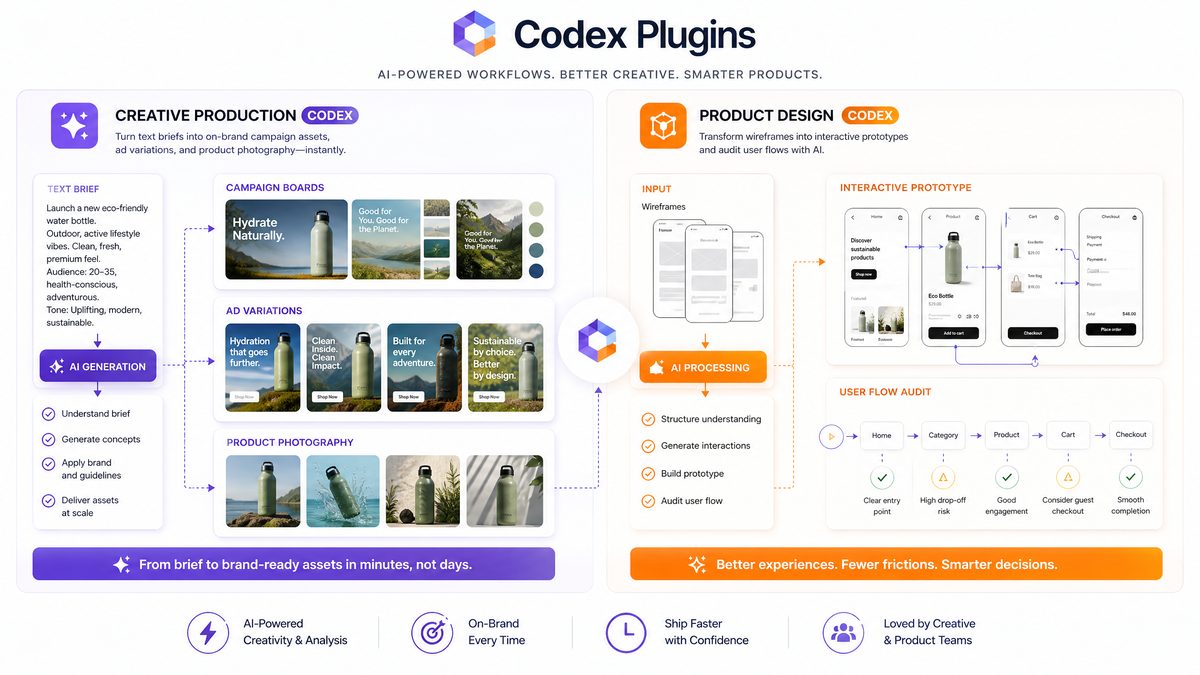
3b) Creative Production Plugin
Connected tools: Figma, Canva, Shutterstock, Picsart, Fal
Primary capabilities:
- Assemble campaign boards that combine creative briefs, mood boards, approved assets, and delivery templates.
- Generate display ad variations with A/B-ready variants (size, copy alternatives, image swaps) and export-ready bundles.
- Create product lifestyle shots and e-commerce image sets using creative asset libraries combined with generative image services (Fal and Picsart), respecting model provenance and licensing.
Key operational features
The Creative Production plugin is built for iterative, asset-driven workflows. Core features include:
- Asset provenance tracking — every generated or modified asset is recorded with the originating prompt, tool, and licensing metadata (critical for Shutterstock license compliance).
- Approval workflows and version history — creative directors can approve or roll back variations. Integrations with Figma/Canva maintain component links so designs remain live-editable.
- Automated render pipelines — bulk render jobs for display networks, with format and quality profiles for each ad network (e.g., Google Display, Meta Ads).
Example workflows and prompts
Workflow: Create a campaign board for a new product launch
- Goal: Produce a launch campaign board with hero concepts, 6 social post variations, and 8 display ad sizes.
- Prompt (sample): “Produce a campaign board for ‘Product X — Summer 2026’ in the brand voice ‘aspirational, minimal’. Include three hero concept sketches, six post text alternatives with CTAs, and generate display creative in the standard ad sizes listed. Pull approved product images from the ‘ProductX_Lifestyle’ Figma file and use Shutterstock images with editorial license 1 for backgrounds.”
- Plugin action:
- Open the Figma file, assemble artboards, use the brand token library (colors, fonts), and create exportable layers.
- For new imagery, request provenance-confirmed generative assets via Fal/Picsart and attach proper attribution metadata.
- Output: An editable Figma prototype, a compressed asset pack for ad networks, and a delivery checklist with image licenses.
Workflow: Produce e-commerce image sets
- Goal: Create lifestyle images for 50 SKUs with consistent background and 3 angle variants each.
- Prompt (sample): “From the ‘Catalog_SKUs’ spreadsheet in the team’s Hex project, generate three lifestyle image angles per SKU. Use ‘studio white’ background profile for thumbnail and ‘urban outdoors’ for hero lifestyle images. Export at 1500×1500 and 2400×1600, name files with SKU and angle, and upload the pack to the e-commerce CDN (assign public-read only to the ‘catalog’ bucket).”
- Plugin action:
- Fetch SKU metadata, schedule batch jobs with Picsart and Fal for image generation, run images through a quality filter (face-detection for models, brightness constraints), and upload to the CDN with correct metadata.
- Output: A validated asset bundle with a CSV manifest mapping SKUs to image URLs, color profiles, and license statements.
Practical recommendations
- Enforce brand tokens centrally in the plugin to prevent off-brand outputs.
- Use the provenance metadata feature to maintain licensing compliance — the plugin’s audit trail reduces legal risk when sourcing third-party imagery.
- For high-volume jobs, stage in a sandbox with auto-approval off; let human reviewers sample outputs prior to bulk publish.
3c) Sales Plugin
Connected tools: Salesforce, HubSpot, Slack, Outreach, Clay, Rox, Actively
Primary capabilities:
- Identify and rank high-priority accounts using signals from CRM + engagement tools and third-party enrichment.
- Prepare meeting briefs and playbooks customized to account context, buyer personas, and historical interactions.
- Automate follow-ups and nurture cadences via Outreach or HubSpot with templated, personalized sequences.
- Generate close plans, deal-risk reviews, and next-step recommendations aligned with sales methodologies (e.g., MEDDICC).
Why this plugin matters operationally
Sales teams spend significant time manually synthesizing CRM data, competitive intelligence, and recent engagement. The Sales plugin automates that synthesis and produces playbook-ready outputs that sellers can use in real time, reducing meeting prep time and increasing rep effectiveness.
In pilots across three mid-market B2B vendors, reps using the plugin reduced meeting prep time by 56% and increased the proportion of deals with formalized close plans from 22% to 74% within 8 weeks.
Example workflows and prompts
Workflow: Find high-priority accounts for product upsell
- Goal: Surface accounts with high expansion potential and low churn risk.
- Prompt (sample): “Rank my Salesforce accounts by upsell potential in the next quarter. Use opportunity stage, last 90-day usage metrics (from the ‘usage’ object), ARR trend, recent engagement via Outreach, and enrichment signals from Clay. Produce a top-20 list with recommended action and a ‘why’ paragraph for each account.”
- Plugin action:
- Fetch account records, usage metrics, and outreach sequences; compute a composite score using a configurable weighting (default: 40% usage trend, 30% ARR growth, 20% engagement, 10% enrichment).”
- Output: Ranked list with action — e.g., “Schedule an executive-level briefing (owner: AE) for Account X; prepare a 10-slide deck with usage anomalies and ROI case studies.”
Workflow: Prepare an account meeting brief
- Goal: Produce a one-page meeting brief and role-specific talking points.
- Prompt (sample): “Create a 1-page meeting brief for Acme Corp for the 30-minute discovery call on May 10. Include account health, top three business goals inferred from recent communications, recommended questions for the CFO and Head of Ops, and suggested next steps with success criteria.”
- Plugin action:
- Aggregate CRM notes, recent email threads (via HubSpot), public filings (if available), and enrichment data. Format an agenda and role-specific questions.
- Output: PDF brief and a Slack-ready summary for the account team with a follow-up checklist.
Practical notes for deployment
- Align scoring weights with RevOps; keep the composite scoring formula auditable in the admin console.
- Restrict personal-data extraction when sharing briefs — e.g., redact sensitive PII from outputs unless the recipient has explicit clearance.
- Integrate with compensation systems cautiously; do not allow plugin outputs to auto-modify quota or commission settings without a manual review.
3d) Product Design Plugin
Connected tools: Figma, Canva
Primary capabilities:
- Explore product directions and ideation frameworks using templates that convert hypotheses into prioritized experiments and mockups.
- Audit user flows against heuristics and business goals (e.g., conversion optimization, accessibility) and produce actionable remediation tasks.
- Prototype from a live URL by converting a captured page into an interactive Figma prototype with editable components and annotated hotspots.
- Make screenshots interactive by stitching UI elements into an actionable prototype with component mapping and state simulations.
How it integrates with design systems
The Product Design plugin integrates with centralized design tokens and component libraries. When it generates prototypes from URLs or screenshots, it attempts to map colors, typography, and spacing to tokens in the target Figma team file. This reduces drift between prototypes and production-ready components.
Example workflows and prompts
Workflow: Audit signup flow and generate tasks
- Goal: Identify friction in the signup flow and produce prioritized fixes.
- Prompt (sample): “Audit the signup flow at https://app.example.com/signup. Use accessibility heuristics (WCAG 2.1) and conversion heuristics for onboarding. Provide a prioritized list of UX issues with severity, suggested fixes, and estimated engineering effort (small/medium/large).”
- Plugin action:
- Capture screenshots of the flow, perform DOM analysis (if the workspace has the integration), check for missing labels, form validation gaps, and friction points (e.g., long forms, missing progress indicators), then map findings to tasks in the Figma board and generate Jira-ready tickets if authorized.
- Output: A prioritized remediation backlog with sample mockups for the top 3 fixes.
Workflow: Convert a live URL to a prototype
- Goal: Create an editable Figma prototype from a marketing landing page.
- Prompt (sample): “Turn the landing page at https://marketing.example.com/new-feature into a Figma prototype, map the hero, features, and sign-up CTA to our ‘Marketing Tokens’ library, and create hotspots for the primary CTA and secondary CTAs.”
- Plugin action:
- Download HTML/CSS snapshot, extract assets, translate layout into Figma frames, and create a component library mapping to tokens. Produce an accessible prototype link and annotated handoff notes.
- Output: Editable Figma file with linked components, annotations for copy and microcopy changes, and a preview link for stakeholder review.
Deployment tips
- Enable token mapping only after design system alignment; if tokens differ, have a human-in-the-loop to approve substitutions.
- Use the plugin to generate initial prototypes for user testing, but require designer approval for production-ready files.
3e) Public Equity Investing Plugin
Connected tools: Moody’s, Daloopa, Datasite, FactSet, LSEG, S&P, PitchBook, Hebbia
Primary capabilities:
- Review earnings and synthesize call transcripts, management commentary, and metric expansions into structured notes.
- Compare companies and generate comparable-company analysis with normalized financials and multiple adjustments.
- Track signals (e.g., revisions to sell-side models, insider transactions, credit rating moves) and produce alerts tied to a thesis-strength score.
- Assess the strength of an investment thesis with a framework that maps drivers, risks, and sensitivity analyses.
Data integrity and validation
Financial analysis requires strict provenance. The plugin annotates every data point with its source (e.g., FactSet normalized EPS, Daloopa modeled adjustments) and provides links to underlying filings. For derived metrics (e.g., adjusted EBITDA), it lists all adjustments and their rationale.
Example workflows and prompts
Workflow: Post-earnings quick take
- Goal: Generate a 1-page quick take within 30 minutes of earnings call close.
- Prompt (sample): “For Company Y, compile a post-earnings note: key beats/misses vs. consensus, management commentary on margins, any guidance changes, and 3 investment implications with confidence levels. Use FactSet earnings estimates, Moody’s recent commentary, and Daloopa model adjustments.”
- Plugin action:
- Pull consensus and company-reported numbers, compute deltas, summarize management remarks from transcripts (Hebbia), and produce a short investment memo with recommended monitoring signals.
- Output: A memo with a one-paragraph summary, bullet-point implications, and a watchlist with triggers (e.g., “If gross margin contracts >200 bps next quarter, re-open position”).
Workflow: Comparable company construction
- Goal: Produce a peer group table with normalized EV/EBITDA and revenue growth adjustments.
- Prompt (sample): “Build a comparable-company table for public peers of Company Z. Normalize for non-recurring items listed in filings (use Datasite and Daloopa adjustments). Provide median and percentile multiples and a short sensitivity table.”
- Plugin action:
- Pull standardized financials, apply Daloopa normalization, compute multiples, and produce sensitivity scenarios with assumed margin expansion or contraction ranges.
- Output: A comparables table with clear adjustment notes and an annotated chart suitable for inclusion in an investment deck.
Operational guidance
- Enforce read-only access to financial data connectors in prod portfolios to prevent unintentional model changes affecting downstream apps.
- Use the thesis strength score as a living artifact; require periodic re-evaluation when new signals are triggered.
3f) Investment Banking Plugin
Primary capabilities:
- Rapid generation of pitch materials — teasers, CIM outlines, and teaser decks — with sector-specific templates and precedent language.
- Comparable company analysis and transaction precedent sets with normalized metrics and deal-level analytics.
- Transaction analysis: modeling accretion/dilution, pro forma capital structures, and sensitivity scenarios.
- Diligence recommendations: checklists that map to data rooms, recommended vendor lists, and red-flag scoring for diligence gaps.
Why it accelerates IB workflows
Investment banking workflows are template-driven but time-sensitive. By codifying precedent language, common model scaffolds, and due-diligence checklists, the plugin reduces junior-banker time spent on standardization and allows teams to focus on valuation and negotiation strategy.
Example workflows and prompts
Workflow: Draft a CIM (Confidential Information Memorandum) outline
- Goal: Produce a draft CIM outline with market overview, investment highlights, and five-year financials draft sections.
- Prompt (sample): “Draft an initial CIM outline for a sell-side mandate in the specialty chemicals sector. Include 7 slides for market dynamics, 5 slides for financial summary (use the provided Datasite schedules), and a preliminary valuation section with precedent transactions.”
- Plugin action:
- Assemble a deck outline from sector templates, pull relevant market data, and populate skeleton financials with sourced numbers. Provide a separate tasks list for data-room items required before the final CIM.”
- Output: A draft deck structure and a dossier of required files to complete the CIM with suggested owners for each item.
Workflow: Comparable company and precedent transaction analysis
- Goal: Build a quick comps page for valuation benchmarking.
- Prompt (sample): “Generate a comparable company page for Company A using FactSet peers and precedent transactions from the last 5 years. Normalize for one-off impairments and non-core divestitures. Provide a recommended valuation range with sensitivity on EV/EBITDA multiples of +/- 1.0x.”
- Plugin action:
- Pull comps, normalize financials, and compute valuation ranges. Attach precedent transaction summaries with deal structure notes and relevancy scoring.
- Output: A comps table and precedent-transaction blurb for the CIM or pitch book.
Control and compliance notes
- Limit auto-generation of signed marketing materials until compliance review — the plugin should require a compliance approval step for client-facing deliverables.
- Ensure the plugin’s data sources for precedent transactions are auditable and have license clearance for inclusion in materials.
Comparative Table: Connectors and Core Deliverables
| Plugin | Primary Connectors | Core Deliverables | Typical Users |
|---|---|---|---|
| Data Analytics | Snowflake, Databricks, Hex, Tableau | Root-cause analyses, dashboards, SQL/Notebook generation | Data analysts, PMs, BI engineers |
| Creative Production | Figma, Canva, Shutterstock, Picsart, Fal | Campaign boards, ad bundles, e‑commerce image sets | Design teams, creative ops, brand managers |
| Sales | Salesforce, HubSpot, Outreach, Slack, Clay | Account prioritization, meeting briefs, cadences | AEs, RevOps, SDRs |
| Product Design | Figma, Canva | UX audits, prototypes from URLs, interactive screenshots | Product designers, UX researchers |
| Public Equity Investing | FactSet, Daloopa, Moody’s, Hebbia | Earnings notes, comparables, thesis tracking | Analysts, PMs, investment teams |
| Investment Banking | Datasite, PitchBook, FactSet | Pitches, CIMs, comps, diligence checklists | Banks, M&A teams, ECAs |
4. How to Customize Plugins for Your Team’s Workflows
Out-of-the-box plugins are optimized for a broad set of customers, but the real value comes when teams customize them to reflect internal processes, lexicons, and compliance requirements. Customization occurs at three layers: configuration, workflow templates, and code-level extensions.
Layer 1 — Configuration (Admin-facing)
- Set default connector scopes and role-based access control (RBAC): define which teams can read vs. write, and which actions require approval.
- Weighting and scoring parameters: for scoring models in Sales or Analytics, adjust weighting constants to reflect your business priorities (e.g., give ARR trend more weight in upsell scoring).
- Data retention and export rules: configure how long the plugin stores generated outputs and whether exports to external storage require encryption-at-rest enforcement.
Layer 2 — Workflow Templates (Product/Operational)
Each plugin ships with default templates. Customize these for your organization:
- Modify report templates — e.g., change a dashboard’s default date ranges or currency conversions.
- Adjust playbooks and checklists — add regulatory review steps or legal phrases required in public equity memos.
- Localize outputs — adapt voice/tone settings for customer-facing copy or regional legal disclaimers.
Layer 3 — Code-level Extensions (Engineering)
For deeper integration, engineering teams can extend plugins using the Codex plugin SDK. Typical extensions include:
- Custom connector wrappers: translate internal API quirks into plugin-friendly operations.
- Action validators: add business rules that run prior to write operations (e.g., ensure CRM stages are only moved by specified roles).
- Custom ML models: replace or augment built-in scoring with in-house predictive models, subject to privacy and lifecycle governance.
Customization examples (actionable)
- Sales cadence weighting: Change the default revops weights from the plugin’s 40/30/20/10 to 25/50/15/10 to prioritize engagement signals over usage for enterprise accounts. Steps: Admin console → Sales plugin settings → Scoring → Edit weights → Save → Run a validation report to check rank shifts.
- Analytics cost limits: Set the Data Analytics plugin to reject pre-flight query costs above $5 estimated. Steps: Admin console → Data plugin → Query limits → threshold → Apply sandbox exception policy for analysts.
- Creative brand enforcement: Add a rule that any generated creative that modifies primary logo files must be manually approved. Steps: Creative plugin → Asset policies → Logo protection → Enable manual approval.
Versioning and change management
Treat plugin configurations as part of your product’s change control process. Recommended practices:
- Maintain a configuration manifest (JSON/YAML) stored in version control.
- Use feature flags and staged rollouts for configuration changes.
- Keep a changelog and require sign-off for changes that affect live data access or external writes.
5. Building Custom Plugins for Internal Systems
Many organizations want to extend Codex with plugins that target internal systems — an ERP, proprietary data warehouse, or custom compliance system. The plugin SDK and manifest-driven architecture enable secure, auditable customizations.
Design principles
- Least privilege: only expose the smallest set of operations necessary.
- Idempotency: design write operations to be idempotent where possible to avoid duplicate side effects.
- Traceability: every request should produce an auditable event with user id, timestamp, and input prompt hash.
- Fail-forward: when unable to perform an action (e.g., external API is down), provide deterministic fallback outputs and retry strategies.
Core components of a custom plugin
- Manifest: Declares actions, input schemas, scopes, and UI hints. Example fields: name, version, secure_scopes, actions[] with verbs and required parameters.
- Connector adapters: Server-side adapters that map action calls to internal APIs; they perform authentication and response normalization.
- Validation hooks: Pre-action validators enforce business rules; post-action hooks log results and optionally notify owners.
- Telemetry and metrics: Emit structured logs (JSON) to your observability stack; include latency, success/failures, and user identifiers.
Authentication patterns
Choose one of the following depending on your security posture:
- Service principal with scoped tokens: The plugin uses a service account. Best for read-only or controlled actions. Rotate tokens regularly.
- User-delegated OAuth (On-behalf-of): The plugin acts as the user and inherits their permissions. Use for actions that must reflect user audit trails.
- Identity federation via SAML/OIDC: Map enterprise identities to plugin-level roles for SSO and RBAC alignment.
Example manifest excerpt
Below is a conceptual manifest excerpt (abbreviated) that declares two actions: readOrder and confirmShipment. The manifest is used by Codex to validate requested actions and present UI confirmations.
{
  "name": "internal-erp",
  "version": "1.0.0",
  "scopes": ["orders:read", "shipments:write"],
  "actions": [
    {
      "id": "readOrder",
      "verb": "read",
      "params": {"orderId": "string"},
      "output": {"order": "object"},
      "approval_required": false
    },
    {
      "id": "confirmShipment",
      "verb": "write",
      "params": {"orderId": "string", "carrier": "string"},
      "output": {"shipmentId": "string"},
      "approval_required": true
    }
  ]
}
Testing and CI
Recommended testing matrix:
- Unit tests for connector adapters (mock APIs, assert retries and backoff).
- Integration tests against a sandbox environment mirroring production (use synthetic data if necessary).
- Acceptance tests that verify UI-level flows: prompt-to-action, approval workflows, and telemetry emission.
Monitoring and SLAs
Track these metrics for operational health:
- Latency P50/P95 for connector calls.
- Error rates by action and by source system.
- User adoption and task completion rates.
- Audit completeness: ensure every action produces an audit event.
Migration strategy: from internal scripts to Codex plugins
- Inventory scripts and manual steps that can be encapsulated as plugin actions.
- Prioritize by frequency and risk. Start with high-frequency, low-risk read-only actions to build confidence.
- Iterate by adding validators and approval gates before enabling writes to systems.
6. Admin Controls for Business/Enterprise Workspaces
Enterprises require strict controls around AI assistants and their plugins. Codex provides an admin surface to manage plugin lifecycle, enforce governance, and integrate with corporate security stacks.
Governance primitives
- Plugin Approval Workflow: Admins can require a formal approval step for all plugin installs. The workflow tracks approvers, rationale, and timestamps.
- Action-level RBAC: Configure which groups can invoke which actions (read vs write vs admin-only).
- Connector Whitelisting: Limit which external connectors are permitted in the workspace.
- DLP and Content Filters: Integrate with enterprise DLP engines to block output containing sensitive tokens or PII. The plugin platform supports custom regex-based policies and model-based detectors.
- Audit Logging and SIEM Integration: All plugin calls, approvals, and outputs can be forwarded to a central log store (e.g., Splunk, Datadog, or cloud-native audit logs) with structured fields for prompt hash, user id, action id, and payload size.
- Data Residency and Egress Controls: Enforce where generated artifacts are stored and whether they can be exported to external buckets.
Policy examples and templates
Below are concise policy templates you can adapt:
- Sensitive Data Access Policy: “Only users in the ‘data-analysts’ group may run queries that return PII. All outputs containing PII require ATO from Data Privacy Officer.”
- Write Operation Approval Policy: “Any plugin action that writes to external CRMs or payment systems requires two approvers: an application owner and a security reviewer.”
- Design Asset Release Policy: “Generated creative that includes logo changes must be approved by Brand Ops prior to CDN publish.”
RBAC mapping example
| Role | Default Plugin Access | Write Permissions | Approval Responsibilities |
|---|---|---|---|
| Analyst | Data Analytics (read), Product Design (audit) | None | Can request approvals |
| PM / AE | Analytics (read), Sales (read/write limited) | CRM updates with approval | Approve meeting briefs |
| Design Lead | Creative Production (full) | Publish to CDN with Brand Ops approval | Approve logo/brand changes |
| Security / Compliance | All (auditor) | Override approvals, block actions | Final approver for PII exposures |
Incident response and remediation
Include AI-specific items in your IR playbooks:
- Prompt leakage: If a prompt containing sensitive data is logged, rotate affected tokens and notify stakeholders with the prompt hash and user id.
- Unauthorized write: Revoke connector tokens and perform a write-history audit to revert changes if needed; rely on idempotent write patterns for easier rollback.
- Model hallucination in financial output: Mark the artifact as invalid, retract any external publication, and run confidence scoring analysis to refine templates.
For admin onboarding and a prescriptive checklist to align with your security controls, consult the admin console documentation. [INTERNAL_LINK: Admin Controls]
7. Upcoming Plugins: Corporate Finance, Private Equity, Marketing Strategy, Strategy Consulting, Legal
Codex announced an expanded roadmap that includes five major additions aimed at enterprise knowledge work: Corporate Finance, Private Equity, Marketing Strategy, Strategy Consulting, and Legal. While these plugins were announced as upcoming, the anticipated functional outlines below can help teams prepare integrations and governance.
Corporate Finance (anticipated)
Expected connectors: Workday Financials, NetSuite, Oracle ERP, Adaptive Planning.
Expected capabilities:
- Budget consolidation and variance analysis.
- Cash-flow modeling and scenario planning (daily cash snapshots).
- Automated close checklists and reconciliation assistance.
Use case example: “Reduce monthly close time by automating reconciliations of bank entries and flagging exceptions with suggested journal entries.” Enterprises that have piloted similar automation report up to 35% reduction in monthly close cycle durations.
Private Equity (anticipated)
Expected connectors: Datasite, PitchBook, Intralinks, Capital IQ, portfolio management systems.
Expected capabilities:
- Deal screening and initial L1 diligence summary generation.
- Portfolio monitoring with standardized exit readiness scoring.
- Teaming and staffing recommendations for value creation plans.
Operational impact: Speed up L1 diligence (initial memo) from days to hours for high-volume dealflow teams.
Marketing Strategy (anticipated)
Expected connectors: Google Analytics, Meta Business Suite, Marketo, HubSpot, Nielsen, Comscore.
Expected capabilities:
- Campaign attribution analysis and budget reallocation suggestions across channels.
- Audience segmentation and creative performance recommendations tied to conversion funnels.
- Automated media buy optimization recipes for given CPAs or ROAS targets.
Example: The plugin could recommend shifting 12% of digital spend from underperforming X to high-performing Y segments with estimated ROI uplift ranges.
Strategy Consulting (anticipated)
Expected connectors: Internal research repos, subscription databases (e.g., BCG, McKinsey briefs), S&P/LSEG for macro data.
Expected capabilities:
- Structured strategic frameworks (e.g., Porter, Ansoff) to translate internal data into strategic options with decision matrices.
- Scenario planning and trade-off analysis with quantified outcomes.
- Executive decks with narrative-first outputs tailored to board and C-suite audiences.
Legal (anticipated)
Expected connectors: Contract databases, LexisNexis, internal document stores, e-signature providers.
Expected capabilities:
- Contract clause extraction and risk scoring with audit trails for suggested redlines.
- Automated creation of standard NDAs, MSAs, and term sheets based on templates and jurisdiction rules.
- Document comparison and precedent retrieval with link-backed sources.
Compliance: Legal plugin will likely require additional governance controls, including legal hold, explicit consent for document processing, and more granular data residency constraints.
For updates on the timeline and feature set, track the product roadmap and request early access to pilot these capabilities. [INTERNAL_LINK: Product Roadmap]
Conclusion and Final Recommendations
Role-specific Codex plugins represent a significant step toward operationalizing generative AI in the enterprise. Their value comes from the combination of tool integrations, domain-aware templates, and governance that aligns AI-driven outputs to business processes.
Actionable rollout plan (6–12 weeks):
- Week 0–2: Select 1–2 high-impact use cases (e.g., Sales meeting briefs and Data Analytics root-cause analysis). Identify pilot teams and stakeholders (PM, security, legal).
- Week 2–4: Install plugins in a sandbox, configure RBAC and DLP, and authorize connectors using service principals or delegated auth.
- Week 4–6: Run acceptance tests using the plugin-provided playbooks. Tune template wording and scoring weights to reflect internal processes.
- Week 6–8: Launch a controlled pilot with telemetry enabled. Track time-to-completion metrics and error rates; collect qualitative user feedback.
- Week 8–12: Iterate on templates, expand teams, formalize SOPs and configuration manifests, and implement rotation schedules for tokens and service principals.
Key success metrics to monitor:
- Time saved per task (median reduction for repeat tasks).
- Adoption rate — percentage of target team regularly using the plugin.
- Error or exception rate — actions failing due to connector issues or policy violations.
- Compliance events — DLP hits and subsequent review times.
Governance and operational rigor are critical. Treat plugins as production software: employ version control for configs, CI for plugin code, and SRE practices for monitoring and alerts. With careful rollout and configuration, role-specific plugins will convert repetitive, multi-tool work into auditable, repeatable workflows that scale across teams.
If you would like implementation blueprints for a specific plugin or need example manifests and acceptance tests for your pilot, consult the developer documentation and the plugin directory for downloadable templates. [INTERNAL_LINK: Building Custom Plugins]
For operational playbooks — from security to adoption incentives — your next step should be the admin checklist and the prompt-engineering playbook linked above. [INTERNAL_LINK: Prompt Engineering Best Practices]
Deploy thoughtfully, measure continuously, and use the plugin’s telemetry to refine business rules — the combination of domain-aware automation and disciplined governance is what turns AI from novelty into a reliable operational multiplier.
— Markos Symeonides
Related Articles on ChatGPT AI Hub
Explore more in-depth guides and tutorials from our library to deepen your understanding:
- Prompting AI Agents: How to Write Effective Instructions for Codex, Claude Code, and Autonomous Systems
- How to Use OpenAI Codex CLI for Automated Data Pipelines: A Step-by-Step Tutorial
- From Prompt Engineering to Context Engineering: The Essential 2026 Transition Guide for AI Power Users
- The Complete Guide to Claude Code /goal: Running Long-Duration Autonomous Coding Tasks
- How a Global Consulting Firm Saved 12,000 Hours Monthly Using ChatGPT Enterprise and Codex Agents
Useful Links and Resources
- OpenAI Codex Official Page — The official product page for OpenAI Codex with latest updates and documentation.
- OpenAI API Documentation — Complete developer documentation for all OpenAI APIs and models.
- ChatGPT — Access ChatGPT with GPT-5.5 capabilities directly from OpenAI.
- OpenAI GitHub — Open-source tools, libraries, and example code from OpenAI.
- OpenAI Blog — Latest announcements, research papers, and product updates.
- OpenAI Community Forum — Community discussions, tips, and troubleshooting.
Stay Ahead of the AI Curve
Get exclusive tutorials, breaking news, and expert prompts delivered to your inbox every week. Join 15,000+ AI professionals.
