
The Complete Guide to Codex Sites: How to Build Hosted Web Applications, Dashboards, and Internal Tools from Plain Language Prompts Without Writing Code

Codex Sites for Business Teams: A Practical Guide to Building Dashboards, Trackers, and Workflow Tools without Engineering Sprints
This guide explains how Codex Sites (launched June 2, 2026) enables business teams—writers, researchers, project managers, financial planners, and operations leads—to convert ideas and processes into hosted interactive web applications with minimal or no engineering effort. It provides detailed use cases, a step-by-step creation walkthrough, sharing and security guidance, and integration patterns with common workplace platforms.
Throughout this document you will find prescriptive instructions, recommended UI patterns, governance suggestions, and templates you can adapt to the specific needs of your team.
Executive Summary and Key Concepts
Codex Sites turns generative outputs from Codex into hosted, interactive web experiences. Rather than receiving static reports or blocks of text, business teams can have Codex assemble an application that contains forms, data visualizations, editable tables, rule-driven logic, and exportable artifacts. The platform is purpose-built to let non-engineers prototype and launch usable tools—dashboards, trackers, and lightweight workflow apps—without waiting for an engineering sprint.
Key concepts you should be familiar with before starting:
- Interactive components: Input fields, dropdowns, tables, charts, and buttons that Codex can wire together to capture and react to user input.
- Data connectors: Lightweight integrations to spreadsheets, databases, and common SaaS apps so the site can read and write data.
- Hosting and routing: Each Codex Site is deployed and given a stable URL; routing and subpages are automatically generated from the site structure Codex produces.
- Permissions and sharing: Role-based access controls, tokenized sharing links, and SSO integration to map site roles to organizational identities.
- Versioning and rollback: Codex Sites maintain a history of changes so non-technical editors can revert or branch visual designs and logic.
Codex Sites was designed for people who know their workflows but not necessarily HTML, CSS, or JavaScript. The platform provides a natural-language-driven authoring loop where you describe the application you want, Codex drafts the page layout, components, and data flows, and you iterate using a combination of visual controls and natural-language prompts.
Typical timelines: a one-screen tracker or dashboard can be created and deployed in under an hour; a multi-page project board or financial planner with integrations and role-based sharing typically takes one to two half-day working sessions with iterative refinement.
Below we will cover specific business use cases and then dive into a pragmatic, step-by-step creation walkthrough.

Before we get to patterns and tactical steps, note that Codex Sites is designed to complement standard workplace tooling rather than replace it. You will commonly connect a Codex Site to existing spreadsheets, project management platforms, data warehouses (via secure connectors), and document repositories so the site becomes a dynamic front-end over your canonical data sources.
Business Use Cases: Concrete Examples and Benefits
This section outlines prioritized use cases for business teams. For each example we describe the problem, how a Codex Site solves it, recommended components, and an example workflow.
1. Financial Planning and Forecasting Dashboards
Problem: Financial planners and FP&A teams need dynamic scenarios, sensitivity analyses, and narrative explanations that non-technical stakeholders can interact with. Engineering teams often take weeks to produce small analytic front-ends.
Codex Site solution: Build a multi-tab financial planner with an assumptions form, a scenario comparison viewer, auto-generated commentary, and downloadable outputs for board decks. Codex can create input widgets (numeric inputs, sliders, toggles), charts (time-series, waterfall, variance), and a narrative panel that drafts a written summary of scenario differences.
Recommended components and data model:
- Assumptions panel: sliders and number fields bound to a “scenario” object.
- Scenario library: a selectable list of saved scenario objects with a “clone and modify” button.
- Charts: always refresh on assumption change; show base vs. scenario lines and shaded confidence intervals.
- Auto-generated narrative: natural-language summary updated on save, with editable text that the user can refine.
- Export: one-click to PDF or a CSV of model outputs.
Example workflow: a planner creates a baseline scenario, duplicates it, adjusts assumptions, and triggers Codex to generate a five-paragraph deck summary. The deck is refined in-line, exported, and shared with executives via a permissioned view.
2. Project Boards and Lightweight PM Tools
Problem: Project managers need flexible boards, roadmaps, and custom workflows that reflect organization-specific stages and handoffs. Building bespoke PM tools typically requires engineering time or expensive third-party customization.
Codex Site solution: Quickly create a configurable project board with custom stages, rules for stage transitions, an integrated timeline view, and automated status summaries. Codex can scaffold templates such as “product launch,” “content production,” and “research sprint,” each with pre-populated task structures and success metrics.
Recommended components:
- Kanban board with drag-and-drop cards that support rich metadata (owner, priority, due date, tags).
- Rules engine panel where PMs can write simple conditional logic in natural language (e.g., “When a design task is moved to Review, notify the Design Lead and set due date +3 days”).
- Timeline view for milestone alignment.
- Status digest: auto-generated weekly emails and a one-click “snapshot” report for stakeholders.
Example workflow: PMs instantiate a “research sprint” template, assign owners, and publish the board. Stakeholders can subscribe to filtered views. As cards transition, the rules engine triggers notifications and updates an integrated work log.
3. Research Trackers and Knowledge Work Tools
Problem: Research teams juggle sources, notes, hypotheses, and evidence. They need a lightweight interface to collect, tag, and synthesize findings, with the ability to generate literature reviews and executive summaries.
Codex Site solution: Build a researcher workspace with an import pipeline for PDFs and links, a meta-data capture form for notes, a tag-based discovery interface, and a synthesis pane where Codex drafts summaries and suggested next steps. Integration with document stores and reference managers ensures provenance and citation accuracy.
Suggested components:
- Import uploader with automated OCR and metadata extraction.
- Notes database with tags, status (unverified, verified, deprecated), and evidence links.
- Synthesis view where Codex proposes outlines, draft abstracts, and gap analyses.
- Reviewer flow where subject matter experts can comment and accept changes.
Example workflow: A researcher uploads a set of articles, Codex extracts abstracts and populates a candidate evidence table, and the team runs a weekly synthesis to produce a 1–2 page summary for leadership.
4. Sales and Customer Success Trackers
Problem: Sales and CS teams need shared trackers for deals, renewals, and customer health that embed playbooks, escalation paths, and automated outreach templates.
Codex Site solution: Create a customer 360 tracker with an account timeline, playbook triggers tied to health metrics, and integrated email/SMS templates. Non-engineers can author and customize playbooks in the interface and publish them to roles with limited editing rights.
5. Data Visualizers and Embedded Reports
Problem: Stakeholders require tailored visualizations built from internal data that are not easily produced by standard BI tools without custom queries and dashboards.
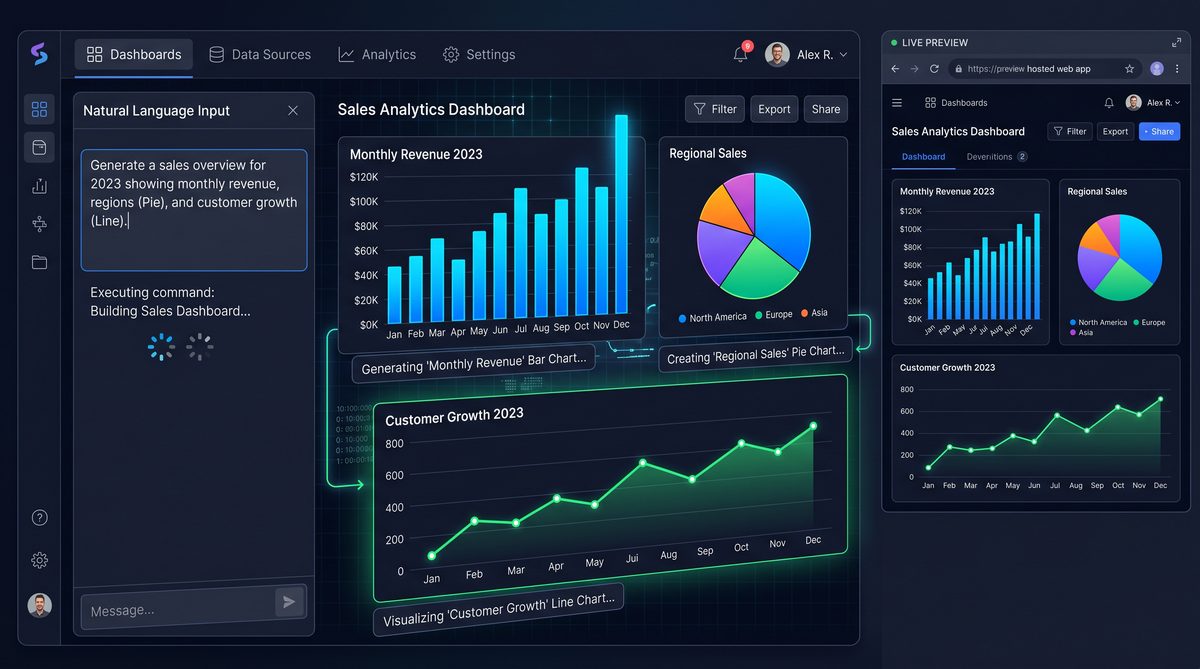
Codex Site solution: Author an interactive data explorer that can query your canonical data source, provide predefined filters and slicers, and produce exportable charts and tables. Codex can generate natural-language explanations for patterns detected in the data and propose follow-up queries.
Across these use cases, the common benefits are speed, empowerment of domain experts, and reduced dependency on engineering cycles. Codex Sites is not intended to replace core engineering work for mission-critical systems; instead, it is intended as a pragmatic layer for rapid prototyping, internal tooling, and workflow automation that can later be hardened if needed.
Step-by-Step Walkthrough: From Idea to Deployed Site
This section provides an actionable, step-by-step approach that a non-engineering team can use to create a Codex Site. We’ll use a project board for a marketing campaign as a running example, but the steps apply to dashboards, planners, and trackers.
Phase 0: Pre-flight — Define Goals, Metrics, and Stakeholders
Before you open Codex Sites, align on the following:
- Primary purpose: Is this a collaborative board, a single-user planner, or an embedded report for stakeholders?
- Success metrics: time saved per week, reduced meeting count, improved forecast accuracy, or faster approvals.
- Data sources: spreadsheets, CRMs, internal databases, or third-party APIs you need to read from or write to.
- Roles and permissions: who needs edit, comment, view-only, or admin privileges.
Document these items in a two-page brief that will guide the authoring session. This brief improves the quality of initial drafts and reduces iteration cycles.
Phase 1: Launch and Natural-Language Scaffold
1) Open Codex Sites and create a new site. Select a template that closely matches your intended app or start from scratch.
2) Provide a natural-language prompt describing the application. Example prompt: “Create a marketing campaign project board with columns: Backlog, Ready, In Progress, Review, and Done. Each card should include fields: owner, priority, due date, budget, status notes, and links to creative assets. Add a timeline view and an automated weekly summary of open high-priority tasks.”
3) Codex will generate a draft site that includes page layout, components, and a preliminary data schema. Review the draft and use inline edits or prompts to refine: “Add a field called ‘impact’ with options High/Medium/Low”, or “Make the weekly summary include count of blocked tasks and overdue items.”
Phase 2: Bind Data and Configure Connectors
Codex Sites supports binding components to data sources in two ways: using an embedded site database for rapid prototyping or connecting to external sources (Google Sheets, Excel on OneDrive, Airtable, internal REST endpoints). For a prototype use the embedded store; for production, configure connectors.
Practical steps:
- To bind to a spreadsheet, use the “Connect data” action and select your source. Provide authorization via the guided OAuth flow.
- Map columns to fields in the site schema. Codex will suggest mappings automatically; confirm or edit as needed.
- For write-back, designate which components can alter data. For instance, allow only managers to change budget fields while creators can edit status notes.
- Test bindings by creating a few rows and verifying that views refresh in real time.
Phase 3: Add Rules and Automations
Automations are defined in a natural-language rule editor and then compiled into executable triggers. Suggested syntax is plain English with parameterization: “When a card is moved to Review, set status = ‘In Review’ and notify the card owner via email. If due date is in the past, set priority = ‘High’.”
Best practices:
- Start with idempotent automations (no destructive actions) until you confirm behavior.
- Use conditions to avoid noisy notifications (e.g., only notify for high-impact items).
- Leverage scheduled automations for periodic digest emails or data syncs.
Phase 4: Iterate on UX and Narrative Output
Codex Sites natively supports a narrative component—an editable text area where Codex drafts summaries, meeting notes, and suggested next steps based on the site data. Use this to accelerate stakeholder communications:
- Draft an executive summary: “Show top 3 blockers and suggested owners for resolution.”
- Auto-generate meeting agendas from the current board state.
- Allow the narrative field to be exported as a PDF for distribution.
Phase 5: Test, Publish, and Invite
Testing checklist:
- Data integrity: verify reads/writes and connector permissions.
- Role enforcement: confirm that view-only users cannot edit protected fields.
- Responsiveness: test the site on desktops and tablets; Codex Sites handle layout adjustments automatically, but confirm complex tables behave as expected.
- Automations: verify triggers fire only when expected and that rate limits are honored for external APIs.
Publishing:
- Choose a URL and a privacy default: private (organization-only), team-shared (via link restriction), or public with tokenized access.
- Configure SSO and user groups if available in your workspace. Assign site-specific roles aligned with your earlier stakeholder mapping.
- Hit “Publish” and share the site link with stakeholders. Use the built-in onboarding prompt to guide first-time visitors.
Phase 6: Maintain and Evolve
After publishing, track site usage metrics provided by Codex Sites (visits, edits, automated run frequency). Establish a lightweight cadence for updates: weekly for active boards, biweekly for dashboards, and monthly for templates. Use versioning to try experimental changes: branch the site, test with a subset of users, then merge successful updates.
Integrating Codex Sites with Standard Workspaces and Tools
One of the strengths of Codex Sites is its flexible integration model. It can function as a front-end to existing data sources and as an orchestrator that triggers external actions. Below are recommended patterns for common workplace systems.
Spreadsheets as a Primary Source
Use spreadsheets for rapid prototyping. Connect a Google Sheet or Excel workbook and let Codex Sites read and write rows. For teams that are comfortable with Sheets but need better UI and automation, a Codex Site can be the canonical interface while the spreadsheet remains the canonical store.
Design tip: establish a stable header row schema and hide internal columns you don’t want casual editors to change. Use the site to expose only the fields that matter for the workflow.
Project Management and Issue Trackers
For teams that use Jira, Asana, or Trello, Codex Sites can either embed filtered views or act as a complementary organizer. Use connectors to pull data and map platform-specific fields to the site’s schema. Automations can create or update tickets as tasks progress in the site.
Example: when a project board card reaches “Ready for Dev” in the Codex Site, an integration can open a Jira ticket with pre-populated description and attachments.
Data Warehouses and BI Tools
For data visualizers that need canonical metrics, connect Codex Sites to an analytics database or a BI tool (as a read-only source). Codex can generate parameterized queries or use pre-saved views. Ensure queries are optimized to avoid long-running fetches—consider materializing intermediate results or using cached aggregations for dashboard performance.
Email, Messaging, and Notifications
Use integrations with email and messaging platforms to deliver automated summaries, alerts, and approvals. Codex Sites supports templated messages that include dynamic content from the site. Use conditional logic to prevent notification fatigue—for example, only notify when an item becomes overdue or when priority escalates.
Document Stores and Knowledge Bases
Codex Sites can write synthesized narratives and meeting notes back to document stores (Google Drive, SharePoint, Confluence). This preserves a document-based audit trail while letting the site remain the active collaborative interface. For research teams, export citation-annotated summaries directly into your knowledge repository.
Extending with Custom APIs
When a required integration is not available out of the box, teams can use the Codex Sites custom connector model to add REST endpoints. For security, register a dedicated service account and restrict endpoints to specific operations. Codex Sites allows designers to map endpoint inputs and outputs to site components without writing client code.
For teams already using Codex to streamline research and writing workflows, integrate the site with your internal documentation and training. The internal article
For a deeper exploration of this topic, our comprehensive analysis on Codex for Knowledge Work: How OpenAI’s Productivity Platform Is Transforming Non-Technical Roles with AI-Powered Research, Analysis, and Automation provides detailed implementation strategies, real-world case studies, and actionable frameworks that complement the concepts discussed in this section.
Access 40,000+ AI Prompts for ChatGPT, Claude & Codex — Free!
Subscribe to get instant access to our complete Notion Prompt Library — the largest curated collection of prompts for ChatGPT, Claude, OpenAI Codex, and other leading AI models. Optimized for real-world workflows across coding, research, content creation, and business.
provides context on how to structure content-centric workflows so Codex Sites becomes an interactive hub for knowledge workers; it explains how Codex generates summaries, links evidence to claims, and designs ingestion pipelines for documents—content which you can then surface, edit, and publish through a Codex Site.
When you need to connect external SaaS products or data sources at scale, explore platform-specific connector libraries described in
For a deeper exploration of this topic, our comprehensive analysis on How to Set Up ChatGPT Connectors for Automated Workflows: Integrating Slack, Google Drive, Jira, and 20+ Third-Party Apps with Scheduled Tasks provides detailed implementation strategies, real-world case studies, and actionable frameworks that complement the concepts discussed in this section.
. That documentation explains connector best practices, authenticated flows, and recommended patterns for mapping organizational roles to connector scopes. Combining Codex Sites with those connector patterns enables teams to orchestrate data flows without building a custom integration stack.
Templates, Design Patterns, and Component Library
Codex Sites includes a component library optimized for business workflows. Understanding patterns helps non-designers create robust, usable apps quickly.
Core Components
- Record Table: Editable, filterable spreadsheet-like component with inline editing, sorting, and bulk actions.
- Card Grid / Kanban: Visual task cards with drag-and-drop and customizable metadata fields.
- Form Builder: Create forms that validate input and trigger automations on submit.
- Chart Widgets: Time-series, bar, pie, and waterfall charts with linked filters.
- Rich Text Narrative: Auto-complete-enabled editor where Codex drafts content and users refine it.
- Connector Panel: Visual mapping interface for binding to external data.
UX Patterns
- Progressive Disclosure: Start with a simple default view and reveal advanced controls in a collapsible panel.
- Template-First: Provide pre-configured templates for common jobs to speed adoption and standardize practice.
- Contextual Help: Embed short help texts or example inputs directly in forms to reduce support overhead.
- Guardrails for Data Edits: Require comment justification for critical field edits and capture change reason in audit logs.
Reusable Patterns
Design a “control center” page for each site that gives an at-a-glance status: key metrics, recently updated items, and pending approvals. Combine this with a “data dictionary” subpage that documents the schema and gives contributors a canonical reference.
Template Library Suggestions
Start with a core set of templates for your organization:
- Campaign planning board
- Quarterly business review dashboard
- Research intake and synthesis workspace
- Customer health tracker
- Financial scenario planner
Maintain these templates centrally and require template registration to prevent unregulated divergence across teams.
Governance, Scaling, and Organizational Adoption
For effective adoption at scale, align five organizational levers: ownership, templates, training, metrics, and lifecycle management.
Ownership and Centers of Excellence
Create a small Center of Excellence (CoE) composed of product ops, security, and a few power users. The CoE curates templates, reviews connector approvals, and acts as an escalation point for governance questions.
Training and Onboarding
Adopt a “teach the teach” model: train a cohort of champions who then run short workshops for their teams. Provide bite-sized materials: 30-minute hands-on sessions and a one-page checklist for launching a site.
Adoption Metrics
Track metrics aligned with your success criteria: time-to-deploy for new sites, average weekly active users, number of automation runs, and percentage of sites connected to approved data sources. These metrics will help you quantify ROI and identify areas requiring additional support.
Lifecycle Management
Implement a lifecycle policy where sites are reviewed periodically. Archive or decommission sites that are inactive beyond an agreed threshold. This reduces surface area for security risk and keeps template libraries relevant.
Community Practices
Encourage a community forum where teams share templates and lessons learned. Highlight high-impact sites in monthly operations reviews and offer recognition to teams that standardize effective workflows using Codex Sites.
Practical Best Practices and Anti-Patterns
Best Practices
- Start with a narrow scope: build one high-value page rather than a sprawling multipage app on the first try.
- Use templates to accelerate and standardize workflows.
- Apply least-privilege access for connectors and data writes.
- Leverage the narrative component to make outputs consumable for non-technical stakeholders.
- Test automations in a staging environment or with safe conditions before production roll-out.
Anti-Patterns to Avoid
- Over-automation: Automating every event leads to notification fatigue and brittle logic. Prioritize the most impactful automations first.
- Using Codex Sites as a data lake: Avoid persisting large volumes of raw data in the site’s embedded store; use it to surface curated views and connect to canonical sources for heavy storage needs.
- Uncontrolled template proliferation: Without governance, dozens of slight-template variations create maintenance burden and data inconsistency.
Troubleshooting, FAQ, and Common Gotchas
Common Questions
Q: How do I rollback a change a non-technical user accidentally made?
A: Use the site’s version history to identify the last good state and restore it. Versioning includes annotations for automated changes, making it easy to filter for manual edits versus automation-triggered updates.
Q: What if my connector authorization expires?
A: Codex Sites indicates expired connectors on the site admin page. Reauthorization requires a user with access to the connector’s credentials or a service account. Consider setting up monitoring to alert owners before expiry.
Q: How do I prevent accidental data deletions?
A: Enable soft-delete on critical tables and require a comment for permanent deletion. Also, limit delete permissions to Owners and Admins only.
Q: How does Codex Sites handle concurrency when multiple users edit the same record?
A: The platform uses optimistic concurrency with conflict detection. When a conflict is detected, editors are presented with a merge view that shows differences and allows them to accept or reject changes.
Troubleshooting Checklist
- Verify connector credentials and scopes.
- Check user role permissions for access-related issues.
- Review automation logs for failed runs and examine error messages.
- Examine the site audit trail for recent changes that could explain unexpected behavior.
Advanced Topics: Scaling, Extensibility, and Developer Handoff
For teams that evolve a Codex Site into a long-lived application, there are several ways to harden and extend the toolset while still preserving the low-code benefits for business owners.
Moving from Prototype to Production
- Refactor data models: Migrate from embedded storage to a production-grade data store with strong schema validation.
- Introduce stricter RBAC: Implement role mappings to group membership controlled by your identity provider.
- Externalize secrets management: Use a vault for connector credentials and rotate keys on a schedule.
Developer Handoff and Code Export
If engineering needs to own scaling beyond what Codex Sites offers, the platform supports an export workflow that provides a machine-readable site specification, UI component map, and data schema. Engineers can then reimplement the front-end or embed the exported site in a larger application while preserving the original logic and data contracts.
Custom Components and Advanced Logic
In scenarios requiring advanced visualizations or complex client-side logic, engineering teams can create custom components that register with the site. Codex Sites exposes a lightweight component API so developers can implement custom widgets and still be managed through the visual editor by non-engineers.
Appendix: Templates, Checklist, and Example Prompts
Quick Launch Checklist
- Define purpose and stakeholders.
- Select a template or write an initial prompt.
- Connect data sources and map fields.
- Create initial automations; run in safe mode.
- Set roles and publish with a short onboarding guide.
- Monitor usage and iterate weekly for the first month.
Example Prompts
Project Board Prompt: “Create a project board for a cross-functional campaign with columns Backlog, Ready, In Progress, Review, Done. Each card should have fields: campaign name, owner, priority, budget, links to assets, and estimated effort in person-days. Include a timeline view and automation to notify the owner 48 hours before the due date.”
Financial Planner Prompt: “Build a financial scenario planner with assumptions for revenue growth, churn, operating expenses, and capital expenditure. Add an assumptions panel with sliders, a scenario library, and a ‘Compare Scenarios’ page that shows side-by-side charts and a written summary of differences.”
Template Example: Research Synthesis Workspace
- Import: PDF and link uploader with automated metadata extraction.
- Evidence table: rows for each item with tags, confidence score, and short notes.
- Synthesis pane: prompts to generate a structured literature review outline and a 1-page executive summary.
- Reviewer flow: comment threads and accept/reject actions.
Conclusion: Practical Next Steps for Business Teams
Codex Sites provides a pragmatic bridge between domain expertise and working software. For business teams seeking to reduce dependencies on engineering, the platform empowers fast iteration, live collaboration, and embedded intelligence to scale internal tooling.
Suggested next steps for teams:
- Run a one-hour pilot: pick a narrow use case and follow the six-phase creation walkthrough in a single working session.
- Form a small CoE and curate three templates to drive consistent adoption.
- Integrate with one canonical data source and operationalize secure connectors as part of the template approval workflow.
In combination with existing practices and connectors, Codex Sites enables business teams to take ownership of their workflows and rapidly deliver tools that previously required engineering sprints. By following the governance and pattern guidance in this document, teams can unlock sustained productivity gains with controlled risk and predictable outcomes.
