
The Complete Guide to Codex Approval Policies — Controlling AI Autonomy in Enterprise Environments
Codex Approval Policies for Enterprise AI Governance: A Complete Guide
Rapid adoption of AI in the enterprise has pushed teams to define crisp, enforceable guardrails that preserve agility without sacrificing safety, privacy, or cost controls. Codex Approval Policies deliver those guardrails as first-class, auditable controls that unify human-in-the-loop approvals, automated gating, tool authentication, and usage governance across agents, applications, and workspaces.
This guide is a deep technical reference to help architects, platform engineers, and security leaders operationalize Codex Approval Policies at scale. It covers the mechanics of approval modes and policy configuration, secure authentication flows for MCP tools and app-server–provided credentials, workspace-level enforcement, per-app access controls for Computer Use, multi-agent concurrency governance, usage credit management, monitoring and auditing, and end-to-end implementation patterns for teams of every size.
Wherever possible, we include implementation examples, event schemas, policy patterns, and operational playbooks you can adapt directly. For conceptual overviews of risk frameworks and lifecycle management, see
For a deeper exploration of this topic, our comprehensive article on How AI Coding Agents Are Triggering Enterprise Security Alerts: What IT Teams Need to Know About Claude Code, Codex, and Cursor provides detailed implementation strategies, real-world benchmarks, and step-by-step workflows that complement the techniques discussed in this section.
. For SDK specifics and libraries, see
For a deeper exploration of this topic, our comprehensive article on The Valyu Deep Research Playbook — Connecting Codex to Real-World Data provides detailed implementation strategies, real-world benchmarks, and step-by-step workflows that complement the techniques discussed in this section.
. Security leaders may also reference
For a deeper exploration of this topic, our comprehensive article on How AI Coding Agents Are Triggering Enterprise Security Alerts: What IT Teams Need to Know About Claude Code, Codex, and Cursor provides detailed implementation strategies, real-world benchmarks, and step-by-step workflows that complement the techniques discussed in this section.
to cross-check policy design with enterprise control catalogs.
1. Overview: What Codex Approval Policies Enforce
Codex Approval Policies codify when and how agents and apps can perform sensitive actions, the circumstances under which users must review or confirm those actions, and how credentials flow from secure stores into tools at runtime. They are enforced consistently at the workspace level, support per-app access controls for Computer Use, and integrate natively with usage controls and audit logging.
- Human-in-the-loop approvals: Policy-driven prompts for read, write, and system actions, with new modes that distinguish declared read-only actions from write operations.
- Granular scope: Policies can apply to a workspace, an app, a specific agent profile, or a particular tool capability, with precedence rules and defaults.
- Runtime authentication: MCP tools can now request authentication interactively without an experimental opt-in, and app-server hosts can provide Codex authentication at runtime via short-lived credentials.
- Cost and usage governance: Usage-limit reset credits show type and expiration, and Ultra reasoning warns when high multi-agent concurrency could increase usage quickly.
- Security UX: Device-code login warnings explain how to recognize phishing attempts during out-of-band authentication flows.
- Computer Use controls: Per-app access controls define permitted system apps (e.g., browser, file, terminal) and their allowed capabilities.
- Workspace-level enforcement: Guardrails propagate reliably across projects and teams while enabling narrowly scoped exceptions and delegated approvals.
2. Understanding Approval Modes
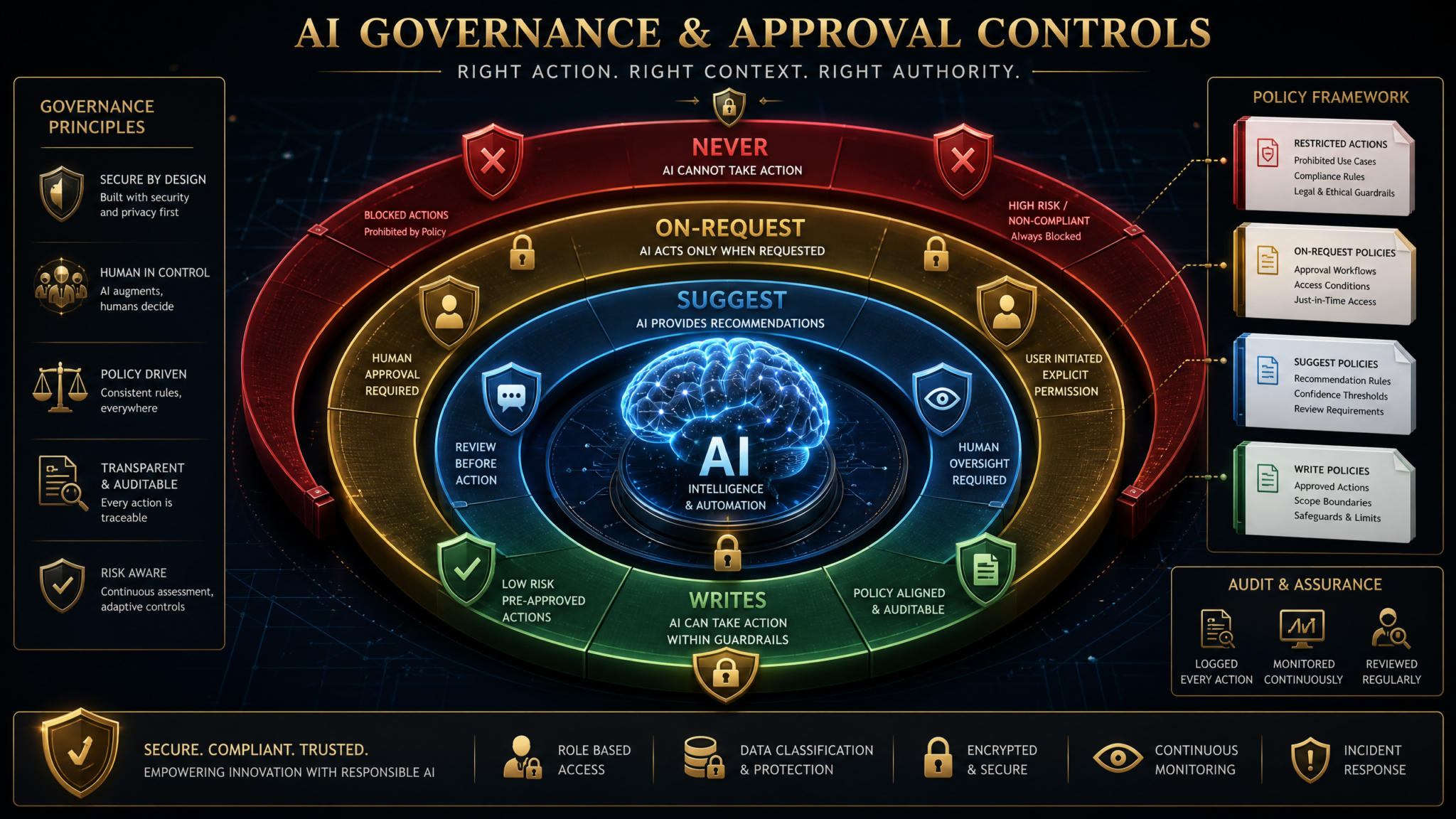
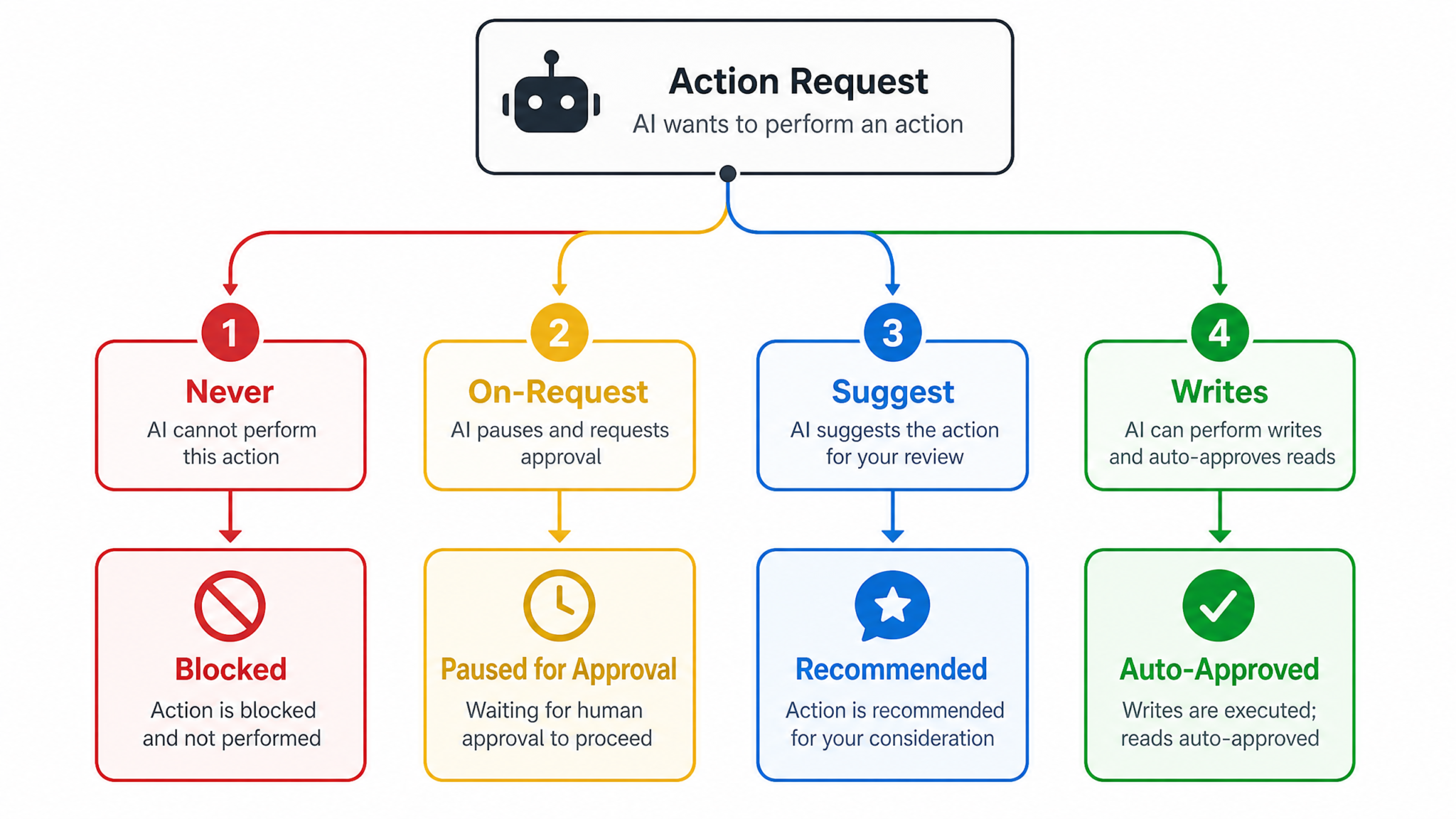
The approval policy parameter controls when user approval is required for specific categories of actions. Codex defines four modes you can attach to a capability or policy scope:
- never: No user approval is required; the agent executes the action autonomously.
- on-request: Approval is only required when the agent explicitly asks for it (e.g., a tool or chain requests an elevated action).
- suggest: The system proactively suggests the user review an action before proceeding, but the agent may continue autonomously if the user takes no action within a configured timeout or if policy deems the risk low.
- writes (new): Declared read-only actions proceed without approval, while any action inferred or declared as write (or state-changing) triggers a user approval prompt.
In practice, you apply a mode to a specific action family (e.g., “filesystem.read” or “calendar.write”) or to an app/agent as a default, with overrides for certain tools. The new writes mode is designed for teams that want low-friction read-only exploration—such as data inspection or browsing—while gatekeeping mutating operations like file writes, database updates, or API POSTs.
2.1 Action Semantics: Read vs. Write
Codex normalizes actions into read (no state change), write (state change, including create/update/delete), and system (configuration, identity, or cross-account changes). The writes mode treats declared read-only actions as implicitly approved under policy, while requiring human-in-the-loop review for anything mutating or systemic. Tool manifests and SDK bindings should accurately label actions; mislabeling is auditable and can be blocked by policy.
2.2 Decision Matrix
| Mode | Read Action | Write Action | System Action | Primary Use Case |
|---|---|---|---|---|
| never | Auto-allow | Auto-allow | Auto-allow | Fully autonomous operations in sandboxed or low-risk environments |
| on-request | Auto-allow | Require approval only when agent explicitly requests elevation | Require approval only when agent explicitly requests elevation | Experienced teams where tooling signals intent clearly |
| suggest | Suggest approval; proceed after timeout or policy heuristic | Suggest approval; higher likelihood of hold for review | Suggest approval; often escalated depending on risk | Soft guardrails that maintain velocity while nudging oversight |
| writes | Auto-allow (declared read-only) | Require approval | Require approval | Read-only productivity with guardrails for mutating/systemic operations |
2.3 Mode Selection Patterns
- Developer sandboxes: Use never for ephemeral environments with strict environment-level isolation and automatic teardown.
- Knowledge workers: Use writes so research and data retrieval are frictionless, while updates to CRMs, calendars, or files require explicit confirmation.
- IT automations: Use on-request where orchestrations know when they need elevation; couple with time-bound approvals.
- Regulated workflows: Use suggest or writes combined with risk tiers; high-risk capabilities can be set to suggest with escalation to a queue.
2.4 Declarations, Inference, and Policy Overrides
Modern toolchains can infer whether an action mutates state by analyzing HTTP verbs, SDK metadata, or expected side effects. Codex uses both declaration and inference; if a tool fails to declare, policy can fall back to inference. If mismatch is detected, the action is either blocked or upgraded to require human approval, depending on the configured strictness.
For example, a tool calling a “search” endpoint that internally writes an audit record might be flagged as write-inferred. In writes mode, that operation prompts for approval even if the tool claimed read. Repeat mismatches are a governance signal you can route to platform owners.
2.5 User Experience and Escalation
Approvals surface through inline prompts, chat-based confirmations, or a unified approval queue. In suggest, users see inline nudges with context diffs; in on-request, prompts occur only when the agent asks. In writes, read-only flows are noiseless, while write prompts include a structured change summary and rollback hints. Approvers can approve once, approve-and-remember (within a TTL scope), or deny with rationale that becomes part of model memory under policy constraints.
3. Configuring Policies via the SDK
Codex provides first-class SDK bindings to define, validate, and deploy approval policies. Policies can be expressed as code (TypeScript/Python), declarative manifests (YAML/JSON), or provisioned via an admin API. Workspace-level defaults cascade to apps and agents, with precise overrides for capabilities and tools.
3.1 Policy Schema
{
  "version": "2026-07",
  "workspaceDefault": {
    "modes": {
      "read": "writes",
      "write": "writes",
      "system": "suggest"
    },
    "strictInference": true,
    "ttlSeconds": 1800,
    "rememberApproval": {
      "enabled": true,
      "scope": "agent+capability",
      "maxEntries": 100
    }
  },
  "apps": [
    {
      "appId": "crm-assistant",
      "overrides": {
        "capabilities": {
          "calendar.write": { "mode": "on-request", "ttlSeconds": 600 },
          "contacts.bulk_update": { "mode": "suggest", "riskTier": "high" },
          "crm.read": { "mode": "writes" }
        },
        "computerUse": {
          "enabled": true,
          "permittedApps": [
            { "name": "Browser", "capabilities": ["navigate", "download"] },
            { "name": "FileSystem", "capabilities": ["read", "list"] }
          ],
          "deniedApps": [
            { "name": "Terminal" }
          ]
        }
      }
    }
  ],
  "audit": {
    "logApprovals": "full",
    "logDenials": "full",
    "redaction": {
      "enabled": true,
      "patterns": ["api_key", "ssn", "secret"]
    }
  },
  "enforcement": {
    "workspaceLevel": true,
    "breakGlass": {
      "enabled": true,
      "roles": ["oncall_sre", "sec_engineer"],
      "ttlSeconds": 900
    }
  }
}
3.2 TypeScript Example
import { Codex, PolicyBuilder } from "@codex/sdk";

async function configurePolicies() {
  const codex = new Codex({ token: process.env.CODEX_ADMIN_TOKEN });

  const policy = PolicyBuilder.create("workspace-default-2026-07")
    .workspaceDefault({
      modes: { read: "writes", write: "writes", system: "suggest" },
      strictInference: true,
      ttlSeconds: 1800,
      rememberApproval: {
        enabled: true,
        scope: "agent+capability",
        maxEntries: 100,
      },
    })
    .app("crm-assistant", (app) =>
      app
        .capability("calendar.write", { mode: "on-request", ttlSeconds: 600 })
        .capability("contacts.bulk_update", { mode: "suggest", riskTier: "high" })
        .capability("crm.read", { mode: "writes" })
        .computerUse((cu) =>
          cu.enable()
            .allow("Browser", ["navigate", "download"])
            .allow("FileSystem", ["read", "list"])
            .deny("Terminal")
        )
    )
    .audit({
      logApprovals: "full",
      logDenials: "full",
      redaction: { enabled: true, patterns: ["api_key", "ssn", "secret"] },
    })
    .enforcement({
      workspaceLevel: true,
      breakGlass: { enabled: true, roles: ["oncall_sre", "sec_engineer"], ttlSeconds: 900 },
    })
    .build();

  await codex.policies.upsert(policy);
}

configurePolicies().catch(console.error);
This example enables workspace-level enforcement, sets the default to writes for read/write and suggest for system actions, configures per-app Computer Use with a denylist for Terminal, and enables break-glass with short TTLs.
3.3 Python Example with Policy-as-Code
from codex import Codex, PolicyBuilder

def main():
    cx = Codex(token=os.environ["CODEX_ADMIN_TOKEN"])
    pb = PolicyBuilder("finance-ws-default")
    pb.workspace_default(
        modes={"read": "writes", "write": "writes", "system": "suggest"},
        strict_inference=True,
        ttl_seconds=1200,
        remember_approval={"enabled": True, "scope": "app", "max_entries": 50},
    )

    pb.app("reporting-bot")\
      .capability("sheets.write", mode="on-request", ttl_seconds=300)\
      .capability("erp.post_journal", mode="suggest", risk_tier="high")\
      .capability("erp.read", mode="writes")\
      .computer_use()\
        .enable()\
        .allow("Browser", ["navigate", "screenshot"])\
        .allow("FileSystem", ["read", "list"])\
        .deny("Terminal")

    pb.audit(log_approvals="full", log_denials="full",
             redaction={"enabled": True, "patterns": ["iban", "secret"]})

    pb.enforcement(workspace_level=True, break_glass={"enabled": True, "roles": ["cfo_delegate"], "ttl_seconds": 600})

    policy = pb.build()
    cx.policies.upsert(policy)

if __name__ == "__main__":
    main()
3.4 Declarative YAML
version: "2026-07"
workspaceDefault:
  modes:
    read: writes
    write: writes
    system: suggest
  strictInference: true
  ttlSeconds: 900
  rememberApproval:
    enabled: true
    scope: "capability"
    maxEntries: 25

apps:
  - appId: "it-automator"
    overrides:
      capabilities:
        system.update_dns:
          mode: on-request
        system.rotate_keys:
          mode: suggest
      computerUse:
        enabled: true
        permittedApps:
          - name: "Browser"
            capabilities: ["navigate"]
        deniedApps:
          - name: "Terminal"
          - name: "Clipboard"

audit:
  logApprovals: "metadata"
  logDenials: "full"
  redaction:
    enabled: true
    patterns: ["password", "secret", "token"]

enforcement:
  workspaceLevel: true
  breakGlass:
    enabled: false
3.5 Precedence and Workspace-Level Enforcement
- Workspace default: Baseline applied to all apps and agents.
- App override: Narrower scope takes precedence over workspace default.
- Agent/tool override: Most specific; e.g., a single tool capability can enforce suggest even if the app default is writes.
- Workspace-level enforcement flag: When true, apps cannot relax restrictions below workspace minimums; they can only add stricter constraints.
Workspace-level policy enforcement ensures a central security posture even when multiple teams deploy their own apps. For example, if the workspace mandates that all system actions require at least suggest, an app cannot set system actions to never.
3.6 Validation and Dry Runs
Before enforcement, run a validation dry run that simulates approvals on historical execution traces. The SDK returns an impact report with counts of newly gated operations, expected approval volumes by role, and any capabilities that lack clear read/write classification.
const report = await codex.policies.validate({
  policyId: "workspace-default-2026-07",
  lookbackDays: 14,
  sampleApps: ["crm-assistant", "reporting-bot"]
});
console.table(report.summary);
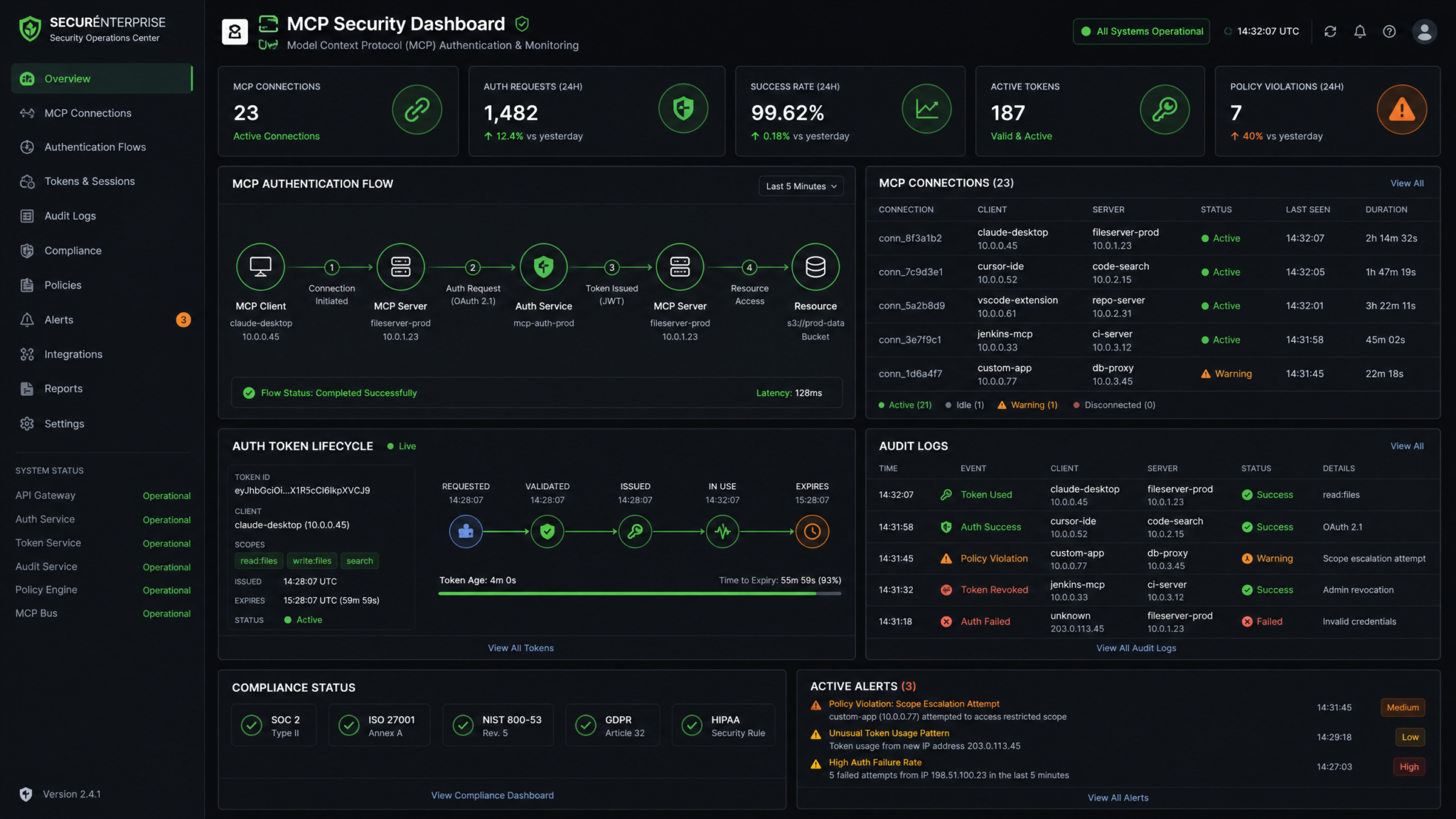
4. MCP Authentication Flows
Many agents rely on MCP (Model Context Protocol) tools that integrate with third-party services. Two recent improvements reduce friction and strengthen security:
- MCP tools can now request authentication interactively without experimental opt-in. Agents dynamically prompt users for the minimal credentials required by a tool at the moment of first use or token expiry.
- Device-code login warnings now explain how to recognize phishing attempts during out-of-band flows, helping users verify legitimate issuers and scopes before granting access.
4.1 Interactive Authentication Without Experimental Opt-In
Previously, interactive auth required an experimental flag. Now, MCP tools can natively request credentials when a call returns an auth challenge. The agent surfaces a structured prompt including issuer, requested scopes, and purpose. Policies can auto-approve low-risk scopes under writes or suggest for read-only tools, while requiring explicit approval for write/system scopes.
// Pseudocode: MCP tool invocation with interactive auth
const res = await mcp.invoke("sheets.read", { spreadsheetId });

if (res.error?.code === "AUTH_REQUIRED") {
  const { issuer, scopes, deviceCode } = res.error.details;
  // Codex SDK helper renders a signed prompt with phishing warnings.
  const approval = await codex.approvals.requestAuth({
    tool: "sheets",
    issuer,
    scopes,
    deviceCode,
    policyHint: "read-only",
  });
  if (approval.granted) {
    await mcp.provideAuth(approval.credentials);
    return await mcp.invoke("sheets.read", { spreadsheetId });
  } else {
    throw new Error("User denied authentication for sheets.read");
  }
}
4.2 Device-Code Login with Anti-Phishing UX
Device-code flows are popular for CLI-like tools or air-gapped devices. Codex integrates warnings and verification steps directly into approval prompts:
- Show the official verification URL and a signed issuer fingerprint.
- Highlight the requested scopes and lifetime; users must match them on the consent screen.
- Explain common red flags: mismatched domain, unexpected scope expansion, or unfamiliar app name.
- Offer a one-click “Report suspicious” that sends telemetry to security operations.
// Example approval prompt metadata (rendered by Codex UI)
{
  "issuer": "login.contoso.com",
  "issuerFingerprint": "SHA256:12:AB:4F:...",
  "verificationUrl": "https://microsoft.com/devicelogin",
  "deviceCode": "Q7N8-2KPV",
  "requestedScopes": ["Sheets.Read"],
  "requestedDuration": "1 hour",
  "warnings": [
    "Verify the issuer domain and check the scope matches 'Sheets.Read'.",
    "Never enter the device code on any page not controlled by the issuer."
  ]
}
4.3 Token Storage and Rotation
Store MCP tokens in a centralized, encrypted provider (e.g., a secrets manager) with per-tool namespaces. Codex can broker short-lived credentials to the agent at runtime. Policies should mandate rotation on a configurable cadence and immediate revocation upon role or project changes.
// Example: Providing a short-lived access token to MCP tool
const token = await codex.auth.issueToolToken({
  tool: "sheets",
  subject: "agent-crm-assistant",
  scopes: ["Sheets.Read"],
  ttlSeconds: 3600
});
await mcp.provideAuth({ type: "Bearer", token });
4.4 Error Handling and Fallbacks
- Expired tokens: Agent retries with interactive auth if allowed by policy; otherwise, queue a background approval.
- Scope mismatch: If the tool asks for broader scopes than policy allows, the request is auto-denied with a rationale, and an audit event is emitted.
- Untrusted issuer: Block and escalate; require admin override via break-glass if business-critical.
5. App-Server Authentication Integration
In addition to MCP interactive auth, app-server hosts can provide Codex authentication at runtime. This pattern centralizes trust: your application server authenticates the user via your IdP, exchanges that identity for Codex runtime credentials, and injects those credentials into agents or tools. It enables user-level scoping of actions while preserving least-privilege, short-lived tokens.
5.1 Flow Overview
- User signs into your app using enterprise SSO (OIDC/SAML).
- The app server requests a Codex session or tool token on behalf of the user using server credentials (e.g., OAuth 2.0 client credentials or a signed JWT assertion).
- Codex issues a short-lived token bound to the user, workspace, and app, with policy claims embedded.
- The server passes the token to the agent environment; the agent invokes tools subject to embedded policy claims and workspace enforcement.
5.2 JWT Assertion Example
// Node.js: server-side exchange for a Codex user-scoped token
import jwt from "jsonwebtoken";
import fetch from "node-fetch";

const assertion = jwt.sign(
  {
    iss: process.env.APP_SERVER_CLIENT_ID,
    sub: "user:alice@corp",
    aud: "https://api.codex.example.com/oauth/token",
    iat: Math.floor(Date.now() / 1000),
    exp: Math.floor(Date.now() / 1000) + 60,
    scope: "codex:invoke codex:tools:sheets.read",
    codex: {
      workspace: "finance-ws",
      appId: "reporting-bot",
      policyMin: { system: "suggest", write: "writes" }
    }
  },
  process.env.APP_SERVER_PRIVATE_KEY,
  { algorithm: "RS256", keyid: process.env.APP_SERVER_KID }
);

const res = await fetch("https://api.codex.example.com/oauth/token", {
  method: "POST",
  headers: { "Content-Type": "application/json" },
  body: JSON.stringify({
    grant_type: "urn:ietf:params:oauth:grant-type:jwt-bearer",
    assertion
  })
});
const { access_token, expires_in } = await res.json();
This approach binds the Codex token to workspace and policy minima, ensuring the agent cannot drop below workspace-level requirements even if the app misconfigures client-side settings.
5.3 mTLS or Identity-Aware Proxy
For higher assurance, pair JWT assertions with mTLS or an identity-aware proxy. Codex will verify the client certificate chain and enforce issuer allowlists. This is useful when your app-server runs inside a controlled network perimeter and you want to restrict where runtime credentials can be minted.
5.4 Propagating End-User Identity
Propagate the user’s identity via signed claims that become part of the Codex audit record. Approvals recorded for a given action tie back to the real user, enabling complete traceability. Avoid passing raw PII in claims; instead, use opaque user IDs that map to your directory.
5.5 Token Lifetimes and Revocation
- Short TTLs (5–15 minutes) for runtime tokens minimize exposure.
- Bind tokens to appId and agent profile; disallow reuse across apps.
- On logout or role change, call the revocation endpoint to invalidate tokens and cached tool secrets.
6. Usage Credit Management and Quotas
Cost governance is a first-class objective in enterprise AI. Codex introduces two improvements that simplify financial controls:
- Usage-limit reset credits now show type and expiration. You can differentiate promotional credits from operational allocations, and plan accordingly.
- Ultra reasoning warns when high multi-agent concurrency could increase usage quickly, allowing proactive throttling before bursts impact budgets.
6.1 Credit Types and Expirations
Credits are tracked by type and an explicit expiration date, visible programmatically and in dashboards. Agents can adapt behavior (e.g., switch from Ultra reasoning to standard) when nearing expiration of certain credit types.
| Credit Type | Description | Typical Expiration | Priority Use |
|---|---|---|---|
| operational | Budgeted credits allocated to a workspace for production | End of fiscal period | Primary for production workloads |
| promotional | Time-bound credits from vendor offers or trials | Vendor-defined window (e.g., 30–90 days) | Non-critical experiments; not for baselining costs |
| reset | Usage-limit reset credits that replenish monthly quotas | End of billing cycle | Baseline capacity; consider carryover rules if available |
6.2 SDK Access to Credits and Warnings
// Query current usage and credits
const usage = await codex.usage.getWorkspaceUsage({
  workspaceId: "finance-ws",
  window: "month_to_date"
});

const credits = await codex.usage.getCredits({ workspaceId: "finance-ws" });
/*
credits = [
  { type: "operational", remaining: 120000, expiresAt: "2026-09-30T23:59:59Z" },
  { type: "reset", remaining: 45000, expiresAt: "2026-07-31T23:59:59Z" }
]
*/

// Listen to Ultra reasoning concurrency warnings
codex.events.on("concurrency.warning", (evt) => {
  if (evt.model === "ultra-reasoning" && evt.estimatedCostSpike > 0.2) {
    throttleAgents({ workspace: evt.workspaceId, model: evt.model });
  }
});
6.3 Quotas, Budgets, and Throttling
Combine credit visibility with quotas and dynamic throttling:
- Per-app budget ceilings: Halt or degrade gracefully when a monthly spend or token cap is reached.
- Burst controls: Cap concurrent Ultra reasoning jobs; queue requests beyond a per-minute threshold.
- Fail-open vs. fail-closed: For critical apps, fail-open within a small overage band; for experimental apps, fail-closed to protect the budget.
await codex.usage.setBudget({
  workspaceId: "finance-ws",
  appId: "reporting-bot",
  monthlyTokens: 5_000_000,
  softLimitNotifyAt: 0.8,
  hardLimitEnforceAt: 1.0,
  onHardLimit: "degrade_model" // fallback to standard reasoning
});
6.4 Reports and Anomalies
Enable daily anomaly detection so spikes in concurrency or per-agent token consumption trigger alerts. Tie alerts back to approval policy changes to ensure governance adjustments haven’t inadvertently removed safeguards.
7. Security Considerations and Hardening
Approval policies are only as effective as the surrounding security posture. This section covers common pitfalls and hardening steps aligned with enterprise control catalogs. Cross-reference
For a deeper exploration of this topic, our comprehensive article on How AI Coding Agents Are Triggering Enterprise Security Alerts: What IT Teams Need to Know About Claude Code, Codex, and Cursor provides detailed implementation strategies, real-world benchmarks, and step-by-step workflows that complement the techniques discussed in this section.
for broader measures such as data classification, incident response, and secure SDLC integration.
7.1 Least-Privilege Policy Design
- Default to writes for read/write and suggest for system at the workspace level.
- Enable strict inference so misdeclared actions are treated as risky by default.
- Use per-app access controls for Computer Use to enforce explicit allowlists.
- Attach TTLs to approvals and prefer approve-and-remember only within a narrow scope (agent+capability).
7.2 Per-App Access Controls for Computer Use
Computer Use exposes high-power capabilities such as file access, browsing, and desktop automation. Configure per-app allow/deny lists with explicit capability constraints.
{
  "appId": "analyst-assistant",
  "overrides": {
    "computerUse": {
      "enabled": true,
      "permittedApps": [
        { "name": "Browser", "capabilities": ["navigate", "screenshot"] },
        { "name": "FileSystem", "capabilities": ["read", "list"] }
      ],
      "deniedApps": [
        { "name": "Terminal" },
        { "name": "Clipboard" }
      ]
    }
  }
}
Auditors should verify that Computer Use never grants write capabilities unless the app’s use case truly requires them, and that such capabilities are gated by on-request or suggest at a minimum.
7.3 Device-Code Phishing Resilience
During device-code auth, Codex now displays contextual warnings to help users detect phishing. Reinforce this by training users to:
- Type the verification URL directly into the browser or use trusted bookmarks.
- Match issuer domain and requested scopes exactly.
- Never approve unfamiliar app names or unexpected scope expansions.
- Use the “Report suspicious” path for any anomalies; SOC teams can correlate with login telemetry.
7.4 Secret Management and Vault Access
Never embed long-lived secrets in agent configuration. Use app-server–mediated short-lived credentials, with rotation and revocation endpoints integrated. Log all secret minting events and enforce mTLS or token binding to execution environments (e.g., workload identity).
7.5 Workspace-Level Enforcement and Delegation
Enable workspace-level enforcement for a consistent baseline. Delegate app-level overrides only to trusted maintainers and require approvals for policy changes themselves, captured via the Codex admin audit log.
7.6 Supply Chain Trust for MCP Tools
- Require signed tool manifests and pin versions; monitor for capability drift.
- Auto-block tools requesting unexpected write/system scopes; alert owners.
- Continuously reconcile declared capabilities with observed network egress.
7.7 Data Minimization and Redaction
Enable audit redaction using patterns for secrets and PII. Use field-level encryption for sensitive payloads at rest. Agents should summarize rather than exfiltrate raw datasets where possible; policies can nudge with suggest when a large data movement is detected.
7.8 Incident Response Integration
Route high-risk denials, repeated mismatches, or concurrency warnings into your SIEM. Predefine playbooks that suspend an app, revoke tokens, and snapshot relevant logs for forensics. Break-glass usage should always open an incident ticket automatically.
8. Multi-Agent Concurrency Governance
Concurrency is both a performance strategy and a cost risk. With Ultra reasoning, parallel agents can rapidly compound usage. Codex now warns when high multi-agent concurrency could increase usage quickly. Treat this signal as a control input, not merely an alert.
8.1 Concurrency Controls
- Global caps: Set workspace-level max concurrency by model tier (e.g., Ultra vs. Standard).
- Per-app queues: Use token buckets or leaky buckets to smooth bursts while allowing sustained throughput.
- Backpressure: Dynamically decrease concurrency when the warning signal exceeds a threshold or when budget burn accelerates.
8.2 Implementation Example
import PQueue from "p-queue";
const ultraQueue = new PQueue({ concurrency: 3 });

function onConcurrencyWarning(evt) {
  if (evt.model === "ultra-reasoning" && ultraQueue.concurrency > 1) {
    ultraQueue.concurrency = Math.max(1, ultraQueue.concurrency - 1);
  }
}

codex.events.on("concurrency.warning", onConcurrencyWarning);

// Usage
await ultraQueue.add(() => agent.runUltraTask(payload));
8.3 Policy-Driven Concurrency
Drive concurrency settings from policy to ensure consistency across deployments:
{
  "workspaceDefault": {
    "concurrency": {
      "ultra-reasoning": { "max": 4, "burst": 2, "autoThrottleOnWarning": true },
      "standard": { "max": 20 }
    }
  },
  "apps": [
    {
      "appId": "research-suite",
      "overrides": {
        "concurrency": {
          "ultra-reasoning": { "max": 2, "burst": 1 }
        }
      }
    }
  ]
}
8.4 Idempotency and Retries
Ensure agent tasks are idempotent to tolerate throttling and retries. Provide idempotency keys to downstream services to avoid duplicated writes when approval timing and concurrency interplay.
9. Implementation Patterns by Team Size
Enterprises vary from lean startups to global regulated organizations. Choose patterns that match your operating model and risk tolerance.
9.1 Small Teams and Startups
- Policy: writes for read/write, suggest for system; computer Use allow Browser and FileSystem read-only.
- Auth: App-server runtime tokens using OIDC client credentials; minimal scopes; short TTLs.
- Usage: Budget caps with degrade_model fallback; simple per-app monthly tokens.
- Monitoring: Built-in dashboards and webhook alerts; daily anomaly scan.
// Minimal baseline
const baseline = {
  workspaceDefault: { modes: { read: "writes", write: "writes", system: "suggest" } },
  enforcement: { workspaceLevel: true },
  audit: { logApprovals: "metadata", logDenials: "full" }
};
9.2 Mid-Size Product Teams
- Policy: App-level overrides with on-request for specific writes; agent-scoped rememberApproval.
- Auth: Mix of MCP interactive auth and app-server token brokering; introduce mTLS for production.
- Usage: Per-app concurrency caps; Ultra warnings trigger backpressure; staged budgets for new features.
- Monitoring: Centralized SIEM integration; weekly drift reports on tool capabilities.
9.3 Large Enterprises and Regulated Industries
- Policy: Workspace-level enforcement; system actions require suggest or stronger. Approvals route to approver groups with SLAs. Break-glass tightly controlled and audited.
- Auth: End-to-end identity propagation; hardware-backed keys; mandatory mTLS; issuance restricted by network perimeter and device posture.
- Usage: Departmental budgets; quarterly true-up; dynamic throttling integrated with finance alerts.
- Monitoring: Full audit trail, data retention aligned to regulation; redaction with PII patterns; continuous control validation.
# Example: regulated baseline YAML snippet
enforcement:
  workspaceLevel: true
  breakGlass:
    enabled: true
    roles: ["sec_engineer", "risk_officer"]
    ttlSeconds: 300

workspaceDefault:
  modes: { read: writes, write: writes, system: suggest }
  strictInference: true
  ttlSeconds: 600

audit:
  logApprovals: full
  logDenials: full
  redaction:
    enabled: true
    patterns: ["ssn", "account_number", "secret"]
9.4 RACI and Change Management
Define who proposes, approves, and implements policy changes:
- Responsible: App team leads propose overrides and justify risks.
- Accountable: Platform security owners own the workspace baseline.
- Consulted: Legal/compliance for regulated capabilities.
- Informed: Finance for usage budget changes; SRE for concurrency adjustments.
Use pull-request workflows for policy changes, with automated validation reports and staging workspaces before production rollout.
10. Monitoring, Auditing, and Analytics
Observability closes the loop between policy intent and operational reality. Instrument approvals, denials, auth events, concurrency warnings, and usage metrics. Aggregate them by app, capability, approver, and outcome.
10.1 Event Taxonomy
| Event | Key Fields | Purpose |
|---|---|---|
| approval.requested | appId, agentId, capability, mode, riskTier | Track approval volume and bottlenecks |
| approval.granted | approverId, ttl, scope, rememberApproval | Audit accountability and scope of granted rights |
| approval.denied | reasonCode, comment, escalationPath | Detect policy friction or misaligned capabilities |
| mcp.auth_prompted | tool, issuer, scopes, deviceCodeShown | Monitor auth flows and anti-phishing efficacy |
| device_code.warning_shown | issuer, fingerprint, userAcknowledged | Security awareness coverage for device-code flows |
| concurrency.warning | model, concurrencyLevel, estimatedCostSpike | Trigger throttling and cost protection |
| usage.credit_applied | type, amount, expiresAt | Reconcile budgets and plan capacity |
10.2 Sample Log Entries
{
  "ts": "2026-07-13T10:12:03Z",
  "event": "approval.requested",
  "workspaceId": "finance-ws",
  "appId": "reporting-bot",
  "agentId": "agent-42",
  "capability": "erp.post_journal",
  "mode": "suggest",
  "riskTier": "high",
  "contextHash": "c0ffee..."
}
{
  "ts": "2026-07-13T10:12:15Z",
  "event": "approval.granted",
  "approverId": "user:bob@corp",
  "ttlSeconds": 300,
  "rememberApproval": false
}
{
  "ts": "2026-07-13T10:13:05Z",
  "event": "concurrency.warning",
  "model": "ultra-reasoning",
  "concurrencyLevel": 7,
  "estimatedCostSpike": 0.35
}
10.3 SIEM Integration
Forward events to your SIEM with consistent schemas. Tag events with workspace and app identifiers for multi-tenant analytics. Consider sampling low-risk approvals while retaining all denials and system actions.
10.4 Metrics and Dashboards
- Approval rate and median time-to-approve by capability.
- Denial reasons distribution, correlated to app releases.
- Concurrency over time, warnings vs. throttling actions taken.
- Budget burn-down vs. credit expirations; predicted shortfalls.
- Auth prompts per tool; phishing warning acknowledgments.
10.5 Continuous Control Validation
Schedule synthetic transactions that intentionally attempt disallowed writes or system actions. Confirm that the policy gates them and that audit events fire. Rotate through tools weekly to detect configuration drift.
11. End-to-End Scenarios
11.1 Knowledge Worker Assistant (Writes Mode)
A sales assistant fetches account data (read) and proposes CRM updates (write). Policy is writes. Reading proceeds without prompts. When the assistant drafts an update, it triggers an approval with a change summary. Users can approve-and-remember for 10 minutes, streamlining follow-up edits while preserving oversight for each write operation.
11.2 IT Automation (On-Request Elevation)
An IT bot handles DNS record propagation. Routine reads are automatic. When propagation requires a write to authoritative servers, the bot explicitly asks for elevation. Approvers receive a diff of intended changes and a runbook link. Post-approval, the bot completes the change and writes back a verification record. If elevation is not granted within 5 minutes, the bot backs off and escalates.
11.3 Research Lab (Ultra Concurrency Governance)
A research team runs parallel literature reviews using Ultra reasoning. Concurrency warnings appear when the queue exceeds set caps. The orchestrator reduces parallelism and defers lower-priority tasks, avoiding unplanned budget spikes while maintaining SLA for critical research pipelines.
12. Governance of Computer Use
Computer Use is particularly powerful, enabling UI automation and local resource access. Combine per-app access controls with approval modes and environment sandboxing to reduce risk.
- App segmentation: Isolate apps that need write access to local files from those that don’t.
- Prompt hygiene: Include screenshots and DOM diffs in suggest prompts to increase reviewer confidence.
- Clipboard and Terminal: Default deny; enable only in secured jump hosts with extra attestations.
// Example: require suggest for any Computer Use write
{
  "apps": [
    {
      "appId": "content-curator",
      "overrides": {
        "computerUse": {
          "enabled": true,
          "permittedApps": [
            { "name": "Browser", "capabilities": ["navigate", "screenshot", "download"] },
            { "name": "FileSystem", "capabilities": ["read", "list"] }
          ],
          "deniedApps": [{ "name": "Terminal" }]
        },
        "capabilities": {
          "computerUse.write": { "mode": "suggest", "ttlSeconds": 120 }
        }
      }
    }
  ]
}
13. Policy Lifecycle Management
13.1 Authoring and Reviews
Keep policies in versioned repositories. Enforce code owners for workspace defaults. Require two-person review on system capability changes. Validate against a catalog of approved capabilities to prevent typos becoming silent holes.
13.2 Staging and Rollout
- Stage in a shadow workspace and replay recent traces to predict approval volumes.
- Roll out to a pilot app; measure approval friction and denial patterns.
- Use feature flags and progressive exposure to reduce disruption.
13.3 Drift Detection
Compare declared tool capabilities against actual endpoint calls and filesystem actions. Alert on deltas: new scopes, elevated HTTP verbs, or unexpected system calls. Auto-file tickets for owners to reconcile.
14. Interoperability and Extensibility
Codex Approval Policies integrate with identity systems, secret vaults, SCMs, and observability stacks. For advanced automation:
- Webhooks: Receive approval lifecycle events to trigger downstream processes.
- GraphQL/REST: Query policy state, credits, and warning signals for custom governance UIs.
- SDK adapters: Wrap toolkits to automatically label read/write/system and attach idempotency keys.
For code-level integration guidance and adapters, see
For a deeper exploration of this topic, our comprehensive article on The Valyu Deep Research Playbook — Connecting Codex to Real-World Data provides detailed implementation strategies, real-world benchmarks, and step-by-step workflows that complement the techniques discussed in this section.
.
15. Reference Configurations
15.1 Minimal Safe Baseline
{
  "workspaceDefault": {
    "modes": { "read": "writes", "write": "writes", "system": "suggest" },
    "strictInference": true,
    "ttlSeconds": 600
  },
  "audit": {
    "logApprovals": "metadata",
    "logDenials": "full",
    "redaction": { "enabled": true, "patterns": ["secret", "token"] }
  },
  "enforcement": { "workspaceLevel": true }
}
15.2 High-Assurance Baseline
{
  "workspaceDefault": {
    "modes": { "read": "writes", "write": "writes", "system": "suggest" },
    "strictInference": true,
    "ttlSeconds": 300,
    "rememberApproval": { "enabled": false }
  },
  "auth": {
    "mtlsRequired": true,
    "issuerAllowlist": ["login.corp", "idp.partner.corp"]
  },
  "audit": {
    "logApprovals": "full",
    "logDenials": "full",
    "redaction": { "enabled": true, "patterns": ["pii", "secret"] },
    "retentionDays": 365
  },
  "enforcement": { "workspaceLevel": true, "breakGlass": { "enabled": true, "roles": ["sre"], "ttlSeconds": 180 } }
}
16. Troubleshooting and Diagnostics
16.1 Unexpected Prompts in Writes Mode
Symptom: Read operations prompt for approval. Diagnosis: Capability misdeclared or inference marked it as write due to side effects (e.g., server logs writes). Fix: Update tool manifest; if truly read-only, add a non-mutating hint. Maintain strictInference to remain safe until corrected.
16.2 MFA Loops in Device-Code Login
Symptom: Users repeatedly see MFA prompts. Diagnosis: Session cookies blocked or issuer misconfiguration. Fix: Whitelist domains, ensure device clocks in sync, verify issuer fingerprint matches Codex prompt.
16.3 Concurrency Warning Storms
Symptom: Frequent Ultra concurrency warnings block throughput. Diagnosis: Multiple apps spiking simultaneously. Fix: Introduce per-app queues; raise workspace global cap slightly with budget guardrails; tune autoThrottleOnWarning thresholds.
16.4 Budget Overruns Despite Caps
Symptom: Spend exceeds expected. Diagnosis: Break-glass sessions, degraded fail-open behaviors, or untagged apps. Fix: Audit break-glass events; enforce tag requirements; switch critical apps to degrade_model rather than fail-open.
17. Compliance Alignment
Codex Approval Policies map naturally to common control frameworks:
- Access control (RBAC/ABAC): Workspace-level enforcement, per-app Computer Use controls.
- Change management: Approval queues with audit trails and TTL-limited elevation.
- Logging and monitoring: Full event taxonomy integrated with SIEM.
- Identity and authentication: App-server runtime auth, MCP interactive auth with phishing-resistant UX.
- Cost management: Credits and concurrency warnings with automated throttling.
Access 40,000+ AI Prompts for ChatGPT, Claude & Codex — Free!
Subscribe to get instant access to our complete Notion Prompt Library — the largest curated collection of prompts for ChatGPT, Claude, OpenAI Codex, and other leading AI models. Optimized for real-world workflows across coding, research, content creation, and business.
18. Frequently Asked Questions (FAQ)
Q1. What is the difference between on-request and suggest?
on-request prompts only when the agent explicitly asks for elevation; suggest proactively nudges for review even without an explicit request. suggest can proceed autonomously after a timeout depending on policy and risk level; on-request requires a user decision to elevate.
Q2. How does the new writes mode work?
writes allows declared read-only actions to proceed without any approval, while prompting for writes or any action inferred to be state-changing. It is ideal for knowledge work where read operations are frequent and writes must be deliberate and auditable.
Q3. Can MCP tools prompt for authentication without special flags?
Yes. MCP tools can now request authentication interactively without experimental opt-in. When a tool encounters an auth challenge, Codex renders a structured approval prompt with issuer and scope details, including device-code phishing warnings.
Q4. How do app-server hosts provide Codex authentication at runtime?
Your server authenticates the user via SSO, exchanges for a Codex token using client credentials or a JWT assertion, and injects a short-lived, scoped token into the agent. Bind tokens to appId and workspace, and enforce mTLS for production issuance.
Q5. What guardrails exist for Computer Use?
Use per-app access controls to explicitly permit or deny system apps and capabilities. Pair with writes or suggest modes for any action that could modify the local environment. Deny Terminal and Clipboard by default unless strictly required.
Q6. How do usage-limit reset credits appear?
Credits now include a type (e.g., reset, operational, promotional) and expiration timestamp. They are visible in dashboards and via the SDK so you can plan usage and avoid unintentional lapses when credits expire.
Q7. What triggers Ultra concurrency warnings?
Codex considers active parallel Ultra reasoning jobs, historical burn rates, and credit posture. When the predicted short-term spend acceleration crosses a threshold, a concurrency.warning event fires. Use it to throttle or requeue tasks.
Q8. How can we recognize phishing in device-code flows?
Codex displays the verification URL, the issuer fingerprint, requested scopes, and duration. Users must verify the domain and exact scopes on the consent page. Any mismatch or unexpected prompt should be reported via the integrated security action.
Q9. Does workspace-level enforcement block app teams from innovating?
It prevents relaxing baseline safeguards but allows stricter app-level overrides. Pair enforcement with fast approval SLAs and break-glass for true emergencies to balance safety and agility.
Q10. How should we handle approval fatigue?
Use writes to reduce noise for read-only actions, apply TTL-limited rememberApproval for repetitive low-risk writes, and invest in high-quality diffs and previews so approvers act quickly with confidence. Track approval rates and iterate.
19. Conclusion
Codex Approval Policies provide the backbone for enterprise-grade AI governance: precise approval modes including the new writes setting, robust MCP and app-server authentication models, workspace-level enforcement, per-app Computer Use controls, and integrated cost governance via credits and concurrency warnings. With strong monitoring, auditable workflows, and well-chosen implementation patterns, teams of any size can scale AI safely, cost-effectively, and in full alignment with enterprise controls.
For broader context on operating models and control frameworks, see
For a deeper exploration of this topic, our comprehensive article on How AI Coding Agents Are Triggering Enterprise Security Alerts: What IT Teams Need to Know About Claude Code, Codex, and Cursor provides detailed implementation strategies, real-world benchmarks, and step-by-step workflows that complement the techniques discussed in this section.
. To implement the patterns described here, consult
For a deeper exploration of this topic, our comprehensive article on The Valyu Deep Research Playbook — Connecting Codex to Real-World Data provides detailed implementation strategies, real-world benchmarks, and step-by-step workflows that complement the techniques discussed in this section.
. Security leaders should cross-check against
For a deeper exploration of this topic, our comprehensive article on How AI Coding Agents Are Triggering Enterprise Security Alerts: What IT Teams Need to Know About Claude Code, Codex, and Cursor provides detailed implementation strategies, real-world benchmarks, and step-by-step workflows that complement the techniques discussed in this section.
to ensure coverage across identity, data, runtime, and incident response.
