
How to Use ChatGPT Structured Outputs for Reliable JSON: Complete API Tutorial with Schema Validation and Error Handling
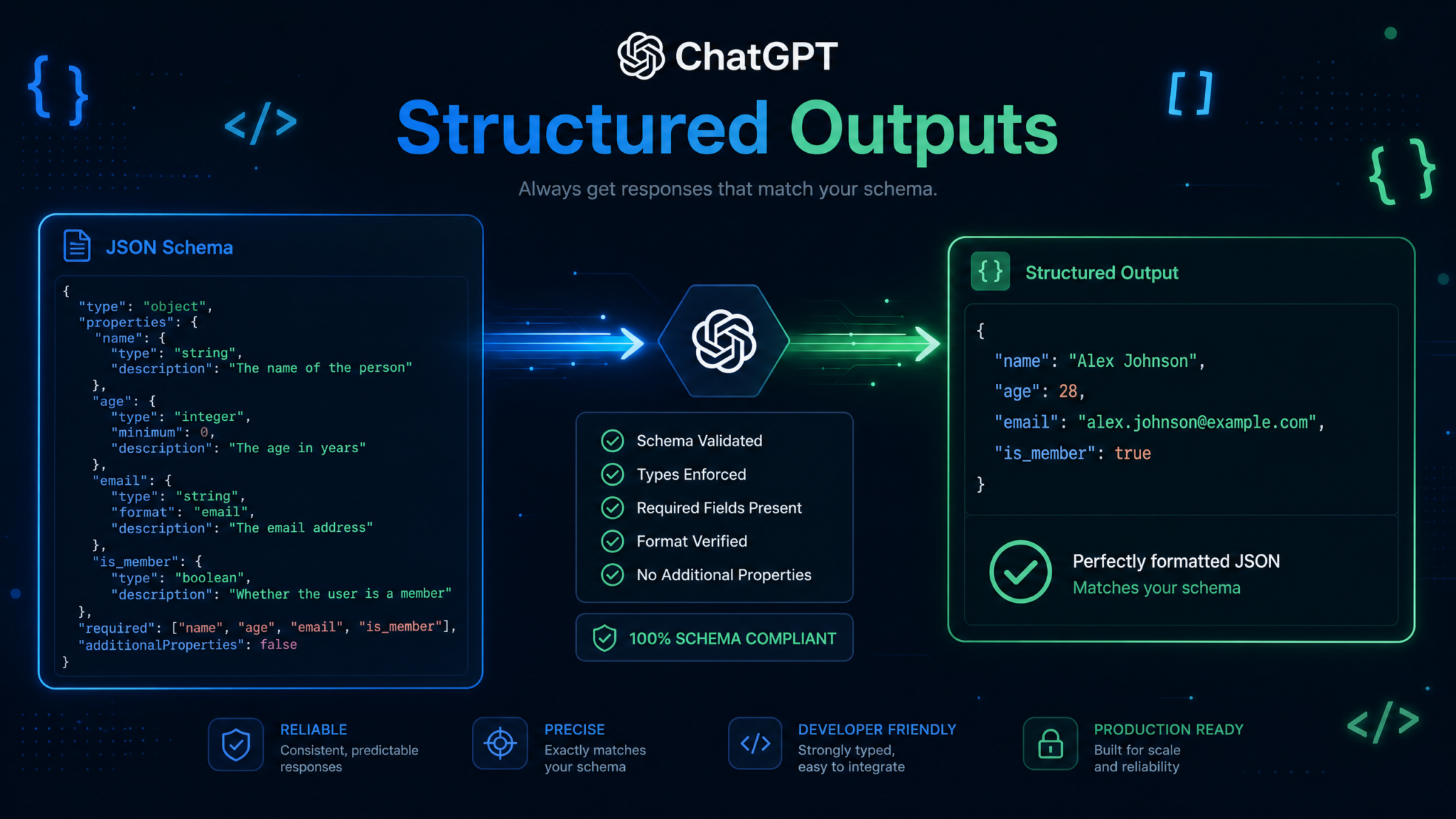
Building production applications on top of large language models has historically meant wrestling with unpredictable JSON output. You define a schema, ask the model to follow it, and somewhere between your prompt and the API response, fields go missing, types get mangled, and your application throws an exception at 2 AM. OpenAI’s Structured Outputs feature changes everything. Introduced in August 2024 and now available across GPT-4o and GPT-4o-mini model families, Structured Outputs enforces 100% schema compliance at the constrained decoding level—not just as a best-effort instruction. This tutorial walks through every aspect of the feature, from basic setup through advanced recursive schemas, with production-ready code in Python and TypeScript throughout.
1. What Are Structured Outputs and Why They Matter
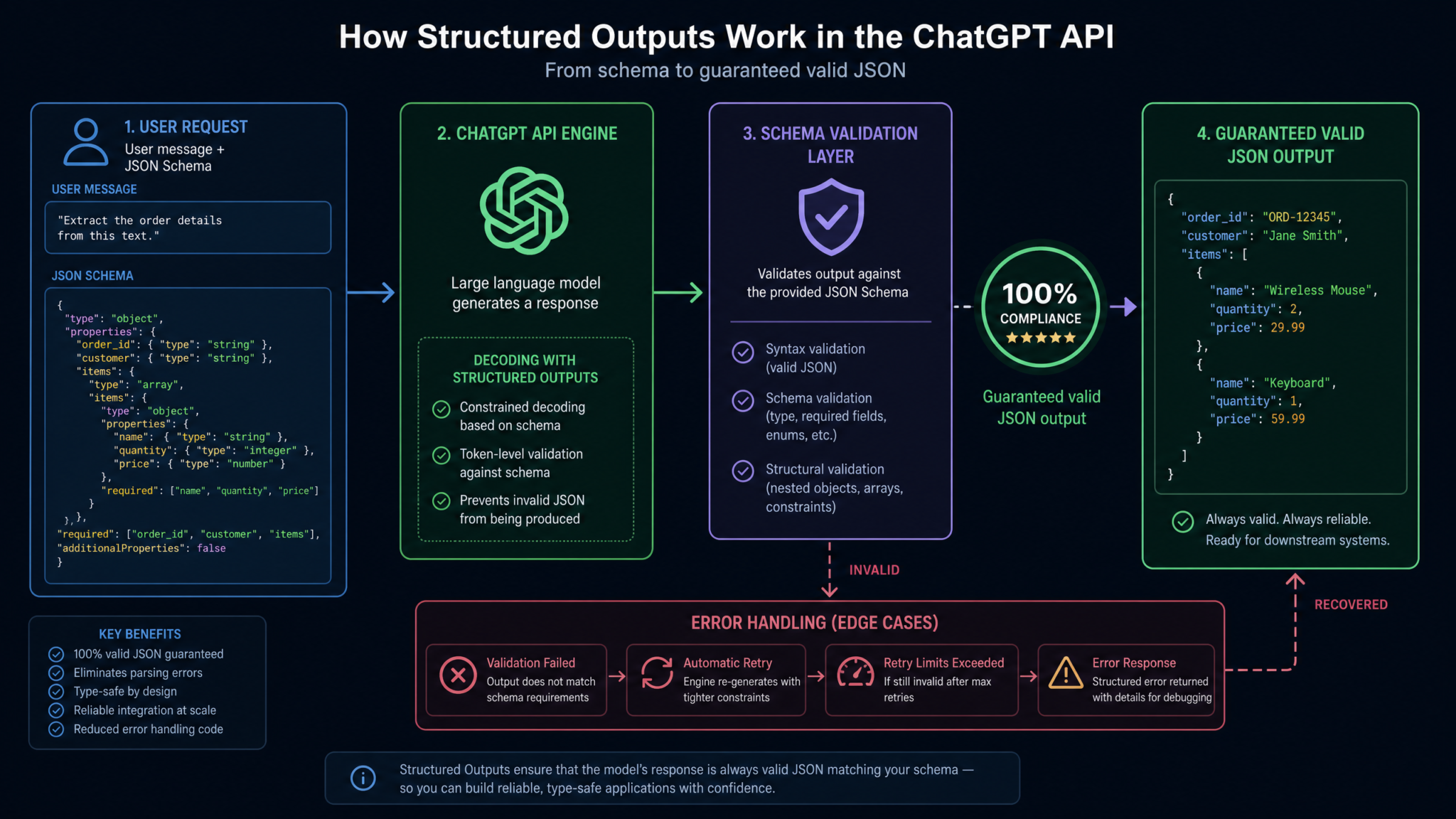
Structured Outputs is an OpenAI API feature that constrains model responses to a developer-specified JSON Schema using a technique called constrained decoding. At inference time, the model’s token sampling is guided by a finite-state machine derived from your schema. Tokens that would produce invalid JSON—or JSON that doesn’t conform to your schema—are assigned a probability of zero and simply cannot be selected.
This is fundamentally different from prompt engineering approaches like “respond only with valid JSON matching this schema.” Prompt-based approaches are probabilistic: they work most of the time but fail unpredictably under load, with long contexts, or when the model is “confused” by complex instructions. Structured Outputs eliminates that class of failure entirely.
The Problem with Traditional JSON Prompting
Before Structured Outputs, developers used several workarounds, each with significant limitations:
- Prompt engineering: “Return only valid JSON with these fields.” Failure rate: 2–15% depending on schema complexity and model version.
- JSON mode (response_format: json_object): Guarantees valid JSON syntax but not schema compliance. The model can still omit required fields or use wrong types.
- Retry loops: Parse the response, validate against a schema, retry on failure. Doubles latency and cost on failures.
- Post-processing: Manually coerce types and fill missing fields. Fragile and business-logic-dependent.
Structured Outputs provides a clean solution: define a schema once, and every response is guaranteed to match it. According to OpenAI’s published benchmarks, Structured Outputs achieves a 100% compliance rate on well-formed schemas, compared to approximately 85% for JSON mode and 65–80% for pure prompt engineering on complex schemas.
Supported Models
| Model | Structured Outputs Support | Notes |
|---|---|---|
| gpt-4o (2024-08-06+) | ✅ Full support | Recommended for production |
| gpt-4o-mini (2024-07-18+) | ✅ Full support | Best cost/performance ratio |
| o1 models | ✅ Full support | High-reasoning tasks |
| gpt-4-turbo | ❌ JSON mode only | No schema enforcement |
| gpt-3.5-turbo | ❌ JSON mode only | No schema enforcement |
2. Setup and Prerequisites
Before writing a single line of schema code, you need the right library versions. OpenAI’s Structured Outputs requires SDK support for parsing responses into typed objects.
Python Setup
# Requires openai >= 1.40.0
pip install openai>=1.40.0 pydantic>=2.0.0

# For schema validation and testing
pip install jsonschema pytest httpx
import os
from openai import OpenAI
from pydantic import BaseModel, Field
from typing import Optional, List, Literal
import json

client = OpenAI(api_key=os.environ.get("OPENAI_API_KEY"))

# Verify the connection
def health_check():
    response = client.models.list()
    structured_models = [m.id for m in response.data
                        if "gpt-4o" in m.id or "o1" in m.id]
    print(f"Available structured output models: {structured_models}")

health_check()
TypeScript / Node.js Setup
# Requires openai >= 4.55.0
npm install openai@latest zod typescript ts-node @types/node

# tsconfig.json should include:
# "strict": true, "target": "ES2020", "moduleResolution": "bundler"
// src/client.ts
import OpenAI from "openai";
import { z } from "zod";

export const client = new OpenAI({
  apiKey: process.env.OPENAI_API_KEY,
});

// Type helper for structured response parsing
export type ParsedResponse<T> = {
  data: T | null;
  refusal: string | null;
  usage: OpenAI.CompletionUsage | undefined;
};
3. Defining JSON Schemas: The Foundation
Structured Outputs uses a subset of JSON Schema Draft 2020-12. Not every JSON Schema keyword is supported—understanding the constraints upfront prevents frustrating debugging sessions. The supported subset is intentionally conservative to ensure the constrained decoding algorithm can efficiently compute valid token sets.
Supported Keywords
- Type keywords:
string,number,integer,boolean,array,object,null - Object keywords:
properties,required,additionalProperties(must befalse) - Array keywords:
items,prefixItems,minItems,maxItems - String keywords:
enum,maxLength,format(informational only) - Composition:
anyOf(for union types and optional fields)
Unsupported Keywords (Common Gotchas)
oneOf,allOf,not— useanyOfinsteadif/then/else— conditional schemas not supported$refto external schemas — inline definitions onlypatternfor string regex constraintsadditionalProperties: true— must befalseor omitted (defaults tofalse)
A critical rule: every object in your schema must have additionalProperties: false and must list all properties in the required array. This is the most common error when migrating existing schemas to Structured Outputs.
# Python: Schema defined as a Python dict
product_schema = {
    "type": "object",
    "properties": {
        "name": {"type": "string"},
        "price": {"type": "number"},
        "category": {
            "type": "string",
            "enum": ["electronics", "clothing", "food", "books"]
        },
        "in_stock": {"type": "boolean"},
        "tags": {
            "type": "array",
            "items": {"type": "string"}
        }
    },
    "required": ["name", "price", "category", "in_stock", "tags"],
    "additionalProperties": False
}
Using Pydantic for Schema Generation (Python)
The cleanest Python approach is using Pydantic models, which the OpenAI SDK can automatically convert to JSON Schema with the correct Structured Outputs constraints.
from pydantic import BaseModel, Field
from typing import List, Literal, Optional
from enum import Enum

class ProductCategory(str, Enum):
    ELECTRONICS = "electronics"
    CLOTHING = "clothing"
    FOOD = "food"
    BOOKS = "books"

class Product(BaseModel):
    name: str = Field(description="Product name as listed in catalog")
    price: float = Field(ge=0, description="Price in USD")
    category: ProductCategory
    in_stock: bool
    tags: List[str] = Field(default_factory=list)

    model_config = {"json_schema_extra": {"additionalProperties": False}}

# Preview the generated schema
import json
print(json.dumps(Product.model_json_schema(), indent=2))
Using Zod for Schema Generation (TypeScript)
// src/schemas/product.ts
import { z } from "zod";
import zodToJsonSchema from "zod-to-json-schema";

const ProductCategory = z.enum(["electronics", "clothing", "food", "books"]);

export const ProductSchema = z.object({
  name: z.string().describe("Product name as listed in catalog"),
  price: z.number().nonnegative().describe("Price in USD"),
  category: ProductCategory,
  in_stock: z.boolean(),
  tags: z.array(z.string()),
});

export type Product = z.infer<typeof ProductSchema>;

// Convert to JSON Schema for OpenAI API
export const productJsonSchema = zodToJsonSchema(ProductSchema, {
  name: "Product",
  $refStrategy: "none", // Inline all refs for Structured Outputs compatibility
});
4. Using the response_format Parameter and Strict Mode
The response_format parameter is where Structured Outputs is activated. Setting type: "json_schema" and strict: true enables full constrained decoding. Without strict: true, you get best-effort schema adherence (similar to the old JSON mode behavior).
Python: Basic Structured Output Call
from openai import OpenAI
from pydantic import BaseModel
from typing import List

client = OpenAI()

class ExtractedEntity(BaseModel):
    name: str
    entity_type: str
    confidence: float
    context: str

class EntityExtractionResult(BaseModel):
    entities: List[ExtractedEntity]
    total_count: int
    processing_notes: str

def extract_entities(text: str) -> EntityExtractionResult:
    completion = client.beta.chat.completions.parse(
        model="gpt-4o-2024-08-06",
        messages=[
            {
                "role": "system",
                "content": (
                    "You are an entity extraction system. Extract all named entities "
                    "from the provided text. Include people, organizations, locations, "
                    "products, and events. Set confidence between 0.0 and 1.0."
                )
            },
            {"role": "user", "content": text}
        ],
        response_format=EntityExtractionResult,
        temperature=0.1  # Low temperature for extraction tasks
    )

    message = completion.choices[0].message

    # Handle refusals (covered in detail in error handling section)
    if message.refusal:
        raise ValueError(f"Model refused request: {message.refusal}")

    return message.parsed

# Usage
result = extract_entities(
    "Apple CEO Tim Cook announced the iPhone 16 launch in Cupertino, California "
    "on September 9, 2024. Google's Sundar Pichai attended the event remotely."
)
print(f"Found {result.total_count} entities")
for entity in result.entities:
    print(f"  {entity.name} ({entity.entity_type}): {entity.confidence:.0%} confidence")
TypeScript: Structured Output Call with Manual Schema
// src/extractEntities.ts
import OpenAI from "openai";

const client = new OpenAI();

interface ExtractedEntity {
  name: string;
  entity_type: string;
  confidence: number;
  context: string;
}

interface EntityExtractionResult {
  entities: ExtractedEntity[];
  total_count: number;
  processing_notes: string;
}

const entitySchema = {
  type: "object" as const,
  properties: {
    entities: {
      type: "array",
      items: {
        type: "object",
        properties: {
          name: { type: "string" },
          entity_type: { type: "string" },
          confidence: { type: "number" },
          context: { type: "string" }
        },
        required: ["name", "entity_type", "confidence", "context"],
        additionalProperties: false
      }
    },
    total_count: { type: "integer" },
    processing_notes: { type: "string" }
  },
  required: ["entities", "total_count", "processing_notes"],
  additionalProperties: false
};

async function extractEntities(text: string): Promise<EntityExtractionResult> {
  const completion = await client.chat.completions.create({
    model: "gpt-4o-2024-08-06",
    messages: [
      {
        role: "system",
        content: "Extract named entities from the provided text."
      },
      { role: "user", content: text }
    ],
    response_format: {
      type: "json_schema",
      json_schema: {
        name: "entity_extraction_result",
        strict: true,
        schema: entitySchema
      }
    },
    temperature: 0.1
  });

  const content = completion.choices[0].message.content;
  if (!content) throw new Error("Empty response from API");

  return JSON.parse(content) as EntityExtractionResult;
}
5. Handling Nested Objects and Arrays
Nested structures are where Structured Outputs really demonstrates its value over prompt engineering. The constrained decoder handles arbitrary nesting depth without degradation in compliance rate, something that’s impossible to achieve with prompts alone.
Deep Nesting Example: Structured Report
from pydantic import BaseModel
from typing import List, Optional
from enum import Enum

class Severity(str, Enum):
    LOW = "low"
    MEDIUM = "medium"
    HIGH = "high"
    CRITICAL = "critical"

class Finding(BaseModel):
    id: str
    title: str
    description: str
    severity: Severity
    affected_components: List[str]
    remediation_steps: List[str]

class ScanMetadata(BaseModel):
    scan_id: str
    timestamp: str
    duration_seconds: int
    files_scanned: int
    model_version: str

class SecurityReport(BaseModel):
    metadata: ScanMetadata
    executive_summary: str
    findings: List[Finding]
    total_findings: int
    critical_count: int
    high_count: int
    remediation_priority: List[str]
    next_scan_recommended: str

def generate_security_report(codebase_description: str) -> SecurityReport:
    completion = client.beta.chat.completions.parse(
        model="gpt-4o-2024-08-06",
        messages=[
            {
                "role": "system",
                "content": (
                    "You are a security analysis system. Generate a structured security "
                    "report based on the codebase description provided. Use realistic "
                    "finding IDs in format VULN-YYYY-XXXX."
                )
            },
            {"role": "user", "content": codebase_description}
        ],
        response_format=SecurityReport
    )
    return completion.choices[0].message.parsed
Variable-Length Arrays with Constraints
# TypeScript: Array with minItems/maxItems constraints
const rankingSchema = {
  type: "object",
  properties: {
    topic: { type: "string" },
    ranked_items: {
      type: "array",
      items: {
        type: "object",
        properties: {
          rank: { type: "integer" },
          name: { type: "string" },
          score: { type: "number" },
          reasoning: { type: "string" }
        },
        required: ["rank", "name", "score", "reasoning"],
        additionalProperties: false
      },
      minItems: 3,
      maxItems: 10
    },
    methodology: { type: "string" }
  },
  required: ["topic", "ranked_items", "methodology"],
  additionalProperties: false
};
6. Enum Types and Constrained Values
Enums are one of the most powerful tools in Structured Outputs schemas. By constraining a field to a specific set of string values, you enable downstream code to use exhaustive switch statements and eliminate entire categories of runtime errors.
from pydantic import BaseModel
from typing import Literal, List

class SentimentAnalysis(BaseModel):
    # Literal types map directly to JSON Schema enum
    overall_sentiment: Literal["very_positive", "positive", "neutral", "negative", "very_negative"]
    confidence: float

    # Aspect-level sentiment
    aspects: List["AspectSentiment"]

    # ISO 639-1 language codes as enum
    detected_language: Literal["en", "es", "fr", "de", "zh", "ja", "ar", "pt"]

    # Structured emotion detection
    primary_emotion: Literal[
        "joy", "sadness", "anger", "fear", "surprise",
        "disgust", "anticipation", "trust", "neutral"
    ]

class AspectSentiment(BaseModel):
    aspect: str
    sentiment: Literal["positive", "neutral", "negative"]
    mentioned_phrases: List[str]

SentimentAnalysis.model_rebuild()
// TypeScript: Using z.enum for constrained values
import { z } from "zod";

const SentimentLevel = z.enum([
  "very_positive", "positive", "neutral", "negative", "very_negative"
]);

const ISOLanguage = z.enum(["en", "es", "fr", "de", "zh", "ja", "ar", "pt"]);

const ClassificationSchema = z.object({
  document_type: z.enum([
    "invoice", "contract", "email", "report",
    "form", "receipt", "letter", "memo"
  ]),
  sentiment: SentimentLevel,
  language: ISOLanguage,
  priority: z.enum(["urgent", "high", "normal", "low"]),
  requires_human_review: z.boolean(),
  department_routing: z.enum([
    "sales", "legal", "finance", "hr", "engineering", "support"
  ]),
  confidence_score: z.number()
});
7. Error Handling: Refusals, Partial Outputs, and Validation Failures
Even with 100% schema compliance, your error handling must account for three distinct failure modes: model refusals, network/API errors, and the rare edge case of schema construction errors.
Handling Model Refusals
When a model determines a request violates usage policies, it returns a refusal instead of parsed content. The OpenAI SDK surfaces this in the message.refusal field. Critically, message.parsed will be None/null when a refusal occurs.
Access 40,000+ AI Prompts for ChatGPT, Claude & Codex — Free!
Subscribe to get instant access to our complete Notion Prompt Library — the largest curated collection of prompts for ChatGPT, Claude, OpenAI Codex, and other leading AI models. Optimized for real-world workflows across coding, research, content creation, and business.
from openai import OpenAI
from pydantic import BaseModel
from typing import Optional
import logging

logger = logging.getLogger(__name__)

class StructuredOutputError(Exception):
    def __init__(self, message: str, error_type: str, raw_response=None):
        super().__init__(message)
        self.error_type = error_type
        self.raw_response = raw_response

def safe_parse(
    model: type[BaseModel],
    messages: list[dict],
    model_name: str = "gpt-4o-2024-08-06",
    max_retries: int = 2
) -> BaseModel:
    """
    Production-safe wrapper for structured output parsing.
    Handles refusals, API errors, and unexpected None responses.
    """
    for attempt in range(max_retries + 1):
        try:
            completion = client.beta.chat.completions.parse(
                model=model_name,
                messages=messages,
                response_format=model
            )

            choice = completion.choices[0]
            message = choice.message

            # Check for content filter refusal
            if message.refusal is not None:
                logger.warning(f"Model refusal on attempt {attempt + 1}: {message.refusal}")
                raise StructuredOutputError(
                    f"Model refused to generate structured output: {message.refusal}",
                    error_type="refusal",
                    raw_response=completion
                )

            # Check finish reason
            if choice.finish_reason == "length":
                logger.error("Response truncated due to max_tokens limit")
                raise StructuredOutputError(
                    "Response was truncated. Increase max_tokens or simplify the schema.",
                    error_type="truncation",
                    raw_response=completion
                )

            # Ensure parsed is not None
            if message.parsed is None:
                logger.error(f"Parsed response is None. Raw content: {message.content[:200]}")
                raise StructuredOutputError(
                    "Parsed response was None despite no refusal",
                    error_type="parse_failure",
                    raw_response=completion
                )

            logger.info(f"Successful parse on attempt {attempt + 1}")
            return message.parsed

        except StructuredOutputError:
            if attempt == max_retries:
                raise
            logger.warning(f"Retrying after error on attempt {attempt + 1}")
            continue

        except Exception as e:
            logger.error(f"Unexpected API error: {type(e).__name__}: {e}")
            raise StructuredOutputError(
                f"API call failed: {str(e)}",
                error_type="api_error"
            ) from e
TypeScript Error Handling
// src/utils/safeStructuredOutput.ts
import OpenAI from "openai";

type StructuredOutputErrorType =
  | "refusal"
  | "truncation"
  | "parse_failure"
  | "api_error"
  | "validation_error";

export class StructuredOutputError extends Error {
  constructor(
    message: string,
    public readonly errorType: StructuredOutputErrorType,
    public readonly rawResponse?: unknown
  ) {
    super(message);
    this.name = "StructuredOutputError";
  }
}

export async function safeStructuredOutput<T>(
  client: OpenAI,
  params: OpenAI.Chat.ChatCompletionCreateParamsNonStreaming,
  validator?: (data: unknown) => T
): Promise<T> {
  const completion = await client.chat.completions.create(params);

  const choice = completion.choices[0];

  if (choice.finish_reason === "content_filter") {
    throw new StructuredOutputError(
      "Request was blocked by content filter",
      "refusal",
      completion
    );
  }

  if (choice.finish_reason === "length") {
    throw new StructuredOutputError(
      "Response truncated. Increase max_tokens.",
      "truncation",
      completion
    );
  }

  const content = choice.message.content;
  if (!content) {
    throw new StructuredOutputError(
      "Empty response content",
      "parse_failure",
      completion
    );
  }

  let parsed: unknown;
  try {
    parsed = JSON.parse(content);
  } catch (e) {
    throw new StructuredOutputError(
      `JSON parse failed: ${e}`,
      "parse_failure",
      content
    );
  }

  if (validator) {
    try {
      return validator(parsed);
    } catch (e) {
      throw new StructuredOutputError(
        `Schema validation failed: ${e}`,
        "validation_error",
        parsed
      );
    }
  }

  return parsed as T;
}
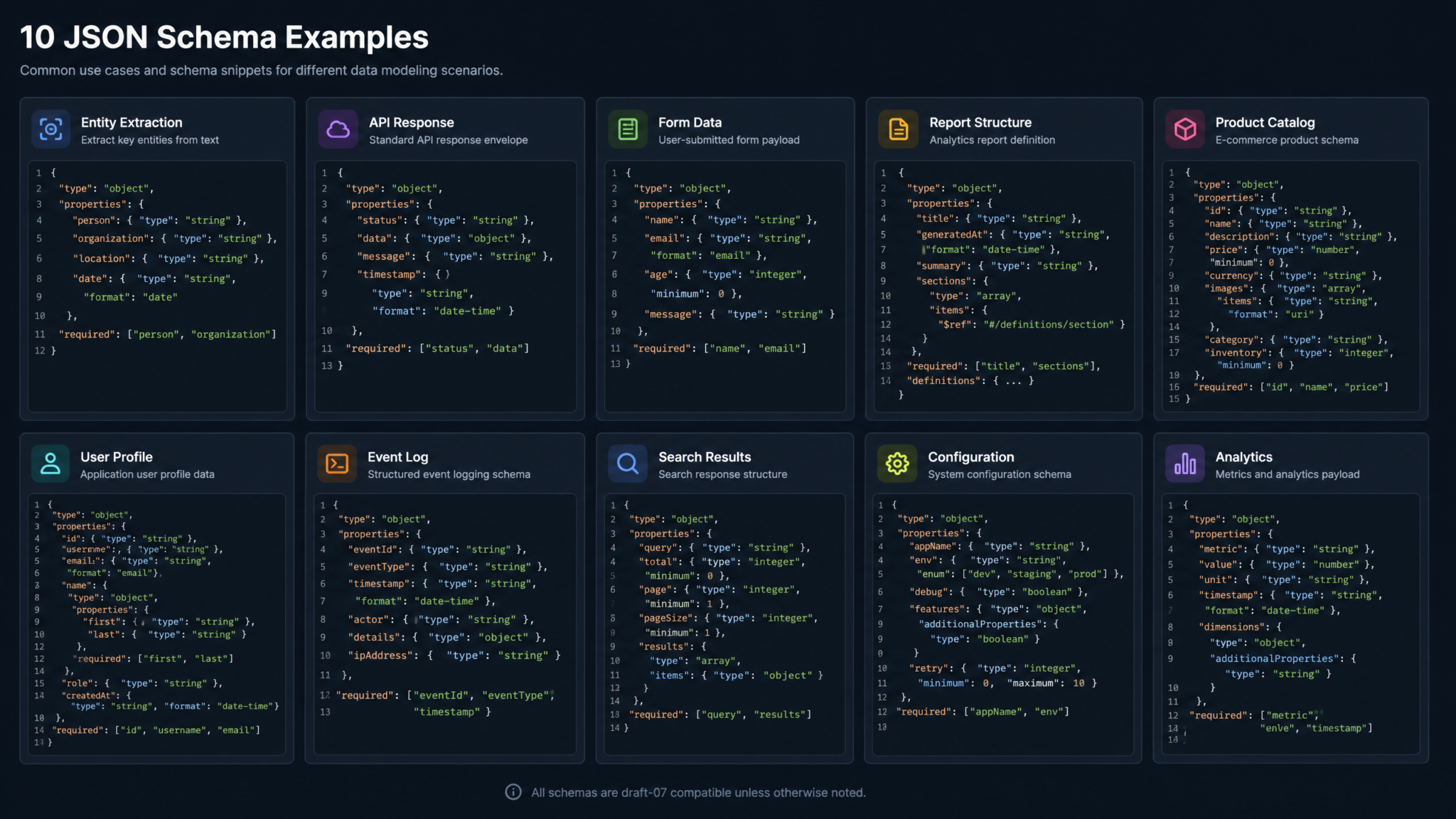
8. Real-World Examples: 10 Production-Ready Schemas
The following schemas cover the most common use cases encountered in production LLM applications. Each includes the complete Pydantic model and a sample extraction call.
OpenAI API Function Calling Complete Guide
Schema 1: E-Commerce Product Extraction
class ProductDimensions(BaseModel):
    width_cm: float
    height_cm: float
    depth_cm: float
    weight_kg: float

class ProductListing(BaseModel):
    sku: str
    name: str
    brand: str
    description: str
    price_usd: float
    original_price_usd: float
    discount_percentage: float
    category: Literal["electronics", "clothing", "home", "sports", "beauty", "food"]
    subcategory: str
    tags: List[str]
    dimensions: ProductDimensions
    in_stock: bool
    stock_count: int
    rating: float
    review_count: int
    features: List[str]
    warnings: List[str]
Schema 2: Resume / CV Parser
class WorkExperience(BaseModel):
    company: str
    title: str
    start_date: str  # ISO 8601: YYYY-MM
    end_date: str    # "present" or ISO 8601
    location: str
    responsibilities: List[str]
    technologies: List[str]
    achievements: List[str]

class Education(BaseModel):
    institution: str
    degree: str
    field_of_study: str
    graduation_year: int
    gpa: str  # Optional, use empty string if not mentioned

class ParsedResume(BaseModel):
    full_name: str
    email: str
    phone: str
    location: str
    linkedin_url: str
    github_url: str
    summary: str
    years_of_experience: int
    seniority_level: Literal["intern", "junior", "mid", "senior", "lead", "principal", "executive"]
    work_experience: List[WorkExperience]
    education: List[Education]
    skills: List[str]
    certifications: List[str]
    languages: List[str]
Schema 3: Legal Contract Analysis
class ContractParty(BaseModel):
    name: str
    role: Literal["client", "vendor", "employer", "employee", "licensor", "licensee", "other"]
    entity_type: Literal["individual", "corporation", "llc", "partnership", "government"]
    jurisdiction: str

class KeyTerm(BaseModel):
    term_name: str
    definition: str
    section_reference: str
    risk_level: Literal["low", "medium", "high"]

class ContractAnalysis(BaseModel):
    contract_type: Literal[
        "employment", "service_agreement", "nda", "saas",
        "licensing", "purchase", "partnership", "other"
    ]
    effective_date: str
    expiration_date: str
    auto_renewal: bool
    parties: List[ContractParty]
    governing_law: str
    key_terms: List[KeyTerm]
    payment_terms: str
    termination_conditions: List[str]
    liability_caps: str
    intellectual_property_clauses: List[str]
    red_flags: List[str]
    overall_risk_score: Literal["low", "medium", "high", "very_high"]
    recommended_changes: List[str]
Schema 4: Customer Support Ticket Classifier
class SupportTicket(BaseModel):
    ticket_id: str
    category: Literal[
        "billing", "technical_support", "account_access",
        "feature_request", "bug_report", "general_inquiry", "complaint"
    ]
    subcategory: str
    priority: Literal["p0_critical", "p1_high", "p2_medium", "p3_low"]
    sentiment: Literal["very_frustrated", "frustrated", "neutral", "satisfied", "very_satisfied"]
    requires_escalation: bool
    escalation_reason: str
    suggested_department: Literal["tier1", "tier2", "billing", "engineering", "management"]
    estimated_resolution_time: str
    key_issues: List[str]
    customer_intent: Literal["needs_help", "wants_refund", "wants_feature", "reporting_bug", "complaint"]
    action_items: List[str]
    auto_response_applicable: bool
Schema 5: Medical Symptom Extractor
class Symptom(BaseModel):
    symptom_name: str
    severity: Literal["mild", "moderate", "severe"]
    duration: str
    frequency: Literal["constant", "intermittent", "occasional", "rare"]
    onset: Literal["sudden", "gradual", "unknown"]
    associated_factors: List[str]

class MedicalHistory(BaseModel):
    # Note: Always add appropriate disclaimers in production
    chief_complaint: str
    symptoms: List[Symptom]
    duration_of_illness: str
    relevant_history: List[str]
    current_medications: List[str]
    allergies: List[str]
    vital_signs_mentioned: List[str]
    red_flag_symptoms: List[str]
    requires_urgent_care: bool
    urgency_reasoning: str
Schema 6: Financial Report Extractor
class FinancialMetric(BaseModel):
    metric_name: str
    value: float
    unit: Literal["usd", "eur", "gbp", "percentage", "ratio", "count", "shares"]
    period: str
    year_over_year_change: float
    meets_guidance: bool

class FinancialReport(BaseModel):
    company_name: str
    ticker_symbol: str
    report_type: Literal["10-K", "10-Q", "8-K", "earnings_call", "annual_report"]
    fiscal_period: str
    fiscal_year: int
    revenue: float
    gross_profit: float
    operating_income: float
    net_income: float
    eps_basic: float
    eps_diluted: float
    revenue_growth_yoy: float
    key_metrics: List[FinancialMetric]
    guidance_raised: bool
    guidance_lowered: bool
    management_outlook: Literal["very_bullish", "bullish", "neutral", "cautious", "bearish"]
    key_risks: List[str]
    strategic_highlights: List[str]
Schemas 7-10 (Condensed)
# Schema 7: API Response Generator
class APIResponse(BaseModel):
    status_code: Literal[200, 201, 400, 401, 403, 404, 422, 429, 500, 503]
    success: bool
    message: str
    data: str  # JSON string for nested data
    errors: List[str]
    warnings: List[str]
    pagination: str  # JSON string: {"page": 1, "per_page": 20, "total": 100}
    metadata: str   # JSON string with request metadata

# Schema 8: Form Data Extractor
class FormField(BaseModel):
    field_name: str
    field_type: Literal["text", "email", "phone", "date", "number", "boolean", "select", "textarea"]
    value: str
    is_required: bool
    is_valid: bool
    validation_error: str

class ExtractedFormData(BaseModel):
    form_type: Literal["contact", "registration", "order", "survey", "application", "feedback"]
    fields: List[FormField]
    completion_percentage: float
    missing_required_fields: List[str]
    submission_ready: bool

# Schema 9: Code Review
class CodeIssue(BaseModel):
    line_number: int
    severity: Literal["error", "warning", "info", "style"]
    rule_id: str
    message: str
    suggestion: str
    category: Literal["security", "performance", "maintainability", "correctness", "style"]

class CodeReview(BaseModel):
    language: str
    overall_quality: Literal["excellent", "good", "acceptable", "needs_work", "poor"]
    issues: List[CodeIssue]
    security_vulnerabilities: List[str]
    performance_concerns: List[str]
    test_coverage_assessment: str
    refactoring_suggestions: List[str]
    complexity_score: int  # 1-10

# Schema 10: News Article Analyzer
class NewsAnalysis(BaseModel):
    headline: str
    summary: str
    article_type: Literal["news", "opinion", "analysis", "press_release", "feature", "interview"]
    topics: List[str]
    named_entities: List[str]
    sentiment: Literal["positive", "negative", "neutral", "mixed"]
    bias_indicators: List[str]
    factual_claims: List[str]
    sources_cited: List[str]
    publication_date: str
    credibility_score: float
    key_quotes: List[str]
9. Function Calling vs. Structured Outputs: When to Use Each
ChatGPT API Function Calling vs Tool Use Comparison
Function calling and Structured Outputs both produce structured data, but they serve different architectural patterns. Understanding the distinction prevents over-engineering.
| Dimension | Function Calling | Structured Outputs |
|---|---|---|
| Primary purpose | Trigger external actions/tools | Extract/generate structured data |
| Schema enforcement | Best-effort (without strict:true) | 100% guaranteed with strict:true |
| Multiple schemas | Yes, multiple tools | One schema per request |
| Async tool execution | Yes, designed for it | No |
| Latency overhead | Low (first pass only) | ~10-20% higher (constrained decoding) |
| Token efficiency | Slightly higher (tool metadata) | Efficient for data extraction |
| Streaming support | Partial | Yes, stream: true supported |
| Best for | Agentic workflows, tool use | Data extraction, form filling, reports |
Function calling also supports strict: true mode as of August 2024, providing schema enforcement for tool parameters. The key architectural decision: if your application needs to do something with the model output (call an API, query a database, execute code), use function calling. If it needs to extract or generate structured data, use Structured Outputs.
# Hybrid approach: Function calling for actions + Structured Outputs for data
# Use function calling when you need the model to decide WHICH action to take
tools = [
    {
        "type": "function",
        "function": {
            "name": "search_products",
            "description": "Search product catalog",
            "strict": True,  # Function calling with strict mode
            "parameters": {
                "type": "object",
                "properties": {
                    "query": {"type": "string"},
                    "category": {"type": "string", "enum": ["electronics", "clothing"]},
                    "max_price": {"type": "number"},
                    "in_stock_only": {"type": "boolean"}
                },
                "required": ["query", "category", "max_price", "in_stock_only"],
                "additionalProperties": False
            }
        }
    }
]

# Then use Structured Outputs to parse the search results into a typed report
10. Advanced Patterns: Recursive Schemas, Union Types, Optional Fields
Optional Fields with anyOf
Since all properties must be listed in required, optional fields are expressed using anyOf with a null type. This is Structured Outputs’ idiom for nullable/optional values.
from typing import Optional, List
from pydantic import BaseModel

class UserProfile(BaseModel):
    # Required fields - will always be present
    user_id: str
    email: str
    created_at: str

    # Optional fields - must use Optional[T] which becomes anyOf: [T, null]
    display_name: Optional[str] = None
    bio: Optional[str] = None
    avatar_url: Optional[str] = None
    phone_number: Optional[str] = None
    date_of_birth: Optional[str] = None  # ISO 8601 or null

    # Optional complex type
    subscription: Optional["SubscriptionInfo"] = None

class SubscriptionInfo(BaseModel):
    plan: Literal["free", "pro", "enterprise"]
    expires_at: str
    features: List[str]

UserProfile.model_rebuild()
// TypeScript: Optional fields with Zod
const UserProfileSchema = z.object({
  user_id: z.string(),
  email: z.string(),
  created_at: z.string(),

  // Optional fields become anyOf: [type, null] in JSON Schema
  display_name: z.string().nullable(),
  bio: z.string().nullable(),
  avatar_url: z.string().nullable(),
  phone_number: z.string().nullable(),
});

// When converting to JSON Schema, nullable() generates the correct anyOf pattern
Union Types with anyOf
from typing import Union, Annotated
from pydantic import BaseModel, Field

class TextContent(BaseModel):
    content_type: Literal["text"]
    text: str
    word_count: int

class ImageContent(BaseModel):
    content_type: Literal["image"]
    url: str
    alt_text: str
    width: int
    height: int

class CodeContent(BaseModel):
    content_type: Literal["code"]
    language: str
    code: str
    explanation: str

# Union type - Pydantic uses a discriminator for clean anyOf generation
ContentBlock = Annotated[
    Union[TextContent, ImageContent, CodeContent],
    Field(discriminator="content_type")
]

class Document(BaseModel):
    title: str
    author: str
    blocks: List[ContentBlock]
    total_blocks: int
Recursive Schemas (Tree Structures)
Recursive schemas require careful handling because JSON Schema doesn’t support infinite recursion. Use a depth limit and forward references.
from typing import Optional, List
from pydantic import BaseModel

# For truly recursive structures, use a depth-limited approach
class CategoryNode(BaseModel):
    id: str
    name: str
    description: str
    level: int  # 0 = root, 1 = child, 2 = grandchild
    parent_id: Optional[str] = None
    children: List["CategoryNode"]  # Recursive!

    model_config = {"arbitrary_types_allowed": True}

CategoryNode.model_rebuild()

# For API calls, be explicit about max depth in your system prompt:
# "Generate a category tree with maximum 3 levels of nesting"
11. Performance Considerations and Pricing Implications
Latency Impact
Constrained decoding adds computational overhead because at each token generation step, the model must compute the valid token set from the schema’s finite-state machine. OpenAI’s internal benchmarks and community measurements show the following patterns:
| Schema Complexity | Latency Overhead (vs JSON mode) | First Token Delay |
|---|---|---|
| Simple (5-10 fields) | ~5-10% | Negligible |
| Medium (20-50 fields) | ~10-20% | 50-100ms |
| Complex (100+ fields, deep nesting) | ~20-35% | 100-300ms |
| Large enum sets (100+ values) | ~15-25% | Variable |
OpenAI caches compiled schemas server-side, so the first request with a new schema has higher latency than subsequent requests. Schema caching is automatic—the same schema used across multiple requests benefits from this optimization.
Pricing
Structured Outputs does not incur additional per-request fees beyond standard token pricing. The schema definition in response_format counts toward input tokens. A typical medium-complexity schema adds 200-500 input tokens per request. At GPT-4o pricing ($2.50/1M input tokens), 1,000 requests with a 300-token schema costs approximately $0.75 in extra input token costs—negligible for most applications.
# Python: Token counting for schema overhead estimation
import tiktoken

def estimate_schema_tokens(schema: dict) -> int:
    """Estimate token cost of including a schema in the API request."""
    enc = tiktoken.encoding_for_model("gpt-4o")
    schema_json = json.dumps(schema, separators=(',', ':'))  # Compact JSON
    tokens = len(enc.encode(schema_json))
    return tokens

def calculate_monthly_cost(
    schema: dict,
    daily_requests: int,
    avg_input_tokens: int = 500,
    avg_output_tokens: int = 300,
    price_per_million_input: float = 2.50,
    price_per_million_output: float = 10.00
) -> dict:
    schema_tokens = estimate_schema_tokens(schema)
    total_input = (avg_input_tokens + schema_tokens) * daily_requests * 30
    total_output = avg_output_tokens * daily_requests * 30

    input_cost = (total_input / 1_000_000) * price_per_million_input
    output_cost = (total_output / 1_000_000) * price_per_million_output

    return {
        "schema_tokens": schema_tokens,
        "monthly_input_tokens": total_input,
        "monthly_output_tokens": total_output,
        "monthly_input_cost_usd": round(input_cost, 4),
        "monthly_output_cost_usd": round(output_cost, 4),
        "total_monthly_cost_usd": round(input_cost + output_cost, 4)
    }
12. Testing and Validation Strategies
Testing AI Applications with Pytest and Mock Strategies
Testing Structured Outputs applications requires a layered strategy: unit testing schema definitions, integration testing API responses, and regression testing output quality.
# tests/test_structured_outputs.py
import pytest
import json
import jsonschema
from pydantic import ValidationError
from unittest.mock import MagicMock, patch

# Test 1: Schema validity - ensure your schemas are valid JSON Schema
def test_schema_is_valid_json_schema():
    """Verify schema passes JSON Schema meta-validation"""
    from schemas import EntityExtractionResult
    schema = EntityExtractionResult.model_json_schema()

    # Validate the schema itself is valid JSON Schema
    jsonschema.validators.validator_for(schema).check_schema(schema)

# Test 2: Schema constraints for Structured Outputs compliance
def test_schema_has_no_additional_properties():
    """All objects in schema must have additionalProperties: false"""
    from schemas import SecurityReport
    schema = SecurityReport.model_json_schema()

    def check_no_additional_properties(obj, path="root"):
        if obj.get("type") == "object":
            assert obj.get("additionalProperties") == False, \
                f"Object at '{path}' is missing additionalProperties: false"
            for prop_name, prop_schema in obj.get("properties", {}).items():
                check_no_additional_properties(prop_schema, f"{path}.{prop_name}")
        elif obj.get("type") == "array":
            check_no_additional_properties(obj.get("items", {}), f"{path}[]")

    check_no_additional_properties(schema)

# Test 3: All required fields present in parsed output
def test_pydantic_model_instantiation():
    """Verify model can be instantiated with all required fields"""
    from schemas import ProductListing

    sample_data = {
        "sku": "PROD-001",
        "name": "Test Product",
        "brand": "TestBrand",
        "description": "A test product",
        "price_usd": 29.99,
        "original_price_usd": 39.99,
        "discount_percentage": 25.0,
        "category": "electronics",
        "subcategory": "accessories",
        "tags": ["test", "sample"],
        "dimensions": {"width_cm": 10.0, "height_cm": 5.0, "depth_cm": 2.0, "weight_kg": 0.3},
        "in_stock": True,
        "stock_count": 100,
        "rating": 4.5,
        "review_count": 42,
        "features": ["Feature 1", "Feature 2"],
        "warnings": []
    }

    product = ProductListing(**sample_data)
    assert product.sku == "PROD-001"
    assert product.category == "electronics"

# Test 4: Integration test with mocked OpenAI client
@patch("openai.OpenAI")
def test_entity_extraction_integration(mock_openai_class):
    """Integration test with mocked API response"""
    from schemas import EntityExtractionResult, ExtractedEntity

    mock_result = EntityExtractionResult(
        entities=[
            ExtractedEntity(
                name="Apple",
                entity_type="organization",
                confidence=0.98,
                context="Apple announced the new iPhone"
            )
        ],
        total_count=1,
        processing_notes="Extracted successfully"
    )

    mock_message = MagicMock()
    mock_message.parsed = mock_result
    mock_message.refusal = None

    mock_choice = MagicMock()
    mock_choice.message = mock_message
    mock_choice.finish_reason = "stop"

    mock_completion = MagicMock()
    mock_completion.choices = [mock_choice]

    mock_client = MagicMock()
    mock_client.beta.chat.completions.parse.return_value = mock_completion
    mock_openai_class.return_value = mock_client

    # Your function under test
    from extraction import extract_entities
    result = extract_entities("Apple announced the new iPhone")

    assert result.total_count == 1
    assert result.entities[0].name == "Apple"
    assert result.entities[0].confidence > 0.9

# Test 5: Regression test - schema version compatibility
def test_schema_backwards_compatibility():
    """Ensure schema changes don't break existing saved outputs"""
    import os
    regression_dir = "tests/regression_fixtures"

    if not os.path.exists(regression_dir):
        pytest.skip("No regression fixtures found")

    for fixture_file in os.listdir(regression_dir):
        if fixture_file.endswith(".json"):
            with open(os.path.join(regression_dir, fixture_file)) as f:
                fixture_data = json.load(f)

            schema_name = fixture_data.get("schema_name")
            sample_output = fixture_data.get("sample_output")

            # Import and validate against current schema
            from schemas import schema_registry
            if schema_name in schema_registry:
                schema_class = schema_registry[schema_name]
                schema_class(**sample_output)  # Should not raise
13. Framework Integration: Python, Node.js, TypeScript
Building Production AI Pipelines with LangChain and OpenAI
FastAPI Integration (Python)
# app/api/extraction.py
from fastapi import FastAPI, HTTPException, BackgroundTasks
from fastapi.responses import JSONResponse
from pydantic import BaseModel
from openai import OpenAI
import asyncio

app = FastAPI(title="Structured Extraction API")
client = OpenAI()

class ExtractionRequest(BaseModel):
    text: str
    extraction_type: str  # "entities", "sentiment", "products", etc.

class ExtractionResponse(BaseModel):
    success: bool
    data: dict
    tokens_used: int
    model: str

# Schema registry - map extraction types to Pydantic models
from schemas import (
    EntityExtractionResult,
    SentimentAnalysis,
    ProductListing
)

SCHEMA_REGISTRY = {
    "entities": EntityExtractionResult,
    "sentiment": SentimentAnalysis,
    "products": ProductListing
}

@app.post("/extract", response_model=ExtractionResponse)
async def extract_structured_data(request: ExtractionRequest):
    if request.extraction_type not in SCHEMA_REGISTRY:
        raise HTTPException(
            status_code=400,
            detail=f"Unknown extraction type. Valid: {list(SCHEMA_REGISTRY.keys())}"
        )

    schema_class = SCHEMA_REGISTRY[request.extraction_type]

    try:
        # Run synchronous OpenAI call in thread pool
        loop = asyncio.get_event_loop()
        completion = await loop.run_in_executor(
            None,
            lambda: client.beta.chat.completions.parse(
                model="gpt-4o-2024-08-06",
                messages=[
                    {"role": "system", "content": f"Extract structured {request.extraction_type} data."},
                    {"role": "user", "content": request.text}
                ],
                response_format=schema_class,
                temperature=0.1
            )
        )

        message = completion.choices[0].message

        if message.refusal:
            raise HTTPException(status_code=422, detail=f"Model refusal: {message.refusal}")

        return ExtractionResponse(
            success=True,
            data=message.parsed.model_dump(),
            tokens_used=completion.usage.total_tokens,
            model=completion.model
        )

    except Exception as e:
        raise HTTPException(status_code=500, detail=str(e))
Express.js / TypeScript Integration
// src/routes/extraction.ts
import express, { Request, Response } from "express";
import OpenAI from "openai";
import { z } from "zod";
import zodToJsonSchema from "zod-to-json-schema";

const router = express.Router();
const client = new OpenAI();

// Request validation
const ExtractionRequestSchema = z.object({
  text: z.string().min(10).max(50000),
  schema_name: z.enum(["entities", "sentiment", "products", "resume"]),
  temperature: z.number().min(0).max(2).default(0.1)
});

// Dynamic schema registry
import { entitySchema, sentimentSchema, productSchema } from "../schemas";

const SCHEMA_REGISTRY: Record = {
  entities: zodToJsonSchema(entitySchema, { $refStrategy: "none" }),
  sentiment: zodToJsonSchema(sentimentSchema, { $refStrategy: "none" }),
  products: zodToJsonSchema(productSchema, { $refStrategy: "none" })
};

router.post("/extract", async (req: Request, res: Response) => {
  const parseResult = ExtractionRequestSchema.safeParse(req.body);

  if (!parseResult.success) {
    return res.status(400).json({
      error: "Invalid request",
      details: parseResult.error.flatten()
    });
  }

  const { text, schema_name, temperature } = parseResult.data;
  const targetSchema = SCHEMA_REGISTRY[schema_name];

  try {
    const startTime = Date.now();

    const completion = await client.chat.completions.create({
      model: "gpt-4o-2024-08-06",
      messages: [
        {
          role: "system",
          content: `Extract structured ${schema_name} data from the provided text.`
        },
        { role: "user", content: text }
      ],
      response_format: {
        type: "json_schema",
        json_schema: {
          name: schema_name,
          strict: true,
          schema: targetSchema as Record<string, unknown>
        }
      },
      temperature
    });

    const latencyMs = Date.now() - startTime;
    const content = completion.choices[0].message.content;

    if (!content) {
      return res.status(422).json({ error: "Empty response from model" });
    }

    const parsed = JSON.parse(content);

    res.json({
      success: true,
      data: parsed,
      metadata: {
        model: completion.model,
        tokens_used: completion.usage?.total_tokens,
        latency_ms: latencyMs,
        finish_reason: completion.choices[0].finish_reason
      }
    });

  } catch (error) {
    console.error("Extraction error:", error);
    res.status(500).json({
      error: "Extraction failed",
      message: error instanceof Error ? error.message : "Unknown error"
    });
  }
});

export default router;
Next.js API Route Integration
// app/api/analyze/route.ts (Next.js App Router)
import { NextRequest, NextResponse } from "next/server";
import OpenAI from "openai";

const client = new OpenAI();

// Edge-compatible schema definition
const articleAnalysisSchema = {
  type: "object" as const,
  properties: {
    title: { type: "string" },
    summary: { type: "string" },
    sentiment: { type: "string", enum: ["positive", "negative", "neutral", "mixed"] },
    topics: { type: "array", items: { type: "string" } },
    reading_time_minutes: { type: "integer" },
    target_audience: { type: "string" },
    seo_keywords: { type: "array", items: { type: "string" } }
  },
  required: [
    "title", "summary", "sentiment", "topics",
    "reading_time_minutes", "target_audience", "seo_keywords"
  ],
  additionalProperties: false
};

export async function POST(request: NextRequest) {
  try {
    const { content } = await request.json();

    if (!content || typeof content !== "string") {
      return NextResponse.json({ error: "content is required" }, { status: 400 });
    }

    const completion = await client.chat.completions.create({
      model: "gpt-4o-mini",  // Cost-optimized for high-volume
      messages: [
        {
          role: "system",
          content: "Analyze the provided article and extract structured metadata."
        },
        { role: "user", content }
      ],
      response_format: {
        type: "json_schema",
        json_schema: {
          name: "article_analysis",
          strict: true,
          schema: articleAnalysisSchema
        }
      },
      temperature: 0
    });

    const result = JSON.parse(completion.choices[0].message.content!);

    return NextResponse.json({
      analysis: result,
      tokens: completion.usage?.total_tokens
    });

  } catch (error) {
    return NextResponse.json(
      { error: "Analysis failed" },
      { status: 500 }
    );
  }
}

export const runtime = "nodejs"; // Use "edge" with caution due to OpenAI SDK requirements
GPT-4o API Best Practices for Production Applications
14. Conclusion
Structured Outputs represents the most significant reliability improvement for production applications that consume model-generated JSON. Use a typed schema as the source of truth, keep it focused, enable strict mode, validate business rules after parsing, and handle refusals or incomplete responses explicitly.
