
20 Claude Code Prompts for Maximum Productivity: Context Management, Clean Prompts, and Automated Checks That Actually Work
Why Prompt Quality Outperforms Tool Features in Claude Code
There is a persistent myth in the AI-assisted development community that the difference between a productive session and a frustrating one comes down to which tool you’re using. Developers debate whether to use Claude Code versus Cursor versus GitHub Copilot as if the tool itself were the variable that matters most. The uncomfortable truth — backed by real-world usage patterns and the experiences of teams who have shipped production code with AI assistance — is that the prompt is the product. The tool is the vessel. A mediocre prompt fed into Claude Code will produce mediocre results, and an exceptional prompt will extract performance that feels like working with a senior engineer who never gets tired.
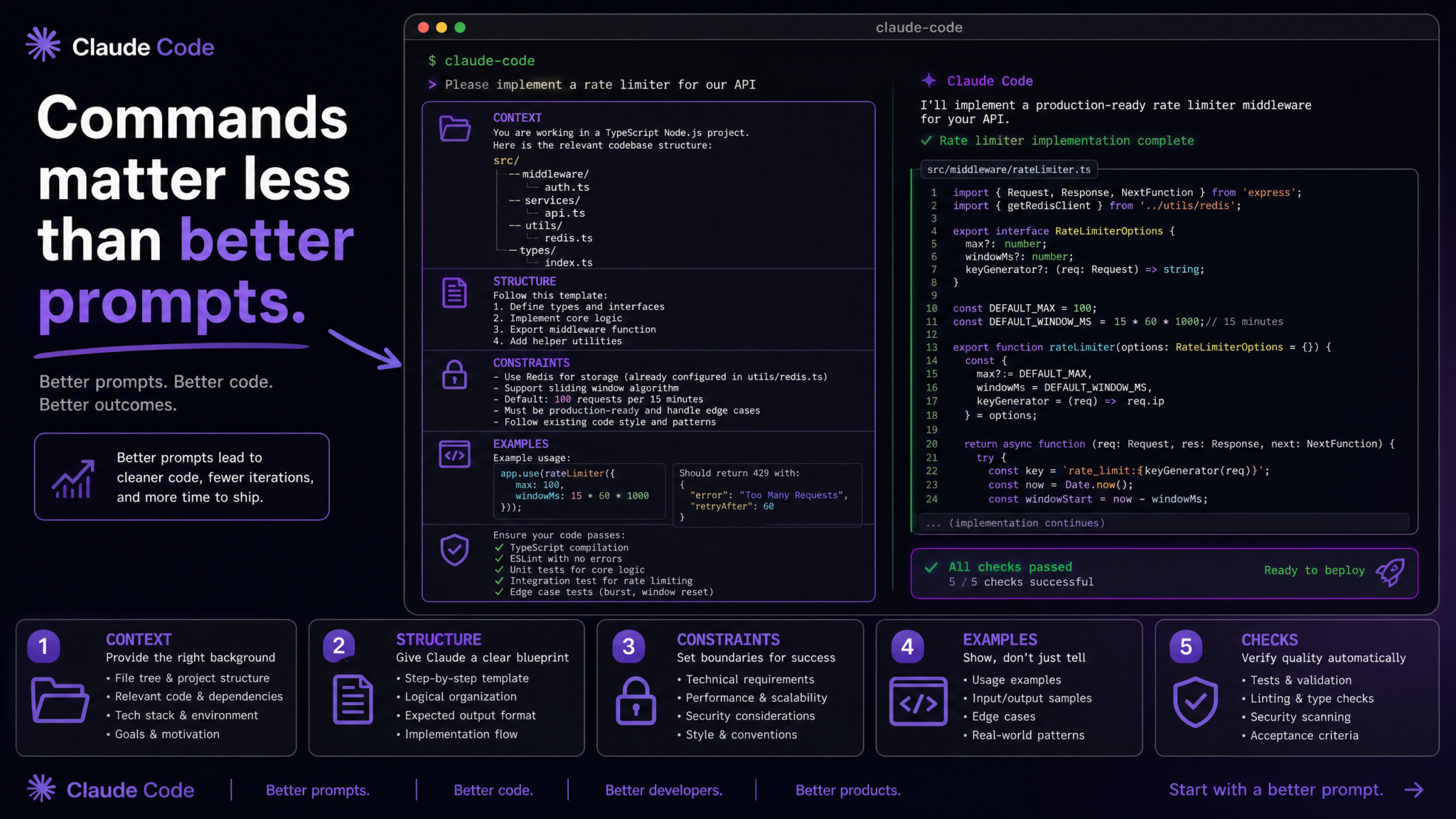
Claude Code, Anthropic’s terminal-native AI coding agent, is particularly sensitive to prompt quality for a specific reason: it operates autonomously within your filesystem, shell environment, and codebase. Unlike a chat-based assistant where a bad response costs you a few seconds of re-reading, a poorly specified prompt in Claude Code can result in the agent modifying the wrong files, skipping test coverage, generating code that looks correct but violates your team’s architectural decisions, or executing shell commands that affect live state in ways you didn’t intend. The stakes are higher, which means the craft of the prompt matters more.
According to developer surveys conducted in 2024, engineers using AI coding assistants spent an average of 34% of their AI interaction time re-prompting or correcting outputs that were technically correct but contextually wrong. That is not a model capability problem. That is a prompt design problem. The model understood the words. It didn’t understand the project, the constraints, the style, the team’s philosophy, or what “done” actually looks like in your context.
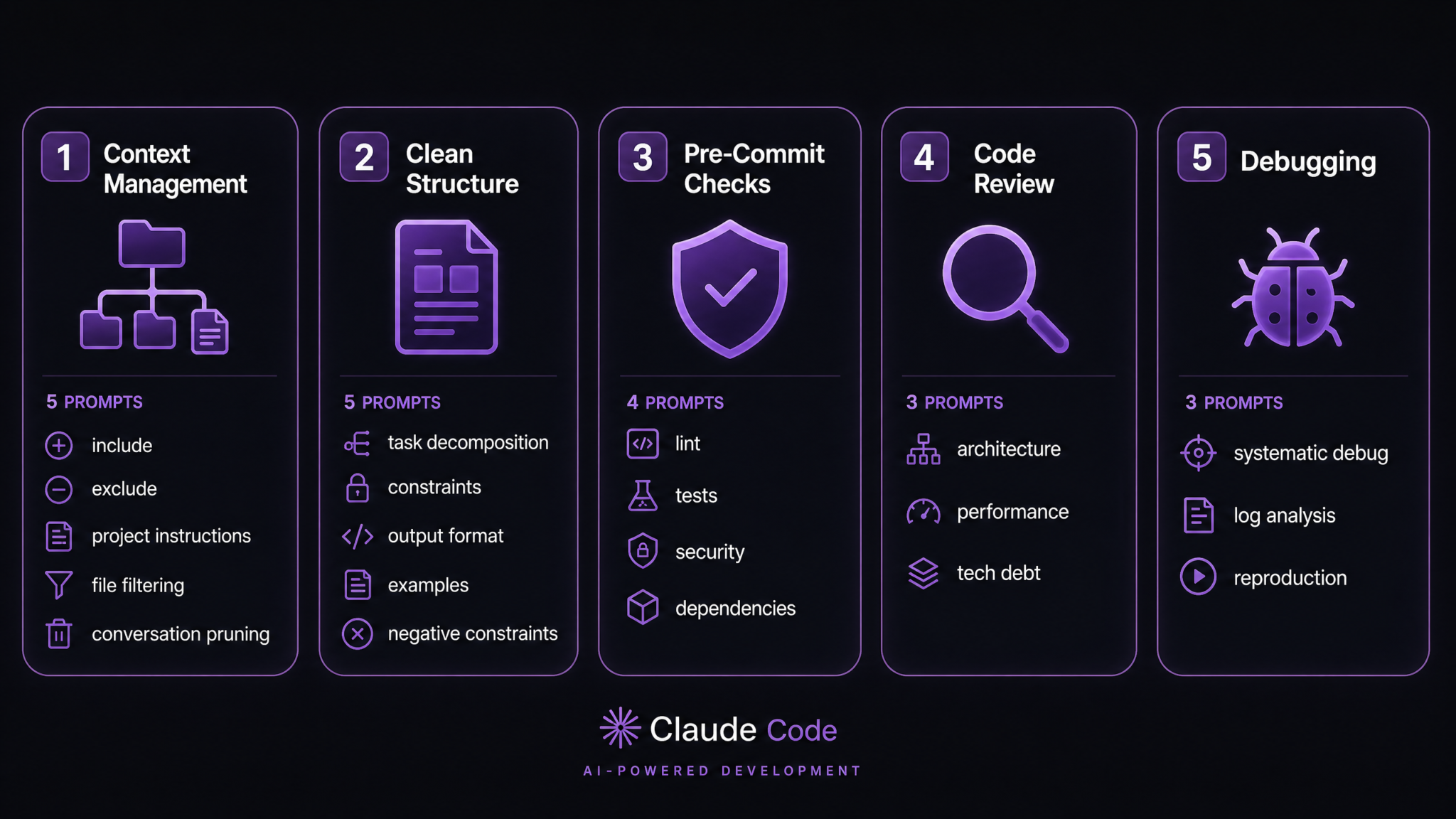
This masterclass is organized around three principals that separate productive Claude Code practitioners from frustrated ones:
- Context management — Claude Code is only as smart as the context you give it. What you include, exclude, and refresh matters enormously.
- Clean prompt structure — Vague instructions produce vague results. Structured prompts that decompose tasks, specify constraints, and control output format produce work you can actually ship.
- Automated checks Claude can run without you — The most powerful productivity multiplier is teaching Claude Code to self-verify. A prompt that includes lint checks, test generation, and security scans as part of the task is worth ten prompts that just say “write the code.”
Each of the 20 prompts in this guide includes the raw prompt text in a copyable block, an explanation of why it works specifically in Claude Code’s execution environment (not just as a generic AI prompt), what cognitive models Claude is using when it processes that structure, and how to customize each prompt for your specific stack and team conventions. Let’s begin.
Category 1: Context Management Prompts
Context is the single most under-optimized dimension of Claude Code usage. Most developers open a session, paste in a file or two, and start giving instructions. Claude Code then operates with a partial mental model of your project — it knows about the files you’ve shown it and infers the rest. The result is code that is locally correct but globally inconsistent. These five prompts solve the context problem at different levels of granularity.
Prompt 1: The Project Initialization Context Brief
Use this prompt at the start of any non-trivial Claude Code session. It forces you (and Claude) to be explicit about the environment before any code is written or modified.
PROJECT CONTEXT BRIEF — Read and internalize before executing any task.

Project: [Project name]
Stack: [e.g., Node 20 / TypeScript 5.3 / Fastify 4 / PostgreSQL 15 / Prisma 5]
Deployment target: [e.g., AWS Lambda via SST v3, cold start budget 200ms]
Test framework: [e.g., Vitest with 80% coverage threshold enforced in CI]
Code style: [e.g., ESLint + Prettier, tabs not spaces, no barrel exports]
Branch strategy: [e.g., trunk-based, all changes through PRs, no direct main commits]
Critical files you must NOT modify without explicit instruction:
  - prisma/schema.prisma
  - src/lib/auth/session.ts
  - .env.production

Architecture constraints:
  - No ORM queries outside of src/db/ directory
  - All external API calls must go through src/services/
  - Errors must be typed using the Result pattern in src/lib/result.ts

Current task: [describe the task after this brief is set]

Confirm you have read this brief by summarizing the stack and listing the protected files before starting work.
Why it works in Claude Code specifically: Claude Code’s agentic behavior means it will explore your repository autonomously. Without explicit boundary-setting, it will follow its best judgment about what to touch — which may mean updating a shared utility file that breaks unrelated modules. The “confirm you have read this brief” instruction at the end is not politeness theater; it forces a verification pass that catches misunderstandings before they become code changes. The confirmation response also tells you immediately if Claude understood the architecture constraints correctly or needs clarification.
Customization tips: The “critical files” section is the highest-leverage field. Populate it with any file that, if modified accidentally, would cause cascading failures or security issues. For monorepos, add the workspace root package.json and any shared tsconfig files to this list.
Prompt 2: The Surgical File Exclusion Directive
When you’re working in a large codebase, Claude Code will sometimes read or reference files that are irrelevant noise — generated files, vendored dependencies, legacy code under deprecation. This prompt establishes a file exclusion contract.
CONTEXT FILTERING DIRECTIVE — Apply to all file reads and searches in this session.

Exclude from context and analysis:
  - All files in: node_modules/, .next/, dist/, build/, coverage/, .turbo/
  - All files matching: *.generated.ts, *.d.ts (except src/types/*.d.ts)
  - All files in: src/legacy/ — this code is being phased out, do not reference it for patterns
  - Migration files in: prisma/migrations/ — read only if specifically asked about migration history

Prefer reading:
  - src/lib/ for utility patterns and shared abstractions
  - src/types/ for canonical type definitions
  - The most recently modified files in the feature area you're working in

If you find yourself reading a file that matches the exclusion list, stop and ask whether it is genuinely needed for the current task.

Acknowledge this directive and list the excluded directories.
Why it works: Claude Code’s context window is finite and precious. Every token spent processing a vendored file or auto-generated type declaration is a token not spent understanding your business logic. More importantly, Claude often uses existing code as a pattern source — if it reads your legacy directory, it may reproduce legacy patterns in new code. The explicit “prefer reading” list is as important as the exclusions because it directs Claude toward your canonical sources of truth.
Customization tips: If your project has a particular configuration library or framework-specific helper directory that contains your most current patterns, add it to the “prefer reading” section. The goal is to make Claude Code’s pattern extraction gravitate toward your best code, not just your most code.
Prompt 3: The Persistent Project-Level Instruction Set
Claude Code supports a CLAUDE.md file in your project root that it reads at session initialization. This prompt is designed to be placed directly in that file, making your context instructions persistent across all sessions without re-entry.
# CLAUDE.md — Project Instructions for Claude Code

## Always apply these rules without being asked

### Code Quality
- Every new function must have a JSDoc comment with @param and @returns types
- Never use `any` type in TypeScript — use `unknown` and narrow explicitly
- All async functions must handle errors with the Result type from src/lib/result.ts
- Magic numbers must be named constants in src/lib/constants.ts

### Testing
- Every new exported function needs a corresponding test in __tests__/
- Tests must cover at least one happy path, one edge case, and one error path
- Do not mock the database in unit tests — use the test database via TEST_DATABASE_URL

### Git
- Commit messages follow Conventional Commits: feat|fix|chore|docs|refactor(scope): description
- Never commit .env files regardless of gitignore status
- Run `npm run lint && npm run typecheck` before declaring a task complete

### Communication
- When you make an architectural decision that wasn't explicitly requested, explain your reasoning
- If a task would require modifying a protected file, stop and ask before proceeding
- If you encounter an ambiguity that could lead to two different implementations, list both approaches and ask which to proceed with
Why it works: The CLAUDE.md pattern is powerful because it removes the initialization tax from every session. But the structure of this particular file matters. Notice that the instructions are written as behavioral rules, not requests — “Every new function must” rather than “please add comments.” Claude Code responds to this authoritative framing with higher compliance rates than polite suggestions. The “Communication” section is particularly important: it teaches Claude when to pause and check in rather than making autonomous decisions that may not align with your preferences.
Claude Code CLAUDE.md Configuration Best Practices
Prompt 4: The Conversation Pruning Protocol
Long Claude Code sessions accumulate context debt. Early decisions, discarded approaches, and superseded instructions still occupy the context window and can cause model confusion. This prompt teaches Claude to manage its own context hygiene.
CONTEXT PRUNING REQUEST

We are now [X] exchanges into this session. Before continuing to the next task, perform a context audit:

1. Summarize the current state of the codebase changes made so far in this session (files modified, functions added, tests written).

2. Identify any instructions from earlier in this conversation that have been superseded or completed and should no longer influence your behavior.

3. Identify any open decisions or TODOs that we discussed but haven't resolved yet.

4. State what you believe the next immediate action should be based on the original task goal.

5. Flag any inconsistencies you've noticed between decisions made early in the session and the current implementation.

After completing this audit, I'll either confirm we should continue or provide corrections before the next action.
Why it works: Context windows don’t just fill up — they degrade. Old instructions compete with new ones. Completed steps still activate when Claude processes similar situations later in the same session. The explicit audit forces a summarization pass that consolidates working memory, surfaces contradictions, and prevents the session from drifting. This is especially valuable in sessions longer than 30-40 exchanges or those involving multiple distinct subtasks.
Prompt 5: The Rolling Context Summary Request
SESSION HANDOFF SUMMARY REQUEST

Before I close this session, generate a compact session summary I can paste into the next session to restore context efficiently.

Format it as:
---
SESSION CONTEXT HANDOFF
Date: [today's date]
Project: [project name]
Branch: [current branch]

Changes made:
- [file]: [what changed and why]
- [file]: [what changed and why]

Decisions made:
- [decision]: [rationale]

Open items / next steps:
- [item with enough context to resume cold]

Constraints to carry forward:
- [any session-specific instructions that should persist]

Known issues discovered but not addressed:
- [issue with file location and description]
---
Why it works: Most developers lose enormous amounts of productive context between sessions. Starting fresh means re-explaining decisions, re-establishing constraints, and potentially re-discovering issues that were already identified. The structured handoff format is designed to be dense enough to restore Claude’s working model of the project quickly without exceeding reasonable preamble length in the next session.
Category 2: Clean Prompt Structure
Clean prompt structure is about translating the fuzzy mental model of “what you want” into unambiguous instructions that produce predictable outputs. The five prompts in this category address the five most common structural failures in developer prompts: insufficient task decomposition, missing constraints, unspecified output formats, lack of behavioral examples, and absent negative constraints.
Prompt 1: The Atomic Task Decomposition Prompt
TASK DECOMPOSITION REQUEST

Before writing any code, decompose the following task into atomic subtasks.

Task: [describe the feature or change]

For each subtask:
1. Name it (verb + noun format, e.g., "Add validation schema for user input")
2. Identify its dependencies (which subtasks must complete first)
3. Estimate its scope (single function / single file / multiple files / architectural change)
4. Flag any subtask that touches a protected file or requires an architectural decision

Present the decomposition as a numbered list with dependency notation.
Do not begin implementation until I approve the decomposition.
If any subtask would require modifying more than 3 files, break it down further.
Why it works: The single most common cause of Claude Code generating incorrect or incomplete implementations is conflating multiple concerns into a single execution step. When Claude receives a complex task without decomposition, it prioritizes completion over correctness — it will write code that appears to satisfy the task description while missing edge cases, skipping error handling, or making assumptions about dependencies. The decomposition-first approach forces explicit reasoning about scope before any code exists, which is dramatically cheaper to correct than code that’s already written.
Customization tips: The “more than 3 files” threshold is adjustable based on your codebase’s coupling density. Tightly coupled legacy codebases may need a lower threshold. Microservices with clear module boundaries can tolerate a higher one.
Prompt 2: The Hard Constraint Specification Template
CONSTRAINT SPECIFICATION

Implement [task description] under the following hard constraints:

MUST (non-negotiable):
- Must be compatible with Node 20 and run without transpilation in test environments
- Must handle null and undefined inputs without throwing — return typed errors instead
- Must complete all database operations within a single Prisma transaction where multiple writes are involved
- Must not introduce any new npm dependencies without explicit approval

SHOULD (strong preference, deviate only with explanation):
- Should reuse the existing pagination utility in src/lib/pagination.ts rather than re-implementing
- Should follow the existing service layer pattern in src/services/user.ts as a reference
- Should add OpenTelemetry span annotations for operations > 50ms

MUST NOT (explicit prohibitions):
- Must not use process.exit() anywhere in library code
- Must not catch and swallow errors without logging
- Must not use synchronous file system operations
- Must not add console.log statements — use the logger at src/lib/logger.ts

If a constraint makes the task impossible or would require a significant workaround, surface that conflict before writing code rather than silently violating a constraint.
Why it works: The MUST / SHOULD / MUST NOT hierarchy maps directly to how Claude processes conflicting objectives. When all instructions carry equal grammatical weight (“please do X and also Y”), Claude will optimize for the one it predicts will make the response look most complete. Explicit tiers tell Claude how to resolve conflicts — MUST constraints are inviolable, SHOULD constraints have an escape valve with justification, and MUST NOT constraints have explicit negative enforcement. The final instruction to surface constraint conflicts before writing code is critical — it converts silent constraint violations into visible conversations.
Claude Code Constraint Specification and Prompt Engineering Guide
Prompt 3: The Output Format Control Directive
OUTPUT FORMAT SPECIFICATION

For the following task, produce output in this exact structure:

## Summary
One paragraph, plain English, describing what you implemented and why you made the key decisions you did.

## Files Modified
| File | Change Type | Description |
|------|-------------|-------------|
| path/to/file.ts | Modified | [what changed] |
| path/to/new-file.ts | Created | [what it contains] |

## Implementation
[Full code for each modified/created file, in separate fenced code blocks labeled with the file path]

## Tests Written
[Full test code in a separate fenced code block labeled with the test file path]

## Verification Steps
Numbered list of terminal commands I can run to verify the implementation works correctly, in order.

## Potential Issues
If there are edge cases you couldn't fully address, assumptions you made, or known limitations, list them explicitly. Do not omit this section — if there are no issues, write "None identified."

Task: [describe the task]
Why it works: Unstructured output from Claude Code is harder to review, harder to apply selectively, and harder to verify. The table format for file modifications gives you an immediate overview before diving into code. The explicit “Potential Issues” section — with the instruction not to omit it — is the most valuable structural element. It forces Claude to be honest about uncertainty rather than projecting false confidence. Developers consistently report that the most value in this template comes from the issues section surfacing edge cases they hadn’t considered.
Prompt 4: The Example-Driven Behavior Anchor
EXAMPLE-DRIVEN SPECIFICATION

I need you to implement [task] following the exact behavioral pattern shown in these examples.

REFERENCE IMPLEMENTATION (follow this pattern, not this code):
```typescript
// src/services/product.ts — this is what I want the new service to look like
export async function getProduct(id: string): Promise<Result<Product, AppError>> {
  const validation = productIdSchema.safeParse(id);
  if (!validation.success) {
    return err(new ValidationError('Invalid product ID', validation.error));
  }

  const product = await db.product.findUnique({ where: { id: validation.data } });
  if (!product) {
    return err(new NotFoundError('Product', id));
  }

  return ok(product);
}
```

ANTI-PATTERN (do NOT produce code that looks like this):
```typescript
// This is the old pattern — do not use
async function getProduct(id: string) {
  try {
    const product = await db.product.findUnique({ where: { id } });
    return product;
  } catch (e) {
    console.error(e);
    return null;
  }
}
```

The new task is: [describe what to implement, e.g., "create a similar service function for orders"]

Match the reference implementation's error handling pattern, validation approach, and return type exactly.
Why it works: Abstract style instructions (“use proper error handling”) produce inconsistent results because “proper” is interpretable. Concrete reference implementations anchor Claude’s output to a specific behavioral pattern that already exists in your codebase. The anti-pattern section is equally important — it explicitly invalidates the older pattern that Claude might otherwise use as a reference if it reads nearby files. This technique is particularly powerful when transitioning a codebase from one pattern to another, because it prevents Claude from cargo-culting the old approach.
Prompt 5: The Negative Constraint Guard
NEGATIVE CONSTRAINT SPECIFICATION

Before implementing [task], I need to establish what this implementation must NOT do, because these anti-patterns exist in our codebase and I want to prevent their propagation.

DO NOT:
1. Do not use class-based components — this is a React hooks-only codebase
2. Do not use useEffect for data fetching — use React Query or SWR exclusively
3. Do not reach into the DOM directly — all DOM interaction through React refs
4. Do not use index as key in any list rendering
5. Do not import from @mui/material — we have migrated to our own design system in src/components/ui/
6. Do not add new useState for data that should live in the URL (routing state belongs in the URL)
7. Do not use inline styles — use the CSS modules convention matching the component file name
8. Do not write tests that assert against implementation details — assert behavior and output only

If any of these constraints conflict with what I'm asking you to implement, pause and flag the conflict rather than violating the constraint.

Task: [describe the task]
Why it works: Positive instructions tell Claude what to build. Negative constraints tell Claude what to avoid. The reason this merits its own prompt template is that negative constraints address a specific failure mode: Claude defaulting to high-frequency patterns from its training data rather than your team’s conventions. If your codebase has any legacy code that doesn’t follow current conventions, Claude will sometimes reproduce those patterns from proximity — it read the nearby file, it looks like your project, so it assumes it’s valid. Explicit negative constraints override that inference.
Category 3: Automated Pre-Commit Checks
This is where Claude Code’s agentic capability produces the highest leverage over traditional AI coding assistants. Because Claude Code can execute shell commands, read output, and iterate autonomously, you can embed verification steps directly into your prompts. The following four prompts create automated quality gates that Claude runs without requiring your attention at each step.
Prompt 1: Lint and Format Verification Sweep
PRE-COMMIT QUALITY SWEEP — LINT AND FORMAT

After completing the implementation task, perform the following verification sequence autonomously. Do not report completion until all steps pass.

Step 1 — Type checking:
Run: npx tsc --noEmit
If errors: Fix all type errors before proceeding. Do not proceed with type errors present.

Step 2 — Lint:
Run: npx eslint src/ --ext .ts,.tsx --max-warnings 0
If errors: Fix all lint errors. If a lint error requires a non-obvious fix, explain your reasoning.
If the error count is 0 but warnings exist: Fix warnings if they are in files you've modified. Leave warnings in unmodified files.

Step 3 — Format check:
Run: npx prettier --check "src/**/*.{ts,tsx,css}"
If format violations exist: Run npx prettier --write on only the files you modified in this session. Do not format files you haven't touched.

Step 4 — Confirmation:
After all three steps pass with zero errors, report:
- Which files you modified for functional reasons (task implementation)
- Which files you modified for format/lint reasons only (cleanup)
- The final output of each verification command

If any step fails after two fix attempts, stop and report the specific error with the file and line number rather than continuing to attempt fixes.
Why it works: The sequential dependency structure (type checking before lint before format) mirrors the correct order of operations and prevents wasted effort. The “two fix attempts” stopping condition is critical — it prevents Claude from entering an infinite self-correction loop on an error it can’t resolve autonomously. The separation of functional changes from cleanup changes in the confirmation report gives you a clean audit trail for code review. Claude Code’s ability to run these commands and read their output natively makes this genuinely autonomous rather than advisory.
Prompt 2: Test Generation Before Commit
TEST GENERATION PROTOCOL — Run before marking any implementation complete.

For every function I have written or modified in this session:

1. IDENTIFY testable units:
   List every exported function and method that was created or modified.
   For each, identify: input types, expected output types, known edge cases, error conditions.

2. GENERATE tests following this structure for each unit:
   describe('[function name]', () => {
     describe('happy path', () => { /* at minimum one test */ });
     describe('edge cases', () => { /* null inputs, empty arrays, boundary values */ });
     describe('error conditions', () => { /* invalid inputs, dependency failures */ });
   });

3. RUN tests:
   Execute: npx vitest run [test file path] --reporter=verbose
   If tests fail: Fix the implementation or the test (explain which and why) and re-run.
   Do not report tests as passing without actually running them.

4. CHECK coverage:
   Execute: npx vitest run --coverage --coverage.include="[modified files]"
   Report the line coverage percentage for each modified file.
   If coverage is below 75% for any modified file, identify the untested branches and either add tests or explain why those branches are untestable.

5. INTEGRATION check:
   Run the full test suite: npx vitest run
   Confirm no previously passing tests now fail.
   If regressions exist, fix them before reporting completion.
Why it works: The explicit “do not report tests as passing without actually running them” instruction addresses a well-documented Claude behavior: generating plausible-looking test code that it presents as verified without executing it. Claude Code can run the tests — but only if the prompt explicitly requires it. The coverage check against modified files specifically (not the whole codebase) makes the coverage requirement tractable without creating a boil-the-ocean test mandate. The regression check step is the safety net that catches the common case where fixing one thing breaks another.
Automated Testing Workflows with Claude Code Agents
Prompt 3: Security Scanning Prompt
SECURITY AUDIT — Run on all code written in this session.

Perform a systematic security review of the following code before it is committed. Work through each category explicitly.

CATEGORY 1 — Input Validation:
Review every function that accepts external input (HTTP request body, query params, file content, environment variables).
For each: Is the input validated before use? Is the validation schema strict (allowlist) or permissive (blocklist)?
Flag any input that reaches a database query, file system operation, or shell command without validation.

CATEGORY 2 — Authentication and Authorization:
Review every route handler or controller function.
For each: Is the route protected by an auth middleware? Is there an authorization check (not just authentication)?
Flag any route that reads or modifies user-specific data without verifying the requesting user has permission for that specific resource.

CATEGORY 3 — Secrets and Credentials:
Scan all modified files for: hardcoded strings that look like API keys, tokens, passwords, or connection strings.
Check that all environment variables are accessed through the validated config module (src/lib/config.ts) not process.env directly.

CATEGORY 4 — Dependency Security:
List any new npm packages introduced in this session.
Run: npm audit --audit-level=high on each new dependency.
Flag any package with known high or critical vulnerabilities.

CATEGORY 5 — Output:
For each flagged issue, report:
  - File and line number
  - Severity (Critical / High / Medium / Low)
  - Description of the vulnerability
  - Recommended fix

If no issues are found in a category, explicitly state "No issues found" rather than skipping the category.
Why it works: Generic security prompts (“check for security issues”) produce generic security observations. Category-driven security prompts produce specific, actionable findings because they direct Claude’s analysis to concrete patterns it can recognize and locate. The instruction to explicitly state “No issues found” for clean categories is not redundant — it forces Claude to actually check each category rather than only reporting categories where it found something. The severity classification makes the output immediately triageable.
Prompt 4: Dependency Audit Prompt
DEPENDENCY AUDIT PROTOCOL

Before finalizing any implementation that adds or updates npm dependencies, run this audit.

STEP 1 — Necessity check:
For each new dependency added:
- State what specific functionality it provides
- Confirm that functionality does not already exist in our codebase or in an existing dependency
- Confirm it cannot be trivially implemented without a dependency (< 20 lines of code)

STEP 2 — Size impact:
Run: npx bundlephobia [package-name] for each new client-side dependency
Report: minified size, gzipped size, tree-shaking support (yes/no)
Flag any package adding > 10KB gzipped for client bundles

STEP 3 — Maintenance health check:
For each new dependency, check:
- npm page for: weekly downloads, last publish date
- GitHub for: open issues count, last commit date, whether the repo is archived
Report these metrics. Flag packages with < 10K weekly downloads, last publish > 18 months ago, or archived repos.

STEP 4 — License compatibility:
Report the license for each new dependency.
Flag any license that is not MIT, Apache-2.0, BSD-2-Clause, BSD-3-Clause, or ISC.
Copyleft licenses (GPL, LGPL, AGPL) require explicit approval before inclusion.

STEP 5 — Version pinning:
Confirm that new dependencies are added with exact version pinning (no ^ or ~ in package.json for production dependencies).

Produce a single DEPENDENCY DECISION table at the end: package | approved/flagged | reason.
Why it works: Dependency sprawl is one of the leading sources of technical debt and security surface area in modern applications. This prompt embeds the discipline of dependency evaluation into the implementation workflow rather than treating it as a separate process. The bundlephobia check is particularly valuable for frontend work, where developers routinely add multi-hundred-kilobyte packages to solve problems that a few native browser APIs would handle equally well.
Category 4: Code Review and Refactoring
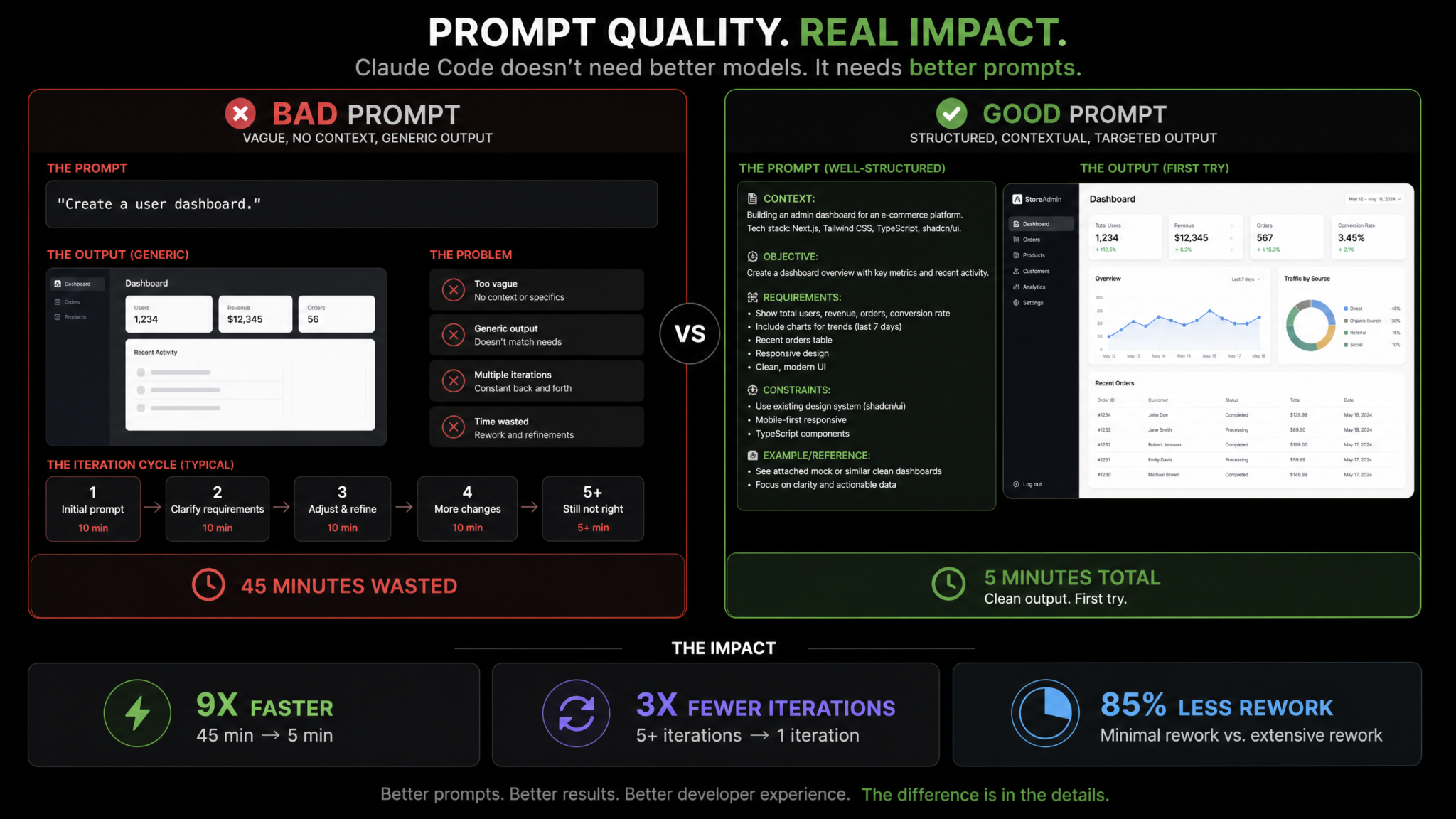
Code review prompts for Claude Code work best when they focus on specific analytical dimensions rather than asking for a general review. A general review produces a mix of style comments, minor suggestions, and genuinely important findings presented with equal weight. Focused review prompts produce prioritized, actionable analysis.
Prompt 1: Architectural Review Prompt
ARCHITECTURAL REVIEW REQUEST

Review the following code [paste code or reference file path] with a focus on architectural concerns only. Do not comment on naming conventions, formatting, or minor style issues — those are handled by our linter.

Address these specific architectural questions:

1. COUPLING ANALYSIS:
   How many modules does this code depend on? Which dependencies are stable (unlikely to change) and which are volatile (likely to change)? Are there dependencies that could be inverted to improve testability?

2. RESPONSIBILITY BOUNDARY:
   Does this module do exactly one thing? If it does more than one thing, where would you draw the boundary and what would you name each half?

3. EXTENSIBILITY:
   If we needed to add [describe a plausible new requirement], would this code require modification or extension? If modification, how invasive would the change be?

4. ABSTRACTION LEVEL:
   Does this code mix abstraction levels? (e.g., high-level business logic mixed with low-level string parsing)

5. DATA FLOW:
   Describe the data flow through this code. Are there any points where data transformation is implicit or unexpected?

For each concern found, rate it: Architectural Debt (fix before scaling) / Design Smell (fix in next refactor) / No Issue.

Do not suggest rewrites. Suggest targeted interventions with approximate effort estimates.
Why it works: Asking Claude for a “code review” triggers a pattern-matched response that covers everything from variable names to design. Asking for an architectural review with specific analytical dimensions directs Claude’s attention to the high-value structural concerns that are harder to catch with automated tools. The effort estimate requirement forces Claude to be practical rather than idealistic — suggesting a full rewrite for a design smell is not useful; suggesting a targeted interface extraction with an estimated one-hour effort is.
Prompt 2: Performance Optimization Prompt
PERFORMANCE ANALYSIS REQUEST

Analyze the following code for performance issues. Organize findings by impact category:

DATABASE QUERY PERFORMANCE:
- Identify any N+1 query patterns (iterating and querying inside loops)
- Identify any missing index opportunities based on the WHERE clauses used
- Identify any SELECT * queries that should be selecting specific fields
- Identify any synchronous sequential database operations that could be parallelized with Promise.all

MEMORY AND COMPUTE:
- Identify any operations inside loops that could be moved outside (loop invariant hoisting)
- Identify any large data structures being rebuilt on every function call that could be memoized
- Identify any unnecessary array copies or object spreads in hot paths
- Identify any regular expressions compiled inside loops

NETWORK AND I/O:
- Identify any waterfall request patterns that could be parallelized
- Identify any missing caching opportunities for data that is read frequently and changes rarely
- Identify any large payloads being serialized/deserialized unnecessarily

For each finding:
- Show the specific code that is the problem
- Estimate the performance impact: Critical (blocking) / High (noticeable latency) / Medium / Low
- Show the corrected version
- If you cannot estimate impact without profiling data, say so explicitly rather than guessing

Code to analyze: [paste code or file reference]
Why it works: Performance reviews without categories produce laundry lists that mix critical database N+1 patterns with trivial micro-optimizations. Categorization forces appropriate prioritization. The explicit instruction to say “requires profiling data” rather than guessing is important — Claude has a tendency to present speculative performance claims with false confidence. Requiring explicit uncertainty acknowledgment produces more trustworthy output.
Access 40,000+ AI Prompts for ChatGPT, Claude & Codex — Free!
Subscribe to get instant access to our complete Notion Prompt Library — the largest curated collection of prompts for ChatGPT, Claude, OpenAI Codex, and other leading AI models. Optimized for real-world workflows across coding, research, content creation, and business.
Claude Code Performance Optimization Workflow for Backend Services
Prompt 3: Technical Debt Identification Prompt
TECHNICAL DEBT INVENTORY REQUEST

Analyze [file or directory path] and produce a structured technical debt inventory. This is an assessment exercise, not an implementation task — do not modify any code.

DEBT CATEGORIES TO ASSESS:

1. DOCUMENTATION DEBT:
   Functions/modules with no documentation, misleading documentation, or documentation that has drifted from implementation.
   Severity based on: how often is this code called? How non-obvious is it?

2. TEST DEBT:
   Functions with no test coverage, tests that only test happy paths, tests that are tightly coupled to implementation.
   List the specific untested scenarios you can identify from reading the code.

3. DEPENDENCY DEBT:
   Deprecated API usage, pinned versions with known security issues, packages with better modern alternatives.

4. COMPLEXITY DEBT:
   Functions exceeding 50 lines, cyclomatic complexity > 10, deeply nested conditionals (> 3 levels), functions with > 5 parameters.
   For each: estimate the refactoring effort in hours.

5. CONSISTENCY DEBT:
   Code that uses patterns inconsistent with the rest of the codebase (as evidenced by what you can observe in adjacent files).

OUTPUT FORMAT:
Produce a debt registry table:
| ID | Category | Location | Description | Severity | Est. Effort |
|----|----------|----------|-------------|----------|-------------|

Then rank the top 5 items to address first, with justification based on risk and effort.
Why it works: Technical debt assessments are most useful when they are systematic rather than opportunistic. The five-category framework ensures Claude covers the full debt surface rather than focusing only on the most obvious issues. The “assessment only, do not modify” instruction is essential — Claude Code’s default behavior is to be helpful by fixing things, and for an assessment task, that helpfulness would corrupt the output by conflating discovery with remediation.
Category 5: Debugging and Problem-Solving
Debugging prompts for Claude Code are fundamentally different from debugging prompts for a conversational AI. Because Claude Code can read files, run commands, and observe outputs, your debugging prompts can be investigative protocols rather than explanations of what you’ve already tried.
Prompt 1: Systematic Debugging Protocol
SYSTEMATIC DEBUGGING PROTOCOL

I have a bug. I need you to work through this systematically, not speculatively.

BUG DESCRIPTION: [describe what's happening vs. what's expected]
ERROR MESSAGE (if any): [paste full error including stack trace]
ENVIRONMENT: [local dev / staging / production] [Node version / OS]
WHEN IT STARTED: [always existed / started after X change / intermittent]

PROTOCOL — Work through these steps in order. Do not skip steps or jump to a conclusion.

STEP 1 — Reproduce:
Before hypothesizing a cause, confirm you can identify the exact code path that produces the error.
Trace the execution path from the entry point to the error site.
State the exact line number where the error occurs or where behavior diverges from expectation.

STEP 2 — Isolate:
List all the variables that could influence the outcome at the error site.
For each variable: what is its expected value? Can you verify its actual value at runtime?
Identify the smallest possible reproduction case.

STEP 3 — Hypothesize:
Generate a ranked list of at most 3 hypotheses for the root cause, ordered by probability.
For each hypothesis: what evidence supports it? What evidence would disprove it?

STEP 4 — Verify:
For the most probable hypothesis: what is the cheapest test you can run to confirm or rule it out?
Run that test. Report the result.
If the hypothesis is disproved, move to the next one.

STEP 5 — Fix:
Fix only what is causing the confirmed bug. Do not opportunistically fix nearby issues.
Explain why the fix resolves the root cause, not just the symptom.

STEP 6 — Regression test:
Write a test that would have caught this bug before it reached a human.
If such a test is not possible, explain why.
Why it works: Unstructured debugging prompts invite Claude to make its best guess at a fix, which often addresses the symptom rather than the root cause. The six-step protocol enforces the scientific method: observe before hypothesizing, hypothesize before testing, test before fixing. Step 6 — the regression test — transforms every debugging session into a durability improvement. Over time, this produces a test suite that specifically covers the categories of bugs your codebase actually produces, which is far more valuable than comprehensive coverage of happy paths.
Prompt 2: Log Analysis and Signal Extraction Prompt
LOG ANALYSIS PROTOCOL

I am providing application logs that contain a bug signal. Extract the relevant information and produce a structured analysis.

LOGS:
[paste log output]

ANALYSIS REQUIREMENTS:

1. TIMELINE RECONSTRUCTION:
   Extract all timestamped events from the logs and place them in chronological order.
   Identify the first anomalous event — the earliest timestamp where something unexpected appears.
   Note the time delta between the first anomaly and the visible error.

2. ERROR CLASSIFICATION:
   Classify the error type: infrastructure (network, disk, memory) / application logic / data / configuration / dependency.
   Is this error deterministic (same input always fails) or probabilistic (fails under certain conditions)?

3. SIGNAL vs NOISE SEPARATION:
   Identify which log lines are directly related to the bug vs. unrelated background noise.
   List the 5-10 most informative log lines, in order of relevance to the root cause.

4. MISSING INFORMATION:
   What information would definitively confirm or rule out each hypothesis?
   What additional logging would you add to catch this bug faster in the future?
   What specific log lines are conspicuously absent that you would expect to see in a healthy execution?

5. HYPOTHESIS FROM LOGS:
   Based solely on log evidence, state your most probable hypothesis for the root cause.
   Confidence level: High (log evidence directly supports) / Medium (log evidence is consistent with) / Low (log evidence does not contradict).

6. RECOMMENDED NEXT INVESTIGATION STEP:
   One specific action to confirm or deny the hypothesis.
Why it works: Raw log analysis is one of the highest-value applications of Claude Code’s reading capability. The structured protocol extracts the most important Claude behavior: timeline reconstruction. Developers looking at logs tend to anchor on the most visible error message, which is often downstream of the actual failure. The “first anomalous event” instruction focuses Claude on upstream causation. The “missing information” section is particularly valuable — it tells you what logs to add for future incident response, converting a single debugging session into a monitoring improvement.
Prompt 3: Reproduction Step Generation Prompt
BUG REPRODUCTION STEP GENERATOR

I need to produce a minimal, complete reproduction of the following bug for a GitHub issue or team bug report.

BUG SUMMARY: [describe the bug]
AFFECTED CODE: [file path or paste code]
CURRENT BEHAVIOR: [what happens]
EXPECTED BEHAVIOR: [what should happen]
KNOWN TRIGGERING CONDITIONS: [any conditions you're aware of]

GENERATE THE FOLLOWING:

1. MINIMAL REPRODUCTION CASE:
   Reduce the affected code to the smallest version that still exhibits the bug.
   Remove all business logic that is not directly involved in causing the bug.
   The reproduction case should be runnable as a standalone script with no external dependencies beyond what is absolutely required.

2. STEP-BY-STEP REPRODUCTION INSTRUCTIONS:
   Write these for a developer who has never seen this codebase before.
   Include: environment setup, exact commands to run, exact inputs to provide.
   Use a fresh project at yourproject.io/repro-template or equivalent as the starting point if the repo is private.

3. ASSERTION:
   State exactly what assertion fails or what observable output is incorrect.
   Provide a test that encodes this assertion: test('reproduction', () => { /* ... */ }).

4. WORKAROUND (if known):
   If there is a known workaround, document it precisely.
   Distinguish between: fixes the root cause / masks the symptom / changes behavior enough that the bug doesn't trigger.

5. DIAGNOSTIC INFORMATION TEMPLATE:
   Produce a template for collecting diagnostic information from users who report this bug:
   - [ ] Node version
   - [ ] Operating system
   - [ ] [project name] version
   - [ ] Steps taken before the bug appeared
   - [ ] [other relevant fields based on the specific bug]
Why it works: Reproduction step generation is a task that most developers shortcut — they write informal notes that are clear to themselves but opaque to a colleague investigating the bug six weeks later. The minimal reproduction case instruction is the most technically demanding step, and it’s where Claude Code provides the most leverage: systematically stripping a complex codebase down to the essential reproduction path requires exactly the kind of systematic code reading that Claude Code does well. The diagnostic information template converts a one-time debugging event into a structured artifact that improves future bug reports.
Putting It All Together: A Prompt Workflow for Real Projects
Individual prompts are valuable. A coordinated workflow is transformative. Here is how these 20 prompts combine into a coherent development workflow for a real feature implementation cycle.
Session Opening (5 minutes)
Start every non-trivial session with Prompt CM-1 (Project Initialization Context Brief) to establish project context, then Prompt CM-2 (Surgical File Exclusion Directive) to eliminate noise sources from Claude’s analysis. If you have a CLAUDE.md file built from Prompt CM-3, these two context steps are shortened significantly because persistent rules are already in place.
Task Planning (10 minutes)
Before any code is written, use Prompt CP-1 (Atomic Task Decomposition) to break the feature into verified subtasks. Then apply Prompt CP-2 (Hard Constraint Specification) and Prompt CP-5 (Negative Constraint Guard) to establish the implementation boundaries. If you’re building something that follows an existing pattern in your codebase, add Prompt CP-4 (Example-Driven Behavior Anchor).
Implementation (bulk of session)
During implementation, use Prompt CP-3 (Output Format Control) to ensure you receive structured, reviewable output for each subtask. At natural pause points between subtasks, apply Prompt CM-4 (Conversation Pruning Protocol) to keep context clean.
Pre-Commit Verification (15 minutes)
Before declaring implementation complete, run the automated check sequence: AC-1 (Lint/Format) → AC-2 (Test Generation) → AC-3 (Security Scan) → AC-4 (Dependency Audit) if new packages were added. This sequence should be treated as mandatory, not optional. The 15-minute estimate is aggressive — these prompts often surface issues that require additional implementation time. Budget accordingly.
Review and Handoff (10 minutes)
Use Prompt CR-1 (Architectural Review) on any newly created module or significant structural change. Close the session with Prompt CM-5 (Rolling Context Summary) to produce the handoff document for the next session.
The Compound Effect of Consistent Prompt Use
Teams that adopt these prompt patterns consistently report changes that go beyond session-by-session productivity. The CLAUDE.md file (CM-3) becomes a living document of team decisions that new team members read. The technical debt inventory (CR-3) becomes a quarterly maintenance planning tool. The regression tests generated by the debugging protocol (DB-1) accumulate into a bug-specific test suite that reflects your actual failure modes.
The discipline required to use structured prompts — especially the pre-implementation decomposition and constraint-setting steps — also changes how developers think about tasks before they reach Claude. Developers who consistently use CP-1 (decomposition) report spending more time clarifying task scope before writing any code, which reduces rework regardless of whether AI assistance is involved.
The best prompt engineers are not the ones who write the most elaborate prompts — they’re the ones who build prompt workflows that create compounding returns on each session’s output.
Adapting These Prompts to Your Stack
All 20 prompts in this guide use variables for stack-specific details. The adaptation process is straightforward:
| Generic Reference | Replace With | Example |
|---|---|---|
| Test framework command | Your actual test runner | pytest -v / cargo test / go test ./... |
| Lint command | Your linter and config | ruff check src/ / golangci-lint run |
| Type check command | Your type system’s CLI | mypy src/ / pyright |
| Result pattern reference | Your error handling convention | Rust Result<T, E> / Go multiple return / Python exceptions with typed hierarchy |
| Database ORM | Your data access layer | SQLAlchemy / GORM / ActiveRecord |
| Protected files list | Your actual critical files | Infrastructure configs, auth modules, migration state files |
The structural principles behind each prompt — constraint hierarchies, explicit verification requirements, categorical analysis, negative constraints, behavioral anchors — are language and framework agnostic. The specific commands are the only parts that require direct substitution.
Claude Code Prompt Templates for Python Django and FastAPI Projects
Conclusion
The 20 prompts in this guide represent a systematic answer to the most common complaint about AI coding assistants: “It writes code, but not my code.” The gap between AI-generated code and production-ready code is almost always a context, constraint, or verification gap — and all three are addressable through prompt design.
The context management prompts ensure Claude Code operates with an accurate model of your project’s structure, boundaries, and architectural decisions. The clean prompt structure templates translate your mental model of a task into unambiguous instructions that produce predictable output. The automated check prompts turn Claude Code from a code generator into a code-generating-and-verifying agent that catches its own errors before you see them. The review and debugging prompts leverage Claude’s analytical capability for the high-value tasks that take the most developer time and attention.
None of these prompts require advanced prompt engineering knowledge. They require one thing: the discipline to invest two minutes in prompt structure before asking Claude to execute. That two-minute investment consistently returns 15-20 minutes of avoided rework, re-prompting, and debugging — a 7-10x return on time that compounds with every session.
The developers who extract the most value from Claude Code are not the ones waiting for the model to get better. They’re the ones who have already built the prompt infrastructure that makes the current model perform as if it already did.
Start with your CLAUDE.md file. Build the context brief template for your current project. Add the automated check sequence to your workflow. The improvements are not gradual — they’re immediate and measurable.
