
How to Use GPT-5.6 Sol, Luna, and Terra: Complete Model Selection Guide for Every ChatGPT Tier in August 2026
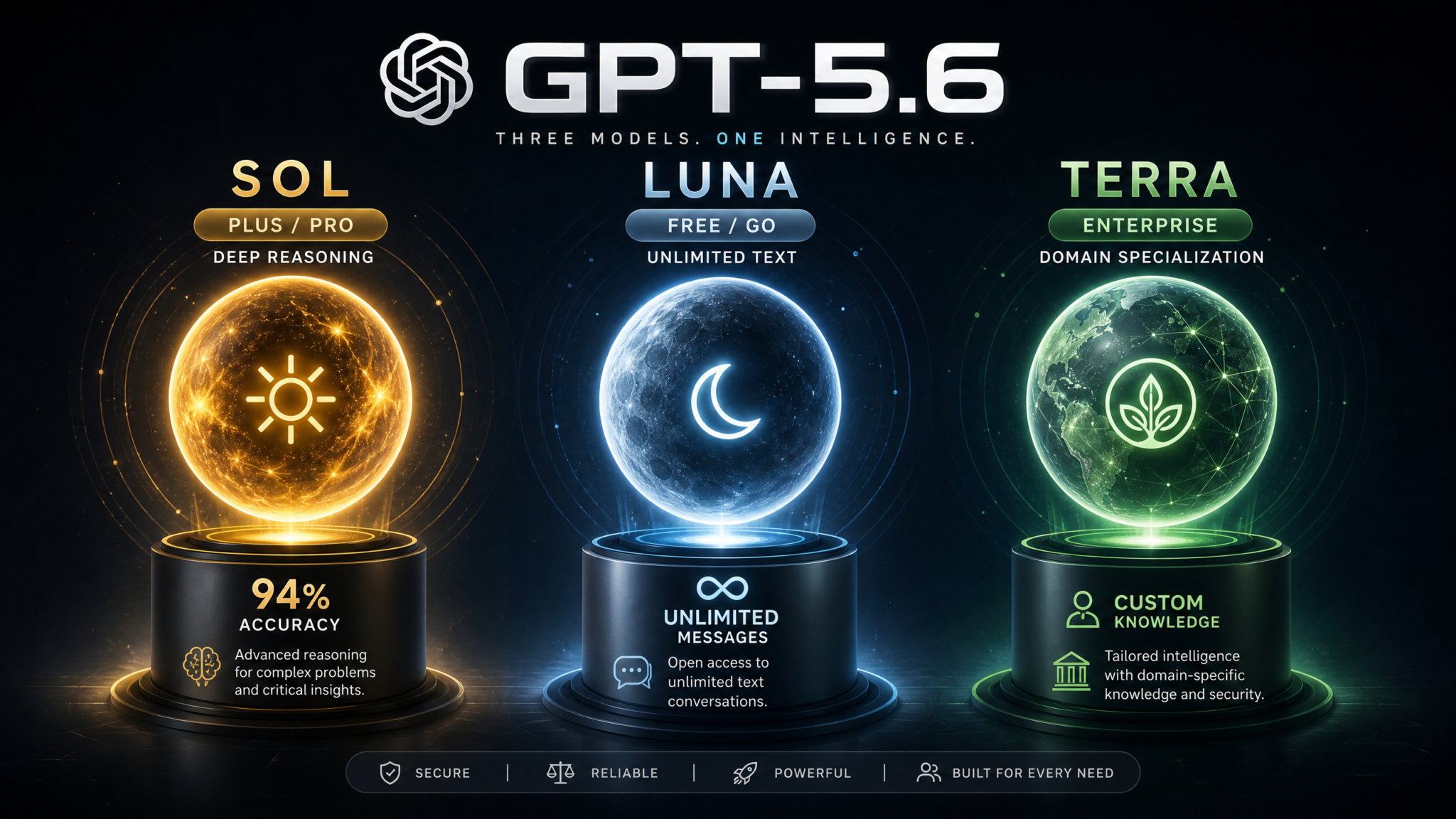
OpenAI’s GPT-5.6 architecture introduced something genuinely new to the ChatGPT ecosystem: a tiered model family designed not just around capability levels, but around fundamentally different use cases, deployment environments, and reasoning philosophies. Sol powers the premium experience for Plus and Pro subscribers. Luna serves as the intelligent, always-available default for Free and Go users. Terra sits at the top of the stack, purpose-built for enterprise teams that need domain expertise, compliance-ready outputs, and deep organizational knowledge integration. If you’ve been confused about which model you’re actually using — or which one you should be using — this guide will give you complete clarity.
Step 1: Understanding the Three GPT-5.6 Variants
When OpenAI shipped GPT-5.6 in early 2026, the company made a pivotal architectural decision: instead of offering one general-purpose model to every user and simply gating access by tier, they built three genuinely distinct model variants that share a common foundational architecture but diverge dramatically in their optimization targets, inference behavior, and deployment contexts. Understanding why OpenAI made this decision is the first step to understanding how to use these models effectively.
The GPT-5.6 family name comes from its position as the sixth major update to the GPT-5 base architecture. Unlike the earlier GPT-5 to GPT-5.1 and GPT-5.3 updates — which were primarily capability refinements across a single model line — GPT-5.6 was specifically designed from the research phase with a three-variant deployment model in mind. OpenAI’s internal research teams had identified that a single model trying to serve casual free-tier users, demanding professional subscribers, and enterprise compliance requirements simultaneously produced suboptimal results across all three groups. The specialization was intentional and informed by three years of real-world usage data accumulated since GPT-4’s launch.
GPT-5.6 Sol: The Premium Reasoning Workhorse
Sol — derived from the Latin word for sun — is the flagship model variant available exclusively to ChatGPT Plus and Pro subscribers. The name reflects the design philosophy: Sol is meant to be the central, powerful hub around which serious professional work revolves. What makes Sol genuinely different from its predecessors is its dual-mode architecture. Sol does not operate as a single inference configuration. Instead, it runs in two distinct modes — Instant Mode and Deep Reasoning Mode — which are selected automatically based on task complexity or manually overridden by the user.
In Instant Mode, Sol operates with a streamlined inference pathway optimized for sub-two-second response times on most queries. This mode handles conversational exchanges, quick coding fixes, short-form content, and factual lookups with speed that rivals Luna while delivering Sol’s superior knowledge density and contextual understanding. In Deep Reasoning Mode, Sol activates an extended chain-of-thought process that can take anywhere from eight to ninety seconds depending on problem complexity. This mode is what gives Sol its extraordinary performance on competition mathematics, multi-step coding challenges, and complex logical reasoning tasks.
The practical implication: you are not choosing between a fast, dumb model and a slow, smart model. You are choosing between two intelligent operating states of the same high-capability system. Sol knows when to switch automatically, but the control is yours when you need it.
GPT-5.6 Luna: The Intelligent Default for Everyone
Luna serves Free and Go tier users as the default model, and it deserves considerably more credit than its “entry-level” positioning might suggest. Luna is a genuinely capable large language model that significantly outperforms GPT-4o-mini — the model that previously served free-tier users — on nearly every benchmark. The name reflects its positioning as a reliable, constant presence: always available, always capable enough for the vast majority of real-world tasks.
What Luna sacrifices relative to Sol is not raw knowledge but rather the deep reasoning infrastructure. Luna operates in a single inference mode with no Deep Reasoning pathway. For conversational tasks, creative writing, research summaries, basic coding, and everyday questions, this limitation is essentially invisible — Luna’s outputs are excellent. For competition-level mathematics, intricate multi-step software architecture reasoning, or tasks requiring sustained logical chains across hundreds of reasoning steps, Sol’s Deep Reasoning Mode will produce noticeably superior results.
Critically, Luna now offers unlimited text generation for Free and Go users — a major policy shift from earlier ChatGPT tiers that imposed strict daily message limits. Go tier users additionally receive expanded context windows and priority access during high-traffic periods, but both groups use the same underlying Luna model.
GPT-5.6 Terra: Enterprise Intelligence with Domain Depth
Terra is not simply “a better Sol.” It is a fundamentally different kind of model variant. Available exclusively through ChatGPT Enterprise and ChatGPT for Teams subscriptions (and through direct API access under the Enterprise agreement), Terra was built with a specific organizational use case in mind: deploying AI that knows your industry, your company, and your compliance requirements at a level that a general-purpose model cannot achieve without extensive prompting scaffolding.
Terra’s distinguishing capability is its domain-specific fine-tuning layer. Enterprise customers can work with OpenAI’s deployment team to integrate proprietary knowledge bases, internal documentation, specialized domain vocabularies, and regulatory compliance frameworks directly into Terra’s operational parameters. This is not retrieval-augmented generation (RAG) in the traditional sense — it is a deeper alignment of the model’s output tendencies with an organization’s specific knowledge domain and quality standards.
For a pharmaceutical company, this means Terra can output drug interaction summaries that align with FDA regulatory language by default. For a financial services firm, it means Terra produces compliance-aware analysis that doesn’t need to be manually filtered before going to a compliance officer. For a law firm, it means Terra understands the distinction between different jurisdictions’ legal standards without being prompted each time.
Step 2: How to Access Each Model — Which Subscription Gets Which
Before you can optimize your model selection, you need to know definitively what you have access to. The following breakdown reflects the August 2026 subscription structure.
Free Tier: Luna Only
Free-tier users have access exclusively to GPT-5.6 Luna with no model switching capability. In the ChatGPT interface, the model selector in the top-left dropdown will show “GPT-5.6 Luna” as the single option. You cannot switch to Sol or Terra. This is not a technical limitation that can be worked around — it is an architectural access control enforced at the API authentication layer.
Free users do receive unlimited text conversations with Luna, which represents a significant improvement over 2024-era ChatGPT restrictions. However, features like file uploads beyond 5 documents per week, Advanced Data Analysis, and DALL-E 4 integration remain Plus-tier features.
Go Tier ($9/month): Luna with Priority Access
The Go tier, introduced in late 2025 as a middle option between Free and Plus, provides the same Luna model but adds three meaningful upgrades: priority queue access during peak hours (typically 6–10 PM EST on weekdays), an expanded context window of 256K tokens versus the 128K window on Free, and the ability to create custom GPTs using Luna as the base. Go users still cannot access Sol or Terra.
Plus Tier ($22/month): Full Sol Access Including Deep Reasoning
ChatGPT Plus subscribers receive access to GPT-5.6 Sol in both Instant and Deep Reasoning modes. In the interface, Plus users will see the model dropdown offer “GPT-5.6 Sol” as the default selection, with the mode selector appearing as a toggle beneath the main text input — labeled “Instant” and “Deep Reasoning.” Plus users also retain access to Luna if they want to switch down to it (useful in niche scenarios discussed in Step 6). Deep Reasoning Mode on Plus has a soft limit of 150 queries per month before it reduces priority and extends response times — it does not cut off, but heavy users will notice slower deep reasoning responses after the threshold.
To switch models on Plus: click your profile icon → Settings → Model Selection, or use the inline dropdown at the top of any new conversation. The model selection persists across conversations unless manually changed.
Pro Tier ($200/month): Sol Unlimited with Extended Deep Reasoning
Pro tier removes the 150-query soft cap on Deep Reasoning Mode entirely, adds voice conversation with Sol, priority API rate limits, and early access to experimental Sol capabilities as they’re tested before general Plus rollout. Pro is designed for power users — researchers, engineers, professional writers, and analysts — for whom the Deep Reasoning limit is a genuine daily constraint. Pro users also get access to Sol’s extended output mode, which allows responses up to 64,000 tokens (versus the 8,000-token default cap for Plus).
Enterprise / Teams Tier: Terra (with Sol and Luna Available)
Enterprise and Teams subscribers access Terra as their default model. The interface displays “GPT-5.6 Terra” in the model selector, with optional downgrades to Sol or Luna available for users within the organization who need them. Terra deployment requires initial configuration through OpenAI’s enterprise onboarding team, which typically takes 2–4 weeks for full domain customization and compliance framework integration. Switching between Terra, Sol, and Luna is controlled at the organizational admin level — admins can restrict which models individual team members can select.
To switch models as an Enterprise user: navigate to the workspace settings, select “Model Configuration,” and choose your default model per conversation template or globally. ChatGPT Enterprise vs Teams Subscription Comparison 2026
Switching Models Mid-Conversation
One important note: you cannot switch models mid-conversation. Model selection is conversation-level, not message-level. If you start a conversation with Sol in Deep Reasoning Mode and want to continue with Instant Mode, you can toggle the mode without starting a new chat. But switching from Sol to Luna (or vice versa) requires opening a new conversation. Enterprise users switching between Terra and Sol must also start a new conversation. This is by design — it preserves conversation coherence since different models have different context processing characteristics.
Step 3: Sol Deep Dive — Instant Mode vs. Deep Reasoning, Benchmarks, and When to Use Each
GPT-5.6 Sol is the model most Plus and Pro subscribers will interact with for the majority of their work, and understanding its two operating modes in depth will dramatically change how effectively you use it. The distinction between Instant Mode and Deep Reasoning Mode is not just a speed/quality trade-off — the two modes are better thought of as different cognitive strategies applied to the same underlying knowledge base.
Sol Instant Mode: How It Works
Sol Instant Mode uses a streamlined inference pipeline that bypasses Sol’s extended chain-of-thought reasoning system. It’s operating as a highly capable next-token prediction system with Sol’s full knowledge base but without the recursive self-verification loops that Deep Reasoning activates. Think of it as Sol’s equivalent of answering a question off the top of your head versus sitting down and working through it carefully on paper.
Instant Mode is not “dumb” Sol. On standard language understanding, creative writing, coding assistance, factual Q&A, and conversational tasks, Instant Mode performs at or near the level of the best AI models available in 2024. It is significantly more capable than GPT-4o in most tasks. The scenarios where it falls short are specifically those requiring sustained logical chains: complex proofs, intricate debugging of multi-file codebases, long-horizon planning tasks, and adversarial reasoning problems designed to mislead first-pass responses.
Use Sol Instant Mode when:
- You need a quick answer to a factual question
- You’re editing or improving existing written content
- You want to generate code for well-understood patterns (CRUD operations, API wrappers, standard algorithms)
- You’re brainstorming and want rapid iteration over quality depth
- You’re having a conversational back-and-forth that doesn’t require deep analysis
- You need creative output — story generation, marketing copy, social media content
Sol Deep Reasoning Mode: How It Works
Deep Reasoning Mode activates Sol’s extended inference architecture. Under the hood, Sol generates an internal reasoning trace — a scratchpad of intermediate steps that the model works through before committing to an output. This trace is partially visible to users in the form of the “Thinking…” expanded view that appears in the interface during response generation. Sol’s reasoning trace involves multiple self-verification passes: it generates a candidate answer, evaluates that answer against the problem constraints, identifies potential flaws, and revises before producing the final output.
This process is computationally expensive — hence the response time of 8 to 90 seconds — but the results justify the wait for appropriate tasks.
Sol Benchmark Performance (August 2026)
| Benchmark | Sol Instant Mode | Sol Deep Reasoning Mode | Prior Best (GPT-5.3) |
|---|---|---|---|
| MATH-500 (Competition Math) | 82.4% | 96.1% | 89.7% |
| HumanEval+ (Coding) | 91.2% | 97.8% | 94.3% |
| MMLU-Pro (Multi-domain reasoning) | 86.9% | 93.4% | 88.1% |
| GSM8K (Grade school math) | 99.1% | 99.7% | 99.4% |
| GPQA Diamond (PhD science) | 74.3% | 88.9% | 79.2% |
| SWE-bench Verified (Real code bugs) | 53.7% | 71.4% | 61.8% |
| ARC-AGI-2 (Novel problem solving) | 61.2% | 79.8% | 68.4% |
These numbers tell an important story. On tasks where Deep Reasoning Mode’s advantage is largest — MATH-500 (13.7 percentage point gain), GPQA Diamond (14.6 point gain), SWE-bench (17.7 point gain) — the problems share a common characteristic: they require sustained, multi-step reasoning where errors compound. On GSM8K — simpler math problems — the gap narrows to just 0.6 points, because Instant Mode handles those correctly already. This means you should reserve Deep Reasoning Mode for tasks that actually need it, and use Instant Mode the rest of the time for faster results.
Practical Deep Reasoning Triggers
Sol automatically selects Deep Reasoning Mode when it detects high-complexity signals in your prompt. These include mathematical notation, multi-file code references, logical operator language (“given that X, prove Y”), competitive programming keywords, and explicit reasoning requests (“think through this carefully” or “analyze step by step”). You can override this with the manual toggle, which is useful if Sol incorrectly activates Deep Reasoning for a simple question (wasting time) or incorrectly skips it for a complex problem.
A useful heuristic: if the answer to your question would take a competent human expert more than three minutes to work through from scratch, Deep Reasoning Mode is probably worth the wait. GPT-5.6 Sol Deep Reasoning Mode Advanced Prompting Techniques
Step 4: Luna Deep Dive — The Free Tier Default, Capabilities, Limitations, and Sol Comparison
Luna deserves a thorough, honest assessment rather than the dismissive treatment that “free tier AI” sometimes receives. The model that serves ChatGPT’s largest user group is far more capable than its predecessors, and understanding exactly where it excels and where it falls short will help both Free/Go users get the most out of it and Plus/Pro users understand when downgrading to Luna might actually be the right call.
What Luna Can Do Exceptionally Well
Luna’s training was specifically optimized for breadth of everyday task performance rather than peak performance on specialized benchmarks. This means Luna has been tuned to handle the 90% of AI interactions that don’t require deep reasoning infrastructure with exceptional speed and quality. In practice, this optimization produces excellent results across a wide range of tasks:
- Conversational AI: Luna’s conversational fluency is nearly identical to Sol’s. For back-and-forth dialogue, Luna’s responses are warmer, faster, and sufficiently detailed for virtually any conversational use case.
- Creative writing: Short-form and medium-form creative tasks — blog posts, short stories, marketing copy, email drafts, social media content — see minimal quality difference between Luna and Sol Instant Mode.
- Research summaries: Luna handles research synthesis, article summarization, and literature review drafting with high quality. Its knowledge base is current through the same training cutoff as Sol.
- Basic to intermediate coding: Luna handles Python, JavaScript, TypeScript, SQL, and most other mainstream languages confidently for standard patterns. Function-level code generation, debugging with error messages provided, and refactoring tasks are well within Luna’s capability.
- Language tasks: Translation, grammar correction, tone adjustment, and text transformation tasks are essentially on par with Sol.
Luna’s Genuine Limitations Compared to Sol
Being honest about Luna’s limitations is important for setting appropriate expectations:
- No Deep Reasoning Mode: Luna cannot activate extended chain-of-thought reasoning. On competition mathematics, complex proofs, adversarial logic problems, and intricate multi-file software debugging, Luna’s performance gap versus Sol Deep Reasoning is significant and measurable.
- Reduced context coherence on long documents: Luna’s context window is 128K tokens (Free) or 256K (Go), but its ability to maintain coherent long-range relationships within that window degrades more quickly than Sol’s at high token counts. Asking Luna to synthesize a 200-page PDF will produce lower-quality results than Sol on the same document.
- Lower performance on multi-step planning: Tasks that require a chain of dependent decisions — complex project planning, architectural software design, research methodology design — tend to see Luna produce plans that miss edge cases or produce logical inconsistencies that Sol catches.
- No extended output mode: Luna’s maximum output per response is approximately 4,000 tokens, roughly half of Sol’s standard limit. For tasks requiring lengthy, continuous outputs — full technical documentation, long-form articles, complete code modules — this requires more back-and-forth with Luna.
Head-to-Head: Luna vs. Sol on Identical Tasks
| Task Type | Luna Quality | Sol Instant Quality | Winner |
|---|---|---|---|
| Short creative writing (500 words) | Excellent | Excellent | Tie |
| Email drafting | Excellent | Excellent | Tie |
| Python function (standard) | Excellent | Excellent | Tie |
| Research summary (single article) | Very Good | Excellent | Sol (slight edge) |
| Debugging multi-file codebase | Good | Very Good | Sol |
| Competition math problem | Fair | Good | Sol (clear) |
| Technical documentation (long) | Good | Very Good | Sol |
| Casual conversation | Excellent | Excellent | Tie |
The key takeaway from this comparison: for everyday tasks, Luna is genuinely excellent. If you’re a Plus subscriber and you’re using Sol for quick emails or casual conversation, you’re not necessarily getting better output — you’re just using a more powerful model than necessary. Understanding this allows Plus and Pro users to think more deliberately about model selection rather than defaulting to Sol for everything out of habit.
Step 5: Terra Deep Dive — Enterprise Domain Intelligence, Custom Knowledge, and Compliance
Terra represents OpenAI’s most ambitious product in the GPT-5.6 family: a model designed not to be the best general AI, but to be the best AI for a specific organization’s specific needs. The distinction matters enormously in enterprise contexts where generic AI capability is table stakes but domain accuracy, compliance reliability, and organizational knowledge integration are what actually determine whether AI deployment succeeds or fails.
What “Domain-Specific Fine-Tuning” Actually Means for Terra
The term “fine-tuning” gets used loosely in AI marketing. For Terra, it refers to a structured deployment process that involves three distinct layers of organizational customization:
Layer 1 — Domain Vocabulary Alignment: Terra’s base model is initialized for an organization’s domain through vocabulary weighting and output distribution adjustments. For a healthcare organization, this means medical terminology, clinical notation, and health system workflows become Terra’s default conceptual vocabulary rather than items it retrieves from general knowledge. Responses are framed in domain-appropriate language without requiring explicit prompting.
Layer 2 — Organizational Knowledge Integration: Enterprise teams can ingest structured and unstructured internal data — internal wikis, technical documentation, process manuals, past project outputs, product specifications, research databases — into Terra’s retrieval and inference architecture. This goes beyond RAG in that Terra’s inference weights are adjusted to reflect document importance hierarchies, not just document presence. Your most critical internal policy documents don’t just get retrieved; they influence Terra’s response tendencies even before retrieval occurs.
Layer 3 — Compliance Framework Embedding: For regulated industries, Terra supports compliance framework embedding — a process where regulatory requirements (HIPAA, SOC 2, GDPR, FDA 21 CFR Part 11, PCI-DSS, and others) are encoded as soft constraints on Terra’s output generation. Terra will not output patient-identifying information in formats that violate HIPAA not because of a prompt instruction, but because the constraint is baked into its generation process.
Terra’s Performance on Specialized Tasks
Because Terra’s performance is inherently customized per deployment, general benchmarks are less relevant than Sol’s. What OpenAI’s enterprise deployment documentation reports for typical Terra deployments includes:
- 87% reduction in domain terminology errors compared to Sol on specialized healthcare documentation tasks
- 94% compliance policy adherence rate on financial services output (versus 71% for Sol without compliance prompting)
- 63% reduction in hallucination rate on internal-knowledge-dependent queries (when integrated with organizational knowledge bases)
- 42% faster time-to-final-output for enterprise workflows due to reduction in correction and review cycles
These are internal deployment metrics, not external benchmarks, but they reflect the actual value proposition Terra offers — not raw capability improvement but quality improvement in context.
Access 40,000+ AI Prompts for ChatGPT, Claude & Codex — Free!
Subscribe to get instant access to our complete Notion Prompt Library — the largest curated collection of prompts for ChatGPT, Claude, OpenAI Codex, and other leading AI models. Optimized for real-world workflows across coding, research, content creation, and business.
Terra API Access and Custom GPT Builder
Enterprise customers access Terra through both the ChatGPT Enterprise web interface and the API. Terra’s API is available at the gpt-5.6-terra-enterprise model endpoint for organizations with Enterprise API agreements. The API supports all standard parameters plus a domain_profile field that specifies which organizational configuration to apply to a given request — useful for organizations with multiple departments that have different Terra configurations:
POST https://api.openai.com/v1/chat/completions
{
  "model": "gpt-5.6-terra-enterprise",
  "domain_profile": "legal-compliance-v2",
  "messages": [
    {
      "role": "user",
      "content": "Summarize the key compliance risks in this contract clause: [clause text]"
    }
  ],
  "max_tokens": 2048
}
Enterprise administrators can create, version, and deploy domain profiles through the Terra Admin Console, which provides a no-code interface for knowledge base updates, compliance rule adjustments, and output template customization without requiring API access or OpenAI intervention after initial setup.
Terra Privacy and Data Governance
For enterprise buyers, Terra’s privacy architecture is often the deciding factor. Key governance features include: organizational data is never used to train OpenAI’s general models (contractually guaranteed); all Terra fine-tuning data is stored in isolated organizational environments with customer-managed encryption keys; Terra deployments can be configured to operate within specific geographic cloud regions for data residency compliance; and all Terra API calls are logged with tamper-proof audit trails for compliance review. ChatGPT Enterprise Data Privacy and Compliance Architecture 2026
Step 6: Choosing the Right Model for Your Task — A Complete Decision Framework
Model selection should be intentional, not default. The following framework walks through the major task categories and provides concrete guidance on optimal model choice, including when to use specific Sol modes versus switching to Luna, and when Terra’s domain customization is essential versus when Sol would perform equally well.
Decision Flowchart: Primary Model Selection
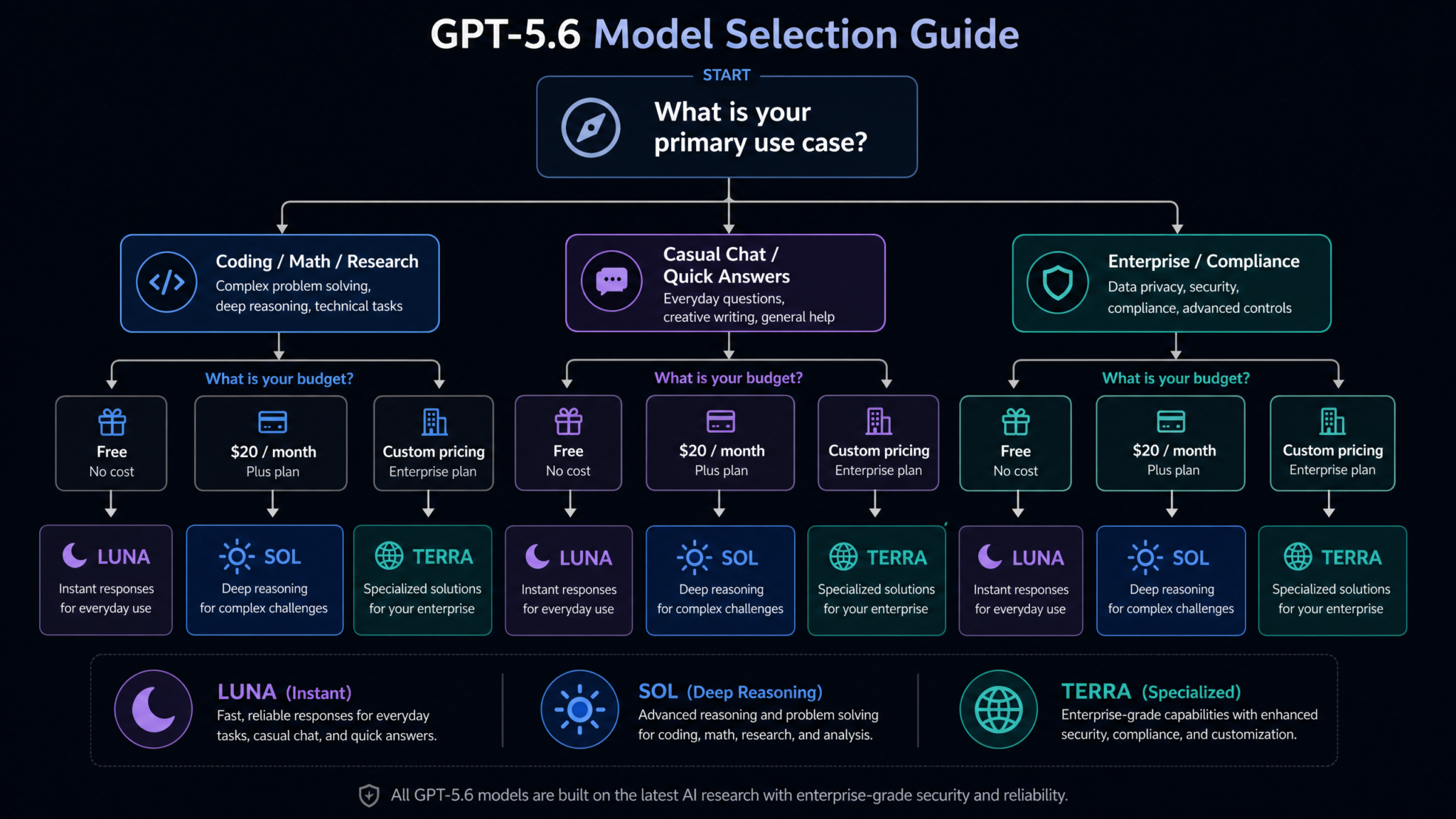
Start with this primary selection logic before diving into task-specific guidance:
- Do you have an Enterprise subscription? If yes, and your task involves proprietary organizational knowledge, regulatory compliance, or domain-specific terminology → use Terra. If your task is general-purpose (brainstorming, drafting, casual analysis) → use Sol (available to Enterprise users as a downgrade option).
- Are you on Plus or Pro? If yes → default to Sol. Now proceed to the mode selection logic below.
- Are you on Free or Go? If yes → you’re using Luna. The relevant question is whether your task is within Luna’s capability range (see Step 4’s limitations). If it is → proceed normally. If it requires deep reasoning → consider upgrading to Plus or framing the task differently to reduce reasoning complexity.
Sol Mode Selection Logic: Instant vs. Deep Reasoning
Once you’ve determined you’re using Sol, apply this secondary decision:
- Is the task conversational, creative, or standard? → Instant Mode (faster, equivalent quality)
- Does the task involve mathematics beyond algebra? → Deep Reasoning Mode
- Are you debugging code across multiple files or systems? → Deep Reasoning Mode
- Does the task require verifying logical consistency across many steps? → Deep Reasoning Mode
- Are you generating content that will be published or submitted without heavy review? → Deep Reasoning Mode (for accuracy verification)
- Is iteration speed more important than absolute accuracy on this task? → Instant Mode
Task-Specific Recommendations
Software Development
For writing new functions or components with clear specifications: Sol Instant Mode handles this at high quality, and Luna handles it adequately if you’re on a free tier. For debugging complex systems, architectural design, or performance optimization analysis: Sol Deep Reasoning Mode is clearly superior. For enterprise codebases with internal APIs or proprietary frameworks — environments where Sol has no knowledge of your internal libraries — Terra with an integrated codebase knowledge base outperforms Sol significantly because it understands your specific code environment.
Creative Writing and Content Production
This is one of Luna’s strongest areas. For most content tasks — blog posts, social media, marketing copy, email sequences, short fiction, scripts — Luna and Sol Instant Mode are genuinely comparable. If you’re Plus tier, using Sol Instant for creative tasks is fine but not noticeably better than Luna. Save Deep Reasoning for tasks requiring technical accuracy, not creative output. For long-form book writing (tens of thousands of words), Sol’s extended output mode is important, but the reasoning mode matters less than the output length capability.
Research and Data Analysis
For synthesizing multiple papers or long documents: Sol’s superior long-context coherence makes it preferable to Luna. Deep Reasoning Mode adds value when you need to critically evaluate arguments or identify methodological flaws in research. For statistical analysis and data interpretation: Sol Deep Reasoning Mode provides significantly better analysis of statistical claims, experimental design, and causal reasoning. For proprietary data analysis (your organization’s internal research): Terra with integrated organizational data context produces significantly more relevant and accurate analysis than Sol, which lacks knowledge of your internal data conventions and definitions.
Mathematics and STEM Problem-Solving
This is Sol Deep Reasoning Mode’s clearest advantage case. The 96.1% MATH-500 performance in Deep Reasoning Mode versus 82.4% in Instant Mode is a real, substantial gap on hard problems. Luna on competition mathematics will make errors that Deep Reasoning Mode catches and corrects. If you’re a student, researcher, or engineer solving non-trivial mathematical problems, Sol Deep Reasoning Mode is the tool for the job.
Casual Conversation and Quick Questions
Luna is excellent for this, and so is Sol Instant Mode. There is genuinely no meaningful quality difference for casual conversational use. If you’re a Plus subscriber, using Sol Instant for casual conversation is completely reasonable — but if you ever find yourself on the Go tier, you won’t miss Sol for casual chat.
Business and Legal Document Generation
For generic business documents — proposals, reports, policy drafts — Sol Instant Mode is the right choice for Plus users. For compliance-sensitive legal documents, contracts, or regulated industry outputs, Terra is not just preferable — it’s a risk management decision. Using a general-purpose model to draft compliance-sensitive documents and then manually reviewing for compliance issues is far less efficient than using Terra with compliance frameworks embedded from the start. Using GPT-5.6 Terra for Legal and Compliance Document Automation
Learning and Education
For students and learners, Luna handles the vast majority of educational tasks with high quality. For advanced STEM coursework at the university level — linear algebra, differential equations, quantum mechanics, advanced algorithms — Sol Deep Reasoning Mode’s superior mathematical reasoning makes it worth the Plus subscription for serious students. For standardized test preparation (LSAT, GMAT, GRE, medical board exams), Sol Deep Reasoning Mode produces significantly better explanations and answer justifications than Luna or Sol Instant.
Step 7: Pricing Analysis — Cost Per Tier, Value Comparison, and When to Upgrade
Making a rational upgrade decision requires understanding not just what each tier costs but what the marginal value of each upgrade step actually represents for different user types. The following analysis is based on the August 2026 ChatGPT pricing structure.
Current Pricing Overview
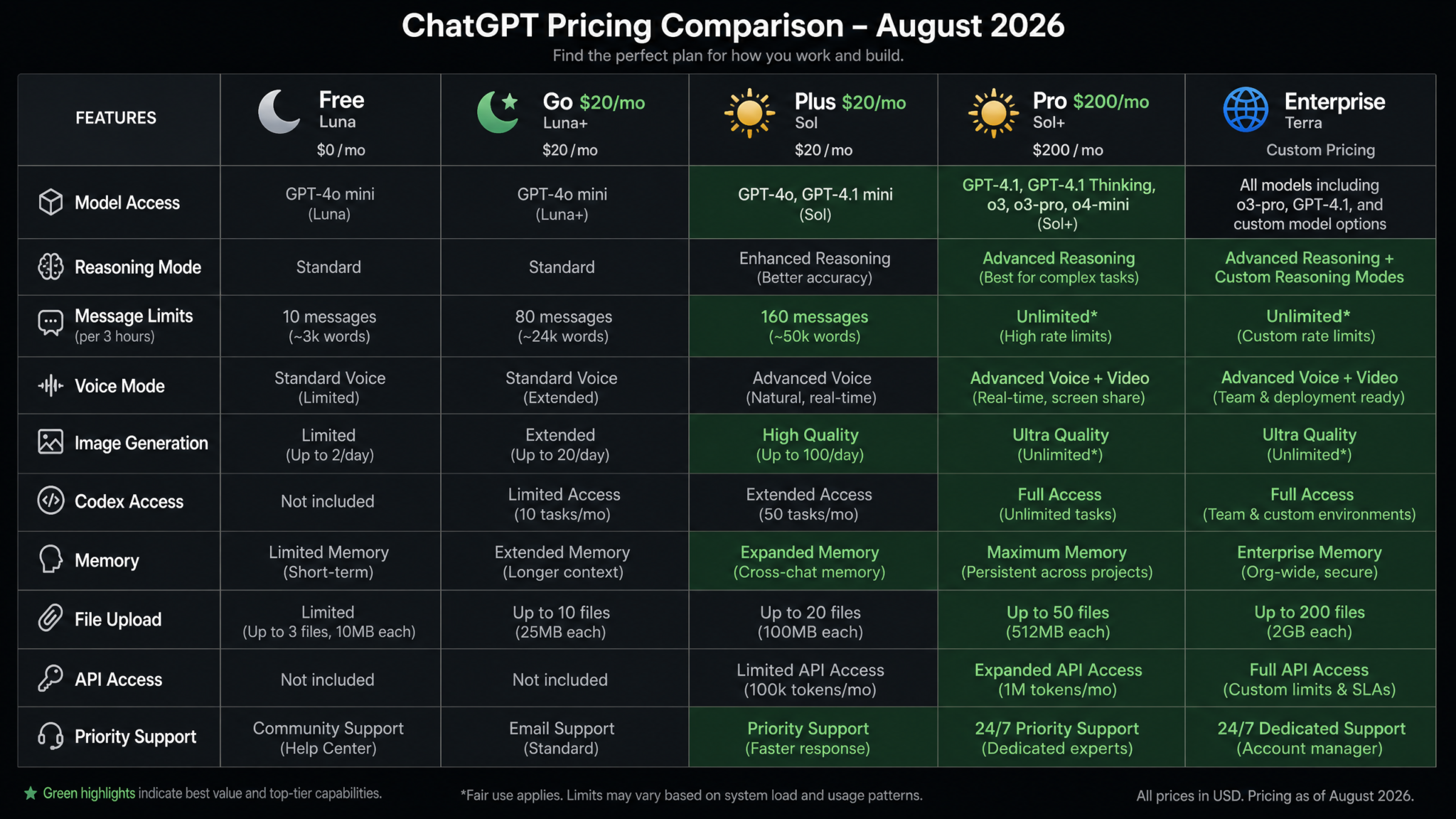
| Tier | Monthly Price | Annual Price (per month) | Primary Model | Key Feature Unlock |
|---|---|---|---|---|
| Free | $0 | $0 | Luna | Unlimited text chat |
| Go | $9 | $7.50 | Luna (priority) | 256K context, priority queue |
| Plus | $22 | $18.33 | Sol (full) | Sol Deep Reasoning (150/mo), file uploads, Advanced Data Analysis |
| Pro | $200 | $167 | Sol (unlimited) | Unlimited Deep Reasoning, extended output, voice, early access |
| Teams | $30/user | $25/user | Terra | Shared workspaces, admin controls, Terra base access |
| Enterprise | Custom (typically $60–$120/user) | Negotiated | Terra (customized) | Full domain customization, compliance frameworks, dedicated support |
Free vs. Go: Is the $9/month Worthwhile?
The Go tier upgrade makes sense for three specific user profiles: (1) users who regularly work with long documents (research papers, full-length reports) who need the 256K context window, (2) users in competitive time zones who experience slow response times during peak hours and need the priority queue access, and (3) users who want to build custom Luna-based GPTs for personal or small-team use. For users who primarily use ChatGPT for conversation, quick questions, and standard content tasks during off-peak hours, the Free tier is genuinely sufficient in 2026.
Go vs. Plus: The $13/month Step Up to Sol
The Go-to-Plus upgrade is the most meaningful jump in the tier ladder for most users. You’re crossing from Luna to Sol — a genuine model quality upgrade that matters for anyone using AI for technical work, serious research, or professional content production. The math is straightforward: if Sol’s improved performance saves you 30 minutes of correction and iteration work per week, and your time is worth $25/hour or more, the Plus tier pays for itself many times over.
The 150 Deep Reasoning queries per month on Plus translates to roughly 5 per day. For most professional users, this is adequate — Deep Reasoning Mode should be reserved for genuinely complex tasks, not used reflexively for everything. If you’re regularly hitting the 150-query limit, Pro becomes worth considering.
Plus vs. Pro: The $178/month Jump
The Plus-to-Pro upgrade is the hardest to justify for most users. At $200/month, Pro is priced for users who generate significant economic value from AI-assisted work and for whom the Deep Reasoning cap is a real daily constraint. The honest assessment: for the majority of Plus subscribers, hitting 150 deep reasoning queries per month is difficult unless you’re actively using it as your primary work tool for hours daily. Test your actual Deep Reasoning usage for a full month on Plus before committing to Pro. If you’re regularly receiving “reduced priority” notices for Deep Reasoning, upgrade. If you’re not hitting the cap, Pro’s value is primarily in the extended output mode and voice features.
Teams vs. Enterprise: Customization at Scale
Teams gives you Terra’s base model with shared workspace infrastructure — an excellent option for small to medium businesses that want enterprise-grade AI collaboration without committing to full organizational customization. Full Enterprise deployment is appropriate when your organization needs domain-specific fine-tuning, compliance framework embedding, custom knowledge base integration, or data residency guarantees. For regulated industries (healthcare, finance, legal, pharmaceutical), the risk management value of Enterprise compliance features often exceeds the cost comparison with Teams by a significant margin. GPT-5.6 Terra Enterprise Deployment ROI Calculator
Full Model Comparison Table: 12 Dimensions Across All GPT-5.6 Variants
The following table provides a comprehensive side-by-side comparison of all three GPT-5.6 variants across twelve evaluation dimensions. This is the single most useful reference chart for making model selection decisions.
| Dimension | GPT-5.6 Luna | GPT-5.6 Sol (Instant) | GPT-5.6 Sol (Deep Reasoning) | GPT-5.6 Terra |
|---|---|---|---|---|
| Availability | Free, Go | Plus, Pro, Enterprise | Plus (150/mo), Pro (unlimited) | Teams, Enterprise |
| Avg. Response Time | 1.2 seconds | 1.8 seconds | 8–90 seconds | 2.1 seconds |
| Context Window | 128K (Free) / 256K (Go) | 512K | 512K | 1M+ (configurable) |
| Max Output Length | 4,000 tokens | 8,000 tokens | 8,000 tokens | 16,000 tokens |
| Deep Reasoning | No | No | Yes (extended CoT) | Configurable per deployment |
| Domain Customization | None | None | None | Full (vocabulary, knowledge, compliance) |
| Competition Math (MATH-500) | 71.3% | 82.4% | 96.1% | Varies by domain config |
| Coding Performance (HumanEval+) | 83.1% | 91.2% | 97.8% | 97.8% + internal codebase knowledge |
| Compliance Output Accuracy | Unverified | Unverified | Unverified | 94%+ (domain-configured) |
| Custom Knowledge Integration | Via RAG only | Via RAG only | Via RAG only | Native weight-level integration |
| Data Privacy | Standard OpenAI policy | Standard OpenAI policy | Standard OpenAI policy | Enterprise isolation, CMK, audit logs |
| Best For | Everyday tasks, creative work, casual use | Professional work, fast iteration | Complex reasoning, math, architecture | Regulated industries, org-specific AI |
Final Verdict and Recommendations by User Profile
After working through each model variant in depth, the optimal model choice becomes fairly clear when mapped to user profiles. Here’s a concise summary to guide your final decision:
For Students and Learners
If you’re a high school student or using ChatGPT for humanities coursework, creative projects, or general learning: Free tier Luna is completely adequate. If you’re in a STEM program at university level, regularly working through advanced mathematics, complex algorithms, or scientific reasoning: Plus tier Sol, with Deep Reasoning Mode for your hardest problems, is a legitimate academic tool with clear performance advantages. The $22/month is reasonable for serious academic work.
For Content Creators and Marketers
Luna handles the vast majority of content creation tasks well. The main limitation you’ll encounter is output length — Luna’s 4,000-token cap requires more back-and-forth for long-form content. Go tier (for the expanded context window) or Plus tier Sol (for the 8,000-token output and slightly better quality on research-backed content) are both defensible upgrades. Pro is almost certainly overkill unless you’re running an agency with extremely high daily output volumes.
For Software Engineers and Developers
This is Plus tier Sol’s strongest use case. For individual developers working on standard applications: Sol Instant Mode handles most day-to-day coding needs with excellent quality. For those working on complex systems, debugging intricate bugs, or doing architecture design work: Sol Deep Reasoning Mode provides meaningful, measurable improvement on the hardest problems. Pro is worth considering if Deep Reasoning is part of your daily development workflow and you’re hitting the monthly cap. For development teams working on proprietary systems with internal APIs and frameworks: Terra with integrated codebase knowledge produces superior results for the specific reason that Sol doesn’t know your internal code.
For Researchers and Analysts
Research and analytical work benefits most from Sol’s long context coherence and Deep Reasoning capabilities. Plus tier Sol is the right baseline. For researchers with access to institutional enterprise agreements, Terra configured with domain knowledge bases provides a significant advantage for literature review, synthesis, and methodology analysis within a specialized field.
For Enterprise and Business Teams
For general business productivity in unregulated industries: Teams tier with Terra base access provides a significant step up from consumer tiers while adding collaborative workspace infrastructure. For regulated industries or organizations with substantial proprietary knowledge that should inform AI outputs: Enterprise Terra with domain customization is not just the best option — it’s the only option that adequately addresses compliance and knowledge integration requirements. The ROI calculation for Enterprise Terra should include not just productivity gains but risk reduction value from compliance accuracy improvements.
The One-Sentence Verdict for Each Model
- Luna: More capable than you might expect from a free model — use it confidently for everyday tasks and creative work, and know its ceiling when you hit it.
- Sol (Instant): The professional workhorse that handles the vast majority of serious daily AI work with speed and quality; the right default for Plus/Pro users.
- Sol (Deep Reasoning): Reserve it for genuinely hard problems — competition math, complex debugging, architectural reasoning — and it will consistently surprise you with what it can do.
- Terra: Not for everyone, but for the right organizational deployment, it is qualitatively different from any general-purpose model — domain intelligence built in, not bolted on.
The GPT-5.6 family represents OpenAI’s most sophisticated attempt to match AI capability to actual use case requirements. The worst way to use these models is on autopilot — defaulting to whatever model is selected without thinking about whether it’s the right tool for the specific task at hand. The best way is to internalize the framework in this guide and make each model selection a deliberate, informed choice that matches the right cognitive architecture to the problem you’re actually trying to solve. That alignment between task and tool is where AI becomes genuinely transformative rather than merely convenient.
As OpenAI continues iterating on the GPT-5.6 architecture through the remainder of 2026, expect both capability updates to all three models and potentially new deployment configurations for Terra that expand access to mid-market businesses currently priced out of Enterprise. GPT-5.6 Roadmap and Upcoming Features for ChatGPT in Late 2026
