
How to Build Human-in-the-Loop Codex App-Server Workflows with Asynchronous Questions and Bounded Approvals
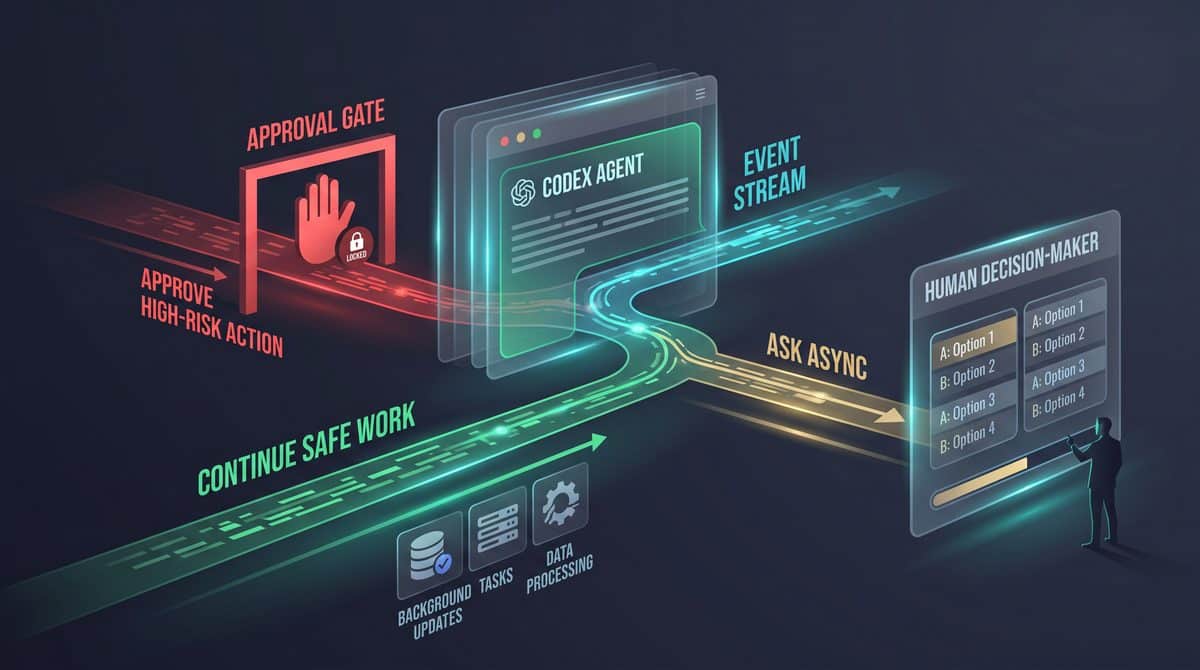

Why Human-in-the-Loop Codex Workflows Need More Than a Blocking “Please Clarify”
Long-running agent workflows fail in a very specific way when every clarification is treated as a blocking conversation turn: the agent stops doing useful work while it waits for a human to answer a question that may not be on the critical path. In a Codex app-server environment, that pause can be expensive operationally. A task might already have enough information to inspect files, run read-only analysis, draft a patch, prepare a migration plan, or summarize risk, but one missing product decision, naming preference, or deployment window can freeze the entire turn if the workflow is modeled as synchronous chat only.
OpenAI’s Codex implementation work around request_user_input_async, described in the Codex changelog and implementation notes, changes that design pattern. Instead of forcing the agent to stop the current turn to ask for clarification, the tool lets the agent request one or more structured answers while the turn continues. That distinction matters for developers and operators because it separates “I need human context eventually” from “I must stop all computation immediately.” The practical result is a better workflow shape for tasks such as repository triage, refactor planning, issue reproduction, release-note preparation, and multi-step remediation where some work can proceed safely before the human responds.
For Codex App Server, How to Embed Codex in an Internal Operations Dashboard with App-Server, MCP Tools, Streaming, and Human Approvals is the most relevant adjacent resource. The internal-operations dashboard tutorial explains Codex app-server events, streaming, MCP tools, and human approvals, providing the direct integration foundation for the asynchronous-question pattern in this playbook.
For Human in the Loop AI, How to Build a Codex Signal-to-Pull-Request Workflow: From Integration Opportunity to Tested Code and Human Review is the most relevant adjacent resource. The signal-to-pull-request workflow shows where evidence, automated tests, and human review belong in a Codex delivery pipeline, offering a concrete model for maintaining decision rights during agent execution.
The Core Failure Mode: Clarification as a Global Stop Signal
A traditional agent loop often handles missing information by emitting a question and waiting. That is simple, but it turns every uncertainty into a global stop signal. If the agent asks, “Should this API response field be called customer_id or account_id?” the entire workflow may halt even though the agent can still inspect the current schema, identify downstream references, draft both patch variants, and prepare tests. The human’s answer is important, but it is not necessarily required before all other safe work continues.
Blocking clarification is especially painful when the human is not present in the same session. App-server workflows may be monitored from a mobile client, a terminal UI, a web surface, or an internal orchestration layer. A maintainer may approve or answer later, during a review window. If the agent blocks every time it needs context, the user sees a growing queue of stalled tasks rather than a set of partially completed work products waiting for precise decisions.
The operational warning is straightforward: do not use synchronous clarification as your default for long-running Codex tasks unless the missing answer determines whether any further safe work can be performed. If the agent can continue with read-only inspection, candidate patch preparation, test discovery, documentation drafting, or risk analysis, the question should usually be asynchronous. If the next action is state-changing, externally visible, credential-dependent, or destructive, the workflow needs approval, not merely a question.
| Human need | Bad workflow shape | Better workflow shape | Why it matters |
|---|---|---|---|
| Naming preference | Stop the whole turn until the user chooses a name. | Ask asynchronously and continue identifying affected files. | The human owns the naming decision, but the agent can still gather evidence. |
| Deployment timing | Block code review preparation while waiting for a release window. | Ask asynchronously and continue producing a deployment checklist. | Timing controls execution, not necessarily planning. |
| Production database change | Ask “Should I run this?” as a casual clarification. | Require explicit bounded approval before any state-changing action. | A question is not authorization for a sensitive operation. |
| External customer communication | Let the agent infer approval from a suggested answer. | Separate draft generation from human authorization to send. | External communication creates business and compliance risk. |
What request_user_input_async Changes
OpenAI’s implementation notes for the Codex pull request describe request_user_input_async as replacing send_user_message_async. The new tool accepts structured questions, supports optional suggested answers, allows the turn to continue, attaches question metadata to asynchronous agent messages, preserves readable fallback text through app-server events and history, and remains compatible with model catalogs advertising either the old or new tool name. Those details are not cosmetic; they are the basis for a durable workflow contract between the agent, app server, UI, and audit trail.
The most important change is that the question becomes a structured artifact rather than an informal chat interruption. A structured question can carry an identifier, a prompt, answer choices or suggestions, and metadata that a client or orchestration layer can render consistently. The readable fallback text matters because not every consumer of history or events will understand the newest schema at the same time. If a transcript, log viewer, or older surface receives the event, the question should still be understandable as plain text.
Because the turn can continue, the app-server workflow can record a question as pending while the agent performs other permitted work. For example, an agent investigating a flaky test can ask which environment is the priority target while continuing to inspect recent test failures, isolate likely race conditions, and prepare a reproduction command. The human response can later bind the final recommendation to the chosen environment without wasting the entire interval.
Recommended design rule: treat asynchronous input as a way to collect human context without stopping safe work. Do not treat it as a bypass for approval, policy checks, credential handling, or production-change controls.
Asking a Question Is Not Obtaining Approval
The sharpest boundary in this playbook is the difference between a question and an approval. A question asks for information: a preference, missing requirement, priority, interpretation, or selection among alternatives. An approval authorizes an action: applying a patch, running a command that changes state, contacting an external party, using credentials, modifying infrastructure, merging a branch, or deploying to production. The mechanism for gathering an answer can be asynchronous; the mechanism for authorizing sensitive action must be explicit, bounded, and auditable.
This distinction prevents a common failure mode in agentic systems: the user answers a narrow question, and the workflow treats the answer as permission to do everything downstream. If the agent asks, “Should the migration use a nullable column first?” and the user answers “Yes,” that answer should not automatically authorize running the migration in production. It only resolves the design choice. The later production action still needs an approval that names the action, scope, environment, time bound, and rollback expectations.
A bounded approval should answer at least five operational questions: what action is authorized, where it may run, what inputs or artifacts it may use, how long the authorization remains valid, and what must happen if conditions change. Without those bounds, an “approval” becomes ambiguous. Ambiguity is dangerous when a long-running turn continues after the human has moved on, the repository state has changed, or an external dependency has become unavailable.
Example decision split:

Question:
"Which compatibility target should the patch prioritize: Node 20, Node 22, or both?"

Approval:
"Authorize running the generated migration against staging only, using migration file
2026_09_03_add_account_id.sql, within the next 30 minutes, after tests pass."
One-or-More-Question Support: Design for Batches, Not Interruptions
The implementation notes state that request_user_input_async accepts one or more structured questions. That matters because real human review often works better as a batch. Instead of interrupting the user three times, the agent can collect related uncertainties into a single decision packet: naming preference, compatibility target, and acceptable test scope. A UI can then present the pending questions together, and the human can answer them in one review pass.
Batching does not mean dumping every possible uncertainty onto the user. A good batch contains questions that share context and can be answered without making the human reconstruct the whole task from scratch. For a repository refactor, one batch might cover public API compatibility, naming conventions, and whether to update examples. A separate approval request later might cover applying the patch or opening a pull request, depending on the permissions and workflow design. Keeping questions grouped by decision context reduces review fatigue and improves audit readability.
For app-server implementers, one-or-more-question support also creates a cleaner state model. The server can track a pending input group, individual question identifiers, answer status, and the agent work that proceeded while answers were pending. If the task is resumed, displayed in a different client, or summarized in history, the workflow can show exactly which human decisions were requested, which were answered, and which remain unresolved.
| Batch type | Appropriate contents | Do not include |
|---|---|---|
| Design clarification | Preferred naming, compatibility target, user-facing wording, accepted tradeoff. | Permission to deploy, merge, delete, or contact users. |
| Investigation scope | Priority environment, affected product area, acceptable reproduction depth. | Credential use or access expansion without explicit approval. |
| Review preparation | Reviewer audience, documentation depth, test evidence format. | Final signoff for production changes. |
Suggested Answers Help Humans Respond Faster, But They Are Not Defaults
OpenAI’s notes describe optional suggested answers. Suggested answers are useful because they turn vague clarification into a bounded choice. Instead of asking, “What should I do about tests?” the agent can ask, “Which test scope should I prepare: unit tests only, affected integration tests, or full local suite?” That gives the human a concrete decision surface and makes the answer easier to store, render, and audit.
The implementation warning is that suggested answers should not be treated as pre-approved defaults unless your workflow explicitly says so and the risk is low. In most human-in-the-loop systems, silence is not consent. If the user does not answer, the agent may continue safe background work, but it should not assume the first suggested answer, choose the most convenient option, or proceed into a sensitive operation. Suggested answers accelerate human input; they do not replace it.
Suggested answers should also be neutral and complete enough to avoid steering the reviewer into a false choice. A question that offers “Deploy now” and “Cancel task” but omits “Prepare deployment plan only” collapses planning and authorization into a poor decision interface. For sensitive work, keep suggestions informational and reserve action authorization for the approval path.
Sample asynchronous question packet:

[
  {
    "id": "compat_target",
    "question": "Which runtime target should the patch prioritize?",
    "suggested_answers": ["Node 20", "Node 22", "Both Node 20 and Node 22"]
  },
  {
    "id": "test_scope",
    "question": "What test evidence should I prepare before review?",
    "suggested_answers": ["Unit tests only", "Affected integration tests", "Full local suite if available"]
  }
]
Continued Turn Execution Requires Guardrails
Allowing the turn to continue is the feature that makes asynchronous questions valuable, but it is also where workflow designers must be precise. Continued execution should be limited to actions that remain valid regardless of the pending answer or that can be safely revised after the answer arrives. Read-only repository inspection, draft generation, static analysis, local reasoning, test plan creation, and alternative patch sketching are usually good candidates. Production mutation, external communication, credential use, irreversible file deletion, or changes outside the declared task scope are not.
A practical implementation pattern is to classify every next step into one of three lanes: continue, wait for answer, or require approval. “Continue” covers safe preparatory work. “Wait for answer” covers work that would be wasteful or misleading without the human’s decision. “Require approval” covers actions that create risk beyond information gathering. This classification can be encoded in orchestration policy, agent instructions, UI labels, and audit logs so that users can understand why the agent kept working after asking a question.
Continued execution also needs state persistence. The Codex implementation notes mention question metadata on asynchronous agent messages and preservation through events and history. That is important because humans may answer from a different surface than the one where the question was asked, and operators may need to reconstruct what happened after an incident. A durable record should show the question text, suggested answers if any, timestamp or sequence position, related task, eventual answer, and the work performed while the question was pending.
A Decision-Rights Model for App-Server Workflows
A decision-rights model assigns each kind of decision to the right actor before the workflow begins. The agent can decide how to inspect code, summarize findings, propose alternatives, and prepare drafts within its tool and policy constraints. A developer can decide implementation tradeoffs, naming, test scope, and whether a patch is acceptable. An operator or administrator may own environment access, credential use, deployment windows, and rollback requirements. Legal, security, or customer-facing teams may own external communication, data-handling exceptions, or regulated workflow steps.
The model should be explicit because asynchronous questions otherwise blur accountability. If an agent asks a developer whether to “proceed with the rollout plan,” the developer may answer from an engineering perspective while the actual authority belongs to an operator. A better workflow asks the developer for technical readiness and separately routes deployment approval to the role that controls the environment. The app server does not need to invent permissions; it needs to preserve the boundary between information, recommendation, and authorization.
| Decision category | Typical decision owner | Workflow treatment |
|---|---|---|
| Clarifying requirements | Product owner, developer, requester | Use asynchronous structured questions when safe work can continue. |
| Code design tradeoff | Maintainer or assigned developer | Ask for preference; continue with analysis or alternative drafts. |
| Credential use | Administrator or authorized operator | Require explicit bounded approval before use. |
| Production change | Release owner, SRE, administrator | Require scoped authorization with environment, artifact, and time limits. |
| External message | Support, legal, communications, or account owner | Generate drafts only until an authorized human approves sending. |
The opening principle for the rest of this playbook is simple: use request_user_input_async to keep useful work moving, not to weaken control. Structured questions with optional suggested answers make human input easier to request, route, render, and preserve. Bounded approvals keep sensitive actions accountable. The strongest Codex app-server workflows combine both: asynchronous clarification for context, explicit authorization for risk, and an audit trail that shows the difference.
Reference Architecture for Asynchronous Questions, Bounded Approvals, and Recoverable App-Server State

A durable human-in-the-loop Codex workflow should treat clarification, approval, execution, and audit as separate event types rather than different labels on the same chat message. OpenAI’s Codex implementation notes for request_user_input_async describe a tool that can ask one or more structured questions, include optional suggested answers, attach metadata to asynchronous agent messages, preserve readable fallback text through app-server events and history, and allow the turn to continue. That behavior is powerful precisely because it is not a blocking approval gate; the app server must decide which actions may continue while the human response is pending and which actions must wait for explicit authorization.
The architecture below uses four stores and one event bus: a conversation history store for transcript continuity, a pending-question store for open human prompts, an approval ledger for bounded permissions, an execution state store for task status, and an append-only event stream that all UI surfaces can replay. The exact persistence technology is an implementation choice, but the boundary matters: pending questions are not approvals, approvals are not free-form chat replies, and history is not the only audit record. This separation prevents a later replay, reconnect, or transcript compaction from accidentally converting “Which migration file should I inspect?” into “Apply the production migration.”
For AI Agent Event Architecture, OpenAI Open-Sources the Codex Agent Harness: Architecture, SDKs, App-Server, and What Developers Can Build is the most relevant adjacent resource. The open-source Codex agent-harness article examines app-server and SDK architecture, helping developers place structured question events, correlation IDs, and thread history inside the wider event system.
Event Flow: Ask, Continue, Correlate, Decide, Resume
The safest event flow starts when the agent emits a structured asynchronous question and the app server writes it to the pending-question store before broadcasting it to clients. The agent may continue non-sensitive analysis after the question is emitted, but the app server should hold any operation that depends on the answer behind a named dependency. This avoids two common failures: the model proceeds as if a suggested answer were selected, or the UI receives a question that was never durably stored and is lost after reconnect.
- Agent emits question request. The app server receives a tool event using
request_user_input_async, or a backward-compatible legacy name when the model catalog still advertises the older tool name. - Server validates schema. The server validates that each question has an identifier, readable prompt text, expected answer shape, and any suggested answers. Invalid questions should be rejected as tool-output errors rather than displayed as ambiguous UI prompts.
- Server persists pending state. The pending-question record is written with correlation IDs, expiration policy, dependency labels, and current task status before client notification.
- Server emits UI event. Connected clients receive a durable event containing structured metadata and readable fallback text so older clients, logs, and transcript views remain intelligible.
- Agent continues allowed work. Non-mutating analysis, code reading, test planning, or draft preparation may continue if the policy engine says the pending answer is not required.
- Human responds or state changes. A user answer, timeout, cancellation, disconnect, or task termination closes or suspends the pending question according to explicit state rules.
- Server emits resolution event. The answer or terminal state is appended to history, linked to the original question, and made available to the agent as structured input.
The important design rule is that the app server, not the UI alone, owns the state transition. A mobile client, terminal UI, browser panel, or automation dashboard may render the question and collect the answer, but the server decides whether the answer is on time, from an authorized actor, consistent with the schema, and sufficient to unblock a dependency. That server-side decision is what makes reconnect behavior safe when drafts, queued input, transcripts, and attachments are preserved but uncertain submissions remain paused for review.
Structured Question Schema
A structured question should be optimized for validation and replay, not just for visual presentation. OpenAI’s implementation notes indicate that the tool supports one or more structured questions with optional suggested answers. Treat the outer tool call as a batch and each question as an individually addressable unit, because one answer may arrive before another, one may time out, and one may be canceled by a task-level state change.
{
  "tool": "request_user_input_async",
  "request": {
    "request_id": "rq_2026_09_03_143015_7f2a",
    "thread_id": "thread_from_runtime_or_client",
    "turn_id": "turn_from_runtime_or_client",
    "agent_step_id": "step_from_runtime_or_client",
    "questions": [
      {
        "question_id": "q_target_branch",
        "kind": "single_select",
        "prompt": "Which branch should I inspect before drafting the migration plan?",
        "description": "This selects the branch for read-only analysis. It does not authorize file changes.",
        "suggested_answers": [
          { "value": "main", "label": "main" },
          { "value": "release-candidate", "label": "release-candidate" }
        ],
        "required": true,
        "depends_on": [],
        "blocks": ["read_repository_branch"],
        "approval_scope": "none"
      },
      {
        "question_id": "q_risk_tolerance",
        "kind": "single_select",
        "prompt": "How conservative should the proposed rollout plan be?",
        "suggested_answers": [
          { "value": "low_risk", "label": "Low risk: staged rollout and manual verification" },
          { "value": "balanced", "label": "Balanced: staged rollout with automated checks" }
        ],
        "required": false,
        "depends_on": [],
        "blocks": ["final_recommendation"],
        "approval_scope": "none"
      }
    ],
    "fallback_text": "Codex asked which branch to inspect and how conservative the rollout plan should be. No production action is authorized by these answers."
  }
}
This example is deliberately clarification-only. The approval_scope field is shown as an application-level convention, not an OpenAI-defined schema requirement. Its purpose is to force a policy check: if the user is merely answering a question, the answer can steer analysis; if the user is approving a sensitive operation, the workflow should use a separate bounded authorization record with operation, target, duration, actor, and revocation semantics.
Readable Fallback Text Is a Compatibility and Audit Requirement
Readable fallback text is not decorative. OpenAI’s implementation work explicitly calls out preservation of readable fallback text through app-server events and history, which matters for older clients, log viewers, transcript exports, and incident review. A structured payload can be perfect for a modern client and still fail operationally if a reconnecting terminal, compacted history view, or audit reviewer only sees an opaque JSON blob.
Use fallback text that states what was asked, what the answer can influence, and what it does not authorize. Avoid fallback text such as “User input requested” because it cannot be used to reconstruct decision context. A better fallback is: “Codex asked which release branch to inspect for read-only analysis; answering does not approve file changes, deployment, credential access, or external communication.” That sentence remains useful even if the structured metadata is unavailable.
| Fallback Element | Required Content | Operational Reason |
|---|---|---|
| Question summary | Plain-language description of each question in the batch. | Allows transcript readers to understand what the human was asked without parsing schema. |
| Decision boundary | Statement that clarification does not authorize sensitive work. | Prevents answers from being misread as approvals during replay or review. |
| Pending dependency | Named work item blocked by the answer. | Helps operators explain why an agent paused one action while continuing another. |
| Terminal state | Timeout, cancellation, answered, superseded, or task-ended status. | Lets clients and auditors distinguish ignored questions from resolved questions. |
Correlation IDs: Make Every Human Decision Traceable
Correlation IDs should connect the question, UI rendering, human answer, policy decision, and any resumed agent work. At minimum, persist a thread_id, turn_id, agent_step_id, request_id, and question_id. If your app server supports multiple devices or surfaces, add client_session_id for the rendering surface and actor_id for the authenticated human who answered. Do not rely on timestamps alone, because queued prompts, background send, reconnects, and long-running tasks can reorder user-visible events.
correlation:
  thread_id: runtime.thread_id
  turn_id: runtime.turn_id
  agent_step_id: runtime.agent_step_id
  request_id: generated_for_question_batch
  question_id: stable_within_batch
  task_id: app_server_task_id
  dependency_id: policy_dependency_name
  client_session_id: rendering_surface_session
  actor_id: authenticated_user_or_service_principal
  history_item_id: transcript_event_id
  audit_event_id: append_only_ledger_id
The request_id should identify the batch, while question_id identifies the individual decision. This distinction matters when the model asks three questions and the human answers only one before a disconnect or cancellation. The server can mark q_target_branch as answered, q_risk_tolerance as expired, and q_notification_channel as canceled without corrupting the batch-level history item.
Pending-Question Store
The pending-question store is the authoritative index of unresolved human input. It should be queryable by thread, task, actor, dependency, and expiration time. A UI can then build a “needs response” view without scraping transcript text, and an operator can find all tasks blocked on approvals or clarifications. OpenAI’s mobile changelog describes a Priority view that elevates running tasks, unread updates, and tasks awaiting a response; app-server implementations should expose equivalent state even if the client presentation differs.
pending_question:
  request_id: string
  question_id: string
  thread_id: string
  task_id: string
  status: enum[pending, answered, expired, canceled, superseded, task_ended]
  kind: enum[free_text, single_select, multi_select, confirm_intent, structured_object]
  prompt: string
  fallback_text: string
  suggested_answers: list
  schema_version: string
  created_at: timestamp
  expires_at: timestamp_or_null
  answered_at: timestamp_or_null
  canceled_at: timestamp_or_null
  actor_constraints:
    allowed_roles: list
    required_reauthentication: boolean
  dependency:
    blocks: list
    permits_continuation_of: list
  answer:
    value: any
    actor_id: string_or_null
    client_session_id: string_or_null
    validation_status: enum[not_applicable, valid, invalid]
  audit:
    history_item_id: string
    audit_event_ids: list
Set expiration based on risk and operational rhythm. A question about preferred code style may remain open until the task ends. A question that blocks a deploy plan should expire before the environment changes enough to make the answer stale. A question tied to an approval-like decision should not be represented only as a pending question; create a separate approval request with a shorter validity window and a precise target.
App-Server Event Handling
The app server should normalize tool-name compatibility before validation. OpenAI’s PR notes state that the implementation remains compatible with model catalogs advertising either the old or new tool name after replacing send_user_message_async with request_user_input_async. In practice, that means your adapter should accept both names when the catalog permits them, but store the canonical operation internally as request_user_input_async so downstream policy and audit code do not fork.
tool_aliases:
  canonical: request_user_input_async
  accepted_when_catalog_allows:
    - request_user_input_async
    - send_user_message_async

handling_policy:
  on_tool_event:
    - resolve_tool_alias_against_model_catalog
    - validate_generated_schema
    - generate_or_verify_correlation_ids
    - persist_pending_questions_transactionally
    - append_history_event_with_fallback_text
    - emit_client_event
    - update_task_dependencies
  on_human_answer:
    - authenticate_actor
    - authorize_actor_for_question
    - validate_answer_against_question_schema
    - write_answer_and_terminal_status
    - append_history_resolution
    - notify_agent_runtime
    - evaluate_blocked_dependencies
Generated schemas should be treated as versioned contracts. The implementation notes for request_user_input_async mention generated schemas and validation coverage, which means app-server code should not accept arbitrary model-shaped objects merely because they are plausible. Version the question schema, reject unknown critical fields when strict mode is enabled, and preserve unrecognized non-critical metadata only if your audit policy allows it. This prevents a future schema extension from silently changing approval semantics in an older server.
History Preservation Across Events, Compaction, and Reconnect
History preservation has two purposes: the agent needs continuity, and humans need accountability. The Codex changelog notes fuller TUI history for patches, terminal input, and completed commands, plus reconnection behavior that preserves drafts and transcripts while uncertain or queued submissions remain paused for review. Your app server should mirror that safety model by replaying known committed events and refusing to auto-submit anything whose delivery status is uncertain.
For each question, append at least three transcript-visible history items: the question request with fallback text, the answer or terminal state, and any resumed action that depends on it. The resumed action should reference the question_id or approval ID that unblocked it. If the task later forks, compacts history, or resumes from compressed context, the trace should still show which human input influenced the new path.
history_items:
  - type: async_question_requested
    request_id: rq_2026_09_03_143015_7f2a
    question_ids: [q_target_branch, q_risk_tolerance]
    visible_text: "Codex asked which branch to inspect and how conservative the rollout plan should be. No production action is authorized."
  - type: async_question_answered
    question_id: q_target_branch
    actor_id: user_123
    visible_text: "User selected release-candidate for read-only branch inspection."
  - type: dependency_unblocked
    dependency_id: read_repository_branch
    caused_by: q_target_branch
    visible_text: "Read-only branch inspection may continue based on the user's selected branch."
Do not erase unanswered questions during transcript compaction. Mark them as expired, canceled, or superseded and preserve enough fallback text to explain why they no longer require action. Silent disappearance is dangerous because a later operator cannot know whether the human declined to answer, the UI failed, the task was canceled, or the agent moved on without permission.
Timeout, Cancellation, and Disconnect States
Timeout and cancellation states should be explicit because asynchronous work creates races. A human may answer after a task has ended, a reconnecting client may resubmit a stale draft, or an agent step may be canceled while a UI still displays the question. OpenAI’s app-server disconnect safety model for the TUI blocks submissions, remote actions, and automatic queue replay when transport state is uncertain; use the same principle for pending questions.
| State | Trigger | Allowed Server Behavior | Disallowed Behavior |
|---|---|---|---|
pending |
Question persisted and visible to clients. | Accept a valid answer from an authorized actor before expiration. | Assume a suggested answer is selected. |
answered |
Valid answer stored and resolution event appended. | Unblock dependencies that require only clarification. | Treat the answer as approval for sensitive actions. |
expired |
Expiration time passes before valid answer. | Notify agent that the question is unresolved and stale. | Apply a default answer unless policy explicitly defines one. |
canceled |
User, operator, or runtime cancels the question. | Stop waiting and record the cancellation actor or system cause. | Continue blocked work as if the question were answered. |
superseded |
A newer question replaces the decision context. | Link old and new question IDs in history. | Accept late answers to the old question. |
task_ended |
Task completes, fails, or is terminated. | Close unresolved questions and preserve fallback text. | Revive questions automatically when a new task starts. |
Late answers should become audit events, not hidden errors. If a user answers after expiration, store the attempted answer with accepted=false, show a clear UI message that the question is no longer active, and require the agent to ask again if the information is still needed. This protects users from believing they made a decision that the runtime never consumed.
Bounded Approvals as a Separate Artifact
Asynchronous questions can collect intent, preference, missing facts, or risk tolerance, but they should not authorize sensitive actions by themselves. For approvals, create a separate artifact with a concrete operation, target, actor, time window, maximum scope, and revocation status. The approval should be referenced by later execution events, and the app server should verify the approval immediately before action rather than only when the human clicked a button.
bounded_approval:
  approval_id: appr_2026_09_03_144200_91bc
  thread_id: thread_from_runtime_or_client
  task_id: app_server_task_id
  requested_by_step_id: agent_step_id
  actor_id: user_123
  operation: "apply_patch"
  target:
    repository: "configured_repository_identifier"
    branch: "release-candidate"
    paths:
      - "migrations/"
      - "tests/migrations/"
  constraints:
    max_files_changed: 4
    external_network: false
    credential_access: false
    production_environment: false
  valid_from: timestamp
  valid_until: timestamp
  status: enum[requested, approved, denied, expired, revoked, consumed]
  human_readable_summary: "User approved applying a bounded patch to migration and migration-test files on the release-candidate branch only."
This approval example uses neutral fields rather than product-specific endpoints. The decision rule is simple: if the action changes state outside the agent’s private reasoning space, it needs explicit authorization with a scope narrow enough for a reviewer to understand. File writes, command execution with side effects, deployment, credential use, plugin installation, messages to customers, ticket updates, and production data access should all be evaluated under this rule.
Audit Artifacts for Operators and Enterprise Administrators
An enterprise-grade audit trail should answer five questions without reconstructing the whole chat: what was asked, who answered, what was approved, what executed, and what was blocked or canceled. Store audit events separately from the user-facing transcript because transcripts are optimized for readability, while audit records are optimized for non-repudiation, filtering, retention, and incident response. The transcript can reference audit IDs; the audit ledger should not depend on the transcript being visually complete.
- Question artifact: structured payload, fallback text, schema version, correlation IDs, suggested answers, and dependency labels.
- Answer artifact: actor identity, client session, timestamp, validation result, accepted value, and whether the answer arrived before expiration.
- Approval artifact: bounded operation, target, constraints, validity window, approval status, revocation status, and consuming execution event.
- Execution artifact: command, patch, remote action, or state change that occurred after a clarification or approval, with links to the enabling artifacts.
- Exception artifact: timeout, disconnect, cancellation, stale completion, rejected answer, validation failure, or policy denial.
The final operational test is replay. Given only the event stream and persisted artifacts, a reviewer should be able to rebuild the task timeline and determine whether Codex continued only where continuation was allowed, waited where human input was required, and executed sensitive operations only inside bounded approvals. If that replay is ambiguous, the workflow is not ready for high-trust production use, even if the UI appears smooth during a normal run.
Implementation Stages for Asynchronous Questions and Bounded Human Control

Implement this pattern as a staged control plane, not as a single chat feature. OpenAI’s Codex app-server work around request_user_input_async establishes the key primitive: the agent can ask one or more structured questions with optional suggested answers while the turn continues. Your application still has to decide which questions are low-risk clarifications, which operations require explicit authorization, how responses are matched to pending work, and when a stale or ambiguous answer must be rejected instead of applied.
For Codex Approval Workflows, How to Set Up ChatGPT Task Delegation for Teams: Complete Playbook for User-Controlled AI Workflows, Approvals, and Automated Handoffs is the most relevant adjacent resource. The team task-delegation playbook covers user-controlled workflows, approvals, and automated handoffs, reinforcing the distinction between clarifying an ambiguous task and authorizing a consequential external action.
For AI Agent Permission Boundaries, AI Agents Are Hacking Real Systems: Complete Guide to AI Agent Security, Credential Management, and Containment in 2026 is the most relevant adjacent resource. The agent-security guide maps credential exposure, tool misuse, containment, and real-system attack paths, translating the playbook’s bounded approval gates into concrete permission and isolation controls.
Stage 1: Classify the Question Before Asking It
Every asynchronous question should be classified before it is emitted. A low-risk clarification can be sent while the agent continues read-only work. A high-risk authorization must be bound to a specific action, scope, expiration time, and maximum effect. The decision rule is operationally simple: if the answer merely selects among safe analysis paths, treat it as clarification; if the answer permits the agent to change external state, disclose data, use credentials, spend money, or affect production, treat it as authorization.
| Question type | Example | Agent may continue? | Required control |
|---|---|---|---|
| Low-risk clarification | “Should I inspect the Python service or the Node service first?” | Yes, if remaining work is read-only or reversible | Question correlation ID and readable fallback text |
| Medium-risk preference | “Should I generate a migration plan for PostgreSQL 15 or 16?” | Yes, but do not execute migration steps | Answer validation and plan-only boundary |
| High-risk authorization | “May I apply this database migration to staging?” | No state-changing step until approval is received | Bounded approval artifact with scope, expiry, and action hash |
| Forbidden implicit approval | “Reply ‘yes’ if you want me to deploy.” | No | Replace with explicit approval workflow |
function classifyHumanInputRequest(intent, target, effect):
    if effect in ["read_only_analysis", "preference_selection", "format_choice"]:
        return "clarification"

    if effect in ["write_files", "run_install", "use_secret", "send_external_message",
                  "modify_production", "change_permissions", "spend_budget"]:
        return "bounded_approval"

    return "manual_review_required"
Stage 2: Ask Low-Risk Clarifications Without Freezing Safe Work
Use request_user_input_async for clarifications that improve the task but do not need to stop the entire turn. OpenAI’s implementation notes say the tool supports one or more structured questions and optional suggested answers while allowing the turn to continue. In practice, this means the agent can ask the user which repository area to prioritize while it continues reading files, summarizing test failures, or preparing a non-destructive plan.
Example clarification batch: ask related questions together when they share the same decision window. Batching avoids notification fatigue and lets the user respond once from desktop or mobile. Do not batch unrelated approvals with clarifications; that makes the approval harder to audit and easier to misunderstand.
{
  "tool": "request_user_input_async",
  "questions": [
    {
      "question_id": "q_2026_09_03_001",
      "kind": "single_select",
      "prompt": "Which service should I inspect first for the failing checkout tests?",
      "suggested_answers": [
        {"id": "api", "label": "Checkout API service"},
        {"id": "web", "label": "Frontend checkout flow"},
        {"id": "worker", "label": "Payment worker"}
      ],
      "fallback_text": "Question: Which service should I inspect first for the failing checkout tests?"
    },
    {
      "question_id": "q_2026_09_03_002",
      "kind": "short_text",
      "prompt": "Is there a recent incident, ticket, or deploy ID I should correlate with this failure?",
      "suggested_answers": [],
      "fallback_text": "Question: Is there a recent incident, ticket, or deploy ID to correlate?"
    }
  ],
  "continue_policy": {
    "allowed_until_answer": ["read_repository", "inspect_logs_if_already_available", "draft_plan"],
    "blocked_until_answer": ["change_files", "run_destructive_commands", "contact_external_systems"]
  }
}
The fallback text is not cosmetic. OpenAI’s PR notes describe readable fallback text and question metadata being preserved through app-server events and history. Treat that readable form as part of your audit and recovery path, especially for clients that receive the event but do not render the newest structured schema.
Stage 3: Represent High-Risk Authorization as a Separate Object
A high-risk authorization should never be stored as a plain answer to a question. Store it as a bounded approval object that names the actor, the exact operation, the environment, the target resources, the maximum permitted effect, and the expiration time. Include an action hash generated from the planned command, file diff, API call, or deployment operation so the agent cannot reuse approval for a materially different action.
approval = {
  "approval_id": "appr_2026_09_03_017",
  "requested_by_agent_turn": "turn_91",
  "human_actor": "user_42",
  "operation": "apply_patch",
  "environment": "staging",
  "target": "services/checkout/src/retry_policy.py",
  "max_effect": "modify_one_file_and_run_unit_tests",
  "expires_at": "2026-09-03T18:25:00Z",
  "action_hash": sha256(normalize(planned_patch)),
  "status": "pending"
}

function canExecuteSensitiveAction(action, approval):
    if approval.status != "approved":
        return false
    if now() > approval.expires_at:
        return false
    if sha256(normalize(action)) != approval.action_hash:
        return false
    if action.environment != approval.environment:
        return false
    return true
Operational warning: suggested answers are useful for speed, but they are not safe defaults for high-risk work. A suggested answer such as “Approve staging patch” should lead to an explicit approval confirmation flow, not directly to execution. The user must understand the bounded action being authorized, and the system must reject attempts to expand the authorization after the fact.
Stage 4: Continue Parallel Safe Work While Waiting
The agent should keep working only inside a predeclared safe envelope while waiting for human input. Safe work usually includes reading repository files, building an inventory of affected components, drafting a test plan, preparing a proposed patch without applying it, and summarizing uncertainty. Unsafe work includes applying patches, running commands that mutate state, installing dependencies, using secrets, posting comments externally, or triggering deployment workflows.
while pendingHumanInput.exists():
    next_step = planner.next()

    if next_step.effect in safe_envelope.allowed_effects:
        execute(next_step)
        record("continued_safe_work", next_step)
        continue

    if next_step.effect in safe_envelope.blocked_effects:
        pause_step(next_step)
        record("blocked_until_human_decision", next_step)
        continue

    escalate("unknown_effect_requires_operator_review", next_step)
This design produces useful progress without hiding risk. When the user returns, the agent can say, “While waiting, I inspected the checkout API and found two likely retry-policy regressions; I did not modify files or run write commands.” That statement is concrete, verifiable, and aligned with the continued-turn behavior enabled by asynchronous questions.
Stage 5: Reconcile Responses by ID, Version, and State
Response reconciliation is where many human-in-the-loop systems become unsafe. A user answer must be matched to the active question ID, the active thread or task, the expected schema, and the current state version. If any of those fail, do not improvise. Ask a fresh question or escalate to a human operator. This is especially important when mobile and desktop clients can both surface task updates, queued prompts, or response-required items.
function reconcileUserResponse(response):
    pending = pendingQuestionStore.get(response.question_id)

    if pending == null:
        return reject(response, "unknown_or_already_closed_question")

    if response.thread_id != pending.thread_id:
        return reject(response, "thread_mismatch")

    if response.state_version != pending.state_version:
        return reject(response, "stale_state_version")

    if now() > pending.expires_at:
        return reject(response, "expired_question")

    if !validateSchema(response.answer, pending.expected_answer_schema):
        return reject(response, "invalid_answer_schema")

    pending.status = "answered"
    pending.answer = response.answer
    pending.answered_at = now()
    return accept(pending)
Example: if the agent asked, “Which service should I inspect first?” and the user replies after the agent has already found that the failing tests are isolated to the worker, the answer may still be useful as preference data but should not automatically redirect the current execution plan. Mark it as late context, record it, and ask a new question if a decision is still required.
Stage 6: Reject Stale Answers Instead of Applying Them Opportunistically
Stale-answer rejection is a safety feature, not a user-experience failure. A response is stale if the relevant plan changed, the approval expired, the action hash no longer matches, the thread forked, the app-server session was relaunched into a different state, or the user answered an older notification after a newer question superseded it. Applying stale approval to a new command is equivalent to executing without approval.
function rejectIfStale(decision, currentPlan):
    if decision.superseded_by != null:
        return "rejected_superseded"

    if decision.plan_revision != currentPlan.revision:
        return "rejected_plan_changed"

    if decision.kind == "approval":
        if decision.action_hash != currentPlan.action_hash:
            return "rejected_action_changed"

    return "not_stale"
When rejecting a stale response, be explicit with the user. A useful message is: “I did not use your earlier approval because the patch changed after new test failures were discovered. Please review the updated diff before approving.” This preserves trust and prevents the system from silently converting an old human decision into a new authorization.
Stage 7: Retry Carefully After Transport or App-Server Interruptions
OpenAI’s Codex TUI disconnect safety model describes an offline state when an external app-server transport disconnects during startup, event streaming, or submission. Drafts, queued input, expanded pastes, attachments, and agent-overview input can remain editable, while submissions, remote actions, and automatic queue replay are blocked. Mirror that rule in your app-server workflow: preserve local work, but do not automatically replay uncertain submissions.
onAppServerDisconnect(event):
    ui.state = "offline_review_required"
    preserve(["drafts", "queued_input", "attachments", "visible_transcript"])
    cancel(["pending_views", "async_work_dependent_on_transport"])
    block(["submissions", "remote_actions", "automatic_queue_replay"])
    markInFlightCompletions("ignore_if_arrive_late")
    notifyUser("Connection lost. Review drafts and relaunch or reconnect before sending.")
Retries should be idempotent and user-visible. If a question event may or may not have reached the client, issue a new question with a new ID after reconnect and mark the previous one as uncertain. If a high-risk approval response may or may not have reached the server, require the user to review the bounded approval again. Do not infer approval from a stuck send state, a partially streamed message, or a notification badge.
Stage 8: Design for User Absence, Not Just User Speed
Users will be away from the keyboard, in meetings, traveling, or responding from a phone. A robust app-server workflow defines what happens after five minutes, thirty minutes, and the end of the business day. Low-risk clarification can time out into a conservative default such as “continue read-only analysis and summarize assumptions.” High-risk authorization should time out closed, not open.
| Elapsed time | Clarification behavior | Approval behavior |
|---|---|---|
| Short delay | Continue safe inspection and keep the question pending | Prepare evidence package; do not execute |
| Timeout reached | Proceed only with documented assumptions or ask a narrower question | Expire approval request and require a fresh one |
| User absent for task window | Produce a plan, findings, and unresolved questions | Escalate to designated operator or stop |
function handleUserAbsence(pending):
    if pending.kind == "clarification" and now() > pending.expires_at:
        close(pending, "timed_out")
        continueWithAssumption(pending.safe_default_assumption)

    if pending.kind == "approval" and now() > pending.expires_at:
        close(pending, "expired_without_approval")
        blockSensitiveAction(pending.target_action)
        createEscalationIfBusinessCritical(pending)
Stage 9: Support Mobile Responses Without Weakening Controls
OpenAI’s September Codex mobile notes describe iOS improvements including a Priority view that elevates running tasks, unread updates, and tasks awaiting a response; queued prompts that synchronize with the connected host and remain editable; background sending; live working time for long-running tasks; and reliability improvements around reconnection, stuck Send states, missing approvals, and long-response streaming. Use those capabilities as convenience surfaces, not as substitutes for server-side validation.
Implementation rule: a mobile response must pass the same reconciliation and bounded-approval checks as a desktop response. If a user taps a suggested answer on mobile, the server still validates the question ID, thread ID, state version, expiration, schema, and approval scope. If the task was reconnected or the queued prompt changed before sending, the server should prefer review over automatic replay.
onMobileResponse(response):
    result = reconcileUserResponse(response)

    if result.status == "accepted" and result.kind == "clarification":
        applyClarification(result.answer)

    if result.status == "accepted" and result.kind == "approval":
        requireApprovalReviewScreen(result.approval_id)

    if result.status == "rejected":
        showMobileNotice(
          "This response could not be applied: " + result.reason +
          ". Open the task to review the current state."
        )
Stage 10: Escalate When the Workflow Cannot Prove Safety
Escalation is required when the workflow cannot prove that the requested action is within the approved boundary. Common triggers include mismatched action hashes, changed target environments, missing fallback text, incompatible client schemas, repeated reconnects, conflicting responses from two devices, or a request to use credentials outside the declared task. Escalation should stop execution, package evidence, and route the decision to a human with the right authority.
function maybeEscalate(context):
    triggers = [
      context.conflicting_human_responses,
      context.approval_scope_mismatch,
      context.transport_uncertainty_after_sensitive_request,
      context.client_schema_incompatible_for_approval,
      context.credential_use_not_preapproved,
      context.production_target_detected
    ]

    if any(triggers):
        freezeSensitiveWork()
        evidence = buildEvidenceBundle(context)
        routeToOperator(evidence)
        return "escalated"

    return "continue"
An evidence bundle should include the readable fallback question text, structured question metadata, suggested answers shown to the user, the answer received, timestamps, client surface if known, thread ID, state version, proposed action, action hash, and the reason automatic handling was refused. This gives operators enough context to decide without reconstructing the entire transcript from memory.
Implementation principle: asynchronous questions improve throughput by letting safe work continue, but they do not relax the permission model. Treat every human response as data that must be correlated, validated, and bounded before it can influence execution.
End-to-End Control Loop Pseudocode
The following pseudocode combines the stages into a single app-server control loop. It is intentionally conservative: clarification can shape safe analysis, while authorization gates sensitive execution. Adapt the naming to your stack, but keep the separation between question, answer, approval, and action.
function runCodexTask(task):
    initializeThreadState(task)
    safe_envelope = defineSafeEnvelope(task)

    while task.status not in ["complete", "stopped", "escalated"]:
        proposed = agent.proposeNextStep(threadState)

        classification = classifyHumanInputRequest(
            proposed.intent,
            proposed.target,
            proposed.effect
        )

        if classification == "clarification_needed":
            questions = buildStructuredQuestions(proposed)
            emitRequestUserInputAsync(questions)
            continueSafeWork(safe_envelope)
            continue

        if classification == "bounded_approval":
            approval = createBoundedApproval(proposed)
            emitApprovalRequest(approval)
            pauseSensitiveAction(proposed)
            continueSafeWork(safe_envelope)
            continue

        if proposed.effect in safe_envelope.allowed_effects:
            execute(proposed)
            appendHistory(proposed)
            continue

        if proposed.effect in safe_envelope.blocked_effects:
            approval = createBoundedApproval(proposed)
            emitApprovalRequest(approval)
            pauseSensitiveAction(proposed)
            continue

        maybeEscalate({
            "reason": "unknown_or_unclassified_effect",
            "proposed_step": proposed,
            "thread_state": threadState
        })

function onHumanInput(response):
    reconciled = reconcileUserResponse(response)

    if reconciled.status == "rejected":
        recordAuditEvent(reconciled)
        notifyUserOfRejection(reconciled)
        return

    if reconciled.kind == "clarification":
        applyClarificationToPlanner(reconciled.answer)
        recordAuditEvent(reconciled)
        return

    if reconciled.kind == "approval":
        approval = finalizeBoundedApproval(reconciled)
        if canExecuteSensitiveAction(approval.action, approval):
            execute(approval.action)
            recordAuditEvent(approval)
        else:
            maybeEscalate({
                "reason": "approval_failed_execution_check",
                "approval": approval
            })
This implementation keeps the valuable part of OpenAI’s asynchronous question model—the turn can continue while the user is asked structured questions—without confusing clarification with authority. The result is a workflow that can move quickly on safe work, stop reliably at permission boundaries, recover from reconnect uncertainty, and give administrators an audit trail that explains exactly which human decision affected which agent action.
Governance Controls for Bounded Human Approval
A production Codex app-server workflow should treat every human response as either a clarification, a review note, or an authorization. OpenAI’s documented change from send_user_message_async to request_user_input_async is useful because it lets a turn continue after asking one or more structured questions, but that capability does not turn an answer into permission to mutate a repository, send an external message, deploy software, use a credential, or spend money. The governance layer should therefore create a separate approval artifact with its own scope, expiry, approver identity, and evidence requirements.
Recommendation: define approval classes by consequence rather than by tool name. A file write in a scratch branch is different from a file write in a protected release branch. A deployment to a preview environment is different from a rollout to production. A message posted to an internal test channel is different from a customer-facing email. This classification prevents a broad “yes” from being reused across actions that have different business, security, or compliance impact.
| Action category | Minimum bounded approval fields | Operational warning |
|---|---|---|
| Filesystem changes | Repository, branch or workspace, path pattern, operation type, diff summary, expiry, maximum file count | Do not let approval for a generated patch authorize unrelated file deletion, credential file edits, or changes outside the reviewed path set. |
| Deployments | Service, environment, version or commit, rollout window, rollback owner, health checks, approval expiry | Approval for staging must not be interpreted as approval for production; environment must be explicit and machine-checked. |
| External messages | Recipient class, channel, draft body or template ID, sender identity, allowed attachments, send deadline | A human edit suggestion is not authorization to send; require a final send approval after the exact message body is known. |
| Credentials and secrets | Secret reference, intended command or integration, duration, redaction policy, requesting workflow ID | Never place raw credentials in asynchronous question text, suggested answers, event logs, or model-visible history. |
| Purchases and paid actions | Vendor or product, maximum amount, billing entity, quantity, renewal terms, approver budget authority | Suggested answers such as “approve purchase” must not become defaults; require an explicit amount-bound decision. |
| Production actions | System, tenant or customer scope, command, blast-radius estimate, maintenance window, rollback plan | Human confirmation should be blocked if the workflow cannot show the exact target and expected side effects. |
Approval Envelopes That Machines Can Enforce
A bounded approval should be represented as structured data rather than inferred from free text. The app server can still preserve readable fallback text for compatibility and audit readability, consistent with OpenAI’s PR notes for asynchronous questions, but enforcement should happen against normalized fields. The same policy engine should evaluate both the requested action and the approval envelope immediately before execution, because state may have changed while the model continued safe work.
{
  "approval_id": "appr_2026_09_03_184200Z_17",
  "workflow_id": "wf_checkout_refactor_42",
  "request_type": "filesystem_change",
  "scope": {
    "repository": "payments-api",
    "branch": "codex/refactor-checkout",
    "allowed_paths": ["src/checkout/**", "tests/checkout/**"],
    "denied_paths": [".env", "secrets/**", "infra/prod/**"]
  },
  "constraints": {
    "max_files_changed": 12,
    "expires_at": "2026-09-03T19:12:00Z",
    "requires_diff_hash": "sha256:example-redacted"
  },
  "approver": {
    "user_id": "user_123",
    "role": "service_owner"
  },
  "decision": "approved"
}
Decision rule: if the workflow cannot verify every field in the approval envelope at execution time, it must pause and ask for a new authorization. This rule is especially important for long-running turns because request_user_input_async allows useful work to continue while the human is responding. Continued execution increases productivity, but it also increases the chance that the original plan, diff, target environment, or operational context no longer matches what the person reviewed.
Separation of Duties for High-Consequence Work
Separation of duties should be built into the app-server policy, not left to social convention. The person who authored a prompt, requested a purchase, or proposed a production change should not automatically be the person who approves it. For low-risk development tasks, a single service owner may be enough. For credential access, production deployment, customer communication, or paid procurement, the workflow should require an approver with the correct organizational authority and should record why that person was eligible.
For Enterprise AI Governance, AI Agent Governance for Enterprises: Complete Guide to Security, Compliance, and Risk Management in 2026 is the most relevant adjacent resource. The enterprise agent-governance guide covers security, compliance, risk management, auditability, and accountability, supplying the organizational framework for question queues, approval expiry, and durable audit records.
Operational warning: asynchronous questions are convenient for collecting context, but they are risky if teams use them as an approval shortcut. Treat “Which option should I use?” as a question, “May I run this production migration?” as an approval request, and “I approve migration plan v3 for tenant group A during the 02:00 UTC window” as a bounded authorization that must be validated before execution.
Least Privilege for Tools, Tokens, and App-Server Actions
Least privilege should apply at four layers: model-visible tools, app-server service accounts, user-scoped approvals, and downstream systems. A Codex workflow that only needs to inspect a diff should not receive write access. A workflow that can update a branch should not be able to deploy. A deployment workflow should not have purchasing authority. A customer-message workflow should not have access to unrelated credentials or production consoles.
Proposed workflow: start each task with read-only capabilities; add write permissions only after the workflow has generated a concrete plan; require a separate approval before irreversible or externally visible actions; and revoke task-scoped permissions after completion or timeout. Where downstream systems support scoped tokens, issue tokens that expire quickly and are limited to the target repository, environment, queue, or tenant. Do not rely on prompt instructions as a substitute for permission boundaries.
Credentials deserve special handling because they can leak through logs, transcripts, crash reports, copied prompts, and human responses. Store secret references outside model-visible text, redact them in event history, and require a human-approved purpose before the app server resolves the secret. If the app server receives a question that asks a user to paste a token into a response, the safer behavior is to reject the request and route the user to the organization’s approved secret-management process.
Evidence Retention Without Over-Collecting Sensitive Data
Evidence retention should prove who asked, who answered, what was approved, what was executed, and what changed. For asynchronous questions, retain the question ID, structured question payload, readable fallback text, suggested answers if shown, response timestamp, responder identity, workflow ID, and correlation to any approval artifact. For state-changing actions, retain the approval envelope, final command or API action, target system, result, diff or deployment version, and post-action verification outcome.
Retention should be long enough to support incident review, compliance audits, and operational debugging, but it should not become a raw transcript dump of secrets, customer data, or private business information. Use redaction before storage where possible, segregate security-sensitive evidence, and keep access to approval logs narrower than access to ordinary task history. Evidence should also survive app-server reconnects, history compaction, and workflow restarts where supported by the integration, because a missing record is a control failure even if the user remembers approving the action.
Incident Handling When Questions, Approvals, or Connections Fail
Incident handling should assume that ambiguity is normal in asynchronous systems. OpenAI’s changelog notes reconnection and preservation behavior in the Codex CLI, including preservation of drafts and transcripts while uncertain or queued submissions remain paused for review. That pattern is a strong governance principle: do not silently replay a state-changing submission when the app server, transport, or client does not know whether the previous request was received, accepted, rejected, or partially executed.
Incident procedure: first freeze further state-changing actions for the affected workflow. Second, snapshot available evidence: pending questions, approval envelopes, app-server events, command results, and downstream system logs. Third, classify the incident as lost question, stale answer, duplicate approval, uncertain execution, unauthorized execution, or evidence gap. Fourth, notify the service owner and, for production or credential exposure, the security or incident-response function. Fifth, require a fresh approval before resuming any action whose prior state cannot be proven.
For external messages and purchases, incident handling should include a “do not repeat” check. If a network interruption occurs after a send or purchase request, the workflow must query the authoritative downstream system before trying again. Retrying from local history can create duplicate customer messages, duplicate orders, or multiple paid commitments. The safer default is to pause, present the uncertainty to a human, and resume only with explicit instructions based on verified downstream state.
Compatibility Strategy for Mixed Tool Catalogs
OpenAI’s implementation notes for PR #42178 state that the system remains compatible with model catalogs advertising the old or new tool name and preserves readable fallback text through events and history. Treat that compatibility as a migration aid, not as permission to maintain two divergent governance paths. The app server should normalize both tool-name variants into a single internal “pending structured question” representation and should apply the same policy checks, logging, timeout behavior, and correlation rules to both.
Backward-compatibility checklist: support deserialization of historical question events; display fallback text when structured fields are unavailable; reject stale answers that lack a current question ID; ensure suggested answers do not become implicit decisions; and keep approval artifacts versioned so older records remain auditable after schema changes. If a client cannot render structured questions, it should still show human-readable text, but high-risk approvals should require a client path that can display the exact scope and constraints.
Testing the Governance Layer Before Rollout
Testing should cover both happy paths and failure paths. Unit tests should verify schema validation, expiration logic, path matching, role checks, approver eligibility, and denial behavior. Integration tests should simulate a model asking multiple asynchronous questions, the app server continuing safe work, a human answering out of order, and the workflow reconciling responses by question ID rather than by arrival order. Security tests should attempt prompt injection, stale approval reuse, path traversal, credential exfiltration, and environment escalation from staging to production.
Recommended test cases:
1. A clarification answer arrives after the task was canceled: reject and retain evidence.
2. A filesystem approval covers src/** but the patch adds infra/prod/**: block execution.
3. A deployment approval expires before rollout starts: request fresh authorization.
4. A suggested answer says "approve" but no approval artifact exists: do not execute.
5. A reconnect occurs with queued production input: pause and require human review.
6. A legacy event uses the old tool name: normalize, display fallback text, and log consistently.
7. A credential request includes raw secret text: reject and route to secret-management flow.
Founders and engineering leaders should also run tabletop exercises. Pick one production deployment, one customer communication, one secret-use scenario, and one accidental duplicate purchase. Ask whether the team can reconstruct the decision chain from retained evidence without relying on memory or chat screenshots. If the answer is no, the workflow is not ready for high-consequence automation.
Rollout Metrics That Reveal Control Quality
Rollout metrics should measure safety, latency, and user experience together. Counting only approvals per day rewards over-automation and hides risk. Better metrics include percentage of actions with valid approval envelopes, stale-answer rejection rate, expired-approval rate, average time to human response by approval class, number of blocked out-of-scope actions, percentage of actions with complete evidence, reconnect-related pause count, and incident count by category.
Also track “unnecessary interruption” signals: questions that could have been batched, repeated clarifications for the same missing field, approval requests rejected because scope was unclear, and workflows abandoned because the human could not understand the request. These metrics help teams improve prompt design and app-server schemas without weakening the core rule that sensitive actions require explicit, bounded authorization.
Thirty-Day Adoption Plan
Days 1–7: inventory and classify. List every Codex app-server workflow that can read files, write files, call tools, send messages, access credentials, deploy, purchase, or affect production. Classify each action by consequence and identify which actions can use asynchronous clarification safely. During this week, disable or gate any workflow that cannot distinguish a question from an approval.
Days 8–14: implement approval envelopes and evidence capture. Add structured approval objects, correlation IDs, expiry, approver identity, and scope constraints. Normalize old and new asynchronous-question tool events into one internal representation. Store readable fallback text for audit continuity while keeping enforcement on structured fields. Add redaction for secrets and customer-sensitive fields before evidence reaches long-term logs.
Days 15–21: test failure modes. Run automated tests for stale answers, duplicate responses, expired approvals, disconnects, path-scope violations, role mismatches, and downstream uncertainty. Include mobile or remote-response scenarios if your users answer questions away from the host machine. Confirm that queued or uncertain submissions remain paused for review instead of replaying automatically after a transport interruption.
Days 22–30: limited rollout and metric review. Start with low-risk filesystem changes and internal-only messages, then expand to staging deployments. Do not enable production actions, credential use, purchases, or customer-facing messages until the evidence trail and approval boundaries have passed review by the relevant service owner, security owner, or business approver. At the end of the month, review blocked actions and user friction together; the goal is not fewer approvals, but fewer ambiguous approvals.
Conclusion: Fast Questions, Slow Authority
The practical value of request_user_input_async is that Codex workflows no longer need to stop all useful work while waiting for a human to answer structured questions. That is a workflow improvement, not a governance waiver. The safe pattern is to let the agent continue low-risk analysis, planning, test preparation, and draft generation while treating every state-changing action as a separate authorization problem with explicit bounds.
Teams that implement this distinction get a cleaner operating model: humans answer clarifying questions quickly, app servers enforce least privilege consistently, administrators retain usable evidence, and production systems are protected from vague approvals, stale responses, duplicate retries, and accidental escalation. The result is a human-in-the-loop workflow that is faster because routine ambiguity is asynchronous, and safer because authority remains explicit, scoped, and auditable.
Access 40,000+ AI Prompts for ChatGPT, Claude & Codex — Free!
Subscribe to get instant access to our complete Notion Prompt Library — the largest curated collection of prompts for ChatGPT, Claude, OpenAI Codex, and other leading AI models. Optimized for real-world workflows across coding, research, content creation, and business.
Useful Links
- OpenAI Codex PR #42178: structured asynchronous user input
- OpenAI ChatGPT and Codex changelog
- OpenAI Codex app-server documentation
