
Building OpenAI Codex Plugins: A Comprehensive Tutorial
By Markos Symeonides
Introduction
This is a hands-on, step-by-step tutorial for building OpenAI Codex plugins. It synthesizes the current ecosystem practices and engineering conventions you need to build production-grade plugins that work with the Codex runtime. The episode of plugin development described here is grounded in the three-layer architecture used in commercial deployments — Skills, Apps (connectors), and MCP Servers (tools & context). The tutorial assumes familiarity with web development, API design, and basic DevOps.
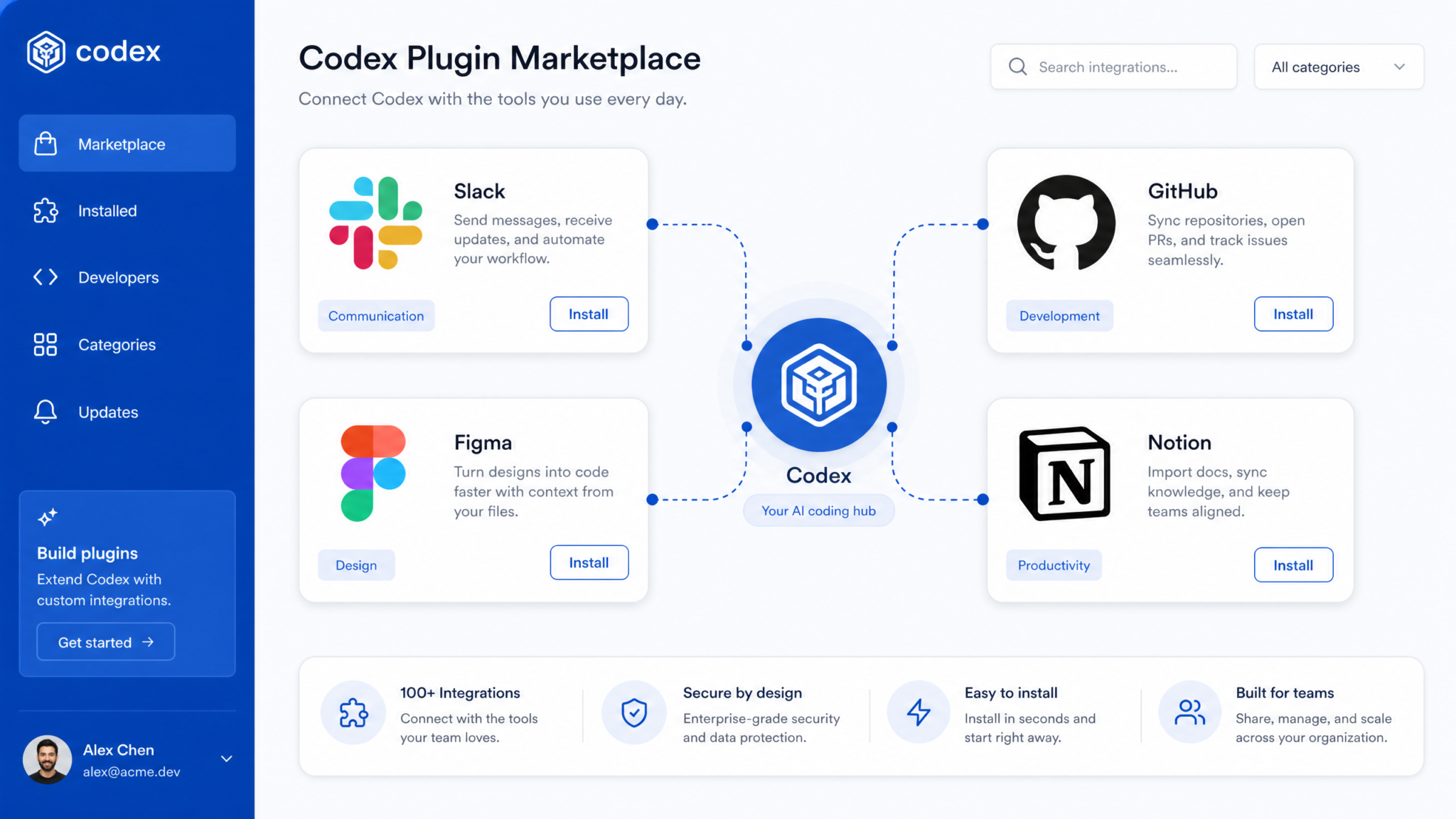
OpenAI Codex plugins have matured quickly. More than 20 plugins have launched already, including integrations with Slack, Figma, Notion, Linear, Sentry, GitHub, and Hugging Face. The ecosystem and tooling now closely mirror structures found in other modern assistant-plugin ecosystems such as Claude Code and Google Gemini CLI plugins. This guide focuses on the Codex CLI-style plugin layout, manifest conventions, validation, and distribution channels.
Prerequisites
Before you start, ensure the following software and accounts are in place:
- Developer account with access to Codex plugin tooling (CLI / agent management).
- Node.js 18+ or Python 3.10+ for local servers and examples in this guide.
- git and access to the repository where the plugin will be managed.
- API credentials for the external app you intend to connect (OAuth client id/secret or API token).
- Familiarity with JSON, YAML, and basic webhooks & OAuth flows.
- Optional: Kubernetes or Docker for production MCP Server deployment.
Architecture Overview
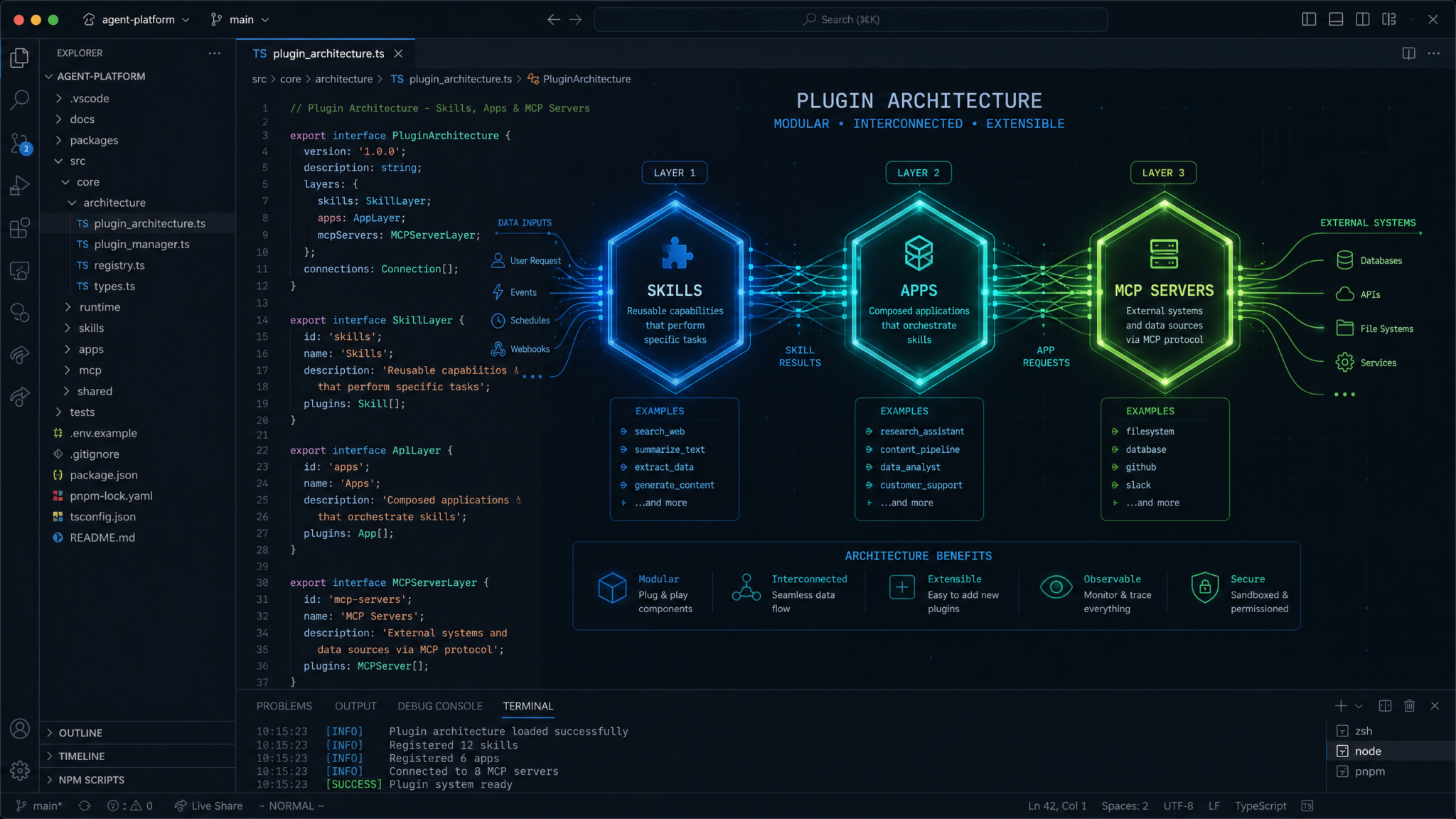
The Codex plugin architecture is organized into three distinct layers. Understanding each layer and the responsibilities they carry is essential to building secure, reliable plugins.
- Skills (instructions): These are declarative instruction documents that tell the model how to invoke functionality. Skills are stored in a predictable location:
skills/<name>/SKILL.md. They describe intent, parameters, constraints, and examples. - Apps (connectors): App connectors handle authentication and API mapping. They translate high-level plugin calls into concrete API requests to third-party services such as Slack, GitHub, Figma, Notion, Linear, Sentry, or Hugging Face. The connector includes OAuth flows, token storage, and request signing.
- MCP Servers (tools & context): MCP (Model Control Plane) servers provide tool implementations and contextual data used during execution. They host the runtime endpoints that Codex calls when a skill maps to a tool. MCP dependencies are declared in
agents/openai.yamlso the agent knows what services to bring up.
This separation of responsibilities mirrors similar approaches used by Claude Code and Google Gemini CLI plugins — skill files for intent, connectors for auth and API calls, and runtime servers for tools and context. It gives you a clean separation between policy/instruction content and executable code.
The MCP server component of Codex plugins builds directly on the Model Context Protocol infrastructure. Our tutorial on setting up MCP Tool Search in OpenAI Codex covers dynamic tool discovery for AI agents, which provides the foundation for understanding how plugins expose capabilities through the MCP layer.
Key artifacts and locations
- Plugin manifest:
.codex-plugin/plugin.json - Skills:
skills/<name>/SKILL.md - Scaffolding skill:
$plugin-creator(CLI skill used to scaffold new plugins) - MCP deps:
agents/openai.yaml - Distribution surfaces: Curated Directory, Repo-scoped, Personal Marketplace
- Enterprise governance: JSON policies enforced at the organization level
Scaffolding Your Plugin
Start with the $plugin-creator skill. The $plugin-creator skill automates initial scaffolding: creating the manifest, the skill directories, a starter MCP server, and the connectors skeleton. Use it as a baseline and upgrade the generated code to meet security and production requirements.
Example usage (pseudo-CLI):
# Install codex CLI (example)
npm install -g codex-cli

# Scaffold a plugin using $plugin-creator
codex-cli scaffold --skill-names issue-tracker,search --display-name "Acme Issue Assistant" --repo acme/codex-plugin
The CLI will create the following layout:
.codex-plugin/
  plugin.json
agents/
  openai.yaml
skills/
  issue-tracker/
    SKILL.md
  search/
    SKILL.md
connectors/
  github/
    README.md
    server.js
mcp/
  server/
    app.py
Once scaffolded, you will iterate on three main components: SKILL.md content, connector implementation, and MCP server/tool endpoints. We cover each next.
Building a Skill (skills/<name>/SKILL.md)
Skills are the most visible part of your plugin to the model. They define intents, parameters, data constraints, and example invocations. Each skill is a Markdown document placed under skills/<name>/SKILL.md. The format is semi-structured: sections for description, input schema, output guidelines, and examples.
Core sections of a SKILL.md:
- Title & Short description: One-line summary and keywords.
- Intent description: Explain when the model should choose this skill.
- Parameters schema: JSON Schema or natural language description of parameters expected (names, types, constraints).
- Response format: The shape of the JSON or text the skill expects back from the tool call.
- Examples: Input-output pairs showing realistic usage.
Sample SKILL.md for an issue creation skill:
Title: Create Issue
Short: Create a new issue in the configured issue tracker (GitHub/Linear).
Intent:
  Use this skill when the user asks to create or log an issue, bug, or task grouped under an external issue tracker.
Parameters:
  - title: string (required) - Short summary of the issue.
  - description: string (optional) - Detailed description; may include code snippets and logs.
  - labels: array[string] (optional) - Labels to attach.
  - assignees: array[string] (optional) - Usernames to assign.
  - repository: string (optional) - Repository slug if applicable.
Response format:
  JSON object with keys:
    - id: string - External tracker issue id.
    - url: string - URL to the created issue.
    - status: string - Human-readable status (open/created).
Examples:
  - Input: "File a bug about the login failure when the user enters empty password"
    Parameters:
      title: "Login fails with empty password"
      description: "Steps to reproduce: ..."
  - Output:
    {
      "id": "GH-1234",
      "url": "https://github.com/acme/repo/issues/1234",
      "status": "created"
    }
Guidelines for writing SKILL.md
- Be explicit about parameter types and limits (max length, content constraints).
- Prefer JSON Schema-like representations for automated validation.
- Include at least three realistic examples to train model inference.
- Document error handling expectations (e.g., duplicates, rate limits).
- Keep instructions deterministic — avoid ambiguous phrasing that leads the model to hallucinate.
Prompt: “Create a skill for summarizing a pull request’s changed files into a bullet list and label it with a priority.” Use this as a template for how you expect the model to fill parameter values in SKILL.md examples.
Building an App Connector
Connectors translate skill invocations into API calls for third-party services. They implement authentication flows (OAuth, API keys), token refresh logic, request templates, and error handling strategies. A connector should be modular and testable.
Connector responsibilities
- Authenticate the plugin user with the third-party service.
- Normalize incoming parameters from skills into API payloads.
- Handle rate-limiting and retry logic.
- Securely store tokens and rotate credentials.
- Expose a minimal HTTP interface (or local function) for the MCP server to call.
Example: GitHub connector skeleton (Node.js)
// connectors/github/server.js
const express = require('express');
const axios = require('axios');
const app = express();
app.use(express.json());

app.post('/create-issue', async (req, res) => {
  const { token, repo, title, body, labels, assignees } = req.body;
  try {
    const response = await axios.post(
      `https://api.github.com/repos/${repo}/issues`,
      { title, body, labels, assignees },
      { headers: { Authorization: `Bearer ${token}`, Accept: 'application/vnd.github.v3+json' } }
    );
    res.json({ id: response.data.number, url: response.data.html_url, status: 'created' });
  } catch (err) {
    console.error('GitHub create-issue error', err.response?.data || err.message);
    res.status(500).json({ error: 'create_issue_failed', details: err.response?.data });
  }
});

module.exports = app;
For production, split the connector into modules: auth, request adapter, error handling, and telemetry. Use secret stores for tokens and support scoped permissions for OAuth clients (least privilege).
OAuth flow example (high-level)
1. User clicks "Connect GitHub" in the plugin UI.
2. Redirect to GitHub OAuth authorize endpoint with client_id and scopes.
3. GitHub redirects back with a code; connector exchanges code for an access_token.
4. Store access_token in a secure store (encrypted DB or secrets manager).
5. Return a connector_id to the MCP server and skills mapping.
When the model chooses a skill that requires external action, the MCP server will supply the connector information (connector_id) and the connector will be called to perform the action.
Building the MCP Server and Tools
The MCP Server is where your tools live — the HTTP endpoints that Codex calls when it executes skills. An MCP Server exposes a set of URLs (often documented in the plugin manifest) that correspond to the skills’ tool names. Tools can be implemented as simple HTTP handlers that perform API calls via the connectors and return normalized outputs.
MCP dependencies and service registrations are declared in agents/openai.yaml. That file tells the agent runtime what services to start and which endpoints to wire into the environment.
# agents/openai.yaml (snippet)
mcp:
  services:
    - name: acme-mcp
      image: acme/mcp-server:latest
      env:
        - name: GITHUB_CONNECTOR_URL
          value: https://connectors.myorg.internal/github
      ports:
        - 8080
Sample MCP server (Python Flask)
# mcp/server/app.py
from flask import Flask, request, jsonify
import requests, os

app = Flask(__name__)
GITHUB_CONNECTOR = os.environ.get('GITHUB_CONNECTOR_URL', 'http://localhost:4000')

@app.route('/tool/create_issue', methods=['POST'])
def create_issue():
    payload = request.json or {}
    # Expected incoming payload follows SKILL.md schema
    token = payload.get('token')  # typically provided by the connector mapping
    repo = payload.get('repository')
    title = payload.get('title')
    body = payload.get('description')
    labels = payload.get('labels', [])
    assignees = payload.get('assignees', [])

    r = requests.post(f"{GITHUB_CONNECTOR}/create-issue", json={
        'token': token, 'repo': repo, 'title': title, 'body': body, 'labels': labels, 'assignees': assignees
    })
    r.raise_for_status()
    return jsonify(r.json())

if __name__ == '__main__':
    app.run(host='0.0.0.0', port=8080)
Mapping skills to MCP tool endpoints
The plugin manifest (.codex-plugin/plugin.json) declares the tools the agent can call and maps them to URLs on the MCP server. The manifest is critical for runtime binding and validation.
{
  "name": "acme-issue-assistant",
  "display_name": "Acme Issue Assistant",
  "description": "Create and manage issues across GitHub and Linear.",
  "tools": [
    {
      "name": "create_issue",
      "mcp_endpoint": "https://mcp.acme.internal/tool/create_issue",
      "description": "Creates an issue and returns canonical id and url.",
      "input_schema_ref": "skills/issue-tracker/SKILL.md#parameters",
      "output_schema": { "type": "object", "properties": { "id": { "type": "string" }, "url": { "type": "string" } } }
    }
  ],
  "auth": {
    "type": "oauth",
    "providers": ["github", "linear"]
  }
}
MCP server responsibilities and best practices
- Validate incoming payloads against the SKILL.md schema before executing.
- Sanitize any user-provided content passed to third-party APIs (prevent injection or unexpected markup).
- Implement strict timeouts and circuit breakers for external calls.
- Return structured errors that the model can interpret (error codes, retryable flag).
- Log actions and telemetry separately from user data; ensure PII policies are respected.
Integration and Testing
Testing a plugin is a multi-layered process: unit tests for connectors and MCP tools, integration tests that run the whole stack locally, and end-to-end behavioral tests with the Codex runtime in a sandboxed environment.
Local development loop:
- Scaffold skill and implement MCP endpoints.
- Run connector and MCP server locally (Docker-compose or separate processes).
- Run the local agent runtime CLI configured to point to local
agents/openai.yaml. - Invoke skill examples via the CLI or a simple test harness and inspect the model → tool flow.
Example local docker-compose fragment:
version: '3.8'
services:
  connectors:
    build: ./connectors
    ports:
      - "4000:4000"
  mcp:
    build: ./mcp/server
    ports:
      - "8080:8080"
    environment:
      - GITHUB_CONNECTOR_URL=http://connectors:4000
Testing checklist and strategies
- Unit tests for connectors: mock external APIs (GitHub, Figma) and verify request shapes and error handling.
- Unit tests for MCP: validate schema enforcement and edge-case responses.
- Integration tests: run Docker-compose stack and use the Codex CLI to simulate skill calls, verifying end-to-end behavior.
- Behavioral tests: evaluate how the model chooses skills given prompts and ensure skill selection aligns with expectations.
- Security tests: check token leakage, path traversal, and injection vectors.
Understanding how plugins integrate with the broader Codex workspace is essential for effective development. The evolution of Codex into OpenAI’s Desktop Work OS fundamentally changed developer workflows, and plugins extend this unified workspace with custom capabilities tailored to specific team needs.
Example automated integration test (Node + Jest)
// tests/create-issue.int.test.js
const request = require('supertest');
const mcp = require('../mcp/server/app'); // assumed exported express app

describe('MCP create_issue integration', () => {
  it('creates an issue via the GitHub connector', async () => {
    const res = await request(mcp)
      .post('/tool/create_issue')
      .send({
        token: 'testtoken',
        repository: 'acme/repo',
        title: 'Integration test issue',
        description: 'This is a test'
      });
    expect(res.statusCode).toBe(200);
    expect(res.body).toHaveProperty('id');
    expect(res.body).toHaveProperty('url');
  });
});
Behavioral validation
Behavioral validation verifies the model picks the correct skill and calls the tool with the right parameters. Use a combination of prompt-based tests and recorded traces from the agent. Example behavioral assertion:
Given prompt: "Create an issue for the payment failure stack trace in the logs"
Assert:
  - Model chooses: skills/issue-tracker/SKILL.md#create_issue
  - Tool called: /tool/create_issue
  - Parameters include 'title' derived from "payment failure" and include a 'description' with the stack trace.
Prompt: “Summarize the latest error logs and file an incident in Sentry with severity critical.” Expectation: model selects the incident-creation skill and fills severity parameter with “critical”.
Publishing and Distribution
Once your plugin is tested, the next stage is distribution. Codex supports three primary distribution channels:
- Curated Directory: A vetted central directory maintained by Codex platform operators. Requires submission, review, and security checks.
- Repo-scoped: Plugins that are available only to users who have installed or have access to a specific repository (common for internal or private workflows).
- Personal Marketplace: A developer-controlled marketplace where individuals can publish plugins to be discovered by their account’s contacts or subscribers.
| Distribution Channel | Visibility | Review Requirements | Typical Use Cases |
|---|---|---|---|
| Curated Directory | Public | Full security and privacy review | Consumer-facing integrations (Slack, Figma, Notion) |
| Repo-scoped | Repository members only | Light review (often automated) | Internal tools, CI/CD automations |
| Personal Marketplace | Developer followers / paid customers | Moderated based on seller policies | Paid extensions, niche enterprise connectors |
Publishing steps (typical curated directory workflow):
- Complete plugin manifest and confirm all tools are live under the mcp endpoints declared in the manifest.
- Provide a signed security review package (dependency list, SCA report, data flow diagram, contact details).
- Supply policy metadata for enterprise governance (JSON policy artifacts described in the next section).
- Submit the plugin via the platform portal with a sample org or test user for verification.
- Address review feedback (scans for secrets, aggressive scopes, data leakage risks).
- Once approved, the plugin appears in the Curated Directory and may be discoverable by millions of users.
When publishing to the personal marketplace or repo-scoped surfaces, focus on packaging, versioning, and clear instructions for granting consent and connecting accounts.
Once your plugin is built and deployed, optimizing the skill instructions becomes critical for consistent agent behavior. The Codex Prompt Engineering Playbook provides 15 battle-tested prompts for improving AI-generated code quality and reducing hallucinations, techniques that directly apply to writing effective plugin skill definitions.
Enterprise Governance and Policies
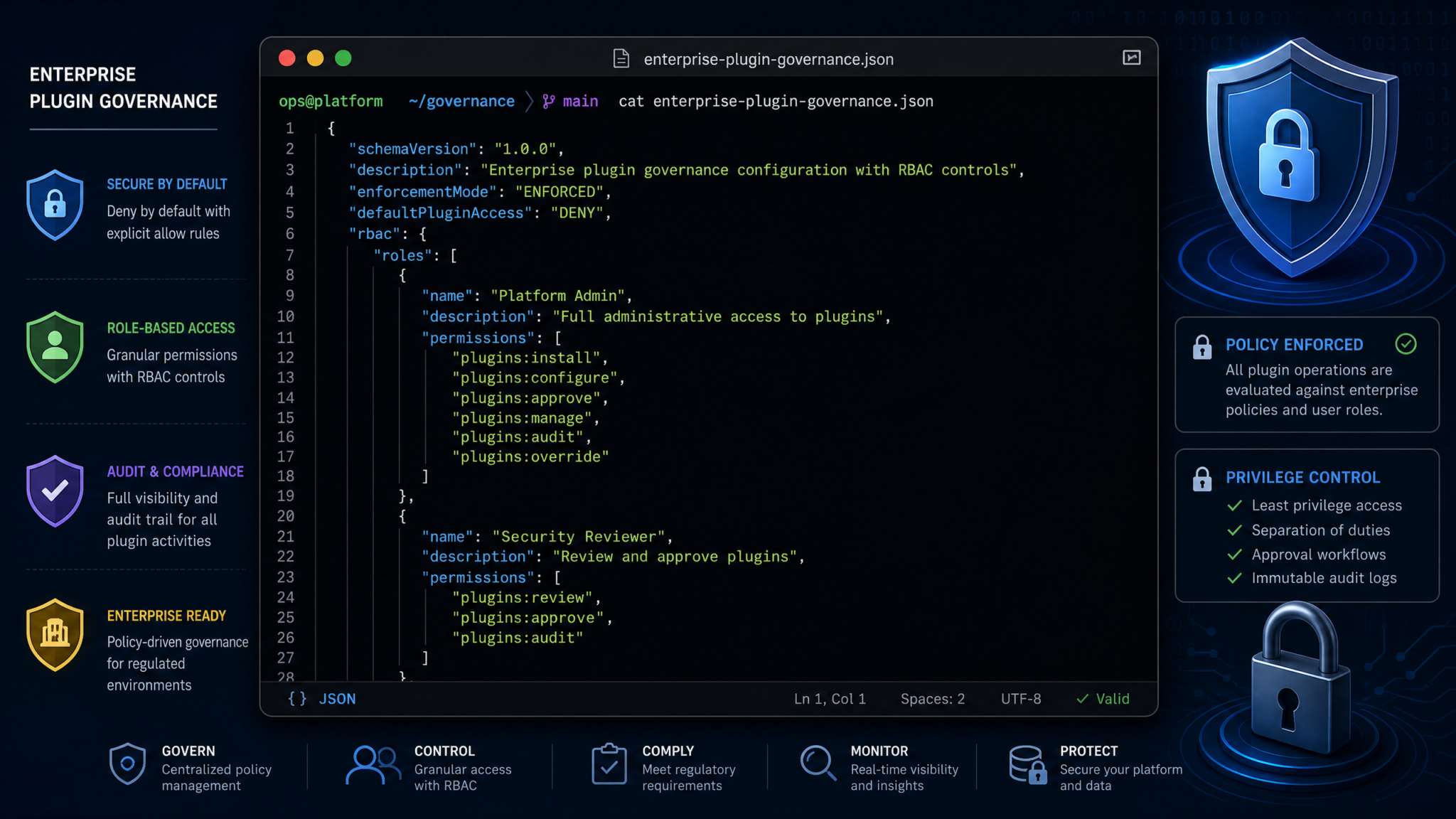
Enterprises adopt plugins but require governance controls. Codex supports enterprise governance mechanisms via JSON policies that administrators can apply at the org level. Policy enforcement can block plugins, restrict connectors, or filter tool actions.
Policy types
- Allow/Deny lists: Control which plugins are available or which external connectors can be used.
- Parameter filters: Inspect and rewrite parameters to block PII or enforce anonymization.
- Action constraints: Limit actions (e.g., prevent destructive operations like deleting repositories).
- Audit & logging: Require that certain interactions are logged or forwarded to SIEM systems.
Policies are expressed in JSON and evaluated at runtime by the control plane before calls reach the MCP server. A simple example policy that blocks public repo modifications:
{
  "policy_name": "no-public-repo-writes",
  "description": "Block any plugin action that writes to public repositories.",
  "rules": [
    {
      "effect": "deny",
      "target": {
        "tool": "create_issue",
        "connector": "github"
      },
      "condition": {
        "path": "parameters.repository_visibility",
        "equals": "public"
      },
      "message": "Writing to public repositories is blocked by enterprise policy."
    }
  ]
}
Enterprises such as Cisco, NVIDIA, Ramp, and Rakuten are already using enterprise governance patterns. Common governance workflows include:
- Allowlisting plugins for security-sensitive teams.
- Instrumenting policies to redact or mask certain fields (example: masking credit card numbers, social security numbers).
- Forwarding plugin activity to existing SIEM or log aggregation tools to satisfy compliance audits.
Policy enforcement is integrated into the runtime: when a model selects a skill, the control plane first evaluates the relevant policies. If allowed, the payload may undergo transformations (redactions or parameter rewrites) before the MCP server receives it.
For enterprises planning governance automation, look at example JSON policy libraries and deployment templates to automate application across teams and enforce consistent governance: 30 ChatGPT-5.5 Prompts for Cybersecurity Professionals
Best Practices
To build production-grade Codex plugins, adopt these best practices across development, security, and operational areas.
Security and Data Protection
- Encrypt all tokens at rest and in transit. Use a secrets manager (Vault, AWS Secrets Manager).
- Use least-privilege OAuth scopes. Request only what you need.
- Mask or redact PII before logging. Keep logging and telemetry separate from user content.
- Implement rate-limiting and circuit-breakers to protect downstream services.
- Scan dependencies for vulnerabilities and keep the dependency list minimal.
Design and User Experience
- Design skills for deterministic outputs. Explicitly define JSON response shapes to reduce model hallucination risks.
- Provide human-readable messages for failed operations and retryable flags in structured errors.
- Support disambiguation strategies — when a model is uncertain, prompt for clarification rather than guessing.
- Include rollback or “undo” capabilities for destructive operations.
Operationalization
- Version your manifest and SKILL.md files. Consumers should be able to rely on stable schemas.
- Use semantic versioning for MCP server images and connectors.
- Integrate health checks for the MCP services and automated remediation (restart or circuit-breaker triggers).
- Monitor key metrics: request latency, error rates, authentication failures, and model-tool mismatch rates (how often the model chooses wrong skills).
Developer ergonomics
- Include robust examples in SKILL.md to guide both the model and future maintainers.
- Document connector setup in a README with step-by-step OAuth configuration.
- Automate scaffolding with $plugin-creator and extend its templates for your organization.
Prompt: “List step-by-step what the model must do to handle a request to update an existing issue, including validation and potential rollback options.” Use this prompt when drafting SKILL.md update procedures and examples.
Troubleshooting and FAQ
Why does the model pick the wrong skill?
Common causes:
- Ambiguous SKILL.md descriptions. The model needs clear, disambiguated intent text and multiple examples.
- Overlapping parameter names across skills. Ensure unique naming or more specific intent triggers.
- Model temperature or inference parameters too high — reduce variability for deterministic tasks.
Tool call returns an error — how should the model handle it?
Return structured error objects from the MCP server with these fields: code, message, retryable. The skill description should include guidance on retries and user-facing messaging.
{
  "code": "rate_limit_exceeded",
  "message": "GitHub API rate limit exceeded",
  "retryable": true
}
How to manage secrets in CI?
Use CI-native secret stores and ephemeral test tokens where possible. Never bake long-lived tokens into test artifacts. For local development, use a secrets file excluded via .gitignore and rotate those tokens frequently.
Common validation steps the platform performs during review
- Manifest schema validation (
.codex-plugin/plugin.json). - Static analysis of SKILL.md for ambiguous or unsafe language.
- Dependency scanning and license checks.
- Runtime penetration tests for exposed endpoints.
Appendices (manifests, examples)
Plugin manifest: canonical example (.codex-plugin/plugin.json)
{
  "schema_version": "1.0",
  "name": "acme-issue-assistant",
  "display_name": "Acme Issue Assistant",
  "description": "Create and manage issues across GitHub and Linear.",
  "version": "1.2.0",
  "author": "Acme Engineering",
  "tools": [
    {
      "name": "create_issue",
      "mcp_endpoint": "https://mcp.acme.internal/tool/create_issue",
      "description": "Creates an issue and returns canonical id and url.",
      "input_schema_ref": "skills/issue-tracker/SKILL.md#parameters",
      "output_schema": {
        "type": "object",
        "properties": { "id": { "type": "string" }, "url": { "type": "string" } }
      }
    },
    {
      "name": "list_issues",
      "mcp_endpoint": "https://mcp.acme.internal/tool/list_issues",
      "description": "Returns a list of matching issues.",
      "input_schema_ref": "skills/issue-tracker/SKILL.md#parameters"
    }
  ],
  "auth": {
    "type": "oauth",
    "providers": [
      {
        "name": "github",
        "client_id_env": "GITHUB_OAUTH_CLIENT_ID",
        "client_secret_env": "GITHUB_OAUTH_CLIENT_SECRET",
        "scopes": ["repo", "read:user"]
      }
    ]
  },
  "contact_email": "[email protected]"
}
agents/openai.yaml (MCP deps)
version: 'v1'
agent:
  name: acme-agent
  description: "Agent runtime for Acme Issue Assistant"
mcp:
  services:
    - id: acme-mcp
      image: acme/mcp-server:1.2.0
      ports:
        - containerPort: 8080
          hostPort: 8080
      env:
        - name: GITHUB_CONNECTOR_URL
          value: "https://connectors.acme.internal/github"
Skills directory example (skills/issue-tracker/SKILL.md)
Title: Create Issue
Short: Create a new issue in the configured issue tracker (GitHub/Linear).
Intent:
  Use this skill when the user explicitly asks to create an issue, task, or bug in an external tracker.
Parameters:
  - title: string (required)
  - description: string (optional)
  - labels: array[string] (optional)
  - assignees: array[string] (optional)
  - repository: string (optional)
Response format:
  JSON object with keys id, url, status
Examples:
  - Input: "Please file a bug for the payment flow timeout"
    Parameters:
      title: "Payment flow timeout"
      description: "The POST /payments/charge endpoint times out with error..."
  - Output:
    {
      "id": "GH-789",
      "url": "https://github.com/acme/repo/issues/789",
      "status": "created"
    }
Sample MCP server error responses
HTTP 200 OK
{
  "result": { "id": "GH-123", "url": "https://..." }
}

HTTP 400 Bad Request
{
  "error": {
    "code": "invalid_parameters",
    "message": "Missing required parameter: title",
    "retryable": false
  }
}

HTTP 500 Internal Server Error
{
  "error": {
    "code": "upstream_error",
    "message": "GitHub API returned 500",
    "retryable": true
  }
}
Checklist: from scaffold to production
| Step | Artifact | Done? |
|---|---|---|
| Scaffold plugin | $plugin-creator output | [ ] |
| Write SKILL.md | skills/<name>/SKILL.md | [ ] |
| Implement connectors | connectors/<provider>/ | [ ] |
| Implement MCP server | mcp/server/ | [ ] |
| Local integration tests | tests/ | [ ] |
| Security review | scans + policy artifacts | [ ] |
| Submit to distribution channel | Curated Directory / Repo-scoped / Marketplace | [ ] |
Adopt a release process with tagging both the plugin manifest and the MCP image, and maintain release notes describing changes to skill schemas and tool behavior so enterprises can plan migrations.
Access 40,000+ AI Prompts for ChatGPT, Claude & Codex — Free!
Subscribe to get instant access to our complete Notion Prompt Library — the largest curated collection of prompts for ChatGPT, Claude, OpenAI Codex, and other leading AI models. Optimized for real-world workflows across coding, research, content creation, and business.
Closing notes
Building OpenAI Codex plugins requires a cross-functional approach: clear skill design, robust connectors, reliable MCP services, and disciplined governance. The toolchain and file layout — manifest at .codex-plugin/plugin.json, skills at skills/<name>/SKILL.md, and MCP dependencies in agents/openai.yaml — provide a stable foundation that aligns with other modern plugin ecosystems like Claude Code and Gemini CLI plugins.
Enterprise adoption adds requirements around JSON policy governance, secure token management, and auditability. Several enterprises, including Cisco, NVIDIA, Ramp, and Rakuten, are already applying these governance patterns across their plugin deployments.
Start with the $plugin-creator scaffold, iterate on skill clarity, and build connectors and MCP servers that validate and sanitize inputs. Follow the testing checklist and adopt the distribution workflow that matches your use case (Curated Directory for public reach, repo-scoped for internal tools, personal marketplace for direct monetization). With this approach you’ll deploy plugins that are secure, maintainable, and valuable to end users.
Author: Markos Symeonides
