
How to Manage Claude’s New Weekly Usage Limits: Complete Playbook for Maximizing Output Under Anthropic’s August 2026 Rate Changes
Last updated: August 2026 | By the ChatGPT AI Hub Editorial Team
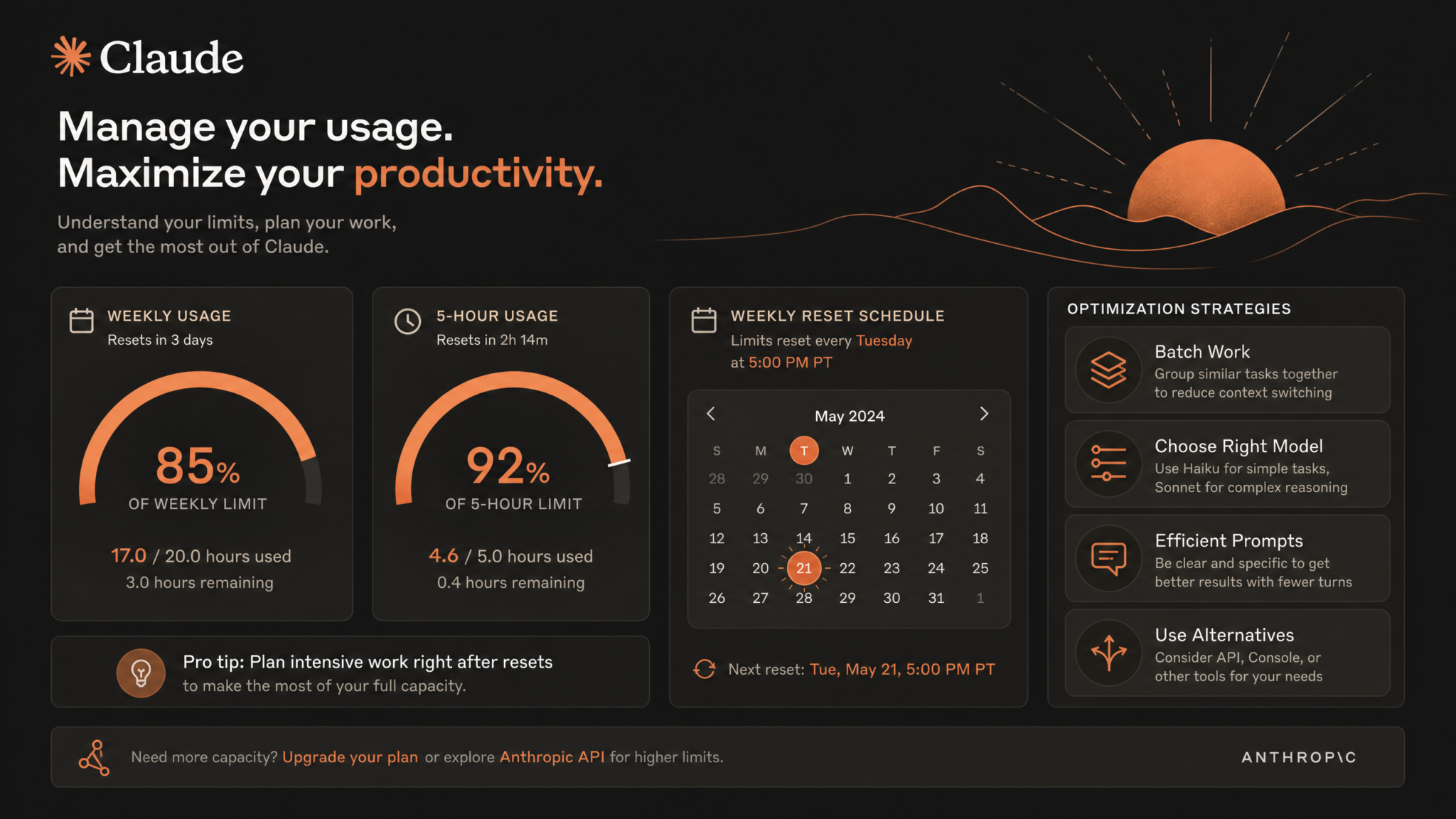
On August 28, 2026, Anthropic quietly rolled out one of the most significant operational changes to Claude’s consumer and API access tiers since the platform’s public launch: a dual-layer rate limiting system that introduces weekly usage caps running in parallel with the already-familiar 5-hour rolling usage windows. For power users, developers, and enterprise teams that have built workflows around Claude’s capabilities, this change demands a complete rethink of how you plan, structure, and execute AI-assisted work. This playbook is the definitive guide to navigating those changes without losing productivity.
Whether you’re a solo developer running Claude through the API to power a SaaS product, a content strategist batching dozens of long-form articles every week, or a team lead managing a shared Claude Pro account across five researchers, the August 2026 rate changes affect you differently — but they affect you. This guide breaks down exactly what changed, how the new limit math works in practice, and gives you a tactical playbook of strategies, decision trees, monitoring templates, and optimization checklists to keep your output high even under tighter constraints.
Bottom line upfront: The users who will suffer most under the new limits are those who have never thought strategically about how they use Claude. The users who will barely notice the change are those who treat token budgets the way a professional treats any finite resource — with intentionality, planning, and the right tools for the right job.
1. What Changed: Anthropic’s August 28, 2026 Rate Limit Overhaul
Prior to August 28, 2026, Claude Pro subscribers operated under a single rolling usage cap: a 5-hour window that reset periodically and throttled usage when you hit a message or token ceiling within that timeframe. Heavy users encountered these walls regularly — typically mid-afternoon after a morning of intensive work — and the common workaround was simply waiting for the window to reset before continuing.
The August 2026 update layers a weekly aggregate usage limit on top of the existing 5-hour caps. This is not a replacement of the 5-hour system — both limits now operate simultaneously. You can hit your 5-hour limit and recover after that window expires, but your weekly usage pool continues to drain with every interaction. When the weekly pool is exhausted, you’re throttled regardless of how recently your last 5-hour window reset.
1.1 What Anthropic Said (and What They Didn’t)
Anthropic’s official communication framed the weekly limits as a “resource equity” measure designed to ensure that fair access is maintained across all subscribers during peak demand periods. The announcement, published via the Anthropic support documentation portal, noted:
“Claude Pro subscribers will now have access to a weekly usage allocation in addition to the existing message windows. This allocation is designed to support the needs of the vast majority of users while ensuring consistent service quality across the platform.”
Critically, Anthropic did not publish exact token counts for weekly allocations. Instead, they operate on a dynamic allocation model where the effective weekly cap adjusts based on platform-wide demand, the model tier being used (Opus consumes allocation significantly faster than Sonnet or Haiku), and whether your account is a standard Pro subscription or a higher-tier enterprise plan.
1.2 The Models Most Affected
The weekly limit system has dramatically different impacts depending on which Claude model variant you use:
| Model | Relative Weekly Allocation Drain | Typical Use Cases | Impact Level |
|---|---|---|---|
| Claude Opus 4 | Highest (approx. 5x Sonnet) | Complex reasoning, long-form writing, coding architecture | Critical |
| Claude Sonnet 4.5 | Moderate | General tasks, content drafts, analysis | Moderate |
| Claude Haiku 3.5 | Lowest | Simple queries, formatting, classification | Low |
1.3 Who Is Exempt
API users with a paid usage-based billing plan above a certain monthly spend threshold are exempt from consumer-facing weekly caps, though they remain subject to API rate limits (requests per minute, tokens per minute) defined by their tier. Enterprise customers with dedicated capacity agreements are fully exempt from both systems. If you are on the Claude Pro consumer subscription at standard pricing, you are subject to the new dual-limit system.
2. Understanding the New Limit Structure: Weekly vs. 5-Hour Limits
To work effectively under the new system, you need a mental model of how the two limits interact. Think of it as a two-bucket system where water drains from both buckets simultaneously when you use Claude, but each bucket refills on a different schedule.
2.1 The 5-Hour Bucket
The 5-hour bucket is a rolling window cap. Every message you send and every token Claude generates draws from this bucket. When the bucket empties, you hit a temporary wall. After approximately 5 hours from your first message in that window, the bucket refills and you can continue. This is the limit most users have experienced for years.
2.2 The Weekly Bucket
The weekly bucket is a cumulative aggregate cap that resets every 7 days from the calendar day your billing cycle began (not necessarily Monday). Every message you send draws from this bucket in parallel. The 5-hour bucket can refill three or four times within a single day — but each refill and subsequent usage event still pulls from the weekly total. When the weekly bucket empties, even a freshly reset 5-hour window won’t help you.
2.3 Interaction Logic: The Two-Bucket Decision Tree
User sends a message to Claude
         |
         v
Is the 5-hour bucket empty?
   Yes → Throttled (wait for 5-hr window to expire)
   No  → Continue to next check
         |
         v
Is the weekly bucket empty?
   Yes → Throttled (wait for weekly reset date)
   No  → Message processed, both buckets drain
The practical implication of this structure is that a user who hammers Claude heavily on Monday and Tuesday can drain their weekly bucket before Thursday — meaning Friday’s work, for which they were planning to use Claude, is unavailable. This is the core planning challenge the rest of this playbook addresses.
2.4 Estimating Your Weekly Allocation
Anthropic does not expose raw token counts in the consumer dashboard. However, based on community benchmarking conducted across dozens of power users in the weeks following the August 28 rollout, the following rough estimates have emerged for standard Claude Pro accounts:
- Opus 4: Approximately 30–45 extended conversations (2,000–5,000 token exchanges) per week before hitting soft throttling
- Sonnet 4.5: Approximately 150–200 substantial exchanges per week
- Haiku 3.5: Effectively unlimited for typical users under most practical workloads
These are estimates, not guarantees. Dynamic allocation means your effective cap varies with platform load. Treat these numbers as planning baselines, not firm limits.
3. Prompt Efficiency Techniques: Fewer Tokens, Same Quality
The single most high-leverage change you can make right now is writing leaner prompts. Most users dramatically over-prompt. They repeat context Claude already has, use verbose phrasing where terse instruction would work identically, and re-explain the same constraints in every message. Under the old 5-hour-only system, this was a minor inefficiency. Under the new weekly limit system, it is a significant drain.
3.1 The Prompt Audit Framework
Before submitting any prompt to Claude, run it through this four-question audit:
- Is this context already in the conversation or project? If yes, delete the repetition.
- Am I explaining why when Claude doesn’t need the why to perform the task? Cut it.
- Am I using a polite but token-wasteful phrasing where a direct instruction would work? Revise it.
- Can I collapse multiple clarifying sentences into a single specific instruction? Do it.
3.2 Before/After Prompt Optimization Examples
Example 1 — Code Review Task
Before (high token cost):
“Hi Claude, I’m working on a Python project and I have a function here that I’m not totally sure about. I want to make sure the logic is correct and also that it follows best practices. Could you please review this function and let me know if there are any issues? I’m especially concerned about edge cases. Here’s the function: [code]”
After (optimized):
“Review this Python function. Flag: logic errors, edge cases, PEP 8 violations. [code]”
The after version produces an equally thorough (often more structured) review while consuming roughly 60% fewer input tokens.
Example 2 — Content Writing Task
Before:
“I need you to write a blog post about email marketing. The post should be informative and useful for small business owners who are just getting started. It should be around 1200 words and cover the main points like building a list, writing good subject lines, and tracking metrics. The tone should be friendly but professional.”
After:
“Write a 1,200-word blog post: Email marketing for small business beginners. Cover: list building, subject lines, metrics tracking. Tone: professional-friendly.”
3.3 Using Output Constraints to Prevent Token Bloat
Claude defaults to thorough, detailed outputs. For many tasks, this thoroughness exceeds your actual need. Explicitly constraining output length saves tokens on Claude’s response side, which counts toward your allocation:
- Append
3 bullet points maxto summary requests - Use
Code only, no explanationwhen you understand the context - Specify
One paragraphfor quick-take questions - Use
Yes/No + one sentence reasonfor decision queries
3.4 Template Prompts for Recurring Tasks
If you run the same type of prompt repeatedly — daily standup summaries, code documentation, email drafts — create a standardized template stored outside Claude (in a text file, Notion database, or your IDE snippets). Copy, fill in the variable, paste. You eliminate the 50–100 token overhead of re-constructing the same instruction format from scratch each time.
4. Batching Work Into Focused Sessions
Conversational, exploratory Claude usage is significantly less token-efficient than batched, task-focused usage. Every time you open a new conversation to ask a quick question, you’re paying a context initiation overhead. Every back-and-forth clarification exchange is consuming allocation that a well-structured single prompt would have avoided.
4.1 The Session Batching Methodology
Instead of using Claude reactively throughout the day, designate 2–3 Claude Work Blocks — focused 45-to-90-minute windows where you batch all queued tasks. Before each block:
- List every task you need Claude for that block
- Organize tasks by context similarity (group related tasks so prior context carries forward)
- Pre-write or at minimum outline your prompts before opening Claude
- Execute the full batch within the single conversation or project context where possible
This approach reduces redundant context-setting, capitalizes on in-session memory, and pushes you toward higher-quality prompts because you’re planning ahead rather than typing impulsively.
4.2 The Task Queue System
Maintain a running Claude task queue — a simple document (a plain text file at ~/claude-queue.md works fine) where you log tasks as they occur to you throughout the day. Instead of immediately jumping to Claude, add it to the queue. Process the queue in your next designated block. Tasks that seem urgent in the moment often turn out to be non-urgent 30 minutes later, further saving allocation.
4.3 Conversation Architecture for Batched Sessions
Within a batched session, structure your conversation to minimize context re-explanation:
- Start with a framing message that establishes the project, your role, output format preferences, and any persistent constraints
- Group similar task types together so the context from one task informs the next
- Use numbered task lists within a single message when you have multiple small, sequential requests
5. Choosing the Right Model Tier: Opus vs. Sonnet vs. Haiku
Under the new weekly limits, model selection is no longer a preference — it is a resource allocation decision. Using Opus 4 for a task that Sonnet 4.5 handles with 95% equivalent quality is equivalent to burning premium fuel in a vehicle that runs fine on regular. Here is a systematic framework for model selection.
5.1 The Model Selection Decision Tree
Task arrives → Ask: Does this require deep multi-step reasoning?
   No → Ask: Is nuanced writing or complex analysis involved?
      No → Route to: Haiku 3.5
      Yes → Route to: Sonnet 4.5
   Yes → Ask: Is this high-stakes? (Architecture decision, critical code, client deliverable?)
      No → Route to: Sonnet 4.5
      Yes → Route to: Opus 4
5.2 Task-to-Model Routing Guide
| Task Type | Recommended Model | Rationale |
|---|---|---|
| Code debugging (simple syntax) | Haiku 3.5 | Pattern recognition task, no deep reasoning needed |
| Email drafts, short copy | Haiku 3.5 | Formulaic structure, Haiku handles well |
| Data classification, tagging | Haiku 3.5 | High-volume, low-complexity |
| Blog posts, long-form content | Sonnet 4.5 | Requires coherence and nuance, not peak reasoning |
| Code review (moderate complexity) | Sonnet 4.5 | Good balance of analysis depth and allocation cost |
| Research summaries and synthesis | Sonnet 4.5 | Adequate for most professional research tasks |
| System architecture decisions | Opus 4 | Requires multi-variable reasoning and tradeoff analysis |
| Complex legal or financial analysis | Opus 4 | High stakes, requires precision and deep reasoning |
| Novel problem-solving and strategy | Opus 4 | Genuinely benefits from Opus’s reasoning depth |
5.3 The “Good Enough” Principle
For 70–80% of professional use cases, Sonnet 4.5 produces output indistinguishable from Opus 4 in final quality — particularly when the user provides a clear, well-structured prompt. The performance gap becomes meaningful only in tasks that require genuinely novel reasoning paths, highly nuanced judgment, or complex multi-step logical chains. Defaulting to Opus 4 because it feels more capable is one of the most expensive habits a Claude user can have under the new limit system.
6. Using System Prompts Effectively to Preserve Limit Budget
System prompts — persistent instructions that shape Claude’s behavior across an entire conversation — are one of the most underutilized efficiency tools available to both API users and Claude.ai consumers. A well-constructed system prompt eliminates the need for repeated instruction-setting in every message, dramatically reducing your per-message token overhead.
6.1 What Belongs in a System Prompt
- Role definition: “You are a senior backend engineer specializing in Go and distributed systems.”
- Output format preferences: “Always structure responses with headers. Code blocks for all code. No preamble.”
- Persona and tone: “Be direct. Skip affirmations. No ‘Great question!’ openers.”
- Domain-specific constraints: “Assume all projects use PostgreSQL 16, Docker, and deploy to AWS.”
- Response length defaults: “Default to concise. Expand only when explicitly asked.”
6.2 System Prompt Templates for Common Workflows
Developer Workflow System Prompt:
You are a senior full-stack developer. Stack: React, Node.js, PostgreSQL.
Response rules:
- Code only when asked for code. No surrounding explanation unless requested.
- Flag security issues proactively.
- Prefer explicit over implicit patterns.
- Default response length: concise. Expand on request.
Content Strategy System Prompt:
You are a B2B content strategist. Audience: technical decision-makers.
Style: authoritative, data-backed, no fluff.
Format: Use headers and bullet points. No intro paragraphs unless specified.
SEO: Flag keyword opportunities but don't over-optimize.
6.3 System Prompt Maintenance
Audit your system prompts quarterly. Remove constraints that have become redundant, consolidate overlapping instructions, and test whether removing a given constraint produces any noticeable output degradation. System prompts consume tokens too — a bloated system prompt is a recurring overhead cost on every single message in that project or conversation.
7. Leveraging Claude Projects for Context Efficiency
Claude Projects allow you to maintain persistent context — uploaded documents, ongoing instructions, and conversation history — across multiple sessions without re-uploading or re-explaining. Under the new weekly limits, Projects are not just a convenience feature; they are a core efficiency mechanism.
7.1 How Projects Reduce Allocation Consumption
Without Projects, every new conversation requires you to re-establish context: paste in the relevant codebase section, re-explain the project background, re-state your output preferences. With a well-configured Project, that context is pre-loaded. You skip the context-establishment overhead and go straight to task execution. For users working on multi-week ongoing projects, this efficiency gain compounds significantly.
7.2 Project Configuration Best Practices
- Upload reference documents once: Codebase overviews, style guides, product briefs, brand guidelines — anything you’d otherwise paste repeatedly.
- Write a project-level system prompt: This replaces per-conversation framing and applies persistently.
- Keep documents lean: Upload only what’s actually referenced in your tasks. Every document in a Project’s context window consumes tokens whether you ask about it or not.
- Archive completed work: Remove old conversation threads and outdated documents from active Projects. Context bloat is real.
7.3 Project Organization Strategy for Teams
For team accounts, create dedicated Projects per workstream rather than one giant all-hands Project. A marketing Project, an engineering Project, and a research Project will each have tighter, more relevant context than a single Project containing everything. Irrelevant context not only consumes tokens but can degrade output quality by diluting Claude’s attention.
8. When to Use Claude vs. Alternatives Based on Limit Status
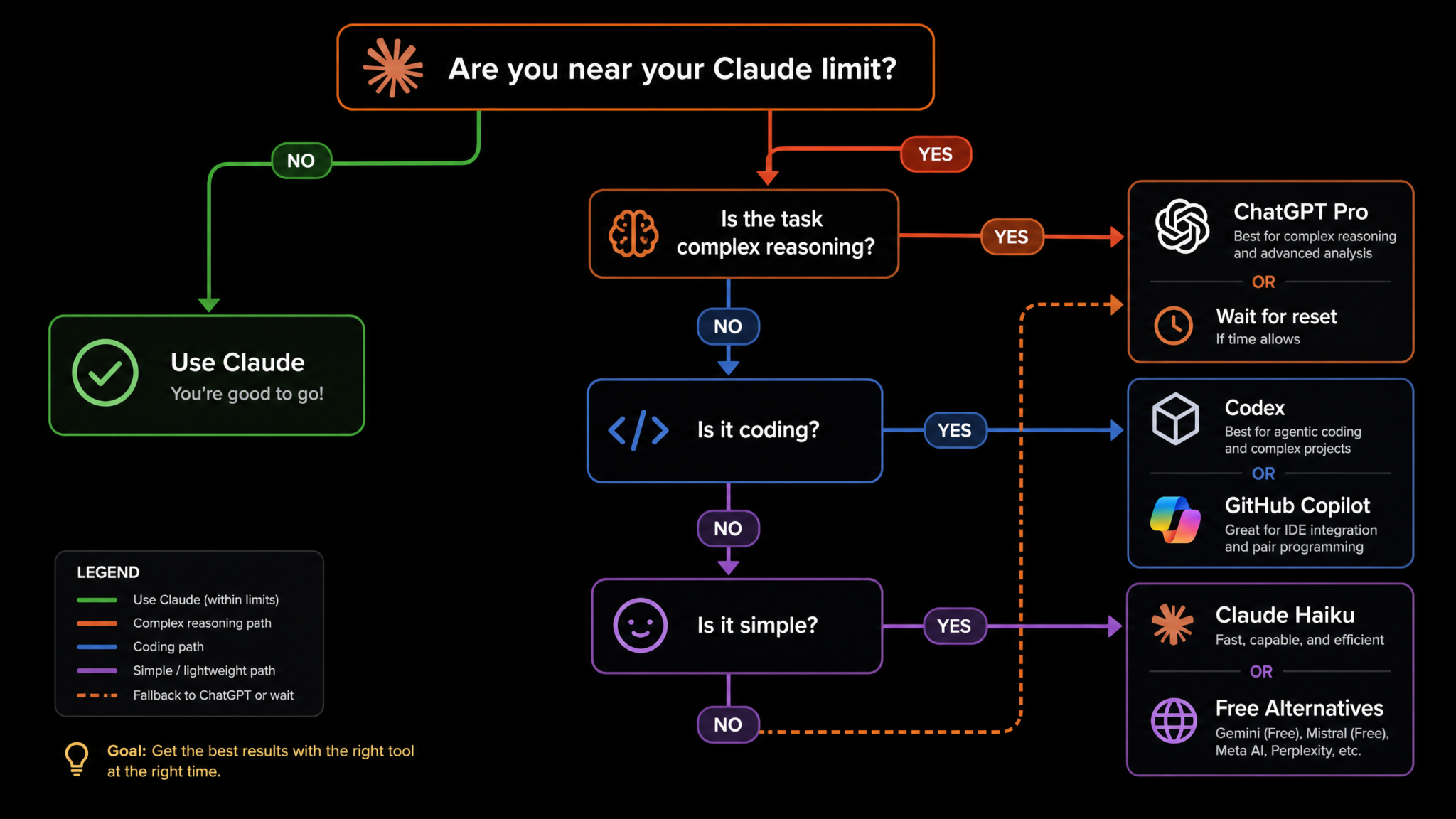
A professional AI workflow in 2026 is not a monogamous relationship with a single model. Claude has genuine strengths — particularly in nuanced writing, complex reasoning, and long-context understanding — but it is not always the right tool. Under the new weekly limits, having an alternative routing strategy based on your current limit status is essential.
8.1 Task-Based Routing: Claude vs. ChatGPT vs. Codex
| Task | Primary (Full Limits) | Alternative (Limit Constrained) | Notes |
|---|---|---|---|
| Long-form writing and editing | Claude | ChatGPT-4o | Claude typically produces more natural prose |
| Code generation (complex) | Claude Opus 4 | GitHub Copilot / Codex | Copilot excellent for IDE-integrated work |
| Code generation (boilerplate) | Claude Haiku | GitHub Copilot | Copilot handles this natively in-editor |
| Data analysis and structured reasoning | Claude Sonnet | ChatGPT with Code Interpreter | ChatGPT CI has execution advantage |
| Quick factual lookups | Claude Haiku | Perplexity AI | Perplexity has web search advantage |
| Image generation prompting | Claude (prompt writing) | ChatGPT-4o (native DALL-E) | ChatGPT has native image generation |
| Summarization of long documents | Claude (superior context) | NotebookLM | NotebookLM specialized for document Q&A |
8.2 The Limit-Status Routing Decision
Build a personal rule: when your estimated weekly allocation falls below 25%, shift all non-critical Opus and Sonnet tasks to alternatives. Reserve remaining Claude allocation exclusively for tasks where Claude’s specific capabilities provide a clear quality advantage over alternatives. This ensures that when a genuinely critical task arrives — the architecture review, the client proposal, the complex debugging session — you have allocation available for it.
Access 40,000+ AI Prompts for ChatGPT, Claude & Codex — Free!
Subscribe to get instant access to our complete Notion Prompt Library — the largest curated collection of prompts for ChatGPT, Claude, OpenAI Codex, and other leading AI models. Optimized for real-world workflows across coding, research, content creation, and business.
9. Monitoring Your Usage: Dashboards, Trackers, and Tools
You cannot manage what you cannot measure. The Claude.ai consumer interface provides a basic usage indicator, but it lacks the granularity that strategic limit management requires. Here is how to build a more robust monitoring system.
9.1 Native Claude Usage Dashboard
Access your usage status at Claude.ai → Account → Usage. The dashboard post-August 2026 update shows:
- Current 5-hour window status (percentage remaining, time until reset)
- Weekly allocation status (aggregate percentage remaining)
- Model-specific breakdown (how much allocation each model tier has consumed)
- Weekly reset date and time
Check this dashboard at the start and end of each Claude Work Block. Build the habit — it takes five seconds and prevents the jarring mid-task throttle.
9.2 The Weekly Usage Tracking Template
Maintain a simple spreadsheet (a Google Sheet at a URL like docs.google.com/spreadsheets/d/your-claude-tracker) with the following structure:
| Date | Session | Model Used | Task Type | Approx. Messages | Usage % Before | Usage % After | Notes |
|---|---|---|---|---|---|---|---|
| Aug 28 | Morning | Opus 4 | Architecture review | 12 | 100% | 78% | High-value task |
| Aug 28 | Afternoon | Sonnet 4.5 | Blog drafts (x3) | 18 | 78% | 65% | Could route to ChatGPT |
After two weeks of tracking, you will have a clear picture of which task types consume disproportionate allocation relative to the value they produce. This data drives better routing decisions.
9.3 API Usage Monitoring for Developers
API users should instrument their applications with token counting middleware. The Anthropic SDK provides token counting utilities that you can log to any monitoring platform — Datadog, Grafana, or even a simple Postgres table on your dev environment at api.yourproject.io. Aggregate daily and weekly token consumption per model tier and set alerting thresholds at 50%, 75%, and 90% of your tier’s rate limits.
10. Team Strategies for Shared Accounts
Shared Claude accounts — whether a single Pro subscription used across a small team or an enterprise plan with pooled allocation — require coordination protocols that individual users don’t need. Without coordination, high-consumption team members can exhaust shared allocation before other members have completed their highest-priority work for the week.
10.1 Usage Allocation by Role Priority
Establish a priority tier for your team’s Claude usage. Not all roles have equal need for high-allocation model access:
- Tier 1 (Opus Priority): Engineers working on core product architecture, senior analysts producing client deliverables, team leads doing strategic planning
- Tier 2 (Sonnet Standard): Content creators, project managers, mid-level analysts, developer task execution
- Tier 3 (Haiku Default): Administrative tasks, formatting work, simple classification, quick lookups
10.2 The Weekly Allocation Meeting
In teams of three or more sharing a Claude account, run a brief Monday morning allocation sync (10 minutes maximum). Each team member identifies their highest-priority Claude tasks for the week and the model tier required. The team collectively ensures that high-allocation Opus work is front-loaded to early in the week and that lower-priority tasks are either routed to Haiku or to alternative tools entirely.
10.3 Shared Task Queue Protocol
Implement a shared Claude task queue in your team’s project management tool (Linear, Notion, or a simple shared document). Any team member who identifies a Claude task adds it with three fields: priority (P1/P2/P3), model required (Opus/Sonnet/Haiku), and estimated session length. The team lead reviews the queue weekly and sequences tasks to avoid allocation crunches.
11. API vs. Consumer App Limit Differences
The August 2026 changes affect the API and the consumer Claude.ai app quite differently. Understanding these differences is critical if you’re choosing between building API-integrated workflows versus using the consumer interface.
11.1 Consumer App Limits
The Claude.ai consumer interface operates under the dual 5-hour / weekly limit system described throughout this playbook. These limits are applied at the account level, are dynamically adjusted by platform demand, and are non-negotiable without upgrading to a higher plan tier. The consumer interface is appropriate for individual professional users with moderate-to-high usage patterns.
11.2 API Limit Structure
The Anthropic API uses a different limit architecture. Rather than weekly usage caps, the API enforces:
- Requests per minute (RPM): The number of API calls you can make in a 60-second window
- Tokens per minute (TPM): The aggregate input + output tokens per 60-second window
- Tokens per day (TPD): A daily aggregate that prevents burst consumption from impacting ongoing access
API tiers (Tier 1 through Tier 4 in Anthropic’s current structure) grant progressively higher limits. API users who exhaust their per-minute limits face temporary rate limiting (typically 429 responses) but do not face the same weekly cutoff structure that consumer users encounter.
11.3 When the API Is Worth It for Power Users
For users who regularly hit the consumer weekly limit before week’s end, the economics of shifting to API access deserve a serious look. The API billing model (pay-per-token) can actually be less expensive than the fixed Pro subscription if your usage is concentrated and task-efficient. A user running 50 highly optimized Sonnet sessions per week at approximately 3,000 tokens per session would pay roughly $4–$8 per week at current API pricing — well below the Pro subscription cost.
12. Cost-Benefit Analysis of Upgrading Tiers
When the weekly limit becomes a persistent constraint on your productivity, upgrading is worth evaluating rigorously. Here is a framework for making that decision without guesswork.
12.1 Calculating the Value of Lost Productivity
Before evaluating upgrade costs, quantify what you’re losing when limits constrain you:
- Track for two weeks how many times weekly limits caused you to pause or redirect work
- Estimate the time cost of each disruption (task switching, waiting, using lower-quality alternatives)
- Apply your hourly value to the total time lost:
Hours Lost × Hourly Rate = Weekly Productivity Cost - Multiply by 4 to get a monthly productivity cost figure
If the monthly productivity cost exceeds the upgrade price differential, the upgrade pays for itself.
12.2 Tier Upgrade Options
| Option | Monthly Cost (Approx.) | Key Benefit | Best For |
|---|---|---|---|
| Claude Pro Standard | $20/mo | Baseline access, dual limits apply | Moderate users |
| Claude Pro+ / Max | $100–$200/mo | 5x usage allocation, priority access | Power users, consultants |
| Anthropic API (Tier 2) | Pay-per-token | No weekly caps, RPM/TPM limits only | Developers, automated workflows |
| Claude Enterprise | Custom pricing | Dedicated capacity, admin controls, SSO | Teams of 10+, enterprises |
13. Workarounds and Alternatives During Limit Periods
When you hit your weekly limit before the reset date, the right response is not panic — it’s routing. Here is a systematic approach to maintaining productivity during Claude dark periods.
13.1 The Limit-Period Playbook
Step 1: Triage your queued tasks. Immediately categorize queued Claude tasks into three buckets:
- Claude-specific: Tasks where Claude’s particular capabilities are genuinely irreplaceable (complex long-form reasoning, nuanced voice matching, long-context analysis)
- Claude-preferred but substitutable: Tasks where Claude is your preference but a quality alternative exists
- Model-agnostic: Tasks where any competent LLM produces adequate output
Step 2: Route Claude-specific tasks to a priority queue for post-reset execution. If any of them are time-sensitive, evaluate emergency API access or a brief Pro+ upgrade.
Step 3: Route substitutable tasks to alternatives immediately:
- ChatGPT-4o: General content, code, analysis. Access via your existing OpenAI account.
- GitHub Copilot: Code completion and generation in-IDE. No additional cost if already subscribed.
- Google Gemini 1.5 Pro: Long-context document work, particularly with Google Workspace integration.
- Perplexity Pro: Research and fact-finding tasks that benefit from web search integration.
- NotebookLM: Deep document Q&A and summarization from your own uploaded sources.
13.2 Offline Productivity During Limit Periods
Use Claude dark periods for the work that doesn’t require AI assistance at all: reviewing and editing Claude-generated drafts from earlier in the week, planning your next Claude work block, organizing reference documents for Projects, writing detailed task briefs that will result in better, leaner prompts when you resume. The limit period forces you into the review and planning work that AI-native workers tend to deprioritize when the tools are flowing freely — a genuinely useful forcing function.
14. Planning Your Week Around Claude’s Reset Schedule
Weekly limit management is fundamentally a planning discipline. The users who run out of allocation mid-week are invariably those who approach Claude reactively. Here is a complete weekly planning framework.
14.1 The Sunday Evening Claude Planning Session
Spend 15–20 minutes every Sunday evening (or the evening before your workweek starts) doing the following:
- Identify your highest-stakes Claude tasks for the week. These are the tasks where Claude’s capabilities genuinely matter and where output quality directly affects important outcomes. List them explicitly.
- Estimate allocation requirements. Based on your tracking data, assign each task an approximate allocation cost (High/Medium/Low based on model tier and session length).
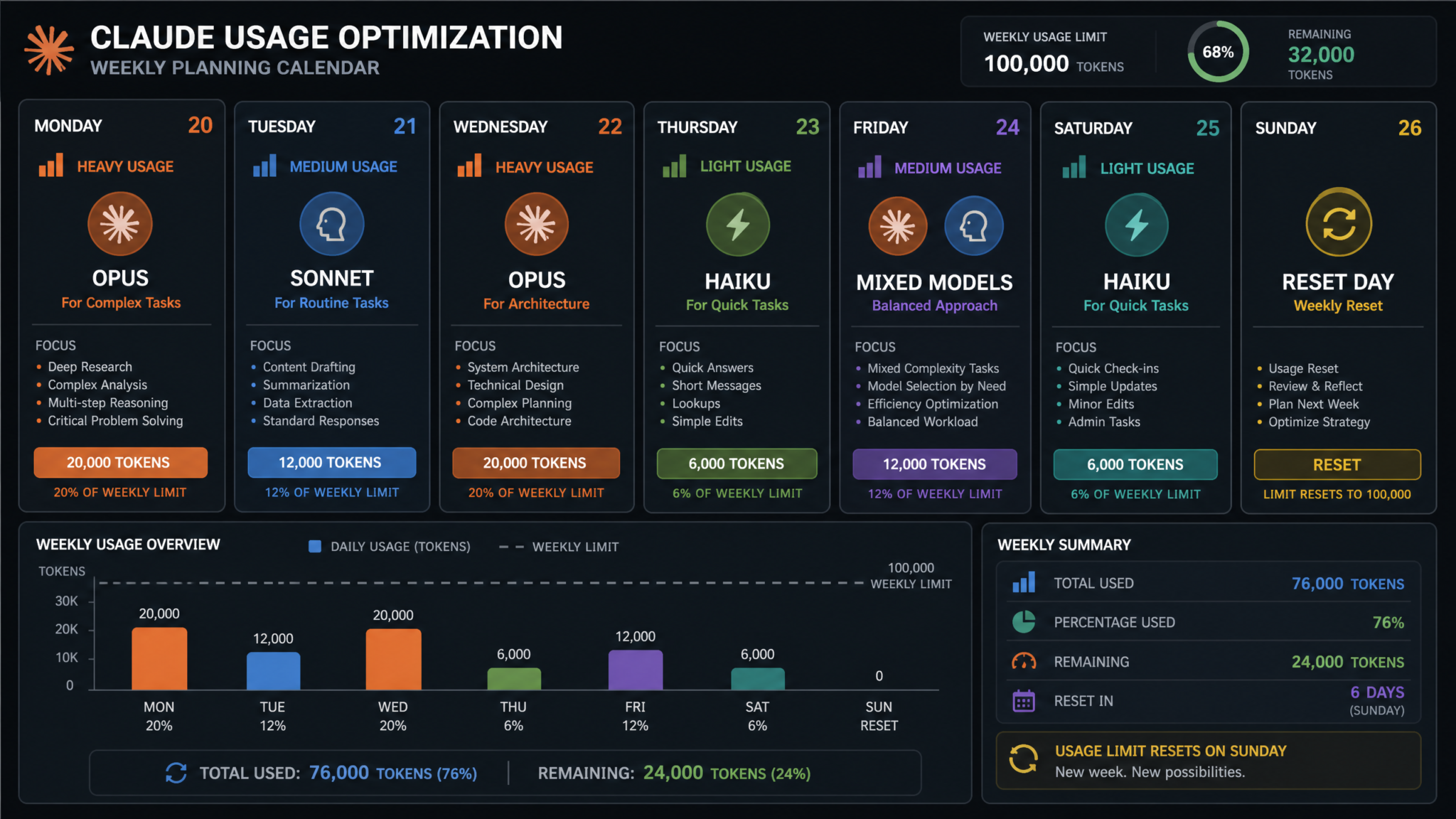
- Sequence tasks strategically. Front-load your highest-stakes, highest-value tasks to Monday and Tuesday when your weekly allocation is full. Move lower-priority tasks to Wednesday–Friday.
- Pre-assign alternatives for mid-week. For each major task category, identify which alternative tool you’ll use if you’ve hit your limit by the time that task arrives.
- Note your weekly reset time. Knowing exactly when your allocation refreshes lets you schedule around it rather than discovering the reset happened after wasting an hour on alternatives.
14.2 The Weekly Claude Work Schedule Template
| Day | Recommended Focus | Model Priority | Allocation Budget Target |
|---|---|---|---|
| Monday | Highest-stakes work: architecture, strategy, critical deliverables | Opus 4 permitted | Spend max 30% of weekly allocation |
| Tuesday | Core production work: content, code, analysis | Sonnet 4.5 default | Spend max 30% of remaining |
| Wednesday | Continuation work, first pass of remaining tasks | Sonnet/Haiku mix | Spend max 25% of remaining |
| Thursday | Lower-priority tasks, begin routing to alternatives | Haiku default, Sonnet exception | Reserve allocation for critical overflows |
| Friday | Review, edit, plan — minimal new Claude work | Haiku or alternatives | Preserve small buffer for urgent Monday needs |
15. Master Optimization Checklists and Templates
15.1 Weekly Setup Checklist
- ☐ Confirm weekly reset date and time in Claude dashboard
- ☐ Review prior week’s tracking sheet — identify any allocation waste patterns
- ☐ List this week’s highest-priority Claude tasks (maximum 5–7)
- ☐ Assign each task to a model tier (Opus/Sonnet/Haiku)
- ☐ Sequence tasks Monday–Wednesday for high-allocation work
- ☐ Pre-write or outline prompts for Monday morning sessions
- ☐ Verify alternative tools are accessible and authenticated (ChatGPT, Copilot, Perplexity)
15.2 Pre-Session Checklist (Before Every Claude Work Block)
- ☐ Check current usage dashboard — note both 5-hour and weekly status
- ☐ Review task queue — confirm batch list is prepared
- ☐ Select correct model tier for each queued task
- ☐ Open the appropriate Project or create a new context with system prompt
- ☐ Ensure reference documents are current in the Project
- ☐ Run prompt audit on your pre-written prompts (trim excess)
15.3 Prompt Quality Checklist
- ☐ Is all repeated context removed?
- ☐ Is the output format explicitly specified?
- ☐ Is the output length constrained appropriately?
- ☐ Are there any courtesy phrases that add tokens without improving output?
- ☐ Can multiple small prompts be collapsed into one multi-part request?
- ☐ Is the correct model tier selected for this task’s complexity level?
15.4 Limit Reached Emergency Response Checklist
- ☐ Confirm limit type (5-hour vs. weekly) — check dashboard
- ☐ If 5-hour: note reset time and schedule next block accordingly
- ☐ If weekly: triage queued tasks into Claude-specific vs. substitutable
- ☐ Route substitutable tasks to ChatGPT, Copilot, or relevant alternative
- ☐ Queue Claude-specific tasks for post-reset priority execution
- ☐ Use downtime for editing, planning, and prompt preparation
- ☐ Note in tracking sheet: what task triggered the limit, what model, what time
15.5 Model Selection Quick Reference Card
- Haiku 3.5: Emails, formatting, classification, simple Q&A, boilerplate code — anything you’d call “straightforward”
- Sonnet 4.5: Blog posts, code review, data analysis, research summaries, most professional content — your everyday workhorse
- Opus 4: Architecture decisions, complex strategy, critical client deliverables, multi-step novel reasoning — reserve for when it genuinely matters
15.6 Monthly Usage Review Template
At the end of each month, answer these questions using your tracking data:
- How many times did I hit the weekly limit before week’s end?
- Which model tier consumed the most allocation relative to the value it produced?
- Which task types could have been routed to Haiku or alternatives without quality loss?
- Did my Monday–Wednesday front-loading strategy hold? If not, why?
- What is my calculated monthly productivity cost of limit constraints? Does it justify a tier upgrade?
- Are my Project context documents current, lean, and well-organized?
- Have I updated my system prompt templates based on output quality observations this month?
Anthropic Claude Pro Plan Complete Feature and Limit Breakdown
Putting It All Together: Your 30-Day Adaptation Plan
The August 2026 rate changes are real, they’re permanent, and they require a genuine shift in how thoughtful Claude users operate. But the shift is not painful for users who approach AI tooling with intentionality. The dual-limit system, ironically, pushes users toward habits — batching, prompt quality, model selection discipline, planning — that produce better outputs and more sustainable workflows than the reactive, fire-hose approach that many power users had settled into.
Week 1: Audit. Start the tracking sheet. Check the dashboard before and after every session. Don’t change your behavior yet — just observe and measure how you actually use Claude.
Week 2: Model discipline. Apply the model selection decision tree strictly for one full week. Route every Haiku-appropriate task to Haiku. Note your allocation consumption compared to Week 1.
Week 3: Prompt efficiency. Apply the prompt audit to every prompt before submission. Eliminate repetition, trim courtesy, constrain output length. Track your per-session allocation consumption.
Week 4: Full system. Implement the weekly planning session, batched work blocks, alternative routing strategy, and Project optimization. You should now be operating well within your weekly allocation with allocation to spare for high-value Opus work when it genuinely matters.
The users who thrive under the new limits are not necessarily the ones with the largest allocations. They are the ones who have internalized the core principle: Claude’s allocation is a finite, valuable resource, and it deserves the same deliberate management you give to any other professional resource. Treat it accordingly, and the August 2026 changes will barely register as a constraint at all.
