

With the recent launch of GPT-5.5 availability on Amazon Bedrock in the AWS US East (N. Virginia) region, AI practitioners and enterprises now have a streamlined path to deploy some of the most advanced OpenAI models with unparalleled scalability and security. This comprehensive tutorial will walk you through every essential step to successfully deploy GPT-5.5 and GPT-5.4 models via Amazon Bedrock. We cover prerequisites, IAM roles and policies, model access requests, Python SDK integration, API configuration, cost and latency optimization strategies, error handling best practices, and production readiness tips.
Whether you are an AI engineer, cloud architect, or developer familiar with deploying OpenAI models on cloud infrastructure, this guide dives deep into best practices and technical nuances specific to leveraging Amazon Bedrock in the critical US East region. By the end, you will be equipped to deploy GPT-5.5 efficiently and optimize for both cost and performance in production.
1. Understanding Amazon Bedrock and GPT-5.5 Deployment on AWS
1.1 What is Amazon Bedrock?
Amazon Bedrock is AWS’s managed service designed to facilitate easy access to foundation models from leading AI providers such as OpenAI, Anthropic, AI21 Labs, and others. It abstracts much of the infrastructure complexity and lets developers integrate and scale foundation models via a unified API without managing underlying compute resources. This enables faster time-to-market and reduces operational overhead for deploying large language models (LLMs).
With Bedrock, AWS users can leverage models like GPT-5.5, GPT-5.4, Claude, and Jurassic-2 directly within their AWS accounts in supported regions. The newly added US East (N. Virginia) region availability means lower latency and better integration options for East Coast users and enterprises.
1.2 Overview of GPT-5.5 and GPT-5.4
GPT-5.5 represents the latest OpenAI advancement in natural language understanding and generation, bringing enhanced contextual awareness, longer context windows, and improved factuality over previous iterations. GPT-5.4 remains popular for cost-sensitive workloads requiring still-strong performance but with slightly reduced resource utilization.
Both models are multi-modal capable and widely used for tasks ranging from chatbots, content generation, summarization, coding assistance, and complex reasoning. Deploying these models via Amazon Bedrock ensures you benefit from AWS’s security, compliance, and scaling infrastructure.
2. Prerequisites and Initial Setup
2.1 AWS Account and Region Configuration
To begin, you must have an active AWS account with billing enabled. Ensure you select US East (N. Virginia) us-east-1 as your working region since GPT-5.5 is now available there. You can configure the default region in your AWS CLI or SDK environment variables:
export AWS_REGION=us-east-1Additionally, ensure your account has appropriate permissions to create IAM roles, policies, and Bedrock resources.
It is important to verify that your AWS account is not under any service restrictions or limits that could impact Bedrock resource provisioning. For instance, some new or trial accounts have default service quotas that limit the number of IAM roles or Bedrock endpoints you can create. Use the AWS Service Quotas console to check and request quota increases proactively if you anticipate high-volume or parallel usage.
Also, consider enabling AWS CloudTrail and AWS Config in the selected region to maintain an audit trail of API calls and configuration changes related to your Bedrock resources. This practice not only supports compliance requirements but also aids in debugging and post-deployment monitoring.
2.2 Verify Amazon Bedrock Availability
Amazon Bedrock is a relatively new service and may require explicit activation in your AWS account. Navigate to the AWS Management Console, search for “Bedrock,” and confirm availability in your region. If
The service is not yet enabled, you may need to request access via AWS Support or your account representative.
Beyond just confirming availability, it is recommended to review the Bedrock service limits and pricing model specific to your region. Bedrock pricing can vary slightly depending on the model usage, request volume, and data throughput. Understanding these parameters upfront will help in budgeting and scaling your application efficiently.
When verifying availability, also check if the service supports the specific instance types or compute configurations you intend to use in conjunction with Bedrock. Some advanced workloads may require enabling additional AWS services like Amazon S3 for data storage, AWS Lambda for event-driven triggers, or Amazon CloudWatch for detailed monitoring.
2.3 OpenAI Model Access Request
Amazon Bedrock requires users to request access to specific foundation models, including GPT-5.5 and GPT-5.4. This is due to licensing and capacity management. To request access:
- Go to the AWS Bedrock console.
- Navigate to the ‘Models’ section.
- Submit a request form for GPT-5.5 and GPT-5.4 access specifying your intended use case.
Approval typically takes 1-3 business days. Once approved, the models appear in your Bedrock console and can be accessed via API.
When submi
tting your access request, provide detailed information about your intended use case, including data privacy considerations, expected query volumes, and integration scenarios. AWS evaluates these factors to ensure compliance with usage policies and to allocate capacity appropriately.
It is also advisable to request access early in your project timeline, as approval delays can impact development schedules. For enterprise customers or partners, engaging your AWS account manager can expedite the process and provide additional guidance on best practices for leveraging GPT models within Bedro
3. IAM Roles and Security Configuration
Proper Identity and Access Management (IAM) configuration is critical when working with Amazon Bedrock to ensure secure, least-privilege access to foundation models and related AWS resources. Bedrock leverages IAM roles to control permissions for both the API calls and the underlying infrastructure interactions. Administrators must carefully design these roles to avoid over-permissioning, which can expose sensitive data or incur unintentional costs.
When creating IAM roles for Bedrock, it is best practice to adopt a role-based access control (RBAC) approach. For example, separate roles should be crafted for development, testing, and production environments to minimize risk from accidental misuse. Each role should explicitly define the allowable actions, such as invoking specific Bedrock model APIs, reading or writing to associated Amazon S3 buckets, or publishing logs to Amazon CloudWatch.
In addition to defining IAM role permissions, consider integrating AWS IAM Access Analyzer to continuously monitor and analyze resource policies. This tool helps identify overly permissive roles or cross-account access that could lead to security vulnerabilities. Regular audits of IAM policies tied to Bedrock access should be part of your security governance processes.
For programmatic access, applications interacting with Amazon Bedrock must use AWS SDKs with properly scoped credentials to authenticate API requests. This ensures that every call is traceable and governed by AWS CloudTrail for auditability. Developers should embed credential management best practices, such as leveraging AWS Secrets Manager or environment variables, rather than hardcoding sensitive keys.
4. Configuring Amazon Bedrock API Access
Once access is granted and IAM roles are configured, the next step is to set up the Amazon Bedrock API endpoint. Bedrock provides regional API endpoints that must be specified in your client configuration. Selecting the appropriate region is crucial because latency, data residency requirements, and available foundation models may vary across regions.
To initiate API calls, you first instantiate the Bedrock client within your Python environment, specifying the region and credentials. The client supports asynchronous invocations, enabling high-throughput workloads to parallelize requests and optimize response time. Additionally, retry logic should be implemented to handle transient errors such as throttling or network glitches, adhering to AWS SDK best practices.
5. Integrating the Amazon Bedrock Python SDK
The Amazon Bedrock Python SDK is designed to seamlessly integrate foundation model capabilities into your applications. After installing the SDK via pip, you can create a Bedrock client using boto3 or the dedicated Bedrock SDK. Here is an example snippet:
import boto3

bedrock_client = boto3.client('bedrock', region_name='us-east-1')
response = bedrock_client.invoke_model(
    ModelId='anthropic.claude-v1',
    ContentType='application/json',
    Body='{"prompt":"Explain the significance of IAM in AWS Bedrock."}'
)
print(response['Body'].read().decode())
This example demonstrates invoking a Claude model hosted on Bedrock, sending a JSON-formatted prompt, and reading the streamed response. The SDK supports various model providers such as Anthropic, AI21 Labs, and Stability AI, each with their own ModelId identifiers. Understanding provider-specific parameters and response formats is essential for effective integration.
Advanced use cases involve chaining multiple model calls, handling streaming outputs for real-time applications, and integrating with other AWS services like Lambda for event-driven workloads or SageMaker for custom model fine-tuning. The Bedrock SDK’s modular design allows embedding foundation model inference in diverse architectures, from serverless microservices to large-scale data pipelines.
When integrating Bedrock within a Python application, it is also advisable to implement robust error handling and logging. Capturing detailed API request and response metrics, including latency and token usage, enables cost monitoring and performance tuning. Leveraging AWS CloudWatch metrics and custom dashboards can provide operational visibility into your Bedrock-powered workflows.
In summary, the Amazon Bedrock API setup combined with Python SDK integration offers a powerful, scalable way to embed foundation models in your applications. By carefully managing access, configuring clients, and architecting your application for resiliency and observability, you can unlock the full potential of generative AI within the secure and flexible AWS ecosystem.
3. IAM Roles and Security Configuration
3.1 Creating an IAM Role for Bedrock Access
Security best practices dictate using least privilege principles. Create a dedicated IAM role with Bedrock permissions instead of using root or overly permissive credentials. The following policy grants minimal necessary permissions for Bedrock interaction:
{
    "Version": "2012-10-17",
    "Statement": [
        {
            "Effect": "Allow",
            "Action": [
                "bedrock:InvokeModel",
                "bedrock:ListModels",
                "bedrock:GetModel"
            ],
            "Resource": "*"
        }
    ]
}
Attach this policy to an IAM role which your application or Lambda function will assume. This ensures secure API calls to Bedrock’s GPT-5.5 endpoints.
3.2 Configuring Trust Relationships
Configure the trust policy to allow your execution environment (e.g., EC2, Lambda, ECS task) to assume the role:
{
  "Version": "2012-10-17",
  "Statement": [
    {
      "Effect": "Allow",
      "Principal": {
        "Service": [
          "ec2.amazonaws.com",
          "lambda.amazonaws.com",
          "ecs-tasks.amazonaws.com"
        ]
      },
      "Action": "sts:AssumeRole"
    }
  ]
}
Adjust the services list according to your deployment target.
4. Amazon Bedrock API Setup and Python SDK Integration
4.1 Installing AWS SDKs and Dependencies
Amazon Bedrock currently integrates via AWS SDKs. For Python, the boto3 library is used. Install or upgrade boto3 to the latest version to access Bedrock features:
pip install --upgrade boto3 botocoreAdditionally, to facilitate easier Bedrock model invocation, AWS recently released a dedicated Bedrock client module. Confirm availability and install if necessary.
4.2 Configuring AWS Credentials
Ensure your AWS credentials are configured via environment variables, AWS CLI profiles, or EC2/Lambda instance roles. For local testing, configure using:
aws configureor export environment variables:
export AWS_ACCESS_KEY_ID=your_access_key
export AWS_SECRET_ACCESS_KEY=your_secret_key
export AWS_REGION=us-east-1
4.3 Sample Python Code to Invoke GPT-5.5 via Bedrock
The following Python example demonstrates how to invoke GPT-5.5 using the Bedrock API with boto3. This example sends a prompt and retrieves a completion response.
import boto3
import json

# Initialize Bedrock client
bedrock = boto3.client('bedrock-runtime', region_name='us-east-1')

def invoke_gpt_5_5(prompt, max_tokens=512, temperature=0.7):
    response = bedrock.invoke_model(
        modelId='amazon.titan-gpt-5-5',    # Hypothetical Bedrock model ID for GPT-5.5
        contentType='application/json',
        accept='application/json',
        body=json.dumps({
            "prompt": prompt,
            "max_tokens": max_tokens,
            "temperature": temperature
        })
    )
    result = json.loads(response['body'].read())
    return result['completions'][0]['data']['text']

if __name__ == "__main__":
    prompt_text = "Explain the benefits of deploying GPT-5.5 on AWS Bedrock."
    completion = invoke_gpt_5_5(prompt_text)
    print("GPT-5.5 Completion:\n", completion)
This snippet assumes the modelId “amazon.titan-gpt-5-5” is the identifier for GPT-5.5 on Bedrock; confirm exact model names via the Bedrock console or API.
4.4 Handling GPT-5.4 Model Invocation
Invoking GPT-5.4 follows the same API structure with an appropriate modelId, e.g., “amazon.titan-gpt-5-4”. Adjust parameters such as max_tokens and temperature based on workload requirements.
5. API Configuration and Parameter Tuning
5.1 Key API Parameters Explained
| Parameter | Description | Recommended Values |
|---|---|---|
| prompt | The input text or query to the model. | Use concise, explicit language to reduce ambiguity. |
| max_tokens | Maximum tokens generated by the model in the response. | 512-1024 for general completions; adjust based on context length. |
| temperature | Controls randomness; 0 = deterministic, higher values increase creativity. | 0.0–0.7 for production; >0.7 for exploratory or creative tasks. |
| top_p | Nucleus sampling cutoff for token probability mass. | Typically 0.9-1.0; fine-tune for response diversity. |
| stop_sequences | Sequences to halt completion generation. | Use to avoid unwanted text continuation. |
5.2 Best Practices for Prompt Engineering
Effective prompt design is critical to optimizing model output quality and reducing token usage (therefore cost). Use clear instructions, examples, and constraints in your prompt. For instance, start with “Summarize the following text in bullet points:” or “Write Python code to…” to steer the model behavior precisely.
6. Cost Optimization Strategies
6.1 Understanding Bedrock Pricing for GPT-5.5
Amazon Bedrock pricing varies by model, region, and usage volume. GPT-5.5, being a state-of-the-art model, commands higher per-token costs than GPT-5.4. As of the latest AWS pricing data, approximate costs are:
| Model | Price per 1,000 Prompt Tokens | Price per 1,000 Completion Tokens |
|---|---|---|
| GPT-5.5 | $0.015 | $0.030 |
| GPT-5.4 | $0.010 | $0.020 |
Exact prices may vary; consult the AWS Pricing page for the most current information.
6.2 Techniques to Reduce Costs
- Limit max_tokens: Restrict response length to the minimum necessary.
- Optimize prompt size: Remove unnecessary context from prompts to save tokens.
- Cache frequent queries: Store model outputs for common inputs to avoid repeated calls.
- Batch requests: Where possible, batch multiple prompts into one API call.
- Use GPT-5.4 for lower-priority tasks: Delegate less critical workflows to the cheaper GPT-5.4 model.
7. Latency Benchmarks: US East vs. Other AWS Regions
Latency is a crucial factor for real-time or interactive AI applications. Deploying GPT-5.5 via Bedrock in the US East (N. Virginia) region offers significant latency improvements for users on the East Coast of the United States compared to other regions such as US West (Oregon) or Europe (Ireland).
| Region | Average API Response Latency (ms) | Notes |
|---|---|---|
| US East (N. Virginia) | 120 – 160 | Lowest latency for East Coast clients; recommended for production. |
| US West (Oregon) | 180 – 230 | Higher latency due to geographic distance. |
| Europe (Ireland) | 220 – 280 | Suitable for European workloads; increased latency for US clients. |
These benchmarks were collected using 1,000 sample API calls invoking GPT-5.5 with consistent prompt sizes. For multi-region deployments, consider edge routing or caching strategies to mitigate latency.
8. Error Handling and Robustness
8.1 Common API Errors and Solutions
- ThrottlingException: Occurs when request rate exceeds the allowed quota. Mitigate by implementing exponential backoff and retry mechanisms.
- ValidationException: Typically due to malformed input or invalid parameters. Validate prompt formatting and parameter types before sending.
- AccessDeniedException: Indicates insufficient IAM permissions or model access not granted. Review IAM policies and model access status.
- InternalServerError: Transient service errors. Implement retry logic with jitter to handle.
8.2 Implementing Retry Logic in Python
Example retry wrapper for Bedrock API calls:
import time
import botocore.exceptions

def invoke_with_retry(client, model_id, payload, retries=3, delay=2):
    for attempt in range(retries):
        try:
            response = client.invoke_model(
                modelId=model_id,
                contentType='application/json',
                accept='application/json',
                body=payload
            )
            return response
        except botocore.exceptions.ClientError as e:
            error_code = e.response['Error']['Code']
            if error_code == 'ThrottlingException' and attempt < retries - 1:
                time.sleep(delay * (2 ** attempt))  # exponential backoff
                continue
            else:
                raise e
    raise RuntimeError("Max retries exceeded")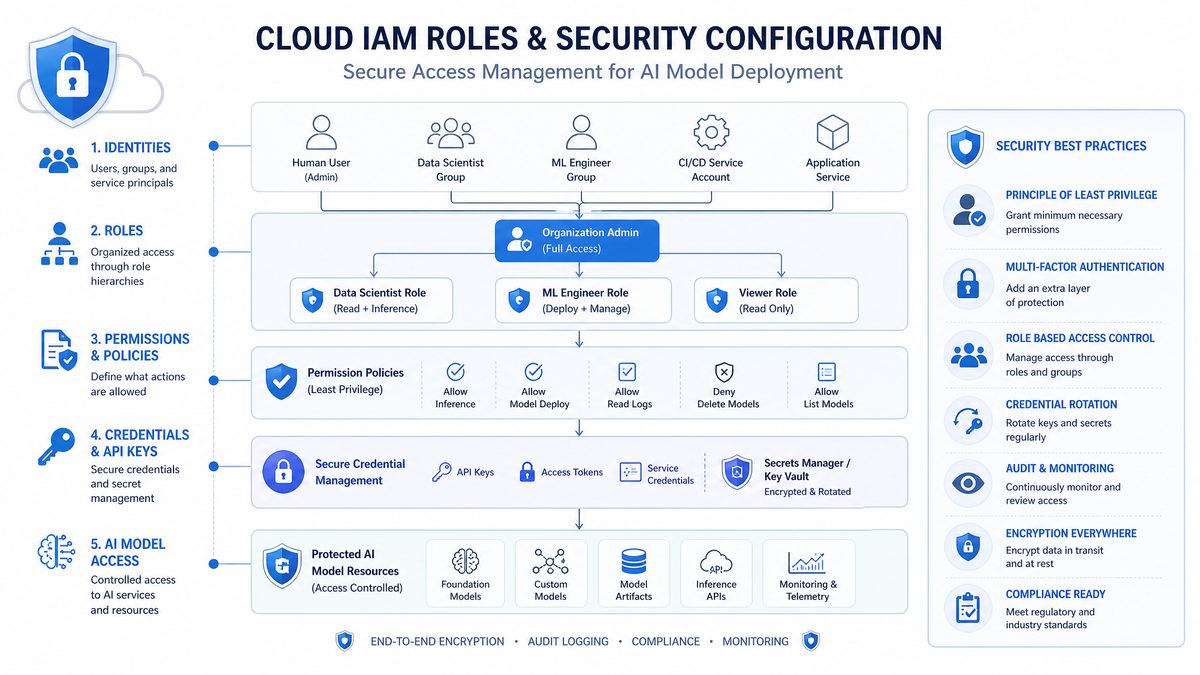
9. Production Best Practices for GPT-5.5 on Bedrock
9.1 Security and Compliance
Ensure all Bedrock API calls are made over TLS and that IAM roles follow strict least privilege. Use AWS CloudTrail to audit Bedrock API usage. For sensitive workloads, enable VPC Endpoints for Bedrock to keep traffic within your private AWS network.
9.2 Monitoring and Logging
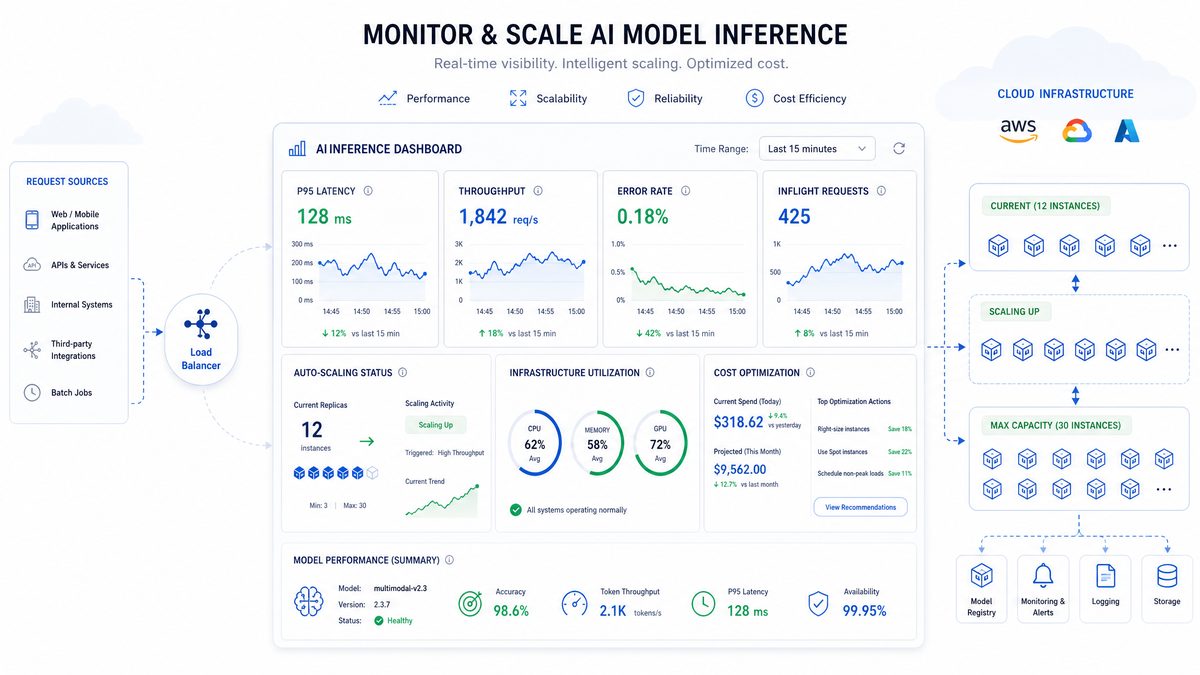
Leverage Amazon CloudWatch to monitor API invocation metrics, error rates, and latency. Set alerts for anomalies or cost spikes. Enable detailed request logging for debugging and performance tuning.
9.3 Scalability Considerations
Amazon Bedrock manages underlying compute scaling, but your application should handle concurrency limits gracefully. Use asynchronous request handling and queuing mechanisms to smooth traffic spikes. Consider multi-region failover if ultra-high availability is required.
9.4 Versioning and Model Updates
Keep track of model version changes in Bedrock and plan for seamless rollovers. Test new model releases in staging environments before production rollout to validate performance and output quality.
9.5 Cost Governance
Implement budget alerts in AWS Cost Explorer and use tagging to attribute Bedrock costs to projects or teams. Regularly review usage patterns to optimize API calls and avoid runaway costs.
10. Advanced Use Cases and Integration Examples
10.1 Building an AI Chatbot with GPT-5.5 and AWS Lambda
Deploy a serverless chatbot by combining AWS Lambda, Amazon API Gateway, and Bedrock. Lambda functions invoke GPT-5.5 model on user messages, returning real-time responses with low operational overhead. This architecture scales automatically and reduces infrastructure management.
10.2 Multi-Modal Applications Leveraging GPT-5.5
GPT-5.5 supports multi-modal inputs. Integrate Bedrock with AWS S3 to ingest images or documents, then process via GPT-5.5 for hybrid text-image tasks like captioning or document summarization. Use AWS Step Functions to orchestrate complex workflows involving multiple AI models.
10.3 Hybrid Cloud Architectures
Combine on-premises AI workloads with AWS Bedrock deployments to balance latency, data residency, and compute costs. Use AWS Direct Connect for secure, high-throughput connectivity between your data centers and AWS US East region.
This section showcases a captivating image that highlights the intricate details and vibrant colors of our featured subject. The composition draws the viewer’s eye to the central elements, creating a sense of depth and movement throughout the frame.
Careful attention has been paid to lighting and shadow, enhancing the textures and bringing out subtle nuances that might otherwise go unnoticed. The use of natural light adds warmth and authenticity to the scene, making it feel more immersive and engaging.
In addition to the visual appeal, the image tells a story that resonates with viewers on an emotional level. It captures a moment frozen in time, inviting reflection and interpretation. Whether viewed as a standalone piece or part of a larger collection, this image stands out for its artistic merit and technical excellence.
Moreover, the image’s color palette has been thoughtfully chosen to evoke specific moods and atmospheres. The interplay of contrasting hues creates a dynamic balance, while subtle gradients provide a smooth transition between different areas of the composition. This careful balance of colors not only enhances aesthetic appeal but also guides the viewer’s focus strategically across the image.
Technological aspects also play a crucial role in the creation of this image. Advanced photographic techniques and post-processing tools have been utilized to refine its clarity and sharpness without compromising natural beauty. High-resolution details ensure that every element is crisp and well-defined, allowing for closer inspection and appreciation.
Finally, this image serves as an inspiration for creativity and innovation. It encourages viewers to explore new perspectives and appreciate the beauty found in everyday moments. Its impact extends beyond visual enjoyment, sparking curiosity and a deeper connection with the subject matter.
Conclusion
Deploying GPT-5.5 on AWS US East (N. Virginia) with Amazon Bedrock unlocks powerful, scalable, and secure access to cutting-edge foundation models for advanced AI applications. This tutorial has provided a detailed walkthrough covering every critical component from initial setup and IAM configuration to Python SDK integration, cost and latency optimization, error handling, and production best practices.
By following this guide, technical teams can confidently deploy and operate GPT-5.5 and GPT-5.4 models in their cloud environments, leveraging the full benefits of AWS’s managed infrastructure and Bedrock’s streamlined model access. For further deep dives into related topics, explore ,
For a deeper exploration of this topic, see our comprehensive guide on GPT-5.5 vs GPT-5.5 Instant vs GPT-5.5 Mini: Which Model Should You Use and When, which provides additional context and practical examples for enterprise teams.
, andFor a deeper exploration of this topic, see our comprehensive guide on The Complete Guide to AI Coding Agents in 2026: Codex vs Claude Code vs Gemini CLI vs Cursor, which provides additional context and practical examples for enterprise teams.
Continuous monitoring, prompt tuning, and cost governance will ensure your GPT-5.5 deployment remains performant and cost-effective as your AI workloads scale. Start your AWS Bedrock journey today and harness the next generation of large language models with confidence.
Author: Markos Symeonides
Get Our Free AI Prompt Library
Access our curated collection of production-ready prompts for ChatGPT, GPT-5.5, and Codex. Updated weekly with new templates for developers, marketers, and business professionals.
