
How to Import and Govern ChatGPT Plugin Marketplaces from GitHub: Enterprise Workspace Playbook
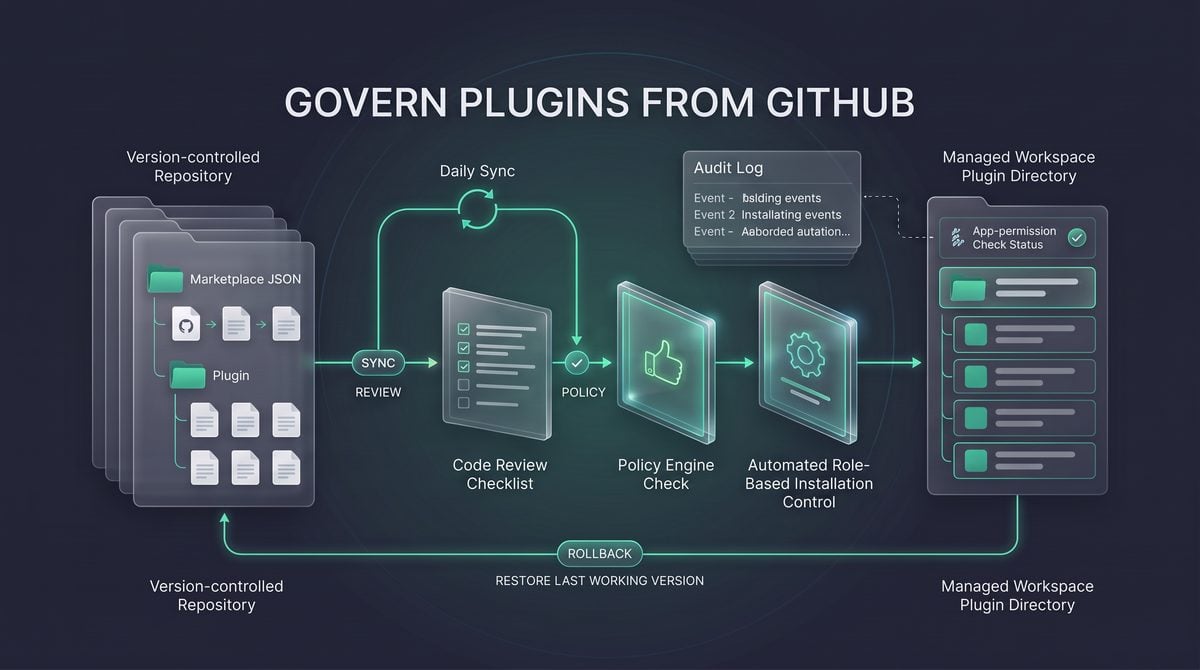

Why the August 28 GitHub marketplace import matters for enterprise plugin governance
On August 28, 2026, OpenAI added a workspace administration capability that changes how organizations can distribute ChatGPT plugins internally: workspace admins and owners can import plugin marketplaces from public or private GitHub repositories into the workspace directory and keep those imported marketplaces updated with an automatic daily sync. The release is important because it moves plugin distribution closer to the software-governance model enterprises already use for code, configuration, review, and change history. Instead of asking every team to manage plugin listings manually inside the workspace, administrators can treat a GitHub repository as the source of record for a marketplace catalog, then use ChatGPT workspace controls to decide which roles may install and use the imported plugins.
This playbook opens with one operational distinction that administrators should repeat in every rollout meeting: importing a marketplace is not the same as approving every plugin for use, granting app access, or connecting employee accounts. The official OpenAI documentation states that import and sync bring plugin content into the workspace, but do not grant app access, connect member accounts, or apply repository installation or authentication policy values. Workspace installation policy, role-based controls, enabled apps, and each member’s own authentication remain the controlling layers after import. That separation is the core governance advantage: the repository can publish a curated directory, while the workspace still enforces who can install, authenticate, and operate each app.
The model is best understood as “marketplace as JSON catalog.” A marketplace repository contains supported JSON manifest locations that describe the plugin marketplace or plugin entry points. OpenAI’s documentation identifies supported manifests at .agents/plugins/marketplace.json, .claude-plugin/marketplace.json, and a standalone .claude-plugin/plugin.json. GitHub is the only supported repository host for these workspace imports, and imports can come from public or private repositories. The practical result is that a platform team can keep a reviewed catalog in version control, a security team can inspect changes before merge, and a ChatGPT workspace owner can import that catalog into the workspace directory without treating the import as a blanket runtime authorization.
The ChatGPT Plugin Governance decision in How to Import and Govern ChatGPT Plugin Marketplaces from GitHub: Enterprise Workspace Playbook is easier to apply when teams also understand Inside the Codex Plugin Ecosystem: How 20+ Integrations Are Reshaping Enterprise AI Development. That article focuses specifically on inside the Codex Plugin Ecosystem: How 20+ Integrations Are Reshaping Enterprise AI Development, providing the adjacent implementation, comparison, or governance context needed to use this section without treating the two topics as interchangeable.
The Enterprise AI Plugin Security decision in How to Import and Govern ChatGPT Plugin Marketplaces from GitHub: Enterprise Workspace Playbook is easier to apply when teams also understand 3 Enterprise Security Checks Before Deploying ChatGPT Work — Data Governance, Access Control, and Audit Compliance. That article focuses specifically on 3 Enterprise Security Checks Before Deploying ChatGPT Work — Data Governance, Access Control, and Audit Compliance, providing the adjacent implementation, comparison, or governance context needed to use this section without treating the two topics as interchangeable.
The release in operational terms
| Release behavior | What administrators can do | What administrators must not assume |
|---|---|---|
| Import plugin marketplaces from GitHub repositories | Use a public or private GitHub repository as a managed catalog source for the workspace directory. | Do not assume non-GitHub repository hosts are supported for workspace imports. |
| Automatic daily sync | Keep imported marketplace content aligned with repository changes without manual re-import every day. | Do not assume daily sync is a security review; repository changes still require review before they are merged. |
| Supported JSON manifest locations | Structure catalog repositories around documented paths such as .agents/plugins/marketplace.json and .claude-plugin/marketplace.json. |
Do not invent unsupported manifest locations and expect the workspace import process to read them. |
| Public and private repository support | Keep internal catalogs private where plugin listings, server references, or operational ownership are sensitive. | Do not remove read access from the authorizing GitHub account if the workspace must continue syncing referenced repositories. |
| Import does not grant app access or connect accounts | Use workspace installation policy, app enablement, role controls, and user authentication as separate gates. | Do not announce that a plugin is “available to everyone” merely because its listing appears in the workspace directory. |
The daily sync capability is useful, but it also changes the risk profile of plugin catalog administration. A manually managed directory changes only when an administrator edits it. A repository-backed marketplace can change whenever a merged repository update is picked up by sync. That is not a reason to avoid the feature; it is a reason to apply the same controls used for production infrastructure repositories: protected branches, required reviewers, ownership files, release notes for catalog changes, and a rollback procedure. The official documentation notes that future syncs can add plugins automatically, so repository changes require review. Administrators should therefore treat the marketplace repository as a production control surface, not as a documentation repo.
Operational rule: a GitHub marketplace import should be governed like a configuration deployment. The repository defines what may appear in the workspace directory; the ChatGPT workspace defines who may install; app authentication defines what each member can actually access.
How the JSON catalog model changes the control plane
The marketplace-as-JSON-catalog model gives enterprises a clear separation between catalog source, workspace policy, and end-user authorization. The catalog source is the GitHub repository and the supported JSON manifest files in that repository. Workspace policy is the set of ChatGPT admin decisions that controls installation by role and required app enablement. End-user authorization is the member’s own connection to the underlying app or service. When those layers are kept separate, a security review can approve a plugin listing without accidentally granting credentials, and an administrator can allow a role to install a plugin without bypassing the app’s own authentication requirements.
A simple repository layout may look like this when an organization chooses to maintain a marketplace catalog in a dedicated repository. This example shows documented manifest paths only; it is not a complete schema reference and should not be treated as a substitute for OpenAI’s plugin management documentation.
enterprise-chatgpt-plugin-marketplace/
├── .agents/
│   └── plugins/
│       └── marketplace.json
├── .claude-plugin/
│   ├── marketplace.json
│   └── plugin.json
├── owners/
│   └── catalog-reviewers.md
└── change-log/
    └── 2026-08-28-initial-import.md
The repository can also reference same-repository paths or supported GitHub repositories and subdirectories. That flexibility is useful for organizations with multiple platform teams, but it creates an access dependency: the authorizing GitHub account must retain read access to every referenced repository. If a referenced private repository is moved, archived, permissioned incorrectly, or transferred outside the account’s accessible scope, the sync path becomes a governance issue rather than just a GitHub issue. Before import, administrators should inventory every referenced repository and confirm who owns it, who can approve changes, and what happens if the team that owns it reorganizes.
The public-versus-private repository decision should be based on exposure risk, not convenience. A public repository may be acceptable for an open-source plugin catalog whose entries disclose no sensitive internal topology, vendor relationships, or operational intent. A private repository is the safer default for enterprise marketplaces because catalog entries can reveal which apps the organization is enabling, which internal workflows are being prioritized, and which plugin owners or support paths exist. The August 28 capability supports both public and private GitHub repositories, so administrators do not need to make the catalog public merely to benefit from repository-based import and sync.
What import does not do
The most common rollout mistake is to describe the import as “installing plugins for the company.” That phrasing is inaccurate and can lead business stakeholders to overestimate readiness. Importing brings plugin content into the workspace directory. It does not install the plugin for every member, does not grant application permissions, does not connect Gmail, Slack, GitHub, or any other user account, and does not override workspace installation policy. If a plugin requires a user to authenticate to an external app, that authentication remains a separate step controlled by the app and by the user’s available permissions.
This distinction matters during incident response. If a questionable plugin appears because a marketplace source changed, administrators should investigate the repository commit, the sync history, and the workspace listing; they should not assume that every user has already connected credentials to the plugin. Conversely, if a user’s plugin action reaches data in an external app, administrators should not assume the marketplace import granted that data access. The likely control path is the user’s app authentication combined with workspace policy and the plugin’s own behavior. Keeping those facts separate makes audit interviews, containment decisions, and executive reporting more accurate.
OpenAI’s documentation also describes failure and retirement behavior that administrators should plan for before the first import. Invalid updates retain the last working version, which is useful for continuity but can surprise teams expecting a bad merge to remove the plugin immediately. Removing a source entry marks the workspace copy as “No longer in source” rather than deleting it outright, which gives administrators a signal that catalog state and workspace state have diverged. Deleting the marketplace removes all plugins imported from it, so marketplace deletion should be handled as a controlled administrative action rather than a routine cleanup step.
The governance outcome this playbook is designed to deliver
The outcome is not merely “a plugin marketplace imported from GitHub.” The desired outcome is a governed plugin supply chain for ChatGPT workspaces: a reviewed catalog in GitHub, a controlled import into the workspace directory, daily sync with change awareness, role-based installation policy, app-level authentication boundaries, and a recovery process for invalid, removed, or unwanted entries. In that model, GitHub is the source of catalog truth, ChatGPT workspace administration is the distribution and policy layer, and external app authentication remains the user- and app-specific authorization layer.
A practical governance program should assign different owners to different decisions. Repository maintainers decide whether a proposed plugin listing is syntactically valid and belongs in the catalog. Security or platform reviewers decide whether the plugin’s purpose, connected systems, and operational risk are acceptable. Workspace admins decide whether to import the marketplace, which roles may install plugins, and which apps must be enabled or restricted. Business owners decide whether the workflow has a legitimate use case and who should be trained to use it. Splitting ownership prevents a single merged JSON change from becoming an implicit enterprise-wide approval.
The opening decision rule is straightforward: do not import a marketplace until you can name the repository owner, approving reviewers, authorizing GitHub account, supported manifest path, workspace owner, intended installer roles, required app connections, and rollback contact. If any of those fields are unknown, the organization is not ready for automatic daily sync. The feature is designed to make plugin catalogs easier to distribute, not to replace basic change control. A disciplined import gives administrators a repeatable way to scale approved plugin discovery while preserving the permission boundaries that matter most in enterprise environments.
Repository prerequisites and review before a workspace import

Before an administrator imports a GitHub-based plugin marketplace into a ChatGPT workspace directory, treat the repository as a governed software supply-chain input rather than a static list of apps. OpenAI’s August 28, 2026 release notes state that workspace admins and owners can import plugin marketplaces from public or private GitHub repositories and keep them updated with automatic daily sync. The same release boundary matters operationally: the import brings plugin content into the workspace directory, but it does not grant app access, connect member accounts, or override installation and authentication policy.
The first prerequisite is administrative authority in the ChatGPT workspace. The official enterprise plugin-management documentation describes the capability for workspace admins, and the release notes specifically call out workspace admins and owners. Do not delegate the import to a personal GitHub account that is merely convenient; the authorizing GitHub account becomes part of the operational dependency because it must retain read access to the imported repository and to every referenced repository used by the marketplace.
The second prerequisite is a GitHub repository that uses a supported marketplace manifest layout. The official documentation identifies GitHub as the only supported repository host for workspace marketplace imports. A GitLab, Bitbucket, self-hosted Gitea, S3 bucket, raw HTTPS file server, or internal artifact registry may be valid for your own software distribution, but it is not a supported repository host for this ChatGPT workspace import path unless OpenAI later documents support for it.
The third prerequisite is a change-control process for the repository. Because OpenAI supports automatic daily sync, a repository change can create a workspace-directory change after the next sync. That is useful for routine plugin catalog maintenance, but it also means a merged pull request can introduce a new plugin, update metadata, change source references, or mark an imported item as no longer present in the source. Require code-owner review, protected branches, and a clear release branch or tag strategy before the first import, not after the first unexpected catalog update.
Supported manifest locations and what each one implies
OpenAI’s GitHub marketplace import documentation lists three supported manifest patterns: .agents/plugins/marketplace.json, .claude-plugin/marketplace.json, and a standalone .claude-plugin/plugin.json. Use these paths exactly as repository contracts. A manifest stored under plugins/marketplace.json, catalog.json, or another convenience path should not be assumed importable unless the OpenAI import flow explicitly supports selecting it.
| Supported manifest | Best operational fit | Review focus before import |
|---|---|---|
.agents/plugins/marketplace.json |
A repository that treats the marketplace as an agent/plugin catalog and may reference multiple plugin entries. | Confirm every source entry resolves to an approved same-repository path or supported GitHub repository/subdirectory. |
.claude-plugin/marketplace.json |
A catalog-style repository using the Claude plugin marketplace convention that OpenAI’s importer recognizes. | Verify the catalog contains only plugins approved for the ChatGPT workspace population and expected roles. |
.claude-plugin/plugin.json |
A single-plugin repository where the plugin manifest is the importable unit rather than a marketplace list. | Review the plugin’s declared behavior, source files, referenced server configuration, and whether it declares an MCP server. |
A practical decision rule is to use a marketplace manifest when you want a curated internal directory and to use a standalone plugin manifest when a repository exists for exactly one plugin. Mixing unrelated experimental plugins into a production marketplace repository increases governance overhead because future daily syncs can surface approved and unapproved changes through the same import relationship.
Plugins declaring MCP servers require special attention. OpenAI’s enterprise plugin-management documentation says plugins declaring MCP servers are marked Desktop only, including those pointing to remote HTTPS servers. That classification affects rollout communications and support procedures: administrators should not promise browser-only users that those imported plugins will behave like ordinary workspace directory entries.
Repository review checklist for administrators and platform teams
Review the repository in two passes: first as a GitHub access object, then as a plugin catalog. The GitHub pass asks whether the authorizing account can continue to read the repository and all referenced repositories. The plugin pass asks whether the manifest entries are appropriate for the workspace directory, role-based installation policy, and member authentication model.
- Confirm ownership and maintainers. Identify the GitHub organization, repository administrators, code owners, and emergency contacts. A marketplace tied to a personal fork creates continuity risk if that account loses access or leaves the company.
- Check visibility and authorization. For private repositories, verify the ChatGPT import authorization is performed by an account with durable read access. For public repositories, still review ownership and branch-protection controls because public visibility does not equal trustworthy governance.
- Inspect supported manifest paths. Confirm one of the documented manifest locations exists and that duplicate manifests do not create confusion about which catalog is authoritative.
- Trace every source reference. For same-repository paths, confirm the path exists and remains inside the repository. For referenced repositories or subdirectories, confirm they are GitHub repositories and that the authorizing account has read access.
- Review plugin declarations. Identify plugins that declare MCP servers, external app dependencies, or authentication expectations. Importing the directory entry does not connect accounts or grant access to those external systems.
- Validate removal behavior expectations. Removing a source entry marks the workspace copy as “No longer in source” rather than deleting it. Deleting the marketplace removes all plugins imported from it, so administrators should distinguish catalog cleanup from marketplace deletion.
- Prepare an approval trail. Record the repository URL, branch/tag/commit choice, manifest path, reviewer names, and intended workspace installation policy before import.
The OpenAI Codex Plugins decision in How to Import and Govern ChatGPT Plugin Marketplaces from GitHub: Enterprise Workspace Playbook is easier to apply when teams also understand The Codex Plugin Ecosystem Playbook: 10 Essential Plugins for Developers, Designers, and Data Scientists in 2026. That article focuses specifically on the Codex Plugin Ecosystem Playbook: 10 Essential Plugins for Developers, Designers, and Data Scientists in 2026, providing the adjacent implementation, comparison, or governance context needed to use this section without treating the two topics as interchangeable.
Source forms: same-repository paths, GitHub URLs, and Git subdirectories
OpenAI’s documentation says marketplace imports can reference same-repository paths or supported GitHub repositories/subdirectories. In governance language, that creates three practical source forms to review: a local source inside the marketplace repository, a referenced GitHub repository, and a referenced GitHub subdirectory. All three should be treated as code dependencies, because a daily sync can import updated plugin content from them when the source changes.
A local, same-repository source is the easiest to govern because the marketplace manifest and plugin files live under the same Git history and branch-protection rules. Use this pattern when a central platform team owns the catalog and wants a single pull request to update both the marketplace entry and the plugin files. The main risk is repository sprawl: if every business unit commits directly into the same repository, code-owner rules must prevent one team from modifying another team’s plugin source.
enterprise-plugin-marketplace/
├── .agents/
│   └── plugins/
│       └── marketplace.json
├── plugins/
│   ├── salesforce-case-summary/
│   │   └── .claude-plugin/
│   │       └── plugin.json
│   ├── finance-policy-helper/
│   │   └── .claude-plugin/
│   │       └── plugin.json
│   └── engineering-runbook-search/
│       └── .claude-plugin/
│           └── plugin.json
└── GOVERNANCE.md
A referenced GitHub repository is appropriate when each plugin has its own repository lifecycle. This can work well for teams that already maintain separate repositories, but the authorizing GitHub account used for the workspace import must retain read access to every referenced repository. If one referenced private repository becomes inaccessible, the marketplace dependency graph is no longer healthy even if the top-level marketplace repository is still readable.
marketplace-catalog-repo/
└── .agents/
    └── plugins/
        └── marketplace.json

referenced-plugin-repo-a/
└── .claude-plugin/
    └── plugin.json

referenced-plugin-repo-b/
└── .claude-plugin/
    └── plugin.json
A GitHub subdirectory reference is useful when a large repository contains several plugin packages but only one subdirectory should be imported. This pattern is common in monorepos, but it requires disciplined path rules. The marketplace should reference the intended subdirectory, reviewers should verify that the plugin manifest and associated files are contained in that area, and repository owners should avoid moving plugin directories without coordinating with the workspace administrator.
company-agent-monorepo/
├── packages/
│   ├── chatgpt-plugins/
│   │   ├── procurement-helper/
│   │   │   └── .claude-plugin/
│   │   │       └── plugin.json
│   │   └── support-triage/
│   │       └── .claude-plugin/
│   │           └── plugin.json
│   └── unrelated-services/
└── README.md
Do not treat “URL source” as permission to use arbitrary URLs. The official boundary is GitHub repositories and supported GitHub repositories/subdirectories. Raw file URLs, release-asset URLs, private artifact URLs, or documentation-site URLs should be rejected during review unless OpenAI’s current import interface and documentation explicitly support them.
Branch, tag, and commit pinning policy
Branch, tag, and commit choices determine how much change the daily sync can absorb without another administrator action. Use the most restrictive reference that still matches your operating model. A moving branch is convenient for fast updates; a tag is better for curated releases; a commit SHA is best for a frozen validation snapshot. If your import flow or manifest references allow selecting or encoding a Git ref, document the selected ref in the approval record.
| Reference strategy | Recommended use | Operational warning |
|---|---|---|
Branch, such as main or release |
Use for a marketplace that should receive approved updates after merge. | Daily sync can pick up new merges automatically, so branch protection and pull-request review are mandatory controls. |
Tag, such as v2026.08.30 |
Use for scheduled releases where administrators want predictable catalog versions. | Do not move tags after approval; treat tag mutation as a supply-chain incident unless your organization has a documented exception process. |
| Commit SHA | Use for audit snapshots, incident rollback, or high-risk plugin onboarding. | A pinned commit will not receive routine updates until the reference is deliberately changed, so security and compatibility fixes require an explicit release action. |
For most enterprise workspaces, a protected release branch is a balanced default because it allows the daily sync to keep the directory current without letting unreviewed commits become workspace catalog changes. For regulated or high-change environments, use tags for promotion: merge to main for development, cut an immutable release tag after review, and import or update the workspace marketplace against that tag.
Path rules that prevent accidental catalog expansion
Path rules should be written down before the repository is connected. Same-repository references should use clear, reviewable relative paths; subdirectory references should point to the smallest directory that contains the intended plugin; and repository maintainers should avoid path aliases, generated directories, or broad monorepo roots that include unrelated files. The goal is to ensure reviewers can answer a simple question: exactly which files are eligible to become imported plugin content?
A safe repository convention is to isolate importable plugin packages under a single top-level directory such as plugins/ or packages/chatgpt-plugins/, then require code-owner approval for that directory. Keep test fixtures, prototypes, archived plugins, and internal design notes outside the importable path. If experimental plugin manifests are stored beside production manifests, future maintainers may accidentally add them to the marketplace during routine cleanup.
Use explicit naming to reduce mistakes. A directory named archive/old-plugin invites accidental re-import during refactoring, while not-for-import/ or a separate repository makes intent clearer. For monorepos, avoid referencing the repository root unless the repository exists only for marketplace content. A root-level reference makes unrelated changes harder to review because every repository restructuring becomes potentially relevant to the import relationship.
Operational warning: invalid updates retain the last working version according to OpenAI’s documentation. That behavior is helpful for continuity, but it should not be used as a validation strategy. A failed sync means the workspace may continue showing older plugin content while maintainers assume a repository change is live.
GitHub organization authorization and access continuity
For private GitHub repositories, authorization is not a one-time clerical step. The account used to authorize the import must retain read access to the marketplace repository and every referenced repository. If your organization uses GitHub organization policies, SSO enforcement, fine-grained access controls, or periodic access reviews, include the ChatGPT marketplace import account in those procedures so that routine offboarding or permission cleanup does not break future syncs.
A recommended pattern is to use a dedicated, organization-managed GitHub identity or tightly controlled administrator account, subject to your company’s GitHub governance rules, rather than a founder’s or engineer’s personal membership. The account should have the minimum read access needed for the marketplace and referenced repositories. Do not grant broad organization administration privileges merely to make the import convenient; repository read continuity and workspace admin accountability are the actual requirements.
For same-repository access, verify that the authorizing account can read the top-level repository and that the manifest’s local paths resolve within it. For referenced-repository access, verify each target repository independently. A marketplace repository may be public while a referenced plugin repository is private, or the reverse may be true; the import dependency succeeds only if the authorization covers the repositories that the marketplace actually references.
Safe import procedure for a production workspace
The following procedure is a recommended workflow, not a substitute for the current OpenAI Admin Console screens. Use it to reduce avoidable catalog surprises when importing a GitHub plugin marketplace into a Business, Enterprise, or other supported workspace where administrators are responsible for member-facing directory content.
- Create or select the marketplace repository. Confirm it is hosted on GitHub and contains one supported manifest path:
.agents/plugins/marketplace.json,.claude-plugin/marketplace.json, or.claude-plugin/plugin.json. - Freeze the review candidate. Choose a branch, tag, or commit according to your release policy. For initial production import, prefer a protected release branch, immutable tag, or reviewed commit over an unprotected development branch.
- Review source references. Trace every local path, GitHub repository reference, and GitHub subdirectory reference. Confirm the authorizing GitHub account has read access to all referenced private repositories.
- Classify plugins before import. Identify entries that declare MCP servers and note that OpenAI marks such plugins Desktop only. Identify entries that depend on external apps so admins can prepare installation policy and member-authentication guidance.
- Record intended workspace policy. Decide which roles may install or use the imported plugins. The import itself does not apply repository installation or authentication policy values, so workspace policy must be configured separately.
- Authorize GitHub from the workspace import flow. Use the approved GitHub identity and select the reviewed repository and manifest source according to the current Admin Console workflow.
- Verify the imported directory entries. After import, compare the workspace directory against the reviewed manifest. Check names, descriptions, plugin counts, Desktop-only markings, and any unexpected entries.
- Configure installation policy and required apps. Enable only the apps and roles intended for the rollout. Remind stakeholders that members must still authenticate to connected apps with their own accounts where required.
- Monitor the first daily sync. Review the next sync result and confirm no unexpected changes appear. If an invalid update occurs, investigate the repository change even if the workspace retains the last working version.
- Document removal and deletion actions. If a plugin is removed from the source, expect the workspace copy to be marked “No longer in source.” If the entire marketplace is deleted from the workspace, expect all plugins imported from it to be removed.
This procedure deliberately separates repository import from workspace enablement. That separation matches OpenAI’s documented behavior and prevents a common governance error: assuming that because a plugin appears in the workspace directory, members automatically have access to the app or that their accounts are already connected. The repository supplies catalog content; workspace policy and member authentication remain the controlling layers.
Policy gates after import: make GitHub the catalog source, not the access source

After a workspace import succeeds, the highest-risk mistake is to treat the GitHub repository as if it has become the workspace permission system. OpenAI’s August 28, 2026 release notes and enterprise plugin-management documentation draw a clear boundary: importing and syncing a GitHub-based plugin marketplace brings plugin content into the workspace directory, but it does not grant app access, connect user accounts, or apply repository installation and authentication policy values. The practical policy model is therefore two-layered: GitHub controls what can appear in the directory, while ChatGPT workspace settings control who can use it and how authentication occurs.
For administrators, this means the import workflow is not finished when the repository is connected. A production-ready rollout requires role-based installation policy, app enablement, member authentication, change review, and sync monitoring. The rest of this section treats the repository as a supply source and the workspace as the enforcement point, which is the safer operating model for regulated teams, internal developer platforms, and enterprises with separate security, identity, and application-owner responsibilities.
Define role-based Available and Installed policy before broad discovery
Use role-based policy as the first workspace control after import. Where the workspace administration interface distinguishes between Available and Installed, treat those states as separate governance decisions rather than convenience labels. A plugin being available to a role means the role is allowed to find or use it under the workspace’s policy model; a plugin being installed for a role means the administrator has intentionally placed that plugin into that role’s working environment. The exact administrative action should be performed in the workspace settings, not inferred from any repository file.
Recommendation: start with the narrowest role that has a legitimate business need, then expand only after authentication, data-flow, and support expectations are clear. For example, a GitHub pull-request summarization plugin should first be made available to engineering roles that already have repository access, not to finance or HR roles simply because the marketplace repository is workspace-wide. This keeps plugin discovery aligned with job function and reduces accidental attempts to connect unsupported or unnecessary applications.
| Workspace role or group | Recommended initial state | Reasoning | Operational check before expansion |
|---|---|---|---|
| Workspace owners and admins | Available for evaluation; Installed only when they operate the plugin | Admins need to inspect governance behavior but should not automatically become production users of every imported entry. | Confirm the plugin appears as expected after sync and that disabling or policy changes behave as intended. |
| Application owner team | Installed for pilot users | The team responsible for the underlying app can validate authentication, scopes, support runbooks, and expected outputs. | Verify that each pilot user authenticates with their own account and permissions. |
| Business users with approved use case | Available after pilot sign-off | Availability allows adoption without forcing the tool into every user’s workflow. | Check that training, support routing, and data-handling guidance are published. |
| High-risk or unrelated roles | Not available | Imported catalog presence is not a sufficient reason to expose a plugin to users without a defined need. | Review quarterly or when a new business case is approved. |
The ChatGPT Workspace Permissions decision in How to Import and Govern ChatGPT Plugin Marketplaces from GitHub: Enterprise Workspace Playbook is easier to apply when teams also understand How to Set Up ChatGPT Enterprise for Your Team: Admin Console, SSO, Data Controls, and Model Access Management. That article focuses specifically on how to Set Up ChatGPT Enterprise for Your Team: Admin Console, SSO, Data Controls, and Model Access Management, providing the adjacent implementation, comparison, or governance context needed to use this section without treating the two topics as interchangeable.
Keep app enablement and member authentication as separate gates
Importing a marketplace does not enable every required app, and it does not connect user accounts. This distinction matters because a plugin can appear in the workspace directory while still being unusable until the relevant app is enabled and the user completes authentication. The workspace admin controls the availability of apps at the workspace layer; the individual member’s credentials and permissions control what that member can access inside the connected service.
Recommendation: before moving a plugin from a pilot group to a broader role, run a three-part validation. First, confirm that the required app is enabled in the workspace settings. Second, confirm that a pilot member can authenticate using their own account, not an administrator’s account. Third, confirm that the plugin’s behavior is constrained by the member’s existing permissions in the connected service. This procedure prevents a common rollout failure where the catalog entry is visible but users cannot complete a useful workflow because the app was never enabled or the authentication path was not tested.
- Identify the underlying app dependency. Record whether the plugin needs GitHub, Gmail, Slack, an internal system, or another supported app connection.
- Check workspace app settings. Do not rely on the imported repository to express app availability; validate the workspace setting directly.
- Test with a non-admin pilot user. Admin accounts often have broader app permissions than normal members, so they are a poor proxy for production behavior.
- Record the expected authentication owner. In most enterprise workflows, each member should connect their own account so downstream access reflects their own authorization.
- Document failure handling. If authentication fails, the help desk or platform team needs to know whether to check workspace app enablement, identity-provider membership, or the connected service’s permissions.
For event-driven and app-connected workflows, this separation also protects against overbroad assumptions about scheduled or consequential actions. OpenAI’s event-triggered task documentation states that recipients of shared tasks use their own permissions and connected apps, and that approval-requiring actions pause for review. The same governance principle applies here: marketplace import can make a capability discoverable, but it does not transfer another user’s credentials, app sessions, chat history, files, memories, custom instructions, or connected-app data.
Do not let repository policy values override workspace policy
OpenAI’s GitHub marketplace import documentation states that repository installation and authentication policy values are not applied by import. Treat that as a hard boundary. A repository can describe, organize, and reference plugin content, but it is not the authority for workspace installation state, role targeting, app enablement, or member authentication. If a repository maintainer adds policy-like metadata, comments, naming conventions, or documentation that says a plugin is “installed for all engineers,” the workspace administrator must still configure the corresponding workspace policy explicitly.
This rule prevents a dangerous ownership inversion. Repository maintainers may be excellent plugin authors, but they are not necessarily workspace owners, identity administrators, compliance approvers, or application-risk owners. Allowing repository policy intent to override workspace settings would let a GitHub change alter access posture outside the admin console. The documented behavior avoids that outcome: sync imports plugin content, while the workspace remains the enforcement layer.
Operational rule: use GitHub pull requests to review what may enter the marketplace, and use ChatGPT workspace settings to decide who may use what entered. Never approve a repository change on the assumption that its policy labels will automatically enforce access in the workspace.
The GitHub Security Best Practices decision in How to Import and Govern ChatGPT Plugin Marketplaces from GitHub: Enterprise Workspace Playbook is easier to apply when teams also understand How to Use OpenAI Codex for Automated Code Review: Setting Up PR Analysis, Security Scanning, and Performance Optimization Agents. That article focuses specifically on how to Use OpenAI Codex for Automated Code Review: Setting Up PR Analysis, Security Scanning, and Performance Optimization Agents, providing the adjacent implementation, comparison, or governance context needed to use this section without treating the two topics as interchangeable.
Review .app.json references as deployable configuration, not just catalog text
Marketplace manifests can reference plugin content in the same repository or in supported GitHub repositories and subdirectories. When those entries point to files such as .app.json descriptors or adjacent app configuration, treat every referenced path as deployable configuration that can affect what administrators and users see after sync. The source notes for this article do not establish a universal schema for .app.json, so the safe governance practice is to review referenced files by path, ownership, and change history rather than assuming a particular field layout.
Recommendation: require pull-request reviewers to open each referenced .app.json path and verify that it belongs to the expected product owner, repository, and directory. A marketplace entry that changes only a path can be as important as a change that edits the manifest itself, because the next daily sync may import content from the newly referenced location. If the authorizing GitHub account lacks read access to the referenced repository or subdirectory, sync can fail or produce an incomplete operational picture, so access continuity should be checked before approval.
{
  "review_note": "Example governance annotation only; not an OpenAI marketplace schema.",
  "marketplace_entry": "customer-support-triage",
  "referenced_config": "apps/support/customer-support-triage/.app.json",
  "expected_owner": "Support Platform",
  "review_checks": [
    "Path is in an approved repository or subdirectory",
    "Authorizing GitHub account retains read access",
    "Workspace policy is configured separately",
    "Required app enablement and user authentication are documented"
  ]
}
The example above is a proposed workflow artifact, not a product requirement and not an OpenAI-defined manifest format. Its purpose is to force reviewers to separate content review from access enforcement. The repository review confirms that the referenced configuration is expected; the workspace review confirms that only the intended roles can access or receive the plugin.
Account for Desktop-only behavior for plugins declaring MCP servers
Plugins declaring MCP servers are marked Desktop only, including plugins that point to remote HTTPS servers. This behavior is easy to misunderstand because “remote HTTPS” can sound like it should work anywhere the web app works. For marketplace governance, do not assume that a remote MCP server declaration makes the plugin available on web, mobile, or every client surface. The Desktop-only marker should be treated as a deployment constraint and communicated before users report inconsistent availability across devices.
This Desktop-only behavior is separate from WebMCP site tools in the ChatGPT desktop app’s built-in browser. OpenAI’s WebMCP documentation describes site tools as page-scoped tools exposed by the live top-level webpage, not as a replacement for conventional MCP integrations through local or remote servers. The same documentation states that site tools are not currently available in Enterprise or Edu workspaces, so enterprise administrators should not use WebMCP availability as evidence that GitHub-imported MCP plugins will work outside their documented Desktop-only behavior.
Recommendation: add a “client support” column to the plugin approval tracker. For each imported plugin, record whether it declares an MCP server and whether administrators should brief users that it is Desktop only. This small documentation step prevents support tickets where users can see a marketplace entry in one context but cannot execute it in another. It also helps procurement and endpoint-management teams understand whether managed ChatGPT desktop app deployment is a prerequisite for a given workflow.
Use change review because daily sync can add new entries automatically
Automatic daily sync is operationally useful because it keeps the workspace directory aligned with the GitHub marketplace, but it also means repository changes can become workspace-visible without a manual import each time. OpenAI’s documentation explicitly warns that future syncs can add plugins automatically, so repository change control must be treated as part of workspace governance. A pull request that adds a new marketplace entry is not merely a documentation update; it is a request to introduce a new workspace directory item at the next successful sync.
Recommendation: classify marketplace pull requests into at least four categories: new plugin entry, changed plugin reference, removed source entry, and metadata-only change. New plugin entries require role-policy planning before merge. Changed references require path and owner review, especially when the target moves to another repository or subdirectory. Removed source entries require communication because the workspace copy is marked “No longer in source” rather than being deleted immediately. Metadata-only changes still deserve review because names and descriptions affect user understanding and support routing.
| Repository change type | Workspace effect to expect | Required reviewer | Pre-merge decision |
|---|---|---|---|
| New marketplace entry | May be added automatically by a future daily sync | Workspace admin plus app owner | Decide Available or Installed policy before merge or keep unavailable after sync. |
| Reference path changed | Workspace may import content from a different path or supported GitHub repository/subdirectory | Repository owner plus security reviewer | Verify authorizing account read access and confirm the new path is approved. |
| Source entry removed | Workspace copy is marked “No longer in source” rather than deleted | Workspace admin plus support owner | Decide whether to delete, replace, or communicate deprecation to affected users. |
| Invalid update introduced | Last working version is retained | Repository maintainer plus workspace admin | Fix the source and verify the next sync rather than assuming users received the bad update. |
Do not rely on branch protection alone unless it covers the exact repositories and subdirectories referenced by the marketplace. OpenAI supports references to same-repository paths and supported GitHub repositories or subdirectories, and the authorizing account must retain read access to every referenced repository. If a marketplace points outside the primary repository, the same pull-request and approval standards should follow the referenced content.
Read sync reports as governance evidence, not just troubleshooting output
Daily sync creates a recurring control point. Administrators should review the sync result or sync report after repository changes, especially after adding entries, changing references, or removing source entries. The report should be used to answer concrete governance questions: did the expected entries appear, did any invalid update fail, did the last working version remain in place, and did any item become marked “No longer in source”? Treating the sync report as evidence gives security and operations teams a way to reconcile GitHub approval with workspace state.
Recommendation: maintain a lightweight reconciliation log after each material marketplace change. The log should include the pull-request identifier, the expected plugin entries, the date of the next sync check, the observed workspace state, and any follow-up action. This is especially important when automatic sync adds entries, because the merge event and the workspace-visible event are separated in time. If your change-management process requires a single closure record, close the change only after the sync result has been reviewed.
Example reconciliation checklist:
1. Pull request merged for marketplace change.
2. Expected additions, updates, removals, or path changes recorded.
3. Daily sync completed or manual verification performed when available.
4. Workspace directory checked for expected plugin state.
5. Role-based Available or Installed policy confirmed in workspace settings.
6. Required apps enabled and pilot authentication tested.
7. Exceptions recorded, including invalid update retention or "No longer in source" status.
This checklist is a proposed operating procedure, not a statement about required OpenAI fields or report formatting. Its purpose is to prevent silent drift between the GitHub source of marketplace content and the ChatGPT workspace policy layer. The most important control is the final comparison: a repository merge is not proof that the workspace is in the intended state.
Understand last-working-version retention and “No longer in source” status
Invalid updates retain the last working version. This behavior is protective because a bad repository change does not necessarily break the workspace copy immediately, but it can also hide a failed rollout if administrators look only at user reports. Users may continue seeing the last working version while the repository contains an invalid update that never successfully synced. Operations teams should therefore treat retention as a safety net, not as a deployment success signal.
When a source entry is removed, the workspace copy is marked “No longer in source” rather than being deleted. This behavior gives administrators a chance to decide whether the plugin should be retired, replaced, or kept temporarily while users transition. It also means repository cleanup is not the same as workspace cleanup. If the business intent is full removal, administrators must follow the workspace deletion or marketplace deletion process that matches that intent. OpenAI’s documentation states that deleting the marketplace removes all plugins imported from it, so use that action only when retiring the entire imported marketplace source is intended.
Recommendation: create two separate runbooks: one for failed updates and one for retirements. A failed-update runbook should focus on correcting the GitHub source and verifying a successful sync. A retirement runbook should focus on user communication, policy removal, replacement options, and eventual deletion where appropriate. Combining these paths leads to avoidable mistakes, such as deleting a plugin that only needed a source fix or leaving a deprecated plugin visible because the source entry was removed but workspace state was never reviewed.
Use a default-deny posture for automatically added entries
Because future syncs can add plugins automatically, the safest enterprise posture is to assume that any newly imported entry starts without broad business approval until workspace policy says otherwise. If the workspace allows administrators to leave a plugin uninstalled or unavailable for general roles, use that state for new entries until app ownership, authentication, and client-support requirements are verified. This keeps daily sync valuable for catalog maintenance without turning it into uncontrolled rollout.
A practical operating model is to pair repository approval with a workspace staging policy. The repository pull request can approve the content entering the marketplace, while the workspace admin initially limits availability to owners, admins, or a designated pilot role. After the app owner confirms behavior and support readiness, the admin can change the role-based policy to Available or Installed for the intended audience. This mirrors mature software-release practice: merge, sync, validate, then enable.
The final policy principle is simple: GitHub is the source for imported plugin marketplace content; ChatGPT workspace settings are the source for access decisions. Keep those responsibilities separate, review every referenced path such as .app.json as deployable configuration, monitor sync results, and document role-based Available or Installed decisions before users depend on the imported marketplace in production.
Operational ownership, source continuity, and recovery
After the first successful import, treat the GitHub repository as a governed software supply source rather than a one-time upload. OpenAI’s August 28, 2026 release notes describe workspace admins and owners importing plugin marketplaces from public or private GitHub repositories into the workspace directory and keeping them updated through automatic daily sync. That means the operational risk moves from “who clicked import” to “who can change the repository, who can approve changes, and whether the authorizing GitHub account continues to have read access.”
Transfer marketplace ownership without creating an access outage
The official GitHub marketplace import documentation states that the authorizing account must retain read access to every referenced repository. For enterprise operations, the safest ownership pattern is to authorize the import with an account whose access lifecycle is not tied to a single employee’s departure. If your company policy does not permit shared user accounts, assign a named platform owner and a named backup owner, document both in the workspace runbook, and require an access review before role changes, team transfers, or offboarding.
| Ownership event | Operational risk | Recommended control |
|---|---|---|
| Importing admin leaves the company | Future syncs may fail if the GitHub account loses read access. | Reconnect the marketplace using an active GitHub identity with read access to all referenced repositories. |
| Repository moved to another GitHub organization | Source paths or repository permissions may no longer resolve for the authorizing account. | Validate every marketplace reference after the move and run a manual admin review of sync status. |
| Private dependency repository added to the marketplace | Daily sync may fail for referenced content the authorizing account cannot read. | Require pull-request review that checks authorizing-account access before merge. |
| Security team revokes broad GitHub permissions | The workspace may retain the last working marketplace copy while losing update continuity. | Coordinate GitHub permission changes with workspace admins and verify the next sync report. |
Recommendation: keep a short “marketplace authority record” outside ChatGPT that lists the marketplace name, GitHub repository URL, manifest path, authorizing account, backup owner, review approvers, and last successful sync date. This record is useful during audits because the workspace directory shows imported content, while the GitHub access decision often lives in a separate identity or source-control system.
Reconnect GitHub after access or source changes
Use reconnecting as a controlled maintenance action, not as an emergency guess. Before reconnecting, confirm that the new authorizing GitHub identity can read the marketplace manifest and every same-repository path, supported GitHub repository, or subdirectory referenced from it. The source notes specify GitHub as the only supported repository host for workspace imports, so moving the canonical source to another forge should be treated as a platform change, not a transparent migration.
- Freeze marketplace merges. Pause changes to the manifest and referenced plugin directories while the authorization change is in progress.
- Inventory referenced sources. Capture every repository and subdirectory used by the marketplace, including standalone
.claude-plugin/plugin.jsonsources if present. - Validate GitHub read access. Confirm the new authorizing account can access each referenced private repository before reconnecting.
- Reconnect in the workspace admin flow. Use an admin or owner account with the required workspace permissions and document the time of change.
- Check the next sync result. Treat a successful sync as evidence that source continuity has been restored; treat a failed sync as an incident until resolved.
If reconnecting follows a personnel change, also verify workspace roles. OpenAI’s August 27, 2026 release notes describe centralized identity controls for eligible Enterprise and Edu customers, including tenant-wide SCIM synchronization, workspace assignments, member/group/role management, and supported Ads-account role management. Where those controls are available to your tenant, use them to ensure that marketplace administrators are assigned through durable groups rather than ad hoc user-by-user grants.
Move existing plugins under marketplace management with stable identifiers
When a workspace already has manually managed plugins, do not import a GitHub marketplace and assume the workspace will automatically reconcile business ownership, installation policy, authentication, and naming conventions. Import and sync bring plugin content into the workspace, but official documentation says they do not grant app access, connect member accounts, or apply repository installation/authentication policy values. The move should therefore be treated as an inventory migration with policy validation at the end.
Recommended workflow: use pluginId as the stable inventory key when mapping existing plugins to source-managed entries. Before the import, create a table that records the existing workspace plugin name, current owner, current installation policy, associated app authentication requirement, proposed GitHub source path, and proposed pluginId. After import, compare the workspace entry against that table before changing availability for broader roles.
{
  "migrationRecordExample": {
    "existingWorkspaceName": "Revenue Ops Deal Review",
    "proposedPluginId": "revops-deal-review",
    "sourceRepository": "github.com/example-org/chatgpt-plugin-marketplace",
    "sourcePath": ".agents/plugins/revops-deal-review",
    "policyOwner": "Revenue Systems",
    "adminReviewer": "Workspace Platform Team",
    "status": "Pending post-import validation"
  }
}
This example is a governance record, not a statement that repository metadata overrides workspace policy. The official documentation is explicit that repository policy values do not control workspace installation policy or app authentication. After import, workspace admins still need to configure role-based installation policy, enable required apps, and rely on each member’s authentication.
For manual-to-marketplace transitions, avoid renaming and changing behavior in the same release. If users already recognize a plugin by a business name, keep the visible naming stable during the first marketplace-managed release, then make naming cleanup a separate change request. This reduces incident ambiguity: if user reports increase immediately after migration, operators can investigate source import, app enablement, and policy mapping without also debugging a communication problem caused by renamed entries.
Removal, deletion, rollback, and incident response
Use removal and deletion for different outcomes
The official import documentation distinguishes removal from deletion. Removing a source entry marks the workspace copy as “No longer in source” rather than deleting it. Deleting the marketplace removes all plugins imported from it. This distinction matters operationally because removal is a catalog drift signal, while deletion is a broad administrative action with workspace-wide impact for imported entries.
| Action | Observed governance meaning | When to use it | Operational warning |
|---|---|---|---|
| Remove one plugin from the GitHub marketplace source | The workspace copy is marked “No longer in source.” | Use when retiring a plugin from future source management while preserving evidence and avoiding abrupt deletion. | Do not assume users lose all access solely because the source entry was removed; verify workspace policy and status. |
| Revert a bad GitHub change | The next sync can return the source to a previously reviewed state. | Use when a new manifest entry, path, or plugin configuration should be undone. | Invalid updates retain the last working version, so confirm what version the workspace is actually presenting. |
| Delete the imported marketplace | All plugins imported from that marketplace are removed. | Use only for decommissioning, severe source compromise, or replacing an entire marketplace after approval. | This is not a narrow rollback; prepare a user-impact notice and recovery plan first. |
For rollback, prefer a Git revert when the marketplace source remains trustworthy and the failure is limited to a recent content change. Prefer deleting or disconnecting the marketplace only when the source itself is no longer acceptable, such as a compromised repository, loss of repository control, or an authorization path that cannot be restored quickly. In every case, check the workspace’s sync status because the official behavior retains the last working version when invalid updates occur.
Incident-response runbook for marketplace failures
Classify marketplace incidents by user impact and source integrity. A broken manifest with no user-facing change is a lower-severity configuration incident. A newly synced plugin that exposes the wrong operational action to a broad role is a higher-severity governance incident because import can add plugins automatically through daily sync, even though workspace policy still controls installation and app access.
- Stabilize access. If the issue involves an unsafe or overbroad entry, restrict the plugin’s workspace installation policy while investigating. Do not rely on GitHub removal alone as the immediate control.
- Preserve evidence. Capture the manifest commit, sync report, workspace status, plugin name,
pluginId, affected roles, and any app enablement settings. - Identify the failure type. Separate malformed source, missing GitHub read access, unexpected new plugin, wrong app dependency, and user-authentication failure.
- Apply the narrowest rollback. Revert the offending Git commit when source control is intact; remove a source entry for retirement; delete the marketplace only when broad removal is intended.
- Validate after sync. Confirm whether the workspace shows the expected current version, last working version, or “No longer in source” status.
- Close with a control update. Add a repository rule, path rule, approver requirement, or rollout gate that would have caught the failure earlier.
Operational rule: repository sync is not an access-control substitute. During an incident, use workspace installation policy and app enablement as immediate containment controls, then repair the GitHub source as the durable fix.
Audit checklist for enterprise administrators
Run the following checklist before broad rollout, after any ownership transfer, and during quarterly access reviews. The checklist is intentionally split across GitHub, ChatGPT workspace policy, and user authentication because the official documentation treats these as separate control layers.
| Control area | Audit question | Evidence to retain |
|---|---|---|
| Source repository | Is the marketplace stored in a supported GitHub location and reviewed through pull requests? | Repository URL, manifest path, branch protection or review record, latest approved commit. |
| Manifest support | Does the source use a supported manifest location: .agents/plugins/marketplace.json, .claude-plugin/marketplace.json, or standalone .claude-plugin/plugin.json? |
Manifest file path and validation notes. |
| Authorization continuity | Does the authorizing GitHub account retain read access to every referenced repository? | Access review result and named backup owner. |
| Workspace policy | Are Available and Installed policies configured by role before broad discovery? | Screenshot or export of role-based policy decisions where available. |
| App enablement | Are required apps enabled separately from marketplace import? | Workspace app settings and owner approval record. |
| User authentication | Do affected members authenticate with their own accounts for connected apps? | Helpdesk readiness note and user setup instructions. |
| MCP behavior | Are plugins declaring MCP servers marked Desktop only, including remote HTTPS MCP servers? | Plugin inventory flag and user communication for desktop requirements. |
| Lifecycle state | Are “No longer in source” entries reviewed and either retired, restored, or explicitly accepted? | Exception register with owner and review date. |
The AI Plugin Deployment Playbook decision in How to Import and Govern ChatGPT Plugin Marketplaces from GitHub: Enterprise Workspace Playbook is easier to apply when teams also understand The Codex Enterprise Deployment Playbook: 12 Prompts for Team Onboarding, Access Control, and Usage Governance. That article focuses specifically on the Codex Enterprise Deployment Playbook: 12 Prompts for Team Onboarding, Access Control, and Usage Governance, providing the adjacent implementation, comparison, or governance context needed to use this section without treating the two topics as interchangeable.
Phased rollout model
A phased rollout reduces the blast radius of daily sync. Start with a private GitHub repository, a small marketplace, and a workspace role limited to platform reviewers. Keep the first phase focused on verifying supported manifest paths, sync behavior, Desktop-only labels for MCP-declaring plugins, and separation between imported catalog content and actual app access.
- Phase 0 — dry inventory: prepare the manifest, map existing plugins by
pluginId, and complete repository review without exposing new entries to end users. - Phase 1 — admin validation: import the marketplace, verify sync reports, and confirm that invalid source changes retain the last working version during a controlled test.
- Phase 2 — pilot role: make selected plugins available to a narrow business role and require feedback on naming, app authentication, and desktop requirements.
- Phase 3 — controlled expansion: expand role-based availability only after app owners approve authentication and data-access expectations.
- Phase 4 — steady state: enforce pull-request review, ownership records, quarterly audits, and incident drills for removal and marketplace deletion scenarios.
Recommendation: schedule marketplace changes during a predictable window even though the product performs automatic daily sync. A review window gives helpdesk, app owners, and workspace admins a shared expectation for when new or changed entries may appear, and it makes it easier to correlate user reports with GitHub commits.
Troubleshooting scenarios
| Symptom | Likely cause | Operator action |
|---|---|---|
| Marketplace no longer updates from GitHub. | The authorizing account lost read access to the source or a referenced repository. | Verify GitHub access for every referenced path, then reconnect with an account that has durable read access. |
| A new plugin appears after sync but users cannot use the connected app. | Import brought catalog content into the workspace, but app enablement or member authentication is missing. | Check workspace app settings, role-based installation policy, and user authentication instructions. |
| A plugin is shown as Desktop only. | The plugin declares MCP servers; official documentation says such plugins are marked Desktop only, including remote HTTPS servers. | Update user documentation and avoid promising web or mobile availability for that plugin. |
| A removed source entry still appears in the workspace with a lifecycle warning. | Removing a source entry marks the workspace copy “No longer in source” rather than deleting it. | Decide whether to restore the source entry, retire the plugin through workspace policy, or delete the marketplace if broad removal is intended. |
| A repository policy value did not change workspace behavior. | Official documentation says repository installation/authentication policy values are not applied by import. | Configure the corresponding policy directly in the workspace admin controls. |
Access 40,000+ AI Prompts for ChatGPT, Claude & Codex — Free!
Subscribe to get instant access to our complete Notion Prompt Library — the largest curated collection of prompts for ChatGPT, Claude, OpenAI Codex, and other leading AI models. Optimized for real-world workflows across coding, research, content creation, and business.
Useful Links
- OpenAI Help: GitHub plugin marketplace import
- OpenAI Learn: Enterprise plugin management
- OpenAI product release notes
- ChatGPT release notes
- OpenAI Help: event-triggered scheduled tasks
Conclusion: operate the marketplace as a governed source channel
The practical value of GitHub marketplace import is centralized source control with automatic daily sync, but the operating model succeeds only when administrators preserve the separation between source, workspace policy, app enablement, and user authentication. Importing a repository does not grant app access, does not connect member accounts, and does not make repository policy values authoritative inside the workspace.
For a durable enterprise rollout, assign resilient ownership, keep GitHub read access under review, map legacy plugins with stable pluginId records, use workspace policy for containment, and treat “No longer in source” as a lifecycle state requiring review. With those controls in place, a GitHub-backed marketplace becomes a manageable catalog supply chain instead of an unmanaged shortcut into the workspace directory.
