
ChatGPT Business Premium vs Standard Seats: 5x Usage, Pricing, ROI, and Team Allocation Guide

OpenAI’s August 24 Premium-seat launch changes the ChatGPT Business capacity decision
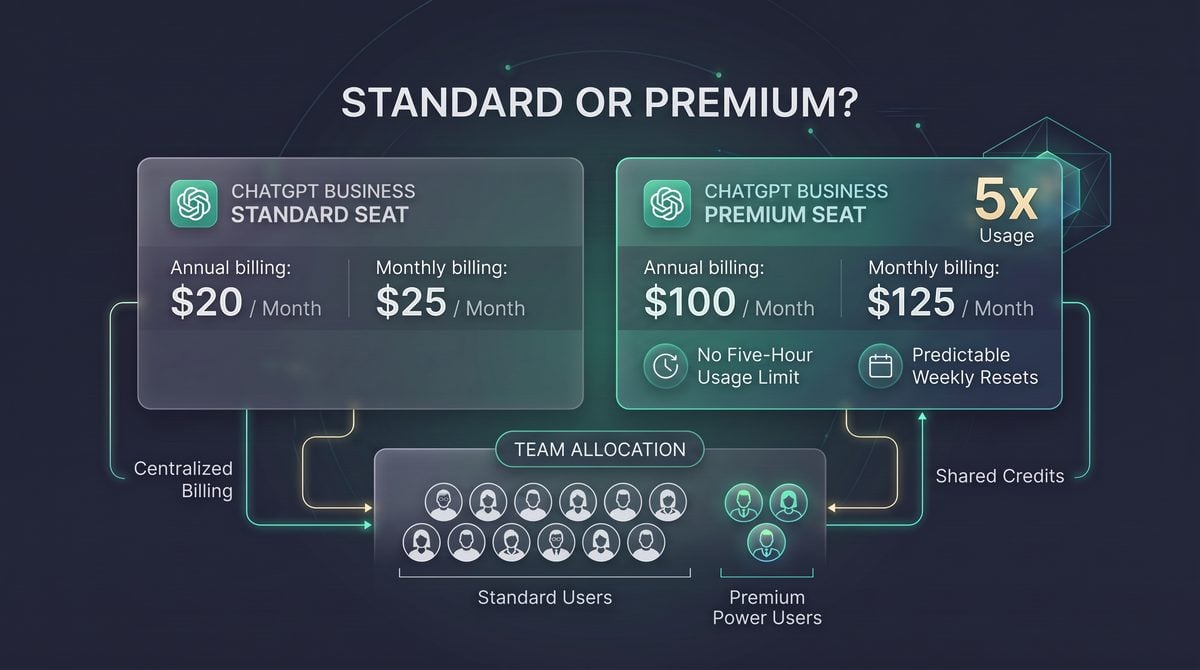
On August 24, 2026, OpenAI introduced Premium seats for ChatGPT Business, creating a two-tier seat model inside the same workspace: Standard seats and Premium seats. The official release-note framing is straightforward but commercially important: Premium seats provide five times the usage of Standard seats, remove the five-hour usage limit, and reset on a predictable weekly cycle. Teams can mix Standard and Premium seats in one ChatGPT Business workspace, which turns the purchasing decision from “How many users need ChatGPT?” into “Which users need materially higher sustained capacity?”
The official listed prices create a clean comparison. ChatGPT Business Standard is listed at $20 per user per month when billed annually, or $25 per user per month on monthly billing. ChatGPT Business Premium is listed at $100 per user per month when billed annually, or $125 per user per month on monthly billing. In both billing modes, Premium costs five times as much as Standard and provides five times the stated usage. That symmetry matters because Premium is not presented as a discounted bulk bundle; it is a named-seat upgrade intended to reduce constraint for specific users whose work is limited by Standard-seat usage windows.
For teams already using ChatGPT Business, the launch creates an allocation problem rather than a simple upgrade prompt. A founder, support lead, staff engineer, analyst, or operator who spends several continuous hours in ChatGPT may benefit from Premium because the five-hour usage limit is removed and usage resets weekly. A colleague who uses ChatGPT for occasional drafts, meeting preparation, spreadsheet help, or short research sessions may still be economically well matched to Standard. The practical task for administrators is to identify where a capacity ceiling interrupts business work and where Standard remains sufficient.
The ChatGPT Business Pricing decision in ChatGPT Business Premium vs Standard Seats: 5x Usage, Pricing, ROI, and Team Allocation Guide is easier to apply when teams also understand The Complete Guide to ChatGPT Pricing in 2026 — Free, Go, Plus, Pro, Business, and Enterprise Compared. That article focuses specifically on the Complete Guide to ChatGPT Pricing in 2026 — Free, Go, Plus, Pro, Business, and Enterprise Compared, providing the adjacent implementation, comparison, or governance context needed to use this section without treating the two topics as interchangeable.
The ChatGPT Team Deployment decision in ChatGPT Business Premium vs Standard Seats: 5x Usage, Pricing, ROI, and Team Allocation Guide is easier to apply when teams also understand OpenAI’s Enterprise Ecosystem in 2026: How ChatGPT Team, Business, and Enterprise Tiers Are Reshaping Corporate AI Adoption. That article focuses specifically on openAI’s Enterprise Ecosystem in 2026: How ChatGPT Team, Business, and Enterprise Tiers Are Reshaping Corporate AI Adoption, providing the adjacent implementation, comparison, or governance context needed to use this section without treating the two topics as interchangeable.
Verified August 24 facts: ChatGPT Business Premium seats were introduced with five times the usage of Standard seats, removal of the five-hour usage limit, predictable weekly resets, support for mixing Standard and Premium seats in the same workspace, and official prices of $100 per user per month billed annually or $125 monthly for Premium, compared with $20 annually or $25 monthly for Standard.
Standard versus Premium at a glance
| Decision factor | ChatGPT Business Standard | ChatGPT Business Premium | Operational meaning |
|---|---|---|---|
| Official annual-billing price | $20 per user per month | $100 per user per month | Premium adds $80 per user per month versus Standard on annual billing, or $960 per user per year. |
| Official monthly-billing price | $25 per user per month | $125 per user per month | Premium adds $100 per user per month versus Standard when billed monthly. |
| Headline usage | Baseline Business usage | Five times Standard usage | The price-to-headline-usage ratio is linear; the value case depends on avoiding blocked work, not on a per-unit discount. |
| Five-hour limit | Subject to the Standard-seat limit described by OpenAI’s launch notes | Removed | Premium is better suited to continuous work sessions, long operating blocks, and roles that repeatedly hit time-based limits. |
| Reset cadence | Usage behavior should be managed against the applicable Standard-seat limits | Predictable weekly resets | Weekly resets make capacity planning easier for managers scheduling recurring analysis, coding, review, or operations work. |
| Workspace model | Can coexist with Premium seats | Can coexist with Standard seats | Admins do not need to upgrade the whole workspace to give high-demand users more capacity. |
The core buying question: interruption cost, not seat prestige
The most useful way to evaluate Premium is to ask whether a Standard-seat limit causes measurable interruption. If a user hits the five-hour limit during customer escalations, production debugging, financial modeling, board-material preparation, contract review support, recruiting loops, or daily engineering work, the cost is not merely inconvenience. The cost is context loss, delayed decisions, duplicated setup time, and a tendency to move sensitive work into less governed channels. Premium is designed for users whose output depends on uninterrupted ChatGPT Business access during concentrated work periods.
Because Premium costs exactly five times Standard in both official billing modes, the arithmetic is unusually transparent. On annual billing, five Standard seats cost $100 per user-month collectively, and one Premium seat also costs $100 per user-month. On monthly billing, five Standard seats cost $125 collectively, and one Premium seat also costs $125. However, those are not interchangeable purchases: five Standard seats serve five named users with baseline usage, while one Premium seat serves one named user with higher individual capacity. The correct comparison is therefore not “Should we buy one Premium or five Standard seats?” but “Does this specific person need five times the capacity and removal of the five-hour limit?”
A practical decision rule is to upgrade the role, not the org chart level. A senior executive who asks ChatGPT for three short summaries per week may not need Premium. A mid-level implementation specialist who spends six hours a day converting customer requirements into configurations, test scripts, and support notes may be a strong Premium candidate. A product manager running continuous discovery synthesis across calls, tickets, and roadmap documents may need Premium during planning cycles but not permanently. This role-based approach prevents Premium from becoming a status marker and keeps the seat mix aligned with actual workload.
What the removal of the five-hour limit changes
The five-hour limit matters because many professional ChatGPT sessions are not evenly distributed through the week. Teams often use the tool in bursts: a sales engineer preparing a proposal before a deadline, a developer working through a migration, a support lead triaging a backlog, or a founder building investor and hiring materials in one long session. Standard capacity may be adequate for a user who works in short intervals, but less suitable for someone whose work pattern depends on staying in the same reasoning flow for most of a day.
Premium’s removal of that five-hour limit should be evaluated against continuous-work scenarios. If the user regularly needs ChatGPT open as an active collaborator for long stretches, Premium can reduce the operational friction of stopping, waiting, switching tools, or asking another teammate to continue the work. The value is highest when the user’s ChatGPT context is tightly coupled to a business process that has a deadline, such as incident response, procurement analysis, month-end reporting, legal intake support, or executive decision preparation.
The predictable weekly reset also makes Premium easier to govern than an undefined or ad hoc exception process. Managers can plan recurring high-intensity periods around the reset cycle, such as weekly customer review synthesis, sprint planning, release-note preparation, sales pipeline inspection, or analytics reporting. The reset does not remove the need for usage discipline; it simply gives administrators and team leads a clearer cadence for observing usage, collecting feedback, and adjusting seat assignments.
Mixed-seat workspaces make allocation the main administrative skill
The ability to mix Standard and Premium seats in the same ChatGPT Business workspace is the key administrative feature of the launch. Without mixed seats, organizations would face an expensive all-or-nothing upgrade. With mixed seats, the workspace can keep broad Standard access for general productivity while assigning Premium to roles with sustained or burst-heavy demand. This is especially relevant for startups and mid-market teams where a small number of operators may drive a large share of AI-assisted work.
A recommended starting allocation is to treat Premium as an exception that must be justified by observed usage, documented workflow need, or an upcoming business cycle. For example, a 40-person company might keep most employees on Standard, assign Premium to two customer-support leads during a backlog reduction project, one staff engineer during a platform migration, and one revenue-operations manager during quarterly planning. That allocation is a recommendation example, not an OpenAI rule; the point is to make Premium follow a concrete workload rather than a department label.
Mixed seats also require a reassignment process. If a Premium user no longer has a high-intensity workload, the seat should be reviewed instead of left in place indefinitely. A monthly or quarterly review can compare manager feedback, user-reported limit encounters, project calendars, and business-critical workflows. The cleanest governance model is to define Premium eligibility in plain language: “The user regularly reaches Standard capacity during priority work” or “The user is assigned to a time-limited project where interruption would delay a business outcome.”
How shared credits fit into the decision
Shared credits should be treated as a workspace-level capacity and governance consideration, not as a substitute for assigning the correct named seat to the correct person. Where a ChatGPT Business workspace uses shared credits, administrators should track them separately from the Standard-versus-Premium decision because shared capacity can obscure who is actually constrained. A team may appear adequately funded at the workspace level while one high-demand user still loses time to seat-specific limits or time-window constraints.
The conservative operating rule is to use shared credits as a buffer for variable demand and Premium seats for predictable high-intensity individual demand. If a team has occasional spikes across many users, shared credits may help absorb uneven activity. If the same few people repeatedly run into limits during long work sessions, Premium is the clearer intervention because the August 24 launch specifically changes the named user’s usage multiple, five-hour limit, and reset cadence. Administrators should confirm the current credit behavior in their own Admin Console and billing materials before using credits in ROI calculations, because the release-note facts establish the Premium-seat attributes but do not publish a universal credit-consumption formula for every workspace scenario.
The first ROI calculation is deliberately simple
Start with the incremental price. On annual billing, Premium adds $80 per user per month over Standard, or $960 per user per year. On monthly billing, Premium adds $100 per user per month over Standard. A user does not need to “use five times as many prompts” to justify Premium; they need to avoid interruption costs that exceed the incremental price. If a high-value employee loses several hours per month to limit management, context switching, or delayed deliverables, the business case may be stronger than raw usage counts alone suggest.
Annual billing example:
Standard: $20/user/month
Premium:  $100/user/month
Incremental Premium cost: $80/user/month
Annual incremental cost: $80 x 12 = $960/user/year

Monthly billing example:
Standard: $25/user/month
Premium:  $125/user/month
Incremental Premium cost: $100/user/month
Annualized incremental cost if held for 12 months: $1,200/user/year
This calculation should be paired with a workflow review. Ask each candidate Premium user to identify the moments when Standard capacity interrupts work, the type of deliverable affected, the frequency of the interruption, and whether the work is recurring or temporary. A vague answer such as “I use ChatGPT a lot” is not enough. A concrete answer such as “During weekly release preparation I spend six continuous hours using ChatGPT to reconcile tickets, draft customer-facing notes, and prepare internal risk summaries” is a better basis for assignment.
What administrators should decide before upgrading seats
- Eligibility criteria: Define whether Premium is assigned based on repeated Standard-limit encounters, long continuous sessions, business-critical deadlines, or approved project periods.
- Review cadence: Review Premium assignments monthly during rollout and quarterly after the seat mix stabilizes, using manager feedback and user-reported constraint data.
- Temporary upgrades: Consider time-boxed Premium assignments for migrations, audits, launches, quarterly planning, or backlog-clearing projects.
- Shared-credit governance: Track shared credits separately so a workspace-level buffer does not hide named-user capacity problems.
- Budget owner: Decide whether Premium upgrades are funded centrally, by department, or by project; unclear budget ownership usually leads to either over-assignment or under-adoption.
The August 24 launch is best understood as a new capacity design tool for ChatGPT Business administrators. Standard remains the broad-access seat for general business use. Premium is the higher-capacity seat for people whose work is materially constrained by Standard usage limits, especially when long sessions and predictable weekly cycles matter. The rest of this guide uses that distinction to build a practical allocation model, ROI framework, and rollout plan without assuming that every power user, manager, or department automatically needs the more expensive seat.
Comparison matrix: what changes when a Business user moves from Standard to Premium
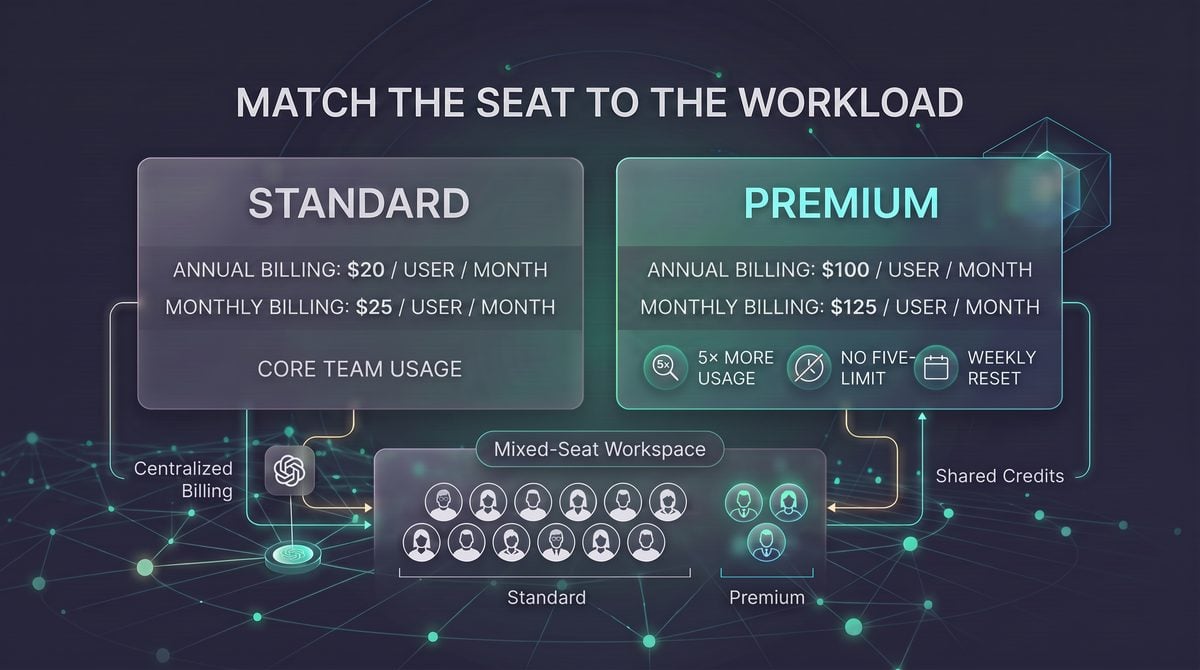
The August 24, 2026 ChatGPT Business release created a practical capacity tier inside the same workspace: Standard seats remain the baseline, while Premium seats provide five times the usage, remove the five-hour usage limit, and reset on a predictable weekly cycle. The important procurement point is that OpenAI explicitly allows teams to mix Standard and Premium seats, so the decision is no longer “upgrade the whole company or do nothing”; it is “which roles create enough interruption risk, Work automation demand, or Codex throughput pressure to justify the higher per-user price.”
Documented Standard-versus-Premium differences
| Decision area | Standard seat | Premium seat | Operational interpretation |
|---|---|---|---|
| Official annual pricing | $20 per user per month when billed annually | $100 per user per month when billed annually | Premium costs exactly five Standard seats on the annual schedule, so the business case should focus on continuity, concentration of usage, and avoided work stoppage rather than a per-unit discount. |
| Official monthly pricing | $25 per user per month on monthly billing | $125 per user per month on monthly billing | The same five-to-one price relationship applies on monthly billing, which makes short pilot calculations straightforward but does not change the underlying allocation logic. |
| Usage capacity | Baseline Business usage | Five times the usage of Standard | Premium is most defensible where one person’s actual workflow regularly concentrates the equivalent demand of several normal users. |
| Five-hour usage limit | Subject to the five-hour usage limit described in the release context | Five-hour usage limit removed | This matters most for sustained sessions: coding sprints, analysis blocks, proposal production, incident response, or executive-prep windows where a pause has a direct cost. |
| Reset model | Standard Business behavior | Predictable weekly resets | Weekly resets are easier to plan around for sprint teams, reporting cycles, and heavy weekly operating rhythms than an ad hoc “try again later” pattern. |
| Mixed-seat workspace | Can coexist with Premium seats | Can coexist with Standard seats | The documented mixed-seat model supports targeted allocation; it does not require executives, finance, legal, or engineering to share a single company-wide tier. |
| Best documented fit | Regular ChatGPT Business users with intermittent or moderate AI usage | Heavy users whose work is materially interrupted by limits or long sessions | Use observed workflow intensity as the primary criterion, not seniority alone; a staff engineer or analyst may have a stronger case than a senior manager who uses ChatGPT occasionally. |
Documented fact: Premium is priced at five times Standard and provides five times Standard usage, with the five-hour usage limit removed and predictable weekly resets. Recommendation: do not justify Premium as a bulk-discount purchase; justify it as a continuity purchase for people whose productive time, decision velocity, or customer-facing output is constrained by hitting usage ceilings.
Ideal seat personas: who should stay Standard and who should move to Premium
A Standard seat is the rational default for employees who use ChatGPT Business as an assistive layer rather than as a continuous work surface. Examples include managers drafting staff communications, recruiters refining interview questions, finance users summarizing policy text, sales representatives preparing account notes, or operations employees using ChatGPT for occasional spreadsheet logic and document cleanup. These users can still receive substantial value from Business access without consuming a disproportionate share of capacity.
A Premium seat is better aligned to users who treat ChatGPT as a live production environment for hours at a time. Examples include developers using Codex during implementation sessions, data and business analysts iterating through exploratory analysis, product managers preparing launch materials under deadline, support leaders building response playbooks, and founders or executives who use ChatGPT continuously during strategy, investor, hiring, or customer escalation work. The key signal is not job title; it is whether usage ceilings interrupt work that would otherwise continue productively.
| Persona | Likely starting seat | Why | Upgrade signal |
|---|---|---|---|
| Occasional knowledge worker | Standard | Uses ChatGPT for drafting, summarization, brainstorming, and occasional research support. | Upgrade only if usage becomes daily, long-running, and deadline-critical. |
| Department analyst | Standard or Premium | Moderate analysts may be fine on Standard; heavy analysts can burn through capacity during reporting cycles. | Upgrade when model use is concentrated into weekly board packs, revenue reviews, financial models, or operational diagnostics. |
| Software engineer or technical lead | Premium candidate | Codex and code-review workflows can require sustained iterative sessions rather than occasional prompts. | Upgrade when development flow is delayed by usage limits during implementation, debugging, refactoring, or test-writing blocks. |
| Founder, executive, or chief of staff | Premium candidate | High-leverage users may compress research, synthesis, board preparation, and external communications into long sessions. | Upgrade when interruptions during time-sensitive decision preparation create measurable delay or staff dependency. |
| Sales, support, or customer-success power user | Standard first | Many customer-facing workflows are bursty and templated, which fits Standard unless volume is unusually high. | Upgrade when the user continuously generates account plans, call prep, follow-up sequences, objection handling, and escalation material. |
| Workspace administrator or AI champion | Premium candidate | Enablement leaders often test workflows, build internal examples, support colleagues, and troubleshoot adoption patterns. | Upgrade when the admin’s own experimentation and support workload repeatedly competes with ordinary daily use. |
How to evaluate Chat, Work, and Codex demand separately
Chat usage is the broadest signal because it covers drafting, summarization, analysis, planning, and iterative reasoning. A Standard seat is usually sufficient when conversations are short, isolated, and substitutable; a Premium seat becomes easier to defend when the user conducts extended multi-step work in a single session, such as turning research into a launch plan, converting messy meeting notes into an operating cadence, or iterating on a complex contract summary with internal stakeholders waiting for output.
ChatGPT Work demand should be evaluated by workflow criticality rather than message count alone. OpenAI’s August 25 release notes and help documentation describe event-triggered scheduled tasks for supported Gmail, Slack, and GitHub activity in eligible plans including Business, with consequential actions pausing for approval. A user who designs, monitors, and refines these automations may need more interactive capacity than a user who only receives occasional outputs from them, especially when the work includes triaging pull-request activity, routing Slack-channel signals, or responding to inbox-triggered workflows.
Website-tool usage through WebMCP is another Work and Codex demand driver, but availability must be stated carefully. OpenAI’s August 31 ChatGPT release notes say ChatGPT Work and Codex gained website tools through WebMCP in the desktop app’s built-in browser, with availability depending on supported account, model, webpage, rollout, and workspace settings. The site-tools documentation also says sensitive activities still require confirmation, and website-provided tool definitions and results remain untrusted. For allocation, treat WebMCP as a reason to watch power users closely, not as an automatic reason to upgrade every Business user.
The OpenAI Codex Usage Limits decision in ChatGPT Business Premium vs Standard Seats: 5x Usage, Pricing, ROI, and Team Allocation Guide is easier to apply when teams also understand The Codex Unlimited Playbook: How to Maximize OpenAI’s Lifted Usage Limits for Development Sprints. That article focuses specifically on the Codex Unlimited Playbook: How to Maximize OpenAI’s Lifted Usage Limits for Development Sprints, providing the adjacent implementation, comparison, or governance context needed to use this section without treating the two topics as interchangeable.
Centralized billing and the five-to-one price math
The official pricing creates a clean allocation equation. On annual billing, one Premium seat at $100 per user per month costs the same as five Standard seats at $20 per user per month. On monthly billing, one Premium seat at $125 per user per month costs the same as five Standard seats at $25 per user per month. That means the buyer should not ask whether Premium is “cheaper usage”; the buyer should ask whether one person’s uninterrupted output is worth more than distributing Standard access to four additional users.
Annual billing comparison:
Standard = $20/user/month
Premium  = $100/user/month
Incremental Premium cost over Standard = $80/user/month
Annual incremental cost = $80 x 12 = $960 per upgraded user/year

Monthly billing comparison:
Standard = $25/user/month
Premium  = $125/user/month
Incremental Premium cost over Standard = $100/user/month
Recommendation: use a two-threshold rule before upgrading a Standard user. First, confirm that the person is already using ChatGPT Business for recurring work that the company wants more of, not merely experimenting. Second, confirm that usage limits, long-session interruptions, or weekly concentration of work create a cost greater than the incremental seat price. A developer losing momentum during a release branch or an analyst blocked during a weekly executive-reporting window is a stronger candidate than an employee who simply wants the highest tier available.
Reassignability: plan for movement, but verify the mechanics in your tenant
The documented August 24 release note says teams may mix Standard and Premium seats, which supports a dynamic allocation strategy. The supplied source notes do not specify reassignment timing, prorating behavior, audit fields, approval workflows, or whether a particular admin console exposes every change in the same way for every customer. Because those mechanics are not documented in the provided sources, administrators should verify current behavior in their own ChatGPT Business workspace before promising same-day seat moves, internal chargebacks, or departmental swaps.
Recommended workflow: treat Premium seats as a managed pool reviewed on a regular cadence. Maintain a short candidate list, record the business reason for each upgrade, set a review date, and downgrade or reallocate when the user’s heavy project ends. This avoids two common failure modes: permanent Premium assignment based on a one-week spike, and under-allocation to users who repeatedly lose productive time because the organization has no formal upgrade path.
| Review question | Evidence to collect | Recommended action |
|---|---|---|
| Is the user hitting limits during business-critical work? | User reports, manager confirmation, project deadlines, examples of interrupted workflows. | Upgrade for a defined period and review after the relevant sprint, reporting cycle, or launch. |
| Is usage heavy but non-critical? | High activity without clear deadline, customer, engineering, or leadership dependency. | Keep Standard, provide workflow coaching, and reconsider if interruption cost becomes concrete. |
| Is the user building workflows for others? | Internal enablement role, templates, Work automations, Codex examples, support requests. | Consider Premium because the user’s output can multiply adoption across the workspace. |
| Did the original heavy-use project end? | Project closure, reduced session length, reduced dependency from stakeholders. | Return the seat to the pool after confirming current admin and billing behavior. |
Governance differences are mostly about workload risk, not seat prestige
Premium increases usable capacity for a Business user, but it should not be treated as an exemption from workspace governance. OpenAI’s late-August releases added several capabilities that raise the value of clear policy: multiple Google accounts can be connected across Gmail, Google Calendar, and Google Contacts on supported Plus, Pro, Business, and Enterprise plans; event-triggered tasks can react to supported Gmail, Slack, and GitHub activity; and website tools can operate from signed-in page state where available. Each capability can be useful, but each also increases the need for permission boundaries, app-connection hygiene, and human approval of consequential actions.
Workspace administrators should also avoid assuming that every governance feature announced for another plan applies to ChatGPT Business. The August 27 release notes describe centralized identity controls and model-access controls for eligible Enterprise and Edu customers, not as a general Business entitlement in the supplied notes. Conversely, the GitHub plugin marketplace import documentation says workspace admins can import public or private GitHub-based plugin marketplaces and enable daily sync, but import and sync do not grant app access, connect member accounts, or override installation policy and authentication. These distinctions matter when Premium users are also power users who test new tools before the rest of the organization.
Governance recommendation: give Premium seats to users with high-value workflows, then surround those users with clearer controls, not looser controls. Require connected-app review, document when consequential actions need approval, define acceptable data types for ChatGPT Work and Codex usage, and review imported plugin marketplaces before automatic daily sync introduces new workspace-visible content.
A practical allocation policy can be simple: Standard for most employees, Premium for validated heavy users, temporary Premium for project spikes, and administrator review for any user combining high usage with connected apps, Work automations, Codex, or site tools. This policy follows the documented mixed-seat model while keeping finance, security, and operations aligned around observable need rather than status-based entitlement.
ROI modeling for Premium seats: price delta, break-even hours, and allocation scenarios

OpenAI’s August 24, 2026 ChatGPT Business release notes give administrators enough pricing detail to build a simple seat-allocation model without guessing at the subscription math. Standard seats are listed at $20 per user per month when billed annually, or $25 per user per month when billed monthly. Premium seats are listed at $100 per user per month when billed annually, or $125 per user per month when billed monthly. The incremental Premium upgrade is therefore $80 per upgraded user per month on annual billing, or $100 per upgraded user per month on monthly billing.
The calculations below are illustrative assumptions for internal planning, not OpenAI claims about productivity, utilization, or financial return. They convert the official seat-price delta into break-even hours so a team can decide whether Premium’s five times usage, predictable weekly resets, and removal of the five-hour usage limit are worth the extra subscription cost for specific roles. The correct unit of analysis is not “how much does the employee use ChatGPT,” but “how many otherwise-paid work hours, blocked handoffs, delayed reviews, or missed delivery windows does the Premium allocation plausibly prevent.”
Official monthly seat prices from OpenAI's August 24, 2026 release notes:

Standard, annual billing equivalent: $20/user/month
Premium, annual billing equivalent:  $100/user/month
Premium delta, annual billing:       $80/user/month

Standard, monthly billing:           $25/user/month
Premium, monthly billing:            $125/user/month
Premium delta, monthly billing:      $100/user/month

Illustrative break-even formula:

Break-even hours per Premium upgrade per month =
  Monthly Premium delta / Fully loaded hourly value of affected work
Break-even hours per upgraded user
The break-even threshold is low when Premium is assigned to employees whose time is expensive, whose work is frequently blocked by usage ceilings, or whose deliverables unblock multiple colleagues. At annual billing, a Premium upgrade needs to justify $80 per month over Standard. At monthly billing, the same decision needs to justify $100 per month over Standard. If a product manager, developer, analyst, attorney, consultant, or operations lead has a fully loaded internal value of $100 per hour, the annual-billing upgrade breaks even at 0.8 hours per month, while the monthly-billing upgrade breaks even at 1.0 hour per month.
| Illustrative fully loaded hourly value | Break-even hours at $80 monthly delta | Break-even hours at $100 monthly delta | Practical interpretation |
|---|---|---|---|
| $50/hour | 1.60 hours/month | 2.00 hours/month | Premium must prevent roughly two hours of low-to-mid-cost rework, waiting, or manual drafting per month. |
| $75/hour | 1.07 hours/month | 1.33 hours/month | One avoided blocked session or accelerated review cycle may cover the monthly delta. |
| $100/hour | 0.80 hours/month | 1.00 hour/month | A single saved hour per month can justify the Premium upgrade under monthly billing. |
| $150/hour | 0.53 hours/month | 0.67 hours/month | For senior specialists, the business case can be less about volume and more about avoiding one interruption during critical work. |
This break-even view intentionally ignores soft benefits until there is a concrete way to measure them. A team should not count every AI-assisted minute as saved time, because some prompts produce exploratory work, drafts that require review, or outputs that would not have been created manually. A conservative policy is to count only observable outcomes: fewer blocked sessions, fewer handoffs to another employee with remaining capacity, shorter first-draft cycles, faster incident summaries, reduced queue time for analysis, or avoided context switching when the five-hour limit would otherwise interrupt a heavy user.
The AI Productivity ROI decision in ChatGPT Business Premium vs Standard Seats: 5x Usage, Pricing, ROI, and Team Allocation Guide is easier to apply when teams also understand How Enterprises Are Achieving ROI with AI: Real-World Adoption Case Studies in 2026. That article focuses specifically on how Enterprises Are Achieving ROI with AI: Real-World Adoption Case Studies in 2026, providing the adjacent implementation, comparison, or governance context needed to use this section without treating the two topics as interchangeable.
Scenario 1: a 10-person team with two Premium seats
A 10-person team is usually small enough to allocate Premium seats by named workflow rather than by department. A practical starting allocation is two Premium seats for the highest-friction users and eight Standard seats for occasional or steady users. This could mean one engineering or data lead who uses ChatGPT Business heavily for code, testing plans, incident notes, and technical analysis, plus one go-to-market or operations lead who drafts customer communications, process documentation, and cross-functional summaries throughout the day.
| 10-person allocation | Annual billing equivalent monthly cost | Monthly billing cost | Incremental cost versus all Standard |
|---|---|---|---|
| 10 Standard, 0 Premium | $200/month | $250/month | Baseline |
| 8 Standard, 2 Premium | $360/month | $450/month | +$160/month annual billing; +$200/month monthly billing |
| 0 Standard, 10 Premium | $1,000/month | $1,250/month | +$800/month annual billing; +$1,000/month monthly billing |
Under annual billing, the two-seat Premium pilot breaks even at $160 divided by the team’s relevant hourly value. If the two upgraded employees each work on $100/hour activities, the combined break-even is 1.6 saved hours per month across both people, or 0.8 hours per upgraded user. Under monthly billing, the same pilot needs 2.0 combined saved hours per month at $100/hour. This is a small enough threshold that the administrator should require specific evidence, not broad enthusiasm: for example, a record of days when a Standard seat’s five-hour limit disrupted live work, or a queue of repeated tasks that the user could complete within Premium’s larger usage envelope.
Scenario 2: a 25-person team with five to ten Premium seats
A 25-person team often has enough role variety to support two allocation tiers. A conservative allocation assigns Premium to five people who repeatedly hit usage ceilings or whose work unblocks others. A more aggressive allocation assigns Premium to ten people across engineering, product, finance, customer operations, and leadership support. The official mixed-seat capability lets the administrator avoid an all-or-nothing decision; the risk is over-allocating Premium to users who are merely enthusiastic rather than capacity-constrained.
| 25-person allocation | Annual billing equivalent monthly cost | Monthly billing cost | Incremental cost versus all Standard |
|---|---|---|---|
| 25 Standard, 0 Premium | $500/month | $625/month | Baseline |
| 20 Standard, 5 Premium | $900/month | $1,125/month | +$400/month annual billing; +$500/month monthly billing |
| 15 Standard, 10 Premium | $1,300/month | $1,625/month | +$800/month annual billing; +$1,000/month monthly billing |
| 0 Standard, 25 Premium | $2,500/month | $3,125/month | +$2,000/month annual billing; +$2,500/month monthly billing |
For the five-Premium allocation, the annual-billing break-even at $75/hour is $400 divided by $75, or 5.33 saved hours per month across the five upgraded users. That is about 1.07 hours per upgraded user per month. At monthly billing, the break-even is $500 divided by $75, or 6.67 combined hours per month. A team should be able to justify this tier if each Premium user can point to one recurring monthly interruption, one delayed analysis packet, one lengthy review cycle, or one repeated drafting workflow where expanded usage prevents a measurable bottleneck.
For the ten-Premium allocation, the annual-billing delta is $800 per month over all Standard. At $75/hour, the break-even is 10.67 hours per month across the upgraded group. The monthly-billing delta is $1,000, requiring 13.33 hours per month at the same hourly value. This larger tier should be reserved for teams where high-volume AI work is distributed across several functions, not concentrated in one or two champions. If only three employees generate most of the measurable demand, the five-seat scenario is likely the better starting point.
Scenario 3: a 100-person organization with 25 to 40 Premium seats
A 100-person organization should treat Premium as a managed capacity pool, not a status badge. The common mistake is to assign Premium by seniority alone. The better method is to map Premium to sustained usage intensity and interruption cost: employees who prepare executive materials daily, respond to customer escalations, maintain internal knowledge, analyze operational data, handle complex drafting, or use ChatGPT Work and Codex-style workflows frequently enough that Standard capacity becomes a constraint.
| 100-person allocation | Annual billing equivalent monthly cost | Monthly billing cost | Incremental cost versus all Standard |
|---|---|---|---|
| 100 Standard, 0 Premium | $2,000/month | $2,500/month | Baseline |
| 75 Standard, 25 Premium | $4,000/month | $5,000/month | +$2,000/month annual billing; +$2,500/month monthly billing |
| 60 Standard, 40 Premium | $5,200/month | $6,500/month | +$3,200/month annual billing; +$4,000/month monthly billing |
| 0 Standard, 100 Premium | $10,000/month | $12,500/month | +$8,000/month annual billing; +$10,000/month monthly billing |
The 25-Premium allocation has a straightforward threshold. At annual billing, the organization pays $2,000 more per month than an all-Standard workspace. At $100/hour, the break-even requirement is 20 saved hours per month across the Premium group, or 0.8 hours per upgraded user. At monthly billing, the $2,500 delta requires 25 saved hours per month at $100/hour, or 1.0 hour per upgraded user. This scenario is usually defensible when Premium seats are assigned to people with persistent throughput needs and reviewed periodically against observed usage pressure.
The 40-Premium allocation raises the governance bar. At annual billing, the $3,200 monthly delta requires 32 saved hours per month at $100/hour. At monthly billing, the $4,000 delta requires 40 saved hours per month. A 100-person organization can exceed those thresholds, but only if the upgraded population is broad enough to use the added capacity and disciplined enough to avoid low-value prompt churn. Administrators should combine cost reporting with seat-change reviews, manager attestations, and workload evidence so Premium does not become a default entitlement.
Sensitivity factors that can change the answer
The biggest sensitivity is the hourly value assigned to the work being accelerated. A senior engineer’s blocked hour, a legal review hour, and a junior coordinator’s drafting hour may all be valuable, but they should not automatically be valued the same way. Use fully loaded cost when the objective is labor substitution, use contribution margin when the objective is revenue throughput, and use service-level impact when the objective is customer response or operational continuity.
The second sensitivity is whether the user actually hits capacity constraints. Premium provides five times the usage of Standard seats and removes the five-hour usage limit, but the business value appears only when Standard capacity constrains work that matters. A user who opens ChatGPT once a day for light rewriting may be perfectly served by Standard. A user who clusters heavy work into long sessions, such as preparing a launch plan, investigating an incident, refactoring code, or generating multiple analysis passes, is more likely to benefit from Premium’s larger usage envelope and weekly reset structure.
The third sensitivity is review burden. AI-assisted output still needs human judgment, especially for customer-facing, legal, financial, technical, or policy-sensitive work. If Premium causes a user to generate substantially more draft material than the team can review, the bottleneck may move downstream rather than disappear. In that case, the ROI model should subtract reviewer time, rework time, and any approval delays from the gross time savings estimate.
The Enterprise AI Cost Management decision in ChatGPT Business Premium vs Standard Seats: 5x Usage, Pricing, ROI, and Team Allocation Guide is easier to apply when teams also understand OpenAI Launches Enterprise Usage Analytics: How New Credit Controls and Spending Dashboards Change Team Management in 2026. That article focuses specifically on openAI Launches Enterprise Usage Analytics: How New Credit Controls and Spending Dashboards Change Team Management in 2026, providing the adjacent implementation, comparison, or governance context needed to use this section without treating the two topics as interchangeable.
A practical allocation workflow for administrators
- Start with observed constraint, not job title. Ask managers to nominate users who have documented capacity friction, repeated long sessions, or work delays tied to Standard usage limits.
- Assign an hourly value band. Use $50, $75, $100, or $150 per hour as an internal planning band, and document why the chosen band fits the work being accelerated.
- Calculate the monthly break-even. Use $80 per Premium upgrade for annual billing analysis or $100 for monthly billing analysis, then divide by the hourly value band.
- Set a 30- to 60-day evidence window. Require each Premium user or manager to identify concrete workflows where expanded usage reduced cycle time, prevented blocked work, or improved throughput.
- Rebalance seats deliberately. Keep Premium assigned to high-friction users, move light users back to Standard where appropriate, and avoid making Premium permanent unless the workload remains persistent.
Recommendation: treat the Premium upgrade as a capacity investment with a monthly break-even target. Under OpenAI’s listed August 2026 prices, each annual-billed Premium seat needs to justify $80 more than Standard per month, while each monthly-billed Premium seat needs to justify $100 more. If a user cannot plausibly document about one saved hour per month at a $100/hour internal value, Standard is the safer default.
30-day rollout framework for mixed Standard and Premium allocation
The safest rollout is to treat Premium seats as a capacity allocation program, not as a perk. OpenAI’s August 24, 2026 release notes say ChatGPT Business Premium seats provide five times the usage of Standard seats, remove the five-hour usage limit, use predictable weekly resets, and can be mixed with Standard seats in the same team. Those facts support a phased rollout: identify high-interruption roles, upgrade a controlled cohort, measure whether the extra capacity changes output quality or cycle time, and reassign seats where the business case is weaker than expected.
Recommendation: run the first cycle for 30 days with a named owner from operations, finance, IT, or the AI program office. The owner should maintain a seat register that records each user’s role, reason for Premium eligibility, expected workload, weekly usage observations, and decision at the end of the trial. Do not rely on memory or informal manager feedback; without a written register, Premium allocation can drift toward seniority or internal politics instead of measurable need.
| Days | Rollout activity | Operational output | Decision rule |
|---|---|---|---|
| 1–3 | Confirm official pricing, contract terms, billing cadence, and whether your workspace already supports mixed Standard and Premium seats. | Approved budget envelope and seat-change procedure. | Do not start the pilot until finance understands the Premium delta: $100 per user per month annually or $125 monthly, compared with $20 annually or $25 monthly for Standard, as listed in the August 24 notes. |
| 4–7 | Score candidates using role impact, frequency of interruptions, and dependence on Work, Chat, or Codex workflows. | Ranked candidate list with documented reasons. | Upgrade only users whose expected avoided interruption cost is plausible and whose manager agrees to weekly reporting. |
| 8–14 | Activate the first Premium cohort and collect baseline examples of blocked or delayed work. | Week-one telemetry sheet and issue log. | Keep the cohort small enough that reassignment remains politically easy if evidence is weak. |
| 15–21 | Review weekly reset behavior, peak usage patterns, and whether the five-hour Standard limit would have interrupted the work. | Midpoint continuation, downgrade, or waitlist decision. | Continue Premium where added capacity protects scheduled work, customer-facing work, executive deliverables, or developer throughput. |
| 22–30 | Finalize allocation, publish policy, and establish a recurring reassessment cadence. | Seat map, approval workflow, and next review date. | Make Premium renewable based on evidence, not permanent based on first-round selection. |
Candidate scoring model for Premium upgrades
Example scoring model: assign each candidate a score from 0 to 100 using the weighted categories below. This is an internal allocation method, not an OpenAI product feature. It is useful because the Premium price is five times the Standard annual monthly price listed in the release notes, so the upgraded user should have a workload where additional continuity and capacity plausibly protect more than the monthly delta.
| Category | Weight | High-score evidence | Low-score evidence |
|---|---|---|---|
| Interruption cost | 30 | User loses material time or misses deadlines when ChatGPT capacity is unavailable during active work blocks. | User can wait for reset windows or complete the task with ordinary tools. |
| Frequency of intensive use | 25 | Daily deep research, drafting, coding, analysis, support, or operational workflows. | Occasional summarization, ideation, or meeting-prep usage. |
| Business leverage | 20 | Work affects revenue, customer response time, engineering velocity, compliance deliverables, or executive decisions. | Work is useful but not time-sensitive or dependent on sustained AI availability. |
| Governance readiness | 15 | User follows workspace data rules, uses approved connectors, and can document use cases. | User is unclear on sensitive-data boundaries or uses unsanctioned workflows. |
| Substitution difficulty | 10 | Tasks require continuity, iterative context, or specialized prompting that is hard to hand off. | Tasks can be distributed across teammates or delayed without significant cost. |
Recommended threshold: start Premium at 75 points or higher, waitlist users between 60 and 74, and keep users below 60 on Standard unless a manager provides a specific time-sensitive justification. A low score does not mean the user should not use ChatGPT Business; it means the organization has not yet shown that five-times-priced capacity is the correct allocation.
candidate,role,current_seat,score,primary_use_case,weekly_review_owner,decision
Avery,solutions engineer,Standard,84,RFP drafting and customer technical responses,RevOps,Upgrade
Morgan,staff developer,Standard,81,Codex-assisted refactoring and code review,Engineering Ops,Upgrade
Riley,people partner,Standard,52,Policy drafts and meeting summaries,HR Ops,Remain Standard
Sam,finance analyst,Standard,68,Monthly close variance analysis,Finance,Waitlist
Weekly telemetry that administrators should collect
Recommendation: collect telemetry weekly even if the workspace does not expose every metric directly in an admin dashboard. A practical measurement sheet can combine user self-reporting, manager validation, ticket volume, project cycle-time observations, and examples of blocked work. Label this as internal operational telemetry so readers do not confuse it with an official OpenAI reporting schema.
- Usage intensity: ask whether the user performed sustained ChatGPT work on one, two to three, or four or more days in the week. This captures whether Premium is supporting recurring work or only a single spike.
- Interruption evidence: record whether the user would likely have been blocked by the Standard five-hour usage limit during the week. The important signal is avoided interruption, not raw enthusiasm.
- Workload category: tag activity as Chat, Work, Codex, connected-app workflow, document drafting, analysis, coding, customer response, or operations. This helps administrators avoid over-allocating Premium to a single department.
- Outcome evidence: capture one concrete deliverable per week, such as a shipped pull request, completed customer response, reconciled report, finalized policy draft, or reduced support backlog.
- Risk events: log any attempted use of unapproved data, credential sharing, unsafe connector behavior, or unclear app-authentication boundaries. Premium increases available capacity; it does not reduce governance obligations.
The ChatGPT Workspace Governance decision in ChatGPT Business Premium vs Standard Seats: 5x Usage, Pricing, ROI, and Team Allocation Guide is easier to apply when teams also understand The Codex Enterprise Deployment Playbook: 12 Prompts for Team Onboarding, Access Control, and Usage Governance. That article focuses specifically on the Codex Enterprise Deployment Playbook: 12 Prompts for Team Onboarding, Access Control, and Usage Governance, providing the adjacent implementation, comparison, or governance context needed to use this section without treating the two topics as interchangeable.
Reassignment rules after the first month
OpenAI’s August 24 release notes confirm that teams may mix Standard and Premium seats, but the supplied sources do not define every billing or reassignment mechanic for every tenant. Before promising monthly rotations, administrators should verify in their own Business workspace or procurement documents how seat changes, billing effective dates, and downgrade timing work. The policy below is therefore a recommended operating rule, not a claim about a universal product workflow.
- Reassign for sustained underuse: if a Premium user has two consecutive weeks with no credible interruption avoidance and no high-leverage deliverable, move the seat to the waitlist at the next permitted administrative change window.
- Protect mission-critical spikes: keep a Premium seat during launches, month-end close, incident response, legal-review windows, migrations, and major sales cycles when the user’s work is predictably time-sensitive.
- Use a waitlist before buying: if three or more waitlisted users exceed the threshold for two weeks, evaluate additional Premium seats rather than repeatedly reallocating the same seat midstream.
- Require manager confirmation: reassignments should be approved by the business owner of both the losing and receiving users so the process is defensible and documented.
- Separate access from employment status: if an employee changes role or leaves the company, follow the normal identity and offboarding process first; then revisit whether the Premium allocation should follow the role or return to the pool.
Shared-credit and shared-capacity policy
Recommended internal policy: do not treat one Premium seat as a shared login, shared credential, or departmental “machine account.” Each user should work through their own account and permissions. This is both a security rule and an allocation rule: shared credentials obscure who performed the work, weaken auditability, and make it impossible to know whether Premium capacity is assigned to the right person.
If finance funds Premium from a central AI budget, define “shared capacity” as an administrative pool of assignable seats, not shared account access. For example, operations may hold two floating Premium entitlements for quarter-end reporting and product-launch windows, but each entitlement should still be assigned to a named user through the workspace’s normal membership process. When the temporary period ends, administrators can evaluate whether to return the user to Standard, subject to the seat-change mechanics confirmed for the tenant.
Policy sentence teams can adopt: “Premium seats are assigned to named users based on documented workload need; Premium access may not be shared through credentials, browser sessions, unattended devices, or informal account rotation.”
Misuse prevention for higher-capacity users
Premium does not grant a user permission to bypass workspace rules, app authentication, or data-handling restrictions. This distinction matters because late-August OpenAI releases expanded several adjacent capabilities, including multiple Google account connections across supported Plus, Pro, Business, and Enterprise plans, event-triggered tasks for eligible workspaces, and workspace plugin marketplace imports from GitHub. Those features can be valuable, but they also make identity, connector, and authorization hygiene more important for heavy users.
- Ban credential sharing: no user should lend a Premium account to a teammate to avoid Standard limits. This defeats individual accountability and can expose connected apps or conversation context.
- Control connected accounts: where users connect Gmail, Google Calendar, Google Contacts, Slack, GitHub, or other supported apps, require account labeling and clear separation between personal and work data where applicable.
- Review scheduled automation: event-triggered tasks can react to supported Gmail, Slack, or GitHub activity for eligible users and workspaces, and approval-requiring actions pause for review. Administrators should define which workflows are allowed before high-capacity users create many tasks.
- Do not confuse marketplace import with app approval: OpenAI’s plugin marketplace import documentation states that importing and syncing a GitHub marketplace does not grant app access, connect member accounts, or apply repository installation and authentication policy values. Admins still need installation policy, app enablement, and member authentication.
- Log sensitive-action patterns: if a user repeatedly attempts actions involving payments, deletion, permission changes, messages, or personal information, review whether the workflow belongs in ChatGPT, an approved internal system, or a stricter automation environment.
Decision matrix for buying, holding, or reducing Premium seats
| Observed condition | Recommended decision | Reasoning |
|---|---|---|
| Premium users consistently avoid capacity interruptions and produce time-sensitive deliverables. | Renew or expand selectively. | The extra monthly cost is tied to measurable continuity and business impact. |
| Users are enthusiastic but cannot identify blocked work, deadlines protected, or outputs improved. | Hold at current count or downgrade at the next review. | Preference is not the same as ROI; Standard may be sufficient. |
| Multiple Standard users hit high-value bottlenecks during the same weekly cycle. | Add Premium seats or create a documented waitlist. | A stable capacity pool is better than ad hoc exception handling. |
| Heavy users are also creating app, connector, or data-risk exceptions. | Pause expansion until governance is corrected. | Higher capacity magnifies misuse if access rules are weak. |
| Premium usage is concentrated in one department while other critical teams wait. | Rebalance by role impact and interruption cost. | Mixed-seat allocation should follow organizational value, not first-mover advantage. |
Procurement and admin questions before committing budget
Procurement should validate official plan terms against the current contract because release notes describe the public product change but do not replace your agreement. Ask direct questions that produce an auditable answer, especially if the organization plans to move users between Standard and Premium during the year.
- What are the current Standard and Premium prices under our billing cadence, and do they match the August 24, 2026 listed prices of $20 annually or $25 monthly for Standard and $100 annually or $125 monthly for Premium?
- How are Premium upgrades, downgrades, and reassignment timing handled in our workspace and contract?
- Can administrators export or otherwise review seat assignment history, billing changes, and user membership changes?
- Which workspace settings govern connectors, app access, plugin installation, scheduled tasks, and model availability for our Business workspace?
- Who approves exceptions when a user claims Standard capacity is blocking urgent work?
- How will finance distinguish central AI budget spending from department-funded Premium seats?
- What offboarding process ensures that connected apps, scheduled tasks, and workspace access are reviewed when a Premium user leaves or changes role?
Final recommendation
Premium seats are easiest to justify when they protect uninterrupted high-value work. The official difference is substantial: Premium provides five times the usage of Standard, removes the five-hour usage limit, and resets weekly, while the listed monthly-equivalent price is also five times the Standard annual monthly price. That means the buying decision should not be framed as “Who wants more ChatGPT?” but as “Whose work becomes materially more reliable when the capacity ceiling moves?”
The strongest allocation strategy is a mixed-seat operating model with written scoring, weekly telemetry, reassignment rules, and a ban on shared credentials. Start small, measure real interruption avoidance, and expand only when the evidence shows that Standard capacity is constraining valuable work. For most organizations, the optimal answer will not be all-Standard or all-Premium; it will be a disciplined seat map that changes as projects, roles, and governance maturity change.
Access 40,000+ AI Prompts for ChatGPT, Claude & Codex — Free!
Subscribe to get instant access to our complete Notion Prompt Library — the largest curated collection of prompts for ChatGPT, Claude, OpenAI Codex, and other leading AI models. Optimized for real-world workflows across coding, research, content creation, and business.
Useful Links
- OpenAI product release notes — includes the August 24, 2026 ChatGPT Business Premium seat launch and late-August workspace updates.
- ChatGPT release notes — official ChatGPT product update log.
- OpenAI help: Scheduled tasks and event-triggered tasks — official details for Gmail, Slack, and GitHub-triggered tasks, eligibility, approval behavior, and limits.
- OpenAI help: Import a plugin marketplace from GitHub — official administrator guidance for GitHub marketplace imports and sync behavior.
- OpenAI documentation: Enterprise plugin management — official plugin installation and governance documentation.
- ChatGPT Business release notes — official Business-specific release-note page.
