
⚡ The Brief
- What it is: OpenAI Codex now includes Computer Use — an agent that controls the desktop (mouse, keyboard, screen) to execute multi-step workflows autonomously.
- Who it’s for: Developers, IT admins, and operations teams automating repetitive desktop tasks or building AI agents.
- Key capabilities: Screen understanding, click/type actions, multi-app workflows, persistent memory, and 90+ new plugins.
- Pricing: Included in ChatGPT Pro ($100/mo) with 5x the Codex usage of the Plus plan.
- Bottom line: The first serious ‘AI employee’ offering from OpenAI — ready for bounded real-world work, with supervision.
✓ Instant access✓ No spam✓ Unsubscribe anytime
OpenAI Codex ‘Computer Use’: How AI Agents Are Taking Over the Desktop
Written by Markos Symeonides
CEO & Founder at ChatGPT AI Hub | AI Apps Creator
OpenAI Codex ‘Computer Use’: How AI Agents Are Taking Over the Desktop
Artificial Intelligence (AI) has evolved rapidly over the last decade, moving from basic automation to complex problem solving and creative assistance. Among the most significant breakthroughs in AI-assisted software development is OpenAI Codex, an advanced descendant of GPT-3 designed specifically to understand and generate code. The recent update introducing ‘computer use’ capabilities marks a major leap forward, empowering AI agents to directly operate desktop applications, interact with web browsers, and streamline developer workflows like never before.
This article provides a comprehensive analysis of the OpenAI Codex update focused on ‘computer use’. We will explore the technical underpinnings of this functionality, its implications for software development and productivity, challenges in implementation, and future prospects for AI agents acting as autonomous digital assistants within desktop environments. This deep dive is tailored for developers, AI researchers, and technology professionals who seek an authoritative understanding of how AI agents are gradually taking over the desktop interface.

Understanding OpenAI Codex: A Foundation for AI-Driven Development
OpenAI Codex is a natural language processing model trained on billions of lines of source code sourced from public repositories, documentation, and forums. Unlike its predecessor GPT-3, which is a general-purpose language model, Codex specializes in coding tasks. It can interpret natural language prompts and translate them into executable code across multiple programming languages, including Python, JavaScript, Java, and many more.
The initial deployments of Codex, such as GitHub Copilot, have demonstrated its ability to accelerate coding by offering contextual suggestions, auto-completing functions, and even generating entire code snippets from brief descriptions. However, Codex’s capabilities were traditionally confined to code generation within text editors or IDEs.
The newly introduced ‘computer use’ feature extends Codex’s operational domain beyond text generation. It allows AI agents to interact with native desktop applications and online services dynamically, emulating a human user’s ability to manipulate software interfaces, execute commands, and gather information from the web.
What is ‘Computer Use’ in OpenAI Codex?
The ‘computer use’ capability in OpenAI Codex represents an integration layer that bridges natural language-driven AI with real-world desktop environments. This feature enables the AI to perform tasks like opening applications, clicking buttons, navigating menus, filling forms, scraping web content, and even running scripts autonomously.
Conceptually, ‘computer use’ treats the desktop and browser environment as an extension of the programming interface. Instead of merely writing code, the AI can now execute it, interact with GUI elements, and respond to dynamic UI changes. This capability effectively transforms the AI into an intelligent agent capable of performing complex workflows on behalf of developers and end-users.
Technically, this involves a combination of several technologies:
- Natural Language Understanding: Decoding user instructions into actionable commands.
- UI Automation APIs: Leveraging operating system-level automation frameworks (e.g., Microsoft UI Automation, AppleScript, or Linux accessibility libraries) to control applications.
- Browser Automation: Using tools like Puppeteer or Selenium integrated into Codex’s environment to simulate user interactions with web pages.
- Context Awareness: Maintaining stateful understanding of application context, screen contents, and user goals.
This combination enables seamless interaction between AI-generated commands and the actual desktop ecosystem.
Technical Architecture Behind AI Agents Operating Desktops
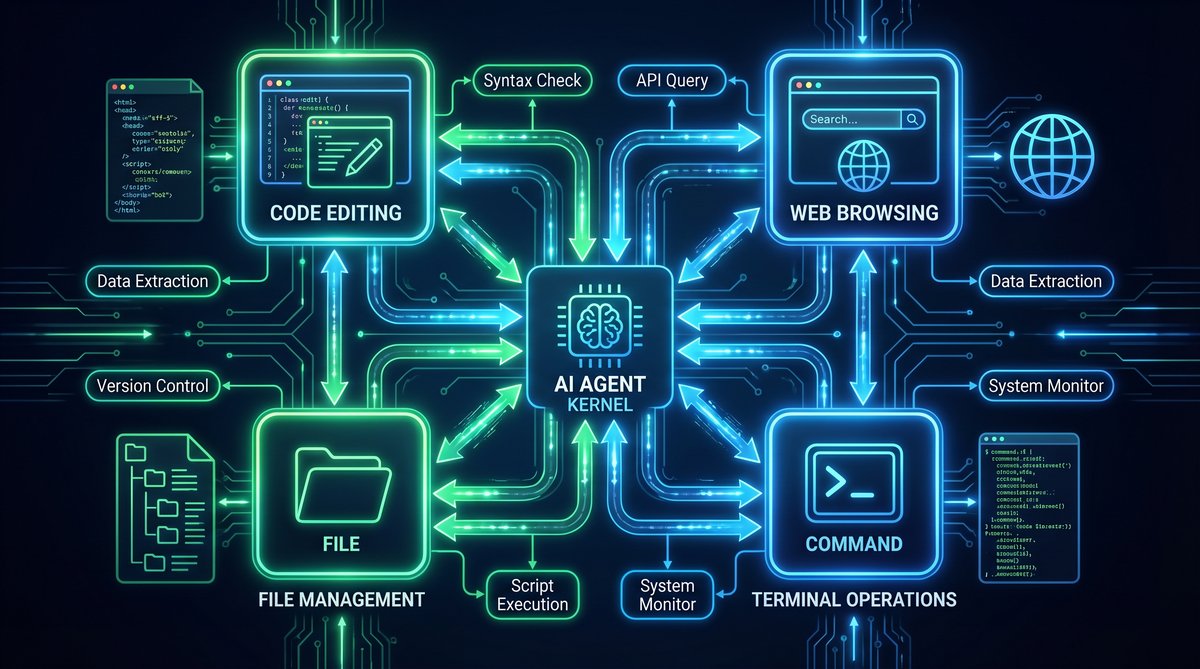
The core architecture enabling ‘computer use’ consists of multiple interlinked components:
- Command Interpreter: The Codex model parses natural language prompts and translates them into a sequence of low-level commands targeting specific applications or web elements.
- Execution Engine: This module interfaces with OS-level automation APIs to perform GUI interactions such as mouse clicks, keystrokes, window management, and clipboard operations.
- Feedback Loop: To handle dynamic interfaces, the AI agent receives state feedback from the desktop environment, including screenshots, DOM information (for web browsers), and application state data. This feedback helps the AI adapt its actions in real-time.
- Security and Sandbox Layer: Given the risks of enabling autonomous control over user desktops, the system incorporates strict sandboxing, permission management, and activity logging to prevent malicious or unintended operations.
The following diagram (conceptual) illustrates this architecture:
| Component | Description | Technologies Involved |
|---|---|---|
| Natural Language Processor | Translates user commands into programmatic actions | OpenAI Codex, Transformer Models |
| Action Planner | Sequences tasks and manages dependencies | Task Schedulers, Heuristic Algorithms |
| GUI Automation Interface | Executes commands on OS and applications | Microsoft UI Automation, AppleScript, xdotool |
| Browser Automation Module | Controls web browsers programmatically | Puppeteer, Selenium, Playwright |
| State Feedback System | Provides environment context for action adaptation | Screen Capture APIs, DOM Parsers |
| Security Sandbox | Enforces execution boundaries and permissions | Containerization, OS-Level Permissions |
Use Cases: How AI Agents Are Transforming Desktop Operations
The ability of OpenAI Codex to ‘use a computer’ unlocks numerous practical applications, particularly for developers, data scientists, and knowledge workers. Below are some of the most impactful use cases:
1. Automated Development Workflows
Developers can instruct Codex to generate code, test it, debug, and even deploy applications—all without leaving their desktop environment. For example, the AI can open a code editor, create a new project, scaffold files, run unit tests, and push changes to a version control system. This multi-step workflow automation drastically reduces manual effort and context switching.
Moreover, Codex can help in configuring environments by installing dependencies, setting environment variables, or communicating with cloud platforms via CLI tools. This level of automation accelerates development cycles and minimizes human error.
2. Intelligent Web Research and Data Extraction
When working on data-driven projects, AI agents can autonomously browse the web, scrape relevant data, summarize content, and export findings into structured formats. For instance, a researcher might ask Codex to gather the latest API documentation from multiple websites, extract code examples, and generate comparative analyses.
Unlike traditional web scraping tools, Codex’s natural language capabilities allow for dynamic query formulation, adaptive crawling based on content, and the ability to handle complex multi-page navigation flows.
3. Cross-Application Task Automation
Many workflows require working across different software applications. Codex’s ‘computer use’ enables AI agents to bridge these silos. For example, an agent can extract data from a spreadsheet, generate visualizations in a dedicated tool, and compose an email summary in a mail client—all triggered by a single natural language command.
Such cross-application orchestration reduces repetitive manual steps and empowers users to focus on higher-value tasks.
4. Personalized Coding Assistance and Tutoring
Beyond simple code generation, AI agents can actively assist developers by interacting with IDE features, debugging tools, and documentation browsers. They can highlight errors, suggest fixes, and even modify code in response to live testing feedback. This interactive AI tutoring leads to faster learning curves and improved code quality.
OpenAI Codex Advanced Features
Challenges and Limitations of AI-Driven Desktop Automation
Despite the remarkable progress, several challenges remain in enabling reliable and safe AI agents capable of full desktop control.
1. User Interface Variability
Desktop applications and web pages often have highly variable and dynamic interfaces. UI elements can change location, appearance, or behavior based on user settings, screen resolutions, or software versions. This variability complicates the AI’s ability to reliably identify and interact with controls.
To mitigate this, AI agents rely on robust UI element recognition techniques such as:
- Accessibility tree parsing for semantic UI identification
- Computer vision models for visual element detection
- Heuristic and rule-based fallback strategies
However, these methods are not foolproof and may require continuous updates and training to maintain accuracy.
2. Real-Time Feedback Interpretation
Interpreting the results of actions and adapting accordingly is critical. For example, if an AI agent attempts to click a button that is disabled or a web page fails to load, it must detect these states and adjust its plan.
This requires sophisticated state monitoring and error handling capabilities, often involving multi-modal data inputs such as screenshots, logs, and event streams. The complexity increases with the number of applications and workflows involved.
3. Security and Privacy Concerns
Granting AI agents control over user desktops raises significant security risks. These include accidental data loss, unauthorized access to sensitive information, or exploitation by malicious actors if the AI model or its interfaces are compromised.
Implementing strict sandboxing, permission models, and transparent activity auditing is essential. Additionally, users must retain full control over when and how AI agents operate on their systems.
4. Performance and Resource Constraints
Continuous AI-driven desktop automation can consume considerable system resources, including CPU, memory, and network bandwidth. Balancing responsiveness with system performance requires efficient model optimization and strategic offloading of heavy computations to cloud services when appropriate.
Technical Deep Dive: Integrating OpenAI Codex with Desktop Automation Frameworks
Achieving seamless ‘computer use’ functionality involves integrating OpenAI Codex with existing automation frameworks and tools. Below is a technical breakdown of this integration process:
Step 1: Command Generation via Codex
The user provides a natural language instruction, such as:
“Open Visual Studio Code, create a new Python file named data_analysis.py, write a function to load CSV data, and run the script.”
Codex processes this prompt and generates a structured command sequence, for example:
open_application("Visual Studio Code")
create_file("data_analysis.py")
insert_code("""
def load_csv(filename):
    import pandas as pd
    return pd.read_csv(filename)
""")
save_file()
run_script("data_analysis.py")
Step 2: Command Parsing and Scheduling
The generated code is parsed into discrete executable tasks. A scheduler manages the order of execution, handling dependencies such as waiting for the application to launch before creating files.
Step 3: Execution via Automation APIs
Each task translates into API calls for UI automation:
- open_application: Uses OS-level commands to launch the app, e.g., Windows ShellExecute or macOS open command.
- create_file: Simulates keyboard and mouse inputs or uses application-specific APIs to create files.
- insert_code: Enters text via clipboard paste or direct input APIs.
- save_file: Triggers save commands through menu navigation or keyboard shortcuts.
- run_script: Opens integrated terminal or uses command palette to execute code.
Step 4: Feedback and Error Handling
Throughout execution, the system captures screenshots, monitors application states, and listens for error dialogs. If the AI detects an error (e.g., file already exists, app crashed), it adjusts the command sequence or prompts the user for guidance.
Step 5: Result Reporting
Upon completion, the AI summarizes the outcomes, including any exceptions or logs. This report can be delivered via chat interfaces or notifications.
This modular architecture allows extensibility to support various applications and platforms, making the AI agent a versatile desktop assistant.
Case Study: Accelerating Data Analysis with AI Agents Using ‘Computer Use’
Consider a data scientist tasked with analyzing a large dataset. Traditionally, the workflow involves opening multiple tools—data editors, visualization software, and documentation browsers—performing repetitive tasks manually.
With OpenAI Codex’s ‘computer use’, the scientist can instruct the AI agent as follows:
“Load the dataset in Excel, filter rows where sales exceed $10,000, export the filtered data to CSV, open Tableau, import the CSV, and create a bar chart of sales by region.”
The AI agent interprets this instruction and proceeds to:
- Launch Excel and open the target file
- Automate filtering and data export
- Start Tableau and import the CSV file
- Generate the requested bar chart
- Capture screenshots and provide a summary report
This automation reduces the time spent on mundane tasks from potentially an hour down to minutes, allowing the data scientist to focus on interpreting insights.
Comparative Analysis: Traditional Automation vs AI-Driven ‘Computer Use’
| Feature | Traditional Automation | AI-Driven ‘Computer Use’ |
|---|---|---|
| Instruction Method | Scripted commands, fixed APIs | Natural language commands |
| Flexibility | Limited to predefined workflows | Adapts dynamically to context |
| Error Handling | Static error handlers, manual intervention | Real-time feedback interpretation |
| Cross-Application Integration | Requires custom connectors | Unified by AI understanding |
| Learning Curve | Requires programming skills | Accessible via natural language |
| Maintenance | High, due to brittle scripts | Lower, AI adapts to UI changes |
This analysis underscores the transformative potential of AI-powered desktop automation to surpass traditional methods.
Security Considerations and Best Practices for AI-Driven Desktop Control
As AI agents gain control over desktop environments, safeguarding user data and system integrity becomes paramount. Below are key security considerations and recommended best practices:
- Permission Granularity: Implement fine-grained permissions that restrict AI agents to specific applications or actions, minimizing risk exposure.
- Sandbox Execution: Run AI automation in isolated containers or virtual environments to contain potential faults or breaches.
- User Confirmation: Require explicit user approval for sensitive operations such as file deletion, system settings changes, or internet access.
- Audit Trail: Maintain detailed logs of AI actions, enabling retrospective analysis and accountability.
- Model Safety: Apply rigorous testing and validation of AI prompts and outputs to prevent harmful or unintended commands.
- Data Privacy: Encrypt sensitive data and limit AI access strictly to necessary information.
By adopting these practices, organizations can confidently deploy AI agents for desktop automation while mitigating security risks.
Future Directions: The Rise of Autonomous AI Desktop Agents
The introduction of ‘computer use’ in OpenAI Codex is a foundational step toward fully autonomous AI desktop agents. Looking ahead, several trends and advancements are likely to shape this landscape:
- Enhanced Multimodal Interaction: Integration of voice commands, gestures, and visual recognition will create more natural AI interfaces.
- Proactive Assistance: AI agents will anticipate user needs, automate routine tasks preemptively, and provide timely recommendations.
- Cross-Device Orchestration: AI will coordinate activities across desktops, mobile devices, and cloud environments for seamless workflows.
- AI Collaborative Agents: Multiple AI agents specialized in different domains will collaborate to solve complex, multidisciplinary problems.
- Improved Explainability: Transparent AI decision-making will enhance user trust and facilitate debugging of automated workflows.
These developments will redefine human-computer interaction, making AI an indispensable partner in daily computing tasks.
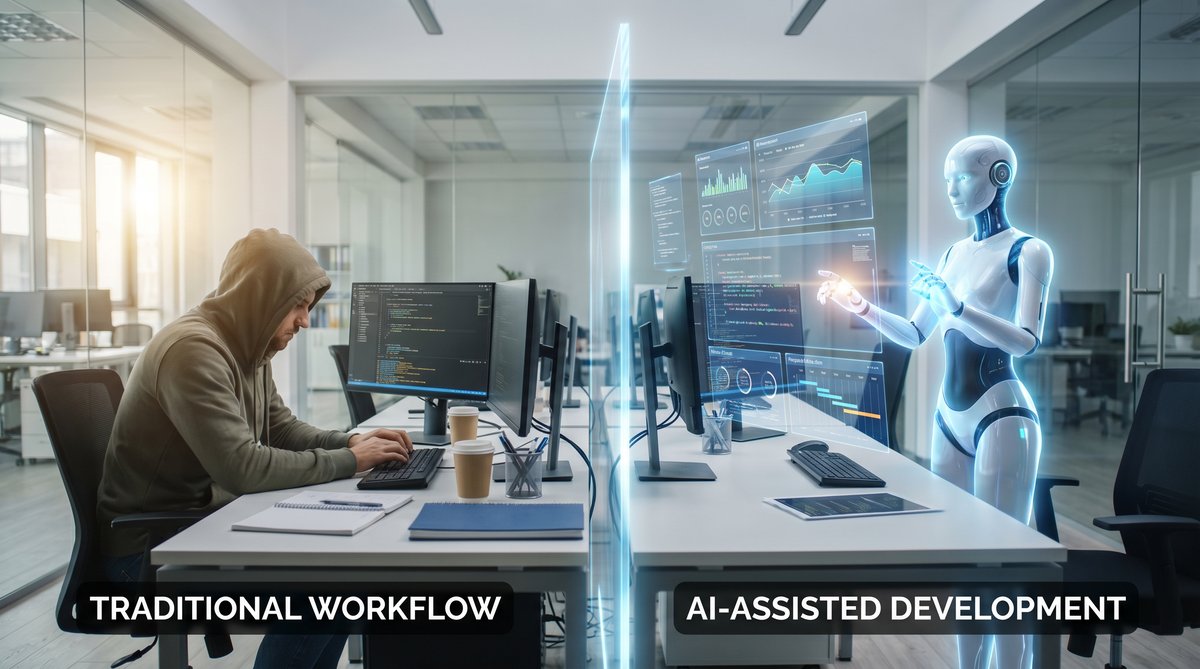
AI Agents in Software Development
Conclusion
OpenAI Codex’s ‘computer use’ capabilities represent a groundbreaking advancement in AI-assisted computing. By enabling AI agents to operate desktop applications, browse the web, and orchestrate developer workflows autonomously, this update bridges the gap between natural language understanding and practical software manipulation.
This shift empowers developers and knowledge workers to delegate repetitive and complex tasks to intelligent agents, significantly enhancing productivity and reducing cognitive load. While challenges remain in UI variability, error handling, and security, ongoing research and engineering efforts continue to refine these systems.
As AI agents mature, we can anticipate a future where desktop environments are no longer passive tools but active collaborators—anticipating needs, automating complex workflows, and unlocking unprecedented efficiency and creativity.
Advanced Technical Analysis of OpenAI Codex’s ‘Computer Use’ Capability
Get Free Access to 40,000+ AI Prompts
Join 40,000+ AI professionals. Get instant access to our curated Notion Prompt Library with prompts for ChatGPT, Claude, Codex, Gemini, and more — completely free.
Get Free Access Now →No spam. Instant access. Unsubscribe anytime.
Integrating Multi-Modal Inputs for Enhanced Contextual Understanding
One of the key innovations enabling Codex’s ‘computer use’ functionality is the integration of multi-modal inputs, combining textual commands with visual and structural cues from the desktop environment. Unlike standard code generation models that rely solely on textual input, this approach allows the AI to interpret screenshots, UI element metadata, and even cursor positions to better understand the context of interactions.
For example, when tasked to fill out a form in a desktop application, Codex can analyze the screen layout, detect text boxes, dropdowns, and buttons, and map natural language instructions to specific UI elements. This requires sophisticated computer vision techniques combined with semantic parsing of UI hierarchies.
Below is a simplified example of how multi-modal input might be processed programmatically:
def interpret_ui_context(screenshot, ui_metadata, user_command):
    # Use OCR to extract visible text
    visible_text = ocr_extract_text(screenshot)
    # Parse UI metadata to identify elements and their properties
    ui_elements = parse_ui_metadata(ui_metadata)
    # Match user command entities to UI elements by text similarity and type
    target_element = find_element_matching_command(ui_elements, visible_text, user_command)
    # Generate automation script to interact with the target element
    action_script = generate_action_script(target_element, user_command)
    return action_script
This integration improves accuracy in dynamic environments where UI elements may shift position or change labels, ensuring the AI agent’s actions remain robust and context-aware.
Robust Error Handling and Recovery Mechanisms
Operating directly on user desktops exposes AI agents to unpredictable interface changes, network delays, and software bugs. To maintain reliability, Codex’s ‘computer use’ system incorporates advanced error detection and recovery strategies:
- Timeout and Retry Policies: If an expected UI element does not appear within a preset time, the agent retries the action or attempts alternative selectors.
- State Validation Checks: After performing an action, the agent verifies the expected state change by analyzing updated UI snapshots or DOM changes.
- Fallback Navigation: When encountering navigation failures, the AI can revert to previous states, refresh the application, or escalate the issue for human intervention.
- Incremental Action Execution: Complex commands are decomposed into smaller atomic actions, each validated separately to isolate errors and minimize cascading failures.
For instance, a Codex script performing a multi-page form submission might include checkpoints after each page to confirm successful data entry before proceeding. This ensures resilience in workflows subject to intermittent failures.
Code Snippet: Automated Email Drafting and Sending Using Codex’s Computer Use
Consider a practical example where Codex is instructed to draft and send an email via a desktop mail client, such as Microsoft Outlook. The AI must open the application, compose a new message, fill recipient fields, write the body, and send the email.
from automation_framework import open_app, click_button, enter_text, wait_for_element

def send_email(recipient, subject, body):
    open_app('Microsoft Outlook')
    wait_for_element('New Email Button')
    click_button('New Email Button')
    wait_for_element('To Field')
    enter_text('To Field', recipient)
    enter_text('Subject Field', subject)
    enter_text('Body Field', body)
    click_button('Send Button')
    print("Email sent successfully.")

# Usage
send_email(
    recipient='[email protected]',
    subject='Project Update',
    body='Hi team,nnPlease find the latest project updates attached.nnBest,nAI Agent'
)
This snippet illustrates how Codex-generated automation scripts utilize OS-level UI automation APIs to perform complex sequences reliably. Such scripts can be dynamically generated or modified on-the-fly in response to user input.
Comparative Analysis: OpenAI Codex Versus Traditional Automation Tools
While Codex’s ‘computer use’ feature represents a paradigm shift, it is instructive to compare it with conventional automation tools across several dimensions:
| Feature | OpenAI Codex ‘Computer Use’ | Traditional Automation Tools (e.g., AutoHotkey, Selenium) |
|---|---|---|
| Input Method | Natural language commands interpreted by AI | Explicit scripting or macro recording |
| Flexibility | Adapts to UI changes and ambiguous instructions | Rigid scripts requiring manual updates |
| Multi-Modal Understanding | Combines text, visual, and structural UI data | Primarily DOM or UI element selectors |
| Context Awareness | Maintains dynamic state and user intent | Limited to scripted workflow |
| Error Handling | Built-in AI-driven recovery and adaptation | Basic error catching, often manual intervention |
| Learning Capability | Improves with usage and feedback | No inherent learning |
| Security Model | Sandboxed with strict permission controls | Varies; often unrestricted access |
This comparison highlights Codex’s advantages in handling ambiguity and complexity, making it a powerful tool for non-expert users who prefer natural language interaction over scripting. However, for highly deterministic, performance-critical tasks, traditional tools may still offer more predictable execution.
Practical Implementation Tips for Developers Using Codex’s Computer Use Feature
Get Free Access to 40,000+ AI Prompts
Join 40,000+ AI professionals. Get instant access to our curated Notion Prompt Library with prompts for ChatGPT, Claude, Codex, Gemini, and more — completely free.
Get Free Access Now →No spam. Instant access. Unsubscribe anytime.
Developers integrating Codex’s ‘computer use’ into their workflows or applications should consider the following best practices to maximize effectiveness and safety:
- Define Clear User Intents: Craft concise and unambiguous natural language prompts to reduce misinterpretation by the AI.
- Modularize Automation Tasks: Break down complex operations into smaller, verifiable steps to simplify debugging and error recovery.
- Leverage UI Element Metadata: Where possible, provide or extract metadata such as element IDs, roles, or accessibility labels to improve targeting accuracy.
- Implement Logging and Auditing: Record all AI-driven actions and responses to facilitate troubleshooting and ensure compliance with security policies.
- Use Sandboxed Environments: Test automation scripts in controlled environments before deployment to production desktops to avoid unintended side effects.
- Incorporate User Feedback Loops: Allow end-users to confirm or correct AI actions, enabling continuous learning and refinement.
Additionally, developers should stay informed about OS-level automation API updates and compatibility issues to ensure seamless integration across different platforms.
Future Directions: Enhancing AI Agents for Desktop Autonomy
Looking ahead, several promising research and development avenues can further enhance Codex’s ‘computer use’ capabilities:
1. Deeper Semantic Understanding of UI Elements
Future models may incorporate ontology-based understanding of UI components, enabling AI agents to reason about element functions beyond simple labels. For instance, distinguishing between a ‘Submit’ button on a form versus a ‘Send’ button in an email client allows for more contextually appropriate actions.
2. Continuous Learning from User Interactions
By capturing user corrections and preferences during AI-driven automation, models can adapt to individual workflows, software versions, and organizational policies, creating personalized AI assistants that evolve over time.
3. Cross-Application Workflow Orchestration
Advanced agents could coordinate complex tasks spanning multiple applications and data sources, such as extracting data from a spreadsheet, generating a report in a word processor, and emailing stakeholders—all autonomously.
4. Enhanced Security and Privacy Controls
Developing robust frameworks for permission management, real-time monitoring, and anomaly detection will be critical to safely deploying AI agents with deep desktop access, especially in enterprise environments.
5. Integration with Voice and Multimodal Interfaces
Combining natural language text commands with voice input, gesture recognition, or eye tracking can create more intuitive and accessible AI assistants capable of fluid interaction with desktops.
These advancements will contribute to more intelligent, reliable, and user-friendly AI agents that can seamlessly assist users in increasingly complex computing tasks.
Useful Links
- OpenAI Codex Official Documentation
- ChatGPT AI Hub: OpenAI Codex Complete Guide
- Understanding AI Agents and Autonomous Systems
- OpenAI API Integration Guide
🕐 Instant∞ Unlimited🎁 Free
Frequently Asked Questions
What is OpenAI Codex Computer Use?
Computer Use is an OpenAI Codex capability that lets the AI agent see the desktop, click buttons, type text, and navigate applications autonomously. It takes a high-level goal (e.g., 'research this topic and summarize in Google Docs') and executes the sequence of clicks, keystrokes, and screen reads required to complete it.
How is Codex Computer Use different from browser automation?
Browser automation (like Playwright) works only inside a browser with DOM-level access. Computer Use works at the OS level — it can control any app (Excel, Slack, IDE, email client) by watching the screen and controlling the mouse/keyboard, just like a human. It's a true general-purpose desktop agent.
Is Computer Use safe to run on my main machine?
Not recommended. OpenAI and most practitioners advise running it in a sandboxed VM or container with limited permissions. The agent can take any action a user can, which includes sending emails, modifying files, or making purchases — so isolate it and keep a human in the loop for sensitive workflows.
How much does Codex Computer Use cost?
It's included in ChatGPT Pro ($100/month) with 5x the Codex usage quota of the Plus plan, and also accessible via the Codex API with metered pricing. Individual screen-understanding calls and multi-step workflows consume tokens faster than chat, so budget accordingly.
What can Codex Computer Use actually do today?
Reliably: browsing, form filling, data extraction, document editing, scheduling, and simple cross-app workflows. Less reliably: anything time-sensitive, games, CAPTCHA-heavy sites, and tasks requiring pixel-perfect precision. Expect 80–95% success on common office workflows with retry logic.
How do I get started with Computer Use?
Subscribe to ChatGPT Pro or enable the Codex API on a Tier 3+ account. Start with a sandboxed VM (Windows 11 or Ubuntu). Use the Codex CLI or the ChatGPT desktop app. Begin with small, well-defined tasks, then expand as you learn the agent's reliability profile for your specific workflows.
Get Free Access to 40,000+ AI Prompts
Join 40,000+ AI professionals. Get instant access to our curated Notion Prompt Library with prompts for ChatGPT, Claude, Codex, Gemini, and more — completely free.
Get Free Access Now →No spam. Instant access. Unsubscribe anytime.
