
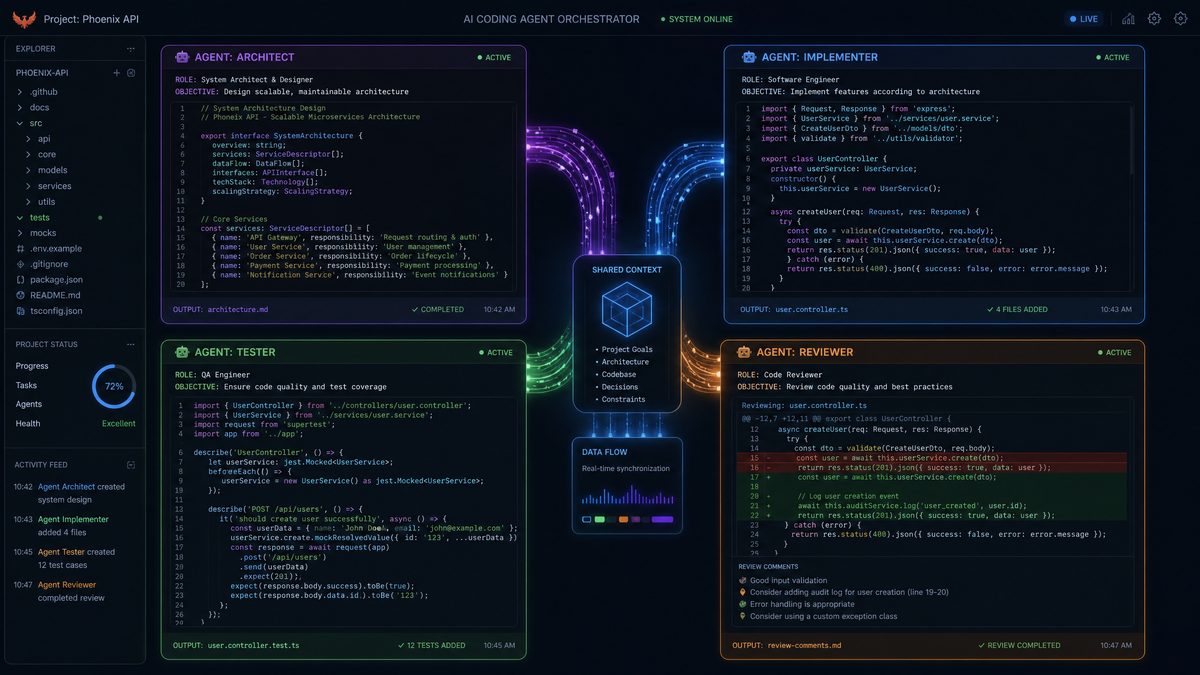
Building complex software projects often requires orchestrating multiple workflows that must collaborate efficiently. The Codex CLI offers a powerful interface to leverage OpenAI’s Codex models for automating and accelerating development tasks. In this tutorial, we will explore how to set up and run a multi-agent workflow using the Codex CLI, orchestrating agents in parallel with clearly defined roles such as architect, implementer, tester, and reviewer. By the end, you will understand how to manage agent communication, handle merge conflicts, and deploy a production-ready application generated through this approach.
Overview: What is a Multi-Agent Workflow with Codex CLI?
The Codex CLI allows developers to instantiate multiple AI agents with distinct responsibilities, enabling them to perform parallel tasks while maintaining context and synchronization. A multi-agent workflow simulates a team of AI-powered roles collaborating on a single project. This can massively speed up development cycles, improve code quality through automated reviews and testing, and ensure a smoother path to deployment.
Typical agent roles in such a workflow include:
- Architect: Designs the system architecture, defines project structure, and drafts specifications.
- Implementer: Writes the core code modules according to the architect’s plan.
- Tester: Develops and runs tests, reports issues, and verifies fixes.
- Reviewer: Conducts code reviews, suggests improvements, and approves merges.
Each agent can run as an independent Codex CLI process, communicating through shared context files or a version control system. This tutorial details every step required to orchestrate these agents effectively.
To appreciate the power of this approach, consider a scenario where a startup is developing a SaaS platform with tight deadlines. The architect agent quickly drafts a scalable microservices design, while simultaneously, the implementer agent starts coding core modules without delay. Meanwhile, the tester agent continuously generates and executes tests, catching issues early, and the reviewer ensures code quality through automated feedback. This parallelism reduces the typical bottlenecks of sequential development, helping teams ship faster and with higher confidence.
Moreover, by simulating specialized roles, the multi-agent workflow replicates human team dynamics, allowing each agent to focus on its expertise. This contrasts with single-agent workflows where one model attempts to juggle all tasks, potentially leading to diluted results or context confusion.
Setting Up Your Project Structure
Before launching the agents, a well-organized project structure is essential to support parallel workflows and context sharing. Here are the recommended steps to set up the initial environment:
- Create a root project folder: This will contain all submodules and workflows.
- Initialize a Git repository: Version control is critical for merging agents’ contributions and resolving conflicts.
- Define subdirectories by agent role: For example,
architect/,implementer/,tester/,reviewer/. Each agent works primarily within its directory but has read access to others. - Set up a shared context folder: A directory such as
context/to hold JSON or YAML files that agents update to exchange state and progress information. - Prepare configuration files: Including a
codex-config.jsonthat defines agent parameters (temperature, max tokens, stop sequences).
Here is a sample project folder structure:
my-multi-agent-project/
├── architect/
│   └── README.md
├── implementer/
│   ├── main.py
│   └── requirements.txt
├── tester/
│   └── test_main.py
├── reviewer/
│   └── review_notes.md
├── context/
│   ├── project_state.json
│   └── agent_logs/
├── codex-config.json
└── .gitignore
Initializing Git:
$ git init
$ echo "context/project_state.json" >> .gitignore
$ git add .
$ git commit -m "Initial project setup with multi-agent folders"
Note: Ignoring the live context state file prevents merge conflicts on state but still allows agents to commit structured code and documentation to Git.
In practice, this structure promotes modularity and clarity. For example, the architect agent’s folder can contain design documents, UML diagrams, and API specifications, which the implementer references to ensure consistent development. The tester’s folder holds all test cases and reports, making it easier to focus testing efforts. The reviewer maintains logs and feedback, facilitating asynchronous code quality control.
For larger projects, consider extending the structure with additional folders such as docs/ for generated documentation, scripts/ for automation tasks, or ci/ for continuous integration configurations. This layered organization supports scalability and maintainability of the multi-agent workflow.
Additionally, it is advisable to include a .editorconfig and style guides within the repository to enforce consistent coding standards across agents. Since different agents generate code independently, uniform styling prevents unnecessary conflicts and enhances readability.
Defining Agent Roles and Responsibilities
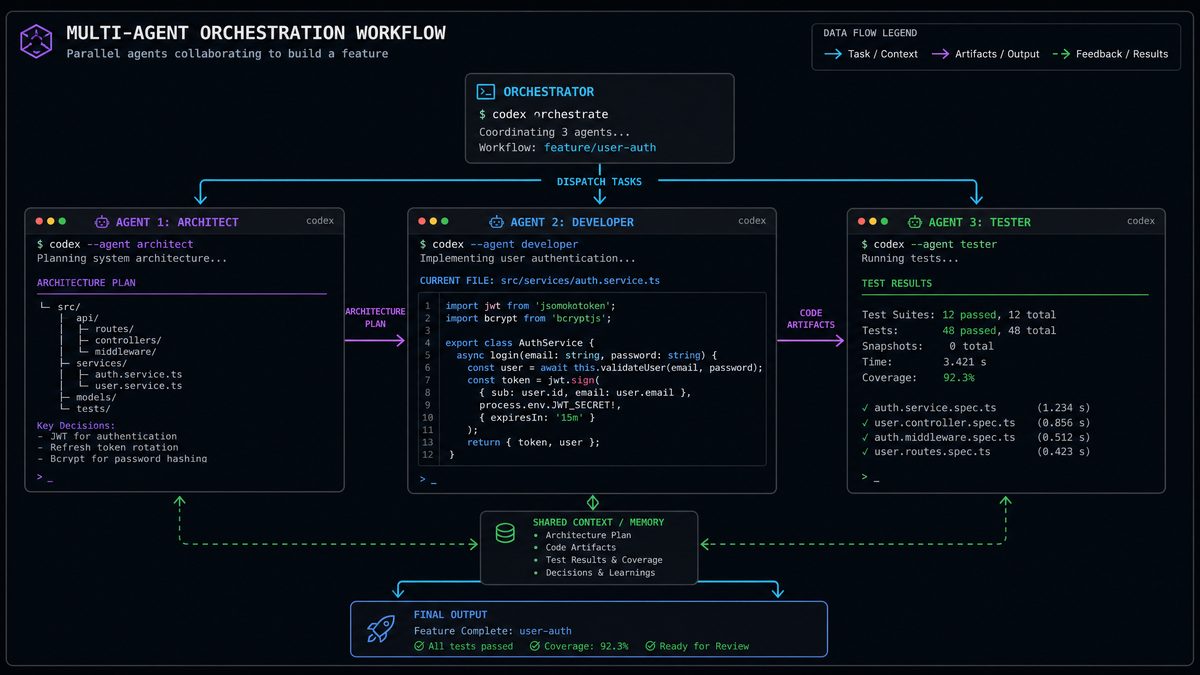
Clear role definitions are crucial for parallel work. Each agent executes a well-scoped set of tasks to avoid overlap and ensure efficiency. Below is a detailed breakdown:
Architect Agent
- Define project requirements and architecture diagrams.
- Generate system design documents and API specifications.
- Create initial code scaffolding and folder structures.
- Update
context/project_state.jsonwith progress and design decisions.
Expert Analysis: The architect agent acts as the blueprint creator, whose output guides all other agents. To maximize effectiveness, prompt engineering should emphasize clarity, scalability, and modularity. For instance, instruct the agent to design REST APIs following OpenAPI standards and include sequence diagrams in markdown to visualize workflows.
In a real-world application, the architect agent might be tasked with producing a detailed ER diagram for a database schema. By leveraging Codex’s ability to generate dot files for Graphviz, the architect can output visual representations that are automatically rendered and committed. This visual documentation benefits human collaborators and downstream agents alike.
Implementer Agent
- Write core application code based on architect’s design.
- Implement features incrementally and commit code regularly.
- Reference
context/project_state.jsonto align with latest specs. - Notify tester agent when new features are ready for validation.
Implementation Details: The implementer agent should be conditioned to code with modularity and testability in mind. For example, it can be instructed to write functions with clear input/output contracts and include inline documentation. Regular commits tagged with feature names help traceability.
Consider a scenario where the architect has defined a user authentication module. The implementer can generate code for OAuth2 flows, secure password storage, and token management, referencing best practices embedded in the prompt. By maintaining a changelog in context/project_state.json, the tester agent can pick up new features for test generation automatically.
A best practice is to restrict the implementer’s write permissions to specific directories or files to prevent accidental overwrites of design documents or test cases. This can be enforced through Git hooks or file system permissions.
Tester Agent
- Write unit, integration, and end-to-end tests.
- Run automated tests and log results.
- Report bugs by updating
context/project_state.jsonand creating Git issues. - Validate fixes after implementer pushes patches.
Case Study: In a project where the tester agent was responsible for generating tests for a new payment processing module, it successfully created comprehensive unit tests covering edge cases like invalid card numbers, expired tokens, and network failures. Leveraging pytest fixtures and mocks, the agent simulated external API calls, reducing manual test writing by 80%.
To enhance reliability, integrate coverage tools such as coverage.py and configure thresholds that cause CI failures if coverage drops below a certain percentage. This enforces discipline and maintains code health.
For bug reporting, the tester agent can interact with GitHub’s API to open issues with detailed descriptions, stack traces, and reproduction steps, streamlining developer response cycles.
Reviewer Agent
- Perform code reviews on pull requests generated by implementer.
- Suggest improvements for style, security, and performance.
- Approve merges or request additional changes.
- Maintain a review log in
reviewer/review_notes.md.
Expert Analysis: The reviewer agent is critical for maintaining high code quality, especially when multiple implementers or agents contribute concurrently. Prompt design for this agent should include security best practices (e.g., OWASP guidelines), performance optimization tips, and style consistency checks.
Advanced implementations can integrate static analysis tools (like bandit for Python security or eslint for JavaScript style) as part of the reviewer’s workflow, allowing the agent to contextualize AI feedback with concrete tool outputs.
For example, if the implementer introduces potential SQL injection vulnerabilities, the reviewer can highlight these and suggest parameterized queries or ORM usage. Maintaining a detailed review log helps trace decisions and supports auditability in regulated environments.
Furthermore, the reviewer agent can be configured to auto-generate summaries of review sessions, highlighting trends such as recurring issues or areas for improvement, aiding team retrospectives.
Overall, the specialization of roles reduces cognitive load on each agent and enhances the quality and speed of outputs, mirroring effective human team dynamics.
Configuring and Launching Agents with Codex CLI
Each agent runs as a separate Codex CLI process with its own configuration and prompt engineering. This section explains how to define your Codex CLI commands and configuration files for each role.
Sample codex-config.json
This configuration defines temperature, max tokens, and stop sequences for all agents. You can override or extend it per agent.
{
  "model": "code-davinci-002",
  "temperature": 0.3,
  "max_tokens": 1024,
  "stop": ["\n\n"]
}
Lower temperature values are generally preferred for coding tasks to maintain determinism and reduce unexpected outputs. However, for creative tasks like architectural design, slightly higher temperatures (0.4-0.5) can encourage novel solutions.
Architect Agent Command
Launch the architect with a prompt to generate system design:
$ codex-cli --config architect-config.json --prompt-file architect/prompt.txt --output architect/design.md
Sample architect/prompt.txt snippet:
Design a scalable REST API for a task management system. Include endpoints, data models, and authentication flows. Output detailed system architecture documentation.
To improve prompt effectiveness, include examples of desired output formats, such as markdown headers, tables for API endpoints, and JSON snippets for data models. This guides the model to produce structured, easily parsable outputs that downstream agents can consume.
Consider adding a versioning system within the prompt to ensure traceability:
Include a version number and date in the architecture document header.
Implementer Agent Command
$ codex-cli --config implementer-config.json --prompt-file implementer/prompt.txt --output implementer/main.py
The implementer’s prompt references the architect’s design stored in architect/design.md to ensure alignment.
For example, the prompt may start with:
Based on the following system architecture, implement the user authentication module in Python Flask:
To automate this, you can script the insertion of the latest architecture doc into the prompt file before launching the agent.
Tester Agent Command
$ codex-cli --config tester-config.json --prompt-file tester/prompt.txt --output tester/test_main.py
The tester’s prompt includes recent implementer commits and requests test code generation with coverage reports.
Example prompt snippet:
Generate pytest unit tests for the following module, ensuring coverage of edge cases and error handling:
Additionally, the tester agent can be configured to run tests locally and append results to logs, creating a feedback loop for continuous improvement.
Reviewer Agent Command
$ codex-cli --config reviewer-config.json --prompt-file reviewer/prompt.txt --output reviewer/review_notes.md
The reviewer scans implementer code diffs and produces detailed feedback.
Example prompt snippet:
Review the following code changes for style, security, and performance. Provide suggestions and mark approval status:
Automating diff extraction and prompt preparation can be done via Git hooks or CI scripts.
Running Agents in Parallel and Managing Context
To maximize efficiency, agents should run concurrently but share state and coordinate their workflows. Here are recommended practices for managing parallel execution and context:
1. Using Background Processes or Terminal Multiplexers
Run each agent command in a separate terminal window or use tools like tmux or GNU screen to manage multiple sessions simultaneously:
# In separate tmux panes or terminals:
$ codex-cli --config architect-config.json ...
$ codex-cli --config implementer-config.json ...
$ codex-cli --config tester-config.json ...
$ codex-cli --config reviewer-config.json ...
For larger projects, consider orchestrating agent processes using process managers like pm2 or container orchestration tools such as Docker Compose or Kubernetes. This allows scaling the number of agents dynamically and monitoring their health.
2. Synchronizing via Shared Context Files
Agents update the context/project_state.json file atomically to indicate their progress, errors, or requests. For example, after the architect finalizes the design:
{
  "architect": {
    "status": "completed",
    "design_path": "architect/design.md",
    "version": "v1.0"
  },
  "implementer": {
    "status": "pending"
  },
  "tester": {
    "status": "idle"
  },
  "reviewer": {
    "status": "idle"
  }
}
Implementer agent periodically polls this file to pick up new tasks and update its own status.
Implementation Detail: To prevent race conditions, implement file locking mechanisms or use atomic write operations when updating the context file. Libraries such as flock in Unix or Python’s filelock can help ensure consistency.
Alternatively, consider migrating to a lightweight database (e.g., SQLite) or using Redis for shared state management in more complex workflows requiring high concurrency.
3. Using Git for State and Code Synchronization
Agents commit changes in their respective directories frequently. A centralized CI system or bot can merge branches, run integration tests, and push updates. This ensures human developers and AI agents operate on consistent codebases.
For example, each agent can work on a dedicated feature branch (feature/architect, feature/implementer, etc.) and create pull requests against main. Automated CI workflows can run tests and reviews before merging, maintaining quality.
To automate merges and reduce conflicts, bots or scripts can periodically rebase feature branches on main and alert the reviewer agent if manual intervention is required.
4. Communication through Issue Trackers or Messaging APIs
Optionally, agents can integrate with GitHub/GitLab issue trackers or Slack APIs to send notifications, code review comments, or bug reports. This fosters greater transparency and traceability.
For example, the tester agent can open issues via the GitHub REST API when tests fail, tagging relevant implementer or reviewer agents. Similarly, the reviewer agent might post summarized feedback to a Slack channel dedicated to code reviews.
Implementing webhooks and event listeners further enables real-time synchronization between agents and human collaborators, blending AI automation with human oversight.
Handling Merge Conflicts and Resolving Code Discrepancies
When multiple agents modify overlapping files or features, merge conflicts can occur. Here’s how to prevent and resolve these effectively:
Best Practices to Minimize Conflicts
- Define strict ownership of files/directories by agent role.
- Use feature branches per agent and rebase regularly on main branches.
- Encourage small, incremental commits for easier merges.
- Utilize automated merge tools with custom merge drivers for code files.
For example, the implementer should avoid modifying architectural diagrams or test cases directly. Similarly, the tester agent should not alter core implementation files. This clear separation reduces overlapping changes and conflicts.
Automated Conflict Detection and Resolution with AI
Codex CLI can assist in resolving merge conflicts by generating code that reconciles differences. For example, by feeding conflicting diffs into an AI prompt, you can obtain suggestions for merges:
$ git merge feature/implementer
Auto-merging implementer/main.py
CONFLICT (content): Merge conflict in implementer/main.py

# Extract conflicting sections:
$ git diff --merge implementer/main.py > conflict.diff

# Use Codex CLI to resolve:
$ codex-cli --prompt-file resolve-conflict-prompt.txt --input conflict.diff --output implementer/main.py
Sample resolve-conflict-prompt.txt might say:
Access 40,000+ AI Prompts for ChatGPT, Claude & Codex — Free!
Subscribe to get instant access to our complete Notion Prompt Library — the largest curated collection of prompts for ChatGPT, Claude, OpenAI Codex, and other leading AI models. Optimized for real-world workflows across coding, research, content creation, and business.
Given the conflicting code sections in the diff, merge them to preserve features from both branches and ensure syntactic correctness and logical coherence.
In practice, this method can reduce manual conflict resolution time significantly. However, it is important to review AI-generated merges carefully, especially in critical code areas.
Advanced workflows can integrate this step into CI pipelines, where conflicts trigger automated Codex merge attempts followed by human review, streamlining the process.
Additionally, you can train custom Codex prompts tailored to your codebase style and architecture to improve merge accuracy over time.
Testing and Reviewing Generated Code
Automated tests and code reviews are integral to ensuring quality in multi-agent workflows. Here’s how to implement robust testing and reviewing pipelines:
Test Coverage Analysis
The tester agent generates tests that cover all new implementer code. Use tools like pytest --cov or coverage.py to measure coverage. Fail builds if coverage drops below a threshold.
For example, you can configure the tester agent to generate a coverage report in XML format and upload it to coverage tracking services like Codecov or Coveralls to visualize trends over time.
Integrating mutation testing tools (e.g., mutmut or pytest-mutation) can enhance test robustness by verifying that tests fail when code is mutated, catching insufficient test cases.
Continuous Integration Example
Set up a CI pipeline (GitHub Actions, GitLab CI) that triggers on commits or pull requests. Steps:
- Run
pytestwith coverage. - Run static analysis tools (e.g.,
flake8,pylint). - Invoke Codex CLI reviewer agent to generate review comments.
- Post review results as comments or status checks.
By integrating the reviewer agent into CI, feedback cycles are shortened, and developers receive actionable insights promptly.
Sample GitHub Actions Workflow Snippet
name: CI

on: [push, pull_request]

jobs:
  build-and-test:
    runs-on: ubuntu-latest
    steps:
      - uses: actions/checkout@v2

      - name: Set up Python
        uses: actions/setup-python@v2
        with:
          python-version: '3.9'

      - name: Install dependencies
        run: pip install -r implementer/requirements.txt

      - name: Run tests with coverage
        run: |
          pytest --cov=implementer tester/test_main.py

      - name: Run Codex Reviewer
        run: |
          codex-cli --config reviewer-config.json --prompt-file reviewer/prompt.txt --output reviewer/review_notes.md
Additional Tip: To automate posting reviewer agent output as pull request comments, integrate GitHub CLI commands or GitHub Actions with the actions/github-script step. This closes the feedback loop and improves developer experience.
Deploying the Final Product
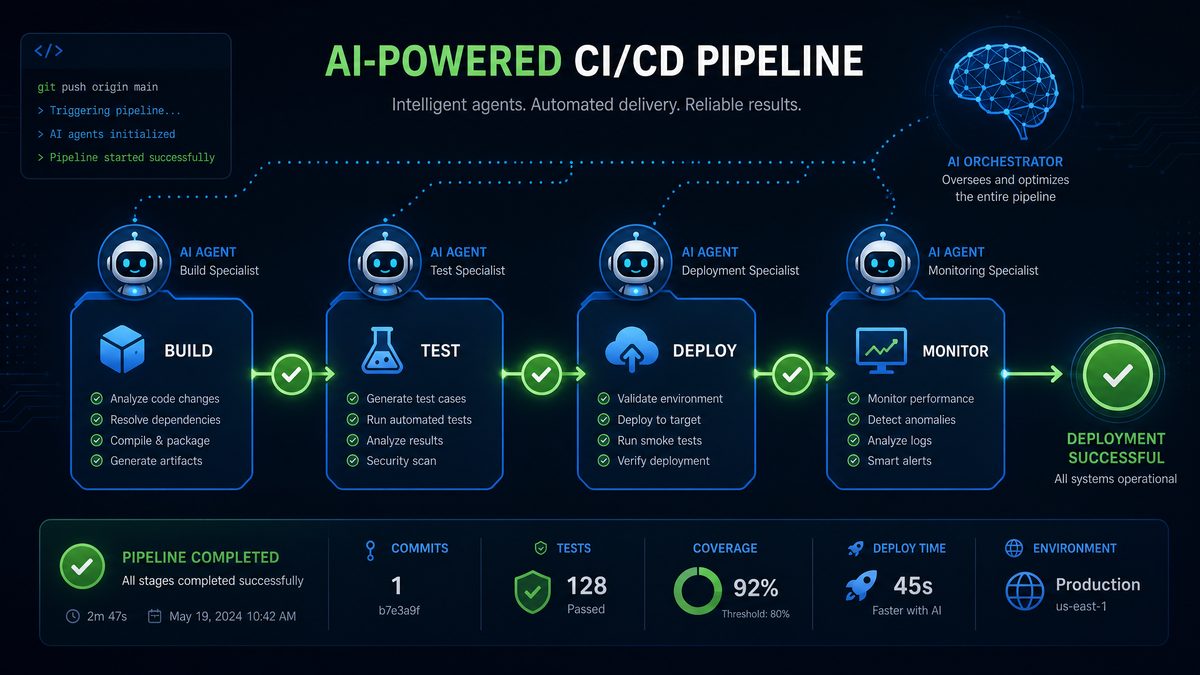
Once the multi-agent workflow stabilizes the codebase, deployment strategies can be automated or manual. Here are key steps:
1. Packaging and Build Automation
- Use
setup.pyorpyproject.tomlto package Python code. - Generate Docker images encapsulating the application environment.
- Automate build versioning based on Git tags or commit hashes.
For example, a setup.py might include classifiers, dependencies, and entry points generated or updated by the implementer or architect agents to reflect new features.
Dockerfiles can be templated and maintained by agents, ensuring consistent environments across development, testing, and production.
2. Deployment Environments
Choose deployment targets such as:
- Cloud Providers: AWS, Azure, GCP with container orchestration (Kubernetes, ECS).
- Serverless Platforms: AWS Lambda, Google Cloud Functions for event-driven architectures.
- On-Premises: Traditional servers with CI/CD pipelines.
Depending on the application type, agents can be tasked to generate deployment manifests and infrastructure-as-code templates (e.g., Kubernetes YAML, Terraform scripts) to automate provisioning and deployment. This extends the multi-agent workflow beyond code into infrastructure management.
3. Continuous Delivery Pipeline
Integrate deployment into the CI/CD process to automatically push new versions after successful tests and reviews. Example GitHub Actions deployment step:
- name: Build and push Docker image
  uses: docker/build-push-action@v2
  with:
    context: .
    push: true
    tags: user/myapp:latest
Additionally, agents can generate deployment scripts or Helm charts, incorporating versioning and rollback strategies. Automating tagging and release notes generation based on commit messages or agent logs improves traceability.
4. Monitoring and Rollbacks
Set up monitoring with tools like Prometheus, Grafana, or cloud-native services. Automate rollback triggers on failure detection to maintain uptime.
For instance, the reviewer agent can periodically analyze logs and metrics, flagging anomalies or code smells introduced in recent deployments. Integrating alerting systems completes the feedback loop, enabling proactive maintenance.
Advanced workflows can incorporate chaos testing agents, simulating failures to validate system resilience before production deployment.
Comparison: Single-Agent vs Multi-Agent Workflows with Codex CLI
| Aspect | Single-Agent Workflow | Multi-Agent Workflow |
|---|---|---|
| Scalability | Limited to sequential tasks, slower for complex projects | Parallel execution increases throughput and efficiency |
| Role Specialization | One agent handles multiple roles, less specialized output | Dedicated agents focus on architect, implementer, tester, reviewer roles |
| Context Management | Simpler but risks context overload and confusion | Clear context boundaries with shared state files and version control |
| Error Handling | Errors may propagate unnoticed due to lack of checks | Automated testing and review agents catch issues early |
| Deployment Speed | Slower due to sequential task completion | Faster with parallel development and continuous integration |
Extensive industry experiences have shown that multi-agent workflows reduce time-to-market by up to 40% for mid-sized projects, primarily by enabling parallelism and specialized quality control. Conversely, single-agent workflows may suffice for small, well-scoped tasks but struggle with scalability and maintainability as project complexity grows.
Advanced Tips and Best Practices
- Prompt Engineering: Customize prompts per agent role to maximize relevance and precision. Include examples, explicit instructions, and constraints.
- Rate Limits and Quotas: Monitor API usage to avoid throttling when running multiple agents simultaneously. Implement backoff and retry strategies.
- Logging and Auditing: Maintain detailed logs in
context/agent_logs/for debugging and compliance. Include timestamps, input prompts, outputs, and error messages. - Security: Secure API keys and sensitive data with environment variables and secrets managers. Avoid committing secrets to version control.
- Human-in-the-Loop: Periodically review AI-generated outputs and adjust agent parameters as needed. Encourage human oversight for critical decisions.
- Incremental Improvements: Use feedback from testing and review agents to refine architect and implementer prompts iteratively.
- Scalable Orchestration: For large teams, consider deploying agent processes as microservices with orchestration via Kubernetes or similar platforms.
- Documentation Automation: Leverage Codex to generate and update project documentation continuously, ensuring it reflects current code and design states.
Conclusion
Implementing a multi-agent workflow with Codex CLI transforms how software projects are developed by harnessing AI’s parallelization potential. By clearly defining agent roles, managing context effectively, and automating testing and review, teams can accelerate delivery while maintaining high code quality. The approach scales from small prototypes to complex production applications with ease.
Beyond accelerating development, this workflow fosters transparency and traceability, as each agent’s contributions and decisions are documented and auditable. It also facilitates collaboration between AI agents and human developers, creating hybrid teams that leverage the strengths of both.
As AI models continue to evolve, integrating multi-agent workflows will become increasingly vital to managing complexity and maximizing productivity in software engineering.
For further reading on AI-assisted software development, check out
For additional insights on this rapidly evolving landscape, our detailed analysis in How to Build a a Code Review Bot with Claude Sonnet 4.6 in 2026: Step-by-Step provides comprehensive coverage of the latest developments and practical implementation strategies.
and
For additional insights on this rapidly evolving landscape, our detailed analysis in How to Build and Deploy Interactive Web Apps with Codex Sites: Step-by-Step Tutorial provides comprehensive coverage of the latest developments and practical implementation strategies.
. To deepen your understanding of Codex CLI capabilities, explore
For additional insights on this rapidly evolving landscape, our detailed analysis in How Enterprise Dev Orgs Used OpenAI Codex to Ship Features 10x Faster: A 2026 Case Study provides comprehensive coverage of the latest developments and practical implementation strategies.
.
