
20 ChatGPT Voice Mode Prompts for Hands-Free Productivity: Commuting, Cooking, Exercise, and Walking Workflows
Why Voice Mode Changes the Productivity Equation
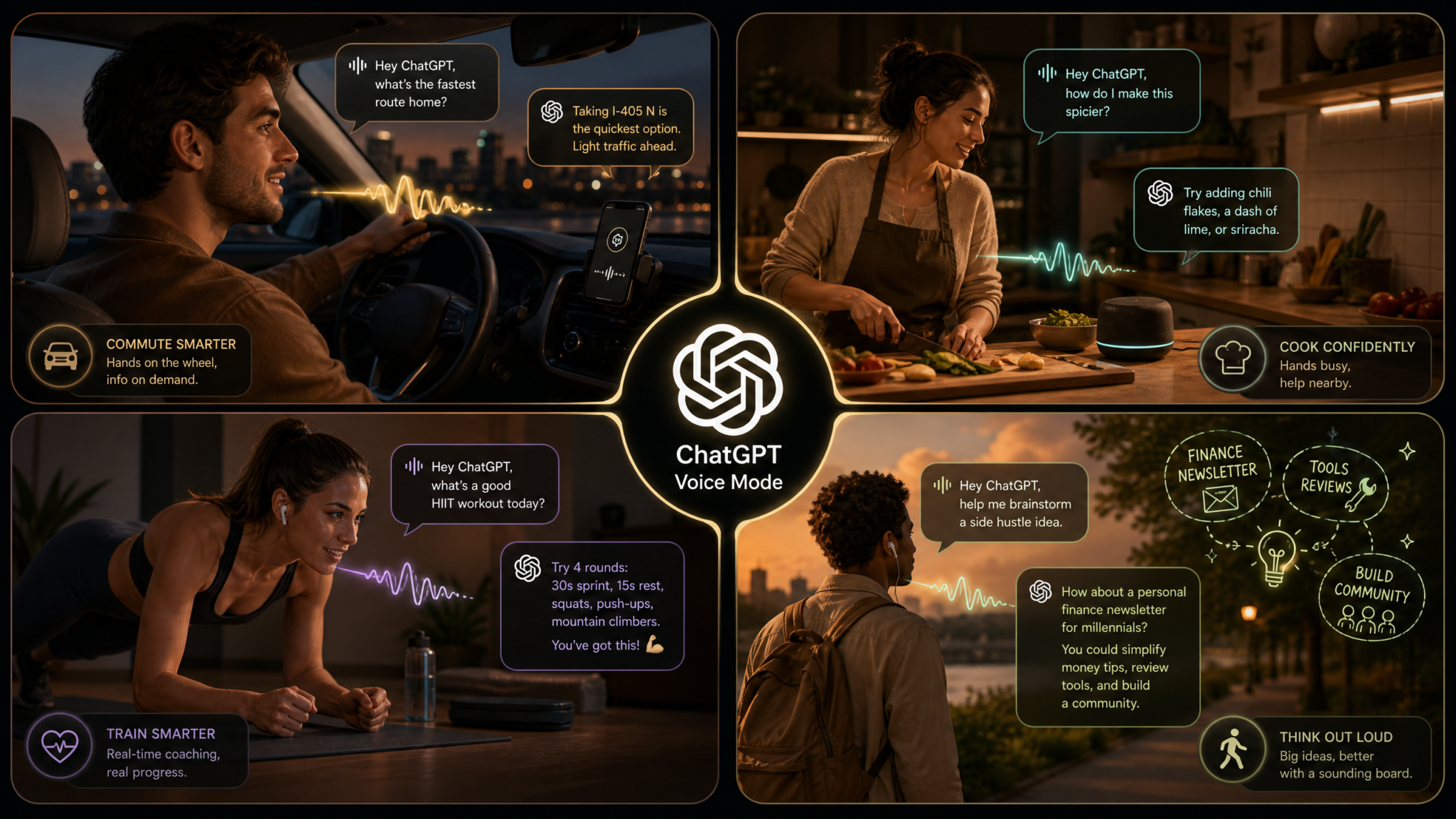
There is a category of time that most productivity systems simply ignore — the hours we spend in motion. The forty-minute commute, the twenty minutes chopping vegetables, the thirty-minute run, the lunchtime walk around the block. These pockets of time have always been dismissed as cognitively unavailable, too fragmented or physically occupied to contribute anything meaningful to our professional or personal goals. ChatGPT’s Advanced Voice Mode fundamentally upends that assumption. For the first time, you have a genuinely intelligent conversational partner that requires nothing from your eyes, nothing from your hands, and nothing from your physical attention — only your voice and your ears. That changes the math on a significant portion of your waking day.
Consider the numbers. The average American spends 27.6 minutes commuting each way, according to the U.S. Census Bureau. Add in cooking time (roughly 37 minutes per day per person, per the Bureau of Labor Statistics), exercise sessions, and daily walks, and you are looking at anywhere from 90 minutes to three hours of hands-free, eyes-free time every single day. At 90 minutes, that is 547 hours per year — the equivalent of more than 22 full calendar days of waking time that most people currently spend listening to podcasts or music or just existing in ambient silence. Voice Mode converts that ambient time into a live, adaptive, conversational productivity layer that works around whatever your body is doing.
But Voice Mode is not just a microphone strapped to ChatGPT. It operates differently from typed interaction in ways that matter for how you design your prompts. Voice conversations reward brevity in your instructions, punish walls of text in the responses, and thrive on back-and-forth exchanges rather than monolithic outputs. The AI’s voice output needs to be scannable by ear — which means numbered steps, natural pauses, and clear signposting matter more here than they do in written chat. A prompt that works beautifully in a typed conversation can feel like having someone read a legal document at you when delivered through speakers in your kitchen.
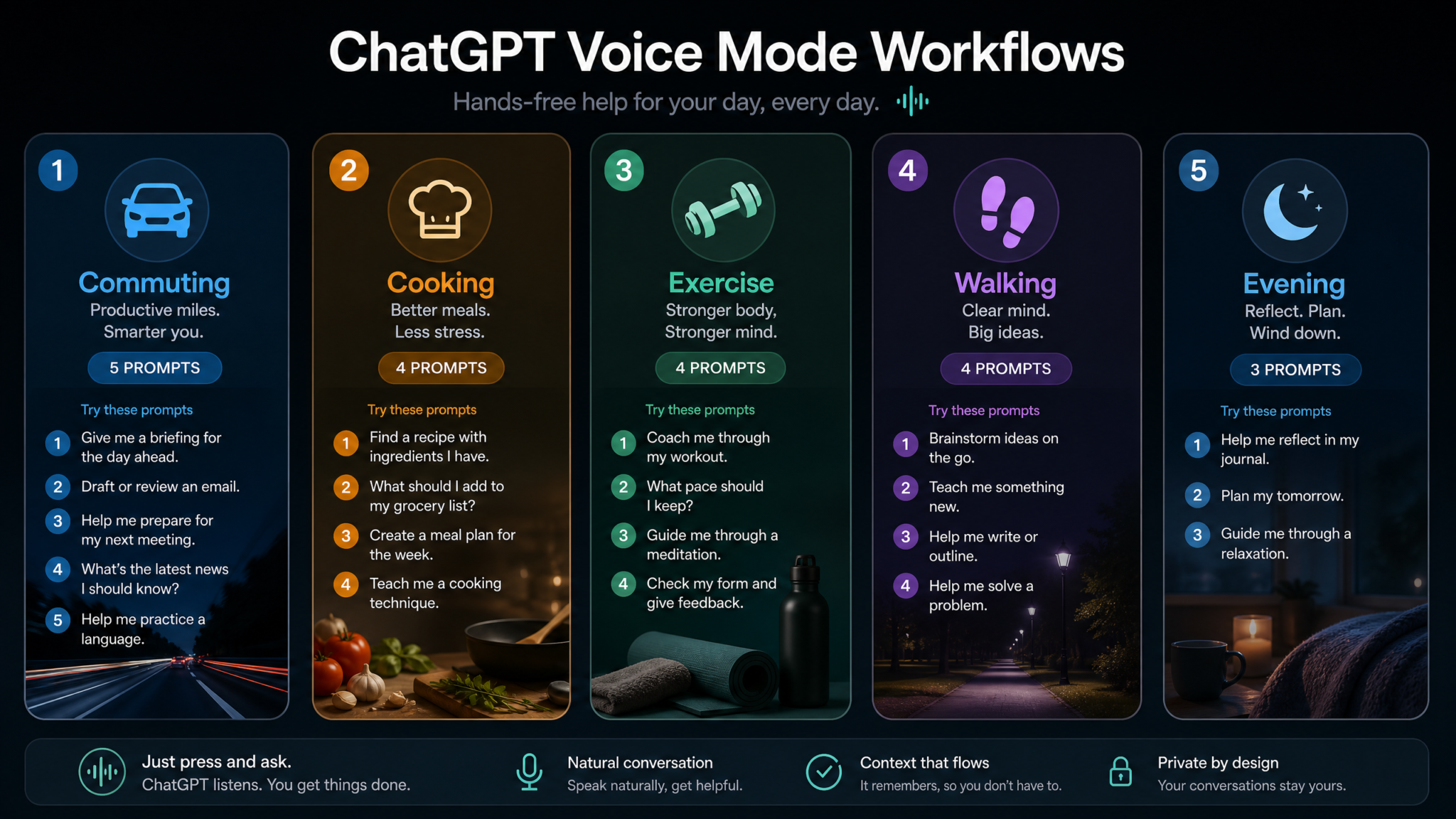
This masterclass gives you 20 battle-tested Voice Mode prompts organized by real-life context: commuting, cooking, exercise, walking, and evening wind-down. Each prompt includes voice-specific phrasing guidance, the conversational flow you should expect, and customization suggestions so you can adapt it to your specific role, schedule, and goals. Whether you are a founder prepping for investor calls during your morning run, a parent building meal plans while unloading the dishwasher, or a writer working through plot problems on a lunchtime walk, there is a workflow here built for you.
The Core Insight: Voice Mode productivity is not about squeezing more into your day — it is about reclaiming the cognitive value of the time you are already spending on physical and logistical activities. The goal is ambient intelligence, not ambient noise.
Before diving in, a quick note on setup: all of these prompts assume you are using ChatGPT’s Advanced Voice Mode (available on iOS and Android in the ChatGPT app) with a reliable set of earbuds or headphones. AirPods, Galaxy Buds, or any Bluetooth earbuds with good microphone pickup work well. In your car, Android Auto and Apple CarPlay both support the ChatGPT app. We will cover specific settings recommendations in the final section.
Commuting Workflows: 5 Voice Mode Prompts
The commute is the original dead time — the slot that has been colonized by podcasters, audiobook publishers, and radio hosts for generations because listeners have nothing else available to them. Voice Mode upgrades this from passive consumption to active, personalized, two-way engagement. These five prompts turn your commute into your most productive professional development window.
Prompt 1: Morning Intelligence Briefing
This prompt sets up ChatGPT as your personal morning briefer — someone who walks you through what you told it about your day, synthesizes context, and frames your priorities before you walk into the office or open your laptop.
Voice Mode Prompt — Morning Intelligence Briefing:

"Good morning. I have about [X] minutes before I arrive at work.
I want a spoken morning briefing. Here is what I need you to cover:
First, remind me of the three priorities I mentioned last night —
[briefly state them or describe your general goals for the day].
Second, give me a one-minute mental warm-up on [specific topic,
industry, or skill area]. Third, ask me one sharp question I should
be thinking about before my first meeting today, which is about
[describe the meeting topic]. Keep each section to about ninety
seconds and check in with me between sections."
Voice-Specific Tips: Speak your three priorities conversationally, as if telling a colleague. You do not need bullet-point precision — ChatGPT will extract the key themes. Say “check in with me” to create natural pauses rather than getting a wall of monologue you cannot interrupt while merging onto the highway.
Expected Conversational Flow: ChatGPT will summarize your priorities, deliver the warm-up topic in spoken, scan-friendly segments, then pose a thought-provoking question and wait for your response. From there, the conversation becomes genuinely interactive — you can push back, ask follow-ups, or request clarification before you park the car.
Customization: Add a “mindset prompt” section if you prefer to start with a motivational angle. Replace the industry warm-up with a language phrase of the day, a financial market summary, or a competitive intelligence snippet if those are more relevant to your role. Best ChatGPT Prompts for Professional Productivity
Prompt 2: Email Triage and Response Drafting
This workflow requires a slight setup: before you leave home, forward your three to five most important overnight emails to yourself and briefly read their subject lines. Then, while driving, you can verbally brief ChatGPT on each email and have it help you draft spoken responses you can dictate or refine later.
Voice Mode Prompt — Email Triage and Response Drafting:

"I am going to verbally describe three emails I need to respond to today.
For each one, after I describe it, do two things: first, classify it as
Urgent, Important, or Can-Wait based on what I tell you. Second, draft
a concise, professional response I could approve or modify — keep it
under one hundred words. After all three, give me a recommended order
for tackling them and one email I should probably send proactively
today based on the patterns you noticed. Ready? Here is email one:
[describe sender, subject, and key ask in your own words]."
Voice-Specific Tips: Describe emails in plain language — “It is from my client Marcus at the agency, he is following up on the proposal I sent last week and wants to know if we can schedule a call” — rather than trying to recite formal email language. The conversational format produces better drafts than you might expect.
Expected Conversational Flow: ChatGPT will classify, draft, and confirm after each email. The final synthesis — recommended order plus a proactive suggestion — is often the most valuable part, as it forces prioritization reasoning you might otherwise skip in a busy morning.
Customization: Specify your communication style (“I write casually and directly, no filler phrases”) or add context about your current relationship with a sender to improve draft quality. You can also ask it to flag any email that might require input from a colleague before responding.
Prompt 3: Meeting Preparation Accelerator
Voice Mode Prompt — Meeting Preparation Accelerator:

"I have a [type of meeting — sales call, team standup, board review,
client QBR] in about [X] minutes. The meeting is with [describe attendees
and their roles]. The main topic is [describe in a sentence or two].
I want you to run me through a rapid verbal prep in three parts:
One — what are the two or three things I absolutely need to communicate
clearly in this meeting? Two — what is the most likely point of friction
or disagreement and how should I address it? Three — give me one strong
opening line I can use to set the tone. Then ask me one question to test
whether I am actually prepared."
Voice-Specific Tips: Keep your description of the meeting conversational and specific. The more context you give about the attendees’ likely concerns and your own goals, the sharper the prep will be. The “test question” at the end is a deliberately uncomfortable feature — it exposes gaps in your preparation when you still have time to fill them.
Expected Conversational Flow: Structured three-part briefing followed by a Socratic challenge question. Your answer will likely trigger a useful follow-up exchange that surfaces the real preparation work you need to do. Budget at least ten minutes of driving time for this one.
Customization: For sales calls, add “What is the most compelling proof point I should lead with?” For board-level meetings, add “What questions should I be ready to answer that I haven’t been asked yet?” ChatGPT Prompts for Sales Professionals and Business Development
Prompt 4: Personalized News Digest
Voice Mode Prompt — Personalized News Digest:

"Act as my personalized news editor. I am going to give you my
professional context and you are going to brief me on the topics
that matter most to my world. My context: I work in [industry/role],
I follow [2-3 companies or sectors closely], and I care about
[specific macro themes — AI regulation, interest rates, healthcare
policy, etc.]. Based on your training knowledge and our conversation,
give me a five-minute spoken briefing. Format it like a radio news
break — lead with the most important story, give context, then move
to the next. End with one question I should be thinking about this
week given everything you just covered."
Voice-Specific Tips: Remember that Voice Mode’s ChatGPT works from its training knowledge and any context you provide — it does not browse the web in real-time by default. Frame this as strategic context and pattern briefing rather than breaking news. The value is in analysis and synthesis, not headlines.
Expected Conversational Flow: A structured spoken digest followed by a strategic reflection question. You can interrupt and say “tell me more about that second point” or “why does that matter to my sector specifically” to drill deeper on any item.
Prompt 5: Language Learning During the Drive
Voice Mode Prompt — Language Learning During Drive:

"I am learning [target language] and I am at approximately [beginner/
intermediate/conversational] level. For the next [X] minutes I want
you to be my driving language tutor. Here is the format I want:
Start by teaching me five vocabulary words or phrases in [target
language] related to [theme — business, travel, food, etc.].
Say each one, tell me what it means, use it in a simple sentence,
then quiz me on the previous one before moving forward. Correct me
gently if I mispronounce or misuse something. Speak slowly and
clearly when using the target language. After the vocabulary,
have a short two-minute conversation with me in [target language],
switching to English only if I genuinely get stuck."
Voice-Specific Tips: This is one of the most powerfully suited use cases for Voice Mode because spoken language practice is exactly what language learners need most and get least from apps. Ask ChatGPT to exaggerate the pronunciation slightly for difficult phonemes — it handles this well. Specify if you want Castilian Spanish versus Latin American Spanish, Mandarin with pinyin confirmation, or Brazilian versus European Portuguese.
Expected Conversational Flow: Vocabulary with spaced repetition testing, followed by a gentle immersive conversation. ChatGPT is patient, non-judgmental, and willing to repeat as many times as you need — far more forgiving than a human tutor when you’re also navigating morning traffic.
Customization: Add a grammar focus (“I always mess up the subjunctive — work that into today’s examples”) or ask for conversational scenarios relevant to an upcoming trip or business meeting. Using ChatGPT for Language Learning — Complete Strategy Guide
Cooking and Kitchen Workflows: 4 Voice Mode Prompts
The kitchen is one of the most time-rich, hands-occupied environments in daily life. Cooking is also one of the few activities where having an intelligent, patient guide who can answer follow-up questions in real time (“wait, what does ‘fold in’ actually mean?”) provides genuine, immediate value. These four prompts turn your kitchen time into a productive, educational, well-organized session.
Prompt 6: Recipe Guidance with Timing
Voice Mode Prompt — Recipe Guidance with Timing:

"I am about to cook [dish name]. I have the following ingredients
available: [list ingredients conversationally]. Walk me through the
recipe step by step, but only give me one step at a time. After each
step, wait for me to say 'next' or 'ready' before continuing.
For any step that involves timing — like simmering, roasting, or
resting — tell me exactly how long and remind me to set a timer.
If I ask a question mid-recipe, answer it clearly and concisely,
then offer to continue from where we left off. If I am missing a key
ingredient, suggest a substitute before we start."
Voice-Specific Tips: The “say next to continue” mechanic is critical in kitchen environments — it puts you in control of the pace and prevents you from missing instructions while your hands are occupied. Say “what was that again?” freely; ChatGPT will repeat without judgment. If you are an experienced cook, add “skip the basic technique explanations unless I ask” to prevent it from over-explaining knife skills you already know.
Expected Conversational Flow: Sequential, paced instruction with natural question-and-answer interludes. The conversational exchange around timing and substitutions is where real value emerges — this is the gap between a static recipe card and a knowledgeable cooking companion.
Customization: Specify dietary constraints (“I am cooking for someone with a nut allergy”), cooking equipment limitations (“I only have one burner”), or skill adaptation (“explain this as if to a complete beginner”).
Prompt 7: Grocery List Building
Voice Mode Prompt — Grocery List Building:

"I want to build a smart grocery list by talking through it with you.
I am going to tell you what I already have in my fridge and pantry,
and then tell you what I want to cook this week. You will identify
what is missing and build an organized shopping list grouped by
store section — produce, proteins, dairy, dry goods, etc.
Ready? Here is what I already have: [describe verbally].
Now here are the meals I want to make this week: [list 4-6 meals].
Once you have the list, read it back to me organized by section,
and flag anything that might be easy to forget or that I will need
in larger quantities than I might expect."
Voice-Specific Tips: Describe your pantry by category rather than trying to list every item — “I have most dried spices, olive oil, pasta, and canned tomatoes, but I am low on proteins and fresh vegetables.” This produces faster, more accurate gap analysis. Ask it to text or share the list after the conversation using the ChatGPT share function.
Expected Conversational Flow: A guided inventory conversation followed by a structured shopping list read-back. ChatGPT will often flag things you genuinely would have forgotten — “you mentioned pasta carbonara but didn’t include guanciale or pecorino” — which alone makes this workflow worth building into your weekly routine.
Prompt 8: Meal Planning Conversation
Voice Mode Prompt — Weekly Meal Planning Conversation:

"Let's do my weekly meal planning. I need dinner ideas for five nights
this week. Here are my constraints: [describe budget, time available
per night, dietary preferences or restrictions, number of people,
any ingredients you want to use up]. Ask me clarifying questions
first if you need more information. Then propose five dinners with
a brief description of each — no more than two sentences per meal.
For each meal, tell me approximately how long it takes and how
difficult it is on a scale of one to three. After I approve or
modify the plan, suggest one batch-cooking component I could
prepare Sunday to make the weeknights easier."
Voice-Specific Tips: The “ask me clarifying questions first” instruction is particularly valuable here — it prevents ChatGPT from making assumptions and produces a genuinely personalized plan rather than generic meal suggestions. The batch-cooking suggestion at the end is often the highest-value output, especially for busy weekday households.
Expected Conversational Flow: Short interview phase, then a conversational five-meal proposal where you can approve, swap, or veto each suggestion. Ending with a meal plan plus a single batch-prep action creates an immediately actionable weekly food strategy in under ten minutes while you clean up from the previous meal.
Prompt 9: Cooking Technique Coaching
Voice Mode Prompt — Cooking Technique Coaching Session:

"I want to improve one specific cooking technique. The technique is
[e.g., making a proper pan sauce, getting a good sear on meat, making
emulsified dressings, knife skills for onions]. Teach me this technique
in a conversational way — explain the science or logic behind why each
step matters, not just what to do. Ask me questions along the way to
check my understanding. When I try the technique while we talk, I will
describe what I am doing and what I am observing, and you give me
real-time feedback. End the session with two common mistakes to avoid
and one pro tip that most home cooks don't know."
Voice-Specific Tips: Narrating what you are doing — “okay, I’ve got the pan on medium-high, I’m adding the oil now, it’s starting to shimmer” — and getting immediate feedback creates a genuine coaching loop that no cookbook or video can replicate. The “why it works” framing accelerates learning because understanding the underlying logic makes the technique easier to remember and adapt.
Expected Conversational Flow: Explanation phase, real-time narration-and-feedback loop, closing synthesis with mistakes and pro tips. Budget fifteen to twenty minutes for a thorough session on any technique worth learning properly.
Exercise and Fitness Workflows: 4 Voice Mode Prompts
Exercise is an ideal Voice Mode environment for most people — your eyes are often free, your mind is alert but not otherwise occupied, and motivation and coaching can have an outsized impact on output. These four prompts cover different modalities from high-intensity training to meditative recovery.
Prompt 10: Workout Coaching and Counting
Voice Mode Prompt — Workout Coaching and Counting:

"You are my workout coach for the next [X] minutes. Design a
[bodyweight/resistance/HIIT] workout appropriate for [your fitness level
and any equipment you have]. For each exercise, tell me the movement,
the rep count or duration, and one form cue. Count out loud with me
during each set — count up from one, give me encouragement at the
halfway point, and call out the last three reps. Between sets,
tell me the rest duration and give me a brief motivational cue or
a fun fact about the muscle group we are working. Ask me how I am
feeling at the halfway point and adjust the second half if needed."
Voice-Specific Tips: Specifying “count out loud with me” is important — without this instruction, ChatGPT might describe the exercise and leave you to count alone. The “fun fact about the muscle group” between sets sounds trivial but actually maintains engagement during rest periods and makes you less likely to pick up your phone. The mid-workout check-in is genuinely useful for scaling intensity up or down based on real-time fatigue.
Expected Conversational Flow: Sequential exercise instructions with live counting, rest period narration, and an adaptive mid-session check-in. The best workouts using this format feel surprisingly similar to having a personal trainer in the room.
Customization: Add time constraints (“I only have 20 minutes and need to shower after”), injury modifications (“avoid anything that puts direct pressure on my left shoulder”), or progressive overload tracking (“this is week three of this program, make it slightly harder than last week”). ChatGPT Fitness and Wellness Prompt Templates
Prompt 11: Running Pace Partner
Voice Mode Prompt — Running Pace Partner:

"I am going on a [distance or duration] run. I want you to be my
pace partner and conversational coach throughout. Here is my context:
[current fitness level, target pace or effort level, whether this is
a training run or easy recovery run]. Check in with me every five
minutes by asking how my breathing feels and whether I am on target
pace or effort. Between check-ins, keep me company with one of these
on rotation — a motivational running story or fact, a question about
something interesting I want to think through, or encouragement
specific to how far I have come. At the [halfway point], give me
a pace and effort assessment. At the final mile, switch to pure
encouragement mode."
Voice-Specific Tips: The “check in every five minutes” instruction creates a natural pacing structure. Tell ChatGPT your approximate goal pace so it can anchor the encouragement and assessment language correctly. The “question about something interesting I want to think through” option transforms a solo run into something closer to a thinking session with a running partner.
Expected Conversational Flow: Periodic check-ins woven around content rotations — facts, questions, encouragement. The conversational texture keeps a long run mentally engaging far more effectively than a podcast because you are an active participant, not a passive listener.
Prompt 12: Meditation and Cooldown Guide
Voice Mode Prompt — Post-Workout Meditation and Cooldown:

"I just finished a workout and I want a guided cooldown followed by
a short meditation. For the cooldown: walk me through five stretches
targeting [the muscle groups I just worked]. For each stretch,
describe the position clearly, tell me how long to hold it, and
give me one breathing cue. Then transition me into a [5/10] minute
meditation. The meditation style I prefer is [body scan/breath focus/
visualization/gratitude]. Speak slowly and calmly throughout.
Use natural pauses. After the meditation, bring me back gently
with a short grounding statement and one intention I can carry
into the rest of my day."
Voice-Specific Tips: Voice Mode’s natural speech cadence is particularly well-suited for meditation guidance — ask it to “speak slowly and leave natural pauses” explicitly. The transition from physical cooldown to mental decompression in a single session is one of the most complete recovery protocols you can complete in fifteen to twenty minutes without any additional apps or subscriptions.
Prompt 13: Form Correction Cues
Voice Mode Prompt — Real-Time Form Correction Cues:

"I am practicing [specific exercise or movement — squat, deadlift,
pull-up, kettlebell swing, yoga pose]. I am going to describe what
I am doing and what I am feeling as I perform the movement, and I
want you to give me form correction cues based on what I describe.
Start by telling me the five key form checkpoints for this movement.
Then ask me to do one rep and describe the experience. Based on my
description, identify the most likely form breakdown and give me one
specific correction cue. Then ask me to try again and describe the
difference. Repeat this loop until I report that the movement
feels consistent and controlled."
Voice-Specific Tips: The quality of the coaching depends entirely on the specificity of your narration. Instead of “it felt fine,” say “I felt my left knee caving inward slightly when I hit the bottom of the squat and my heels wanted to come up.” That level of detail allows ChatGPT to give targeted, technically accurate correction cues. This workflow works particularly well for lifters who train alone and cannot afford a coach to watch every session.
Expected Conversational Flow: Initial checklist, narrated rep, targeted cue, repeat loop. Three to five loops on a single movement is usually enough to embed a correction meaningfully. For complex movements, plan multiple sessions on different aspects of the form.
Walking and Outdoors Workflows: 4 Voice Mode Prompts
Walking has a neurological relationship with creative thinking that researchers have documented extensively — Stanford studies found that walking increases creative output by an average of 81%. Voice Mode converts a walking-induced creative state into captured, structured output. These four prompts leverage that relationship deliberately.
Prompt 14: Outdoor Brainstorming Sessions
Voice Mode Prompt — Structured Outdoor Brainstorming:

"I want to brainstorm [specific problem, project, or challenge]
during this walk. Here is the context: [describe the challenge in
a few sentences]. Use the following structure to guide our session:
First, spend three minutes helping me expand the problem space —
ask me provocative questions that challenge my assumptions about
what the problem actually is. Second, spend five minutes in pure
idea generation — suggest wild and practical ideas alternately,
and ask me to build on or combine them. Third, help me filter
down to two or three ideas worth taking seriously and articulate
why each one has merit. Keep the energy conversational and
challenging — push back if I am being too conservative."
Voice-Specific Tips: Tell ChatGPT to “push back if I am being too conservative” explicitly — without this permission, it tends to affirm your thinking more than challenge it. The problem expansion phase (reframing the challenge) is consistently where the highest-value insights emerge. Many walkers find that moving physically while wrestling with a problem verbally produces insights they could not reach sitting at a desk.
Access 40,000+ AI Prompts for ChatGPT, Claude & Codex — Free!
Subscribe to get instant access to our complete Notion Prompt Library — the largest curated collection of prompts for ChatGPT, Claude, OpenAI Codex, and other leading AI models. Optimized for real-world workflows across coding, research, content creation, and business.
Expected Conversational Flow: Three distinct phases with natural energy shifts — probing questions, high-energy ideation, then evaluative synthesis. Budget a thirty-minute walk for a full session on a substantive problem. For shorter walks, compress to fifteen minutes by dropping the expansion phase and going straight to ideation.
Customization: Add role-play elements — “approach this as a venture capitalist would” or “give me the counterargument from my biggest competitor’s perspective.” Specify the domain constraints (“we have zero marketing budget and a team of two”) to keep ideation grounded in the real. Advanced ChatGPT Prompting Strategies for Strategic Thinking
Prompt 15: Podcast-Style Learning
Voice Mode Prompt — Personalized Podcast-Style Learning Session:

"Act as the host of a personalized learning podcast. The episode
topic is [specific subject you want to learn about]. I am at
[beginner/intermediate/advanced] level on this topic. Structure
the episode like a real podcast: start with a hook that explains
why this topic matters right now, cover three to four key concepts
with examples and analogies, include a simulated 'expert insight'
where you take the perspective of a leading thinker in this space,
and end with three practical takeaways I can apply immediately.
Check in with me after each section — ask one comprehension or
discussion question before moving on. Target twenty minutes total
for the full episode."
Voice-Specific Tips: The podcast format works brilliantly in Voice Mode because it is already designed for ears. The comprehension check-ins after each section convert passive listening into active learning — research consistently shows that retrieval practice (being asked to recall or apply information) dramatically improves retention compared to passive exposure. Name a real thinker you want the “expert insight” to simulate — “take the perspective of Adam Grant on this” or “channel what Nassim Taleb would say about this concept.”
Expected Conversational Flow: A genuinely engaging twenty-minute learning experience that adapts to your comprehension signals in real time. Unlike a real podcast, you can interrupt and say “wait, explain that analogy again” or “I disagree with that — here’s why” and the host responds.
Prompt 16: Creative Writing Dictation
Voice Mode Prompt — Walking Creative Writing Session:

"I want to work on a creative writing project during this walk.
The project is [describe briefly — novel, short story, essay, script,
personal narrative]. Here is where I am in the project: [describe
current progress and the specific challenge you want to work on —
developing a character, plotting a chapter, finding the right voice,
working through a scene]. I am going to dictate ideas, scenes, and
dialogue out loud. Your role is: first, be an active scene partner —
play the character I am writing opposite if I want to improvise
dialogue. Second, when I ask for feedback, give me one specific
strength and one specific challenge in what I just dictated.
Third, if I get stuck, offer three possible directions the scene
or story could go, without choosing for me. Capture the key
decisions I make so you can recap them at the end of the walk."
Voice-Specific Tips: Dictating creative writing while walking is a technique used by writers from Nietzsche to Henry David Thoreau — the rhythm of walking naturally influences sentence rhythm and narrative pacing in ways that sitting at a desk does not. The recap at the end of the walk is crucial — it creates a capture layer that prevents you from losing the ideas you generated before you can type them up.
Expected Conversational Flow: Fluid, improvisational, with you leading and ChatGPT supporting through dialogue improvisation, targeted feedback, and generative direction-offering. The best sessions feel like a writing workshop conducted at two miles per hour.
Prompt 17: Problem-Solving Walks
Voice Mode Prompt — Structured Problem-Solving Walk:

"I have a specific problem I need to think through and I want you
to be my thinking partner for this walk. The problem is:
[describe the problem clearly]. Walk me through a structured
problem-solving process using the following framework:
Step one — help me define the problem precisely. Ask me clarifying
questions until we have a crisp, single-sentence problem statement
we both agree on. Step two — identify the key constraints and
non-negotiables. Step three — generate at least five possible
approaches, including at least one that seems counterintuitive.
Step four — evaluate each approach against my constraints.
Step five — help me identify the single next action that would
make the most progress. Be rigorous. Tell me when my thinking
is sloppy or when I am avoiding the hard part of the problem."
Voice-Specific Tips: The instruction to “tell me when my thinking is sloppy” is the most important phrase in this prompt. Without it, ChatGPT will often agree too readily and the session becomes an exercise in confirmation rather than genuine problem-solving. The five-step structure creates a satisfying arc for a thirty-minute walk, and arriving at a clear “single next action” is the difference between a productive thinking walk and an anxiety spiral.
Expected Conversational Flow: Iterative and rigorous, with ChatGPT pushing back when your problem definition is too vague or your proposed solutions avoid the real constraint. End every problem-solving walk by asking ChatGPT to summarize the key decisions and the agreed next action so you have a capture point.
Evening Wind-Down Workflows: 3 Voice Mode Prompts
The evening hours present a different Voice Mode opportunity — one less about productivity and more about integration, reflection, and preparation. These three prompts help you extract the most from what happened today and set up tomorrow for success, while protecting the transition into genuine rest.
Prompt 18: Day Review and Journaling
Voice Mode Prompt — Evening Day Review and Journaling:

"I want to do a spoken evening journal session. Your role is to
be my reflective interviewer — ask me thoughtful questions about
my day and help me process what happened and what it means.
Start with these four questions, one at a time, and let me
fully answer each before moving on:
One — What was the most significant moment of today, and why?
Two — What did I handle well today that I want to acknowledge?
Three — Where did I fall short of how I want to show up, and
what would I do differently?
Four — What is one thing I learned or noticed today, about
myself, my work, or the world?
After the four questions, give me a one-paragraph synthesis of
what you heard in my answers — not an evaluation, just a
reflection of the themes you noticed."
Voice-Specific Tips: The “one at a time” instruction prevents the conversation from feeling like a survey. The synthesis at the end is consistently the most valuable part for many users — hearing your own words organized and reflected back reveals patterns you did not consciously notice while speaking. Do this session in a low-stimulation environment (no TV in the background) for best results.
Expected Conversational Flow: Four gentle but substantive interview questions with space for full answers, followed by a non-judgmental reflective synthesis. The tone should feel like talking to a thoughtful friend who asks good questions and listens without needing to fix anything.
Customization: Add domain-specific questions based on your current goals — “Was I moving toward my Q4 goal today or away from it?” or “How did I show up for the people who depend on me today?” Build a consistent four-question framework you use every evening and track themes across weeks. ChatGPT Prompts for Personal Growth and Self-Reflection
Prompt 19: Tomorrow Planning Session
Voice Mode Prompt — Evening Tomorrow Planning:

"Help me plan tomorrow evening so I wake up with clarity and
zero ambiguity about what I am doing and why. Here is my
context for tomorrow: [describe your key obligations, meetings,
deadlines, and any wild cards]. Guide me through this five-minute
planning exercise:
One — What is the single most important thing I need to accomplish
tomorrow? Help me articulate it as a concrete outcome, not just
an activity.
Two — What are two or three supporting tasks that matter after
the most important thing?
Three — What is one thing on my list that I should actually
remove, delegate, or postpone rather than carry it into tomorrow?
Four — What is one potential obstacle I should prepare for
and what is my contingency?
End by having me state my priority out loud as a commitment
statement. Confirm it back to me clearly."
Voice-Specific Tips: The “remove, delegate, or postpone” question is where most people get the most value — it creates conscious permission to let things go rather than carrying an impossible list into tomorrow. The verbal commitment statement at the end is a behavioral psychology technique; stating your priority out loud increases the probability of follow-through significantly compared to simply writing it down.
Expected Conversational Flow: Sequential five-question planning exercise that moves from importance hierarchy to obstacle preparation to verbal commitment. The whole session should take five to eight minutes and leave you with a clear, stated top priority for tomorrow and three supporting tasks — no more.
Prompt 20: Bedtime Story or Relaxation Guide
Voice Mode Prompt — Bedtime Story or Relaxation Guide:

"It is time for me to wind down and prepare for sleep. I want
you to guide me through a calming transition. Choose one of the
following based on what I tell you I need tonight:

Option A — Tell me an original short story with a calm,
gentle narrative. The story should have a satisfying but
unhurried resolution. No conflict, no tension, just vivid
and peaceful world-building. Set it in [a place or landscape
that feels calming to you — forest, seaside, mountain town].

Option B — Guide me through a progressive relaxation exercise.
Start at my feet and work upward through each muscle group.
Speak slowly with natural silence between instructions.

Tonight I want: [Option A or Option B].
Speak slowly, use a calm and low cadence, and do not ask me
any questions during the session — just guide me through gently."
Voice-Specific Tips: The “do not ask me any questions” instruction is essential for this prompt — it prevents the back-and-forth dynamic that works well during the day but keeps the mind active at night. Option A produces unexpectedly high-quality original short stories with genuinely evocative imagery. Option B benefits from being told to “leave five seconds of silence between each muscle group instruction” — this creates the slow, meditative pacing that actually produces relaxation rather than just listing body parts.
Expected Conversational Flow: Entirely one-directional — ChatGPT speaks, you listen and relax. No check-ins, no questions, no interactive elements. After the session ends, simply stop the conversation. Many users report falling asleep before the session concludes, which is an outcome worth designing for.
Voice Mode Settings Optimization Tips
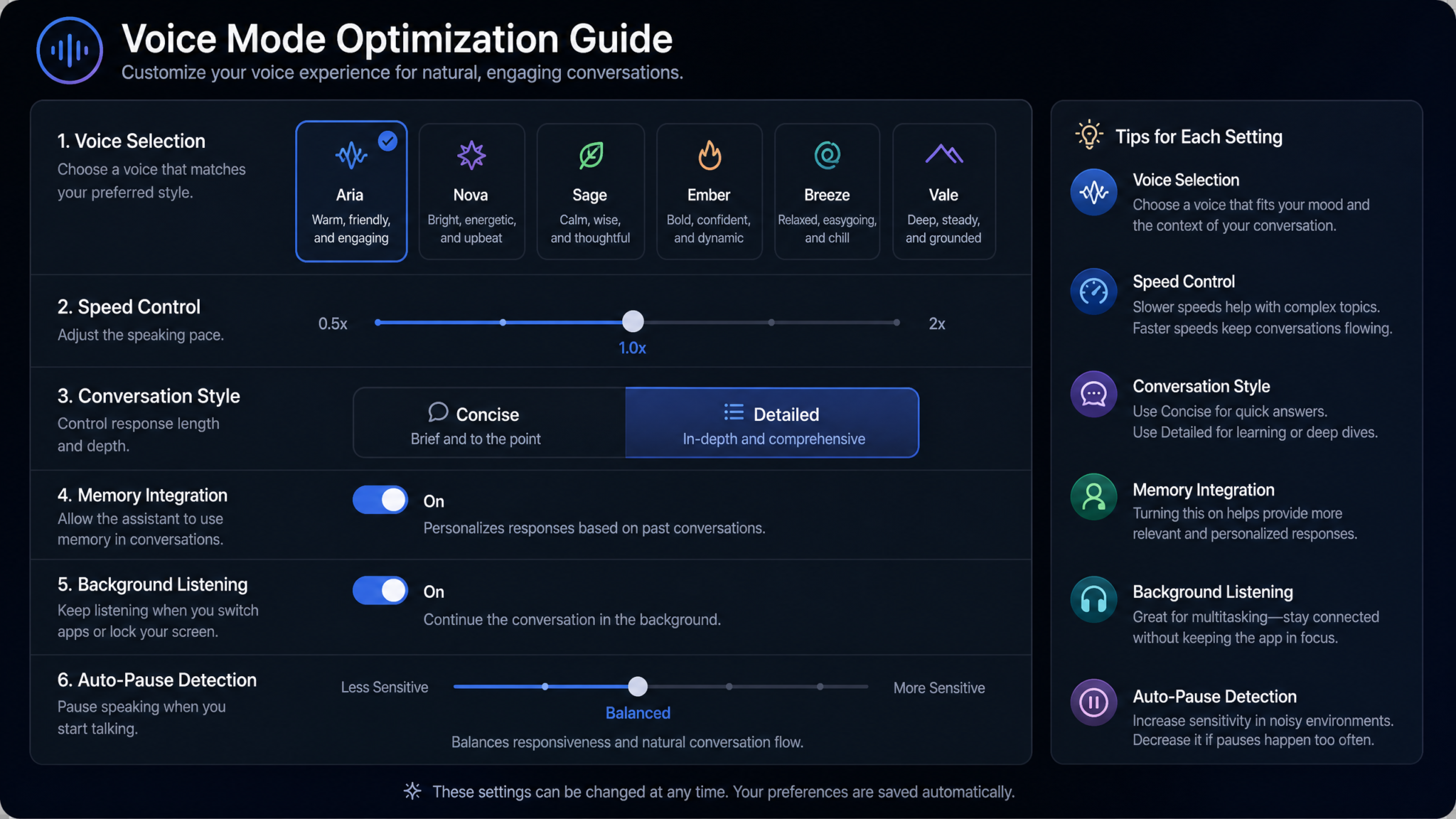
The difference between a frustrating Voice Mode session and a seamless one often comes down to a handful of settings and environmental choices that most users never deliberately configure. Here are the specific optimizations that make the most meaningful difference:
Choose the Right Voice for Each Context
ChatGPT Voice Mode offers several distinct voice options (Alloy, Echo, Fable, Onyx, Nova, Shimmer). For professional contexts like meeting prep and email triage, voices with a crisper, more neutral tone (Alloy, Onyx) reduce cognitive load. For meditation and bedtime relaxation prompts, softer voices (Nova, Shimmer) create better tonal alignment with the task. For workout coaching, higher-energy voices feel more motivating. It takes five minutes to test all options — that investment pays off in every subsequent session.
Response Length Calibration
In your opening instruction, always specify approximate response length for spoken output. “Keep each section to about sixty to ninety seconds of speech” is more useful than vague instructions like “be concise.” For reference: 150 words of ChatGPT output equals approximately sixty seconds of spoken audio. Use that ratio to calculate your ideal response length for each context — recipe steps need to be shorter than podcast segments.
Interruption Handling
Voice Mode is designed to handle interruptions gracefully, but in loud environments (car engine noise, kitchen sounds, outdoor wind), it can misinterpret ambient sound as speech. In noisy conditions, add “wait for me to say ‘okay’ or ‘go ahead’ before starting a new section” to prevent false triggering. In quiet home environments, natural interruption works smoothly without additional instruction.
Background Noise Management
| Environment | Recommended Setup | Noise Mitigation Tip |
|---|---|---|
| Car Commute | Bluetooth connection to car speakers or earbuds | Use voice command to start/stop, minimize hands-on phone interaction |
| Kitchen | Phone on counter, or one earbud | Pause cooking sounds before speaking; turn off extractor fan |
| Gym / Workout | Wireless earbuds with active noise cancellation | Sony WH-1000XM5 or AirPods Pro recommended for gym ambient noise |
| Outdoor Walk | Single earbud for ambient awareness and safety | Face away from wind direction when speaking; use bone conduction headphones in high-traffic areas |
| Evening Home | Phone on bedside table or earbuds | Quiet environment improves speech recognition significantly; soft voices work better on speakers than earbuds for relaxation |
Session Continuity and Memory
ChatGPT’s memory feature (when enabled in settings) allows context from previous Voice Mode sessions to carry forward. Enable this and explicitly ask ChatGPT to “remember” key facts about your preferences, goals, and recurring contexts — your fitness level, your language learning progress, your meal planning constraints. Over time, this eliminates the setup preamble in repeat-use prompts, making sessions start faster and feel more personalized from the first word.
The “Tone Calibration” Opening
For any Voice Mode session longer than five minutes, spend thirty seconds calibrating tone before launching into content. Say: “For this session, I want you to be [coaching and direct / calm and guiding / energetic and motivating / thoughtful and probing]. Confirm that you understand the tone before we start.” This dramatically improves session quality because tone is invisible in voice output unless you name it explicitly upfront.
Ending Sessions Cleanly
Always end Voice Mode sessions with a verbal capture request: “Before we finish, give me a three-sentence summary of the key decisions, commitments, or outputs from this session.” This creates a spoken summary you can screenshot, share via the app, or reference later. Without a deliberate close, the value of a thirty-minute brainstorm or planning session can evaporate before you sit down to type anything up.
Battery and Connectivity Practical Notes
Voice Mode is notably more battery-intensive than text chat. For commutes longer than thirty minutes, ensure your phone is charging in the car. For outdoor walks, verify you have a strong LTE or 5G signal on your route — Voice Mode degrades significantly on poor connections and can drop sessions at the worst moments. If you are in an area with unreliable connectivity, use text mode with voice input (dictation) as a backup that tolerates connectivity interruptions better.
Final Thoughts: Building Your Hands-Free Productivity Stack
The twenty prompts in this masterclass are not a checklist to work through mechanically — they are a menu to match against your real daily life. Start with the two or three contexts where you currently feel the most friction or the most wasted time. For most people, that means the commute and the evening wind-down are the easiest wins: low environmental complexity, predictable scheduling, and immediate measurable impact on how you start and end your working day.
Once those two workflows feel natural, add a third in a physically active context — the kitchen, a daily walk, or a workout session. The combination of physical movement and conversational AI engagement creates a surprisingly powerful cognitive state: you are physically occupied enough that the critical inner editor quiets down, but verbally and mentally engaged enough that genuine insight and output emerge. Many users find they solve their most persistent creative and strategic problems during walks and runs, not at their desks.
The deeper shift that Voice Mode enables is a recategorization of your day. Time you previously wrote off as cognitively unavailable turns out to be some of your most available time — because you are not staring at a screen, distracted by notifications, or caught in the reactive churn of your inbox. The commute, the kitchen, the walk: these have always been yours. Voice Mode simply gives you something genuinely intelligent to do with them.
Build the habit by anchoring Voice Mode to an existing routine — always start your morning briefing when you put the car in reverse, always launch the recipe guidance prompt when you take out a cutting board. The prompt is the trigger, the context is the habit loop, and the accumulated output across weeks and months is a compounding advantage that is difficult to overstate. Over a year of 90-minute daily Voice Mode workflows, you will have generated more focused strategic thinking, more language practice, more creative output, and more deliberate reflection than most people accumulate in a decade of commutes and cooking sessions.
That is what ambient AI assistance actually means at its best: not a tool you open when you need it, but a layer of intelligence that makes your whole day a little more intentional, one hands-free conversation at a time.
